Effective email communication is crucial for both personal and business success. Gmail has established itself as a leading email service, offering a plethora of features designed to enhance user experience. However, like any product, it has its strengths and weaknesses. In this comprehensive Gmail review, I will explore its pros and cons, highlight key features, and suggest a few alternatives such as Lark that might better suit different needs. By delving into the nuances of Gmail, you can determine if it truly meets your requirements.
Understanding Gmail: A comprehensive Gmail review
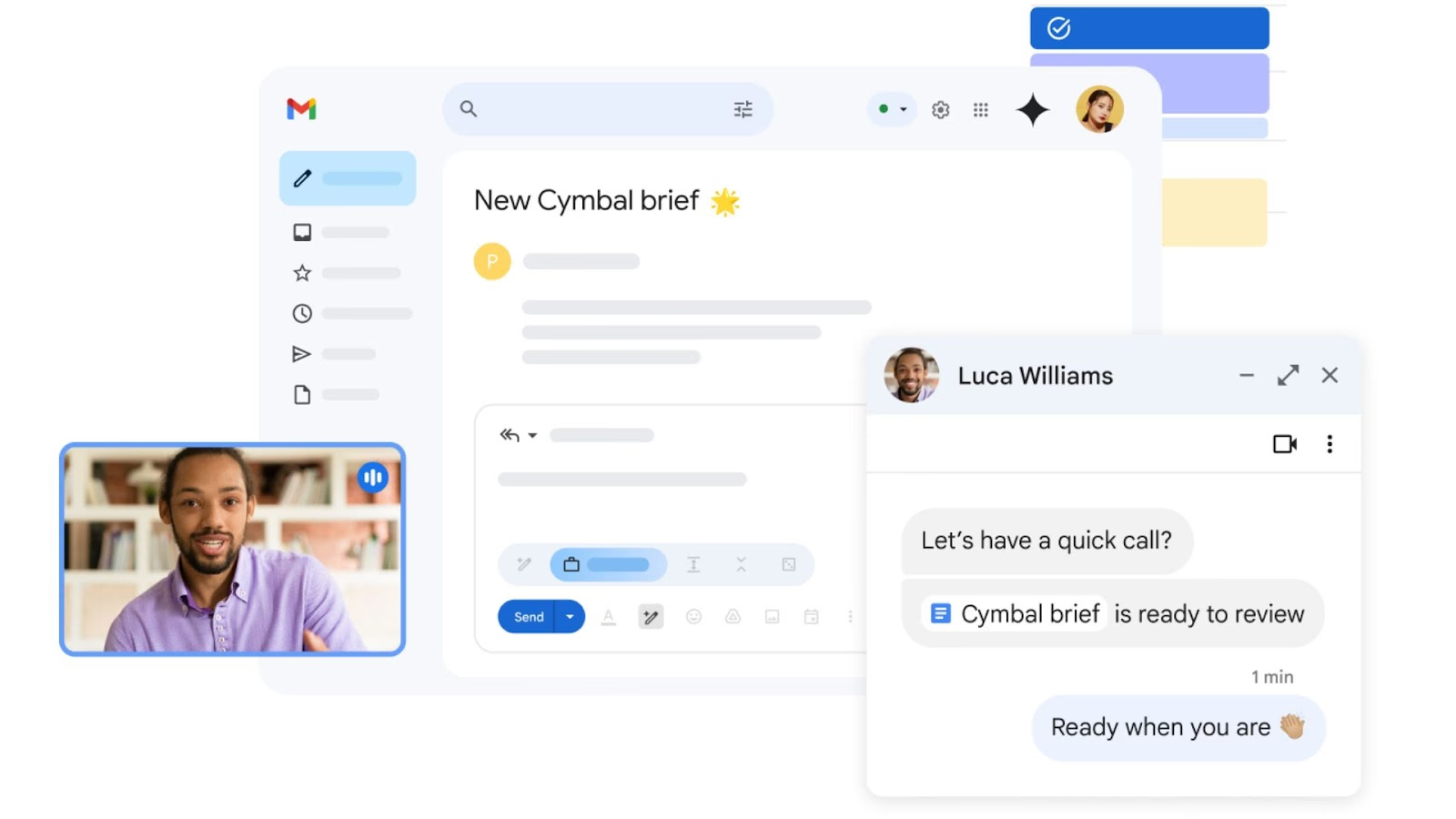
Image source: google.com
, developed by Google, launched in 2004 and has since grown to become one of the most popular email services worldwide. It boasts millions of active users, thanks to its unique features that cater to both personal and professional communication needs. The platform is known for its user-friendly interface, making it easy for first-time users to navigate, powerful search functionality, and seamless integration with other Google services, making it a go-to choice for many individuals.
Overall, Gmail's design is optimized for usability, offering a straightforward onboarding process that welcomes new users into the ecosystem without overwhelming them. However, despite its numerous advantages, it's essential to consider the drawbacks to ensure it aligns with your needs. Keep in mind that Gmail's features and language support may vary by country availability, so users should check regional options for the best experience.
Learn how to create actionable tasks from email content
Key features of Gmail
Gmail stands out as one of the most popular email services and is widely recognized as a leading due to its extensive integration capabilities with other productivity apps. In addition to its core functions, Gmail offers a range of other features that enhance productivity and user experience. Here are some of its key features that contribute to its widespread usage:
Intelligent email organization
One of the hallmark functionalities of Gmail is its intelligent email organization. The platform automatically categorizes emails into several tabs: Primary, Social, Promotions, Updates, and Forums. This sorting helps users manage their inbox effectively by prioritizing essential messages while keeping less important notifications easily accessible but out of the way. By grouping similar types of emails, Gmail allows users to focus on what matters most without the clutter that often accompanies an overflowing inbox.
Collaboration tools
Gmail is not just an email client; it is part of a broader Google ecosystem that fosters collaboration. The integration with Google Docs, Sheets, and Slides allows users to share documents easily and collaborate on them in real time. This means that users can initiate document reviews, make edits, and provide feedback directly within their emails. Additionally, the incorporation of Google Meet enables video calls without leaving the Gmail interface, making it a convenient tool for teams who need to communicate and work together seamlessly. Search functionality
Gmail's search capabilities are second to none, often considered a standout feature compared to other email providers. Users can search their inboxes using specific keywords, email addresses, and various filters such as date ranges or attachment types. This intelligent search function significantly reduces the time spent looking for particular emails or documents, empowering users to retrieve crucial information quickly when needed.
Mobile and desktop usability
Gmail excels in providing a consistent user experience across both mobile and desktop platforms. The official Gmail app brings comprehensive features and integrations to mobile devices, including enhanced security, real-time notifications, multiple account support, and seamless access to like Google Chat, Meet, and Calendar. The Gmail app, available on iOS and Android, maintains key functionalities similar to its web counterpart, allowing users to manage their emails on the go.
Security and privacy
Gmail brings together thoughtful security features that work quietly in the background to keep your email account and personal information safe. Smart spam filters seamlessly identify and filter out unwanted messages, creating a cleaner inbox while reducing exposure to phishing attempts and malware. Two-factor authentication provides a reassuring extra step that makes unauthorized access significantly more challenging.
Simple practices like refreshing passwords periodically, activating two-factor authentication, and approaching unfamiliar emails with healthy caution can strengthen protection even further. Should questions arise or concerns develop regarding your privacy, Gmail's help center and support team stand ready to provide guidance and assistance.
Interface and navigation
The Gmail interface strikes a balance between sophisticated functionality and intuitive simplicity, delivering navigation that feels effortless while remaining comprehensive. Upon logging in, users encounter a streamlined inbox layout that's both polished yet welcoming, with primary navigation positioned strategically in the sidebar. Here, essential folders like "Sent," "Drafts," and "Spam" await alongside custom labels.
The search function commands attention at the interface's summit, powerful yet accessible, enabling lightning-fast discovery of addresses, keywords, and attachments while maintaining remarkable precision. Smart reply and smart compose features offer efficiency that's intelligent yet unobtrusive, providing quick responses and suggested text that enhances workflow while preserving .
Common use cases for Gmail
Gmail's versatility serves a wide range of user scenarios, making it suitable for various individuals and organizations. Gmail is often recommended for personal use due to its free service and robust features. Gmail helps users stay organized and efficient by integrating with various third-party apps, making it a central hub for managing different aspects of work and personal life.
Personal and educational use
Gmail is an excellent choice for personal users and students alike due to its comprehensive set of features that simplify communication and collaboration. Free accounts include essential features such as "Smart Reply," "Smart Compose," and spam filtering, making them suitable for both casual and some professional use. For personal users, the user-friendly interface and powerful organizational tools help manage day-to-day emails efficiently. Users can also set reminders for important events or tasks directly from Gmail or related Google apps, and create and manage a task list to organize emails and related activities. In educational settings, Gmail's advantages extend further. Many schools and universities adopt Gmail as part of Google's suite of productivity tools, which includes Google Classroom and Google Drive.
Small business communications
Small businesses frequently rely on Gmail to handle their communication needs due to its reliability and extensive feature set. Through Google Workspace, businesses can use a custom domain to create professional email addresses, enhancing credibility and branding for . Gmail also integrates seamlessly with the entire Google Workspace ecosystem, making it a strong choice for businesses. Users can access essential business features like customizable signatures, email scheduling, and shared calendars that streamline operations and enhance productivity.
However, small business owners may find limitations in Gmail's advanced functionality compared to more specialized email solutions designed expressly for enterprise environments. Features such as and deeper analytics may require additional third-party applications, which can complicate the user experience.
Enterprise business use
For enterprises, Gmail stands out as a leading email software, offering a robust email platform integrated into the wider Google Workspace ecosystem. As a critical component of the business tech environment, Gmail facilitates seamless collaboration across departments, allowing for efficient sharing of large files via Google Drive, quick scheduling through Google Calendar, and through Google Meet—all accessible within the Gmail interface. Compared to other email software, Gmail's strength lies in its web and cross-platform access, making it accessible from virtually any device.
However, enterprises may also encounter limitations with Gmail. For users accustomed to more traditional email clients, Gmail's unique organizational structure and automatic sorting could pose challenges, potentially leading to missed communications. Additionally, some businesses may prefer enhanced IT controls and customizations that Gmail's offerings do not support fully. As such, while Gmail presents a suitable option for many enterprises, it's essential for larger organizations to and explore additional tools to complement their email solutions.
Common Gmail integrations
Gmail's functionality can be greatly enhanced through various integrations, allowing users to create a more efficient and . Here are some common integrations that can elevate your Gmail experience:
- Slack & Gmail integration: Integrating Slack with Gmail enables notifications for new emails within the Slack interface, allowing users to manage email communications and chat without switching platforms.
- Lark & Gmail integration: Lark & Gmail integration allows users to connect their Gmail account with Lark for enhanced workflow automation and email management. Workflows can be set up in Lark Base to trigger actions when a Gmail email is received or to send emails via Gmail automatically.
- Zoom & Gmail integration: The Zoom integration allows users to schedule video calls directly from their Gmail account, simplifying the process of connecting with colleagues or clients through video meetings.
- Asana & Gmail integration: By integrating Asana with Gmail, users can convert emails into tasks, assign them to team members, and set deadlines right from their inbox, enhancing project management workflows.
- Dropbox & Gmail integration: The Dropbox-Gmail integration allows users to easily attach large files from their Dropbox account directly into Gmail messages without having to download and re-upload files.
- Zapier & Gmail integration: With Zapier, users can automate many workflows by connecting Gmail to other applications. This creates more automated tasks between their email and multiple work applications.
These integrations exemplify how Gmail can work hand-in-hand with other tools to create a more cohesive and productive digital workspace.
Embrace a unified tool with no need for integration
Gmail pricing & value
Gmail offers a free personal version with up to 15 GB of storage, which is more than the 5 GB offered by Zoho Mail and is shared across Google services like Gmail, Google Drive, and the Google Photos app. If users need more storage or additional storage beyond the free limit, they can purchase more space through paid plans.
For businesses, Gmail is part of Google Workspace, which offers tiered paid plans with increasing storage capacity and features.
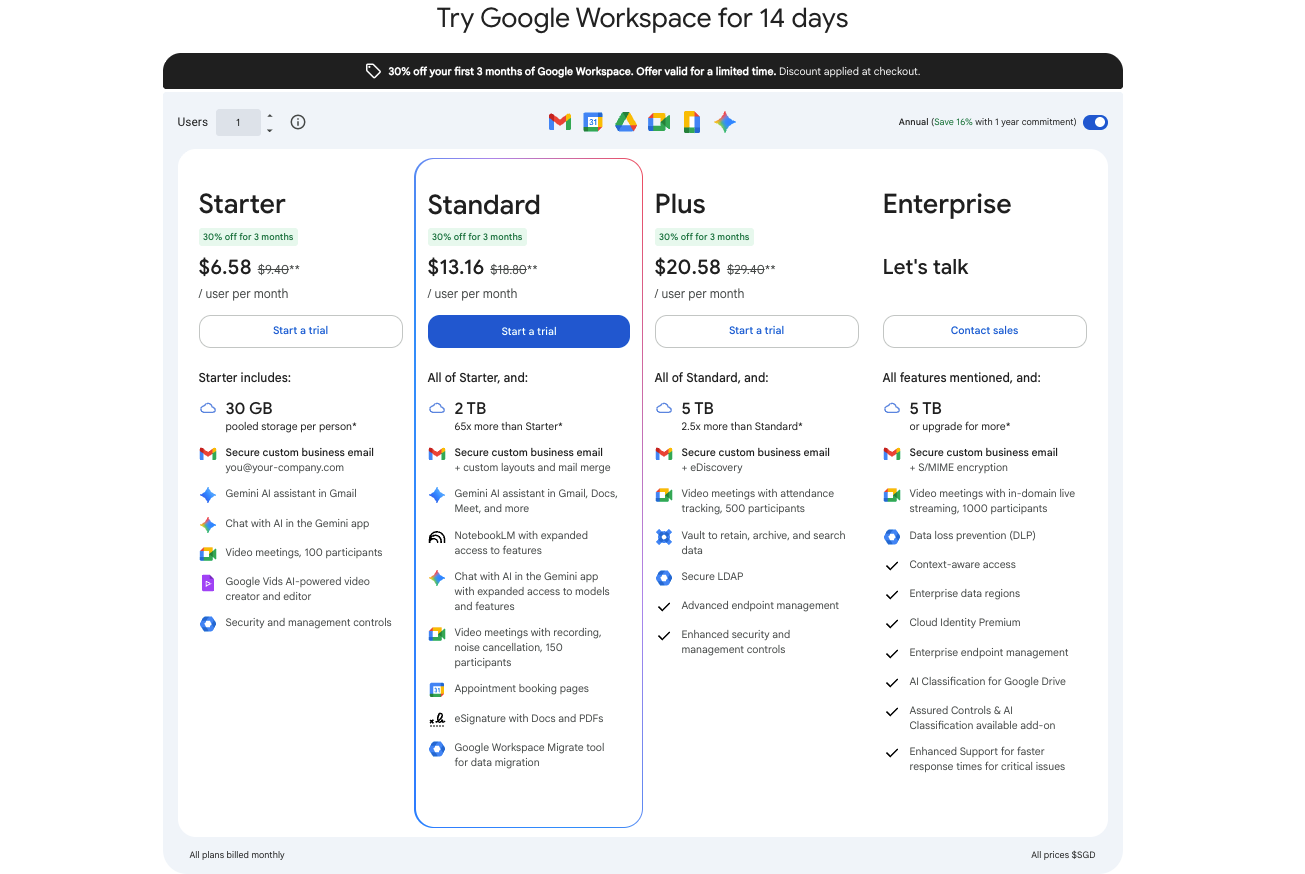
Google Workspace pricing: (for now, 30% off for 3 months for Starter, Standard, and Plus plan)Google Workspace pricing: (for now, 30% off for 3 months for Starter, Standard, and Plus plan)
- Starter: $9.40/user/month, 30GB storage
- Standard: $18.80/user/month, 2TB storage
- Plus: $29.40/user/month, 5TB storage
- Enterprise: Contact sales, 5TB storage
Information & image source: google.com
Update time: 2025-12-19
Note: Pricing and plan details reflect publicly available data as of the update date and may vary based on region, billing cycle, and number of agents.
To know more about Google Workspace pricing, read this article:
Overall, the value of Gmail lies in its combination of robust features, ease of use, and integration with other Google services, making it a strong contender for anyone seeking a reliable email solution. The adaptability of its pricing plans, including Google One and Google Workspace paid plans, allows users to choose options that best fit their needs without compromising on essential functionalities.
Pros of using Gmail
Gmail offers several compelling advantages that make it a preferred choice for diverse user groups. Here are some notable pros:
- User-friendly interface: Gmail's layout is intuitive, allowing users to easily navigate through features and settings. The clean design minimizes distractions, letting users focus on their communications. Gmail's user interface is praised for its intuitiveness and ease of navigation, even for first-time users, making user friendliness a standout feature.
- Robust features: The platform includes advanced capabilities such as smart compose, which uses AI to suggest email responses and complete sentences, streamlining the writing process. Users appreciate these smart functionalities that save time and enhance productivity.
- Advanced security measures: With security being a top priority for many users, Gmail incorporates strong spam filtering and offers features like two-factor authentication, ensuring that accounts remain secure against unauthorized access.
- Integration with Google ecosystem: Gmail seamlessly integrates with other Google services, including Google Drive and Google Calendar. This integration facilitates easy file sharing and scheduling, making it a powerful tool for both personal and professional use. Gmail offers exceptional integration for users of Google Docs or Sheets and is known for its near-legendary uptime.
These advantages have contributed to Gmail's reputation as a robust and efficient email service, appealing to a broad audience from casual users to businesses looking for reliable communication solutions.
Cons of using Gmail
Despite its strengths, Gmail is not without its flaws. Users should be aware of these potential downsides:
- Privacy concerns: One of the most frequently voiced criticisms of Gmail centers around privacy. As a free service, users often feel uneasy about how their data is handled, particularly regarding targeted advertisements and potential data mining practices.
- Automated inbox management: The automatic categorization of emails can result in important messages being missed or overlooked. While this feature aims to enhance organization, it may also inadvertently hide crucial communications, impacting workflow.
- Limited offline functionality: Users who frequently work without internet access may find Gmail's offline capabilities lacking. While you can view and draft emails offline, certain functionalities require a stable connection that may not always be available.
These disadvantages illustrate that while Gmail is an exceptional service, it may not be the right fit for everyone. Users must weigh these cons against the benefits when deciding if Gmail meets their specific email needs.
Protect inbox with advanced spam protection features
Best Gmail alternatives that you can have a try
1. Lark: An all-in-one collaboration suite with built-in communication tools
, a standout choice among modern , is a comprehensive workplace collaboration suite that integrates communication, document editing, , and video conferencing all in one platform. Designed for teams looking for seamless collaboration, Lark combines chat, calendar, and file storage functionalities to enhance productivity. The platform is particularly appealing for businesses that rely on real-time collaboration and require a host of built-in tools to streamline workflows.
Key features:
Powerful email functions
One significant aspect of is its ability to integrate with Gmail, allowing users to sync their Gmail accounts directly with Lark Mail. This integration streamlines workflow by consolidating email communications in one platform, and Lark Mail also supports integration with various other email services. With Lark Search, users can easily find an email, streamlining . 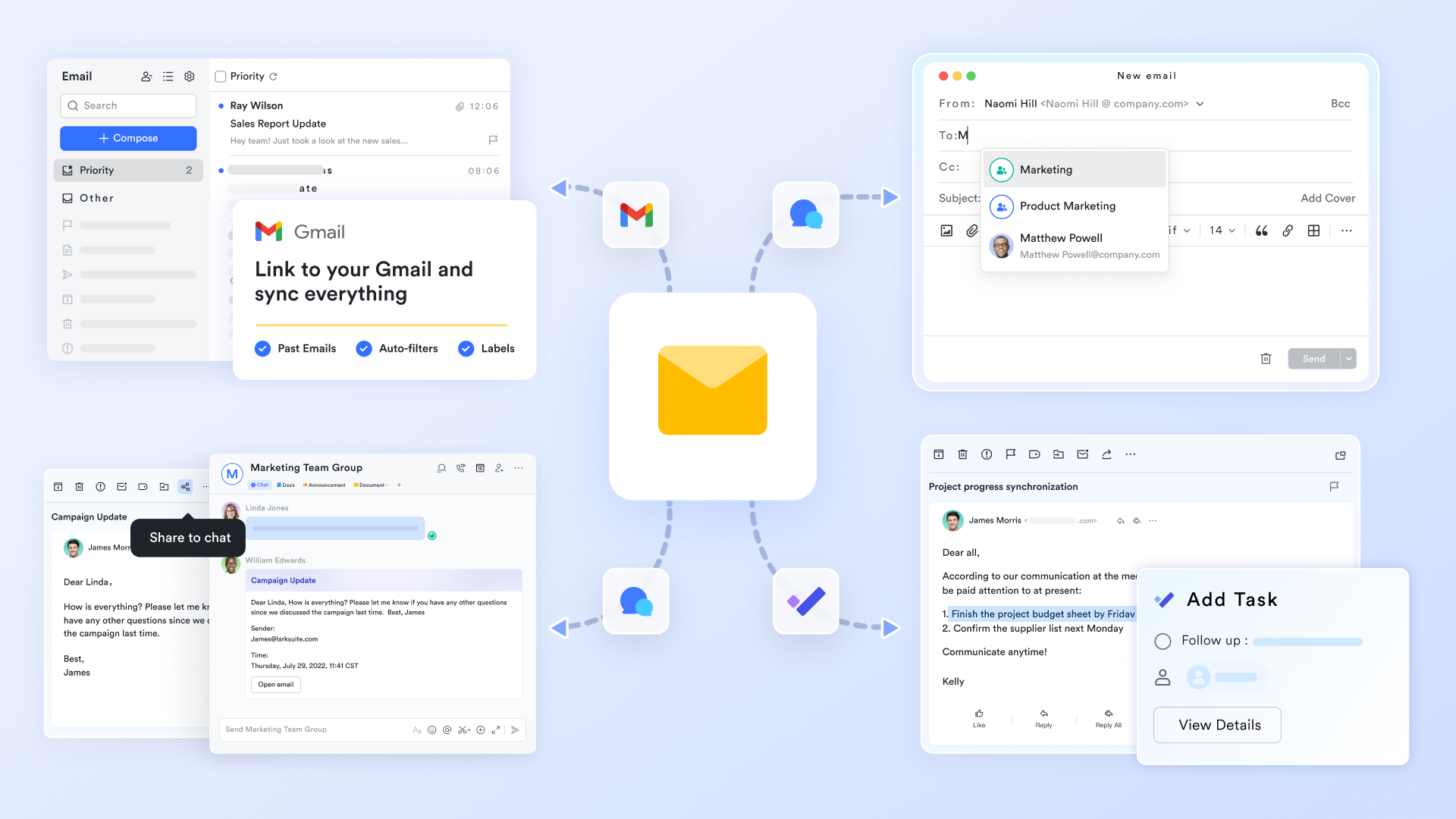
Emailing aligning with other functions
Lark Mail also allows users to send emails directly to a personal or group chat via , promoting quicker and more efficient team discussions, facilitating immediate collaboration on important messages. Furthermore, tasks in Lark Tasks can be created directly from email content within Lark Mail, making it easy to convert emails into actionable items without leaving the platform. These features combine to make Lark Mail a versatile tool for teams seeking to enhance productivity and communication. 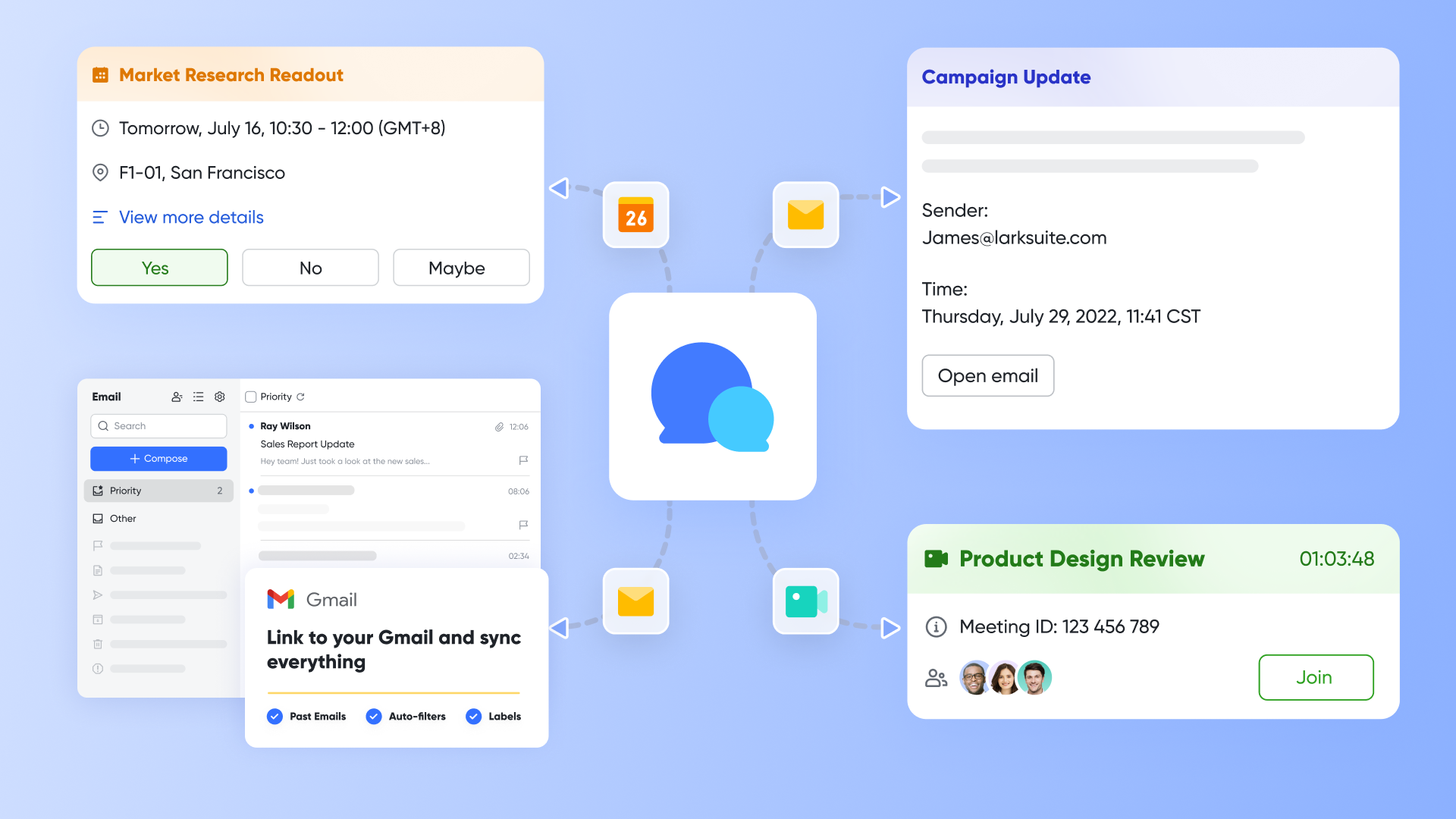
Collaborative and unified ecosystem for work
Like Google Workspace, Lark Mail is part of the Lark ecosystem, which means it works harmoniously with Lark's other functionalities, minimizing the need for tool switching.
Cloud storage, app mobility & data security
With , emails are accessible across multiple devices, ensuring users can transition effortlessly without the risk of data loss. Furthermore, Lark Mail includes robust spam protection and security features to safeguard users from unwanted emails and threats, enhancing overall safety. Enterprises' admin workers can also turn on the two-factor authentification log-in setting, ensuring account security. 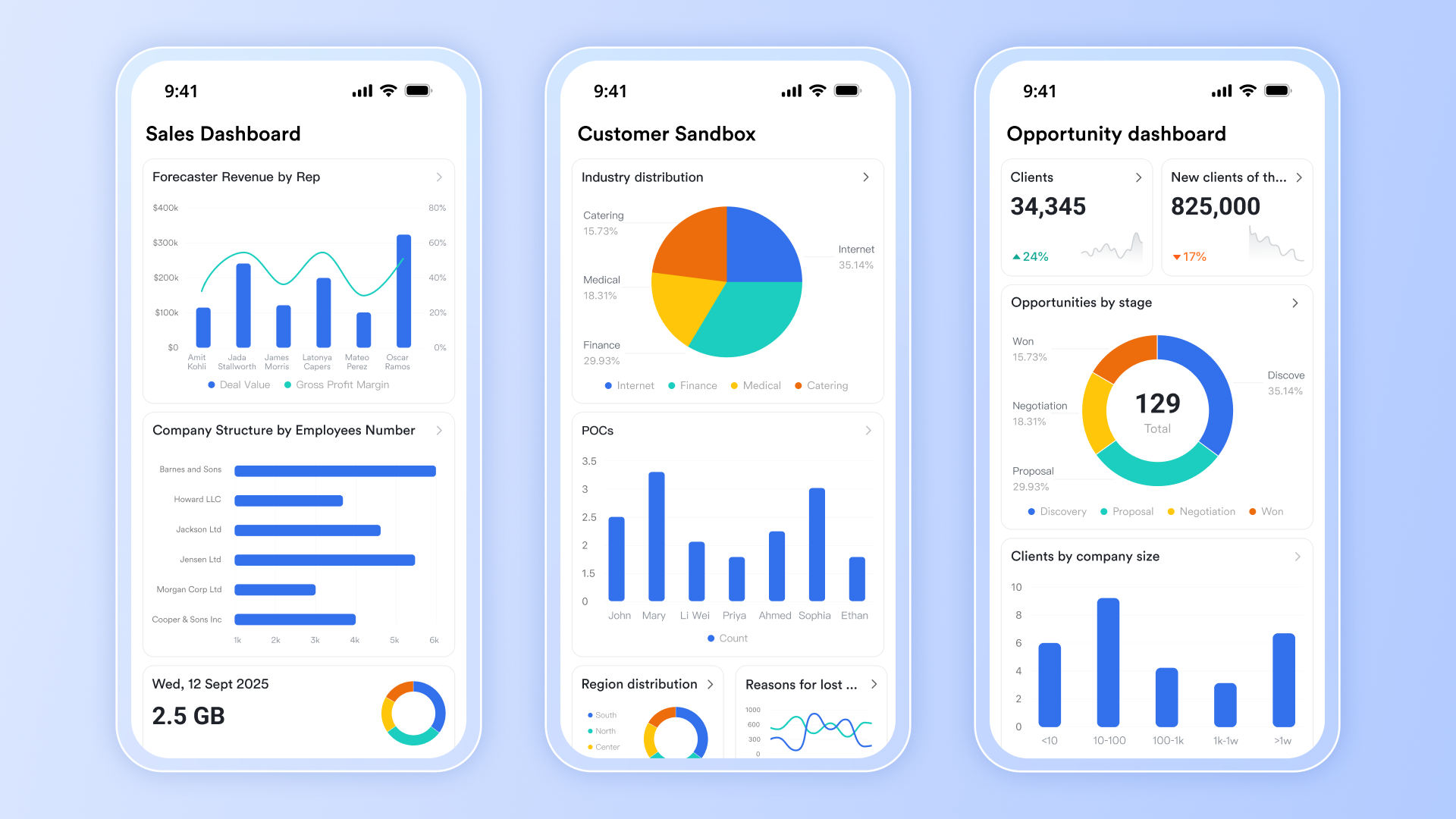
Why Lark can replace Gmail: Lark offers a more unified workspace, making it an excellent option for teams that need collaboration tools alongside their email. Its multifunctionality surpasses Gmail's traditional email setup by combining emails with .
Limitations: Lark's many advanced features may need time and systematic courses for onboarding. However, Lark's Help Center and onboarding videos on Youtube are helpful.
:
- Starter plan: Free forever plan that includes 11 powerful tools for up to 20 users. It also comes with 100GB of storage, 1,000 automation runs, AI translations, and more.
- Basic plan: $6/user/month (billed annually) for up to 500 users, including everything in Starter plus 1-on-1 video meetings, 5TB of storage, 1,000 automation runs, and more. To know more about Basic plan, .
- Pro plan: $12/user/month (billed annually) for up to 500 users. It includes everything in Basic plus a group calling for up to 500 attendees, 15TB of storage, 50,000 automation runs, and more. Companies looking to optimize software spending frequently compare their options against and .
- Enterprise plan: for custom pricing. Supports unlimited users and includes even more automation runs and advanced security, compliance, and management features.
For small teams with simple communication needs

18 months message history
1000 Base automation runs/month
2000 rows per table in Base
Most POPULAR
For companies with comprehensive collaboration and management needs
Unlimited message history
500-participant video meetings
50k Base automation runs/month
20k rows per table in Base
For large companies with advanced security and organizational management needs
Get a personalized demo and pricing
Unlimited message history
500-participant video meetings
15 TB storage + 30 GB storage/user
500k Base automation runs/month
50k Base automation runs/month
Most POPULAR
For companies with comprehensive collaboration and management needs
Unlimited message history
500-participant video meetings
50k Base automation runs/month
20k rows per table in Base
2. Outlook: A comprehensive email and calendar management platform for professionals
Outlook is a well-established email client by Microsoft, known for its robust email management and productivity features. It combines email, calendar, task management, and contact management into a singular platform, making it a favorite among business users. Outlook allows users to create and organize multiple email accounts, making it a powerful tool for professionals who require comprehensive management of communications.
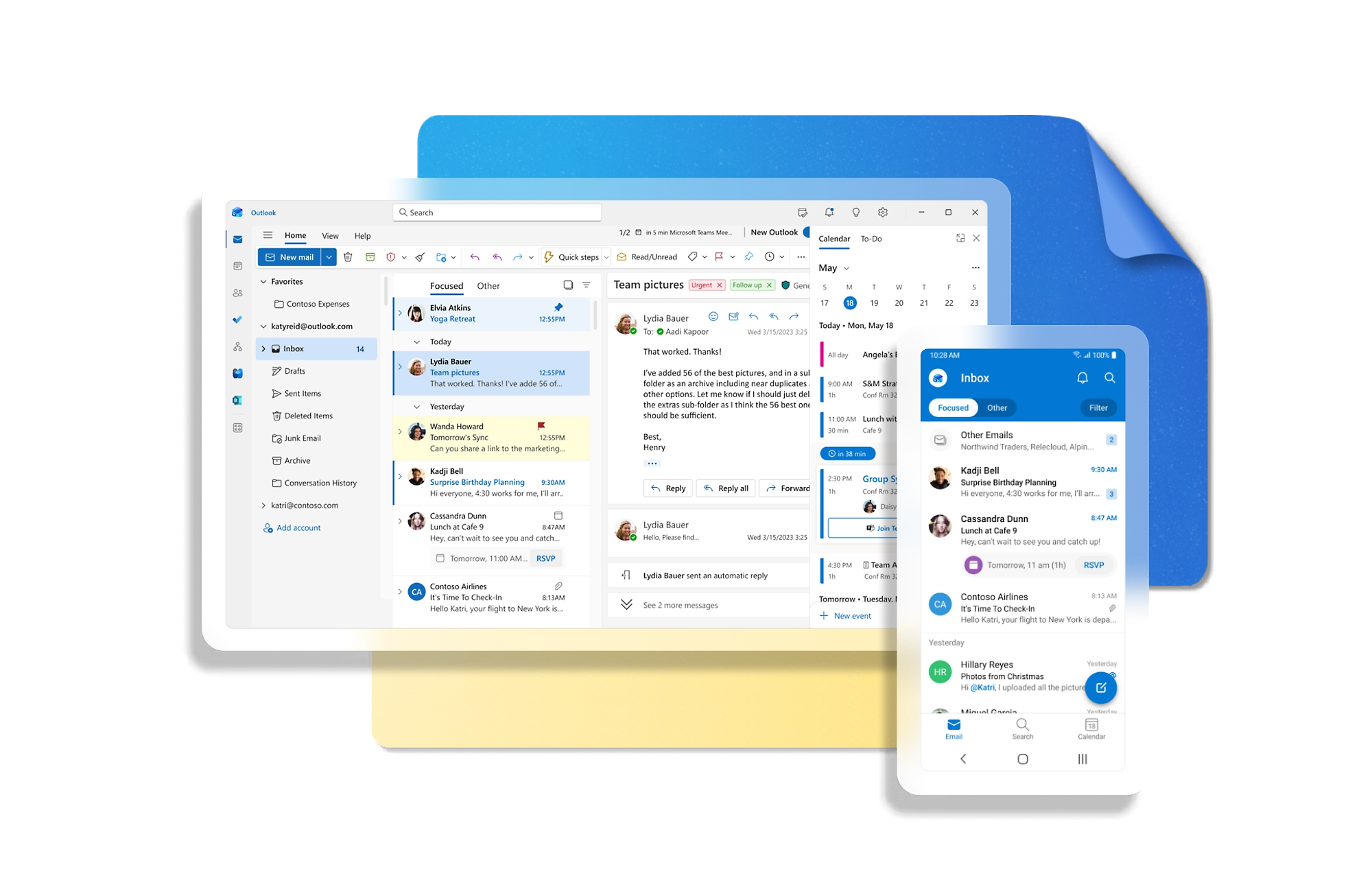
Image source: microsoft.com
Key features:
- Comprehensive calendar integration for scheduling and event management.
- Focused Inbox feature to prioritize essential emails.
- Calendar sharing and file attachment capabilities.
- Integrated task management to track deadlines and responsibilities.
Limitations:
- Daily sending limits can restrict large-scale email marketing or communication efforts, with maximum recipient caps that may hinder user flexibility.
- The complexity of features and settings can overwhelm new users, making onboarding and navigability a challenge for some.
Why Outlook can replace Gmail: For those embedded in the Microsoft ecosystem or who require extensive planning and scheduling features alongside email, Outlook serves as a powerful alternative that offers more than just email functionality.
Pricing: Outlook is available through Microsoft 365 subscriptions, which include various service tiers depending on the features required.
- Microsoft 365 Business Basic: $6.00/user/month, paid yearly
- Microsoft 365 Business Standard: $12.50/user/month, paid yearly
- Microsoft 365 Business Premium: $22.00/user/month, paid yearly
3. Thunderbird: A customizable open-source email client ideal for personal preferences
Mozilla's Thunderbird is a free, open-source email client. Known for its customization options and flexibility, it caters to users who prefer a more personalized approach to email management. Thunderbird provides a robust suite of tools ideal for email organization, security, and productivity, making it a practical choice for users with specific email management needs.
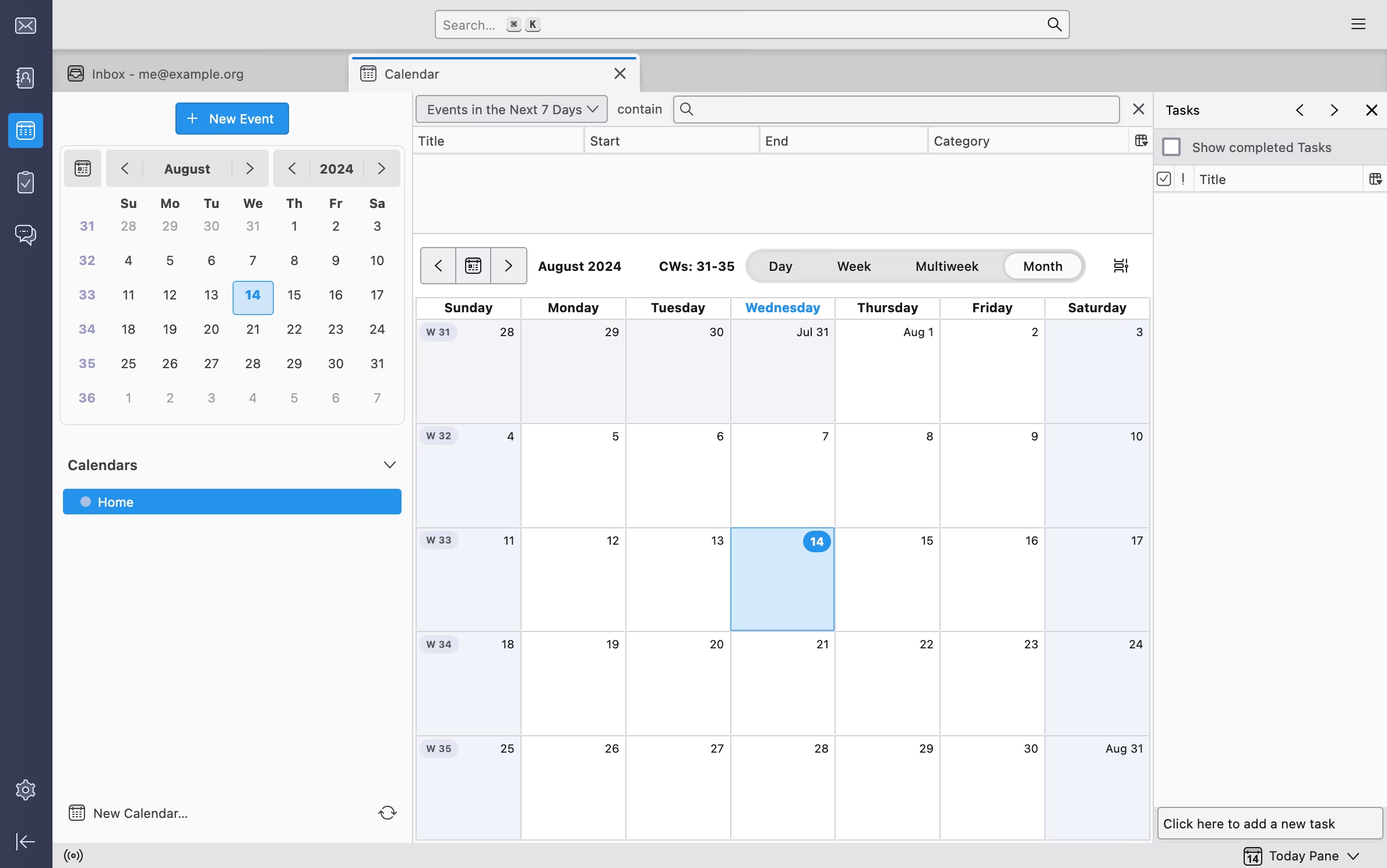
Image source: thunderbird.net
Key features:
- Highly customizable interface with numerous add-ons.
- Advanced filtering and organization capabilities for inbox management.
- Strong security features, including support for encryption.
- Ability to manage multiple email accounts from one interface.
Limitations:
- Limited customer support, relying heavily on community forums, which may lead to slower resolution of issues for users seeking immediate help.
- The maximum size for a single email message is capped at 4GB, which could be insufficient for users needing to send large files or extensive attachments.
Why Thunderbird can replace Gmail: Thunderbird's focus on user customization allows users to tailor their email experience to fit their needs, making it an ideal alternative for those looking for more control over their email management process.
Pricing:
- Thunderbird is free forever. Users can donate to make it better.
- Thunderbird Pro Early Bird Plan: $9/month,paid annually
4. Superhuman: A productivity-focused email client designed for speed and efficiency
Superhuman is a premium email client designed for professionals seeking to enhance their productivity. Known for its sleek interface and speed, Superhuman emphasizes efficiency with features that allow users to manage their emails quickly and effectively. This app is particularly well-suited for those who spend significant time handling emails and want to optimize their workflow.
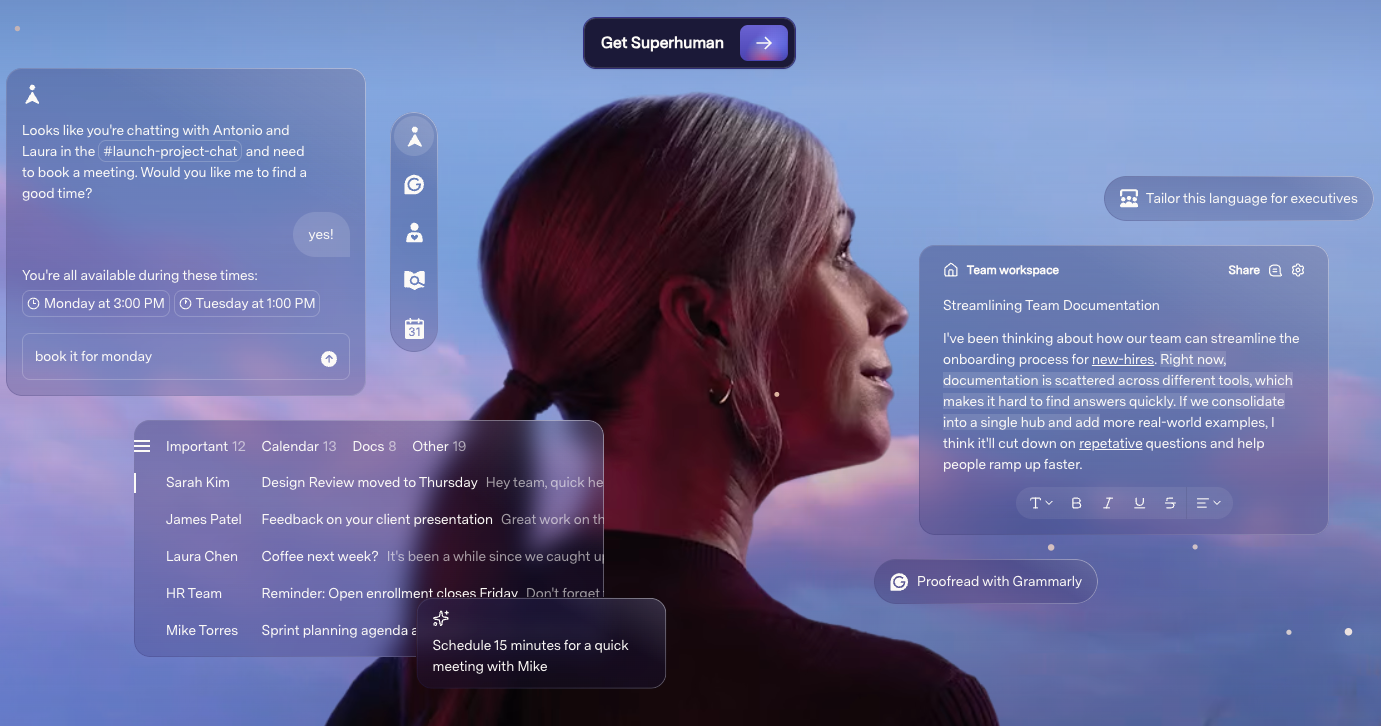
Image source: superhuman.com
Key features:
- Rapid email processing is designed for speed and efficiency.
- Advanced keyboard shortcuts and a command palette for quick navigation.
- AI-driven features for smart triaging of emails.
- Undo send and snooze options for better email management.
Limitations:
- Premium pricing may deter casual users or those on tighter budgets, as the service is positioned primarily for professionals who can afford the cost.
- Lack of traditional email organization features, such as folders, may challenge users accustomed to different organizational systems.
Why Superhuman can replace Gmail: As a more focused email client, Superhuman offers a streamlined experience, reducing email overload and increasing productivity for professionals who prioritize speed and performance over traditional email features.
Pricing (billed annually):
- Business: $33/user/month
- Enterprise: Custom pricing
5. AOL Mail: A straightforward email service with unlimited storage and a user-friendly interface
AOL Mail is a long-standing free email service that has evolved over the years to meet modern user needs. It provides unlimited storage space and integrates basic email functionalities with additional news and weather features. While often viewed as a more traditional email provider, AOL Mail remains user-friendly and straightforward for casual users.
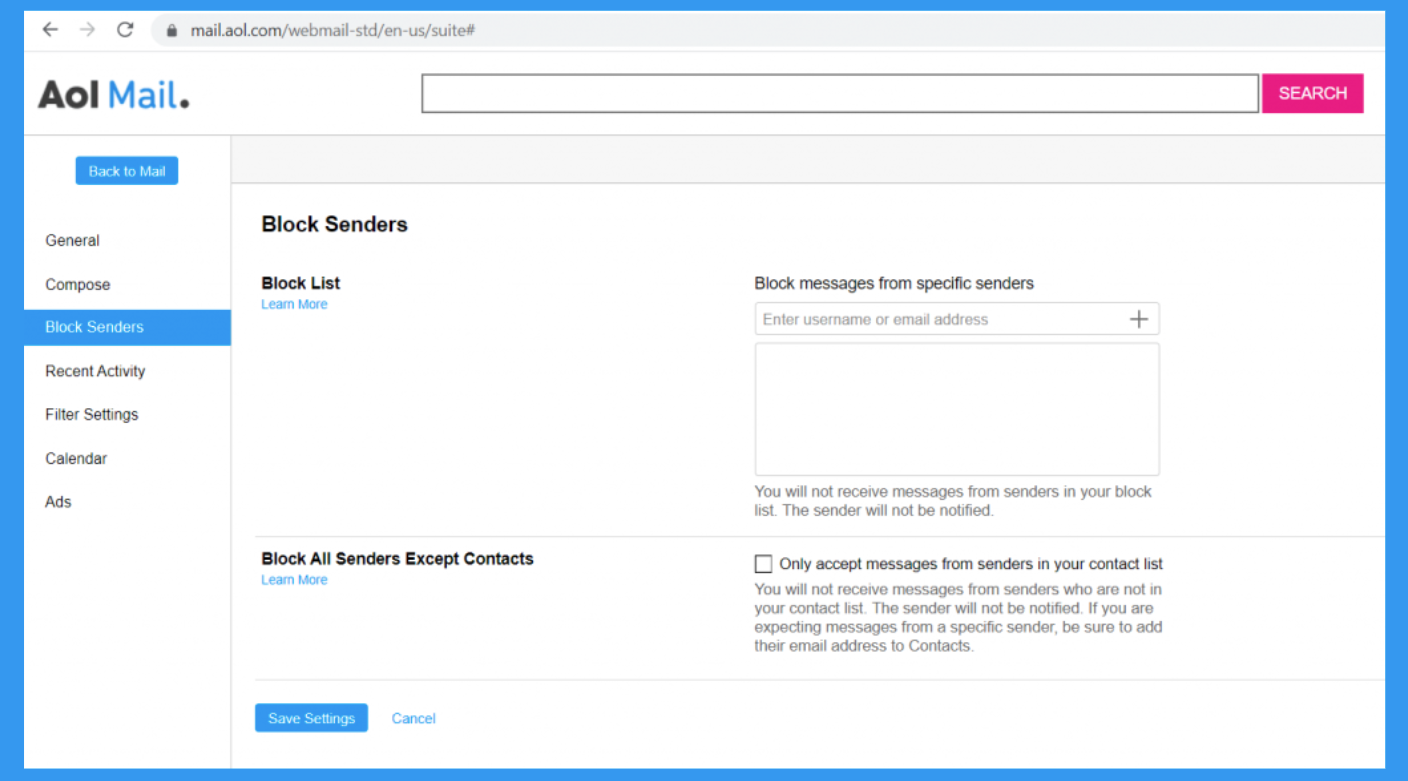
Image source: aol.com
Key features:
- Unlimited email storage for users without the worry of inbox size limits.
- Simple, intuitive interface that is easy to navigate.
- Strong spam protection and security settings.
- Integrated access to news and weather information.
Limitations:
- Limited advanced features and integrations compared to other modern email services, which may not satisfy tech-savvy users.
- The interface can feel outdated to some users, which might diminish overall usability for those accustomed to more contemporary designs.
Why AOL Mail can replace Gmail: For users seeking a straightforward email service without the complexity of advanced features, AOL Mail offers a reliable solution that allows for easy communication without distractions.
Pricing: AOL Mail is free, although premium plans are available for users who want to remove advertisements or access additional features.
Enjoy seamless working experience with unified workspace
Conclusion
While Gmail remains a popular email service known for its user-friendly features and seamless integration with Google's ecosystem, it is not without its drawbacks, such as privacy concerns and occasional complexity. Many users are exploring alternatives that address these issues, offering enhanced security and more straightforward interfaces. Services like Lark stand out as comprehensive collaboration tools that integrate email with project management, document sharing, and real-time communication. This makes Lark not only a viable replacement for traditional email services like Gmail but also a platform that fosters greater collaboration and productivity. As users weigh their options, it's essential to consider individual needs and preferences, ensuring the chosen email service aligns with their personal or professional requirements.
FAQs
Is Gmail email any good?
Gmail is often praised for its user-friendly interface and robust features, making it a reliable choice for personal and professional use. Users enjoy its strong anti-spam filters, effective search functionality, and seamless integration with other Google services like Drive and Calendar. Additionally, its generous 15GB of free storage is a significant advantage. However, some users have expressed concerns about privacy, particularly regarding data collection for advertising purposes, which may influence their decision to use Gmail.
Why are people ditching Gmail?
Many users are moving away from Gmail due to privacy concerns, as they feel uncomfortable with how Google handles their data. The perceived clutter of the interface and overwhelming options can also drive users to seek simpler alternatives. Furthermore, issues such as spam filtering inaccuracies and account security worries have led some to prefer other email services that offer more privacy-focused or streamlined experiences.
What is the warning about Gmail?
Recent warnings about Gmail primarily focus on security vulnerabilities, such as phishing attacks, where users might receive deceptive emails aimed at extracting personal information. Google continually works to enhance security features, but users are urged to remain vigilant. There's also a warning regarding potential account lockouts if unusual activity is detected, highlighting the necessity for strong password practices and two-factor authentication to protect accounts.
What is the most hacked email provider?
Gmail is often cited as one of the most hacked email providers due to its large user base, making it a prime target for cybercriminals. Though Google has robust security measures in place, reports suggest that millions of Gmail accounts have been compromised in various data breaches. This emphasizes the importance of strong, unique passwords and enabling two-factor authentication for protection [ref:8,9,10].
How to write a Google review without a Gmail account?
To leave a Google review without a Gmail account, you can create a Google account using any email address, not just Gmail. Visit the Google account creation page, enter your non-Gmail email, and follow the prompts. Once set up, you can log in and write reviews on Google services and businesses without needing a Gmail address, ensuring wider participation in the review process.
Do you need a Gmail account to leave a Google review?
No, you do not need a Gmail account specifically to leave a Google review. Any Google account created with a non-Gmail email address can be used to submit reviews. This offers users flexibility, allowing them to utilize alternative email services while still participating in the Google review ecosystem.
Related reading






























