Construction companies are under constant pressure to deliver projects efficiently while managing costs, documentation, and communication across dispersed teams. Procore has long been positioned as a comprehensive construction management platform, but many contractors eventually begin exploring Procore alternatives that better match their scale and workflows. Cost concerns, usability challenges, and feature overload are common triggers for this evaluation.
Discussions across Procore alternatives Reddit threads and detailed reviews of Procore alternatives show a consistent pattern. Many teams feel they are paying for features they rarely use while still relying on separate tools for communication or documentation. In this guide, we will fully explore alternatives to Procore that prioritize flexibility, faster onboarding, and clearer collaboration. Come and check the solutions out.
Key takeaways: Best Procore alternatives
1. Lark: Best for collaboration and flexible construction workflows
2. Mastt: Best for owner-side project controls
3. Archdesk: Best Procore alternative for operational management
4. RedTeam: Best for general contractors
5. Knack: Flexible, no-code alternative
See how modern teams manage construction work differently
Quick overview snapshot:
Information source: Official vendor sites
Update time: 2025/12/14
Note: Pricing and plan details reflect publicly available data as of the update date and may vary based on region, billing cycle, and number of agents.
What is Procore
Procore is a construction management platform designed to manage the entire . It supports contractors, owners, and consultants by centralizing project information into a single system. Teams use Procore to manage drawings, RFIs, financials, safety reports, and field updates.
The platform is widely adopted in large commercial projects, especially in the Procore alternatives New York market, where regulatory and compliance requirements are high. However, many contractors find that Procore's depth can introduce complexity, prompting them to explore alternatives for risk management or more focused operational needs.
Drawbacks of Procore: Why Team moved from it
Despite its strengths, Procore may not suit every construction team or project type. Many contractors experience challenges related to cost, usability, and onboarding effort. These concerns are frequently highlighted in Procore alternatives reviews and often drive interest in alternatives to Procore.
- High cost, especially for small and mid-sized contractors. While Procore is purpose-built for enterprise-level construction, its high entry barrier often forces growing firms to look at standard project management systems. Understanding options like can help businesses decide if a general-purpose collaborative platform fits their operational budget better.
- Steep learning curve for new users, particularly field teams. Training is often required before teams feel productive. Onboarding time delays immediate value. This slows adoption during busy .
- A feature-heavy interface that can overwhelm users. Teams may struggle to find commonly used actions quickly. Complexity increases administrative overhead. Some users rely on only a small subset of tools.
- is longer compared to lighter tools. Initial configuration requires planning and internal ownership. Smaller teams may lack resources for this setup. This delays return on investment.
- Many contractors report that they do not use half of the paid features. This feedback appears consistently in Procore alternative reviews. Unused functionality increases perceived cost and frustration. Teams then begin to evaluate constructables on Procore alternatives and other specialized tools.
Explore cost-effective Procore alternatives now
Top 10 Procore alternatives
Construction management doesn't just happen via blueprints; it relies heavily on daily documentation and administrative workflows. Many teams find themselves managing these via scattered consumer apps, eventually prompting a shift toward comprehensive Procore and to unify their back-office operations and field communications. Alternatives vary widely in focus, from owner controls to field execution and collaboration. Comparing these options helps teams identify platforms that deliver practical value rather than unnecessary complexity.
1. Lark: Best for team collaboration and flexible construction workflows
is increasingly being adopted by construction teams seeking simplicity, clarity, and flexibility over rigid construction modules. Many organizations begin using Lark for communication and documentation before expanding into structured . This gradual adoption suits teams that are unsure about committing to a full replacement immediately. Over time, Lark has become a popular alternative to Procore for , project tracking, and .
Dynamic workspaces and project management hub
provides shared workspaces where teams can structure multi-step projects using tables, grouped records, and visual layouts. These spaces allow teams to build organized processes for tracking dependencies, managing responsibilities, and recording updates across departments. Within these workspaces, data can be filtered, grouped, or displayed in Gantt, Kanban, or calendar view that supports clarity during fast-moving projects. This gives teams a functional alternative to Procor, offering an adaptable, easy-to-manage environment for planning and . 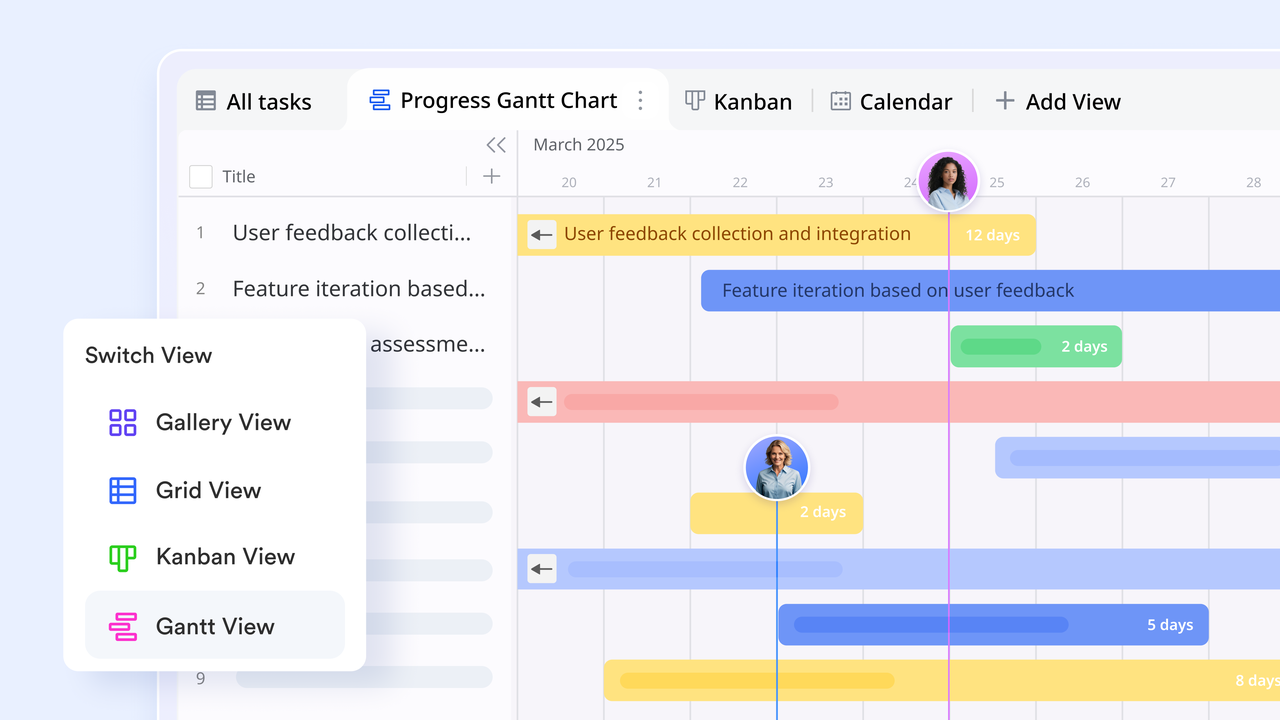
Automated workflow powers up project management
The workflow feature in Lark Base steps helps manage routine updates, notifications, or status changes, ensuring smoother execution without constant manual oversight. Unlike simpler automations, Workflow supports advanced logic-based actions such as If/Else, Switch, and Loop nodes. This allows teams to map out complicated project stages where different actions must be triggered based on various conditions, such as automatically escalating a task if a deadline is missed. If you require a flexible, no-code engine for automating any custom process, Lark is your first choice. 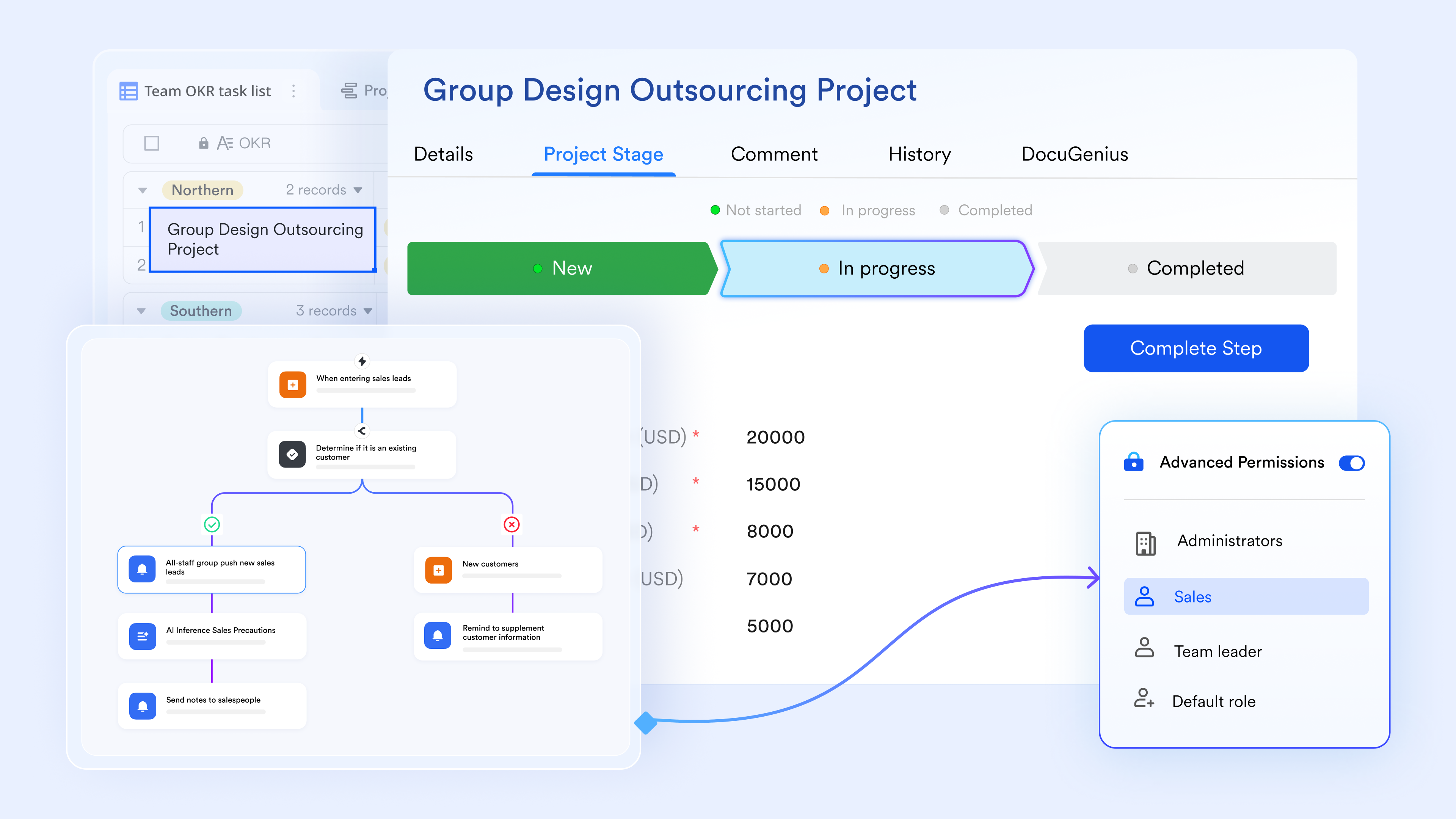
Dashboards for project monitoring and operational visibility
The , offers a powerful, visual solution for real-time and tracking by consolidating complex data into understandable reports. It helps projects by providing visual, data-driven reporting using features like progress charts and countdown blocks to monitor deadlines and milestones, while teams can analyze performance using various chart types (combo, funnel, area) and metric blocks to track KPIs. The dashboard allows users to filter data interactively with slicer blocks, combine data from multiple sources for comprehensive insights, and enable automated distribution, ensuring all relevant stakeholders receive up-to-date project reports. 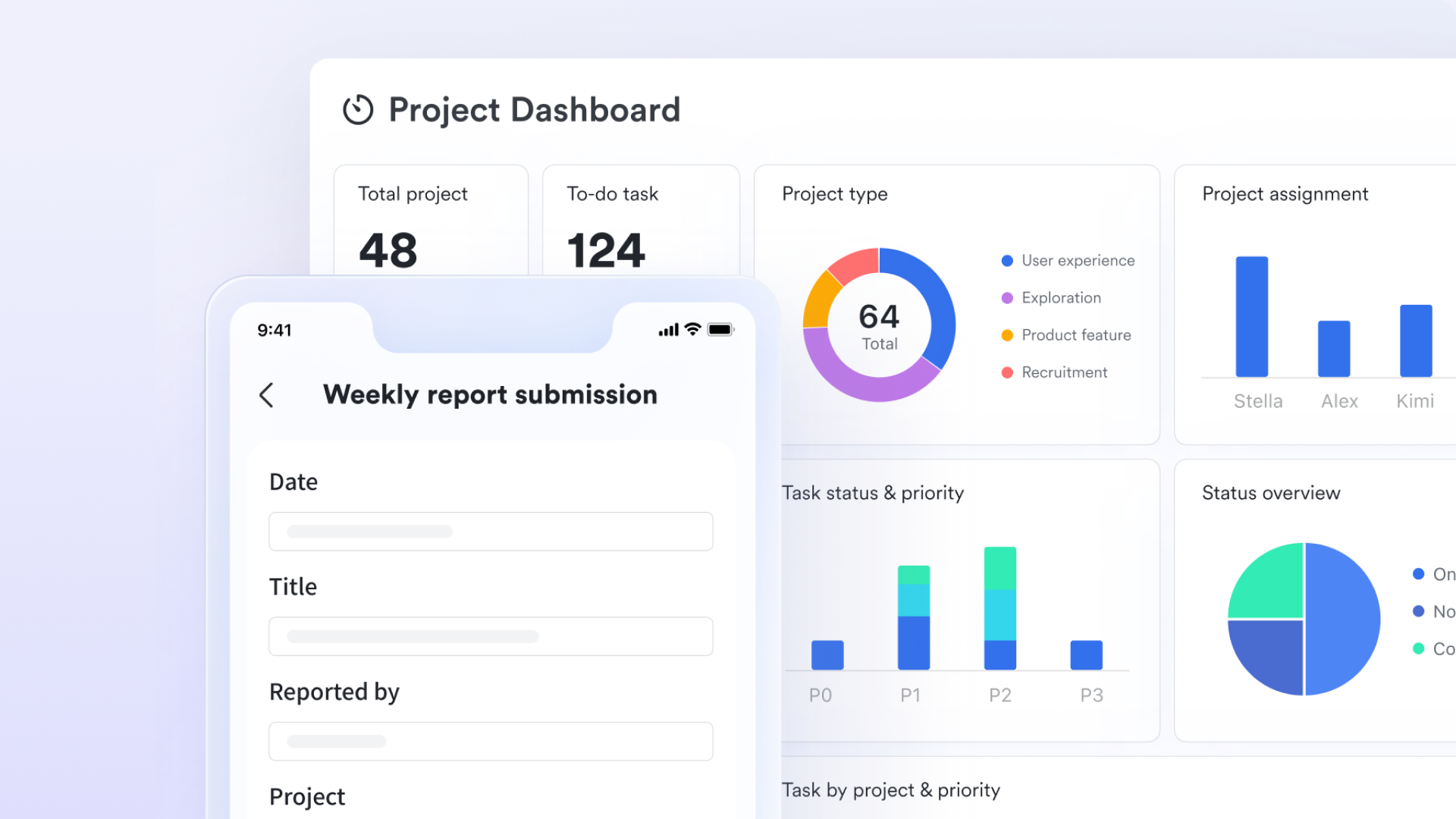
Centralized documentation for real-time collaboration
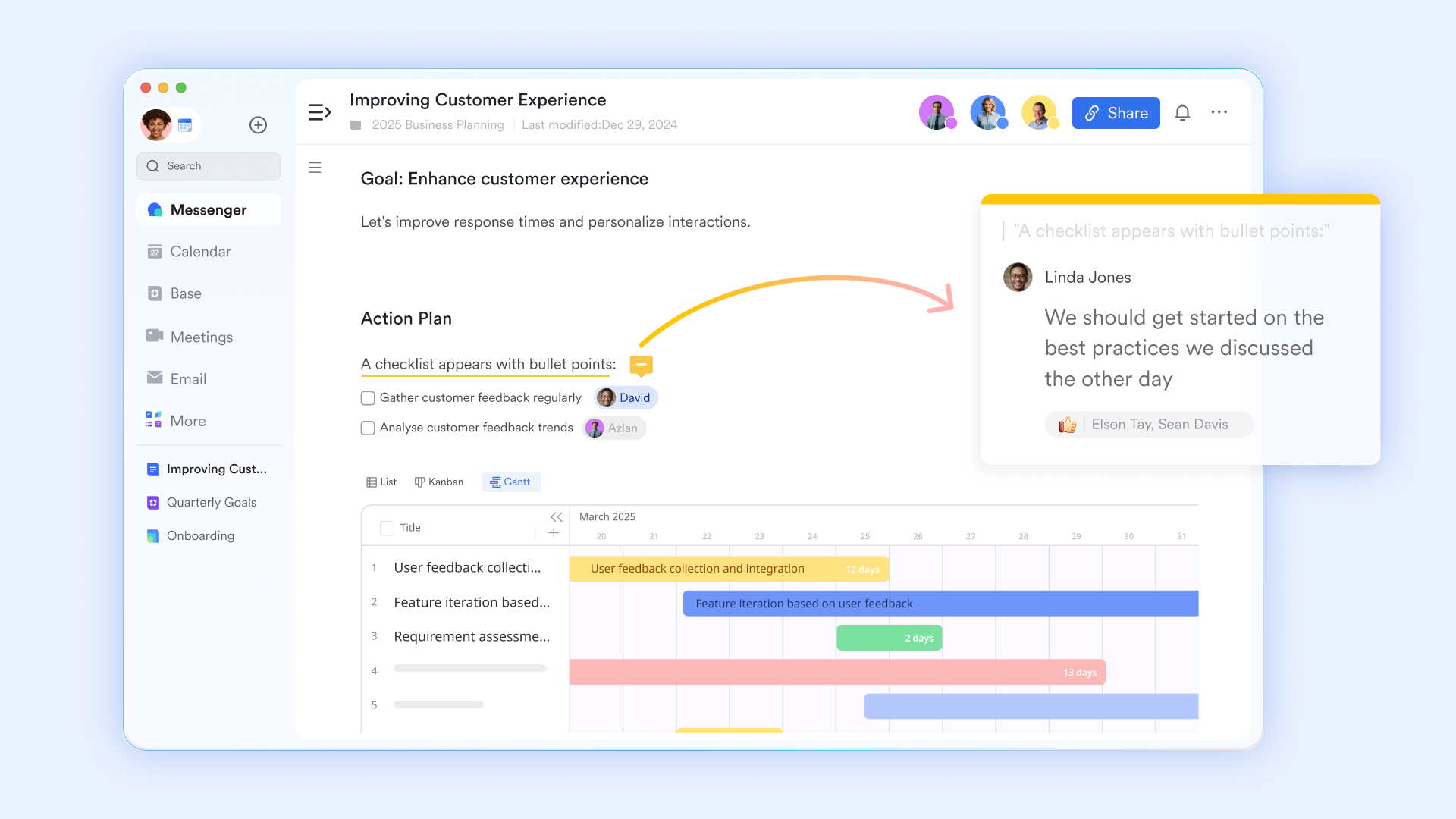
acts as a living documentation system where teams create and maintain project material together. Users can edit simultaneously, leave comments for clarification, request updates, and embed tables or media directly within documents. Version clarity is built in; team members always see the latest content, and previous versions remain accessible for review. Linked Docs can form structured knowledge hubs, reducing the fragmentation that occurs when files are scattered across emails or multiple tools. This mirrors Procore's document control concept but makes collaboration faster and reduces the need for repeated file uploads or controlled version locking.
Communication channels that bridge office and field teams
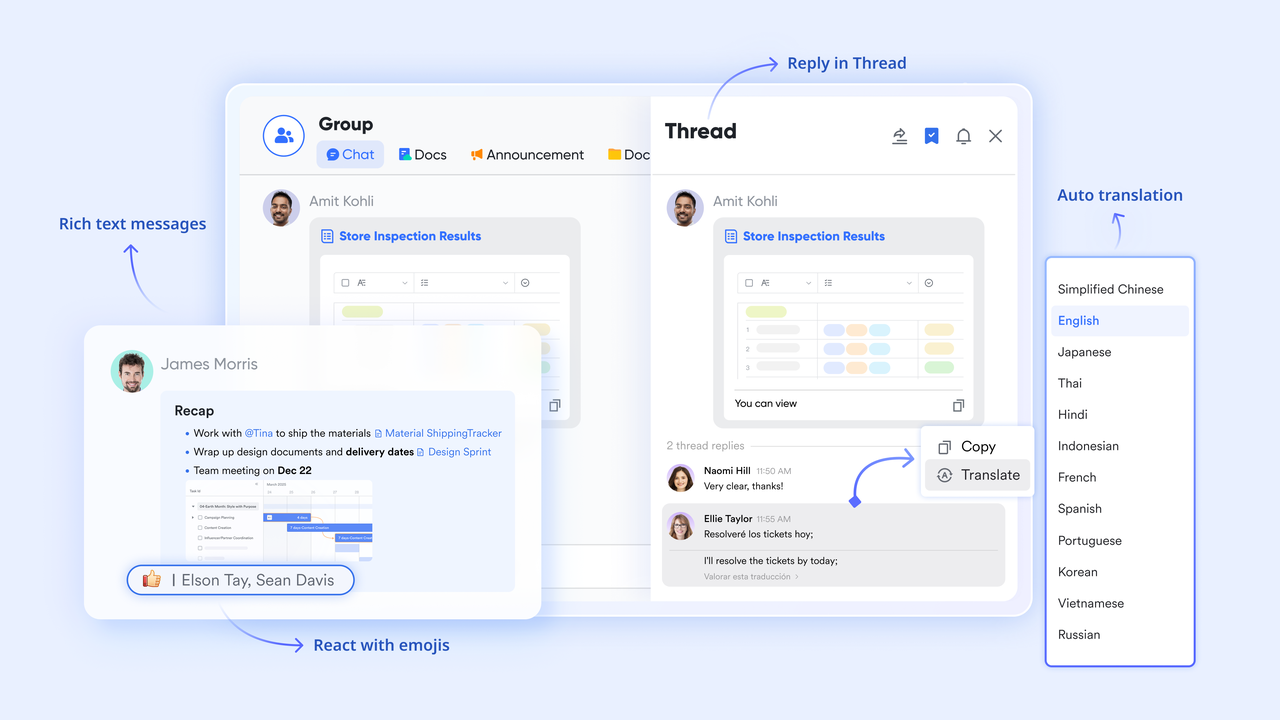
allows teams to communicate through direct messages, group channels, and threaded conversations that preserve context. Whether teams are remote, distributed across offices, or collaborating on-site, all messaging stays connected to the work being done. Images, voice messages, and quick files can be sent instantly, while smart search helps retrieve past discussions without navigating deep folder structures. Teams can @mention colleagues or link to Docs, tasks, or workspaces, reducing confusion and improving operational continuity. This creates a communication rhythm that echoes Procore's office-to-field collaboration but with more flexibility and fewer tool gaps.
Meetings supported by content sharing and automated notes
Lark offers robust video meetings where teams can collaborate on shared materials in real time. Lark Meetings Magic Share allows participants to present documents or content interactively everyone sees the same view and can follow along clearly, improving meeting alignment. recordings can be uploaded or captured directly, and the system automatically generates minutes summarizing the discussion, decisions, and follow-up tasks. This eliminates the need for manual note-taking and ensures consistent documentation across recurring or complex meetings. Where Procore supports meeting coordination through structured modules, Lark enhances the entire meeting cycle from live discussion to automated outcome capture. 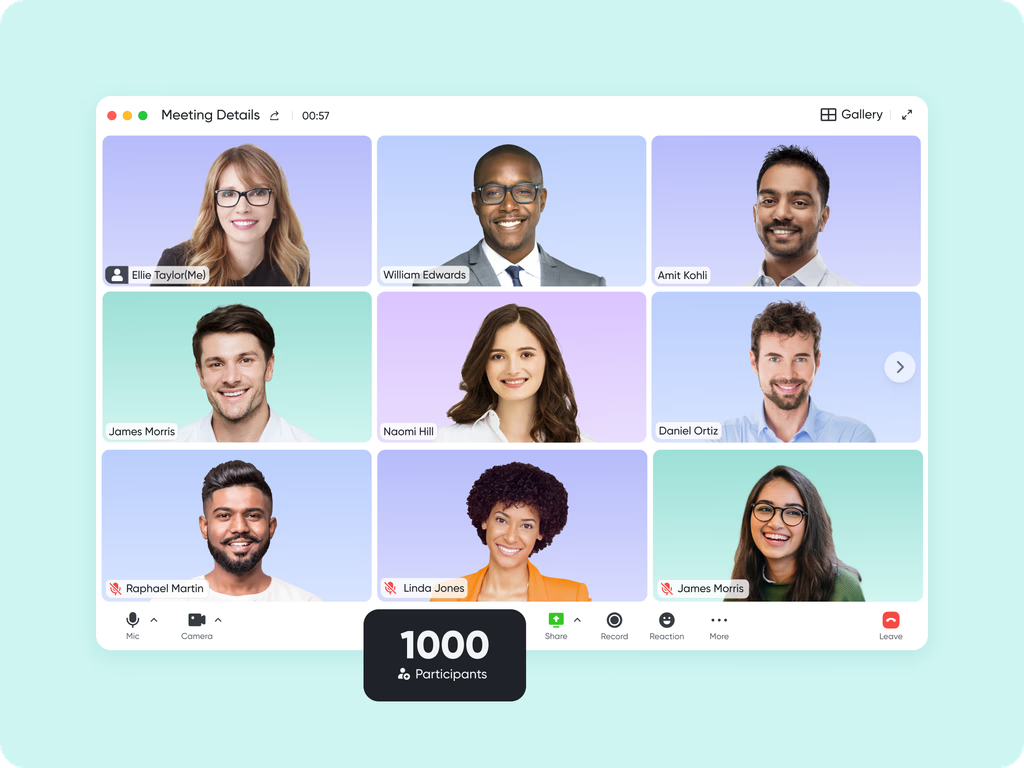
Pros:
- Easy onboarding for both office and field teams with minimal training. Teams start collaborating quickly. Adoption friction is low.
- Highly adaptable to different construction workflows and team sizes. Workspaces can be customized easily. This flexibility supports growth.
- Strong collaboration layer that reduces the need for multiple disconnected tools. Communication and documentation stay aligned.
Cons:
- Teams need onboarding time for some advanced features, while its provides searchable guides.
:
- Starter plan: Free forever plan that includes 11 powerful tools for up to 20 users. It also comes with 100GB of storage, 1000 automation runs, AI translations, and more.
- Basic plan: $6/user/month (billed annually) for up to 500 users. It includes everything in Starter plus group calling for up to 500 attendees, 5TB of storage, 1000 automation runs, and more. For more details, please .
- Pro plan: $12/user/month (billed annually) for up to 500 users. It includes everything in Basic plus group calling for up to 500 attendees, 15TB of storage, 50,000 automation runs, and more.
- Enterprise plan: for custom pricing. Supports unlimited users and includes even more automation runs and advanced security, compliance, and management features.
For small teams with simple communication needs

18 months message history
1000 Base automation runs/month
2000 rows per table in Base
Most POPULAR
For companies with comprehensive collaboration and management needs
Unlimited message history
500-participant video meetings
50k Base automation runs/month
20k rows per table in Base
For large companies with advanced security and organizational management needs
Get a personalized demo and pricing
Unlimited message history
500-participant video meetings
15 TB storage + 30 GB storage/user
500k Base automation runs/month
50k Base automation runs/month
Most POPULAR
For companies with comprehensive collaboration and management needs
Unlimited message history
500-participant video meetings
50k Base automation runs/month
20k rows per table in Base
2. Mastt: Best for owner-side project controls
Mastt is built specifically for owners and client side teams who require portfolio level visibility. It focuses less on daily field execution and more on governance and oversight. This makes it relevant in alternatives to Procore for risk management discussions. Mastt is commonly used in public sector and large capital programs. Its design supports executive decision making.
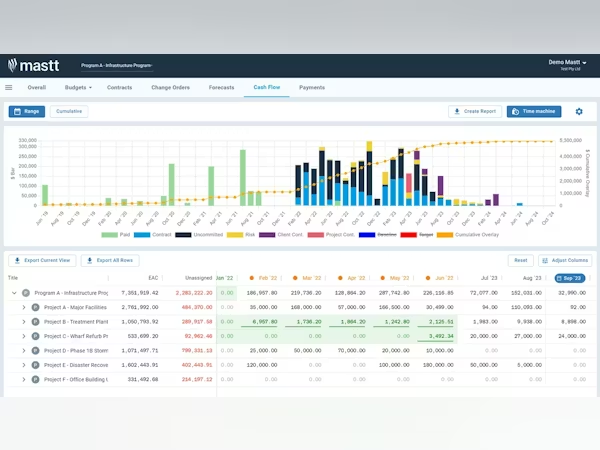
Image source: mastt.com
Features:
- Portfolio dashboards that track cost, schedule, and risk across multiple projects. Owners gain a consolidated view. This supports early intervention.
- Approval workflows aligned with governance and compliance needs. Decision making becomes more structured. Audit trails are maintained.
- Financial reporting tools tailored for owner requirements. Data supports funding and oversight discussions. Reports are standardized.
- Risk registers that help identify and manage project risks proactively. Issues are tracked consistently. Visibility improves accountability.
Pros:
- Strong executive level visibility across portfolios. Leaders gain confidence in reporting.
- Well suited for public sector and infrastructure programs. Compliance needs are supported.
- Clear focus on owner priorities rather than contractor execution.
Cons:
- Limited field execution and collaboration tools.
- Not suitable for subcontractors or small GCs.
Pricing:
- Starter (Free): Includes AI Upload and Templates, unlimited users, unlimited budgets and contracts, and tracks up to 10 payments on your first project.
- Professional: $150 avg cost/project/month
- Enterprise: Custom pricing, starts at 10 projects which includes all professional features
3. Archdesk: Best Procore alternative for operational management
Archdesk connects project, commercial, and operational data into a single environment. It is designed for contractors managing multiple departments and workstreams. The platform focuses on operational efficiency and financial clarity. Teams evaluating Procore alternatives reviews often consider Archdesk for mid-sized operations. It balances depth with configurability.
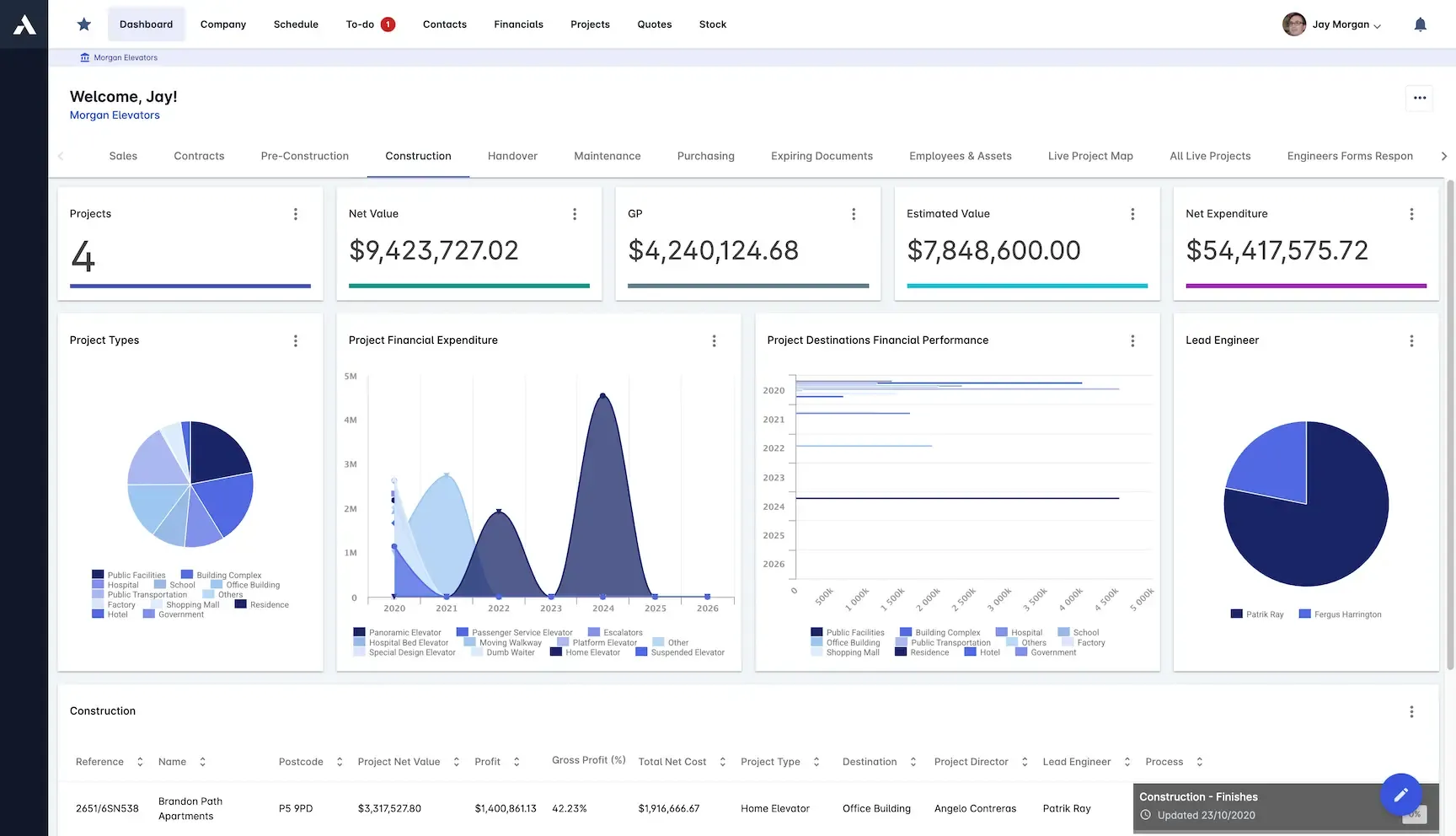
Image source: archdesk.com
Features:
- Project scheduling and resource planning tools that support coordinated delivery. Teams can allocate resources effectively. Visibility improves planning accuracy.
- Cost control and forecasting features that connect budgets with live project data. Financial teams track performance continuously. Variances are easier to spot.
- Workflow automation for approvals and handovers. Manual coordination is reduced. Processes remain consistent.
- Reporting dashboards that unify operational and commercial insights. Leadership gains a holistic view. Decisions are data driven.
Pros:
- Strong operational oversight across teams. Data stays connected.
- Configurable workflows suitable for growing contractors. Flexibility supports change.
- Covers both project delivery and commercial management.
Cons:
- Interface may feel complex for new users.
- Setup requires planning to unlock full value.
Pricing:
- Essential: From $790/month
- Professional: Priced Individually
- Enterprise: Priced Individually
4. RedTeam: Best for general contractors
RedTeam is a construction management platform created specifically for general contractor workflows. It supports projects from preconstruction through closeout using familiar construction processes. The platform emphasizes execution, financial control, and document management. RedTeam is often evaluated as a direct alternative to Procore by GCs. It provides structured workflows without targeting owners or designers. This makes it a focused option for contractor led projects.
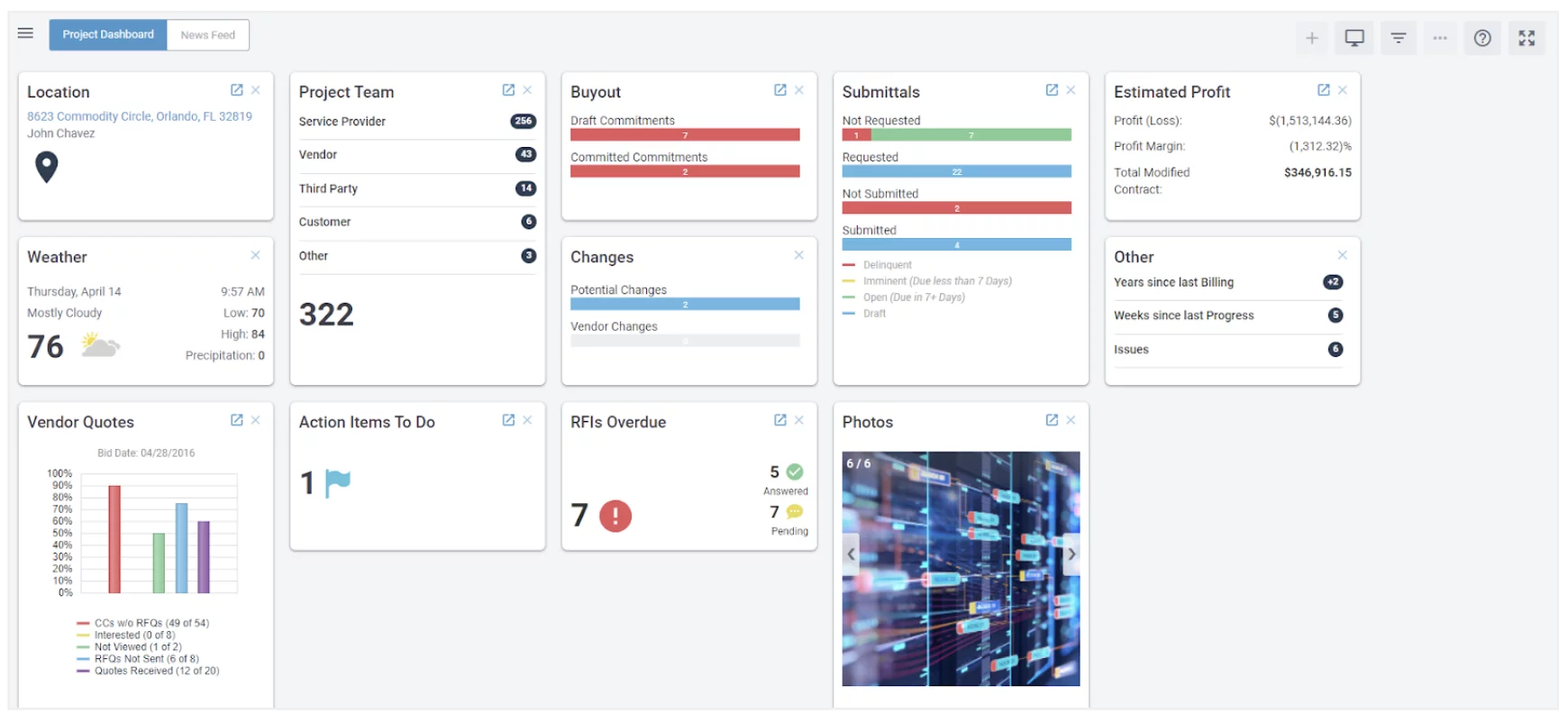
Image source: redteam.com
Features:
- Preconstruction and bidding management tools that support estimating and vendor coordination. Early project phases are structured.
- RFIs, submittals, and document control for execution stages. Information stays centralized. Accountability improves.
- Financial tracking and contract management tools. Teams monitor costs and commitments. Visibility supports control.
- Collaboration features that connect internal teams and external partners. Communication stays aligned.
Pros:
- Purpose built for general contractors. Workflows match GC needs.
- Balanced feature set without extreme complexity. Adoption is manageable.
- Covers the full construction lifecycle.
Cons:
- User interface feels dated compared to newer platforms.
- Mobile experience is improving but limited.
Pricing:
- Standard Subscription: $729/month it includes up to $5 million in Active Project Value (APV)
5. Knack: Flexible, no-code alternative
Knack is a no-code platform that allows construction teams to build custom databases and workflows. It is not construction-specific, but its flexibility attracts teams with unique processes. Contractors use Knack to track projects, inspections, vendors, or assets in custom ways. It is often explored when rigid platforms feel limiting. Knack requires internal ownership for setup and maintenance. This makes it suitable for teams comfortable with customization.
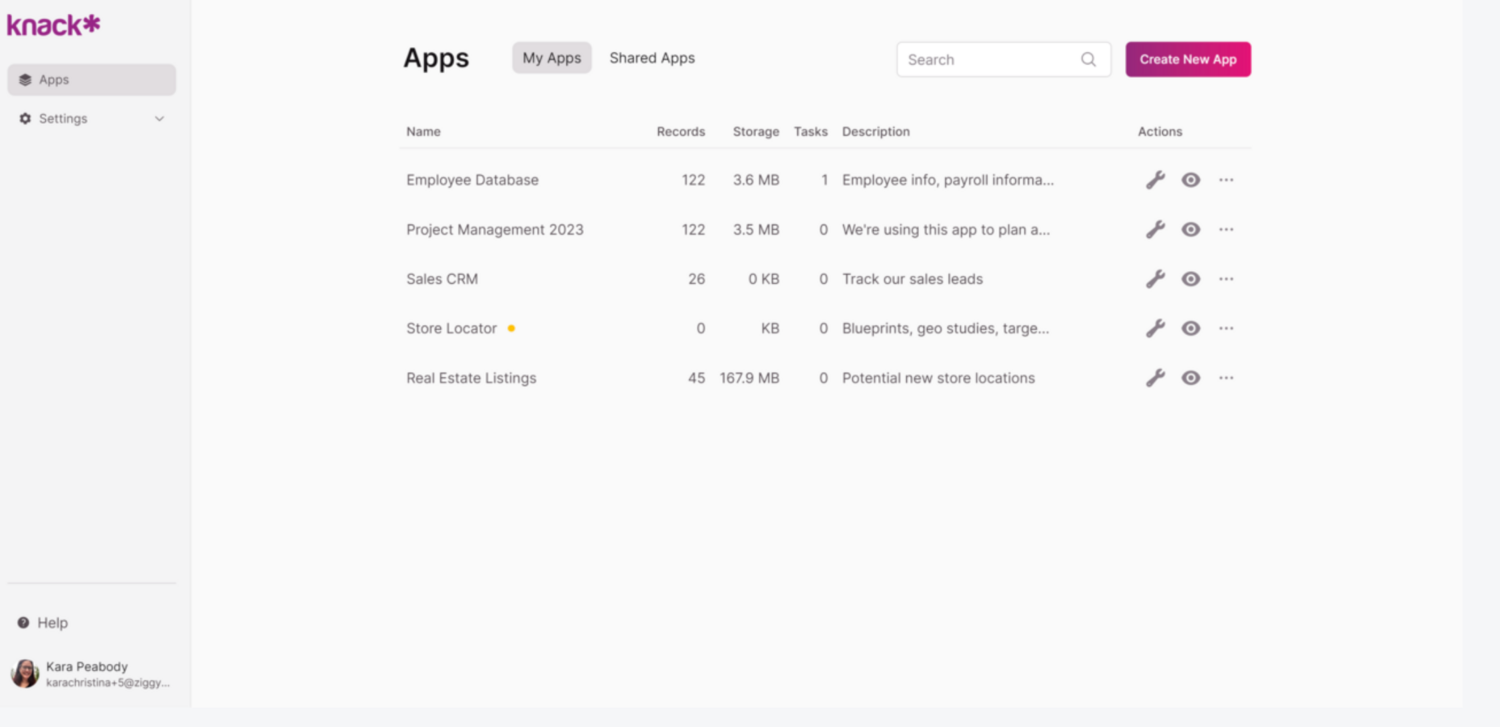
Image source: knack.com
Features:
- Custom databases for tracking projects, vendors, and inspections. Data structures match internal needs. Flexibility is high.
- Role-based access controls that protect sensitive information. Permissions are configurable. Security is maintained.
- Automated workflows that update records and notify users. Manual updates are reduced. Efficiency improves.
- Custom dashboards and reports built from live data. Teams monitor performance easily. Insights are tailored.
Pros:
- Extremely flexible platform for custom workflows. Teams build what they need.
- Suitable for niche construction processes. Adaptability is strong.
- No coding required for most configurations.
Cons:
- Requires internal expertise to design and maintain systems.
- Not construction-ready out of the box.
Pricing:
- Starter: $59/month, or $49/month billed annually for individuals and small teams, includes 3 applications
- Pro: $130/month, or $110/month billed annually for businesses building more complex apps, it includes unlimited applications
- Corporate: $300/month, or $250/month billed annually for companies looking to transform their business operations, cost changes based on usage requirements
- Enterprise: Custom Pricing
6. Revizto: Best for BIM coordination
Revizto is widely used on design heavy and BIM driven construction projects. It focuses on model coordination and issue tracking across disciplines. The platform helps teams identify and resolve clashes early in the project lifecycle. Revizto is often used alongside other project management tools rather than as a replacement. It is commonly mentioned in Procore alternatives reviews for BIM coordination. The main value lies in visualization and collaboration between design and construction teams.
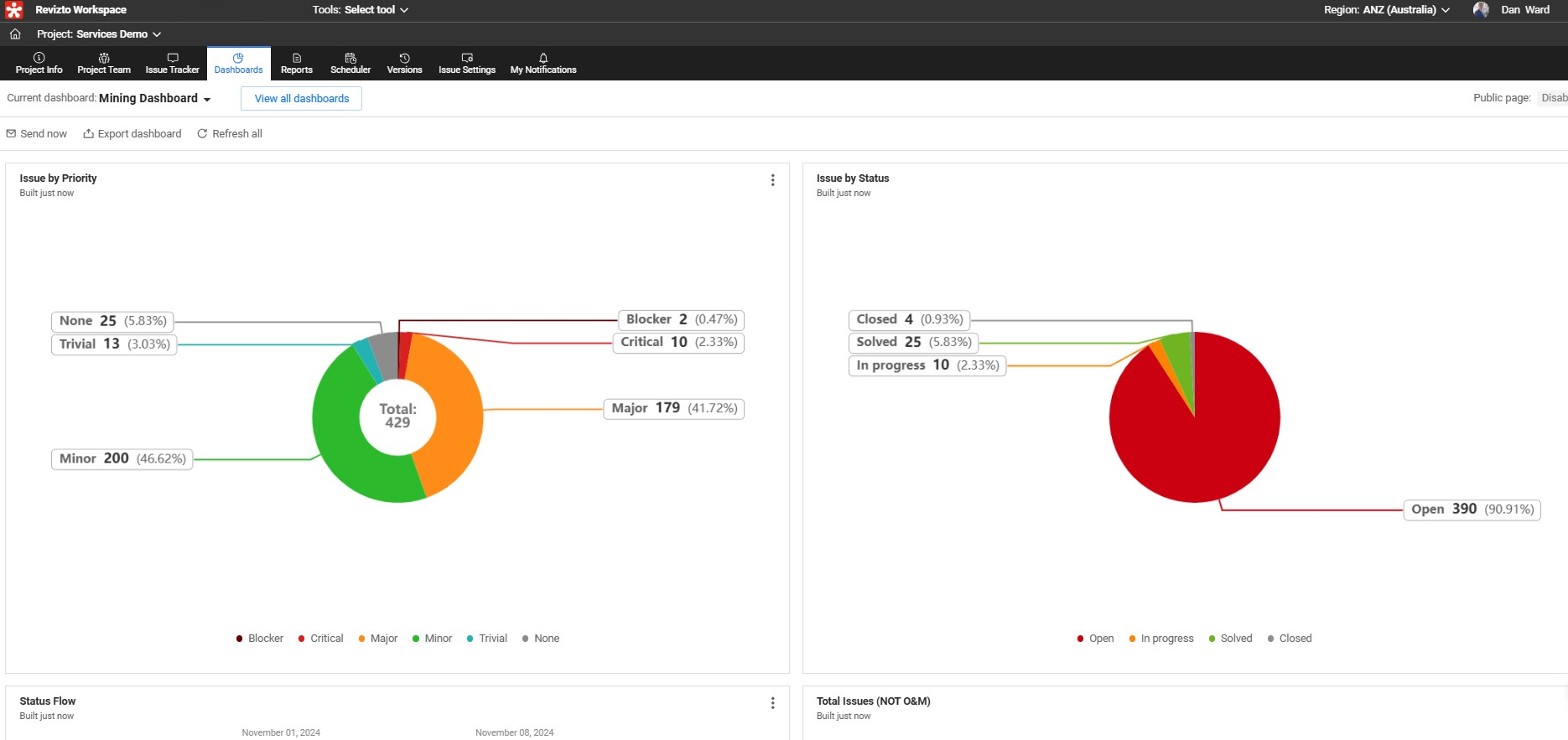
Image source: revizto.com
Features:
- Centralized model viewing and coordination across disciplines. Teams collaborate visually. Issues are easier to understand.
- Issue tracking linked directly to BIM models. Problems are contextualized. Resolution becomes faster.
- Clash detection support for early design coordination. Rework risk is reduced. Quality improves.
- Field access to coordinated models. On site teams stay aligned with design intent.
Pros:
- Excellent for BIM driven projects. Visualization is strong.
- Improves collaboration between design and construction teams.
- Reduces costly rework through early issue detection.
Cons:
- Limited general project management capabilities.
- Often requires pairing with other tools.
Pricing:
- License based pricing per user.
7. Sablono: Best for progress tracking
Sablono is built to provide clear visibility into construction progress using location based planning. It helps teams understand what work is complete and what is delayed across sites. The platform supports lean construction and production focused workflows. Sablono is often evaluated by teams that want execution transparency rather than full project management. It appears frequently in discussions around practical Procore alternatives. The emphasis is on progress reliability and flow.
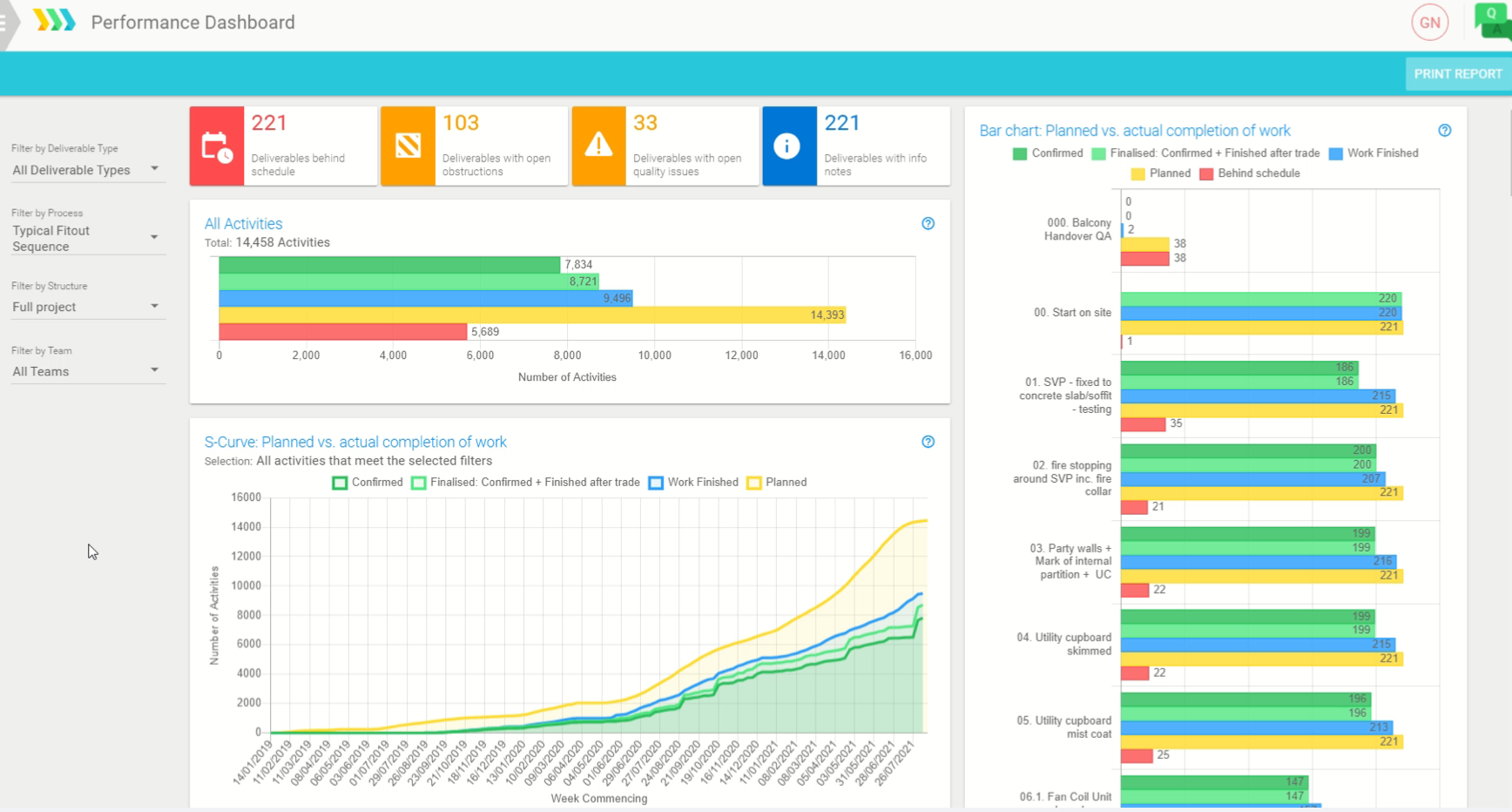
Image source: sablono.com
Features:
- Location based schedules that track progress at granular levels. Teams see exactly where work stands. Planning improves.
- Real time progress updates from site teams. Reporting delays are reduced. Visibility increases.
- Bottleneck identification tools that highlight constraints early. Teams act proactively. Delays are minimized.
- Visual dashboards that show production flow. Communication becomes clearer.
Pros:
- Clear execution visibility for site teams. Progress is transparent.
- Supports lean and production focused workflows.
- Improves reliability of delivery plans.
Cons:
- Limited financial and document management.
- Not a full construction management system.
Pricing:
- Track: $53/user/month billed annually
- Trace: $107/user/monthbilled annually
- Flow: Custom pricing (Project-based or Enterprise Licence Agreement)
8. Ingenious.Build: Best for Full Lifecycle Construction Management
Ingenious.Build supports contractors managing complex and regulated construction projects. It covers planning, procurement, execution, and compliance within one system. The platform is designed for organizations that need strong governance and lifecycle visibility. It is often considered as an alternative to Procore for risk management and control. Ingenious.Build targets enterprise level users rather than small teams. Its focus is on structure, reporting, and compliance.
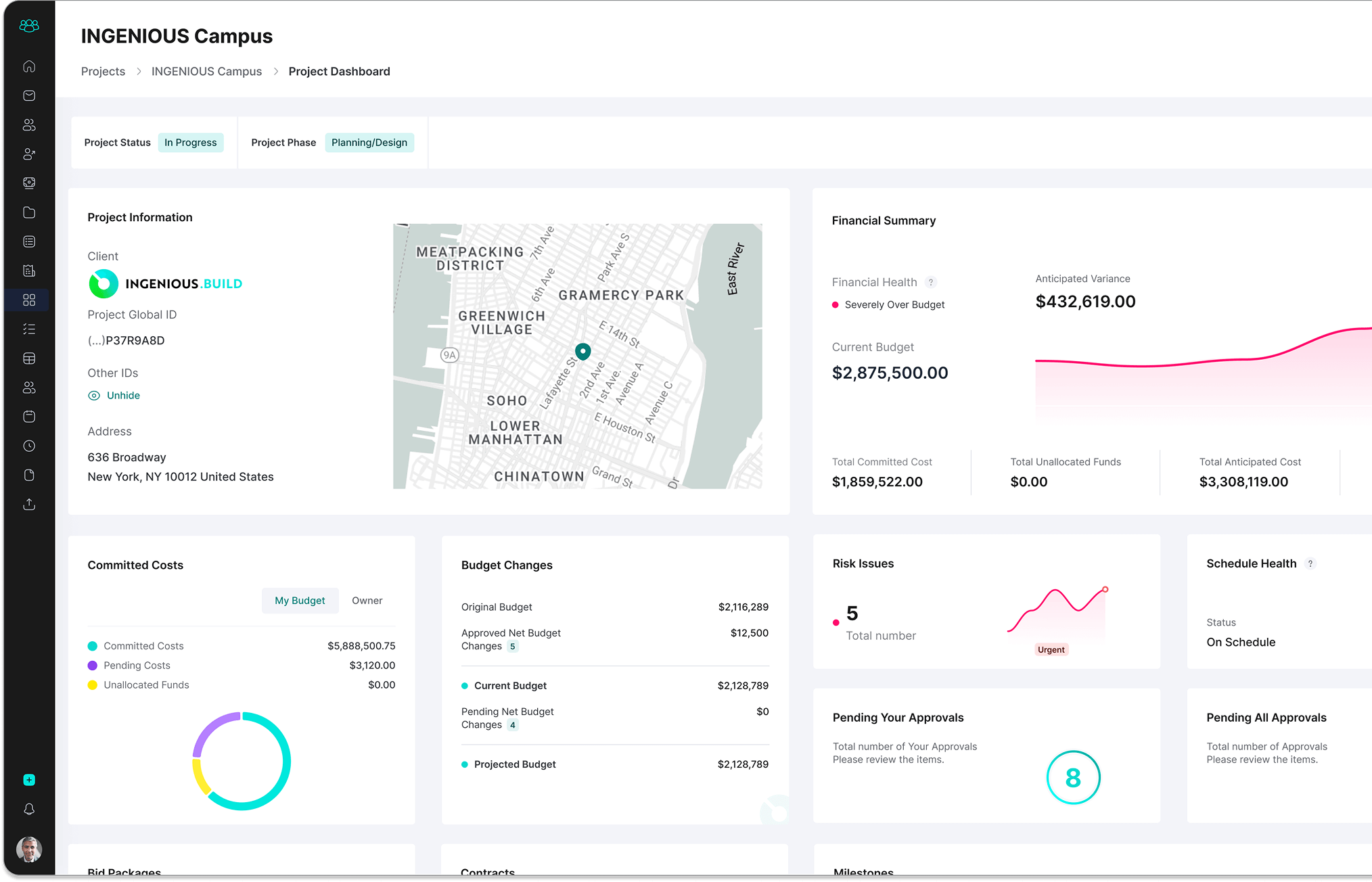
Image source: ingenious.build
Features:
- Integrated project and financial management across lifecycle stages. Data remains connected. Control improves.
- Procurement and contract management tools. Commercial risk is reduced. Processes are standardized.
- Risk and compliance tracking features. Governance requirements are supported. Reporting is structured.
- Enterprise reporting across projects and portfolios. Leadership gains visibility.
Pros:
- Comprehensive lifecycle coverage. Suitable for complex projects.
- Strong compliance and control features.
- Designed for enterprise scale organizations.
Cons:
- Higher cost than lightweight platforms.
- Longer onboarding and setup time.
Pricing:
- Enterprise pricing on request.
9. Fonn via Access Group: Best for field simplicity
Fonn is designed to be easy for site teams to use with minimal training. It focuses on daily field communication, reporting, and document access. The platform helps reduce friction between office and site teams. Contractors often evaluate Fonn when Procore feels too complex for field adoption. It is commonly mentioned in Procore alternatives reddit discussions. Simplicity and usability are its primary strengths.
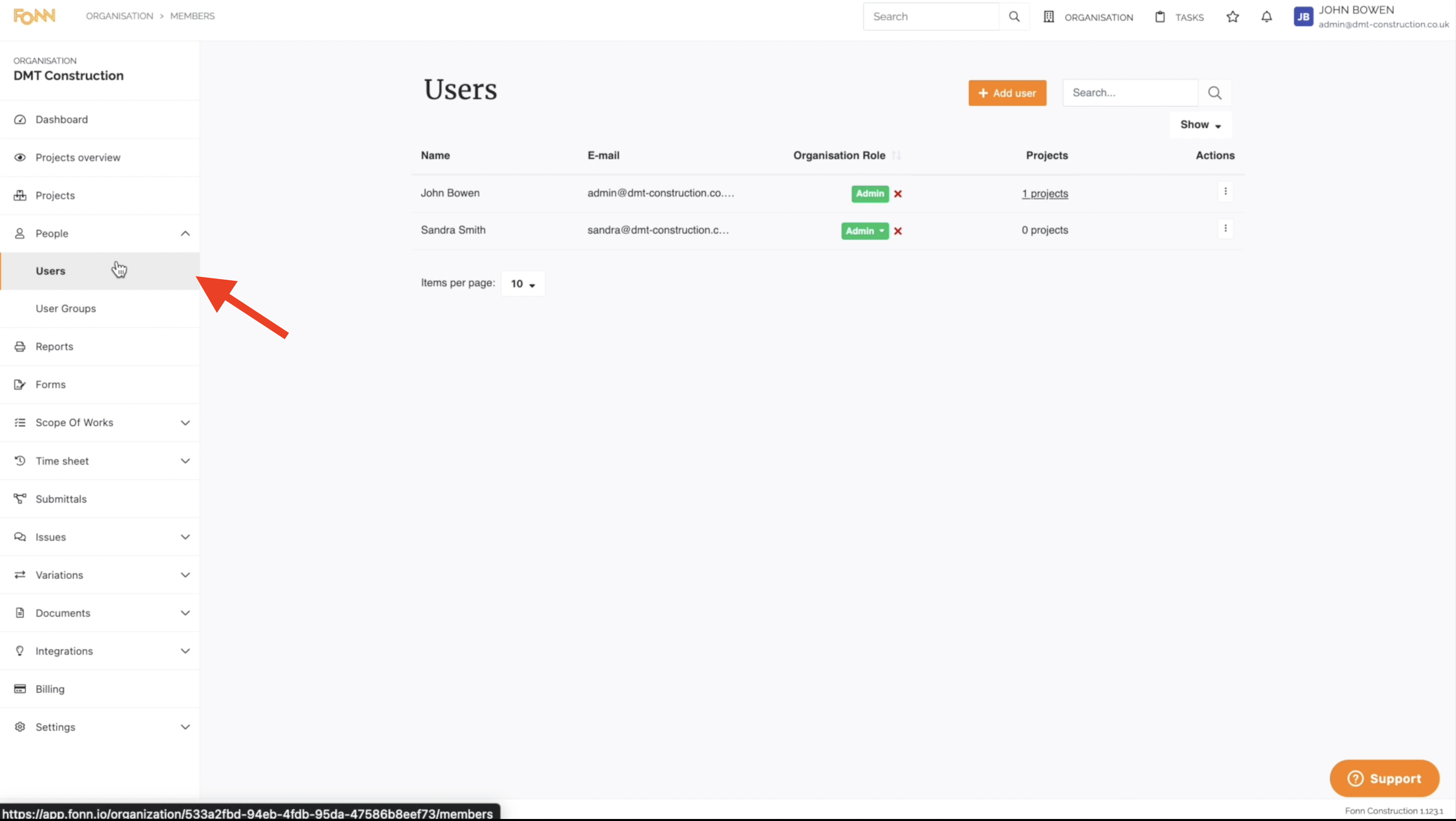
Image source: fonn.io
Features:
- Simple document sharing for drawings and photos. Field access is quick. Information stays current.
- Mobile friendly field reporting tools. Updates are submitted easily. Adoption improves.
- Task and checklist management for daily work. Execution stays organized.
- Centralized communication for site coordination. Messages are accessible.
Pros:
- Very easy for field teams to adopt.
- Minimal training required.
- Strong focus on daily site needs.
Cons:
- Limited advanced project management features.
- Not ideal for complex commercial projects.
Pricing:
- Subscription based pricing per user.
10. Vitruvi: Best for Utility & Infrastructure Projects
Vitruvi is purpose-built for linear and infrastructure construction such as utilities and transportation projects. It supports spatial planning and progress tracking across long project corridors. The platform is used by teams managing complex geographic assets. Vitruvi is often considered in the Procore alternatives New York market for infrastructure work. Its GIS-based approach sets it apart from general construction tools. The focus is on visibility across large-scale networks.
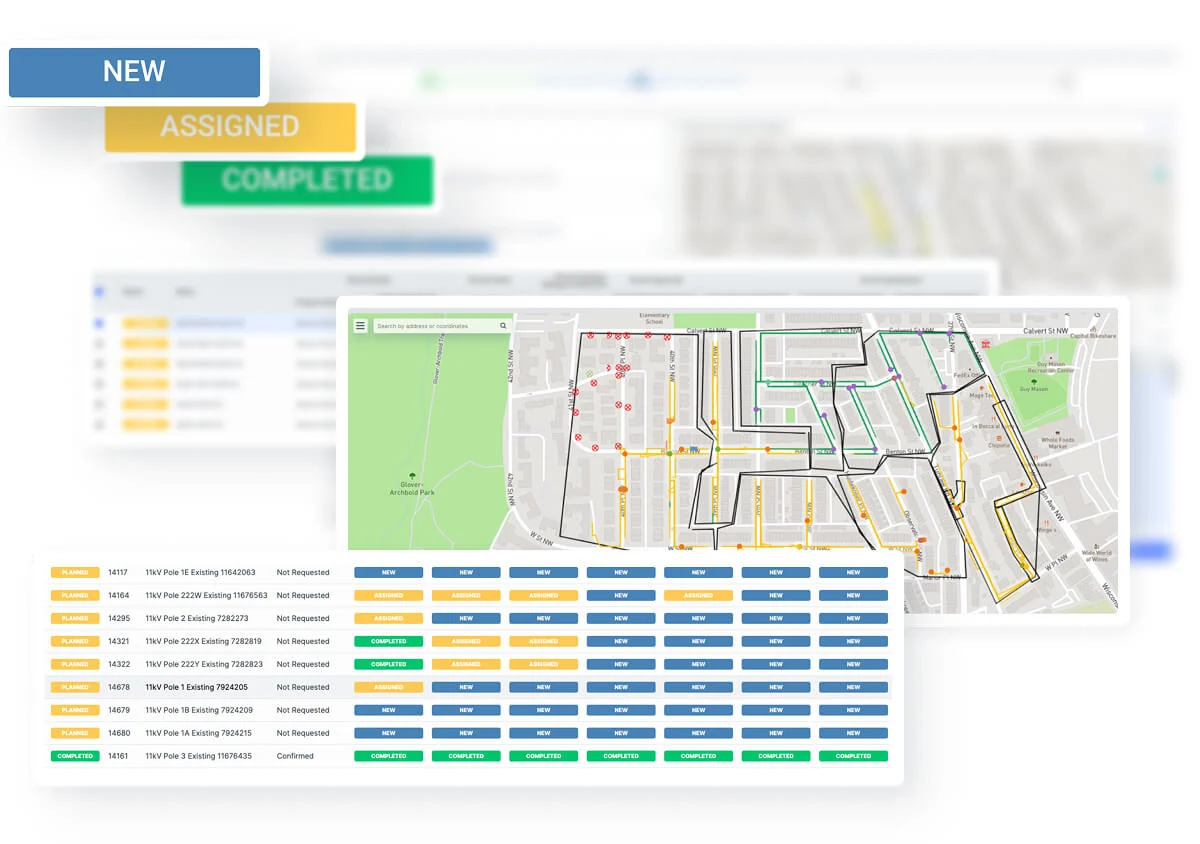
Image source: vitruvisoftware.com
Features:
- GIS-based project visualisation tools. Teams see work spatially. Coordination improves.
- Linear asset tracking across long corridors. Progress is easier to monitor.
- Resource and schedule management for infrastructure workflows. Planning becomes clearer.
- Reporting tailored for utility and infrastructure projects. Stakeholders gain insight.
Pros:
- Purpose-built for infrastructure and utilities.
- Strong spatial and GIS capabilities.
- Supports large-scale linear projects.
Cons:
- Niche focus limits general construction use.
- Learning curve for teams new to GIS tools.
Pricing:
- Custom pricing based on project requirements.
How to choose the right Procore alternative
Selecting the right construction platform requires more than comparing feature lists or pricing pages. Construction teams must evaluate how a tool fits daily workflows, long-term growth, and risk exposure. A structured selection approach helps reduce operational disruption and ensures smoother adoption, especially when teams are actively searching for alternatives to Procore for risk management.
- Define your primary workflow needs clearly before evaluating tools: Some teams need strong project management, while others prioritize estimating, field reporting, or risk controls. Understanding whether collaboration, financial visibility, or is most critical helps narrow options quickly. This step prevents overpaying for unused features. It also ensures the tool supports daily work rather than occasional reporting.
- Evaluate the size and complexity of your projects carefully: Small and mid-sized contractors often need simpler tools than enterprise builders. Platforms designed for large portfolios may introduce unnecessary complexity. Matching the tool to your project scale improves adoption and efficiency. This consideration appears frequently in Procore alternative reviews.
- Consider ease of onboarding and daily usability for field teams: Tools that require extensive training can slow adoption and reduce data accuracy. Field teams benefit from intuitive interfaces and mobile-friendly workflows. Faster onboarding leads to better participation and reporting consistency. Many alternatives to Procore focus on simplicity for this reason.
- Compare pricing models for long-term sustainability: Some platforms price based on company revenue, while others charge per user or module. Understanding how costs scale over time prevents budget surprises. Transparent pricing is especially important for growing contractors. Cost concerns are a common theme in Procore alternatives reddit discussions.
- Identify gaps that require stronger communication and collaboration: Many construction teams still rely on separate tools for chat, meetings, and documents. Platforms like Lark can be used as a core workspace or alongside construction-specific software. This approach improves coordination without forcing a full system replacement.
- Ensure compatibility with existing tools such as : Smooth data flow reduces manual work and errors. Checking compatibility early avoids costly workarounds later. This is especially important for finance and design coordination.
- Start with a small pilot team before full deployment: Testing the platform on a live project reveals real-world strengths and limitations. Feedback from actual users is more valuable than feature lists. A pilot reduces risk and builds confidence before scaling.
Conclusion
Exploring Procore alternatives is becoming a natural step for many construction companies as projects grow more diverse and teams seek better alignment between tools and daily work. While Procore remains a strong option for large and highly regulated environments, it is not always the most practical choice for every contractor. Cost, , and feature complexity often push teams to reassess what they truly need from a construction platform.
Modern alternatives to Procore offer more focused solutions, whether that means better field adoption, clearer progress tracking, stronger owner controls, or simpler collaboration. Some organizations choose a phased approach by improving communication and documentation first, then addressing project and financial management later. In this context, platforms like are collaboration hubs that reduce friction across teams. The right choice ultimately depends on workflow fit, usability, and long term sustainability rather than feature volume alone.
Boost your construction productivity starting today
FAQs
Is switching from Procore to another platform difficult?
Switching from Procore can be manageable if approached in stages. Many teams start by running a pilot on a smaller project to test workflows and adoption. Data migration and training require planning, but lighter Procore alternatives often reduce onboarding effort. Gradual transitions lower . This approach is commonly discussed in Procore alternatives reddit threads.
Which alternatives work best for subcontractors rather than GCs?
Subcontractors often benefit from simpler tools that focus on field reporting, communication, and task tracking. Platforms like Fonn or flexible tools such as Lark work well for subcontractors who do not need complex financial modules. Ease of use and mobile access are key factors. Cost transparency also matters more for smaller teams.
Can Lark serve as the primary hub for communication and project documentation?
Yes, many construction teams use Lark as their main workspace for messaging, meetings, and documentation. It helps centralize communication and keep project information accessible. While it does not replace specialized estimating or BIM tools, it complements them effectively. This makes it useful when evaluating alternatives to Procore for and coordination.
Do Procore alternatives offer similar mobile performance for field crews?
Many Procore alternatives prioritize mobile usability to improve field adoption. Simpler interfaces and faster onboarding often result in better participation from site teams. While feature depth may vary, daily reporting and communication are often smoother. Mobile performance is a key reason teams explore alternatives to Procore.
What's the typical onboarding time when adopting a new platform?
Onboarding time varies by platform and project complexity. Lightweight tools can be adopted within days, while enterprise systems may take weeks or months. Training requirements and configuration effort play a major role. Teams that start with collaboration tools often see faster initial value.
Related reading