














Project Planning Examples: Types, Template & How to Start

Ryan Tanner
Product Marketing Specialist
Sep 18, 2026
Ryan Tanner
Sep 18, 2026

17 min read


Every successful project begins with a clear plan that defines objectives, roles, timelines, and outcomes. A project plan gives teams direction and structure from day one. It helps track progress, manage resources, and keep everyone aligned around shared goals. Whether you're launching a new product, running a marketing campaign, or building infrastructure, an organized plan ensures consistent results. Modern project management tools make planning collaborative and transparent, turning static documents into living frameworks. This article explores practical project plan examples, templates, and steps for creating your own. You'll also discover how teams simplify project planning through connected digital workflows.

What is a project plan?
A project plan defines how objectives will be completed within a specific timeline using available resources. While many teams rely on project plan examples to get started, every planning approach must align with business needs and delivery expectations. Modern planning also includes digital formats such as project plan examples in Excel, or simple project plan examples stored in online workspaces. A project plan becomes a shared guideline that supports alignment between stakeholders at every phase. From sample project plan examples to enterprise project planning solutions, the core goal remains clarity, visibility, and control.
In professional settings, project plans vary based on size and complexity, from simple outlines for small projects to detailed frameworks for multi-phase initiatives. Regardless of type, every strong plan promotes visibility and accountability.
Key components of a strong project plan
A strong plan contains focused sections that support clarity across planning, execution, and tracking. Teams reviewing project management plan examples will notice similar elements repeated across simple, agile, or enterprise frameworks.
- Project overview: Summarizes project objectives, background, and expected outcomes. It gives readers a quick understanding of purpose and scope.
- Timeline and milestones: Breaks work into clear phases, with key checkpoints to track progress. Timelines create accountability for every contributor.
- Roles and responsibilities: Assigns ownership so each person knows their tasks and deliverables. Defined roles prevent duplication and miscommunication.
- Budget and resources: Lists tools, materials, and funding allocations. Resource visibility ensures spending aligns with project priorities.
- Risk management plan: Identifies possible challenges and outlines response strategies to minimize disruption.
- Deliverables: Describes measurable outputs that signal completion of each phase.
- Communication plan: Defines how and when updates are shared, ensuring that collaboration stays consistent and transparent.
When these elements work together, they form a dynamic plan that evolves with the project lifecycle.
Types of project plan examples
Different projects demand unique planning methods to ensure clarity and control. Each type of plan supports specific goals, workflows, and industries, helping teams maintain structure from start to finish.
Simple project plan: Simple project plan examples are ideal for small or short timelines with basic task lists, clear dates, and straightforward workflows. These are often created using spreadsheets like Excel project plan examples or informal templates stored digitally for quick updates.
Agile project plan: An agile project plan is designed for flexible, iterative work. It organizes projects into sprints and prioritizes backlogs while allowing goals to evolve. Teams can adjust timelines quickly based on feedback, making it perfect for software or product development. The emphasis is on adaptability and continuous improvement.
Implementation plan: An implementation plan guides the rollout of new systems, processes, or tools. It includes onboarding steps, adoption targets, and post-launch reviews to ensure smooth execution. This plan helps teams manage change efficiently while tracking user readiness and performance. It's particularly valuable for organizations introducing digital solutions.
Construction project plan: A construction project plan outlines schedules, permits, labor requirements, and inspection checkpoints. It provides a clear framework for managing materials and timelines across multiple contractors and phases. This plan ensures work progresses safely, efficiently, and within compliance standards. It keeps complex operations synchronized and on track.
IT project plan: An IT project plan defines key components like architecture, testing phases, deployment procedures, and security protocols. It ensures that every technical stage aligns with system requirements and business goals. With clear dependencies and quality checkpoints, it minimizes risks during software launches or infrastructure upgrades.
Marketing project plan: A marketing project plan brings creative and strategic efforts together under one structure. It defines campaign goals, audience segments, timelines, and performance indicators. This format keeps content production organized, budgets on track, and results measurable. It's essential for teams running multi-channel or time-sensitive campaigns. It also often builds creative and timeline-based sample project plan examples to manage campaign activities, channels, and performance metrics.
Each type of plan ensures structured progress suited to its context, keeping projects clear, accountable, and aligned with their intended outcomes.
How to create a project plan
Teams looking for project plan examples often follow structured planning sequences similar to those found in project management plan examples and examples of a project plan online.
Step 1: Define your project objectives and deliverables.
Clarify what the project aims to achieve, why it matters, and what specific outputs will be produced. Set measurable indicators of success so everyone understands the end goal.
Step 2: Identify stakeholders and assign clear roles.
Determine who needs to be involved from core team members to external contributors and specify their responsibilities. Ensure each person knows their scope of work, communication expectations, and decision-making authority.
Step 3: Break the project into tasks and phases.
Organize the work into logical segments, outlining every task required to complete the project. This structure helps teams prioritize effectively and makes the entire project workflow easier to visualize and track.
Step 4: Set deadlines and allocate resources to each phase.
Define realistic project timelines for each stage and assign the necessary people, tools, and budget. Consider team capacity, skill sets, and potential constraints so the plan remains achievable.
Step 5: Establish dependencies and create a logical timeline.
Identify tasks that must be completed before others can begin, then map them into a sequence. This ensures the project flows smoothly and highlights the critical path of tasks that directly impact your timeline.
Step 6: Define checkpoints or milestones to evaluate progress.
Built-in points where the team will review status, resolve issues, and validate whether the project is on track. Milestones create natural moments for reflection and adjustment.
Step 7: Document all details in your planning tool.
Centralize timelines, owners, files, updates, and discussions in a shared workspace. This keeps everyone aligned, reduces miscommunication, and ensures the plan remains the single source of truth.
Step 8: Review, update, and share regularly to maintain alignment.
A good plan evolves as new information emerges. Continually refine timelines, reassign resources when needed, and keep all stakeholders informed to maintain momentum.
Ready-to-use project planning templates for quick start
We here offer ready-to-use project planning templates that help teams start faster and stay organized. These templates provide a clear structure so you can plan, track, and deliver work with confidence.
Project plan template
The project plan template provides a comprehensive structure for defining goals, deliverables, and ownership within one organized document. It's ideal for teams starting new projects that require clarity on responsibilities and measurable outcomes. The layout simplifies coordination, aligns teams around milestones, and ensures transparency throughout every phase. Its flexible structure makes it suitable for both small-scale and enterprise-level projects.
Marketing plan template
The plan template provides a clear, structured framework to organize your goals, target audience, messaging, timelines, and KPIs in one place. It's designed to help teams stay aligned, manage tasks efficiently, and execute campaigns with confidence. Use this template as a flexible guide to plan, track, and refine your marketing initiatives from start to finish.
Project plan outline template
The project plan outline template helps teams create a concise overview of objectives, timelines, and ownership. It's beneficial at the early planning stage when clarity and alignment are essential. The simple layout keeps planning focused and avoids unnecessary complexity, making it an excellent choice for kickoffs and initial project briefs.
Project overview roadmap template
The project overview roadmap template gives teams a clear visual timeline of their entire project journey. It displays milestones, dependencies, and goals in chronological order, allowing everyone to see progress at a glance. This project roadmap enhances communication between stakeholders and helps maintain long-term alignment across deliverables and priorities.
Project management Gantt chart overview template
The project management Gantt chart overview template transforms complex project schedules into easy-to-read timelines. It highlights relationships between tasks and phases, providing a transparent view of progress. Managers can identify overlaps or potential delays early, enabling proactive scheduling and resource adjustments.
Project management workflow template
The project management workflow template helps teams track interconnected tasks and responsibilities in one streamlined view. It's designed for managers overseeing multiple projects who need to maintain visibility across all moving parts. The structured layout ensures accountability, coordination, and clarity throughout the workflow.
OKR task subdivision and progress control template
The OKR task subdivision and progress control template connects objectives and measurable results in one system. It shows how daily tasks contribute to larger business goals, making performance evaluation more transparent. This template is ideal for organizations focusing on strategic alignment and continuous improvement.
Team task allocation template
The team task allocation template organizes workload distribution to ensure balanced productivity across team members. It offers visibility into assigned tasks, priorities, and due dates, helping managers manage capacity effectively. This structure reduces workload imbalances and keeps collaboration transparent and fair.
Gantt chart template
The Gantt chart template provides a sequential view of project timelines, showing how different activities align over time. It helps teams visualize dependencies and identify potential scheduling conflicts early. The clear chronological layout supports efficient planning and smooth execution across complex projects.
Meet Lark: Smarter project planning for connected teams
Modern teams need planning tools that go beyond spreadsheets. Lark brings your team's communication, tasks, docs, and workflows into one seamless platform, making project planning faster, clearer, and more collaborative. Instead of juggling multiple tools, teams can map out projects, assign responsibilities, track progress, and adapt to changes all in a single, connected workspace.
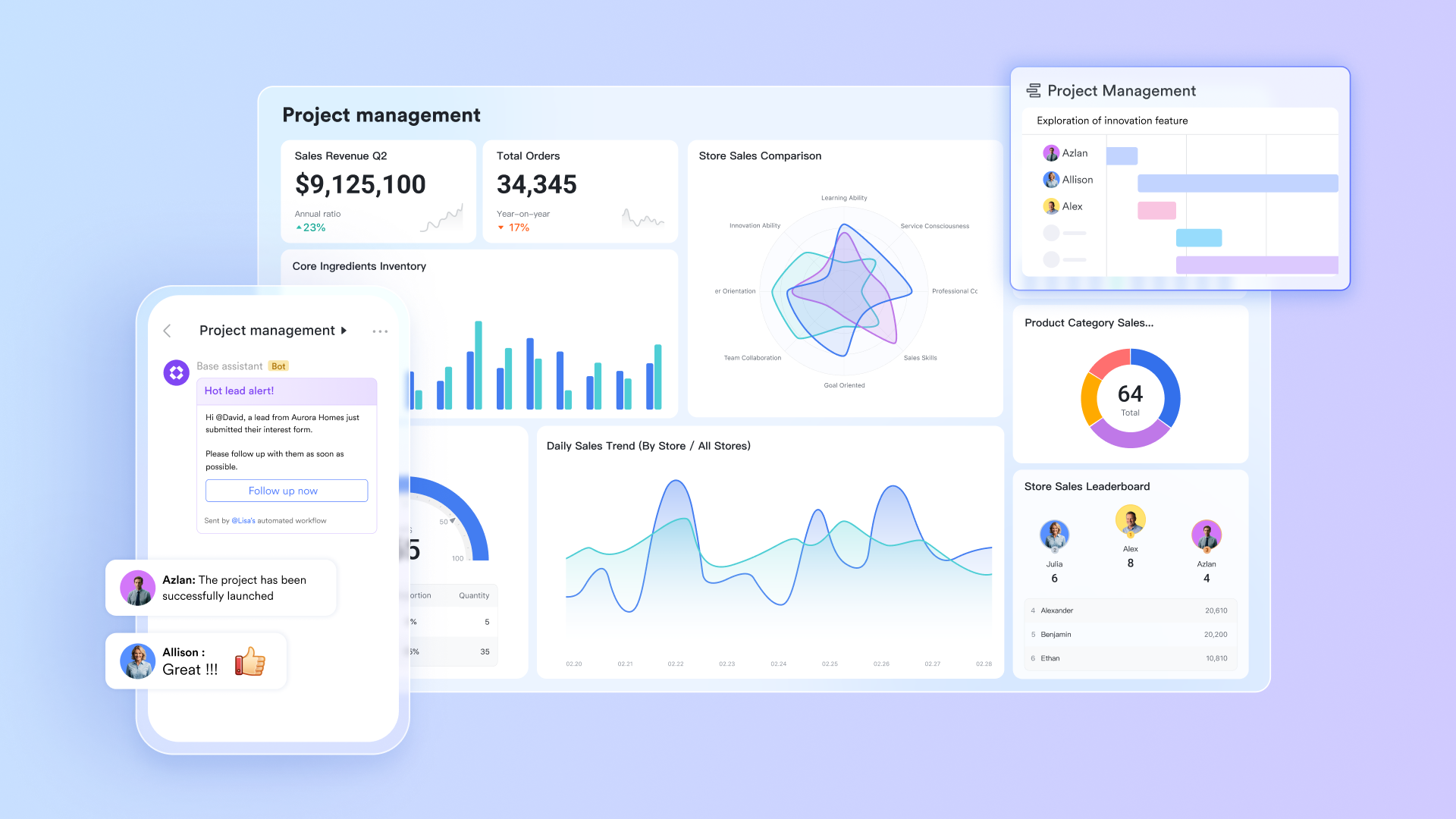
Lark Base: Structure your plan as data, not a static file
When work needs structure and relational logic, Lark Base is the answer: create separate tables for Projects, Tasks, People, Milestones, and Dependencies. Each table stores fields tailored to its purpose (dates, owners, status, estimates), and you can use formulas, rollups, and conditional views to calculate progress, remaining effort, or budget burn rate.
By centralizing all project information, Base gives you a unified workspace to manage every detail: owners and members, objectives, task lists, weekly progress reports, and more. Multiple views including calendar, Kanban, and table views, help you visualize schedules, track deadlines, and coordinate team activities.
To keep everyone aligned, Base supports automated notifications and reminders triggered by task updates, status changes, or upcoming milestones. Teams can also submit updates through one-click forms, with mobile syncing ensuring progress is captured quickly and consistently, no matter where they are.
Why it matters for project planning: Modeling plans as structured data makes reporting reliable, automations predictable, and changes auditable. It turns vague timelines into measurable progress.
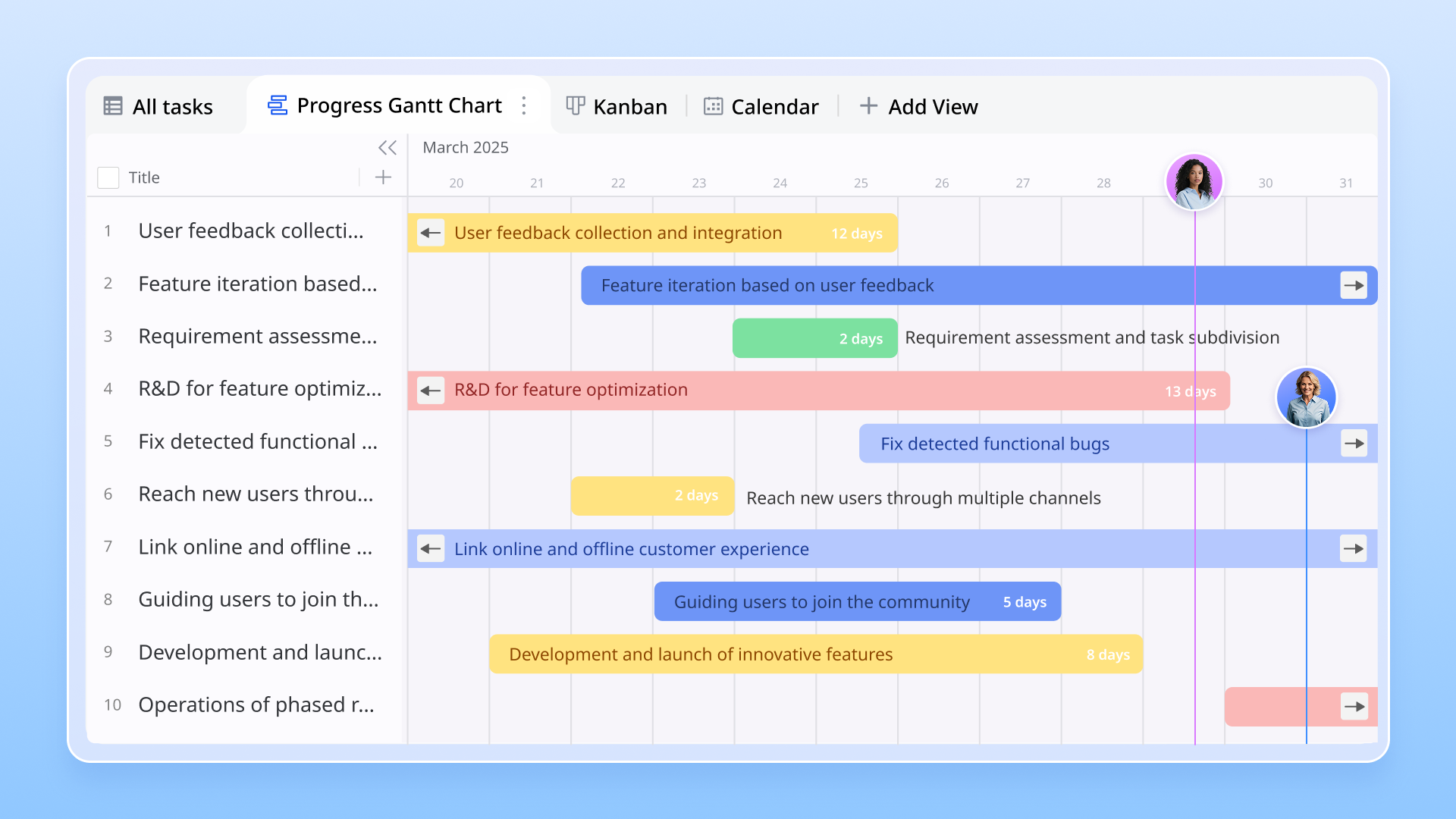
Lark Docs: Plan, align, and co-author in one living document
Lark Docs are where a project plan takes shape. Start with a project brief that captures goals, scope, success metrics, stakeholders, and key risks then share it instantly with the team. Lark Docs supports real-time co-editing, inline comments, and @mentions so contributors can draft schedules, add acceptance criteria, and resolve questions without email chains.
Use Docs templates to speed setup (project charter, RACI matrix, communication plan), then embed Base tables or Sheets snapshots right inside the document so planning artifacts stay next to the narrative. When decisions are made, convert notes into Lark Tasks or a milestone checklist with a click, so plans become executable items, not static PDFs.
Why it matters for project planning: Docs keep intent, rationale, and references in one place. Stakeholders review the same living plan, reducing ambiguity and accelerating buy-in.
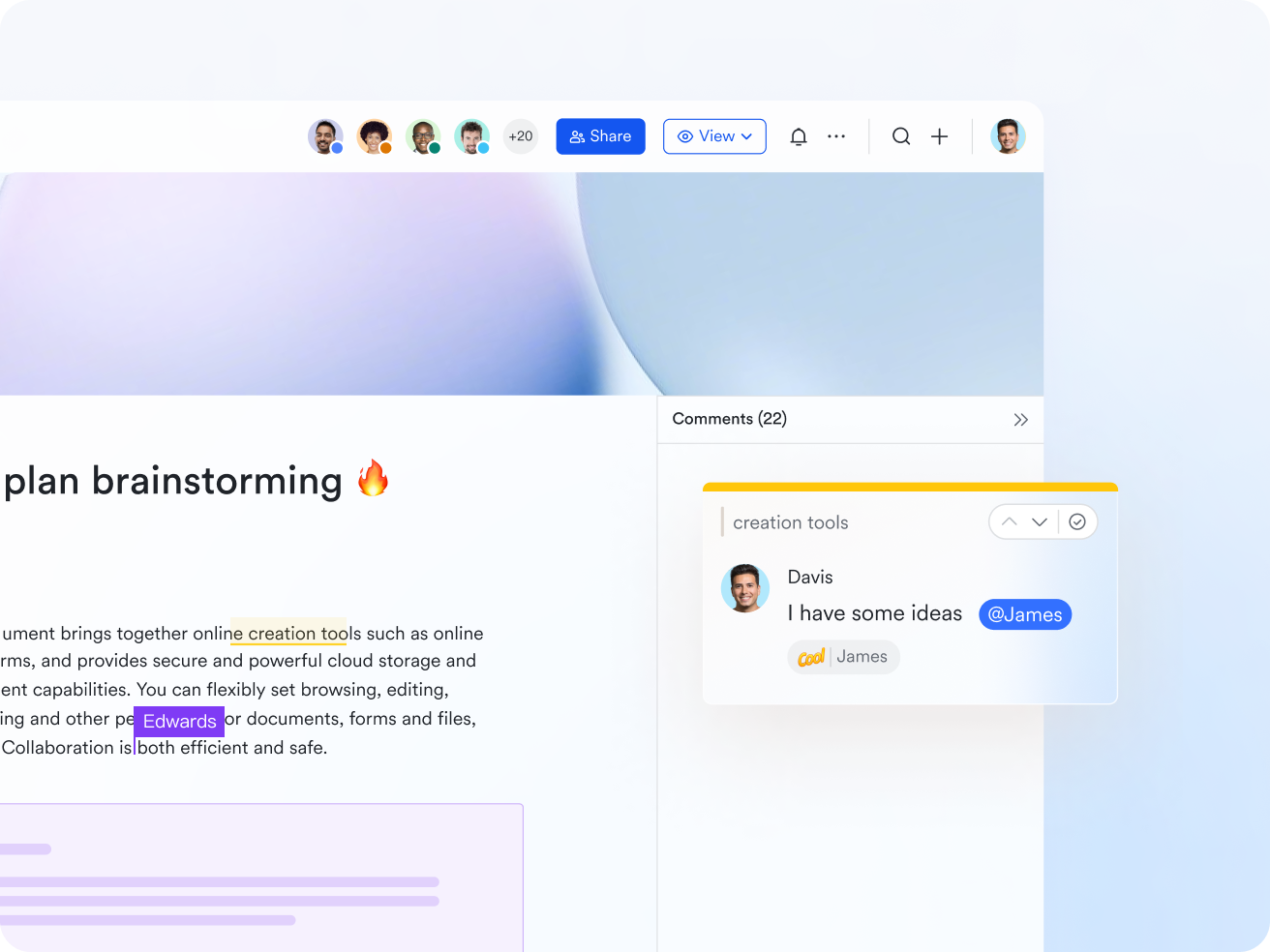
Lark Calendar: Turn deadlines into scheduled work and invites
Lark Calendar places milestones, review meetings, and checkpoints directly on the team calendar so timetables become actionable commitments. Create recurring review events (weekly standups, milestone reviews), attach the milestone Docs or relevant Base views to the event, and invite the exact group of contributors. Calendar reminders, RSVP tracking, and timezone-aware scheduling reduce back-and-forth and ensure reviewers show up prepared.
Taken together with Docs and Base, the Lark calendar ensures that milestone due dates are not just dates on a sheet, they're scheduled touchpoints with context and preloaded artifacts.
Why it matters for project planning: Calendar turns passive deadlines into active, shared commitments and ensures the right people are scheduled to make decisions on time.
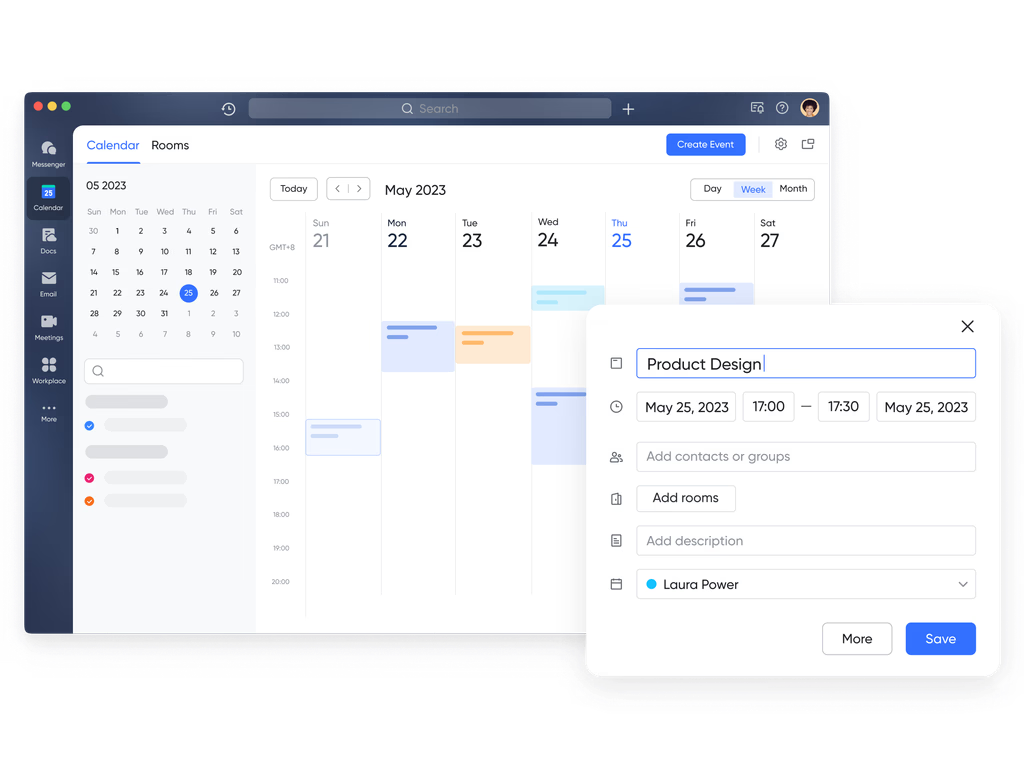
Task assignment: Turn plans into accountable action
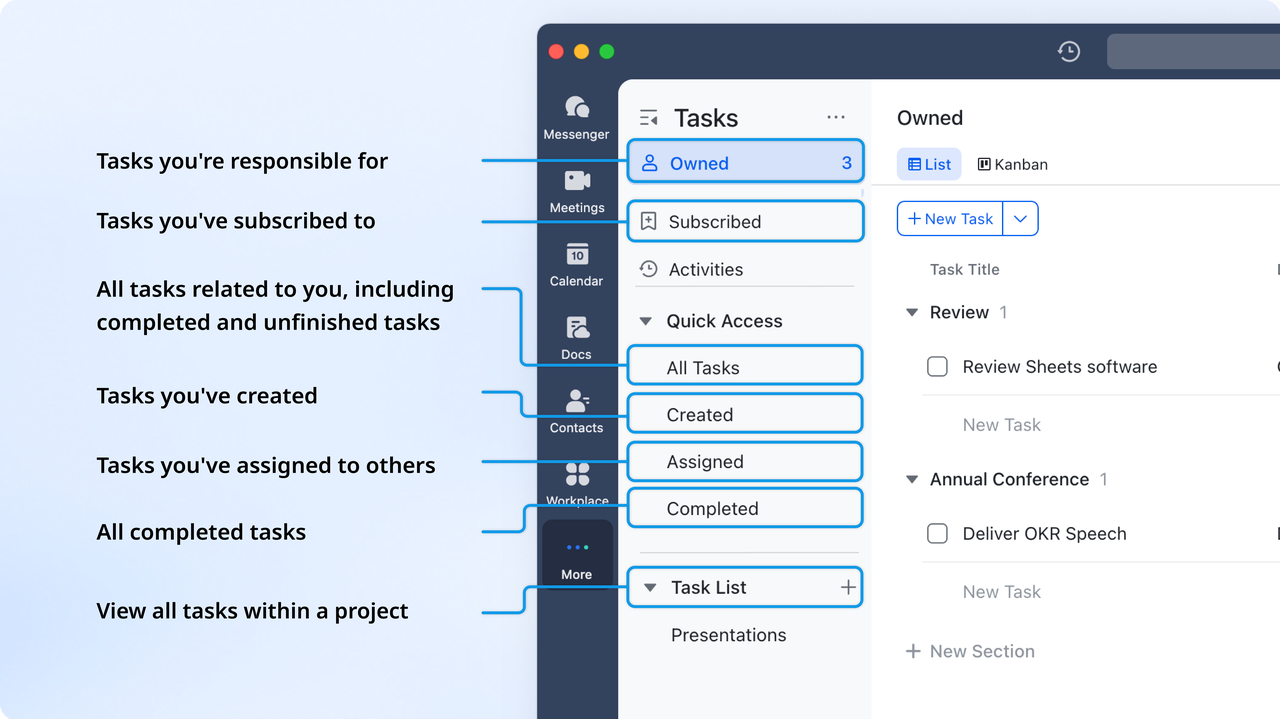
Lark Tasks are the execution layer of a project plan. From a single task, you can assign an owner, set a due date, add dependencies, attach Docs, and mark priority or estimated effort. Tasks can be created directly from a discussion in a Docs file, or a chat message preserving the originating context. Use subtasks to break milestones into actionable steps and apply automation rules that update task status, notify owners, or escalate overdue items.
Views (list, Kanban, Gantt) let contributors and managers see the same tasks from different perspectives: individual to-dos for contributors, timeline views for planners, and workload views for resource balancing. Combine tasks with custom fields (risk, impact, stage) to power dashboards and run simple formulas that show percent complete or predict slippage.
Why it matters for project planning: Tasks convert intent into accountable work. With clear owners, dates, and linked context, teams can execute without ambiguity and coordinators can measure progress in real time.
- Starter plan: Free forever plan that includes 11 powerful tools for up to 20 users. It also comes with 100GB of storage, 1000 automation runs, AI translations, and more.
- Pro plan: $12/user/month (billed annually) for up to 500 users. It includes everything in Starter plus group calling for up to 500 attendees, 15TB of storage, 50,000 automation runs, and more.
- Enterprise plan: Contact sales for custom pricing. Supports unlimited users and includes even more automation runs and advanced security, compliance, and management features.
Why a project plan matters
A structured plan guides ownership, decisions, timeline tracking, and dependencies at every stage. Teams comparing project plan examples or searching for project management plan examples often discover how documentation improves communication and accountability.
- Sets direction: Clarifies scope, expectations, and milestones. Defines how each deliverable connects to business objectives and ensures the team understands the overall intent.
- Aligns teams: Keeps all contributors focused on shared goals, avoiding overlap or confusion. Transparent planning helps maintain momentum even when priorities shift.
- Tracks progress: Provides measurable checkpoints, enabling data-driven decisions throughout execution. Progress tracking reduces the risk of unnoticed delays.
- Improves communication: Offers a single reference point for updates, dependencies, and approvals, minimizing back-and-forth.
- Reduces risks: Identifies potential bottlenecks early, allowing mitigation before they impact timelines or budgets.
A clear plan turns scattered efforts into coordinated action, helping organizations stay agile and accountable.
Best practices for successful project planning
Effective project planning starts with clarity, structure, and consistent follow-through. A well-built plan helps teams stay aligned, manage risks early, and move through each phase with confidence. When the right habits are in place, even complex work becomes easier to manage.
- Define ownership: assign clear accountability for every task and deliverable, so everyone knows their role and expectations.
- Use milestones: set meaningful checkpoints that make progress easy to monitor and adjust.
- Keep communication transparent: share updates in common spaces so all team members stay aligned.
- Automate repetitive updates: reduce manual effort by using automated reminders and status updates.
- Review weekly: look at KPIs and identify project blockers early to maintain steady momentum.
- Adapt to change: refine the plan as priorities evolve to keep execution realistic and flexible.
Conclusion
A strong project plan gives teams clarity, confidence, and a shared reference across every phase of work. Many organisations begin by studying project implementation plan examples to understand how rollout steps, readiness checkpoints, and user adoption stages are documented. For projects requiring precise sequencing and duration tracking, MS Project plan examples provide timeline-based visibility and structured coordination. Some teams prefer editable files and use Word project plan examples for simple documentation that can be shared, adjusted, and reviewed easily.
Fast-paced environments and iterative delivery teams explore agile project plan examples to support continuous improvement and evolving requirements. Choosing the right planning approach depends on team size, scope, and delivery method. Modern work environments also benefit from platforms like Lark, where planning, documentation, tracking, and communication can stay connected in one place. This helps reduce manual updates, improves visibility, and supports faster and more confident execution across the full project lifecycle.
FAQs
What is the purpose of a project plan?
A project plan defines the roadmap for achieving goals by outlining tasks, timelines, and ownership. It brings clarity and structure to every stage of execution. Teams can track milestones, allocate resources, and avoid miscommunication. With connected planning tools like Lark, these processes become more streamlined and collaborative, allowing real-time updates and shared visibility.
How can I create a simple project plan quickly?
The easiest way to build a project plan is to start with a clear list of objectives, responsibilities, and deadlines. A simple table or structured template can help organize everything in one view. Using a workspace like Lark lets teams co-edit, assign owners, and track progress without switching tools, keeping planning fast and efficient.
What's the difference between a project plan and a project schedule?
A project plan defines the overall strategy, objectives, and scope, while a schedule focuses specifically on when tasks will happen. The plan gives direction; the schedule ensures timing and sequencing. Lark connects both through linked tasks, calendar events, and shared documents, so teams can see strategic goals and daily schedules in one place
Can I manage agile projects with a project plan template?
Yes, a project plan template can easily support agile workflows by accommodating sprints, backlogs, and review cycles. It gives structure without limiting flexibility. Tools like Lark make this process smoother by letting teams update sprint progress, adjust priorities, and track feedback collaboratively in real time.
How does Lark help teams with project planning and milestone tracking?
Lark brings every planning element together documents, data tables, calendars, and tasks in one workspace. Teams can create project briefs, assign deliverables, and monitor milestones with built-in dashboards. The connected setup reduces context switching and ensures progress stays visible from planning to completion.
Related reading
Table of contents
Start using Lark today

Manage all your work in one place
Boost team efficiency by 10x
Save up to 70% on software costs
Table of contents
Start using Lark today
Manage all your work in one place
Boost team efficiency by 10x
Save up to 70% on software costs
Keep reading







2026 Lark Technologies Pte. Ltd.
Headquartered in Singapore with offices worldwide.






Explore: