














Requirements Gathering Templates: Guide for Project Success

Ryan Tanner
Product Marketing Specialist
Sep 18, 2026
Ryan Tanner
Sep 18, 2026

16 min read


Requirements gathering is the foundation of any successful project it ensures teams fully understand business goals, user needs, and technical constraints before development begins. Without a clear set of requirements, projects risk delays, rework, and scope creep. Using structured requirements gathering templates helps streamline the process, align stakeholders, and turn insights into actionable plans.
With an all-in-one collaboration platform like Lark, teams can document, review, and update requirements in real time, combining docs, chats, and task boards in one workspace. This organized approach keeps everyone aligned from planning to delivery, improving accuracy and project outcomes.

What are the requirements gathering, and why does it matter
Requirements gathering is the process of identifying, documenting, and validating what a project needs to achieve, from business objectives to user expectations and technical specifications. It acts as the bridge between stakeholders, project managers, and developers, ensuring everyone shares a clear understanding of the desired outcomes before work begins. A well-structured requirements gathering phase minimizes confusion, reduces costly revisions, and sets measurable success criteria.
This process is especially important because unclear or incomplete requirements are among the top causes of project failure. By using requirements gathering templates and collaborative tools like Lark, teams can capture feedback, prioritize needs, and maintain transparency across departments in one shared workspace. Whether defining functional features or compliance standards, effective requirements gathering helps teams stay focused, aligned, and ready to deliver solutions that truly meet business and user needs.
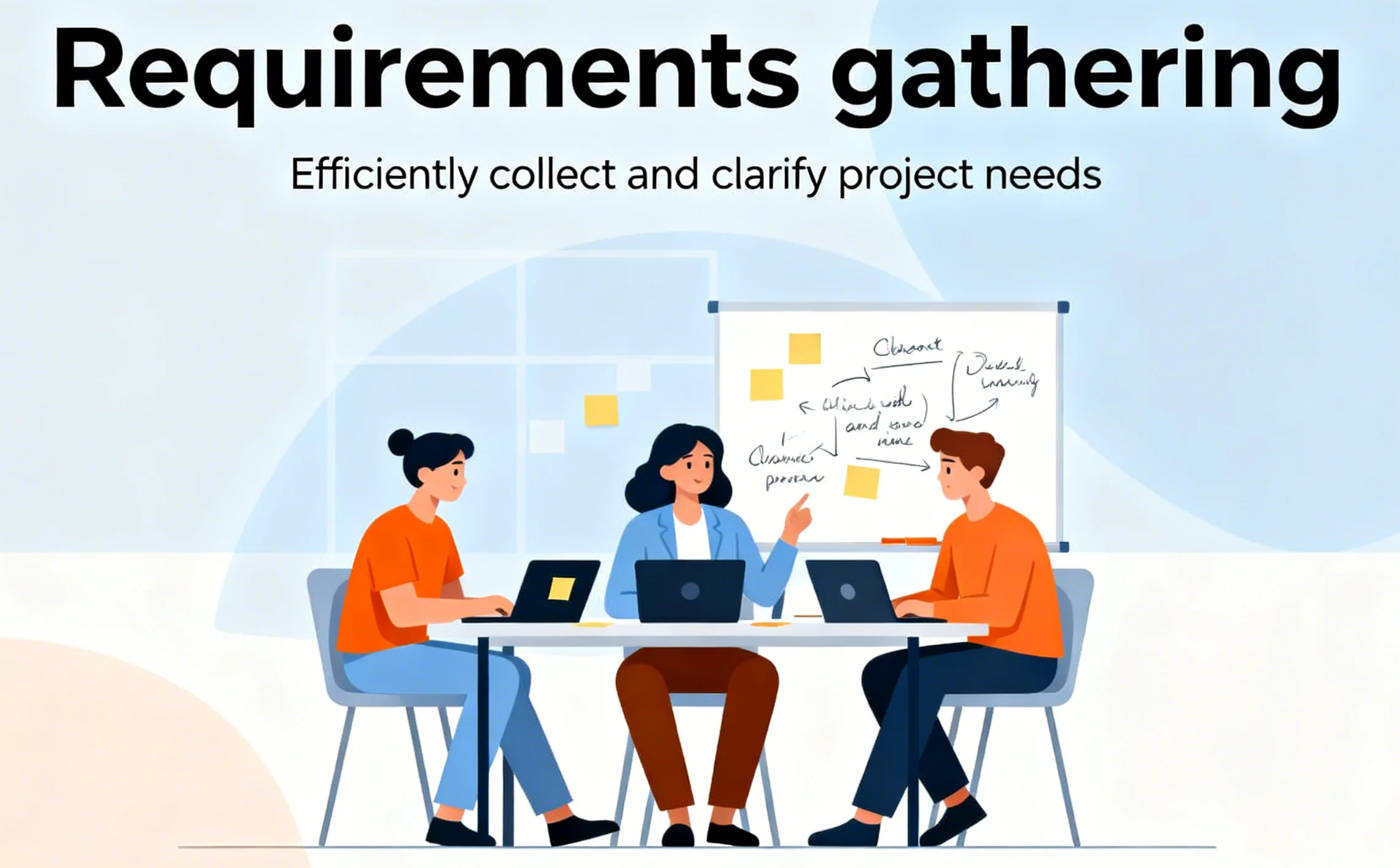
Image source: unsplash.com
Types of requirements you should collect
Gathering requirements isn't just about listing needs; it's about understanding them from multiple perspectives. Each type of requirement provides a unique lens on what makes a project successful, ensuring that business goals, user needs, and technical capabilities align seamlessly. Here's a breakdown of the key types you should capture:
- Business requirements: Business requirements outline the overarching purpose and measurable outcomes a project aims to achieve. They define the why behind the initiative covering business goals, strategic objectives, KPIs, and the value it will bring to the organization. These requirements ensure that every feature or decision aligns with broader company priorities, such as improving efficiency, boosting revenue, or enhancing customer satisfaction. A clear business requirement sets the foundation for all other requirement types.
- Functional requirements: Functional requirements describe what the system, product, or service must do to meet business needs. They focus on specific features, behaviors, workflows, and interactions that drive user and business outcomes. Examples include user authentication, data processing, or report generation. Well-written functional requirements ensure developers and stakeholders share a common understanding of expected functionality, reducing the risk of rework or misinterpretation during development.
- Non-functional requirements: Non-functional requirements define the quality attributes that determine how a system performs rather than what it does. They include performance, security, scalability, usability, reliability, and overall user experience. For example, a system might need to support 10,000 users simultaneously or load within two seconds. These requirements help maintain consistency and ensure the final solution meets performance standards and compliance expectations under real-world conditions.
- Technical requirements: Technical requirements specify the technological foundation needed to build, deploy, and maintain the project effectively. They cover programming languages, frameworks, system architecture, integrations, hardware, and data storage needs. These requirements guide development teams in selecting the right tools and technologies, ensuring compatibility and long-term scalability. Clear technical specifications reduce implementation risks and improve the project's ability to adapt as technology evolves.
- Stakeholder requirements: Stakeholder requirements capture the needs, expectations, and constraints of everyone involved in the project from executives and product owners to end users and developers. They ensure all perspectives are considered, fostering transparency and shared understanding. By identifying roles, responsibilities, and success criteria early, stakeholder requirements help prevent conflicts, improve collaboration, and ensure the final deliverable meets everyone's expectations and goals.
What makes a good requirements gathering template
A strong requirements gathering template acts as more than a simple checklist it's the foundation for clear communication, smarter decisions, and smoother execution. It should help teams:
- Capture details in a structured, repeatable format: A well-designed template ensures every requirement is documented consistently, leaving no gaps or ambiguities. Structured fields help teams capture essential information like purpose, owner, and acceptance criteria—making requirements easy to review, update, and track throughout the project.
- Keep stakeholders aligned on scope, expectations, and priorities: Centralized documentation ensures all stakeholders share the same understanding of project goals and deliverables. This alignment minimizes miscommunication, prevents scope creep, and keeps everyone working toward a common vision.
- Prioritize features and must-have items based on business impact and feasibility: Templates help teams organize and rank requirements by value, urgency, and resource availability. This ensures that high-impact features are delivered first while maintaining a realistic project scope and timeline.
- Simplify traceability from initial concept to final delivery: Linking each requirement to project milestones, tasks, and test cases ensures complete visibility across the lifecycle. Teams can easily trace how every decision contributes to the final outcome, supporting accountability and compliance.
- Adapt seamlessly across both Agile and Waterfall workflows: Flexible templates allow teams to customize their approach, whether they're working in sprints or sequential phases. They provide structure without rigidity, enabling smooth transitions between planning, execution, and review.
However, even the most well-designed spreadsheets eventually hit their limits. As projects scale and multiple stakeholders get involved, version control issues, scattered feedback, and endless email threads make collaboration cumbersome. Requirements gathering needs real-time visibility, shared ownership, and collaborated communication not static documents.
Modern teams often face limits with traditional tools version control issues, scattered feedback, and time-consuming updates slow progress. That's where a good collaborative platform like Lark makes a difference. It helps teams improve efficiency by co-editing requirement docs, discussing changes via built-in chat, managing approval workflows, and linking each requirement directly to project tasks and milestones. Let's step closer to this tool with its ready-to-use templates now
Ready-to-use requirements gathering templates
1. Requirements & bug management
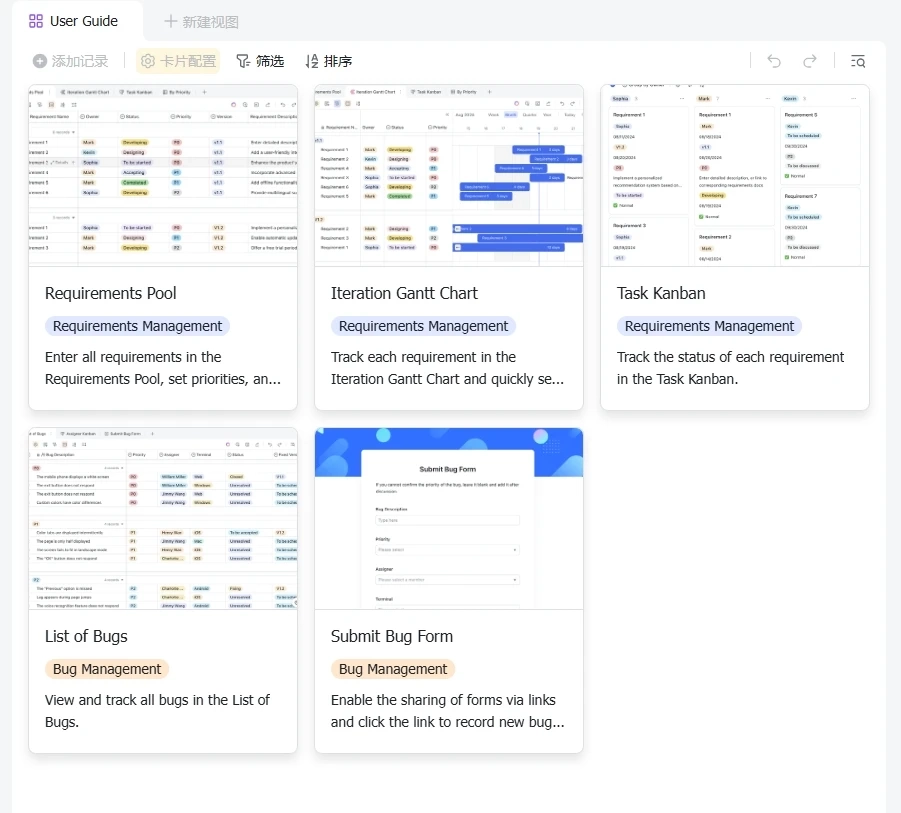
The requirements & bug management template is a comprehensive tool designed to help you manage and track your project requirements and bugs. It provides a structured way to view and track all bugs in the 'List of Bugs' and monitor the status of each requirement in the 'Task Kanban'. This template is designed to streamline your project management process, making it easier to identify, prioritize, and resolve bugs, and keep track of project requirements.
2. Project planning & implementation
This template is designed to help you efficiently plan and implement your projects by providing a clear structure for outlining project background, objectives, milestones, and core team members. With Lark's advanced features, you can easily collaborate with your team, track progress, and ensure that everyone stays on the same page throughout the project lifecycle.
3. 4x4 risk assessment
The 4x4 risk assessment template is a comprehensive tool designed to help you identify, assess, and manage risks in your organization. It allows you to categorize risks based on their severity and likelihood, and assign them to specific departments for management. The template also includes fields for risk description, the date it was reported, and the person who created the entry. This way, you can keep track of all potential risks and ensure they are addressed promptly and effectively.
4. Project request list
Keeping track of project requests can be a daunting task, especially when they come from different sources and need to be prioritized. This template is designed to help you manage all your project requests in one place. It includes fields for the request, its status, the task leader, and the duration of the task. It also includes a Gantt chart for visualizing the timeline of each request.
5. Project roadmap Gantt chart
The project roadmap Gantt chart template is a visual tool for project planning and tracking. It allows you to display the project timeline, the tasks involved, and who is responsible for each task. It also provides a clear view of the project's progress, with tasks displayed against time. This template includes features such as task view, project view, priority view, and status view. It also allows for customization of fields and settings, including filters, groups, and sorting options.
6. Gantt chart for requirement management
Managing project requirements can be a complex task. It involves tracking different modules, versions, and priorities, and keeping an eye on their status - whether they are under development, pending testing, or pending release. This Gantt chart for requirement management template is designed to simplify this process. It provides a clear, visual representation of your project requirements, making it easier to manage and track their progress.
7. Demand collection & management
The Demand collection & management template is a comprehensive tool designed to help you manage your project demands efficiently. It includes a Gantt chart for project tracking, a progress Kanban for visualizing task status, and a project information section for detailed project descriptions. This template also allows you to add records, configure fields, and customize views to suit your project needs.
8. Product development template
This development template transforms complex product development into a manageable process. It allows teams to document and prioritize requirements, assign responsibilities, and set timelines, all within a unified workspace. With visual tools like Kanban boards and Gantt charts, teams can track progress and ensure alignment across all stages of development.
9. Game development management template
Tailored for the dynamic world of game development, this game development management template helps teams manage requirements, track tasks, and monitor progress. It includes sections for testing, art supplies, and requirements lists, providing a comprehensive overview of the project. The template supports multimedia content, allowing teams to include relevant images for better visualization and understanding.
10. Requests management template
Managing incoming requests can be challenging, especially when they come from various channels and formats. Lark's request management template centralizes all requests, allowing teams to categorize, assign, and track them efficiently. This ensures that every request is addressed promptly and accurately, streamlining the workflow and enhancing productivity.
Understand the tool: Use Lark to manage the needs and requests better
Great requirements need more than a spreadsheet or templates. They need clarity, ownership, real-time updates, and traceability. Considering those needs, Lark provides all of this in one workspace, helping teams move from discovery to documentation to project success without losing momentum.
- Lark Base for structured requirement tracking and prioritization
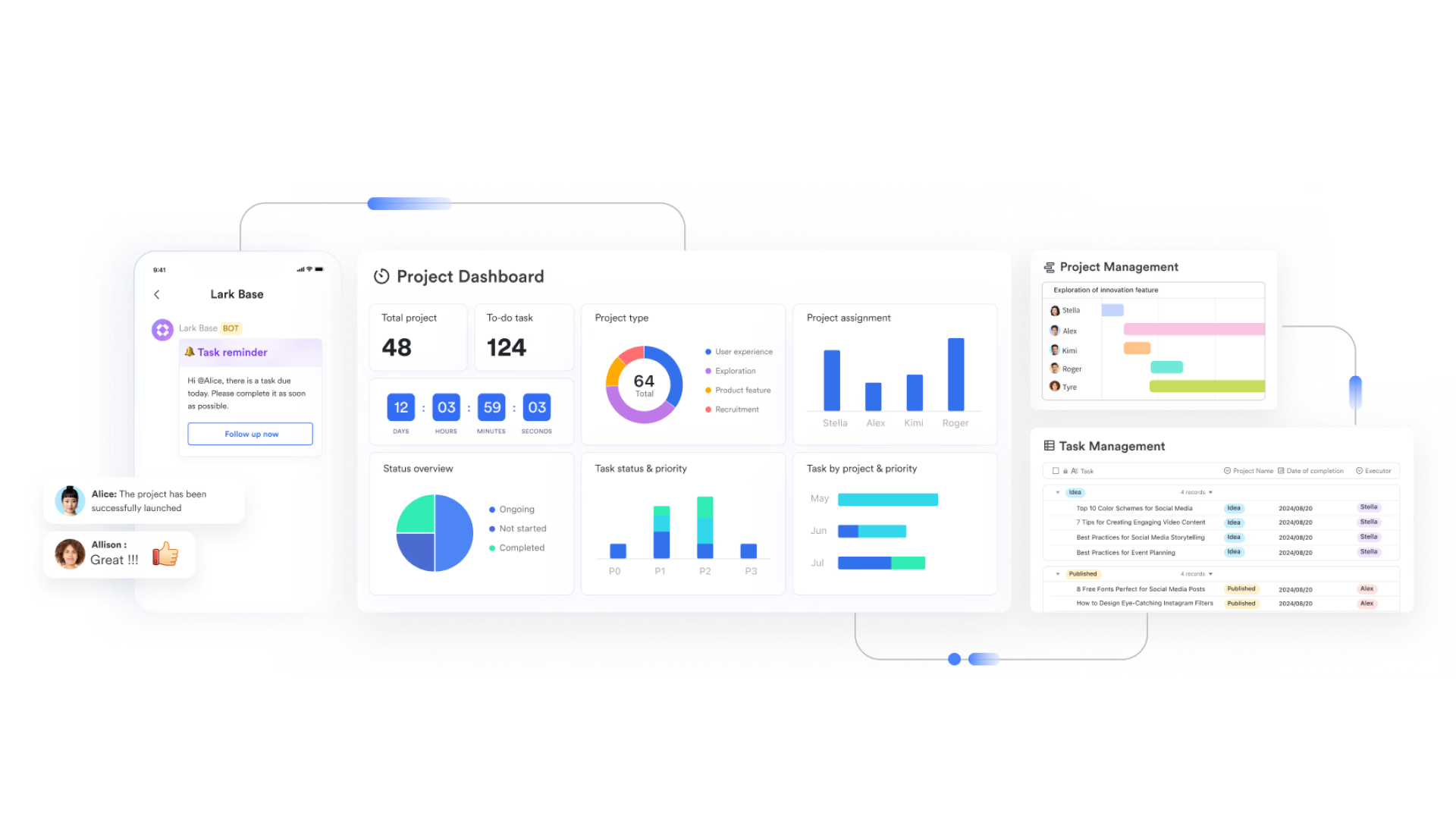
Lark Base serves as a smart requirements database where product, engineering, and business teams can classify items by priority, status, acceptance criteria, and requirement type —functional, technical, or user-focused. Teams can switch between Kanban, List, Gannt, or Calendar, or use dashboard to track progress from multiple perspectives. Dependencies can be linked to prevent downstream blockers, keeping requirement records active, actionable, and visually organized throughout development.
- Lark Docs for real-time requirement documentation and alignment
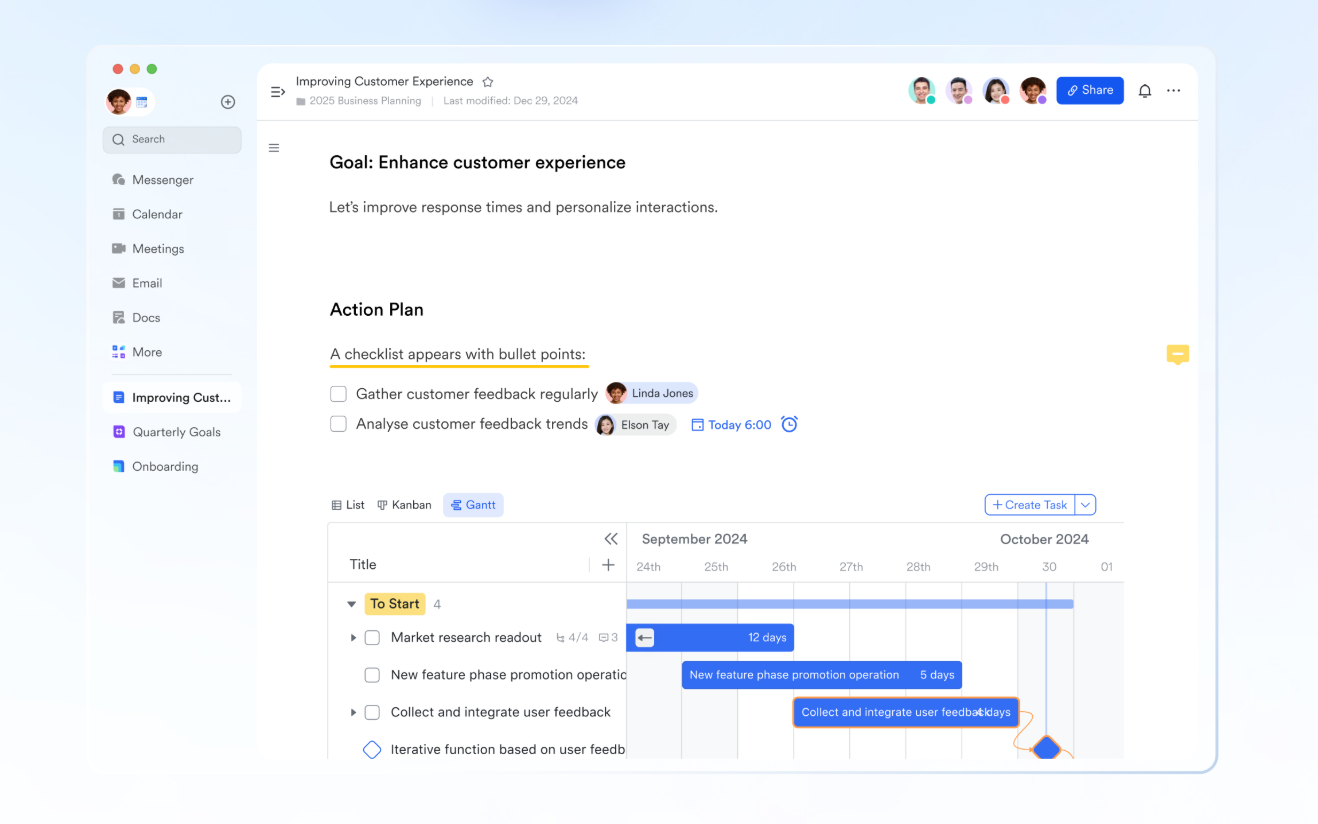
Requirements evolve quickly from initial workshop notes to refined specifications. With Lark Docs, teams can co-edit requirement details in real time, embed stakeholder feedback, and add visuals, such as screenshots or diagrams, for greater clarity. @mentions notify the right people to review or approve updates, while comments remain attached at the exact point of discussion. This eliminates scattered email threads and outdated attachments, ensuring everyone stays aligned on the latest version of the requirement.
- Lark Tasks for ownership, deadlines, and automated follow-ups
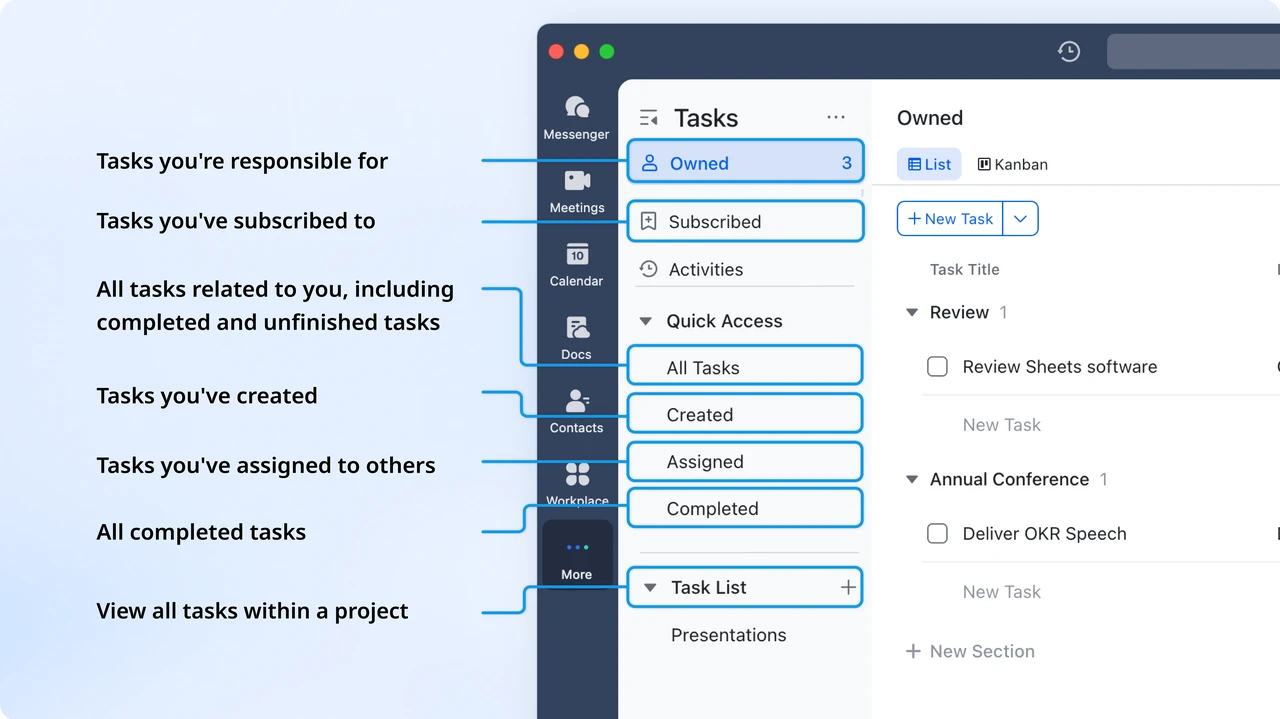
Requirements often fail not because they're unclear but because nobody owns the next step. Lark Tasks solves this by assigning requirement-specific actions to accountable owners, complete with due dates and progress indicators. Automated reminders surface pending items before delays become costly, and managers get clear visibility into risks and roadblocks. This turns requirements into real execution milestones instead of forgotten notes.
- Lark Meetings & built-in Magic Share for live requirement reviews
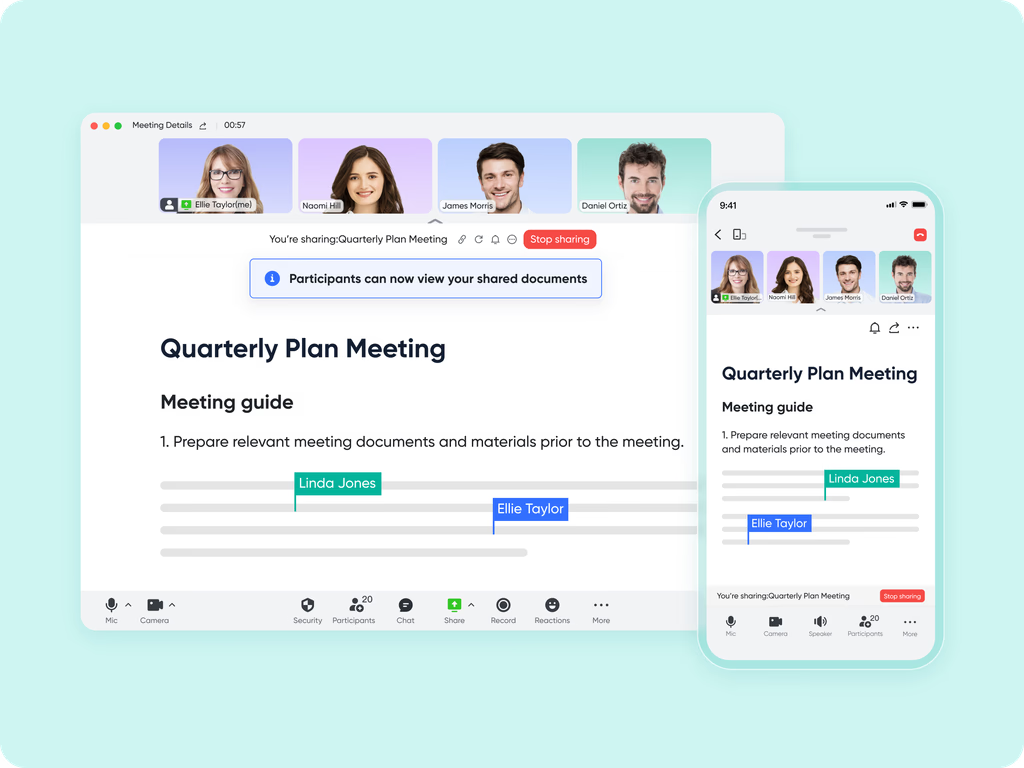
Alignment happens fastest when teams review requirements together in context. With Lark Meetings, requirement Docs or Base records can be opened directly through Magic Share, allowing real-time edits during discussions without switching screens or tools. Stakeholders see updates as they happen, eliminating misunderstandings and speeding up approvals. This makes requirement review sessions faster, more accurate, and far more collaborative.
- AI Meeting Notes for capturing requirement decisions automatically
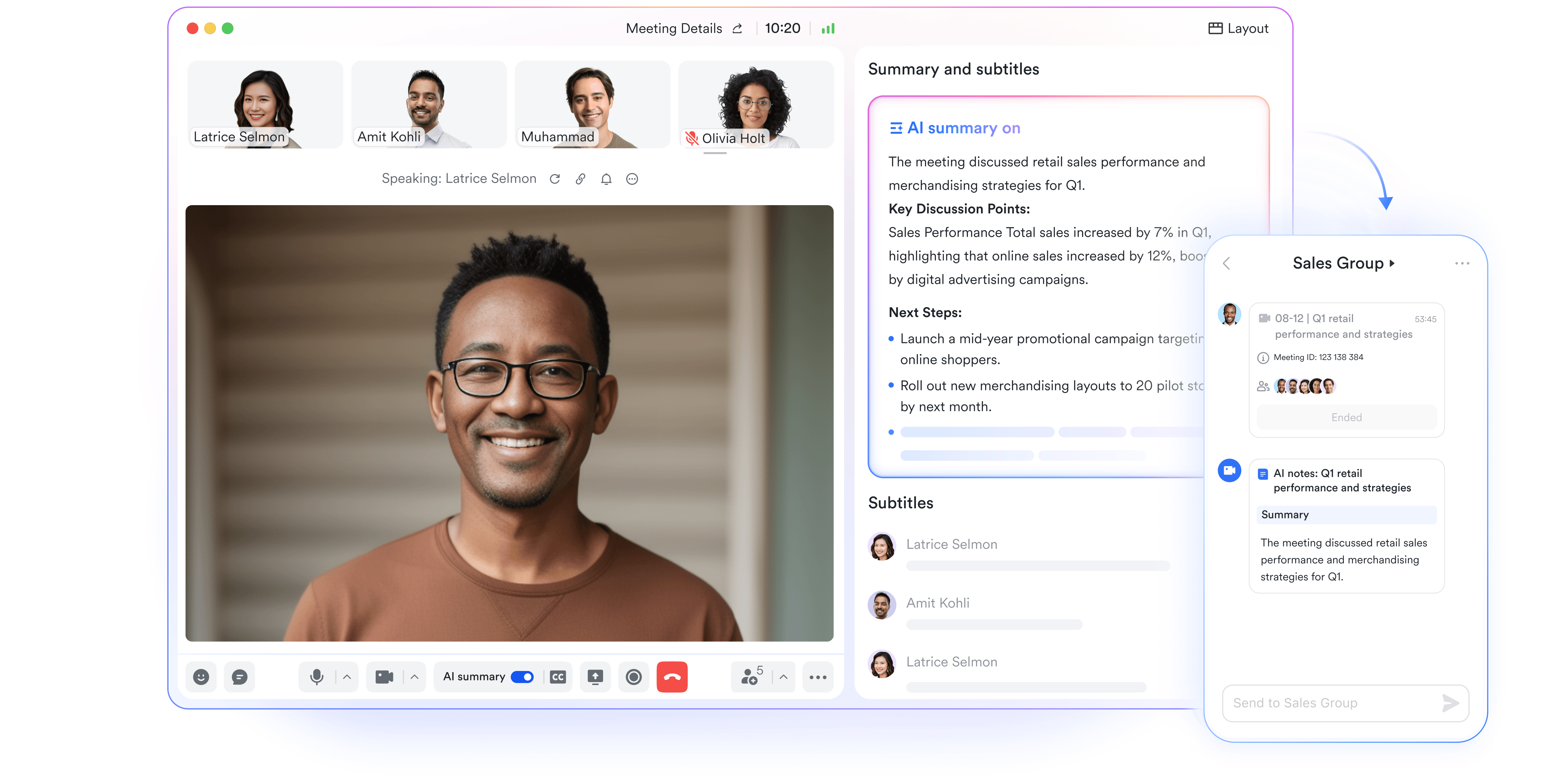
Project decisions often get lost after meetings, leading to rework and conflicting assumptions. AI Meeting Notes automatically captures the key outcomes of requirement discussions, including approval points, next steps, stakeholder comments, and required changes. These summaries sync back to each requirement record, creating a full traceable history of why decisions were made. That means no more "We agreed on something different" arguments later in development.
- Starter plan: Free forever plan that includes 11 powerful tools for up to 20 users. It also comes with 100GB of storage, 1000 automation runs, AI translations, and more.
- Pro plan: $12/user/month (billed annually) for up to 500 users. It includes everything in Starter plus group calling for up to 500 attendees, 15TB of storage, 50,000 automation runs, and more.
- Enterprise plan: Contact sales for custom pricing. Supports unlimited users and includes even more automation runs and advanced security, compliance, and management features.
Common mistakes in requirements gathering and solutions
Even the most skilled teams can run into roadblocks when requirements are unclear, scattered, or outdated. These challenges often slow down delivery, cause misunderstandings, and create extra work for everyone involved. Below are the most common pitfalls teams face during requirements gathering and how Lark helps turn these issues into opportunities for clarity, speed, and seamless team collaboration.
Mistake 1: Requirements are too vague or incomplete: Unclear or loosely defined requirements lead to confusion, conflicting expectations, and costly rework later in the project. Teams waste time clarifying what's needed instead of building solutions.
How Lark fixes it: With Lark Docs, teams can co-edit requirement details in real time, adding screenshots, tables, and embedded links for full context. Stakeholders can be tagged directly for clarification, ensuring every question is addressed instantly. The entire team always works on the latest version, no outdated attachments or fragmented drafts.
Mistake 2: No single source of truth: When requirements are spread across emails, spreadsheets, and chat threads, version chaos takes over. It becomes nearly impossible to tell which document is final or who approved what.
How Lark fixes it: Lark Base acts as a centralised hub where all requirement fields, acceptance criteria, and priorities are stored in one structured database. Information is searchable, traceable, and accessible to everyone who needs it, making alignment faster and decision-making smoother.
Mistake 3: Missing ownership and follow-ups: Without clear accountability, requirements can sit idle. Teams lose track of who's responsible for updates or validation, stalling progress and delaying delivery.
How Lark fixes it: Lark seamlessly connects Base records to Lark Tasks, automatically creating assignments with owners, due dates, and reminders. Everyone knows what's next, and nothing slips through the cracks, keeping the entire process transparent and action-driven.
Mistake 4: Decisions aren't properly recorded: Verbal approvals and informal agreements often get forgotten, leading to disputes about what was agreed upon or when.
How Lark fixes it: With Lark Meetings + AI Meeting Notes, every discussion, decision, and risk is automatically summarized and synced back to the related requirement in Base. Teams gain an auditable history of choices made, ensuring accountability and easy reference throughout the project lifecycle.
Mistake 5: No way to track changes over time: When requirements evolve (as they often do), teams struggle to track what changed, who changed it, and why. This lack of visibility leads to misalignment during development.
How Lark fixes it: Both Lark Docs and Lark Base maintain a complete revision history, capturing all edits and updates. Every change is logged with author details and timestamps, allowing teams to trace the evolution of each requirement from discovery to delivery.
Mistake 6: Slow stakeholder alignment: Feedback loops drag when everyone reviews documents separately. By the time approvals come in, the information is already outdated.
How Lark fixes it: Using Magic Share, teams can open requirement docs or databases directly within Lark Meetings for live collaboration. Stakeholders can discuss, comment, and approve in real time reducing back-and-forth delays and accelerating consensus.
Mistake 7: Requirements don't connect to project execution: Spreadsheets are great for capturing ideas, but not for managing execution. Teams often struggle to move from planning to delivery efficiently.
How Lark fixes it: In Lark, requirements naturally flow into execution. Teams can link requirements to tasks, dashboards, and automated workflows, ensuring every item transitions smoothly from concept to completion. This unified approach eliminates manual handoffs and keeps delivery on track every time.
Conclusion
Gathering requirements is often one of the most challenging and time-consuming stages of project planning, but with the right templates, it becomes simpler, faster, and far more effective. Structured templates ensure that every business goal, technical detail, and stakeholder expectation is captured clearly and consistently. They eliminate confusion, reduce rework, and create a single source of truth that guides the entire project lifecycle.
Modern tools like Lark take this a step further, transforming static templates into dynamic, collaborative workspaces. Teams can co-edit documents, assign owners, track changes, and connect requirements directly to execution. The result is a streamlined, transparent process where ideas flow smoothly from discovery to delivery, helping teams move with clarity, confidence, and precision from the very start of every project.
FAQs
How do you write a good set of project requirements?
Start by clearly defining the project's purpose, goals, and success criteria. Involve key stakeholders early to gather input and validate needs. Use structured templates to organize business, functional, and technical details, ensuring every requirement is specific, measurable, and testable.
Are Excel templates still effective for gathering requirements?
Excel templates work well for small projects but quickly become difficult to manage as complexity and collaboration increase. They lack version control, real-time updates, and integration features. Modern tools like Lark offer smarter, collaborative alternatives for tracking and updating requirements dynamically.
What's the difference between business and software requirements?
Business requirements define what the organisation aims to achieve, objectives, KPIs, and outcomes. Software requirements explain how technology will support those goals, detailing system features, behaviours, and integrations.
How can Lark help improve the requirements gathering process?
Lark unifies documentation, collaboration, and execution in one workspace. Teams can co-edit requirements, assign tasks, track versions, and connect discussions directly to project workflows, ensuring clarity, accountability, and faster stakeholder alignment throughout the process.
Related reading
Table of contents
Start using Lark today

Manage all your work in one place
Boost team efficiency by 10x
Save up to 70% on software costs
Table of contents
Start using Lark today
Manage all your work in one place
Boost team efficiency by 10x
Save up to 70% on software costs
Keep reading







2026 Lark Technologies Pte. Ltd.
Headquartered in Singapore with offices worldwide.






Explore: