Every project carries uncertainty. Timelines shift, resources change, and unexpected issues can surface at any stage. The difference between a project that fails and one that succeeds often depends on how well teams anticipate and manage risks. That is where a risk log template becomes essential.
A risk log helps teams identify, assess, and respond to potential issues before they turn into costly problems. Instead of reacting late, teams can track risks, assign owners, and plan mitigation steps in advance. While many still use spreadsheets, collaborative tools like Lark offer a more organized, real-time way to keep risk logs up to date and visible to everyone involved.
What is a risk register template?
A risk register template is a structured document or digital tool used to identify, assess, and manage potential risks throughout a project or business process. It serves as a central record where teams list possible threats, evaluate their likelihood and impact, , and define mitigation strategies.
A typical risk register template includes fields such as risk description, category, probability, impact score, overall risk rating, owner, response plan, and review dates. This structure helps teams prioritize high-impact risks and track how each one is being handled over time.
Rather than a static document, a risk register should be updated regularly as new risks emerge or existing ones change. Many teams use spreadsheet-based templates, while others adopt to keep risk registers visible, organized, and easy to maintain across the entire team.
4 key elements of a good project risk log template
A well-structured risk log template ensures risks are not only recorded but also effectively assessed and managed. Each element in the template should support clear decision-making and accountability. The following components form the foundation of a practical and actionable project risk log.
- Risk description and category: Every risk entry should clearly explain the issue in specific, measurable terms. Vague descriptions make it difficult to assess impact or create mitigation plans. Categorizing risks—such as technical, financial, operational, or legal—helps teams spot patterns and manage similar risks together.
- Probability and impact scoring: Each based on its likelihood and the severity of its consequences. Teams often use a simple scale, such as 1–5 or Low, Medium, and High. Combining these scores helps prioritize which risks need immediate attention.
- Ownership and response strategy: Every risk must have a clearly assigned owner who is responsible for monitoring and managing it. The response strategy should define how the team plans to handle the risk, whether by avoiding, mitigating, transferring, or accepting it. This ensures risks are actively managed rather than just recorded.
- Status, review dates, and escalation notes: A risk log should track the current status of each risk, such as open, mitigated, or closed. Regular review dates help ensure as the project evolves. Escalation notes document when and why a risk was raised to higher management for action.
12 ready-to-use risk log templates
Ready-to-use risk log templates help teams identify, assess, and track potential project risks throughout execution. These templates provide a structured format for monitoring risk impact, mitigation plans, and response strategies.
4x4 risk assessment template
This template is a comprehensive tool designed to help you identify, assess, and manage risks by categorizing them based on severity and likelihood (the 4x4 matrix). It is an essential tool for project managers and leaders in high-risk industries like construction or healthcare to proactively address potential issues before they escalate.
Risk assessment template
Designed for businesses of all sizes, this template provides a high-level, comprehensive overview of potential risks. It covers the entire lifecycle of a risk—from identification and likelihood to current controls and target resolution dates—helping organizations develop long-term strategies to mitigate threats.
Risk assessment matrix for risk managers
This template provides a structured, centralized platform specifically for risk managers and compliance officers. It streamlines the tracking of operational, strategic, and legal risks, allowing teams to prioritize actions and document proactive mitigation strategies in a professional, audit-ready format.
Risk register template
A "must-have" for project planning, this template acts as a master log to keep track of every potential risk in one place. It focuses on accountability, listing the person responsible for each risk, the current status, and the next review date to ensure that no threat is forgotten during a project's lifecycle.
Risk-benefit analysis template
This template is designed for strategic decision-making. It helps teams weigh the potential dangers of a project or action against its expected rewards. By visualizing both sides of the coin, it allows leaders to make informed, balanced choices on whether a specific opportunity is worth the associated risk.
Operational risk management reporting
The template is designed to help organizations systematically track and report on risks arising from daily internal processes, human factors, and system failures. It provides a centralized framework to document risk events, assess their impact on business continuity, and monitor the progress of mitigation efforts.
Risk log template
This template is a fundamental tool for identifying and quantifying project threats. It uses a structured "low-medium-high" rating system for impact and probability, allowing managers to calculate a risk exposure score and assign clear ownership for mitigation actions.
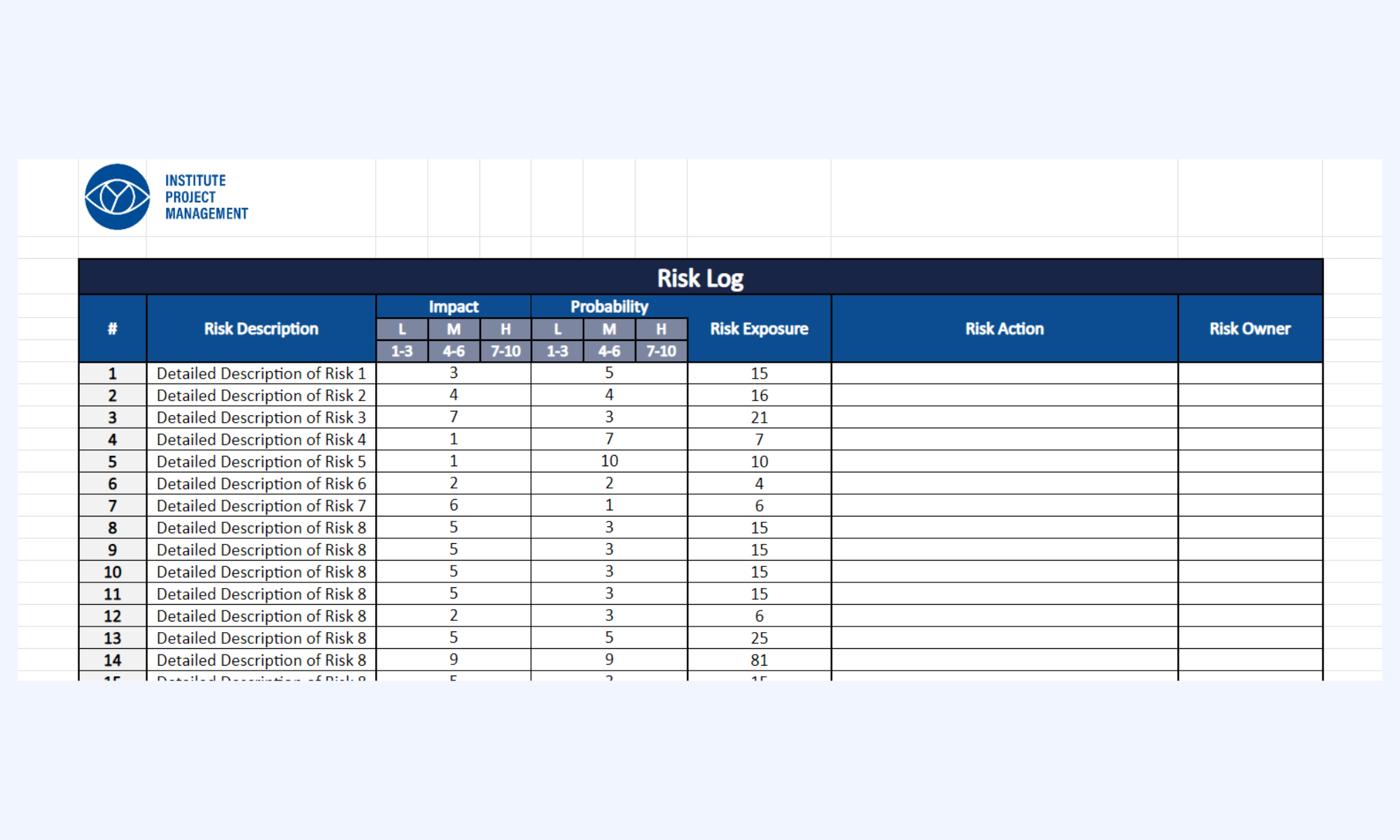
Image source: instituteprojectmanagement.com
Project risk register template
This collection offers a variety of formats ranging from simple spreadsheets to complex project trackers. These templates are designed to help teams capture risk descriptions, likelihood, and mitigation plans in a collaborative environment, making it easier to maintain a "living document" that evolves with the project.
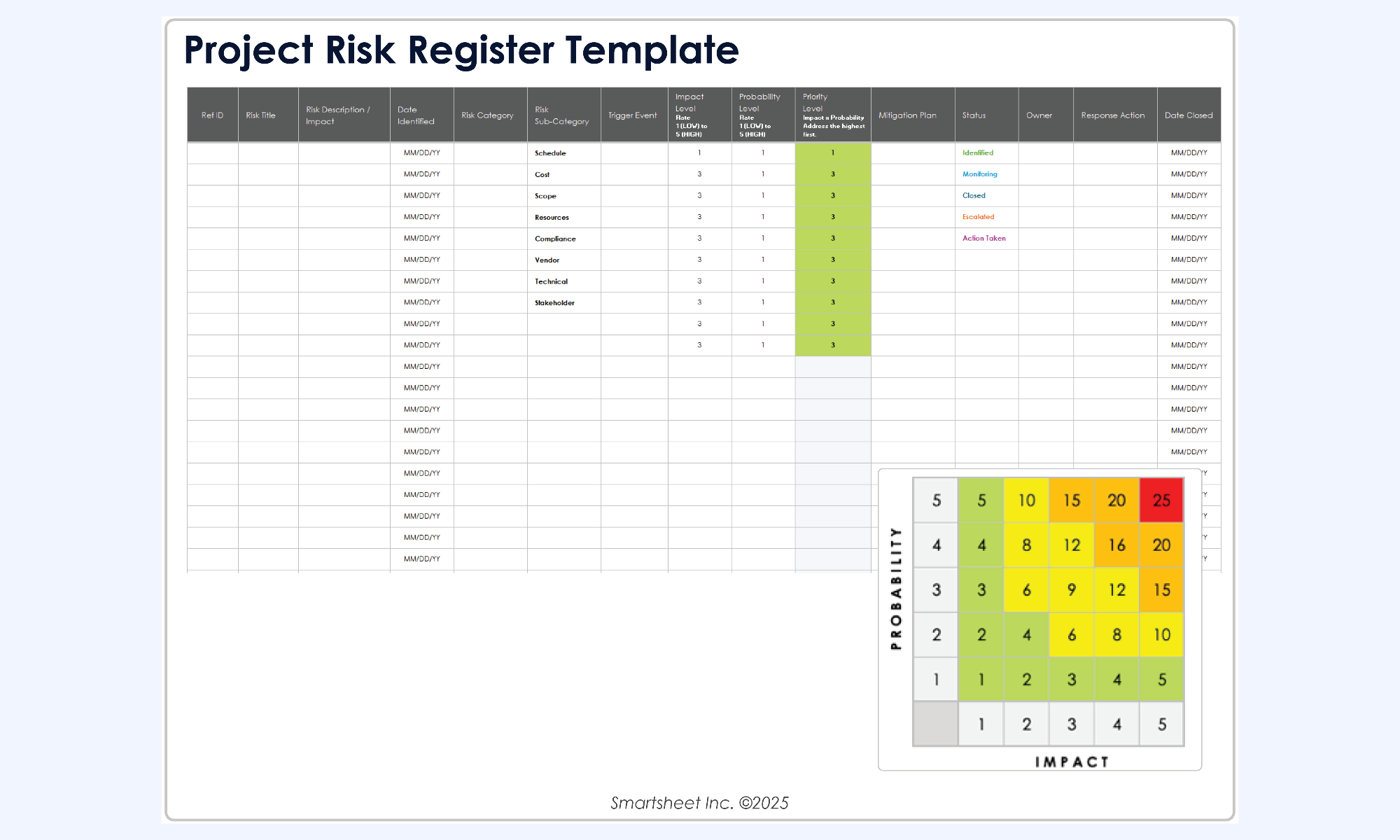
Image source: smartsheet.com
ISO 31000 checklists
Specifically aligned with ISO 31000 standards, this template focuses on safety and compliance. It provides a visual, clean layout for evaluating hazards and existing controls, ensuring that safety-critical environments have a documented trail of risk assessment and prevention.
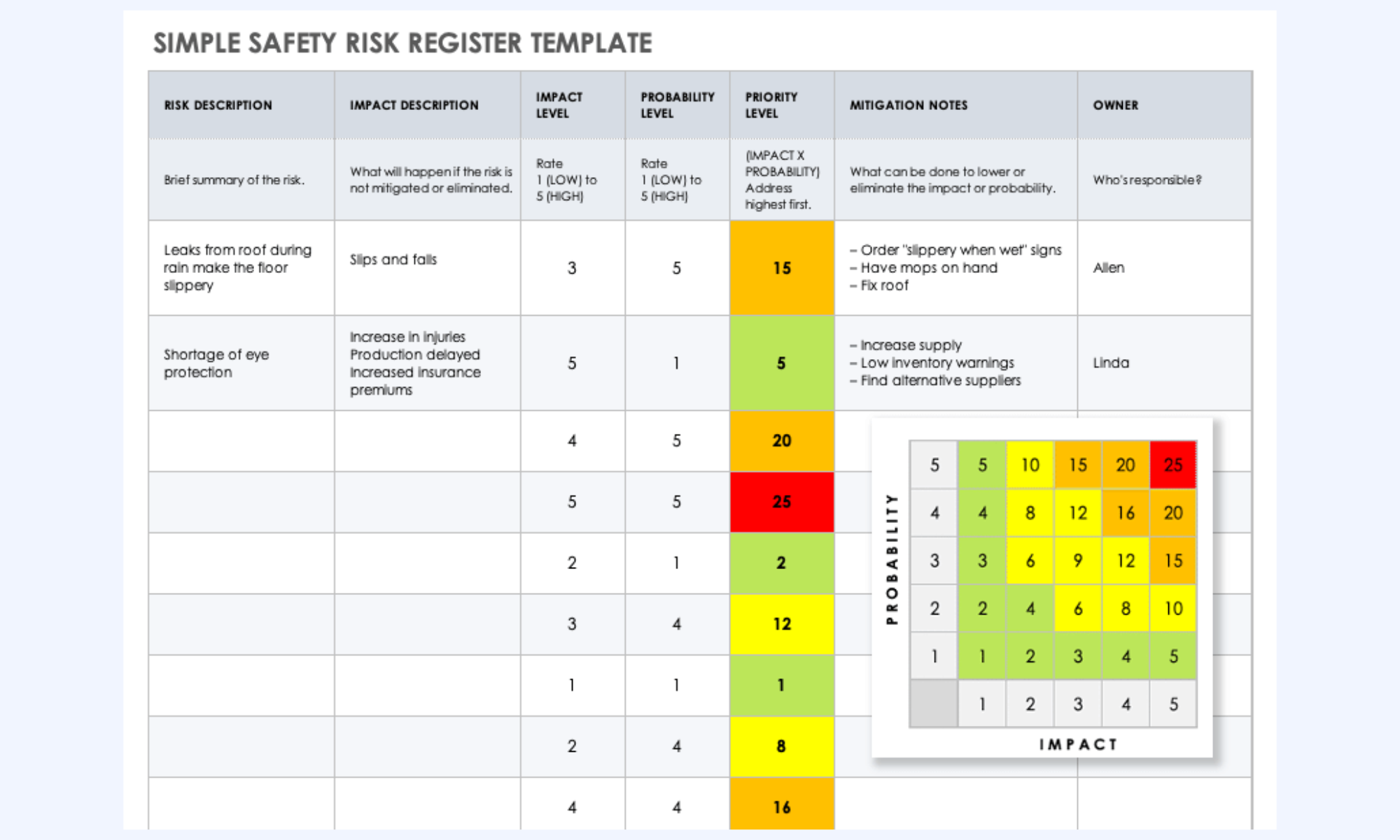
Image source: smartsheet.com
Risk register template
This template is tailored for agile and visual teams who need to integrate risk management directly into their planning workflows. It focuses on identifying potential bottlenecks and external threats early, providing a clear roadmap for how to handle issues if they arise during a sprint or project phase.
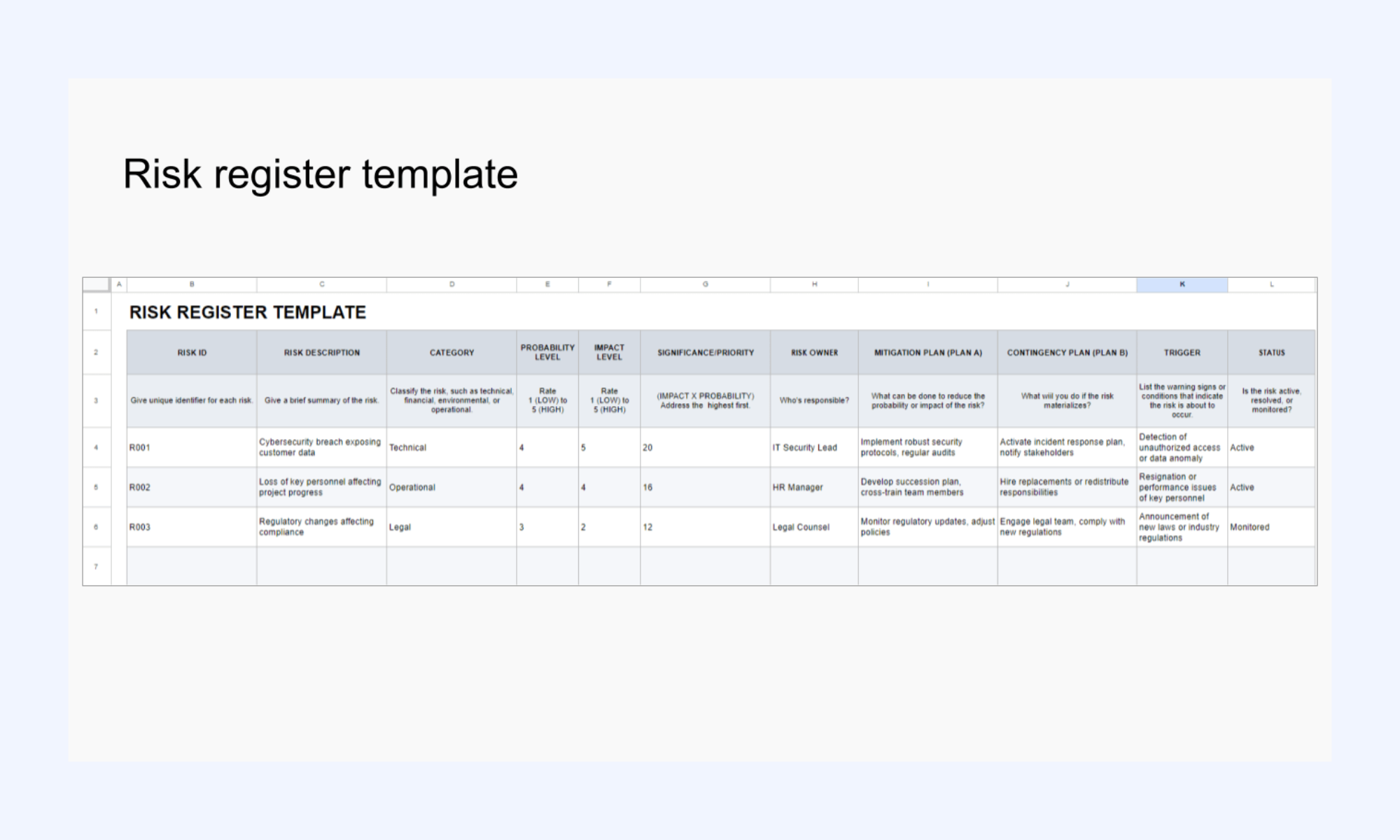
Image source: planyway.com
Project risk log template
This template provides specialized views for different types of project risks, including financial and technical categories. It helps project managers move beyond simple lists to create detailed risk response strategies that include contingency planning and residual risk tracking.
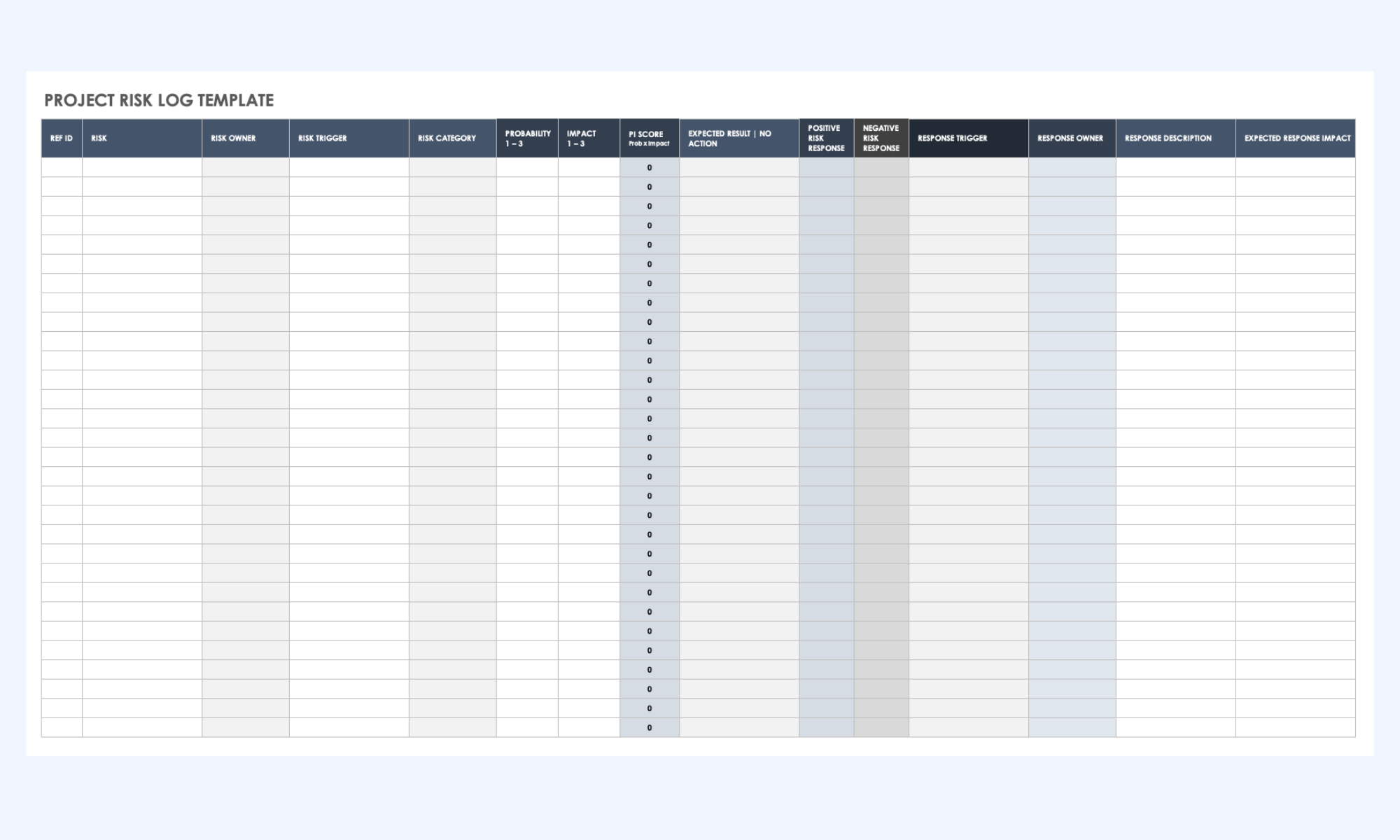
Image source: smartsheet.com
Risk log diagram template
Unlike standard spreadsheets, this template offers a more visual, diagram-based approach to risk tracking. It is ideal for brainstorming sessions where teams need to visualize the relationship between different risk factors and their cumulative effect on a project's success.
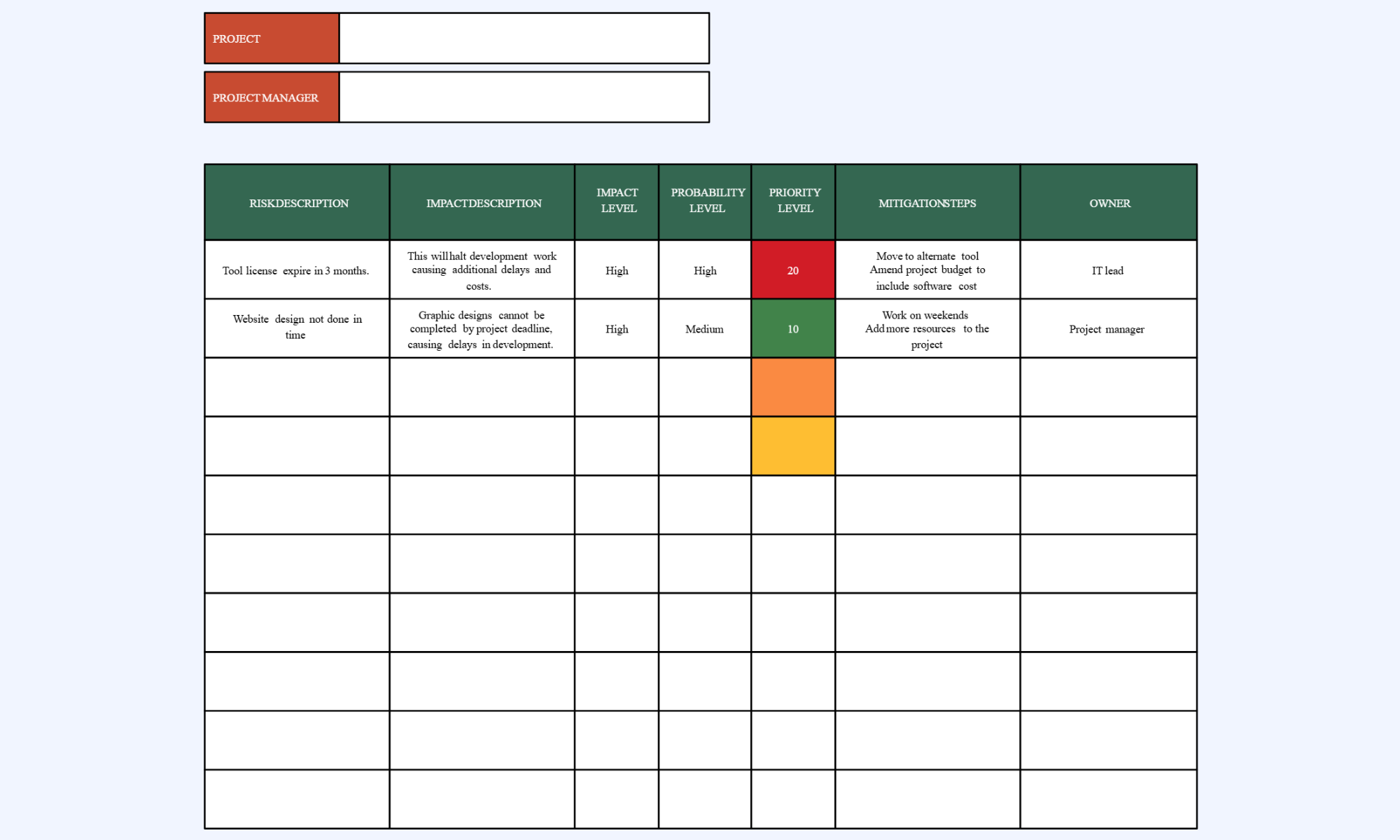
Image source: creately.com
Bonus: How to make a project risk log template on your own
A risk log template is most effective when it is used consistently . It should not be treated as a one-time setup but as a working tool that evolves with the project. Following a structured process helps teams identify, prioritize, and manage risks effectively.
Step 1: Identifying risks early and continuously
Start by identifying risks during the planning phase through brainstorming sessions, past project reviews, and stakeholder input. Encourage team members to report risks as soon as they notice them. Continuous identification ensures the risk log stays relevant as the project changes.
Step 2: Prioritizing risks using scoring models
Once risks are listed, evaluate each one based on probability and impact. Use a simple scoring model to calculate a risk rating and sort risks by priority. This helps the team focus first on the threats that could cause the most disruption.
Step 3: Assigning ownership and accountability
Every risk should have a designated owner and managing it. The owner ensures mitigation actions are carried out and updates the risk status regularly. Clear accountability prevents risks from being overlooked or ignored.
Step 4: Reviewing and updating risks throughout execution
Schedule regular reviews to reassess risks and update their status, scores, and mitigation plans. New risks may appear as the project progresses, while others may become less relevant. Ongoing updates keep the risk log accurate and useful for decision-making.
Start building your project risk log in minutes
Risk log template Excel vs modern project tools
Many teams start risk tracking in spreadsheets because they are simple and familiar. However, as projects grow in complexity, the limitations of static tools become more visible. Understanding when Excel works—and when —helps teams choose the right approach.
- Why Excel remains popular for risk tracking: Excel is widely available and easy to use, which makes it a natural starting point for many teams. It allows quick setup of a basic risk log without additional software or training. For small projects with limited stakeholders, a spreadsheet can be sufficient.
- Common limitations of spreadsheet-based risk logs: Spreadsheets often lack real-time collaboration, automated alerts, and built-in accountability. As the number of risks and stakeholders grows, version control and manual updates become challenging. This can lead to outdated information and missed mitigation actions.
- Scenarios where Excel still works—and where it breaks: Excel works well for small, short-term projects with a single owner managing the risk log. It is also useful for quick analysis or early planning stages. However, in large, fast-moving, or , manual tracking often becomes inefficient and error-prone.
Why Lark is a smarter alternative to risk log static project tools
Traditional risk logs often reside in isolated spreadsheets that require manual updates and ongoing follow-up. As projects grow more complex, these static tools struggle to keep pace with real-time changes and team communication needs. like bring risk tracking, task management, and communication into a single shared workspace. This makes it easier for teams to act on risks rather than just record them. By connecting risk data with workflows and updates, teams can keep their risk management process more visible, responsive, and consistent.
Multi-dimensional views for different stakeholders
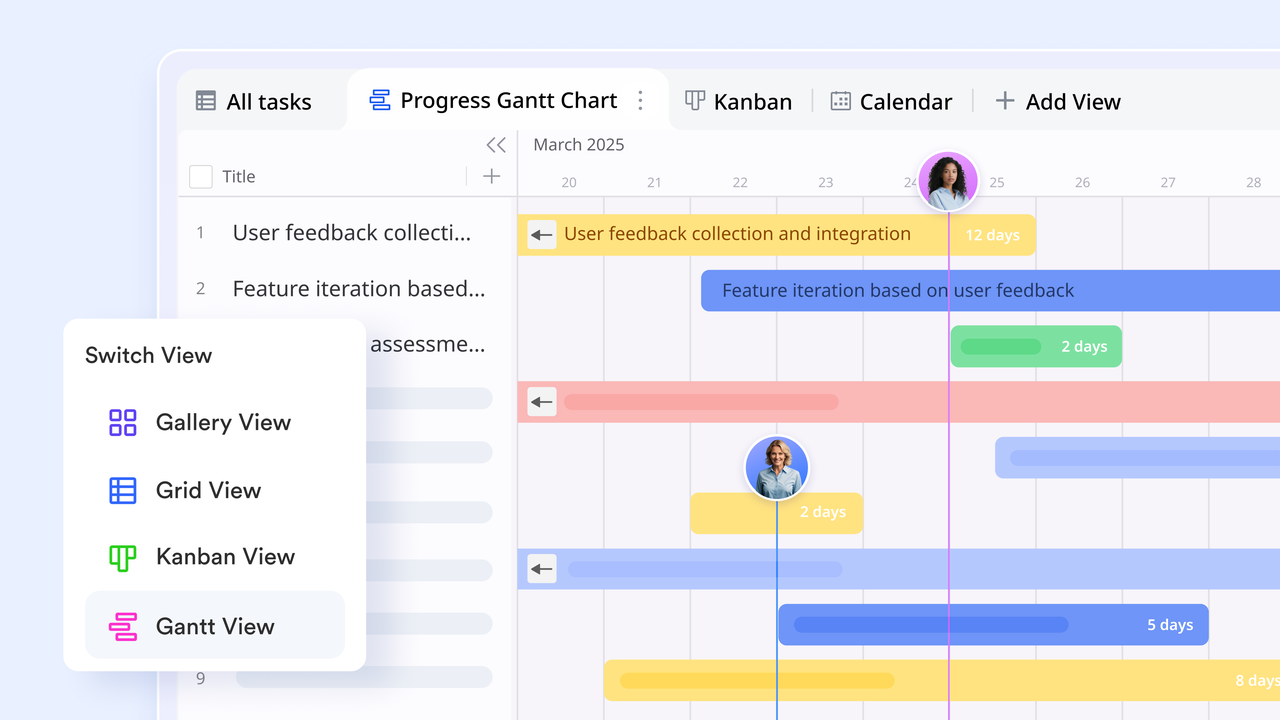
A risk log often contains too much detail for executives and too little for technical leads. allows you to create a "" for timelines, a "Gallery View" for high-level summaries, and a "Grid View" for deep data—all powered by the same single source of truth.
Trigger-based automated workflows
Unlike a static sheet that sits silently, Lark Base uses automations to act as a digital watchdog. You can set rules so that the moment a risk score reaches "High" or a mitigation deadline is missed, an is sent to the project manager or stakeholder via . It automatically moves risk from a cell to a conversation. 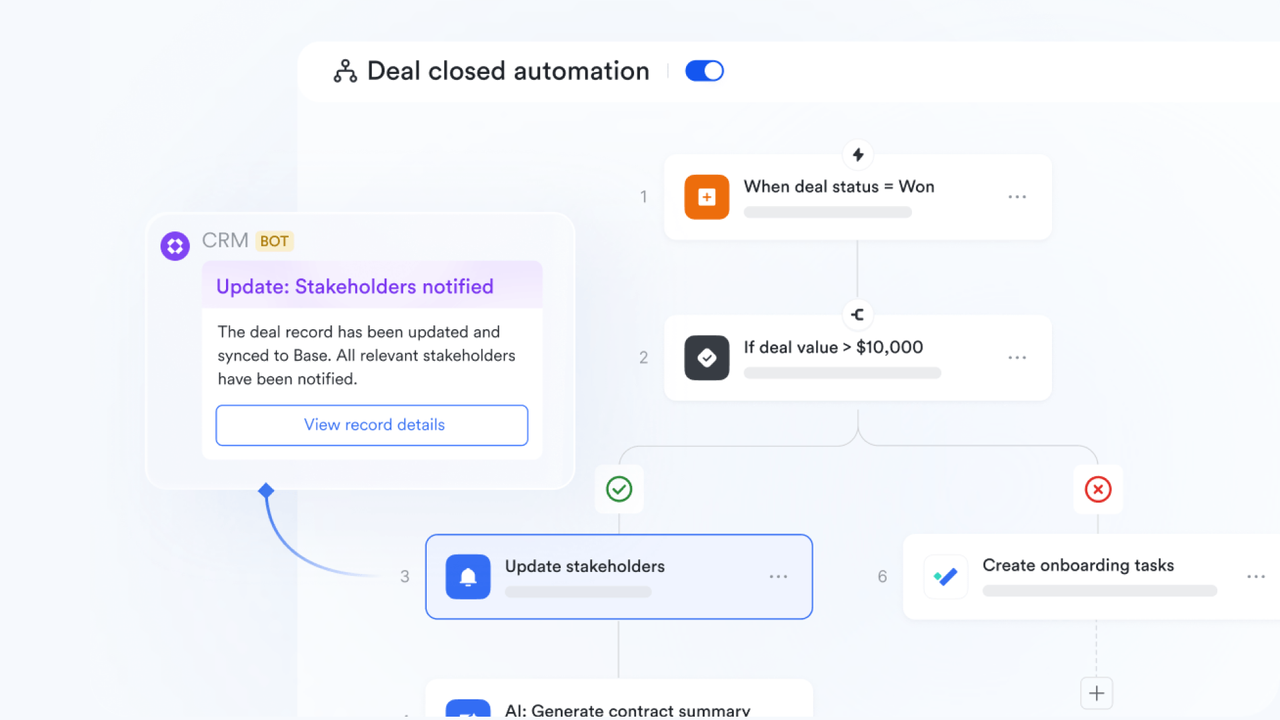
AI-powered risk classification
Lark's built-in AI field shortcuts can process your risk descriptions to (e.g., "Financial," "Operational," or "Technical") and suggest initial severity levels. This reduces manual data entry and ensures that your risk log remains organized and consistent even as it scales. 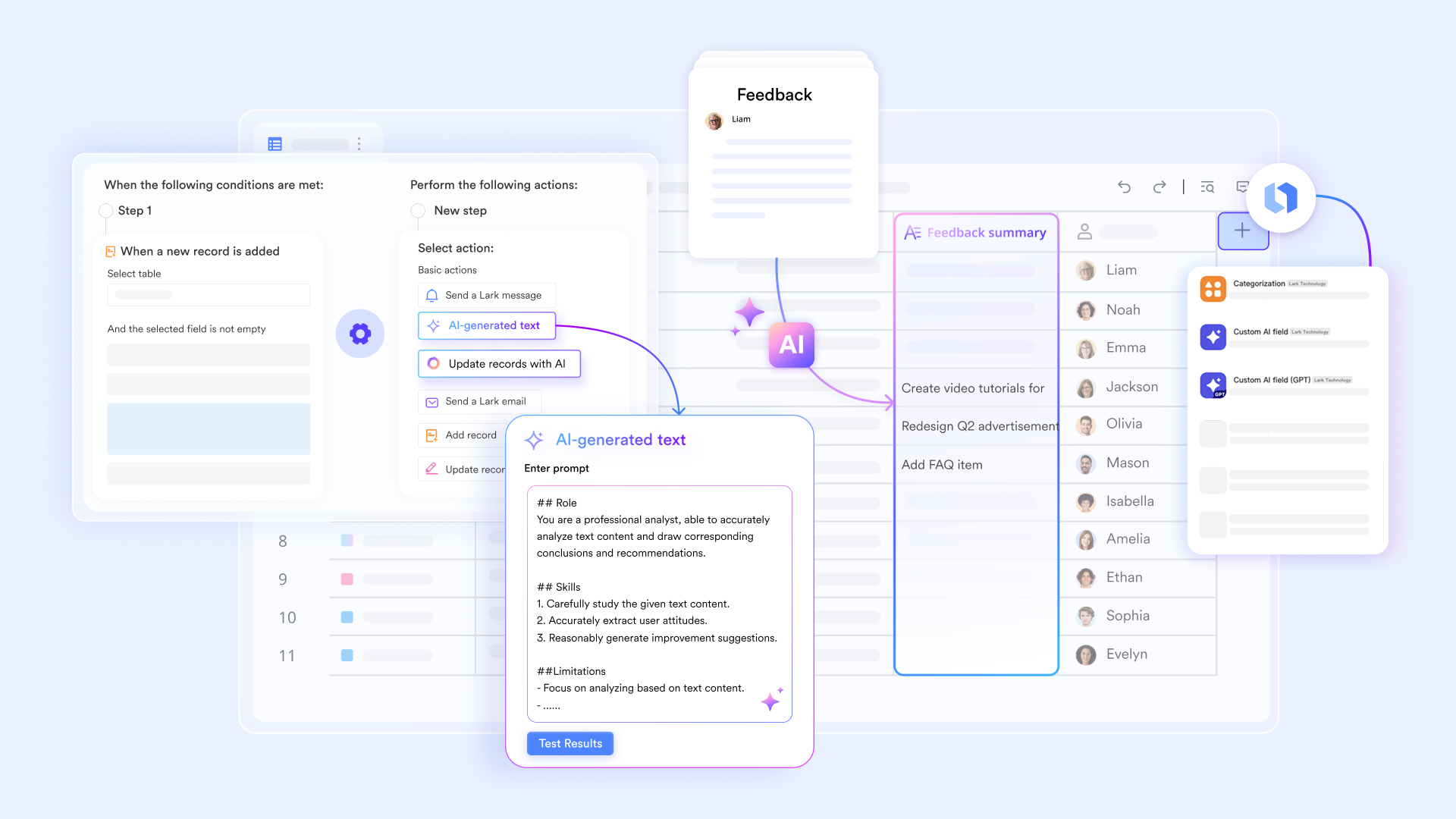
Real-time risk dashboards
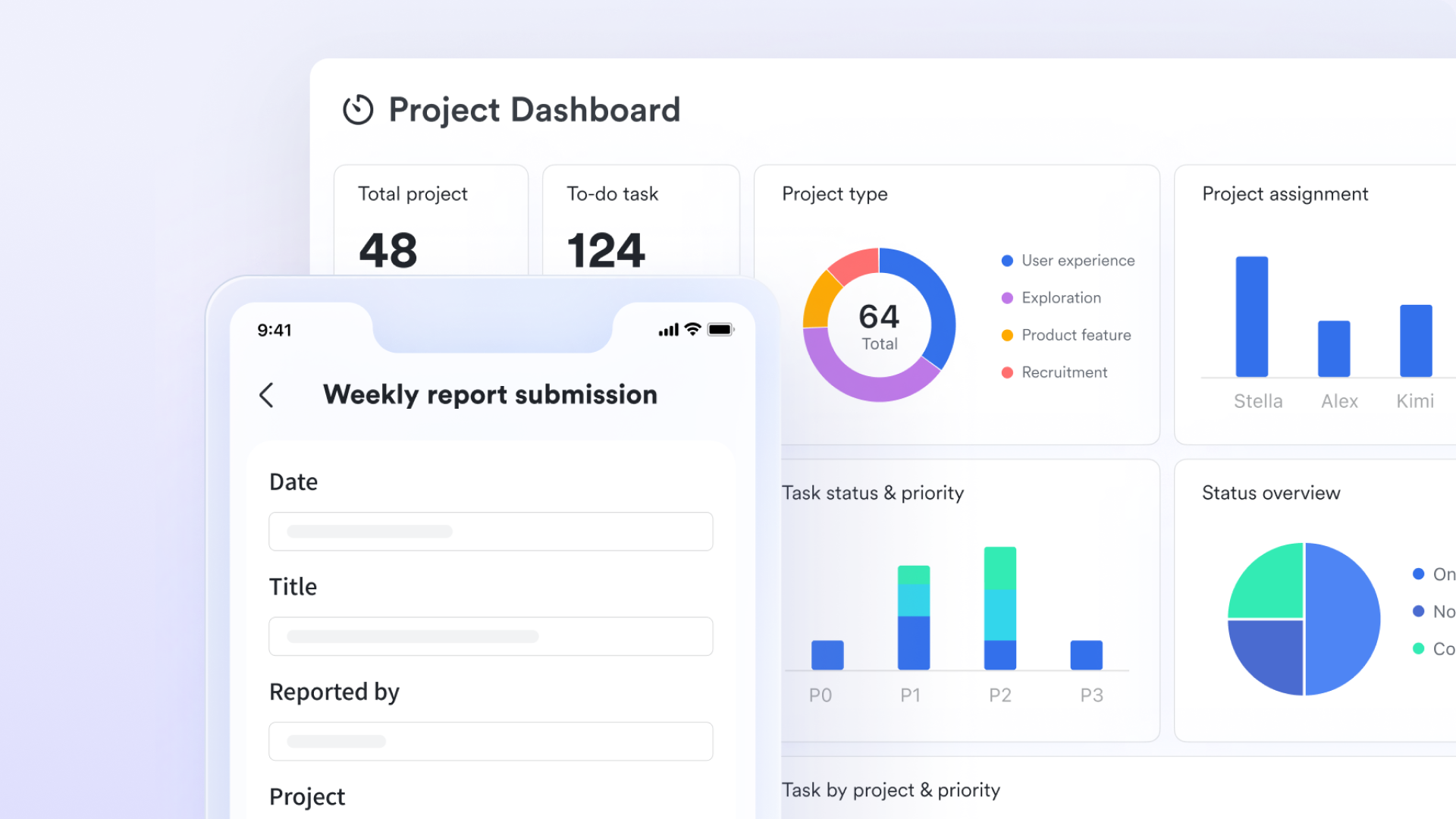
Static tools require manual charting to visualize threats. blocks—including "Heat Maps" and "Pivot Tables"—that aggregate . You can click on a "High Probability/High Impact" quadrant on the chart to instantly filter and see the specific records behind the threat.
Live risk-to-task conversion
In traditional tools, the "Mitigation Plan" is just text. In Lark, you can bridge the gap between identification and action by converting any risk entry into Lark Tasks. These tasks have assigned owners, due dates, and reminders that appear in the owner's , ensuring mitigation occurs. 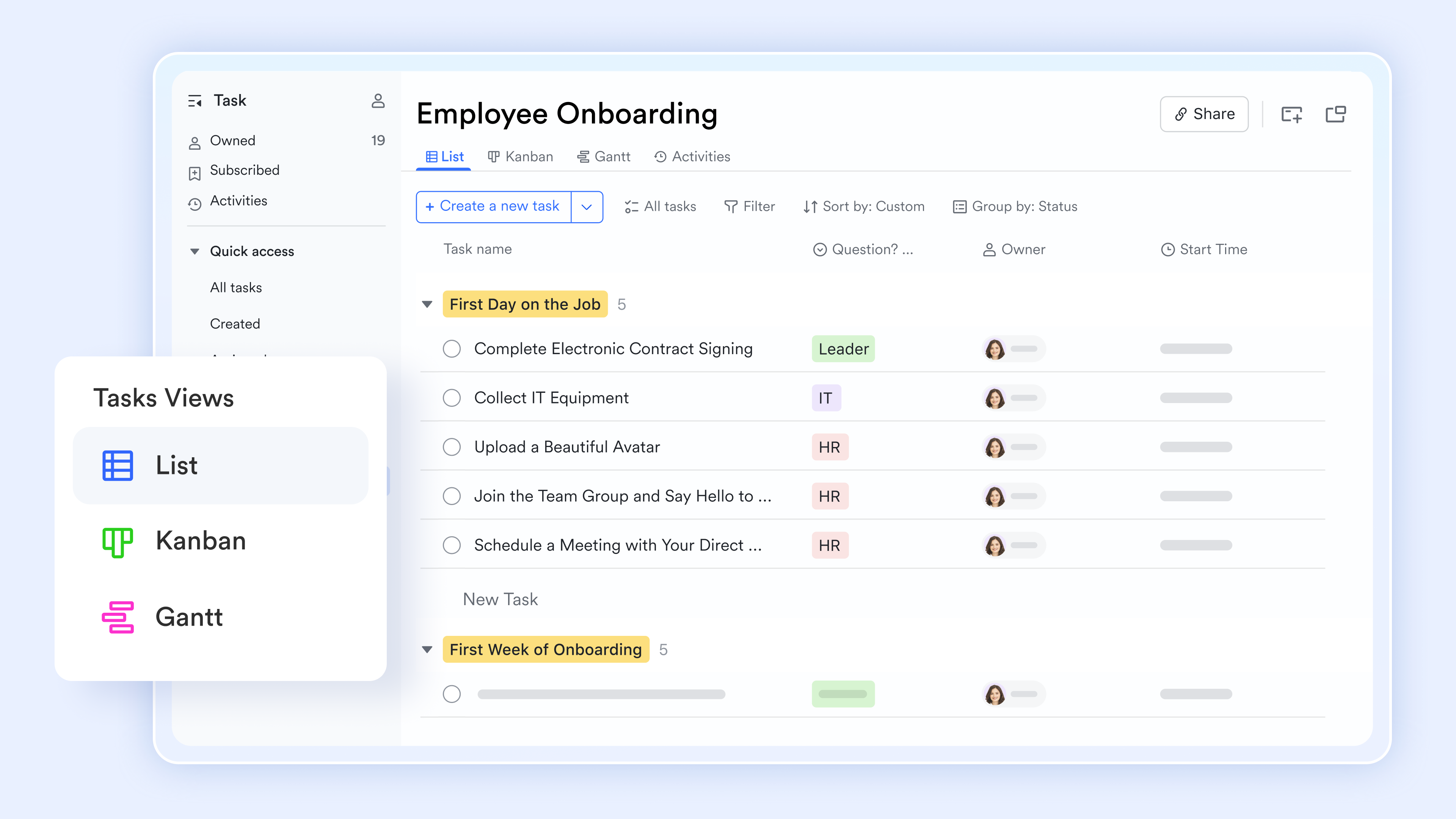
:
- Starter plan: Free forever plan that includes 11 powerful tools for up to 20 users. It also includes 100GB of storage, 1000 automation runs, AI translation, and more.
- Pro plan: $12/user/month (billed annually) for up to 500 users. It includes everything in Starter plus group calling for up to 500 attendees, 15TB of storage, 50,000 automation runs, and more.
- Enterprise plan: for custom pricing. Supports unlimited users and includes even more automation runs and advanced security, compliance, and management features.
For small teams with simple communication needs

18 months message history
1000 Base automation runs/month
2000 rows per table in Base
Most POPULAR
For companies with comprehensive collaboration and management needs
Unlimited message history
500-participant video meetings
50k Base automation runs/month
20k rows per table in Base
For large companies with advanced security and organizational management needs
Get a personalized demo and pricing
Unlimited message history
500-participant video meetings
15 TB storage + 30 GB storage/user
500k Base automation runs/month
50k Base automation runs/month
Most POPULAR
For companies with comprehensive collaboration and management needs
Unlimited message history
500-participant video meetings
50k Base automation runs/month
20k rows per table in Base
Adapting a risk log template for different project types
Not all projects carry the same types of risks or follow the same execution style. A risk log template should be flexible enough to adapt to different project environments. Adjusting the structure and review approach ensures the log remains useful across various scenarios.
- Agile vs. traditional project risk tracking: handle frequent changes, short cycles, and evolving requirements. Risk logs in Agile environments should be reviewed at the end of each sprint and updated continuously. In traditional projects, risks are often identified during planning and reviewed at key milestones.
- Risks in fast-moving vs. long-term projects: Fast-moving projects face risks related to rapid decision-making, resource availability, and coordination. These risks require frequent monitoring and prompt mitigation. Long-term projects often involve strategic, financial, or regulatory risks that must be tracked over extended timelines.
- Internal projects versus client-facing work: Internal projects typically focus on operational efficiency, cost control, or . Client-facing projects carry additional risks related to expectations, deadlines, and contractual obligations. A risk log for client work should include communication, reputation, and compliance considerations.
Conclusion
Effective risk management is not about eliminating uncertainty—it is about preparing for it. A well-structured risk log template helps teams identify potential threats early, prioritize what matters most, assign clear ownership, and track mitigation efforts throughout the project. Whether you are managing a small internal initiative or a complex client-facing project, a consistent, up-to-date risk log improves decision-making and .
While spreadsheets can work for basic tracking, modern collaborative tools make the process more visible, organized, and easier to maintain. Platforms like bring risk logs, tasks, communication, and automation into one shared workspace, helping teams move from passive tracking to active risk management.
If you want a simpler and more connected way to manage project risks, you can explore Lark's ready-to-use templates and start building your risk log in minutes.
Turn risk logs into real-time action plan
FAQs
What are the 5 P's of risk management?
The 5 P's commonly refer to Predict, Prevent, Prepare, Protect, and Perform. These principles focus on identifying risks early, reducing their likelihood, planning responses, safeguarding outcomes, and maintaining performance. Tools like Lark help teams apply these principles by keeping risk data, tasks, and updates in one shared workspace.
Who is responsible for maintaining the project risk log?
The project manager is usually responsible for maintaining the risk log, but each risk should have an assigned owner. These owners monitor specific risks and carry out . With collaborative tools like Lark, updates can be shared across the team in real time.
Can one risk log template be reused across multiple projects?
Yes, a standard risk log template can be reused across different projects, especially if they follow similar processes. Teams can adjust categories, scoring models, or fields to match specific project needs. Platforms like Lark make it easy to duplicate and customize templates for new projects.
How do teams quantify risk impact accurately?
Teams typically use scoring systems that rate impact based on cost, time, scope, or quality. Some organizations use numerical scales, while others define clear impact levels with descriptions. Digital tools such as Lark can standardize scoring fields and automate calculations for consistency.
What's the difference between a risk log and a RAID log?
A risk log tracks only potential risks and their mitigation plans. A RAID log, on the other hand, records Risks, Assumptions, Issues, and Dependencies in one place. Many teams use like Lark to manage RAID logs because they support multiple data types in a single workspace.
Related reading





























