Todoist has long been one of the most popular task management apps on the market. With millions of users worldwide, it promises simplicity, productivity, and effective task tracking across platforms. But is it still the right choice for 2026? In this comprehensive Todoist review, we'll explore its features, pricing, pros and cons, and see how it stacks up against more innovative alternatives like Lark. Whether you're a solo user managing personal tasks or a team looking for collaboration features, this guide will help you decide.
Experience next-gen productivity
What is Todoist, and who is it for?
Todoist is a designed to help individuals and teams organize, prioritize, and track their work efficiently. As one of the most popular productivity apps, Todoist combines a clean interface with powerful , including projects, labels, filters, and natural-language input. Users can quickly create tasks, set due dates, assign priority levels, and even establish recurring schedules, making it ideal for daily task management and weekly planning.
Todoist is perfect for freelancers, small teams, and professionals seeking a straightforward to-do app without the complexity of full project management software. Its cross-platform support, desktop, mobile, and web, ensures tasks stay synced wherever you are. However, teams requiring advanced project workflows, approvals, CRM integration, or dashboards may find it limiting. For these users, more innovative alternatives like Lark provide integrated task, team, and project management.
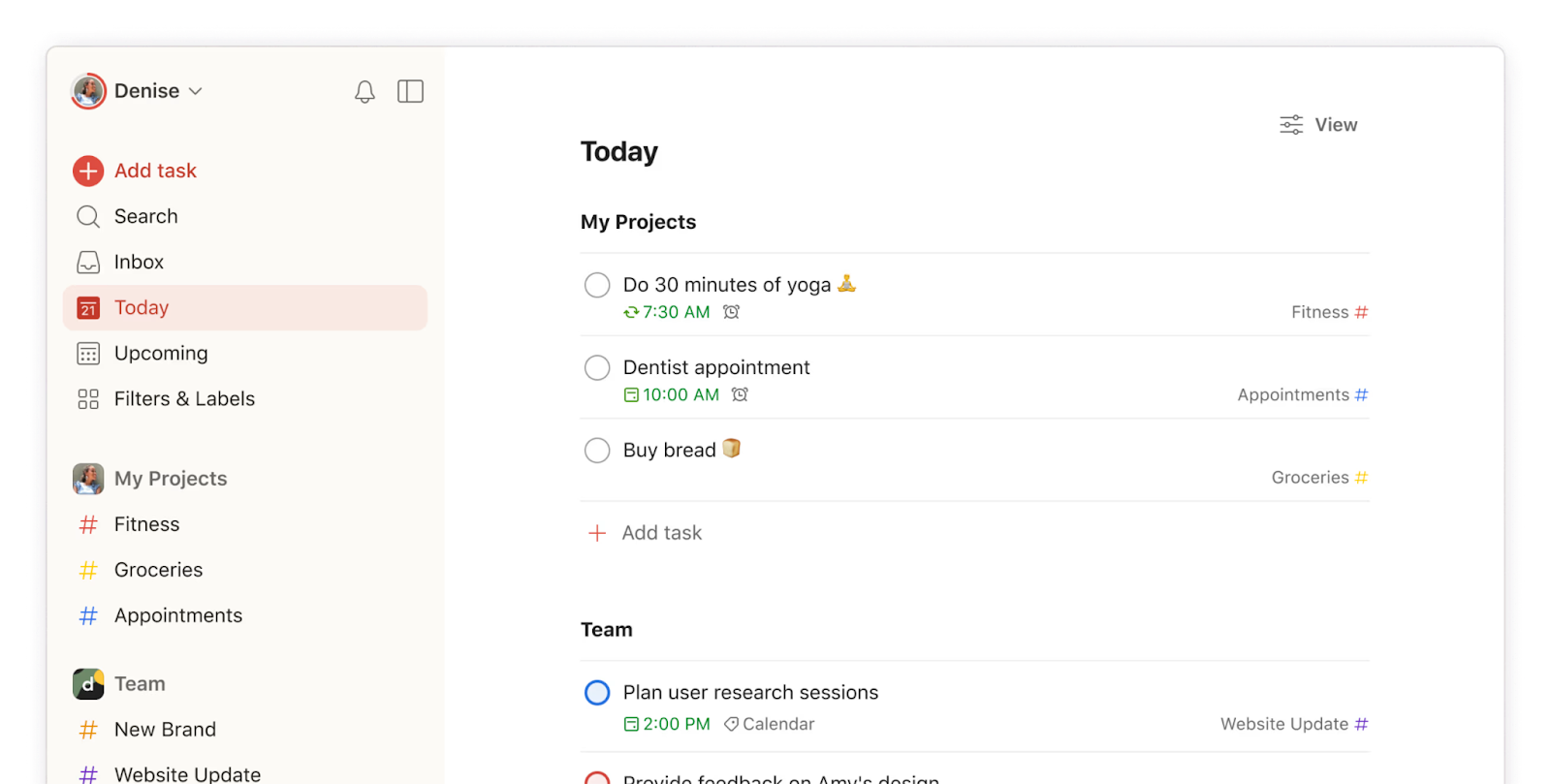
Image source: todoist.com
How Todoist works: Core features explained
Todoist is more than just a simple to-do app; it's a designed to help users stay productive and organized. In this Todoist app review, we'll break down its core features, from task creation to integrations, and highlight how it works across mobile, desktop, and web versions.
- Task creation, priority levels, and scheduling: Todoist makes task creation quick and intuitive. Users can assign tasks to projects, set due dates, and define priority levels from 1 (highest) to 4 (lowest). Scheduling recurring tasks, like "Weekly report every Friday," ensures nothing slips through the cracks.
- Sections, projects, and labels: Projects organize related tasks, while sections break projects into manageable parts. Labels provide additional context, allowing users to filter tasks by type or context, such as @work or @personal. Together, these features enhance task visibility and organization.
- Filters & smart lists: Filters and smart lists let users view tasks based on custom criteria, such as priority, due date, or assigned person. This Todoist app review highlights how filters help maintain focus on the most critical work. Smart lists automatically aggregate tasks across projects for easy management.
- Natural language input: Todoist supports natural-language input, allowing users to type phrases like "Submit draft every Monday" to create recurring tasks automatically. This feature speeds up task entry and reduces manual setup, making it especially useful for weekly reviews in Todoist workflows.
- Kanban view: The Kanban view in Todoist provides a for tasks. Users can drag tasks between columns such as "To Do," "In Progress," and "Completed," providing a clear overview of project progress. While basic, it's effective for simple project tracking.
- Integrations overview: Todoist integrates with tools like Google Calendar, Slack, Dropbox, and Microsoft Teams. These integrations streamline workflows by syncing tasks and deadlines across apps, improving collaboration and productivity.
- Differences between mobile, desktop, and web versions: Todoist's desktop version offers the most comprehensive experience, including filters, a , and natural-language input. Mobile apps focus on quick task entry, notifications, and widget support. The web version balances functionality and accessibility, allowing users to manage tasks from anywhere.
Todoist pricing and value for money
When evaluating value in this Todoist review, pricing plays a central role. Understanding what you get in each tier helps you decide whether Todoist fits your workflow, whether for simple personal use or more . In this 2026 Todoist app review, we assess whether the cost justifies the features. Below is a breakdown of pricing and what you get for the money.
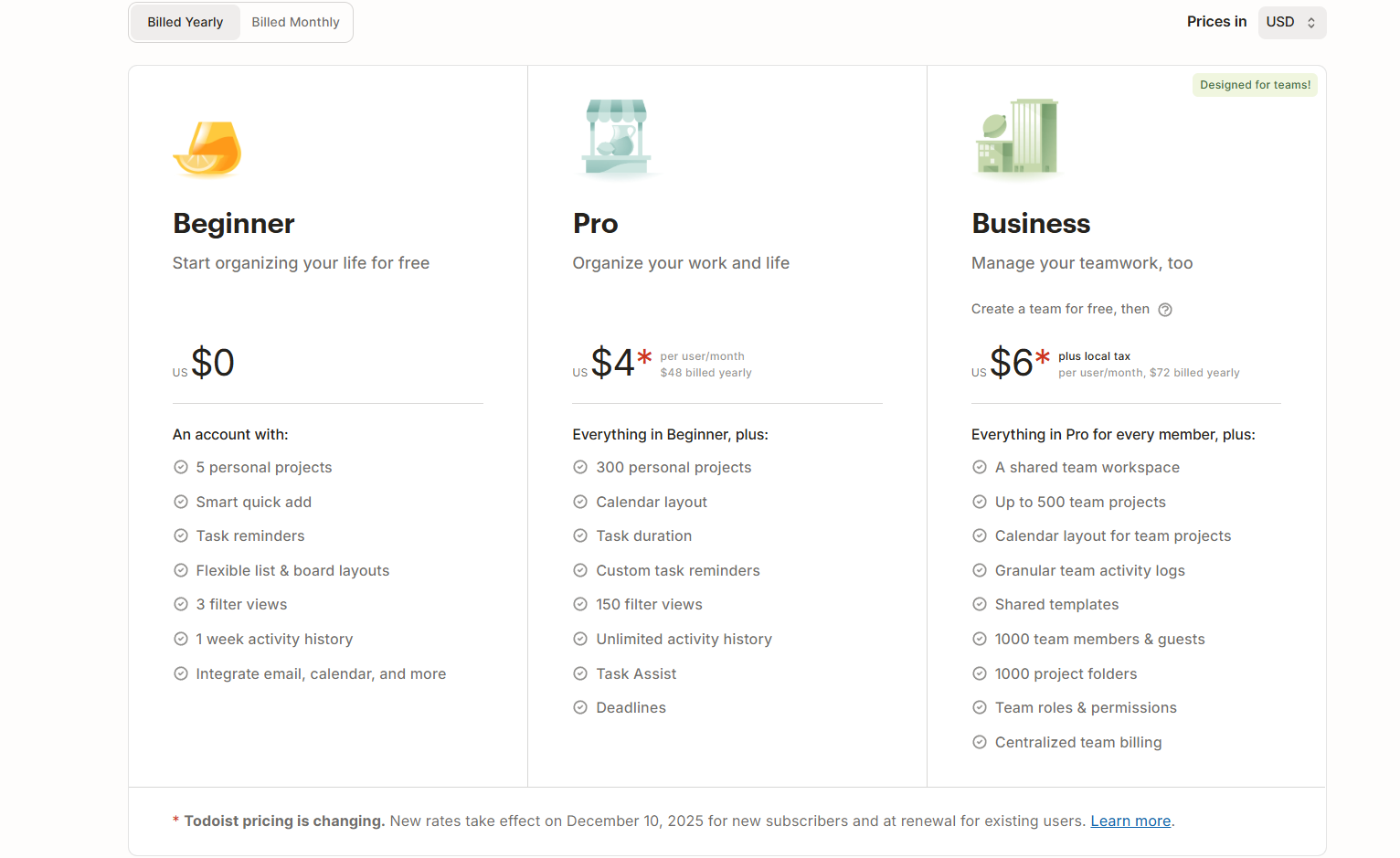
Image source: todoist.com
Information source: todoist.com
Update time: 2025-12-09
Note: Pricing and plan details reflect publicly available data as of the update date and may vary based on region, billing cycle, and number of agents.
Todoist mobile vs desktop experience
Understanding how Todoist performs across mobile, desktop, and web platforms is crucial for productivity. In this Todoist app review, we'll examine offline syncing, UI differences, natural language input, widgets, and notifications to help you choose the best platform for your workflow.
- Offline syncing reliability: Todoist allows users to manage tasks offline, automatically syncing changes when an internet connection is restored. Desktop and mobile apps handle offline updates reliably, though conflicts can occur if multiple devices update the same task simultaneously. This ensures your weekly review Todoist workflow stays consistent across platforms.
- UI feature differences: The desktop version offers a comprehensive interface with filters, labels, and a Kanban view, making it ideal for deep task management. Mobile apps prioritize simplicity for quick task creation and . The web version balances features and accessibility, providing a consistent experience across devices.
- Natural language input accuracy across platforms: Todoist's natural language input works best on desktop and web, accurately interpreting phrases like "Submit report every Monday." Mobile apps generally perform well, but can misinterpret complex recurring tasks. This feature is handy for fast task entry in weekly review workflows in Todoist.
- Widget usefulness: Mobile widgets provide quick access to today's tasks and top priorities without opening the app. They enhance daily productivity by keeping important tasks visible on the home screen. Desktop and web versions lack widget support but offer more robust task management features.
- Notification behavior: Todoist notifications are highly customizable, with options for push notifications, emails, and reminders. Mobile notifications help users throughout the day, while desktop alerts are useful for focused work sessions. Over-notification can occur when multiple devices are synced, so settings should be tailored accordingly.
Who should not use Todoist?
In this Todoist app review, it's crucial to highlight scenarios where Todoist may not be the best fit. While it excels for individual task management, some teams and businesses require advanced features that Todoist doesn't provide.
- Teams needing real project workflows: Todoist lacks advanced like task dependencies, Gantt charts, and workload tracking. Teams managing multi-step projects or complex processes may struggle to maintain clarity and control. For these users, Todoist's simple task lists are insufficient.
- Businesses requiring approvals or CRM Linkage: Companies needing or integration will find Todoist limited. It doesn't natively support multi-step approvals, sales pipelines, or automated CRM actions, making it less suitable for structured business processes.
- Companies needing dashboards or capacity planning: Todoist offers minimal reporting and no built-in dashboards for tracking team performance. Organizations that rely on resource allocation, capacity planning, or visual analytics may find it inadequate for operational oversight.
- Enterprises seeking role governance: For large organizations, role-based access and advanced permissions are critical. Todoist only supports basic project sharing and user management, leaving enterprises without the necessary control over roles and responsibilities.
Todoist's limitations for business use center on its inability to handle complexity, including the lack of features such as advanced project dependencies, multi-step approval workflows, , and granular access controls. For organizations that require this level of integrated functionality and governance, a dedicated platform is necessary. That's where Lark comes to help, providing a comprehensive alternative. Let's take a closer look at this tool.
Review of Todoist: Pros and cons in lists
In this Todoist app review, it's essential to understand both the strengths and limitations of the platform. Knowing the pros and cons helps users decide if Todoist fits their productivity needs or if alternatives like Lark may be better.
Pros:
- User-friendly & cross-platform: Todoist offers a clean, intuitive interface that works seamlessly on desktop, mobile, and web. This makes it easy to organize tasks and stay productive from anywhere, whether at home or on the go.
- Flexible task organization: With projects, sections, labels, filters, and priority levels, Todoist allows users to structure tasks to match their workflow. This flexibility supports both personal and professional task management.
- Natural language input & quick task entry: Adding tasks is fast and simple using natural language, e.g., "Submit report every Monday." This feature speeds up task creation, especially for weekly review in Todoist workflows.
- Integration and connectivity: Todoist integrates with tools like Google Calendar, Slack, and Dropbox. These connections streamline workflows and keep tasks synced with broader team or personal schedules.
For more Google Workspace's information, you can refer to and .
- Reminders, recurring tasks & : Paid plans include these features. Users can monitor progress over time and ensure key tasks are never missed.
Cons:
- Free plan limitations: Many advanced features, such as reminders, filters, and attachments, are restricted to paid plans. Casual users may find the free tier sufficient, but power users will likely need Pro or Business.
- Not ideal for complex projects: Todoist lacks advanced project management features like Gantt charts, task dependencies, and workload tracking. Large teams or complex projects may find it limiting.
- The learning curve for advanced features: Filters, labels, and integrations can be overwhelming for new users. It may take time to fully leverage Todoist's capabilities.
- Limited collaboration & depth: Shared projects and basic collaboration are supported, but advanced workflows, approvals, and role governance are missing. Teams that need these features may need to use alternatives.
- No built-in time tracking/limited analytics: Todoist doesn't provide native time tracking or detailed analytics. Users requiring these insights must rely on external tools or integrations.
- Scaling and cost for teams: Pricing increases with team size, and Todoist's limited advanced features may make it less cost-effective than other project management platforms.
Get organized with all-in-one tools
Meet Lark: Unified platform with smart control & automated workflows
is a unified enterprise platform that enhances team efficiency and control by combining all critical business capabilities. It enables the structure and analysis of complex data (projects/ CRM) across multiple dimensions and the automation of business processes using customizable, conditional logic. The platform ensures and collaborative work execution within a secure environment defined by granular, role-based access controls.
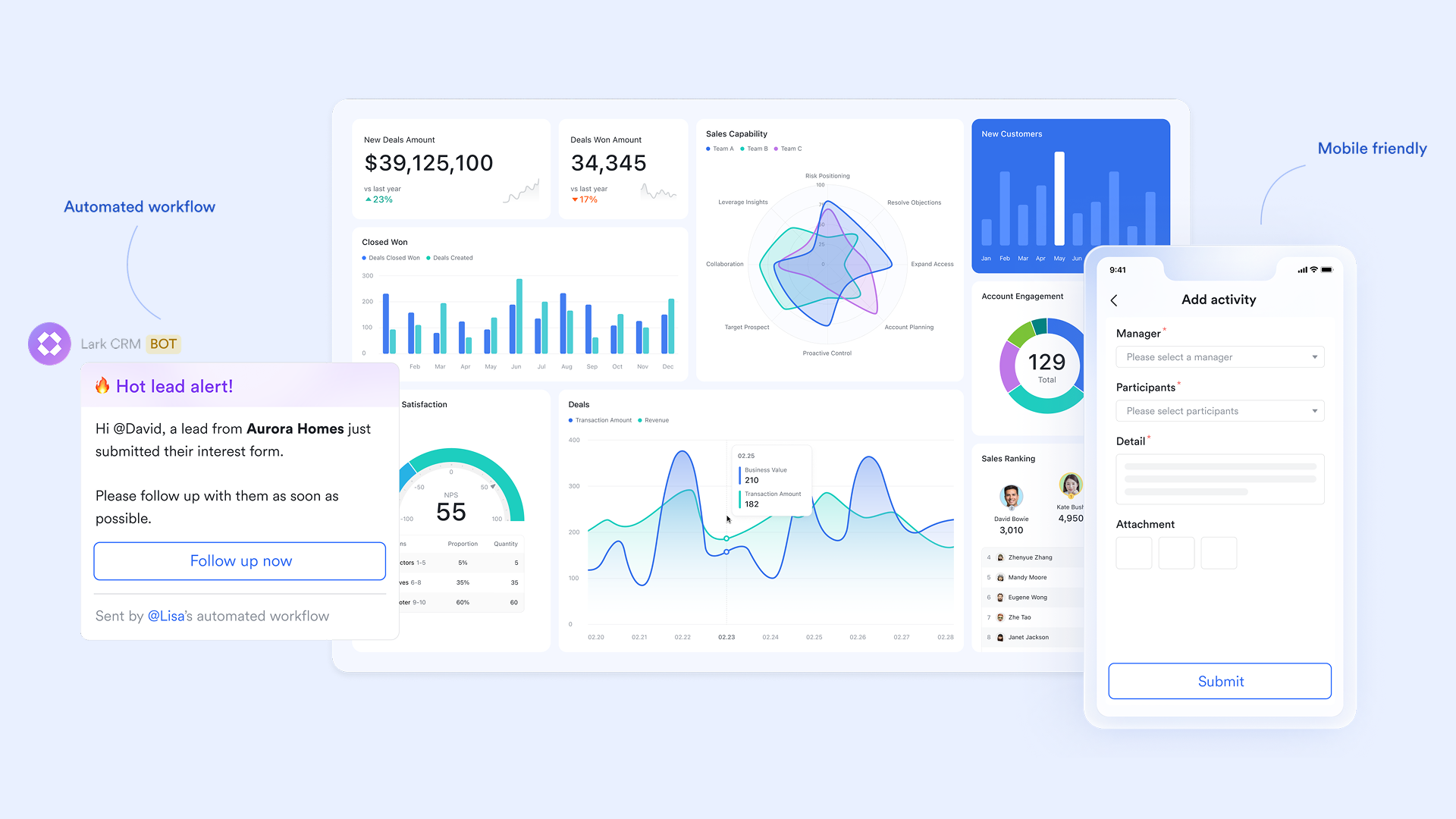
Clean tasks dependencies & clean accountability
Lark Tasks assists task dependencies and execution by allowing users to structure work with sub-tasks to break down large projects. It provides visibility into and using a Gantt chart view and manages workflow stages with a Kanban view. The feature ensures accountability by clearly defining owners and subscribers and automates routine work through recurring tasks, centralizing all project efforts in dedicated Task Lists. Also, benefiting from Lark's ecosystem, task creation in Lark is deeply rooted across its suite. You can easily create and manage tasks directly in , and they sync automatically. In , a message can be instantly converted into a task with assigned owners and deadlines. For users of the desktop app, simply highlight text in an email, right-click, and choose "Add Task" to turn the content into an actionable to-do. 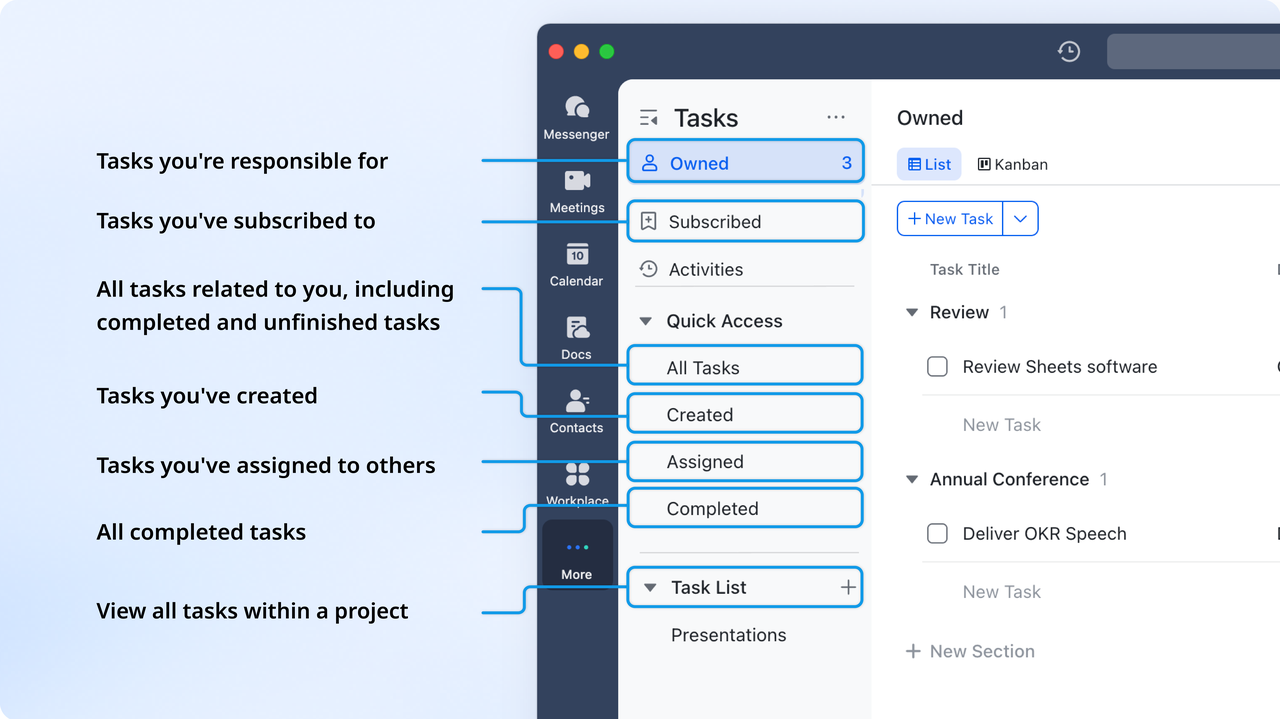
Advanced data hub for complex projects or CRM systems
manages complex projects and CRM data using a structured, multi-dimensional approach. It's multiple views, including a native for project scheduling, a Kanban view for tracking sales stages and customer data, and Gallery views to streamline organization. By using various linked tables, it breaks down large projects or complex customer relationships into manageable components, such as team members, individual tasks, or client communication history. Furthermore, filters and groups provide real-time clarity by instantly highlighting critical items, such as incomplete tasks, assigned owners, high-value leads, or service requests, ensuring proactive, focused management. 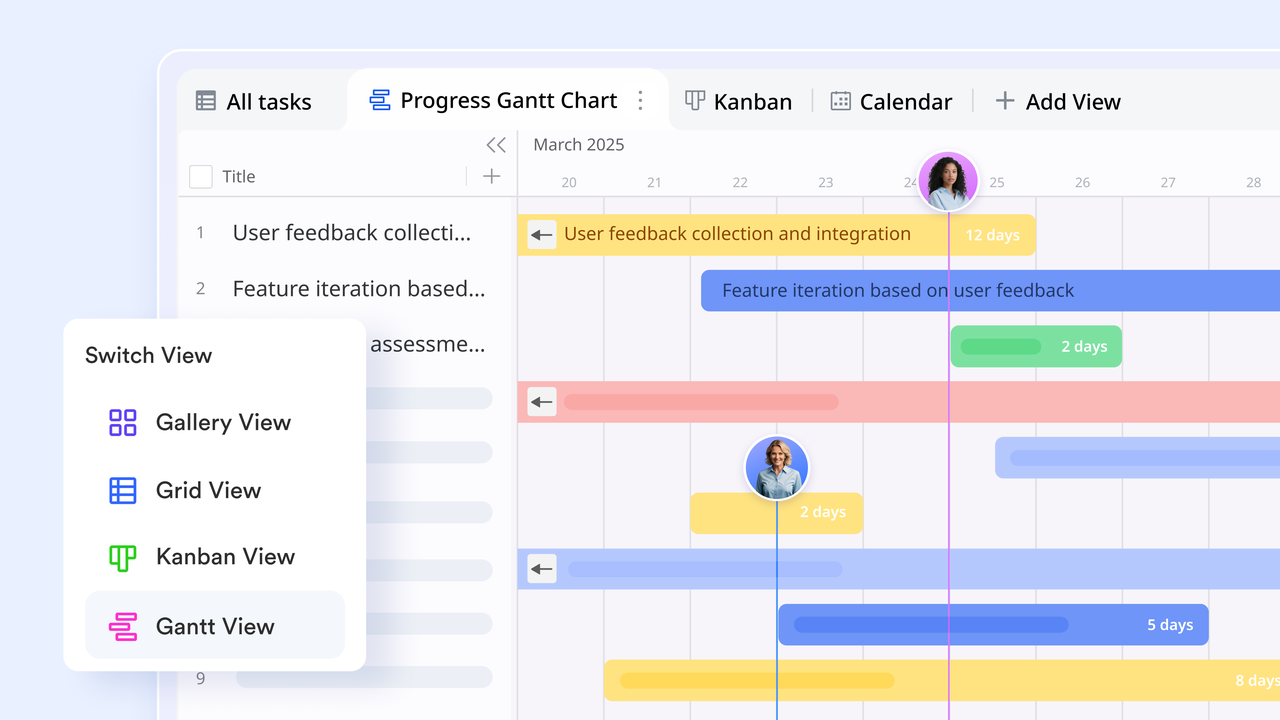
Built-in automated workflow for logical processing
Lark automates project workflows primarily through the workflow feature in Lark Base. This feature operates by setting specific triggers (like a new record or an update), which then execute defined actions automatically. Workflows support complex logic using If/Else, Switch, and Loop nodes to handle complicated processes. This functionality saves time by automatically performing tasks such as sending messages, creating events, updating records, and integrating with other apps. 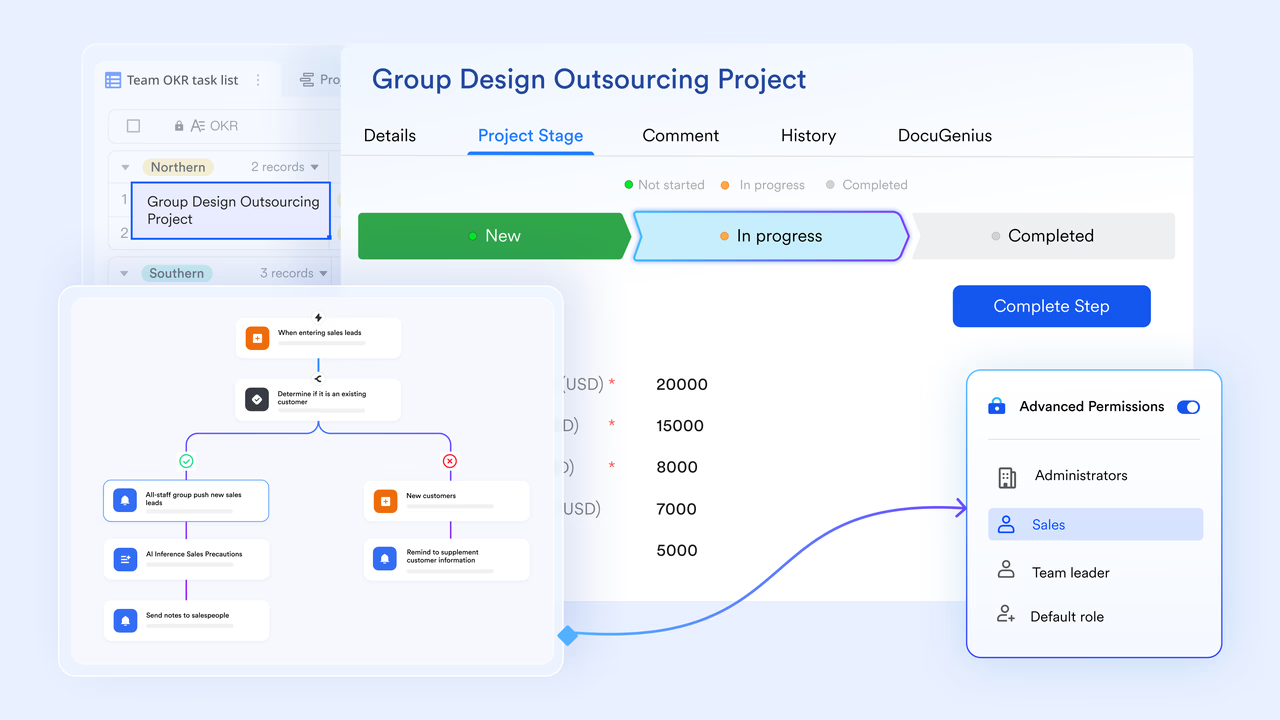
Dashboard and built-in intelligent analysis for data insights
Lark Base dashboards enhance project management by providing real-time visual analysis of project data across multiple dimensions. They use various charts and blocks, such as metric blocks for key performance indicators (KPIs), to monitor progress in real time. This visualization and tracking capability facilitates quick, data-driven decision-making. Additionally, AI Smart Analysis generates quick insights and summaries of dashboard data, providing details and insights into the current data. 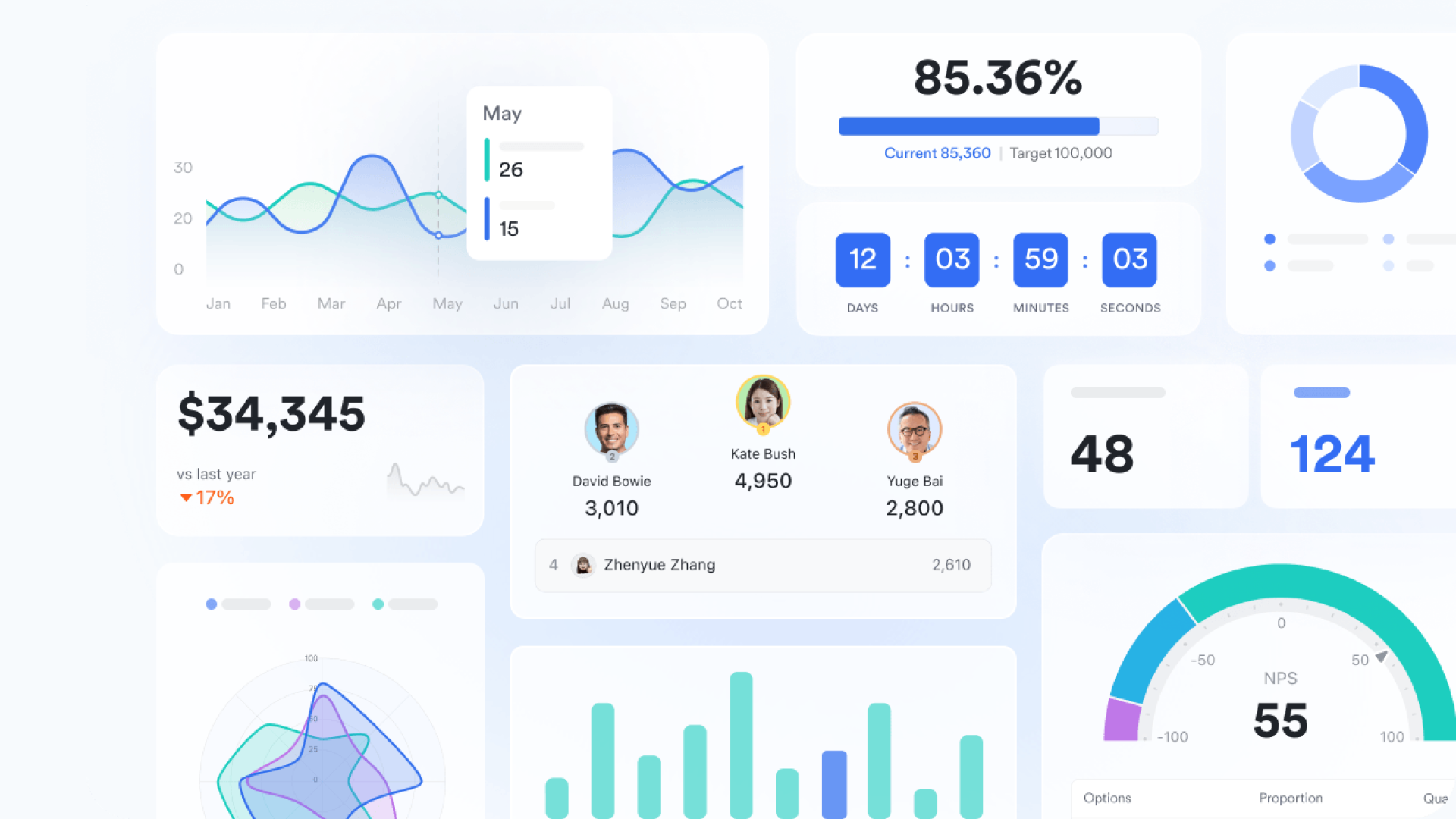
Streamlined approval process for fast processing
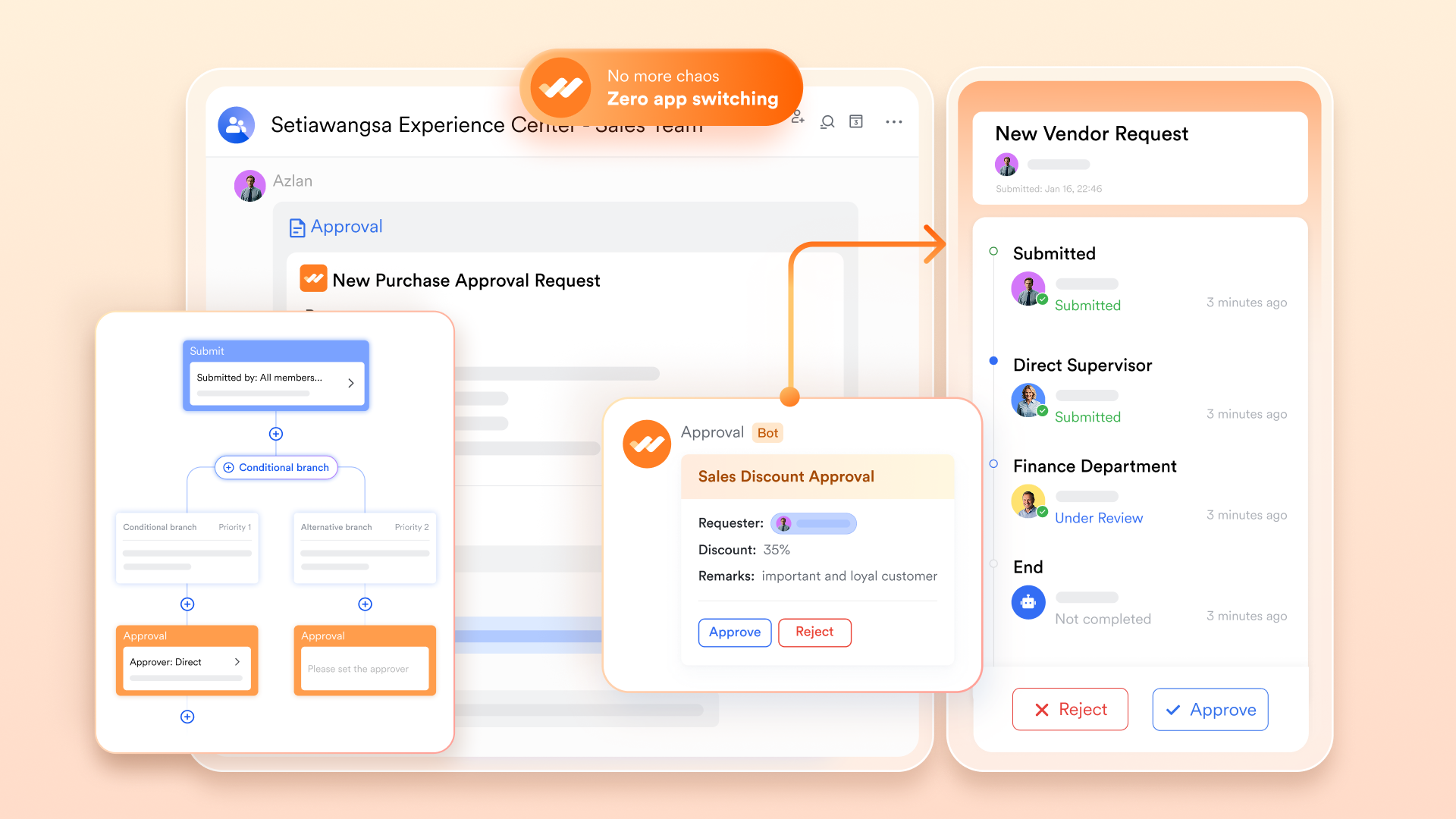
is a centralized platform for managing all enterprise requests, such as leave and reimbursements. It enables highly customizable forms and processes tailored to an organization's specific needs. The system routes requests through designated Approvers using a sequential, multi-step process, which can include conditional or parallel branches. The feature also offers deep integration with other Lark tools, like Base and Messenger, to launch chats or sync data automatically upon approval.
Native team communication hub
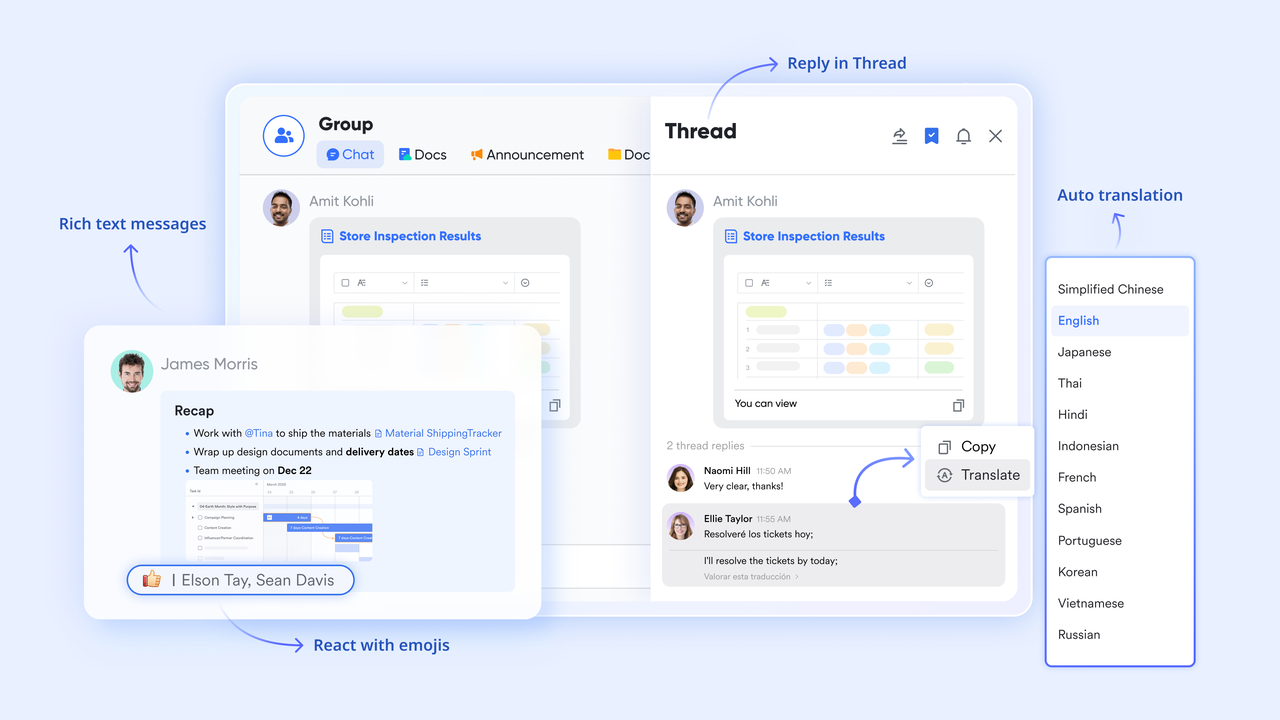
boosts team collaboration and communication through its comprehensive features, starting with one-on-one and group chats that support rich text, files, and media. It enhances focus in groups using message threads and the Buzz feature for urgent alerts. Crucially, it deeply integrates with other Lark apps, enabling users to schedule meetings, convert messages into tasks, and co-edit documents with permission management directly within the chat interface.
Granular permission & advanced role-based control
Lark ensures secure data access using Role-Based Access Control (RBAC), where roles serve as permission groups that define specific access to dashboards, tables, and records. Administrators can use system or custom roles and assign them to users or groups for tailored access. Furthermore, advanced permissions provide granular control, allowing restrictions on who can view or edit sensitive fields, thus ensuring data privacy and focused management. :
- Starter plan: Free forever plan that includes 11 powerful tools for up to 20 users. It also comes with 100GB of storage, 1000 automation runs, AI translations, and more.
- Basic plan: $6/user/month (billed annually) for up to 500 users. It includes everything in Starter plus group calling for up to 500 attendees, 5TB of storage, 1000 automation runs, and more. For more details, please .
- Pro plan: $12/user/month (billed annually) for up to 500 users. It includes everything in Basic plus group calling for up to 500 attendees, 15TB of storage, 50,000 automation runs, and more.
- Enterprise plan: for custom pricing. Supports unlimited users and includes even more automation runs and advanced security, compliance, and management features.
For small teams with simple communication needs

18 months message history
1000 Base automation runs/month
2000 rows per table in Base
Most POPULAR
For companies with comprehensive collaboration and management needs
Unlimited message history
500-participant video meetings
50k Base automation runs/month
20k rows per table in Base
For large companies with advanced security and organizational management needs
Get a personalized demo and pricing
Unlimited message history
500-participant video meetings
15 TB storage + 30 GB storage/user
500k Base automation runs/month
50k Base automation runs/month
Most POPULAR
For companies with comprehensive collaboration and management needs
Unlimited message history
500-participant video meetings
50k Base automation runs/month
20k rows per table in Base
Conclusion
Todoist remains a popular task management app in 2026, offering an intuitive interface, cross-platform support, and essential features like task creation, priority levels, labels, filters, and natural language input. It's free, and Pro plans are suitable for individuals and small teams that focus on simple task tracking and personal productivity. However, Todoist has limitations on larger teams, complex workflows, CRM integration, dashboards, and advanced reporting. For businesses and teams seeking a comprehensive, all-in-one solution that combines project management, collaboration, and sales workflow capabilities, offers an innovative alternative to boost productivity and streamline operations.
Get every task on track with one clean workflow
FAQs
Does Todoist work offline on all devices?
In this Todoist app review, offline functionality works on desktop, web, and mobile, allowing users to create and edit tasks without an internet connection. Changes sync automatically once online. For a reliable weekly review Todoist workflow with offline support ensures that task tracking and Todoist Pro review features remain uninterrupted across devices.
Can Todoist replace a complete project management tool?
A Todoist review 2026 shows that while Todoist handles individual tasks and small projects efficiently, it cannot replace full . It lacks Gantt charts, task dependencies, and resource planning. Teams needing complex workflows may need alternatives, though weekly review Todoist setups works well for personal or small-team organization.
Does Todoist support time blocking natively?
Review Todoist notes that native time blocking is not supported. Users can schedule tasks and recurring events, but complete requires integrations. Despite this, Todoist weekly review routines remain effective, and Todoist Pro review features like reminders help maintain structure for scheduled work.
Can I migrate data easily from other to-do apps to Todoist?
This Todoist app review confirms that importing data is straightforward. CSV imports and integrations with tools like Trello or Wunderlist simplify migration. Users setting up weekly review Todoist or upgrading to Todoist Pro review plans can seamlessly transfer tasks without losing project structure.
How secure is Todoist data storage and syncing?
A Todoist review 2026 highlights strong encryption for data in transit and at rest. Review Todoist also notes that syncing across devices is secure, making offline and online weekly review Todoist routines reliable. Todoist Pro review users benefit from additional features, but enterprise-level security may require third-party tools.
Related reading