A mind map helps people organize ideas visually so they can understand relationships between topics more clearly. When learners or teams search for "What is a mind map," they usually want a simple way to capture thoughts in a structured layout that encourages exploration and creativity. This visual method supports planning, brainstorming, and problem-solving across different types of work. Modern tools also make it easier to create and share mind maps in collaborative environments. As teams grow, many prefer a workspace where mind maps connect with tasks and documents, so ideas can move into action naturally.
Visualize your inner mind flow with ease
What is a mind map?
A mind map is a that organizes information around a central topic. When people ask what a mind map is, they want to understand how this simple structure helps them capture ideas quickly without losing clarity. Teams, educators, and individuals rely on mind maps to break down concepts into smaller parts that are easier to process. This format supports brainstorming, planning, learning, and problem-solving because it allows people to see how ideas relate to one another.
Mind maps are popular because they make information easier to absorb. Instead of scanning long text documents, users can follow branches that reveal details step by step. This gives clarity during complex discussions or planning cycles. A mind map encourages creativity by showing how different ideas connect. People use it in both personal and professional settings because the layout reduces cognitive load and speeds up decision-making.
What is a mind map diagram?
A mind map diagram turns an idea into a structured that organizes thoughts clearly. When people search for what is a mind map diagram is, they want to understand how its components work together to form a complete picture. A typical diagram includes a central idea, main branches, and child nodes that expand into subtopics. This layered structure helps teams explore topics in detail without losing sight of the core theme. A well-designed diagram makes it easier to guide discussions, prioritize ideas, and prepare action steps.
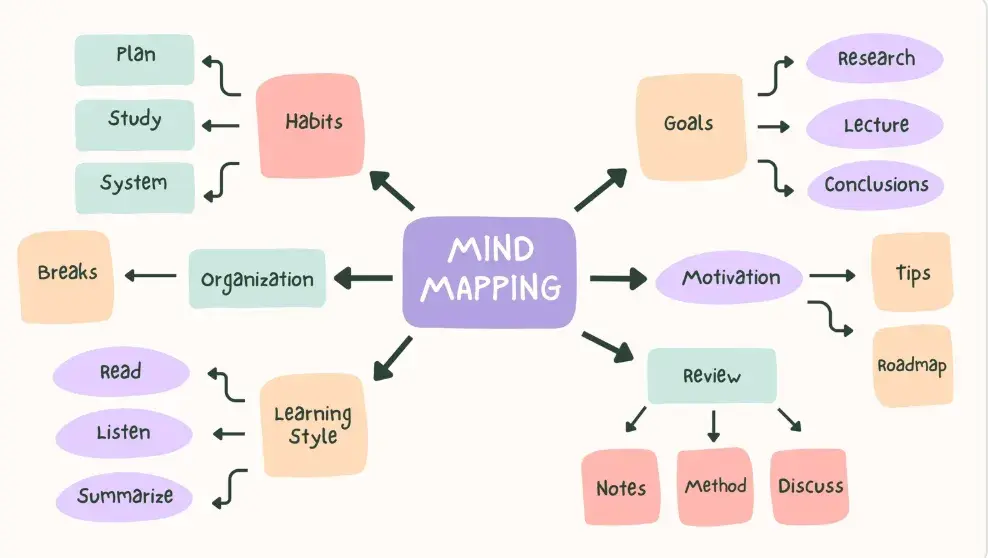
Image source: hubspot.com
Below are the essential parts of a mind map diagram:
- Central topic: The central topic is the primary idea placed at the center of the page. It anchors the entire structure and provides a clear focus for the mind map. All other elements connect back to this topic to ensure the diagram stays organized. A strong central topic helps teams maintain direction during .
- Main branches: Main branches represent the major themes related to the central idea. They help group information into meaningful categories so people can explore each theme individually. Clear branches prevent confusion during planning or collaborative sessions. They also guide participants toward a logical flow of thought.
- Child nodes: Child nodes expand the main branches with additional layers of detail. They help break large concepts into simpler components so users can explore ideas thoroughly. This step-by-step breakdown is important for understanding complex topics. Well-written nodes keep discussions practical and structured.
- Connectors: Connectors visually link branches and nodes to show relationships. These links help people understand cause and effect or similarities between ideas. Connectors keep the map coherent and ensure that no element becomes isolated. They strengthen the diagram by clarifying how concepts influence each other.
- Visual cues: Visual cues include colors, icons, shapes, or highlights that make the map easier to read. These cues help participants differentiate categories or emphasize important points. They also support memory retention during study or . A visually clear map improves comprehension for all users.
What is a mind map used for? Practical modern applications
People often ask what a mind map is used for because they want to understand how it fits into daily workflows. In modern environments, mind maps help teams brainstorm, plan projects, study topics, and coordinate work across departments. The structure supports clarity by reducing clutter and showing how ideas evolve. As digital tools become more common, mind maps also supportand cross-team discussions.
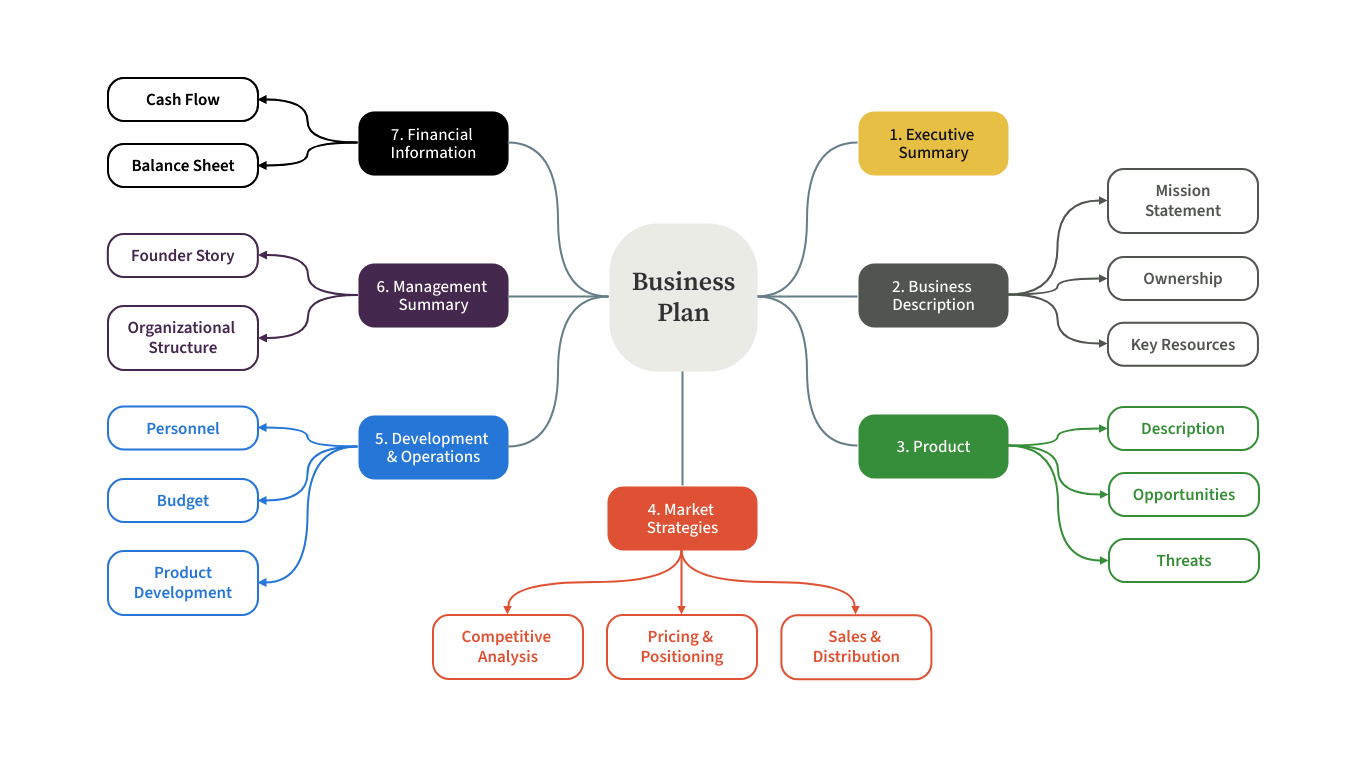
Image source: moqups.com
Below are common uses across real-world settings, each explained in a practical way:
- Marketing campaign planning: Marketing teams use mind maps to outline campaign goals, audience segments, messaging ideas, and channels. This helps everyone see how creative concepts align with business objectives. The visual layout speeds up brainstorming during meetings. It also helps teams track follow-up items more clearly.
- Product design and feature mapping: Product teams map features, user stories, and potential enhancements to see how ideas connect. This structure supports better decision-making during . It helps designers understand user needs more deeply. Teams can review priorities together and refine ideas faster.
- Sales strategy breakdowns: Sales teams use mind maps to plan prospecting methods, messaging themes, and pipeline stages. The structure helps clarify how leads move through the sales cycle. It simplifies discussions about targets and outreach plans. This approach supports alignment between sales and marketing.
- Educational learning and study notes: Students use mind maps and to summarize lessons, simplify concepts, and prepare for exams. The visual structure makes it easier to remember key points. Teachers also rely on mind maps to present course material. This method strengthens understanding during revision.
- , workflows, and retros: Teams use mind maps to outline deliverables, timelines, dependencies, and retrospective insights. The diagram gives them an overview of what needs attention. It also highlights bottlenecks and priorities. Mind maps support continuous improvement cycles.
- Personal goal planning and habit tracking: Individuals use mind maps to plan yearly goals, track habits, and visualize long-term ambitions. Seeing goals organized visually helps motivate consistent progress. It also reveals connections between personal priorities. This method supports clearer reflection.
- Brainstorming sessions for cross-functional teams: Teams from multiple departments use mind maps to collect ideas during workshops. The format helps participants collaborate without overlap. It reduces confusion during rapid ideation. Mind maps provide a clear record of the group's thinking.
Examples of mind maps for real workflows
Examples help people understand what is a mind map example in practical terms. Real scenarios demonstrate how different teams adapt mind maps for planning, strategy, and learning. Seeing how maps guide discussions helps teams apply the technique confidently. These examples cover work, education, and personal development.
- Launching a : Teams map audience groups, creative assets, timelines, and success metrics. This structure clarifies responsibilities and reduces uncertainty during execution. The visual layout supports faster approvals. It also ensures campaign elements remain consistent.
- Building a new product feature roadmap: Product managers map feature categories and user problems. Designers and engineers add ideas to refine direction. This shared structure improves transparency during planning. It encourages more thoughtful prioritization.
- Classroom lesson planning or study topics: Teachers outline key subjects, activities, and assignments to create a smooth learning sequence. Students use the diagram to revise topics quickly. The map supports flexible teaching strategies. It improves engagement in class.
- Yearly personal : Individuals map health, career, finance, and learning objectives. This layout shows how goals influence each other. It helps track progress over months. The map creates clarity for long-term decision-making.
Why teams struggle with traditional mind mapping tools
Many teams eventually ask what is the purpose of a mind map when older tools slow them down. Traditional apps often isolate files and limit . This causes friction when teams try to convert ideas into actual workflows. Without proper connections, mind maps become static and lose value.
- Files stuck in separate apps with no connection to work: Teams struggle because mind maps sit outside their daily workspace. This creates gaps between brainstorming and execution. People spend time moving information manually. Productivity declines when context is lost.
- Limited collaboration features only single-user editing: Older tools allow only one editor at a time. This slows down idea generation during meetings. Teams cannot contribute freely. Discussion becomes fragmented and less productive.
- Hard to link maps with tasks, documentation, or execution: Without direct links, ideas remain disconnected from real work. Teams must rewrite details in other tools. This increases the chance of errors. It also reduces enthusiasm for using mind maps.
- Version control problems during cross-team brainstorming: When multiple versions appear, teams lose track of the latest updates. This leads to confusion during follow-up. Decisions become unclear. Coordination across departments weakens.
- Lack of for turning ideas into action: Traditional tools stop at brainstorming. Teams must rely on manual steps to execute work. This slows momentum and reduces impact. Ideas fade before they become useful.
Learn how to convert ideas into actual workflows
Action time: Try Lark for modern, collaborative mind mapping workflows
brings mind mapping directly into the workspace where teams already manage projects, making it easy to brainstorm, structure information, and plan visually without switching between separate tools. With , tasks, documents, Messenger, and data, ideas can move naturally into action. This unified experience strengthens by giving teams a clearer understanding of their direction and helping them work faster and more efficiently.
MindNotes in Lark Docs for designing mind map
MindNotes inside Lark Docs provides a flexible visual canvas for brainstorming sessions, idea structuring, and mapping out complex project elements. Teams can shift instantly between outline mode and mind map view to explore concepts from different angles. In mind map view, it's simple to create, edit, arrange, and reorganize nodes, add images, zoom in or reshape the canvas, and make the map easier to navigate. Nodes can be highlighted, styled, or marked as complete, and detailed notes can be added to ensure clarity and context. 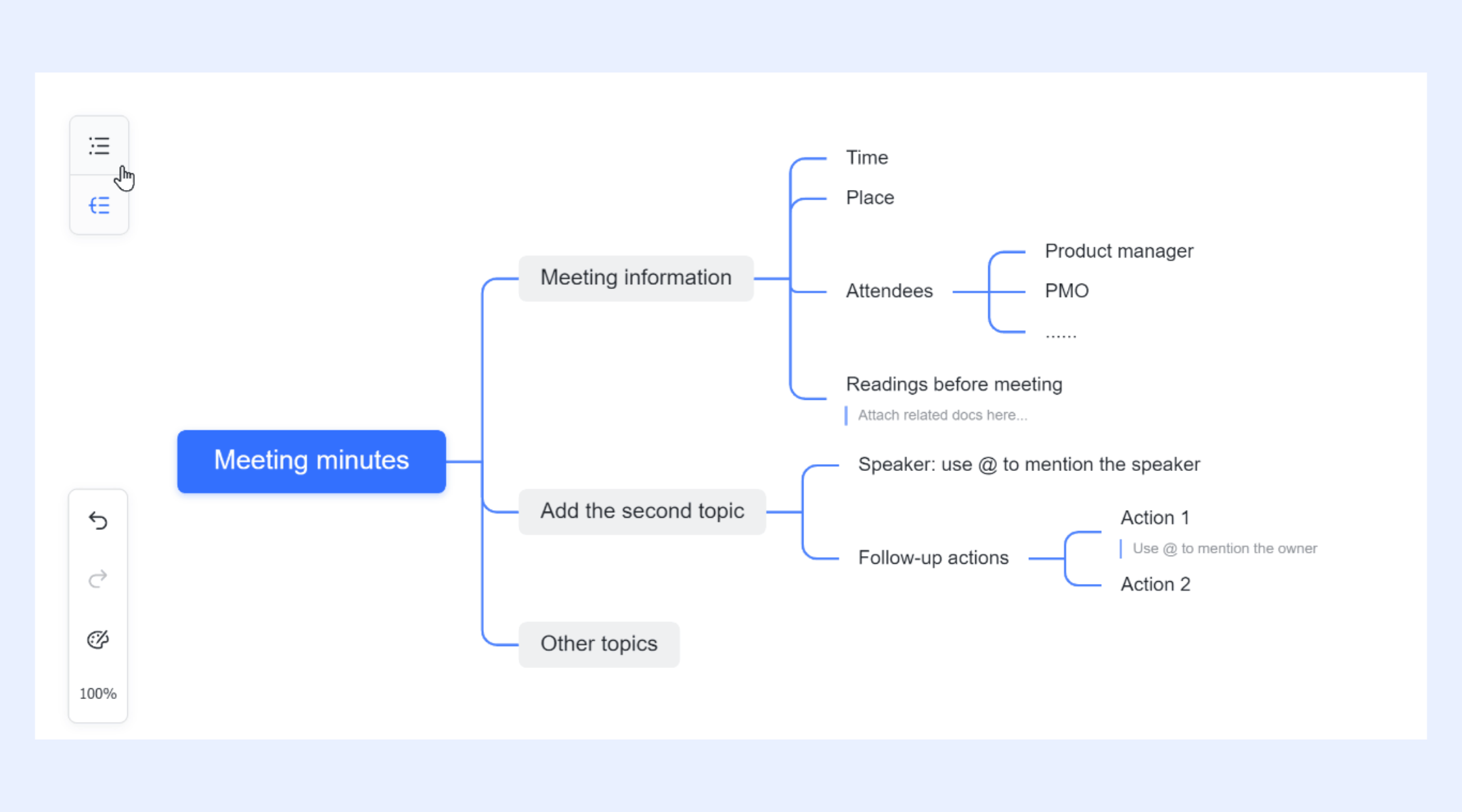
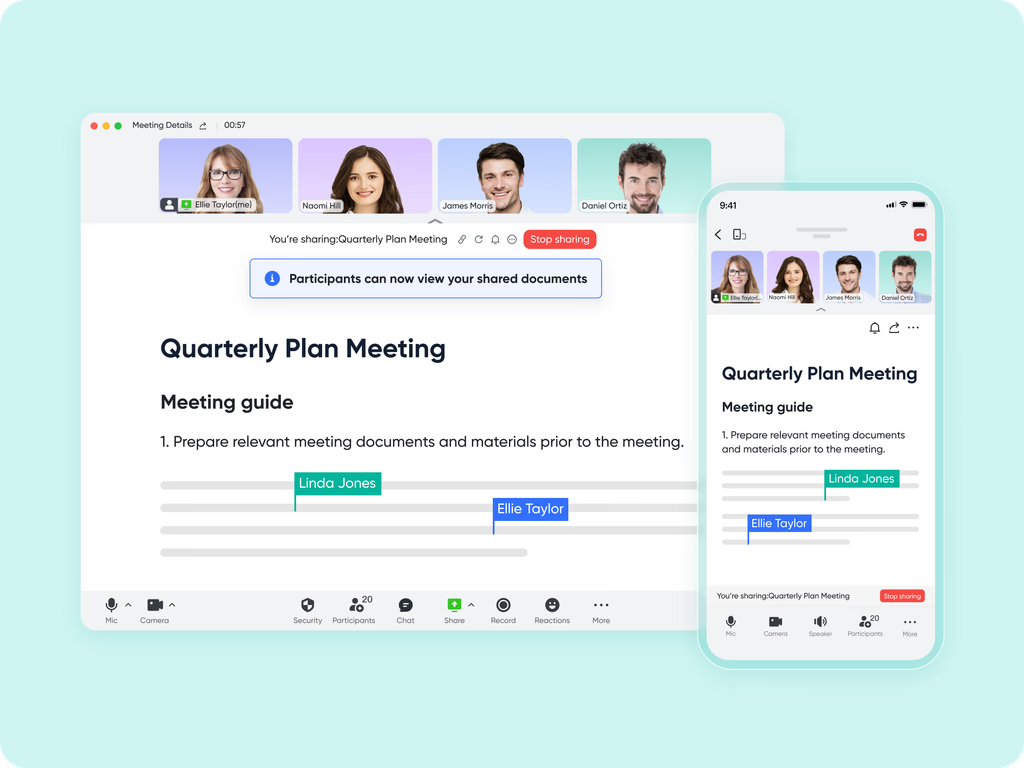
Lark Meetings for collaborative brainstorming
, enhanced by , allows teams to review and refine mind maps together in real time. Participants can view and interact with the shared map simultaneously, see updates as they happen, or explore sections independently. They can leave comments on specific nodes or the entire map to provide targeted feedback. With screen sharing and whiteboard tools included, teams can sketch ideas, add annotations, and refine concepts collaboratively, ensuring that the mind map evolves meaningfully during discussions.
Lark Tasks for turning ideas into execution-ready plans
Lark Tasks makes it simple to transform brainstormed ideas into actionable work. Concepts from a mind map can be converted into tasks within , assigned to team members, and given deadlines and detailed descriptions. From there, teams can track progress and manage follow-through within Lark Tasks. embedded in Docs also provide a timeline-based view of tasks and dependencies, offering a clear bridge between brainstorming and structured execution. 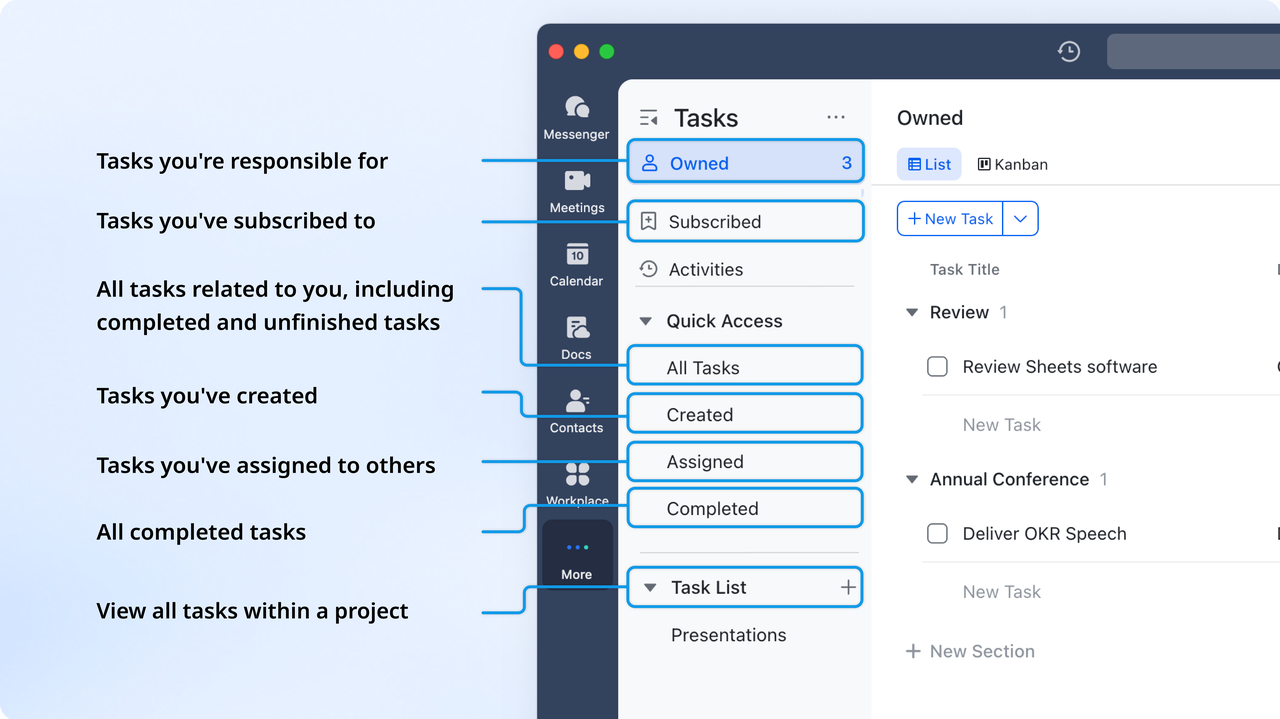
Automations in Lark Base for streamlined idea-to-action workflows
For teams practicing mind mapping at scale, automations in Lark Base help eliminate repetitive manual effort. Automated workflows can create tasks, update records, or send notifications whenever new ideas or nodes are added. Conditional rules ensure that adjust intelligently, prioritizing, organizing, or routing work without constant supervision. This frees teams to focus on strategic thinking and execution while the routine transitions from ideation to actionable tasks happen automatically. 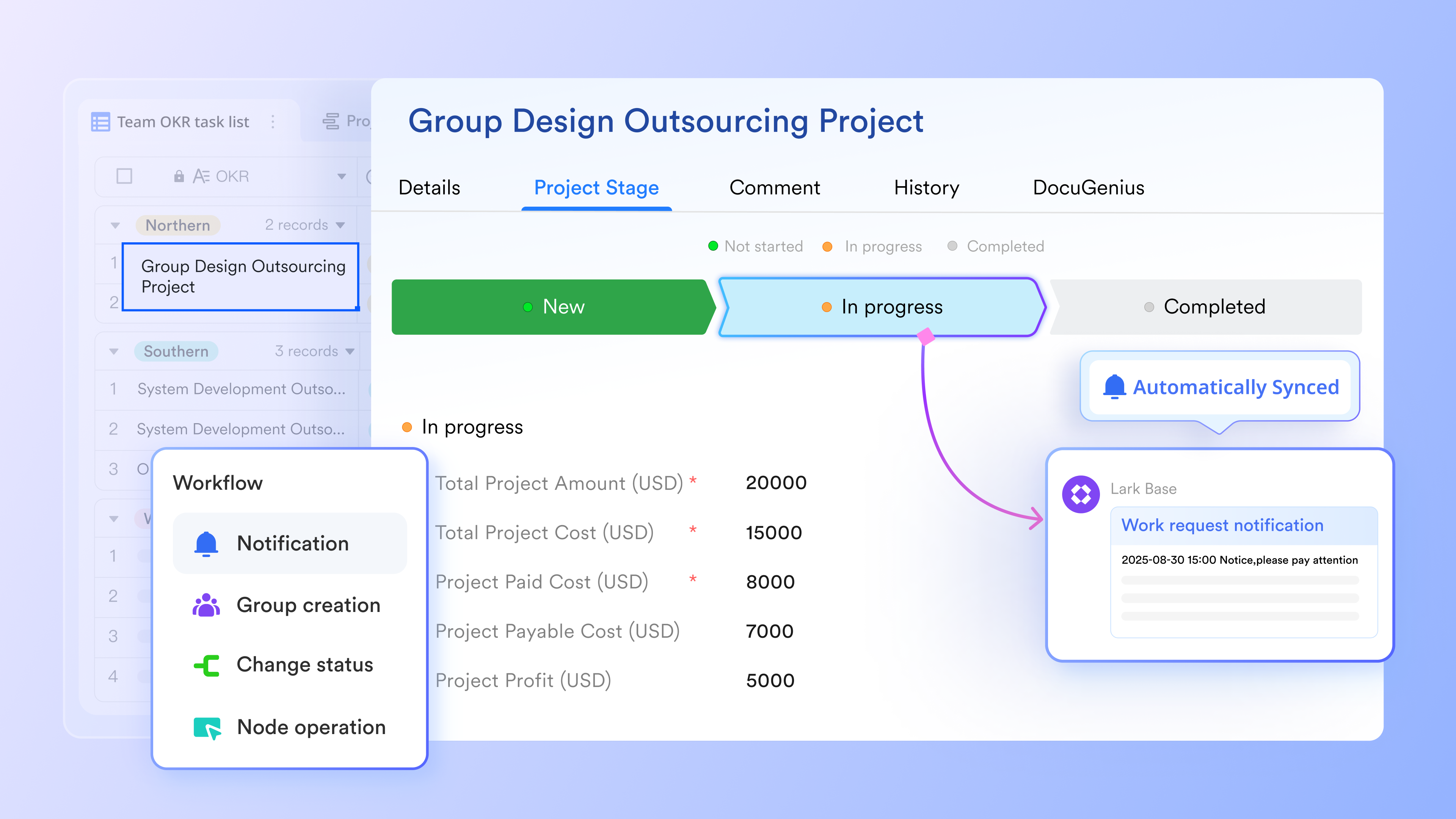
:
- Starter plan: Free forever plan that includes 11 powerful tools for up to 20 users. It also comes with 100GB of storage, 1000 automation runs, AI translations, and more.
- Pro plan: $12/user/month (billed annually) for up to 500 users. It includes everything in Starter plus group calling for up to 500 attendees, 15TB of storage, 50,000 automation runs, and more.
- Enterprise plan: for custom pricing. Supports unlimited users and includes even more automation runs and advanced security, compliance, and management features.
For small teams with simple communication needs

18 months message history
1000 Base automation runs/month
2000 rows per table in Base
Most POPULAR
For companies with comprehensive collaboration and management needs
Unlimited message history
500-participant video meetings
50k Base automation runs/month
20k rows per table in Base
For large companies with advanced security and organizational management needs
Get a personalized demo and pricing
Unlimited message history
500-participant video meetings
15 TB storage + 30 GB storage/user
500k Base automation runs/month
50k Base automation runs/month
Most POPULAR
For companies with comprehensive collaboration and management needs
Unlimited message history
500-participant video meetings
50k Base automation runs/month
20k rows per table in Base
Lark's ready-to-use Mind Map templates
Templates help teams get started faster by offering structured layouts for brainstorming and planning. Use these Lark templates to support planning, event management, and long-term strategic thinking. Brainstorming template
The Lark brainstorming template is designed to help teams and individuals organize and streamline their creative sessions. It provides a structured format to capture essential information, including the project's background, goals, attendees, generated ideas, and follow-up plans. Utilizing Lark's collaborative features, this template ensures a productive session and works as a flexible foundation that adapts to different .
Event planning mind map template
This template helps users break down an event into manageable parts such as logistics, content, timelines, and resources. It provides a clear overview so teams can without losing track of details. The layout supports both high-level planning and deeper exploration of requirements. It keeps event workflows organized from start to finish.
OKR mind map development template
This template helps teams visualize objectives and align them with measurable key results. It provides a structured canvas for connecting goals, initiatives, and expected outcomes. The format supports team alignment during planning cycles and quarterly reviews. It makes strategic goals easier to understand and act on.
Benefits of digital mind maps over traditional whiteboards
As workflows become more distributed, many teams compare digital tools with physical whiteboards. Understanding the difference helps them decide what a mind map is used for in remote or hybrid environments. Digital solutions make it easier to maintain, update, and share diagrams across devices. Teams benefit from more flexible editing and long-term storage.
- across devices: Digital mind maps enable multiple people to edit simultaneously. This supports hybrid meetings and improves idea sharing. It reduces delays during planning sessions. Teams stay aligned even when working remotely.
- Easy editing, reorganization, and duplication: Digital maps let users update nodes quickly without needing to redraw diagrams. This supports flexible brainstorming as ideas evolve. It keeps maps clean and readable. Teams spend less time rewriting whiteboards.
- Integration with tasks, docs, and project workflows: Digital platforms connect mind maps to execution tools so ideas move into action. This smooth transition helps teams maintain momentum. It improves task clarity across projects. Workflows become more predictable.
- Better accessibility and searchability: Digital maps can be accessed anywhere and searched instantly. This saves time when retrieving old diagrams. It also supports better organization of knowledge. Teams avoid losing valuable insights.
- for long-term reference and team alignment: Cloud-saved maps remain available for future cycles. This helps teams track progress over months or years. It also provides a clear record of decisions. Consistent storage improves collaboration.
Conclusion
Mind mapping remains one of the most versatile ways to brainstorm, organize thoughts, and plan projects. It gives teams a structured method to explore ideas visually and understand how concepts connect. Modern digital tools make the technique more collaborative by enabling shared editing, comments, and clear transitions from ideas to actionable tasks. When people ask what a mind map is or what a mind map diagram is, they often want to understand how this visual structure supports clarity and creativity in daily work.
enhances this journey by placing mind maps, tasks, documents, meetings, and workflows in one connected platform. This lets teams move seamlessly from brainstorming to execution while preserving context from start to finish. It supports clarity across departments, encourages better decision-making, and strengthens . As organizations grow and handle more complex projects, having a unified space for planning and action becomes even more valuable.
Begin your workflow journey with Lark today
FAQs
Which industries benefit most from collaborative mind mapping?
Industries such as marketing, product development, education, consulting, and operations benefit significantly from mind maps because they rely heavily on structured brainstorming and planning. Teams in these sectors appreciate how visual thinking clarifies complex decisions. make the process smoother. Lark supports these workflows through integrated tools.
How to create a mind map?
To create a mind map, begin with the main idea or topic in the center of the page. Draw thick, curved main branches radiating out from the center, each labeled with a key concept. From these main branches, add thinner sub-branches with related keywords, symbols, or images. Using colors and varying line thicknesses helps emphasize relationships and makes the entire map more visually engaging and memorable.
What three things must a mind map have?
A mind map must include three core elements. It requires a central image or keyword defining the main subject. Secondly, it needs curved branches connecting main ideas to the center, showing clear relationships. Lastly, the map must use single keywords or images on the lines, avoiding full sentences to encourage rapid recall and association.
What are the 7 steps to creating a mind map?
The seven steps to creating an effective mind map involve: starting in the center with an image; using colors to separate themes; connecting the main branches to the center; using single keywords per line; using images and symbols throughout; varying line thickness for emphasis; and using association to freely brainstorm new ideas off existing branches.
How can mind maps help with problem-solving frameworks?
Mind maps give teams a clear overview of issues and break them into smaller components. This supports frameworks like by mapping symptoms, causes, and actions visually. Teams can understand patterns more easily. Lark helps convert these insights into tasks for follow-through.
Related reading





























