


Basecamp vs Slack: Honest Comparison for 2026 Teams

Cecilia Lane
Go-to-Market Associate
Aug 5, 2026
Cecilia Lane
Aug 5, 2026

26 min read


If you've ever searched for the right team collaboration tool, chances are you've landed in discussions comparing Basecamp vs. Slack. Both platforms have evolved into core tools for modern teams—but in very different ways.
Basecamp is built on the philosophy of structure: projects, messages, and tasks stay neatly packaged for clarity. Slack, in contrast, thrives on spontaneity and speed—real-time chat, instant feedback, and integration with nearly every other app you use.
For decision-makers, freelancers, and startup founders, the question isn't which tool is better but which aligns with your team's rhythm. You may even have seen threads on Basecamp vs Slack Reddit debating how these platforms overlap or complement each other. In this guide, I'll guide you through a complete, yet honest comparison and analysis of these two tools, which will give you enough insights to make the right choice.
Key takeaway: Quick comparison of Slack vs. Basecamp
Before diving deeper, here's a summary that highlights where Basecamp vs Slack align—and where they clearly differ. Consider it a quick guide to help you identify which platform aligns best with your team's size, workflow, and communication style.
While both tools aim to keep teams connected, they differ fundamentally in how they approach productivity. Basecamp organizes; Slack energizes. And depending on your culture—fast feedback vs. structured collaboration—the "winner" changes.
Slack at a glance
Slack is a cloud-based team communication platform that significantly enhances workplace productivity and collaboration. Developed by Slack Technologies and currently owned by Salesforce, this platform serves as a centralized hub where teams can seamlessly integrate conversations, projects, tools, and AI capabilities to streamline workflows. With its commitment to creating a more enjoyable and effective working environment, Slack has become an essential tool for organizations around the globe.
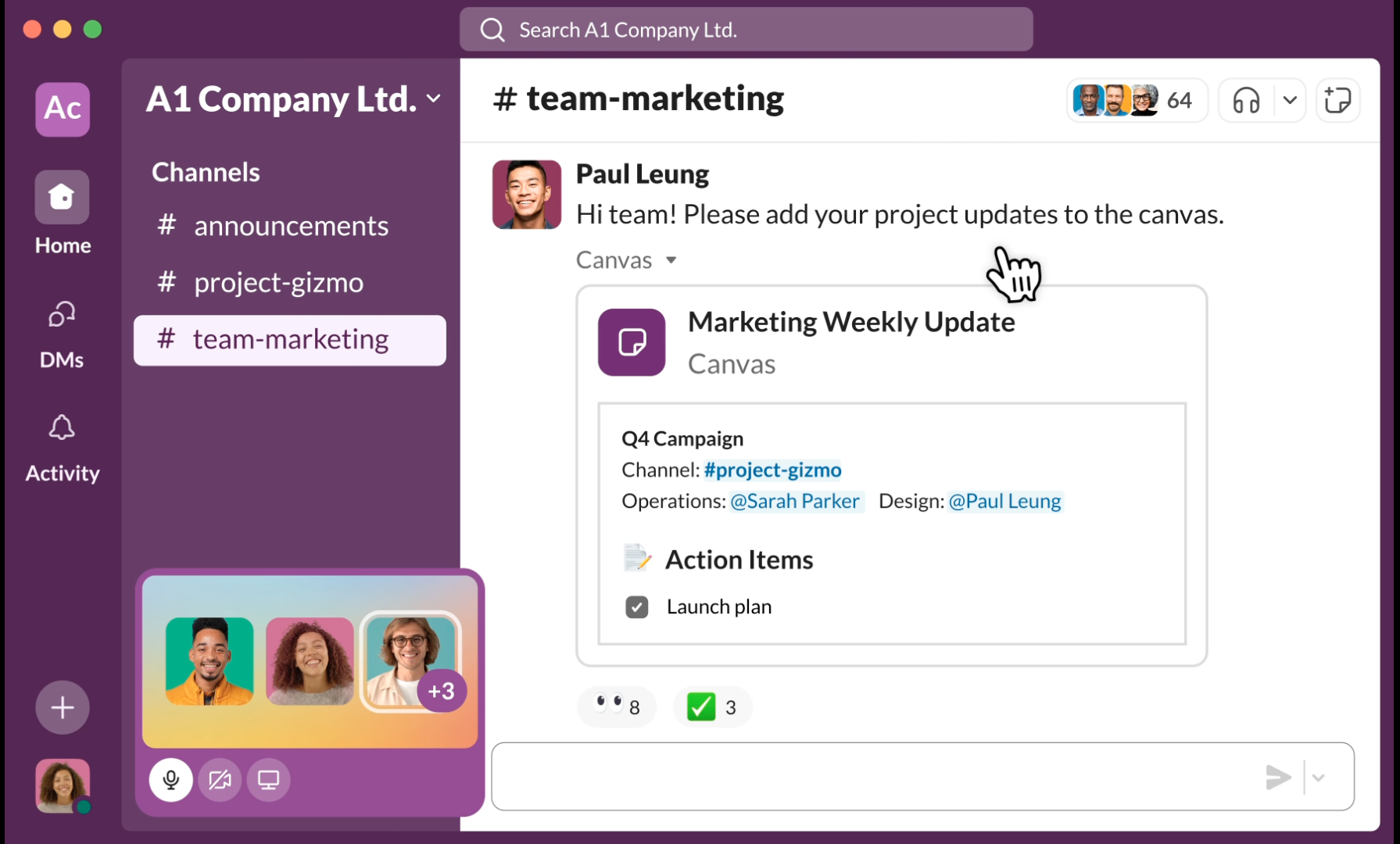
Image source: slack.com
Key features of Slack
Collaboration: Slack fosters a collaborative environment with features designed to enhance communication and teamwork:
- Channels: Organize conversations around specific topics, projects, or teams to keep discussions focused and relevant. Channels can be public, private, or shared with external partners for comprehensive collaboration.
- Connect: Extend collaboration beyond your organization by working with clients, vendors, and partners in shared channels. This feature facilitates seamless interaction with external stakeholders, improving relationships and efficiency.
- Messaging: Instant messaging capabilities enable quick communication through direct messages or group chats, allowing teams to share updates, ideas, and feedback in real time.
- Huddles: For spontaneous discussions, Huddles provide instant voice or video calls within Slack. This feature promotes informal communication and quick brainstorming sessions, making it easier for teams to resolve issues and collaborate dynamically.
- Clips: Users can send audio and video messages, adding a personal touch to communication. Clips are beneficial for conveying complex information or expressing ideas more effectively than traditional text.
Project management: Slack includes a variety of tools to support project management and organization:
- Templates: Built-in templates streamline the creation of standardized messages, reports, and documents. This feature ensures consistency in communication and saves time for teams.
- Canvas: A collaborative space for organizing and sharing information, Canvas allows teams to create and maintain documents like meeting notes and project outlines, offering a clear overview of essential details.
- Lists: Slack Lists enable users to create to-do lists directly within the platform, improving task management and helping team members prioritize their responsibilities.
- File Sharing: With easy drag-and-drop file sharing, users can upload documents directly into channels, keeping pertinent resources easily accessible within the context of conversations.
Integration: Slack provides extensive integration capabilities to enhance workflow efficiency:
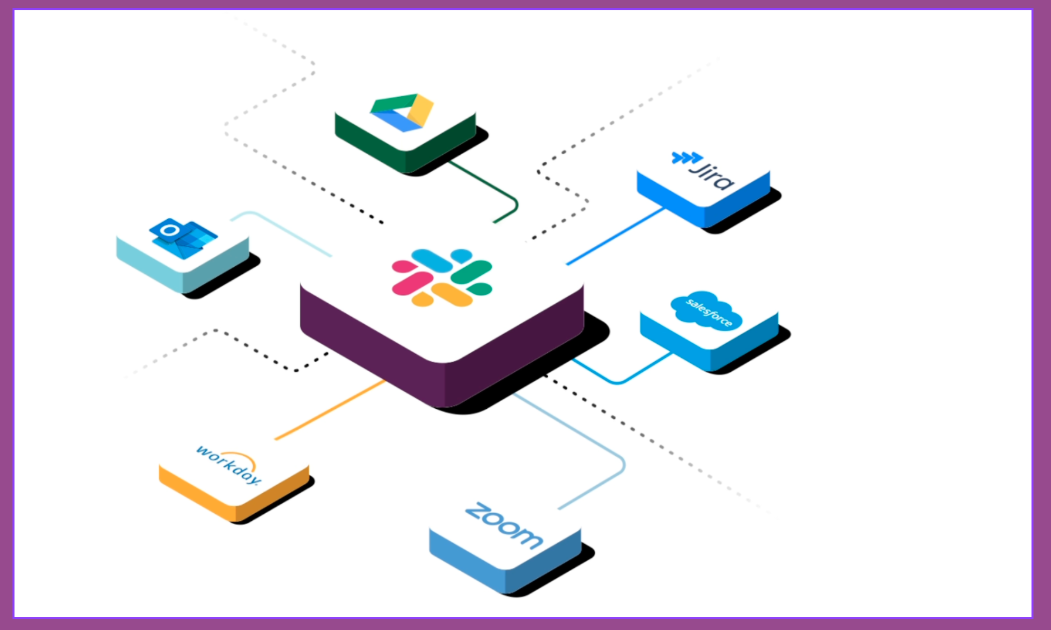
Image source: slack.com
- Workflow Builder: This no-code tool allows users to automate repetitive tasks and create custom workflows, improving efficiency across teams without needing technical expertise.
- Slack & Salesforce Integration: By integrating with Salesforce, Slack users can streamline their sales processes, manage customer inquiries, and enhance communication across sales teams directly within Slack.
Intelligent tools: Slack incorporates intelligent features to support productivity and information retrieval:
- AI in Slack: Leveraging artificial intelligence, Slack enhances user experience through features like smart notifications, message recommendations, and effective task management.
- Agentforce: This tool integrates a virtual assistant designed to help sales teams manage leads, automate tasks, and enhance communication efficiency using AI capabilities.
- Enterprise Search: Advanced search functionality allows users to quickly find information across channels, messages, and documents, ensuring that critical data is readily available when needed.
However, Slack vs Basecamp debates often raise the issue of focus. The same flood of notifications that keeps teams responsive can also drain attention. Without disciplined channel management, information quickly scrolls away, and accountability can blur. Still, Slack continues to dominate in environments where communication speed outweighs structure—think software teams, media companies, and agile startups.
👉Check our reviews about Slack alternatives that worth a try: The 12 Best Slack Alternatives for Every Business in 2025
Basecamp at a glance
Basecamp is a project management and team collaboration tool designed to simplify workflows and enhance communication within organizations. With its straightforward, user-friendly interface, Basecamp enables teams to manage projects, set schedules, delegate tasks, and track progress—all in one centralized space. By focusing on clarity and ease of use, Basecamp helps teams stay organized, align efforts, and maintain visibility across projects, ultimately leading to better productivity and reduced management overhead.
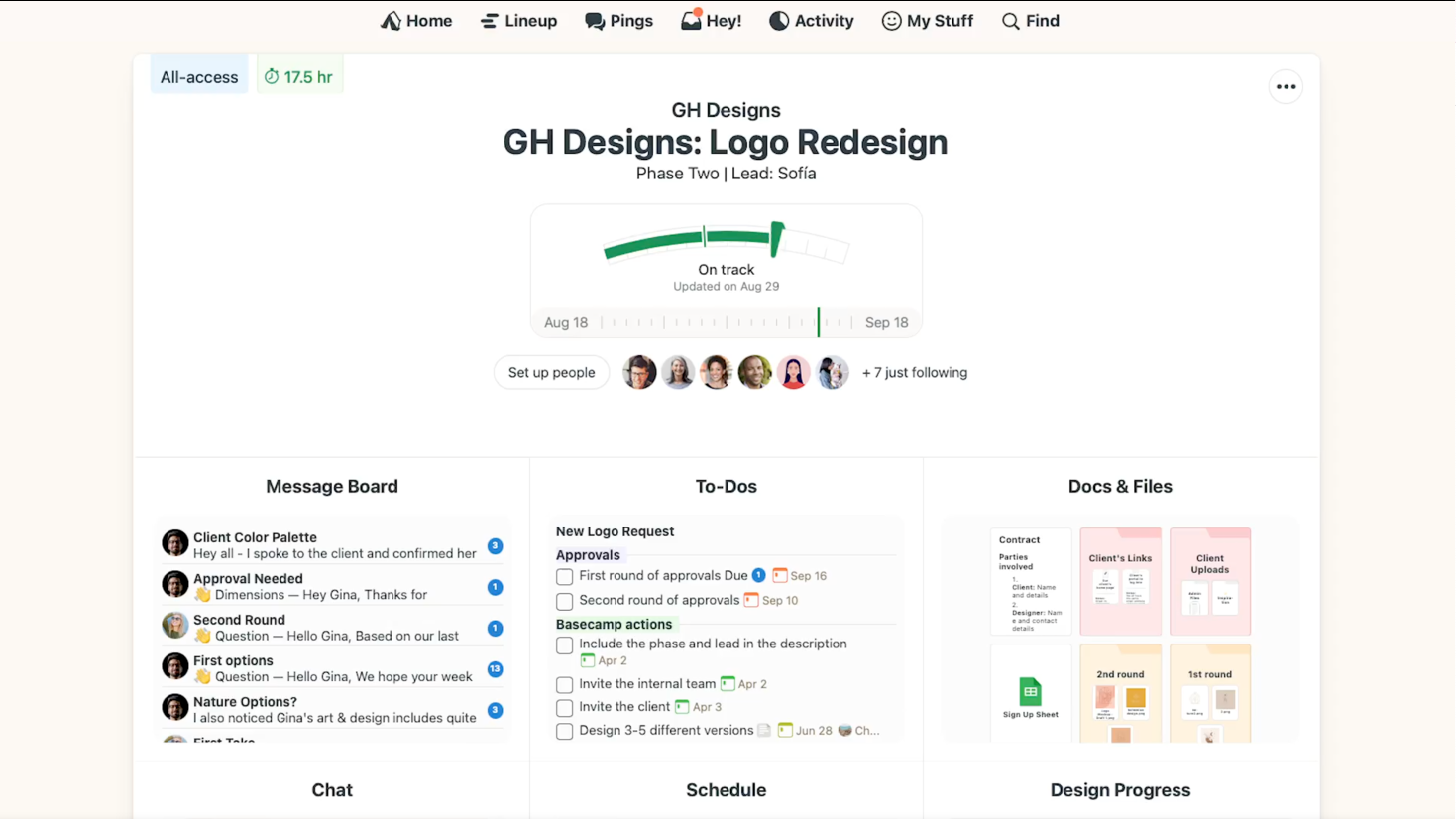
Image source: basecamp.com
Key features of Basecamp
Collaboration: Basecamp provides various tools designed to enhance teamwork and improve the way team members work together on projects.
- To-dos: Create and assign tasks easily, set due dates, attach files, and comment on individual tasks.
- File sharing: Upload and store documents within projects, providing all team members access to the latest resources.
- Client access: Invite clients into specific projects for transparency, allowing them to see progress and collaborate effectively.
Project management: These features help teams keep track of their projects, deadlines, and overall progress efficiently.
- Schedules: Manage project timelines with a calendar view of upcoming deadlines and events, ensuring everyone is informed about important milestones.
- Hill Charts: Provide a visual representation of project progress, helping teams prioritize work and identify bottlenecks.
- Reports: Generate summaries of project activity, task completion rates, and team participation to monitor productivity and inform decision-making.
Communication: Effective communication is at the heart of Basecamp, allowing team members to stay connected and engaged throughout their projects.
- Message Boards: Foster discussions and share important announcements in a centralized location to reduce email clutter.
- Chat: Enable real-time communication among team members for informal discussions, quick problem solving, and enhanced collaboration.
- Automatic Check-ins: Prompt team members to share progress updates and challenges, encouraging regular communication without excessive meetings.
Basecamp vs Slack: Feature-by-feature comparison
When evaluating Slack vs. Basecamp, the choice often comes down not to visual preference but to workflow philosophy. Let's break down how the two compare across their most critical aspects.
Task and project management
- Basecamp excels in task and project management with its integrated to-do lists, progress trackers, and milestone scheduling features. It is specifically designed to provide teams with clear visibility into various project stages, ensuring personal accountability and organized workflows. Team members can easily see their assigned tasks and deadlines, making it an ideal choice for those who prefer a centralized approach to managing projects.
- Slack, while not a dedicated project management tool, offers features that enhance task management within its communication framework. For instance, Lists allows users to create to-do lists directly within Slack, helping teams keep track of tasks and prioritize their work effectively. Additionally, Canvas provides a collaborative space for teams to organize their thoughts, share documents, and maintain project-related information in one easily accessible area. File Sharing in Slack allows teams to share important documents and files quickly and efficiently, embedding necessary resources directly into their conversations.
In comparing Basecamp with Slack, teams often find that while Slack provides valuable tools for managing tasks within a collaborative environment, Basecamp stands out by delivering a comprehensive and structured approach to project management. This distinction illustrates the choice between a focused project management system and a versatile communication platform, each suited to different team needs and dynamics.
Communication and collaboration
- Slack is designed for continuous communication. Its Channels create context-driven spaces where teams can engage in instant discussions, share files, and even initiate video calls through Huddles. This setup encourages real-time interaction and responsiveness, enhanced by the use of emojis, mentions, and bots that foster engagement and keep conversations lively. Additionally, Messaging allows for quick exchanges, while Clips enable team members to share voice or video messages, providing a more personal touch to communication.
- Basecamp emphasizes intentional and structured communication. It provides thoughtful Message Boards that promote focused discussions and encourage less frequent interruptions. This approach helps prevent projects from spiraling into endless threads, which many managers appreciate for maintaining accountability and clarity. Features like Automatic Check-ins encourage team members to share updates on their work in a concise manner, fostering a culture of transparency while minimizing distractions.
By combining these functional approaches, Slack offers rapid communication and dynamic engagement, whereas Basecamp prioritizes organized discussions and deliberate interactions, catering to different team needs and improving collaboration in unique ways.
Integrations and workflow automation
- Basecamp takes a streamlined approach to integrations. Instead of overwhelming users with hundreds of add‑ons, it focuses on essential connections that enhance productivity—calendar syncs, file storage links (users can link up files from Google Docs, Figma, Dropbox, Airtable), and time‑tracking tools. This simplicity appeals to teams that prefer straightforward workflows over constant app‑hopping. While it doesn't aim to be an automation powerhouse, Basecamp's clean integration ecosystem ensures stability and ease of use for small and mid‑sized organizations.
- Slack, on the other hand, is built around extensibility. Slack App Directory includes thousands of integrations (over 2,600 apps) spanning CRMs, analytics platforms, customer support, and deployment pipelines. This flexibility allows Slack to act as a central hub where notifications, progress updates, and automated reminders converge. For digital‑first or engineering‑heavy businesses, that breadth translates into seamless information flow and faster operational response.
Data security and privacy
Security concerns often emerge in enterprise-level evaluations of Slack vs Basecamp.
- Slack: Provides robust enterprise-level encryption for data both at rest and in transit, ensuring that sensitive information remains secure. It offers granular admin controls, allowing organizations to regulate access and manage user permissions effectively. Additionally, Slack is compliant with various industry standards and regulations, including ISO/IEC 27001 and GDPR, making it suitable for corporate environments that require comprehensive security measures. Its Enterprise Key Management feature gives organizations enhanced control over their data encryption keys, ensuring that they can meet stringent governance requirements.
- Basecamp: Focuses on transparency and simplicity in its approach to data security and privacy. The platform emphasizes reliability and provides a clear data management policy with minimal tracking, making it appealing to smaller organizations and teams that prioritize straightforward privacy measures. Basecamp's commitment to protecting user data is evident in its efforts to limit complexity, which streamlines the user experience while ensuring essential safeguards are in place.
For highly regulated firms, Slack's extensive enterprise governance and compliance capabilities may be essential. In contrast, for creative teams or remote agencies looking for transparent, user-friendly solutions, Basecamp offers a balanced approach that caters to their needs without the complexities of intricate compliance structures.
Basecamp Slack integration
Integrating Basecamp and Slack can seem appealing at first glance, as both tools offer unique strengths in project management and team communication. However, the necessity of merging these two applications brings its own set of challenges and costs.
Utilizing both tools simultaneously can increase users' learning curves and time spent switching between applications, leading to potential inefficiencies. For teams that find themselves needing the robust project management capabilities of Basecamp alongside Slack's dynamic communication features, the integration may not yield the expected seamless experience. Instead, users often encounter the frustration of managing notifications and updates across platforms, which can detract from productivity.
Moreover, while using both applications can add complexity, maintaining two separate subscriptions may also result in higher operational costs. Teams must consider whether the benefits of having two specialized tools outweigh their time and financial investment.
If a team determines it must leverage both Slack and Basecamp, it may be more efficient to seek an all-in-one solution like Lark that effectively combines CRM and project management functionalities. By adopting a single platform, organizations can foster smoother collaboration, minimize the need for juggling different tools, and streamline user experience—all while reducing overhead costs associated with multiple subscriptions.

Pricing and value: Which platform offers better ROI?
The pricing model is one of the most defining factors in the basecamp vs. slack discussion. While both tools aim to deliver team productivity, the way each charges for access can dramatically influence the total cost of ownership.
Slack pricing
Slack uses a per-user, per-month model. For small teams, the free plan allows basic communication but limits message history and integrations. Professional or Business tiers give access to full histories, advanced admin controls, and enterprise-level security. The flexible scaling appeals to startups growing gradually—but the cumulative cost rises sharply as the team expands.
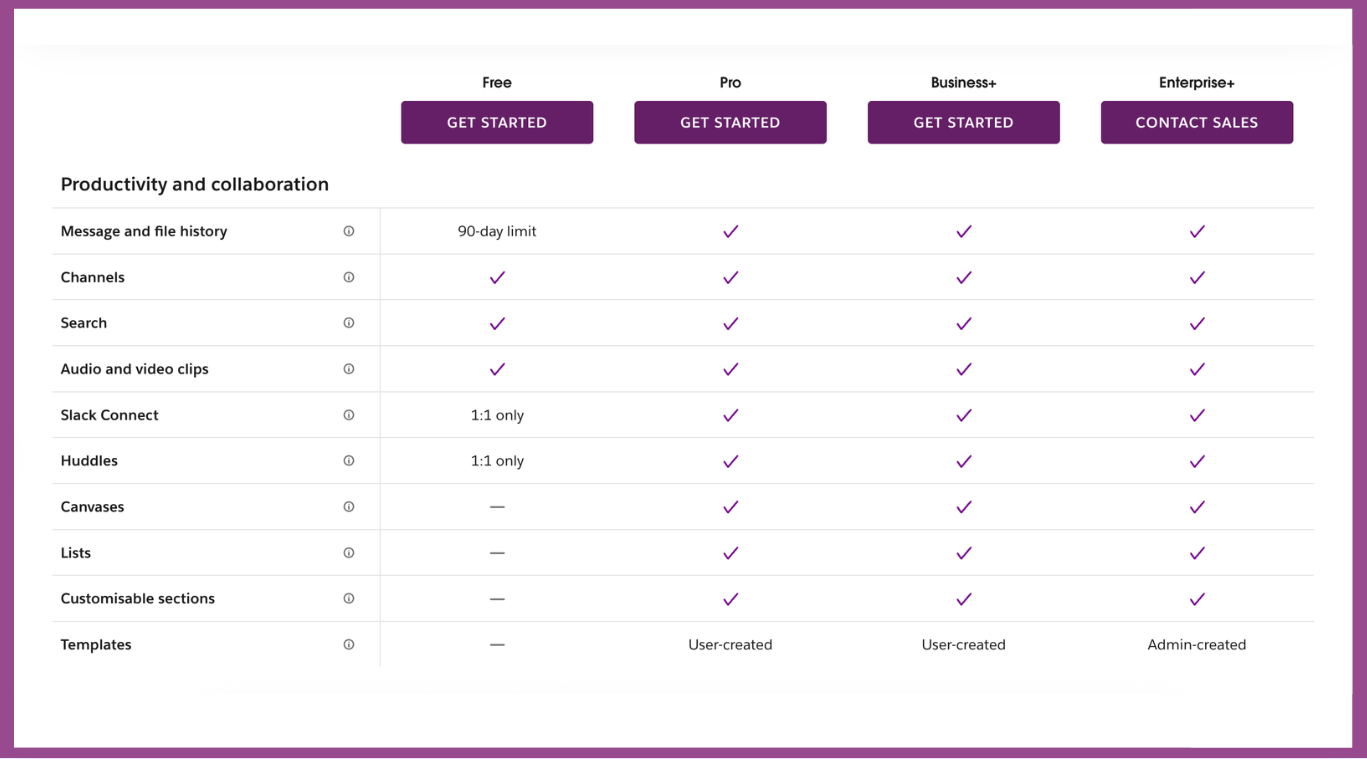
Image source: slack.com
Slack's plans:
- Free: 90 days of message history, up to 10 apps from Slack App Directory, 1:1 meetings, 1:1 external messages.
- Pro $8.75/user/month (paid annually): Unlimited message history, unlimited app integrations, group meetings, group external messages, and basic AI conversation summaries. $4.38 for the first three months.
- Business+ $15/user/month (paid annaully): Everything in Pro plan plus advanced AI features (workflow generation, search, daily recap, file summaries). $9 for the first three months.
- Enterprise, need to contact sales: Everything in Business+ plan plus enterprise-grade AI features (multiple SAML configurations, SCIM user management, native data loss prevention)
👉Take a look at the detailed breakdown of Slack's paid plans: Slack Pricing Breakdown 2025: Free and Paid Plans Explained
Basecamp pricing
Basecamp keeps things remarkably simple: a single monthly fee gives the entire organization unlimited users and projects. For smaller businesses or agencies managing multiple clients, that flat-rate model removes billing complexity and budgeting surprises. It also eliminates discussions about “who gets access,” enabling entire organizations to onboard without extra licenses.
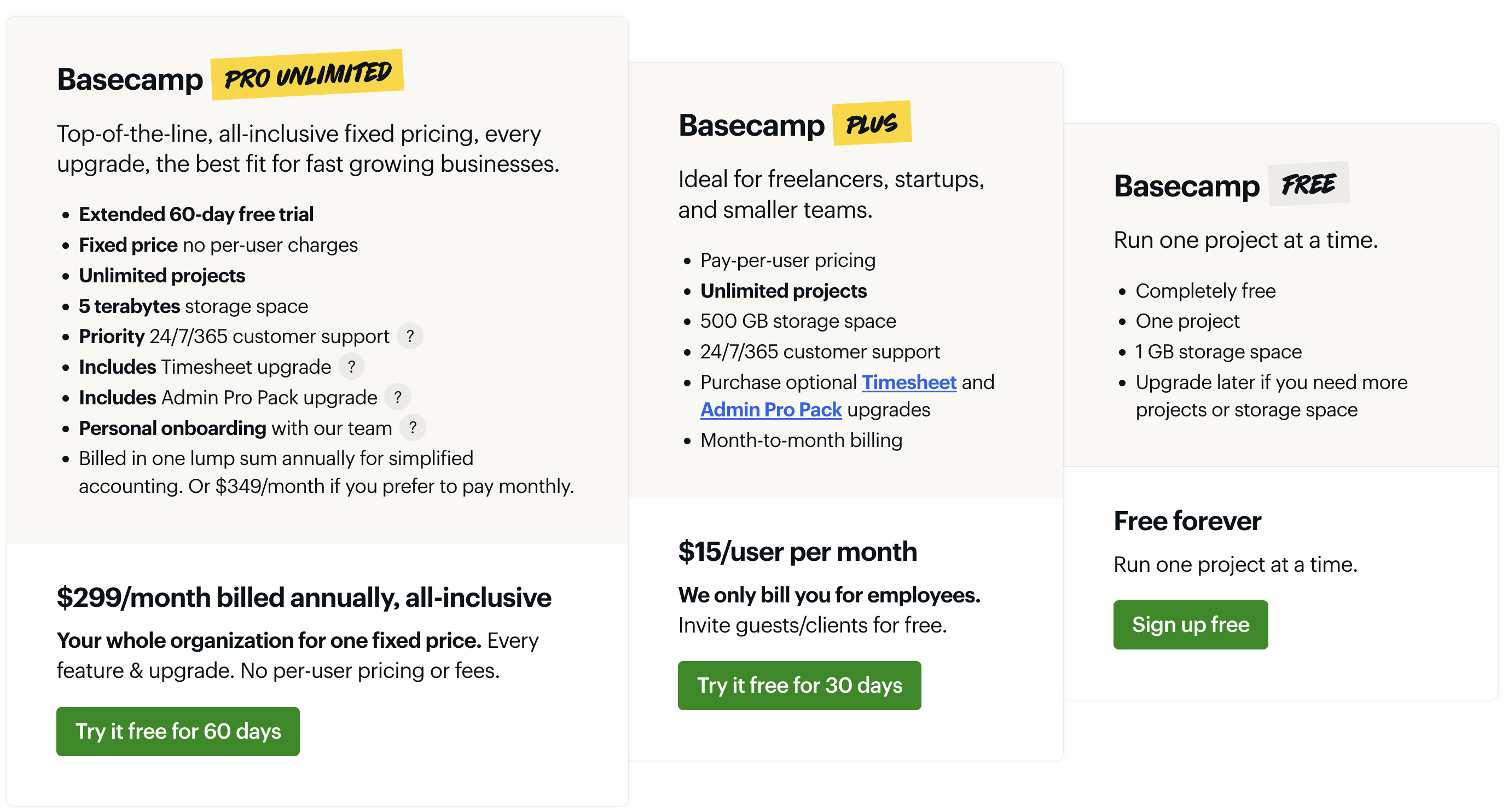
Image source: basecamp.com
Basecamp's plans:
- Free: This entry-level plan enables teams to manage one active project with essential task and file-sharing capabilities. It serves as an ideal starting point for new users to evaluate Basecamp's workflow before upgrading, and remains free indefinitely for individual or trial use.
- Plus: Aimed at small teams and startups, this plan supports a limited number of users and includes core project management tools with fixed storage. Its monthly per-user pricing structure allows teams to scale precisely with their needs, while optional add-ons offer flexibility for specialized requirements. Allowing free trial for 30 days.
- Pro unlimited: This top-tier plan is designed for established businesses and growing teams, offering unlimited projects, users, and advanced client access. It operates on a flat-rate annual billing system with no per-user fees, providing predictable budgeting and scalability. Priority support and enhanced control features are included to facilitate large-scale collaboration. Allowing free trial for 60 days.
Pricing comparison
When weighing Basecamp vs Slack from a cost perspective, their pricing philosophies differ fundamentally: Basecamp values simplicity and predictability, while Slack emphasizes scalability and modular access. The table below offers a side‑by‑side snapshot of how these models affect team budgets and long‑term ROI.
Ultimately, the Basecamp vs Slack return on investment depends on how your team operates.
- If your team thrives on rapid collaboration and daily, real‑time discussions, Slack's higher‑tier plans can be justified by the time saved and fluid communication flows.
- If your organization values cost steadiness, lower administrative overhead, and structured workflows, Basecamp delivers greater financial and operational efficiency.
In both cases, clarity on your team's workflow patterns—how often you communicate versus how rigorously you track progress—determines which tool provides the better long‑term value.
User experience and learning curve
Usability can often make or break adoption—no matter how powerful a platform looks on paper. When teams compare Basecamp vs. Slack, the first question that arises after pricing is: how fast can my team learn it?
- Basecamp was designed to feel familiar, almost like a digital office whiteboard. Its layout is clean, with predictable navigation: messages, to‑dos, schedules, and files live neatly within each project space. This structure keeps non‑technical users comfortable and reduces onboarding time. Managers can easily align new employees without training sessions or tech support. Its calm interface also encourages asynchronous work—perfect for teams seeking structure over speed.
- Slack, conversely, requires a bit more ramp‑up. The platform's channel‑based design is powerful but can feel overwhelming at first, particularly for users unused to constant notifications or multitasking in chat. Once mastered, though, Slack becomes second nature: quick commands, integrations, and threaded conversations help users stay responsive and connected across projects.
Comparing the two, the Slack vs Basecamp user experience debate boils down to personality—Basecamp offers peace and clarity, while Slack delivers energy and immediacy. For teams with mixed preferences, thoughtful onboarding and clear usage norms make all the difference.
Which one fits your team? Basecamp vs Slack use cases
No single platform universally wins the Slack vs. Basecamp debate—it's all about alignment with how your team operates day to day. Below are common scenarios showing where each platform excels and where combining them, or adopting a unified alternative, might work best.
When deciding, reflect on how your team interacts:
- If progress depends on quick conversations and spontaneous problem‑solving, Slack's immediacy is unbeatable.
- If stability, documentation, and visibility across time matter more, Basecamp ensures nothing gets lost in chat history.
- And if you want chat, tasks, docs, and meetings tied neatly together, modern all‑in‑one suites such as Lark now offer a middle ground.
Choosing between Basecamp vs Slack isn't about replacing one with another; it's about building the right digital rhythm for your team's culture and workflow.
A powerful, cost-effective alternative to Basecamp and Slack
Lark stands out as an all-in-one platform that effectively combines features for collaboration, project management, and communication, making it a compelling alternative to both Basecamp and Slack. Below are some key aspects where Lark excels:
Collaboration & communication
Lark's collaboration and communication features foster a complete environment that keeps team members connected and aligned, ultimately driving productivity and enhancing the overall effectiveness of group interactions.
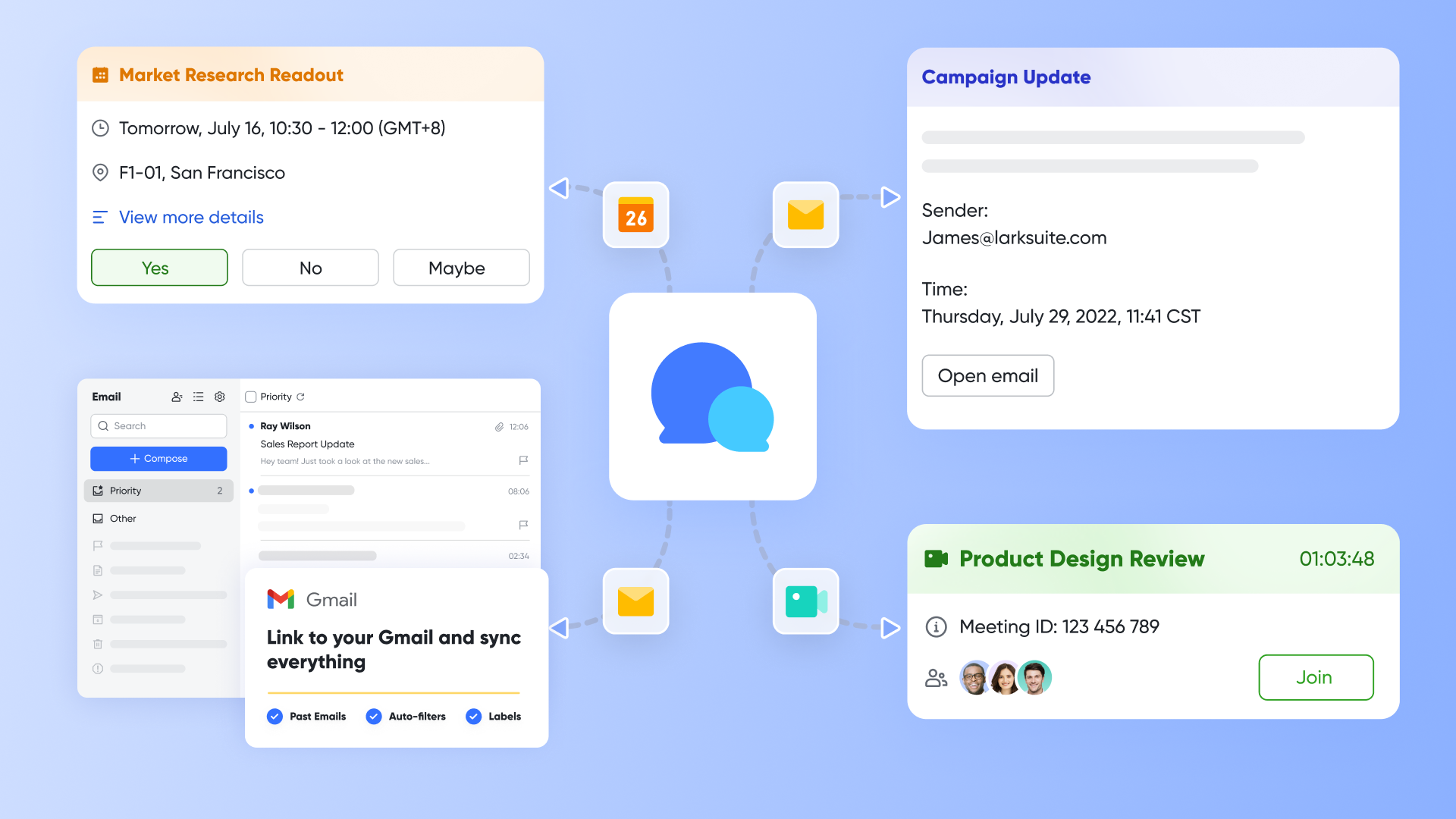
Lark Messenger, as a comprehensive messaging tool, allows team members to communicate in real-time, providing a seamless platform for one-on-one and group chats. With features like file sharing, emoji reactions, and mentions, Lark Messenger enhances engagement and facilitates dynamic discussions.

Designed for efficient virtual collaboration, Lark Meetings supports high-quality video and audio calls. Teams can schedule and conduct meetings directly within the app, benefiting from integrated screen sharing and real-time collaboration tools to ensure productive discussions. Lark Minutes and Lark AI Meeting Notes also help streamline meeting notes, generate discussion insights.
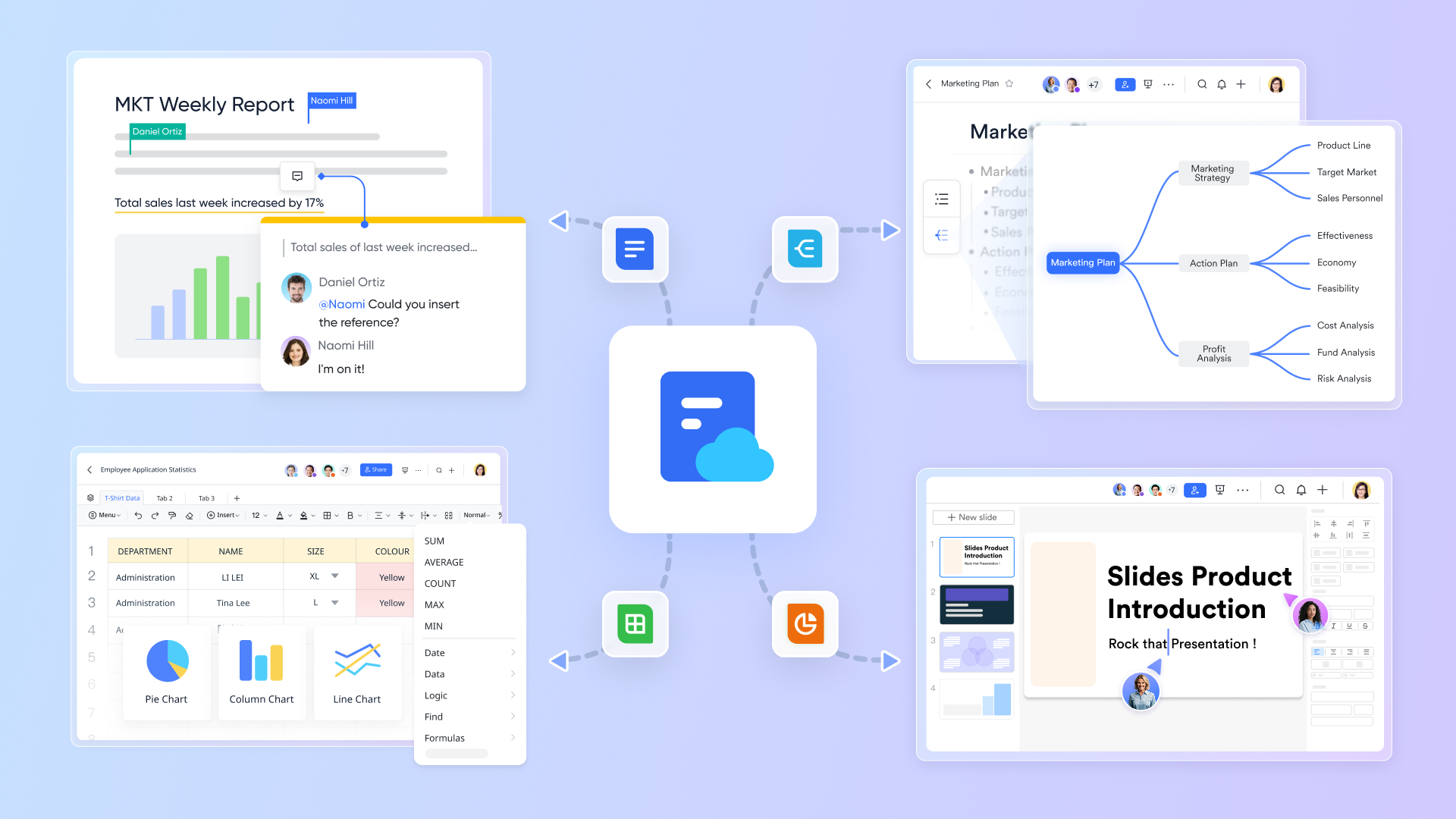
Lark Docs, as a collaborative document editing tool, allows multiple users to work on files simultaneously, enabling real-time updates and discussions within documents. With features such as comments, version history, and intelligent suggestions, Lark Docs streamlines the content creation process and enhances teamwork.
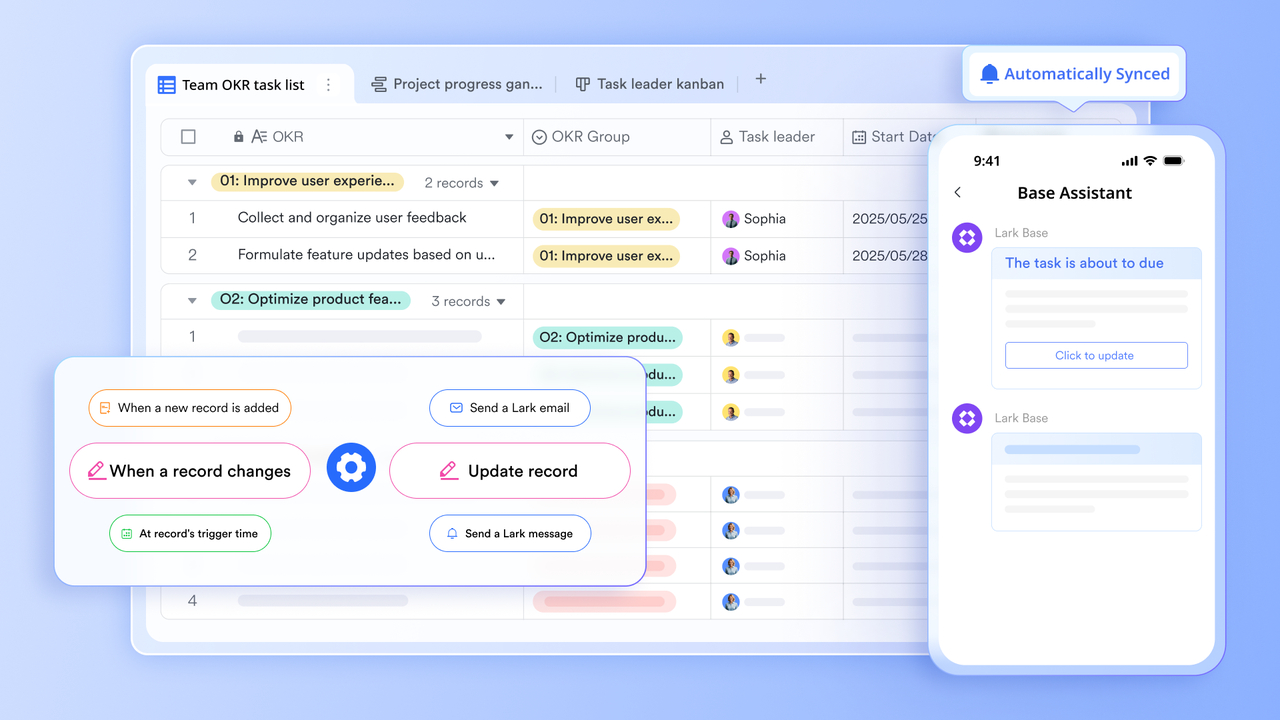
Lark OKR is a powerful tool designed to enhance people management and collaboration within teams focused on achieving measurable goals and driving successful outcomes. By providing a structured framework for setting and tracking objectives, Lark OKR fosters alignment across departments and ensures that everyone is working towards shared goals. It enhances visibility into team objectives, allowing members to see how their individual contributions align with overall organizational priorities.
Project management
With robust project and people management tools, Lark enhances organizational efficiency by providing clarity, accountability, and effective tracking of initiatives, making it easier for teams to collaborate on goals and achieve results.
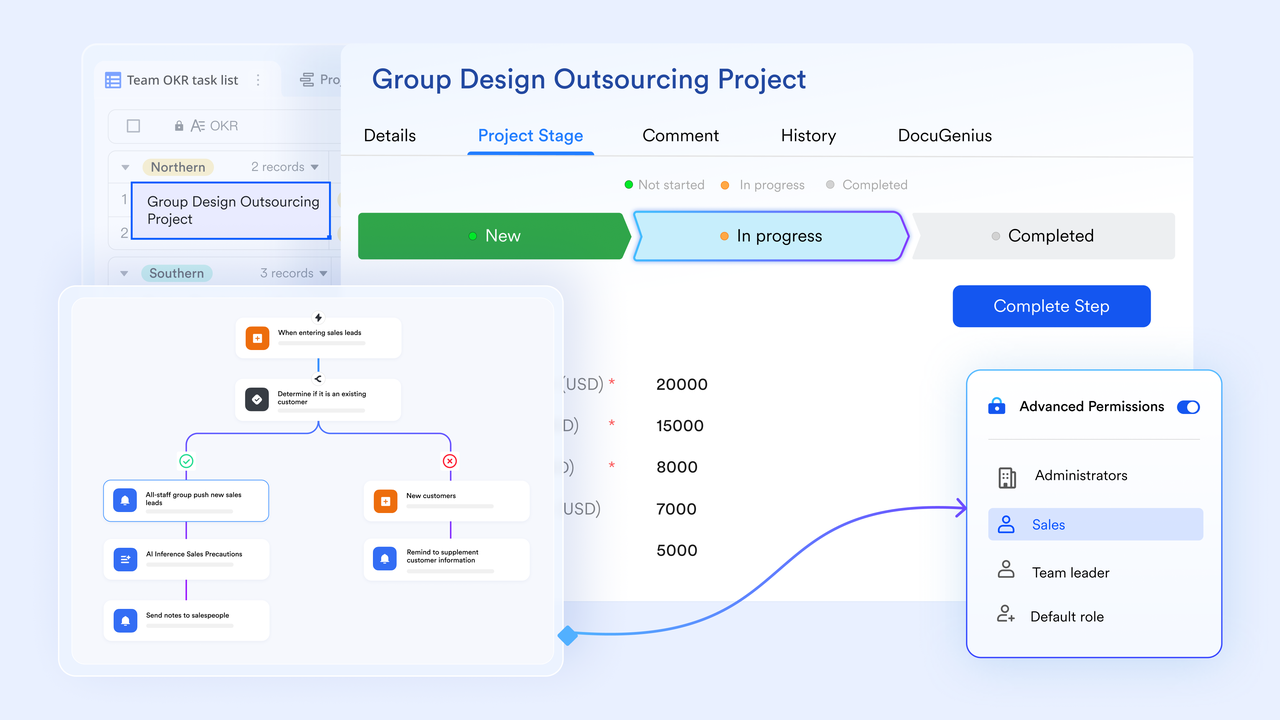
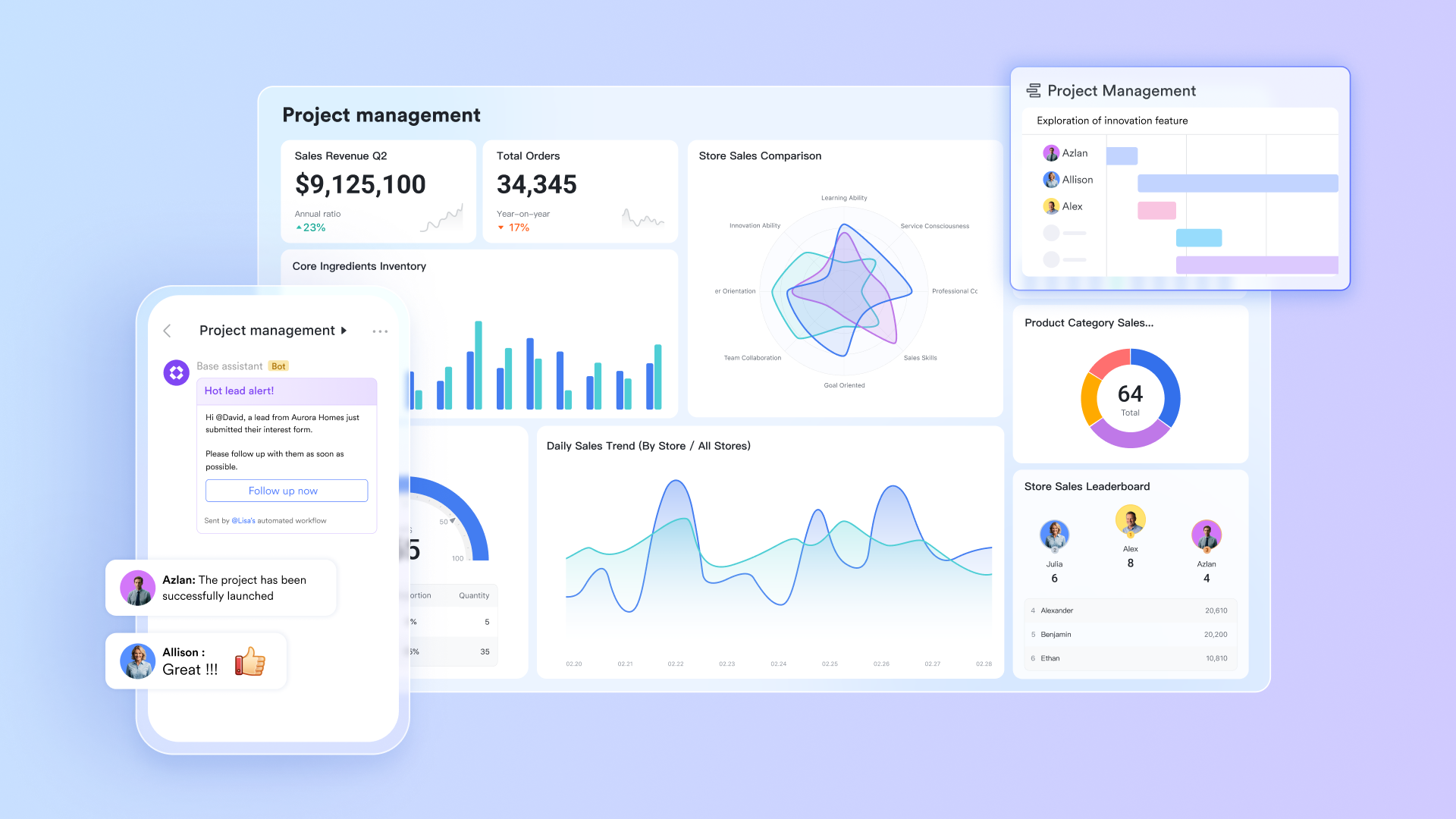
Lark Base offers robust data visualization capabilities and customizable dashboards that provide teams with comprehensive insights into their projects' progress and performance. Users can leverage multiple view options, including Gantt charts, Kanban boards, and gallery views, to visualize tasks and timelines from different perspectives, making it easier to identify bottlenecks and track progress effectively.
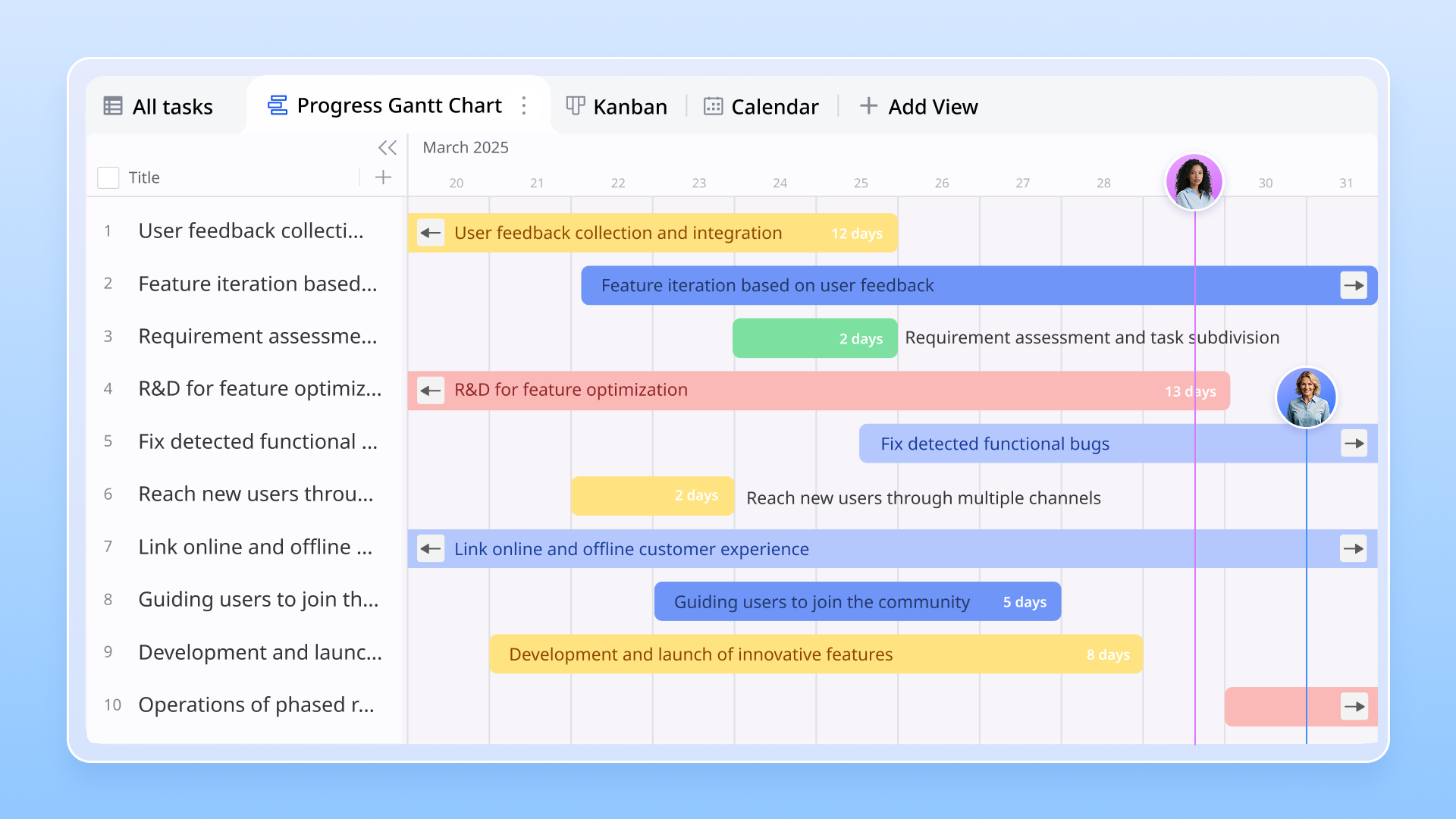
Additionally, Lark Base supports automated workflows by allowing users to set triggers that streamline routine processes. When combined Messenger and Lark Docs, it creates a cohesive working environment where communication and documentation are seamlessly connected.
When it comes to time management, Lark Calendar simplifies scheduling by allowing users to see team availability, schedule meetings, and set reminders all in one place. This function helps streamline project planning and ensures that every team member stays on track with important dates and deadlines.
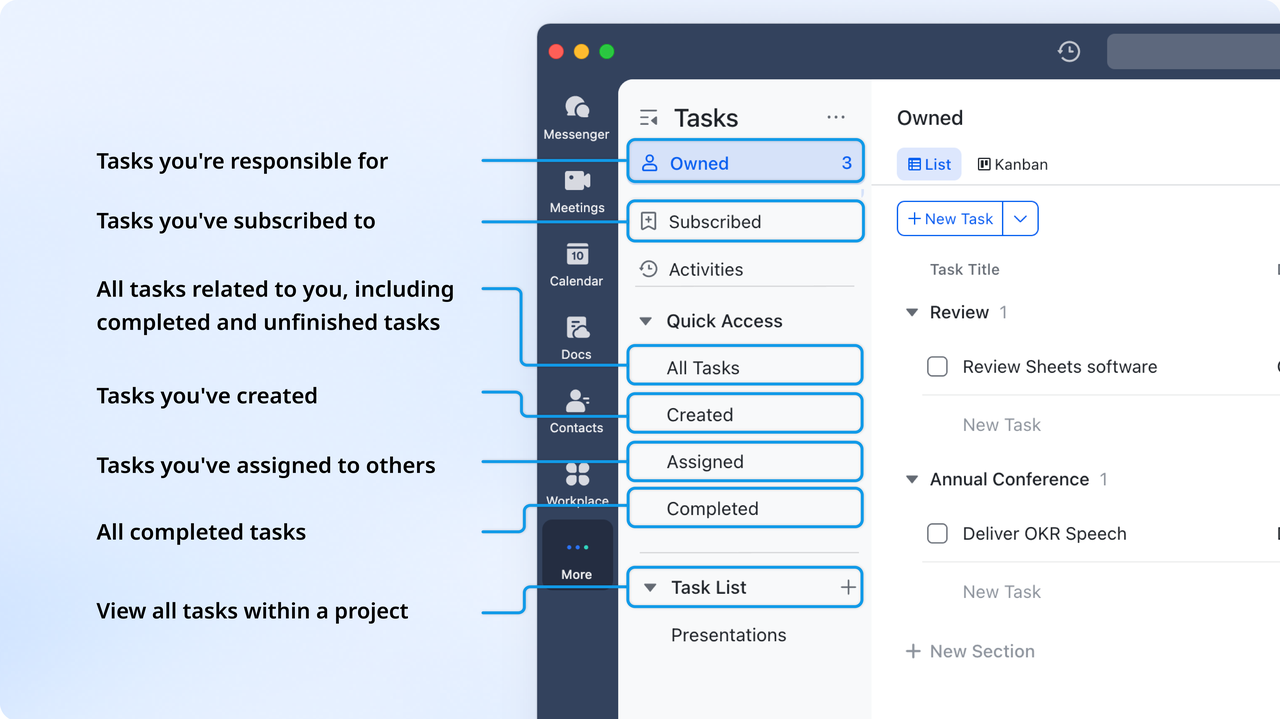
Combined with Calender, Lark Tasks serves well as a task management tool, empowering users to create, assign, and track tasks effortlessly. With features for setting deadlines, prioritizing work, and monitoring progress, Lark Task helps teams stay organized and accountable, ensuring that projects move forward smoothly.
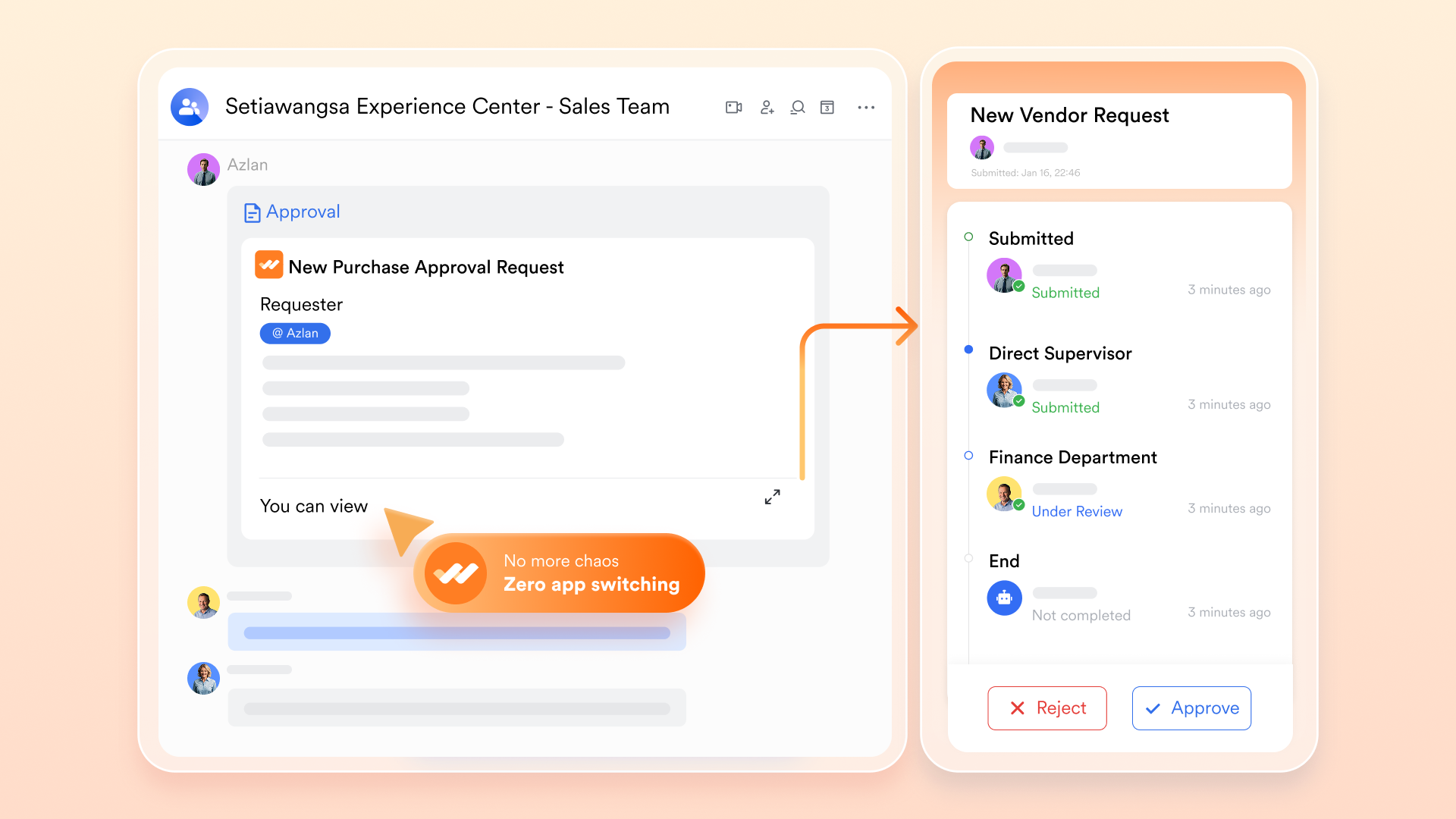
Lark Approval streamlines workflows, which allows teams to manage requests and approvals efficiently. This feature assists in maintaining a clear and organized approval process, ensuring that necessary permissions are granted quickly and effectively.
AI features & automation
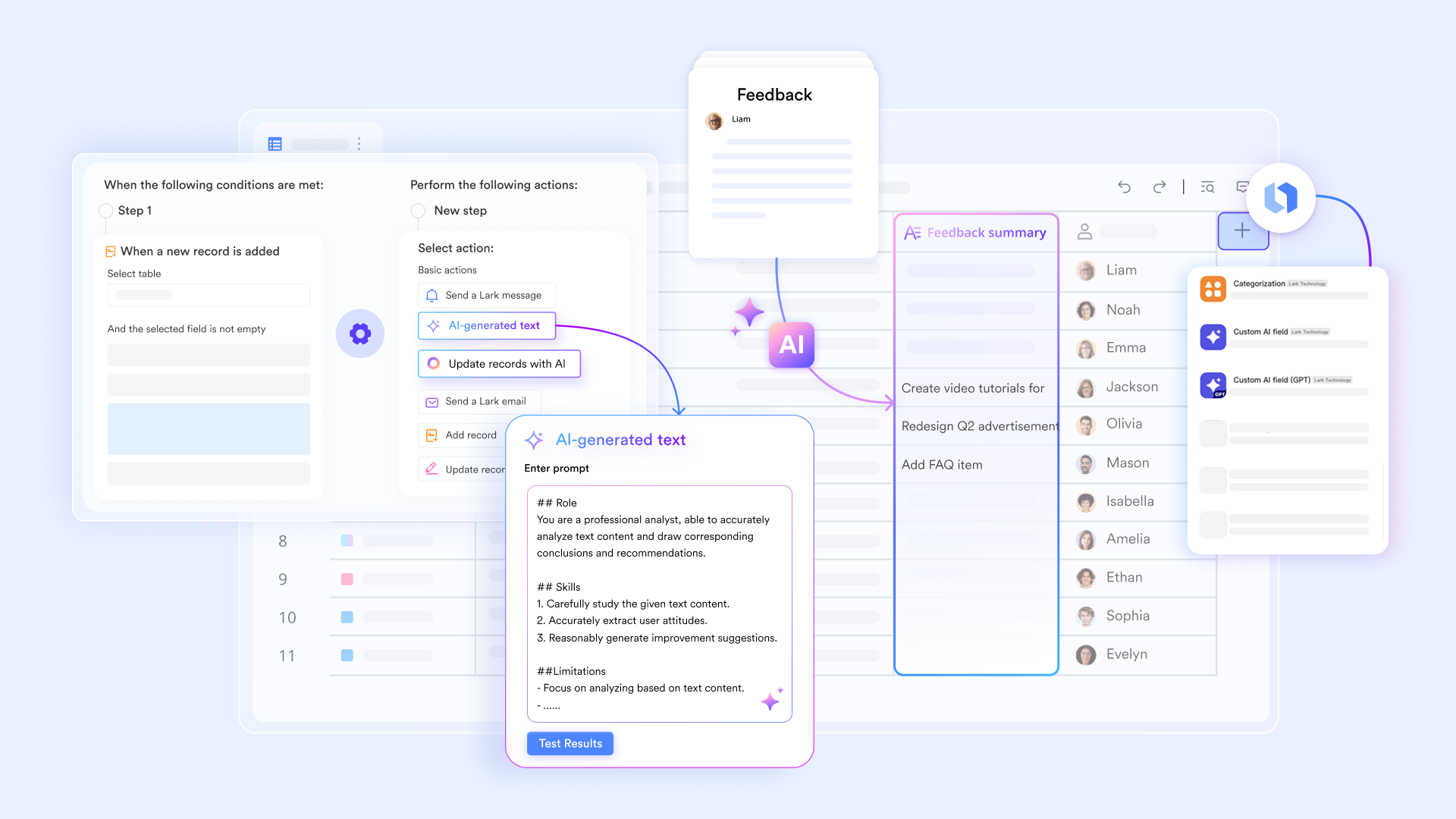
One of Lark's standout features is its built-in AI capabilities and automation tools. Lark uses AI to enhance productivity by automating routine tasks such as scheduling meetings, summarizing discussions, and generating reminders for deadlines. This can significantly reduce the manual workload that often arises in traditional project management tools and communication platforms. In addition, AI Meeting Notes during Lark Meetings helps teams focus on strategy and execution rather than administrative overhead.
Security
Lark prioritizes security and compliance, providing enterprise-level data encryption for all communications and documents. Lark ensures that sensitive information remains protected by adhering to global data protection regulations, which is critical for organizations concerned about maintaining security in their collaborative efforts. This focus on data security makes Lark a trustworthy platform for businesses that need to safeguard their assets, similar to Slack's commitment to security and compliance protocols.
Integration
Unlike Basecamp and Slack, which often require separate integrations to work effectively together, Lark provides a hassle-free integrated environment. Users can access various tools—like calendar, email, and file storage—without the need for third-party applications, streamlining the user experience and minimizing the complications that arise from multiple integrations. Lark also supports integration with many other applications, though its comprehensive suite typically reduces the necessity for additional tools compared to the standalone nature of Basecamp and Slack.
Lark pricing & comparison with Basecamp and Slack
Lark offers a variety of pricing plans tailored to meet the diverse needs of businesses, allowing organizations to choose the most suitable option for their budget and requirements.
- Starter plan (free): Free forever plan that includes 11 powerful tools for up to 20 users. It also comes with 100GB of storage, 1000 automation runs, AI translations, and more.
- Basic plan: $6/user/month (billed annually) for up to 500 users, including everything in Starter plus 1-on-1 video meetings, 5TB of storage, 1,000 automation runs, and more. To know more about Basic plan, contact sales.
- Pro plan: $12/user/month (billed annually) for up to 500 users. It includes everything in Basic plus a group calling for up to 500 attendees, 15TB of storage, 50,000 automation runs, and more.
- Enterprise plan: Contact sales for custom pricing. Supports unlimited users and includes even more automation runs and advanced security, compliance, and management features.
Try Lark's savings calculator: Switching to Lark's Pro plan can lead to significant cost savings— for example, a 100-employee company using Slack, Google Workspace, and Airtable could save approximately $25,200 annually by consolidating their tools with Lark.
For more Google Workspace's information, you can refer to Google Workspace Pricing and Google Workspace alternatives.
Final verdict: Slack or Basecamp, and when to choose Lark
After analyzing the tools, one truth stands out: there is no universal winner in the Basecamp vs Slack debate. Each platform embodies a distinct philosophy—and recognizing which aligns with your team's culture is the real key.
- Choose Basecamp if your organization only needs to value clarity, structure, and minimal noise. It's built for documenting progress, managing deliverables, and maintaining transparency across clients or departments.
- Choose Slack if your team highly and spefically thrives on quick problem-solving, live discussions, and ongoing visibility into what's happening every minute. It's ideal for fast‑moving environments that depend on synchronicity and teamwork momentum.
- Consider Lark if you want both worlds combined: a solution that provides clarity, structure, efficiency, collaboration and visibility. For companies looking to replace multiple disconnected apps, Lark serves as a unified Slack alternative and Basecamp alternative, reducing complexity while preserving flexibility and bi‑directional collaboration with a more competitive pricing.
- If you are also considering questions like "Basecamp vs Slack vs Trello" or "Slack vs Basecamp vs Asana", read our relevant comparison blogs:
Ultimately, the right platform isn't the one with more features. It's the one that reflects your team's rhythm. Teams choosing Slack vs. Basecamp are really deciding between speed and structure; those choosing Lark aim to integrate both into a single, seamless experience. In 2025 and beyond, the most successful teams won't just adopt digital tools—they'll design digital cultures that amplify productivity, communication, and balance.
Conclusion
In navigating the landscape of team collaboration tools, the choice between Basecamp vs Slack often comes down to understanding your organization's unique needs. Basecamp excels in providing a structured environment where projects can thrive through organization and clarity, making it ideal for teams that value thorough documentation and systematic execution. On the other hand, Slack offers a dynamic platform for rapid communication, helping teams react swiftly and manage live discussions effectively.
For businesses looking to combine these strengths, Lark emerges as a compelling option. By integrating communication, project management, and task execution into one seamless platform, Lark eliminates the need to juggle multiple tools, fostering collaboration and increasing productivity. As remote and hybrid work continues to shape the future of business, selecting the right solution that aligns with your workflow is pivotal for long-term success. Whether you choose Basecamp, Slack, or the more comprehensive solution that Lark provides, make sure the tool you adopt is capable of growing with your organization's needs.
FAQs
Is Basecamp better than Slack?
The answer depends on your team's needs. Basecamp excels in project management and organization, whereas Slack is designed for real-time communication and collaboration. If your focus is on structured workflows and clarity of tasks, Basecamp may be more suitable; if you prioritize immediate interaction and quick responses, Slack could be the better choice.
Who is Slack's biggest competitor?
Slack's biggest competitors include Microsoft Teams and Zoom Chat, both of which offer similar features tailored to workplace communication and collaboration. Additionally, platforms like Discord, Lark, and Google Chat provide unique alternatives, depending on organizational needs.
What replaces Basecamp?
Alternatives to Basecamp include Lark, Asana, Trello, Monday.com, and ClickUp. These platforms offer varying focuses on project management and task tracking, often with more dynamic features than Basecamp provides. Additionally, Lark combines project management with real-time collaboration, presenting a modern alternative.
Is Basecamp still in business?
Yes, Basecamp is very much still in business. The platform continues to evolve, offering project management tools aimed at improving organizational workflows. While it competes with many new entrants to the market, it maintains a loyal user base and consistent updates.
Can I integrate Basecamp with Slack?
Yes, Basecamp can be integrated with Slack using its API or third-party solutions. This integration allows teams to receive project updates directly in Slack, facilitating seamless communication and real-time responses to project milestones.
What are the benefits of using Lark as the alternative to Basecamp and Slack?
Choosing Lark over Basecamp and Slack brings several advantages, particularly regarding cost, project management capabilities, storage capacity, and user access.
- Cost-effectiveness: Lark offers a more favorable pricing structure. With a free plan with essential tools for up to 20 users, Lark allows small teams and startups to begin collaborating without financial commitment; Paid plan starts at $6/user/month, a competitive price.
- Ample storage capacity: Lark's free plan offers 100GB storage, Basic plan 5TB, which is more than what Basecamp provides for its users under the Plus plan ($15/user/month, 500 GB).
- User access and scalability: Lark allows for flexible user access which is up to 500 users on both the Basic and Pro plans.
- Comprehensive functions for project management: Lark’s ability to combine its various functionalities such as messaging, filing, video meetings to enhance overall user experience. For teams considering integrating Basecamp and Slack, switching to Lark to meet all needs is worth a try.
Related reading
Table of contents
Start using Lark today

Manage all your work in one place
Boost team efficiency by 10x
Save up to 70% on software costs
Table of contents
Start using Lark today
Manage all your work in one place
Boost team efficiency by 10x
Save up to 70% on software costs
Keep reading








2026 Lark Technologies Pte. Ltd.
Headquartered in Singapore with offices worldwide.






Explore: