Managing an enterprise construction firm requires balancing tight profit margins with incredibly complex schedules. When your team relies on scattered apps, critical information gets lost between the job site and the corporate office. AI construction software offers a unified way to handle everything from material estimating to daily field reporting. I will walk you through the core capabilities of these platforms and compare the top tools available today. This guide will help you connect your workforce, reduce costly bidding errors, and protect your bottom line.
What is AI construction software?
AI construction software applies artificial intelligence and machine learning to the daily operational challenges of building projects. Instead of just storing files in a cloud folder, these intelligent platforms actively analyze your project data. They read blueprints, track schedule deviations, and scan safety reports to find patterns that a human reviewer might miss.
For enterprise operations, this technology shifts project management from reactive to proactive. Rather than finding out about a budget overrun at the end of the month, the software before you even order the materials. It takes over the heavy lifting of parsing complex submittals and extracting data from requests for information (RFIs). By handling these repetitive administrative tasks, artificial intelligence gives your project managers their time back, allowing them to focus on client relationships and strategic planning.
How AI software for construction connects the field and office
The biggest leak in construction profitability is the communication gap. Site supervisors operate in a physical environment where speed is critical, while corporate estimators and . When these two worlds use different systems, projects stall.
Consider a common site delay: A foreman discovers that the delivered structural steel does not match the specifications on the current drawing. In a traditional setup, that foreman drives back to a trailer, searches through a massive paper binder, takes a photo with a personal phone, and emails the project manager. Hours pass while waiting for clarification.
With an intelligent platform, the workflow changes completely. The foreman snaps a photo using a mobile app on the job site. The system uses computer vision to identify the specific part, cross-references it with the latest digital blueprints, and immediately alerts the procurement manager. The office approves a rapid replacement via a connected chat interface, and the field crew gets back to work in minutes rather than days. Connecting your workforce on a single platform ensures that the office has real-time visibility into field progress, preventing minor site discrepancies from ballooning into massive scheduling delays.
Solve the information silos
Key features of top AI construction business management software
Before you evaluate specific platforms, you need to understand the core capabilities that drive real return on investment. The best tools focus on automating the most labor-intensive parts of the construction lifecycle.
Automated estimating and takeoff
Creating accurate bids is historically a tedious, manual process. changes this by using computer vision to automatically scan drawings and count materials. The system recognizes symbols for doors, windows, and electrical fixtures, instantly generating a comprehensive material list.
This automation protects your margins in two ways. First, it significantly reduces the human error that leads to underbidding or overbidding. Second, it allows your bids faster. When you can turn around an accurate proposal in half the time, your business can compete for a higher volume of projects without sacrificing quality.
Intelligent project scheduling
Construction schedules are famously fragile. A single delayed delivery can throw off trades for weeks. AI construction scheduling software analyzes historical project data, weather forecasts, and current supply chain metrics to .
If a concrete pour gets delayed by rain, the system automatically adjusts the schedules for the framing and electrical teams. It alerts the affected subcontractors and reschedules equipment rentals without requiring a project manager to manually update dozens of spreadsheet cells. This predictive capability keeps jobs moving smoothly and prevents costly downtime.
Centralized document control and RFIs
Modern construction projects generate mountains of paperwork. Managing submittals, RFIs, and contract revisions often requires dedicated administrative staff. Intelligent software steps in to read your specification books and automatically build a complete, accurate submittal log in a fraction of the usual time.
These platforms also offer smart search capabilities. If a site worker asks a question about a specific drywall requirement, the system instantly surfaces the exact paragraph from a 500-page document. By centralizing document control, you ensure that every team member builds off the correct, most up-to-date information.
Top AI construction estimating software and management tools compared
1. Lark: Best for workflow consolidation
is best for growing SMEs to large enterprises, especially remote and hybrid construction teams struggling with fragmented tool stacks. It stands out because , , , , , , , , and AI automation live in one workspace, acting as the centralized hub that prevents project data silos.
Construction managers can coordinate field teams and office staff without jumping between different applications. The platform connects communication directly to task execution, allowing project leaders to approve material requests or review site updates right from their chat window.
The user experience centers around and accessibility for both desktop and mobile users. Remote teams benefit from built in AI translations that break down language barriers on diverse job sites. The system connects easily with your daily operations to keep OKRs, shared calendars, and knowledge wikis updated in real time.
Key features:
Advanced project tracking
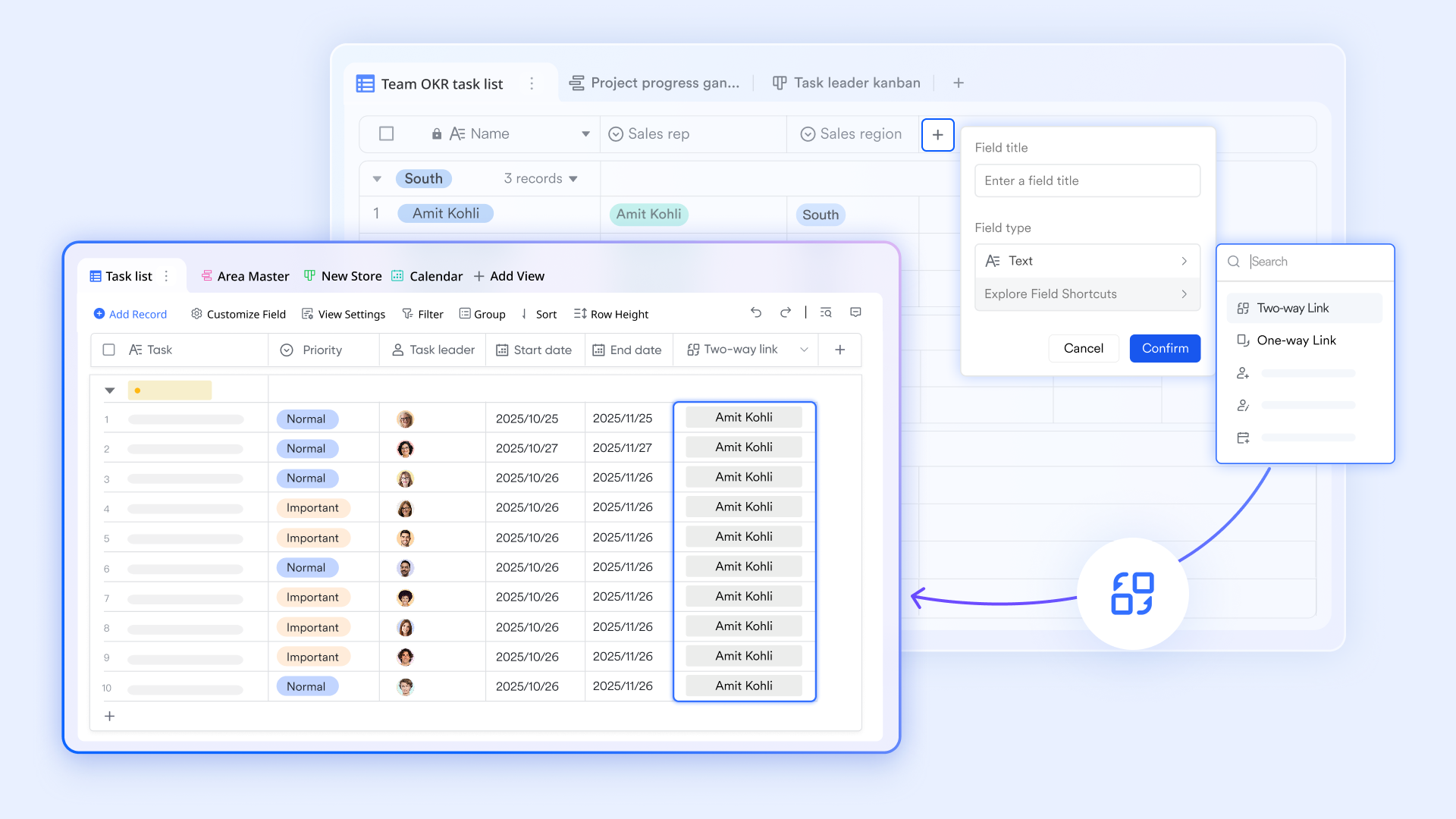
To manage complex construction data flexibly, allows project managers to . Teams can track RFI logs, submittals, and material deliveries while sharing and editing this information directly within their group chats.
Centralized approval chains
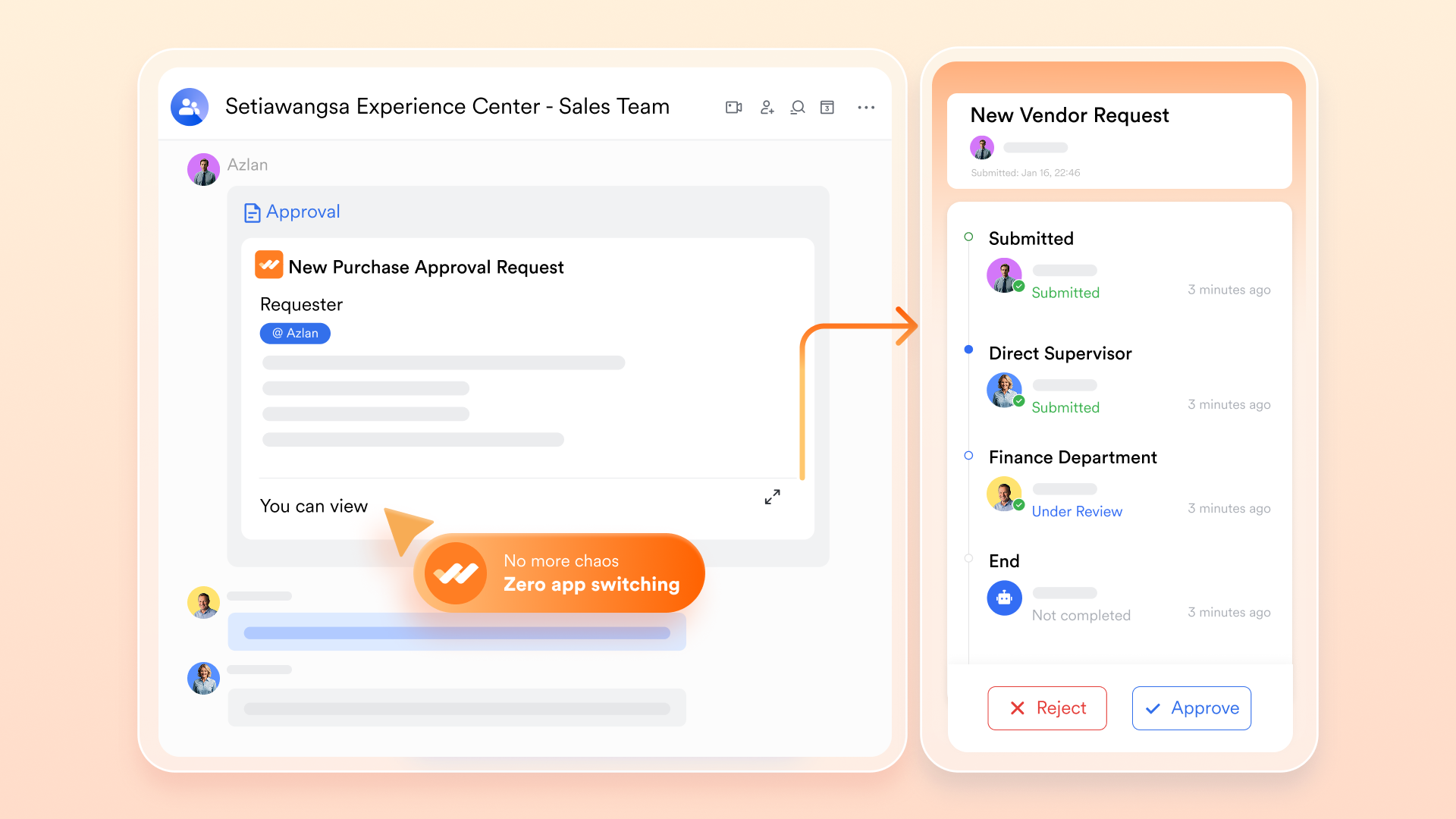
Construction moves on approvals. features built-in, customizable approval chains for change orders, safety incident reports, and budget sign-offs, keeping the entire review process organized and accessible in one central location.
Smart meeting summaries
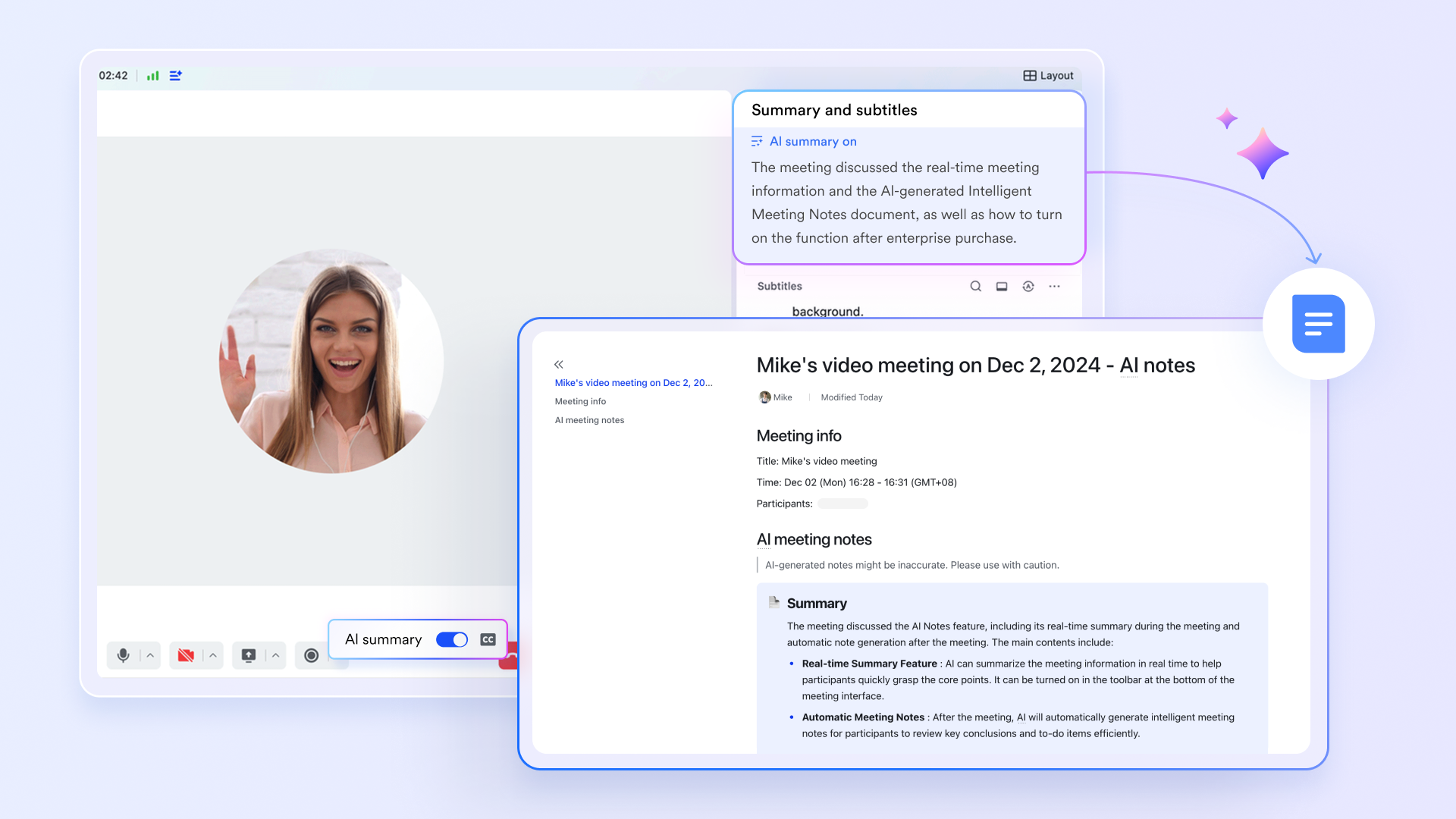
Coordination meetings require clear documentation to keep field and office teams aligned. automatically , generates clear summaries, and extracts key action items from the conversation. This feature turns a standard site update meeting into a list of assignable tasks without requiring a dedicated note taker.
Real time multilingual translation
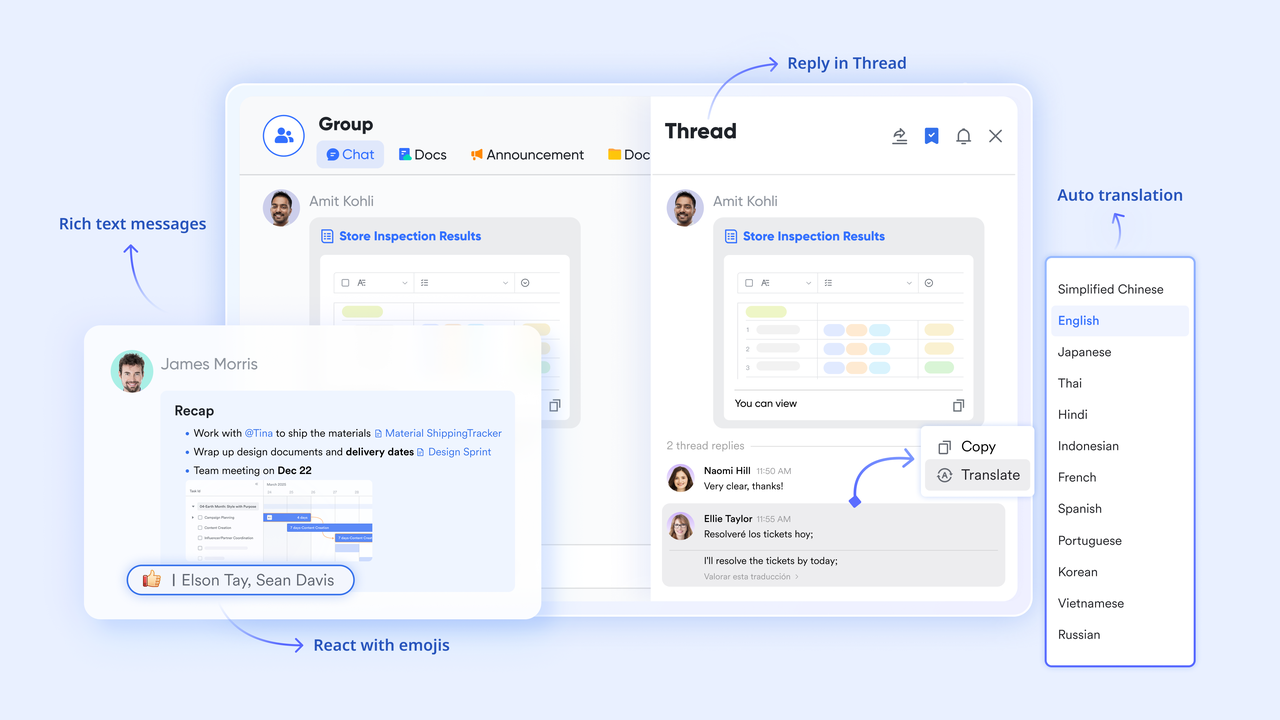
Clear communication is vital when coordinating diverse field crews and corporate offices. The within Lark support text chats, shared documents, and live video meetings. This capability ensures that everyone on the job site understands safety guidelines and daily task directives, regardless of their primary language.
Pros:
- Combines 11 powerful productivity tools into a unified platform.
- Features AI translations to support multilingual construction crews.
- Includes generous cloud storage and automation runs even on free tiers.
Cons:
- Might require training for teams used to traditional email workflows.
- Starter plan: Free forever plan with 11 powerful tools for up to 20 users, 100GB storage, 1,000 automation runs, AI translations, and more. No credit card needed.
- Basic plan: $6/user/month (billed annually) for up to 500 users. Includes everything in Starter plus unlimited message history, 5TB storage, 1,000 automation runs, and more. Some users may need to to purchase.
- Pro plan: $12/user/month (billed annually) for up to 500 users. Includes everything in Basic plus group calling for up to 500 attendees, 15TB storage, 50,000 automation runs, and more.
- Enterprise plan: for custom pricing. Supports unlimited users and includes advanced automation, security, compliance, and management features.
For small teams with simple communication needs

18 months message history
1000 Base automation runs/month
2000 rows per table in Base
Most POPULAR
For companies with comprehensive collaboration and management needs
Unlimited message history
500-participant video meetings
50k Base automation runs/month
20k rows per table in Base
For large companies with advanced security and organizational management needs
Get a personalized demo and pricing
Unlimited message history
500-participant video meetings
15 TB storage + 30 GB storage/user
500k Base automation runs/month
50k Base automation runs/month
Most POPULAR
For companies with comprehensive collaboration and management needs
Unlimited message history
500-participant video meetings
50k Base automation runs/month
20k rows per table in Base
2. Trunk Tools: Best for instant document search
Trunk Tools focuses on answering critical project questions by analyzing your existing documents. The platform reads specifications, blueprints, and meeting notes to deliver precise answers to field workers in under 30 seconds. This capability empowers onsite staff to resolve discrepancies without waiting for office verification.
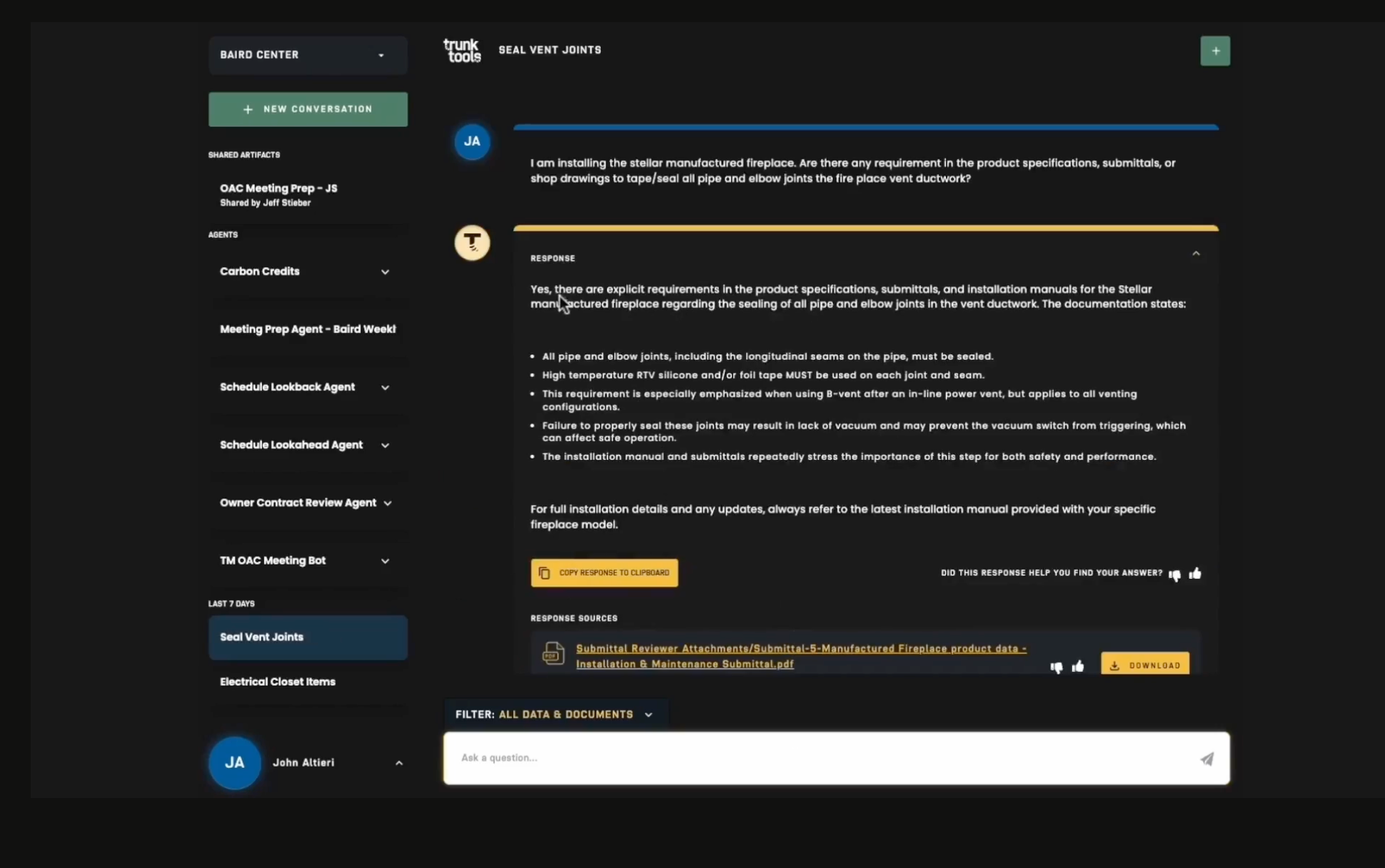
Image source: trunktools.com
The interface is built specifically for construction professionals who need fast access to information while wearing personal protective equipment. The submittal feature automatically reviews logs and flags missing or noncompliant data before it causes a delay. It helps less experienced project engineers spot issues that typically require years of industry knowledge to catch.
Pros:
- Delivers actionable answers from project documents in seconds.
- Automates the creation of comprehensive submittal registers.
- Reduces onboarding time for new project engineers and managers.
Cons:
- Focuses heavily on documentation rather than full financial estimating.
- Requires high quality source documents for the best analytical results.
Pricing: Detailed pricing information is unavailable on the official site.
3. Monday: Best for customizable project dashboards
Monday provides a highly visual platform that allows construction managers to track multiple project phases simultaneously. The software relies on color coded boards and customized columns to give stakeholders a clear view of task statuses and budget health. Teams can build unique views that match their specific operational requirements without needing a background in coding.
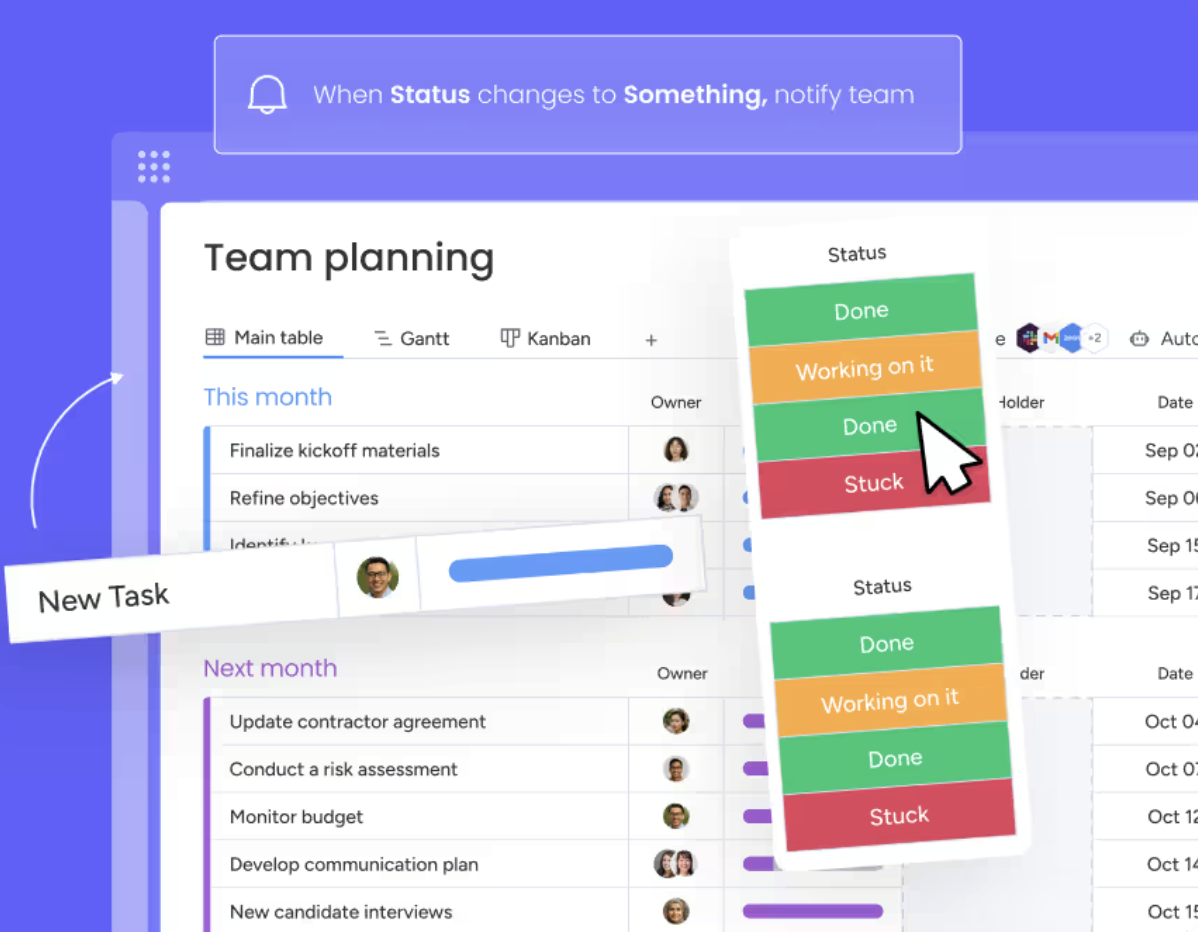
Image source: monday.com
The user interface is exceptionally intuitive and appealing to visual learners. Project managers can set up automated triggers that move tasks across stages as soon as field workers update their progress. This keeps the entire organization aligned on upcoming deadlines and resource allocation needs.
Pros:
- Offers highly customizable dashboards for visualizing project data.
- Features an intuitive interface that speeds up team adoption.
- Includes powerful automation rules to keep tasks moving forward.
Cons:
- Can become visually cluttered when tracking massive enterprise projects.
- Advanced features require upgrading to higher priced subscription tiers.
Pricing:
- Free: Free for up to 2 users
- Basic: $9/user/month (billed annually)
- Standard: $12/user/month (billed annually)
- Pro: $19/user/month (billed annually)
- Enterprise: Custom pricing (billed annually)
4. Smartsheet: Best for spreadsheet transitions
Smartsheet blends the familiar layout of traditional spreadsheets with powerful project management and automation capabilities. Construction professionals who have spent years managing budgets in grid formats will find the interface highly approachable. The platform adds intelligent workflow features that turn static rows and columns into active project tracking tools.
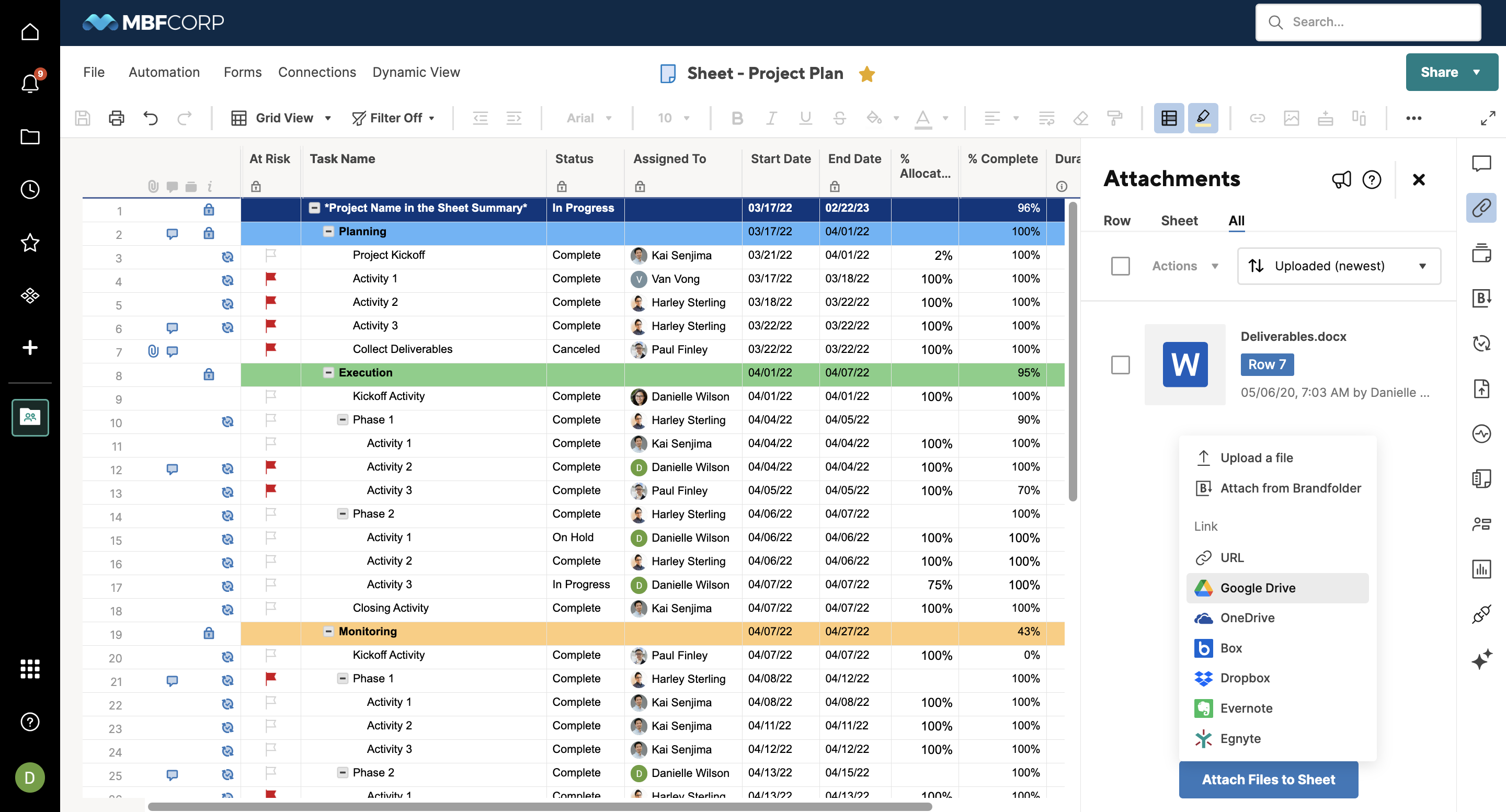
Image source: smartsheet.com
The software excels at handling complex dependencies and large data sets common in commercial construction. Users can create custom forms to collect field data which then automatically populates the main project tracker. This structure helps management maintain strict version control over critical scheduling and financial documents.
Pros:
- Provides a familiar spreadsheet interface that lowers the learning curve.
- Excels at managing complex task dependencies and automated workflows.
- Offers robust data collection capabilities through custom field forms.
Cons:
- Lacks the fluid chat and communication tools of modern workspaces.
- Requires significant initial setup time to build effective templates.
Pricing:
- Free plan: available (limited to 90 days of message history)
- Pro plan: $8.75/user/month (billed annually)
- Business+ plan: $18/user/month (billed annually)
- Enterprise+ plan: Contact sales
5. Wrike: Best for construction project visibility
Wrike provides construction managers with a clear view of multiple job sites simultaneously. The platform uses intelligent features to analyze resource allocation and predict when a team might fall behind schedule . This helps project leaders shift workers to different sites before delays happen.
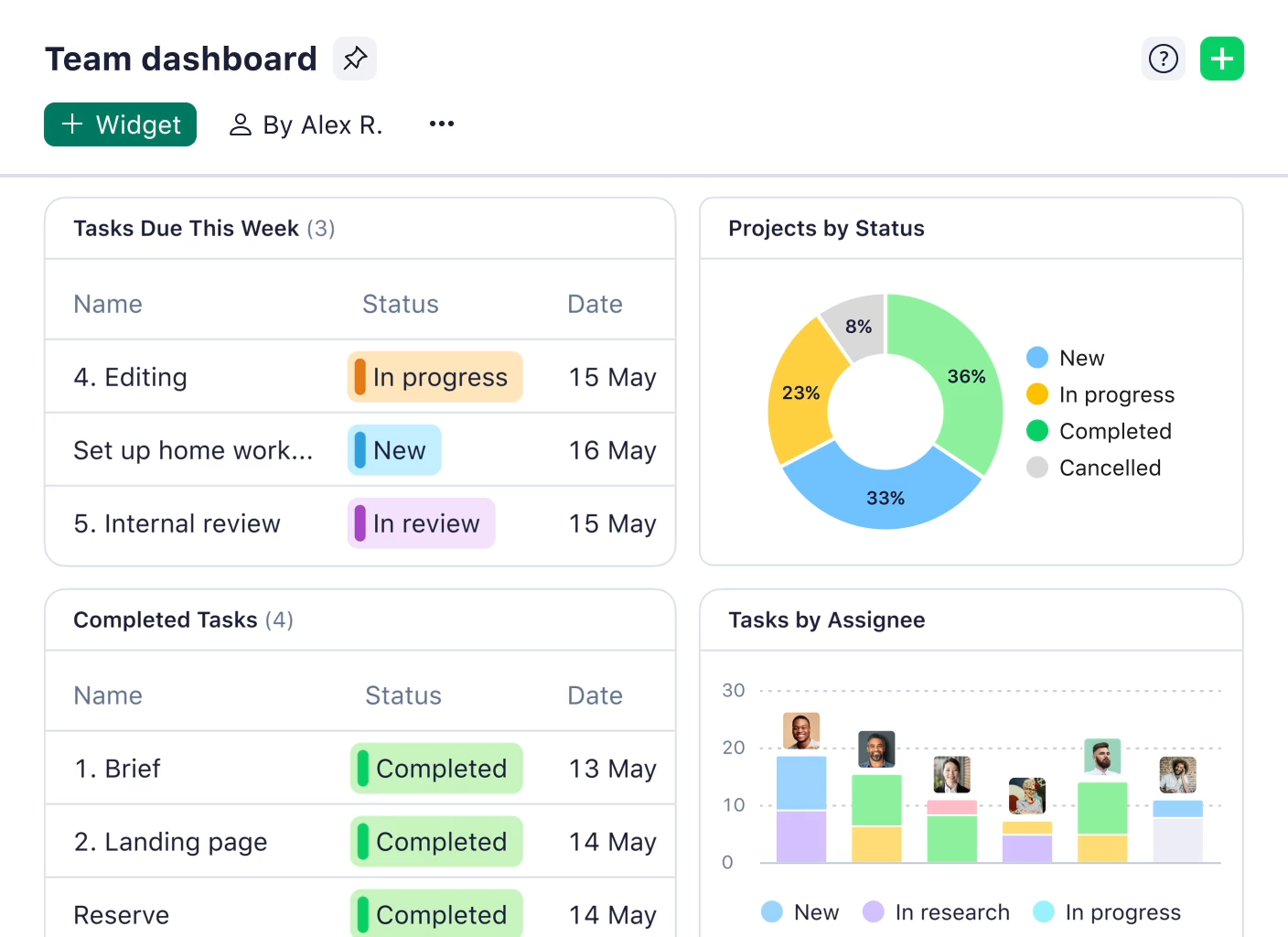
Image source: wrike.com
The software allows you to create custom workflows tailored to specific contracting phases. Teams can track daily progress through visual Gantt charts and Kanban boards. This setup ensures that both field supervisors and office executives stay aligned on the latest financial updates.
Pros:
- Offers excellent visibility across multiple concurrent building projects.
- Features intelligent resource forecasting to prevent schedule delays.
- Provides highly customizable views like Gantt charts and Kanban boards.
Cons:
- Can be overwhelming for small teams with simple administrative needs.
- Requires a steep learning curve during the initial setup process.
Pricing:
- Free: Free for unlimited users
- Team: $9.80/user/month (billed annually)
- Business: $24.80/user/month (billed annually)
- Enterprise/Pinnacle: Custom pricing (billed annually)
6. Zoho Projects: Best for multi phase tracking
Zoho Projects excels at managing building processes that stretch across multiple complex phases . The software breaks down massive enterprise operations into manageable tasks and subtasks. Managers can easily assign these items to specific subcontractors and set strict dependency rules.
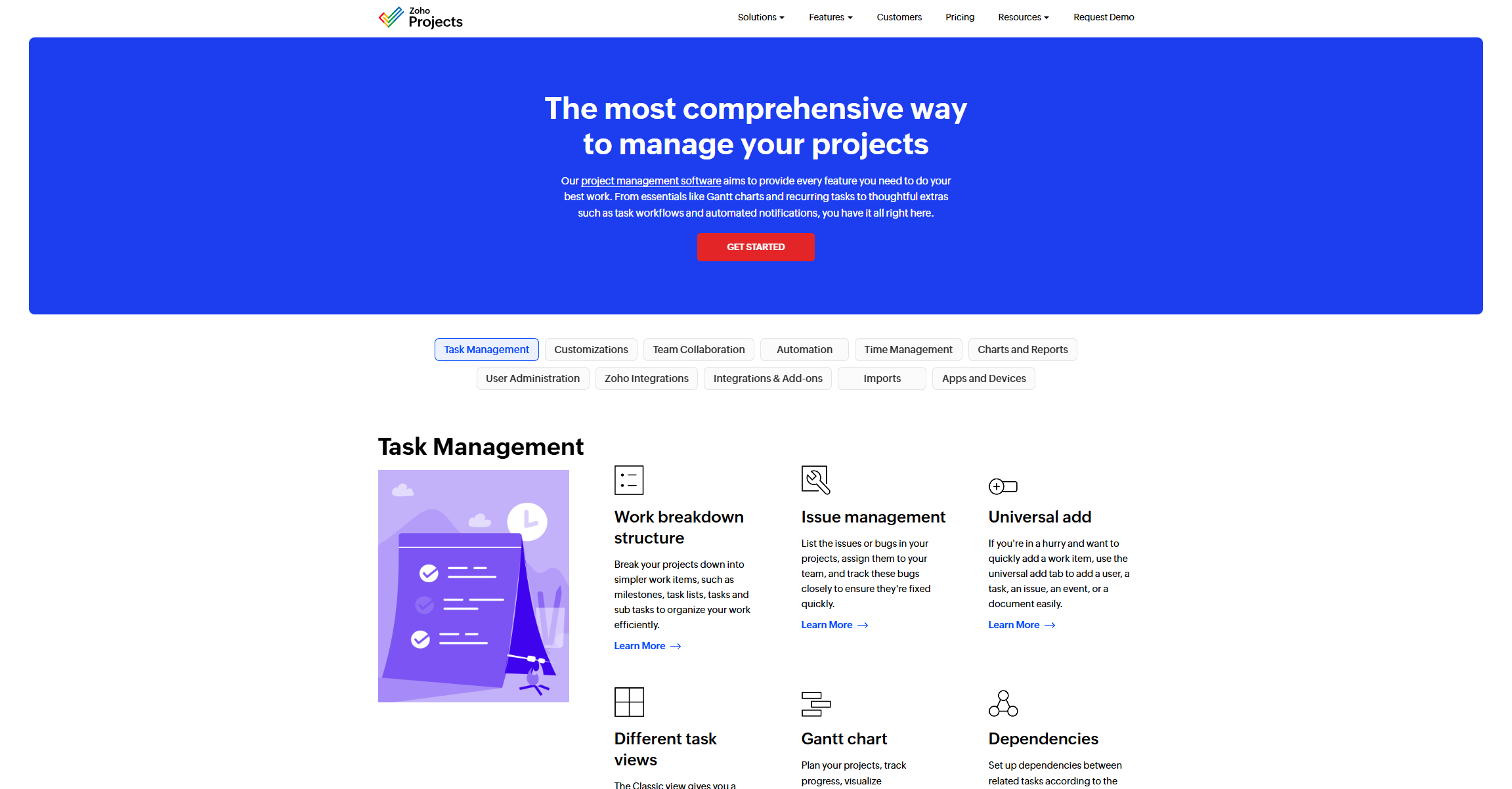
Image source: zoho.com
The platform includes an intelligent chat interface and document sharing tools to keep communication centralized. When a schedule changes, the system automatically recalculates dependent deadlines and notifies the affected team members. This automation reduces the administrative burden on your core management staff.
Pros:
- Breaks down massive operations into easily manageable project phases.
- Calculates task dependencies automatically when schedules suddenly change.
- Connects well with other business tools in the broader Zoho ecosystem.
Cons:
- Can run slowly when loading massive architectural files and plans.
- Limits advanced analytical reporting features to the most expensive tiers.
Pricing:
- Free: Free for up to 5 users
- Premium: $4/user/month (billed annually)
- Enterprise: $9/user/month (billed annually)
7. ClickUp: Best for flexible task organization
ClickUp serves as a versatile workspace that adapts to various construction management styles. Whether your team prefers list views, calendar layouts, or mind maps, the platform supports multiple ways to visualize a project. This flexibility helps diverse teams collaborate without forcing everyone into a single rigid structure.
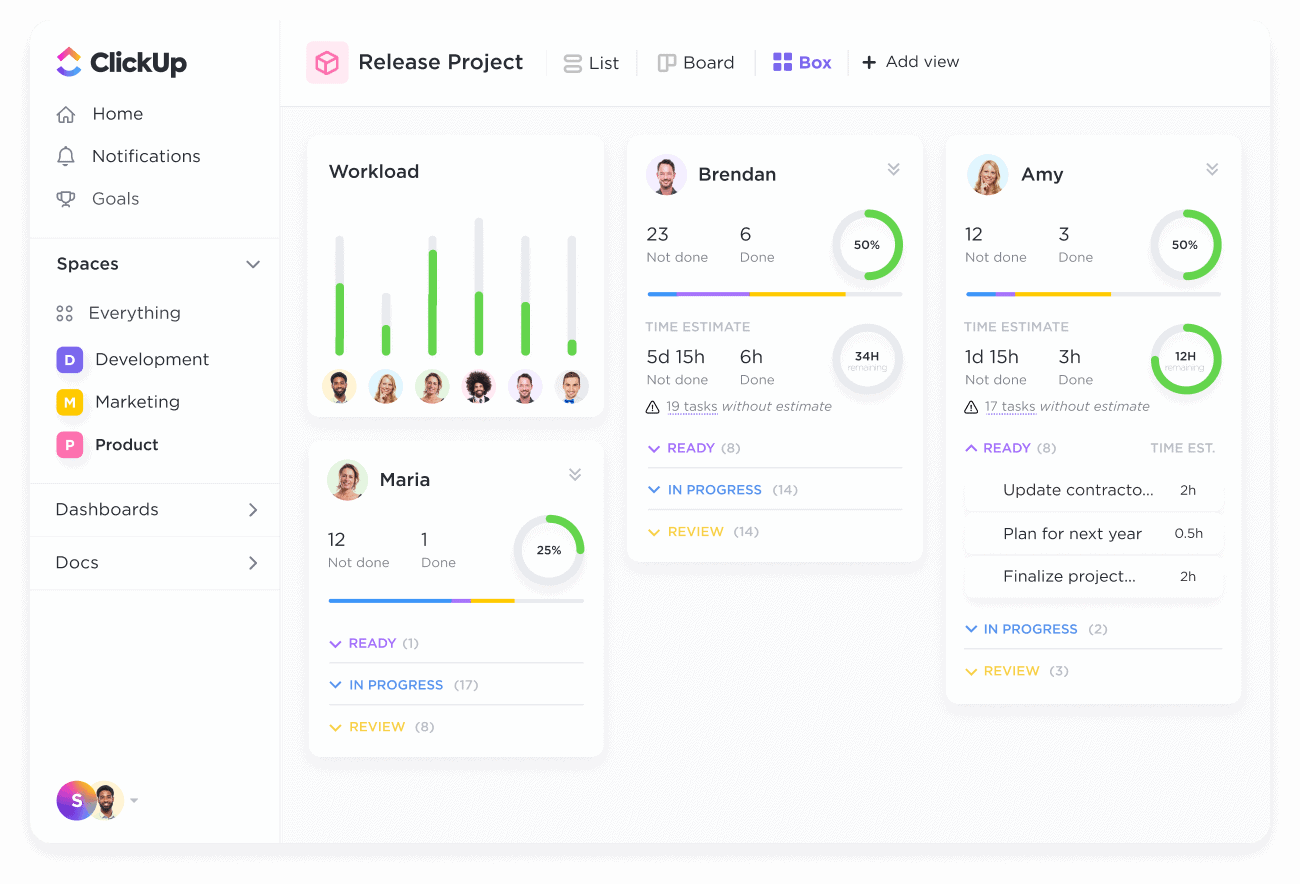
Image source: clickup.com
The software includes built in artificial intelligence features that summarize long meeting notes and generate project updates. Field teams can use the mobile application to update statuses and upload site photos directly to specific tasks. These capabilities keep corporate teams informed without requiring constant phone calls.
Pros:
- Offers numerous visual layouts to suit different team working styles.
- Summarizes long meeting notes and project documents automatically.
- Features a strong mobile application for instant onsite photo updates.
Cons:
- Requires heavy customization to fit specific construction industry workflows.
- Overwhelms new users with too many configuration options initially.
Pricing:
- Free Forever: Free for unlimited users
- Unlimited: $7/user/month (billed annually)
- Business: $12/user/month (billed annually)
- Enterprise: Custom pricing (billed annually)
How to choose the best AI construction takeoff software for your team
With so many powerful applications available, decision paralysis is a common hurdle for enterprise leaders. It is tempting to buy the tool with the most advanced analytical features, but raw computing power does not guarantee successful implementation. To find a solution that your workforce will actually use, you need to evaluate potential software against three critical operational pillars.
Field usability and adoption: Selecting the right software requires a clear understanding of daily site habits. A tool that looks perfect in a boardroom presentation might fail if workers find the mobile application difficult to navigate while wearing heavy gloves. Prioritize platforms with a user friendly interface that requires minimal training to operate on a busy job site.
Data security and access controls: Enterprise construction firms handle highly sensitive financial records and proprietary blueprints. Any software provider you choose must comply with strict global security standards and offer robust permission settings. This structure protects your intellectual property while giving subcontractors appropriate access to necessary files.
Platform consolidation: Purchasing ten different niche applications creates confusion and . Search for a unified workspace that covers multiple operational needs. A platform combining messaging, document storage, and approvals will reduce your overall software licensing expenses and simplify your IT management.
Consolidate your tools with Lark today
The true cost of fragmented construction tech stacks
Many construction firms fall into the trap of purchasing separate applications for chat, video calls, document storage, and task management. This fragmented approach creates severe operational bottlenecks:
- Dangerous data silos: When your scheduling tool cannot communicate with your budgeting software, project managers must manually copy data between systems. This manual entry introduces the exact human errors you want to eliminate.
- Hidden financial drains: Beyond the obvious expense of paying for multiple software licenses, your business loses money through constant context switching. Employees waste valuable time searching across four different apps to find a single approved change order.
- Slow decision making: Disconnected tools delay critical approvals. A field supervisor might miss a vital update simply because it was sent in a separate chat application instead of the main project tracker.
Moving to a unified workspace provides a significant operational advantage. When your team can discuss a project, edit a budget spreadsheet, and approve a submittal within the exact same application, work moves faster. Consolidating your tools simplifies your daily operations and keeps everyone aligned on the same goals.
Conclusion
Adopting artificial intelligence in construction protects your profit margins and eliminates costly manual errors. Automating administrative tasks connects your field workforce with office staff for efficient project delivery. It is time to evaluate your software stack and eliminate isolated data silos. Consolidating your communication, document approvals, and project tracking into one unified workspace provides a clear competitive edge. Try today to centralize your operations and build a highly connected construction business.
Build an AI construction management system for your team
FAQs
What are the main benefits of AI in construction?
Artificial intelligence helps construction firms reduce manual data entry and catch costly errors before they happen. It automates scheduling adjustments and speeds up complex document reviews.
Is AI construction software only for large enterprises?
No. While large firms benefit from scaling these tools, small and medium businesses can use them to compete for larger bids and manage resources more effectively.
How does artificial intelligence improve project estimating?
Intelligent software uses computer vision to count materials on blueprints automatically. This process reduces human error and allows estimators to create accurate bids in a fraction of the usual time.
Related reading