We have all been there. You have an urgent, nuanced issue with a product, and you find yourself trapped in an endless chatbot loop that keeps pointing you to the same unhelpful FAQ article. Everyone is rushing to add AI to their customer support channels, hoping for quick wins and reduced overhead. However, bolting a standalone AI bot onto a fragmented internal tech stack often damages customer satisfaction rather than improving it. True success with AI in customer service requires a unified workspace. To resolve complex tickets fast, your frontline AI, human support agents, and product engineers must share the exact same context, collaboration tools, and internal knowledge base.
Core benefits of AI in customer service when implemented correctly
When deployed as part of an integrated ecosystem, the return on investment for AI in customer service extends far beyond just deflecting support tickets. It fundamentally changes how your operational teams function.
Slashing First Response Time (FRT)
One of the most immediate benefits of AI is its ability to handle high-volume, repetitive queries instantly. Password resets, basic , and simple billing inquiries can clog up a support queue, keeping human agents from addressing genuine emergencies. Intelligent routing and automated resolution clear this noise. When a customer submits a routine request, AI can parse the intent, verify the user's details, and solve the problem in seconds. For regulated businesses, an can add a stronger trust layer by confirming that users are legitimate before account access, payments, or sensitive support workflows are approved. This keeps the queue pristine for complex issues that require a human touch.
Managing high demand without agent burnout
Support teams frequently face seasonal spikes or unexpected surges in ticket volume, leading to severe agent burnout. Automated ticket creation and case summarization drastically reduce the administrative burden on your staff. According to Salesforce data on operational efficiency, 82% of service professionals say customer demands have increased, yet resources remain tight. AI mitigates this pressure by automatically digesting long email threads or chat logs into concise summaries. Handoffs happen instantly, allowing businesses to scale their operations securely without overworking their human staff.
Proactive rather than reactive support
Modern AI transforms customer service from a reactive cost center into a proactive revenue driver. According to , 62% of executives believe will disrupt how organizations design customer experiences. Instead of waiting for a customer to complain about a delayed package, predictive AI can flag the delay, automatically generate a personalized apology email, and offer a discount code before the customer even realizes there is a problem.
Cost optimization vs. Value creation
Many business leaders view AI purely as a tool for headcount reduction. This is a missed opportunity. The true value lies in cost optimization combined with value creation. By letting AI handle data entry, routing, and basic queries, you are reinvesting your agents' time into high-stakes problem-solving, empathetic communication, and long-term customer retention—areas where humans excel and machines fall short.
Generative AI vs. traditional rules: Understanding the best AI tech in customer service programs
Not all AI is created equal. Understanding the technical distinctions between different AI models is crucial for building a support stack that actually works for your customers. Building an effective AI-powered support ecosystem often requires guidance from an experienced , helping organizations select the right technologies, integrate existing systems, and maximize long-term ROI.
Natural Language Processing (NLP)
Traditional bots rely on rigid keyword matching. If a customer types "I need my money back," but the bot is programmed only to recognize the exact word "refund," the interaction fails. Modern systems leverage to understand the semantic intent and even the slang behind a customer's message. This ensures that users aren't forced to speak like robots just to get a helpful response.
Generative AI vs. traditional decision trees
For years, customer service bots were built on strict decision trees. Customers were presented with a static menu of options (e.g., "Press 1 for Sales, 2 for Support"). If the customer's problem did not fit into those pre-defined boxes, they hit a dead end. Generative AI changed this paradigm. Instead of following a strict script, can generate highly personalized, context-aware responses on the fly, creating a dynamic interaction that feels much closer to chatting with a real person.
Sentiment analysis engines
Understanding what a customer is saying is only half the battle; understanding how they feel is equally important. Sentiment analysis engines evaluate the tone of a text or email to detect anger, frustration, or urgency. If a customer's message contains strong negative language, the AI can immediately bypass the standard triage process and trigger an emergency escalation protocol, routing the ticket directly to a senior agent equipped to de-escalate the situation.
The shift toward agentic AI
We are currently witnessing a massive transition from standard AI chatbots to "agentic AI." A standard chatbot can only answer a question based on a —for example, it can tell a customer what the company's refund policy is. Agentic AI, on the other hand, can take action. It can securely log into the billing system, process the refund, update the , and send the confirmation receipt without requiring any human input. Platforms like Zendesk have become a leading example of this shift, with that can handle customer inquiries end-to-end across chat, email, voice, and social channels, resolving issues like refunds and order updates without any human input.
7 practical examples of AI in customer service applications
When you integrate the right technologies, the impact on both the customer and the support agent is profound. Here are seven ways modern teams are applying AI in their .
1. Intelligent self-service
Gone are the days of forcing customers to read through a massive 50-page PDF to find a single policy detail. AI-powered knowledge management allows users to type a natural question into a search bar. The system then and surfaces the exact paragraph or specific instructional video the user needs to resolve their issue independently.
2. Automated ticket routing
Instead of relying on a human dispatcher to read and assign every incoming email, AI analyzes requests the moment they arrive. It sorts tickets by language, product category, and sentiment, routing them directly to the most appropriate department or the specific agent with the right expertise.
3. Intelligent video meeting summaries
For complex technical issues or high-touch enterprise accounts, support often moves from text to a live video call. Instead of forcing agents to frantically type notes while walking a user through a screen share, AI handles the documentation. AI-powered meeting assistants automatically transcribe the conversation and with clear action items the moment the call ends. This ensures no critical details are lost, allowing the agent to focus entirely on the customer rather than administrative paperwork.
4. Drafting empathetic responses
Staring at a blank text box slows down reply times, especially when dealing with an angry user. Generative AI helps human agents by based on the context of the complaint. The agent simply reviews the draft, makes a few quick edits, and hits send, drastically improving workflow automation and speed.
5. Bridging the omnichannel gap
Retail companies are leveraging AI to connect online browsing habits with in-app customer support. If a customer is looking at a specific pair of shoes on a mobile app and opens the support chat, the AI already knows which product they are viewing and can provide immediate, contextual sizing information without asking.
6. Post-resolution data synthesis
Support tickets contain a goldmine of product feedback, but manual tagging is tedious. AI automatically tags and categorizes resolved tickets. This feeds direct, structured insights back to the product and engineering teams, helping them prioritize bug fixes and feature updates based on real customer pain points.
7. Predictive issue resolution
AI can monitor global support tickets to identify emerging patterns. If there is a sudden spike in specific error-code mentions across multiple regions, the AI can flag a potential product outage to the engineering team before the servers crash completely, allowing for predictive, rather than reactive, issue resolution. This is particularly valuable in telecom, where can identify network issue patterns, resolve common connectivity queries, and escalate complex cases with the relevant customer context.
The contrarian reality: Why standalone chatbots and fragmented AI tools hurt customer service
Looking at those seven examples, it is easy to see why companies are eager to deploy AI. However, there is a contrarian reality that many software vendors ignore: trying to build those solutions by purchasing disconnected, standalone tools creates an operational nightmare.
The "AI dead end"
Recent community feedback from a highlights a massive disconnect between corporate expectations and customer reality. Users frequently note that while AI is great for simple password resets, it becomes an infuriating wall when issues are even slightly complicated. Standalone generative AI bots often fail to handle nuanced queries and, worse, offer no clear off-ramp to a human agent. This results in the dreaded "AI dead end," which causes severe brand friction and leaves customers feeling ignored.
The danger of point solutions
The root of this problem usually lies in the software stack. Buying a separate AI chatbot for the website, a separate , a separate , and a separate ticketing system creates massive information silos. When these systems cannot natively share data, the AI has no way of escalating a ticket smoothly, and team communication breaks down completely.
The context drain and the tool tax
When a frontline AI bot cannot communicate directly with the engineering team's , the burden falls entirely on the human agents. Support staff lose critical minutes , copy-pasting chat logs from the helpdesk into a separate messaging app, and waiting hours for product managers to reply. This "tool tax" means that customer problems that should take five minutes to fix end up taking days. The lack of real-time document collaboration and unified productivity tools slows the entire resolution pipeline to a crawl.
The human-in-the-loop (HITL) necessity
AI should serve as a smart triage system, not an impenetrable barrier. When an AI hits the limit of its capabilities, the transition to a human must be immediate and retain the entire conversation history. The best AI implementation isn't just a clever chatbot—it is an entire ecosystem where AI, internal communication, , and exist in one unified workspace. This is the only way to ensure a highly effective, human-in-the-loop transition that actually satisfies the customer.
Evaluating the best AI for customer service in software: How Lark fixes the broken support stack
When your frontline AI bot cannot communicate natively with the engineering team’s project management software, the system breaks down. To deliver the fast, context-aware support your customers expect, you need to consolidate.
is an all-in-one platform that helps teams of every size manage projects and work smarter together. It is the best choice for growing SMEs to large enterprises—especially remote or hybrid workforces—that need to eliminate fragmented tool stacks and unite customer support, engineering, and under one roof. To understand why this matters, let's look at the operational reality most support teams face.
The Problem: Customer support teams relying on disconnected tools—like a standalone ticketing system paired with a separate messaging app—face crippling operational friction. Information lives in silos, meaning no single platform holds the entire truth about a customer's journey or a product's status.
The Agitation: When a complex user bug requires engineering input, support agents lose critical time copying and pasting context between windows, waiting for replies, and tracking down product specs in outdated Google Docs. This context drain causes First Response Times to spike. Customers feel like they are talking to a brick wall, having to re-explain their issue every time they are passed to a new department.
The Solution: resolves this by integrating your entire operational tech stack into a single interface. Lark brings , , , , , and AI-powered workflows into a unified workspace. If a customer query requires product team input, a support agent does not have to leave their screen. They can instantly turn that ticket into a structured , tag the product manager, or start a video call directly within the same chat interface. Furthermore, Lark's integrated ensures your team finds project specs and product updates without leaving the chat window, preventing delayed resolutions and keeping work moving efficiently.
By operating as one of the most on the market, ensures your AI, your support team, and your developers are literally on the same page.
Pros & Cons
Pros:
- Cost-efficiency through consolidation: By combining team communication, real-time document collaboration, and project management, eliminates the need to pay for multiple software subscriptions like Slack, Asana, and Google Workspace.
- Built-in workflow automation: Native approval flows and automated task assignments reduce the manual data entry that slows down support ticket escalations.
- Global collaboration features: Built-in for chat, documents, and video meetings break down language barriers for international support teams.
Cons:
There are just so many features on the platform that it takes some time to try them out. The initial switch from using spreadsheets to a structured system like Lark Base also took some getting used to, but the made it painless.
- Starter plan: Free forever plan with 11 powerful tools for up to 20 users, 100GB storage, 1,000 automation runs, AI translations, and more. No credit card needed.
- Basic plan: $6/user/month (billed annually) for up to 500 users. Includes everything in Starter plus unlimited message history, 5TB storage, 1,000 automation runs, and more. Some users may need to to purchase.
- Pro plan: $12/user/month (billed annually) for up to 500 users. Includes everything in Basic plus group calling for up to 500 attendees, 15TB storage, 50,000 automation runs, and more.
- Enterprise plan: for custom pricing. Supports unlimited users and includes advanced automation, security, compliance, and management features.
For small teams with simple communication needs

18 months message history
1000 Base automation runs/month
2000 rows per table in Base
Most POPULAR
For companies with comprehensive collaboration and management needs
Unlimited message history
500-participant video meetings
50k Base automation runs/month
20k rows per table in Base
For large companies with advanced security and organizational management needs
Get a personalized demo and pricing
Unlimited message history
500-participant video meetings
15 TB storage + 30 GB storage/user
500k Base automation runs/month
50k Base automation runs/month
Most POPULAR
For companies with comprehensive collaboration and management needs
Unlimited message history
500-participant video meetings
50k Base automation runs/month
20k rows per table in Base
How to use AI in customer service: 3 Lark workflows to transform your team
Reading about features is one thing, but applying them to daily operations is where the real value lies. Here is how I recommend using to fix a broken support pipeline.
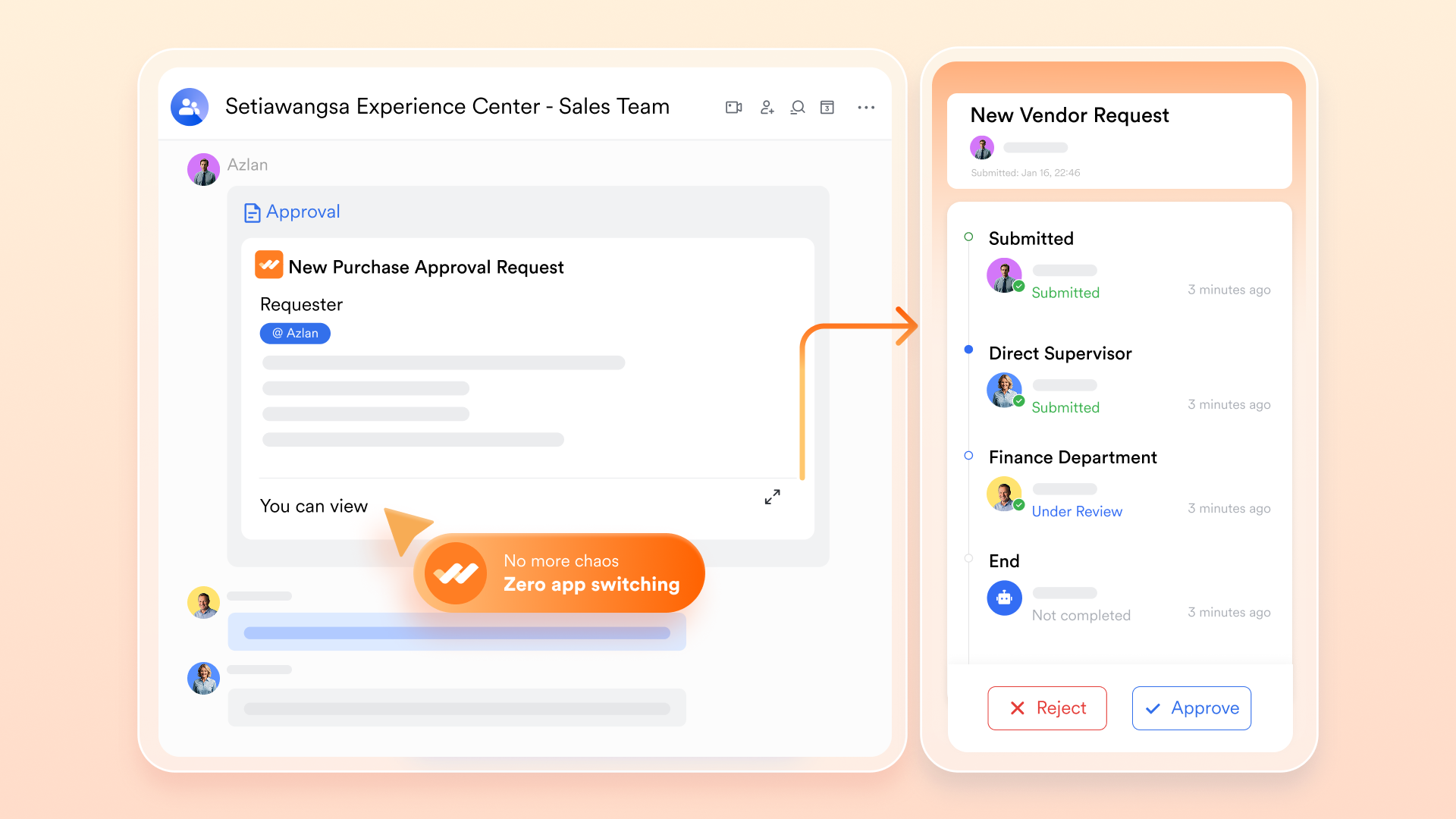
Workflow 1: Escalating tickets with Lark Base and Approvals
Imagine an fails to resolve a complex billing dispute. The customer is frustrated and asks for a human. The human agent takes over, reads the AI summary, and realizes they need the finance department to authorize a custom refund.
Instead of sending an email into a void, the agent uses Lark Base to log the ticket. With one click, this triggers a . Lark routes the exact customer context, along with a simple "Approve/Deny" button, directly to the finance manager's . The manager can approve the refund from their phone using mobile-desktop hybrid work tools, and the support agent can resolve the ticket in minutes.
Workflow 2: Feeding accurate data to your AI via Lark Wiki
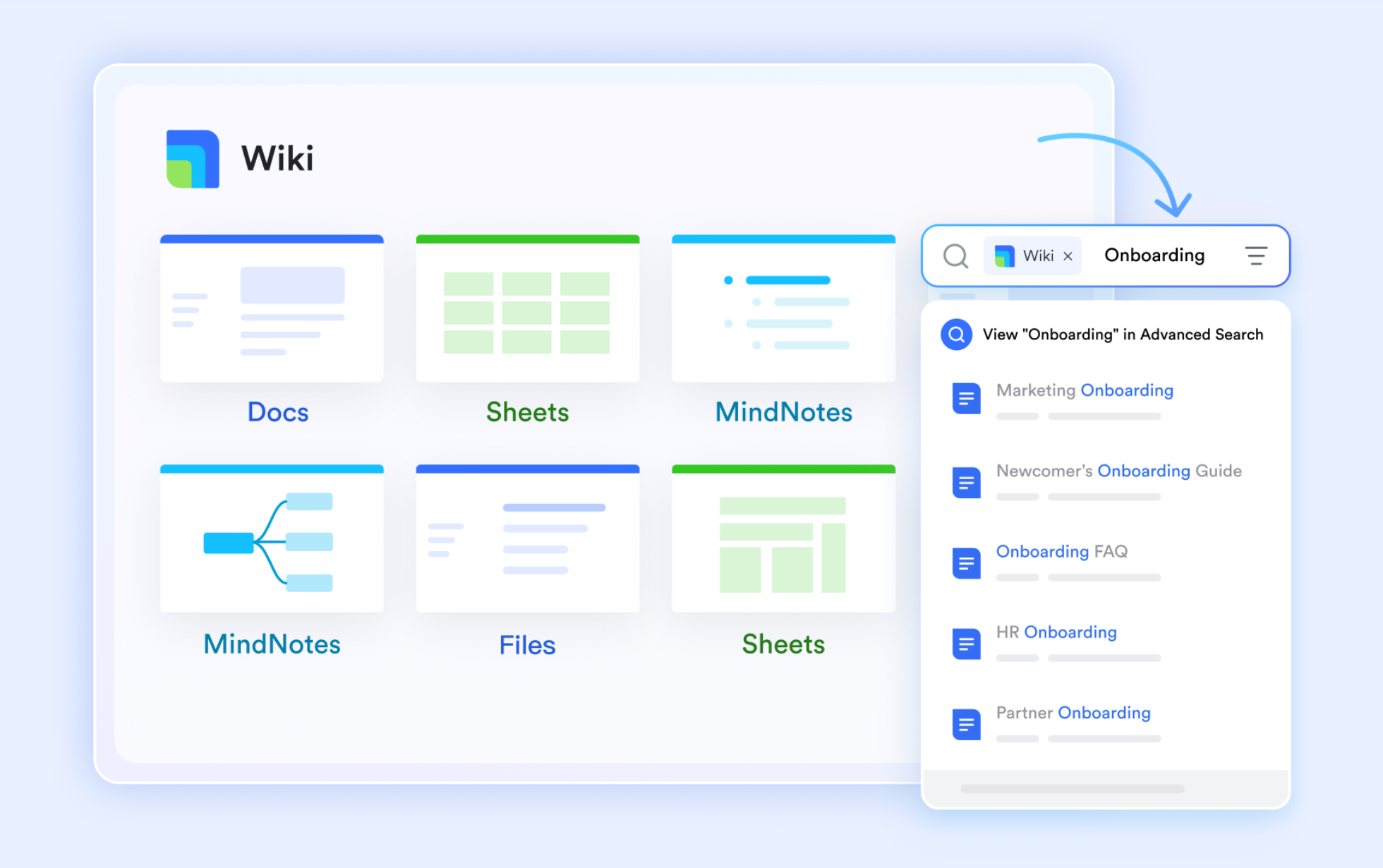
AI models are only as smart as the internal knowledge base they train on. If your company policies are scattered across personal hard drives or fragmented apps, your frontline bot will give customers outdated answers.
By keeping all company policies, product specs, and FAQs inside a cloud-native , your support team ensures the data is always accurate and centralized. When the product team updates a feature in a , that knowledge management system updates in real time. This means both your human agents and your automated systems reference the exact same up-to-date reality.
Workflow 3: Breaking global language barriers in real-time
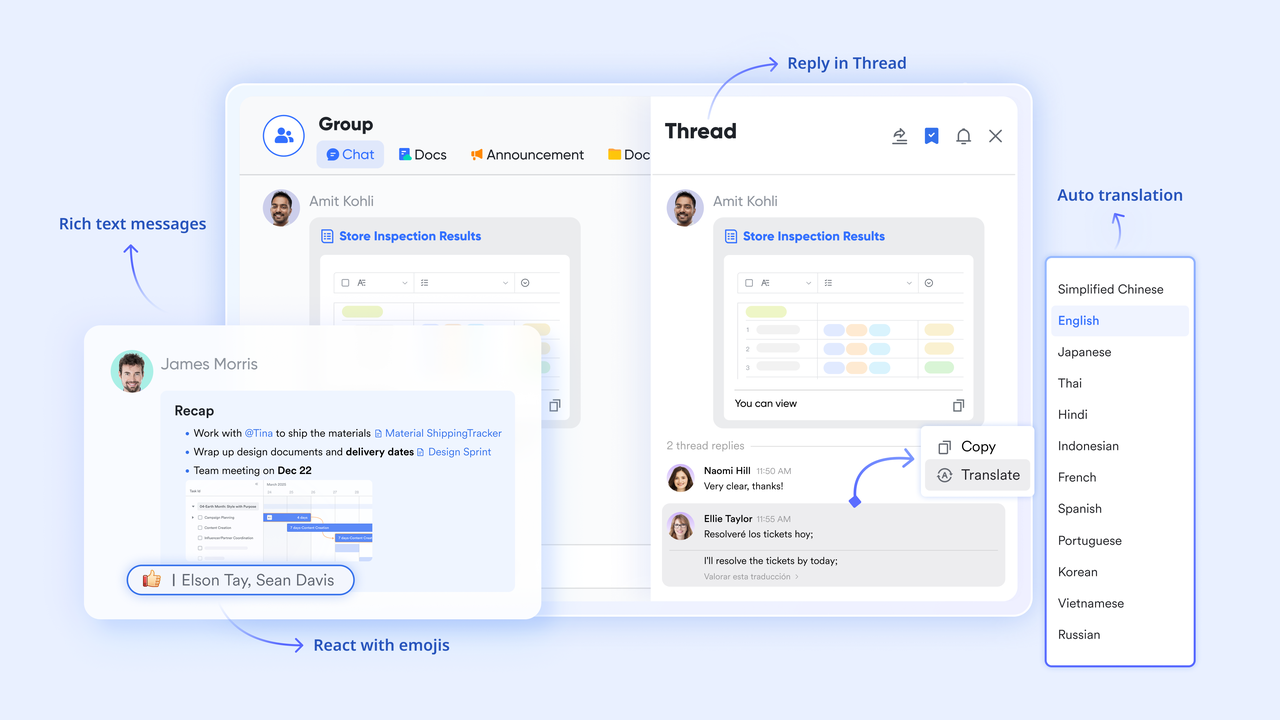
For international customer service operations, collaborating across time zones and languages is a massive hurdle. With Lark's built-in AI translations, this friction disappears.
If a support agent in Berlin needs help with a complex software bug, they can message an engineer in Tokyo. The agent types in German, and the engineer reads it in Japanese. If they jump on a video conferencing call to troubleshoot, provides translated live captions. They can even collaborate on the same bug-tracking document, with the text translating automatically. This eliminates language hurdles and speeds up global resolution times.
Deliver seamless multilingual customer support with Lark.
The future of AI in customer service: Breaking down internal silos
As AI technology matures, the line between front-office support and back-office operations will vanish. We are moving toward a continuous data loop where isolated departments no longer exist.
The end of isolated departments
In the near future, customer service operations will merge completely with internal project management tools. When a customer reports a bug, the AI won't just create a support ticket; it will automatically cross-reference the shared calendar to find an available developer, create a task in the engineering sprint, and update the company-wide to reflect the impact on quarterly goals.
Hyper-personalization at scale
Future iterations of AI will anticipate customer needs before a ticket is ever submitted. For example, if an e-commerce package is delayed due to weather, the AI will use email integration to send a proactive, personalized outreach message to the buyer, complete with tracking updates and an apology credit, preventing the inbound complaint entirely.
Elevating the human agent
There is a persistent fear that AI will replace human support staff entirely. I see a different reality. AI will strip away the repetitive data entry and routing tasks, serving as an advanced triage system. This shift frees humans to , and high-level customer retention strategies that require emotional intelligence.
Conclusion
Integrating AI into your customer service operations is mandatory, but doing it with a fragmented tool stack is a guaranteed way to frustrate your customers and burn out your agents. Slapping a standalone bot onto a disconnected backend results in dropped context, delayed resolutions, and a miserable user experience. True efficiency happens when your automated workflows, internal communications, and product documentation live in the exact same ecosystem. Stop wasting your budget on isolated software that refuses to communicate. Start unifying your team's workspace with platforms like to deliver the fast, context-aware support your customers actually expect.
Build a context-aware customer service ecosystem
FAQs
AI customer support is actually good now?
Yes, but only if it has evolved past rigid decision trees. Historically, bots relied on exact keyword matching, which often trapped frustrated users in unhelpful loops. Today, AI support is highly effective because modern systems use advanced Natural Language Processing (NLP) to understand context, slang, and sentiment. Furthermore, the shift toward "agentic AI" means bots can now securely log into billing systems to process refunds or update CRMs on their own. However, this modern AI is only "good" if it is fully integrated into a unified tech stack—standalone chatbots that cannot communicate with your internal tools will still result in a terrible customer experience.
Can I use AI for customer service?
Absolutely. You can use AI to instantly handle high-volume, repetitive queries (like password resets or simple billing issues), which drastically slashes your First Response Time (FRT). Beyond just chatting with customers, you can use AI behind the scenes to automatically route tickets based on sentiment, summarize long chat histories or video meetings for your human agents, and break global language barriers with real-time translation. To use it successfully, just ensure your AI is deployed within a unified workspace where your frontline bots, human agents, and product engineers share the exact same context and internal knowledge base.
How is AI used in customer service?
Companies use AI to handle routine tasks that traditionally consume human hours. This includes using Natural Language Processing (NLP) for accurate query routing, deploying generative AI to draft quick case summaries for agents, and utilizing automated workflows for backend data entry. AI can answer basic FAQs, process simple refunds, and categorize ticket sentiments.
Will AI agents replace human customer support teams?
No. AI is designed to act as a highly efficient triage system. It handles repetitive, low-tier tasks so that the queue stays clear. Human agents remain absolutely vital for complex problem-solving, exercising emotional intelligence, and managing critical escalations where a frustrated customer needs a human touch.
What are the main benefits of generative AI in customer service?
Generative AI shifts support away from static, rigid decision trees to dynamic, natural conversations. It allows bots to generate highly personalized responses on the fly, which significantly boosts customer satisfaction (CSAT) scores while drastically reducing average handling time and first response times.
Why do some AI customer service implementations fail?
Most failures stem from a lack of integration. When a company buys a standalone AI bot that cannot access the unified workspace human teams use to collaborate internally, it creates operational friction. These disjointed setups lead to "dead ends" that aggravate users seeking complex help, as the AI cannot properly escalate the ticket with full context to the right department.
Related reading