














AI Knowledge-Based Systems: How to Automate Decisions at Scale

Fecilia Clarke
Solutions Marketing Specialist
Sep 18, 2026
Fecilia Clarke
Sep 18, 2026

15 min read


When your approval manager retires, does their decision logic go with them? A knowledge-based system (KBS) is a computer program that reasons using stored knowledge—explicit rules and facts. Unlike black-box AI, every decision is traceable.
Traditionally, AI knowledge based system required separate platforms and specialist engineers. Modern unified platforms now embed KBS directly into everyday tools teams already use. This matters because regulated industries need to explain decisions to auditors—and knowledge-based systems deliver that transparency where AI cannot.
In this article, we'll explore what KBS is, how it works, and how platforms make it accessible to business users.
What is a knowledge-based system?
A knowledge-based system is fundamentally different from traditional software. Instead of embedding decision logic into code that requires engineers to maintain, a KBS stores knowledge explicitly—as rules and facts—so domain experts can update it directly.
Think of a KBS as having three core components working together:
- Knowledge base. This is the repository of facts and rules in your domain. A fact might be: "John Smith works in Engineering with approval level 6." A rule might be: "If a travel request amount exceeds $10,000 AND the requester's level is below 5, route to VP Finance." This knowledge lives in a structured, searchable location that non-technical people can read and update.
- Inference engine. This is the reasoning component. It takes the facts you feed it and applies the stored rules to derive new conclusions. If a request comes in for $12,000 from a level-3 employee, the inference engine matches it against all relevant rules and fires the matching one: "Route to VP Finance." This happens automatically, consistently, and without human involvement.
- User interface. This is how people interact with the system. The interface captures input (a new request), triggers the inference engine, and presents both the decision and the reasoning behind it to the user. Transparency here matters—when a request is approved or denied, the user sees exactly why.
Historical proof point: MYCIN
To understand why this architecture is powerful, consider MYCIN, developed in the 1970s at Stanford University. MYCIN was a medical diagnosis system designed to help doctors identify bacterial infections and recommend antibiotics. It demonstrated three critical insights:
1. Domain experts can encode their own knowledge. Medical specialists didn't need programmers to translate their experience into code. They could directly define diagnostic rules: "If the patient has fever AND elevated white blood cell count, suspect infection."
2. Systems can explain their reasoning. When MYCIN made a diagnosis, it could trace the chain of rules that led to the conclusion. A doctor could see not just the answer, but why the system reached it—essential for clinical decision-making.
3. Reasoning logic can be separated from data. The inference engine that applied rules was general-purpose. The same engine could work for any domain where you provided rules and facts, making KBS architecture reusable.
KBS vs. expert systems: The distinction
These terms are often confused but aren't synonymous:
- Knowledge-based system describes the architecture: explicit knowledge (rules + facts) + reasoning engine + user interface.
- Expert system describes the application: a knowledge-based system specifically designed to replicate specialist decision-making in a narrow domain—like medical diagnosis or legal precedent research.
All expert systems are knowledge-based systems. But not all knowledge-based systems are expert systems. A KBS can solve broader organizational problems—approval workflows, eligibility checks, compliance routing—that don't require domain expertise to set up.
Why regulated industries are rediscovering KBS
When a financial auditor asks "Why did you approve this contract?" you need a reasoning chain, not a probability score. When an HR team appeals a benefits decision, they need to show the same logic was applied consistently. KBS delivers that transparency where machine learning cannot.
Types of knowledge-based systems in practice
Different KBS architectures solve different problems. Here's how they map to real organizational needs:
Expert systems
- What they do: Replicate human specialist decision-making in narrow domains.
- Real examples: A radiology system that analyzes X-rays and recommends diagnoses. A loan approval system that evaluates creditworthiness. A technical support system that diagnoses software issues.
- Key feature: They provide both answers and explanations. When they recommend a diagnosis, they also show the reasoning—which symptoms matched, which risk factors were present.
- Why it matters: In high-stakes domains (healthcare, finance), users need to understand the logic before acting on it.
Rule-based systems
- What they do: Encode organizational policies as IF-THEN rules.
- Real examples: Expense approval workflows. Benefits eligibility checks. Compliance routing (this document must be reviewed by Legal if it mentions regulatory compliance).
- Key feature: Deterministic reasoning based on explicit rules—no learning, no adaptation. Rules are maintained by policy owners, not engineers.
- Why it matters: Most organizational workflows live here. Policies change when management decides, not when new data arrives. Rule-based systems are built for that reality.
Case-based reasoning systems
- What they do: Solve new problems by matching them to similar past cases and adapting previous solutions.
- Real examples: Legal research systems that find relevant precedents. Sales negotiation systems that reference similar past deals. Customer support systems that match new tickets to resolved cases.
- Key feature: No explicit rules needed. The system learns patterns from historical cases.
- Why it matters: When your knowledge is messy and contextual (legal precedent, sales strategy), case-based reasoning can outperform rigid rules.
Classification systems
- What they do: Categorize inputs into predefined classes.
- Real examples: Document classification (incoming contracts, vendor agreements, NDAs). Risk rating (customer credit risk, vendor reliability, project risk). Customer segmentation (high-value vs. standard vs. at-risk).
- Key feature: Rules define which characteristics belong to each category. "If this document contains a 'termination clause' AND 'limitation of liability' AND mentions 'confidentiality,' classify as NDA."
- Why it matters: When you need to organize large volumes of unstructured information automatically.
Eligibility analysis systems
- What they do: Determine whether a user qualifies for a service by asking guided questions until a disqualifying answer emerges.
- Real examples: Benefits eligibility (is an employee eligible for parental leave, given their tenure and employment status?). Support tier assignment (is this customer eligible for premium support?). Loan pre-qualification (does a borrower qualify for a mortgage, given income and credit score?).
- Key feature: Interactive, sequential questioning. As soon as you hit a disqualifying criterion, the system stops and explains why.
- Why it matters: Users understand exactly what would make them eligible. It removes the "black box" feeling of application systems.
Intelligent tutoring systems
- What they do: Support human learning by providing personalized instruction and feedback.
- Real examples: Onboarding systems that teach new employees company policies. Software training systems that adapt to the learner's knowledge gaps. Compliance training that branches based on the learner's role.
- Key feature: Diagnoses what the learner needs and customizes instruction accordingly.
- Why it matters: Learning retention improves when systems adapt to individual gaps rather than forcing everyone through the same generic training.
Which type fits your organization?
Most growing companies use a combination: rule-based systems for policy-driven workflows (approvals, compliance), eligibility analysis systems for services or benefits, and intelligent tutoring systems for onboarding. Only specialized domains (medical diagnosis, legal research) would use expert systems or case-based reasoning as the primary approach.
If your workflow depends on explicit policies that must be applied consistently, rule-based KBS is the match. If it requires learning from historical data, case-based reasoning. If it involves training and adaptation, intelligent tutoring.
KBS vs. Modern AI: Complementary, not competitive
There's a misconception that machine learning and large language models have replaced knowledge-based systems. They solve different problems.
Modern AI excels at pattern detection. Feed it historical data and it learns statistical patterns. Trade-off: opaque. You get a prediction but not necessarily the reasoning.
KBS excels at rule-based, auditable decisions. You encode rules upfront. The system applies them consistently and shows the reasoning. Trade-off: you must know the rules in advance.
When KBS wins
- Regulated industries. A financial auditor asks "Why approve this $500K credit line?" The bank produces a reasoning chain. Large language models cannot.
- Consistent policy enforcement. "Employees with 10+ years tenure AND rating ≥ 3.5 are eligible for sabbatical." This rule doesn't change based on historical patterns—it changes when leadership decides. KBS executes consistently. Machine learning would find statistical patterns in who took sabbaticals, which is irrelevant if policy just changed.
- Limited historical data. A startup has few precedents to train on but clear rules: "Any contract over $100K requires legal review AND CFO sign-off." KBS works. Machine learning would fail.
When modern AI wins
- Unstructured data understanding. A support ticket: "My app crashes when uploading videos. I'm on the free plan." An LLM extracts relevant facts and routes appropriately. A rule-based system struggles with linguistic variability.
- Fraud detection. Credit card fraud shows subtle patterns (geographic inconsistencies, velocity anomalies). Machine learning identifies these. No rule-based system could encode them manually.
The hybrid approach
Sophisticated organizations use both: LLMs extract meaning from unstructured input, KBS applies deterministic logic to those facts, and the user sees transparent reasoning. This hybrid recognizes that knowledge-based systems and AI solve different problems.
Embedding KBS in unified workflows: The Lark model
The traditional problem with knowledge-based systems was architectural: they lived in separate platforms. A bank used one system for credit decisions, another for compliance routing, another for customer communication. Each silo required specialist configuration. When a policy changed, coordinating updates across systems was painful.
How Lark integrates the four KBS layers
Lark is designed as an all-in-one collaboration workspace combining messaging, video calls, cloud-native document, project management, approvals, email, wiki, OKR tracking, and a no-code database all live in one environment. From a KBS perspective, this unified architecture provides all four layers:
Layer 1: Rules in Lark Wiki
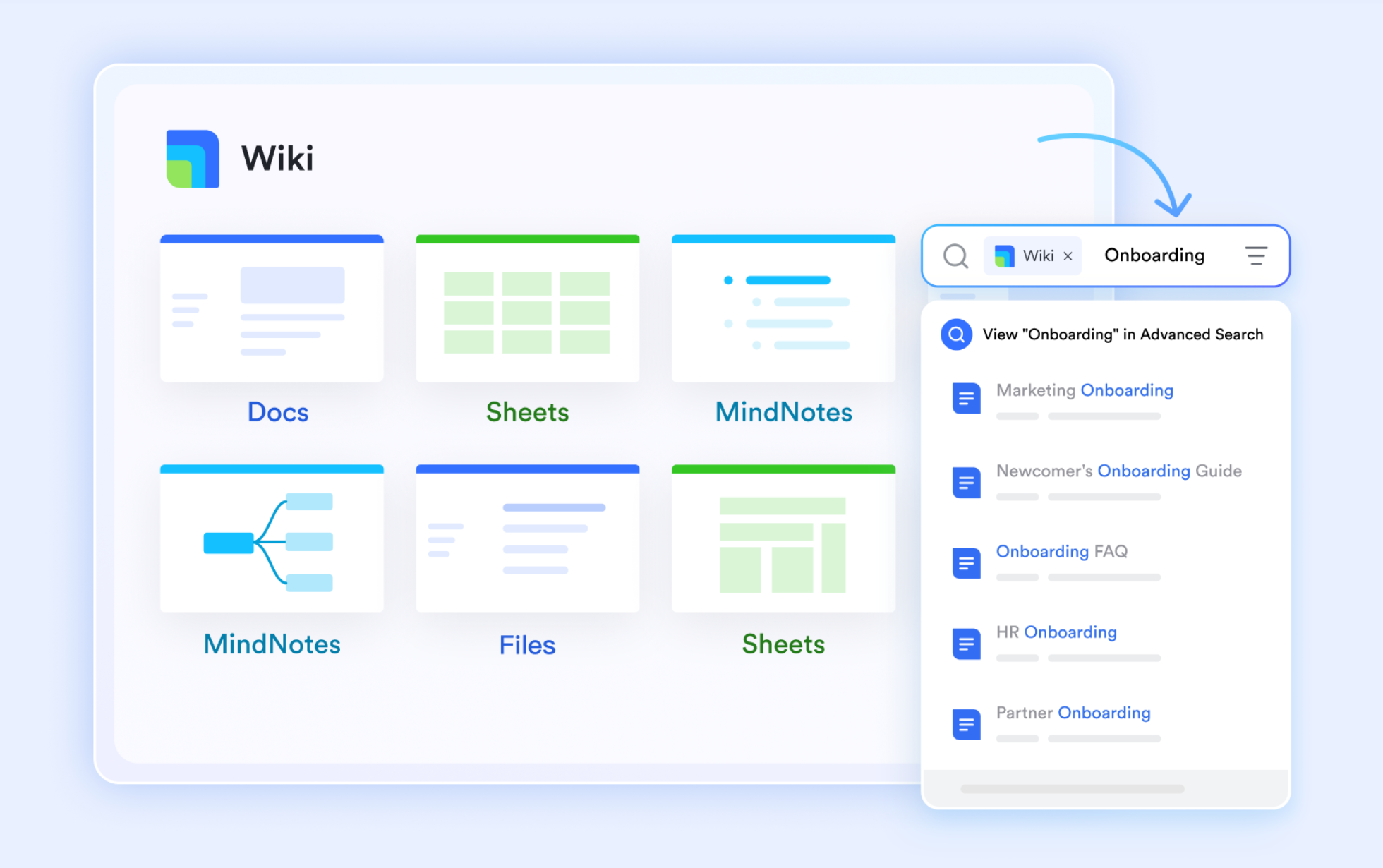
Your organization's approval policies live in Lark Wiki in plain language that anyone can read and update. A Finance Manager might document a travel policy that reads: "For domestic travel, if the request amount is less than 5,000, the employee′s direct manager can approve. If the amount falls between 5,000, the employee′s direct manager can approve.If the amount falls between 5,000 and 10,000, director−level approval is required. For amounts exceeding 10,000, director level approval is required. For amounts exceeding 10,000, VP Finance approval becomes necessary. All international travel, regardless of amount, requires VP approval plus a compliance review."
This isn't buried in a specialist's configuration file or locked behind IT. It's searchable, versioned, and updateable by anyone with edit rights. When policy changes next quarter, a manager simply edits the Wiki entry. The change is immediately visible to everyone and tracked in version history. There's no need to wait for IT to redeploy systems or for knowledge engineers to reconfigure rules.
Layer 2: Facts in Lark Base
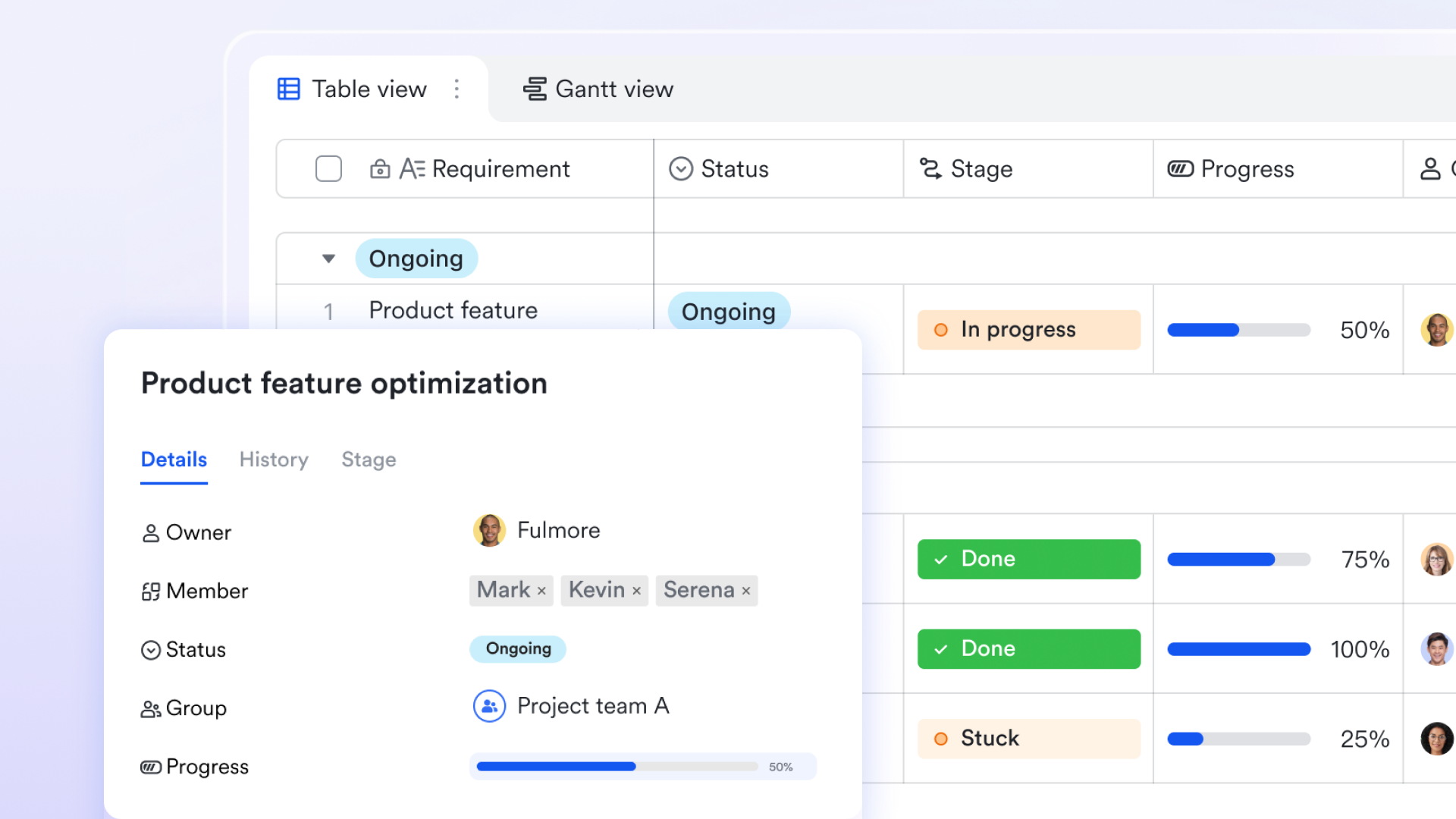
Lark Base functions as a cloud-native relational database where your organization structures decision-critical data. In the travel approval example, you'd create a table containing employee information: their ID, name, department, approval level, cost center assignment, and annual travel budget. Each row represents an employee. When an employee submits a travel request, the system retrieves their facts from this table—knowing their approval level, their current budget allocation, their cost center classification.
This structured approach ensures data accuracy. You can set validation rules: approval levels must be positive integers, cost centers must match your organization's approved list. No garbage data pollutes the system. When data changes—someone gets promoted, a budget resets quarterly—you update the table once, and the entire decision system reflects the change immediately.
Layer 3: Automatic reasoning via Lark Automation
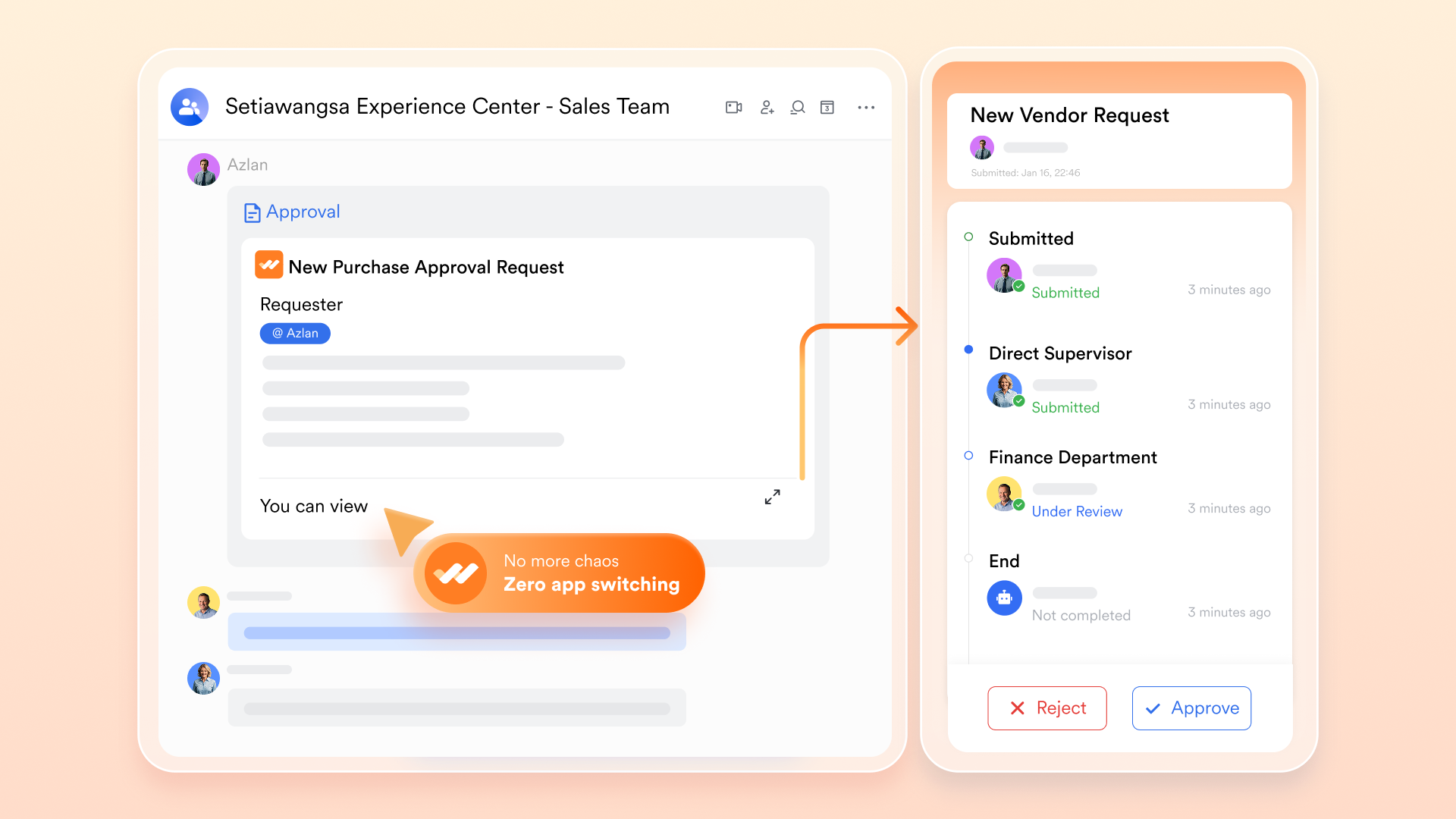
Lark automation is where the AI knowldge-base system logic lives and executes. Rather than requiring code, it uses a configuration interface where non-technical managers define decision rules. You might set up logic that says: "When a travel request arrives, check the amount and destination. If the amount is under 5,000 and the destination is domestic, and the requester has approval level 4 or higher, automatically route this request to their manager. If the amount exceeds 5,000 and the destination is domestic, and the requester has approval level 4 or higher, automatically route this request to their manager. If the amount exceeds 10,000 or the destination is international, route to VP Finance instead."
When a travel request arrives, this reasoning happens automatically in the background. Forward chaining executes: the system checks all matching rules and routes the request accordingly. No human sits in the middle deciding who should approve what. No delays. No inconsistency based on who's available that day.
Layer 4: Transparency in every decision
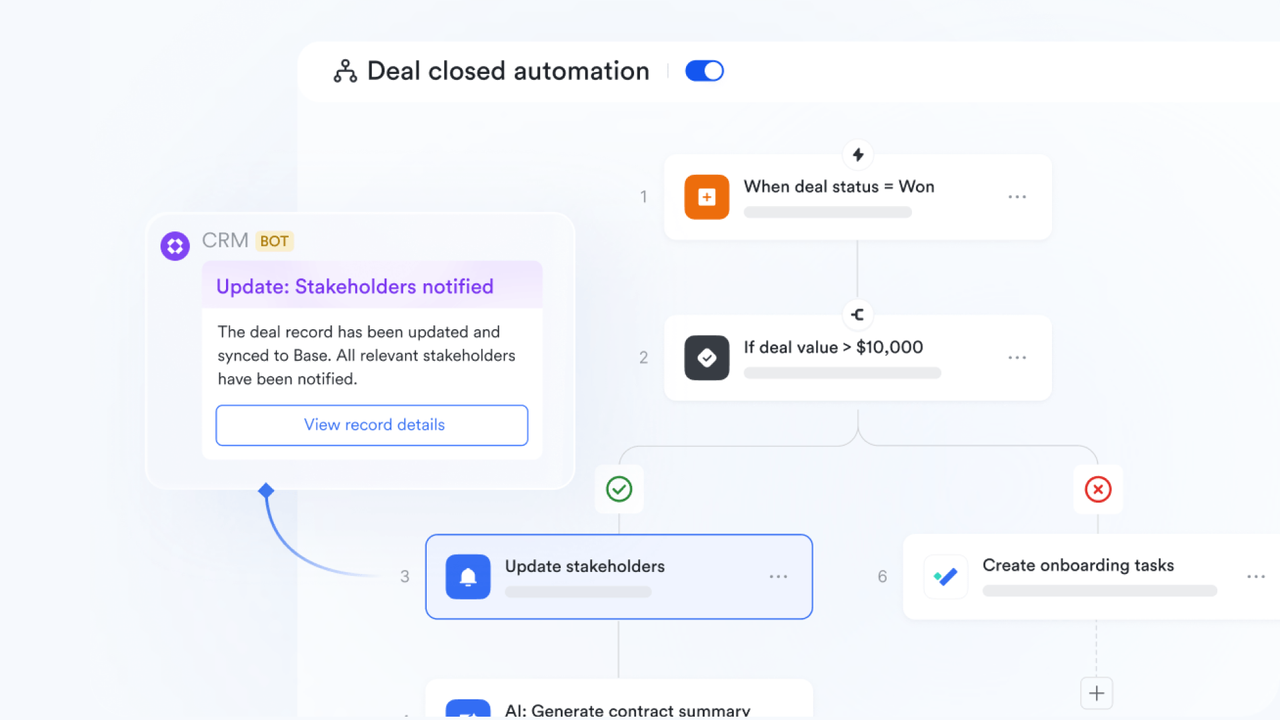
When the request is routed, the requester receives a message explaining the decision with specifics. If a request for 4,200 domestic travel is routed to a manager, the notification reads:"Your travel request for 4,200 domestic travel is routed to a manager, the notification reads:"Your travel request for 4,200 (domestic) has been routed to your manager, Marcus Johnson, for approval. Reason: Your request amount is below the $5,000 domestic threshold per Travel Approval Policy v2.3. Expected response within 2 business days."
If a request cannot be auto-approved—say, a 15,000 request to Singapore that exceedstheannualbudget—the system explains that too: "Your travel request for 15,000 request to Singapore that exceeds the annual budget—the system explains that too:"Your travel request for 15,000 to Singapore could not be auto-approved. Reason: International travel exceeds your annual budget of $15,000 and requires VP Finance approval. Your manager will review and escalate if appropriate."
Every decision is logged in Lark's audit trail: timestamp, which rule fired, which facts matched, who the approver was. This level of transparency is invaluable for compliance reviews. When an auditor asks why a request was approved, you have a complete, timestamped record.
Why this integration reduces friction
Compare this to traditional approaches:
Email + spreadsheets: Approval rules live in a spreadsheet (or someone's email signature). When John approves requests differently than Sarah, there's no consistency. When your CFO leaves, where are the rules? In their head. New hires must shadow experienced approvers for weeks. Auditors can't verify decisions were policy-compliant because the reasoning isn't documented.
Slack + external approval tool: Teams chat in Slack but approvals happen in a separate platform. Users switch contexts constantly. Rules aren't visible in the chat. When someone asks "Why wasn't I approved?" there's no built-in explanation. The approval system is disconnected from where work actually happens.
Lark unified approach: Rules, facts, execution, and explanation all live in one place. Your team doesn't need to learn a new platform. Operations managers update policies in Wiki without IT involvement. Requests are routed automatically with transparent reasoning. Auditors see complete decision chains.
The result: faster approvals, consistent decisions, preserved institutional knowledge, and auditability that compliance teams rely on.

Why KBS + unified platforms matter for modern enterprises
The convergence of knowledge-based systems and unified workflows addresses a set of persistent enterprise pain points.
Explainability for regulators and stakeholders
When a compliance officer audits your approval process, they're looking for consistency and justification. A reasoning chain—"Request approved because amount $3,200 is below $5,000 threshold"—is audit gold. It proves decisions follow policy, not whim.
This matters across regulated domains: healthcare providers justify treatment decisions, financial institutions explain credit approvals, legal teams document contract review logic, insurance companies explain claim denials.
Knowledge preservation when experts leave
Organizations hemorrhage institutional knowledge when experienced people depart. The retiring manager who "just knows" which vendor relationships are worth maintaining, or the senior analyst who understands which cost centers get budget discretion—that knowledge walks out the door.
When decision logic is encoded in rules (stored in Wiki) and facts (structured in Base), it remains accessible to successors. A new manager reads the documented rules, understands the policy, and can approve requests consistently from day one. Ramp-up time decreases. Decision quality doesn't drop during transitions.
Consistency and fairness
Rules applied uniformly across all requests, all approvers, all time zones. No human fatigue leading to inconsistent decisions on Friday afternoons. No manager in New York approving a $50,000 contract while a manager in Singapore denies an identical request.
This consistency builds trust. Employees understand they're being treated fairly—the same criteria apply to everyone. It also reduces litigation risk. If an employment decision is ever challenged, you can produce the reasoning chain showing that the same logic was applied consistently.
Scalability without proportional cost
As your organization grows, approval volume increases exponentially. Hiring proportionally more approvers is expensive and inefficient. Encoding rules in an AI knowledge-based system lets you scale throughput without hiring headcount. The system routes requests automatically. Approvers focus on edge cases and exceptions.
Auditability and compliance
Every decision is logged with complete context: which rule was applied, which facts triggered it, when, by whom. For compliance reviews, this is invaluable. You're not reconstructing history from email threads. You have a complete, timestamped record of the reasoning behind every approval or denial.
Implementing AI knowledge-base system: Where to start
If your organization is struggling with approval delays, knowledge loss when experts depart, or compliance audits that demand transparent reasoning, this section outlines a practical starting point.
Assessment: Does your workflow fit KBS?
Ask three diagnostic questions:
1. Do you have explicit, documented rules? "If budget > $50K, require VP sign-off." If your rules are vague or exist mainly in people's heads, KBS isn't ready yet.
2. Do you lose knowledge when people leave? If your newest hire must shadow an experienced approver for weeks to learn the logic, that's a sign decision rules aren't codified.
3. Do you struggle to explain decisions to auditors or stakeholders? If you can't produce a clear reasoning chain for why a request was approved or denied, KBS would help.
If you answer "yes" to any of these, knowledge-based systems are worth exploring.
Choose the right first workflow
Pick a workflow with these characteristics:
- Creates obvious friction. Approvals take 5+ days, or approvers apply rules inconsistently, or knowledge walks out the door when someone departs.
- Has explicit, stable rules. The logic doesn't change weekly. Policies are documented or can be documented in an afternoon.
- Affects enough people to justify effort. If only three people care about the workflow, the project is low-priority. Choose something 50+ people interact with.
- Is self-contained. Avoid workflows that depend on rules you don't control or that require complex integrations with legacy systems.
Good first workflows: Expense approvals, benefits eligibility determination, support ticket routing, contract review triage, vendor approval, procurement requests. Initially, please avoid complex multi-department workflows, workflows with constantly changing rules, workflows requiring integration with systems you don't own.
Implementation: Five practical steps
Step 1: Document the rules in plain language
Interview three to five people who currently make decisions in this workflow. Ask them to walk you through their approval process step by step. What conditions trigger different decisions? What exceptions do they make?
Write down the rules they describe. For a travel approval workflow, this might look like: "Travel requests under 5,000 for domestic destinations can be approved by the employee's manager. Requests between \5,000 and $10,000 require director approval. Any international travel, regardless of amount, needs VP approval. Additionally, if a request violates the cost center's allocated budget for the year, it must be escalated to Finance."
Store these rules in a shared location like Lark Wiki. Non-technical managers should be able to read and update them without help. Use clear, simple language—avoid jargon. The goal is that someone reading the rules for the first time understands the logic immediately.
Step 2: Organize the facts and structure your data
Identify what information the system needs to make decisions. For travel approvals, you need the employee's approval level, their annual travel budget, their cost center classification, and how much they've already spent this year. For expense approvals, you might need the expense category, the amount, the employee's role, and any departmental spending limits.
Create tables in Lark Base (or your structured database) to store this data. Each table represents one type of information. The employee table might have columns for ID, name, department, approval level, cost center, and travel budget. The finance table might track departmental budget limits and spend-to-date.
Add validation rules to ensure data accuracy. An employee's approval level can't be negative. A cost center code must match your approved list of cost centers. Without these guardrails, bad data corrupts your decisions.
Step 3: Configure the automated reasoning
Using Lark Automation's workflow configuration, define the decision logic. You specify: "When a travel request arrives, evaluate the following: if the amount is less than 5,000 AND the destination is domestic and the employee′s approval level is 4 or higher, automatically route to their manager. If the amount exceeds 5,000 AND the destination is domestic and the employee′s approval level is 4 or higher, automatically route to the irmanager. If the amount exceeds 10,000, route to VP Finance instead. If the destination is international, also notify the compliance team."
Test this logic against historical requests. Pull five or ten past requests that were approved or denied, and run them through your new rules. Do the rules produce the same outcome? If not, adjust the rules. Keep them simple initially. You can add complexity later as you gain confidence.
Step 4: Add transparency by showing reasoning to users
When a request is routed automatically, include a message that explains the decision. The message should state what triggered the routing, which policy was applied, and what happens next. For instance: "Your 3,500 domestic travel request has been automatically routed to your manager for approval because your request falls below the 5,000 threshold per Travel Policy v2.2. Your manager typically responds within 2 business days."
When a request cannot be auto-approved—because it's international or exceeds a budget—explain why: "Your request for $12,000 to London requires VP Finance approval. Reason: International travel requests of any amount require VP-level review per company policy. Your manager will escalate this to Finance for consideration."
This transparency removes frustration. Users understand why decisions are made, and they know what to expect next.
Step 5: Maintain the rules and data incrementally
Knowledge-based systems require ongoing maintenance, but it's straightforward. When a policy changes—quarterly budget resets, new approval thresholds, organizational restructuring—update the rules in Wiki and the data in Base.
Do not update them simultaneously. First, update the data (employee records, budget allocations). Then, update the rules to reflect the new policy. Then communicate the changes to affected teams. This sequencing prevents confusion.
Schedule quarterly reviews of your rules: Are they still accurate? Have new edge cases emerged that the rules don't address? Are your data tables still current? Assign one person accountability for these reviews. Document every change so you maintain an audit trail.
Why start small
Implementing knowledge-based systems on a complex, organization-wide workflow is high-risk. Start with one workflow because:
- If implementation encounters challenges, the blast radius is small.
- Success builds organizational confidence for expansion.
- Your team learns how to maintain KBS logic at low risk.
- You can measure results (approval cycle time, consistency) quickly.
After your first workflow succeeds, the second implementation is faster. You've built institutional knowledge about how to structure rules and facts. Your team understands the pattern. Scaling becomes incremental rather than revolutionary.
Conclusion
Knowledge-based systems solve a persistent enterprise problem: making consistent, explainable decisions at scale. Platforms like Lark embed KBS directly into daily workflows, making them accessible to business users without specialists.
If your team struggles with approval delays, knowledge loss, or compliance audits demanding transparent reasoning, start with one workflow. Document rules in Lark Wiki, organize data in Lark Base, automate reasoning via Lark Automation, and show logic to users. The payoff is measurable: faster approvals, consistent enforcement, and audit trails that satisfy regulators.
FAQs
What are knowledge-based systems in AI?
A knowledge-based system (KBS) is a computer program that reasons using explicitly stored knowledge—rules and facts—rather than learning statistical patterns. Unlike black-box AI, every decision is traceable and auditable.
A KBS has three core components:
- Knowledge base: Repository of facts and rules (e.g., "If travel request exceeds $10,000 AND requester level is below 5, route to VP Finance")
- Inference engine: Applies rules to facts to derive conclusions automatically
- User interface: Shows both the decision and the reasoning behind it
The key difference from traditional AI: you must encode rules upfront, but the system applies them consistently and explains every decision.
What are the main types of knowledge-based systems?
The article discusses six primary types:
1. Expert systems: Replicate specialist decision-making (e.g., medical diagnosis, loan approval)
2. Rule-based systems: Encode organizational policies as IF-THEN rules (e.g., expense approvals, compliance routing)
3. Case-based reasoning systems: Match new problems to similar past cases (e.g., legal research, customer support)
4. Classification systems: Categorize inputs into predefined classes (e.g., document classification, risk rating)
5. Eligibility analysis systems: Determine qualifications through guided questioning (e.g., benefits eligibility, loan pre-qualification)
6. Intelligent tutoring systems: Provide personalized learning and feedback (e.g., onboarding, compliance training)
Most organizations use a combination—rule-based for approvals, eligibility systems for services, and tutoring systems for onboarding.
What are knowledge bases in AI?
A knowledge base is the repository of explicit knowledge in a KBS—containing both facts and rules that drive decisions.
Example facts:
- "John Smith works in Engineering with approval level 6"
- "Employee has annual travel budget of $15,000"
Example rules:
- "If domestic travel request < $5,000, manager can approve"
- "If international travel, route to VP Finance"
Unlike traditional databases, knowledge bases are designed to be:
- Human-readable: Non-technical people can understand the rules
- Updatable by domain experts: No engineers needed to maintain policies
- Searchable and versioned: Changes are tracked and auditable
This is why knowledge bases are critical for regulated industries—auditors can see exactly which rules governed each decision.
Related reading
Table of contents
Start using Lark today

Manage all your work in one place
Boost team efficiency by 10x
Save up to 70% on software costs
Table of contents
Start using Lark today
Manage all your work in one place
Boost team efficiency by 10x
Save up to 70% on software costs
Keep reading







2026 Lark Technologies Pte. Ltd.
Headquartered in Singapore with offices worldwide.






Explore: