CRM tools today are expected to do more than store contacts or track deal stages. Teams want systems that adapt quickly, support collaboration, and evolve as workflows change. This is why interest in using Airtable as a CRM has grown steadily among startups, agencies, and operations teams. Airtable positions itself as a flexible database rather than a traditional CRM, which makes it appealing to teams that want control over structure and customization. As this Airtable CRM review explores, flexibility can be both a strength and a challenge as teams scale. Many teams eventually compare Airtable with more execution focused platforms, including modern workspaces like Lark, as they look for fewer tools and clearer ownership.
Flexible CRM setups evolve with scale
What is Airtable CRM?
Airtable CRM is not a standalone but a way teams use Airtable's database platform to . Instead of predefined sales pipelines and rigid objects, Airtable allows teams to build CRM systems from tables, views, and automations. This approach appeals to teams that want to design their own workflows rather than adapt to traditional CRM constraints. Understanding what Airtable CRM is and how it works helps set realistic expectations before adoption.
At its core, Airtable functions as a hybrid between a and a . Teams create tables for leads, accounts, deals, activities, and contacts, then connect them using linked records. Views such as grid, Kanban, calendar, and gallery allow teams to visualize CRM data in different ways. Because the structure is fully customizable, Airtable CRM can look very different from one team to another.
However, Airtable CRM lacks many opinionated features found in dedicated CRMs. There is no native forecasting engine, no built-in opportunity scoring, and no predefined sales methodology. This means teams gain flexibility but also take on responsibility for designing, maintaining, and governing their CRM system over time.
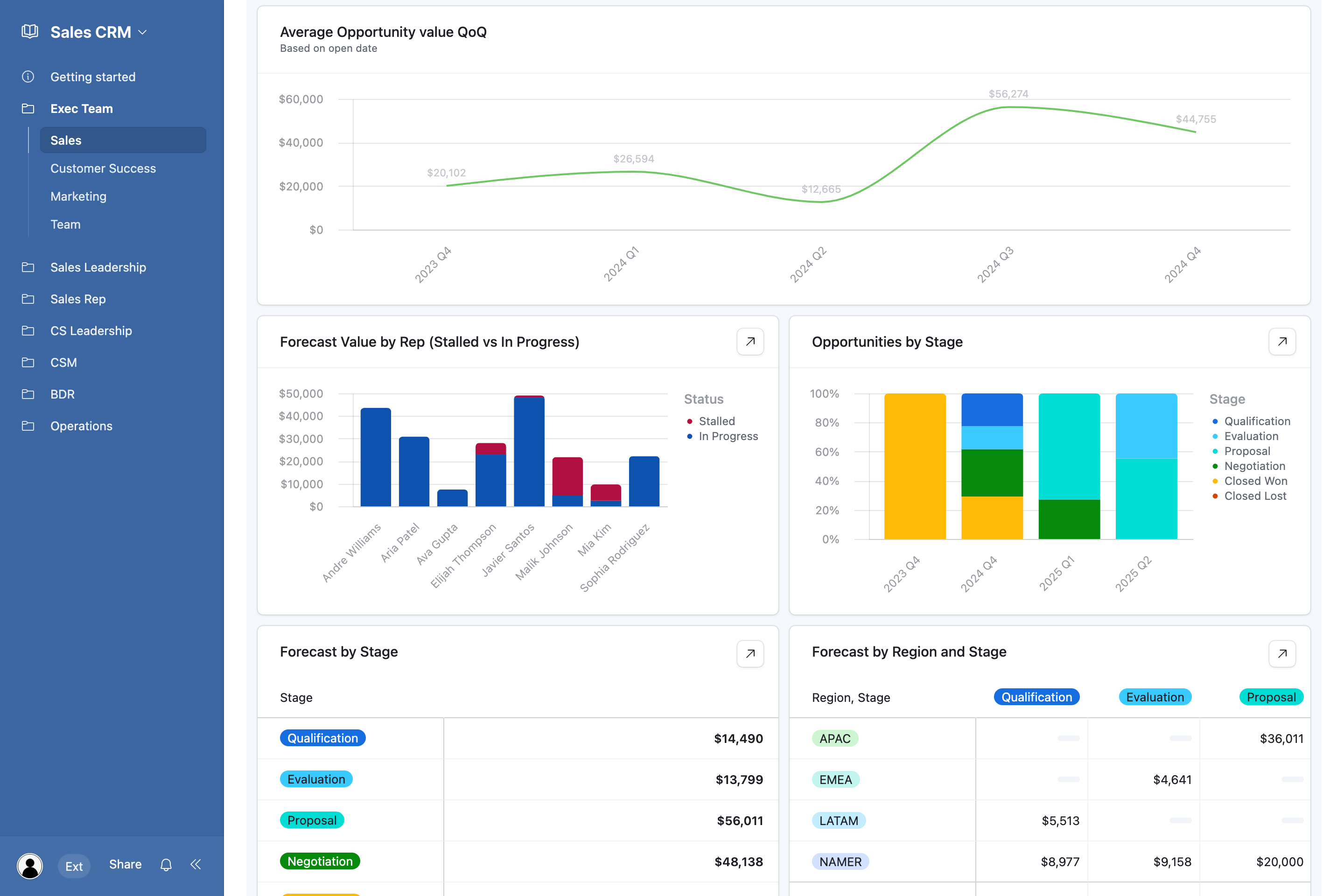
Image source: airtable.com
Strengths and limitations of Airtable CRM
Airtable CRM is best understood as a highly flexible database that can be shaped into a CRM, rather than a CRM built with predefined rules and workflows. This distinction is important because it defines both its strengths and its limitations as teams grow.
- Airtable CRM is a flexible database, not a native CRM: Airtable provides powerful tables, views, relationships, and formulas that allow teams to model customer data in almost any way they choose. However, it does not include built-in CRM logic such as deal stages, pipeline progression, ownership enforcement, or by default. All of these must be designed, configured, and maintained manually by the team.
- It supports CRM use cases, but doesn't enforce them: Teams can easily track contacts, leads, opportunities, and activities in Airtable. However, the platform does not guide users through a structured sales flow or prevent incomplete or inconsistent data entry. Unlike purpose-built CRMs, Airtable does not enforce required steps, ownership rules, or follow-up actions, which can lead to gaps as usage expands.
- Templates accelerate setup, not long-term operations: Airtable CRM templates make it easy to get started quickly. They provide a foundation for , contact tracking, and basic reporting. However, templates are starting points rather than scalable systems. As pipelines become increasingly complex, templates require continuous customization, manual updates, and ongoing administrative oversight to remain effective.
- It's great for customization, weak on accountability: Airtable excels at customization and adaptability, allowing teams to tailor fields, views, and automations to their exact needs. What it lacks are native accountability mechanisms. There are no built-in ways to consistently enforce task ownership, follow-ups, or execution standards across users, which becomes increasingly noticeable as teams expand.
- Airtable works best for experimentation, not execution at scale: For early-stage teams or low-volume CRM use cases, Airtable works extremely well. It enables fast experimentation, iteration, and customization without heavy setup. As teams grow and processes become repeatable, the absence of built-in structure, guided workflows, and execution-focused automation can slow momentum and introduce operational risk.
How to use Airtable as a CRM
Teams adopt Airtable as a CRM in very different ways depending on their size, process maturity, and execution discipline. Because Airtable is highly flexible, it can support a wide range of scenarios without forcing a specific workflow. This flexibility makes it appealing to teams that want control over structure rather than rigid CRM rules. However, outcomes vary significantly based on how consistently teams define and maintain their processes.
- Contact and lead tracking for small teams: Small teams often use Airtable to centralize contact details, lead sources, and basic interaction history in one place. Its table-based structure makes it easy to add custom fields and views without technical setup. This works well when a few users manage all relationships. As volumes grow, manual updates and inconsistent data entry can quickly become harder to manage.
- Lightweight : Airtable is frequently used to build simple pipelines that track deal stages, values, and expected close dates. Teams can visualize progress using Kanban or grid views and customize stages freely. This approach supports early sales motions without heavy tooling. Over time, the lack of enforced steps and automated follow-ups can slow execution.
- Creator, agency, and ops-led CRM setups: Agencies, creators, and operations teams often prefer Airtable for its ability to combine CRM data with , content workflows, and client deliverables. Records can link contacts to campaigns, tasks, and assets in one system. This cross-functional flexibility is powerful for non-traditional sales teams. However, it relies heavily on manual coordination rather than guided execution.
- Why usage varies widely by team maturity: The effectiveness of Airtable as a CRM depends more on team discipline than on the platform itself. Teams with strong internal processes can make Airtable work well. Less structured teams often struggle as data grows and ownership becomes unclear. This explains why Airtable feels empowering for some teams and limiting for others as they scale.
Step-by-step guide of using Airtable CRM
Setting up Airtable as a CRM is less about installing a tool and more about designing a structure that fits how your team works. Because Airtable does not enforce predefined CRM rules, teams must intentionally define fields, views, and data standards from the start. The setup process is straightforward and flexible, making it accessible even for non-technical users. However, the quality of the setup directly impacts how usable and scalable the CRM will be over time.
Step 1: Choose a CRM template
Airtable provides ready-made that cover most common use cases, saving significant setup time. After creating an account, browse the Templates section and search for "CRM" to explore available options. These templates offer a strong starting structure that you can adjust later instead of building everything from scratch.
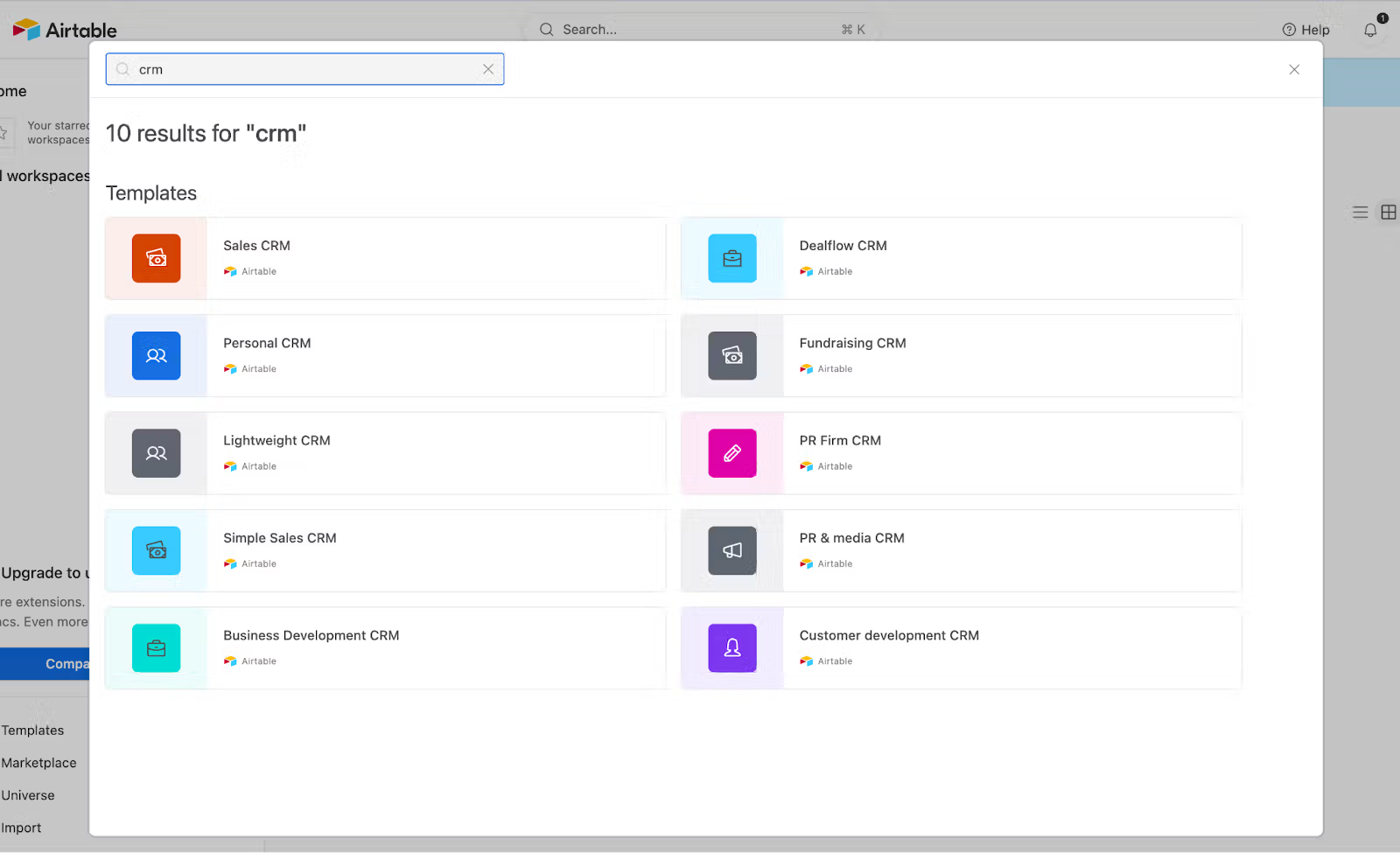
Image source: airtable.com
Step 2: Customize your fields
Once the template is in place, tailor the fields to match the data you actually need. Remove irrelevant columns and add fields such as deal status, pipeline stage, or lead priority. Airtable's flexible field types, like single select, checkboxes, and dates, make it easy to capture structured CRM data.
Step 3: Import your existing customer data
After finalizing your layout, import contacts and company details from or previous systems. Airtable's import tool helps map data to the correct fields, though a quick manual review is recommended. This step ensures your CRM starts with accurate, usable information.
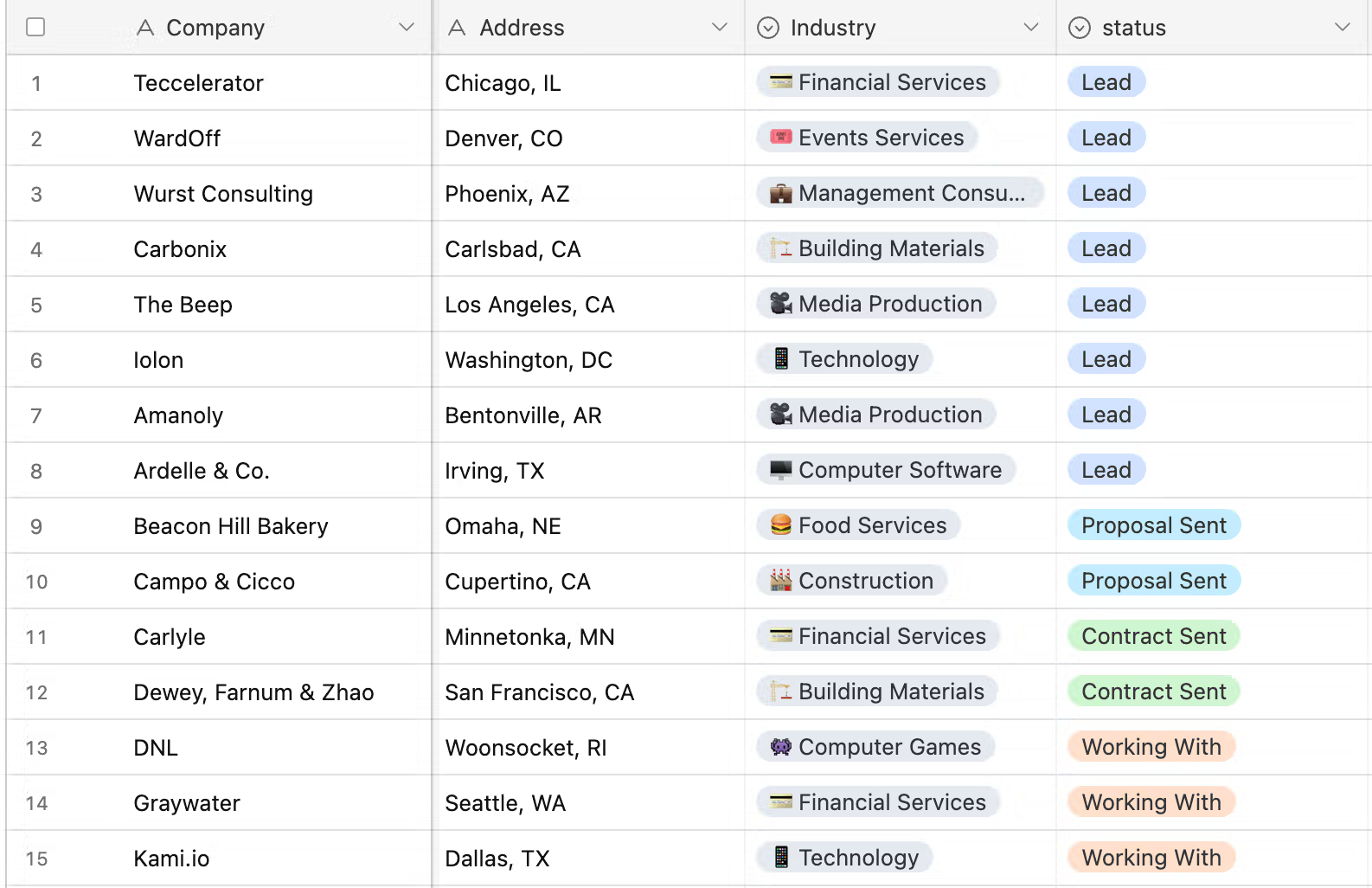
Image source: airtable.com
Step 4: Set up custom views and filters
Views let you interact with the same CRM data in different ways, such as grid, Kanban, or calendar formats. You can track pipeline progress visually, schedule follow-ups, or focus on specific deal stages using filters. This flexibility makes it easier to manage CRM activity without duplicating data.
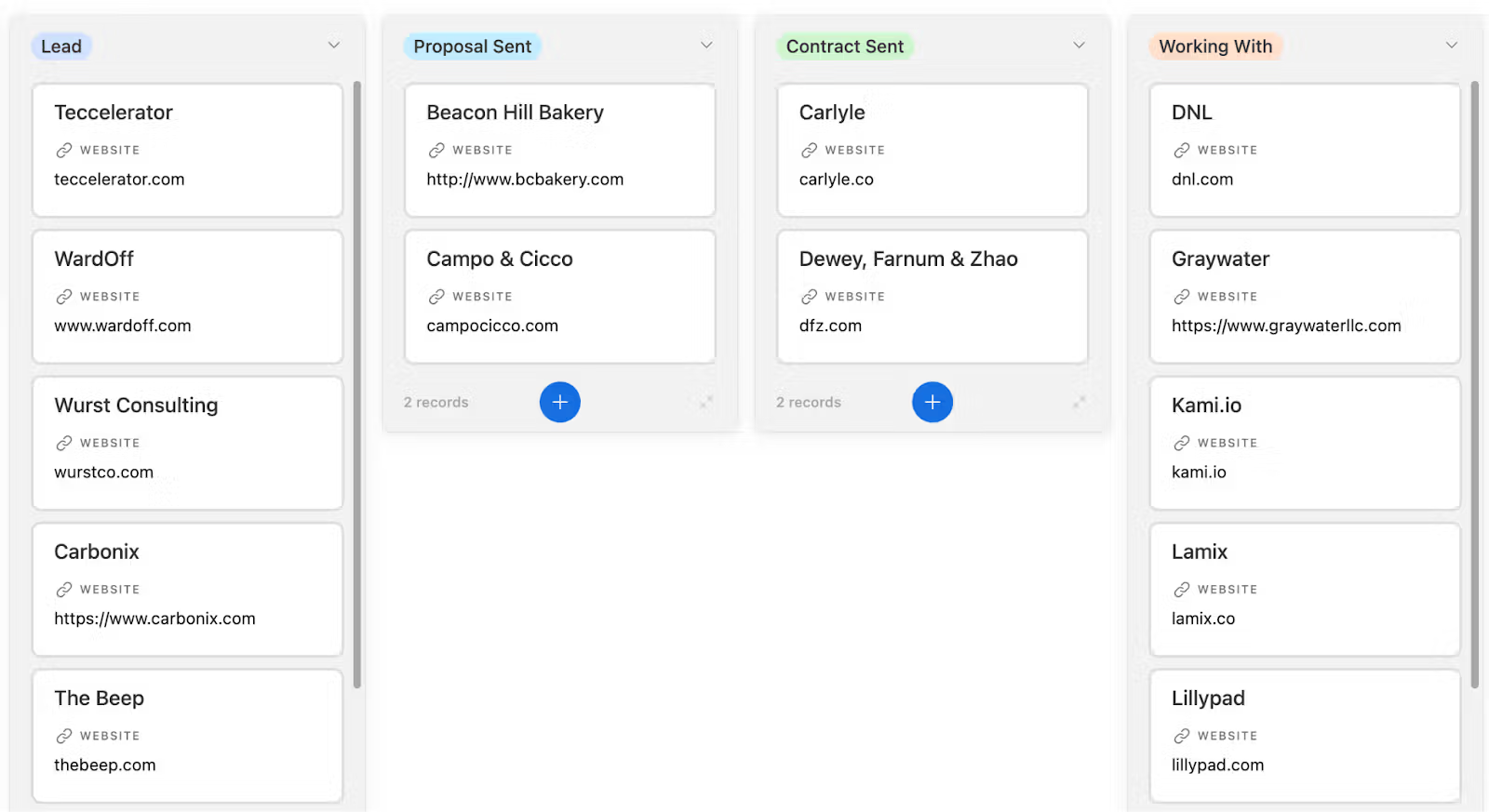
Image source: airtable.com
Data consistency challenges in Airtable CRM
As teams rely more heavily on Airtable CRM for managing leads and deals, maintaining consistent data becomes increasingly difficult. The platform's flexibility allows anyone to modify fields and records, which works well early on but introduces risk as usage grows. Without built-in CRM guardrails, data quality depends almost entirely on user discipline. Over time, these gaps can affect reporting accuracy, , and decision-making.
- Risk of duplicate or incomplete records: In Airtable CRM, duplicate contacts and partially filled records are common as multiple users update the same tables. There is no native enforcement to prevent repeated entries or missing critical fields. As deal volume grows, these inconsistencies compound and reduce trust in pipeline data. Teams often spend extra time cleaning records instead of moving deals forward.
- Lack of enforced ownership rules: Airtable does not natively require record ownership or accountability fields. Deals and contacts can exist without a clear owner, making follow-ups inconsistent. As more team members join, it becomes harder to know who is responsible for the next steps. This lack of structure slows execution and increases dropped opportunities.
- Difficulty maintaining standards : Different teams often customize Airtable in different ways, leading to inconsistent field usage and naming conventions. Without centralized enforcement, standards drift over time. Reporting becomes harder as data formats vary. This challenge grows significantly in cross-functional or multi-region CRM setups.
Collaboration gaps teams face in Airtable CRM
Airtable CRM stores data well, but often happens elsewhere. Conversations, decisions, and context frequently live in chat tools or email, disconnected from CRM records. This separation creates visibility gaps and slows coordination as teams scale. The more deals and stakeholders involved, the more friction teams experience.
- Conversations living outside CRM records: Sales discussions usually take place in Slack, email, or meetings rather than inside . As a result, important context is not tied directly to deals or contacts. New team members struggle to understand the deal history. This disconnect leads to repeated questions and lost insights.
- Decisions scattered across tools: Pricing approvals, deal changes, and strategy discussions are rarely captured inside Airtable records. Decisions end up spread across multiple platforms. Over time, teams lose a single source of truth. This fragmentation increases misalignment and slows response times.
- Why context loss increases as teams grow: As deal complexity and team size increase, context becomes harder to maintain manually. Airtable lacks native real-time discussion features tied to records. Important details get buried in chat threads or documents. Execution slows as teams search for information instead of acting on it.
Automation limits when using Airtable for CRM
Airtable automation works well for simple triggers, but often require more depth. As processes become more complex, teams hit limits in logic, visibility, and follow-through. Automation becomes harder to manage and less effective at driving real outcomes. This creates hidden operational overhead.
- Rule-based logic vs : Airtable automations are primarily rule-based and event-driven. They handle simple updates but struggle with multi-step CRM workflows. Complex often require multiple disconnected automations. This increases maintenance effort and error risk.
- Gaps between data updates and real actions: Updating a deal stage in Airtable does not automatically ensure follow-ups happen. Tasks, reminders, and approvals often require separate setups. This gap between data and action leads to missed opportunities. Teams must manually monitor changes to stay on track.
- Operational overhead as processes expand: As CRM usage grows, managing automations becomes a job in itself. Small changes can break workflows. Documentation and testing have become necessary to maintain reliability. This overhead slows teams that initially chose Airtable for speed and simplicity.
Aritable pricing at a quick glance
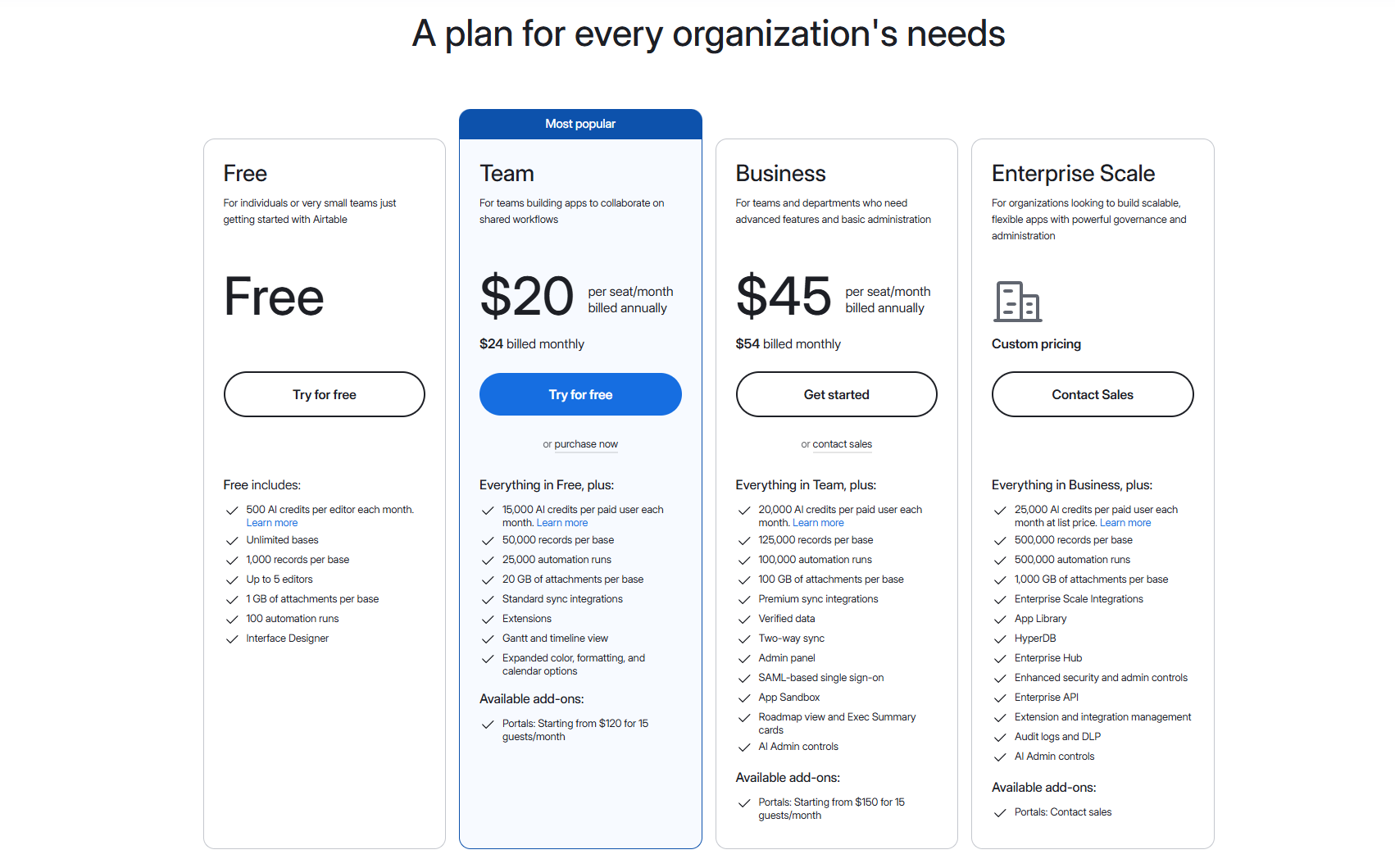
Information source: airtable.com
Update time: 2025-12-21
Note: Pricing and plan details reflect publicly available data as of the update date and may vary based on region, billing cycle, and number of agents.
When Airtable CRM starts to slow teams down
Airtable CRM performs well at low volumes, but scaling introduces friction. As pipelines grow longer and more stakeholders get involved, manual coordination increases. What once felt flexible begins to feel fragile. This is often the inflection point where teams reassess their CRM foundation.
- Growing deal volume and longer sales cycles: Higher deal volume means more records, more updates, and more coordination. Without enforced processes, deals stagnate unnoticed. lengthen as follow-ups rely on memory rather than systems. Visibility into true pipeline health declines.
- Cross-team handoffs and accountability needs: As deals move between , and operations, Airtable struggles to manage handoffs. Ownership changes are not always clear. Accountability depends on external communication. This slows execution and increases friction between teams.
- Increased reliance on manual coordination: Ultimately, teams compensate for Airtable's gaps with meetings, messages, and spreadsheets. Manual coordination replaces automation. This reduces speed and increases burnout. At this stage, many teams begin exploring more execution-focused CRM workspaces that connect data, collaboration, and action more tightly.
As these challenges compound, many teams begin to realize that the issue is not how Airtable is configured, but what it was never designed to do. Airtable excels as a flexible database, but as CRM usage expands, the lack of enforced ownership, connected conversations, and execution-driven automation creates friction. Data updates do not naturally translate into follow-ups, discussions remain detached from records, and accountability depends heavily on manual discipline.
This is often the point where teams look for a workspace that keeps , communication, tasks, and automation tightly connected. Platforms like Lark emerge naturally here, not as a replacement for flexibility, but as a way to turn CRM information into coordinated action across growing teams.
Reduce manual coordination with a smart CRM tool
Meet Lark: A unified platform for workflows, CRM, and collaboration
Unlike Airtable CRM, which starts as a flexible database and asks teams to build structure themselves, Lark approaches CRM as part of a connected execution workspace., conversations, documents, tasks, and automation live together by default, reducing the gaps that slow teams as they scale.
Instead of treating CRM as a standalone table, embeds customer records into everyday work, where decisions and follow-ups actually happen. This approach helps teams move from tracking information to driving outcomes with less manual coordination.
Structured CRM databases designed for execution
Airtable is widely used for organizing and structuring data through flexible tables, custom fields, and linked records. offers similar flexibility but is designed with execution in mind. Instead of acting as a passive database, Base turns CRM data into an active system where ownership, stages, priorities, and relationships directly drive follow-up actions and accountability. Required fields, role-based visibility, and structured relationships help teams maintain clean, reliable CRM data as usage scales, something that becomes increasingly difficult in Airtable as more contributors are added. 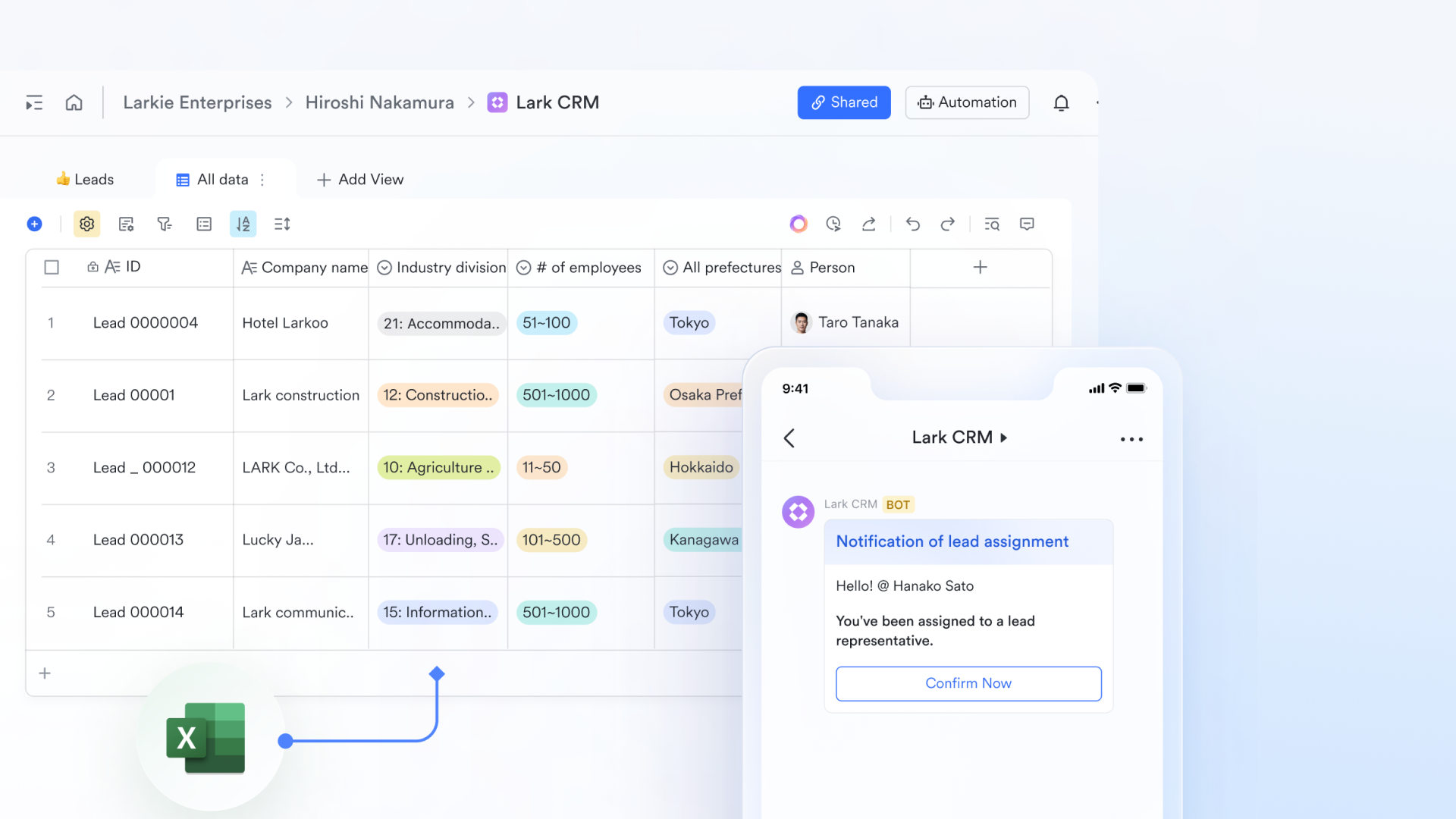
Operational views that guide daily work
While Airtable provides multiple views, such as grid, Kanban, and calendar views for visualizing data, Lark Base views are optimized for operational clarity. Teams use Kanban views to move deals through pipelines, grouped table views to track ownership and progress, and real-time dashboards to monitor performance metrics. These views aren't just visual representations; they are designed to support daily decision-making and prompt action, reducing the manual effort often required to translate Airtable views into execution. 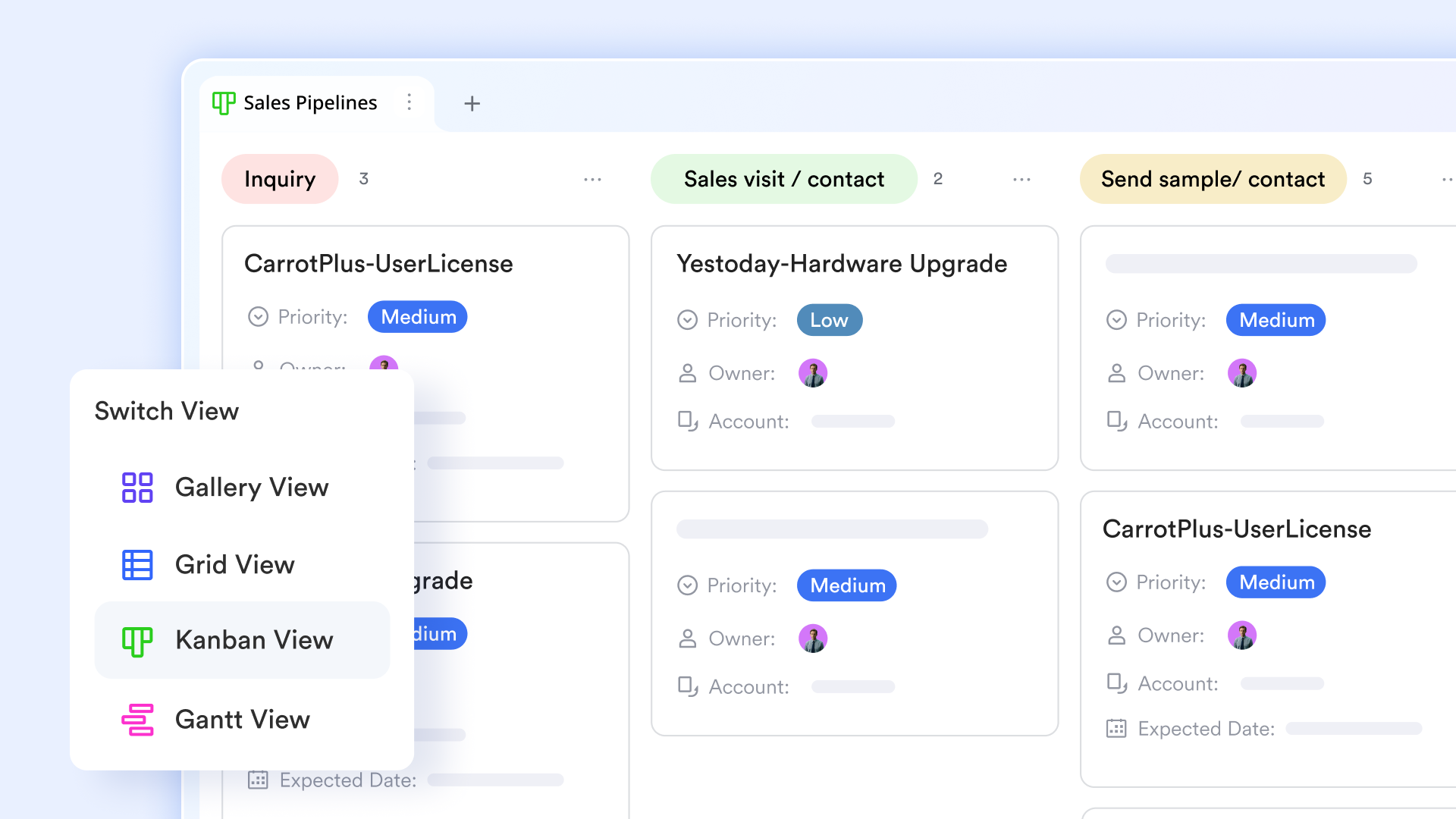
CRM automation tied directly to workflow execution
Automation in Lark Base is another area where the difference becomes clear. Airtable supports rule-based automations, but complex CRM workflows often require chained rules or external tools. Lark Base workflow embeds directly into the CRM process. When a lead progresses, stalls, or changes status, Lark can automatically assign owners, create follow-up tasks, notify stakeholders through messages, or update related records. This keeps CRM workflows consistent and reduces reliance on manual updates as volume grows. 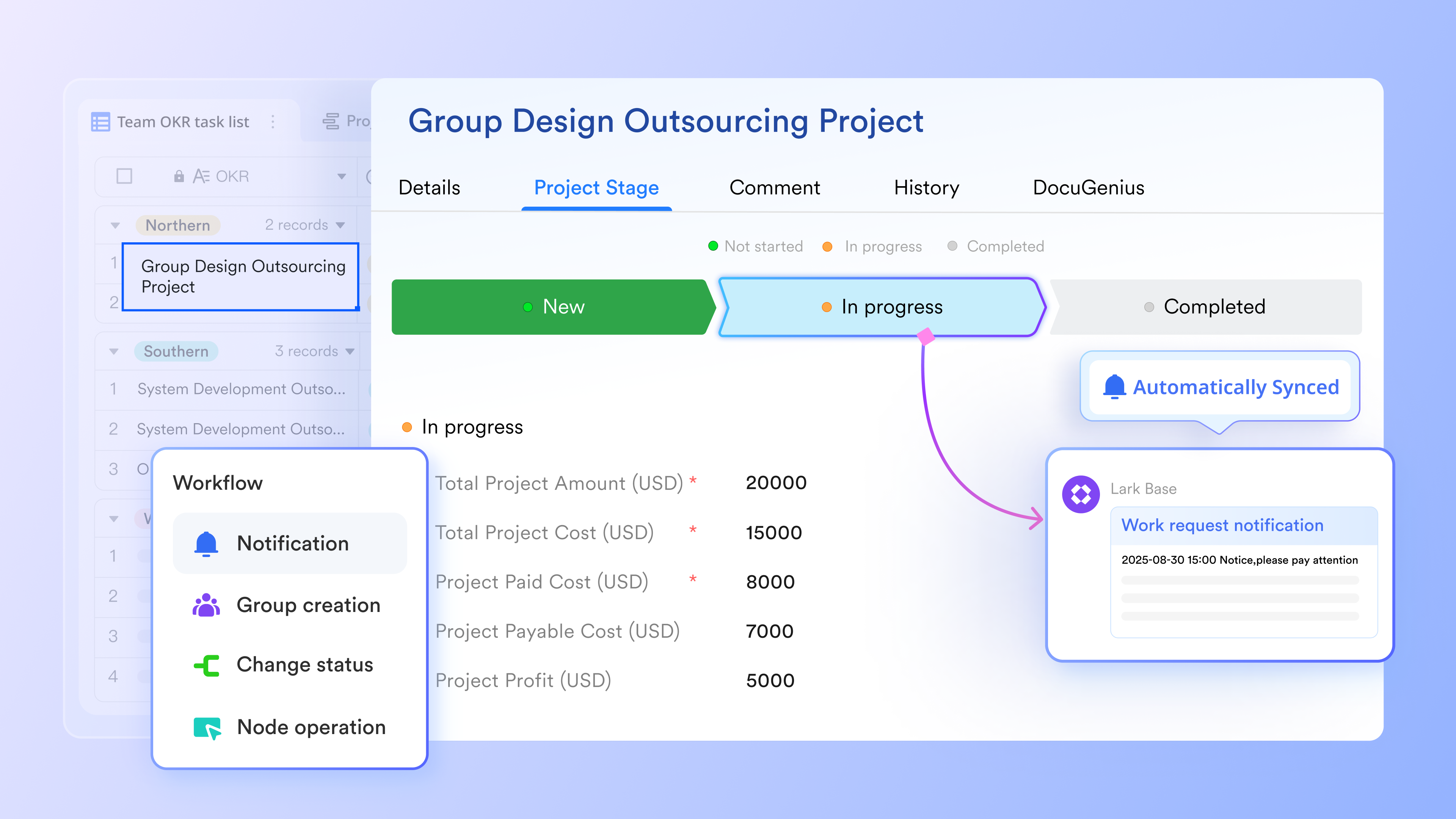
Native collaboration via contextual messaging and documents
Collaboration in Airtable is typically limited to comments on records, which can fragment conversations over time. and take a more connected approach by embedding collaboration directly into CRM workflows. Teams can co-edit proposals, onboarding guides, and strategies in docs while linking them to live CRM records. Conversations in Messenger stay tied to the data they reference, ensuring context is preserved and decisions remain visible across teams. 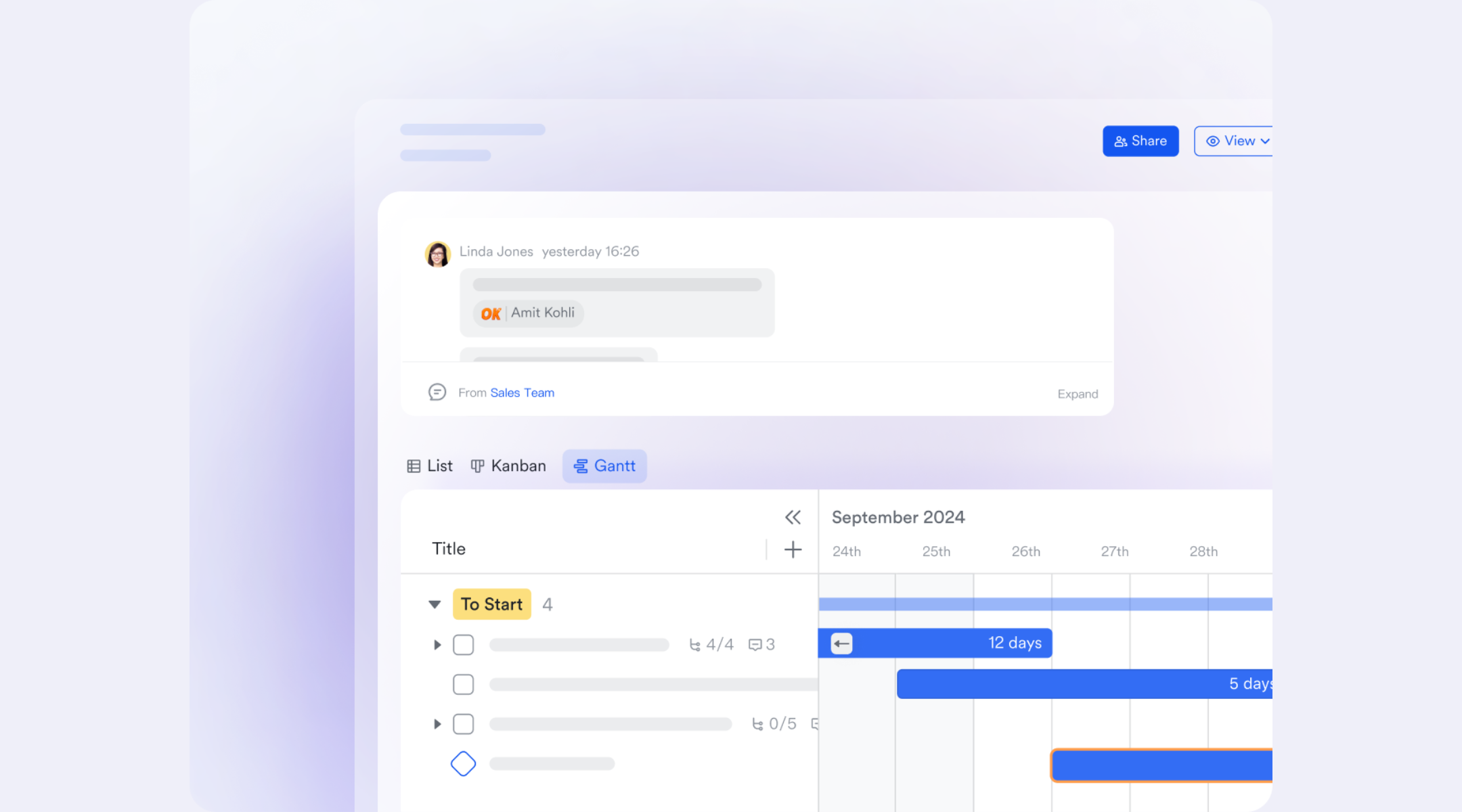
AI goes further than textual assistance
AI capabilities further separate Lark from Airtable's primarily data-centric approach. While Airtable AI focuses on assisting with text generation or field updates, Lark Base AI field shortcuts leverage advanced models like DeepSeek to automate complex data extraction and multi-language translation directly within the workflow. It goes beyond simple automation by providing "smart shortcuts" that turn messy attachments into structured insights and trigger proactive team actions. 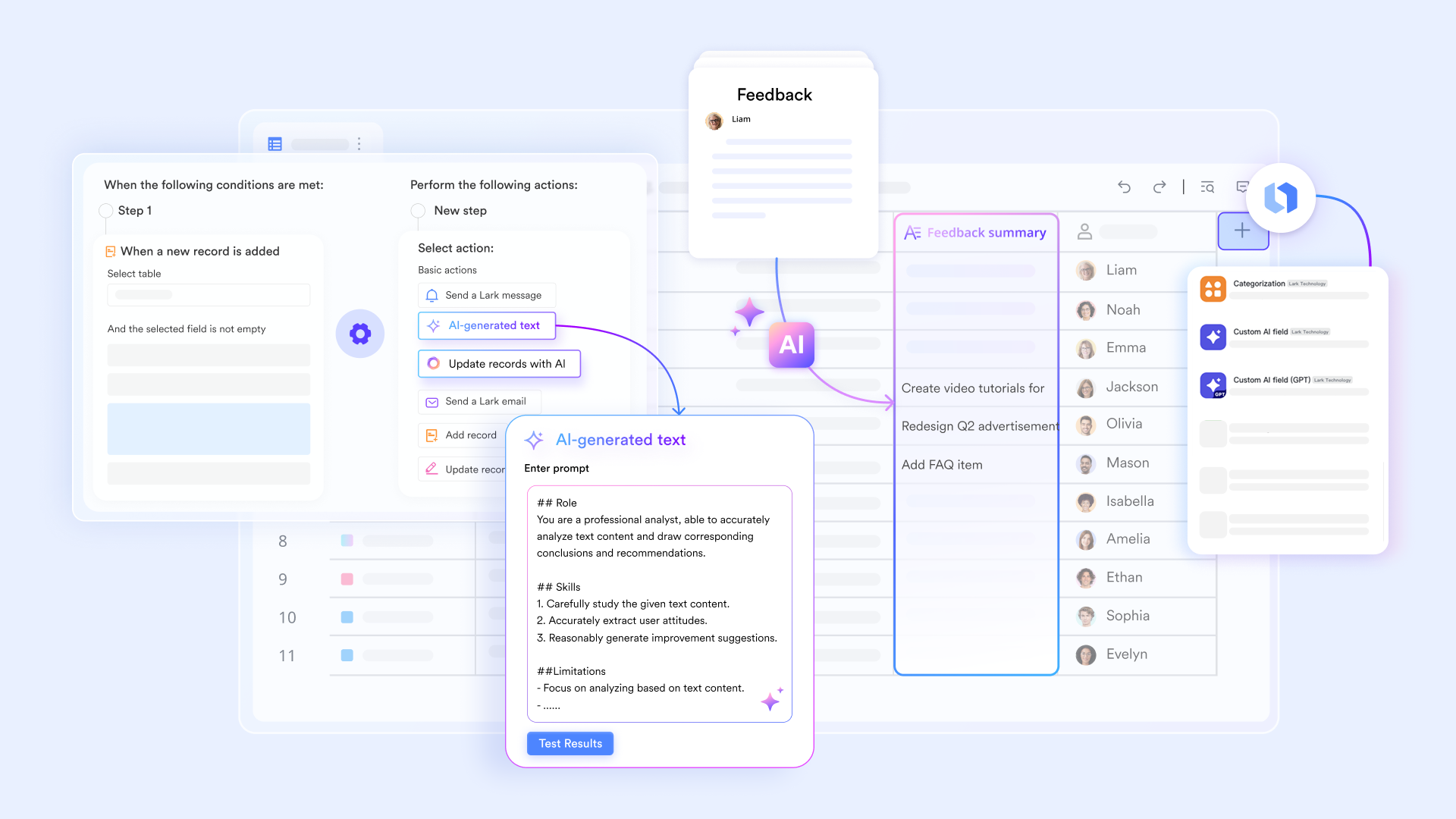
:
- Starter plan: Free forever plan that includes 11 powerful tools for up to 20 users. It also comes with 100GB of storage, 1000 automation runs, AI translations, and more.
- Pro plan: $12/user/month (billed annually) for up to 500 users. It includes everything in Starter plus group calling for up to 500 attendees, 15TB of storage, 50,000 automation runs, and more.
- Enterprise plan: for custom pricing. Supports unlimited users and includes even more automation runs and advanced security, compliance, and management features.
For small teams with simple communication needs

18 months message history
1000 Base automation runs/month
2000 rows per table in Base
Most POPULAR
For companies with comprehensive collaboration and management needs
Unlimited message history
500-participant video meetings
50k Base automation runs/month
20k rows per table in Base
For large companies with advanced security and organizational management needs
Get a personalized demo and pricing
Unlimited message history
500-participant video meetings
15 TB storage + 30 GB storage/user
500k Base automation runs/month
50k Base automation runs/month
Most POPULAR
For companies with comprehensive collaboration and management needs
Unlimited message history
500-participant video meetings
50k Base automation runs/month
20k rows per table in Base
Airtable CRM vs Lark CRM for scaling teams
As teams grow, the difference between tracking data and driving execution becomes clearer. Airtable CRM and may look similar at a glance, but they are built on very different assumptions about how teams work at scale. This comparison highlights how each platform handles structure, collaboration, automation, and accountability as complexity increases. Looking beyond features helps teams understand which approach supports long-term growth without adding friction.
Key takeaway
Airtable CRM works well for early-stage or low-complexity CRM setups where flexibility matters most. Lark CRM is built for scaling teams, where data, collaboration, automation, and accountability must operate together without adding more tools or manual overhead.
Conclusion
Choosing between Airtable CRM and Lark CRM ultimately comes down to how a team plans to grow. Airtable gives teams freedom to design their own CRM structure, which works well in the early stages when processes are still forming. Over time, however, that same flexibility can introduce inconsistency, manual upkeep, and fragmented execution as more people and data enter the system.
takes a different path by treating CRM as part of a larger execution environment. Customer records, conversations, documents, tasks, meetings, and automation are designed to work together from the start. This reduces context switching and makes ownership and follow-through clearer as teams scale. For organizations moving from experimentation to repeatable execution, Lark offers a more sustainable foundation without sacrificing adaptability.
Choose a CRM that grows with your team
FAQs
Can Airtable CRM support role-based access at scale?
Airtable does offer permissions, but enforcing role-based access consistently becomes harder as teams grow. Permissions often apply at the base or view level, which can limit precision. Teams usually rely on internal rules rather than system enforcement. As complexity increases, this can slow governance. Some teams later add platforms like Lark to improve structure.
How reliable is Airtable CRM for long-term sales forecasting?
Forecasting in Airtable depends heavily on how well teams maintain fields and views. There is no native logic, so accuracy varies by discipline. Manual updates increase risk as deal volume grows. This makes long-term forecasting less predictable. Execution-focused CRMs like Lark reduce this risk with workflow-driven updates.
What happens to CRM accuracy when multiple teams edit Airtable at once?
As more teams collaborate in Airtable, duplicate entries and inconsistent updates become more common. There are limited safeguards to prevent overwrites or skipped steps. This increases the need for audits and manual checks. Over time, accuracy can degrade. Platforms such as Lark address this with enforced workflows and ownership.
How do teams enforce sales processes inside Airtable?
Most enforcement in Airtable is procedural rather than built-in. Teams document rules and rely on training instead of system controls. Automations help, but they are limited to complex flows. As processes mature, this approach becomes fragile. Teams often look to structured CRM workspaces like Lark.
When should a team stop customizing and switch CRM platforms?
If customization effort begins to outweigh execution speed, it is usually a signal to reassess. Frequent fixes, manual coordination, and reporting gaps indicate structural limits. At that point, switching to a platform designed for scale can reduce overhead. Many teams make this transition gradually by introducing Lark alongside existing tools.
Related reading
































