In the modern business environment, effective project management tools have become crucial for teams aiming to streamline their workflows and enhance collaboration. As professionals explore various options, two standout contenders often surface: Basecamp vs Notion. Both tools offer unique functionalities tailored to different project management needs, making the Notion vs Basecamp debate relevant for project managers, team leaders, and organizations alike.
While many might be familiar with Basecamp and Notion, another tool worth mentioning is Lark, which presents itself as a formidable alternative in the project management space. In this article, I will help you navigate the complexities of choosing between Basecamp and Notion by providing detailed comparisons, feature breakdowns, and pricing insights.
Key takeaways: Summarizing the Notion vs Basecamp at a glance
What is Basecamp
was launched in 2004 by the team at 37signals (now known as Basecamp). Originally designed as a web-based project management tool, Basecamp has evolved over the years to cater to the needs of teams worldwide. Its focus has always been on , facilitating communication, and improving team collaboration. Basecamp gained popularity for its straightforward approach, making it accessible to users of all technical backgrounds.
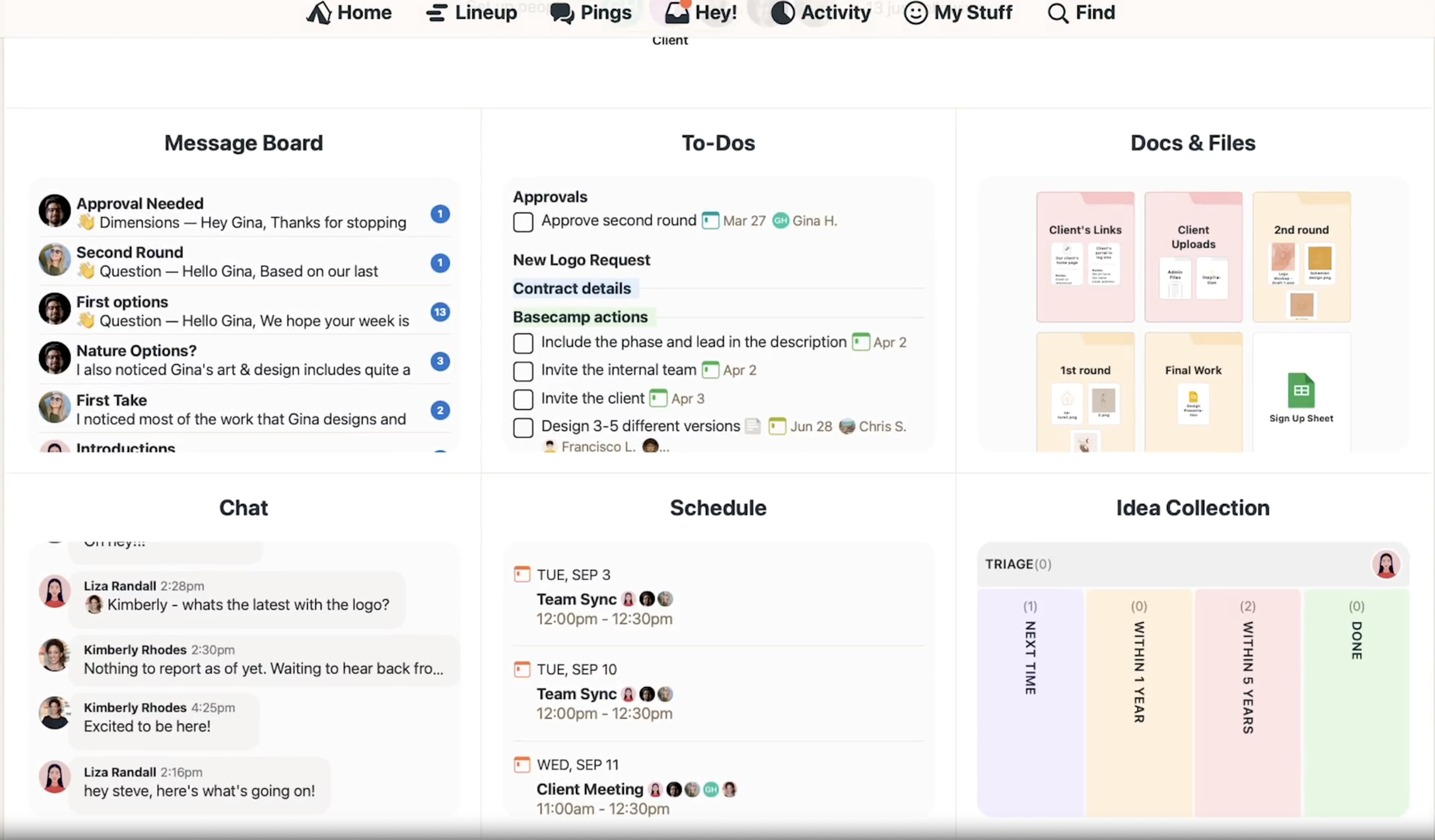
Image source: basecamp.com
Key features and functional highlights:
- Task management: Users can create to-do lists, assign tasks to team members, set due dates, and in a straightforward manner.
- Message Boards: Basecamp includes discussion forums where team members can communicate and share ideas, centralizing project-related conversations.
- File sharing: Users can easily upload and share documents, images, and other files, allowing for seamless collaboration.
- Schedules and calendars: Integrated calendars help teams and upcoming events, enhancing overall project visibility.
- Automatic Check-Ins: This feature prompts team members to provide status updates on their work, fostering accountability and transparency.
With its user-friendly interface, Basecamp is particularly favored by teams looking for a structured way to manage projects without unnecessary complexity.
What is Notion
started as a note-taking app in 2013. Over the years, it has transformed into a tool for workspace that combines task management, note-taking, and project collaboration. Notion has gained significant traction among individual users and teams alike for its adaptability and powerful customization options. Its growth has been fueled by a strong community and a flexible platform allowing users to shape it according to their specific requirements.
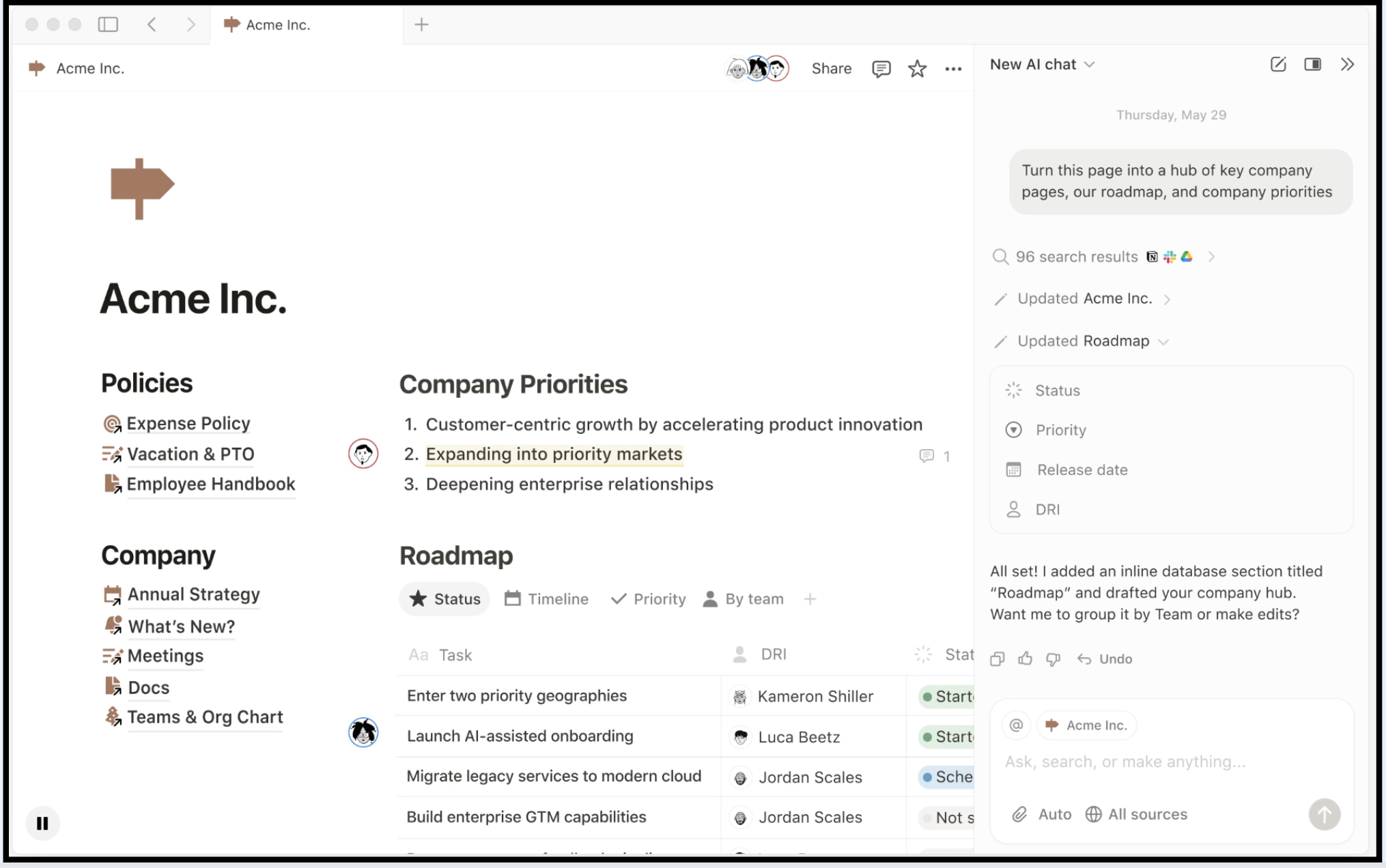
Image source: notion.com
Key features and functional highlights:
- Customizable databases: Notion allows users to that can be tailored to suit various project management needs, such as Kanban boards, timelines, or simple lists.
- Note-taking and documentation: It offers robust tools for taking notes, creating wikis, and compiling documentation, making it a powerful resource for knowledge management.
- Task management: Users can organize tasks with due dates, assign responsibilities, and track progress visually by utilizing various project views.
- Real-time collaboration: Notion supports real-time editing, letting multiple team members work together simultaneously on documents or projects.
- Templates and integrations: Notion provides to help users get started quickly and integrates with several third-party applications to enhance its functionality.
Notion's flexibility and comprehensive capabilities make it a favorite among teams that prioritize tailored solutions for their project management processes.
Read more about Notion with our complete blog of Notion review:
Basecamp vs Notion comparison: Feature by feature
Task management approaches
Both Basecamp and Notion have distinct methodologies for handling task management.
In Basecamp, tasks are managed through straightforward to-do lists that allow team members to clearly see their assignments, set deadlines, and check off completed items. Its simplicity is appealing for teams that prefer a clean, organized structure without excessive options.
In contrast, Notion excels in providing a more intricate task management experience. Users can create multiple views for tasks — such as , calendars, or list views — and customize how information is displayed. This flexibility allows teams to adapt their task management to fit various workflows and preferences.
User interface and experience
The user experience of both tools reflects their design philosophies.
Basecamp is known for its minimalist design that prioritizes functionality over options. Navigating Basecamp feels intuitive, making it easy for new users to get accustomed to the platform promptly. The layout is straightforward, allowing teams to focus on what needs to be done with minimal distractions.
Notion, on the other hand, offers a highly customizable workspace that can be both a boon and a bane. While its multifaceted capabilities enable users to create tailored environments for managing projects, the vast array of options can lead to a steeper learning curve for some. Once users become familiar with the interface, however, they can harness the full potential of Notion's flexibility.
Collaboration features
Effective collaboration is vital for any and both Basecamp and Notion facilitate this in unique ways.
Basecamp boasts built-in messaging, allowing team members to communicate directly within the platform. Its message boards help centralize conversations related to specific projects, reducing the need for external communication tools and enhancing visibility.
In Notion, collaboration is emphasized through real-time editing features, allowing multiple users to work on the same document simultaneously. Team members can leave comments and feedback directly on the project pages, fostering an environment of open communication and immediate clarification. Integrations and compatibility
Integration capabilities are crucial for teams looking to leverage existing tools within their workflows.
Basecamp provides several integrations with popular apps, including Google Calendar and various file-sharing services. This interoperability enables teams to sync their schedules and enhance productivity without switching between multiple platforms.
Notion offers a broader spectrum of integrations with third-party applications, allowing users to connect various tools like Jira, Slack, Gmail, and other APIs, creating a seamless workflow. Its API also facilitates custom integrations, making Notion a versatile choice for teams with specific integration needs. For more Google Workspace's information, you can refer to and .
Skip the comparison and try the best alternative
Pricing models: Which offers better value?
Basecamp pricing structure
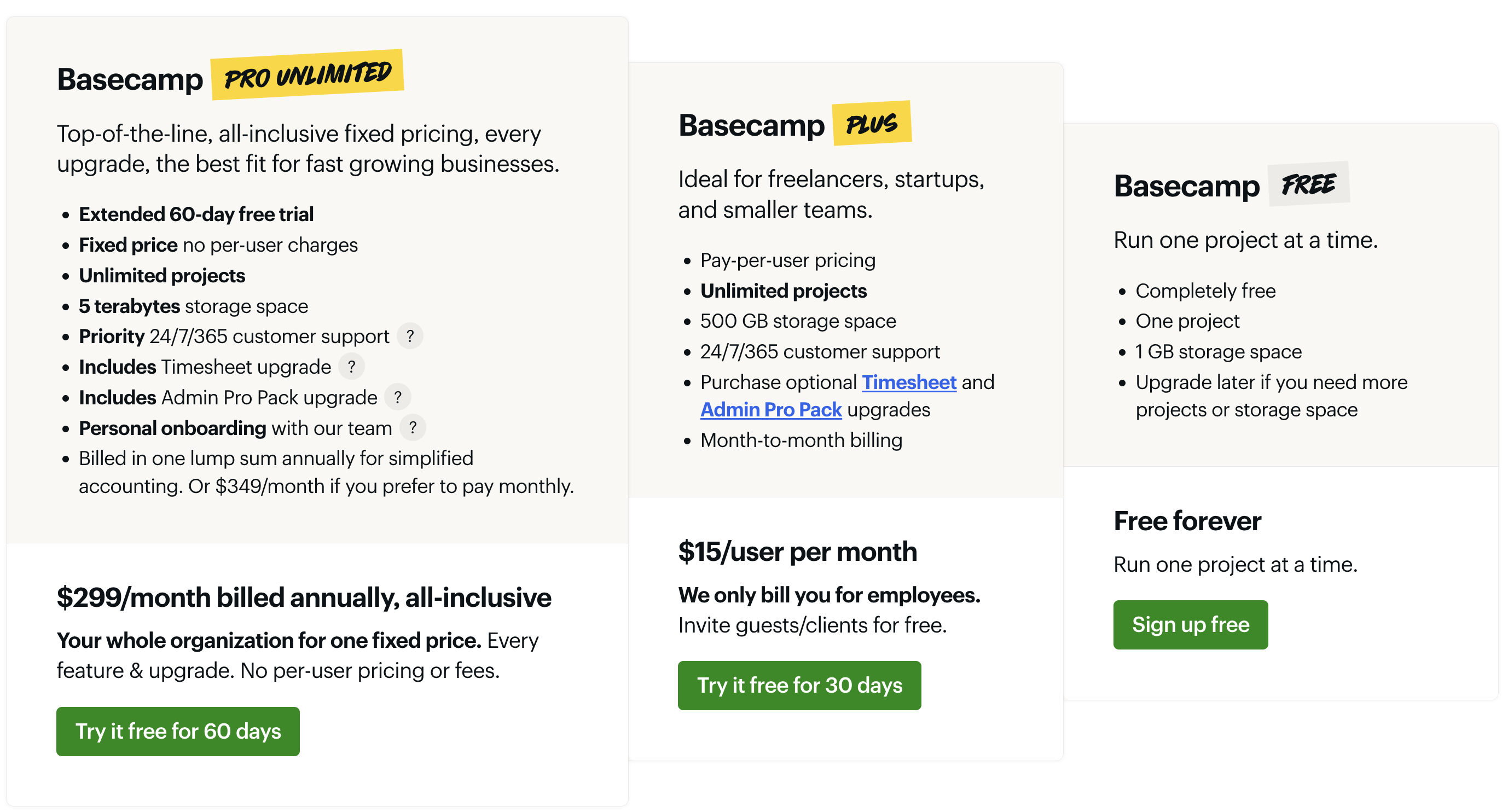
Image source: basecamp.com
Instead of complicated enterprise licenses or user‑based limits, the company offers three straightforward options designed for different team sizes and collaboration styles. Many users see it as a refreshing alternative to tools that charge per feature or per seat. Below is a concise comparison table reflecting the current official pricing and benefits, as accurate as of this Basecamp review:
Information source: basecamp.com
Update time: 2025-11-20
👉Read more to know Basecamp cost breakdown:
Notion pricing structure
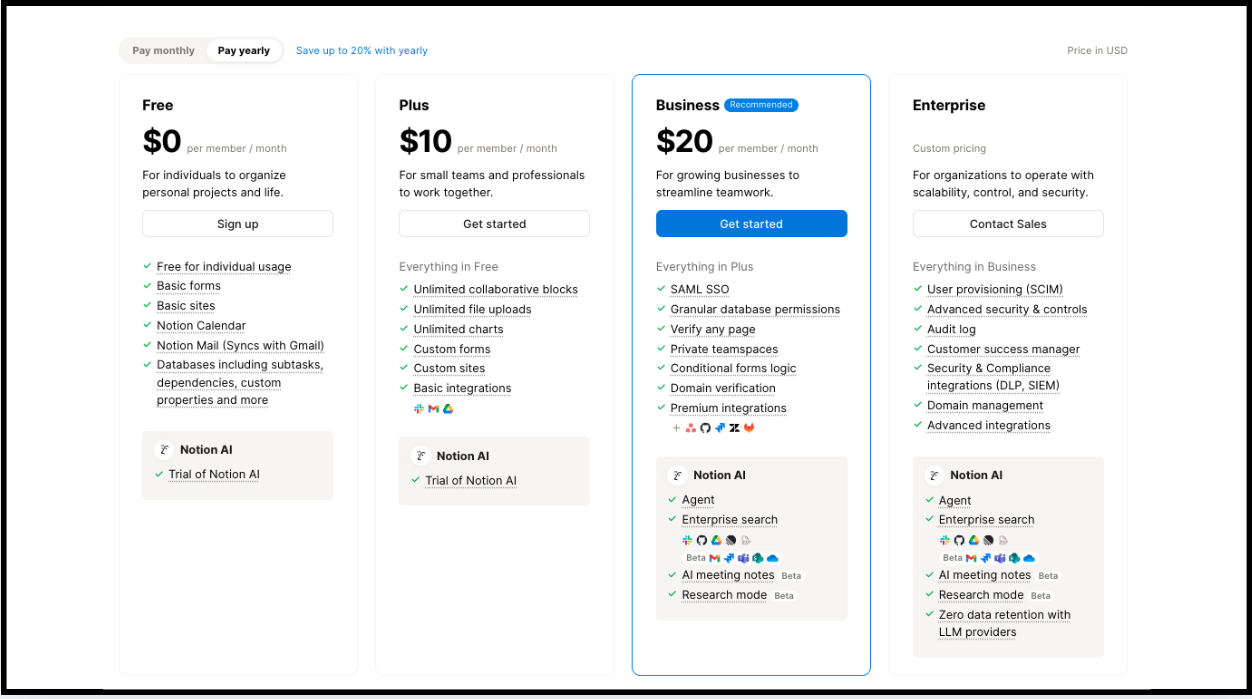
Image source: notion.com
In contrast, Notion follows a per-user pricing model. This structure offers flexibility ideal for both small teams and individuals. Notion provides a free tier, allowing users to explore its basic functionalities without any financial commitment.
Value comparison
When comparing the value offered by Basecamp and Notion, the right choice largely depends on team size and specific requirements.
For that anticipate significant growth, Basecamp's flat-rate structure can be more economical. It allows unlimited users and projects for a single monthly fee, which can lead to substantial savings if a team expands.
On the other hand, Notion's per-user pricing may be more appealing to with fewer employees, as they can start on the free tier and scale as needed. This model allows organizations to tailor their subscriptions to precisely fit their budget and team dynamics. Ultimately, which model offers better value will depend on each team's specific use case and expected growth trajectory.
User experiences and feedback
Positive feedback
Basecamp users often praise its simplicity and intuitive interface, mentioning how it aids in keeping teams organized without unnecessary complexity. The built-in communication tools and project visibility are frequently lauded, as teams appreciate the ability to access all project-related discussions, tasks, and files .
- User voice from G2: It is an amazing project management tool which let's us create projects easily and add team members to that specific project. It is really useful to add tasks in list and other documents related. It makes it easier to keep track of work and tasks being done combined with easy to use UI.
Notion, in turn, receives positive feedback for its flexibility and customization capabilities. Users enjoy creating unique workflows tailored to their specific needs, whether through crafting detailed databases, project pages, or collaborative documents. Testimonials often reflect that this level of customization can significantly enhance productivity, particularly for teams that like to operate in a personalized environment.
- User voice from G2: I love how streamlined it is and the amount of customization options there are. It's also intuitive with the search function and I never feel like my notes are piling up but are available to me. I use notion everyday with our team and find that everyone is able to work with it together and implement the app into our work routines.
Common criticisms
Basecamp users sometimes point out that while its simplicity is a benefit, it can also be a limitation. Some users feel that it lacks advanced features that more complex projects may require, such as or in-depth reporting capabilities. This makes it less suitable for teams needing more sophisticated project management tools.
- User voice from G2: The tool doesn't have latest and advanced features like charts and AI which makes it a bit outdated for the price being paid. The customer service is also not good. The overall platform has very less integrations with other tools.
Notion also has its share of challenges. Users have commented that the extensive customization options can lead to a steeper learning curve, especially for newcomers unfamiliar with its interface. Additionally, some users have expressed concerns about the speed of the application, particularly when handling large amounts of data or complex databases. While its versatility is admirable, not all teams may find the initial setup and navigation intuitive.
- User voice from G2: Its flexibility quickly becomes a downside without a clear structure, as workspaces can get messy and disorganised very fast. The search function is weak, especially for larger databases, making it difficult to find information efficiently. Offline access is minimal, which is a big problem when you need to work without internet. Integrations are limited unless you rely on third-party tools, adding extra complexity.
Recognizing these strengths and weaknesses can assist potential users in making informed decisions about whether Basecamp, Notion, or another tool, like Lark, aligns best with their project management needs.
Try a better solution and get better user experience
A powerful and cost-effective alternative to Basecamp and Notion
Overview of the best alternative: Lark
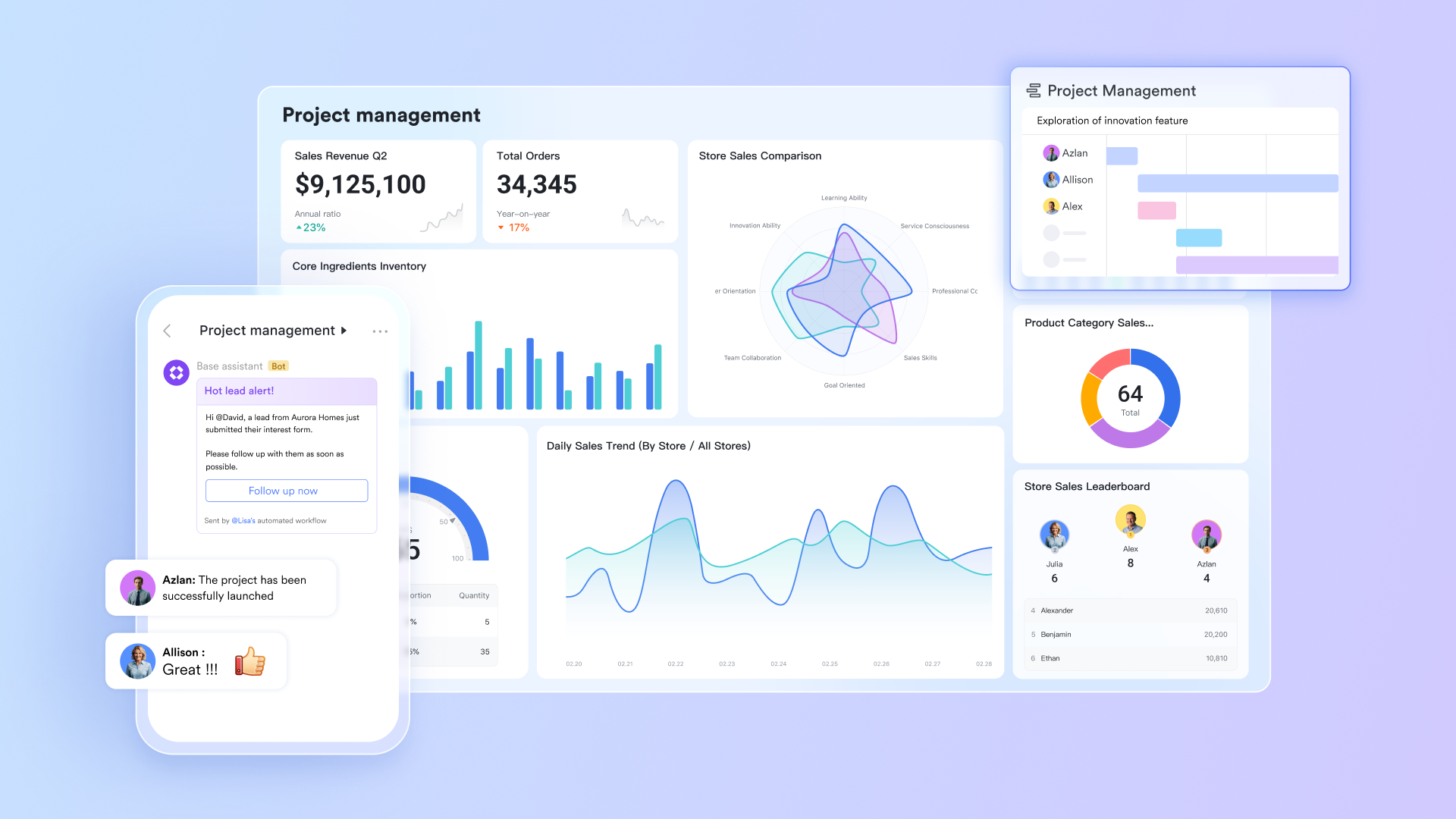
is an all-in-one collaboration and project management suite designed to combine , document collaboration, and various communication tools into a single platform. It facilitates seamless interaction between team members and streamlines workflows, making it particularly attractive for companies that emphasize integrated solutions over multiple tools. By combining elements of chat, document sharing, and project management, Lark aims to enhance efficiency and drive productivity across teams.
Lark's key features and why it excels
Document management
Lark provides a comprehensive suite for creating and managing documents collaboratively, featuring tools such as , Wiki, board, and MindNotes. These tools enable users to co-edit documents in real time, allowing multiple team members to work simultaneously on the same document. With document version control, teams can easily track changes, revert to previous versions, and maintain an accurate history of edits, ensuring transparency and efficiency in collaboration. The built-in feature set supports various document types, making it versatile for different needs—from formal reports to . 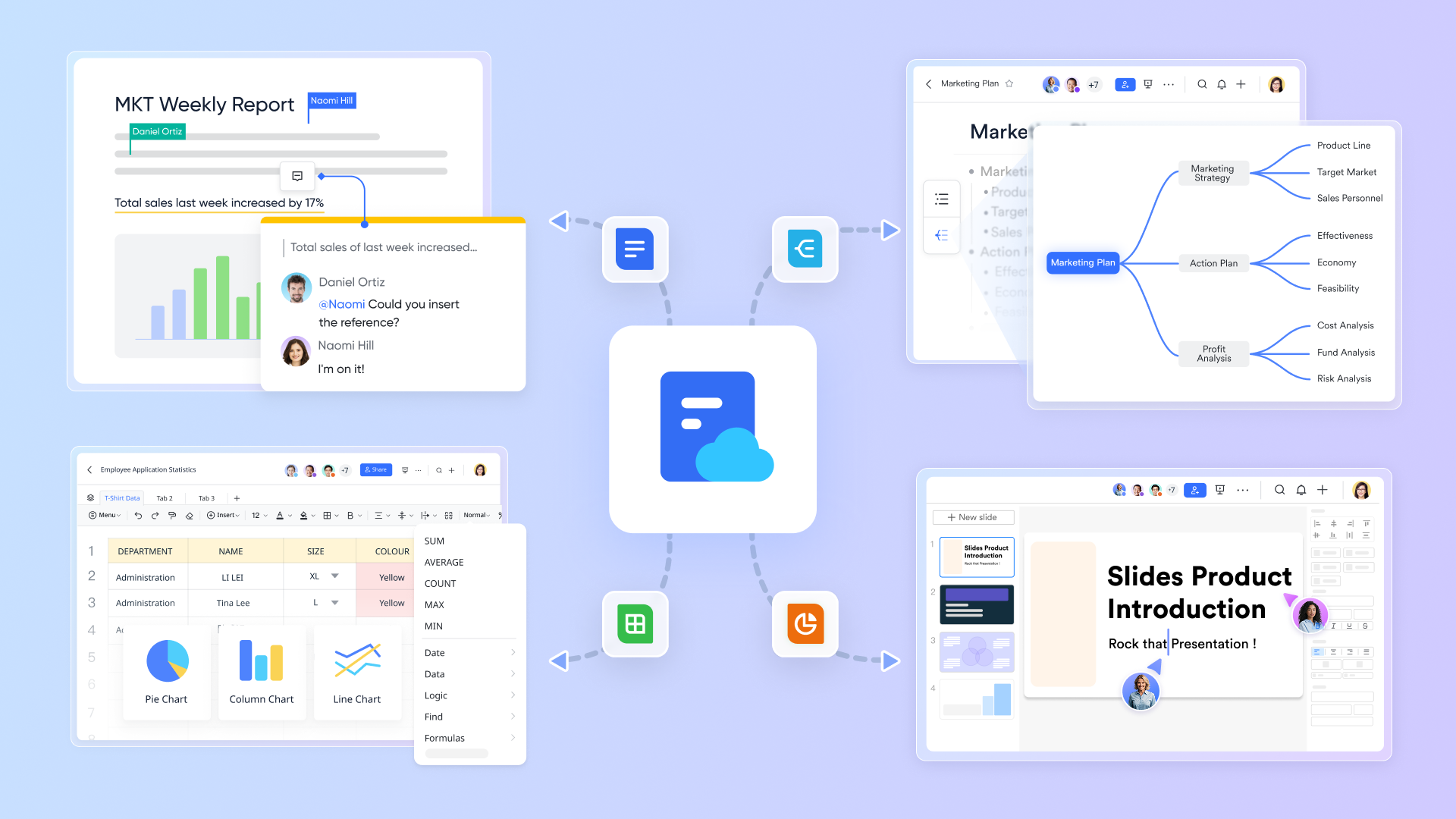
Task management
Lark Tasks feature enhances productivity by enabling users to create, assign, and manage tasks across different projects seamlessly. Teams can easily set deadlines, and update task statuses within the application. Lark Tasks offers Kanban and Gantt views for users to manage timeline of tasks. The intuitive interface of Lark Tasks helps prioritize work and ensures that team members stay on top of their responsibilities without the confusion often associated with project management. 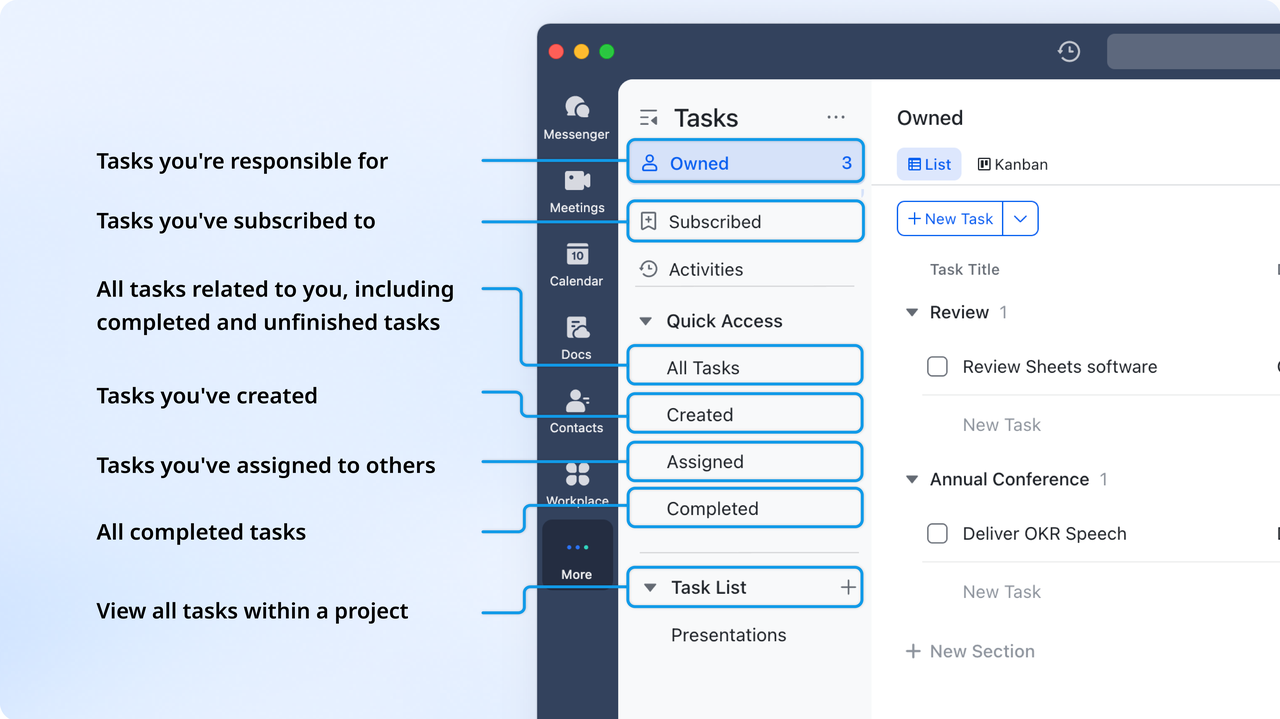
Collaboration and communication
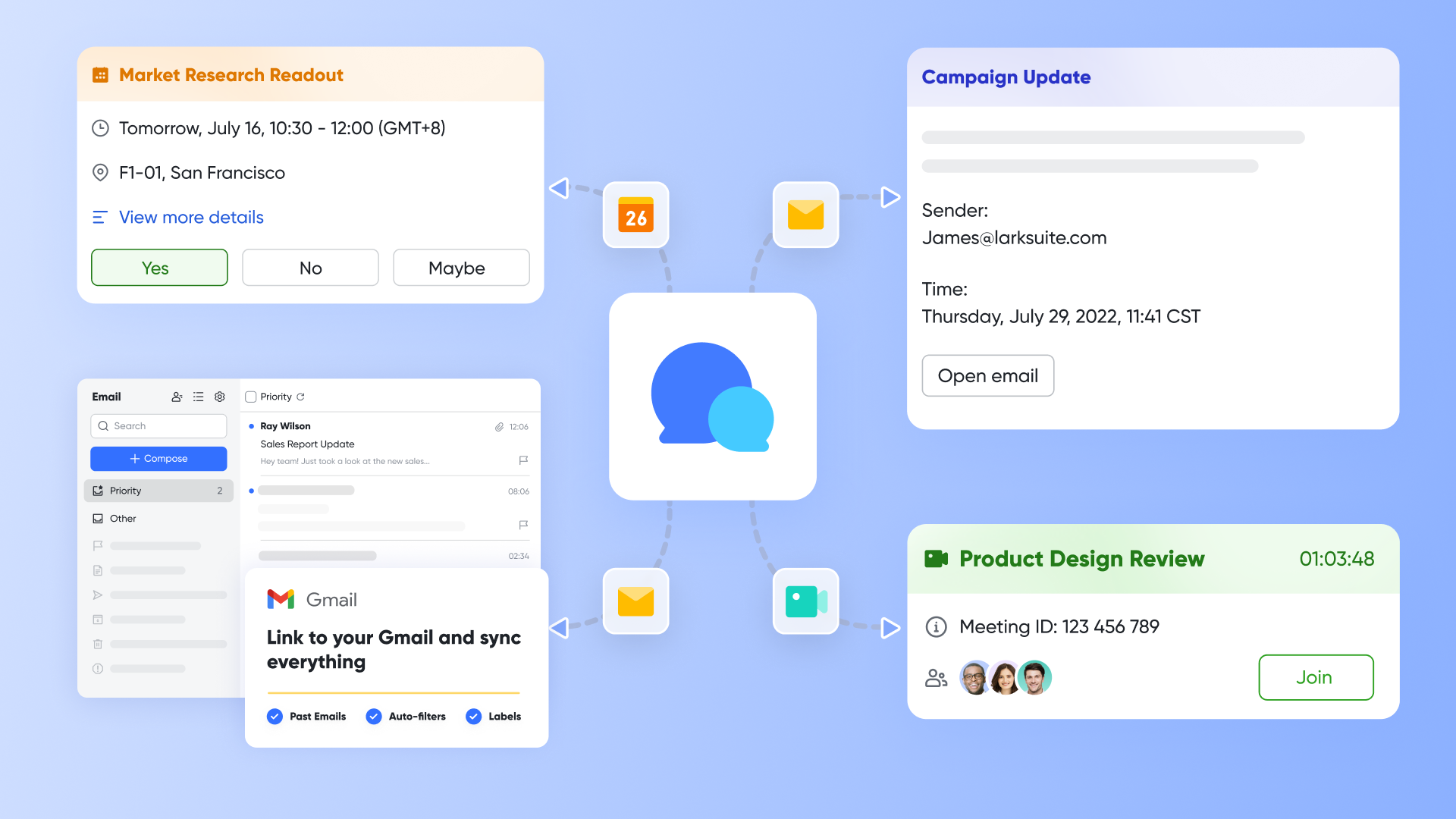
Lark excels in built-in communication tools within its platform, including for instant messaging, file sharing, for video conferencing and screen sharing during brainstorming, and for scheduling. This all-in-one system fosters real-time communication, allowing team members to chat, share ideas, and hold virtual meetings without the need to switch between multiple applications. By consolidating these functions, Lark enhances collaboration and ensures that information is readily accessible during projects.
Project management
Lark Base provides essential functionalities for project planning and execution, including timeline views, progress tracking, and resource allocation. This feature enables teams to visualize their projects comprehensively, providing multiple views including Kanban, Gantt, grid, and gallery view, monitoring projects from initiation to completion. With Lark Base, users can manage project phases effectively, assign roles, and monitor overall project health, ensuring that teams remain aligned and proactive in addressing any project challenges. 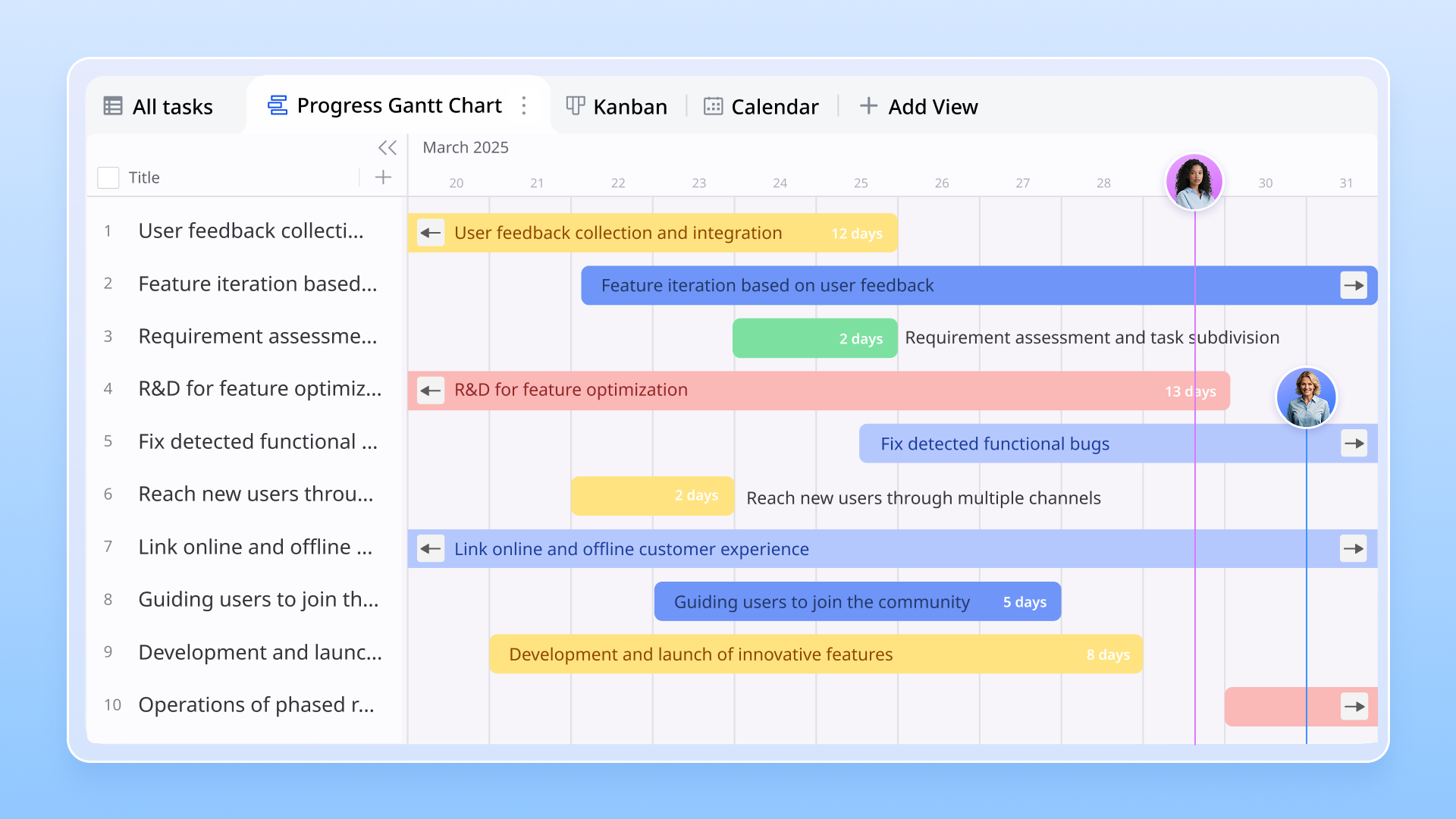
Lark Base is also a powerful tool designed to facilitate the creation and management of databases and visual dashboards for reporting and analyzing within the ecosystem, enabling teams to streamline their work with . By allowing users to build customized databases tailored to their specific needs, Lark Base empowers organizations to collect, organize, and analyze data efficiently. This capability enhances decision-making through easy access to information and insights. Why I choose Lark: While Basecamp offers a solid but somewhat rigid project management framework, and Notion requires extensive customization to fully suit project management needs, Lark strikes a balance by offering powerful project management tools that are ready to use without extensive setup, allowing teams to jump right into execution.
Pricing comparison: Lark vs Basecamp vs Notion
Lark offers a competitive pricing model that focuses on providing value for teams of various sizes. The structure typically includes:
- Starter plan: Free forever plan that includes 11 powerful tools for up to 20 users. It also comes with 100GB of storage, 1000 automation runs, AI translations, and more.
- Basic plan: $6/user/month (billed annually) for up to 500 users, including everything in Starter plus 1-on-1 video meetings, 5TB of storage, 1,000 automation runs, and more. To know more about Basic plan, .
- Pro plan: $12/user/month (billed annually) for up to 500 users. It includes everything in Starter plus a group calling for up to 500 attendees, 15TB of storage, 50,000 automation runs, and more.
- Enterprise plan: for custom pricing. Supports unlimited users and includes even more automation runs and advanced security, compliance, and management features.
For small teams with simple communication needs

18 months message history
1000 Base automation runs/month
2000 rows per table in Base
Most POPULAR
For companies with comprehensive collaboration and management needs
Unlimited message history
500-participant video meetings
50k Base automation runs/month
20k rows per table in Base
For large companies with advanced security and organizational management needs
Get a personalized demo and pricing
Unlimited message history
500-participant video meetings
15 TB storage + 30 GB storage/user
500k Base automation runs/month
50k Base automation runs/month
Most POPULAR
For companies with comprehensive collaboration and management needs
Unlimited message history
500-participant video meetings
50k Base automation runs/month
20k rows per table in Base
Pricing Comparison Table
Conclusion
In the competitive landscape of project management tools, both Basecamp and Notion bring unique strengths to the table. Basecamp is celebrated for its simplicity and straightforward pricing model, making it an optimal choice for teams that prioritize clear structure and easy onboarding. Notion, on the other hand, stands out for its flexibility and extensive customization options, ideal for users looking to tailor their workspaces to fit their specific project needs. emerges as a powerful alternative, combining document management, task organization, and integrating communication into a single platform. Its comprehensive feature set and user-friendly design cater to modern team dynamics, streamlining collaboration and enhancing productivity across organizations.
Ultimately, the best tool for your team will depend on your specific requirements, team size, and project complexity. Understanding the unique capabilities of each tool is essential in making an informed decision that aligns with your workflow and enhances your team's efficiency.
Get experts' advice on project management for your team
FAQs
What is the difference between Basecamp and Notion?
Basecamp and Notion serve different purposes in the project management space. Basecamp is designed for simplicity, offering a clear structure for managing projects with features like to-do lists, message boards, and file sharing, all in a user-friendly interface. In contrast, Notion offers a more flexible, customizable workspace that allows users to create tasks, databases, and documents tailored to their specific needs. This makes Notion suitable for individuals or teams looking for a highly adaptable solution, while Basecamp is better for those who prefer straightforward project management without the need for extensive customization.
Is Notion still relevant in 2025?
Yes, Notion remains highly relevant in 2025. It continues to evolve, releasing updates and features that cater to modern working environments and user requests. Notion's flexibility and ability to act as an all-in-one workspace for note-taking, documentation, and project management have kept it popular among teams and individuals alike. As more people embrace remote and hybrid work models, tools that facilitate seamless collaboration, like Notion, are likely to maintain their significance.
What has replaced Basecamp?
While Basecamp remains a popular choice, several alternatives have emerged that offer similar or enhanced functionalities. Tools like Notion, Lark, Asana, and Trello have gained traction for their unique features and flexible approaches to project management. These alternatives may appeal to users looking for more dynamic solutions that can adapt to their specific project needs or offer advanced integrations.
Why is Basecamp so popular?
Basecamp's popularity stems from its focus on simplicity and user-friendliness. By providing a straightforward interface with essential project management features, it allows teams to organize their workflows without unnecessary complication. The flat-rate pricing model is also a significant factor, offering unlimited users at a fixed cost, which can be more economical for larger teams. Additionally, its strong emphasis on communication and transparency within projects helps teams stay aligned and informed, contributing to its continued success in the marketplace.
Related reading






























