














Business Workflows Explained: Types, Examples, and Top Tools

Ryan Tanner
Product Marketing Specialist
Sep 18, 2026
Ryan Tanner
Sep 18, 2026

22 min read


Business workflow is the backbone of efficient operations, helping teams streamline tasks, reduce manual effort, and maintain consistency across departments. Whether you're managing approvals, onboarding, finance processes, or customer operations, a well-structured workflow keeps everything running smoothly.
Today, organizations rely on modern workflow platforms like Lark, Kissflow, Zoho Flow, Monday.com, SAP Workflow Management, and Cflow to automate routine steps and improve collaboration. In this guide, we break down what business workflows are, the different types you should know, and real examples that show how companies use them daily. You'll also discover top tools and best practices to build smarter, scalable processes.
1. Lark: Teams wanting the most complete all-in-one workflow and collaboration system
2. Kissflow: Teams needing structured process automation
3. Zoho Flow: Businesses using the Zoho ecosystem
4. Monday.com: Teams wanting visual workflow mapping
5. SAP: Large organizations with complex workflows
6. Cflow: Small businesses needing basic workflows
Update time: 2025-11-22
Note: Pricing and plan details reflect publicly available data as of the update date and may vary based on region, billing cycle, and number of agents.

What is a business workflow?
A business workflow is a structured sequence of tasks that outlines how work moves from one step to the next within an organization. It defines who is responsible at each stage, what actions must be completed, and how information flows across teams. A well-designed business process workflow helps eliminate guesswork, standardize operations, and improve overall efficiency. Modern teams often rely on business workflow automation and dedicated business workflow management systems to streamline repetitive tasks and reduce errors. With the right business workflow tool, companies can ensure smoother operations and better visibility across all processes.
Why business workflow automation matters
Business workflow automation helps organizations streamline everyday tasks, reduce delays, and ensure every process runs consistently. By shifting from manual work to a structured business process automation workflow, teams can operate with far greater speed and accuracy. Modern business workflow automation also improves transparency, eliminates repetitive steps, and gives managers better control over operational performance management —especially when supported by reliable business workflow management software or small business workflow software.
- Faster delivery times: Automation removes bottlenecks, routes tasks instantly, and ensures work reaches the right person at the right moment—leading to quicker turnaround times. This speed is especially valuable for customer-facing teams, where faster service directly improves satisfaction and competitiveness.
- Reduced manual tasks: Teams spend less time on data entry, follow-ups, and repetitive admin work, allowing them to focus on more strategic responsibilities. By eliminating unnecessary manual steps, organizations free up capacity and boost overall productivity.
- Higher accuracy: Automated workflows reduce human errors by applying validation rules, standardizing steps, and ensuring information is captured correctly every time. This consistency helps maintain clean data, improves reporting quality, and reduces the risk of costly mistakes.
- Better customer experience: Faster responses, fewer mistakes, and more consistent service make workflows a key contributor to strong customer satisfaction. When processes run smoothly in the background, customers benefit from seamless interactions and reliable support.
- Stronger internal coordination: Automation improves communication between departments, making handoffs smoother and keeping everyone aligned throughout the process. With clearer visibility and real-time updates, teams avoid miscommunication and work more efficiently together.
- Lower operational cost: With fewer manual processes and better resource management, organizations save money while boosting productivity. Automated workflows reduce staffing load, operational delays, and rework—helping businesses scale without proportionally increasing costs.
- Essential for small business workflow management: For smaller teams with limited staff, workflow automation becomes critical to handle growth, prevent overload, and maintain smooth operations without increasing headcount. It enables small businesses to function with enterprise-level efficiency and reliability.
Types of business workflows
Understanding the different types of business workflows helps organizations choose the right structure for each process. With modern business workflow software and flexible business workflow management system options, it's easier than ever to design workflows tailored to your operations. Here are the core types, supported by reliable business process workflow tools and automated business process workflow capabilities:
- Process workflows: Process workflows follow a predictable, repeatable sequence of steps. They are ideal for structured tasks such as onboarding, procurement, or finance operations where each stage is clearly defined.
- Case management workflows: Case management workflows adapt based on the situation. Instead of fixed steps, actions are determined by the information gathered during the process—common in customer support, investigations, and service cases.
- Project workflows: Project workflows manage multiple moving parts, deadlines, and dependencies. They provide a clear structure for teams to collaborate, track progress, and complete deliverables efficiently.
- Approval workflows: Approval workflows route requests the right stakeholders for review and authorization. Examples include budget approvals, leave requests, and contract sign-offs.
- Document workflows: Document workflows manage the creation, sharing, review, and storage of documents. They streamline version control, ensure compliance, and help teams maintain accurate records.
- Automated business process workflow: An automated business process workflow reduces manual effort by using rules, triggers, and integrations to run processes automatically. This increases speed, transparency, and reliability across departments.
Business workflow process lifecycle (step-by-step)
A business workflow follows a structured lifecycle that ensures processes are designed, executed, and improved with clarity and consistency. Below is a step-by-step breakdown of how an effective workflow is planned, automated, and optimized.
- Step 1: Identify the workflow goal: Every effective business process begins with clarity. Define the purpose of the workflow—whether it's improving response times, reducing errors, or standardizing business process and workflow operations. A clear goal ensures that every step adds value and supports measurable outcomes.
- Step 2: Map stages & responsibilities: Outline each stage of the workflow and assign responsibility to the right individuals or teams. This ensures accountability and smooth coordination. Visual mapping tools or business process workflow software can make it easier to understand transitions and handoffs.
- Step 3: Document tasks & dependencies: List all tasks required in the workflow and note dependencies between them (e.g., a request can't be approved until documents are uploaded). Thorough documentation creates a reliable blueprint for building and improving workflows over time.
- Step 4: Automate repeatable steps: Identify repetitive or manual tasks and automate them using business workflow automation tools. Automations can handle routing, notifications, validations, and reminders—freeing teams from routine admin work. For smaller teams, workflow software for small business helps streamline operations without heavy IT support.
- Step 5: Run & test workflow: Before full deployment, test the workflow with a small group. Look for missing steps, delays, or unclear instructions. Testing helps uncover friction points and ensures that the workflow performs as expected under real conditions.
- Step 6: Monitor performance: Track workflow performance using metrics like cycle time, error rates, approval delays, and completion rates. Real-time dashboards in workflow tools help identify bottlenecks and ensure the process stays efficient as teams grow.
- Step 7: Optimize the workflow continuously: Workflows are living systems and must evolve with new business needs. Make ongoing improvements based on user feedback, performance data, and organizational changes. Continuous optimization ensures the workflow remains relevant, scalable, and efficient.
Common business workflow examples
Business workflows help teams work in a structured, predictable, and efficient way. Below are some of the most common workflows organizations rely on to manage operations smoothly.
1. Sales pipeline workflow
A sales pipeline workflow tracks every potential customer from first interaction to final conversion. It ensures nothing slips through the cracks. This workflow typically includes lead capture, qualification, nurturing, product demonstration, proposal creation, negotiation, and deal closure. By standardizing each stage, teams maintain visibility into sales performance and forecast revenue more accurately.
2. Customer onboarding workflow
A customer onboarding workflow helps new clients experience a smooth transition into using your product or service. It usually involves welcome communications, account setup, product walkthroughs, documentation sharing, training sessions, and early follow-ups. This structured process boosts customer satisfaction, accelerates product adoption, and reduces churn.
3. Purchase order workflow
A purchase order workflow manages how an organization requests, approves, and purchases goods or services. It covers steps such as creating requisitions, validating budget availability, selecting vendors, generating purchase orders, receiving goods, and reconciling invoices. Automating this workflow reduces procurement errors and prevents unauthorized spending.
4. HR request workflow
An HR request workflow ensures employee-related queries and processes are handled consistently and efficiently. It may include leave applications, travel approvals, payroll updates, employee onboarding, policy queries, and document requests. With automation, HR teams can reduce delays, improve transparency, and maintain accurate records.
5. IT service request workflow
An IT service request workflow helps IT teams manage support issues and internal technology needs. This includes logging issues, assigning technicians, diagnosing problems, providing resolutions, tracking SLAs, and escalating complex cases. A standardized workflow ensures faster response times and better user satisfaction.
6. Marketing campaign workflow
A marketing campaign workflow organizes all the moving parts involved in planning and launching campaigns. Key steps include ideation, content creation, design approvals, audience targeting, scheduling, publishing, and performance reporting. This workflow improves cross-team coordination and keeps campaigns on track.
7. Finance approval workflow
A finance approval workflow brings structure and accountability to financial decision-making. It involves submitting expense reports, validating amounts, checking compliance, routing to the right approvers, processing payments, and maintaining audit trails. This reduces financial risk and ensures timely approvals.
Business workflow management challenges
Even the most organized teams face workflow issues when processes are handled manually. Below are the most common challenges—plus how automation helps eliminate them.
- Disconnected systems: When data is scattered across tools, teams struggle to get accurate, real-time information. This leads to confusion, removing duplicate entries, and inconsistent updates. Automated workflows integrate apps and sync data seamlessly, so teams always work with the latest information.
- Manual bottlenecks: Tasks that rely heavily on human action—like forwarding emails or updating spreadsheets—slow progress and create delays. Workflow automation routes tasks instantly, triggers automatic actions, and removes unnecessary waiting steps.
- Poor visibility: Without clear project tracking, managers don't know which tasks are pending, who's responsible, or where projects stand. Automated dashboards provide real-time progress views, metrics, and alerts to keep everything transparent.
- Inconsistent processes: Every employee may follow their own method, leading to errors, miscommunication, and unpredictable outcomes. Workflow tools enforce standardized steps, templates, and rules to ensure consistent execution every time.
- Long approval cycles: Approvals often get stuck in inboxes or lost in long email threads, delaying important decisions. Automated routing sends requests directly to approvers, triggers reminders, and escalates overdue items automatically.
- Lack of documentation: Processes stored only in people's minds or scattered files cause confusion and dependency on specific individuals. Automation platforms maintain digital audit trails, store workflow steps, and centralize all process documentation.
Full list: 6 Popular business workflow tools
1. Lark: The unified workspace built for faster, smarter workflows
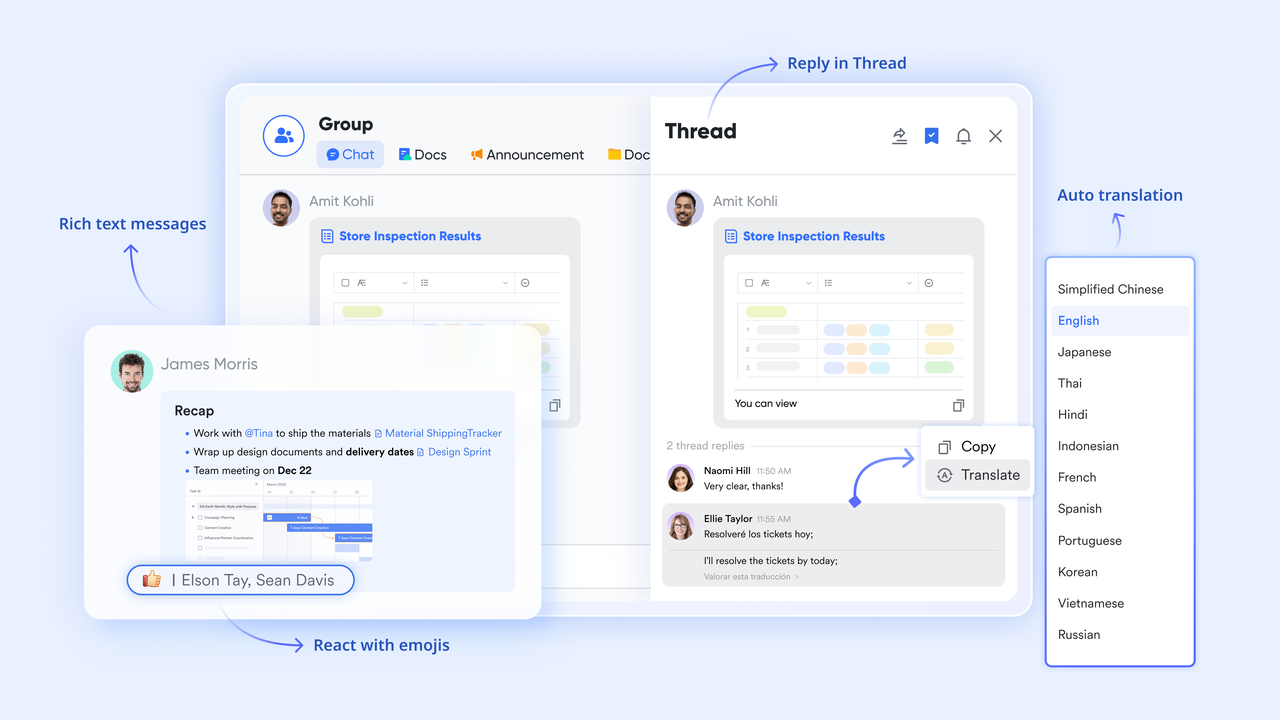
Lark brings your communication, automation, and team collaboration into one powerful platform—eliminating the need for scattered tools and manual handoffs. Designed for modern teams, it streamlines every stage of your business workflow, so work moves faster, decisions happen sooner, and teams stay perfectly aligned.
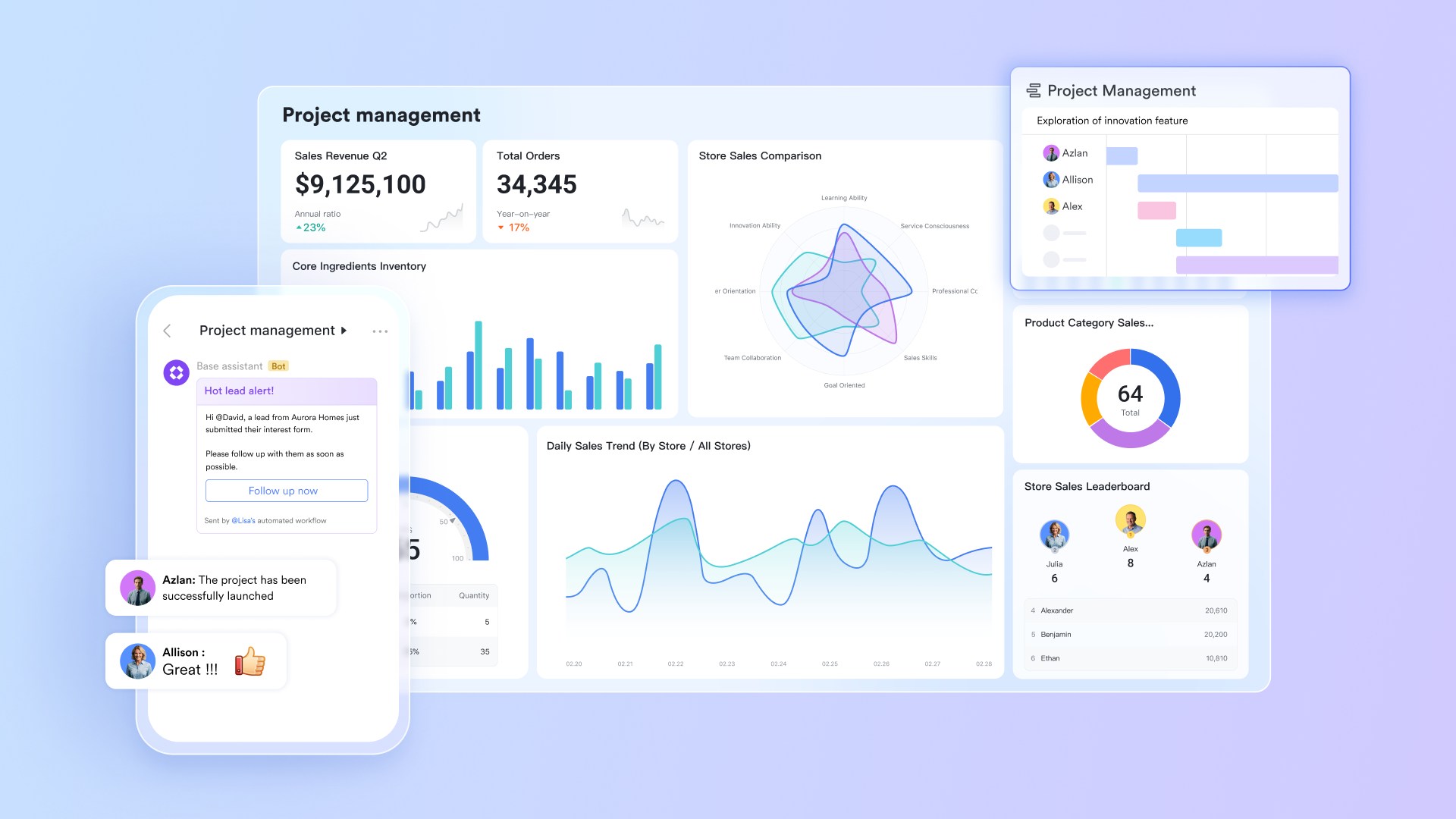
A structured foundation for every workflow
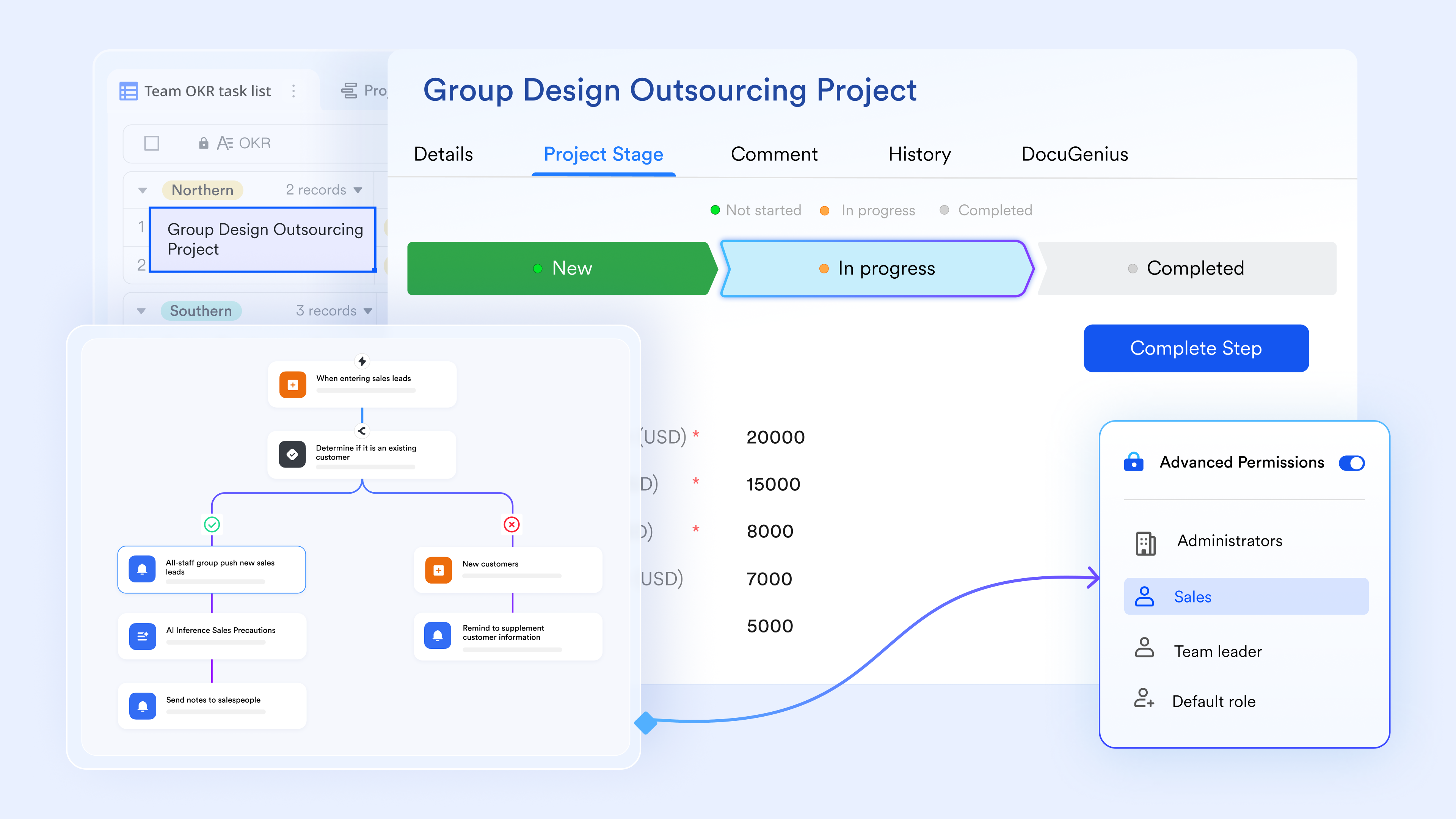
Lark Base provides organized business records, customizable fields, and automated actions that keep processes consistent from start to finish. For example, a sales team can manage leads, deal stages, and follow-up tasks in Base, while automated actions in the workflow feature update statuses or notify managers as opportunities progress. This structure ensures every workflow runs predictably, even as teams scale.
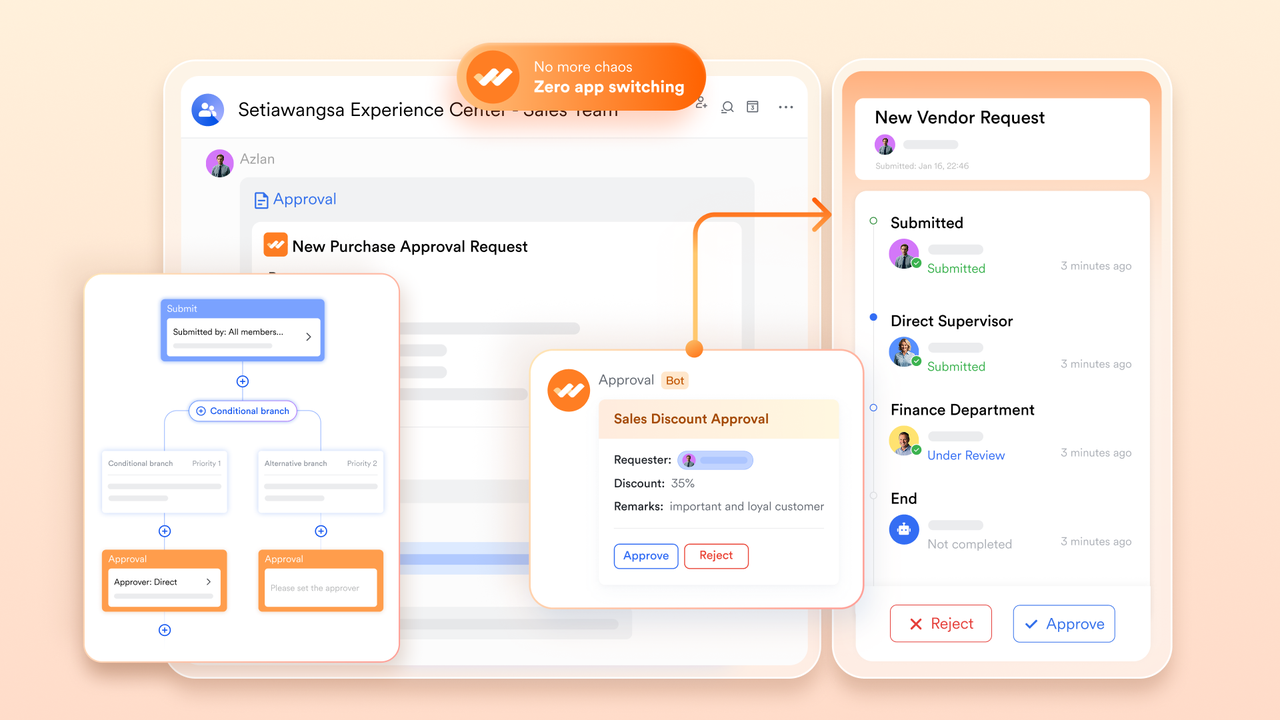
Fast and accurate decision routing across departments
With Lark Approval, teams can route purchase requests, travel authorizations, contract reviews, or expense submissions to the right stakeholders instantly. Approvers receive notifications on desktop or mobile, reducing delays in multi-level business approvals. For instance, finance teams can set rules where requests above a certain budget automatically escalate to a senior manager.
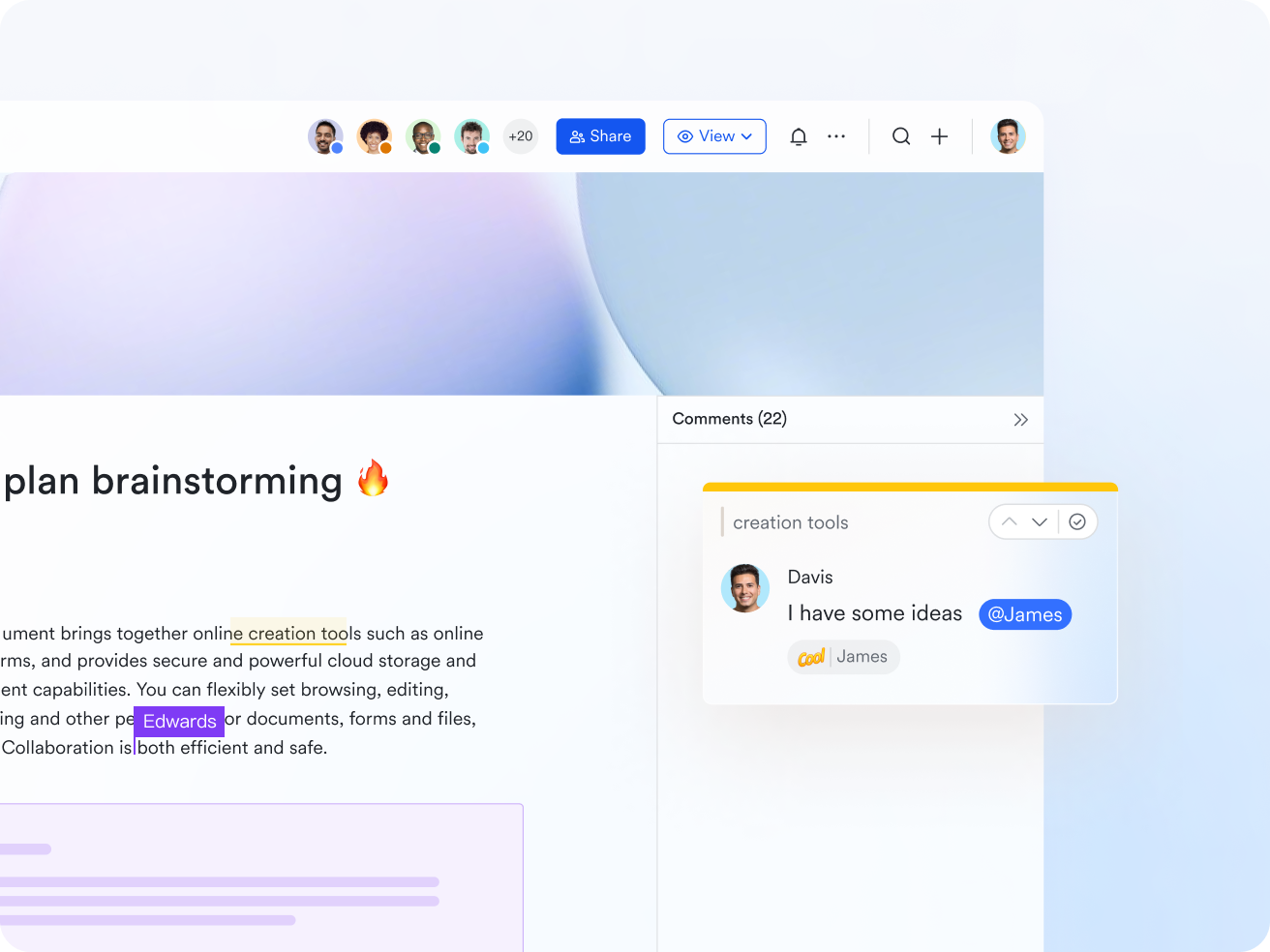
Shared workspace for documents that drive workflows forward
Lark Docs allows teams to co-edit proposals, SOPs, campaign plans, or audit checklists in real time. These documents stay connected to business workflows, meaning updates occur while meetings, automated approval, or discussions are happening. During a product launch workflow, for example, marketing, design, and operations can edit the launch plan simultaneously while linked tasks update progress automatically.
Seamless communication that turns discussions into action
Using Lark Messenger, teams can align quickly, clarify tasks, and turn chat messages into action items without leaving the conversation. In business workflows—like customer onboarding or issue escalation—team members can convert a message into a task instantly, assign the right owner, and keep all context intact for clearer follow-up.
Smarter execution with meetings that document themselves
Lark Meetings paired with AI Meeting Notes allows teams to run discussions that automatically generate summaries, action items, and follow-up steps. This is especially useful for workflows involving recurring check-ins, sprint reviews, or project updates. For example, an operations team reviewing weekly KPIs can rely on AI-generated notes to update workflow records or trigger next-step tasks without manual documentation.

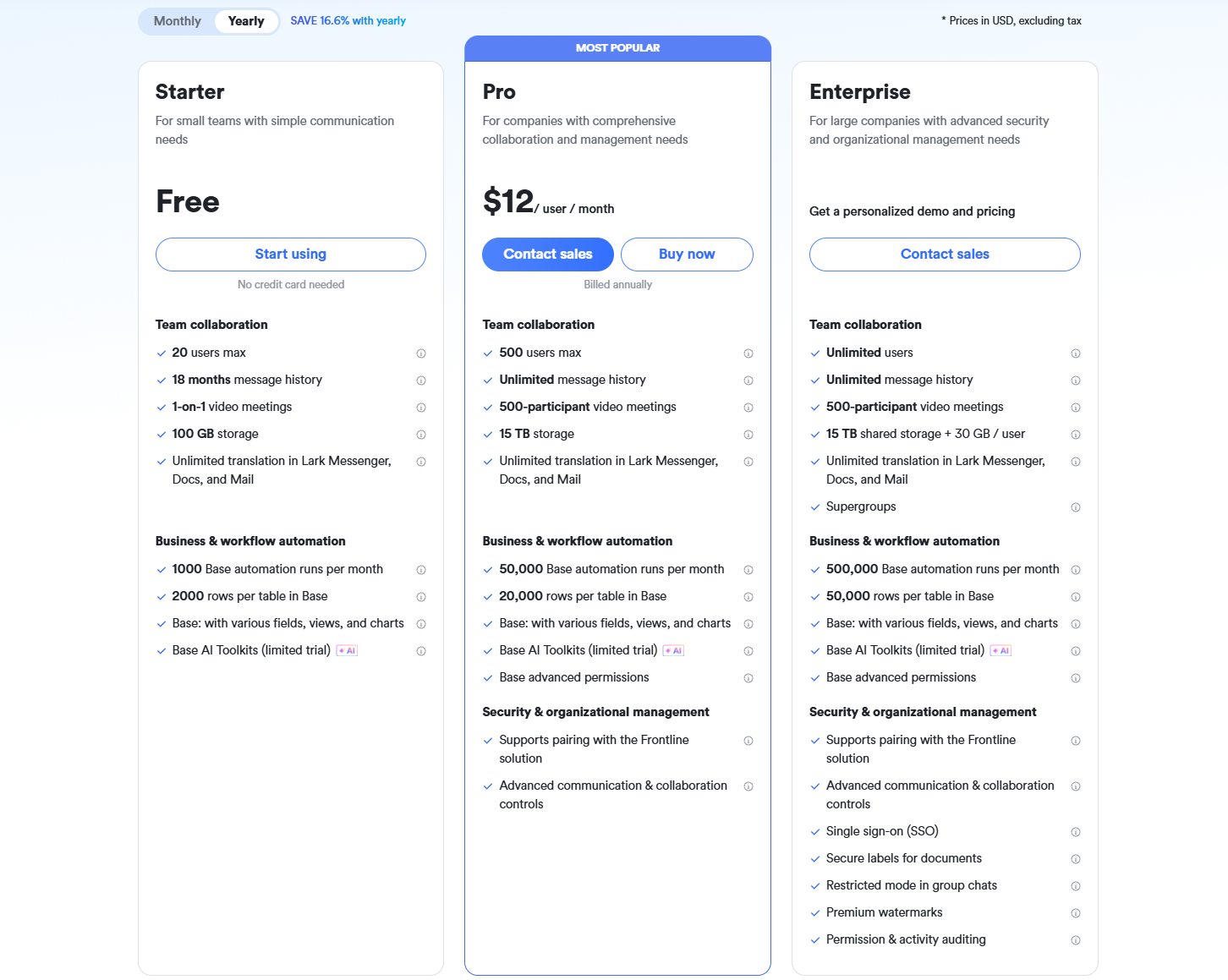
- Starter plan: Free forever plan that includes 11 powerful tools for up to 20 users. It also comes with 100GB of storage, 1000 automation runs, AI translations, and more.
- Basic plan: $6/user/month (billed annually) for up to 500 users. It includes everything in Starter plus group calling for up to 500 attendees, 5TB of storage, 1000 automation runs, and more. For more details, please contact sales.
- Pro plan: $12/user/month (billed annually) for up to 500 users. It includes everything in Basic plus group calling for up to 500 attendees, 15TB of storage, 50,000 automation runs, and more.
- Enterprise plan: Contact sales for custom pricing. Supports unlimited users and includes even more automation runs and advanced security, compliance, and management features.
2. Kissflow: Best for teams that need structured process automation
Kissflow is a no-code platform designed to help teams build, automate, and manage business processes without relying on engineering support. It's built around clear routing rules, workflow templates, and an intuitive drag-and-drop designer that makes it easy to map out approval flows, form submissions, and routine operational tasks. Teams use it to streamline requests, standardize multi-step processes, and reduce manual follow-ups across departments like HR, finance, operations, and procurement.
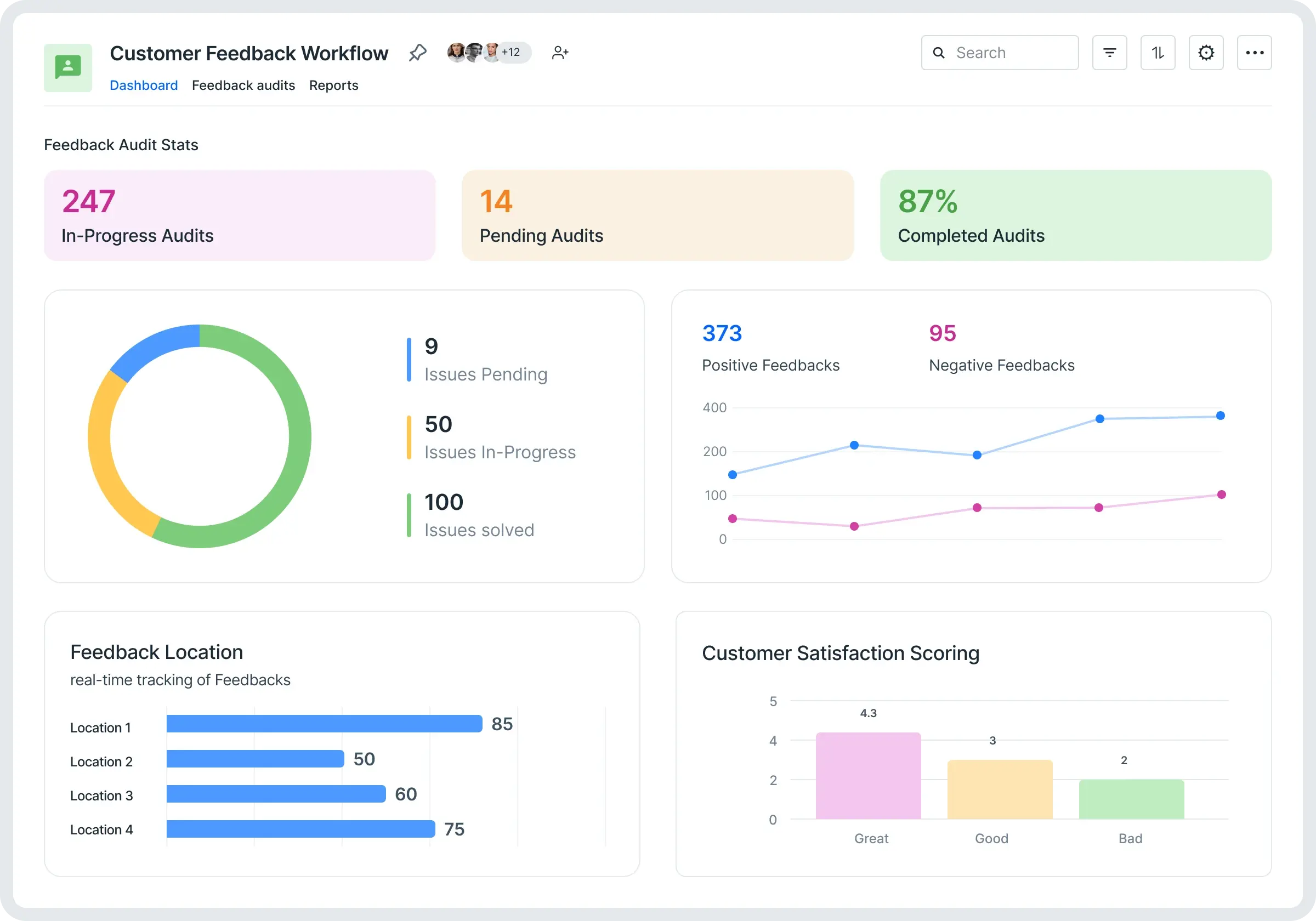
Image source: kissflow.com
Key features:
- No-code workflow builder with drag-and-drop design
- Pre-built workflow and process templates
- Rule-based routing for approvals and task assignments
- Process performance analytics and reports
- Integrations with popular apps through APIs and connectors
Pros:
- Easy for non-technical teams to create and automate processes
- Strong rule-based automation to reduce manual work
- Clean interface with ready-made templates for quick setup
- Scales well for cross-department workflows
Cons:
- Limited flexibility for highly complex, custom logic
- Advanced automation and integrations may require higher-tier plans
Pricing:
- Basic plan: $1500 per month
- Custom pricing for enterprise needs
3. Zoho Flow: Best for businesses already using the Zoho ecosystem
Zoho Flow helps teams connect Zoho apps with third-party tools and build rule-based workflows that move data across systems automatically. It acts as the glue between apps in the Zoho suite, allowing users to trigger actions, sync records, and automate routine tasks without coding. It's especially useful for businesses that rely heavily on Zoho products and want all their tools to work together smoothly.
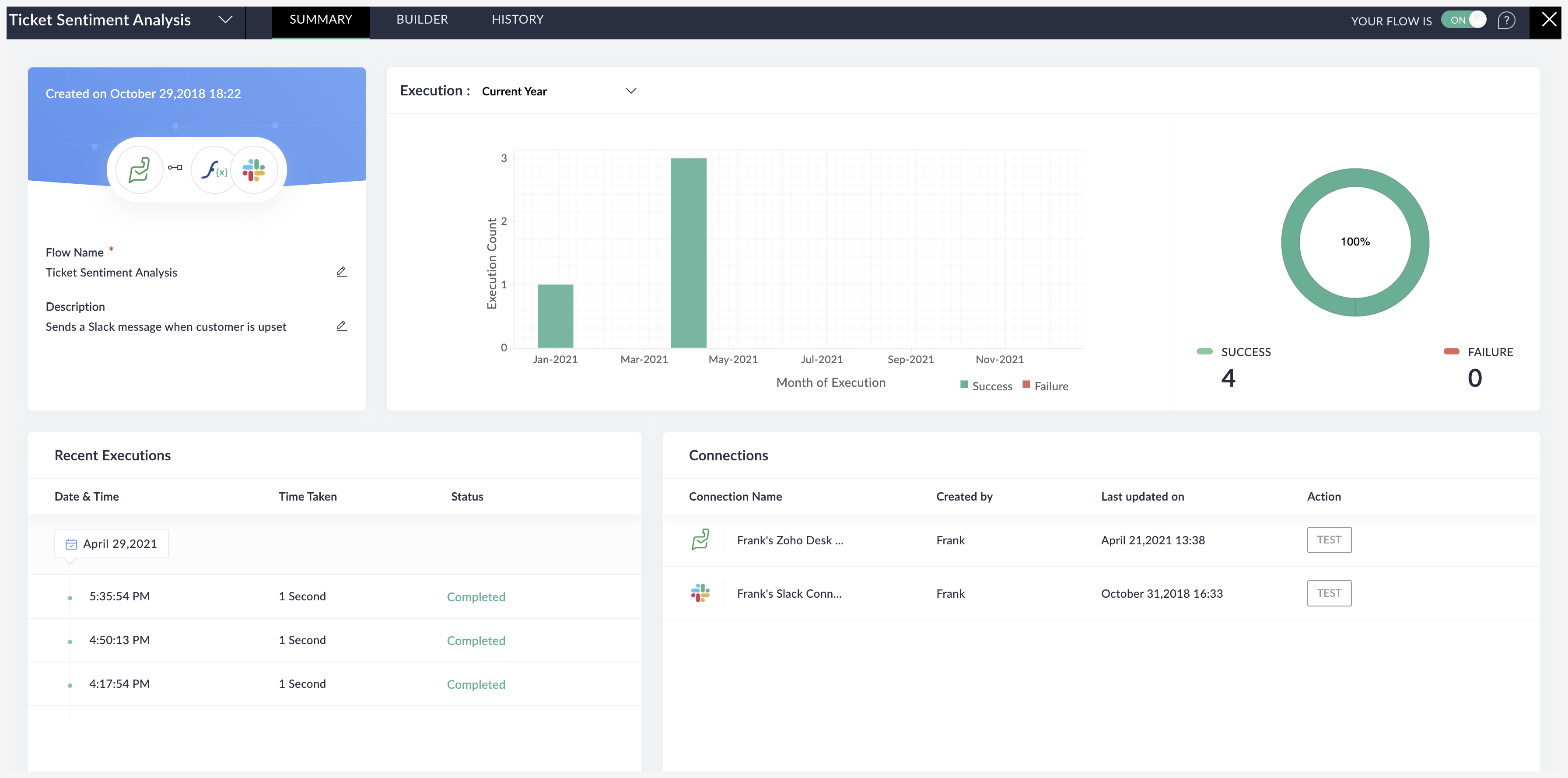
Image source: zoho.com
Key features:
- App integrations across Zoho and external tools
- Rule-based workflow builder with triggers and actions
- Multi-step flows with branching and conditions
- Logs and insights for monitoring automated processes
- Drag-and-drop interface for building workflows
Pros:
- Ideal for teams working within the Zoho ecosystem
- Simple setup with strong app connectivity
- Good control over triggers, rules, and conditional logic
- Affordable compared to most integration tools
Cons:
- Automation features are spread across different Zoho apps
- Less suited for large, complex workflows
Pricing:
- Standard: $25/5k tasks/ month
- Professional: $41/10k tasks/month
4. Monday.com: Teams wanting visual workflow mapping
Monday.com gives teams a clear, visual way to plan and track work through customizable boards, dashboards, and automation triggers. Its strength is the way it turns workflows into color-coded, easy-to-follow layouts that help teams stay on the same page. You can automate assignments, status updates, notifications, and simple dependencies with a few clicks. It works well for teams that want structured workflows without getting into complex logic or technical setup.
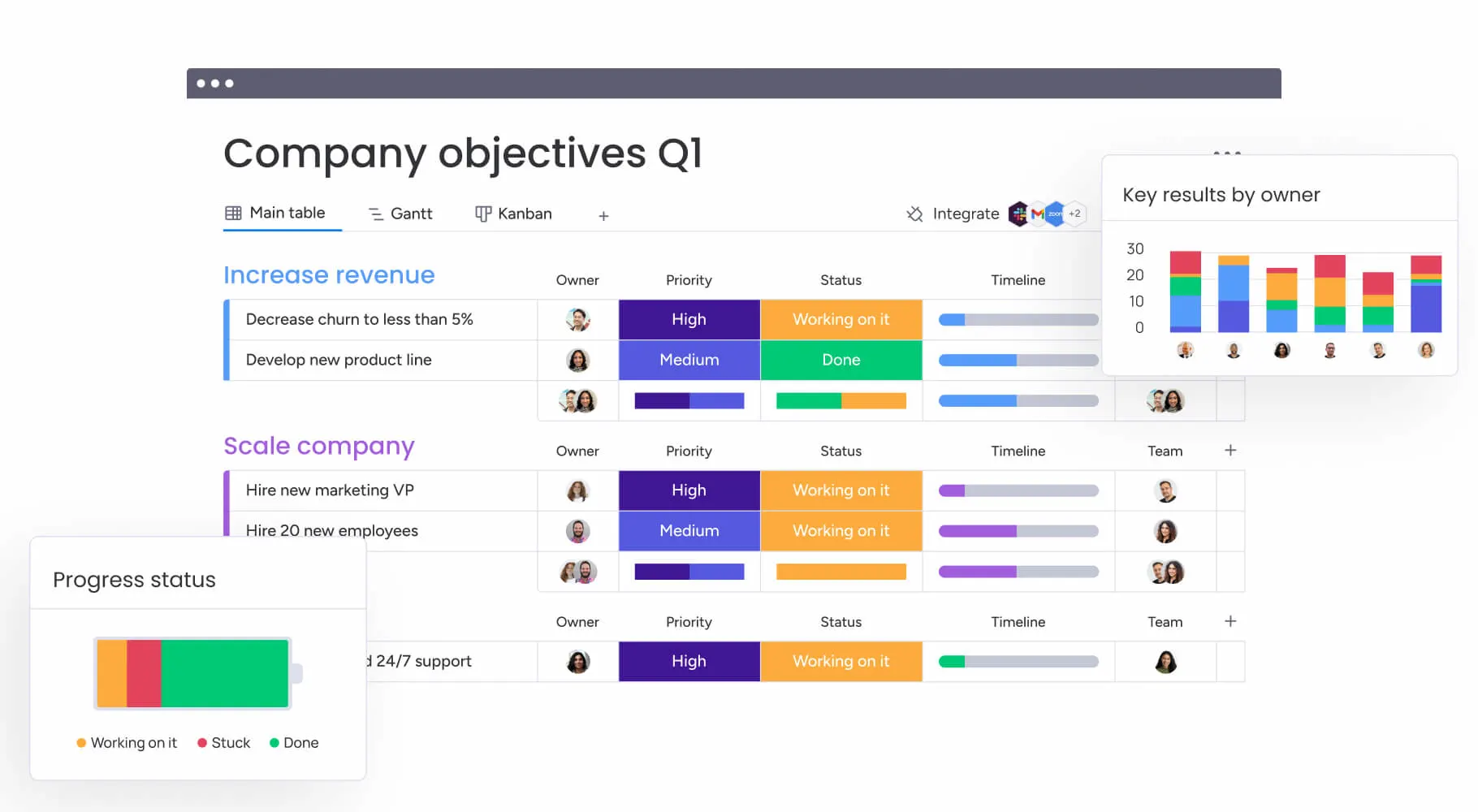
Image source: monday.com
Key features:
- Visual boards for tasks, timelines, and workflows
- Automation triggers for repetitive updates and actions
- Dashboard views for tracking progress and workload
- Templates for project management, operations, and marketing
- Integrations with tools like Slack, Google Workspace, and HubSpot
Pros:
- Easy to understand thanks to its visual layout
- Quick automation setup for common workflows
- Flexible boards that adapt to different team needs
- Strong collaboration and reporting options
Cons:
- Limited support for advanced or deeply nested logic
- More complex workflows may require higher-tier plans
Pricing:
- Free: Available for up to 2 users
- Basic: $9/user/month
- Standard: $12/user/month
- Pro: $19/user/month
5. SAP Workflow Management: Best for large organizations with complex workflows
SAP Workflow Management is built for enterprise teams that need strong orchestration, compliance controls, and end-to-end process automation. It supports everything from multi-layered approvals to regulated workflows that must follow strict audit and governance standards. With tools for modeling, managing, and monitoring processes at scale, it helps enterprises streamline operations across finance, procurement, HR, supply chain, and other core functions.
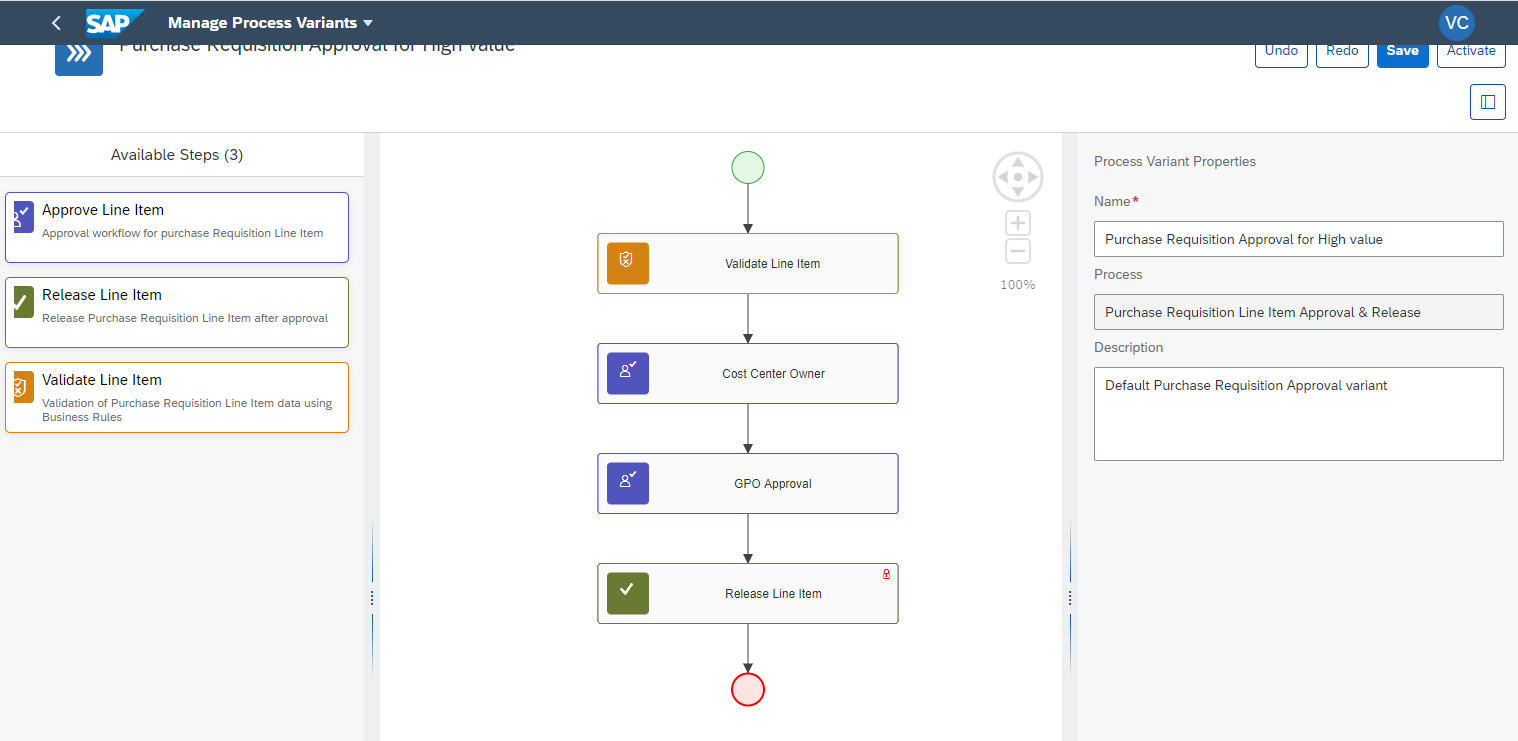
Image source: sap.com
Key features:
- Enterprise-grade BPM with modeling, automation, and orchestration
- Pre-built content packages for compliance-heavy workflows
- Process visibility dashboards and audit-ready tracking
- Integration with SAP S/4HANA and other SAP cloud tools
- Rule-based decisions and event-driven automations
Pros:
- Strong automation for complex, enterprise-level processes
- Deep compliance and governance capabilities
- Works seamlessly with SAP's broader product ecosystem
- Scales well for high-volume workflows
Cons:
- Requires technical expertise to configure advanced workflows
- Best suited for companies already using SAP
Pricing:
- Custom pricing
6. Cflow: Best for small businesses that need simple workflows
Cflow is a straightforward workflow builder made for small teams that want to automate basic, repetitive tasks without diving into complex setup or coding. It's built around simplicity, offering an easy drag-and-drop editor, ready-made templates, and quick approvals that help teams reduce manual follow-ups. It's a good fit for small businesses that need structure but don't require the depth of enterprise tools.
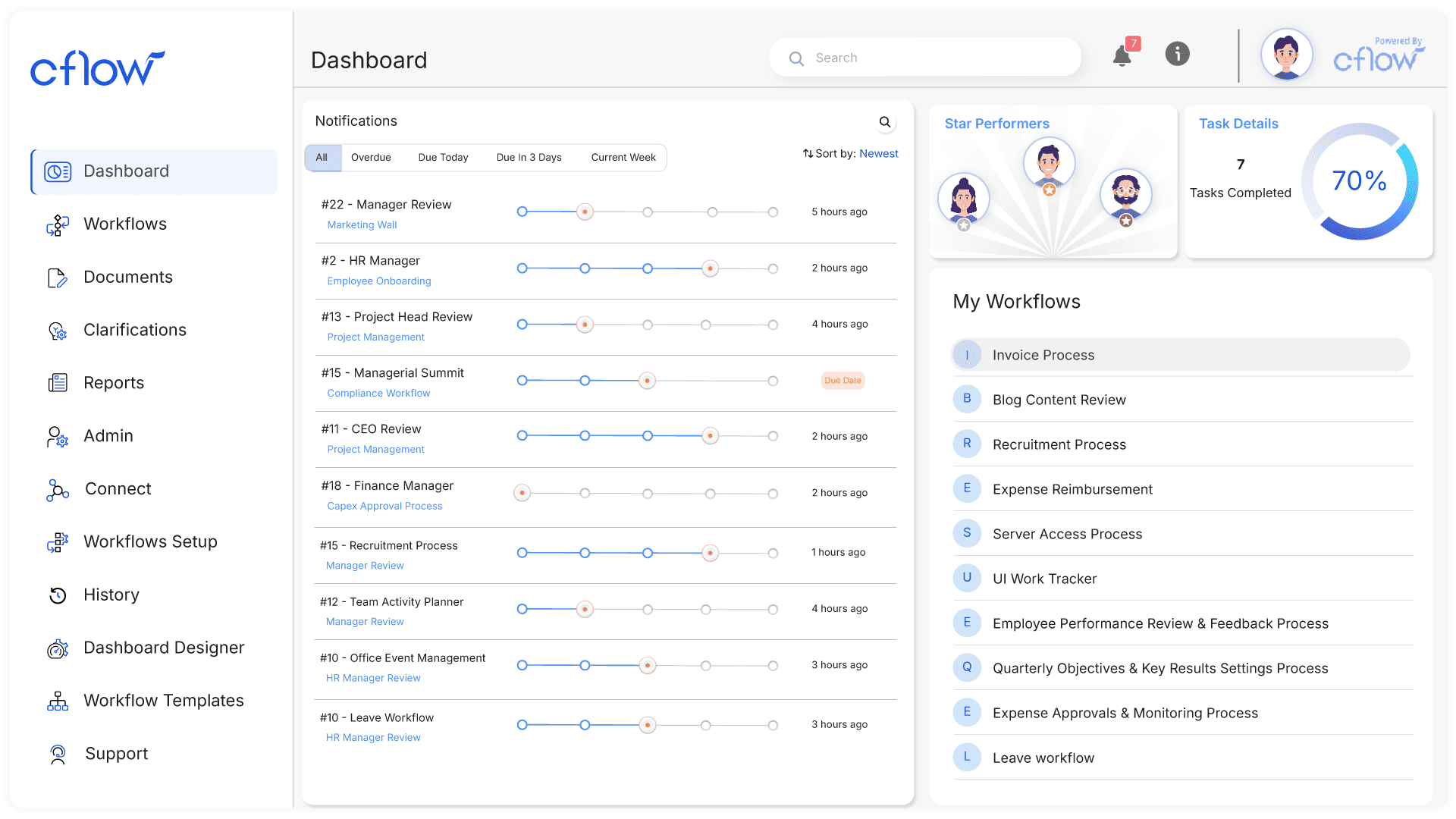
Image source: cflowapps.com
Key features:
- Simple drag-and-drop workflow builder
- Templates for common business processes
- Basic rule-based approvals and routing
- Email notifications and status tracking
- Integrations with popular apps via API and Zapier
Pros:
- Very easy for beginners to set up
- Good for small teams with predictable, repetitive tasks
- Clean interface with quick deployment
- Affordable compared to advanced workflow tools
Cons:
- Not designed for complex or high-volume workflows
- Limited customization for advanced logic
Pricing:
- Basic: $11/user/month
- Premium: $16/user/month
- Zen: Custom pricing
Business workflow optimization tips
Optimizing your business workflow is an ongoing effort. The goal is to make processes leaner, faster, and easier to manage while reducing friction across teams. Here's how to refine your workflows effectively:
- Remove unnecessary steps: Streamline your business process by eliminating redundant actions that add no value. This reduces delays and keeps your workflow clean and efficient.
- Reduce approval layers: Too many approval checkpoints slow down work. Simplify your hierarchy, so tasks move quickly without compromising accountability.
- Standardize templates: Use uniform workflow templates for repeated processes to minimize confusion and ensure every team member follows the same structured approach using your preferred business workflow tool.
- Use automation for repetitive tasks: Automate routine actions such as notifications, routing, and data entry. This is where a strong business workflow management system can make a significant difference.
- Centralize documentation: Keep all workflow-related files, task guidelines, and SOPs in one accessible hub. This helps remove silos and pairs well with workflow software for small business that prioritizes clarity.
- Encourage cross-team visibility: Ensure every stakeholder can track progress, see task ownership, and monitor bottlenecks. Modern business process workflow tools give teams the transparency needed to stay aligned and efficient.
Conclusion
Business workflows are the backbone of consistent, scalable operations. When teams streamline their processes and embrace automation, they unlock faster execution, fewer errors, and clearer accountability across every function. As organizations grow, the need for structured business process workflow design becomes even more important—especially when supported by reliable business workflow automation software that keeps teams aligned.
For smaller teams, adopting the right small business workflow software helps eliminate chaos and ensures daily operations run smoothly without extra overhead. Modern platforms like Lark make it easier to unify communication, manage tasks, and automate routine steps so businesses can focus on strategic growth instead of manual admin.
Whether you're improving workflow and business process management, refining documentation practices, or scaling processes with robust business process workflow software, the key is continuous optimization. With the right tools and mindset, any business can transform its workflows into a powerful engine for productivity and long-term success.
FAQs
Can business workflows be fully automated without technical skills?
Yes. Most modern workflow tools offer no-code builders, drag-and-drop editors, and ready-made templates. This allows non-technical users to automate tasks, approvals, and notifications without writing any code.
What is the difference between a workflow and a standard operating procedure?
A workflow defines the sequence of tasks, people involved, and automation rules for completing a process.
An SOP (Standard Operating Procedure) is a document that explains how tasks should be performed. Workflows automate what SOPs describe.
How do small businesses benefit from workflow software?
Small businesses save time, reduce manual work, and prevent bottlenecks by automating repetitive tasks. Workflow tools also help improve accuracy, maintain consistency, and support teams that may have limited staff or resources.
Do business workflows work on mobile devices?
Yes. Most business workflow platforms offer mobile apps or mobile-responsive access, enabling teams to approve requests, track tasks, and collaborate from anywhere.
How often should workflows be reviewed or updated?
Workflows should be reviewed at least every 6–12 months, or whenever a business process changes. Regular updates ensure accuracy, remove outdated steps, and improve efficiency as your organization grows.
Related reading
Table of contents
Start using Lark today

Manage all your work in one place
Boost team efficiency by 10x
Save up to 70% on software costs
Table of contents
Start using Lark today
Manage all your work in one place
Boost team efficiency by 10x
Save up to 70% on software costs
Keep reading







2026 Lark Technologies Pte. Ltd.
Headquartered in Singapore with offices worldwide.






Explore: