Google Sheets project management is often the first system teams turn to when organizing work. It is familiar, flexible, and easy to start using without training or setup. Many teams rely on project management in Google Sheets because spreadsheets already play a central role in daily operations. As work grows more complex, teams begin looking for ways to keep the simplicity of spreadsheets while adding better coordination and execution support.
See how structured project work scales
What is Google Sheets project management?
Google Sheets refers to using spreadsheets as a lightweight system to plan, track, and coordinate project work. Teams rely on rows, columns, formulas, and filters to organize tasks, deadlines, owners, and progress. A typical project management template Google Sheets setup includes task lists, status fields, due dates, and basic reporting.
Project management in Google Sheets works best when processes are simple and teams are small. It allows quick customization without technical setup and supports through shared access. However, project management with Google Sheets depends heavily on manual updates, consistent formatting, and formula accuracy. As projects become interconnected, maintaining reliability becomes harder, especially when using Google Sheets project management templates at scale.
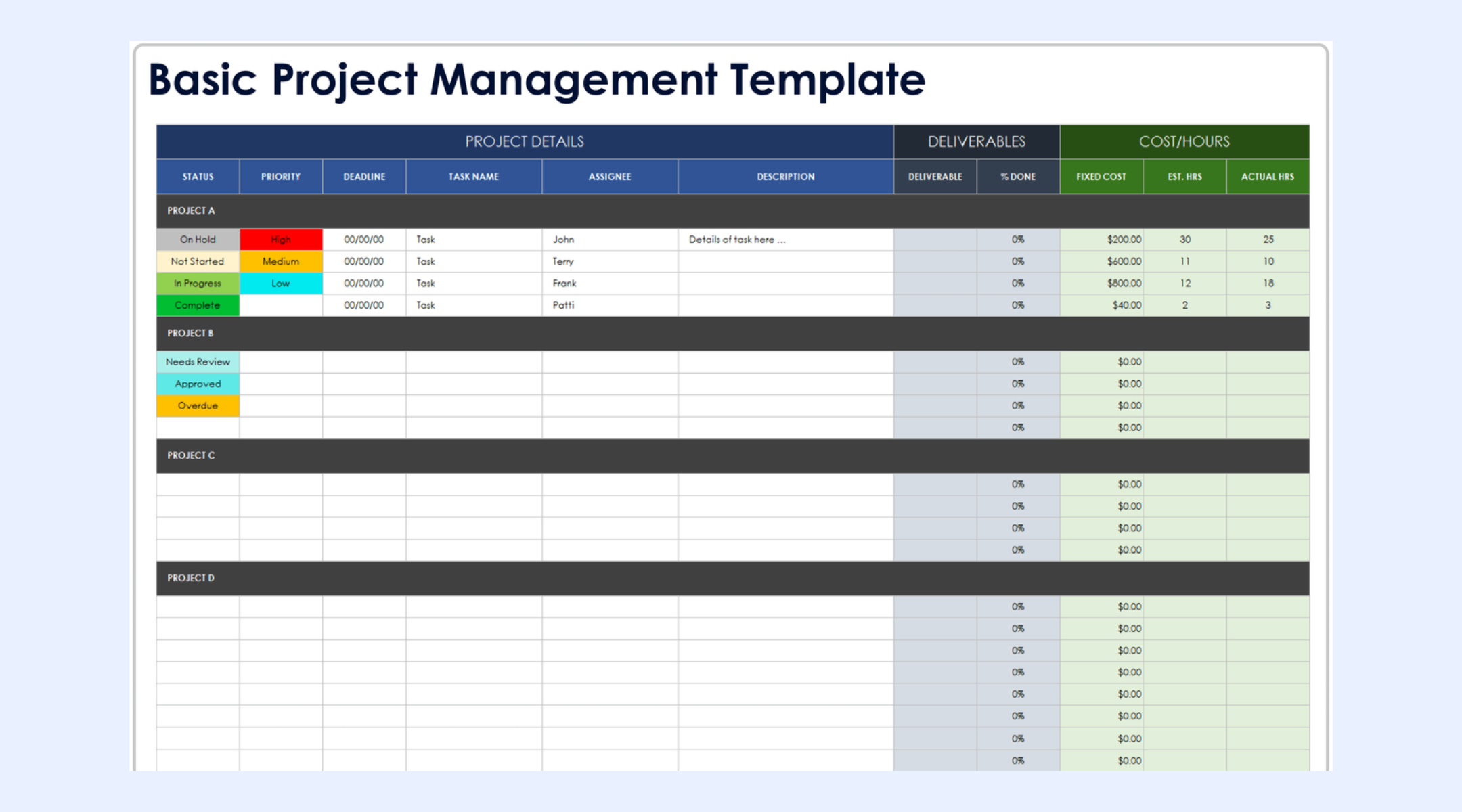
Image source: google.com
Common project types managed in Google Sheets
Google Sheets for project management supports a wide range of use cases. Teams often start with spreadsheets because they adapt easily to different project styles. Below are the most common scenarios where project management in Google Sheets templates is used.
- Simple task tracking projects: Simple task tracking projects are the most common use of project management in Google Sheets. Teams create lists of tasks with due dates, owners, and status fields. This works well for internal to-do lists and personal workloads. Updates are easy to make and visible instantly. However, accountability depends on discipline rather than system rules.
- planning: Marketing teams use project management in Google Sheets to plan campaigns, content calendars, and launches. Sheets help track deliverables, timelines, and approvals across channels. Filters make it easier to review progress by owner or campaign. As campaigns overlap, dependency management becomes harder. Reporting often requires manual consolidation.
- Event planning projects: Event planning teams rely on Google Sheets project management templates to manage schedules, vendors, budgets, and logistics. Everything stays centralized and accessible. This works well during early planning stages. As events approach, frequent updates increase the risk of errors. Version tracking becomes harder to manage.
- Client work and service delivery: Service teams use project management with Google Sheets to track client tasks, deadlines, and status updates. This approach works well for small client portfolios. As client volume increases, separating data and maintaining visibility becomes difficult. Ownership clarity often weakens over time.
- Resource and workload planning: in project management using Google Sheets focuses on tracking availability and capacity. Teams use formulas to estimate workloads across people or departments. This provides a high-level overview of resource allocation. Adjustments require manual recalculation. There is no automatic response to shifting priorities.
- Budget and cost tracking projects: Budget tracking is a natural use case for Google Sheets for project management. Teams compare planned versus actual costs using formulas. This offers flexibility and transparency. Accuracy depends on careful data entry. Formula errors can easily affect financial decisions.
- Short-term operational initiatives: Short-term initiatives often use a project management Google Sheets template because the setup is fast. Teams can start tracking work immediately. This works well for temporary efforts. Long-term ownership and reporting are difficult to maintain. These trackers are often abandoned after completion.
Core strengths of using Google Sheets for project management
Google Sheets project management remains widely used because it offers several practical advantages. These strengths explain why many teams continue using spreadsheets before adopting more structured tools.
Task management
in Google Sheets project management is simple and flexible. Teams can create task lists with owners, due dates, and status fields that match their workflow. Sorting and filtering help teams focus on priorities quickly. Updates are easy to make and visible in real time. However, task completion relies on manual updates rather than enforced rules.
Gantt charts
in Google Sheets are commonly built using project management Google Sheets templates. They visualize timelines, milestones, and basic dependencies through formulas and formatting. This works well for small or linear projects. As schedules change, charts require frequent manual updates. Accuracy depends on careful formula maintenance.
Resource allocation
with Google Sheets allows teams to estimate workloads across people or teams. Formulas help calculate availability and assignment levels. This provides a high-level view of capacity planning. Adjustments must be made manually. Sheets do not automatically rebalance workloads when priorities shift.
Data validation & conditional formatting
Data validation improves consistency in Google Sheets project management by standardizing inputs. Dropdowns help limit errors in fields such as status and priority. Conditional formatting highlights risks, delays, or overdue tasks visually. These features improve clarity for teams. They still rely on users following defined rules. Collaboration & sharing
Google Sheets supports and file sharing across teams. Multiple users can edit simultaneously and leave comments. This makes Google Sheets for project management accessible for distributed teams. Over time, comment threads and edits can become cluttered. Context is harder to track as projects grow.
Popular Google Sheets project management template
Many teams rely on Google Sheets project management templates to get started quickly without designing trackers from scratch. These templates provide ready-made structures for , scheduling, and tracking work. They help standardize task lists, timelines, and reporting across projects. Using a project management template in Google Sheets setup also reduces setup errors. Each template is designed to support a specific planning or tracking need, depending on project complexity.
Gantt chart project management template
This Google Sheets project management template focuses on visualizing timelines and task dependencies. Tasks are plotted across dates to clearly show start and end points. It helps teams understand sequencing and overlaps at a glance. The template works best for simple project schedules. Frequent changes require careful manual updates.
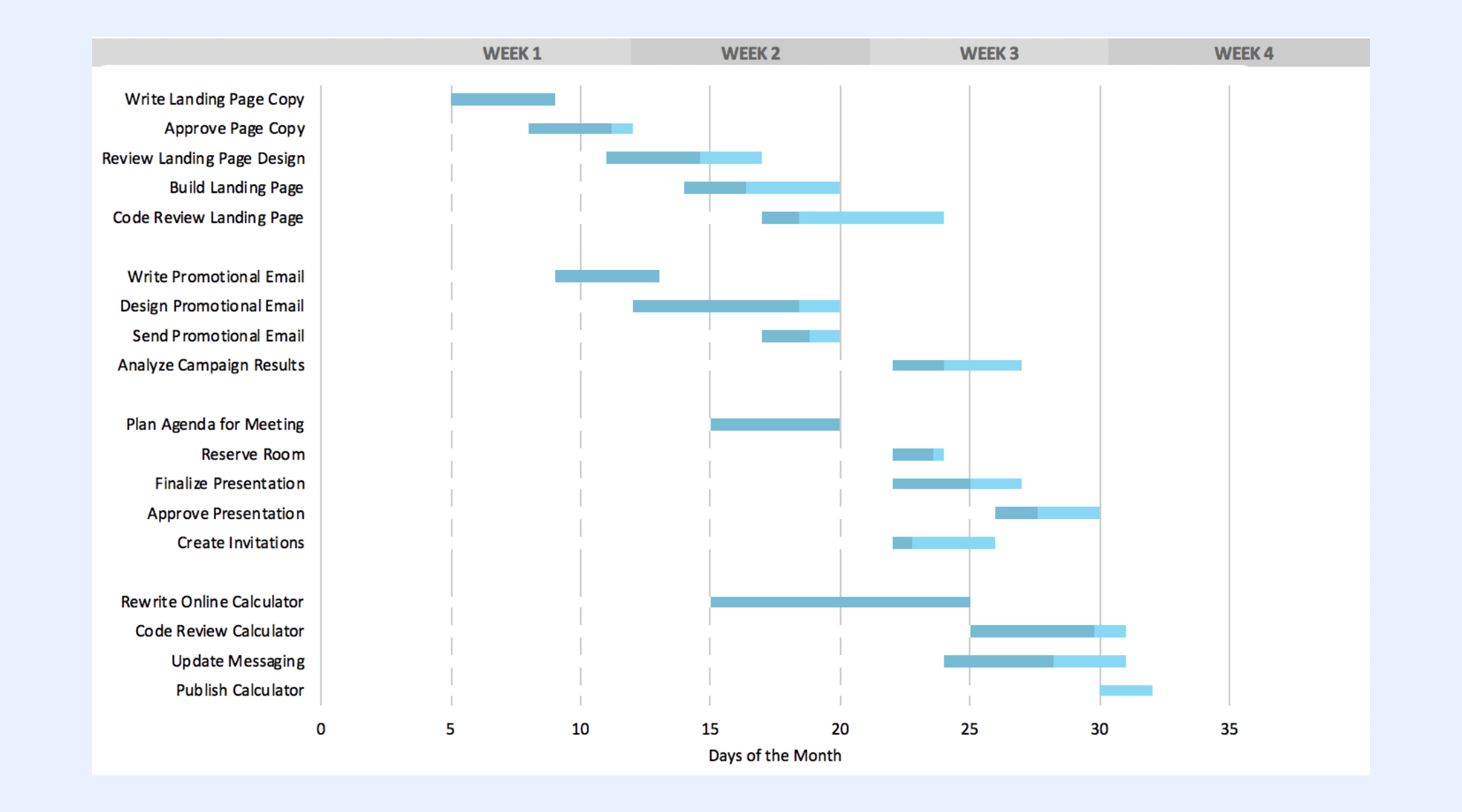
Image source: google.com
Project timeline template
The project timeline template highlights key milestones and delivery dates without task-level detail. It is commonly used for stakeholder updates and planning discussions. The layout keeps schedules easy to understand. Execution tracking usually happens on a separate sheet. Accuracy depends on regular manual updates.
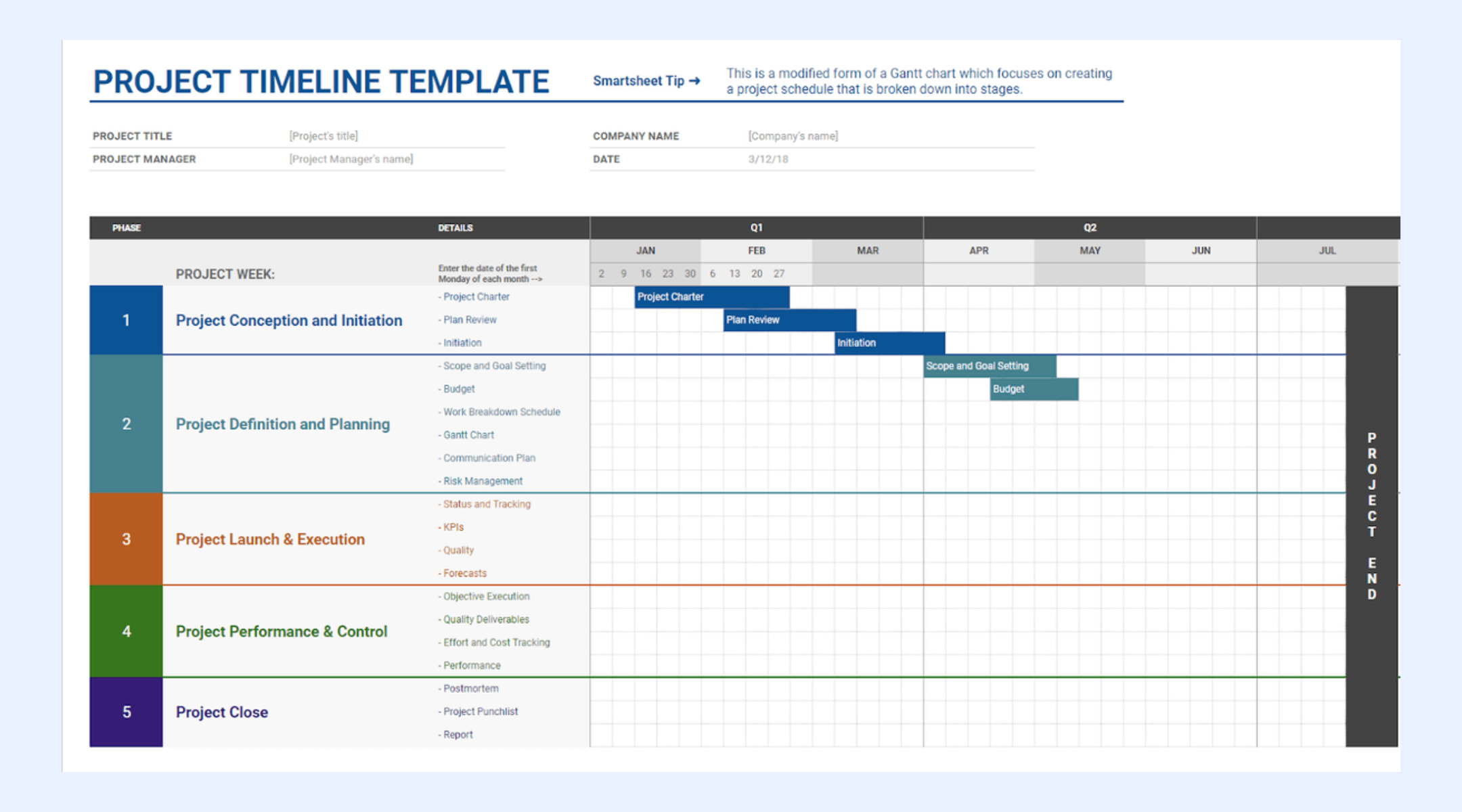
Image source: google.com
Project tracking template
Project tracking templates are among the most widely used Google Sheets project management templates. They focus on , owners, and status in a single view. Teams use them for daily updates and reviews. Progress visibility is clear when data is updated consistently. Reporting relies on accurate manual input.
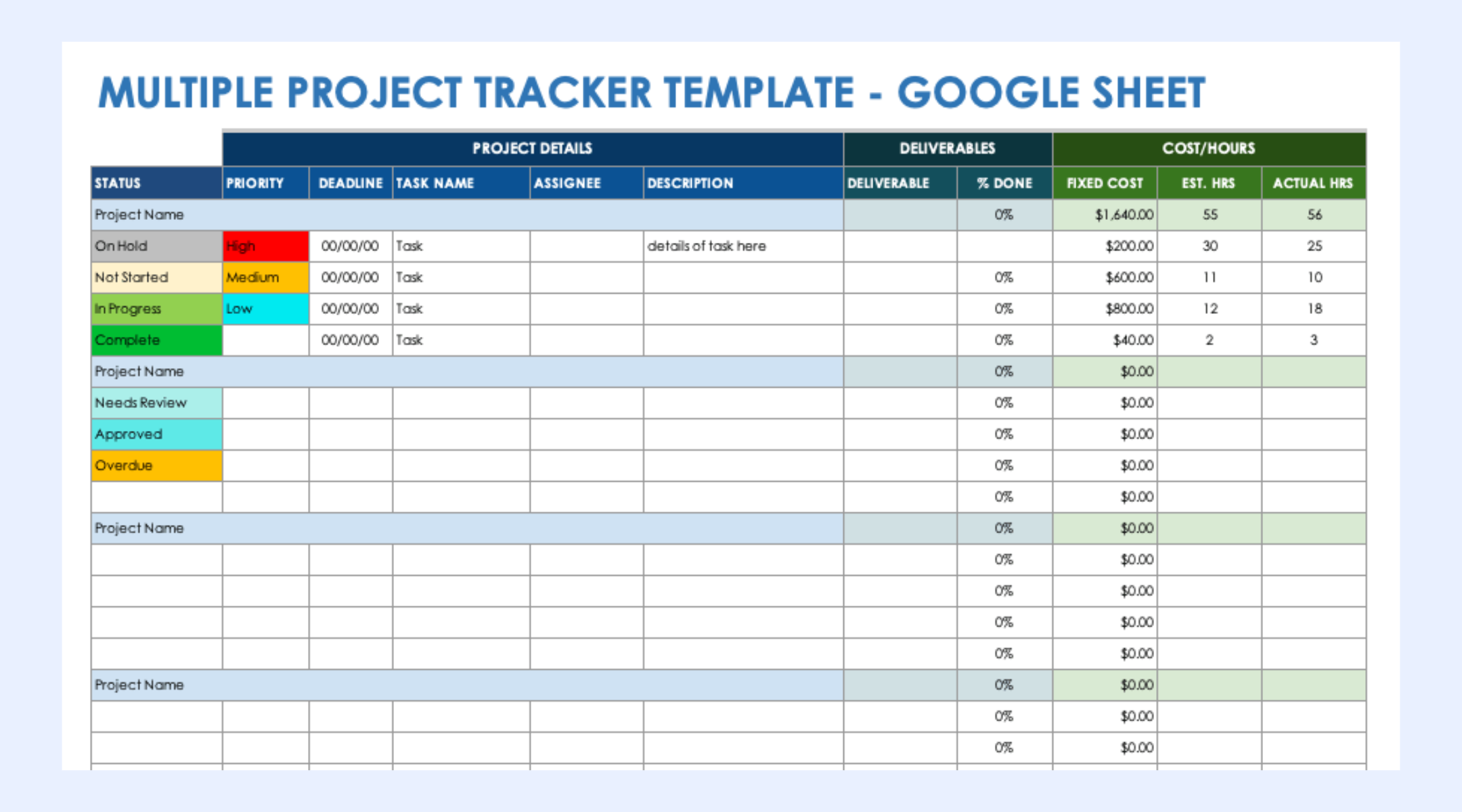
Image source: google.com
Project management template
A general Google Sheets template for project management combines tasks, timelines, and summary fields. It offers flexibility for different project types and team structures. Teams often customize it to match their workflows. Over time, heavy customization increases complexity. Long-term maintenance can become challenging.
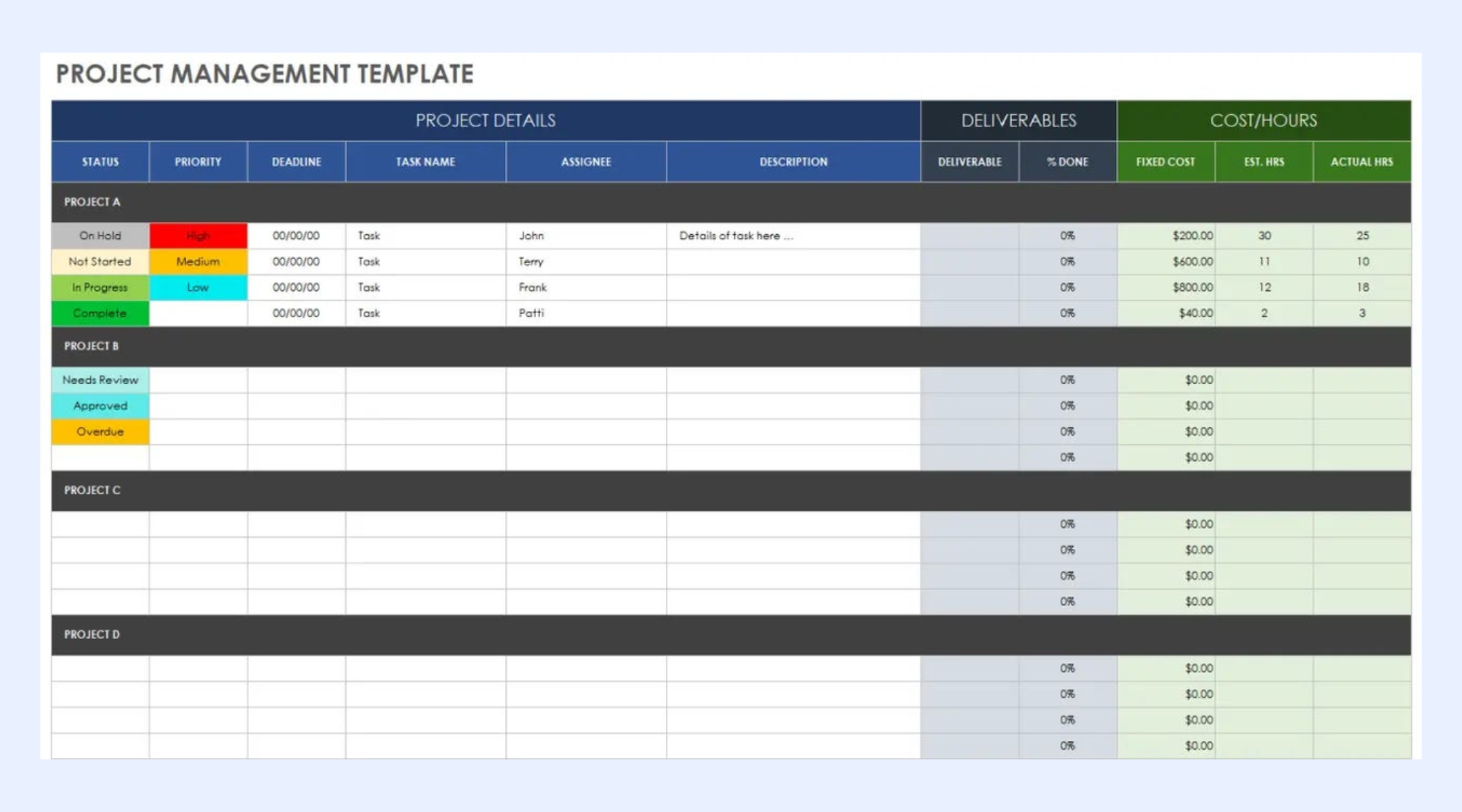
Image source: google.com
Note: For more its information, you can refer to and .
When teams outgrow Google Sheets project management
As teams scale, the limits of Google Sheets project management become more visible. increases dependencies, approvals, and handoffs that spreadsheets struggle to manage consistently. Manual updates slow execution and reduce confidence in reporting accuracy. Ownership becomes harder to enforce as more contributors join the same files.
At this stage, teams often start looking for tools that retain the familiarity of spreadsheets while offering better structure and execution support. This is where Lark begins to make sense, providing a connected workspace that builds on spreadsheet-based workflows while helping teams manage growing complexity more reliably.
Upgrade spreadsheets into connected workflows
Modern choice: Use Lark to standardize project management like a pro
Teams moving beyond project management in Google Sheets often want more execution control without losing flexibility. addresses this by combining structured with spreadsheet-style interaction. It allows teams to build on existing habits rather than replace them. This makes the transition gradual and less disruptive.
Structured project tracking with real execution control
manages projects using structured tables where each record represents a task, milestone, or deliverable, similar to a spreadsheet but far more robust. Teams can switch between Grid, Kanban, and Gantt views without duplicating data, making it easy to track status, ownership, and timelines from different perspectives. Groups and filters help teams focus on priorities instantly, while two-way data linking connects related tasks, projects, or teams automatically. Automation and flow fields update progress, trigger reminders, and reduce manual follow-ups. Compared to Google Sheets, Lark Base removes formula dependency and manual updates, ensuring progress reflects real work, not static cells. 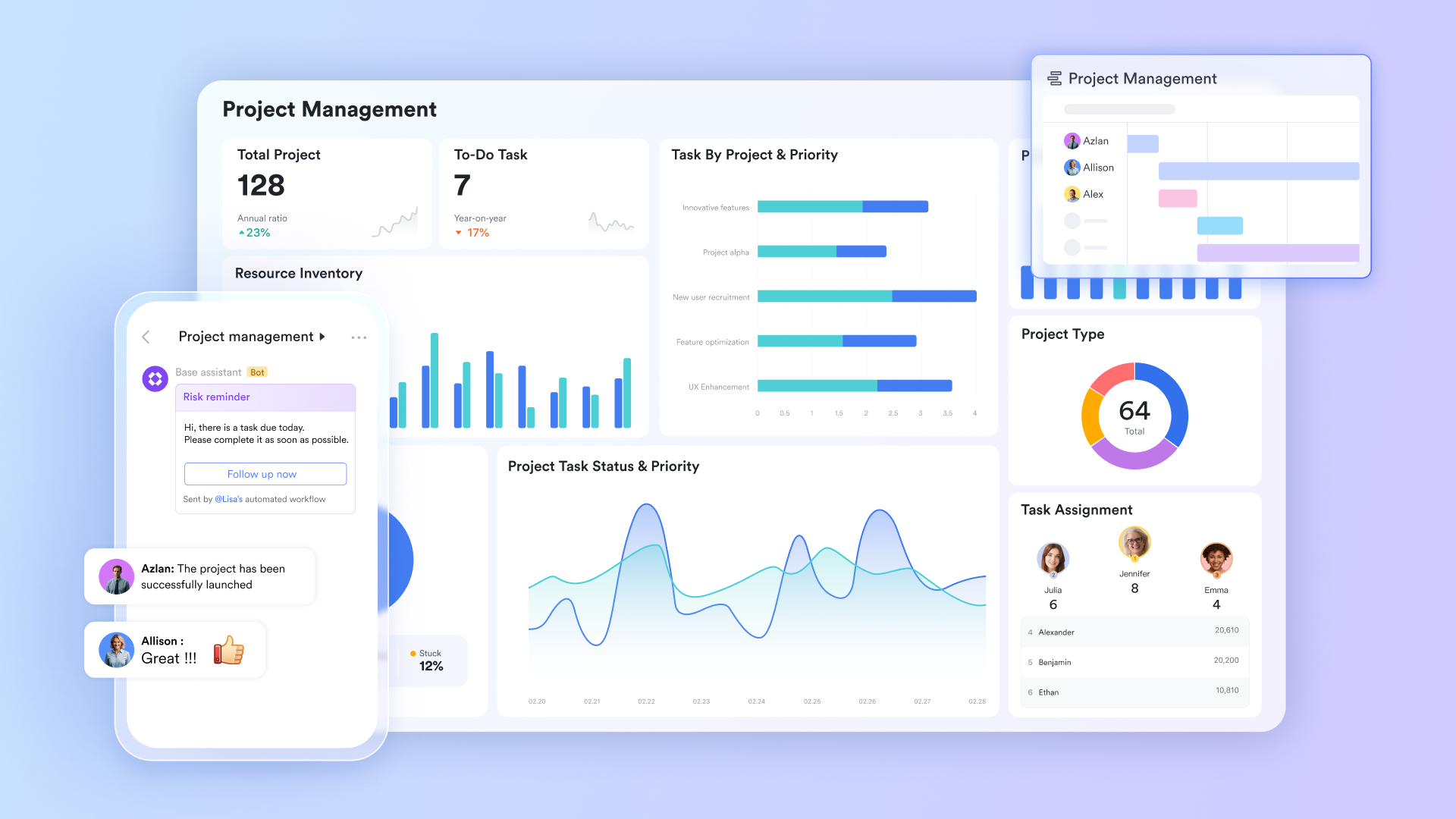
Live collaboration tied to project work
and Lark Sheets allow teams to document requirements, meeting notes, and execution plans while collaborating in real time. Docs support comments, mentions, and version history, making discussions and decisions easy to track. Templates help standardize reports, retrospectives, and meeting records across projects. Unlike Google Sheets, where documentation often lives separately from task tracking, Lark keeps documents connected to ongoing project work. This ensures context is never lost and teams always work from the latest information. 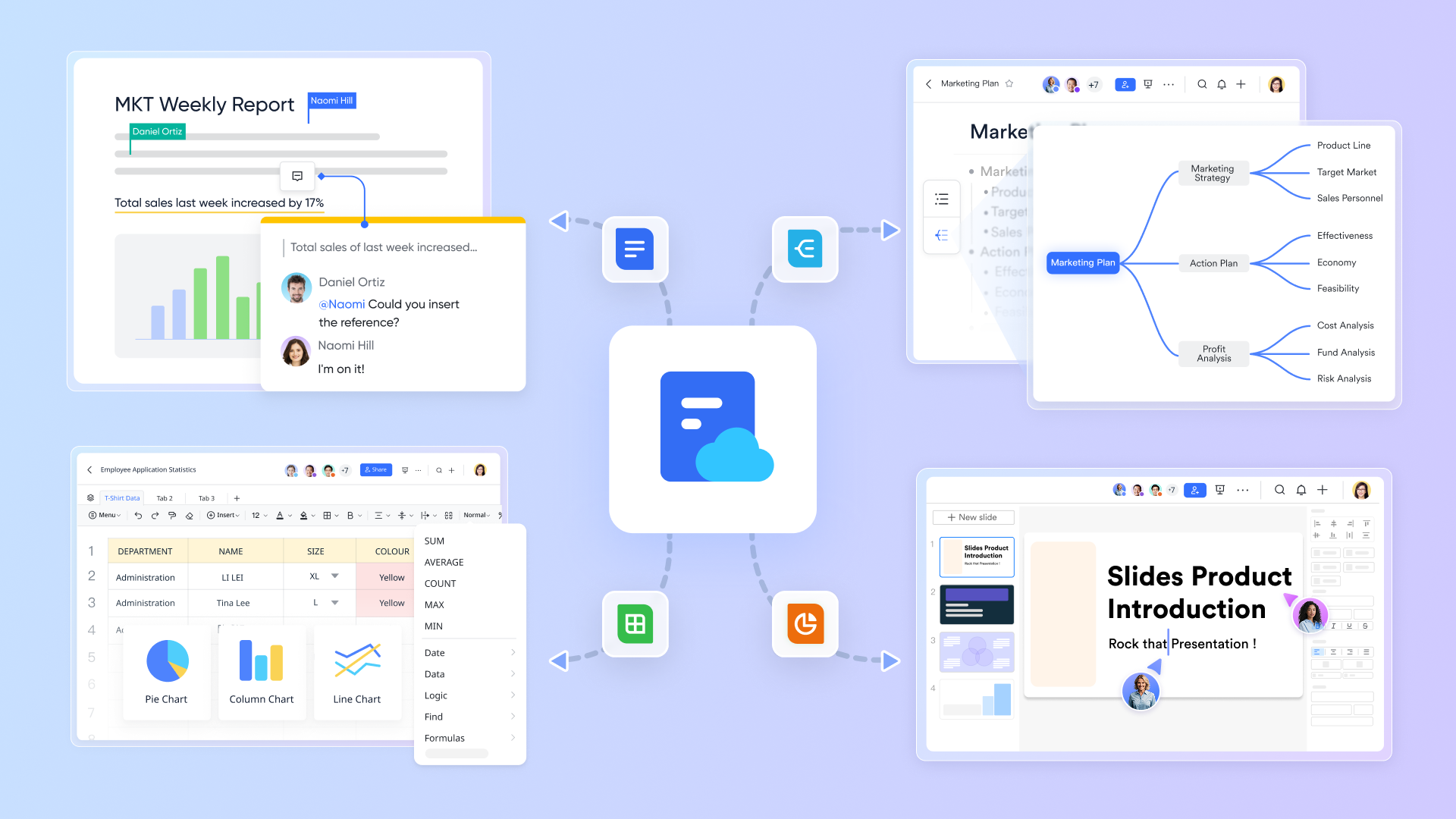
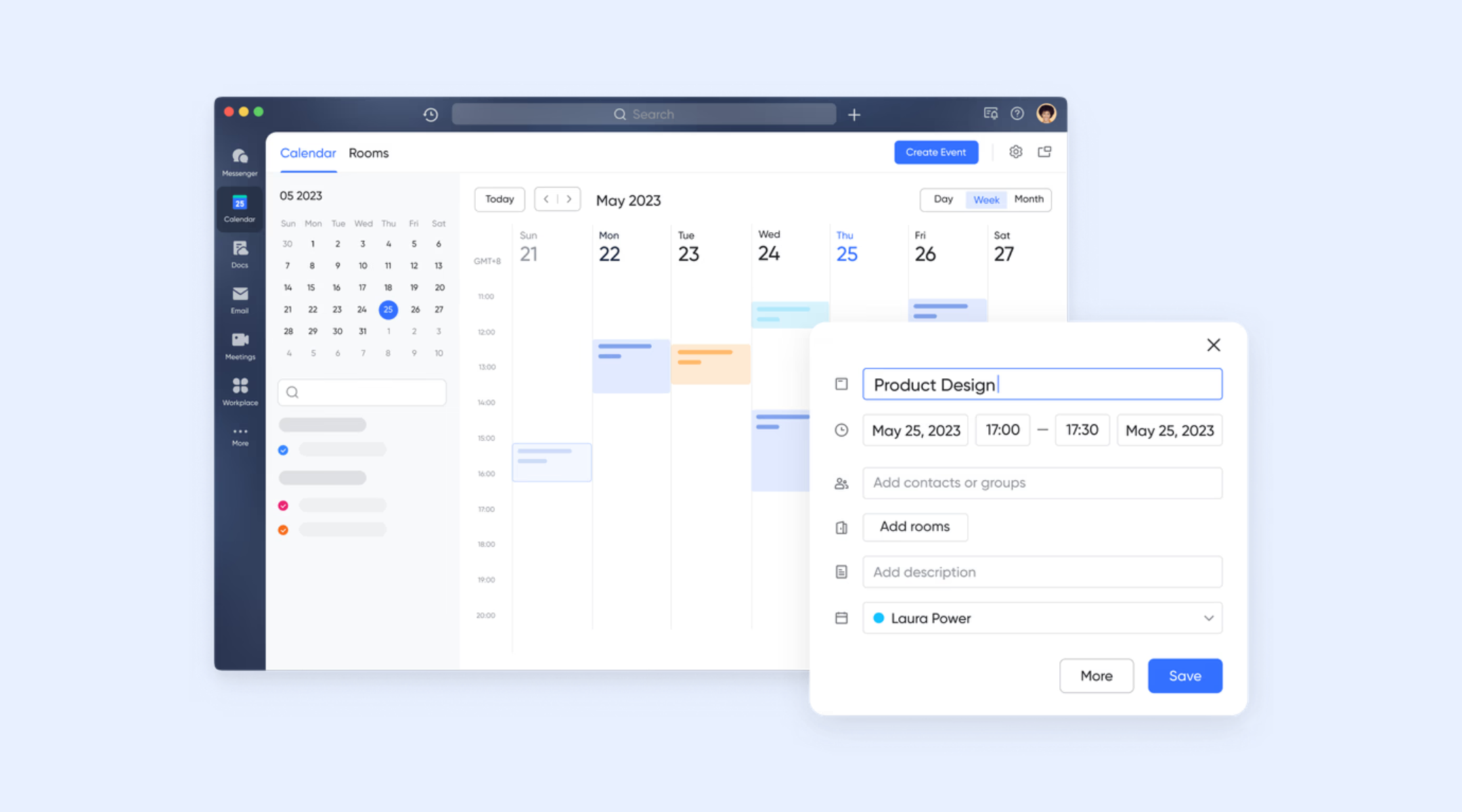
Milestones and schedules that stay aligned with work
helps teams schedule project milestones, deadlines, and meetings while keeping timelines visible to everyone involved. Events can be tied directly to tasks or project phases, helping teams see how schedules align with actual progress. ensure deadlines are not missed. In Google Sheets, timelines are often static and require constant updates. Lark's calendar stays in sync with project execution, reducing the risk of outdated schedules.
Real-time communication with project context
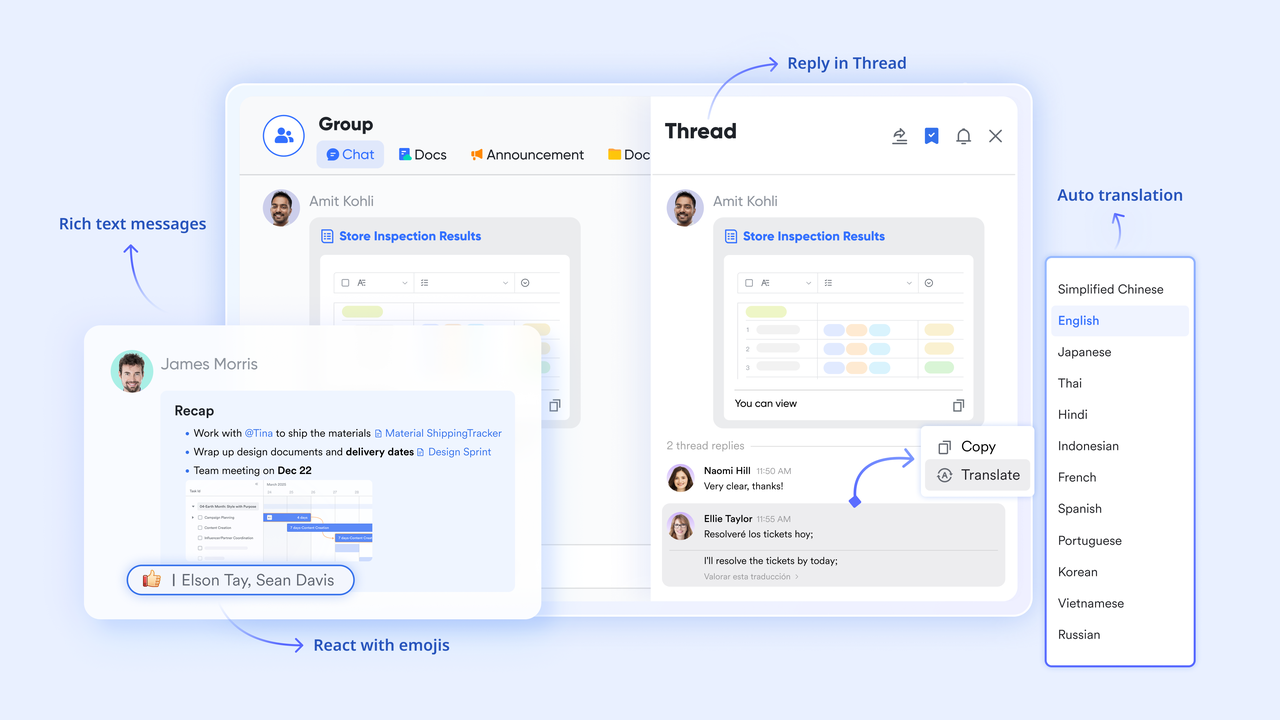
enables teams to communicate instantly while staying directly connected to their project work. Team members can share updates, clarify blockers, and make decisions without switching between tools or documents. Conversations remain searchable and linked to ongoing tasks, which reduces confusion and missed context. In Google Sheets project management, communication relies on cell comments that often become scattered and hard to track. Lark Messenger keeps discussions clear, timely, and closely aligned with real project execution.
Clean data collection without spreadsheet chaos
Lark Forms allows teams to collect project-related information such as requests, updates, or feedback through structured forms. Submitted data flows directly into Base tables, ensuring consistency and accuracy from the start. Validation rules prevent incomplete or incorrect entries. In contrast, Google Sheets often requires manual data entry or sharing editable files, increasing the risk of errors. Form View simplifies data intake while keeping project information organized and ready for action. 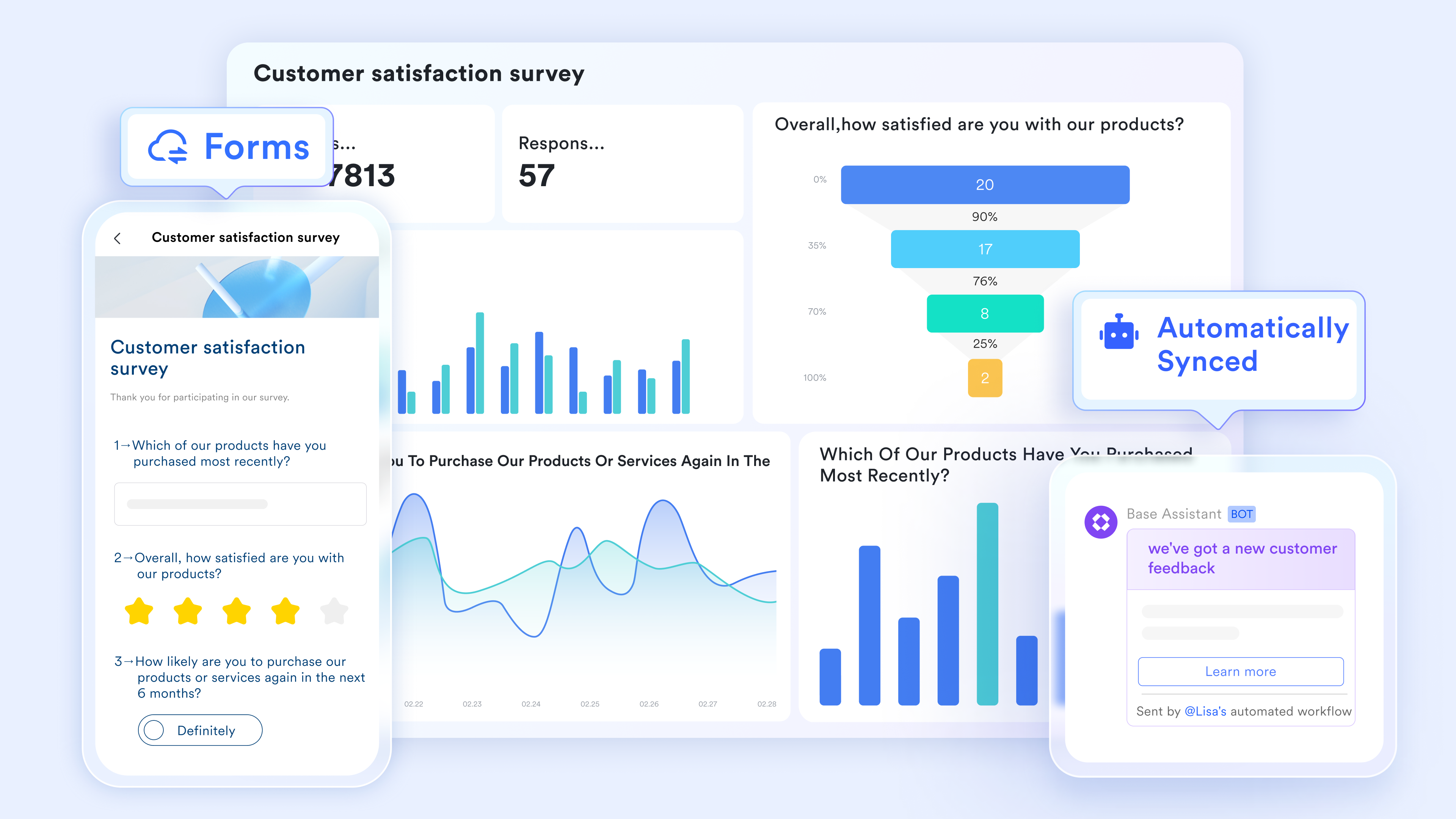
:
- Starter plan: Free forever plan that includes 11 powerful tools for up to 20 users. It also comes with 100GB of storage, 1000 automation runs, AI translations, and more.
- Pro plan: $12/user/month (billed annually) for up to 500 users. It includes everything in Starter plus group calling for up to 500 attendees, 15TB of storage, 50,000 automation runs, and more.
- Enterprise plan: for custom pricing. Supports unlimited users and includes even more automation runs and advanced security, compliance, and management features.
For small teams with simple communication needs

18 months message history
1000 Base automation runs/month
2000 rows per table in Base
Most POPULAR
For companies with comprehensive collaboration and management needs
Unlimited message history
500-participant video meetings
50k Base automation runs/month
20k rows per table in Base
For large companies with advanced security and organizational management needs
Get a personalized demo and pricing
Unlimited message history
500-participant video meetings
15 TB storage + 30 GB storage/user
500k Base automation runs/month
50k Base automation runs/month
Most POPULAR
For companies with comprehensive collaboration and management needs
Unlimited message history
500-participant video meetings
50k Base automation runs/month
20k rows per table in Base
Bonus: Lark ready-to-use project management templates
Project management template
This template provides a structured foundation for managing projects from planning through delivery. Tasks, owners, priorities, and timelines are organized in one connected workspace. Teams gain clear visibility without relying on manual spreadsheet formulas. Multiple views help different roles track progress easily. It works well for cross-functional and ongoing projects. The structure supports consistency as project complexity grows.
Task management template
The task management template focuses on daily execution and ownership clarity. Each task includes a defined owner, status, and due date. Teams can quickly identify priorities and pending work. Progress updates remain visible in real time. This template is ideal for operational and execution focused teams. It reduces reliance on scattered task lists.
Project management Gantt chart template
This template is designed for teams that need clear timeline visibility. Tasks are mapped across a Gantt view that stays aligned with real execution. Dependencies and milestones are easy to understand at a glance. Changes update automatically across views. Teams avoid maintaining complex spreadsheet formulas. It supports reliable scheduling for growing projects.
Product development progress management template
This template helps teams track product development across stages and milestones. Work moves through clearly defined phases with ownership at each step. Progress remains visible to product, engineering, and leadership teams. Dependencies are easier to manage as work evolves. It supports structured delivery without heavy process overhead. The template works well for iterative product cycles.
Design project management template
The design project management template supports creative workflows with a clear structure. Tasks move through stages such as review, revision, and approval. Designers and stakeholders stay aligned on progress and feedback. Deadlines and ownership remain visible throughout the project. This template reduces back-and-forth communication. It works well for collaborative design teams.
Kanban board template
The kanban board template focuses on visual workflow management. Tasks move across stages such as planned, in progress, and completed. Teams can quickly spot bottlenecks and stalled work. Ownership and priorities remain clear. This template works well for agile and operational teams. It encourages steady flow and continuous progress.
Base project management template
This template provides a flexible foundation for building custom project workflows. Teams can adapt fields, views, and automation to match their needs. It supports different project types without rebuilding the structure. Ownership and status tracking remain consistent. This template grows with team requirements. It is ideal for teams moving beyond basic spreadsheets.
Gantt chart for requirement management template
This template focuses on tracking requirements across timelines and delivery stages. Requirements are linked to schedules and milestones. Teams can see how changes impact delivery plans. Dependencies remain visible throughout execution. This reduces misalignment between planning and delivery. It works well for complex requirement-driven projects.
Comparing Google Sheets project management vs Lark for growing teams
As teams scale, the limits of spreadsheet-based tracking become clearer. Comparing Google Sheets project management with Lark highlights differences in ownership, automation, and visibility that matter most for growing teams.
Google Sheets works well for simple, short-term projects, but it struggles as teams grow and work becomes more interconnected. Lark provides structured project tracking, , real-time collaboration, and in one workspace. Instead of relying on formulas and manual updates, teams get live visibility into progress, ownership, and outcomes. For growing teams that need reliability, coordination, and scalability beyond spreadsheets, Lark offers a far more sustainable project management approach.
Conclusion
Google Sheets project management is a practical and reliable starting point for teams that need to organize work quickly. Its familiarity, flexibility, and low setup effort make it especially useful for small teams managing simple projects or short-term initiatives. Teams can track project tasks, timelines, and basic ownership using tools they already understand. However, as collaboration grows and projects become more interconnected, manual updates and formula-based tracking begin to slow execution. Visibility decreases, ownership becomes harder to enforce, and reporting accuracy depends heavily on discipline.
At this stage, many teams look for ways to preserve the simplicity of spreadsheets while improving structure and coordination. supports this transition by extending spreadsheet-style workflows into a connected workspace. It adds clearer ownership, , and real-time collaboration without forcing teams to abandon familiar ways of working. For teams moving beyond basic project management in Google Sheets, Lark provides a scalable approach that keeps work aligned, visible, and easier to execute as complexity increases.
Move beyond Google Sheets project tracking
FAQs
Can Google Sheets project management handle approvals and dependencies reliably?
Google Sheets can support basic approvals using formulas, comments, and manual checks. This works reasonably well for small teams with simple dependencies. As workflows expand, tracking approval status becomes harder to maintain accurately. Dependencies often rely on manual updates, which increases risk. Many teams eventually look to structured tools like Lark for clearer approval visibility.
How do teams prevent formula breakage in large project trackers?
Teams use protected ranges, data validation, and limited edit permissions in project management Google Sheets templates. Regular reviews help catch errors early. Despite these safeguards, formulas remain sensitive to changes. As files grow, maintenance efforts increase. Some teams move active projects into structured systems such as Lark to reduce risk.
Is Google Sheets suitable for cross-department project ownership?
Project management in Google Sheets supports basic visibility across departments. Ownership tracking depends on consistent manual updates by all contributors. As more teams participate, gaps often appear. Reporting becomes harder to standardize. Connected platforms like Lark help centralize ownership without complex setup.
What happens to reporting accuracy as project data grows in Sheets?
Reporting in Google Sheets for project management becomes more fragile as data volume increases. Charts and summaries rely on formulas that require constant updates. Small errors can affect decision-making. Manual checks become necessary. Many teams adopt tools like Lark to maintain live and reliable reporting.
How do teams migrate from Google Sheets project management without losing data?
Most teams migrate active projects first rather than everything at once. Data from project management Google Sheets templates is imported gradually to reduce disruption. Teams often run both systems in parallel for a short time. This allows validation before switching fully. Tools like Lark support smoother transitions during this phase.
Related reading