Every week, executive teams push a familiar mandate: "We need to accelerate our AI adoption." Yet, most department managers share a quiet frustration. They have no idea which daily tasks AI should control, where human judgment must intervene, or how these handoffs should actually work in practice. I see this tension in hybrid and remote teams constantly. In this guide, I will explain what human AI collaboration really looks like on the ground. We will explore practical operational models, show you how to audit your team's output quality, and evaluate the best software to make this workflow a reality.
What human AI collaboration means in the workplace
, we first need to define exactly what we are trying to achieve. So, what is human AI collaboration? At its core, it is a strategic working partnership where humans and artificial intelligence systems share tasks to achieve a specific goal. In this dynamic, human workers provide empathy, ethical oversight, and complex judgment, while the AI system handles repetitive data processing, pattern recognition, and rapid execution.
Before you can restructure your team's daily routines, it is vital to clear up the terminology. We often throw around different terms as if they mean the same thing, which leads to massive confusion when buying software.
- Basic AI automation: This relies on pre-set, rigid triggers. If 'X' happens, the system does 'Y'. It does not think; it merely routes data.
- AI copilots: These systems assist you while you work, much like an advanced autocomplete. They wait for your prompt and generate text, code, or formatting based on your instructions.
- : Often referred to as agentic AI, these systems take specific actions to complete multi-step goals with minimal human input. They can search the web, evaluate a finding, and trigger a follow-up action on their own.
When we talk about the human-AI collaboration workplace, we are usually looking at how these tools fit into three core operational models:
- Human-in-the-loop: The human does the majority of the heavy lifting. The AI sits quietly in the background, offering advice, retrieving documents, or highlighting potential errors, but the human executes the work.
- Human-on-the-loop: The AI does the bulk of the repetitive execution. The human sits above the process as a supervisor to review the output, edit for nuance, and grant final approval.
- Human-in-command: The human dictates the exact strategy and parameters, acting as a strict commander. The AI then runs the entire workflow based on those rigid constraints without needing step-by-step approvals.
Understanding these distinctions helps business teams realize a crucial fact: human and AI collaboration is about designing faster, scalable, cross-functional workflows, not just asking a chatbot to generate an email.
Why human-only or AI-only thinking breaks down
If you follow recent human-AI collaboration news, you might be tempted to believe that adding more artificial intelligence to your tech stack automatically guarantees better business results. This is the productivity myth. Collaboration quality does not depend on the sheer volume of AI tools you purchase; it depends entirely on how accurately you match the tool to the task.
A fascinating working paper from MIT Sloan recently dismantled the idea that pairing a person with a machine always yields the best outcome. The research highlighted that for certain highly complex, context-heavy problems, a human working entirely alone often outperforms a human-AI pair. Why? Because when humans over-rely on AI for deep strategic thinking, they often become complacent, accepting mediocre or slightly flawed logic rather than pushing for a rigorous, original solution. Conversely, for strictly repetitive data synthesis, an AI working alone often beats a human-AI pair, because human intervention merely slows the machine down. This means that successful AI and human collaboration requires us to categorize our daily operations strictly.
- Judgment-based decisions: Negotiating contracts, , and require human empathy and high-level business context. Keep AI out of the driver's seat here.
- Repetitive synthesis: across fifty spreadsheets is a task built for machines. Humans should only verify the final dashboard.
- Drafting and creation: Writing initial project scopes or marketing copy is a shared space. AI builds the skeleton; humans add the soul.
- Exception handling: When a standard process breaks down (e.g., a critical vendor fails to deliver), human intervention is required to manage the fallout.
For managers, this should come as a massive relief. Your real job in the intelligent age is strategic task allocation. You do not need to force AI into every single process. You just need to know who—or what—is best equipped to handle the next step in your workflow.
Choosing the right AI human collaboration model for each task
If you want to move past theory and actually implement an AI human collaboration model on your team, you need a practical decision framework. I recommend a very simple rule for managers: before starting any new project, clearly define who creates the draft, who reviews the data, who clicks approve, and who takes the final accountability.
To make this actionable, here are four reusable workplace models you can deploy immediately, depending on the task at hand:
1. AI drafts, human decides
- Best for: Routine communication, meeting summaries, and initial content drafts.
- How it works: The or reads a brief and generates the first pass of the output. The human takes that draft, checks the facts, adjusts the tone, and hits send.
- In practice: Your team finishes a 45-minute sprint planning call. Instead of a project manager spending 20 minutes typing up notes, the AI generates the action items. The manager spends two minutes reviewing the list, assigns the deadlines, and shares it with the team.
- Where this goes wrong: This model fails if the human gets lazy and stops reading the drafts before approving them, leading to embarrassing hallucinations being sent to clients.
2. Human commands, AI expands
- Best for: Research frameworks, brainstorming sessions, and initial data synthesis.
- How it works: The human holds a clear vision and provides a highly structured prompt or set of constraints. The AI takes that narrow command and expands it into a comprehensive list or dataset.
- In practice: A product lead needs to research competitor pricing. They command the AI to "Find the current enterprise pricing tiers for these five specific SaaS companies and format them into a comparative table."
- Where this goes wrong: This fails when the human provides vague, open-ended commands (e.g., "Tell me about our competitors"), resulting in generic, unusable fluff.
3. AI monitors, human intervenes
- Best for: Workflow alerts, anomaly detection, and process bottlenecks.
- How it works: The AI acts as a quiet supervisor over your systems. It only flags the human when it detects something outside the normal parameters.
- In practice: An IT operations manager oversees server loads. They don't need to watch the dashboard all day. The AI monitors the traffic and pings the manager on their chat app only when a server reaches 90% capacity, prompting the human to step in and reroute traffic.
- Where this goes wrong: If the AI is too sensitive, it creates "alert fatigue." The human gets so many notifications that they start ignoring the system entirely.
4. Human leads, AI supports
- Best for: Sensitive areas like , performance reviews, contract approvals, and policy changes.
- How it works: The human owns the entire process and makes all the decisions. The AI is strictly relegated to administrative support, such as organizing files or checking for basic spelling errors.
- In practice: During a quarterly performance review, the manager reads peer feedback and makes a nuanced judgment about an employee's promotion. The AI is only used to format the final HR document, not to score the employee's worth.
- Where this goes wrong: This model breaks down when managers try to save time by asking the AI to interpret sensitive employee data, opening the company up to immense compliance risks and destroying team trust.
When deciding which model to use, run through a quick checklist. Ask yourself about these questions:
- The reversibility of the task: Can we easily undo a mistake?
- The business risk: Will this cost us money or reputation?
- The need for nuance: Does this require empathy?
- The compliance exposure: Are we handling protected data?
If the risk is high and the need for nuance is strong, keep the human firmly in the driver's seat.
How to build trust, safety, and clear accountability
When rolling out new technology, leadership often assumes that the main obstacle is technical training. In reality, the biggest barrier to widespread adoption is organizational friction. Employees experience role anxiety, worry about job displacement, and hesitate to rely on outputs they do not fully understand. If you want effective AI and human collaboration, you have to address the emotional and structural realities of your workforce.
A critical factor here is psychological safety. Insights from Carnegie Mellon University’s research on Collective Human-Machine Intelligence (COHUMAIN) reveal a fascinating dynamic: when AI is positioned as a peer or a tool, teams adapt well. However, when AI is used to monitor, evaluate, or critique human workers, psychological safety plummets. Team members stop sharing creative ideas, become overly defensive, and view the technology as a surveillance mechanism rather than a supportive partner.
To build trust, managers must establish clear . Trust does not come from telling your team to "embrace the future"; it comes from predictable review habits and clear boundaries. Studies show that say their employer doesn't have a clear AI use policy in place, or not sure if one exists. Implement these four rules to create a secure operating environment:
- Assign a clear human owner: Every AI-assisted workflow must have a named human who is responsible for the final outcome. The machine cannot take the blame for a bad decision.
- Establish review checkpoints: Hardcode steps into your process where a human must explicitly approve the data before it moves to the next stage.
- Label AI-generated outputs: Transparency prevents confusion. If a project brief was drafted by an AI, put a simple tag at the top so reviewers know they need to verify the facts rigorously.
- Document escalation paths: If the AI produces anomalous data or fails a task, the team needs a clear, documented path to escalate the issue to a human manager without fear of reprimand.
Mini-scenario: A customer success team handles a high-stress client complaint. The AI analyzes the client’s history and drafts a response offering a standard discount. Because the team has strict governance rules, the human representative knows they are required to review the draft. Recognizing the client is a top-tier enterprise account, the representative discards the standard discount, rewrites the email with a personalized tone, and escalates the issue to an account executive. The AI handled the initial data gathering, but the human owned the relationship.
How to audit ai-human collaboration quality
You cannot manage what you do not measure. If you are investing time and budget into new workflows, you need a structured way to evaluate if they are actually working. Addressing how to audit AI-human collaboration quality requires moving away from just looking at the AI's text output. Instead, you must audit the entire system—the prompt, the human review, the software environment, and the final business result.
I recommend integrating a lightweight audit framework into your team's monthly retrospective meetings. Focus the review on these four key quality dimensions:
1. Accuracy: Are the facts reliable? Did the model hallucinate dates, numbers, or policy details that the human reviewer failed to catch?
2. Appropriateness: Did the workflow assign the right jobs to the right entity? Did we force a human to do repetitive data entry, or did we improperly ask the AI to make a sensitive judgment call?
3. Traceability: If something goes wrong, can the team clearly see the history of the task? You need to know exactly what the AI generated, what the human edited, and who gave the final approval.
4. Speed to usable outcome: Did the collaboration actually shorten the cycle time? If an AI drafts a report in two seconds, but it takes a human two hours to rewrite it into something usable, your workflow has failed.
To make this audit operational, do not rely on vague feelings. Track concrete key performance indicators (KPIs) that prove efficiency.
- Revision rates: How many times did a human have to edit the AI's first draft? A high revision rate indicates a bad prompt or a mismatched task.
- Approval turnaround times: How long does a document sit in a manager's queue waiting for human sign-off?
- Rework frequency: How often do projects need to be entirely restarted because the initial AI-assisted direction was flawed?
Common mistakes teams make when rolling out AI collaboration
Even with good intentions and solid audit frameworks, many organizations stumble during execution. The most frequent failure pattern is jumping straight into purchasing tools without designing the underlying workflow first. This leads to a chaotic where technology creates more friction than it removes.
The most destructive mistake I see is the fragmentation trap. Leadership buys standalone AI subscriptions and tells the team to use them. Suddenly, your workflow is scattered across disconnected applications. An employee generates a project summary in an external AI web app, copies the text into a Google Doc, messages the team about it in , and tracks the approval in .
The hidden cost of scattered tools is immense. Every time you cross from one application to another, you lose context. The original prompt is left behind in the AI app. The discussion about the document happens in the chat app, completely disconnected from the document itself. When the manager goes to approve the work, they have no idea what the AI originally wrote versus what the employee edited. This lack of traceability makes auditing impossible and destroys accountability.
Another dangerous mistake is over-trusting polished outputs. Modern language models are excellent at sounding confident. They format text beautifully, use professional vocabulary, and present information with authority. This creates a cognitive bias where human reviewers assume that because the grammar is perfect, the facts must be accurate. Teams will routinely let the AI handle sensitive judgments—like evaluating vendor contracts—simply because the generated summary looked professional.
A good tool only reduces friction if it supports the entire collaboration loop—from the initial prompt to the final human approval. If your team is constantly copying, pasting, and switching tabs, you have not created a collaboration model; you have just created a more complicated administrative burden.
Stop app switching and unify team's workflow with Lark
What to look for in the best software for human-AI collaboration at work
To fix the fragmentation trap, you need to evaluate your tech stack through a critical lens. When buyers search for the best software for human-AI collaboration at work, they often get distracted by flashy, standalone feature sets. However, the commercial reality is that adoption depends entirely on how easily the technology fits into the tools your team already has open on their screens all day.
If you are a remote or hybrid team, dot-solutions (buying separate apps for chat, video, documents, and AI) will fail you. Cross-tool handoffs result in delayed reviews and version confusion. Instead, your standard for software evaluation should be: "Which workspace supports human and AI collaboration with the least friction and clearest accountability?" To achieve this, look for a platform that meets these core buyer-oriented requirements:
- A shared workspace for communication and execution: Chat, , and document editing must happen in the same window. You cannot collaborate effectively if you are constantly switching tabs.
- Embedded AI assistance: The AI must live inside the workflow, not in a separate browser window. It needs native access to your team's context to be useful.
- Cloud-native documents and sheets: The software must support real-time, collaborative human-AI reviews. You need to see exactly what is being generated and allow multiple team members to edit simultaneously.
- Built-in approval checkpoints: Governance requires structure. The software should allow you to that physically pause and require a human manager to click "approve" before data moves forward.
- Searchable context and knowledge management: Your workspace must centralize your project specs, meeting notes, and OKRs so that both your human team members and your AI assistants are pulling from the exact same single source of truth.
Finding a platform that actually delivers this exact level of integration can be challenging, as most tools still force you to connect messy third-party plugins. However, if your team is ready to move past scattered apps and build a centralized operational model, let's look at a platform designed specifically to solve this problem.
Lark review: A unified workspace for human AI collaboration
is an all-in-one suite that helps growing SMEs and large enterprises communicate smoothly and work smarter together. It stands out because it completely eliminates fragmented tool stacks, combining , , , , , , , , and essential workflows into one unified workspace. It is the ideal choice for remote or hybrid teams that need human and AI collaboration to happen naturally inside their day-to-day work, rather than across disconnected applications. Many hybrid teams currently suffer from severe . When leadership pushes for an AI human collaboration model, employees end up drafting project specs in separate cloud documents, discussing them in a scattered chat app, and using a third-party AI generator to summarize action items. This disjointed approach wastes time, causes severe context loss, and leaves teams confused about who actually holds final decision-making power over the AI's output. solves this by functioning as an all-in-one productivity powerhouse. Instead of giving you a disconnected AI chat window, Lark ensures that your AI assistance, your team communication, and your project execution all share the exact same context.
Automating workflows with Lark Base and Approvals
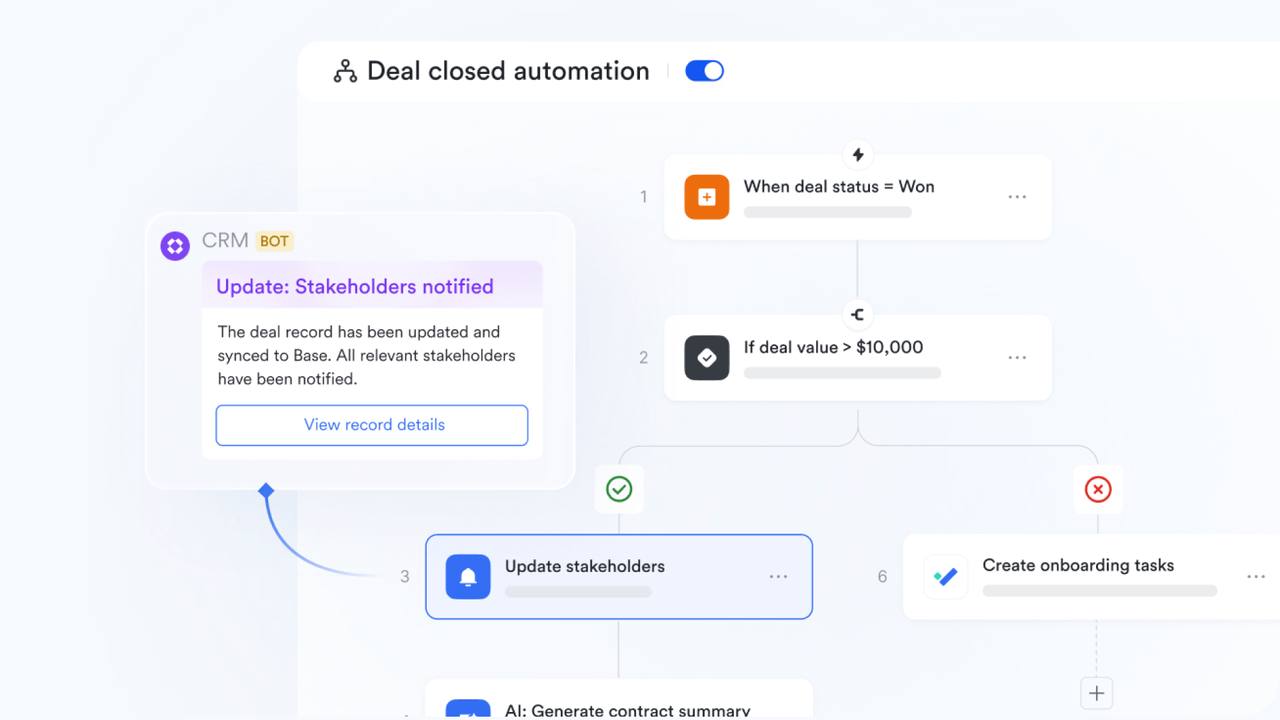
turns theoretical task allocation into operational reality, directly supporting the "human-on-the-loop" model. Instead of relying on manual data entry, teams can use —a flexible, relational database—alongside built-in .
For example, a procurement manager can set up a flow where Lark automatically routes incoming vendor requests, updates the database, and . The AI handles the repetitive data processing, while the human manager simply reviews the flagged data and clicks "approve" directly within their chat window. The system does the heavy lifting, but the human provides the necessary judgment without ever leaving their conversation.
Enhancing global teamwork with built-in AI translations
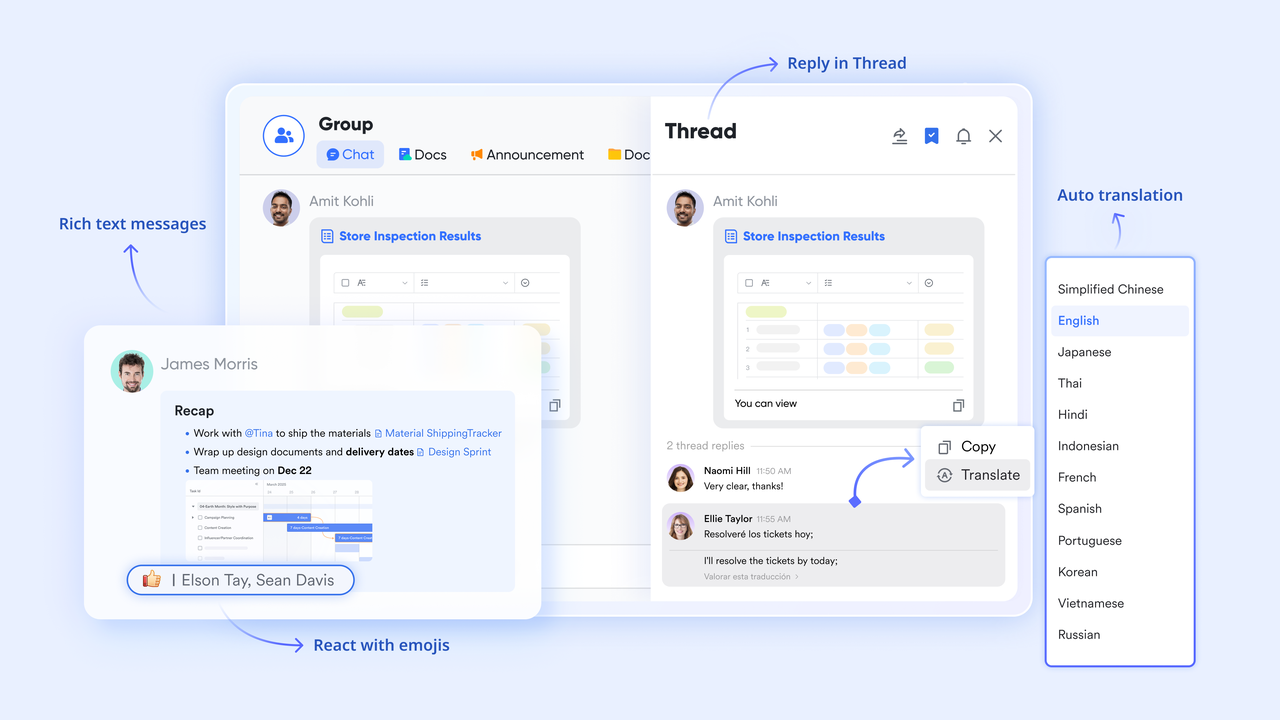
True collaboration relies on empathy and clear communication, which can be challenging for distributed teams. uses AI to support human connection rather than replace it.
Even on its free Starter plan, Lark offers . When a product manager in London and a developer in Tokyo collaborate on a video call or in a group chat, Lark translates the conversation in real-time. The AI handles the language processing, while the human workers retain complete control over their tone, nuance, and sensitive business choices. It transforms the human-AI collaboration workplace by removing technical barriers to genuine human interaction.
Consolidating context with Lark Docs and Wiki
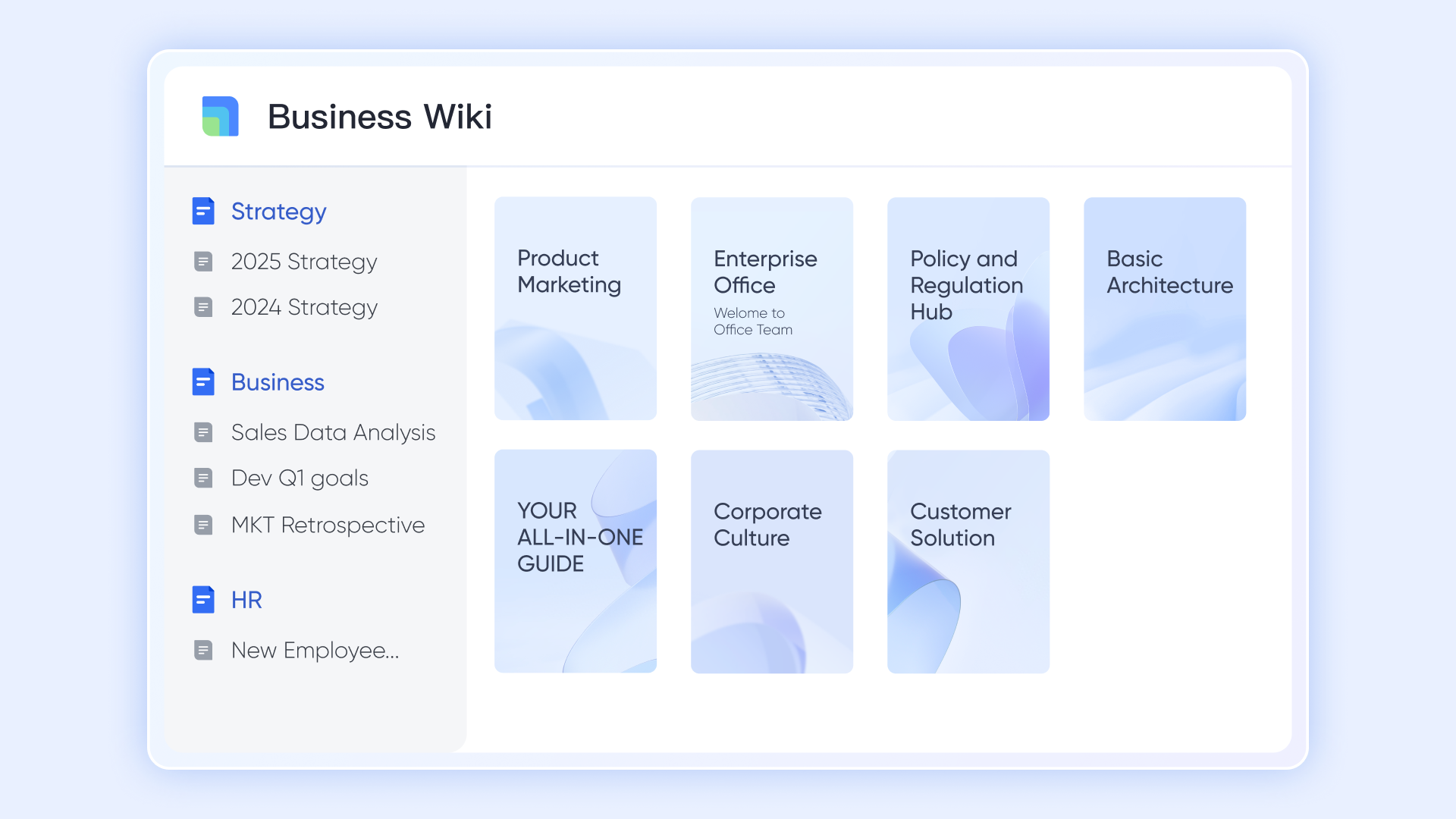
When we discussed how to audit AI-human collaboration quality earlier, traceability was a core requirement. Fragmented tools make auditing impossible. (cloud-native documents and sheets) and the integrated solve this by keeping all project specs, , and right next to the team chat.
Because all work artifacts are centralized, teams can easily trace the history of a document. You can see the initial AI-assisted draft, review the subsequent human revisions, and maintain the historical context needed for future decision-making. Your team finds what they need instantly, and the AI has the exact context required to help them work faster.
Streamlining decisions with Lark Meetings and AI summaries
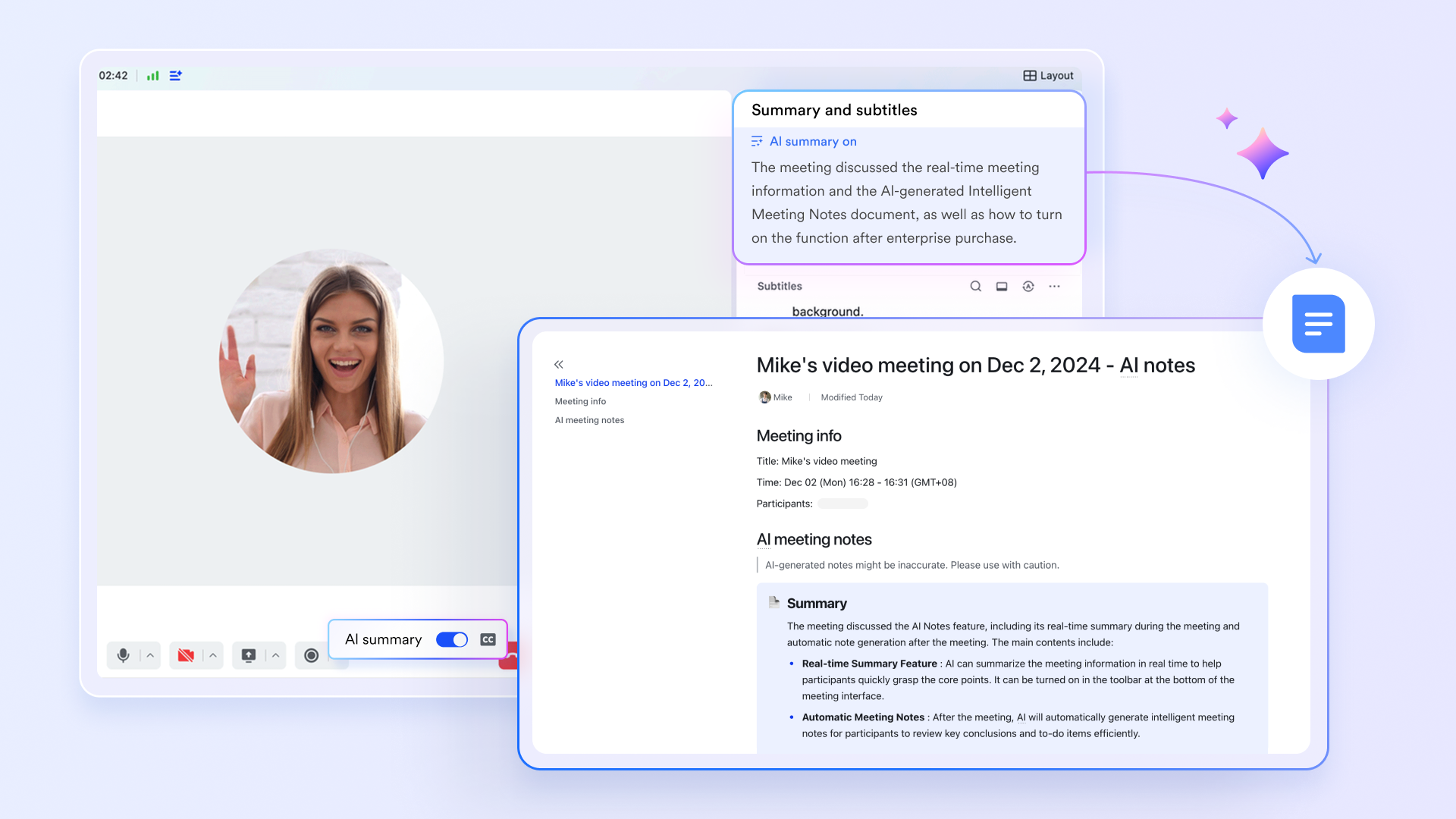
When hybrid teams jump from video calls to separate task management apps, critical action items often fall through the cracks. prevents this context loss by embedding AI directly into your video conferencing experience, flawlessly executing the "AI drafts, human decides" collaboration model.
During a virtual call, the platform provides real-time transcription. The moment the meeting ends, 's AI instantly , extracting key decisions and formatting the next steps into a clear list. Instead of a project manager wasting 30 minutes synthesizing manual notes, the AI handles the administrative drafting. The human manager simply reviews the AI-generated document for accuracy, adds any missing strategic nuance, and assigns the tasks to team members—all within the exact same workspace. The machine acts as the ultimate administrative assistant, leaving the human free to focus on actual leadership.
is highly regarded in the market, holding a and a . Its pricing structure significantly lowers the barrier to entry for teams wanting to test unified workflows:
- Starter plan: Free forever plan with 11 powerful tools for up to 20 users, 100GB storage, 1,000 automation runs, AI translations, and more. No credit card needed.
- Basic plan: $6/user/month (billed annually) for up to 500 users. Includes everything in Starter plus unlimited message history, 5TB storage, 1,000 automation runs, and more. Some users may need to to purchase.
- Pro plan: $12/user/month (billed annually) for up to 500 users. Includes everything in Basic plus group calling for up to 500 attendees, 15TB storage, 50,000 automation runs, and more.
- Enterprise plan: for custom pricing. Supports unlimited users and includes advanced automation, security, compliance, and management features.
For small teams with simple communication needs

18 months message history
1000 Base automation runs/month
2000 rows per table in Base
Most POPULAR
For companies with comprehensive collaboration and management needs
Unlimited message history
500-participant video meetings
50k Base automation runs/month
20k rows per table in Base
For large companies with advanced security and organizational management needs
Get a personalized demo and pricing
Unlimited message history
500-participant video meetings
15 TB storage + 30 GB storage/user
500k Base automation runs/month
50k Base automation runs/month
Most POPULAR
For companies with comprehensive collaboration and management needs
Unlimited message history
500-participant video meetings
50k Base automation runs/month
20k rows per table in Base
Discover how Lark empowers global enterprise teams efficiently
The future of human AI collaboration will be workflow-first
If you look past the speculative thought leadership defining the future of human-AI collaboration, a very practical reality emerges. The next phase of workplace technology is not about replacement narratives; it is about designing repeatable, safe operational models.
We are moving away from treating AI as a magic substitute for human judgment. Instead, the strongest teams will treat AI as a specific role within their existing systems. AI will become deeply embedded into the planning, search, and approval layers of our workspaces. To prepare for this, leaders must adopt a workflow-first mentality. Start small: pick one administrative bottleneck, establish a clear audit method, and move that process into a .
Conclusion
Effective AI and human collaboration depends on matching the right operational model to the right task, while keeping humans strictly accountable for final judgments. You cannot achieve this if your team relies on scattered applications that destroy context across your daily workflows. True productivity comes from combining human oversight, AI assistance, and unified execution. If you are evaluating the best software for human-AI collaboration at work, look for a platform where communication, governance, and document creation live in one place. Try ’s free Starter plan today to build a centralized workspace that actually supports your team.
Experience the best all-in-one collaborative workspace
FAQs
What is Agentic AI?
Agentic AI, or autonomous AI agents, refers to systems that can take specific actions within a software environment to achieve a goal, rather than just generating text based on a prompt. Instead of waiting for step-by-step instructions, an agentic system can search a database, evaluate the findings, and trigger a follow-up action (like sending an alert) independently.
Will AI replace human collaboration in the workplace?
No. According to extensive research, including perspectives from MIT Sloan, AI complements human output but cannot replace complex problem-solving. AI handles repetitive data processing and rapid drafting, but human empathy, ethical oversight, and strategic business judgment remain absolutely necessary for successful operations.
What skills do humans need to work with AI?
As AI takes over routine data generation, human workers need to develop strong credibility assessment skills to catch AI hallucinations. Additionally, prompt engineering, critical thinking, empathy, and the ability to design clear workflow structures are becoming the most valuable skills for modern employees.
Why is tool fragmentation bad for AI adoption?
Jumping between a separate chat application, a standalone document editor, and an external AI generator causes a complete loss of workflow context. When tools are fragmented, AI cannot access the full history of a project, human reviewers lose track of what the AI generated versus what a human edited, and auditing the quality of the work becomes impossible.
Related reading