Time tracking inside Jira looks simple on the surface—log hours against an issue, pull a report, and export it if needed. But the moment you try using Jira as a full-scale timesheet system, most teams quickly realize that plugins, approvals, reporting add-ons, and admin-heavy workflows suddenly take over.
This guide explains precisely how the Jira timesheet works, how teams typically use it, the fundamental limitations they face, and when it makes sense to adopt a unified alternative like Lark. Whether you manage engineers, cross-functional teams, billable clients, or internal projects, this breakdown helps you choose the right way to track hours without drowning in configuration debt.
Track and manage time without efforts
What is a timesheet in Jira?
A timesheet in Jira is a structured record of all work hours logged by users against issues, tasks, epics, and projects. While Jira includes basic time-tracking fields, most teams rely on plugins to turn these entries into organized, reviewable timesheets. The most widely used option is the Tempo Timesheet Jira plugin, which adds views for daily or weekly logs, approvals, cost rates, billable hours, and . A timesheet in Jira helps teams connect time spent directly to Agile workflows, enabling tracking against estimates, sprint planning, and project budgeting.
Each entry includes details such as the task worked on, duration, remaining estimate, and work description. Timesheets can then be exported for reporting, invoicing, payroll, or compliance needs. Overall, Jira's timesheet model works best for engineering and product teams that already operate within and need detailed visibility into where time is spent.
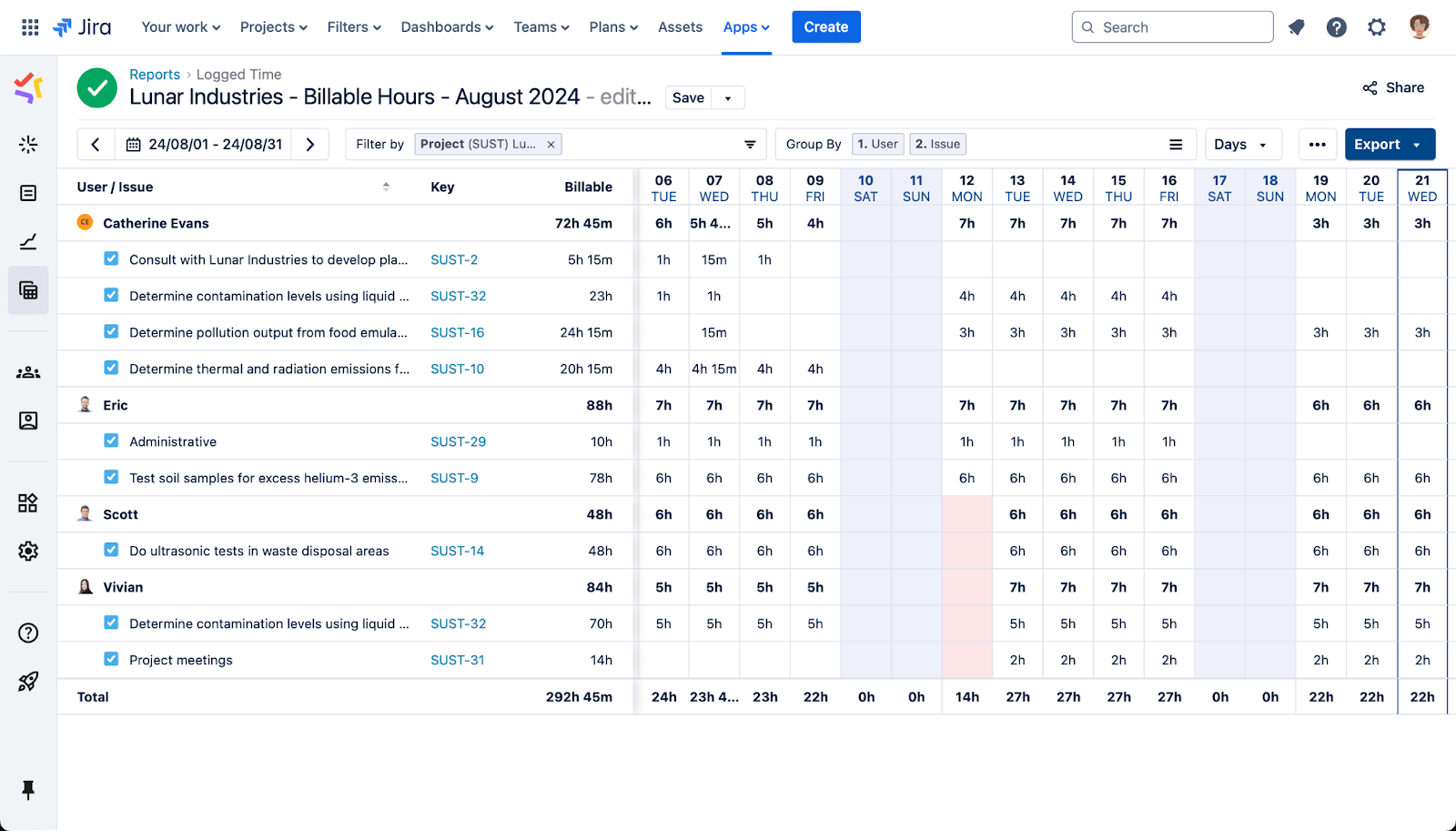
Image source: atlassian.com
How teams use Jira timesheet tracking in practice
Teams use Jira timesheet tracking to connect everyday work with , helping managers see how effort is distributed across tasks, sprints, and broader project goals. By maintaining consistent logging habits, teams ensure data remains accurate enough for forecasting and resource planning. This also supports sprint reviews, where teams analyze time spent and adjust future commitments. Many organizations incorporate approvals or pre-defined rules to maintain governance over logged entries. Overall, this practice helps teams stay accountable and aligned without disrupting their existing workflow.
- Logging hours against tickets & tasks: Teams typically log hours directly on individual issues so every minute of work is tied to a straightforward task, making more transparent and organized. This method helps managers understand progress, spot blockers, and refine estimates with factual evidence from the field. It also ensures that time is mapped accurately to epics and project components for better workload distribution. Because of this structured approach, a timesheet Jira setup becomes a reliable foundation for team accountability.
- Daily vs. weekly submission routines: Some teams require daily time logging to ensure precision, while others prefer weekly reviews in which members submit all entries in a single consolidated cycle. Weekly routines often require reminders or remember to fill in gaps from earlier days. These patterns depend on company culture, compliance needs, and manager oversight. Tools like Jett - timesheet entry - Jira help standardize whichever routine a team adopts while keeping submissions consistent.
- Retroactive timesheet entry behavior: Retroactive time entry happens when users log hours for past days, usually because work was done but not recorded on time. While common, this can reduce accuracy in report-driven environments where time-sensitive data matters. Managers often enforce cut-off dates or approvals to prevent significant delays in logging. This behavior underscores why a structured timesheet in Jira is essential for maintaining reliable records.
- Linking logged time to sprints and releases: Teams frequently align logged hours with sprints and releases to understand how effort contributes to major milestones and deliverables. This allows leaders to evaluate sprint capacity, identify overruns, and improve estimation accuracy. The linkage also helps in analyzing which phases of development consume more resources. Solutions like Tempo Timesheet Jira make this association clearer and easier to report on.
- Challenges for cross-functional teams: Non-engineering teams often find Jira's overly technical, leading to uneven adoption across departments. Marketing, support, and operations teams may struggle with ticket-based workflows that don't match their natural way of working. This leads to inconsistent participation and unreliable time data when teams operate outside software development norms. Such gaps directly affect the accuracy of reports and timesheet Jira outputs across the organization.
Tempo timesheet Jira: The most common extension
Tempo is widely adopted because it transforms Jira's basic worklogs into a complete, structured timesheet system that supports real operational needs. Teams appreciate how seamlessly it integrates with Jira issues, sprints, and workflows, allowing time tracking to feel like a natural part of daily task updates. Its dashboards and reports give managers real visibility into , utilization, and budget consumption. Tempo also supports governance through approvals, roles, and configurable permissions that many organizations require. Overall, it provides the control, structure, and depth that larger or billable teams need from a professional timesheet solution.
Capabilities:
- Manual and timer tracking: Tempo supports both manual entry and start–stop timers, giving users flexibility depending on their working style. Developers who multitask can quickly switch timers, while others can enter hours at the end of the day. This makes it easier to maintain accurate logs without relying solely on memory. The dual method helps teams improve compliance and reduce the likelihood of missing entries.
- Approval flows: Tempo includes that allow managers to review, approve, or reject submitted timesheets. This is especially useful for billing teams, regulated industries, or organizations that require verified data. Approvals ensure that all entries comply with internal rules before they are used for payroll or invoicing. The structured review process improves accountability across the team.
- Cost rates: Tempo allows organizations to assign cost rates to users or roles so that hours automatically translate into financial insights. This enables teams to calculate project costs, profitability, and budget usage with greater precision. Managers can quickly understand where resources are being consumed and whether project spending aligns with expectations. This financial connection makes Tempo attractive for service-based teams.
- Role-based reports: Tempo provides detailed reports tailored to different roles—team leads, finance, project managers, and executives. Each group can filter and analyze time data based on what matters most to them, whether that's utilization, billables, or project progress. This ensures that stakeholders can access insights without manually compiling data. The clarity of role-aligned reporting is one of Tempo's most substantial advantages.
Adoption friction:
- Learning curve: Despite its benefits, Tempo has a steep learning curve due to its many features and configuration options. New users may find the interface complex, especially when navigating approvals or . Admins must also map fields and workflows correctly to avoid inconsistencies. This setup time can slow adoption among teams unfamiliar with advanced time-tracking systems.
- Admin workload: Tempo's depth means administrators must manage permissions, cost rates, worklog rules, and approval cycles. Maintaining these settings—especially for larger teams—requires ongoing attention. When projects or roles change, admins must update configurations to keep data accurate. This operational overhead is a common reason why some organizations seek simpler solutions.
- Plugin costs: Tempo is a paid plugin that scales with team size, making it a significant expense for growing organizations. Many teams also need multiple Tempo modules or additional add-ons to cover all reporting and invoicing needs. Over time, these cumulative plugin fees can exceed the base Jira subscription cost. Budget-conscious teams often reevaluate whether the feature set justifies the investment.
How to use Tempo in Jira
Step 1: Navigate to the apps section in Jira: The process begins on your Jira dashboard, which serves as your central project hub. In the left sidebar of the dashboard, click the Apps option to open the gateway to your Jira's enhanced functionality.
Step 2: Access the marketplace and search: Once inside the Apps section, click the Explore More Apps option to open the marketplace. Use the search bar and type in Time Sheets by Tempo. This add-on is specifically designed to integrate with Jira for accurate time tracking.
Step 3: Install or try the tool: After finding Time Sheets by Tempo, click on it to view its details, then choose the option to either try it for free or install. If you opt for full installation, be sure to select the annual pricing plan as you use annual pricing.
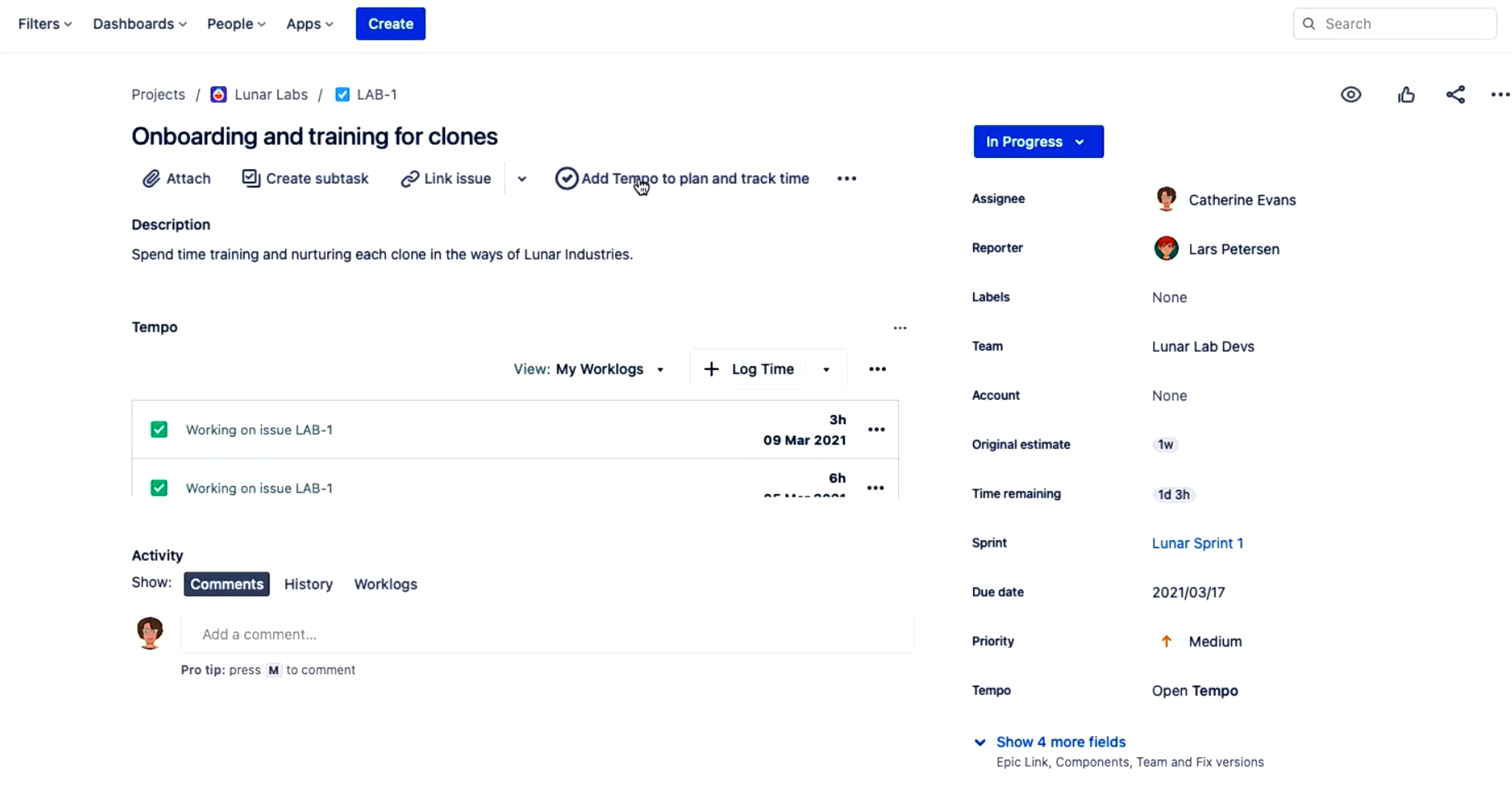
Image source: atlassian.com
Step 4: Complete configuration and installation: Follow the instructions provided for installation. These will include granting permissions and selecting the projects you want to link. Once the configuration is complete, you will have successfully connected Time Sheets by Tempo to your Jira environment.
Step 5: Log time quickly from the dashboard: You can now log time in Tempo without leaving Jira. From most places, like your dashboard, simply press the W key, and the log time form will pop up. Select an issue, enter the hours worked, and click log time.
Step 6: Log or edit time from a Jira issue: Alternatively, open a specific Jira issue. You can click the Tempo button to display the panel or click "Open Tempo" to open the side panel, where you can click Log Time or edit a previous record to update the hours.
Learn how to simplify and speed up your daily tasks
Reports and timesheet Jira teams rely on
Teams depend heavily on Jira's reporting capabilities to understand how work hours align with project goals, sprint commitments, and financial expectations. These reports help identify bottlenecks, , and maintain transparency across teams. Managers use them to analyze historical trends, forecast workloads, and guide resource decisions. They also play a significant role in compliance and billing cycles for organizations handling client work. Because of this, reports and timesheet Jira features are considered essential for operational visibility.
- Logged vs estimated hours: Teams use this comparison to measure how actual work aligns with planned estimates and to refine future forecasting. It helps identify tasks that consistently run over or under expectations. This insight allows managers to adjust and improve accuracy over time. Many rely on Jira Tempo Timesheet tools to visualize these variances clearly.
- Team utilization: Utilization reports show how effectively team members are spending their available hours across projects and internal work. Leaders use these metrics to prevent burnout, identify under-allocation, and optimize staffing. It also helps in distributing workloads more fairly across roles. This analysis depends on consistent timesheet tracking for Jira entries from all contributors.
- Billable vs non-billable: Teams track billable and non-billable hours to understand revenue generation and internal operational effort. This distinction is crucial for service companies that invoice clients based on worklogs. It also helps finance teams evaluate the effort spent on support, training, or internal initiatives. These insights come from structured reports and timesheet Jira data.
- Sprint costs: By linking hours to cost rates, teams can understand the financial value of each sprint and evaluate budget adherence. This helps leaders identify which sprint phases consume the most resources. It is beneficial for project managers who want deeper financial transparency. Many teams depend on Jira Tempo Timesheet capabilities to calculate these cost-driven insights.
- Client invoicing preparation: Accurate client invoices require organized worklogs, billable tagging, and clear time summaries. Teams consolidate these logs to ensure clients are billed correctly and on schedule. This workflow demands consistency and validation from all team members. in Jira simplifies the pre-invoicing process.
Limitations:
- Report fragmentation across plugins: Jira's reporting often becomes fragmented because different plugins handle different aspects of time tracking. Teams may need to jump between dashboards, exports, and add-ons to piece together insights. This scattered structure slows down analysis and complicates audits. Such limitations are recurring complaints in reports and timesheet Jira workflows.
- Export-heavy workflows: Many teams rely on exporting data to spreadsheets because native reporting doesn't always meet deeper analytical needs. This creates manual overhead for managers who prepare monthly or client reports. It also increases the risk of errors during copy-paste or manual data cleaning. These gaps often appear even for teams using Jira Tempo Timesheet extensions.
- Manual reconciliation for payroll/finance: Payroll teams frequently combine Jira logs with HR or finance systems to calculate payouts or . This manual reconciliation consumes time and increases the chances of mismatch or outdated entries. Finance departments often need additional tools to verify accuracy. These pain points arise from fragmented timesheet tracking for Jira usage across teams.
Strengths of the Jira timesheet approach
The Jira timesheet approach offers several advantages for teams already operating within an Agile or ticket-driven environment. Because all work is captured through issues, time tracking becomes a natural extension of existing rather than an added burden. This creates consistency in how hours are recorded, reviewed, and analyzed across teams. It also provides deeper visibility into progress, costs, and resource usage at the task or feature level. As a result, organizations gain structured, traceable, and disciplined time data that enhances both reporting and decision-making.
- Agile alignment: The Jira timesheet approach ties seamlessly into because every task is already tracked through issues and sprints. Teams can log hours during daily workflows without switching tools or changing habits, which maintain momentum. This connection reinforces planning, estimation, and retrospectives by grounding discussions in real-time data. Ultimately, it keeps Agile execution and time tracking tightly connected.
- Ticket-based tracking discipline: By requiring time to be logged against specific issues, Jira enforces a disciplined, traceable structure for all work activity. This minimizes ambiguity and ensures every hour is linked to a defined task or deliverable. Managers gain clearer insights into progress and dependencies, improving project control. Over time, this creates cleaner records that support audits, reviews, and long-term analysis.
- Cost attribution by feature: Logging hours against epics, components, or features allows teams to understand the actual cost of developing each part of a project. This level of granularity helps leadership make informed decisions about prioritization and investment. It also supports by highlighting where resources are most heavily allocated. Such visibility is especially valuable for product and finance teams managing multi-feature roadmaps.
- Integration into sprint review routines: Time entries feed directly into sprint reviews, allowing teams to compare planned versus actual effort for each iteration. This insight improves estimation accuracy and highlights areas where processes need refinement. Having real-time data available during retrospective discussions leads to more actionable improvements. This integration strengthens the continuous improvement mindset central to Agile teams.
Limitations of Jira time tracking
While Jira offers a structured way to log work, many teams find that its native time tracking is too limited for real operational needs. Core features like approvals, utilization summaries, and financial metrics often require additional plugins, increasing costs and complexity. The system also demands careful configuration to avoid inconsistencies across projects and issue types. Non-technical teams frequently struggle with Jira's , which feels unfamiliar compared to simpler time-entry tools. These challenges make Jira highly effective for engineering teams but less adaptable for broader organizational use.
- Plugin dependency for full functionality: Jira's built-in worklogs cover only the basics, forcing teams to install plugins for approvals, cost tracking, utilization reports, or invoicing. This dependency not only increases subscription expenses but also adds ongoing maintenance responsibilities. When multiple plugins are stacked, data becomes fragmented across dashboards and menus. Over time, organizations may find themselves managing more add-ons than the core tool itself.
- Admin-heavy setup: Configuring Jira for dependable time tracking requires significant administrative effort, including custom fields, permissions, workflows, and plugin settings. Changes to roles or often require additional reconfiguration to maintain consistency. As teams grow, admins must regularly monitor setups to ensure compliance and accuracy. This operational overhead can be cumbersome for companies without dedicated Jira specialists.
- User friction during logging: Because Jira requires users to navigate issues and fields before logging in, the process can feel slow or unintuitive, especially for those not accustomed to ticket-driven work. Many users postpone logging until the end of the day or week, increasing inaccuracies. The interface can also feel overwhelming when tasks span multiple sub-issues or components. Such friction reduces the likelihood of timely and consistent entries.
- Delayed entries are reducing accuracy: When team members log time retroactively, it becomes challenging to maintain accurate historical data. Delays lead to estimates based on memory rather than actual activity, weakening . This impacts sprint reviews, budget tracking, and resource planning. Over time, data quality deteriorates, even when plugins are used.
- Clearly, technical workflows are unsuited to marketing, sales, and ops teams: Non-engineering functions often struggle with Jira because their work doesn't naturally fit into issue-based workflows. Marketing tasks, sales activities, or operations work usually move faster and don't break down neatly into tickets. These teams may skip logging or rely on spreadsheets, creating data gaps. As a result, Jira's time-tracking model becomes inconsistent across the organization.
Why do modern teams consider simpler timesheet solutions? Many teams need time tracking that works across development, operations, client support, marketing, and finance simultaneously, without deploying specialized plugins for each role. They also minimize training time, avoid plugin-related costs, and ensure all departments contribute reliable time data. Ultimately, teams look for solutions that and reporting instead of adding complexity.
Free yourself from these limitations today
New solution: Use Lark as a unified platform for timesheet tracking
offers a unified workspace where timesheets, tasks, , and reporting all live in one connected system, eliminating the need for multiple plugins or external add-ons. Teams benefit from having their work structured around shared data sources rather than jumping across separate tools for time entry, approvals, or dashboards. Lark Base provides for tracking hours, while Lark Tasks ensures every time entry is tied to work that is clearly defined. Calendar, Approval, and Sheets form an ecosystem that , reviews, and calculations without added complexity.
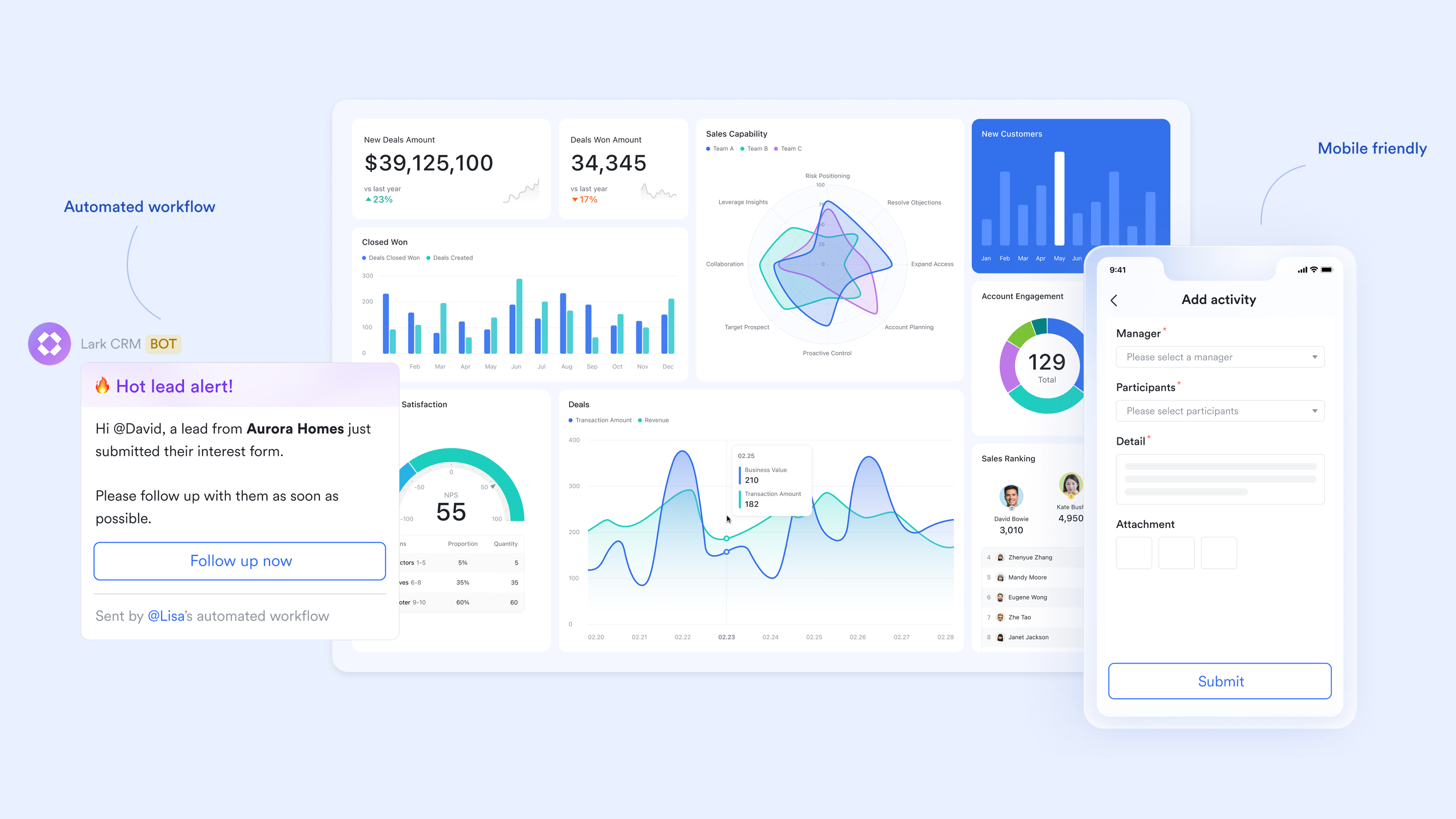
Smart attendance function generates employee timesheets
simplifies the production of employee timesheets by providing a clear process for verification. As an administrator, you can generate timesheets either by synchronizing data directly from existing attendance reports (specifically, Summary records) or by uploading an Excel file containing manual attendance inputs. Once basic information is generated, the timesheet is sent to team members for verification in the Lark mobile app. This process ensures transparency and allows you to easily view, track the verification status, and export all timesheets and supporting vouchers for payroll and auditing purposes.
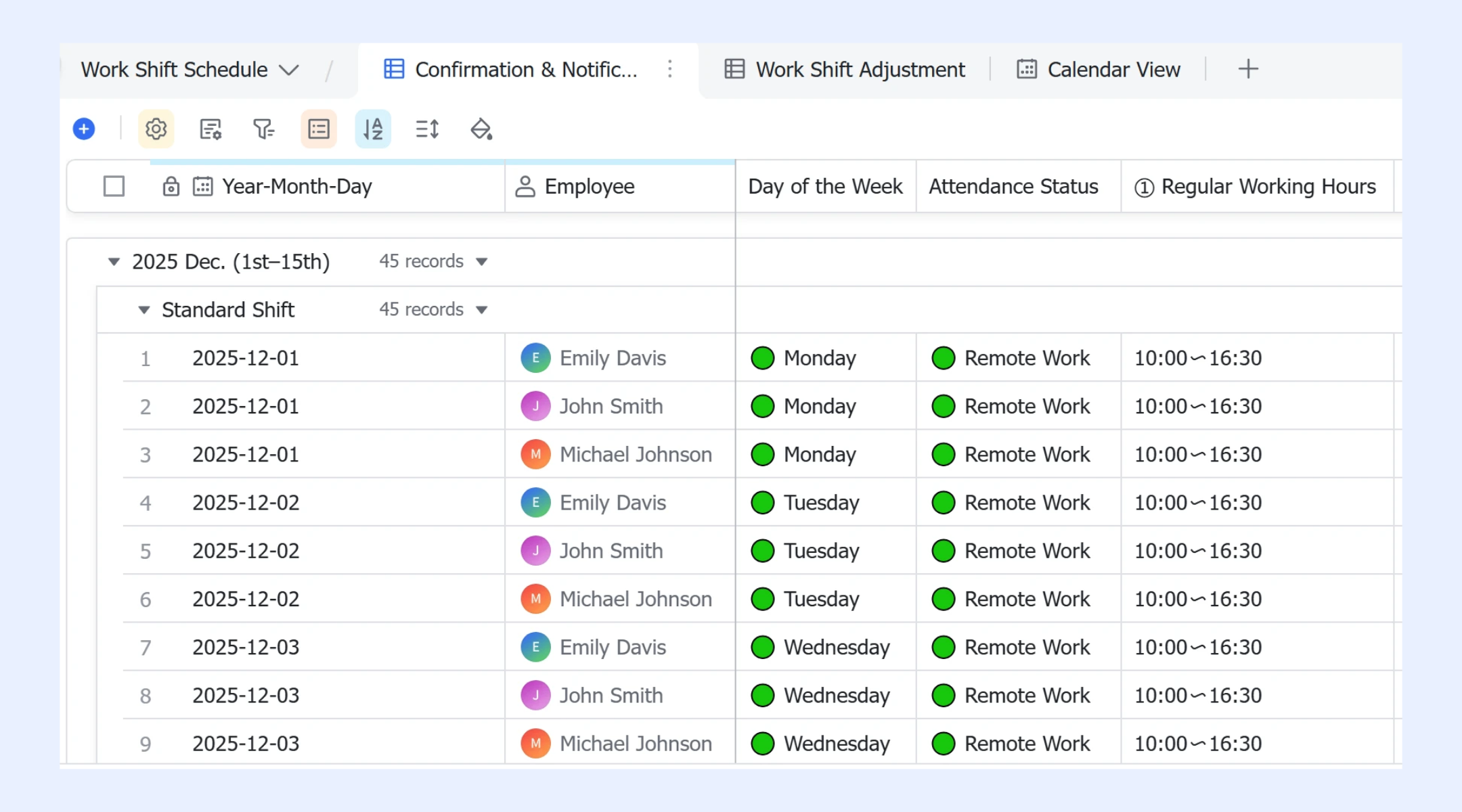
Teams can log time with ease when their system keeps it simple
enables teams to build flexible timesheet tables where employees log hours daily or weekly with minimal friction. Managers can customize fields for projects, tasks, billable status, and approval states without technical setup. Automation in Base validates entries, routes submissions for review, sends reminders for missing logs, and updates statuses automatically, reducing manual coordination and late reporting. Teams can also use the Gantt view to visualize planned versus logged work across timelines, helping managers spot schedule gaps, over-allocation, or underutilization at a glance. Because task updates flow directly into Base records, time entries stay continuously aligned with real work progress—eliminating duplicate data entry while maintaining accurate, up-to-date timesheets. 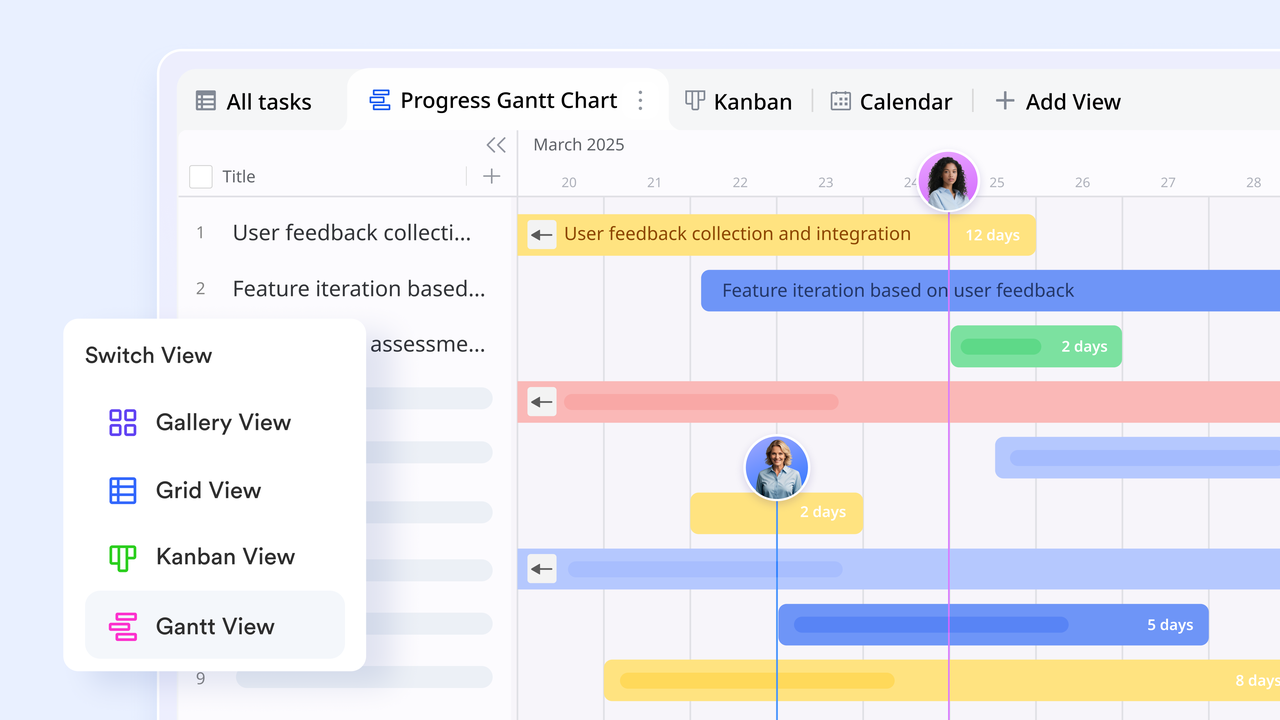
Work becomes easier to manage when tasks and time stay in sync
Lark Tasks helps teams organize work using for daily execution and Gantt charts for timeline planning, giving managers clear visibility into ownership, priorities, and deadlines. While time entries are recorded separately in Lark Base, teams use consistent task IDs, names, or assignees to associate logged hours with corresponding work items for reporting and analysis. Task status changes and schedule updates provide essential context when reviewing timesheets, making it easier to verify how time was spent across projects. This connected workflow keeps task progress and time tracking aligned without relying on unsupported direct linking features or extra plug-ins. 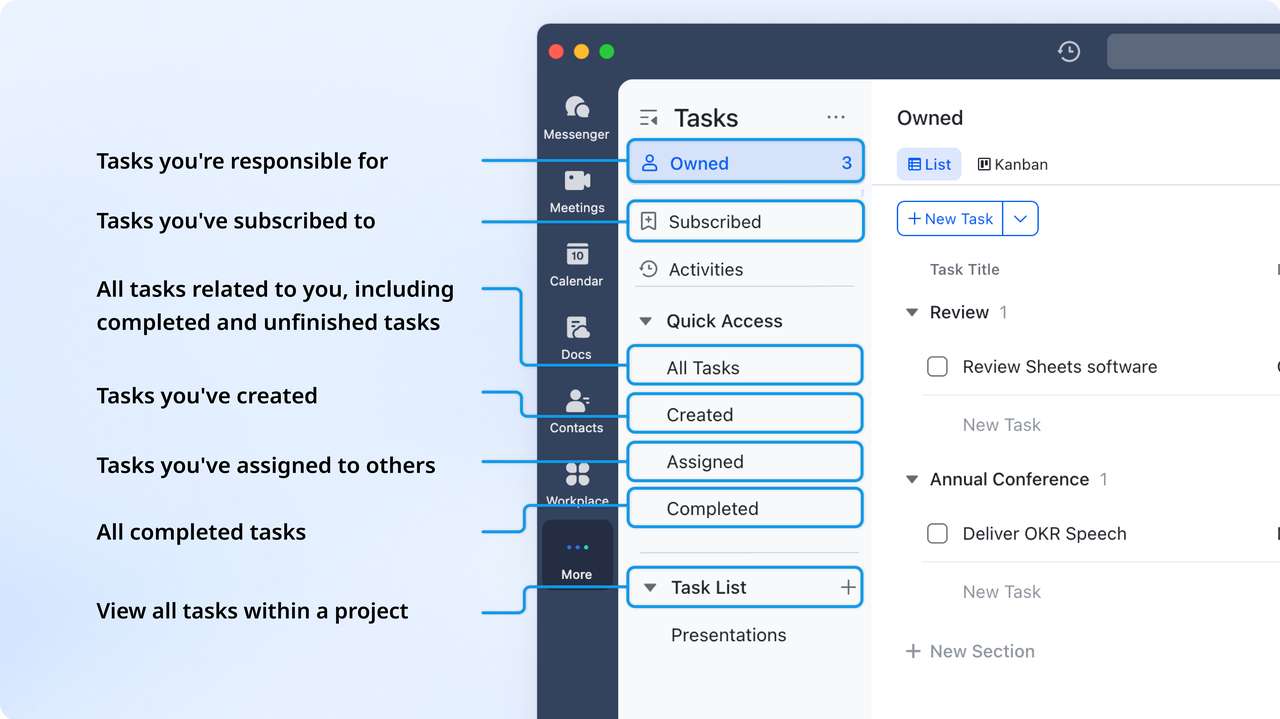
Planning workloads becomes smoother when calendars guide the day
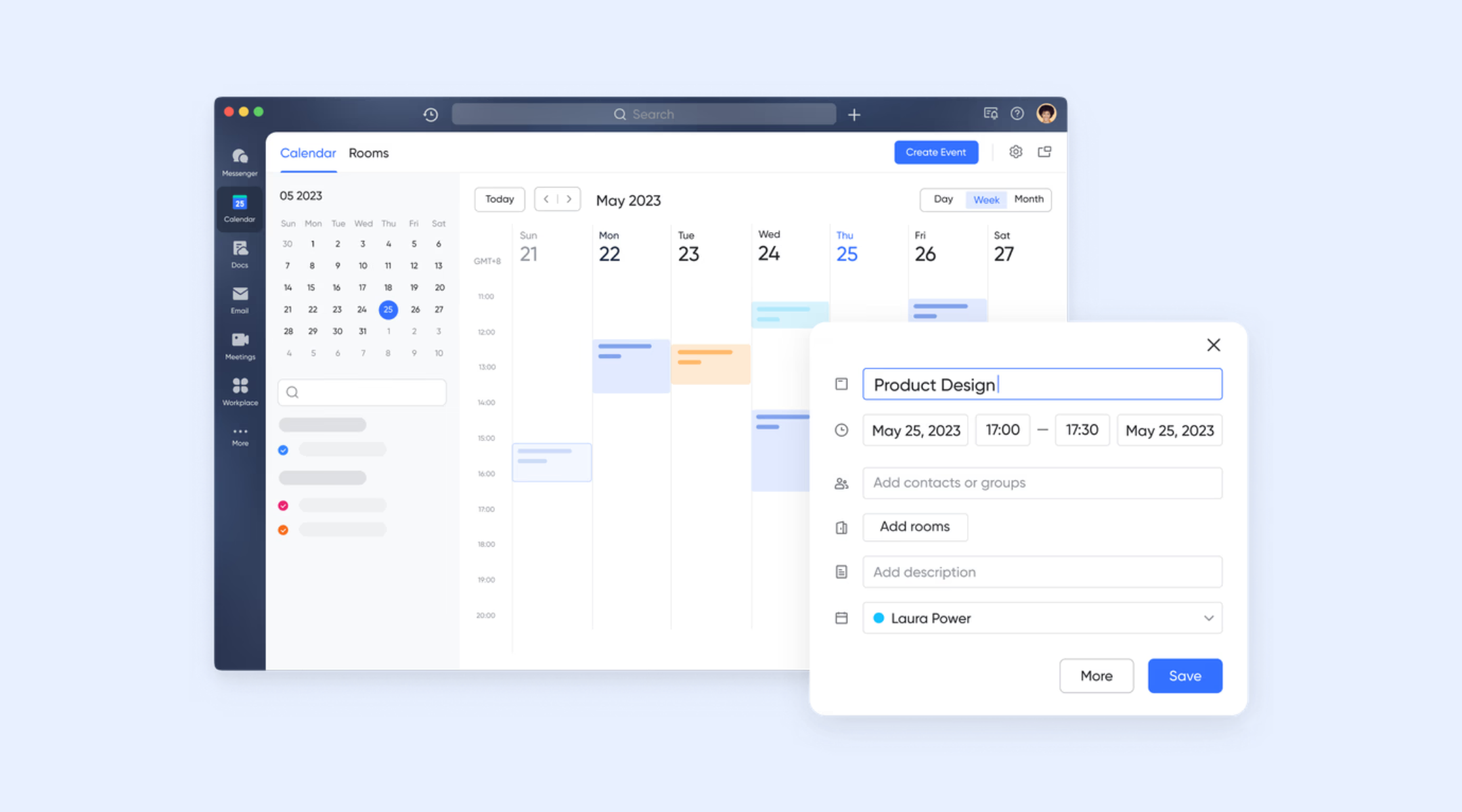
helps teams coordinate schedules, plan workloads, and understand availability before assigning tasks and time expectations. By linking tasks and events directly to the calendar, teams can align hours with meetings, , and recurring activities. This reduces scheduling conflicts and improves visibility for managers planning capacity. As a result, teams manage their timelines with greater accuracy and fewer surprises.
Payroll becomes effortless when automation connects time tracking and approvals
Lark simplifies payroll preparation by using automation across Lark Base and to move verified timesheet data through review workflows without manual handoffs. Teams record working hours in Lark Base, where formulas calculate totals, overtime, and allowances automatically. When entries reach submission or cutoff status, Base automation can trigger approval requests in Lark Approval, routing them to designated managers or finance reviewers. Once approvals are completed, automated status updates sync back to Base so only verified time records appear in . This automation-driven flow removes duplicate checks, reduces manual reconciliation, and ensures payroll teams always work from clean, validated timesheet data. 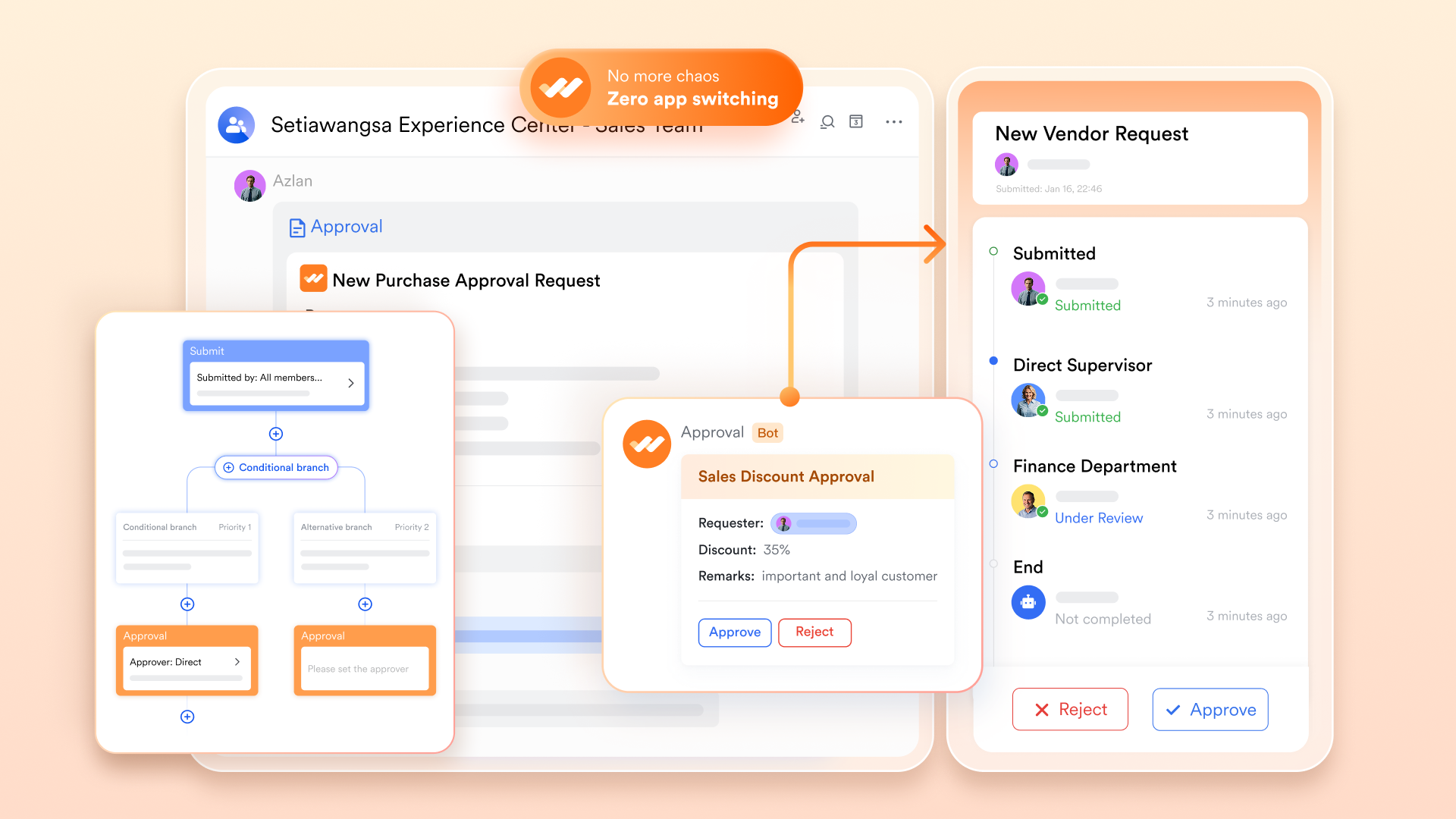
Reporting becomes easier when teams start with ready-made timesheet templates
Rather than building reporting structures from scratch, Lark provides a wide library of specifically designed for time management and work tracking. These templates include daily timesheets, weekly work logs, attendance trackers, project time allocation plans, and overtime summaries—all fully built on Lark Base and Lark Sheets. Teams can deploy a template instantly, customize fields to match their processes, and begin tracking time within minutes. Because templates already include formulas, grouping logic, and validation rules, they eliminate setup complexity and ensure consistent reporting across teams. :
- Starter plan: Free forever plan that includes 11 powerful tools for up to 20 users. It also comes with 100GB of storage, 1000 automation runs, AI translations, and more.
- Pro plan: $12/user/month (billed annually) for up to 500 users. It includes everything in Starter plus group calling for up to 500 attendees, 15TB of storage, 50,000 automation runs, and more.
- Enterprise plan: for custom pricing. Supports unlimited users and includes even more automation runs and advanced security, compliance, and management features.
For small teams with simple communication needs

18 months message history
1000 Base automation runs/month
2000 rows per table in Base
Most POPULAR
For companies with comprehensive collaboration and management needs
Unlimited message history
500-participant video meetings
50k Base automation runs/month
20k rows per table in Base
For large companies with advanced security and organizational management needs
Get a personalized demo and pricing
Unlimited message history
500-participant video meetings
15 TB storage + 30 GB storage/user
500k Base automation runs/month
50k Base automation runs/month
Most POPULAR
For companies with comprehensive collaboration and management needs
Unlimited message history
500-participant video meetings
50k Base automation runs/month
20k rows per table in Base
Jira vs Lark: Timesheet comparison summary
Final verdict
Jira timesheets work best for engineering teams already embedded in the Atlassian ecosystem who need highly structured, ticket-based time tracking tied directly to development workflows. With plugins like Tempo or Jett, Jira provides detailed logging, sprint cost analysis, and advanced governance—but this comes at the cost of added setup complexity, ongoing admin effort, and rising per-user expenses. For outside core development, adoption can be slower due to technical interfaces and fragmented collaboration across multiple tools.
Lark, on the other hand, is better suited for modern, multi-department teams that want faster setup, lower overhead, and truly connected workflows. Native tools combine time logging, task management, approvals, reporting, documentation, and in one workspace, eliminating the need for timesheet add-ons. This unified approach simplifies adoption for marketing, sales, ops, and support teams while still supporting QA and engineering needs.
Boost overall time management across teams today
Conclusion
Jira's timesheet ecosystem offers substantial advantages for engineering-driven teams, especially those deeply invested in Agile workflows, , and issue-based tracking. With plugins like Tempo, teams gain structured logging, approval flows, cost tracking, and detailed reporting—though this comes at the cost of added complexity, higher admin workloads, and plugin dependency. As organizations grow more cross-functional, these limitations become more visible, mainly for marketing, sales, support, or operations teams who need simpler ways to track time without navigating technical workflows.
A unified solution like eliminates these challenges by bringing time entry, task management, scheduling, approvals, and reporting into one fully connected platform. Instead of managing multiple plugins, teams get a streamlined system that works for every department with minimal setup and friction. If you're looking for a faster, more intuitive way to manage timesheets without overhead, it's the perfect time to explore Lark and modernize your workflow.
FAQs
Can Jira timesheets be used for payroll processing?
Jira timesheets can support payroll, but only when combined with plugins and exports, which adds more administrative steps. Finance teams often need to reconcile data manually before final processing. Many organizations prefer a unified tool like Lark, where time entries flow directly into payroll-ready sheets for faster, more accurate processing.
How accurate is Jira time logging compared to dedicated trackers?
Accuracy in Jira depends heavily on user discipline, since entries are mostly manual and often logged retroactively. Dedicated trackers offer more , reducing gaps caused by late submissions. Teams seeking fewer delays and cleaner logs usually choose systems like Lark for more reliable time data.
What are the compliance risks of manual time entry in Jira?
Manual logging increases the likelihood of errors, inconsistencies, and backdated entries, creating audit and compliance challenges. Teams must rely on approvals and strict rules to control quality. A centralized workflow like Lark helps reduce risks by combining approvals, , and structured time entry in one place.
How do teams prevent retroactive timesheet manipulation?
Organizations use approval flows, cut-off dates, and reporting audits to limit unauthorized retroactive changes. Jira requires plugins to enforce these controls effectively. Many teams switch to solutions like Lark, where built-in approvals and clear submission timelines keep time data transparent and tamper-resistant.
Can sales and operations teams effectively use Jira time tracking?
Sales, ops, and non-technical teams often struggle with Jira because its workflows are designed primarily for engineering. The ticket-based structure can feel too rigid for fast-moving, cross-functional work. Systems like Lark, with simpler tasks and unified timesheet tools, are easier for these teams to adopt consistently.
Related reading

















