A meeting without a clear roadmap is a direct drain on company resources. Utilizing professional meeting agenda examples is the first step toward transforming aimless discussions into high-impact decision-making sessions. This guide explores versatile templates and proven strategies to help you structure your time effectively, ensuring every participant remains aligned on key objectives. Discover how shifting from static documents to an automated workflow can reclaim your team's productivity and drive measurable business results.
What is a meeting agenda?
A meeting agenda is a structured document that outlines the topics, goals, and timeframes for a scheduled discussion. Its primary purpose is to provide a "North Star" for participants, ensuring that the conversation remains focused on specific outcomes rather than without a plan. In high-stakes environments, reviewing professional meeting agenda examples can help teams move from vague updates to decisive action.
By clearly defining the objectives beforehand, an agenda ensures that every stakeholder arrives prepared. Without this roadmap, meetings often become productivity sinks; however, a well-organized agenda transforms a simple gathering into a high-output session where decisions are documented and is measurable.
Key components of a meeting agenda
Every high-impact agenda, regardless of the meeting type, should include:
- A clear objective: Define exactly what needs to be decided to keep the session productive. Reviewing successful meeting agenda examples shows that a focused goal prevents the conversation from drifting into irrelevant topics, similar to how a keeps a product on track.
- Timeboxed topics: Allocating a specific number of minutes to each item prevents any single issue from dominating the entire schedule. This discipline is a hallmark of professional business meeting agenda examples, used to respect everyone's time while maintaining a strict pace.
- Assigned owners: Designating a lead for each portion ensures someone is responsible for driving resolution. Clear ownership is essential in leadership meeting agenda examples to maintain and accountability among executive stakeholders.
- Required preparation: Listing documents attendees must review reduces time wasted on context-setting. Most effective staff meeting agenda examples include a "pre-read" section so the live session is reserved for actual and decision-making.
- The "Action Item" log: A dedicated space for recording next steps is vital for turning verbal discussions into progress. Integrating a tracker into your project meeting agenda examples ensures that commitments are captured, much like a .
Turn meetings into clear summaries and actionable items
How to write a meeting agenda
Step 1: Define the meeting's purpose
Start by answering one question: What must be different when this meeting ends?
A strong agenda is built around outcomes—decisions made, problems resolved, or actions agreed—not just discussion. Write the purpose in one sentence and place it at the top of the agenda.
Example: "Decide Q2 campaign priorities and assign owners."
Step 2: List the topics that support that purpose
Identify only the topics that directly help achieve the meeting goal. Avoid "nice-to-have" updates that can be shared asynchronously. Each agenda item should justify why it needs live discussion.
Tip: If a topic doesn't require input or a decision, it doesn't belong in the meeting; instead, consider using to keep the team informed without a live call.
Step 3: Assign time limits to each item
Timeboxing keeps meetings focused and prevents any single topic from taking over. Allocate time based on importance, not habit. High-impact decisions get more time; quick updates get less.
Example:
Step 4: Clarify owners and preparation
For each agenda item, note who leads the discussion and what preparation is required. This ensures participants arrive ready and reduces wasted meeting time spent on context-setting. To streamline this process, many teams use a to centralize all pre-read documents in one accessible location.
Example: "Budget review (Owner: Marketing Lead—review attached doc in advance)"
Step 5: End with decisions and action items
Reserve time at the end to confirm what was decided and who is responsible for next steps. Document action items with owners and due dates so the meeting translates into execution.
Example:
- Tasks assigned with deadlines
Final tip
A good meeting agenda is short, intentional, and outcome-focused. If it can't fit on one page, the meeting likely needs a tighter scope or fewer attendees.
Automate follow-ups and arrange post-meeting tasks
Examples of meeting agenda and templates
Team meeting agenda examples (the "standard sync")
Focus: Weekly alignment and team health.
The "standard sync" team meeting agenda is designed for weekly alignment and team health. It begins with a short icebreaker or warm-up round to build rapport and set a positive tone. A quick KPI review follows, offering a fast pulse check on progress toward weekly targets. The meeting then focuses on a single main topic that requires group discussion and problem-solving. Team members share brief 60-second updates on their key priorities to maintain visibility.
Meeting agenda template examples (the "All-purpose format")
Focus: Versatility for ad-hoc sessions.
This meeting structure is designed to drive clear decisions and accountability. It starts with a concise objective statement that defines exactly what must be decided by the end of the meeting. A brief background context section allows participants who missed the pre-read to quickly catch up. The discussion then moves through key points in order of importance, keeping focus on what matters most.
Project meeting agenda examples (the "execution loop")
Focus: Hitting milestones and managing dependencies.
This meeting structure focuses on keeping delivery on track and reducing surprises. It begins with a milestone status check to confirm whether the team is aligned with the next hard deadline. The discussion then surfaces by clarifying what work cannot begin until other tasks are completed. Resource allocation follows, ensuring the team has the right tools, time, and capacity to continue effectively.
Board meeting agenda examples (the "governance strategic")
Focus: High-level fiduciary duty and long-term vision.
This board meeting structure is designed for efficient governance and focused decision-making. It opens with a consent agenda that groups approvals of minutes and routine reports into a single time-saving block. The CEO's report follows, offering a narrative update on the company's overall health and key industry developments. Finance and audit review comes next, covering the P&L, balance sheet, and burn rate to ground discussions in financial reality. A dedicated strategic motion then reserves deep-focus time for one major decision, such as an acquisition or a company pivot.
Business meeting agenda examples (the "external/client sync")
Focus: Relationship management and service delivery.
This client check-in meeting structure is built to reinforce trust and strengthen long-term partnerships. It starts with a recap of past successes to remind the client of the value already delivered. The conversation then moves to a transparent update on the current project status, ensuring clear expectations of progress. A dedicated feedback loop invites the client to share what's working and what can be improved. The meeting closes by reviewing the future , aligning with priorities and goals for the next three to six months.
Examples of meeting agendas for brainstorming (the "creative sprint")
Focus: Divergent thinking and ideation.
This workshop structure is designed to encourage focused thinking and balanced participation. It begins with a clear problem statement that defines the constraint everyone is solving for. Participants then spend time in silent ideation, writing ideas privately to reduce groupthink and surface diverse perspectives. This is followed by rapid-fire idea pitching, where concepts are shared quickly without debate.
Leadership meeting agenda examples (the "strategy & rocks")
Focus: Removing organizational friction at the executive level.
This leadership meeting structure focuses on maintaining organizational health and strategic clarity. It opens with a vitals check that reviews the company scorecard, including revenue, churn, and NPS. The discussion then moves to and employee headlines, capturing key people-related updates in concise one-sentence highlights. Next, the team reviews "Rocks" to track progress on quarterly strategic goals. The meeting concludes with an IDS session, where leaders identify, discuss, and solve the three most pressing issues facing the organization.
Staff meeting agenda examples (the "department pulse")
Focus: Communication for larger internal departments.
This all-hands meeting structure is designed to keep the entire organization informed and aligned. It begins with company news, where leadership shares top-down updates and key announcements. The meeting then encourages department cross-pollination through short updates from different teams, helping everyone understand what others are working on. Policy and process changes are explained clearly, so expectations and "rules of the road" are understood. The session ends with an open Q&A, allowing employees to raise questions either anonymously or live for transparency and trust.
One-on-one meeting agenda examples (the "growth sync")
Focus: Individual career development and direct feedback.
This one-on-one meeting structure is designed to build trust, growth, and alignment. It starts by giving the employee the floor to share concerns, wins, and recent experiences. The manager then provides constructive feedback focused on performance and development. The conversation expands to career growth, addressing long-term goals beyond day-to-day tasks. The meeting closes with a personal check-in on work-life balance and overall well-being, reinforcing a supportive manager–employee relationship.
Sales meeting agenda examples (the "revenue driver")
Focus: Pipeline velocity and hitting quotas.
This sales meeting structure is designed to drive motivation, clarity, and revenue focus. It opens with a leaderboard review to celebrate top performers and highlight notable deals of the week. The discussion then turns to the , with focused attention on stagnant deals that need action or support. Objection handling follows through role-playing exercises that sharpen responses to recent client pushback. The meeting wraps up with marketing alignment, sharing updates on new leads, campaigns, or sales collateral coming from the marketing team.
New option: Use Lark to turn meeting agendas into execution workflows
bridges the gap between static planning and active delivery by transforming every meeting agenda into a dynamic execution engine. Rather than leaving decisions in a document, the platform connects meeting agenda examples with real-time task tracking, AI-powered transcription, and . This unified workspace ensures that every discussion point is instantly actionable, turning your team's conversations into measurable results without the need for manual follow-ups.
The actionable agenda creation hub
serves as the foundational "canvas" for your meeting. Unlike a static document, it supports "Smart Blocks" that allow you to turn any bullet point into a living assignment. By using the "to do" feature and the sync to Lark Tasks function, you can instantly bridge your meeting notes with Lark Tasks. This creates a bi-directional link where the task's progress is visible directly within the original agenda document, ensuring no action item is lost on a static page. 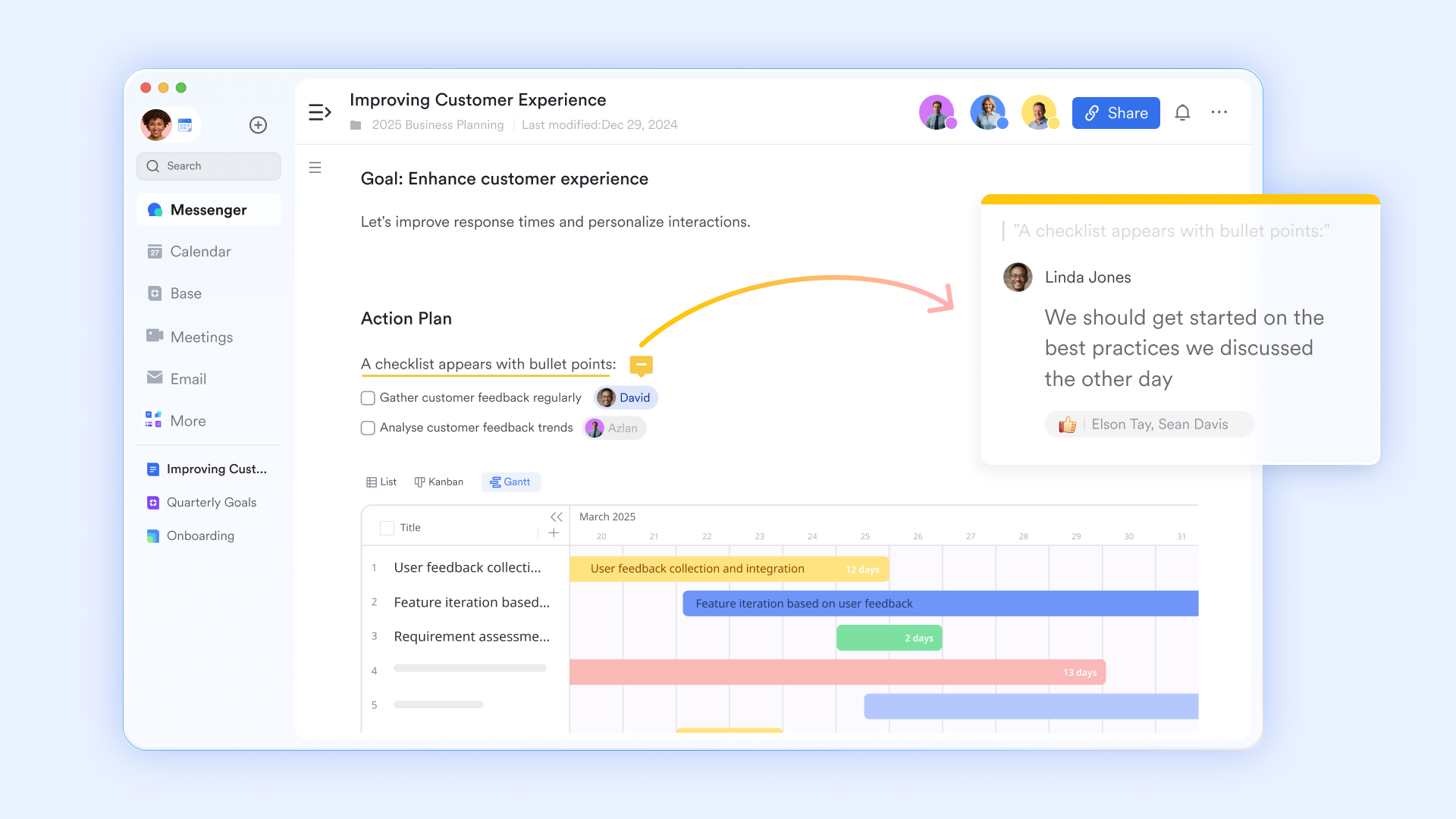
AI-powered transcripts and meeting notes
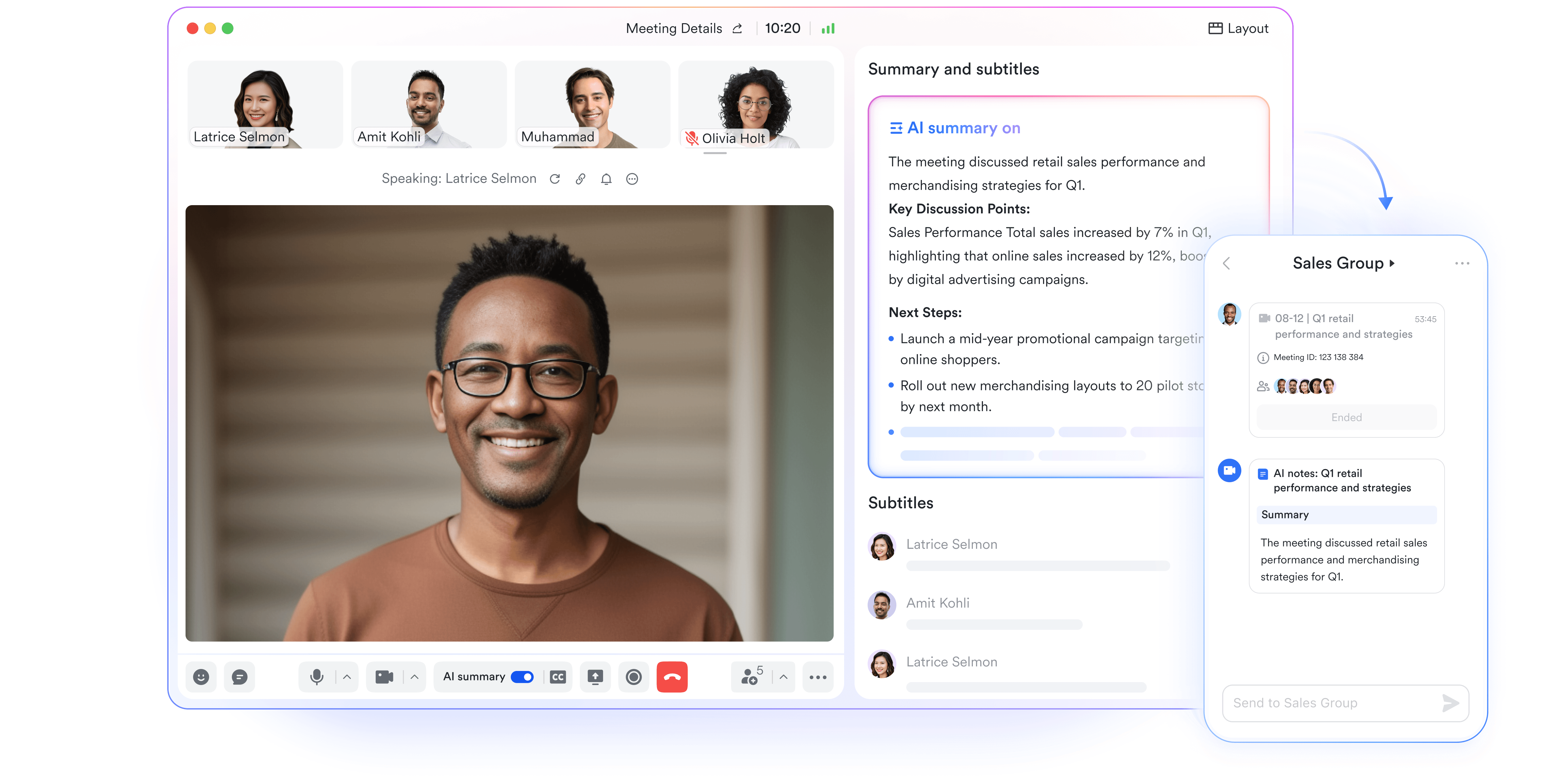
One of the biggest bottlenecks in meeting execution is the delay in distributing notes. To solve it, Lark has its own intelligent tools. When you upload your meeting to it, can generate an automated transcript with audio dialogues from different speakers. When "AI summary" is enabled, the can automatically identify commitments made during the call, forming smart chapters that break down meeting content.
Contextual topic threads
Lark eliminates the "context gap" by allowing teams to reply and exchange ideas right inside the agenda doc. This ensures that the pre-meeting prep and post-meeting follow-ups stay attached to the specific agenda items they reference. Use comment threading and group chat link functions. You can start a dedicated chat thread on a particular bullet point in the agenda. If a decision requires further discussion after the meeting, the conversation lives right next to the agenda item, preventing important details from being lost in a generic Slack channel or email chain. 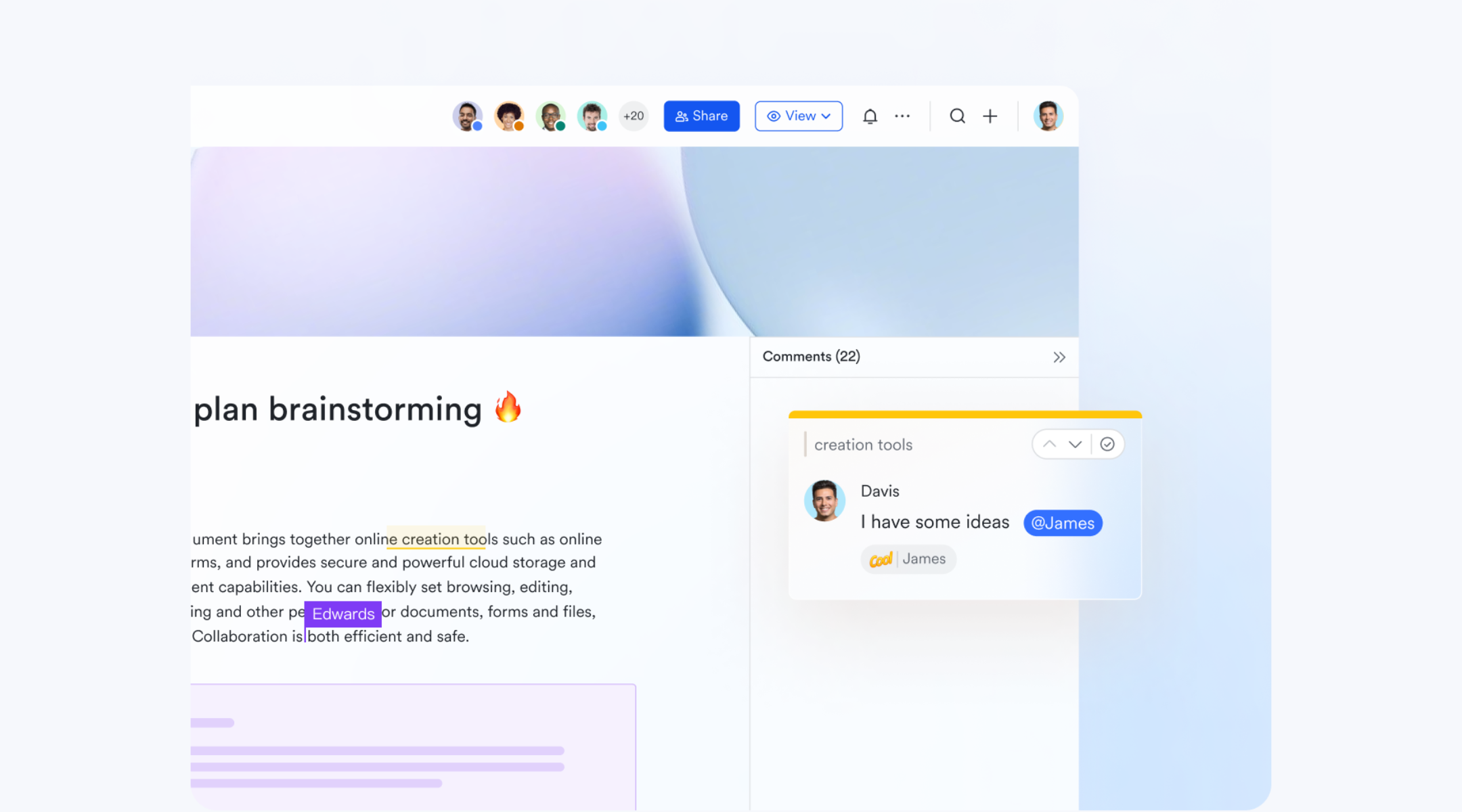
Relational tracking for agenda items
For recurring meetings like a sales meeting agenda, you need to track data over time. allows you to embed live database views into your agenda, so you can interact with "real" data rather than static screenshots. Use the Base views function to view for agenda information, or pull a filtered list of "Open Deals" or "Project Risks" into the doc. If you update a record's status within the agenda during the meeting, that change is reflected across every other dashboard in your company instantly. 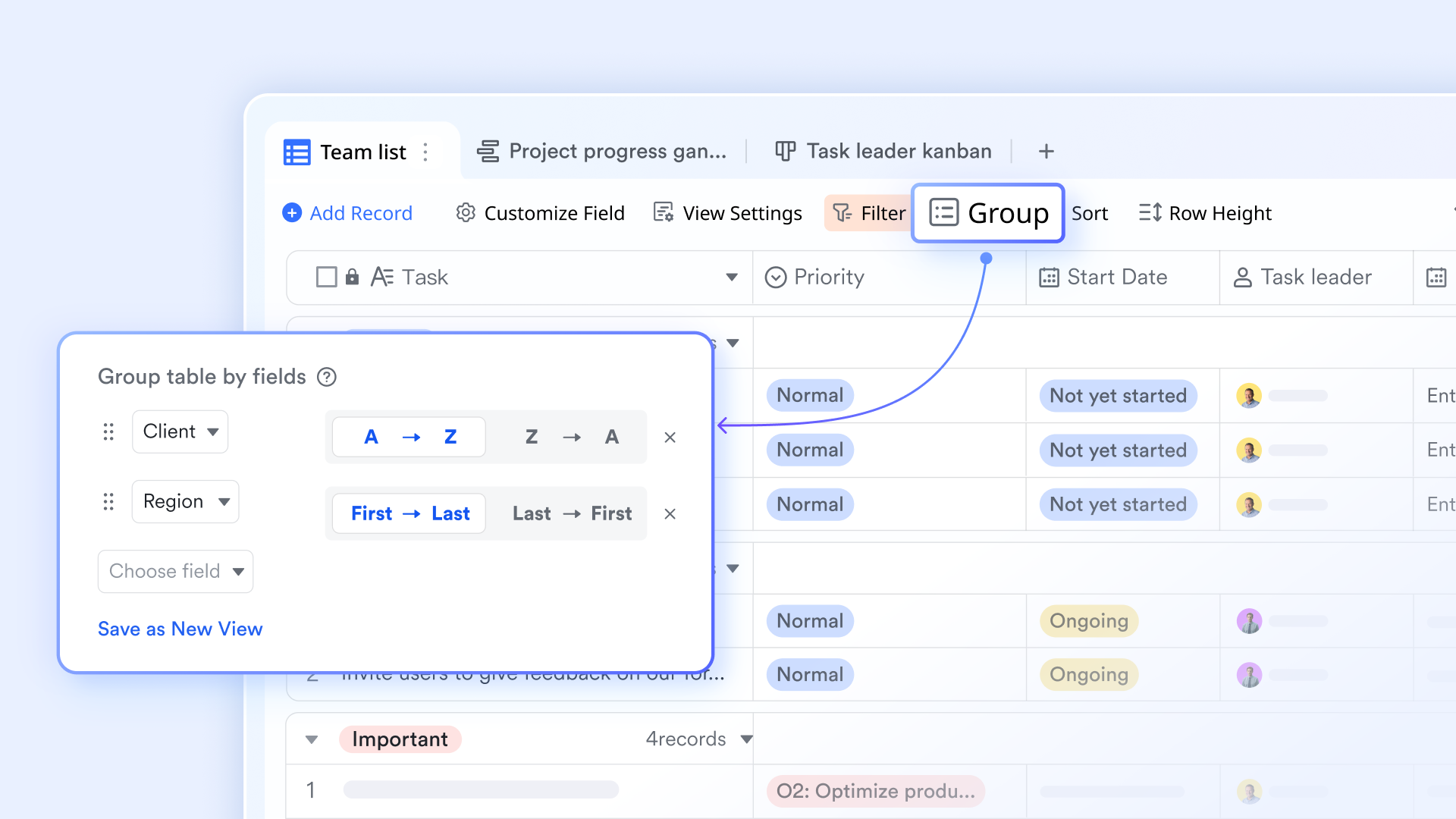
Automated post-meeting workflows
The Lark Base workflow engine can be configured to trigger actions the moment a meeting concludes or an agenda item is marked "Complete." This moves the project forward without the project manager definition having to send manual emails. Set up conditional triggers based on a "Status" change in your meeting tracker. For example, when an agenda item in a board meeting agenda example is marked "Approved," Lark can automatically generate a PDF of the decision and send it to the legal team via a Lark Messenger bot. This automates the administrative "tail" of the meeting. 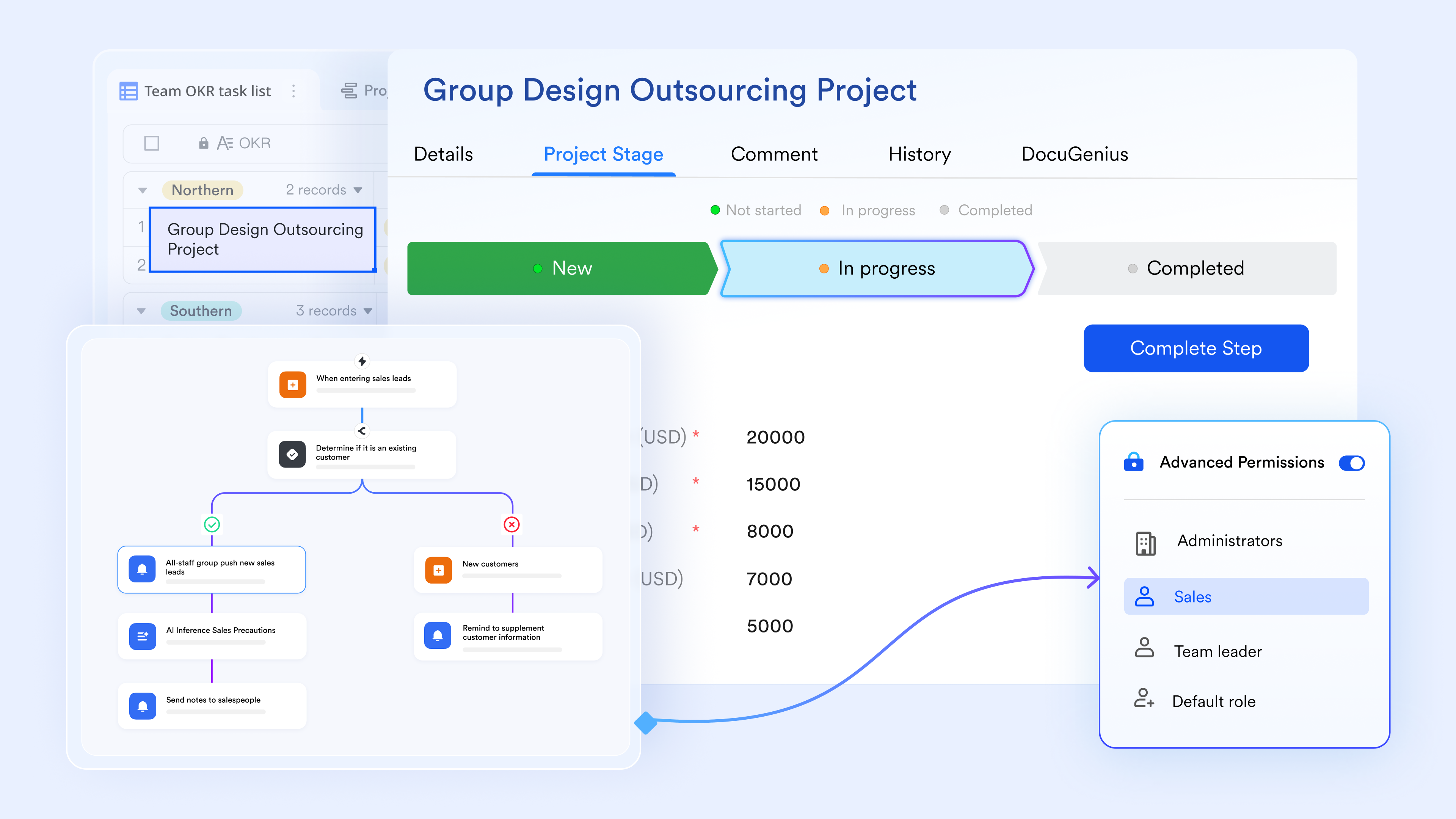
:
- Starter plan: Free forever plan that includes 11 powerful tools for up to 20 users. It also comes with 100GB of storage, 1000 automation runs, AI translations, and more.
- Pro plan: $12/user/month (billed annually) for up to 500 users. It includes everything in Starter plus group calling for up to 500 attendees, 15TB of storage, 50,000 automation runs, and more.
- Enterprise plan: for custom pricing. Supports unlimited users and includes even more automation runs and advanced security, compliance, and management features.
For small teams with simple communication needs

18 months message history
1000 Base automation runs/month
2000 rows per table in Base
Most POPULAR
For companies with comprehensive collaboration and management needs
Unlimited message history
500-participant video meetings
50k Base automation runs/month
20k rows per table in Base
For large companies with advanced security and organizational management needs
Get a personalized demo and pricing
Unlimited message history
500-participant video meetings
15 TB storage + 30 GB storage/user
500k Base automation runs/month
50k Base automation runs/month
Most POPULAR
For companies with comprehensive collaboration and management needs
Unlimited message history
500-participant video meetings
50k Base automation runs/month
20k rows per table in Base
Traditional meeting tools vs. Lark: A value comparison
Lark bridges the gap between static planning and active delivery by transforming every meeting agenda into a dynamic execution engine. Rather than leaving decisions in a document, the platform connects meeting agenda examples with and real-time tracking. This unified workspace ensures that every discussion point is instantly actionable, turning your team's conversations into measurable results without the need for manual follow-ups or delays.
Conclusion
A meeting is only as effective as the actions it triggers. While traditional collaboration tools capture the words spoken, Lark captures the momentum of the work by turning your agenda into an automated execution workflow. By utilizing professional meeting agenda examples within Lark, you ensure your team spends less time "meeting about the work" and more time actually doing it. This approach is key to maintaining across all departments.
Turn every meeting into a results-driven machine
FAQs
How long should a meeting agenda be for maximum focus?
For most 30-to-60-minute meetings, an agenda should have 3 to 5 core topics. Any more than that leads to "agenda fatigue" and rushed decisions.
Should agendas be shared before or during meetings?
Always share the agenda at least 24 hours in advance. This allows participants to read the "pre-read" materials and arrive with informed questions rather than spending the first 15 minutes getting up to speed.
Who should own the meeting agenda—the host or the team?
While the host is the facilitator, a collaborative agenda (like a Lark Doc) allows the team to add their own "blockers" or updates beforehand, making the meeting more inclusive.
Can AI-generated agendas replace manual planning?
AI can suggest topics based on previous project data, but a human lead should always review the agenda to ensure it aligns with the current strategic priorities.
How do remote teams keep agendas engaging?
Use interactive agendas. In Lark, you can use polls, , and @mentions to keep remote participants involved in real-time.
Related reading



















![What Is a 2-2-3 Work Schedule? Explanation and More [2026]](https://framerusercontent.com/images/uKHRfkp4v7y4azRNTYUmuteNQz8.png)








