Choosing a CRM today is less about finding the tool with the most features and more about finding one that fits how teams actually work. As interest in a detailed Nutshell review continues to grow, many teams are evaluating whether Nutshell CRM can support both current needs and future growth. Nutshell positions itself as a simple, sales-focused CRM designed to reduce friction and speed up adoption. This guide explores how Nutshell performs across usability, features, pricing, and scalability, while briefly acknowledging how some teams eventually consider broader platforms like Lark as workflows expand. Many readers searching for a Nutshell crm review are trying to understand how the platform performs in real sales workflows beyond basic feature lists.
What is Nutshell?
Nutshellis a cloud-based built primarily for sales teams that want simplicity without sacrificing essential structure. It focuses on helping teams manage contacts, companies, deals, and activities in one centralized system. Nutshell is often adopted by small to mid-sized sales teams that prefer an approachable interface over a highly complex configuration. Its design emphasizes clarity, consistency, and ease of use.
Unlike that require extensive setup and customization, the Nutshell CRM app offers a more guided experience. Contacts and companies serve as the foundation, with deals and activities layered on top. This approach works well for teams with defined but uncomplicated sales processes. However, the same simplicity influences how Nutshell scales as teams become more cross-functional and execution-driven.
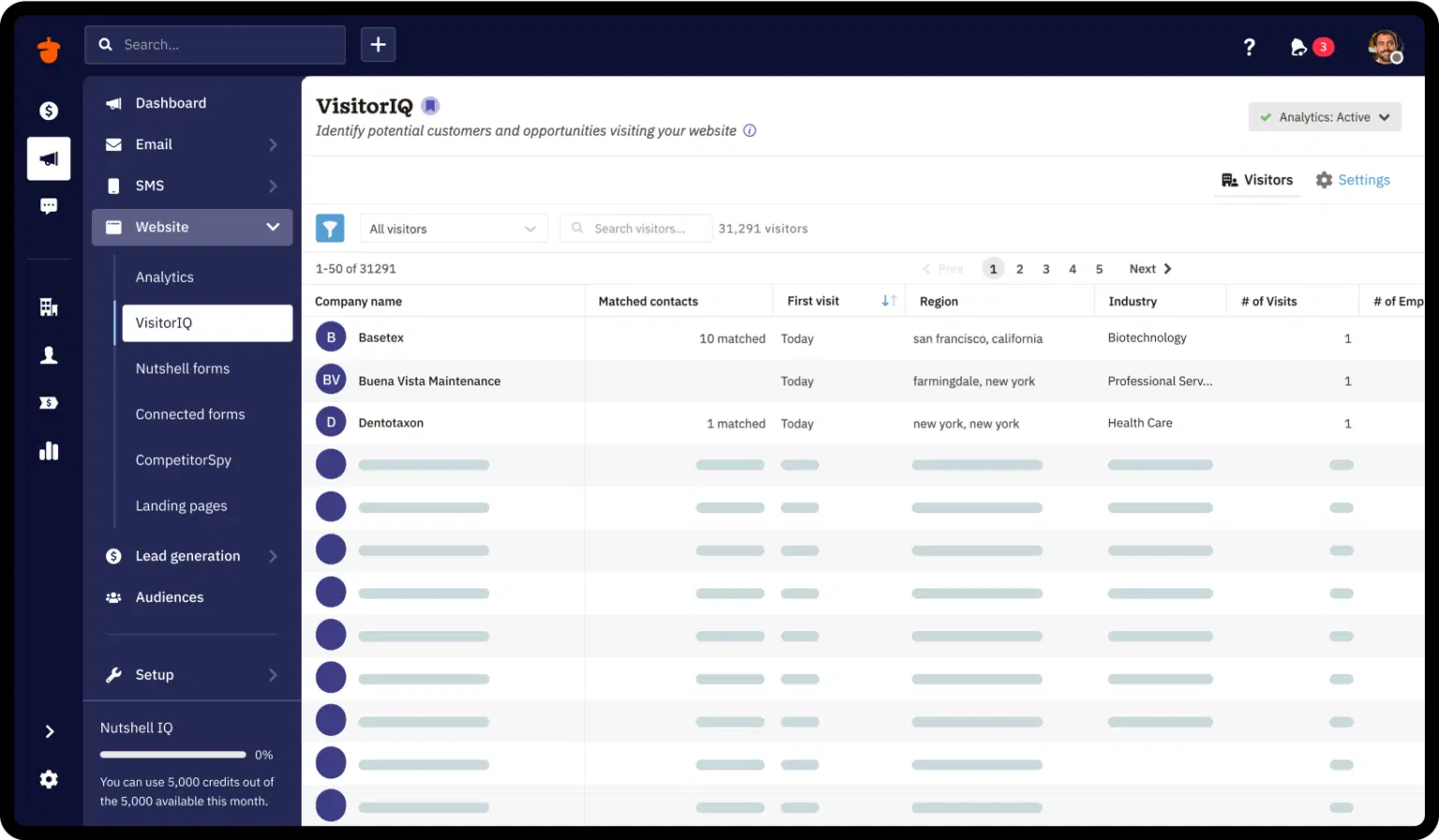
Image source: nutshell.com
Nutshell review
The core features of Nutshell CRM are designed to support everyday sales execution without overwhelming users. The platform focuses on essential CRM functionality rather than advanced customization. This makes it easier to adopt but also defines its long-term limits. Understanding these features helps clarify where Nutshell review reddit fits best.
- Contact and company management: in Nutshell CRM provides a structured way to track people and organizations together. Contacts are linked to companies, creating a clear relationship context across deals and activities. Communication history, notes, and timelines help sales teams understand engagement at a glance. For relationship-driven sales, this structure feels intuitive, though it can become limiting when teams need more flexible data relationships.
- Deal and pipeline tracking: Deal and pipeline tracking in Nutshell CRM offers a straightforward way to visualize sales progress. Teams can move deals through defined stages and associate them with contacts and companies. This clarity supports simple and prioritization. As deal complexity increases, however, progress often relies on manual updates rather than automated execution signals.
- Activity logging and reminders: Activity logging in Nutshell CRM allows users to track calls, emails, meetings, and follow-ups in one place. Reminders help sales reps stay on top of next steps and deadlines. This supports consistency in individual workflows. In larger teams, activity logging improves visibility but does not always guarantee accountability across multiple owners.
- Reporting and sales insights: Nutshell CRM includes built-in reporting tools that provide insight into sales activity and pipeline performance. Reports help managers understand deal movement and rep activity levels. These insights are useful for and basic forecasting. As reporting needs grow more advanced, teams may find customization options limited.
Nutshell pricing explained
Understanding is important for teams evaluating both short-term affordability and long-term value. Nutshell uses a tiered pricing structure designed to support teams at different stages of growth, from early adoption to advanced sales operations. Each plan adds functionality in a predictable way, making it easier to align cost with capability. This section breaks down what each pricing tier includes and who it is best suited for.
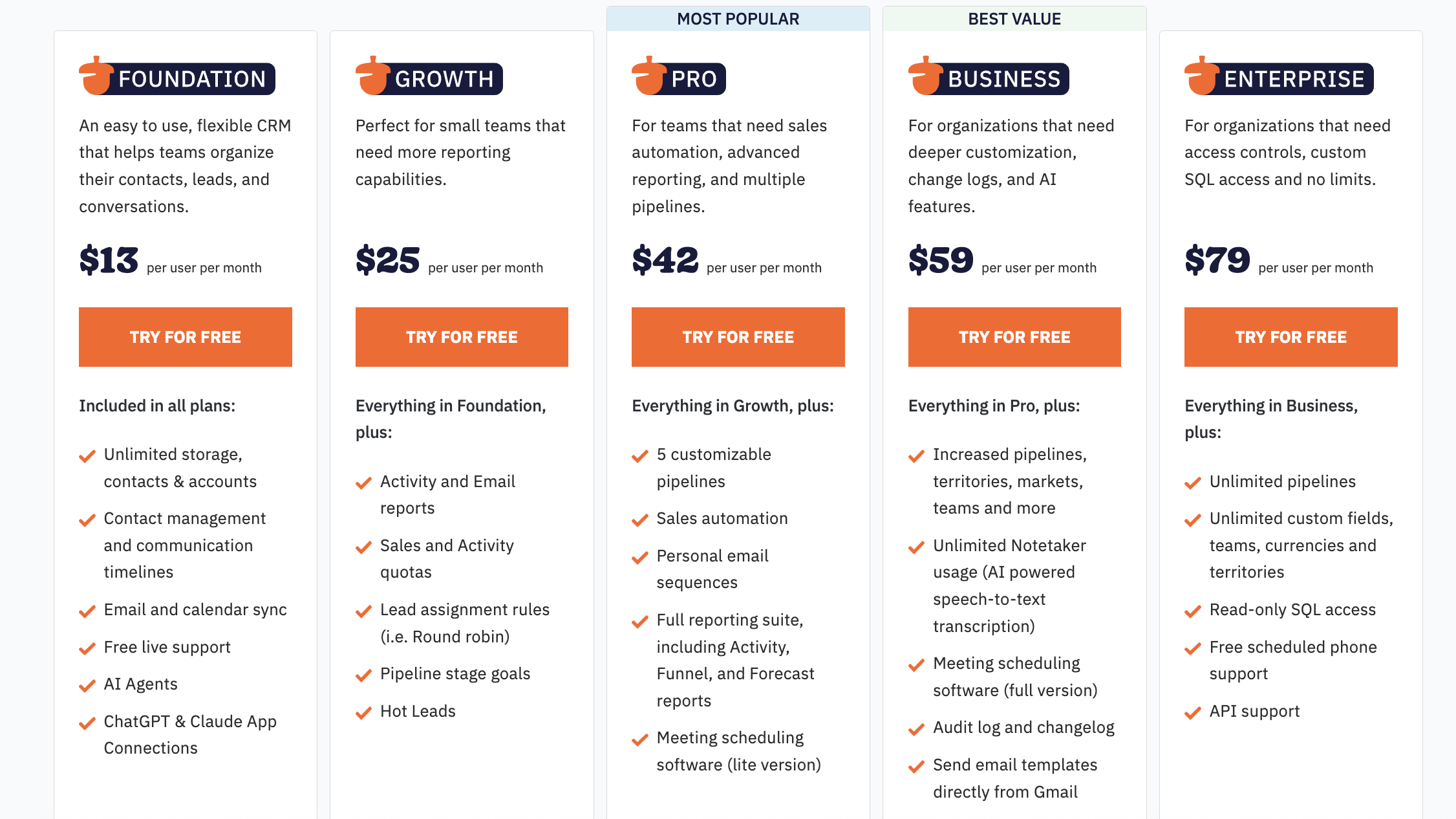
Information source: nutshell.com
Update time: 2025-12-16
Note: Pricing and plan details reflect publicly available data as of the update date and may vary based on region, billing cycle, and number of agents.
Nutshell CRM use cases by team type
Nutshell CRM is designed for teams that want a clear and structured sales system without heavy operational complexity. Its feature set aligns best with teams that value relationship management, visibility, and ease of use. While it may not fit every organization, there are several team types where Nutshell performs particularly well. These use cases highlight where the platform delivers the most value.
- Founder-led and relationship-driven sales teams: Founder-led sales teams often rely on personal relationships and direct involvement in deals. Nutshell CRM helps founders centralize contacts, track conversations, and manage follow-ups without adding administrative burden. The simple interface allows founders to stay focused on selling rather than system management. This makes it easier to maintain consistency while growing early revenue.
- Small B2B sales teams with simple pipelines: Small teams benefit from Nutshell's straightforward pipeline and deal tracking. Defined stages provide clarity without overwhelming sales reps. Managers can monitor progress and activity with minimal reporting setup. This approach works well when sales cycles are predictable and do not involve complex handoffs.
- Agencies and service businesses managing repeat clients: Agencies and service-based businesses often focus on long-term rather than one-time deals. Nutshell CRM supports this model by keeping communication history and activities organized over time. Teams can easily reference past interactions to maintain continuity. However, execution across projects may require additional tools beyond the CRM.
- Teams prioritizing ease of use over deep automation: Teams that value and minimal training often choose Nutshell CRM for its approachable design. New users can become productive quickly without extensive guidance. This ease of use reduces resistance to adoption across the team. The trade-off is limited automation depth for more advanced workflows.
- Sales teams without heavy cross-functional handoffs: Nutshell works best when sales processes remain largely within a single team. Limited cross-functional involvement reduces the need for and execution tracking. Sales reps can manage deals independently with clear visibility. As handoffs increase, coordination challenges may begin to appear.
Nutshell CRM strengths and limitations
Evaluating both strengths and limitations provides a balanced view of how Nutshell in real-world scenarios. The platform offers clear advantages in usability and pricing transparency. At the same time, certain constraints become more visible as teams scale. Understanding these factors helps teams set realistic expectations.
Strengths of Nutshell CRM
- Simple, approachable that's easy to adopt without heavy training
- Transparent pricing tiers with clear per-user costs
- Strong contact and activity management for relationship-driven sales
- Built-in reporting and automation are available in higher plans
- AI-assisted features such as Notetaker and AI agents on advanced tiers
Limitations of Nutshell CRM
- Advanced automation and customization are locked behind higher-priced plans
- Limited , relying mostly on notes and activity logs
- Basic project and task execution features that often require extra tools
- Reporting depth may not scale well for complex or multi-team sales operations
- Less suitable for cross-functional teams needing tight execution visibility
Unify team collaboration and task execution easily
When teams start looking beyond Nutshell CRM
As sales teams grow, the way they work often changes faster than their . Nutshell CRM works well in early stages, but increasing deal volume and coordination needs can expose gaps. What once felt efficient may start to feel disconnected . This shift usually signals a need to rethink how execution and visibility are managed.
- Growth triggers (users, deals, handoffs): An increase in users and active deals introduces more handoffs and shared ownership. Manual updates become harder to maintain consistently across the team. Deal progress may depend on individual habits rather than structured processes. As complexity increases, teams begin looking for systems that scale with growth rather than slow it down.
- Execution breakdowns: Execution issues often appear when follow-ups are delayed or when responsibilities are unclear. Reminder-based workflows may no longer be enough to keep everyone aligned. Tasks can fall through the cracks as sales cycles become busier. These breakdowns push teams to seek stronger execution control and accountability.
- Visibility loss across teams: When multiple are involved, visibility across conversations and work becomes critical. Notes and activity logs alone may not capture the full context. Teams need customer data, communication, and tasks connected in one place. At this stage, execution-focused platforms like Lark begin to stand out as teams look for better coordination.
As teams grow and become more interconnected, these challenges often signal a shift in priorities. What once worked as a lightweight CRM can start to feel disconnected when multiple owners, parallel deals, and cross-team coordination are involved. At this stage, teams typically look for more than contact tracking-they need clearer ownership, faster follow-ups, and better visibility across conversations and work. This is where execution-focused platforms like Lark begin to stand out.
Want to explore a more execution-driven approach?
Meet Lark: Connect collaboration, execution, and sales pipelines into one
transforms traditional CRM from a static database into a dynamic, AI-powered ecosystem that unifies structured data, , and real-time communication. By combining professional project management with instant messaging and , it ensures that every lead is tracked and every deal is discussed in a single, cohesive workspace. This all-in-one approach eliminates the friction of switching between tools, allowing your team to focus on building meaningful client relationships rather than managing administrative silos.
Centralised CRM database for structured client information
Lark Base fields provide a highly structured foundation for a by ensuring data consistency and enabling direct communication. Specialized business fields like phone numbers and email allow teams to call or message prospects with a single click while maintaining proper formatting. Two-way link fields create powerful relationships between tables, such as connecting specific contacts to their respective company accounts or deal history. Also, Base supports Excel data import with just one-click. If you wish to map out how sales leads process, flow, and progress fields provide clear visual tracking of leads' journey through the sales pipeline. 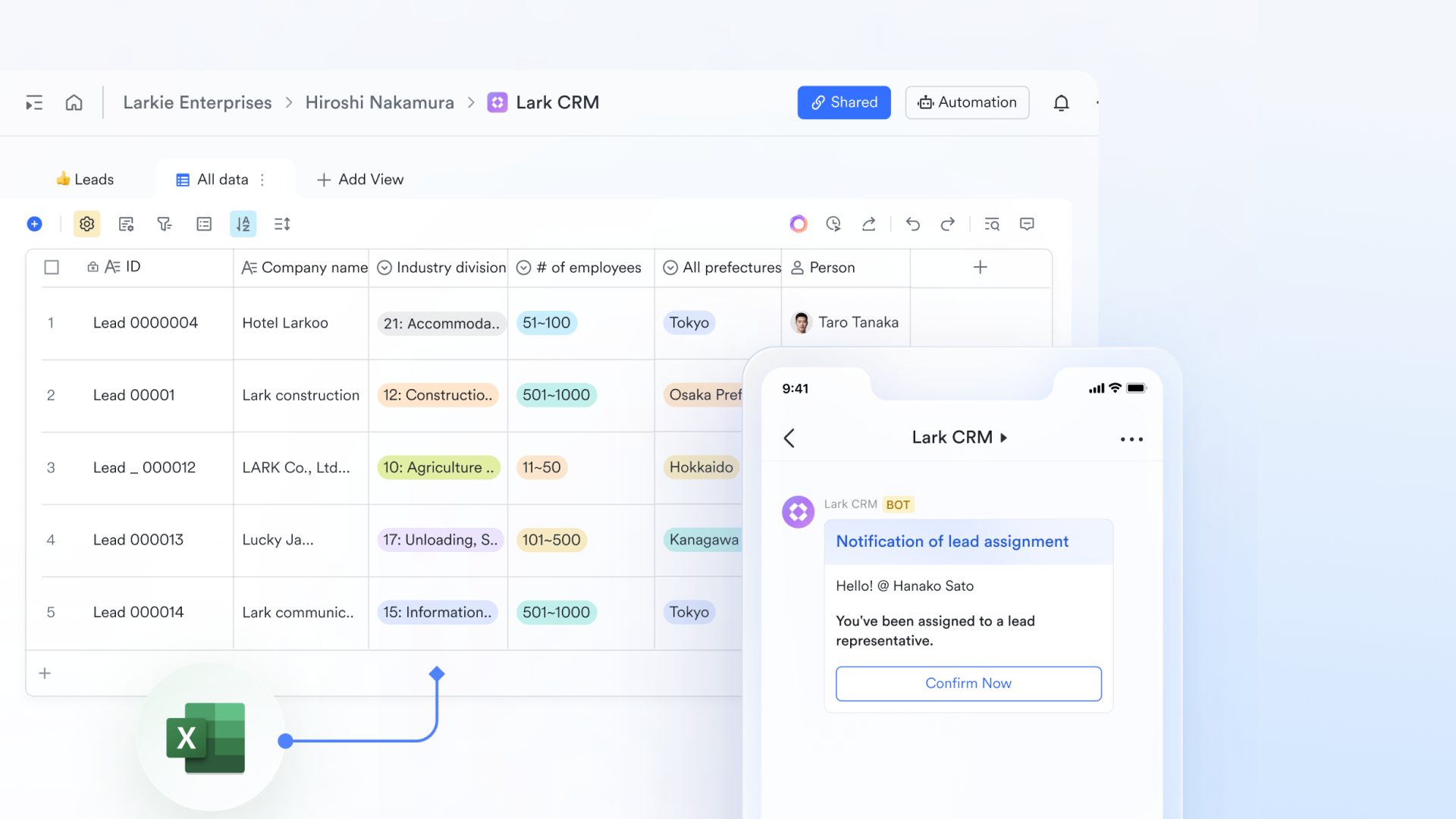
AI accelerates data entry and management
Lark creates a highly specific CRM workflow by using AI field shortcuts to automate the most time-consuming parts of , such as data entry and lead scoring. By leveraging the "Categorization" and "Smart Extraction" shortcuts, your database can automatically tag high-value prospects and pull contact details directly from unstructured meeting notes or emails without manual effort. The "Summary" and "Custom AI Autofill" tools further streamline the sales process by condensing long customer histories into quick briefs and generating personalized follow-up drafts based on specific lead data. 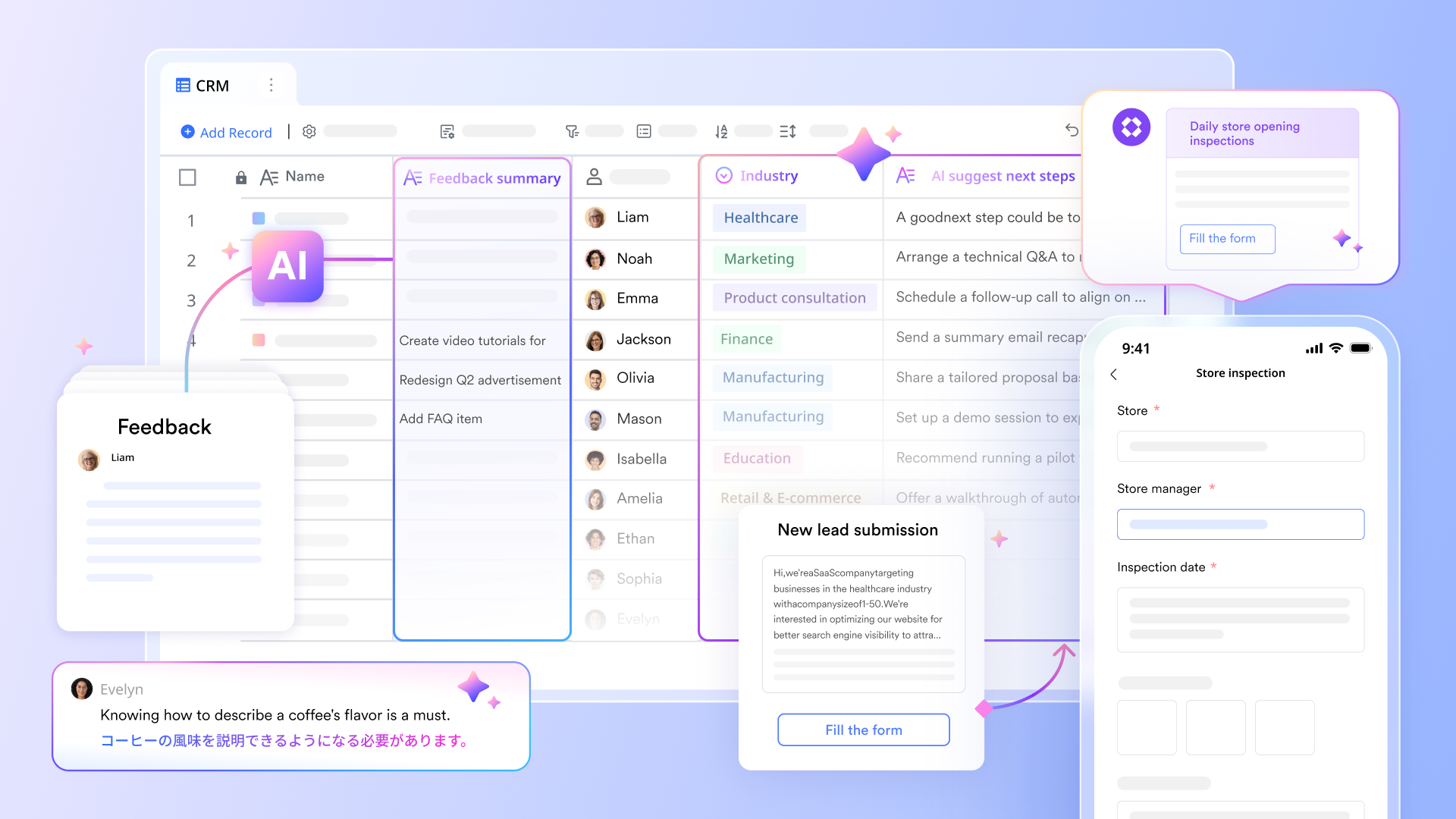
Follow up sales pipelines with instant notification
Lark helps and CRM status by allowing team members to "Follow" specific records, ensuring that no movement in a high-value deal goes unnoticed. When a sales rep or manager follows a lead, they receive instant notifications whenever critical CRM fields—such as deal stage, contact info, or contract value—are updated by any collaborator. This eliminates the need for manual status meetings, as stakeholders are proactively alerted the moment a prospect moves from "Negotiation" to "Closed-Won." 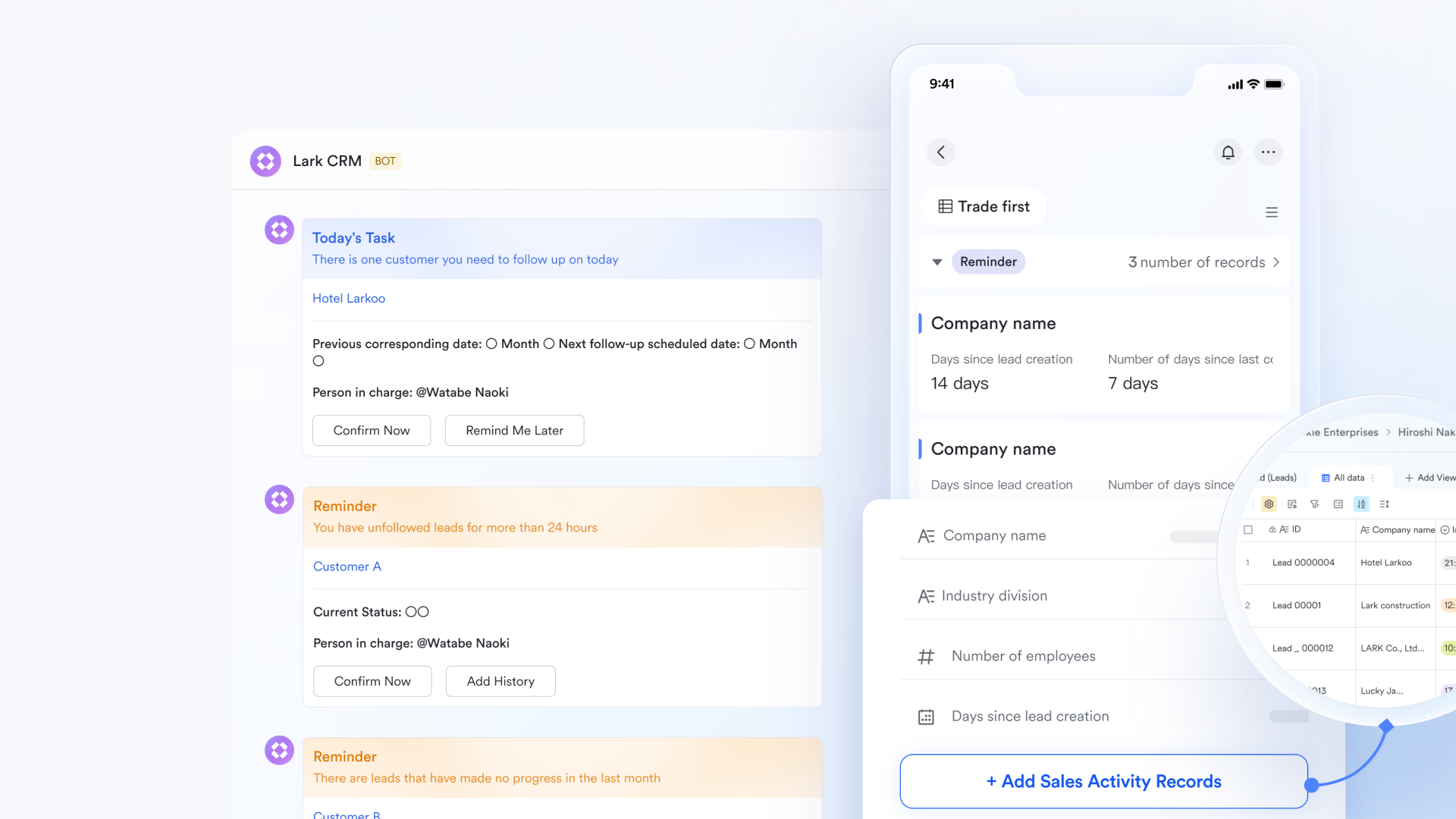
Automated CRM workflow with no-code setup
Lark Base workflow feature builds automated CRM workflows using a visual, no-code engine that connects lead data to immediate team actions via advanced logic nodes. Using If/Else and Switch nodes, you can automatically route high-priority leads to the correct sales representatives based on deal size or region, ensuring no opportunity is missed. The platform also supports interactive button triggers and Loop nodes, allowing teams to launch complex processes—like contract generation or bulk follow-up emails—with a single click. 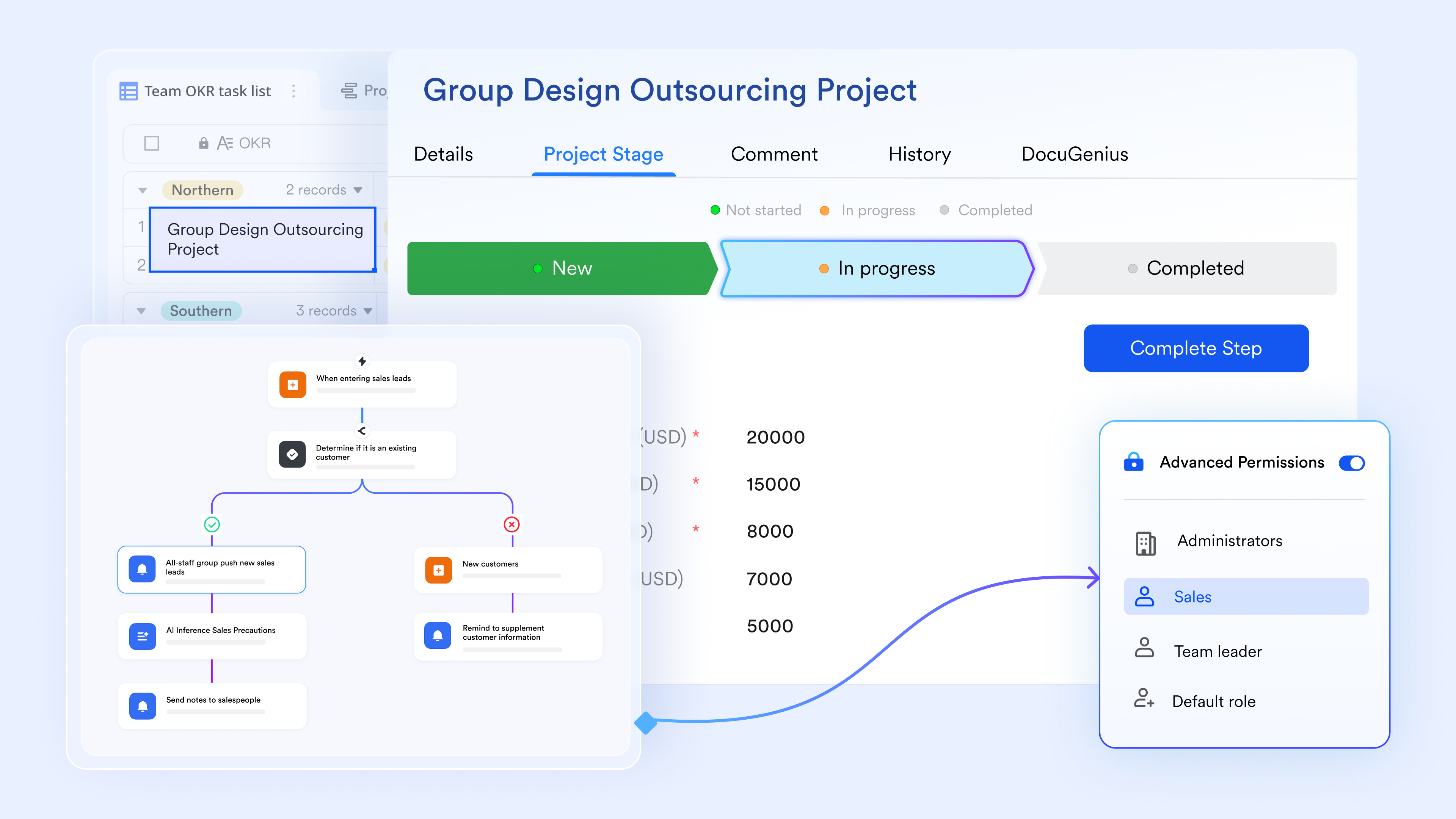
Instant communication and brainstorming
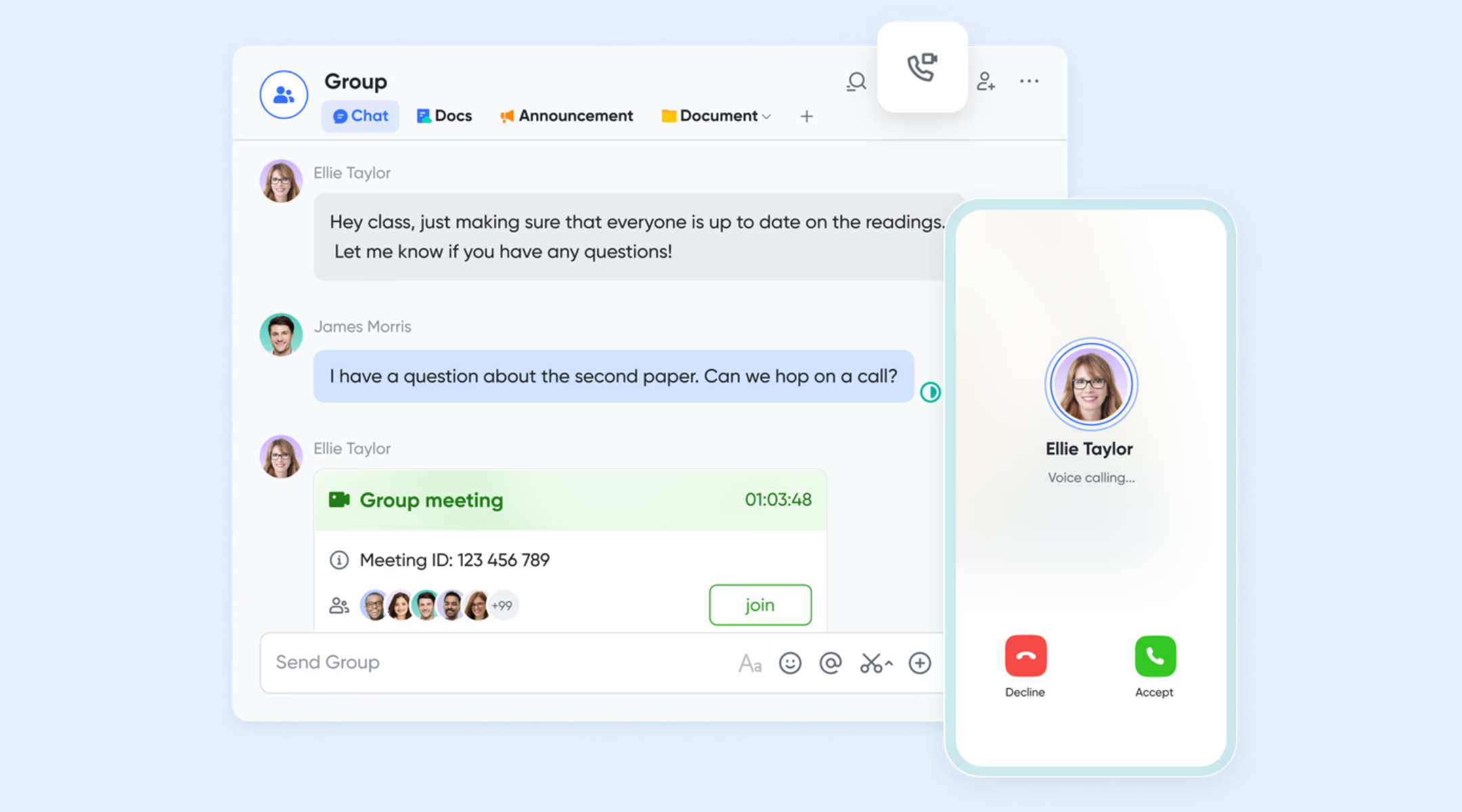
and transform CRM-focused communication from static data entry into a real-time collaborative experience. By sharing links from your database, Lark Messenger allows sales teams to receive instant deal alerts and discuss prospect needs in dedicated threads, ensuring no client detail is buried in an inbox. During the closing stages, Lark Meetings provides a high-definition platform where reps can use "" to co-edit proposals or review the CRM dashboards in Base with clients live. This seamless transition from chat to video ensures that every customer interaction is documented, searchable, and actionable within a single, unified workspace.
:
- Starter plan: Free forever plan that includes 11 powerful tools for up to 20 users. It also comes with 100GB of storage, 1000 automation runs, AI translations, and more.
- Basic plan: $6/user/month (billed annually) for up to 500 users. It includes everything in Starter plus group calling for up to 500 attendees, 5TB of storage, 1000 automation runs, and more. For more details, please .
- Pro plan: $12/user/month (billed annually) for up to 500 users. It includes everything in Basic plus group calling for up to 500 attendees, 15TB of storage, 50,000 automation runs, and more.
- Enterprise plan: for custom pricing. Supports unlimited users and includes even more automation runs and advanced security, compliance, and management features.
For small teams with simple communication needs

18 months message history
1000 Base automation runs/month
2000 rows per table in Base
Most POPULAR
For companies with comprehensive collaboration and management needs
Unlimited message history
500-participant video meetings
50k Base automation runs/month
20k rows per table in Base
For large companies with advanced security and organizational management needs
Get a personalized demo and pricing
Unlimited message history
500-participant video meetings
15 TB storage + 30 GB storage/user
500k Base automation runs/month
50k Base automation runs/month
Most POPULAR
For companies with comprehensive collaboration and management needs
Unlimited message history
500-participant video meetings
50k Base automation runs/month
20k rows per table in Base
Choosing between Nutshell and Lark
Choosing between Nutshell and Lark depends largely on how a team approaches sales execution today and how it expects to operate in the future. Nutshell focuses on simplicity and core , while Lark takes a broader approach by connecting customer data with daily work. As teams grow, the difference between tracking relationships and executing work becomes more noticeable. Understanding this distinction helps teams choose a platform that aligns with their stage and priorities.
Which should you choose?
Choose Nutshell if your team needs a straightforward CRM for managing contacts and deals with minimal setup, especially for small or sales-only teams. Choose Lark if your team is growing and needs , communication, documents, and execution to live in one connected workspace. Lark is better suited for teams that value speed, accountability, and long-term scalability over a standalone CRM experience.
Conclusion
Nutshell CRM is a strong fit for teams that want a straightforward and approachable CRM without the overhead of complex setup. Its strengths lie in , clear pricing, and ease of adoption, making it especially effective for small or sales-only teams. For organizations focused on relationship-driven selling with simple pipelines, Nutshell delivers consistent value and keeps administrative work to a minimum.
As teams grow, however, sales execution often extends beyond contact tracking into coordination, accountability, and real-time collaboration. At this stage, many teams begin to look for tools that unify CRM data with communication and work management. Platforms like are gradually considered when teams want fewer tools, clearer ownership, and workflows that scale alongside their operations.
Build execution-ready workflows with Lark today
FAQs
Can Nutshell handle multi-team sales operations?
Nutshell can support small multi-team setups where processes remain relatively simple. As more teams and become involved, coordination can rely heavily on manual updates and notes. This may lead to slower handoffs and reduced visibility. At this point, some teams start exploring broader workspaces like Lark to keep execution aligned across groups.
How long do teams typically stay on Nutshell before switching?
Many teams use Nutshell successfully during early growth stages when sales processes are straightforward. The decision to switch often comes when deal volume increases, and execution becomes more complex. This timeline varies depending on team size and workflow maturity. As needs evolve, platforms such as Lark may come into consideration for added .
Does Nutshell work beyond pure sales use cases?
Nutshell is primarily designed for sales-focused workflows and performs best in that context. Non-sales use cases may feel due to limited task and collaboration features. Teams that expand into cross-functional work often supplement Nutshell with other tools. Over time, some teams evaluate platforms like Lark that support broader collaboration needs.
What breaks first as deal volume increases?
As deal volume grows, manual updates and follow-ups become harder to manage . Visibility across deals and owners may decrease, leading to execution gaps. Reporting and coordination challenges often appear next. These issues sometimes prompt teams to look at execution-focused platforms such as Lark.
Is it better to start simple or plan for scale early?
Starting simple helps teams move quickly and reduces early friction. Planning for scale becomes important once growth introduces coordination challenges. Some teams choose to evolve their tools gradually rather than switching abruptly. In this phase, solutions like Lark may be explored as a longer-term workspace option.
Related reading






























