














How to Create Project Plan that Actually Works

Fecilia Clarke
Solutions Marketing Specialist
Sep 18, 2026
Fecilia Clarke
Sep 18, 2026

16 min read


A project plan is a structured roadmap that connects a project's goals, scope, timeline, resources, and risks into one clear view. It explains why the project matters, what needs to be delivered, who is responsible, and how progress will be tracked. A strong plan does more than describe tasks; it supports decision‑making, communication, and day‑to‑day coordination across the team. This guide explains how to create a project plan, highlights common pitfalls, and shares practical tips to keep improving your planning process. It also shows how collaborative tools help turn planning into a continuous, team-driven workflow.
What is a project plan?
A project plan is a structured document that explains how a project will move from an initial idea to a completed outcome. It acts as a roadmap for the whole team, describing what needs to be achieved, how the work will be organized, and how success will be measured. A typical project plan brings together the project's objectives, scope, deliverables, schedule, and resources in one place so everyone sees the same picture. Instead of being just a list of tasks, it provides a coherent story of why the project exists and how the team will bring it to life.
In project management, the project plan is often seen as the central guiding document. It answers fundamental questions such as: What are we trying to accomplish, and for whom? What results or deliverables must be produced? Who is responsible for each area of work or milestone? When are key activities due, and how will progress be monitored along the way? By capturing these decisions upfront, a project plan creates clarity, structure, and transparency for stakeholders at every level. It also becomes the reference point for status updates, approvals, and course corrections.
A modern project plan usually combines several key elements: goals and success metrics, a clear scope statement, defined roles and responsibilities, a timeline with milestones, and an overview of budget, risks, and dependencies. These sections work together to create both strategic alignment and day‑to‑day guidance. Whether the team works in a waterfall, agile, or a hybrid approach, the plan provides a shared understanding of priorities and trade‑offs. It is less about predicting the future perfectly and more about giving the team a solid foundation to adapt from.
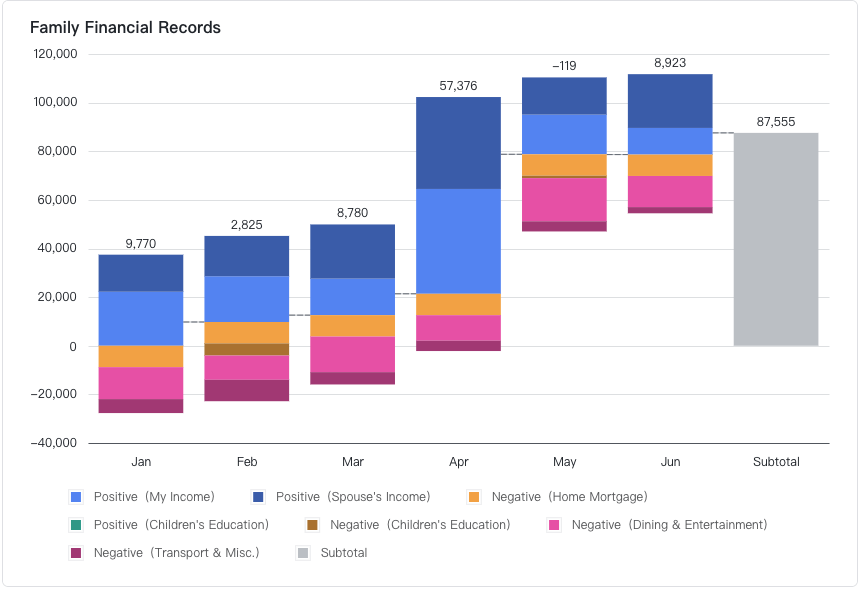
Project plans can be created in many ways, from simple documents and spreadsheets to dedicated project management tools. Some teams prefer tools like Excel or Google Sheets to map out tasks, dates, and owners, while others use collaborative platforms such as Lark to connect plans with real‑time communication, files, and tasks. Regardless of the tool, the aim is to keep the plan accessible, current, and actionable. When treated as a living document instead of a one‑off deliverable, a project plan becomes a powerful mechanism for coordinating work, managing risk, and guiding decisions throughout the project lifecycle.
Why is a project plan important to project management?
- Connects strategy to execution: A project plan links business objectives, scope, and resources into a single, shared roadmap. Instead of jumping straight into tasks, teams see how each activity contributes to the overall goal, which reduces confusion and rework.
- Improves control over time, cost, and risk: By mapping milestones, dependencies, and constraints upfront, the plan helps project managers spot bottlenecks early. It becomes easier to adjust priorities, rebalance workload, and keep work within agreed timelines and budgets.
- Aligns stakeholders and clarifies ownership: The plan defines who is responsible for what, how status will be reported, and when decisions are needed. This shared view prevents miscommunication, speeds up approvals, and helps new team members understand the project quickly.
- Supports consistent communication: A documented plan provides a single source of truth for updates, changes, and progress. When combined with collaboration tools, it keeps discussions, files, and decisions connected, rather than scattered across channels.
- Adapts to different project methods: Whether the team works in agile, waterfall, or a hybrid model, the project plan can be tailored to fit. Knowing how to create project plans for different approaches allows teams to stay flexible without losing structure or visibility.

Key components of a modern project plan
A modern project plan brings structure to ideas and turns them into a practical roadmap. Instead of being a loose collection of notes, it is made up of clear, well‑defined components that work together to guide project execution. These components make it easier to align stakeholders, set expectations, and manage change over time. When teams understand the building blocks of a project plan, they are better equipped to choose the right project planning tools, compare different formats, and decide how to create project plans that fit their context and way of working.
Project objectives and goals: At the heart of any strong plan are project objectives and goals. These explain why the project exists and what success looks like. Good objectives are specific enough to guide decisions and help teams say no to work that does not support the outcome. Many teams use a SMART approach to make goals more concrete and measurable. Clear objectives also support project reporting, because they provide a simple way to check if the project is on track, needs to be adjusted, or should be stopped or re‑scoped.
Project scope: The project scope defines the boundaries of the work. It describes what is included, what is excluded, and sometimes what might be considered later. A scope section often lists key deliverables, target users or markets, and main activities. When the scope is vague, projects are vulnerable to scope creep, where new features and tasks are added without adjusting time or budget. A well‑written scope statement becomes a reference point whenever change requests appear, helping stakeholders have constructive conversations about priorities instead of ad‑hoc reactions.
Deliverables, milestones, tasks, and dependencies: Closely connected to the scope are deliverables, milestones, tasks, and dependencies. Deliverables are the tangible outputs the project must produce, such as a new feature, campaign, or process. Milestones mark important progress points, like design sign‑off or launch readiness. Tasks are the concrete actions needed to achieve each deliverable, and dependencies show which tasks must be completed before others can start. Together, these elements create a logical structure for execution. They also underpin more visual planning formats, such as Gantt charts, kanban boards, or checklists in a work management tool.
Timeline and schedule: A modern project plan should also describe the timeline and schedule in a way that is realistic and easy to understand. The timeline shows how the project will unfold over time, often broken into phases or iterations. The schedule goes deeper into start dates, end dates, and durations for individual tasks or work packages. Including dependencies and constraints in this section helps avoid unrealistic expectations. When teams learn how to create a project plan in Excel, Google Sheets, or specialized software, they often start by turning this timeline and schedule into a visual view so everyone can see how work fits together.
Resources and budget: Another essential component is the resource and budget plan. This part of the project plan outlines which people, tools, and materials are needed, and how much they will cost. It may highlight critical roles, expected workload, and required skills. A basic budget section can group costs into categories such as labor, software, external vendors, and contingencies. Clear resource planning helps prevent team members from being overloaded and reduces the risk of cost overruns. It also supports conversations with sponsors when trade‑offs between scope, time, and budget need to be made.
Roles, responsibilities, and stakeholders: The plan should make roles, responsibilities, and stakeholder relationships explicit. This includes naming the sponsor, project manager, core team members, and key partners or suppliers. Many teams use a simple responsibility model to clarify who is accountable, who is responsible for day‑to‑day work, who needs to be consulted, and who should simply be informed. Documenting this in the project plan avoids confusion later, especially when decisions are needed quickly. It also helps new people joining the project understand how to plug in and where to go with questions.
Risk and issue management: No modern project plan is complete without a risk and issue management section. Projects rarely follow the original script, so it is important to think ahead about what could go wrong and how to respond. A basic risk register lists potential risks, their likelihood and impact, and possible mitigation actions. Issues, which are problems already happening, can be tracked alongside risks. By including risks in the core plan rather than in a separate document, teams keep them visible and can adjust timelines, resources, or scope when needed. This proactive approach to uncertainty is a hallmark of mature project planning.
Communication and collaboration: Finally, the plan should describe a communication and collaboration approach. This component sets expectations for how information will flow, how often updates will be shared, and which channels will be used. It may specify recurring check‑ins, decision meetings, reporting formats, and where key documents live. As more teams move to hybrid and distributed work, this part of the plan has become just as important as the schedule or budget. When communication is intentional and supported by collaborative tools, the project plan becomes a living reference point rather than a static file that is quickly forgotten.
How to create a project plan step by step
Creating a project plan step by step is about turning the key components of a modern project plan into a practical sequence of actions. Rather than trying to define every detail at once, you move through clear steps that start from objectives and scope, then flow into WBS, timeline, resources, budget, risks, and communication. This structure follows widely used project management practices, while leaving room to adapt to your team's context. The same logic works whether you manage traditional, agile, or hybrid projects; what changes is the level of detail and the format of documentation.
Step 1: Define project objectives and success criteria
Begin with project objectives that explain why the project exists and what problems it aims to solve. Turn a broad vision into a small set of clear objectives and success criteria that everyone can understand. Many teams draw on SMART thinking, so goals are specific, measurable, achievable, relevant, and time‑bound. Link each objective to business outcomes, such as better efficiency, improved customer experience, or strategic growth. This early clarity shapes later work on scope, milestones, and project closure, and provides a practical baseline for evaluating whether the project has achieved what it set out to do.
Once objectives are in place, move into defining the project scope. Describe what the project will deliver, what it will not deliver, and which areas might be considered in a future phase. Summarize main deliverables, target users, core business scenarios, and any known technical or regulatory constraints. Record assumptions and dependencies on other initiatives or systems so they are visible to everyone. A clear scope statement underpins your Work Breakdown Structure, schedule estimates, and change management, and acts as a neutral reference when you need to decide whether a new request belongs inside the project or requires extra time and budget.
Next, identify the people around the project and clarify who does what. List key stakeholders such as project sponsors, leadership, core team members, supporting teams, and external partners, along with their expectations and level of influence. Based on this list, define roles including sponsor, project manager, workstream leads, and subject‑matter experts. Clarify who is accountable for results, who is responsible for execution, who needs to be consulted, and who should be kept informed. Writing these roles and responsibilities into the project plan supports smoother decision‑making and ties directly into the "roles, responsibilities, and stakeholders" component of your overall plan.
With scope and people clarified, start building your Work Breakdown Structure. Begin with major phases or top‑level deliverables, then break them down into smaller work packages and, finally, into individual tasks. Each work package should correspond to a concrete output that can be assigned to a specific owner. The WBS reduces complexity, helps avoid missing key work, and becomes the foundation for scheduling, resource planning, and cost estimation. It also connects back to the "deliverables, milestones, tasks, and dependencies" component, showing how high‑level project objectives are translated into day‑to‑day activities.
Using the WBS as your base, define important milestones and place each work package on a timeline. Identify dependencies between tasks, such as which ones must finish before others can begin and where parallel execution is possible. From this, build a project schedule using tools like Gantt charts, timeline views, or a combination of kanban and calendars. This Step operationalizes the "timeline and schedule" component, giving the team a visual roadmap of phases, critical path, and busy periods. As the project progresses, revisit the schedule regularly to refine dates, update dependencies, and keep the plan grounded in real progress.
Once the schedule is drafted, align it with actual resource capacity. For each work package, identify the skills, roles, tools, and materials required, then map them against availability and other commitments. Evaluate whether key team members are overloaded and where you might need external support. Convert effort and resource needs into cost categories such as internal labor, external services, software, and contingencies to form your project budget. This Step brings the "resources and budget" component to life, reducing the risk of over‑promising, making funding discussions more transparent, and providing a baseline for cost tracking during execution.
With timing and resources in place, define what quality means for your project deliverables. Specify quality standards and acceptance criteria for each major output, along with how they will be checked—for example, through peer reviews, testing, pilots, or inspections. Integrate key quality assurance activities directly into the schedule and resource plan rather than treating them as optional extras. Clear quality requirements help the team self‑check during execution, reduce rework, and prevent disputes at handover. This Step complements the other components of your project plan by focusing on the "how good" question, not just "how fast" and "how much."
Now take a structured look at uncertainty. Identify potential risks that could affect scope, timeline, budget, or quality, across dimensions such as technology, capacity, dependencies, and changing requirements. Assess their likely impact and outline mitigation strategies or fallback options for significant risks. At the same time, define how issues arising during execution will be logged and escalated. Building on your scope and schedule, design a clear change management process that explains how change requests are submitted, evaluated, approved, and documented, as well as how they adjust the project baseline. This Step deepens the "risk and issue management" component while providing practical control over change.
The communication plan ensures the project plan can be understood and used in daily work. Decide which stakeholder groups need which information, in what level of detail, through which channels, and how often. Define regular touchpoints such as stand‑ups, weekly check‑ins, steering meetings, and written status updates. Agree on the tools you will use for documentation, chat, and file sharing, and where the latest version of the project plan will live. By linking communication, collaboration, and documentation, this Step completes the "communication and collaboration" component and helps keep everyone aligned around a single, current view of the project.
Step 10: Consolidate, review, and keep the plan as a living document
Finally, consolidate all pieces into a complete project management plan. Bring together objectives, scope, stakeholder map, WBS, milestones and schedule, resource and budget overview, quality requirements, risk and change management, plus the communication plan into one central reference. Review it with key stakeholders to validate assumptions, check feasibility, and refine details. Once execution begins, treat the plan as a living document rather than a static file. Update it in line with real progress, approved changes, and new insights. By actively maintaining the plan, teams can use it as a day‑to‑day guide for decisions and governance from kickoff through to project closure.
How Lark supports collaborative project planning
Modern project planning is rarely a solo exercise—it depends on shared context, fast feedback, and plans that can adapt without chaos. Lark supports this by bringing the entire project planning workflow into one connected workspace. Instead of building a project plan in Excel, sending it by email, and updating it manually, teams use Lark to define objectives and scope, structure the Work Breakdown Structure, schedule tasks, and communicate changes in real time. Each planning step is supported by dedicated tools that stay in sync, so the project plan remains a living, reliable guide from kickoff to delivery.
Transforms project planning into living workflows
Lark supports collaborative project planning by turning static project plans and spreadsheets into connected, real-time workflows. Everything that goes into a modern project plan (objectives, scope, timelines, milestones, and dependencies) can live in one built-in workspace. When something in the plan changes, updates sync automatically across data, tasks, and communication. This reduces manual tracking, minimizes version confusion, and helps project managers keep the planning phase, execution phase, and ongoing project monitoring aligned from kickoff to closure.
Structure objectives, scope, and WBS with Lark Base
Lark Base acts as a structured hub for the core components of a project plan. Teams can capture project objectives, scope, owners, timelines, dependencies, risks, and milestones in one place, then organize them into views such as Grid, Kanban, and Gantt. This makes it easier to translate scope into a Work Breakdown Structure and visual roadmaps. Automation rules keep dashboards updated and flag late tasks or delayed milestones early, so Base effectively replaces static Excel plans with a live project planning workspace that scales across multiple projects and teams.
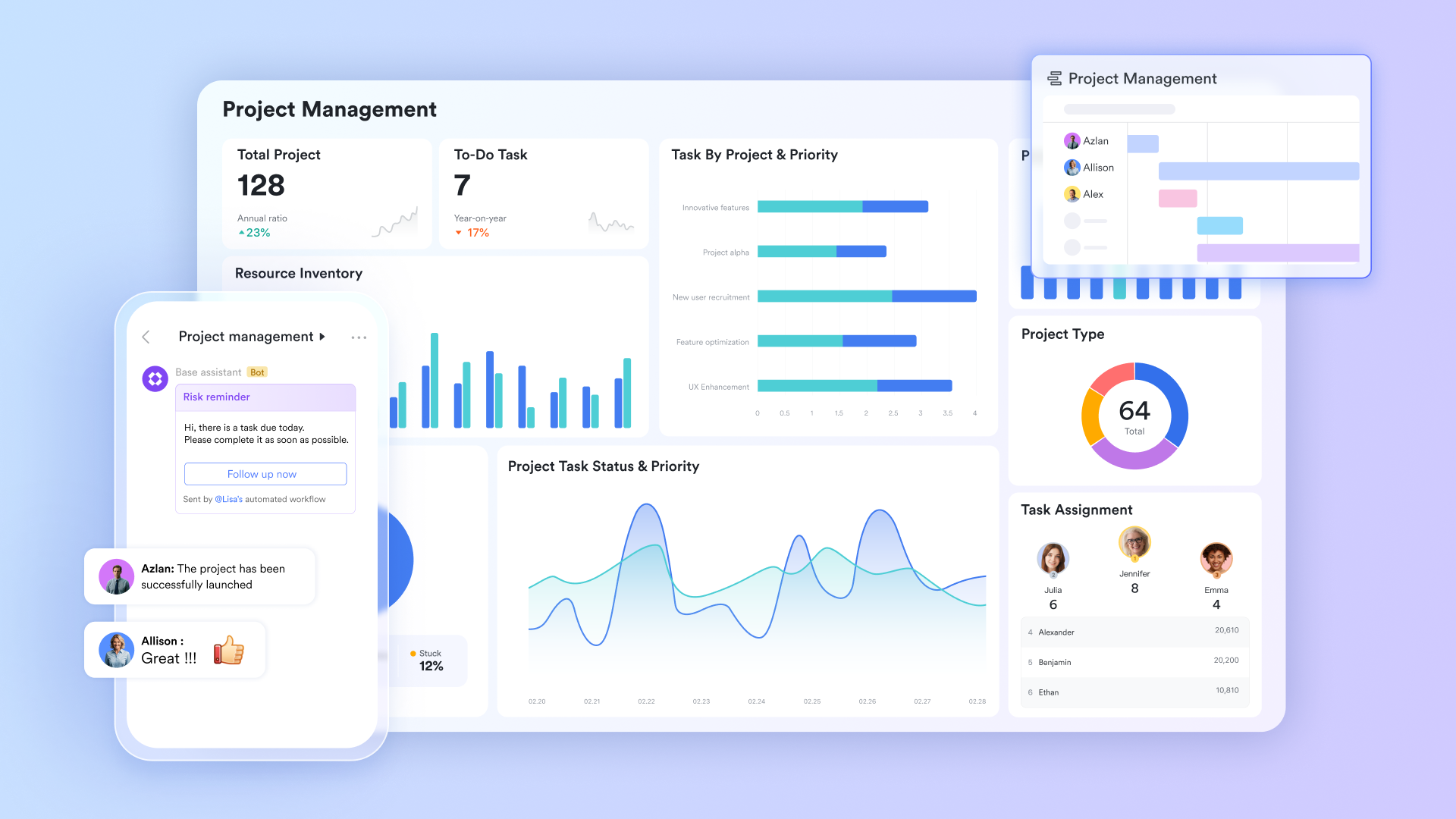
Turns project plan tasks into action with Lark Tasks
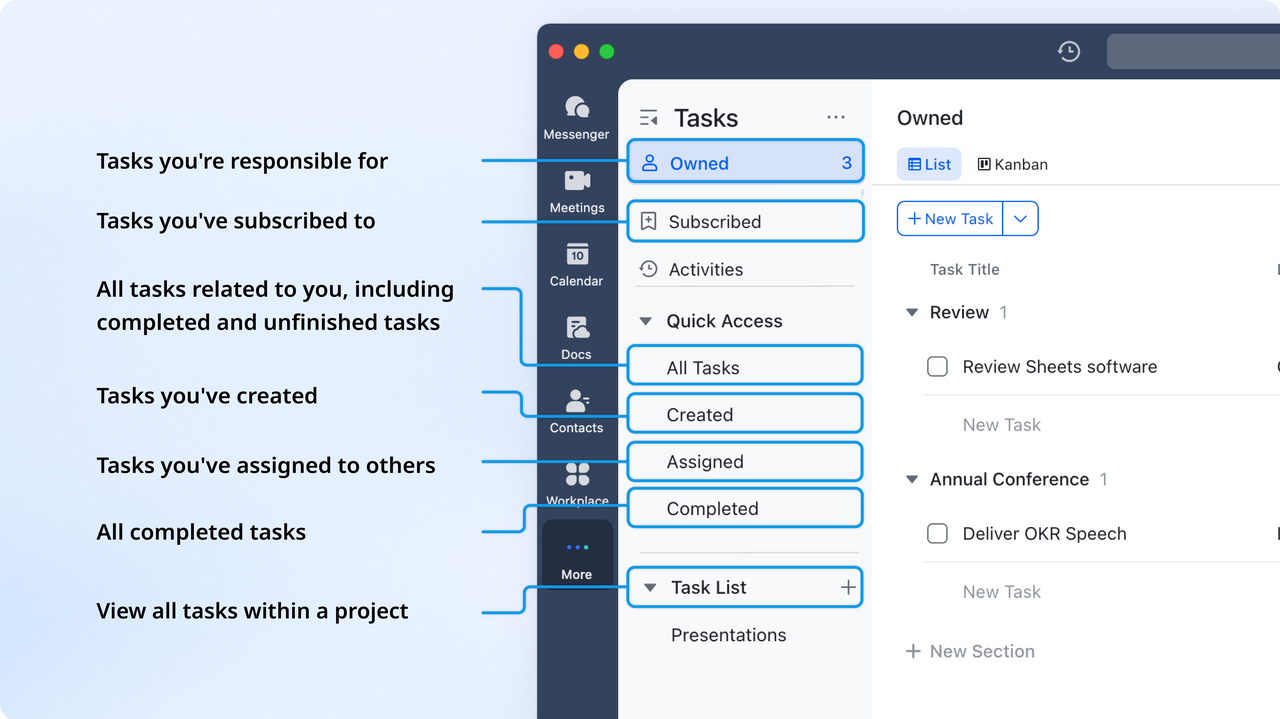
Lark Tasks helps teams take what was defined in the planning steps—deliverables, work packages, and action items—and turn them into clear, trackable work. From a WBS or project roadmap in Base or Docs, tasks can be created with owners, priorities, due dates, and labels. Subtasks roll up into parent tasks, preserving an accurate view of progress against the project plan without extra status reporting. Different task views show what each person owns, assigns, or follows, while automated reminders and updates keep execution in sync with the original schedule and milestones.
Keeps plan documentation aligned in Lark Docs
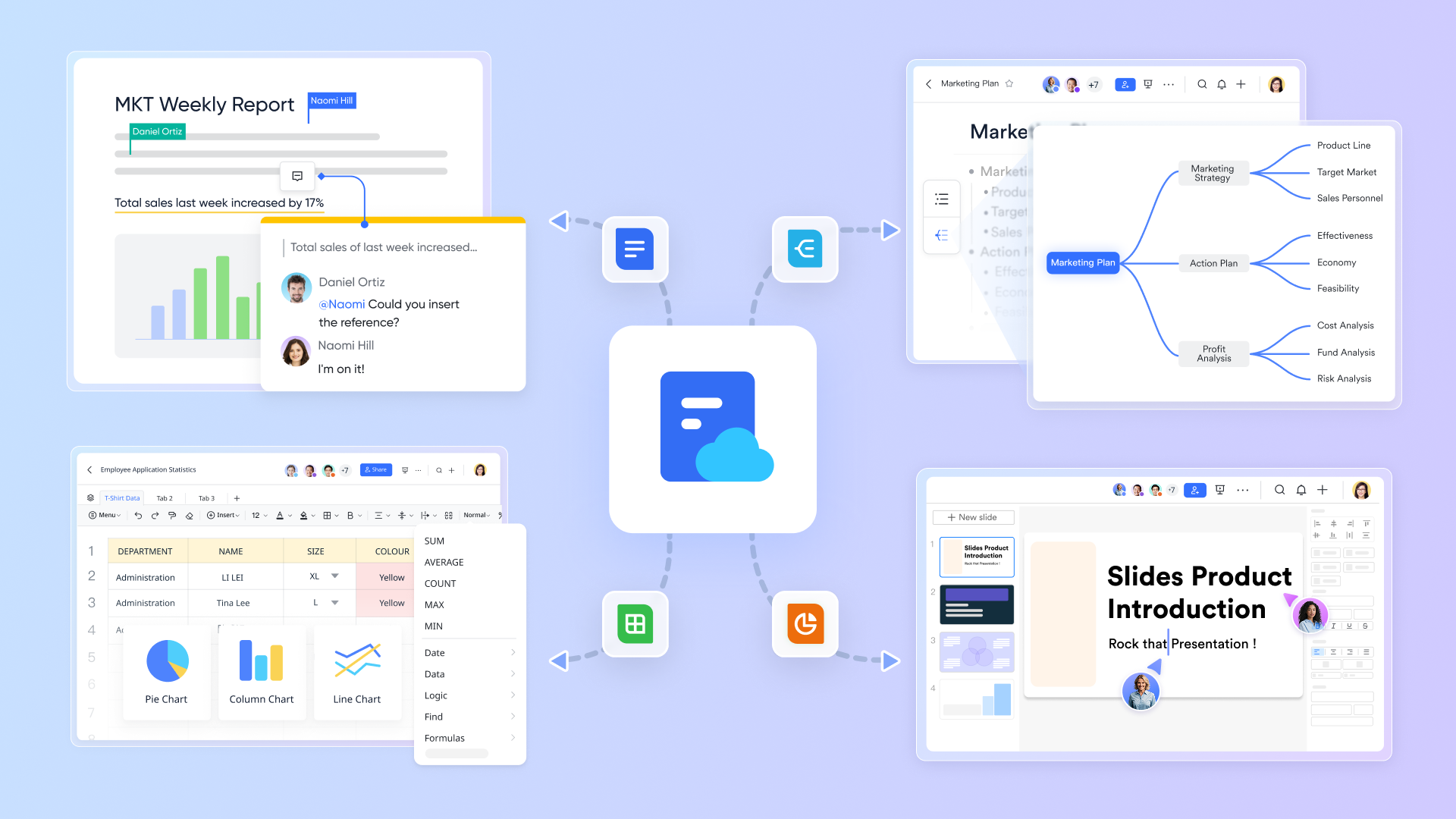
Lark Docs provides a shared space for drafting and maintaining the project management plan itself: Project charter, scope statement, risk register, communication plan, and change management process can all be co-edited in one place. Stakeholders can refine objectives, confirm scope, and document planning decisions through comments and suggestions. Tables and charts from Lark Base can be embedded directly into Docs, so timelines, resource plans, and KPIs always reflect the latest project data. This turns the project plan from a static document into a living reference that evolves smoothly as the project and its planning assumptions change.
Connects planning conversations with work in Lark Messenger
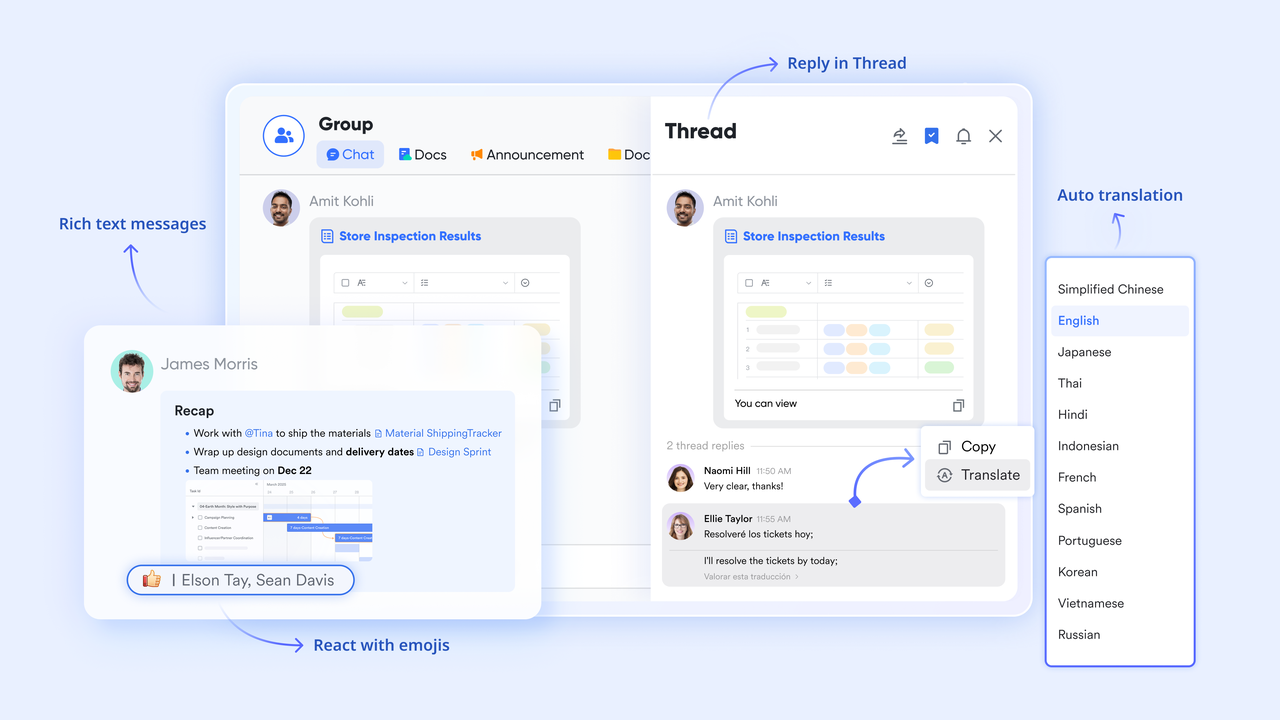
Lark Messenger brings project planning discussions into the same environment as the plan and related tasks. Group chats and threaded replies keep topics like scope changes, risk responses, and schedule adjustments organized and easy to follow. When fields in Base or tasks linked to the project plan are updated, notifications can appear in the right chat, so stakeholders react quickly. Team members can review proposals, discuss trade‑offs, and agree on updates without losing the link back to the underlying data. It shortens feedback cycles during the planning phase and keeps everyone aligned around the same project roadmap.
Aligns planning reviews and follow‑up with Lark Meetings
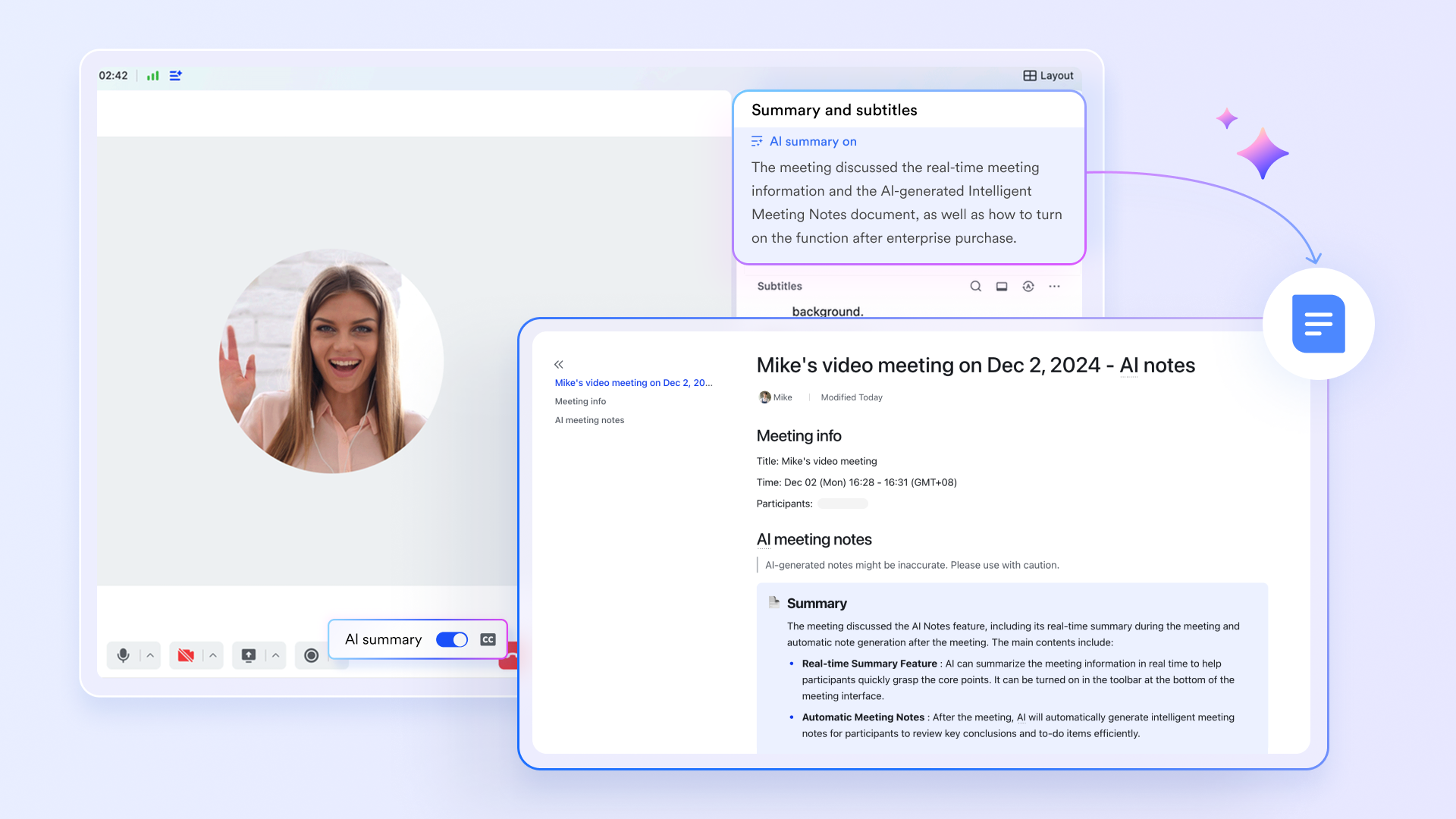
Lark Meetings closes the loop between planning sessions and the live project plan. During project kickoff, planning workshops, or regular reviews, teams can open Base dashboards, task boards, and docs directly in the meeting to review status, revisit assumptions, or refine schedules together. Afterwards, a Minutes file with recording, transcript, and AI‑generated notes captures decisions, risks, and next steps in one place. Follow‑up chats and tasks can be created immediately, ensuring that every planning discussion results in concrete updates to the shared project plan. This built-in flow keeps planning, execution, and governance connected inside a single collaborative workspace.
Tips and common pitfalls when you create project plans
Even experienced teams run into similar problems when creating a project plan. Many of these issues do not come from tools, but from how goals, timelines, and responsibilities are defined at the start. Being aware of these patterns makes it easier to spot them early and keep your project planning process on track and aligned with your project management plan.
Pitfall 1: Goals are inspiring, but too vague
When objectives and success criteria are unclear, each stakeholder develops a different idea of success, and scope becomes "elastic."
Tip
Start by writing down a concise "project north star" with clear objectives, metrics, and non‑goals, and make it easily accessible in a shared workspace (e.g. Lark Docs) so everyone refers to the same definition of success.
Pitfall 2: Timelines are optimistic, not realistic
Overly optimistic schedules often ignore real capacity, dependencies, and external constraints, turning the project timeline into a wish list.
Tip
Build the first version of the schedule in a collaborative planning tool (such as a Lark Gantt view or table), and review it together with the team to adjust estimates, owners, and dependencies based on real workload.
Pitfall 3: Planning in isolation and locking plans in static documents
When the project plan is created by a small group and then "frozen," the team has little room to challenge assumptions, and updates are hard to track.
Tip
Treat the plan as a living document: start with a lightweight version, share it early, and iterate in a shared space (for example, in Lark) where comments, discussions, and revisions are visible to the whole team.
To avoid these traps, treat the project plan as something that evolves, not a one‑time deliverable. Start with a lightweight draft covering objectives, high‑level scope, milestones, and an initial WBS, then refine as you learn more. Make assumptions and dependencies explicit in a shared space so they can be discussed and turned into risks or change requests when needed. Standardize the structure with reusable templates, and use collaborative tools like Lark so teams can review, question, and adjust the plan together.
Conclusion
Creating a solid project plan is less about producing a perfect document and more about building a shared, adaptable roadmap. By defining clear objectives, scope, milestones, and responsibilities, then refining them through feedback and small iterations, teams can navigate uncertainty with confidence. Avoiding vague goals, unrealistic timelines, and isolated planning keeps the project management plan grounded in reality. When combined with collaborative tools like Lark for project tracking, documentation, and communication, the plan becomes a living guide rather than a static file. The result is more predictable delivery, healthier collaboration, and projects that stay aligned with their original purpose—even as conditions change.
FAQs
How to create a project plan in Excel?
To create a project plan in Excel, first define your project goals, key objectives, and scope so everyone agrees on what's in and out of scope. Then open a new workbook, add clear headers (such as Task, Assigned To, Start Date, End Date, Duration, Status), and enter task data with simple duration formulas. Assign each task to a specific owner, adding comments or notes for context. Finally, visualize the schedule by simulating a Gantt chart with a formatted stacked bar chart.
How to create a project plan in Google Sheets?
To create a project plan in Google Sheets, start a new sheet and add core columns like Task Name, Owner (with Smart Chips), Start Date, Due Date, Duration, Status (dropdown), Priority, and Notes. Add project title and scope at the top. List tasks by phase, assign owners and dates, then build a Gantt-style timeline using date columns plus conditional formatting or the Insert > Timeline feature. Finally, use data validation for status dropdowns, comments/@mentions, and sharing for real-time collaboration.
How to create an LMS implementation project plan?
To create an LMS implementation project plan, define clear goals and success metrics, then assemble a dedicated cross‑functional team. Research and select providers, and plan the technical setup: integrations, data migration, and needed customizations. In parallel, develop or adapt learning content and design a user training program. Run a pilot to test workflows and gather feedback, communicate changes to stakeholders, then launch and monitor performance for continuous improvement against your timeline.
What are the 7 steps of a project plan?
Step 1. Define project goals and success metrics
Step 2. Clarify scope, deliverables, and boundaries
Step 3. Identify stakeholders and project roles
Step 4. Break work into tasks with a Work Breakdown Structure
Step 5. Build a realistic schedule and milestones
Step 6. Assess risks, assumptions, and dependencies
Step 7. Set up communication, tracking, and review routines
What is a project plan format?
A project plan format is the structured way you organize project information—typically as a document, Excel sheet, or Google Sheet—with standard sections or columns such as: project goals and scope, stakeholders/roles, tasks (WBS), owners, start/end dates, duration, milestones, status, risks, and communication. It provides a consistent template, so plans are easy to read, track, and update across different projects and tools.
What are the 5 stages of a project plan?
Commonly, a project plan follows five broad stages: Initiation, Planning, Execution, Monitoring & Controlling, and Closure, guiding a project from initial idea to final delivery, ensuring goals are met through structured steps like defining scope, allocating resources, tracking progress, and formally closing out.
Related readings
Table of contents
Start using Lark today

Manage all your work in one place
Boost team efficiency by 10x
Save up to 70% on software costs
Table of contents
Start using Lark today
Manage all your work in one place
Boost team efficiency by 10x
Save up to 70% on software costs
Keep reading








2026 Lark Technologies Pte. Ltd.
Headquartered in Singapore with offices worldwide.






Explore: