When I talk to IT administrators and technical leads evaluating communication platforms, the appeal of open-source software is obvious: you own your data, and on the surface, it looks free. However, in enterprise software procurement, "free to download" rarely equals "free to run." If you are considering this platform for your organization, you need to look past the initial download link. This guide breaks down true Rocket.Chat pricing, exploring the strict limitations of its Starter plan, the hidden infrastructure fees of self-hosting, and how to calculate a realistic Total Cost of Ownership (TCO) for your team before you commit.
How much does Rocket.Chat actually costs?
To help you decide between the open-source community version and the enterprise-grade options, here is a side-by-side comparison of the tiers and who each serves best.
Note: Because Rocket.Chat focuses on customized enterprise deployments; public monthly or annual per-user prices are not listed for their premium tiers. You must contact their sales team for exact quotes.
All prices and features are current as of May 2026, but are subject to change by the provider. We actively monitor and update this post to reflect any changes to plans and pricing.
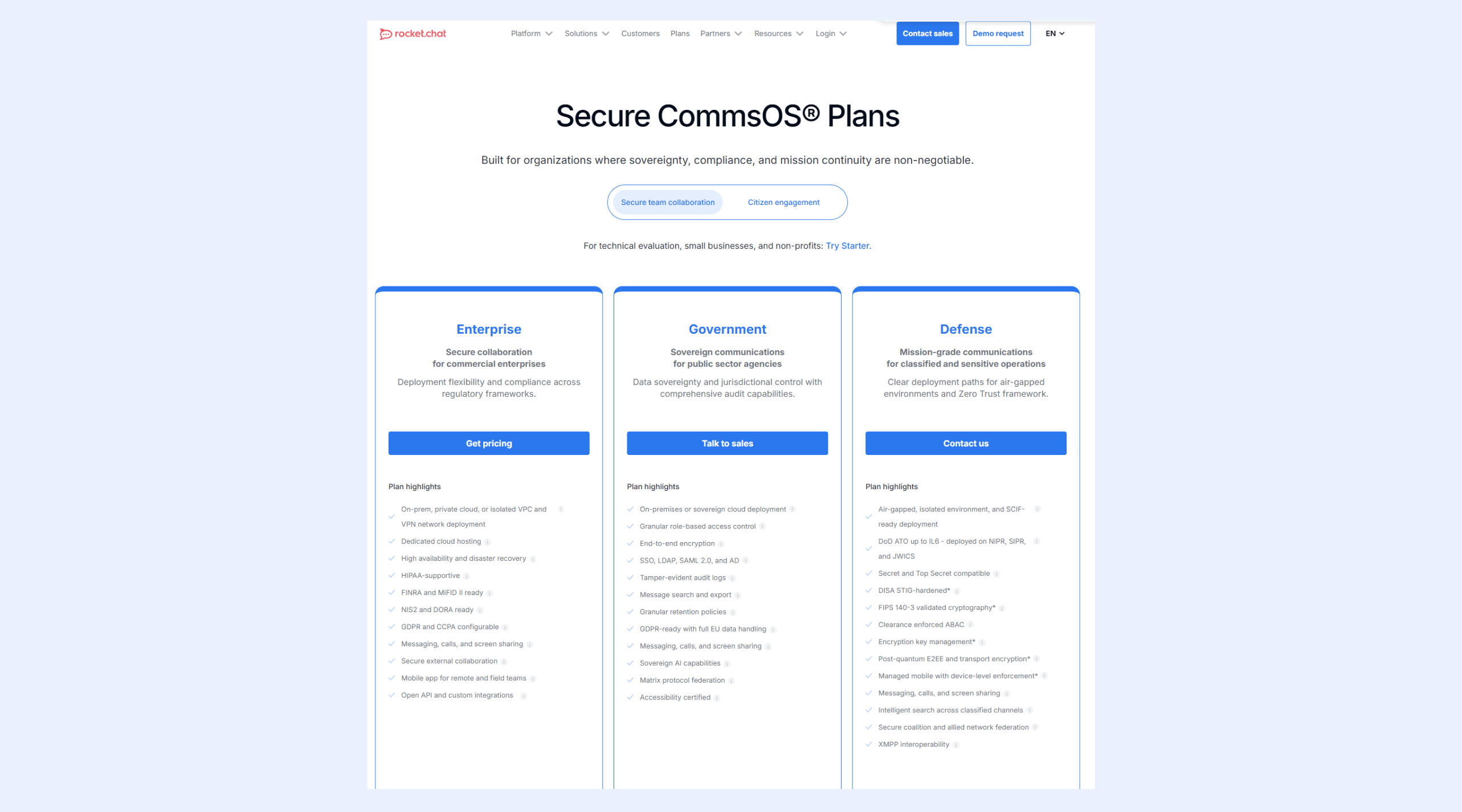
Image source: rocket.chat
Starter
- Ideal for: Technical evaluation, small businesses, and non-profits.
- This is a great plan for those just starting out or IT teams looking to test the platform. For zero licensing cost, you get the basic chat infrastructure, but scaling teams will hit operational limits sooner than expected.
- What you get: Access to basic team collaboration tools, messaging, and the ability to self-host for technical evaluation.
- Key constraint: Based on community feedback, the community version limits you to 50 users, and managing mobile push notifications requires registering your self-hosted instance with their cloud.
- Missing pieces: If your server goes down, you have no dedicated support. High availability, disaster recovery, and advanced compliance are reserved entirely for paid tiers.
Enterprise
- Ideal for: Commercial enterprises needing high availability and regulatory compliance.
- This tier serves as the bridge between standard chat and strict IT requirements. You are paying for security, compliance, and deep deployment flexibility rather than just messaging.
- Security and compliance: This plan is HIPAA-supportive and ready for FINRA, MiFID II, NIS2, and DORA. If your industry demands strict legal data handling, this plan is mandatory.
- Advanced management: IT admins gain deployment flexibility with options for on-prem, private cloud, or isolated VPC and VPN network deployments.
- The reliability bump: You gain high availability and disaster recovery configurations, ensuring your communication lines stay open during unexpected server outages.
Government
- Ideal for: Public sector agencies requiring data sovereignty and jurisdictional control.
- Designed specifically for public sector operations, this tier introduces sovereign communication architectures with comprehensive, tamper-evident audit capabilities.
- Control and auditing: You get granular role-based access control, tamper-evident audit logs, and on-premises or sovereign cloud deployment options.
- Data sovereignty: It is GDPR-ready with full EU data handling capabilities, ensuring sensitive public data stays exactly where legally required.
- Added capabilities: It includes sovereign AI capabilities and matrix protocol federation, tailored specifically for secure inter-agency communication.
Defense
- Ideal for: Classified and sensitive operations requiring mission-grade communications.
- This is the highest level of security Rocket.Chat offers, built specifically for air-gapped environments and strict Zero Trust frameworks.
- Top-tier security: It features FIPS 140-3 validated cryptography, post-quantum end-to-end encryption (E2EE), and clearance-enforced attribute-based access control (ABAC).
- Maximum compliance: Built for the military and intelligence sectors, it features DoD ATO up to IL6 deployed on NIPR, SIPR, and JWICS, and is compatible with Secret and Top Secret clearances.
The "free" fallacy: Hidden costs of self-hosting Rocket.Chat
The biggest misconception I see technical teams make is assuming that a self-managed, open-source chat tool requires zero budget. Hosting your own software shifts the cost from a straightforward SaaS subscription to infrastructure, maintenance, and hidden gateway fees.
The 50-user limit trap
If you are planning to roll out the free community version across your company, you will hit a wall quickly. Community discussions frequently highlight a critical constraint: the free community version is generally limited to 50 users.
Scenario: Imagine your startup scales from 40 to 60 employees. Suddenly, the "free" tool you relied on locks you out of adding new hires. You are now forced into immediate, unbudgeted Enterprise negotiations or a chaotic migration to another tool.
The push notification problem
Mobile accessibility is non-negotiable for modern teams. Yet, one of the most frustrating aspects of self-hosting Rocket.Chat is the push notification system. Even if you host the entire application on your own bare-metal servers, you cannot simply send mobile push notifications out of the box.
To get notifications working on iOS and Android, you are required to register your self-hosted instance with the Rocket.Chat cloud. Users often express frustration over this, noting that self-hosting loses some of its appeal if you still have to tether your system to the vendor's cloud services just to ping a coworker on their phone.
Infrastructure and managed hosting fees
Unless you have physical servers sitting in an IT closet, you have to rent computing power. You will pay monthly fees to AWS, DigitalOcean, or managed cloud providers like Elestio, on top of whatever .
Managed services remove some setup complexity, but they operate on their own billing models. For example, managed platforms often use a credits system where you are charged hourly based on CPU and RAM usage. While basic support might be free, you are still paying continuous operational costs to keep the chat server running, which entirely negates the "free" aspect of the open-source software.
Ready to skip the hidden hosting fees
Calculating the Total Cost of Ownership (TCO) for growing teams
To make a sound procurement decision, you need to calculate the actual TCO and compare it with other platforms whose pricing models are well-documented, such as . A $0 software license can easily cost an organization thousands of dollars a year in hidden operational debt.
IT administration and maintenance hours
The highest hidden cost is engineering time. Deploying an application via Docker or managing a GitHub repository requires ongoing technical oversight.
When a security patch drops, your engineers have to test and deploy it. If the server crashes at 2 AM, your team is responsible for getting it back online. If an engineer costs your company $60 an hour, and they spend just five hours a month managing server backups, troubleshooting push notification gateways, and managing user roles, that is $3,600 a year in hidden labor costs alone.
Setup complexities and scaling friction
While Rocket.Chat is highly secure and often evaluated alongside other , user reviews consistently point out setup complexities. Moving from a single Docker container to a highly available, load-balanced Enterprise architecture is a massive technical leap. Organizations handling highly sensitive information often find the security benefits worth this friction. But for standard B2B companies just looking for a reliable way to communicate, the engineering overhead often outweighs the benefits of self-hosting.
Rocket.Chat deployment options: Docker, GitHub, and managed cloud
When you decide to run your own communication platform, you have to choose how deep into the technical weeds you want to go. Rocket.Chat provides several paths for deployment, but each comes with its own trade-offs regarding cost and complexity, similar to other .
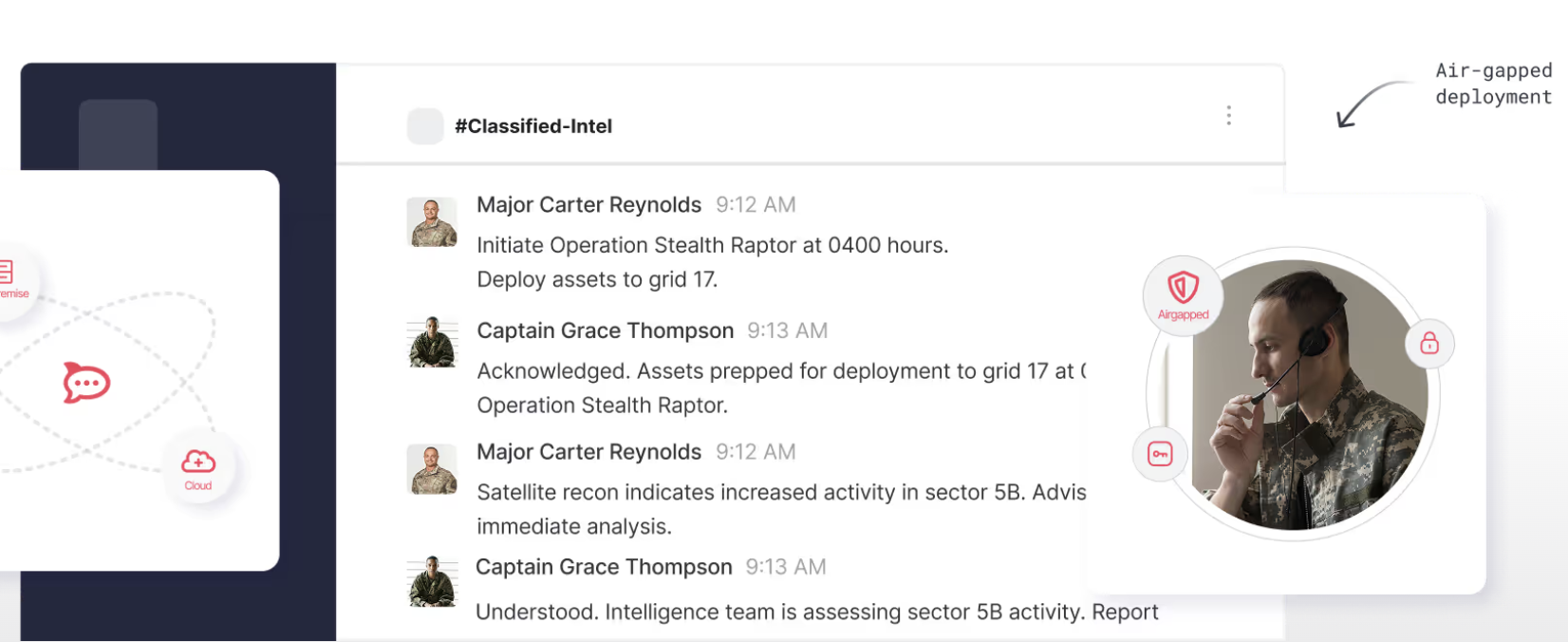
Image source: rocket.chat
Bare-metal deployment vs. managed services
If you have a dedicated DevOps team, you can pull the code directly from GitHub or run it as a Docker container on your own bare-metal servers. This gives you maximum control over your data environment, which is exactly why defense and government sectors prefer it. However, you bear 100% of the maintenance load.
To offset this, many organizations use managed hosting providers like Elestio. Elestio handles the backend infrastructure, offering options like "Bring your own VM" and operating on a flexible credits system where you are charged hourly based on resource usage. While this approach removes the headache of manual server configuration, it adds a recurring monthly expense. You are no longer running a "free" tool; you are paying a cloud provider to keep your chat application alive.
Navigating community support
Another critical factor in your deployment choice is support. If you stay on the free community version, you do not get a dedicated service level agreement (SLA). When a database migration fails or an update breaks your integration, you rely entirely on community forums and GitHub discussions to find a fix. For an enterprise handling time-sensitive operations, relying on a forum for technical support is a massive operational risk.
Is upgrading to Rocket.Chat Enterprise worth the price?
Given the 50-user limit and the lack of dedicated support on the community tier, growing teams inevitably face a decision: do we upgrade to the Enterprise edition?
Features you get when paying
Moving to the paid tiers unlocks the capabilities that make Rocket.Chat is a serious enterprise contender. You gain access to high availability architectures, disaster recovery protocols, and advanced security configurations. More importantly, the Enterprise and Government tiers offer strict compliance features required by regulations like HIPAA, FINRA, and MiFID II.
Who should pay for Enterprise?
If you operate in healthcare, finance, or government contracting, upgrading to Enterprise is a logical business expense. The custom pricing you negotiate with their sales team covers the cost of keeping you legally compliant and secure.
However, if you run a standard B2B marketing agency, an e-commerce brand, or a software startup, the heavy emphasis on defense-grade compliance might be overkill. In these cases, negotiating a custom enterprise contract just to get reliable internal chat and push notifications is rarely the most efficient use of your IT budget.
Unified workspaces vs. standalone chat: A better ROI?
When evaluating software budgets, I often ask IT leaders to zoom out. Why pay custom pricing and infrastructure fees for a standalone messaging app when modern teams need much more than just chat, especially given the range of ?
Why isolated communication tools limit productivity
If you self-host Rocket.Chat, you solve the messaging problem. But your team still needs video conferencing, document collaboration, and project management tools, which is why many organizations turn to broader . This leads to a fragmented tool stack where employees constantly context-switch between an open-source chat app, a separate video meeting link, and scattered cloud documents.
Shifting the budget from infrastructure to productivity
Instead of allocating engineering hours to maintain a chat server—or paying managed cloud providers hourly credits to host it—you can shift that exact budget toward an all-in-one productivity suite such as Lark for remote collaboration and communication. Consolidating your stack reduces software bloat and provides a much clearer return on investment (ROI). Boost productivity with an all-in-one platform
Lark pricing: A transparent, cloud-native alternative
If your team is struggling with fragmented tools and unpredictable infrastructure costs, offers a compelling alternative. Built as a cloud-native unified workspace, Lark combines messaging, video meetings, collaborative docs, shared calendars, and automation workflows into a single platform.
Out-of-the-box mobile accessibility without gateway friction
One of the most frequent complaints in GitHub discussions about the self-hosted Rocket.Chat is the push notification system. To get mobile notifications working on your own server, you are forced to register your instance with their cloud gateway. Lark removes this technical friction entirely. Because it is a natively hosted cloud platform, mobile accessibility works instantly. You do not need to spend engineering hours configuring notification gateways or troubleshooting server connections just to reach your team on their phones.
Replacing fragmented chat servers with a unified workspace
Rocket.Chat is highly specialized for secure messaging, which means you still have to pay for and integrate separate tools for video meetings, calendars, and documents. Lark is built to be different from the very start, combining collaborative tools like,, cloud storage,, , and , as well as operational tools like , , and attendance, onto one seamless platform. When you use Lark, you can jump from a chat thread directly into a video call or co-edit a document without ever switching apps or managing messy third-party integrations. 
Instant messaging in Lark
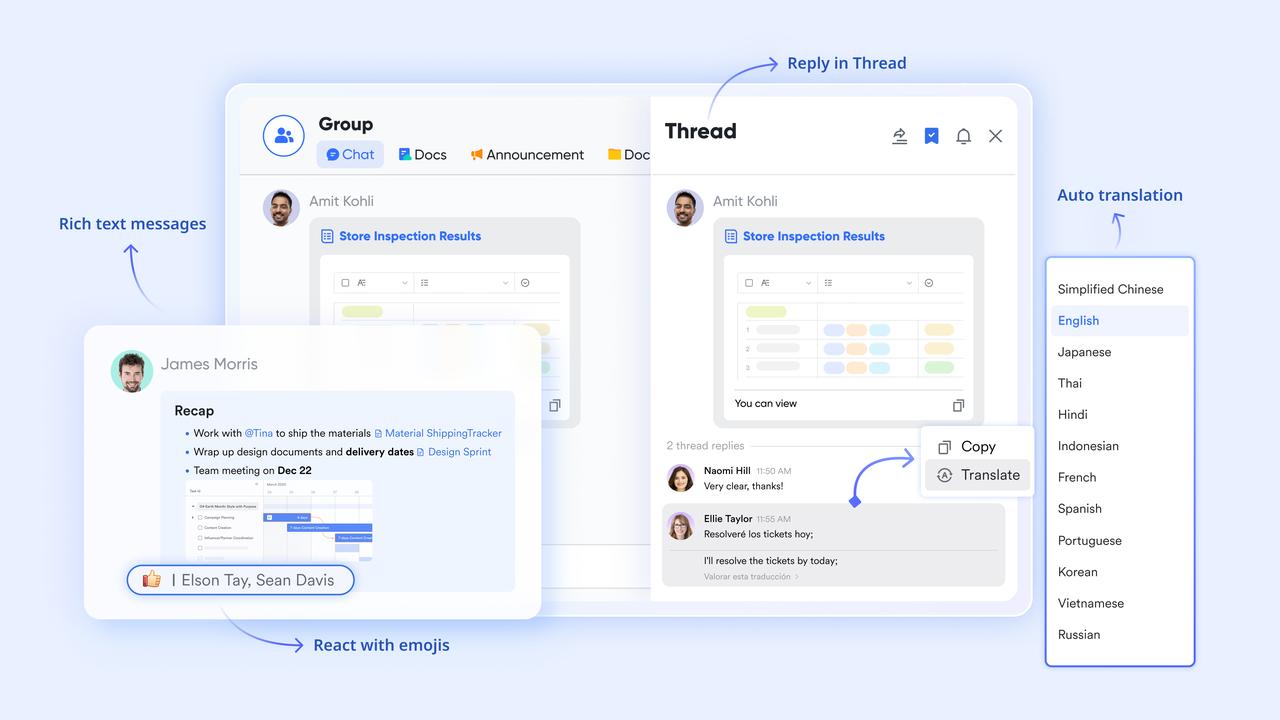
Lark replaces scattered tools with one powerful platform. It combines messaging, video, documents, and automation, ending constant app-switching. At its heart, Lark connects conversations directly to work. Teams can discuss, edit docs, and plan projects using modern , all in one view, boosting efficiency. Lark simplifies IT. As a fully managed cloud service, it offers enterprise security and multilingual support with zero maintenance. Global teams connect effortlessly, especially when powered by secure, integrated .
Built-in project management and automation
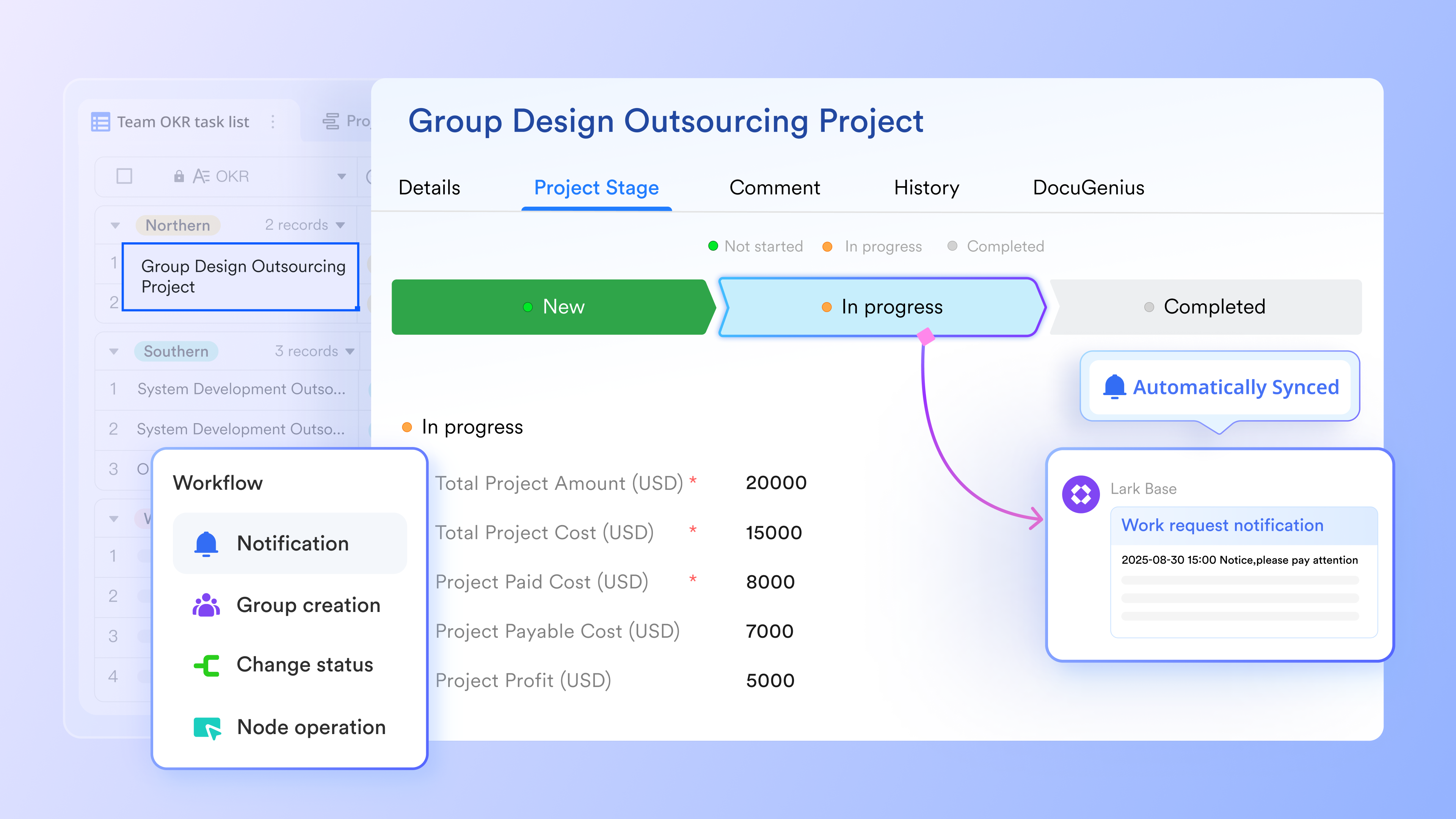
Instead of relying entirely on external tools like Jira or Trello to track work, Lark brings operational workflows directly into your communication hub. It features , a no-code data management tool that allows your team to set up automated approval workflows, build project trackers, and monitor OKRs. If a status changes in your project board, the relevant team members are automatically notified in Lark Messenger, keeping everyone aligned without context switching.
Free Starter plan without infrastructure headaches
Unlike open-source tools that require server setup, Lark is entirely cloud-hosted. The is free forever for up to 20 users. It requires zero server maintenance, includes 11 powerful built-in tools, provides 100GB of cloud storage, and allows for 1,000 automation runs. You get a functional workspace immediately, without worrying about Docker containers or push notification gateways.
Predictable scaling with Basic and Pro plans
When you outgrow the free tier, Lark provides complete pricing transparency. There are no surprise enterprise negotiations for standard scaling.
- Starter plan: Free forever plan that includes 11 powerful tools for up to 20 users. It also comes with 100GB of storage, 1000 automation runs, AI translations, and more.
- Basic plan: (billed annually) for up to 500 users. It includes everything in Starter and unlimited message history, 5TB of storage space, 1,000 automation runs, and more. Some users may need to to purchase this plan.
- Pro plan: (billed annually) for up to 500 users. It includes everything in Basic plus group calling for up to 500 attendees, 15TB of storage space, 50,000 automation runs, and more.
- Enterprise plan: for custom pricing. Supports unlimited users and includes even more automation runs and advanced security, compliance, and management features.
For small teams with simple communication needs

18 months message history
1000 Base automation runs/month
2000 rows per table in Base
Most POPULAR
For companies with comprehensive collaboration and management needs
Unlimited message history
500-participant video meetings
50k Base automation runs/month
20k rows per table in Base
For large companies with advanced security and organizational management needs
Get a personalized demo and pricing
Unlimited message history
500-participant video meetings
15 TB storage + 30 GB storage/user
500k Base automation runs/month
50k Base automation runs/month
Most POPULAR
For companies with comprehensive collaboration and management needs
Unlimited message history
500-participant video meetings
50k Base automation runs/month
20k rows per table in Base
Conclusion
Choosing the right communication tool comes down to calculating your actual Total Cost of Ownership. While open-source solutions like Rocket.Chat offers unparalleled control for highly regulated industries; the hidden costs of self-hosting, strict user limits, and complex enterprise pricing can catch standard businesses off guard. For most growing teams, stepping away from infrastructure maintenance and adopting a transparent, all-in-one cloud workspace like provides a far better return on investment and a more cohesive daily workflow.
Get Lark for free, no credit card needed
FAQs
How much does Rocket.Chat cost?
Rocket.Chat offers a free Starter plan for basic community use. However, its Enterprise and Government tiers—which are required for high availability and strict compliance—do not have public pricing. You must contact their sales team for a custom quote based on your specific organizational needs.
Is Rocket.Chat fully free?
No. While the source code and the Community/Starter version are free to download, self-hosting requires you to pay for your own server infrastructure (such as AWS or managed providers like Elestio). Additionally, the free tier limits you to 50 users, and setting up features like mobile push notifications requires registering with their cloud service.
What is the best Rocket.Chat alternative?
The best alternative depends on your needs. If you want to eliminate server maintenance and consolidate your tools, Lark is an excellent alternative that combines chat, video meetings, and documents into one transparently priced platform. Other common alternatives for simple messaging include Microsoft Teams and Slack.
Is Rocket.Chat like Discord?
Visually, Rocket.Chat shares a similar channel-based interface with Discord. However, their use cases are entirely different. Discord is built primarily for public communities and gamers, while Rocket.Chat is designed for secure, internal B2B communications, offering self-hosting options and strict regulatory compliance (like HIPAA) for enterprises.
Related reading































