Salesforce is one of the most recognized names in customer relationship management, often considered the default choice for large organizations aiming to centralize sales, service, marketing, and customer data. Over time, it has grown far beyond basic CRM into a broad ecosystem of cloud products designed to support complex enterprise workflows. However, scale and popularity don't guarantee fit. This Salesforce review takes a practical look at where the platform excels, where it creates friction, and what teams should realistically expect.
In this guide, we examine Salesforce's core features, pricing structure, user experience, security approach, and how it compares with other CRM tools on the market.
Cut complexity and boost team alignment from today
Salesforce CRM overview: What is the platform built for?
Salesforce CRM is designed to support organizations with complex customer operations, , and high volumes of data. At its foundation, the platform focuses on centralizing customer information across sales, service, marketing, and commerce functions, enabling teams to operate from a shared system of record. In many enterprise environments, this all-in-one structure is a key reason Salesforce is often positioned as a long-term CRM investment.
From a functional standpoint, a typical review of Salesforce highlights its strength in pipeline management, workflow automation, and customizable reporting. Salesforce also extends beyond core CRM through industry-specific products such as Salesforce Service Cloud, Salesforce Financial Services Cloud, and Salesforce Commerce Cloud, allowing companies to tailor the platform to regulated or vertical-specific needs. However, this breadth comes with added configuration requirements, making Salesforce best suited for teams with dedicated admin resources and clearly defined processes rather than lightweight CRM needs. 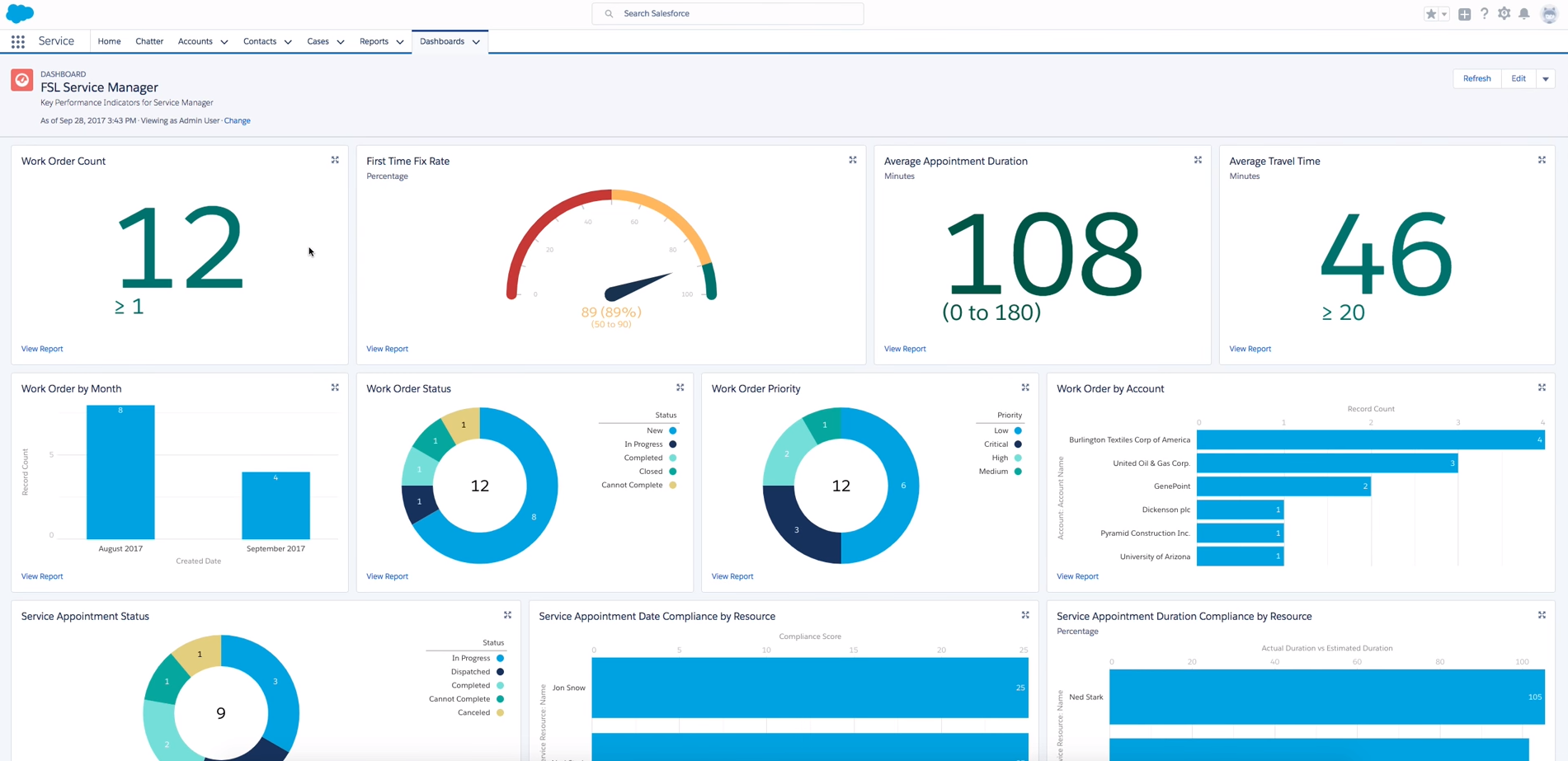
Image source: salesforce.com
Salesforce core CRM features reviewed
A detailed Salesforce CRM review isn't complete without examining the platform's core features and how they perform in real operational environments. Below is a practical breakdown of Salesforce's primary CRM capabilities, focusing on usability, depth, and everyday impact rather than feature volume alone.
- Lead and : Salesforce provides structured tools for capturing, organizing, and tracking leads across multiple channels. Contacts, accounts, and activity histories are stored in a centralized database, giving teams full visibility into customer interactions. While powerful, effective use often depends on proper field configuration and ongoing data hygiene.
- Opportunity and pipeline management: Salesforce's opportunity tracking supports detailed sales stages, probability weighting, and revenue forecasting. Managers gain strong visibility into pipeline health and deal progression. However, pipeline customization typically requires admin involvement, especially for complex sales cycles.
- and approvals: Through Flow Builder and rule-based automation, Salesforce allows teams to automate follow-ups, an workflow, and record updates. This reduces manual effort and enforces consistency across processes. The tradeoff is complex, as poorly designed workflows can slow performance or cause conflicts.
- Reporting and dashboards: Salesforce offers advanced reporting tools with real-time dashboards and customizable metrics. Teams can analyze performance by rep, region, or product with precision. Building advanced reports, however, often requires technical knowledge or admin support.
- Integration and AppExchange ecosystem: Salesforce integrates with thousands of third-party tools through APIs and the AppExchange marketplace. This extensibility is a major strength in many review Salesforce reviews. At the same time, managing integrations adds cost, governance, and security considerations.
Salesforce UX and learning curve: A closer assessment
User experience plays a major role in CRM adoption, and in any Salesforce review, usability is one of the most debated aspects. While Salesforce offers extensive customization and control, those strengths directly influence how easy, or difficult, the platform is to learn and use consistently.
Salesforce's Lightning Experience delivers a modern interface with , record views, and navigation menus. Power users and admins benefit from this flexibility, as layouts can be tailored to specific roles or processes. However, for new users, the interface can feel dense, with multiple objects, tabs, and record types competing for attention.
The learning curve is especially noticeable for teams without prior . Sales reps often require formal onboarding to understand workflows, automation behavior, and reporting logic. In many real-world Salesforce CRM reviews, organizations note that ongoing training and admin support are necessary to maintain adoption and prevent workarounds outside the system.
Salesforce security review and compliance readiness
Security and compliance are central considerations in any Salesforce security review, especially for organizations handling sensitive customer or financial data. Salesforce positions its , offering a broad set of controls designed to support global security and regulatory requirements.
At the platform level, Salesforce provides role-based access control, field-level permissions, audit logs, encryption at rest and in transit, and identity management through single sign-on and multi-factor authentication. These tools allow organizations to define granular data access policies across teams and regions when configured correctly. From a compliance standpoint, Salesforce supports major standards such as GDPR, SOC 2, ISO 27001, and industry-specific regulations, making it a common choice for regulated sectors. However, security strength depends heavily on implementation. A thorough Salesforce AppExchange security review checklist is essential, as third-party apps may introduce data exposure risks if not properly vetted and monitored.
What is the pricing model of Salesforce?
Salesforce uses a tiered, product-based pricing system that can feel overwhelming due to the number of editions, add-ons, and required configurations.
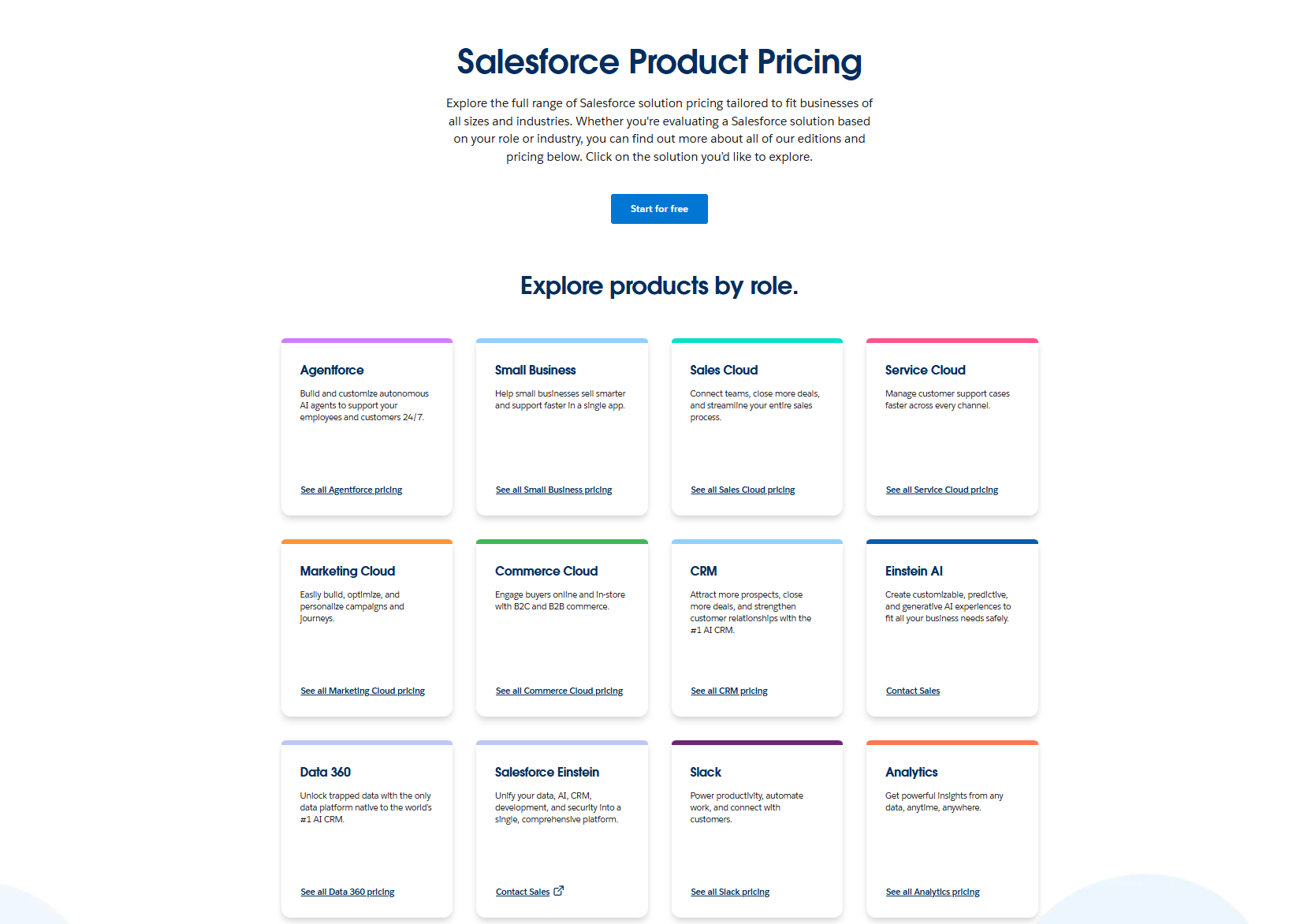
Understanding how each product is priced helps teams choose the right plan without overspending. Below is a simplified table of 5 major and popular Salesforce offerings and what each includes.
Information source: salesforce.com
Update time: 2025-12-10
Note: Pricing and plan details reflect publicly available data as of the update date and may vary based on region, billing cycle, and number of agents.
Salesforce pros and cons based on real-world usage
Any practical Salesforce review should weigh the platform's strengths against the challenges teams encounter after implementation. Based on real-world usage across industries, Salesforce delivers strong enterprise capabilities, but not without notable tradeoffs.
Pros
- Highly customizable CRM platform: Salesforce allows deep customization of objects, workflows, layouts, and automation to match complex business processes. This flexibility makes it suitable for large organizations with unique requirements. However, customization often requires skilled administrators or consultants.
- and analytics: Salesforce offers advanced reporting, dashboards, and forecasting tools that provide strong visibility into sales and customer performance. Leadership teams benefit from real-time data insights. Building and maintaining these reports can be resource-intensive.
- Scalable for enterprise growth: The platform supports large user bases, multiple regions, and complex hierarchies with relative stability. As organizations grow, Salesforce can adapt to evolving needs. That scalability often comes with higher licensing and operational costs.
Cons
- Steep learning curve for end users: Many users find Salesforce difficult to learn without structured onboarding. The interface and data model can feel overwhelming, especially for non-technical teams. This can slow adoption and impact productivity.
- High total cost of ownership: While entry-level plans appear affordable, real-world costs increase with add-ons, higher tiers, integrations, and admin support. Many reviews of Salesforce CRM software discussions highlight this gap between list pricing and actual spend.
- Ongoing admin and maintenance effort: Salesforce typically requires dedicated admin resources to , data quality, and system updates. Without continuous oversight, configurations can become inefficient or fragmented over time.
Afterthought
The platform's highly customizable nature and powerful reporting make it the standard for complex, enterprise-level CRM. However, these benefits often come with the cons of a steep learning curve and a high total cost of ownership due to add-ons and administrative overhead. Given these trade-offs, particularly the high cost and complexity that smaller teams often cite, it's worth evaluating alternatives that prioritize ease of use and a lower barrier to entry. This brings us to platforms like Lark, designed to unify collaboration and work management in one place. Let's dive into this new option and see where it outshines others.
Reduce tool sprawl with streamlined workflows now
New option: A modern alternative for agile teams
For modern, fast-moving teams that prioritize speed, alignment, and real-time collaboration, provides a more streamlined environment where , workflows, and operate in one cohesive workspace. This is a deliberate contrast to Salesforce, which excels as a deeply configurable system of record but often sacrifices agility and communication flow for that complexity.
A dynamic database compared to Salesforce's complex pipeline setup
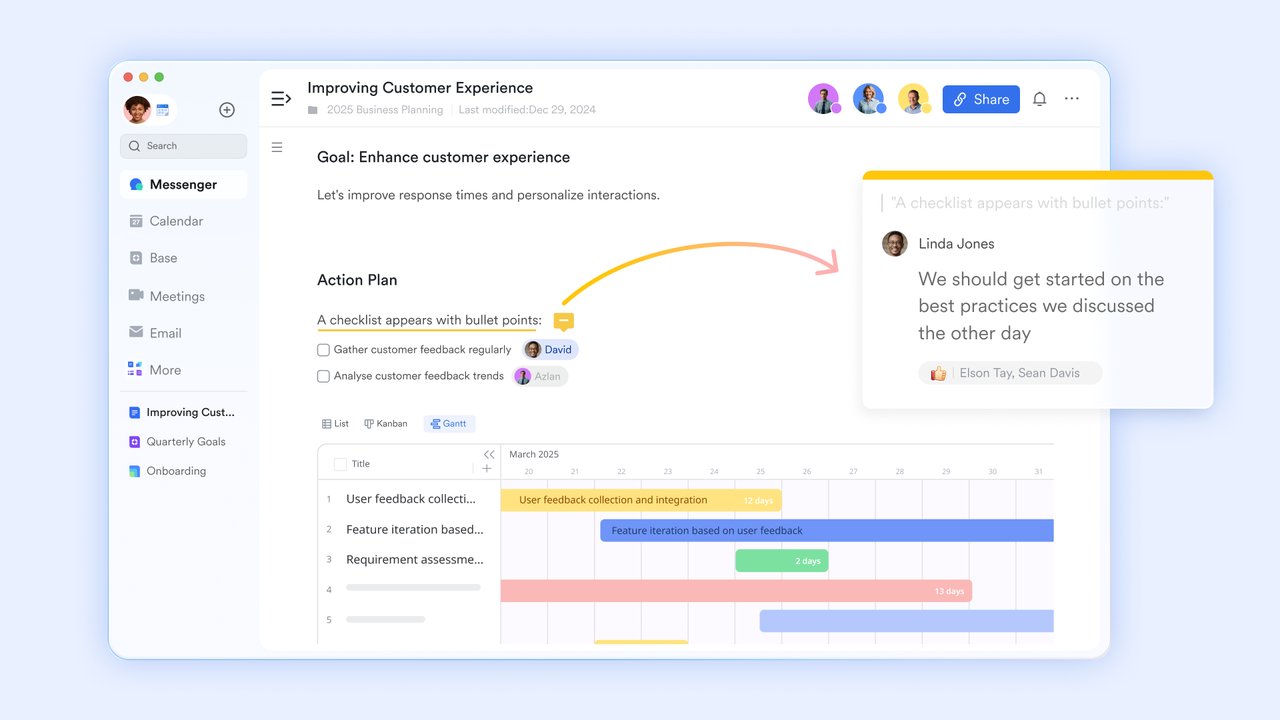
Salesforce relies on objects, page layouts, and layered configurations to manage pipelines and account data. This structure is powerful but often requires specialists to adjust or maintain. offers a more by letting teams shape pipelines, customer records, and without heavy setup. With table views, Kanban layouts, and automated workflow functions, Base supports fast-moving sales cycles and removes the administrative overhead that Salesforce often demands. 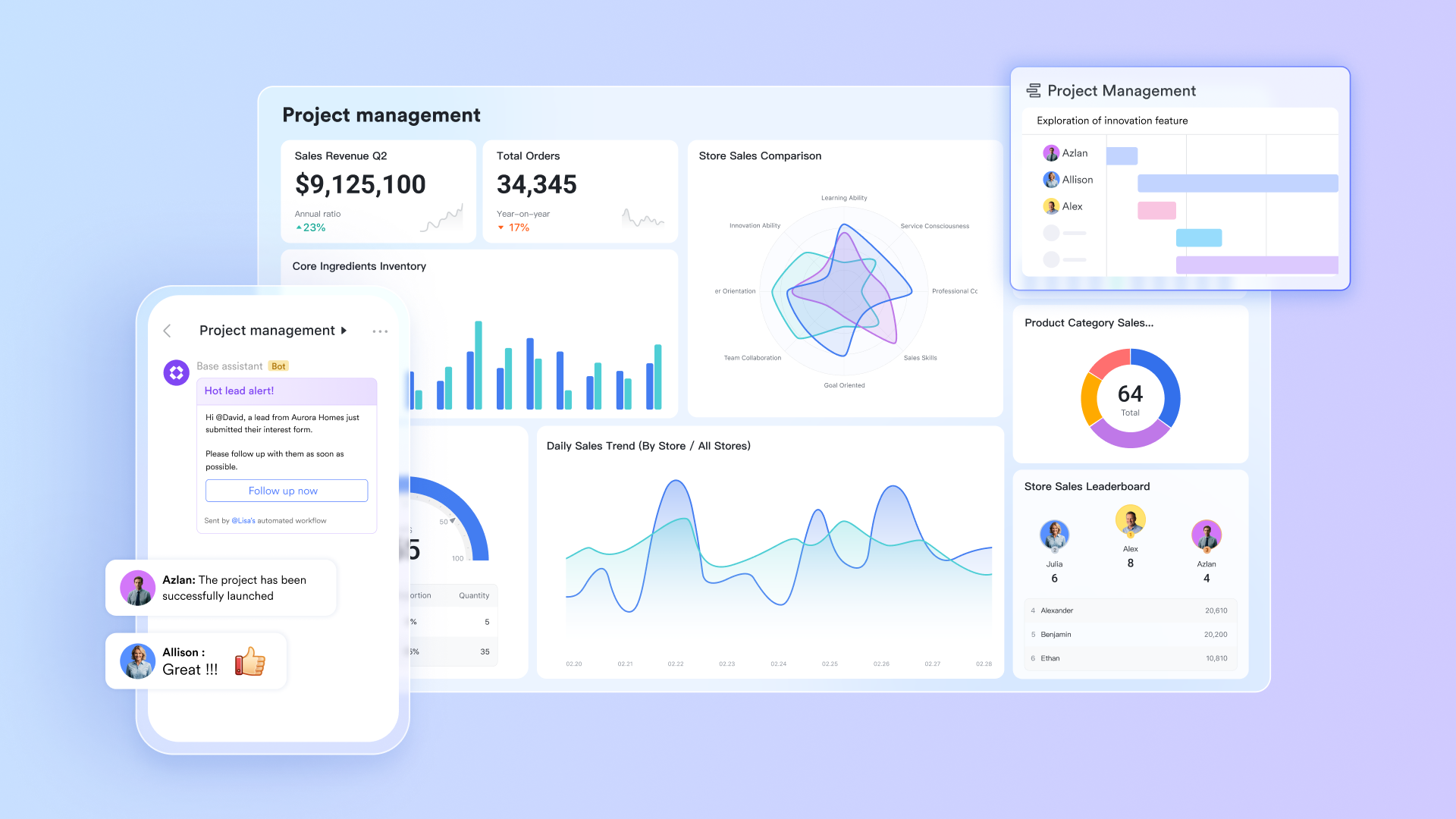
Faster collaboration compared to Salesforce Chatter
Salesforce Chatter keeps discussions tied to individual records, which can scatter conversations across multiple pages. This slows communication when teams need quick alignment. brings team discussions into a connected environment where messages, threads, and mentions stay closely linked to active work. Sales updates, , and customer insights move in real time, offering a clearer and more cohesive communication flow than Chatter's fragmented structure. 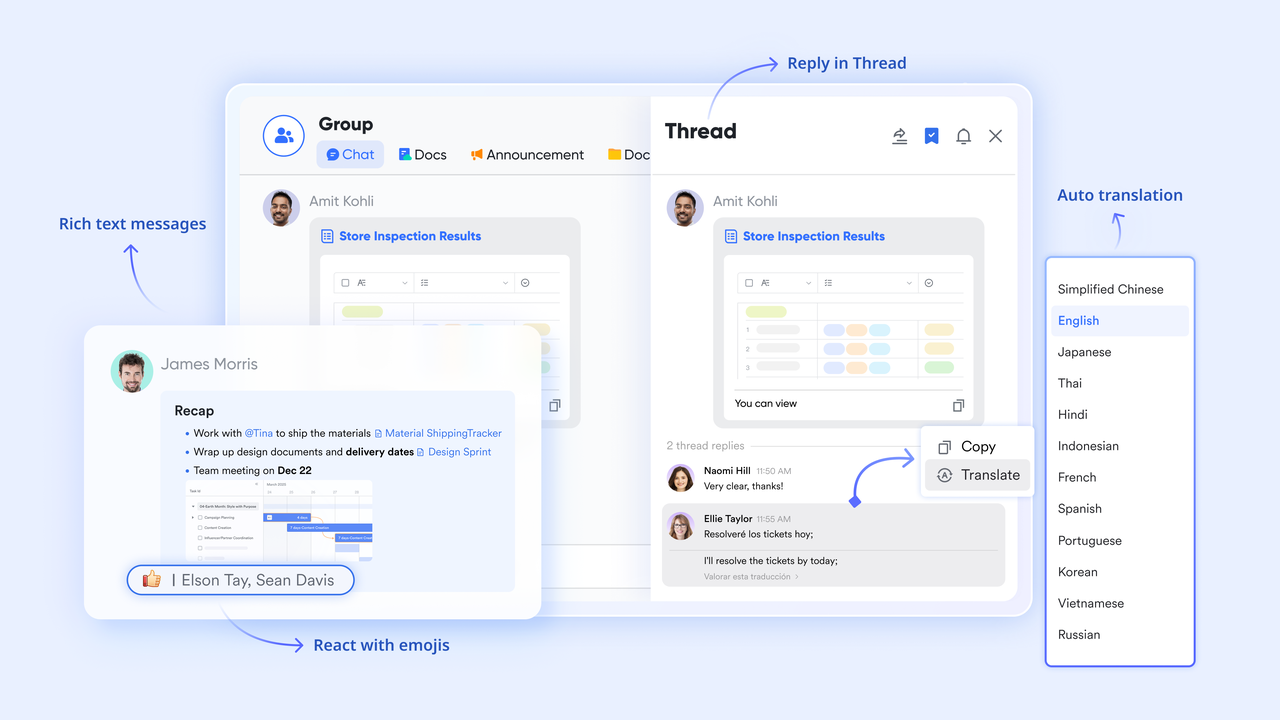
Collaborative knowledge building beyond Salesforce's file libraries
Salesforce stores documents through attachments or content libraries, but collaboration typically happens one update at a time. removes this friction by giving teams a shared, real-time workspace for sales playbooks, proposal templates, , and more. Multiple contributors can edit, comment, and refine content simultaneously, helping teams evolve their documentation as they learn, something Salesforce's file-based system cannot easily support.
Streamlined execution versus Salesforce's layered task system
Salesforce tasks are tied to individual records and require users to navigate through multiple layers to understand workload or responsibilities. This can make prioritization difficult during busy sales cycles. Lark Tasks brings ownership and execution into a single, clear view. Team members can assign tasks, track progress, and manage follow-through with minimal effort. This unified task environment helps teams move faster and maintain momentum without the navigation complexity often found in Salesforce . 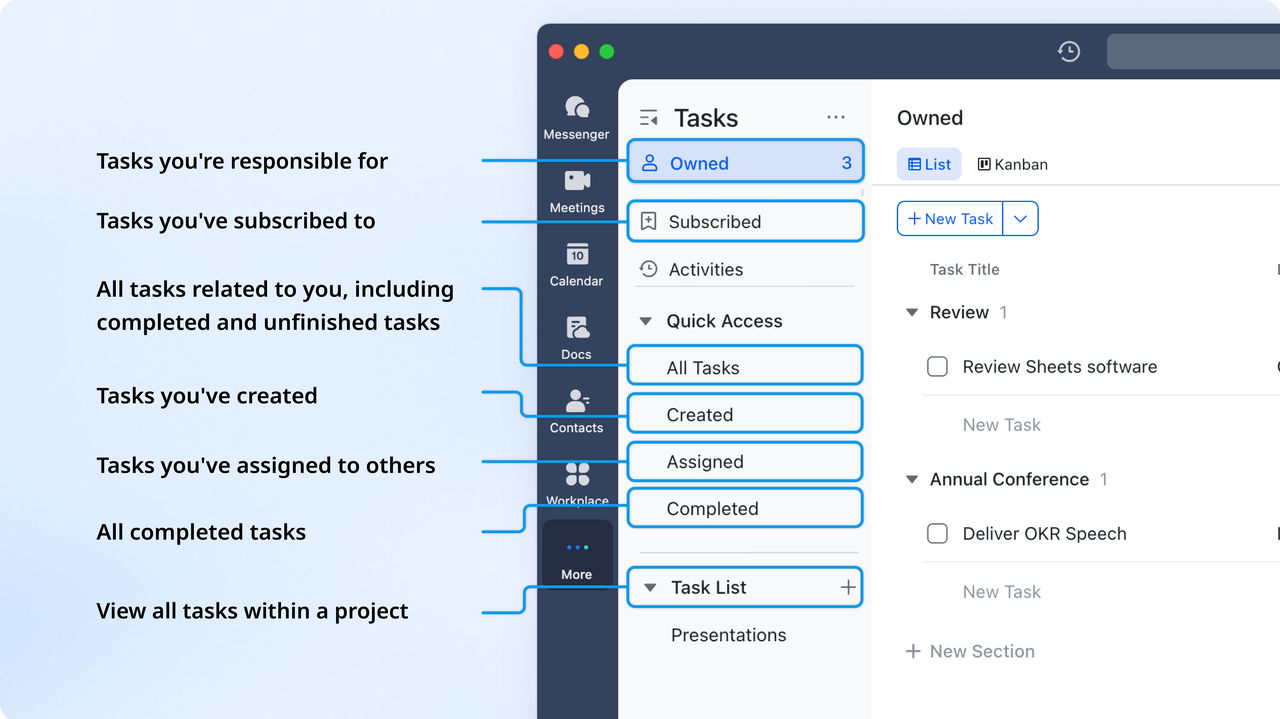
:
- Starter plan: Free forever plan that includes 11 powerful tools for up to 20 users. It also comes with 100GB of storage, 1000 automation runs, AI translations, and more.
- Pro plan: $12/user/month (billed annually) for up to 500 users. It includes everything in Standard plus group calling for up to 500 attendees, 15TB of storage, 50,000 automation runs, and more.
- Enterprise plan: for custom pricing. Supports unlimited users and includes even more automation runs and advanced security, compliance, and management features.
For small teams with simple communication needs

18 months message history
1000 Base automation runs/month
2000 rows per table in Base
Most POPULAR
For companies with comprehensive collaboration and management needs
Unlimited message history
500-participant video meetings
50k Base automation runs/month
20k rows per table in Base
For large companies with advanced security and organizational management needs
Get a personalized demo and pricing
Unlimited message history
500-participant video meetings
15 TB storage + 30 GB storage/user
500k Base automation runs/month
50k Base automation runs/month
Most POPULAR
For companies with comprehensive collaboration and management needs
Unlimited message history
500-participant video meetings
50k Base automation runs/month
20k rows per table in Base
Who should choose Salesforce, and who shouldn't
A practical Salesforce review isn't just about features, it's about fit. Salesforce delivers the most value when its complexity aligns with an organization's scale, structure, and .
Who should choose Salesforce
- Large enterprises with complex processes: Salesforce is well-suited for organizations managing multi-layered sales cycles, global teams, and regulated data. Its customization and automation capabilities support detailed workflows across departments. Dedicated admin and IT resources are usually required to sustain long-term value.
- Companies needing industry-specific CRM solutions: Businesses in finance, healthcare, retail, or manufacturing benefit from specialized products like Salesforce Financial Services Cloud, Salesforce Service Cloud, and Salesforce Commerce Cloud. These tools help meet compliance and operational needs. Implementation timelines, however, can be lengthy.
- Organizations with long-term CRM investment plans: Salesforce works best as a strategic, multi-year platform rather than a quick deployment. Teams willing to invest in training, configuration, and ongoing optimization typically see stronger returns. Short-term or experimental CRM use cases are less ideal.
Who shouldn't choose Salesforce
- or early-stage companies: For startups or small sales teams, Salesforce may feel excessive and costly. The learning curve and admin overhead often outweigh the benefits. Simpler CRMs can deliver faster time-to-value.
- Teams needing fast setup and flexibility: Organizations that prioritize speed, ease of use, and minimal configuration may struggle with Salesforce's layered setup. Frequent process changes can require repeated admin involvement. This can slow execution.
- Companies with limited CRM resources: Without dedicated admins or external consultants, Salesforce environments can become cluttered or underutilized. Many review Salesforce experiences point to poor adoption when internal support is limited.
Rethink your tool for CRM & enjoy streamlined workflow
Conclusion
This Salesforce review shows why the platform remains a powerful CRM for enterprises with complex processes, strong compliance needs, and long-term CRM strategies. Its customization depth, analytics, and ecosystem make it a solid choice for large organizations, but those strengths come with higher costs, steeper learning curves, and ongoing admin requirements. Teams evaluating Salesforce should carefully assess their internal resources, timelines, and operational complexity before committing. For organizations that prioritize speed, clarity, and built-in collaboration over heavy configuration, modern platforms like offer a more streamlined way to manage work, communication, and data in one connected workspace.
FAQs
What is the typical ROI timeline for teams adopting Salesforce for the first time?
In most cases, ROI from Salesforce appears within 9–18 months, depending on implementation complexity and adoption. A salesforce crm review or review of salesforce crm software often shows faster returns for enterprises with dedicated admins and clear processes, while smaller teams may need longer to offset setup, training, and customization costs.
How does Salesforce compare to HubSpot for mid-market sales teams?
In a typical Salesforce comparison review, Salesforce offers deeper customization and scalability, while HubSpot prioritizes ease of use and faster onboarding. Mid-market teams often find Salesforce more powerful but heavier to manage. Products like those highlighted in a Salesforce Service Cloud review appeal to teams needing advanced support workflows over simplicity.
What are the hidden admin and maintenance costs users don't account for initially?
Beyond licensing, many users underestimate admin salaries, consulting fees, automation maintenance, and integration costs. A Salesforce financial services cloud review often highlights the need for specialized configuration and . Ongoing customization, data cleanup, and user training can significantly increase the total cost of ownership over time.
How does Salesforce's AI functionality compare to newer AI-driven CRMs?
Salesforce Einstein delivers predictive insights, scoring, and , but setup and tuning are required. Newer AI-first CRMs emphasize out-of-the-box intelligence and faster insights. In both the Salesforce Commerce Cloud review and the Salesforce Commerce Cloud retail solutions review, users note that AI value depends heavily on data quality and configuration depth.
What security audits should companies perform before installing AppExchange apps?
Before installing third-party tools, organizations should follow a Salesforce security review checklist, including permission audits, data access scope, vendor compliance, and updated policies. A thorough Salesforce AppExchange security review is critical, especially for regulated teams. This applies across products, including findings from a salesforce commerce cloud seo review.
Related reading






























