














A Complete Guide to Workplace Scheduling for Modern Teams

James Lewis
Product Manager
Sep 18, 2026
James Lewis
Sep 18, 2026

14 min read


Managing a fragmented team schedule feels like a frustrating puzzle. Whether you are coordinating retail shift swaps or aligning cross-timezone meetings, poor employee scheduling directly causes missed deadlines and staff burnout. Finding the right workplace scheduling software is critical to fixing these operational bottlenecks. In this guide, I will walk you through the evolution of schedule management, provide practical steps to fix your workflow, and review the top workplace scheduling apps and employee scheduling software for 2026 to help you bring real order to your team's daily operations.
The evolution of employee and workplace scheduling
Workplace scheduling is not a one-size-fits-all concept. On one end of the spectrum, you have traditional hourly shift work. For decades, traditional employee scheduling strictly meant managing a physical presence. In environments like retail stores or healthcare facilities, managers relied on early workplace scheduling software to ensure adequate floor coverage, manage constant shift swaps, and prevent understaffing.
On the other end sits the modern knowledge-worker environment. For remote or hybrid teams, modern workplace scheduling involves coordinating uninterrupted focus time, managing varying physical work locations, and balancing project capacity across borders. You are no longer just scheduling a physical presence; you are coordinating intellectual capacity.
The true bottom-line value of adopting modern employee scheduling software lies in what it eliminates: administrative waste. A reliable shared calendar cuts out those endless "Are you free at 3 PM?" chat pings. It helps businesses control labor costs by preventing accidental overtime. Good workplace scheduling apps also drastically improve your team's work-life boundaries by clearly communicating when someone is off the clock, preventing burnout in distributed teams.
How to program employee scheduling effectively
Break down data silos
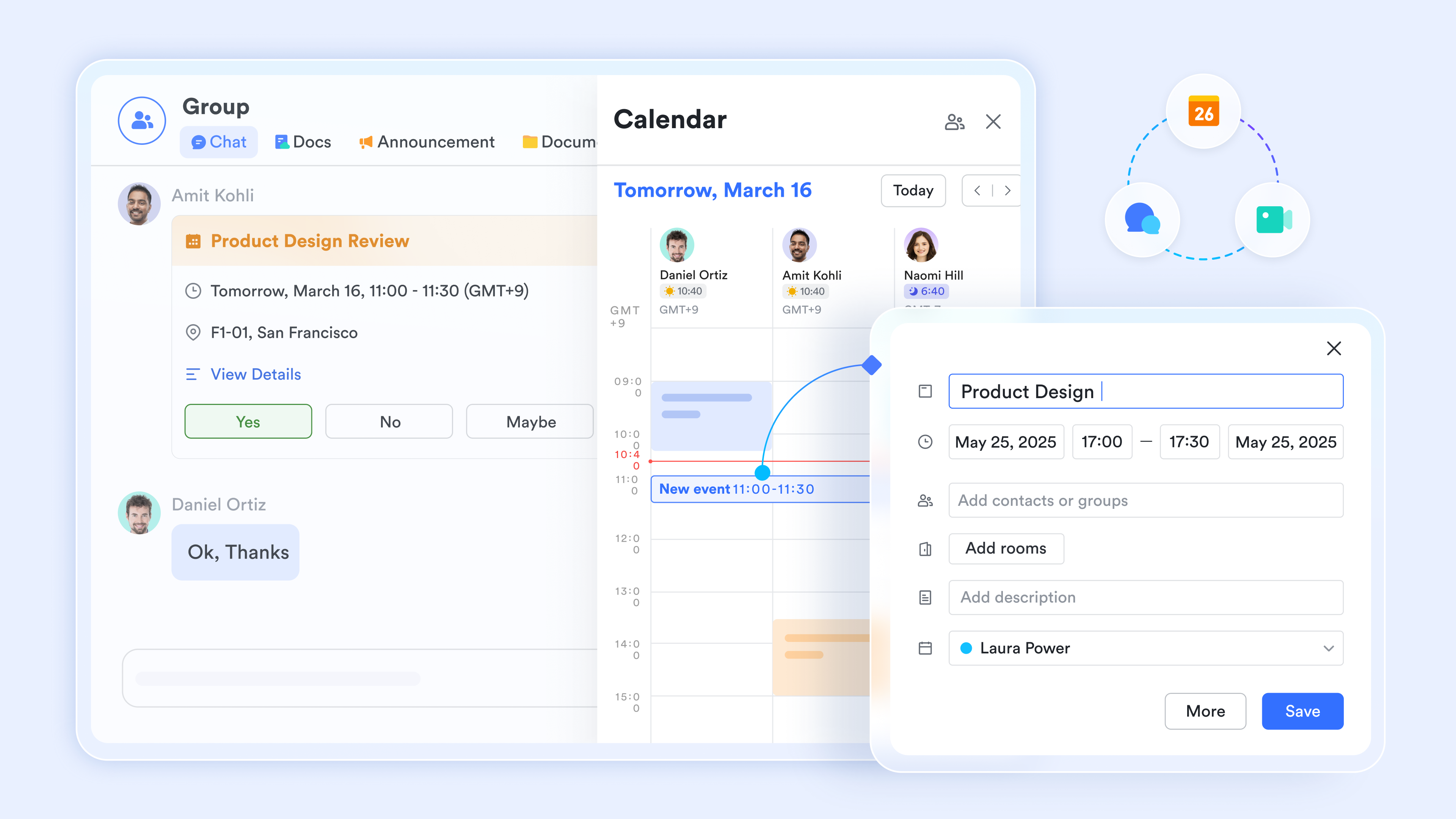
The biggest hurdle in workplace scheduling is relying on disconnected applications. When your calendar does not connect to your team chat or project tracker, you create massive data silos. I strongly advise adopting unified platforms where your workplace scheduling software naturally syncs with your team communication and document hubs. This way, if a meeting time changes, everyone gets notified in the exact place they are already working.
Establish rules for complex absences
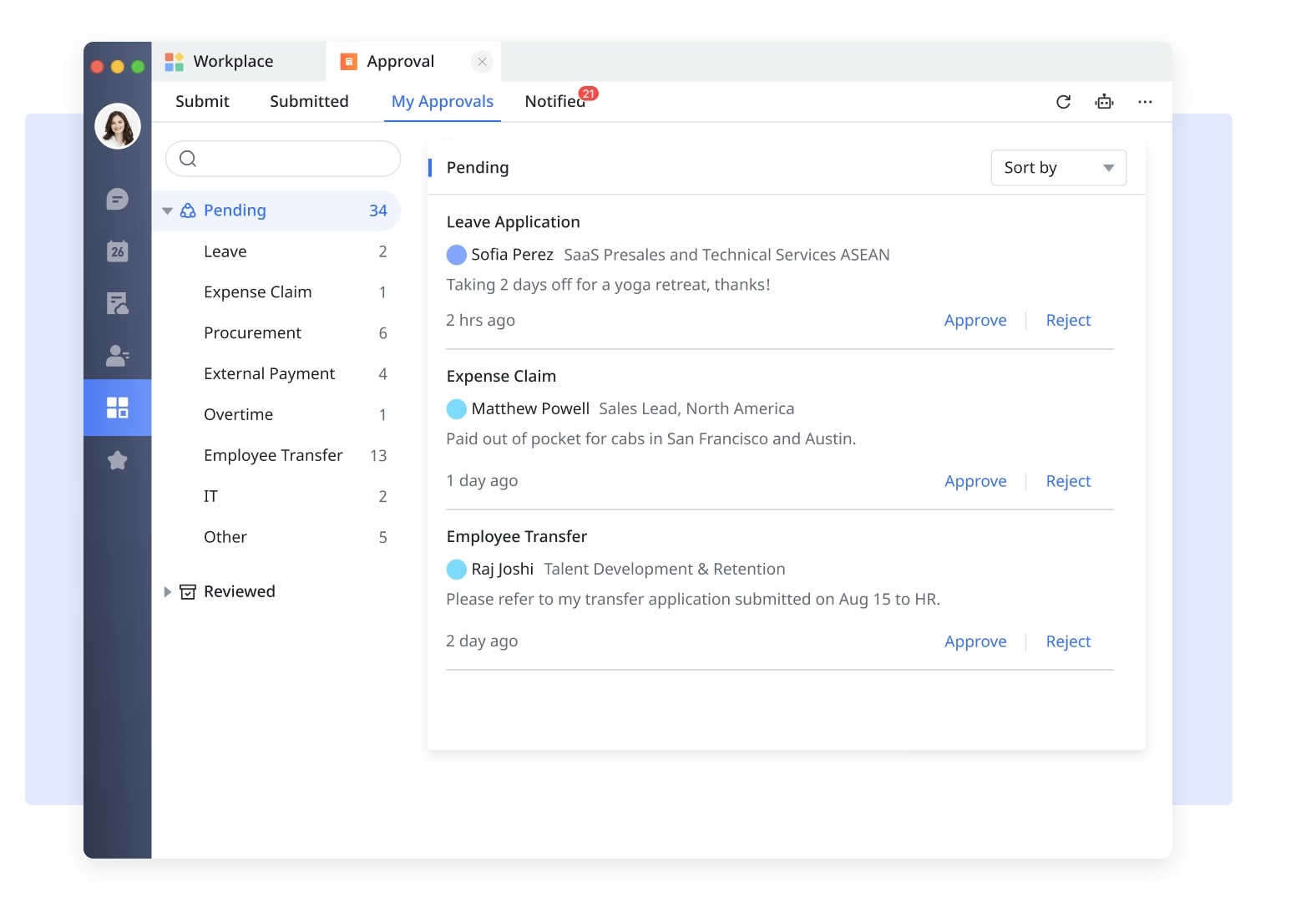
Tracking overlapping Paid Time Off (PTO) and sudden sick leaves can quickly become a logistical nightmare. Instead of relying on manual email requests, set up automated approval workflows within your employee scheduling software. This ensures that every time-off request is routed to the correct manager and automatically reflected on the team calendar once approved, keeping your employee scheduling coverage intact without manual intervention.
Assess baseline requirements first
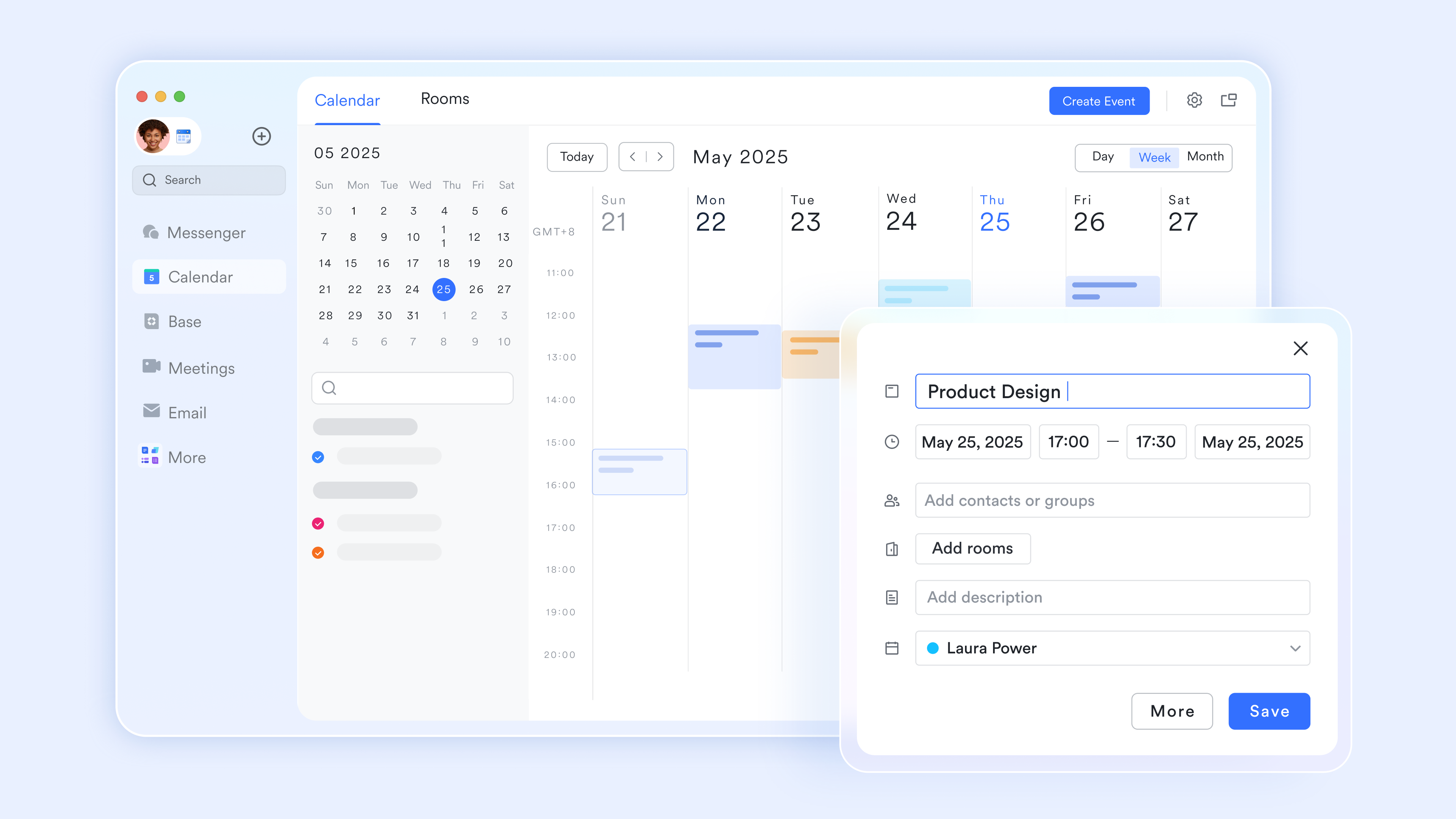
Before releasing any schedules to your team, you must understand your operational reality. Identify your peak working hours and map out the baseline availability of your staff. Building schedules without this data inside your workplace scheduling software often leads to critical understaffing during busy periods or double-booked meeting rooms that disrupt important client calls.
Core features of top employee scheduling software
Real-time, cross-device synchronization
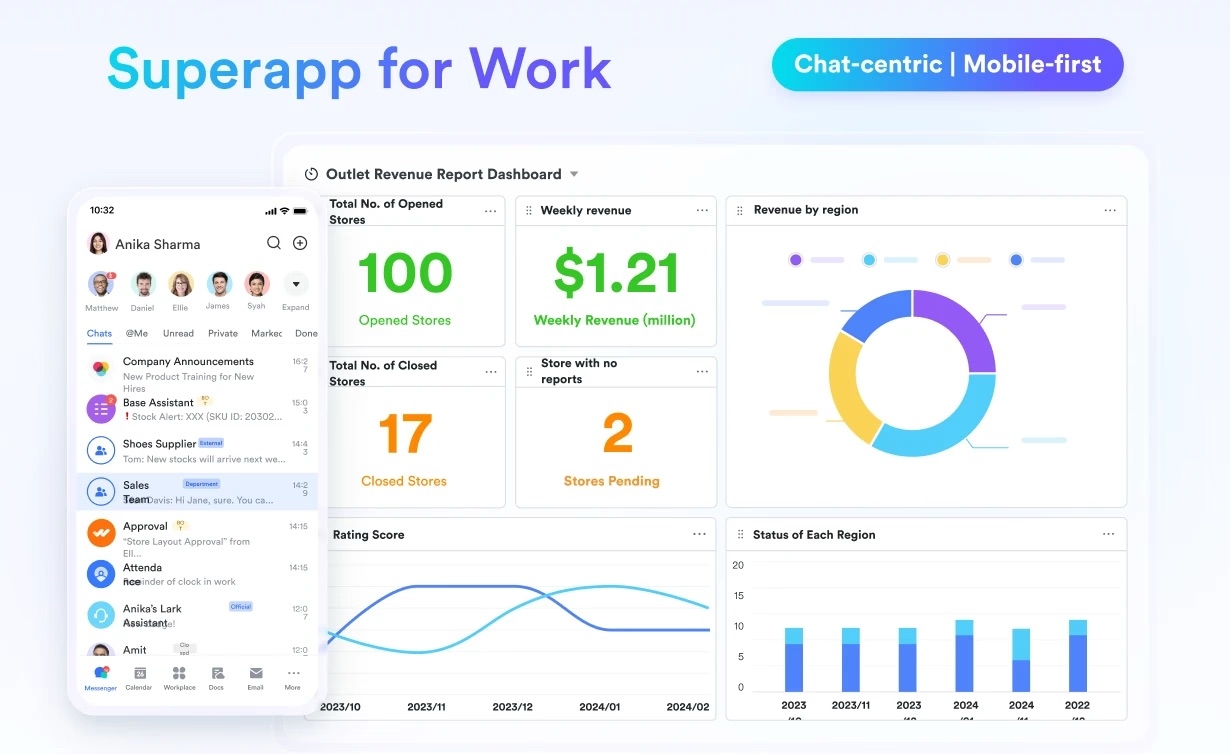
Your team does not always sit in front of a monitor. Any reliable scheduling system requires strong mobile-desktop hybrid compatibility. Every team member needs the ability to see the most current schedule updates on the go, ensuring alignment whether they are commuting, traveling, or at their desk.
Self-service portals
Modern teams expect autonomy. Look for systems that empower employees to input their own availability, submit time-off requests, or initiate shift swaps independently. Paired with automated routing, this feature saves managers hours of manual data entry every week.
Native communication integration
A schedule is only as good as its visibility. Choose scheduling tools that trigger automated reminders directly inside your company’s primary messaging app. Pushing notifications to where your team already chats prevents missed shifts, forgotten meetings, and delayed project kick-offs.

Top 8 workplace scheduling software and apps for 2026
1. Lark - Best for hybrid teams, growing SMEs & Enterprises
Lark is best for growing SMEs and enterprise teams looking to replace fragmented software stacks. It stands out by bringing your calendar, messaging, video meetings, and automated approval into one unified workspace.
For many hybrid teams, the biggest pain point in employee scheduling is the constant, exhausting context switching. You might check a standalone Google Calendar to see when a colleague is free, switch over to Slack to ask them for a meeting, and then open a completely separate HR tool just to request your own PTO. This fragmented approach destroys productivity, creates anxiety over missed messages, and leads to constant miscommunication. Lark acts as the complete unified workspace to solve this exact problem. Instead of toggling between five different tabs, Lark's integrated calendar syncs perfectly with your team messenger and document hub.
When you configure a project meeting in Lark, the system automatically creates a dedicated group chat for the attendees, links the relevant cloud-native documents right in the invite, and updates everyone's availability instantly. You manage human availability, project timelines, and PTO approvals in one single window. Furthermore, Lark's integrated wiki ensures your team finds project specs without leaving the chat window. By combining your workplace scheduling software with your daily operations, it removes the friction of disconnected tools.
Pros:
- Consolidates messaging, calendar, video meetings, and approvals into one platform, significantly lowering overall software subscription costs.
- Real-time calendar syncing across desktop and mobile prevents double-booking and ensures no missed updates.
- Built-in automated approval workflows streamline PTO and shift requests without needing a third-party HR application.
Cons:
- There are just so many features on the platform that it takes some time to try them out, but the comprehensive Help Center made it painless.
- Starter plan: Free forever plan with 11 powerful tools for up to 20 users, 100GB storage, 1,000 automation runs, AI translations, and more. No credit card needed.
- Basic plan: $6/user/month (billed annually) for up to 500 users. Includes everything in Starter plus unlimited message history, 5TB storage, 1,000 automation runs, and more. Some users may need to contact sales to purchase.
- Pro plan: $12/user/month (billed annually) for up to 500 users. Includes everything in Basic plus group calling for up to 500 attendees, 15TB storage, 50,000 automation runs, and more.
- Enterprise plan: Contact sales for custom pricing. Supports unlimited users and includes advanced automation, security, compliance, and management features.

Starter
Pro
Enterprise
Starter
For small teams with simple communication needs
$0
/ user / month
20 users max
18 months message history
1-on-1 video meetings
100 GB storage
Lark Docs & Mail
1000 Base automation runs/month
2000 rows per table in Base
Pro
For companies with comprehensive collaboration and management needs
$12
/ user / month
500 users max
Unlimited message history
500-participant video meetings
15 TB storage
Lark Docs & Mail
50k Base automation runs/month
20k rows per table in Base
Enterprise
For large companies with advanced security and organizational management needs
Get a personalized demo and pricing
Unlimited users
Unlimited message history
500-participant video meetings
15 TB storage + 30 GB storage/user
Lark Docs & Mail
500k Base automation runs/month
50k Base automation runs/month
Single sign-on (SSO)
Pro
For companies with comprehensive collaboration and management needs
$12
/ user / month
500 users max
Unlimited message history
500-participant video meetings
15 TB storage
Lark Docs & Mail
50k Base automation runs/month
20k rows per table in Base
2. When I Work - Best for retail & food service shift workers
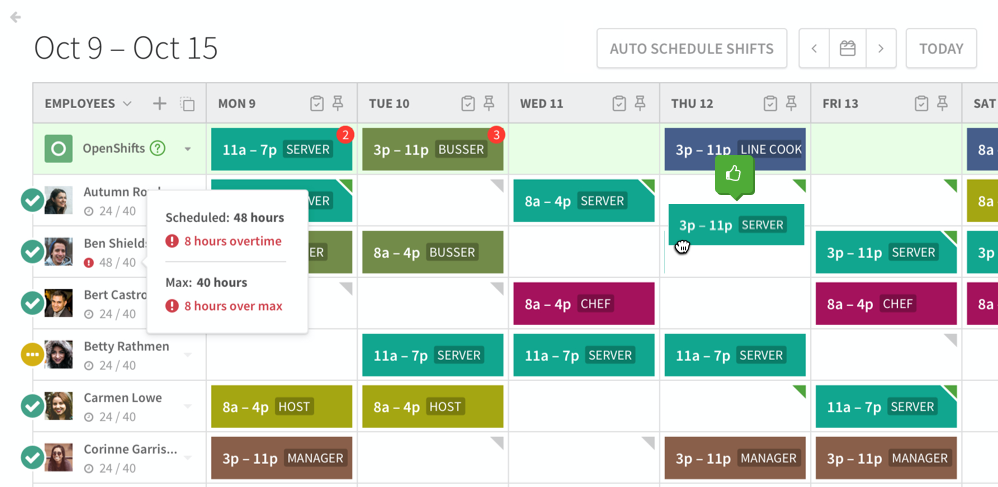
Image source: wheniwork.com
When I Work is best for businesses relying heavily on hourly shift workers, such as retail shops or restaurants. It stands out for its highly intuitive mobile app designed specifically for rapid shift swapping.
When I Work focuses strictly on the operational logistics of frontline, hourly employees. The user experience is built around a visual schedule builder that allows managers to drag and drop shifts quickly. Its mobile app is highly rated among retail and food service employees because it simplifies the often chaotic process of finding coverage for a sudden absence. Employees can offer shifts to qualified coworkers directly from their phones.
However, its strict focus on hourly shifts means it lacks the broader organizational tools needed by knowledge workers. If your team needs to collaborate on documents, host complex video meetings, or manage long-term project calendars, When I Work will not fill those gaps. It is a specialized point solution, meaning you will still need to pay for a separate communication and document suite for your back-office staff.
Pros:
- Highly intuitive mobile app for employees to trade shifts and request time off.
- Built-in time clock feature helps track exact hours worked and prevents buddy punching.
- In-app team messaging keeps shift-related conversations separate from personal text messages.
Cons:
- Lacks comprehensive office productivity tools (like cloud docs or video meetings) for corporate or hybrid teams.
- Pricing can become expensive as your hourly workforce scales up since it charges per user for features that are strictly administrative.
Pricing:
- Offers a 14-day free trial, but lacks a permanent free plan.
- Paid plan starts just $2.50 per user per month for single-location teams.
3. Shiftboard - Best for heavy manufacturing & healthcare
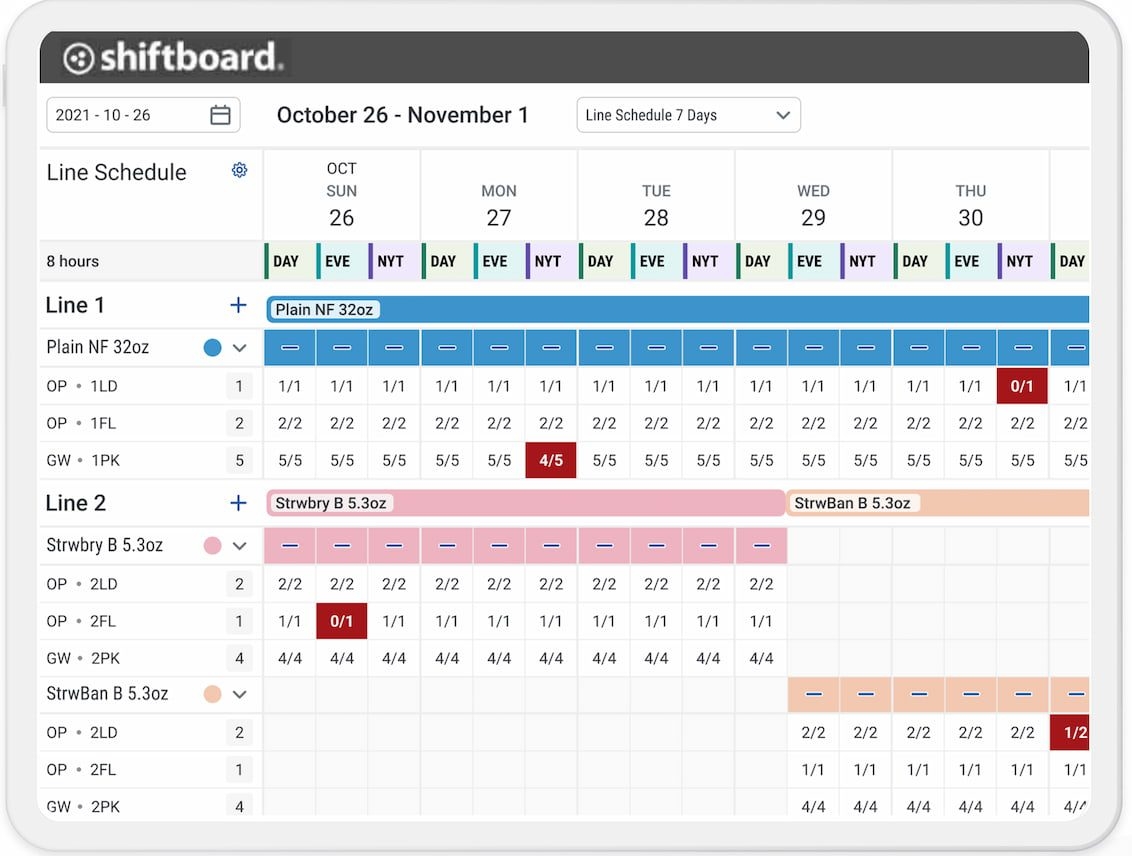
Image source: shiftboard.com
Shiftboard is best for enterprise-level manufacturing, energy, and healthcare organizations. It stands out because of its robust compliance tracking for highly regulated hourly workforces.
Shiftboard is not designed for the local coffee shop or an agile marketing agency. It is a heavy-duty platform built for complex, mission-critical operations where labor compliance and union rules dictate how schedules must be built. The software uses rules-based scheduling engines to ensure that employees are not assigned shifts that violate local labor laws or safety regulations regarding required rest periods.
The interface reflects this complexity. It is data-dense and requires significant configuration during deployment. Managers can use its demand-based scheduling tools to align labor hours with production targets, but the learning curve is steep. Expect a lengthy onboarding process to get the system fully customized to your facility's specific operational rules, making it entirely unsuitable for standard office environments.
Pros:
- Exceptional rules engine for strict labor law and union compliance.
- Demand-based scheduling helps optimize labor costs against production needs.
- Strong reporting and auditing tools for enterprise workforce management.
Cons:
- The interface is highly complex and intimidating for average end-users.
- Implementation is slow and requires extensive training and support from their technical team.
Pricing:
- Pricing is entirely custom based on the size and complexity of the organization. You must contact their sales team for a specific quote.
4. Workfeed - Best for small to mid-sized service businesses
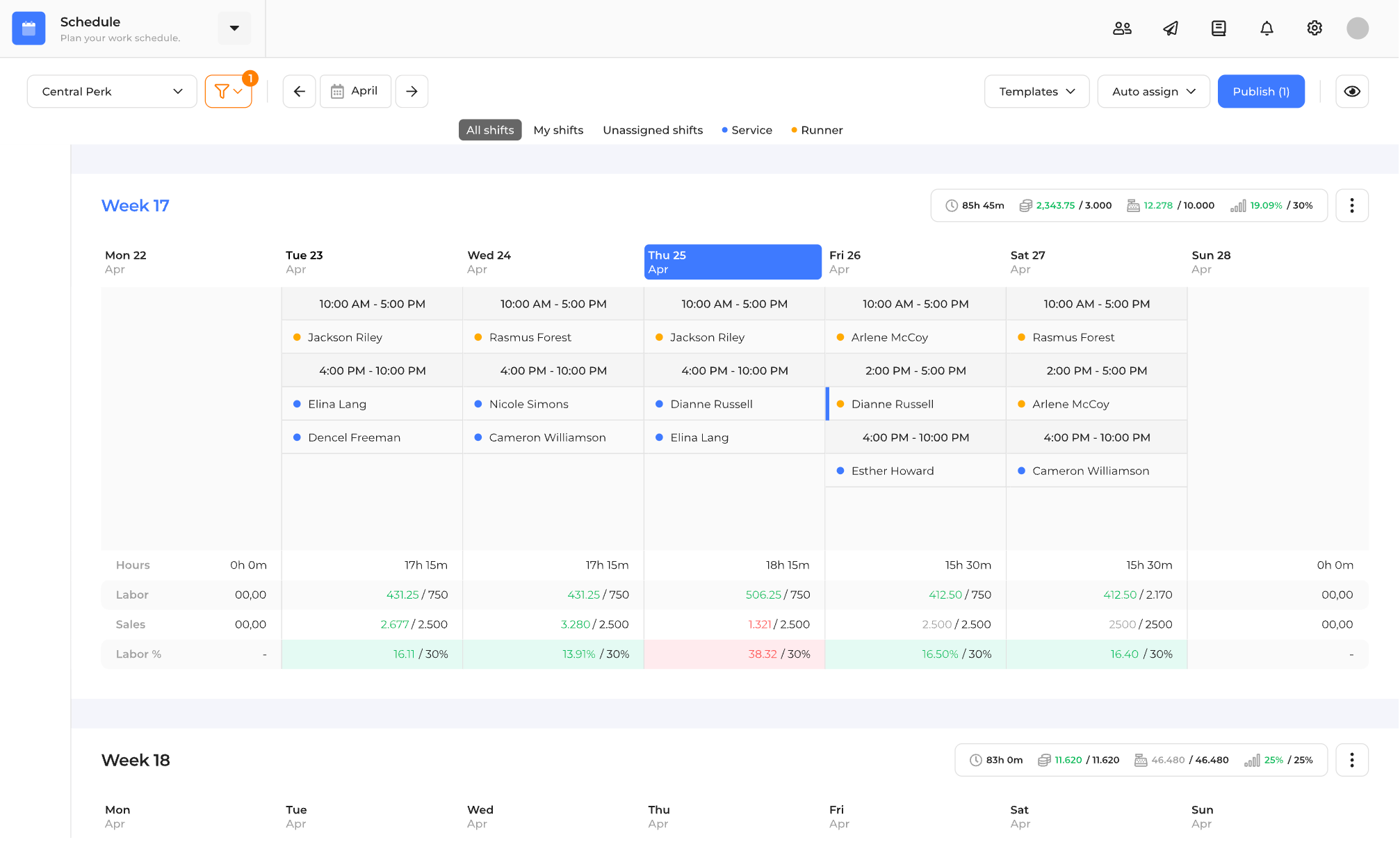
Image source: workfeed.io
Workfeed is best for small to medium-sized service businesses. It stands out for its modern, user-friendly interface that significantly speeds up weekly roster creation.
Workfeed positions itself as a modern alternative to clunky legacy scheduling tools, focusing heavily on a clean visual experience. The platform automates the repetitive parts of creating a weekly roster by using templates and saving previous schedule structures. For a shift manager at a mid-sized clinic or a growing retail chain, this reduces the hours spent staring at messy spreadsheets and manually counting employee hours.
The software also integrates basic time-tracking and attendance features, making payroll prep less painful. However, it is fundamentally an operational scheduling tool. It does not handle project-based capacity planning or integrate deeply with professional B2B tools like enterprise email clients or advanced wiki systems.
Pros:
- Very clean, modern user interface that requires minimal training for new managers.
- Automated template features speed up the weekly roster creation process.
- Integrates well with several popular local payroll systems.
Cons:
- Limited functionality for project-based or knowledge-worker scheduling.
- Reporting features are somewhat basic compared to heavy-duty enterprise tools.
Pricing:
- Offers a free plan.
- Paid plan starts at approximately $3.00/user/month (billed annually) for core scheduling.
5. WhenToWork - Best for simple, traditional scheduling needs
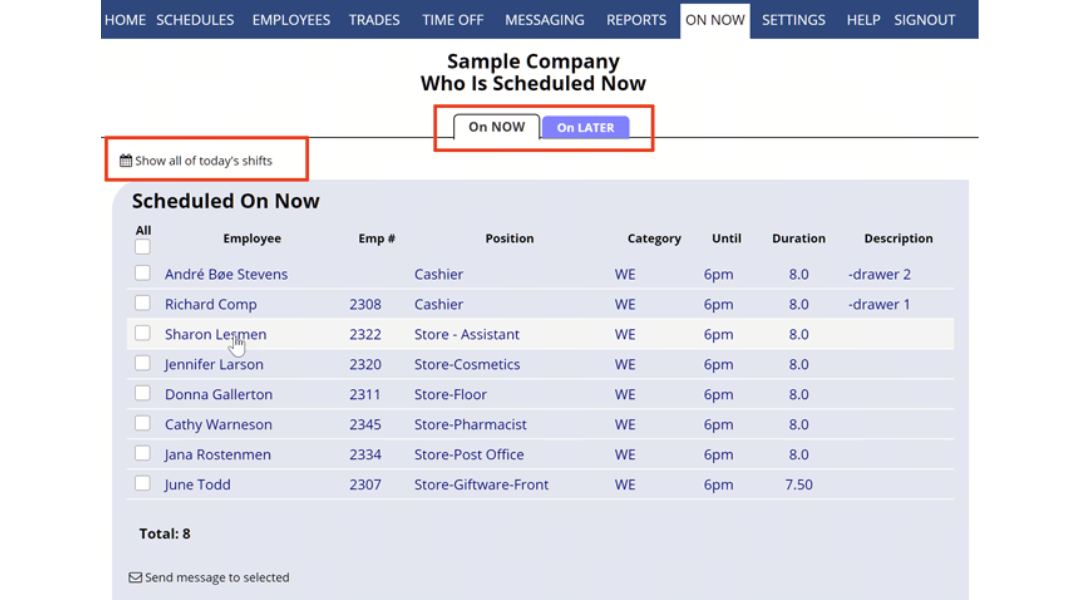
Image source: whentowork.com
WhenToWork is best for organizations looking for a straightforward, no-frills web scheduling tool. It stands out for its reliability and automatic conflict warnings during shift assignment.
WhenToWork has been in the scheduling space for a long time, and its primary appeal is its straightforward reliability. It functions exactly as you would expect a web-based scheduling board to work. Managers can assign shifts manually or auto-fill schedules based on preferences, and the system automatically flags conflicts—such as an employee being scheduled for overlapping times or during their approved vacation.
While it gets the job done efficiently, the user interface feels noticeably dated compared to newer SaaS products on the market. It functions more like a digital version of a bulletin board rather than an interactive, unified workspace. It handles shift assignments perfectly but offers little in the way of real-time collaboration, workflow automation, or document sharing.
Pros:
- Highly reliable system with excellent automatic conflict detection.
- The "Tradeboard" feature allows employees to easily pick up or drop open shifts.
- Flat-rate pricing model based on employee count rather than strict per-user fees can be very cost-effective.
Cons:
- The user interface is visually outdated and lacks modern design elements.
- Missing broader communication and collaboration tools needed for office workers.
Pricing:
- Offers a 30-day free trial, but no free forever tier.
- Pricing is based on the number of employees, starting around $28/month for up to 10 employees, scaling up based on total headcount.
6. ClickUp - Best for project-focused dev & marketing teams
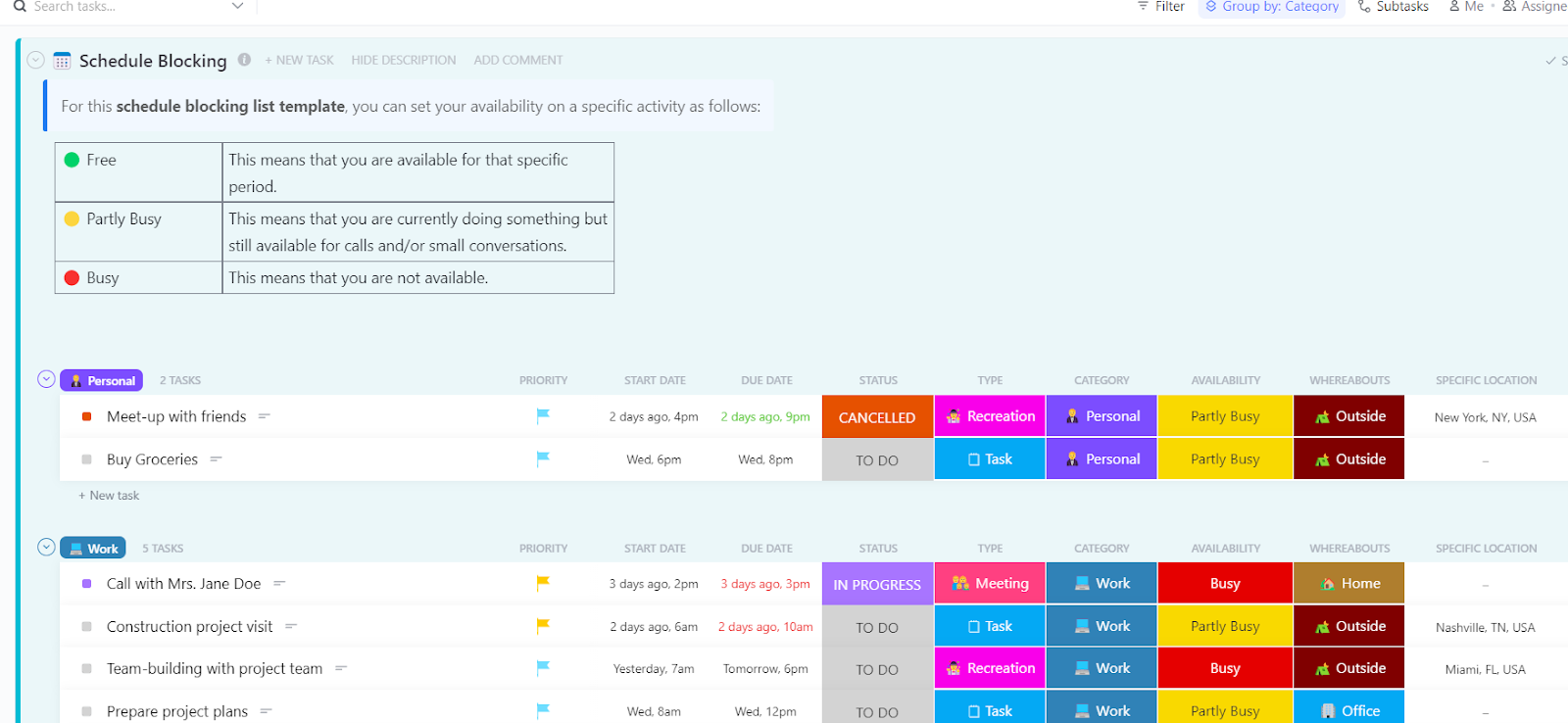
Image source: clickup.com
ClickUp is best for marketing, design, and engineering teams strictly focused on project deliverables. It stands out for its incredible workload views that help managers balance knowledge-worker task capacity.
ClickUp approaches workplace scheduling entirely from a project management perspective. Instead of building shifts on a grid, managers assign tasks, subtasks, and deadlines to specific team members. The platform's true power lies in its "Workload" view, which visually calculates how many hours or tasks an employee is responsible for in a given week. If an engineer is over capacity, the system visually flags it, allowing the project manager to drag and drop tasks to someone with more bandwidth.
However, ClickUp is not a traditional employee scheduling software for managing hourly workers or frontline staff. You cannot easily use it to track when a retail employee punches in, nor does it have native, simple shift-swapping mechanics for a restaurant floor. Furthermore, the platform is so dense with features, custom statuses, and nested folders that the user interface can feel completely overwhelming for teams that just want a simple workplace scheduling app.
Pros:
- Exceptional workload and capacity management views for complex project teams.
- Deep customization allows managers to tailor the workspace to exact workflow needs.
- Strong integrations with dozens of other popular development and marketing tools.
Cons:
- Not designed for hourly employee scheduling or traditional frontline shift management.
- The staggering amount of features creates a steep learning curve and a cluttered interface.
Pricing:
- Offers the Forever plan.
- Paid plan starts around $7 per user per month (billed annually).
7. Microsoft Teams - Best for enterprise teams in the MS ecosystem
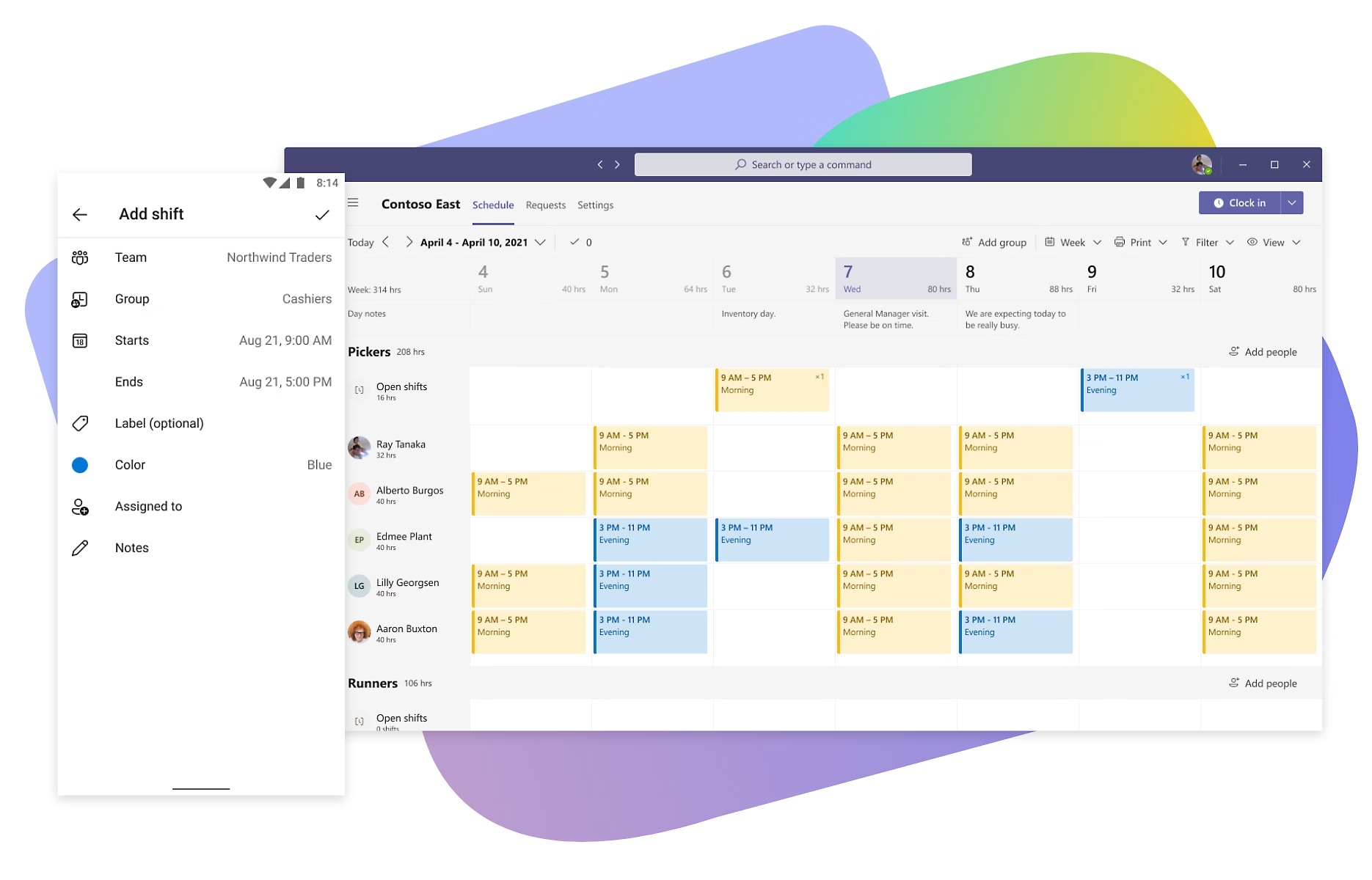
Image source: microsoft.com
Microsoft Teams is best for large corporations already deeply entrenched in the Microsoft ecosystem. It offers robust enterprise communication and includes the "Shifts" app for basic roster management.
Microsoft Teams is a heavyweight unified communication tool that many enterprises rely on for video calls, document sharing, and chat. For companies looking to handle workplace scheduling, Teams offers a built-in module called the "Shifts" app. This feature allows frontline managers to create schedules, copy weekly rosters, and manage open shifts directly inside the same application employees use to chat. Because it connects with Microsoft 365, it is a convenient option for organizations that already pay for Microsoft licenses.
The downside is that the broader Teams suite can feel incredibly heavy, slow, and resource-intensive for smaller, agile teams. While the Shifts module works for basic employee scheduling, it lacks the sophisticated labor rule enforcement or deep demand-forecasting features found in dedicated employee scheduling software like Shiftboard. Smaller businesses often find that paying for enterprise Microsoft licenses just to get access to basic scheduling and chat is an inefficient use of their budget.
Pros:
- Included within the broader Microsoft 365 subscription, offering an all-in-one feel.
- The Shifts app handles basic scheduling, time-off requests, and shift swapping.
- Enterprise-grade security and data compliance policies.
Cons:
- The application can be resource-heavy and run slowly on older hardware.
- The employee scheduling features are somewhat basic and lack deep customization for complex labor operations.
Pricing:
- Available as part of Microsoft 365 subscriptions, which start around $4.00/user/month (Teams Essentials).
- Higher enterprise tiers increase significantly in price depending on security and storage requirements.
8. Google Workspace - Best for office & knowledge workers
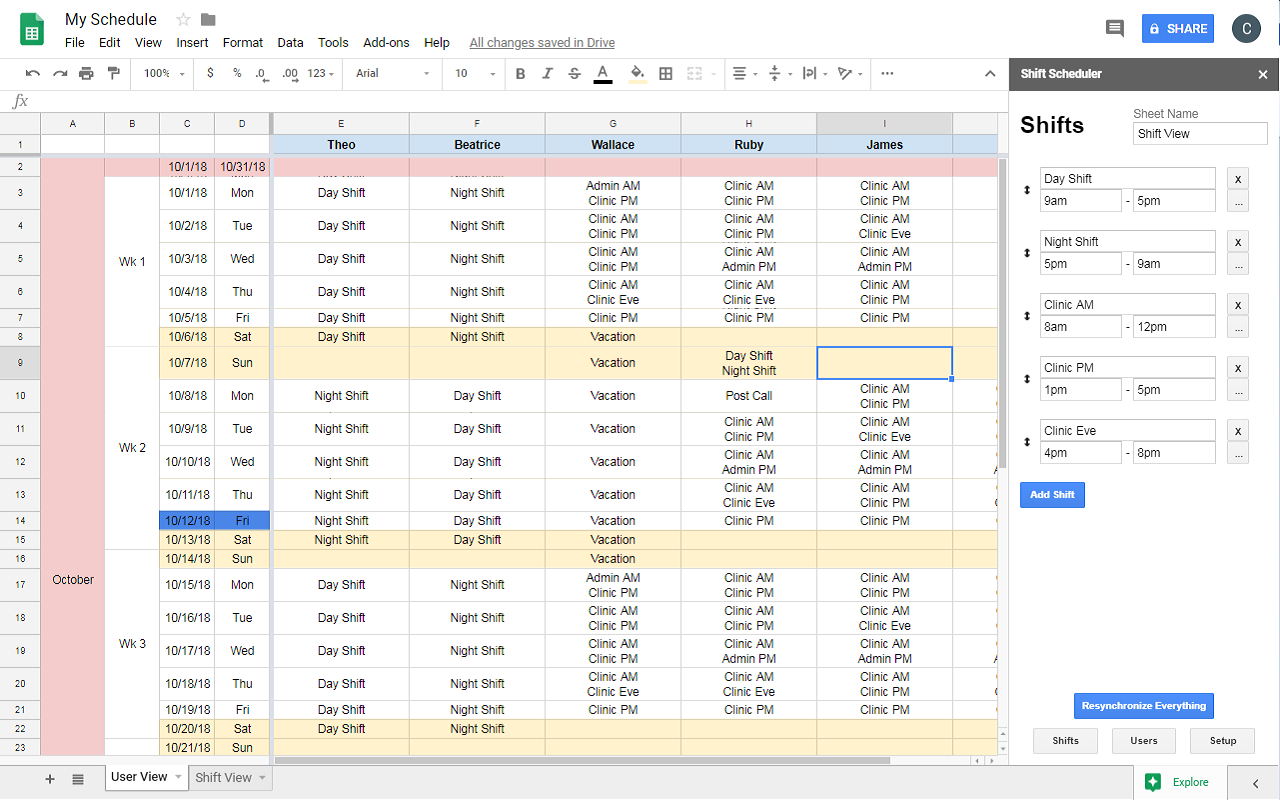
Image source: workspace.google.com
Google Workspace is best for office teams needing simple, ubiquitous shared calendars. While great for office meetings, it often requires third-party add-ons for actual employee shift swaps.
Google Workspace is the default choice for millions of businesses needing email, cloud storage, and shared calendars. As a tool for basic workplace scheduling, Google Calendar is exceptional. It allows knowledge workers to view colleague availability, block out focus time, and set up recurring virtual meetings with ease. The interface is clean, universally understood, and requires practically zero onboarding.
However, Google Workspace is not an employee scheduling software. It does not have native tools for managing hourly shifts, clocking in and out, or setting up complex approval workflows for PTO without resorting to manual Google Forms and messy Spreadsheets. If you run a retail store or need to manage frontline staff, relying on Google Calendar means you have no automated way to handle shift swaps or prevent overlapping time off. To achieve true employee scheduling, you must purchase and integrate third-party workplace scheduling apps, driving up costs and complexity.
Pros:
- Universally understood interface that requires zero training.
- Excellent for coordinating standard office meetings and managing personal focus time.
- Highly reliable cloud infrastructure.
Cons:
- Lacks any native features for traditional hourly employee scheduling or shift swapping.
- Does not have built-in automated approval workflows for PTO (requires manual workarounds).
Pricing:
- Personal Google accounts are free.
- Business tiers (Business Starter) begin at $9.4/user/month (billed annually).
Choosing the right system for your evolving workforce
Reviewing a long list of workplace scheduling apps can feel overwhelming, but the decision ultimately comes down to examining your team's daily habits. If your staff already suffers from app fatigue, introducing a standalone employee scheduling software that only does one thing will simply add a sixth or seventh tool to their daily rotation. This often leads to poor adoption rates, missed notifications, and continued scheduling errors.
The most successful modern organizations are moving away from fragmented point solutions. True workplace scheduling efficiency happens when your calendar, your team chat, and your project documents exist in the exact same environment. By consolidating these functions, you do not just fix your schedule—you streamline the entire operational workflow. This is exactly why forward-thinking teams are gravitating toward a unified workplace scheduling software like Lark. By making availability, approvals, and communication native to a single platform, managers can finally stop playing calendar Tetris and get back to focusing on high-value business growth.
Conclusion
Effective scheduling is about respecting your team's time, controlling costs, and removing operational friction. It is not just about filling boxes on a screen. Finding the right workplace scheduling software requires matching your operational reality—whether that means hourly shift control or project capacity planning—to the right platform. I encourage you to audit your current software stack today. Test a unified workplace scheduling app like Lark to eradicate data silos and bring true order to your daily operations.
FAQs
What is a 5 2 2 5 work schedule?
A 5 2 2 5 schedule is a type of rotating shift pattern commonly used in 24/7 operations, such as healthcare, emergency services, or manufacturing. In this system, an employee works 5 days, gets 2 days off, works 2 days, and then gets 5 days off. Because this rotation spans a multi-week cycle, managing it manually on a spreadsheet is highly prone to errors. Organizations typically rely on robust employee scheduling software to automate this specific pattern and ensure there are no gaps in operational coverage.
What are the three types of scheduling?
The three primary types of organizational scheduling are capacity scheduling, resource scheduling, and service scheduling. In the context of team management, this generally translates to hourly shift scheduling (for frontline and service workers), project-based scheduling (for knowledge workers assigning tasks to timelines), and flexible/hybrid scheduling (coordinating office days and remote work). Choosing the right workplace scheduling software depends entirely on which of these three types your core business operations rely on the most.
What's the best staff scheduling tool?
The "best" tool ultimately depends on your workforce structure. For frontline teams strictly needing hourly shift management and time clocks, specialized workplace scheduling apps like When I Work or Shiftboard are excellent. However, for modern, hybrid, or knowledge-worker teams that need to coordinate meetings, share documents, and process PTO requests simultaneously, Lark is widely considered the best unified workplace scheduling software. It completely eliminates data silos by keeping your schedule and team chat on one seamless platform.
What is a 4-3-3-4 work schedule?
A 4-3-3-4 schedule is another complex rotating shift pattern. It means an employee works 4 days, gets 3 days off, works 3 days, and then gets 4 days off. This schedule is popular in manufacturing and tech sectors because it usually involves working 10 to 12-hour shifts, giving employees longer continuous periods of rest. Because it requires tracking extended hours and varying rest days, it must be managed using advanced employee scheduling software to prevent accidental overtime and maintain strict compliance with local labor laws.
How do large enterprises like Walmart schedule workplace teams?
Massive retail operations typically rely on proprietary, highly customized enterprise workplace scheduling software. These systems are specifically designed to handle tens of thousands of hourly shifts, complex union regulations, and strict labor laws across multiple regions. This enterprise-grade employee scheduling software is vastly different and far more expensive than the agile tools SMEs require.
Can I find a free workplace scheduling app for my small business?
Yes, you can. Lark’s Starter plan provides comprehensive calendar management, automated approval workflows, and team chat for up to 20 users at zero cost without a credit card. It is a highly effective, free workplace scheduling software option for small teams looking to consolidate their tools.
What is the difference between a project calendar and an employee schedule?
A project calendar tracks specific deliverables, project phases, and milestone deadlines. Conversely, an employee schedule manages human availability. Dedicated employee scheduling software focuses on clock-in times, shift assignments, PTO approvals, and overall team capacity. While project calendars manage the work, workplace scheduling software manages the people doing the work.
Related reading
Table of contents
Start using Lark today

Manage all your work in one place
Boost team efficiency by 10x
Save up to 70% on software costs
Table of contents
Start using Lark today
Manage all your work in one place
Boost team efficiency by 10x
Save up to 70% on software costs
Keep reading









2026 Lark Technologies Pte. Ltd.
Headquartered in Singapore with offices worldwide.






Explore: