The shift toward digital teamwork has never been faster, and choosing the right project management software has become key to consistent productivity. Among countless options, Wrike and Basecamp continue to stand out as leaders that represent two distinct paths: Wrike, a structured platform designed for control, complexity, and scalability; Basecamp, built around clarity, communication, and simplicity.
This article offers a practical Wrike vs Basecamp comparison that covers key differences in functionality, usability, and pricing for teams planning their next move in 2026. I've reviewed how professionals and organizations apply both tools to help you determine which aligns best with your workflow. And because the collaboration market is evolving quickly, it's worth noting that newer entrants — like Lark, ClickUp, and Asana — are also reshaping how teams connect, automate, and scale their work.
Key takeaway: Quick comparison at a glance
How we select and assess software in our reviews
Our editorial team follows a transparent, repeatable methodology. Every review is based on using experience in realistic working scenarios, and we always stick to a set of consistent scoring criteria.
- Features and functionality
- Security, privacy, and compliance
- Integrations and compatibility
Our team reviews and assesses tools using consistent datasets and real-world scenarios, focusing on the things users care about most—such as sales pipelines, marketing automation, collaboration, and knowledge management. We confirm the official pricing and release notes of each product we review, and gather user feedback from across different channels. We do not accept paid placements and ensure our reviews are completely unbiased and fair. Additionally, as software and digital work environments constantly evolve, we review our content at least quarterly and update articles whenever products undergo significant changes. For more information about our review methodology, read the full rundown of.
Check how modern PM tools improve efficiency
Understanding what Wrike and Basecamp offer today
Both Wrike and Basecamp have established solid reputations in the world of project management tools, yet their approaches couldn't be more different.
What is Wrike: Power and precision for structured teams
Wrike is a robust project management platform designed for organizations that navigate complex workflows and require meticulous control over their projects. It enables teams to plan, execute, and monitor their work with precision by combining task management, , automation, and advanced analytics. With a focus on enterprise-level visibility, Wrike is well-suited for teams in fields such as marketing, IT, and operations that benefit from and detailed reporting capabilities.
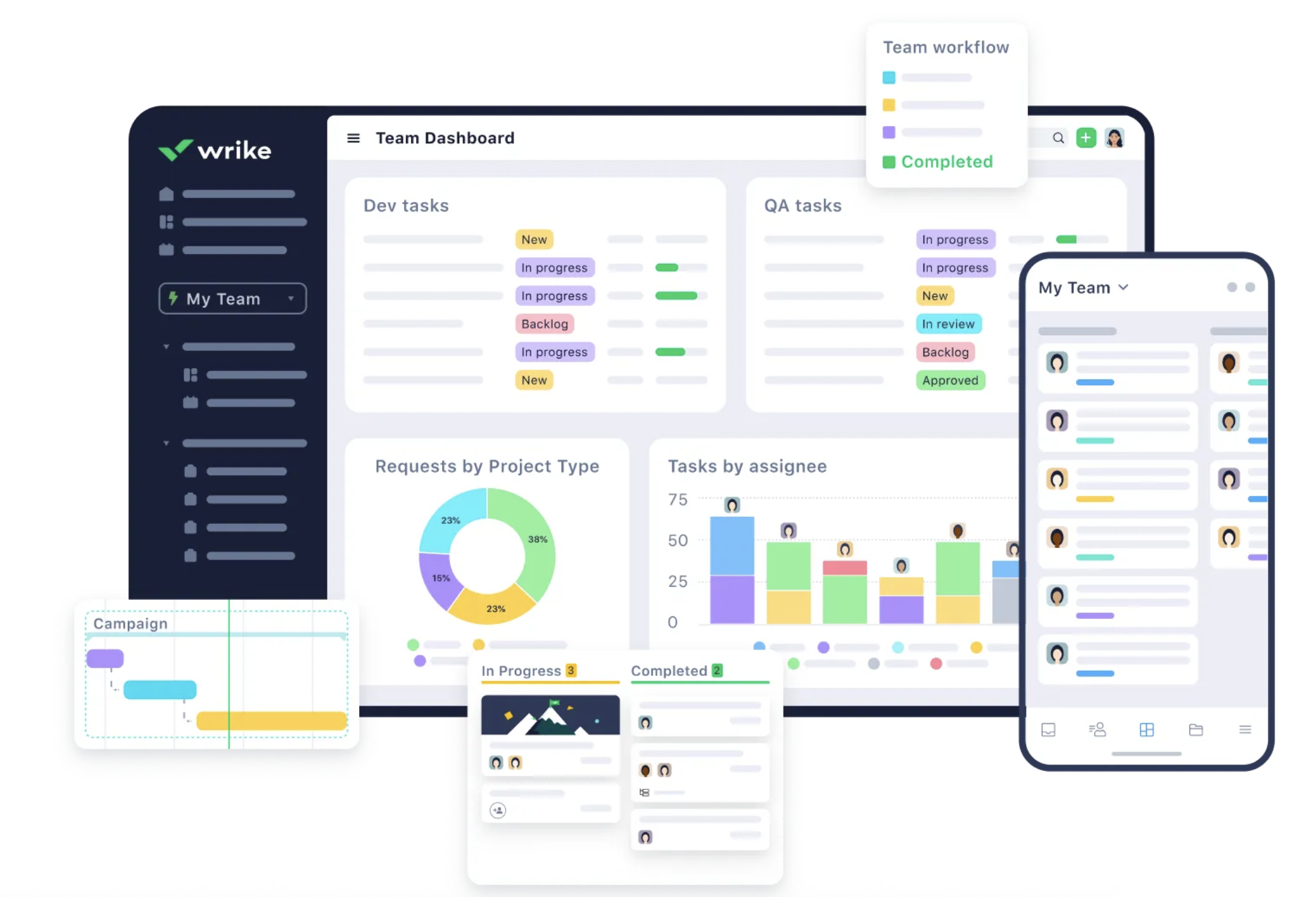
Image source: wrike.com
Key features:
- Task management: Create, assign, and prioritize tasks with detailed descriptions, due dates, and dependencies, facilitating clear accountability and efficient .
- Resource allocation: Advanced resource management tools allow teams to view workload distribution, ensuring resources are allocated effectively across multiple projects.
- Automation: Automate repetitive tasks and workflows to enhance productivity, reduce manual errors, and ensure that processes adhere to .
- Customizable dashboards: Teams can personalize dashboards to track project progress and KPIs, enabling real-time insights and data-driven decision-making.
- Advanced reporting: Comprehensive reporting features provide deep insights into project performance, allowing teams to and forecast outcomes.
- Integrations: Wrike offers a wide range of integrations with other business applications, enhancing its functionality and allowing teams to consolidate their tools.
Limitations:
- Steep learning curve: New users may find the interface dense and challenging to navigate initially, which can lead to longer onboarding periods.
- Cost: Pricing can be a barrier for smaller teams or organizations, especially as they scale and require additional features, leading to higher subscription costs.
- Complexity for simple projects: Wrike might be overkill for teams needing straightforward task management solutions, making simpler tools more appealing in those cases.
- Limited automation options: Some users have noted restrictions on the number of automations available per account, which could hinder larger teams with extensive workflow requirements.
- Dashboard filtering: Users have reported limitations in dashboard filtering options, making it challenging to customize views to meet specific informational needs.
Overall, Wrike offers capabilities ideal for organizations handling complex projects, but its complexities can deter smaller teams or those seeking a more streamlined approach.
To know more details about Wrike, check Wrike review article:
Basecamp: Simplicity and communication in one place
Basecamp adopts a minimalist approach to project management, integrating conversations, tasks, and file sharing into a cohesive, user-friendly interface. This platform eliminates the chaos of complex features, allowing teams to focus on collaboration and effective communication. Basecamp is particularly valued for its ability to quickly onboard new team members and streamline client interactions, making project management straightforward and accessible. By utilizing tools like message boards, , and chat functionalities, Basecamp supports transparency and organization in team projects.
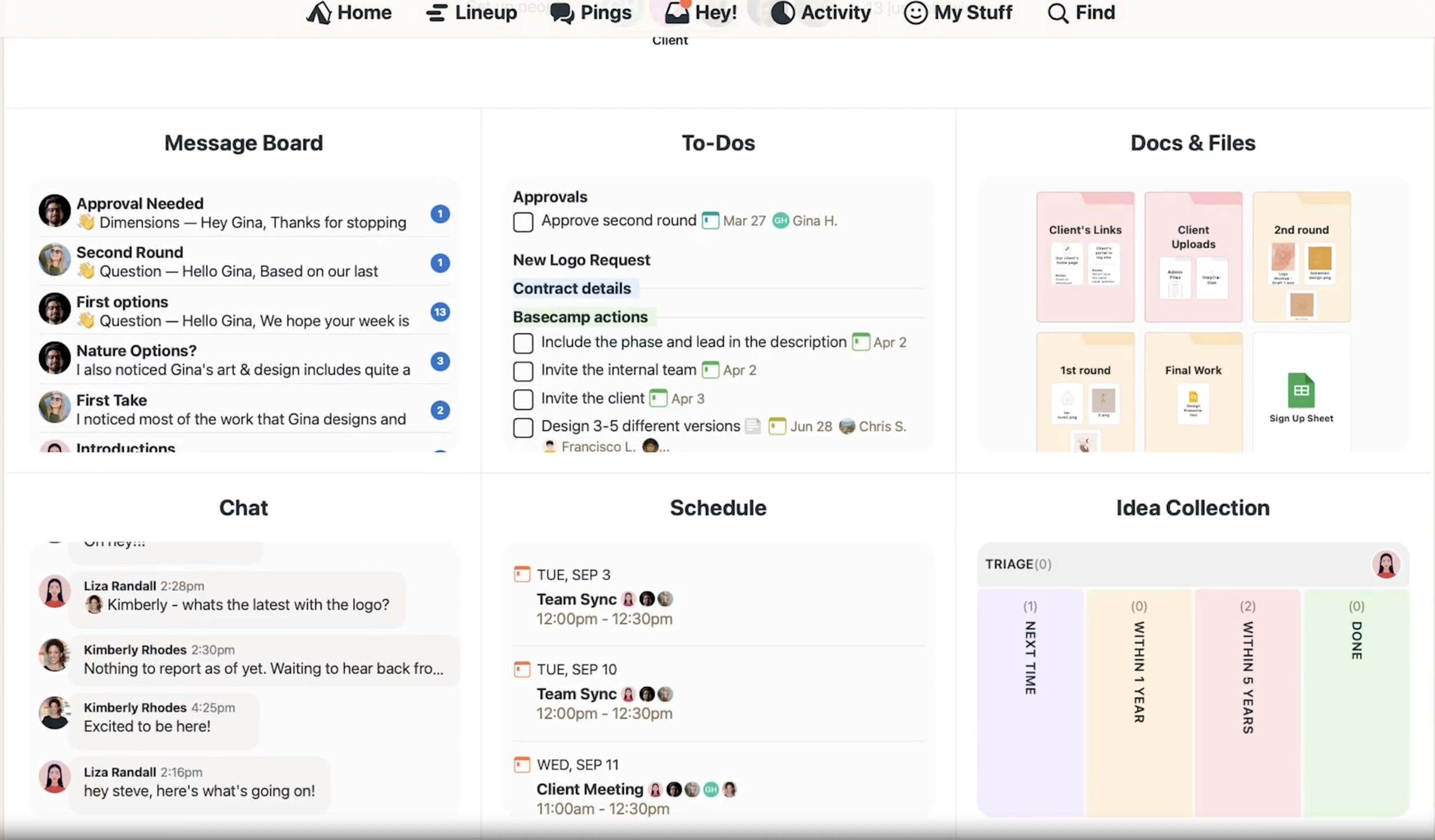
Image source: basecamp.com
Key features:
- Integrated communication: Combines messaging, file sharing, and project management in one platform, enabling seamless interactions without the need to switch between applications.
- To-do lists: Users can create, assign, and prioritize tasks within easy-to-manage lists, ensuring clarity on responsibilities and deadlines at a glance.
- Message boards: Centralized message boards facilitate open discussions and updates, keeping all project conversations organized and easily accessible.
- Automatic check-ins: Users can configure automated check-ins to prompt team members for updates on their work, encouraging accountability and communication.
- File storage: Robust file sharing capabilities allow users to upload and share important documents directly within the project, keeping everything in one accessible location.
Limitations:
- Limited advanced features: Basecamp lacks complex project management tools such as or detailed reporting analytics, which may restrict its effectiveness for intricate projects.
- No time tracking: The absence of built-in time tracking features limits teams' ability to monitor and analyze time spent on tasks, which could be crucial for project billing.
- Customization constraints: Users may find the customization options insufficient, as Basecamp does not provide extensive flexibility for tailoring workflows or dashboards to specific needs.
- Simplicity may hinder complexity: For teams handling intricate projects, Basecamp's simplicity might be limiting, as it does not support nuanced planning or detailed execution.
- No subtask management: The lack of support for subtasks or complicates the ability to break larger tasks down into smaller, manageable parts.
Basecamp provides an effective solution for teams looking for simplicity in project management. However, its limitations may not meet the needs of organizations handling more complex project requirements.
Check Basecamp review to get more information about Basecamp:
Who uses Wrike and who prefers Basecamp
- Wrike appeals to larger teams or organizations that manage intricate, multi‑stage projects and need deep visibility.
- Basecamp works best for small to medium teams that prioritize communication and agility over detailed planning, and is often chosen by creative agencies for its support of their unique workflows.
In essence, where Wrike delivers structure and sophisticated control, Basecamp offers a more human‑centered approach to collaboration — a useful contrast for teams deciding between basecamp vs wrike in their 2026 toolkit, as each tool adapts to a.
Explore better option beyond Wrike & Basecamp
7 aspects: Feature-by-feature comparison
When comparing Wrike and Basecamp, their feature sets reveal two fundamentally different philosophies of getting work done. Both serve as strong , but each caters to a distinct rhythm of collaboration. Each platform offers robust features and comprehensive project management capabilities, supporting a wide range of professional needs and enabling effective project execution for teams of all sizes.
Task and project management
Wrike structures work into spaces, folders, and tasks with flexible views — , calendars, and Kanban boards — giving teams full control over dependencies and progress tracking. Its robust task management features help teams track progress, manage complex workflows, and meet project deadlines efficiently. The platform thrives when projects require coordination across multiple departments or clients.
Basecamp, by contrast, takes a straightforward approach. Each project contains discussions, to‑do lists, and file storage in one place. It helps teams focus on high‑level goals rather than detailed scheduling, while still allowing them to. This simplicity makes it ideal for smaller, creative, or client‑service teams that want alignment without over‑organizing their workflows.
Collaboration and communication
Wrike centralizes discussion threads within each task, keeping context close to action. With integrations that link chats, documents, and comments, and robust real time collaboration features, it enhances team collaboration and minimizes tool switching.
Basecamp relies on its well‑known message boards and group chats, enabling open communication loops across clients and teammates. Its focus on team collaboration and email‑free philosophy reduces noise and encourages visibility for everyone involved.
Automations and workflows
Automation represents one of Wrike's biggest strengths. Users can design recurring processes, trigger updates based on custom rules, create custom workflows tailored to their team's needs, and even use AI‑powered suggestions for .
Basecamp stays deliberately simple — manual task creation keeps teams in control but limits scalability when managing many simultaneous projects.
Time tracking and reporting
Wrike stands out for its detailed reporting dashboards and add‑ons that provide managers with transparent workloads and team insights. Its advanced analytics capabilities enable project managers to assess and improve project performance, making it easier to identify bottlenecks and optimize outcomes.
Basecamp instead uses check‑ins and updates to reflect progress, relying more on conversation than numbers.
Customization and integrations
Wrike's open ecosystem allows integration with hundreds of third‑party tools, from to marketing platforms, extending its reach. Its integration capabilities are considered a core feature, enabling seamless connectivity and enhancing workflow efficiency within existing tech stacks.
Basecamp offers fewer direct connections but maintains compatibility through external , emphasizing speed over setup.
In short, choosing between Wrike vs Basecamp here comes down to whether your team values analytical depth or streamlined collaboration.
Security, scalability, and enterprise readiness
Security has become a non‑negotiable factor in choosing . Both Wrike and Basecamp adhere to modern safety standards, but they target different types of organizations.
Wrike includes enterprise‑grade compliance, data encryption, and permission flexibility. Administrators can manage access by department, set approval workflows, and integrate single sign‑on systems to align with corporate IT policies. Its infrastructure is optimized for global teams that work with sensitive or regulated industries.
Basecamp builds security into its simplicity. It protects user data using encrypted connections and account‑level restrictions but keeps advanced governance light. For small businesses, this means a clean balance of security and ease; for large enterprises, it may feel limited.
From a scalability perspective, Wrike is designed to expand across teams and departments, while Basecamp favors consistent performance with fewer management layers. In short, Wrike grows with structural needs; Basecamp keeps things safe and straightforward.
Interface and user experience
In the Wrike vs Basecamp interface comparison, the difference comes down to structure versus simplicity.
Wrike offers a data‑focused, customizable interface with dashboards, Gantt charts, and that give teams high visibility and control. It's designed for structured workflows and complex project tracking, but it does come with a steeper learning curve for first‑time users. Once configured, it becomes a powerful command center for managing large or multi‑layered teams.
Basecamp, on the other hand, provides a minimal, intuitive interface centered on communication. Its clear organization of message boards, to‑do lists, and files keeps collaboration simple and fast. Teams can onboard quickly without training, relying on a user friendly interface that feels natural from the start. In short, Wrike delivers the precision needed for , while Basecamp champions ease — enabling teams to stay focused without navigation complexity.
Get to know an all-in-one solution
Comparing Wrike vs Basecamp pricing plans
Pricing is a practical factor that often determines how sustainable a project management solution is over time. Wrike and Basecamp approach pricing from opposite directions, much like their design philosophies.
accommodates various business sizes through multiple tiers — from free starter plans for smaller teams to professional and enterprise packages that unlock , custom fields, and administrative controls. Its per‑user pricing model makes it easily adaptable for growing teams that need layered permissions or private workspaces. Wrike offers several pricing plans tailored to different business needs, including:
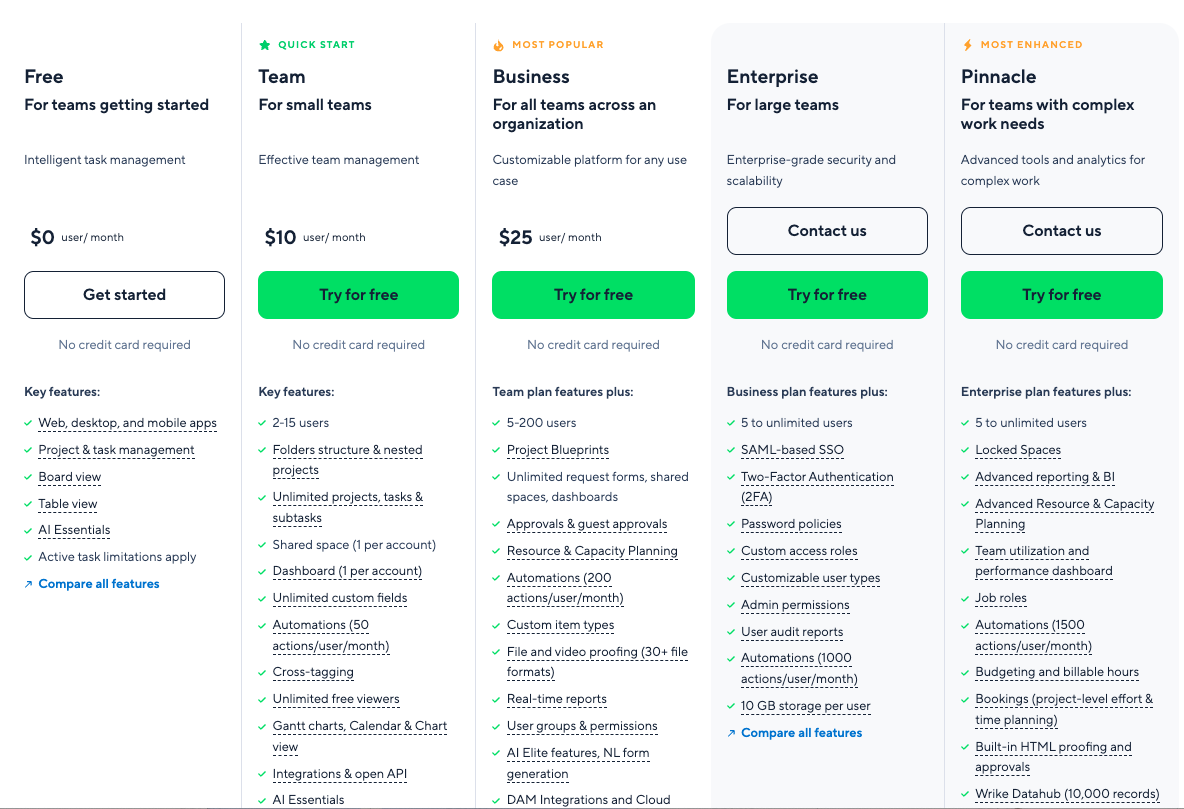
Image source: wrike.com
- Free: Aimed at small teams just starting out, this plan includes basic features for project management.
- Team: $10/user/month. Aimed at small teams for effective team management, including 2-15 seats and basic functions.
- Business: $25/user/month. Suitable for larger teams and complex projects, this plan offers improved analytics and reporting capabilities.
- Enterprise: Tailored for organizations demanding extensive features, this plan encompasses advanced security and provides dedicated support.
- Pinnacle: For teams with complex work needs, allowing unlimited seats. Supporting locked spaces, advanced reporting & BI, and so on.
is intentionally simple. One fixed monthly fee provides access for unlimited users and projects. This transparency appeals to budget‑conscious teams and small businesses that prefer predictable costs over feature variety.
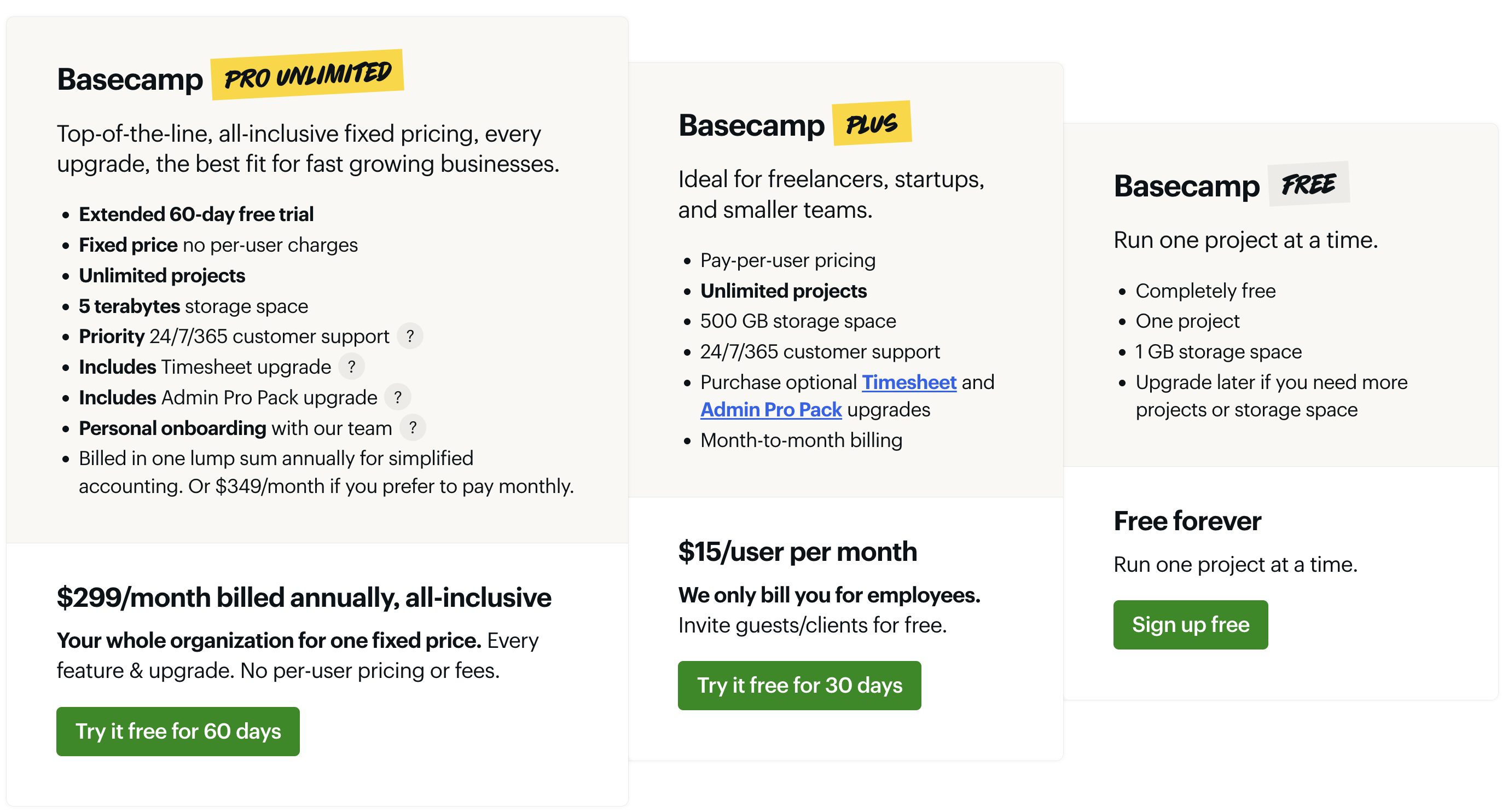
Image source: basecamp.com
- Free: This entry-level plan enables teams to manage one active project with essential task and file-sharing capabilities. It serves as an ideal starting point for new users to evaluate Basecamp's workflow before upgrading, and remains free indefinitely for individual or trial use.
- Plus: $15/user/month. Aimed at small teams and startups, this plan supports a limited number of users and includes core project management tools with fixed storage. Its monthly per-user pricing structure allows teams to scale precisely with their needs, while optional add-ons offer flexibility for specialized requirements.
- Pro unlimited: $299/org/month. This top-tier plan is designed for established businesses and growing teams, offering unlimited projects, users, and advanced client access. It operates on a flat-rate annual billing system with no per-user fees, providing and scalability. Priority support and enhanced control features are included to facilitate large-scale collaboration.
While Basecamp focuses on cost efficiency, Wrike positions itself as a long‑term scaling tool with higher functionality for the investment. The question isn't only about price — it's about overall value. Wrike's advanced analytics and customization can deliver better when used to their full potential, whereas Basecamp's simplicity reduces training and maintenance costs.
For buyers evaluating Wrike pricing vs Basecamp pricing, the decision depends on whether you need enterprise‑grade reporting and automation or a solid, flat‑cost communications hub that “just works.” Both are viable — the right fit depends on your growth trajectory and team maturity.
Get to know a cost-effective better solution
Wrike vs Basecamp — which is right for your organization?
Every organization operates with unique rhythms and priorities. When selecting the best project management software for teams, the right choice often depends more on your team's size, workflow complexity, and adoption habits than on the sheer number of features. Choosing the right tool can significantly improve team productivity by streamlining collaboration and optimizing your team's workflow. Here's how to think about it.
- Startups and freelancers: Basecamp is designed for fast collaboration without technical overhead. Teams can get started quickly, share updates, and unify communication in a single workspace. Its flat pricing and minimal setup make it a stress‑free way to organize client projects without worrying about scaling costs.
- Marketing teams and agencies: Wrike delivers workflow clarity and automation. Marketing departments benefit from its , campaign tracking, and reporting features. For agencies managing multiple clients, Wrike's space organization helps maintain both visibility and separation.
- Enterprises and global organizations: Wrike's strength lies in control and scalability. Admins can define access rules, monitor performance metrics, and with security standards that meet corporate IT policies.
When making a Wrike vs Basecamp decision, apply a simple framework:
- Team size: Small teams value Basecamp's simplicity; larger teams thrive with Wrike's hierarchy.
- Project complexity: Wrike excels in intricate, multi‑layered projects; Basecamp fits straightforward workflows.
- Technical adoption rate: Basecamp's ease encourages immediate engagement; Wrike's depth rewards teams that invest time in setup.
Ultimately, if your aim is speed, Basecamp keeps collaboration light and human. If growth and control matter most, Wrike's systematic environment is built for evolution.
5 alternatives: More project management tools to consider in 2026
While Wrike and Basecamp dominate many comparisons, several modern sit between Wrike's structural depth and Basecamp's accessible simplicity.
1. Lark: The all-in-one collaborative hub
serves as a unified digital workspace designed for modern teams, integrating chat, video calls, project management tools, and cloud documents into one cohesive platform. Its features promote real-time collaboration among distributed teams, enhancing productivity while reducing the need for multiple applications.
Key features:
Real-time collaboration: Users can co-edit documents simultaneously via (including Docs, Slides, Sheets, MindNotes) while engaging in chat via or video calls via .
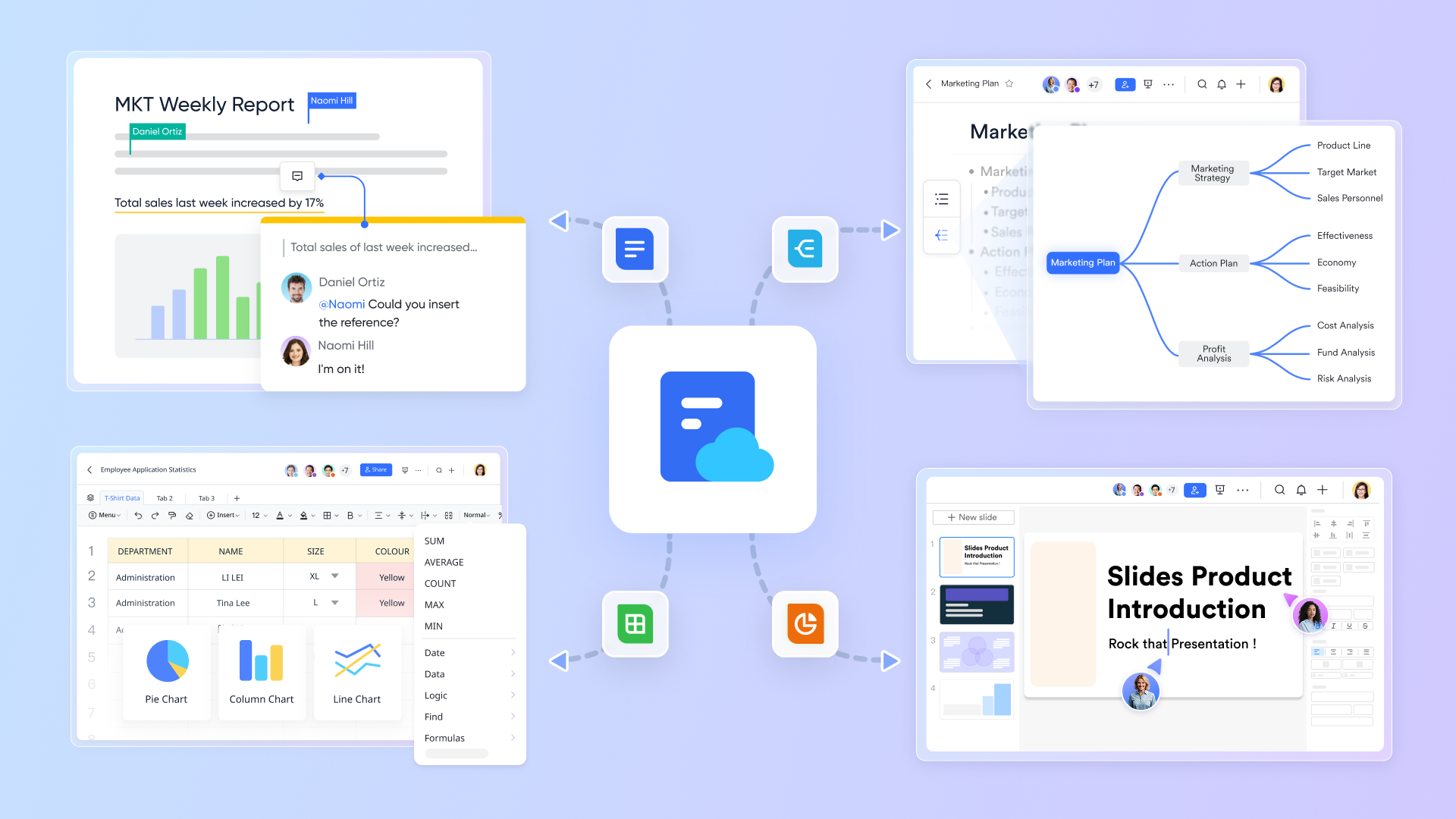
In addition, teams can build task lists for the whole team and individuals via Lark Tasks, block time in for discussion via Calendar view, which all streamlines collaboration. 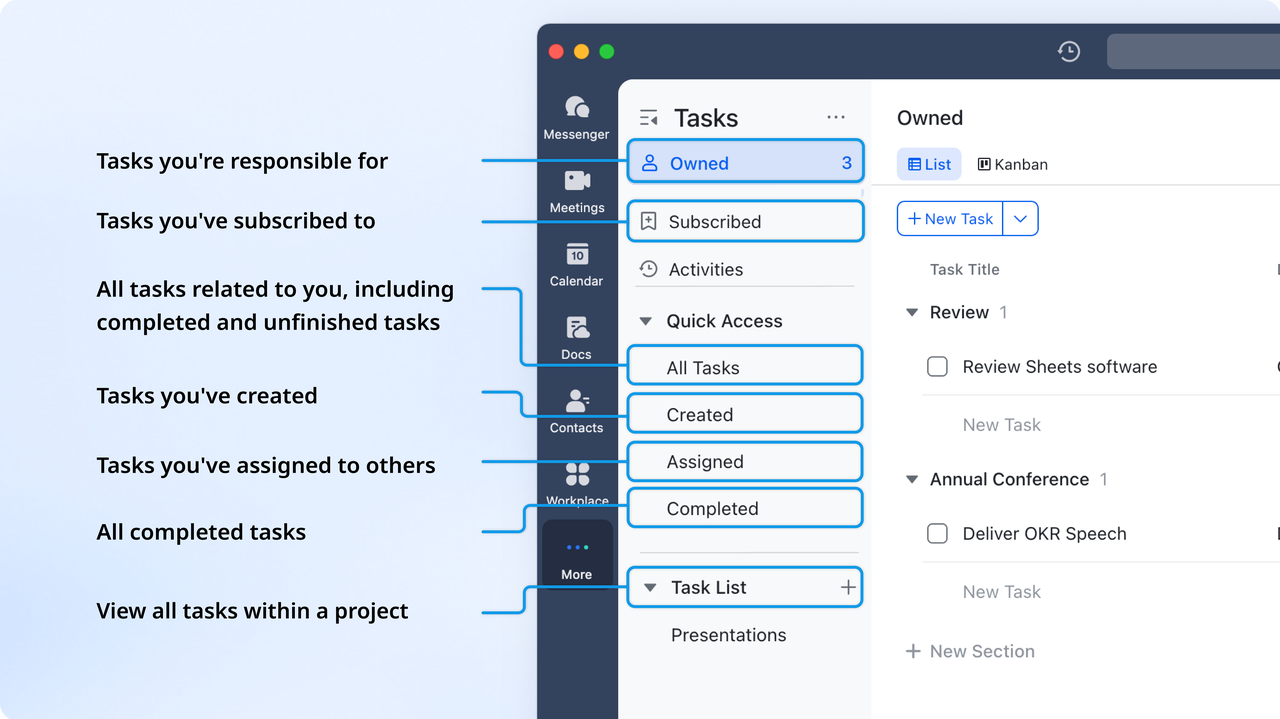
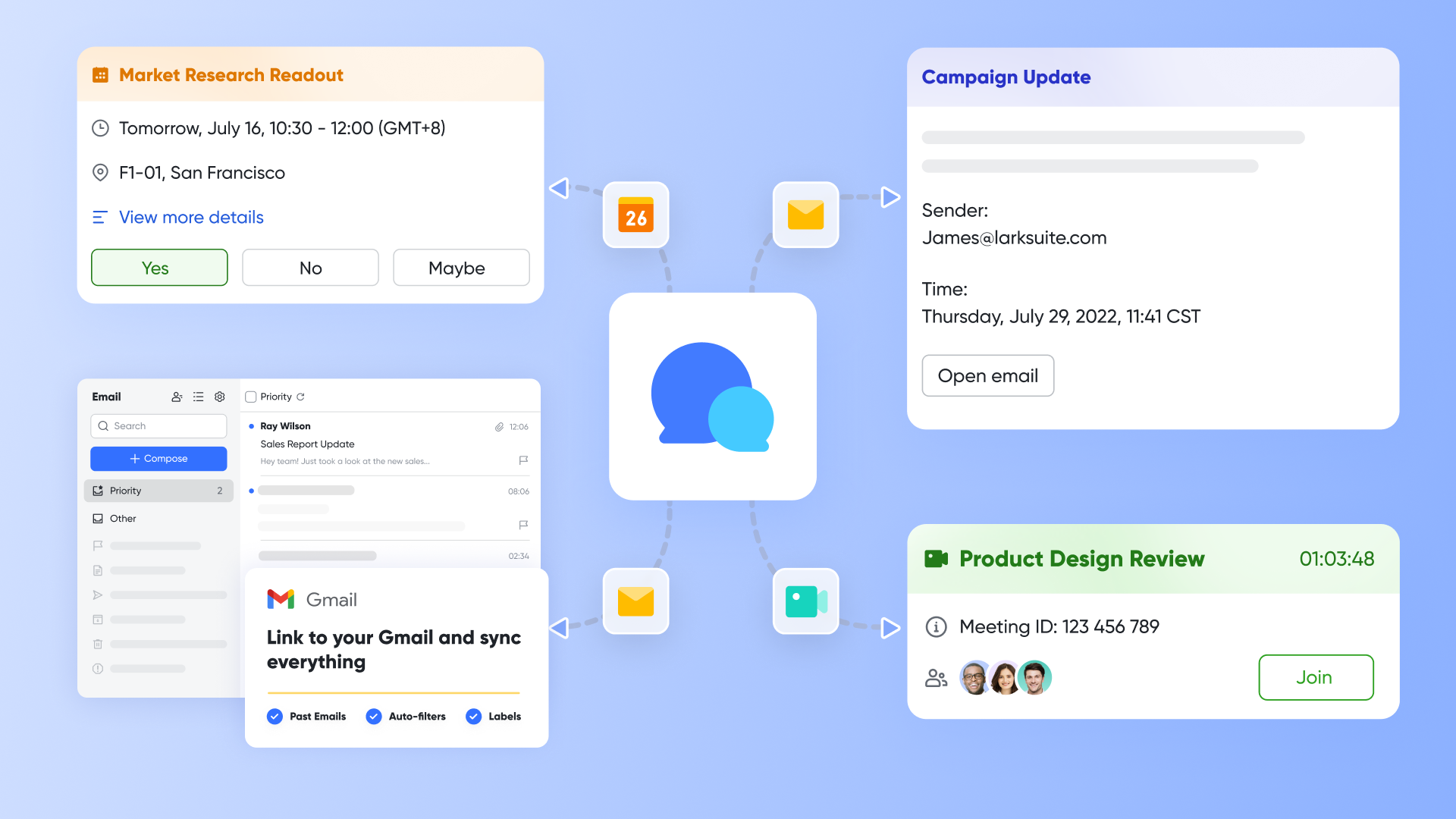
Built-in communications: Lark includes built-in communications tools, including chat and , which enable seamless connections among team members. Users can build tasks, start videos, or send files in chat channels. This combination eliminates the need to switch between different applications, as all communications related to projects can occur in one place.
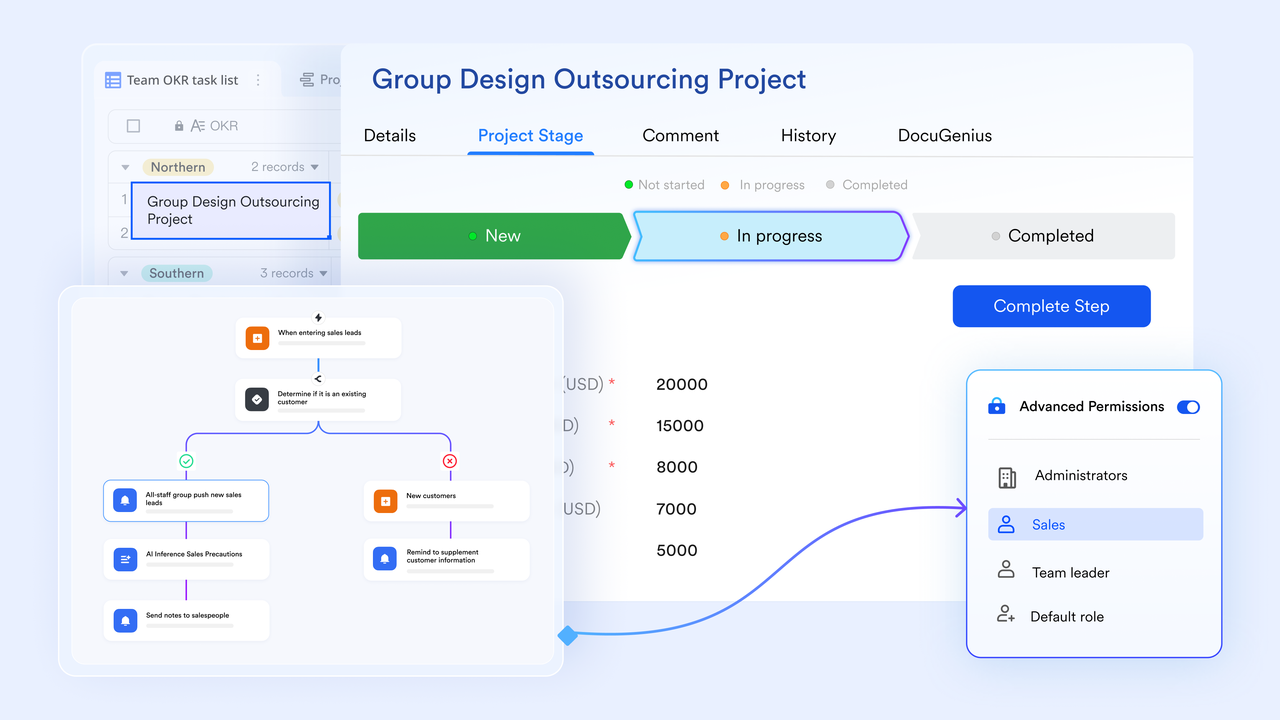
Customizable workflows and advanced automation: provides users with the capability to create customizable workflows and employ advanced automation through pre-set triggers and rules. Combined with bots which send reminders to users through chat, streamlining operations by automating repetitive tasks and notifications.
Analytics and visual dashboard: offers an analytics and visual dashboard that delivers real-time insights into team performance and project progress, helping teams monitor , identify bottlenecks, and make informed decisions about resource allocation and task management.
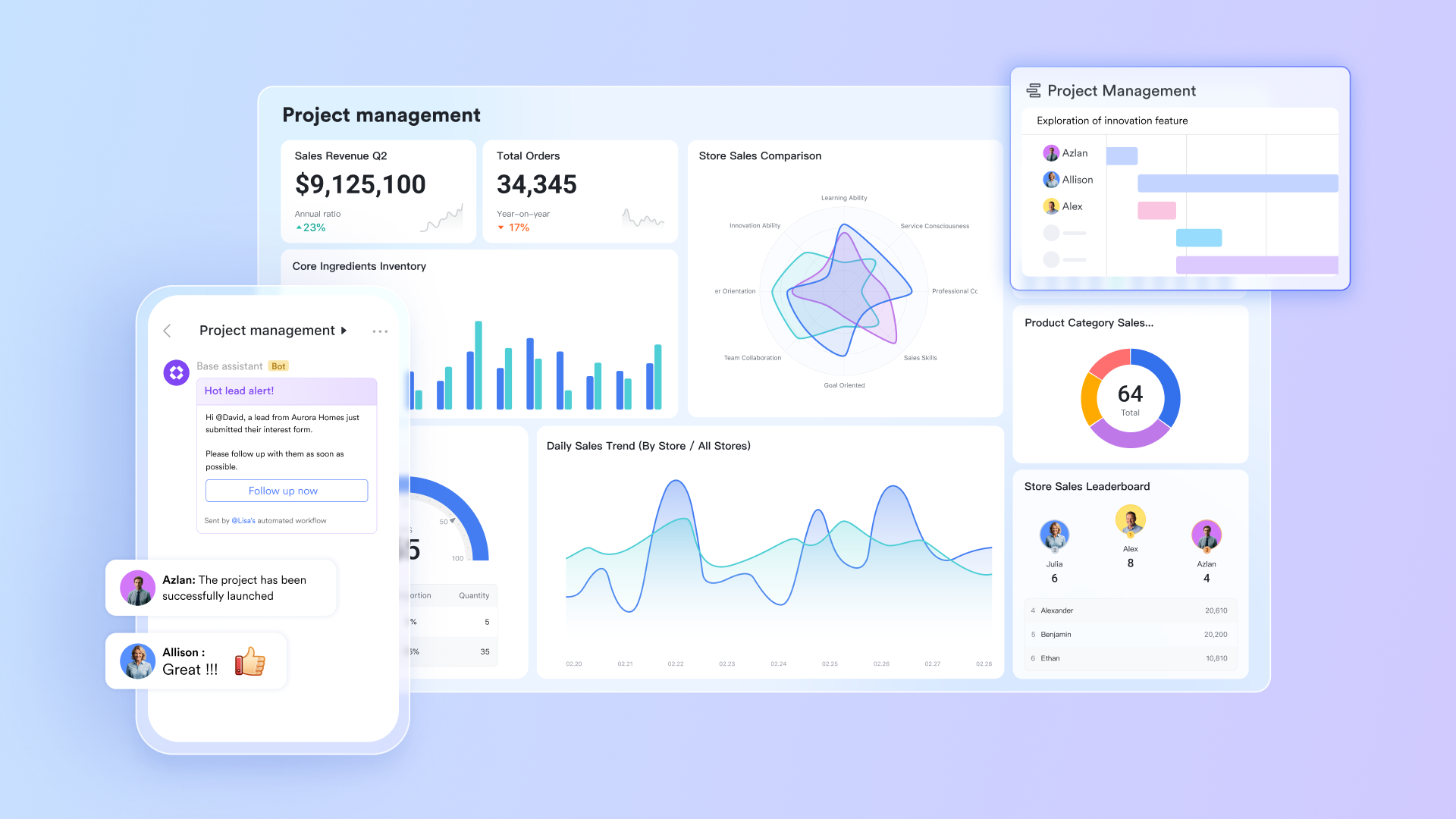
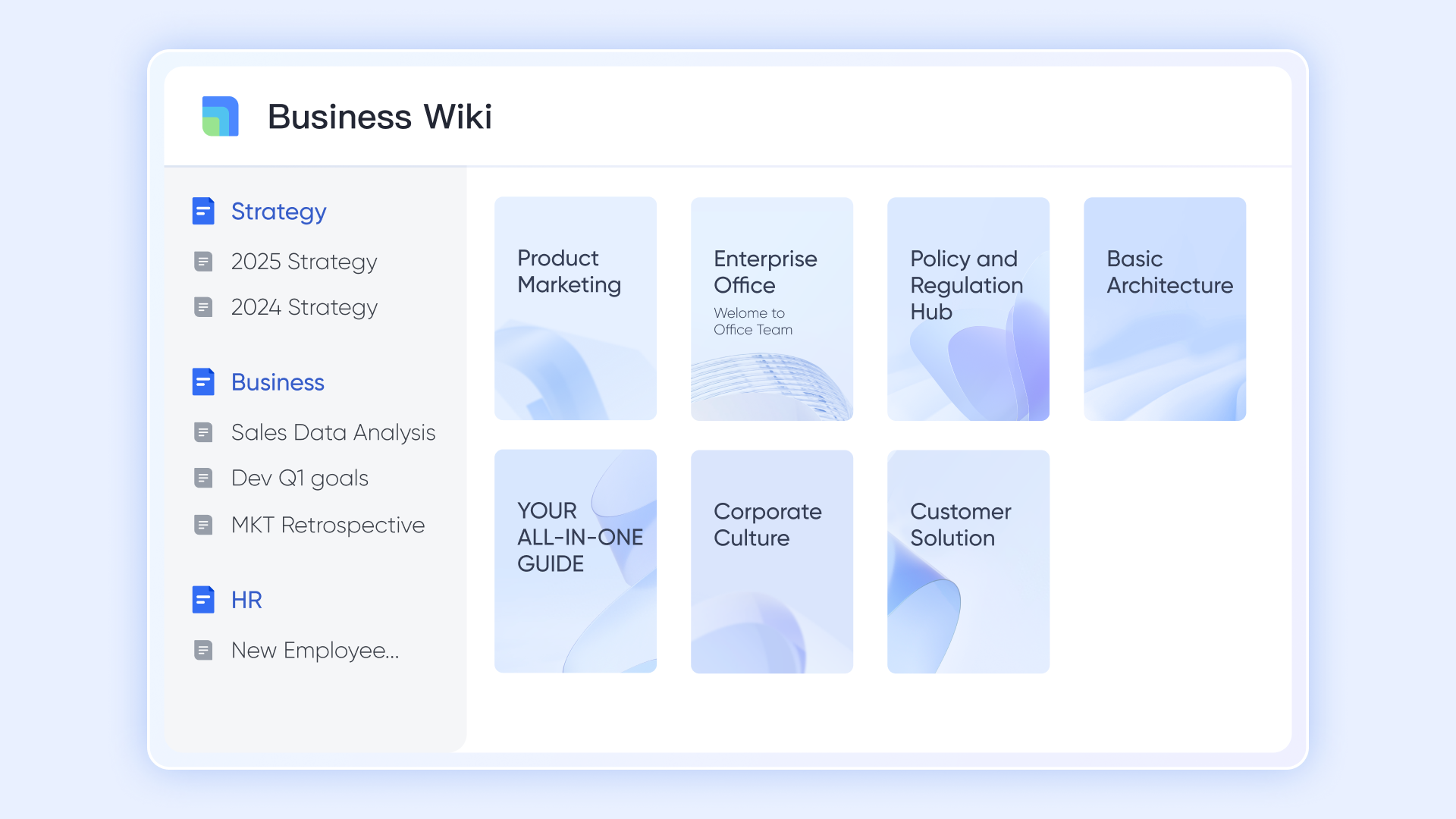
Document & material storage: features centralized document storage, which ensures that all project-related files are easily accessible and organized. This centralized approach simplifies document management and collaboration, as team members do not need to search through multiple systems to find the latest versions of project materials.
Why alternative to Wrike & Basecamp:
Lark's unique combination of communications and project management in one platform makes it ideal for teams looking to minimize app-switching while fostering a collaborative environment.
:
- Starter plan: Free forever plan that includes 11 powerful tools for up to 20 users. It also comes with 100GB of storage, 1,000 automation runs, AI translations, and more.
- Basic plan: $6/user/month (billed annually) for up to 500 users, including everything in Starter plus 1-on-1 video meetings, 5TB of storage, 1,000 automation runs, and more. To know more about Basic plan, .
- Pro plan: $12/user/month (billed annually) for up to 500 users. It includes everything in Basic plus a group calling for up to 500 attendees, 15TB of storage, 50,000 automation runs, and more.
- Enterprise plan: for custom pricing. Supports unlimited users and includes even more automation runs and advanced security, compliance, and management features.
For small teams with simple communication needs

18 months message history
1000 Base automation runs/month
2000 rows per table in Base
Most POPULAR
For companies with comprehensive collaboration and management needs
Unlimited message history
500-participant video meetings
50k Base automation runs/month
20k rows per table in Base
For large companies with advanced security and organizational management needs
Get a personalized demo and pricing
Unlimited message history
500-participant video meetings
15 TB storage + 30 GB storage/user
500k Base automation runs/month
50k Base automation runs/month
Most POPULAR
For companies with comprehensive collaboration and management needs
Unlimited message history
500-participant video meetings
50k Base automation runs/month
20k rows per table in Base
2. ClickUp: The flexible project management solution
ClickUp is a highly versatile project management tool known for its modular structure that allows teams to tailor workflows according to their preferences. It supports a wide range of project types, making it suitable for organizations of all sizes.
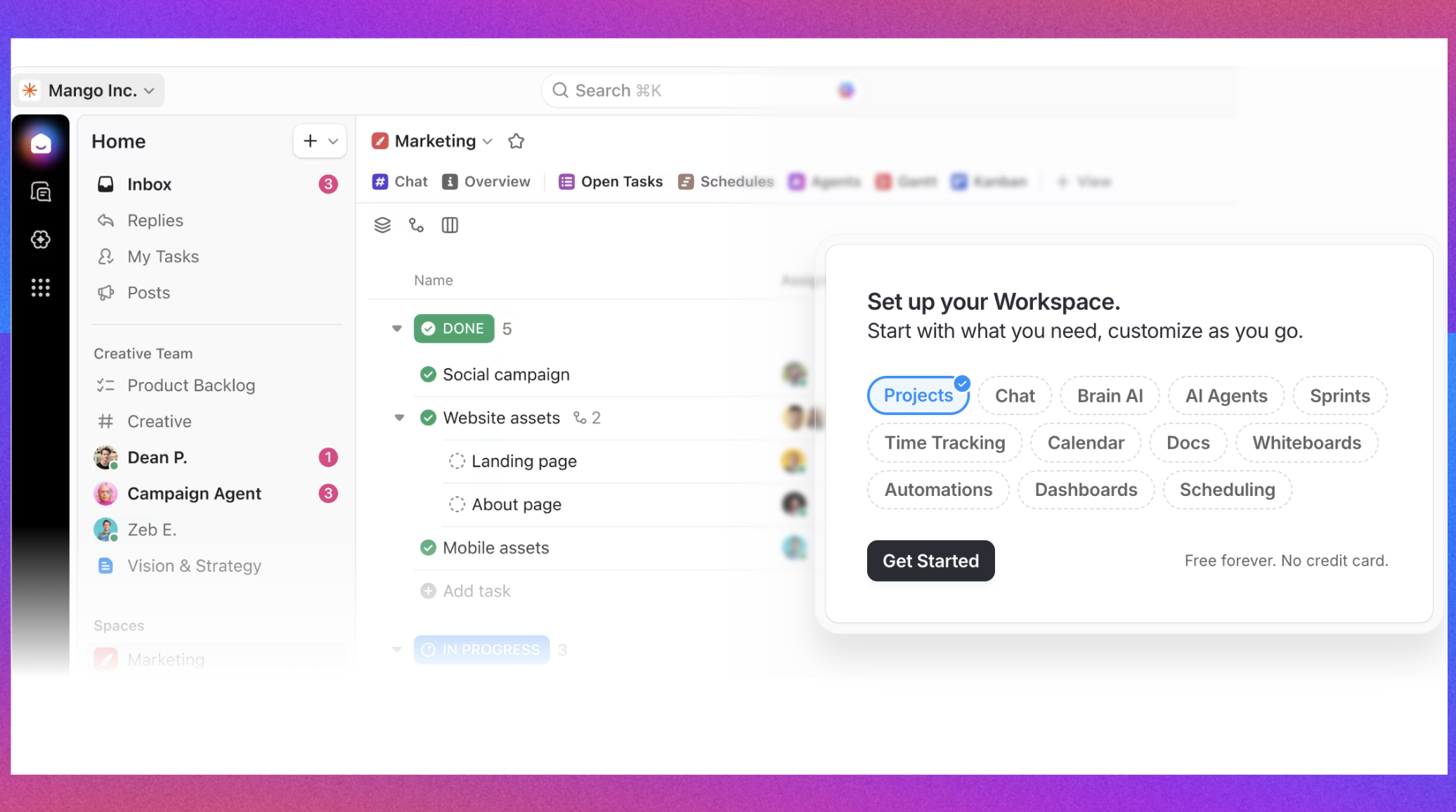
Image source: clickup.com
Key features:
- Multiple views: Offers various views including List, Board, Gantt, and Calendar to manage tasks in different formats suitable for any workflow.
- Task management: Users can create tasks with detailed descriptions, due dates, priorities, and dependencies, helping to clearly define responsibilities.
- Goal tracking: Enables teams to set and track goals within the project management framework, aligning daily tasks with broader objectives.
- Document editing integration: Built-in document creation and editing features allow teams to collaborate on project documents without leaving the platform.
- Automations: Provides robust automation options to streamline repetitive tasks, notifications, and status updates, increasing efficiency.
Why alternative to Wrike & Basecamp:
ClickUp's unmatched flexibility and customization options cater to dynamic workflows, making it appealing for teams needing a tailored project management experience that Wrike may complicate or Basecamp may lack.
Pricing:
- Unlimited: $7/user/month, paid yearly
- Business: $12/user/month, paid yearly
- Enterprise: Custom pricing
3. Asana: Visual planning and task management
Asana is a popular project management tool recognized for its intuitive user interface that simplifies planning and tracking tasks. It is favored for its ability to connect strategic goals with actionable tasks while promoting team collaboration across departments.

Image source: asana.com
Key features:
- Visual project tracking: Users can visualize projects through task boards and timeline views, which help manage dependencies and project timelines effectively.
- Task hierarchies: Asana supports subtasks and sections for organizing tasks, making it easier to break down complex projects into manageable segments.
- Automated workflows: Automation rules can be established to minimize manual work on repetitive tasks, enhancing productivity.
- Integration with other tools: Seamlessly integrates with numerous applications like Slack, Google Drive, and Microsoft Teams to expand functionality.
- Reporting features: Provides reporting tools to track project progress and team performance, offering insights that facilitate informed decision-making.
Why alternative to Wrike & Basecamp:
Asana strikes a balance between structure and simplicity, making it ideal for teams that require a sophisticated management tool without the complexity that Wrike may introduce.
Pricing:
- Starter: $10.99/user/month, paid yearly
- Advanced: $24.99/user/month, paid yearly
- Enterprise: Custom pricing
To know more about comparison between Wrike vs Asana vs Basecamp, read these:
4. Monday.com: The creative project management platform
Monday.com offers an innovative approach to project management that blends structure and visual appeal. Its highly customizable boards cater to various project requirements, allowing teams to design workflows that mirror their unique processes.
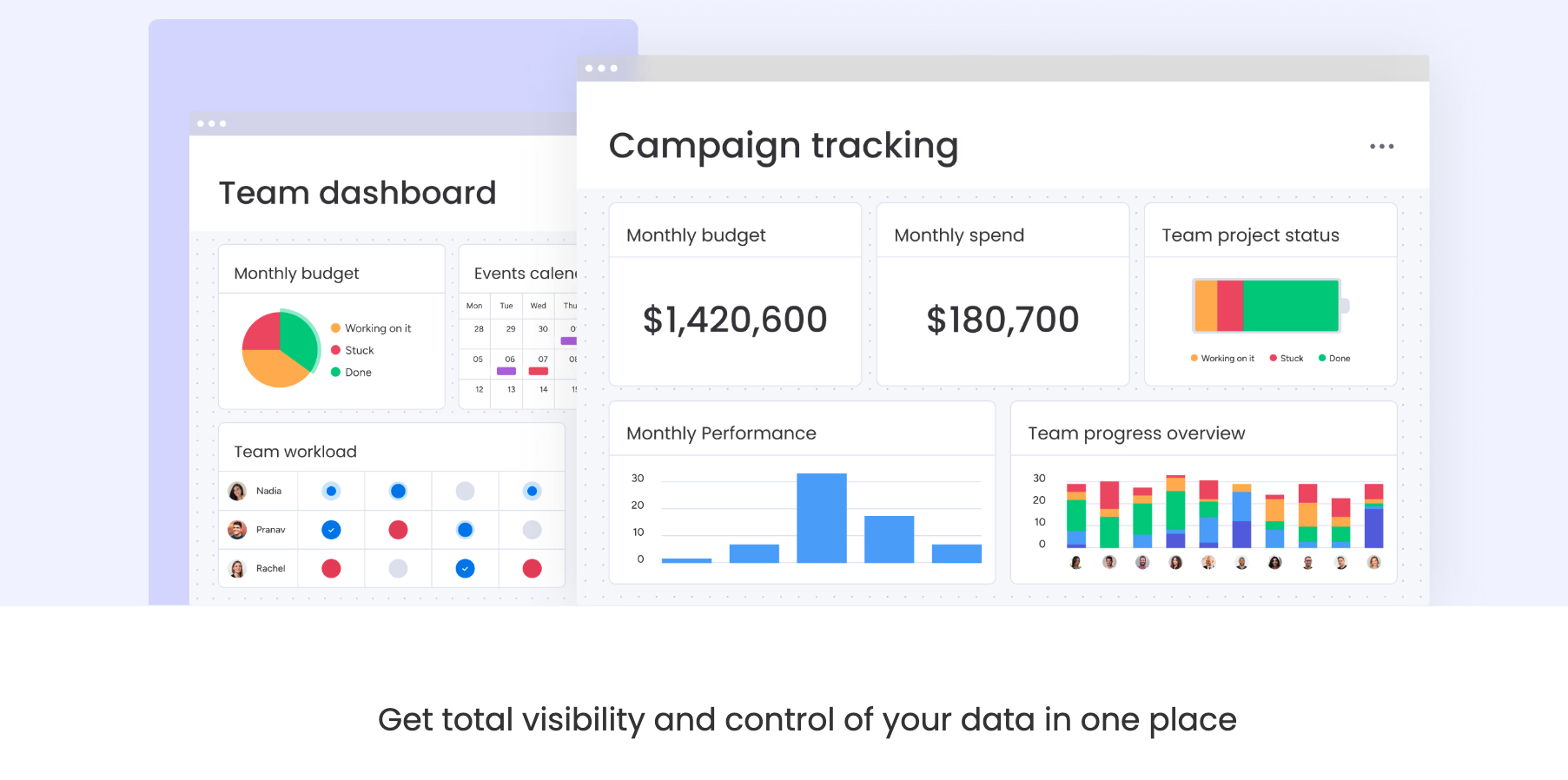
Image source: monday.com
Key features:
- Visual boards: Users can create visually appealing boards with customizable columns and statuses to manage projects intuitively.
- Task automation: Automates routine tasks and updates, reducing the workload on team members and keeping everyone in sync.
- High customization: Provides templates and customization options that enable teams to create workflows specific to their needs.
- Collaboration tools: Integrated features for comments and files make it easy for team members to communicate and share resources directly on task boards.
- Time tracking: Features built-in time tracking to monitor time spent on tasks and projects, helping manage deadlines effectively.
Why alternative to Wrike & Basecamp:
Monday.com's vibrant and user-friendly interface, combined with its emphasis on both structure and creativity, caters to teams that desire an engaging way to manage projects without losing oversight.
Pricing: Monday.com provides flexible plans for different number of seats. For example, Monday Service for 10 seats. For example, Monday Service for 10 seats:
- Standard: $26/seat/month, paid yearly
- Pro: $38/seat/month, paid yearly
- Enterprise: Custom pricing
5. Notion: The flexible knowledge workspace
Notion combines documentation, task management, and database functionalities in a single platform. It stands out for its adaptability, allowing teams to create personalized workflows that fit their unique needs while facilitating collaboration.
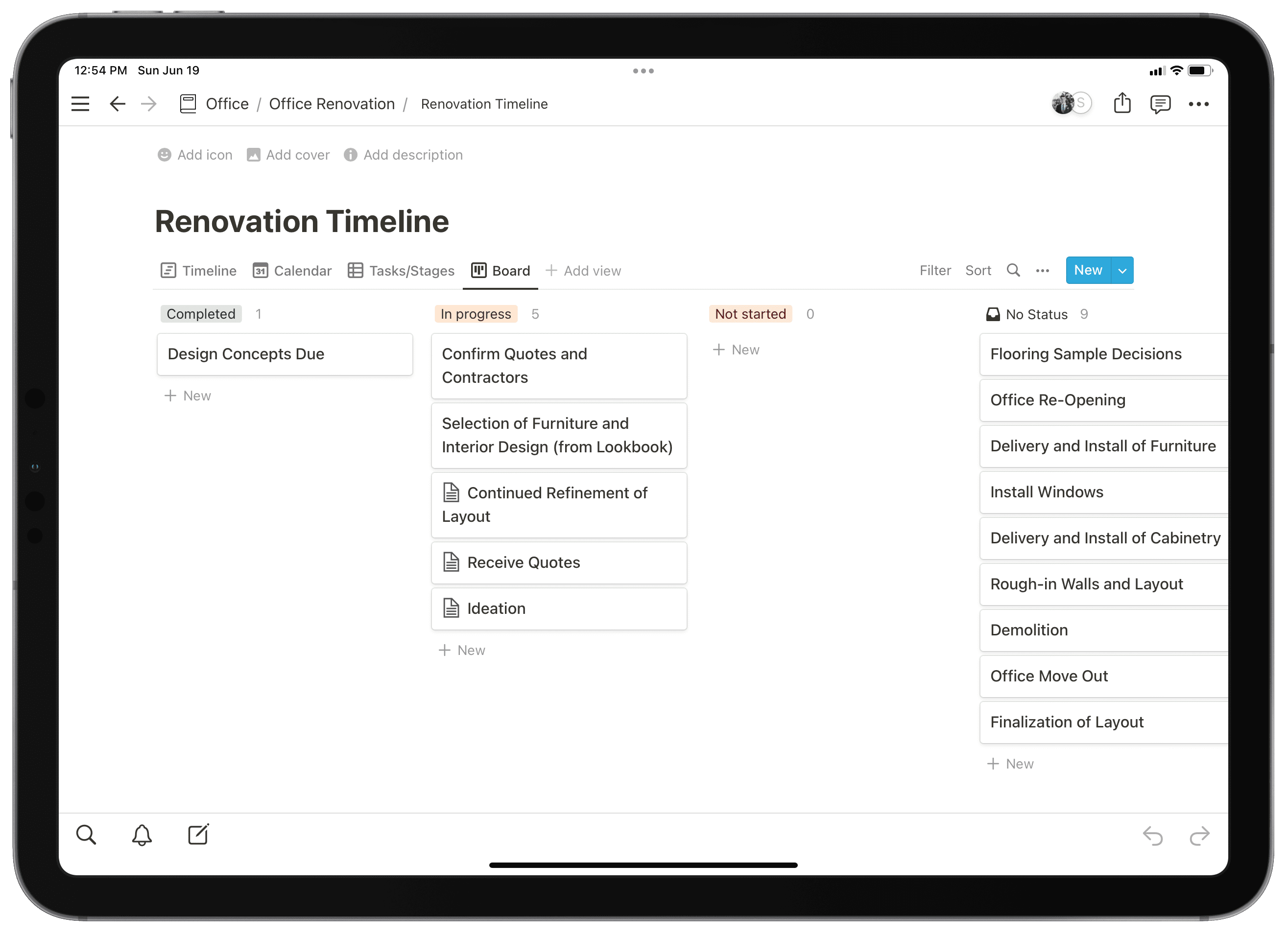
Image source: notion.com
Key features:
- Multi-functional workspace: Combines notes, tasks, project tracking, and databases into one focused environment, simplifying resource management.
- Template library: Offers a variety of customizable templates for different project types, enabling users to start quickly without extensive setup.
- Collaborative editing: Supports real-time collaboration on documents and projects, ensuring that teams can work together seamlessly.
- Relational databases: Users can create databases that connect related information, enhancing project organization and access to resources.
- Integrations: Integrates with tools like Google Drive, Trello, and various other apps, allowing teams to centralize their work.
Why alternative to Wrike & Basecamp:
Notion's flexibility and comprehensive functionality provide a unique all-in-one solution that appeals to teams seeking less formal project management with a focus on collaboration and creativity, contrasting with the structured environments of Wrike and Basecamp.
Pricing:
- Plus: $10/user/month, paid yearly
- Business: $20/user/month, paid yearly
- Enterprise: Custom pricing
If you're evaluating Wrike alternatives or Basecamp alternatives, these platforms reveal how the landscape has matured — emphasizing seamless integration, real‑time teamwork, and tailored scalability. Each offers a fresh balance between structure and simplicity, giving organizations the freedom to redefine how they plan, communicate, and execute in 2026's dynamic work environment.
Experience modern project management
Conclusion
The Wrike vs Basecamp comparison reflects two distinct visions of teamwork. Wrike excels through structure, analytics, and scalability — offering enterprise‑ready features ideal for organizations that manage complex, interconnected projects. Basecamp, by contrast, succeeds through simplicity and communication flow, enabling teams to collaborate without obstacles or steep learning curves.
In 2026's changing digital landscape, choosing the right platform depends on your team's personality and priorities. If you value control, insight, and automation, Wrike supports your long‑term growth. If you prioritize clarity, human communication, and ease, Basecamp keeps work human‑centered and efficient. Lark presents a strong alternative, integrating real-time collaboration and communication tools in a user-friendly interface. Ultimately, the best software is the one your team enjoys using daily. Ultimately, the best software is the one your team wants to use every day.
FAQs
What is replacing Basecamp?
Basecamp isn't disappearing, but several tools are replacing it in certain workflows. Platforms like ClickUp, Asana, Monday.com, Teamwork, and Notion are now seen as leading Basecamp replacements, offering more customization, advanced reporting, and integrations that appeal to modern hybrid teams
What are the disadvantages of Basecamp?
While Basecamp shines with simplicity, its limitations include lack of advanced automations, no built‑in time tracking, and minimal analytics. Larger organizations may also find its flat structure less suitable for managing multi‑layered projects.
Why is Basecamp so popular?
Basecamp's popularity comes from its user‑first philosophy. Teams love the clean interface, predictable pricing, and minimal setup. It eliminates software fatigue, letting people focus on communication and progress rather than managing the tool itself.
What are the disadvantages of Wrike?
Wrike's biggest drawback is complexity. Its interface can feel overwhelming for new users, and setup requires more time than simpler tools. Additionally, some smaller teams find Wrike's pricing higher than comparable lightweight alternatives.
Is Wrike better than Basecamp for teams?
It depends on your needs. Wrike suits data‑driven teams needing structure, automation, and reporting, while Basecamp remains best for small to mid‑sized teams seeking simplicity and open communication. Both can be the best project management software for teams — but in very different ways.
Related reading


















