Ever felt like your projects are a tangled mess? Deadlines loom, team members are stressed, and somehow, everything feels like it's on the verge of chaos. You're not alone! Many teams struggle with project management, searching for that perfect tool to bring order and efficiency to their workflows. That's where project management software like Wrike comes in.
In this comprehensive Wrike review, I'll delve into its features, pricing, pros and cons, and compare it to other tools. My goal is to help you decide if Wrike is the right fit for your needs. I've spent considerable time researching Wrike and similar tools, and this review is designed to give you an unbiased, practical perspective.
What is Wrike?
Wrike is a designed to help teams of all sizes manage projects, collaborate effectively, and . It offers a range of features, from task management and scheduling to resource allocation and reporting, all within a centralized environment.
Wrike aims to be a versatile solution, adaptable to various industries and team structures. While it can be used effectively by individual project managers, it truly shines when implemented across larger teams and organizations.
Wrike has evolved over the years, adding more features and capabilities to meet the changing demands of the market. It has consistently been recognized as a leading project management solution. Wrike focuses on key features, such as , Gantt charts, and collaboration tools to help teams work more efficiently.
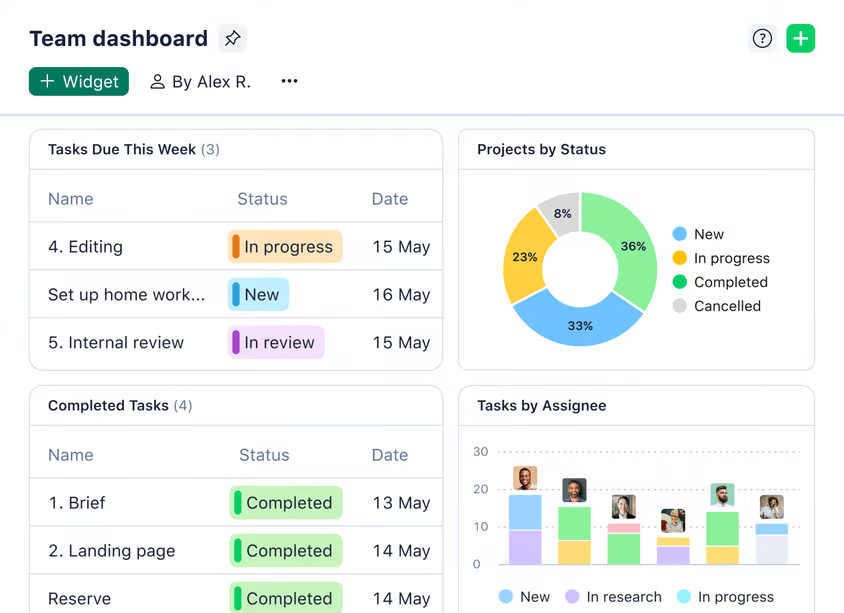
Image source: wrike.com
Wrike features: A deep dive
Wrike's strength lies in its extensive feature set. It provides a comprehensive toolkit for managing projects from start to finish. Let's take a closer look at some of the core features of wrike project management software review:
Task management
Wrike provides capabilities. Creating and assigning tasks is straightforward. You can set priorities and deadlines to ensure team members understand what needs to be done and when. Wrike allows you to , linking tasks together so that one cannot start until another is completed. Subtasks and recurring tasks are also supported, allowing for detailed task breakdown and automated task creation.
Collaboration and communication
Effective collaboration is at the heart of successful project management, and Wrike delivers in this area. Wrike facilitates real time commenting and discussions directly within tasks and projects. You can easily share files and manage different versions, ensuring everyone has access to the latest information. Wrike includes team collaboration features that allow you to , and you can even integrate it with communication tools like Slack and Microsoft Teams for seamless communication.
Project planning and scheduling
Wrike offers powerful project planning and scheduling tools. and timelines provide visual representations of project schedules, making it easy to track progress and identify potential delays. The platform also allows for resource management, helping you allocate team members and equipment to different tasks. Workload management features help ensure that no one is overloaded, promoting a balanced and productive work environment. If you find yourself repeating similar projects, you can use project templates to save time and effort.
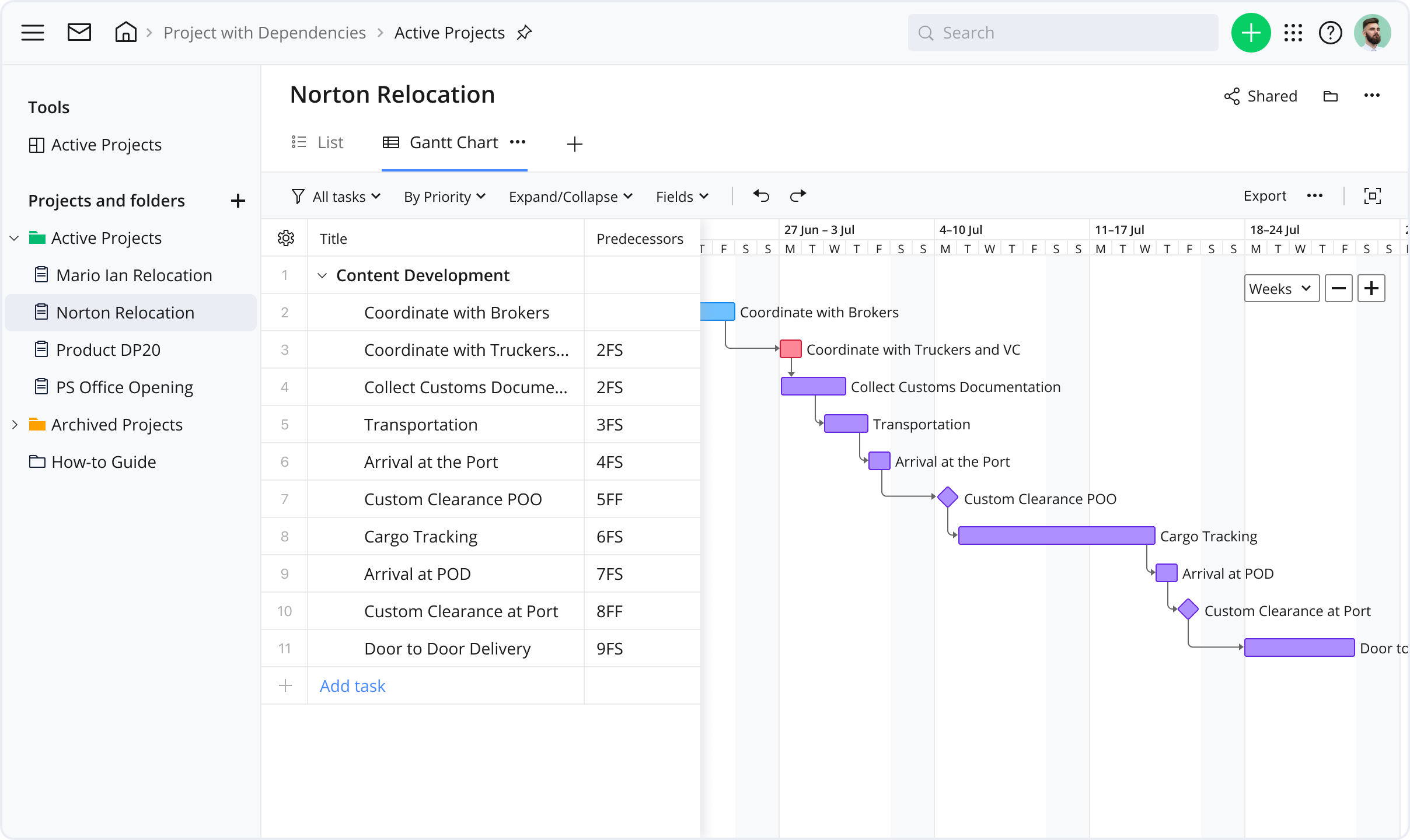
Image source: wrike.com
Reporting and analytics
Wrike provides customizable dashboards that allow you to visualize key project metrics. You can generate real time reports to track progress, identify bottlenecks, and make data driven decisions. The platform allows you to , and you can customize data visualization to present information in a way that is most meaningful to you.
Automation and workflows
Wrike allows you to create custom workflows that automate repetitive tasks and streamline processes. You can set up automated task assignments, ensuring that the right people are assigned to the right tasks. can be automated as well, ensuring that important decisions are made in a timely manner. Wrike also offers AI powered automation to further enhance efficiency.
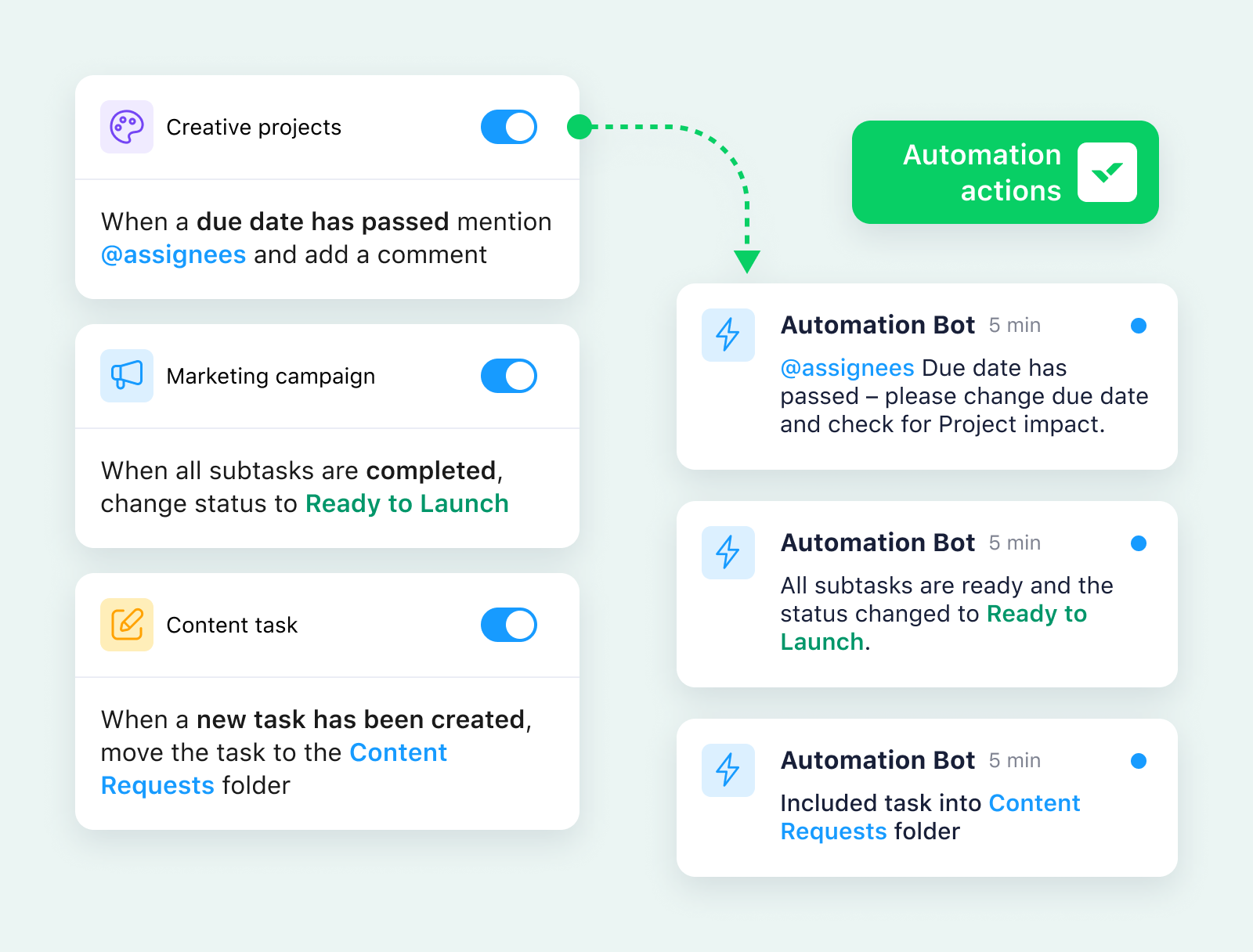
Image source: wrike.com
Integrations
Wrike integrates seamlessly with a wide range of other tools. If you use Salesforce, you can integrate it with Wrike to manage sales projects and track customer interactions. Microsoft 365 integration allows you to collaborate on documents and share information within Wrike. Similarly, Google Workspace integration enables you to work with Google Docs, Sheets, and Slides directly within Wrike. If you need to connect Wrike with other tools, you can use the API and Zapier integration to create custom connections.
Mobile app experience
Wrike's mobile app allows you to stay connected and manage projects on the go. The app includes many of the features available on the desktop version. The app allows you to manage tasks, communicate with team members, and track project progress from your smartphone or tablet. While the mobile app offers a lot of functionality, there are some limitations compared to the desktop version.
Usability and onboarding: Is Wrike too complex?
One of the most frequent points of discussion surrounding Wrike is its usability. While its extensive feature set is a major strength, it can also be a source of frustration for new users. The interface is dense, and navigating through the various options and settings can feel overwhelming at first.
Wrike reviews Reddit discussions often highlight the steep learning curve. Some users report needing significant time and effort to fully grasp the platform's functionalities. Wrike offers onboarding resources, including training videos and tutorials, but these may not be sufficient for everyone.
To mitigate this, it's crucial to invest time in proper training and onboarding. Consider creating internal guides and documentation tailored to your team's specific workflows. Start with the essential features and gradually introduce more advanced functionalities as users become comfortable.
Try a simpler way to manage projects
Customization vs. complexity: Striking the right balance
Wrike's high degree of customization is a double-edged sword. It allows you to tailor the platform to your specific needs and workflows, but it also adds to the complexity. Finding the right balance between customization and simplicity is crucial to maximizing Wrike's value.
Avoid over customizing the platform with unnecessary features or configurations. Focus on streamlining your workflows and implementing only the customizations that are essential to .
Regularly review your Wrike configuration to identify areas where you can simplify and optimize. Seek feedback from your team members to ensure that the platform is meeting their needs and that they are not encountering unnecessary complexities.
Performance and reliability: Is Wrike always up to the task?
While Wrike generally offers reliable performance, users occasionally report issues with speed and stability, particularly during peak usage times. These issues can range from slow loading times to occasional errors or crashes.
These issues don't appear to be widespread. It's important to monitor Wrike's performance within your own environment and report any issues to Wrike's support team. Consider optimizing your Wrike configuration and reducing the number of active integrations to improve performance.
Wrike's customer support
When you need help with Wrike, the level of support you receive often depends on your subscription plan. For all users, Wrike provides a strong foundation of self-help resources, including a comprehensive knowledge base, active community forums, and a library of training videos.
If you need to contact a person, all paid plans offer the ability to submit a support ticket. However, for more immediate assistance, faster channels like 24/7 phone and live chat support are typically reserved for customers on higher-tier plans, such as Business, Enterprise, and Pinnacle.
Feedback on support, often seen in Wrike reviews Reddit discussions, is generally positive regarding the quality of help provided. However, some users on lower-priced plans express a desire for more direct and faster access to support agents. In summary, Wrike has a robust support system, but the most responsive, hands-on help is a premium feature.
Wrike pricing: Plans & hidden costs unveiled
Choosing the right Wrike plan hinges on balancing team size, workflow complexity, and budget—while accounting for often-overlooked hidden costs. Below is a streamlined breakdown of Wrike's pricing tiers and unstated expenses to inform your decision.
Wrike pricing plans table
Detailed breakdown of Wrike pricing plans
Free plan
Core positioning: Short-term trial tier (not for long-term use) for solo users/2–5 person teams to test Wrike's foundational project management capabilities.
Key unique features: AI Essentials is limited to basic task suggestion functionality (no natural language processing for form/build automation).
Key limitations/gaps:
- Active task caps block new task creation until existing tasks are marked complete (unviable for ongoing workflows like weekly content planning).
- No option to purchase additional storage (even for a fee) for file-heavy work (e.g., PDFs, simple design assets).
Team plan
Core positioning: Entry-level paid tier for small, non-technical teams needing standardized collaboration and basic automation.
Key unique features:
- Unlimited free viewers allow external stakeholders (clients/executives) to access/comment on projects without counting toward paid user licenses.
- Cross-tagging functionality for task organization (but limited to a single shared space per account).
Key limitations/gaps:
- Open API only supports read-only integrations (can pull data to Google Sheets/Excel but not push data from CRMs to auto-create tasks).
- Folder structure lacks custom permissions (all team members have equal access to all folders).
Business plan
Core positioning: Mid-tier solution for structured, collaborative teams needing advanced resource management and proofing capabilities.
Key unique features:
- Resource & Capacity Planning includes real-time workload heatmaps to avoid team overallocation (critical for multi-project teams).
- AI Elite's NL form generation lets teams build custom request forms via plain-language prompts (cuts setup time by 50%).
- Project Blueprints offer pre-built workflow templates (agile sprints, event planning) to standardize team processes.
Key limitations/gaps:
- No SSO integration (a must-have for enterprise-grade security).
- Advanced support (24/7 phone/chat) is not included and requires add-on fees.
Enterprise plan
Core positioning: Enterprise-grade tier for large/global teams with strict compliance, security, and scaling requirements.
Key unique features:
- Regional data hosting (Paris for EU accounts, Santa Clara for global) with optional relocation (meets GDPR/data residency rules).
- Customizable user types (e.g., “contractor” with read-only access) to minimize security risks.
- User audit reports track all platform actions for 7+ years (satisfies HIPAA/financial industry audit requirements).
Key limitations/gaps:
- Pricing is fully custom (no transparent per-user rate) and requires direct negotiation with Wrike sales.
- Advanced automation (1000 actions/user/month) still has limits for hyper-complex enterprise workflows (e.g., global supply chain management).
Pinnacle plan
Core positioning: Premium enterprise tier for organizations with hyper-complex workflows, financial tracking, and advanced analytics needs.
Key unique features:
- Wrike Datahub (10,000-record capacity) powers executive BI dashboards to track project profitability and team utilization.
- Locked Spaces add end-to-end encryption for sensitive data (client contracts/financial forecasts)—even Wrike admins lack access without approval.
- Built-in HTML proofing supports web content review (landing pages/email templates) without third-party tools (Figma/Adobe Acrobat).
Key limitations/gaps:
- Fully tailored to organizational needs (no standardized feature set), leading to longer negotiation/onboarding timelines.
- Integrations with QuickBooks/PowerBI require additional setup (no one-click activation).
To know more about Wrike pricing ➡️
Hidden costs to budget for
- Storage upgrades: Overage storage (beyond tier limits) requires custom pricing via sales (critical for creative/file-heavy teams).
- User license tiers: Wrike sells licenses in blocks (5 for <30 seats, 10 for 30–100 seats, 25 for >100 seats)—you'll pay for unused seats if your team size falls between tiers.
- Premium add-ons: Wrike Whiteboard (brainstorming), Two-Way Sync (Jira/GitHub), and Wrike Lock (encrypted data management) are paid extras with custom pricing.
- Professional services: Guided onboarding/deployment (recommended for teams of 20+) has custom fees for smooth adoption.
- Integration development: Custom integrations (e.g., with niche ERP systems) cost $3,000–$10,000 per integration (even native integrations need internal IT labor).
- Upgrade migration: Moving from lower tiers to Enterprise/Pinnacle requires data migration/workflow restructuring.
Stop paying for hidden costs right now
How does Wrike compare to alternatives?
While Wrike is a powerful contender, it's not the only player in the game. The project management software market is crowded, and making the right choice means understanding how Wrike stacks up against its main competitors. Whether you're looking at Wrike vs Asana or comparing Monday.com vs Wrike review, each platform has its own philosophy and strengths.
Especially in a world where teams are tired of switching between apps, present a compelling alternative. They challenge the traditional model by bundling communication and project management into a single, seamless experience. To help you see the landscape clearly, here is a breakdown of the key differences.
If you want to read more about Wrike vs Asana review ➡️
If you want to read more about Wrike vs Monday.com review ➡️
If you want to read more about Wrike vs ClickUp review ➡️
Experience the power of an all-in-one solution
Why Lark is Wrike's best alternatives?
When considering a switch from Wrike, it's helpful to look at how addresses some common challenges. The following comparison highlights key areas where Lark offers a distinct advantage, providing a more cohesive and efficient way of working.
Solving the "tool silos" problem
Wrike is, at its core, a standalone project management tool. To enable full team collaboration, it relies heavily on integrations with third-party tools like Slack, Teams, Google Drive, and Outlook. This often leads to:
- Fragmented context: Discussions happen in chat apps, files are in cloud storage, and tasks live in Wrike, scattering information.
- Inconsistent experience: Integrations can be limited, clunky, and might come with extra costs.
- High administrative overhead: Your IT team has to manage user accounts and permissions across multiple separate systems.
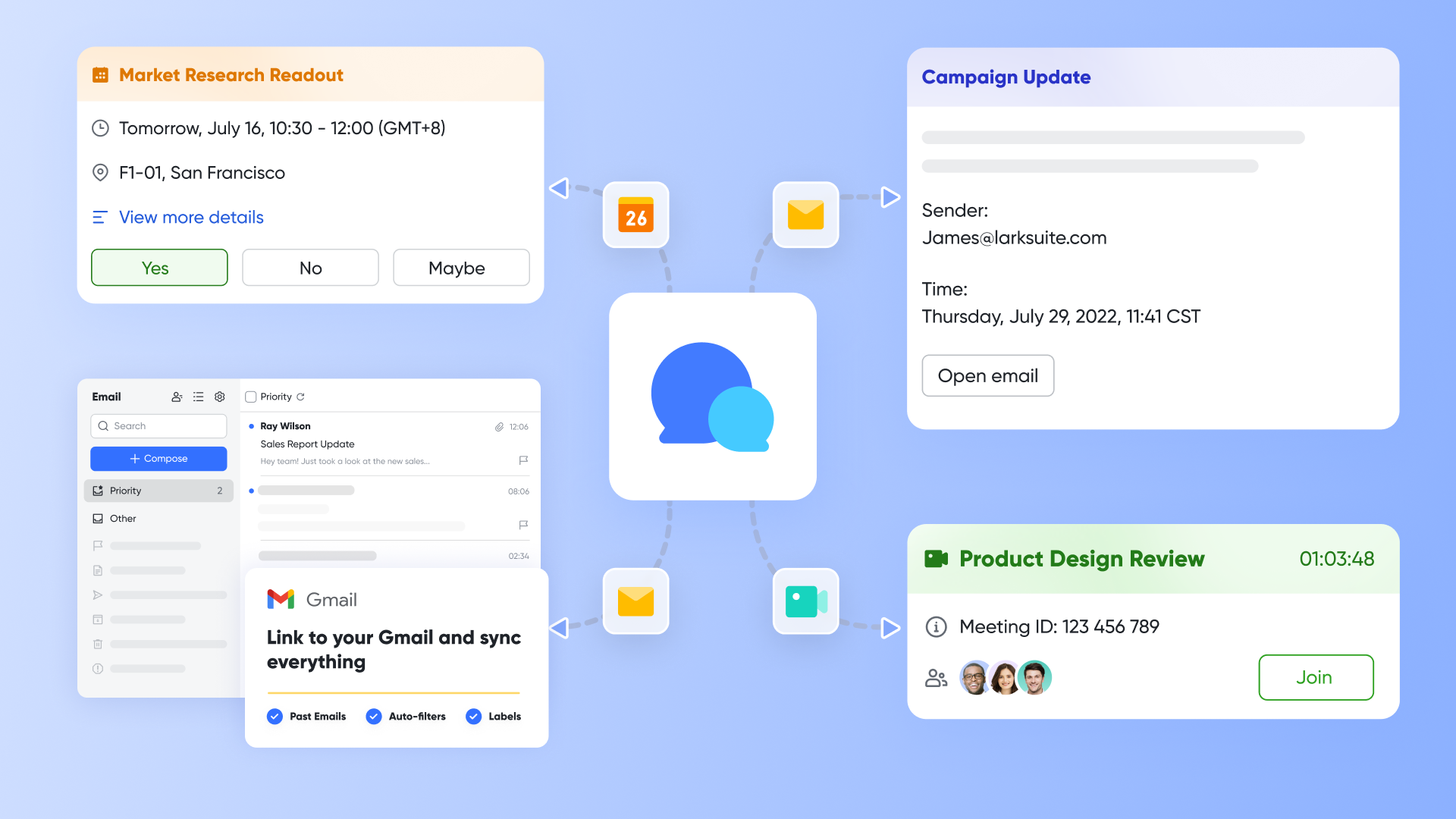
Instead, Lark isn't just a project management tool; it's a native, all-in-one collaboration platform. It solves the "tool silos" problem at its root.
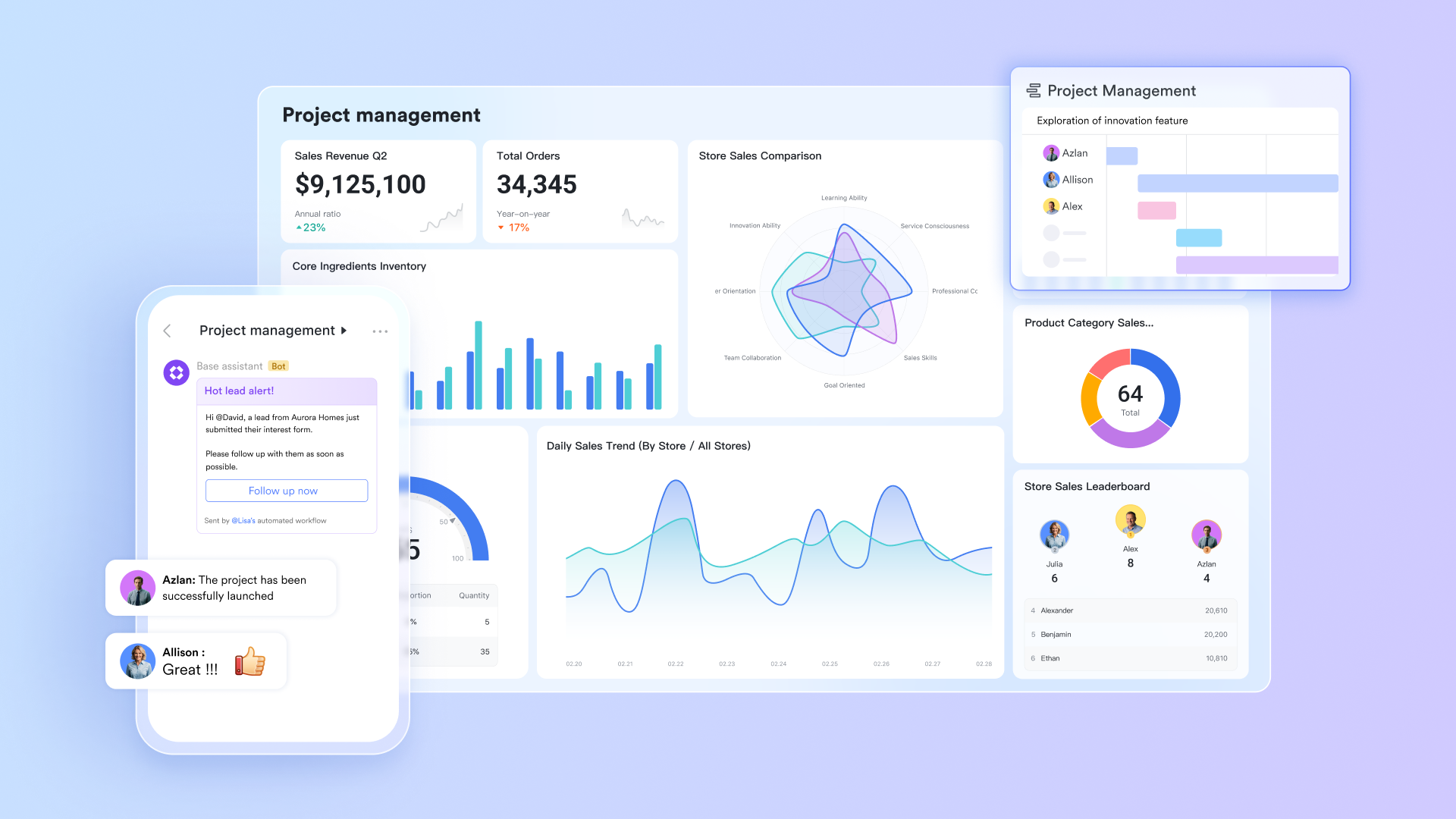
In Lark, after creating a task, your team can discuss it directly in the . can be embedded and co-edited right there. If you need a meeting, you can with one click from the chat or task. Everything happens within one platform, with no need to switch apps, keeping your workflow continuous and focused. Choosing Lark means you use one platform for communication, meetings, docs, and project management. This not only significantly cuts down on subscription costs and the hassle of managing multiple apps but, more importantly, it reshapes how your team works. It frees everyone from constant app-switching, allowing them to focus on the work itself.
Resolving the "rigidity vs. complexity" dilemma
While Wrike is powerful, its custom workflows and reports can be too complex for non-technical users (like marketing or ops teams). Quickly setting up a lightweight system for managing clients, an event, or a content calendar in Wrike has a steeper learning curve and isn't very agile.
On the other hand, tables offer powerful customization while being remarkably user-friendly. Your teams can quickly build applications tailored to their workflows, much like using a smart spreadsheet. You can manage project stages in a "," oversee design assets in a "Gallery view," or collect information with a "Form view"—all while working with the same live data. You can also set up automation rules. For example, when a task's status changes to "Done," the responsible person can be notified automatically. Or, when a new item is added, a message can be sent to relevant teammates. This flexibility allows Lark to act not just as a project management tool, but as your team's central operational hub, offering much greater ease-of-use and agility compared to Wrike's more fixed templates. 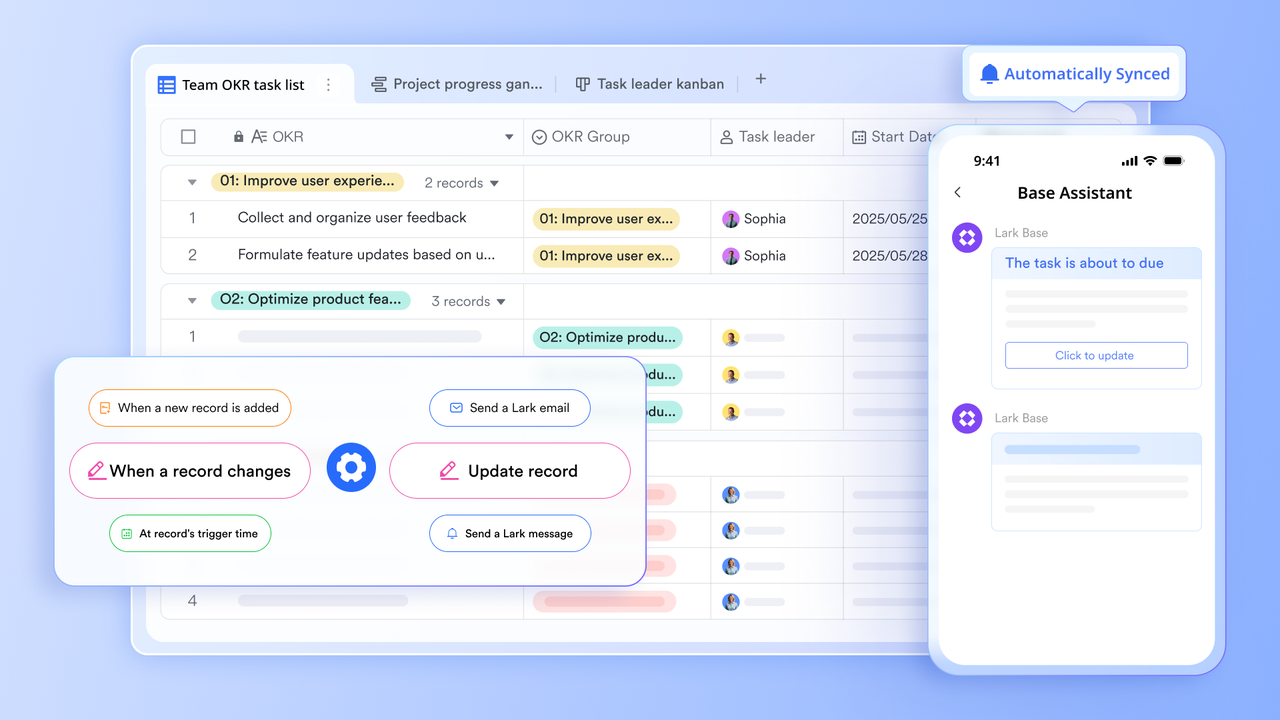
Bridging the "collaboration gap"
In Wrike, interaction is mostly limited to task comments, which can feel slow. Complex discussions that need immediate clarification often get moved to external chat apps. This separates the task history from key decision-making conversations, making it hard to preserve valuable knowledge.
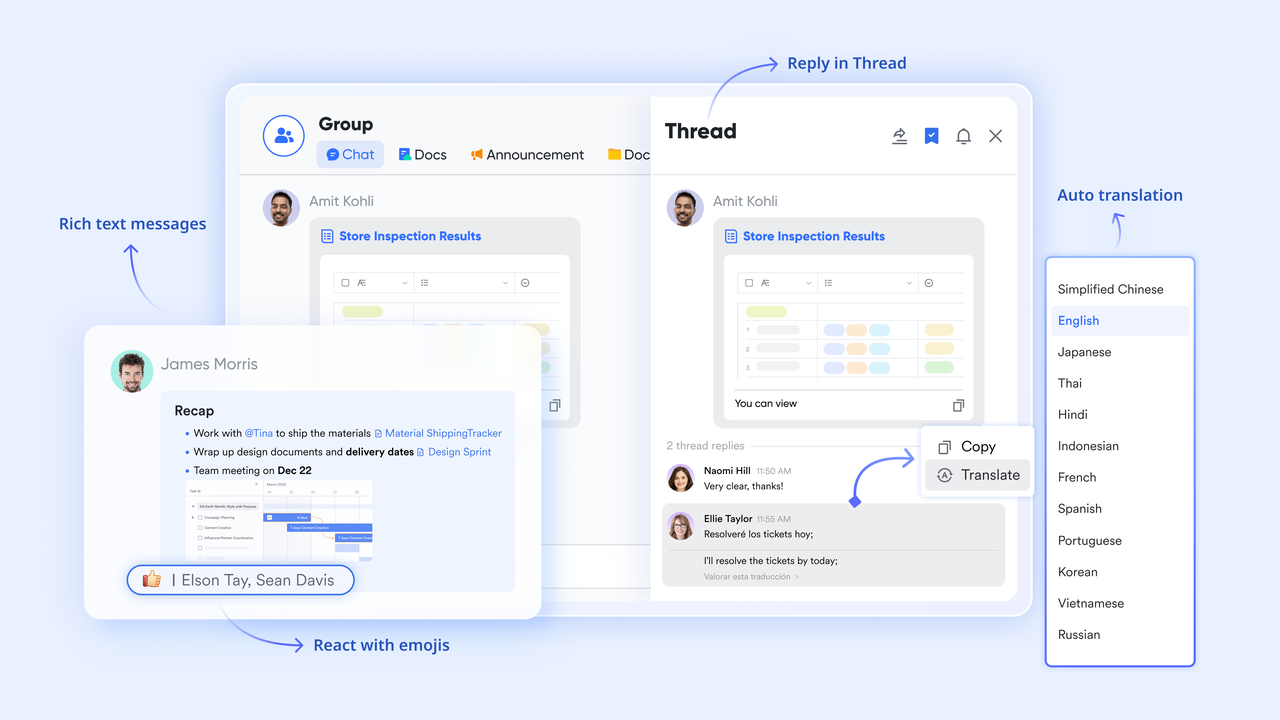
Lark tackles this by deeply combining instant messaging with all your work, creating a "communication-around-content" model. In , you can comment on a specific paragraph and @mention a colleague. They'll get an instant notification in their chat and can jump right to that spot. In a group chat, you can easily share a task, a doc, or a meeting link, and everyone gets the full context immediately.
This design ensures that communication records and knowledge naturally stick to the relevant tasks and documents, creating a traceable knowledge base. Compared to the fragmented experience in Wrike—where tasks and discussions live in different places—Lark delivers a deeper, more efficient, and truly unified collaboration experience.
Tackling the "hidden cost" challenge
Wrike's license fee is just the starting cost. To get full functionality, companies often need to pay for additional integrated tools, making the often exceed the initial budget.
Here, Lark offers a highly competitive free plan, and its paid version is a feature-packed "complete suite." Your business doesn't need to pay separately for chat, video conferencing, docs, and project management. Lark covers all these in one platform. Consolidating tools into Lark can help you save significantly on license fees and administrative overhead each year.
Here is :
- Free plan: Includes 11 powerful products, supporting up to 20 users, 100 GB storage, 1,000 automation runs and unlimited AI translation in chats, docs and email.
- Basic plan: $6/user/month (billed annually) for up to 500 users. Includes everything in Starter plus unlimited message history, 5TB storage, 1,000 automation runs, and more. Some users may need to to purchase.
- Pro plans: $12/user/month, supporting up to 500 users. Includes unlimited message history, 50,000 automated Base workflow executions per month. Evaluating and alongside competing platforms can provide useful budgeting insights.
- Enterprise plan: for custom pricing. Supports unlimited users and includes even more automation runs and advanced security, compliance, and management features.
For small teams with simple communication needs

18 months message history
1000 Base automation runs/month
2000 rows per table in Base
Most POPULAR
For companies with comprehensive collaboration and management needs
Unlimited message history
500-participant video meetings
50k Base automation runs/month
20k rows per table in Base
For large companies with advanced security and organizational management needs
Get a personalized demo and pricing
Unlimited message history
500-participant video meetings
15 TB storage + 30 GB storage/user
500k Base automation runs/month
50k Base automation runs/month
Most POPULAR
For companies with comprehensive collaboration and management needs
Unlimited message history
500-participant video meetings
50k Base automation runs/month
20k rows per table in Base
The final comparison between Wrike and Lark
This section summarizes the core differences between Lark and Wrike across key operational dimensions, providing a clear reference for teams seeking the most suitable project management solution.
Conclusion
Choosing the right project management tool is critical, and our deep dive shows Wrike is a powerhouse for complex, large-scale projects that demand robust analytics. However, its strength comes with significant complexity and cost, and it still requires separate tools for vital functions like chat, video meetings, and documentation.
For teams tired of juggling apps and subscriptions, a fragmented workflow is the real enemy. This is where emerges as the clear alternative. By unifying chat, meetings, documents, and project management into one seamless platform, Lark eliminates context-switching and reduces costs. It's more than just a different project manager; it's a better way to work.
If you're ready to boost productivity and simplify your tech stack, it's time to give Lark a try. See for yourself how a truly all-in-one solution can transform your team's collaboration.
Simplify your workflow and boost team productivity
FAQs
What is Wrike best used for?
Wrike excels in large organizations and marketing agencies that require deep analytics, robust security, and granular control over complex projects. Its strength lies in its power as a dedicated project management engine for teams with established, data-driven workflows.
Is Wrike difficult for new users to learn?
Yes, Wrike often has a steeper learning curve compared to other tools. Its extensive feature set and customization options can be overwhelming for teams without a dedicated project manager. Simpler, more intuitive interfaces like Lark may be better for teams seeking quick adoption.
Is Wrike expensive?
Wrike's paid plans can be costly, especially when you add necessary features or more users. It's also important to factor in the "hidden costs" of paying for separate tools like Slack for communication and Zoom for meetings, which are not included in Wrike's platform. However, Lark provides cheaper and more transparent pricing plans.
What is the best all-in-one alternative to Wrike?
For teams looking to consolidate their tools, Lark is the best all-in-one alternative. While other tools focus only on project management, Lark bundles chat, video meetings, collaborative docs, and project management into a single app, eliminating the need for multiple subscriptions and simplifying your team's workflow.
Related reading
































