A breakdown structure template helps project teams turn complex goals into clear, manageable tasks. By organizing work into logical levels, it becomes easier to define scope, assign responsibilities, and track progress without confusion. Many teams start with familiar tools such as Excel to build a simple work breakdown structure, but modern collaborative platforms are also gaining traction. Tools such as Lark combine templates with real-time collaboration, automation, and integrated communication to help keep everyone aligned. Whether you're planning a marketing campaign, software release, or internal initiative, the right breakdown structure template provides a solid foundation for efficient, organized project execution.
What is a Work Breakdown Structure (WBS)?
A is a hierarchical framework that divides a project into smaller, manageable components. Instead of viewing a project as one large objective, a WBS organizes it into phases, deliverables, and work packages, making planning and execution more structured. Teams typically use a work breakdown structure template to standardize this process and ensure that no critical tasks are overlooked. Each level of the structure provides more detail, with the lowest level containing clearly defined , scheduled, and tracked.
A project breakdown structure template is especially useful for complex initiatives, as it clarifies scope, improves accountability, and supports accurate time and cost estimation. By breaking work into logical segments, a WBS helps teams stay organized, communicate expectations clearly, and maintain control throughout the .
What is the purpose of Work Breakdown Structures?
Work Breakdown Structures help teams turn complex projects into clear, manageable components. By dividing work into logical deliverables and tasks, a WBS improves planning accuracy and execution. It gives project managers a structured view of scope, resources, and responsibilities from the very beginning.
- Clarifies project scope: A WBS defines the project scope by breaking it into smaller deliverables and work packages. This prevents important tasks from being overlooked and reduces scope creep. Many teams rely on an organisational breakdown structure template to align with team roles and departments.
- Simplifies planning and task assignment: Breaking work into smaller units makes it easier to assign responsibilities and track progress. Teams can quickly understand what needs to be done and who is accountable. A simple work breakdown structure template is especially useful for smaller projects or teams new to structured planning.
- Improves cost and time estimation: When tasks are clearly defined, it becomes easier to estimate resources, budgets, and timelines accurately. Each work package can be analyzed individually for . Many managers use a work breakdown structure template in Excel format for quick calculations and updates.
- Enhances communication and collaboration: A WBS provides a shared visual reference for the entire team, reducing misunderstandings about project scope. Stakeholders can easily see how different parts of the project connect. Teams often start with a free work breakdown structure template to create a common planning framework.
- Supports documentation and reporting: A WBS provides a structured record of project deliverables and tasks, supporting reporting and audits. It also makes it easier to track changes and maintain consistency across projects. Some teams prefer a work breakdown structure template pdf for easy sharing and formal documentation.
Organize the total scope of work with ease
Benefits of creating a Work Breakdown Structure
Creating a Work Breakdown Structure brings clarity and control to complex projects. By organizing work into smaller, well-defined components, teams can plan, assign, and monitor tasks more effectively. A structured approach reduces confusion, , and increases the chances of meeting deadlines and budgets.
- Better task clarity and focus: A WBS divides large goals into specific, manageable tasks, making it easier for teams to understand their responsibilities. This reduces confusion and helps maintain focus on deliverables. Many teams begin by downloading a free Excel work breakdown structure template to quickly structure their tasks.
- Improved time management: When work is broken into smaller components, it becomes easier to estimate durations and set realistic deadlines. This helps prevent scheduling conflicts and delays. A simple work breakdown structure template in Excel is often used to create a clear, practical timeline.
- More accurate budgeting: Each work package can be assigned its own cost estimate, improving overall budgeting precision. This reduces the risk of unexpected expenses later in the project. Teams often use a free work breakdown structure template in Excel to efficiently calculate and track costs.
- Stronger team coordination: A WBS provides a shared structure that helps different teams understand how their tasks connect. This and reduces duplication of effort. Many managers use a free Excel work breakdown structure template to keep everyone aligned with responsibilities.
- Flexible and accessible planning: Modern teams often collaborate in cloud-based tools, making it easier to update and share the WBS in real time. This improves accessibility and version control across locations. A Google Sheets work breakdown structure is commonly used for quick collaboration and remote planning.
Track tasks and manage time without switching tools
What are the key components of a Work Breakdown Structure?
A Work Breakdown Structure is built from several core components that define the project's full scope. These elements help teams organize deliverables, assign responsibilities, and track progress effectively. Understanding these components ensures that the WBS is clear, complete, and practical for real-world execution.
- Project objective or final deliverable: The top level of a WBS represents the overall project goal or final deliverable. It provides a clear focus and ensures that all tasks align with the main objective. Many teams begin with a work breakdown structure example in Excel to visualize this top-level structure.
- Major deliverables or project phases: The second level typically includes major deliverables, milestones, or . These represent the primary outcomes required to complete the project successfully. A work breakdown structure (WBS) Excel template often helps teams quickly organize these high-level components.
- Sub-deliverables or task groups: Each major deliverable is broken down further into smaller sub-deliverables or task groups. This level provides more detail and helps teams understand how work is distributed across the project. Some teams prefer a work breakdown structure template in Google Docs to facilitate collaboration when organizing these elements.
- Work packages: The lowest level of the WBS, containing specific, assignable tasks. Each package should be small enough to estimate time, cost, and resources accurately. Teams often use an Excel sheet work breakdown structure template to define and manage these work packages.
- WBS numbering and coding system: A numbering or coding system is used to identify each element in the structure. This makes it , manage dependencies, and link them to schedules or budgets. A consistent coding method improves clarity and reporting throughout the project lifecycle.
How to create a Work Breakdown Structure template in Excel
Creating a Work Breakdown Structure template in Excel is a practical way to organize project tasks. Excel allows teams to build a clear hierarchy, assign responsibilities, and estimate time or costs within a single worksheet. This step-by-step approach helps you create a clear project framework without needing specialized .
Step 1: Create a worksheet
Open Excel and start a new blank worksheet. This will serve as the space where you build your work breakdown structure. Rename the sheet with your project name to keep files organized.
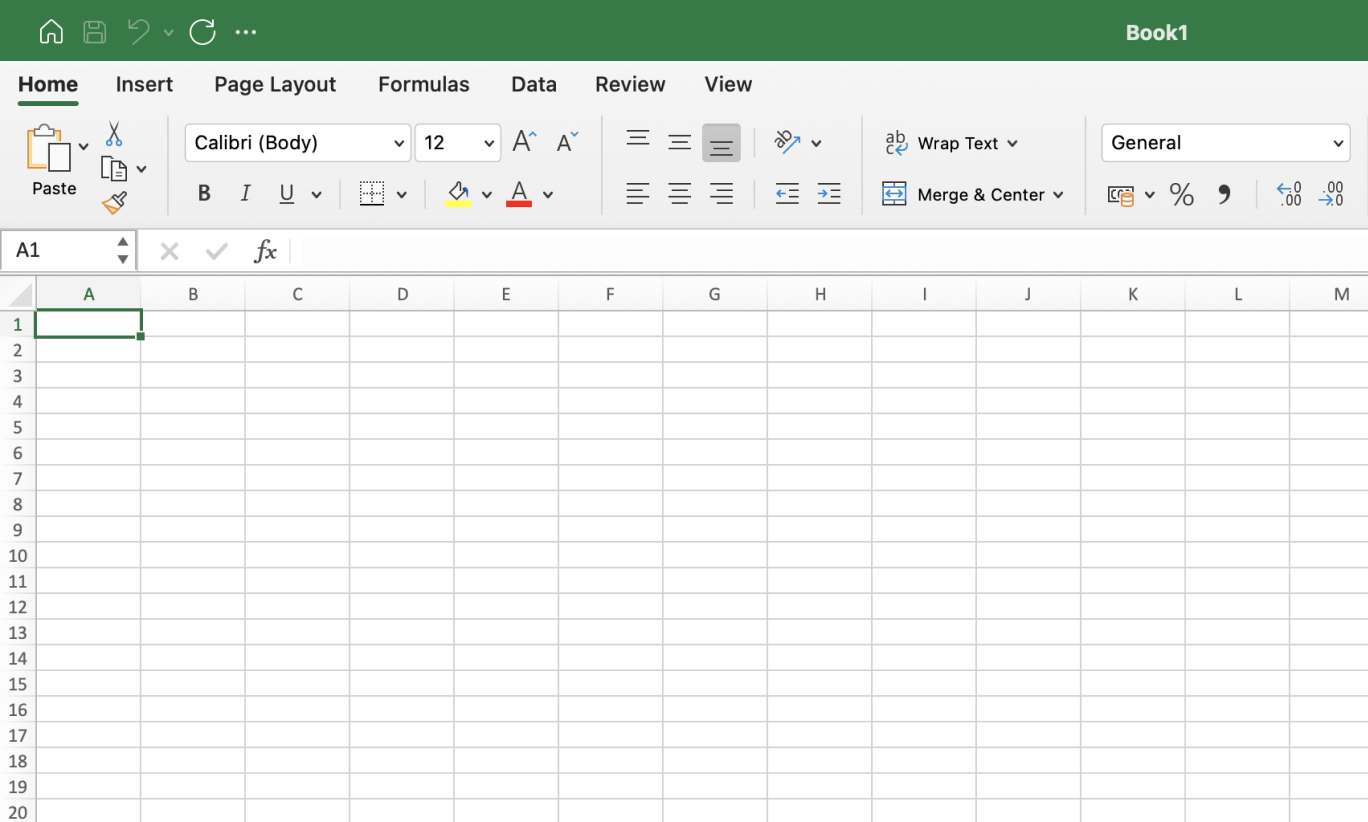
Image source: microsoft.com
Step 2: Choose SmartArt Graphics
Go to the "Insert" tab and select "SmartArt" from the ribbon. SmartArt provides ready-made hierarchical diagrams that work well for WBS layouts. Choose a category that supports structured or organizational charts.
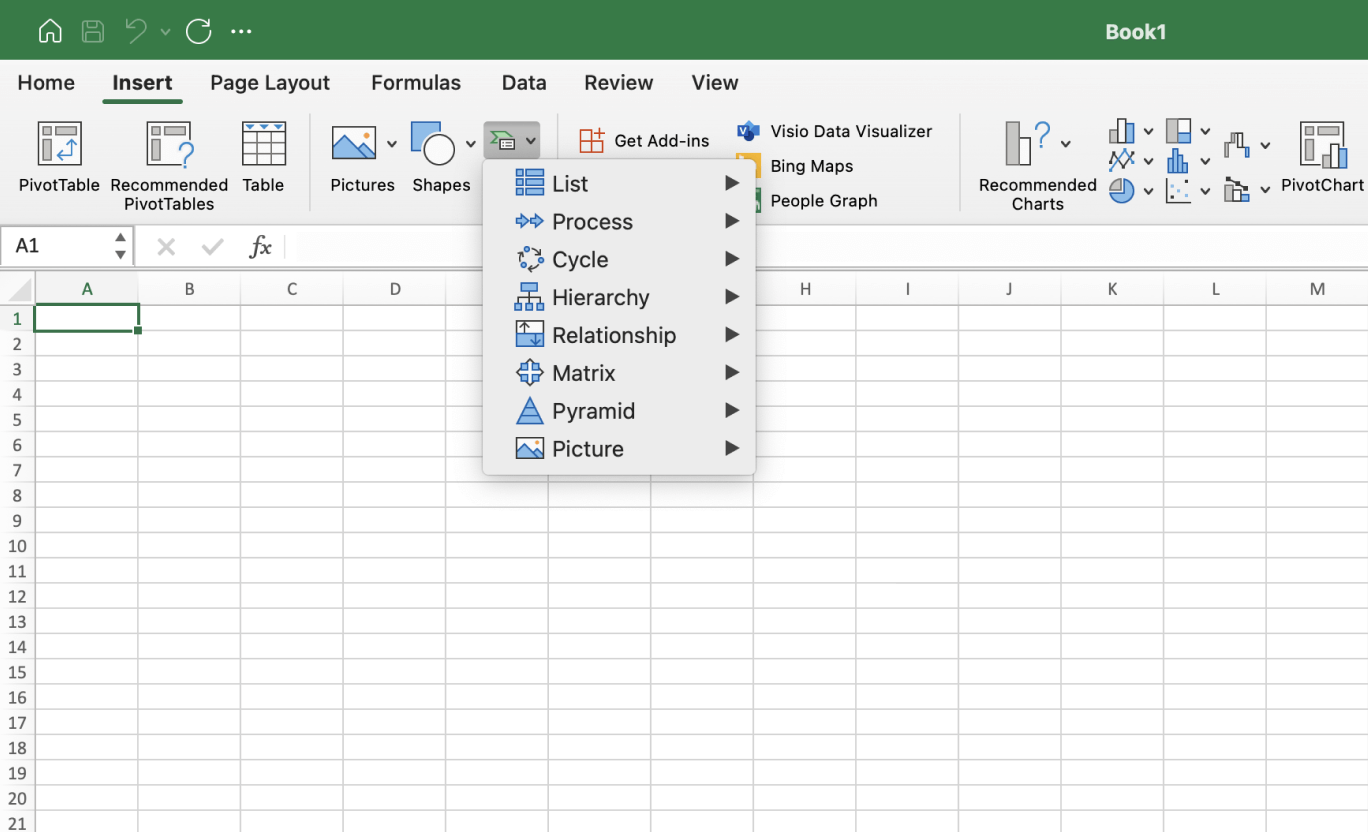
Image source: microsoft.com
Step 3: Select a specific shape of your WBS
In SmartArt, select a hierarchy or tree-style diagram that best fits your project. These shapes and sub-tasks. Select the layout that best matches the complexity of your project structure.
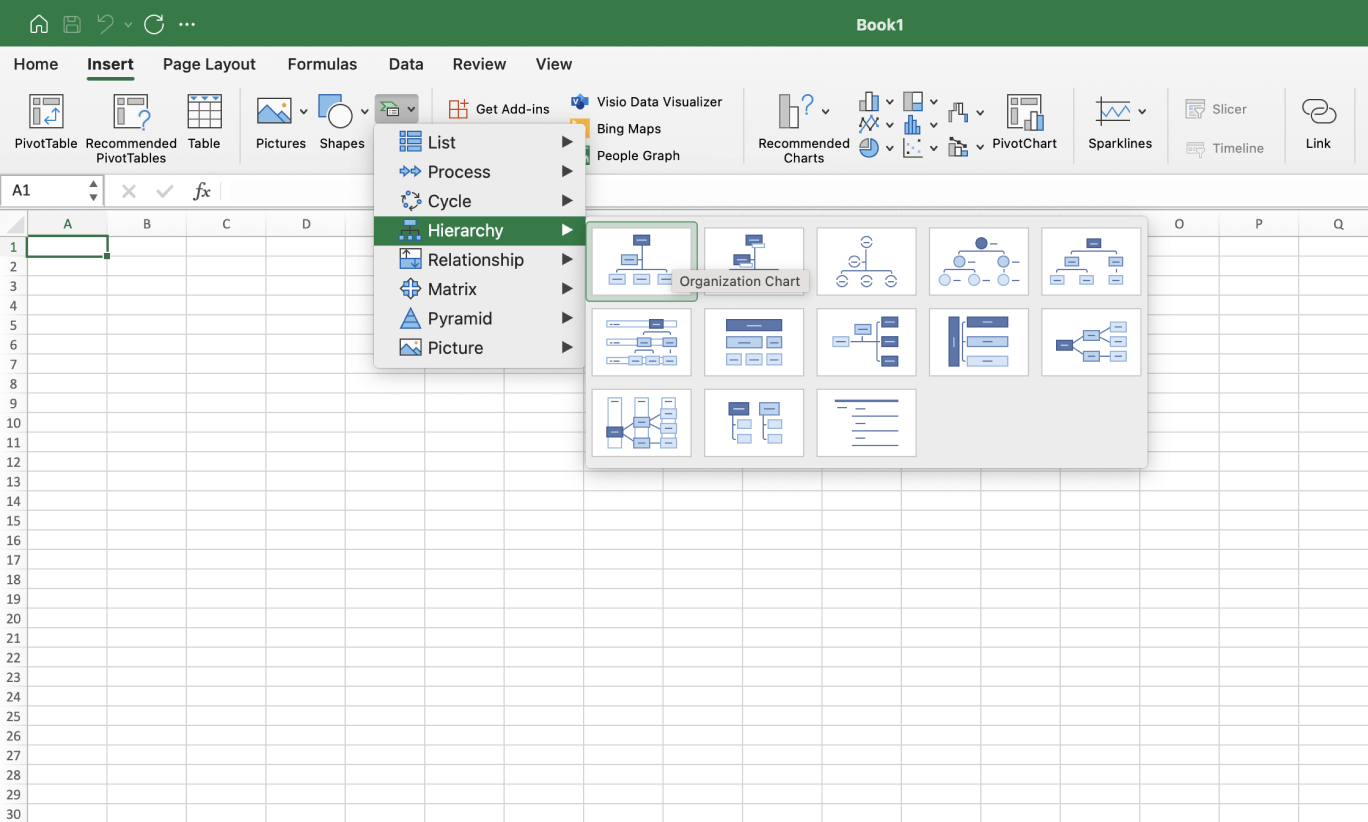
Image source: microsoft.com
Step 4: Customize your WBS
Enter your project name at the top level, then add major deliverables and sub-tasks beneath it. Adjust colors, fonts, and shapes to improve readability. You can also add more levels to reflect detailed work packages.
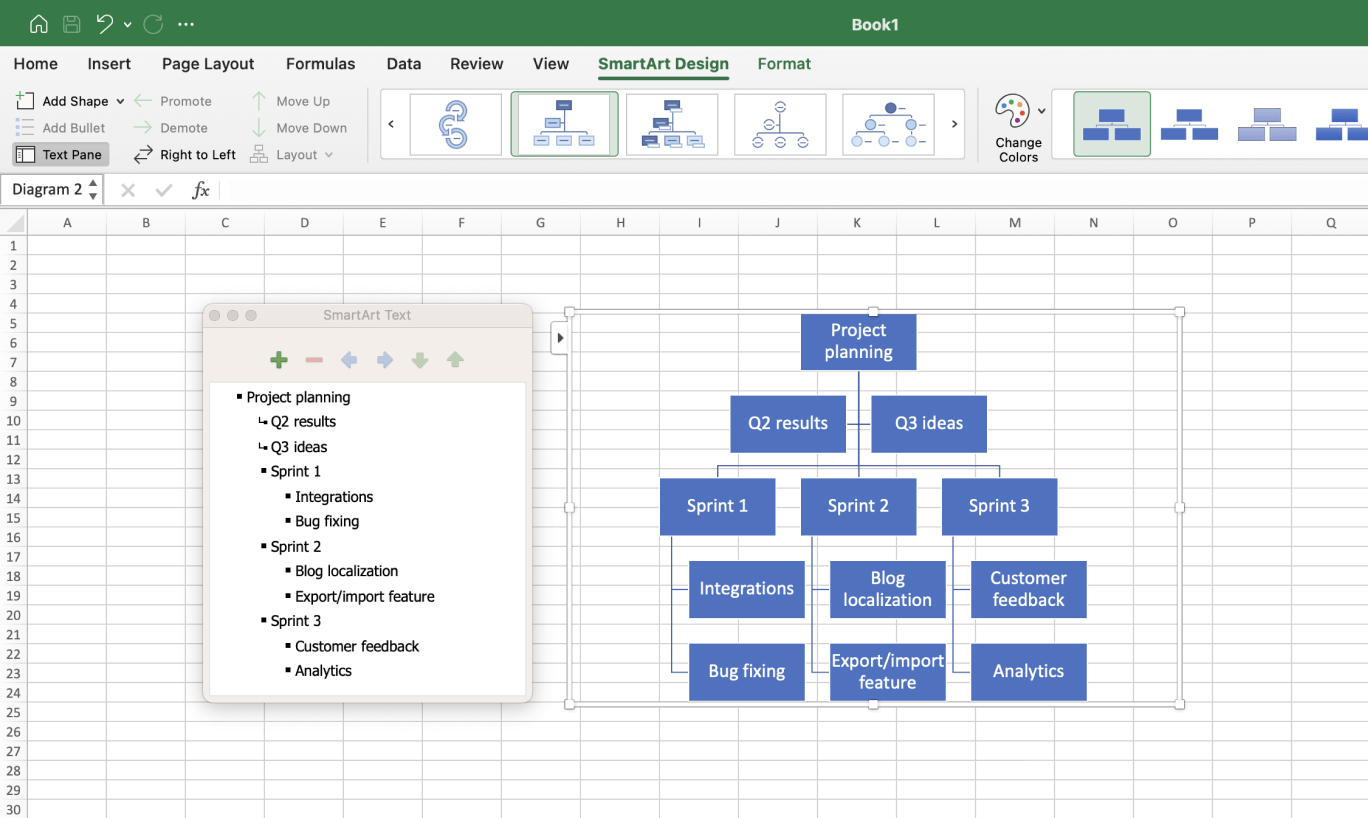
Image source: microsoft.com
Step 5: Save the template
Once your Work Breakdown Structure template is complete in Excel, review it for accuracy and clarity. Save the file with a clear name and version number for easy tracking. You can also export it as a PDF or share it with your team for collaboration.
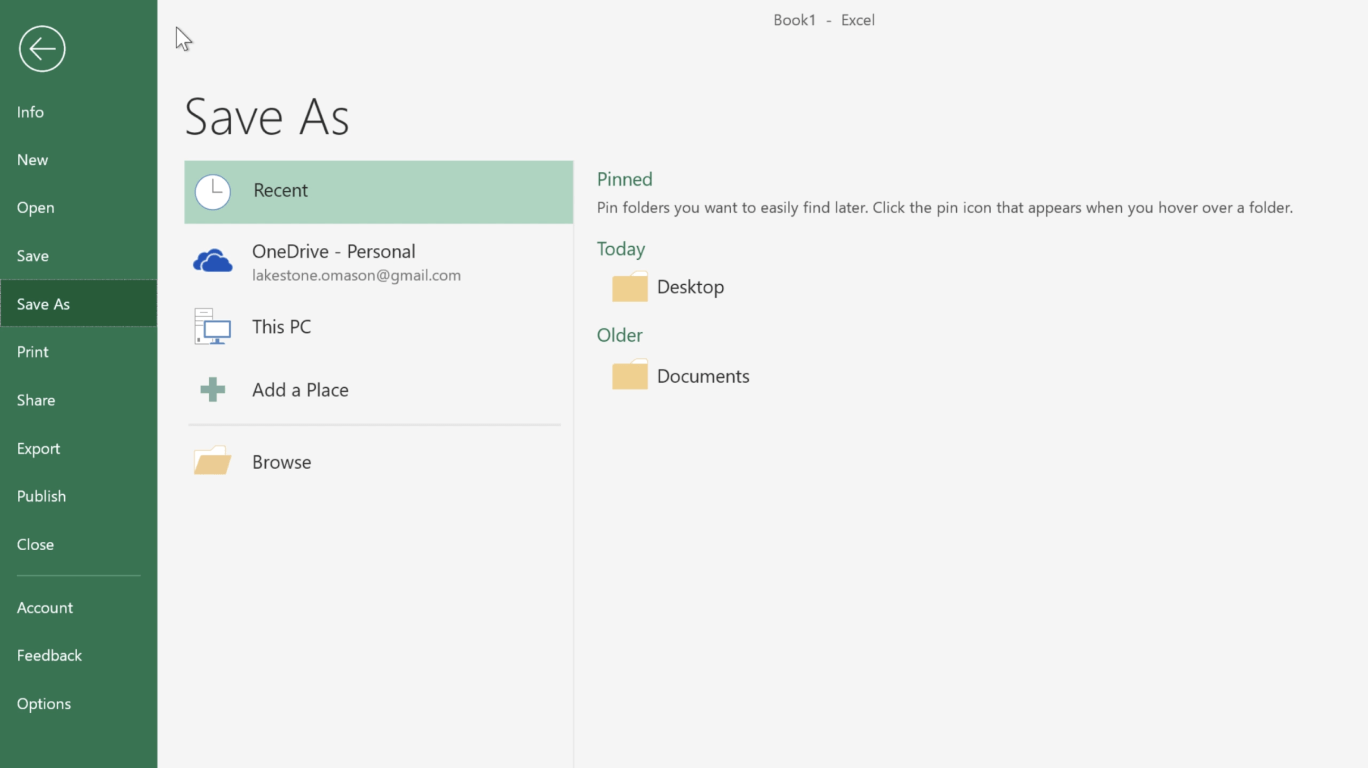
Image source: microsoft.com
Ready-to-use WBS templates you can explore
Ready-to-use WBS templates help teams skip the setup process and start planning immediately. These templates are designed to , deliverables, and timelines in a clear, structured format. Instead of building a WBS from scratch, teams can adapt a prebuilt template to match their project needs. This saves time, improves consistency, and helps projects move from planning to execution faster.
Work Breakdown Structure
This template helps teams organize projects into clear deliverables, sub-tasks, and work packages. It provides a structured hierarchy that makes planning, assignment, and tracking more efficient. Teams can quickly adapt it to different project sizes and industries.
Work Breakdown Structure (WBS) basic template
The WBS Basic template provides a simple framework for structuring project tasks into clearly defined components. It supports teams in outlining scope, organizing deliverables, and managing task dependencies. Use this template to establish a consistent planning structure and ensure each project phase is aligned with execution goals.
Multi-task Work Breakdown Structure template
This Multi-Task WBS template helps teams manage projects that involve parallel activities and multiple deliverables. It enables task segmentation across project stages while maintaining clarity in dependencies and assignments. Use this template to coordinate complex workflows and track progress across various execution paths.
ProjectManager WBS template
The ProjectManager WBS template helps structure project scope into organized work packages and deliverables. It allows teams to visualize task hierarchies and allocate resources effectively across project phases. Use this template to maintain clarity in planning and monitor execution across interconnected tasks.
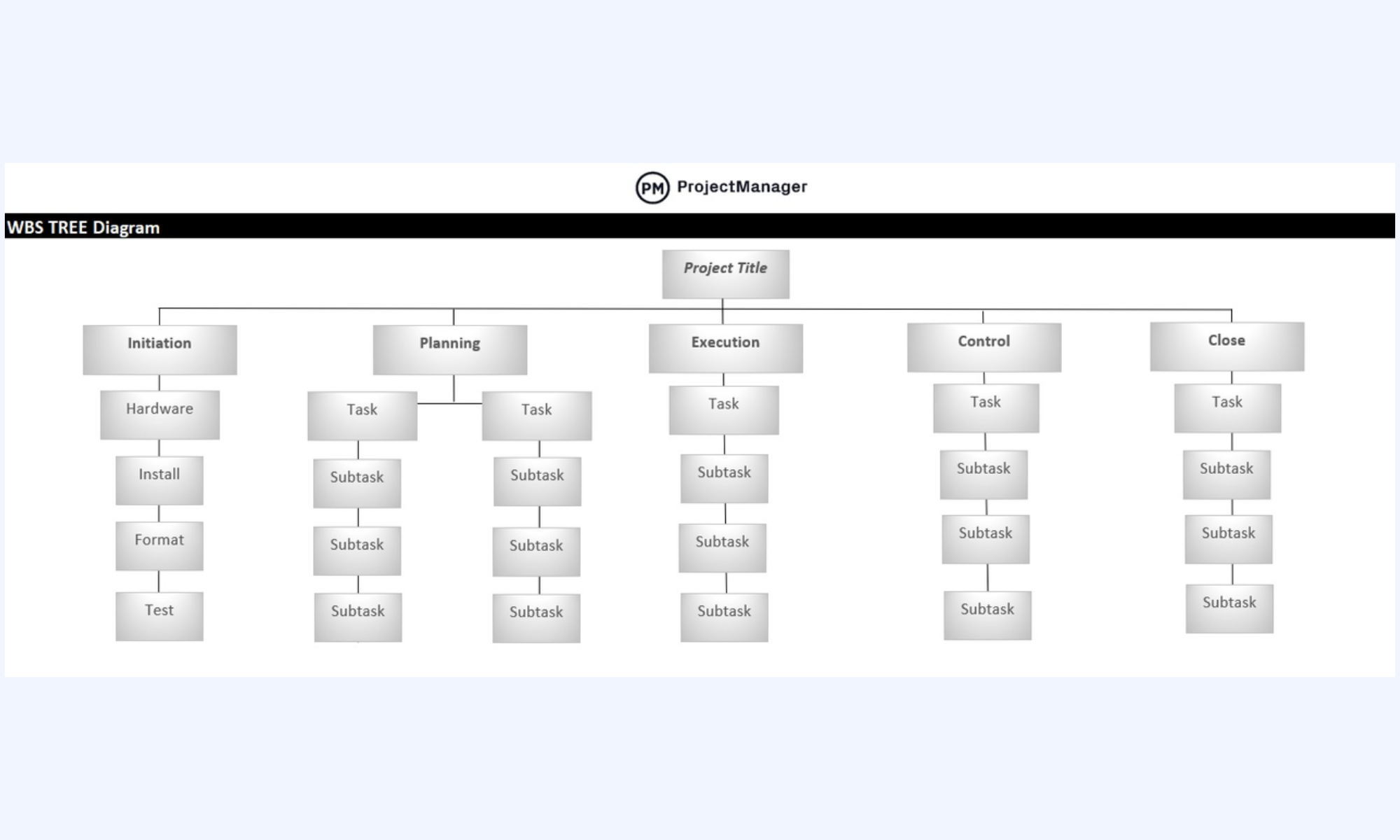
Image source: projectmanager.com
Smartsheet WBS template
The Smartsheet WBS template provides a tabular layout for organizing project tasks and deliverables into a structured breakdown. It supports progress tracking and task ownership assignment across teams. Use this template to manage dependencies and maintain consistency throughout project execution stages.
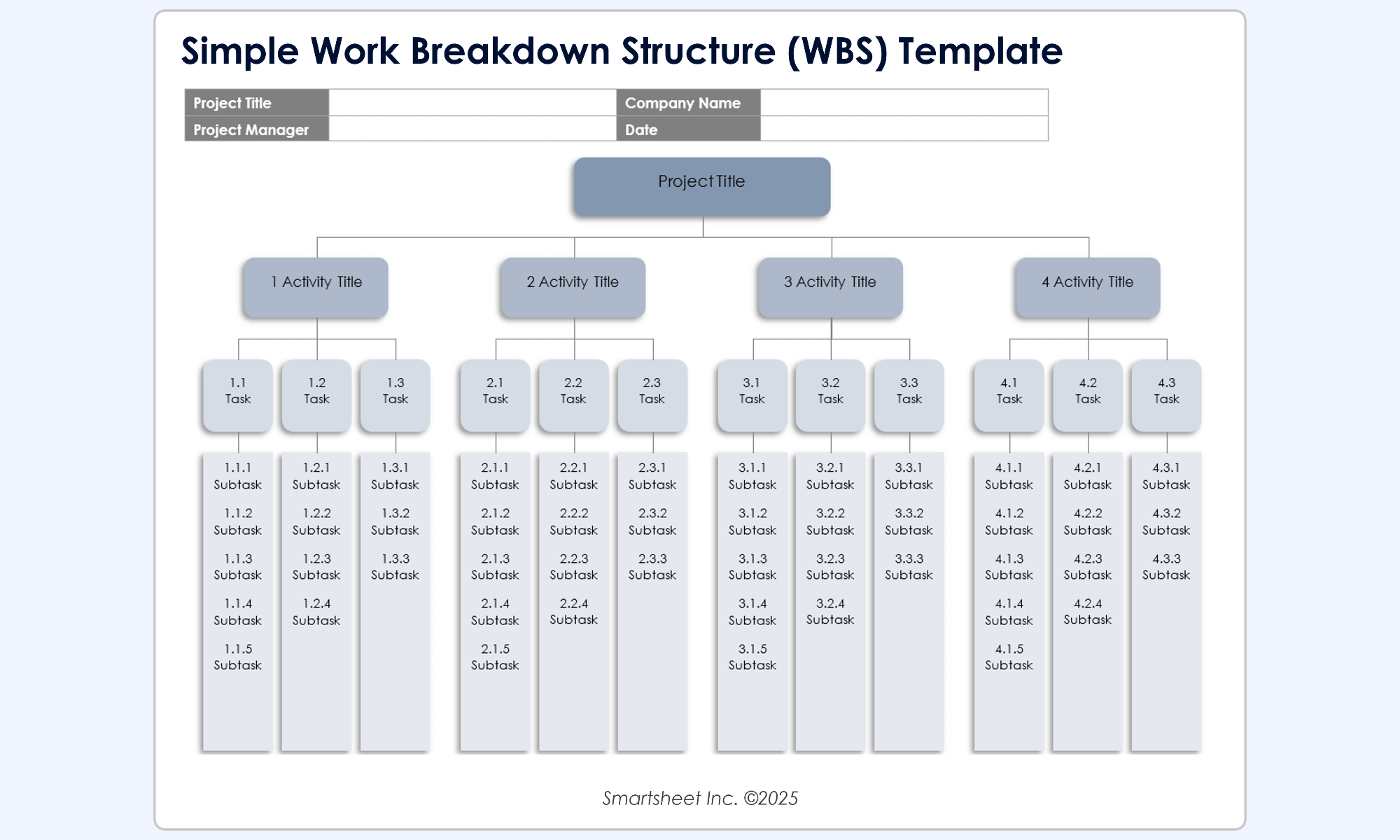
Image source: smartsheet.com
GanttPro WBS template
The GanttPro WBS template combines timeline visualization with structured task breakdown. It helps teams manage dependencies, milestones, and deliverables within a unified planning view. Use this template to support scheduling accuracy and maintain alignment across project activities.
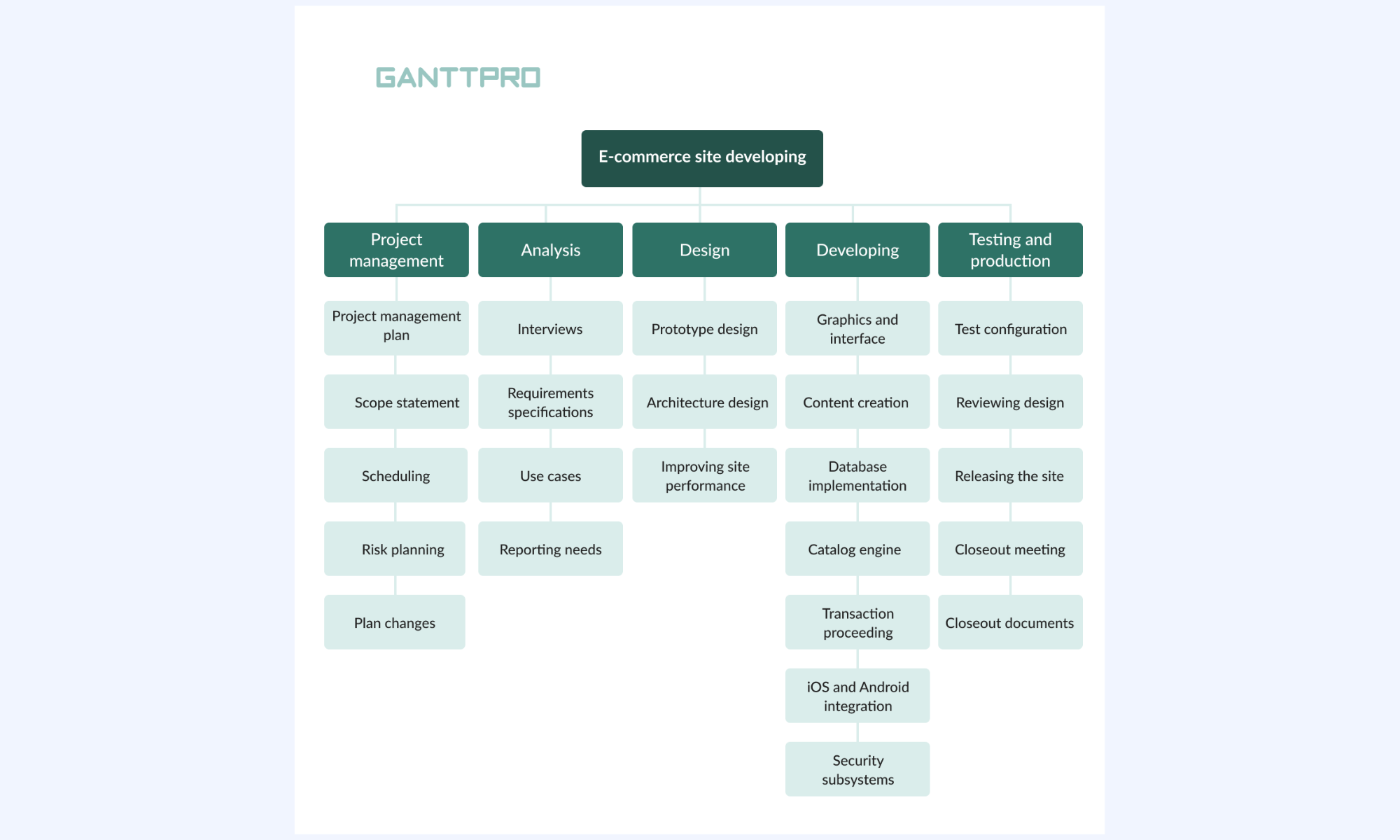
Image source: ganttpro.com
Creately WBS template
The Creately WBS template helps visualize project scope using hierarchical diagrams. It supports task organization into logical work packages and improves clarity in project planning. Use this template to map deliverables and maintain coordination across execution stages.
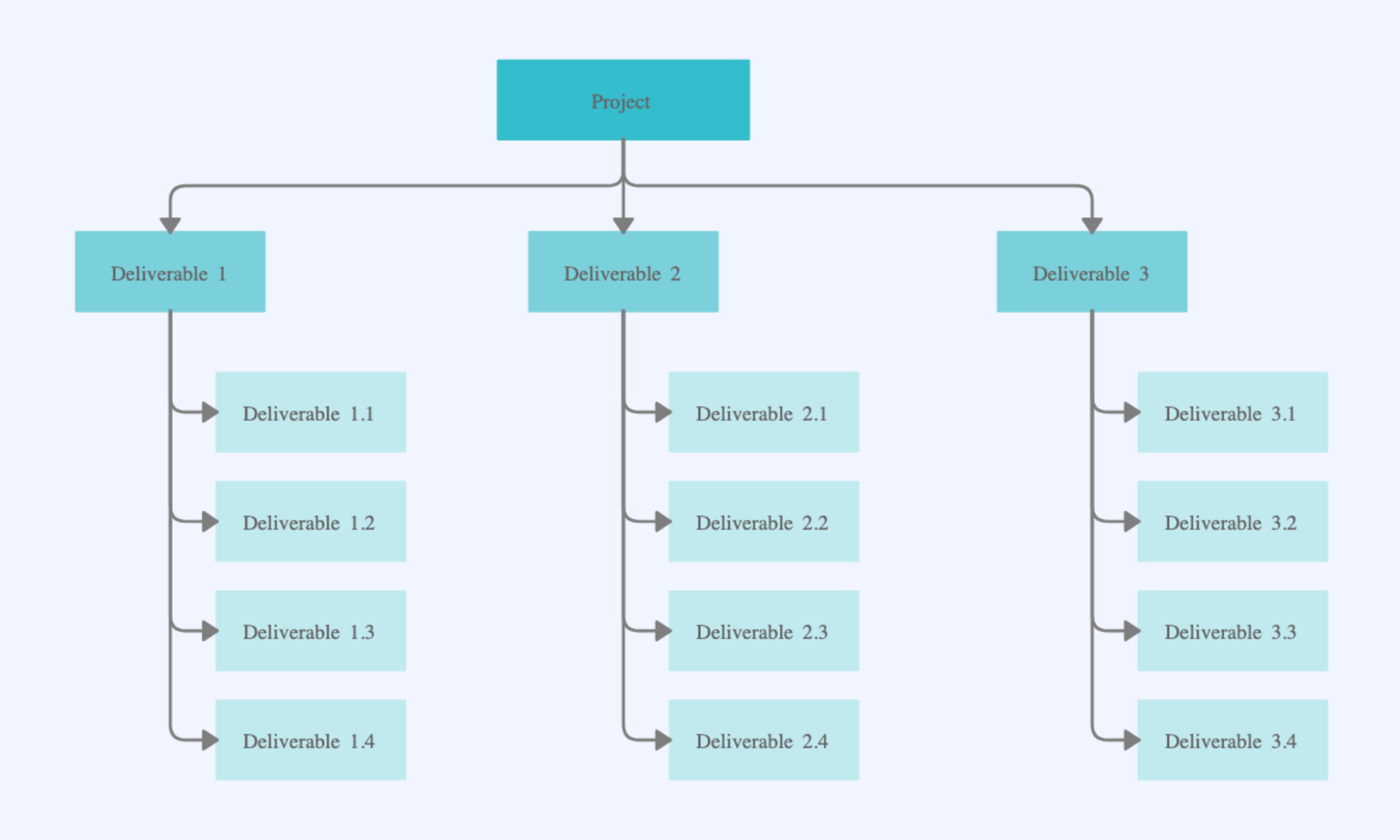
Image source: creately.com
Template.net WBS template
The Template.net WBS template offers a customizable structure for outlining project tasks and deliverables. It enables teams to define scope clearly and assign responsibilities across execution phases. Use this template to improve task visibility and maintain structured project workflows.
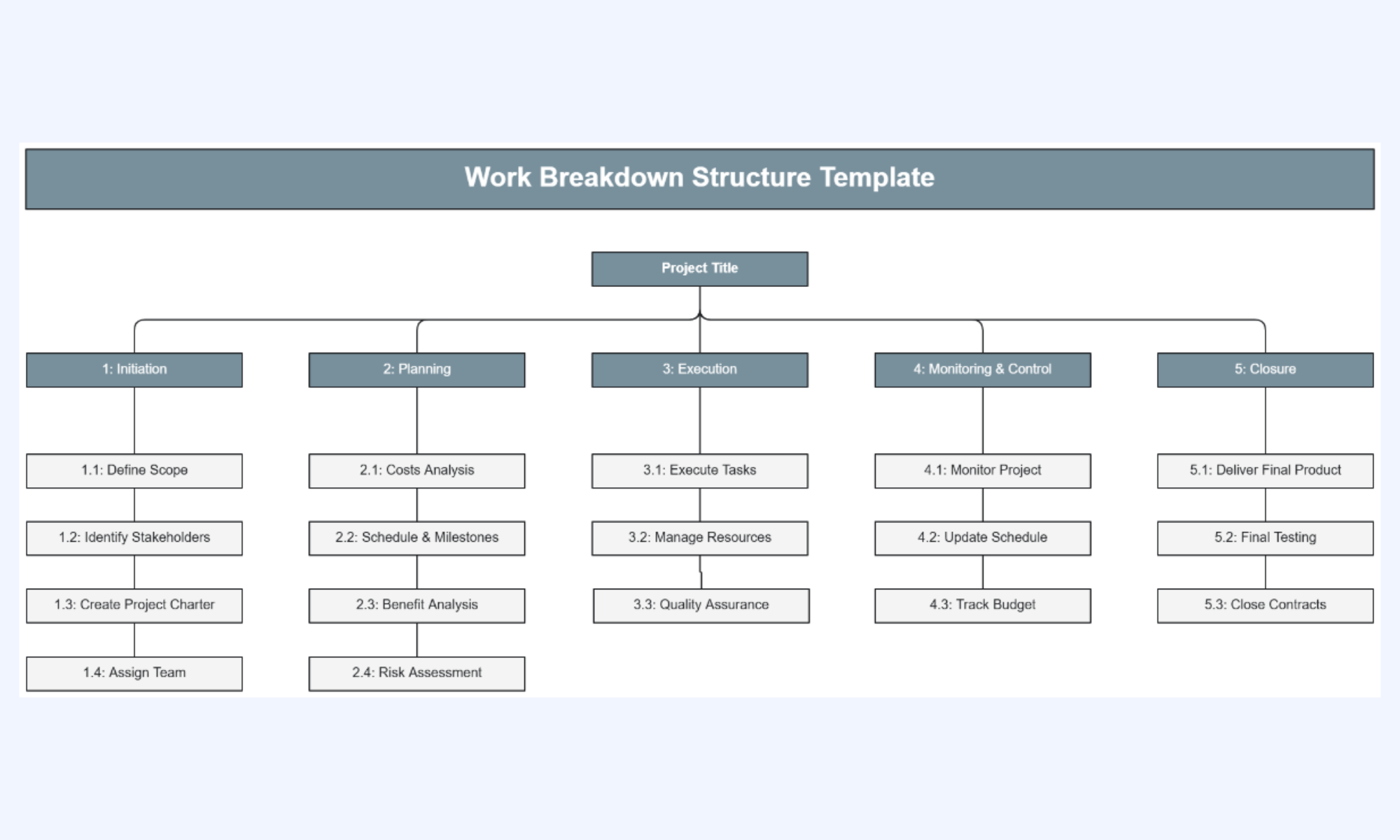
Image source: template.net
Slidemodel WBS template
The Slidemodel WBS template is designed for presenting project structures in a clear visual format. It helps teams organize deliverables and sub-tasks for planning discussions and reporting. Use this template to communicate project scope effectively with stakeholders.
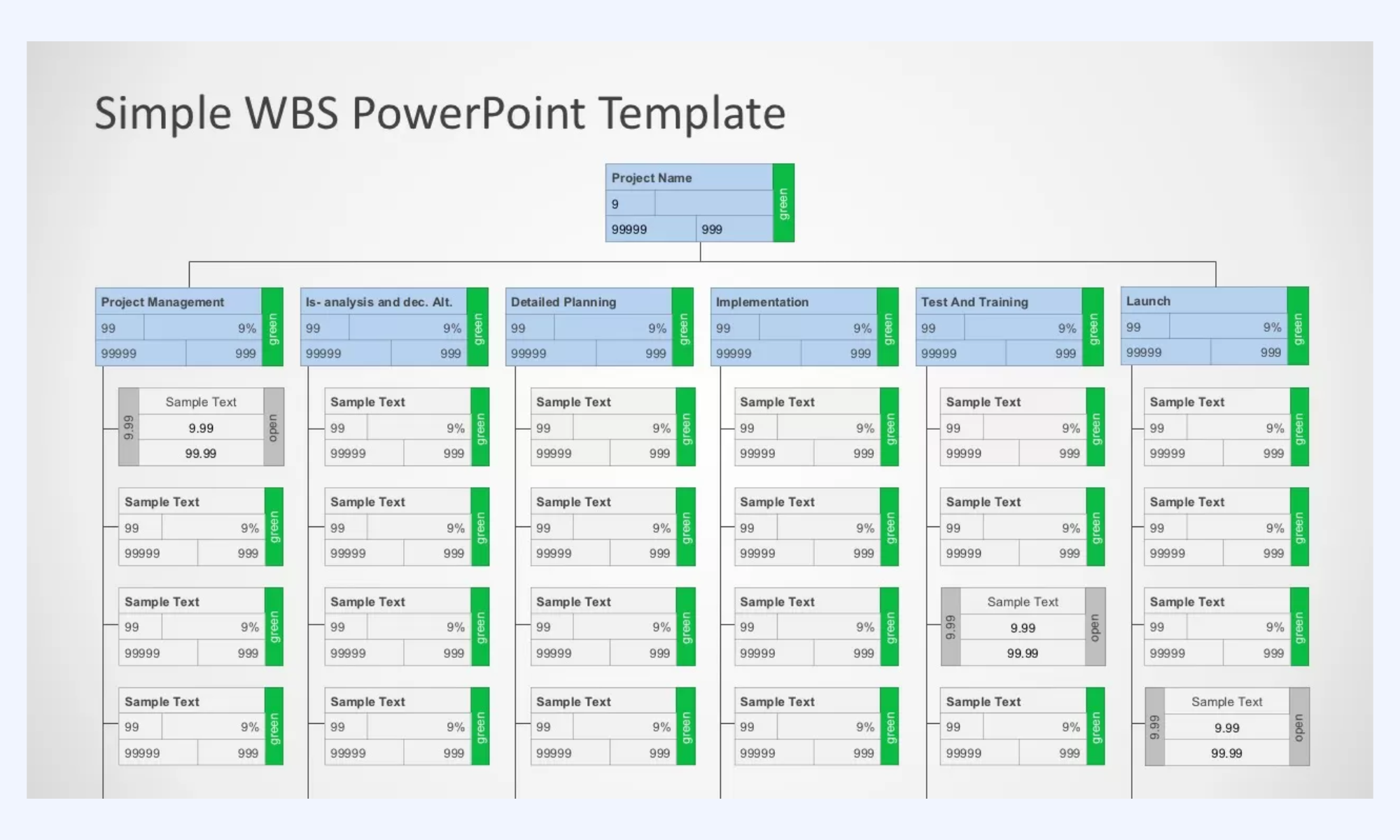
Image source: slidemodel.com
Zapier WBS template
The Zapier WBS template helps teams organize project deliverables into structured components that support workflow automation planning. It enables task tracking across execution stages and improves coordination between team members. Use this template to maintain clarity in complex project environments.
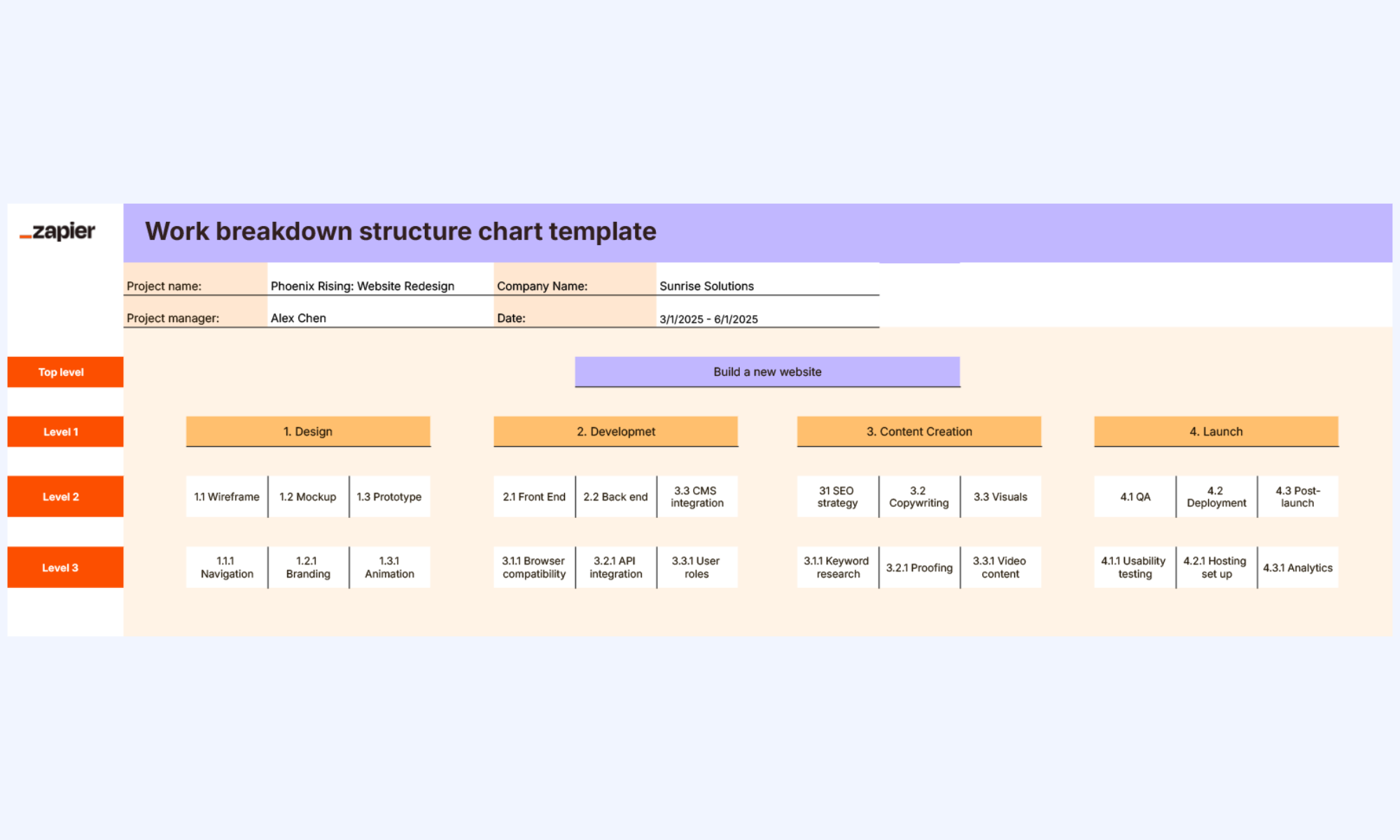
Image source: zapier.com
Modern tool: Achieve efficient project management with Lark
Modern projects require tools that go beyond static files and manual updates. offers a collaborative, real-time environment where teams can build, manage, and update their work breakdown structures without switching between multiple tools. Instead of relying on isolated spreadsheets, teams can connect tasks, documents, approvals, and communication in one place. With , visual views, and shared workspaces, Lark helps keep everyone aligned throughout the project lifecycle.
Customizable hierarchical databases
allows teams to build structured, that mirror the levels of a work breakdown structure. You can organize projects into phases, deliverables, and work packages within a single, connected system. Fields can be customized to include owners, deadlines, budgets, and priorities. This flexibility makes it easier to adapt the structure to different project types. Teams can also update or expand the hierarchy as the project evolves. 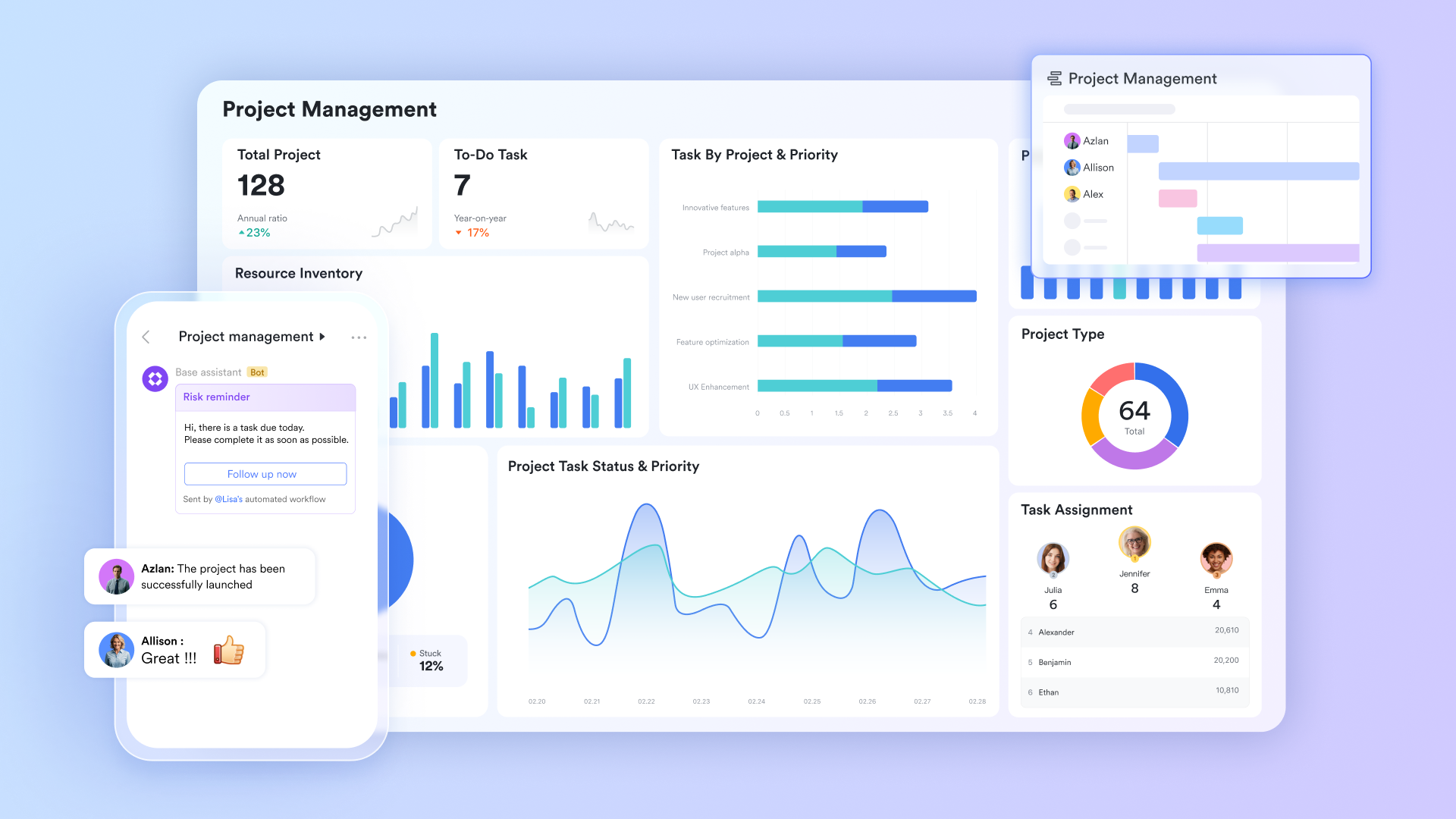
Built-in Kanban, Gantt, and dashboard views
Lark provides multiple visual views, including Kanban boards, , and dashboards, without needing separate tools. Teams can switch between these views to track progress, timelines, and workloads more effectively. The Gantt view helps with scheduling and dependencies, while Kanban boards support task flow and prioritization. Dashboards offer quick insights into project status and performance. This variety makes planning and tracking more intuitive for different roles. 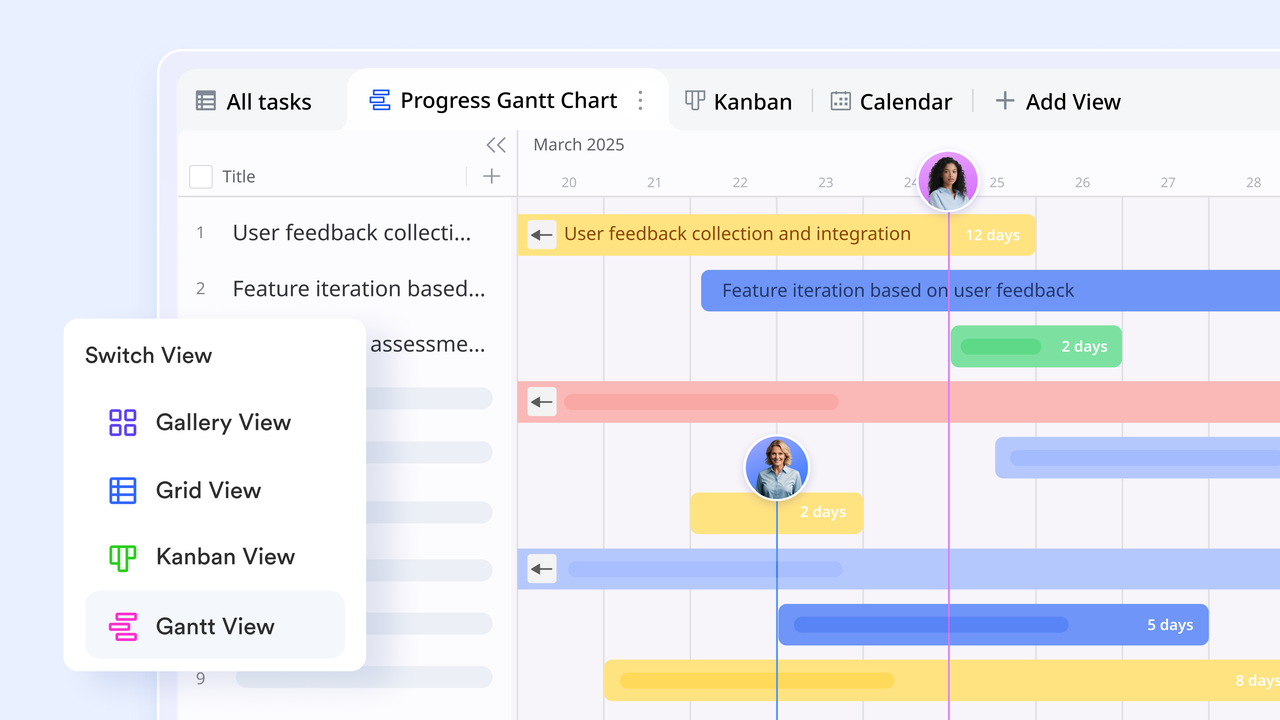
Real-time collaboration across teams
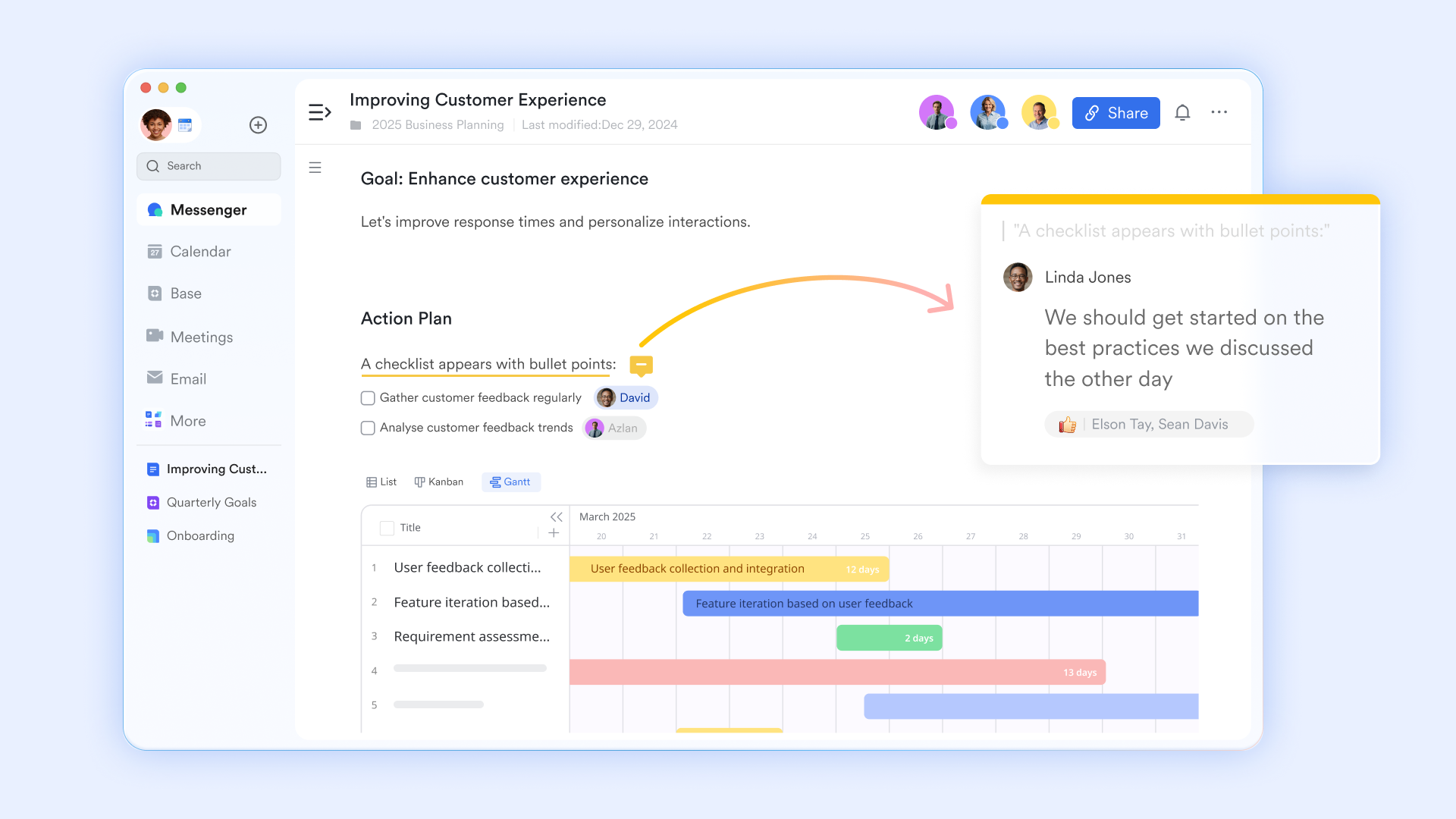
enables multiple team members to . Changes are updated instantly, so everyone always sees the latest information. Comments, mentions, and shared documents keep communication tied directly to the relevant tasks. This reduces confusion and eliminates the need for endless email threads. Cross-functional teams can stay aligned without switching platforms.
Automated status updates and workflow triggers
Automation in Lark helps reduce manual effort in tracking and updating tasks. Teams can set triggers for status changes, reminders, or approvals based on specific conditions. For example, a task can automatically move to the next stage once it is completed. Notifications ensure that responsible team at the right time. This improves efficiency and helps projects stay on schedule. 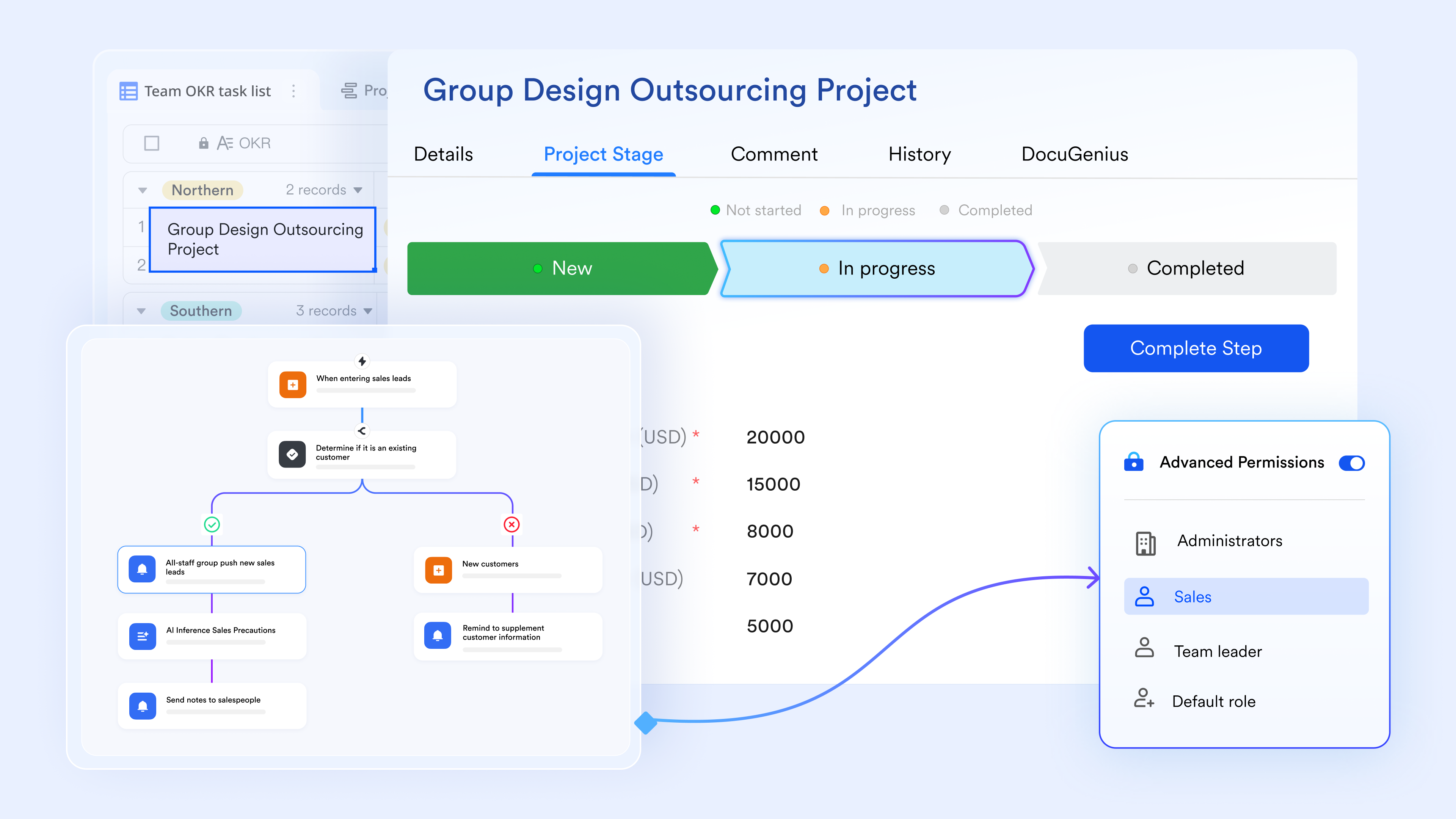
:
- Starter plan: Free forever plan that includes 11 powerful tools for up to 20 users. It also comes with 100GB of storage, 1000 automation runs, AI translations, and more.
- Pro plan: $12/user/month (billed annually) for up to 500 users. It includes everything in Starter plus group calling for up to 500 attendees, 15TB of storage, 50,000 automation runs, and more.
- Enterprise plan: for custom pricing. Supports unlimited users and includes even more automation runs and advanced security, compliance, and management features.
For small teams with simple communication needs

18 months message history
1000 Base automation runs/month
2000 rows per table in Base
Most POPULAR
For companies with comprehensive collaboration and management needs
Unlimited message history
500-participant video meetings
50k Base automation runs/month
20k rows per table in Base
For large companies with advanced security and organizational management needs
Get a personalized demo and pricing
Unlimited message history
500-participant video meetings
15 TB storage + 30 GB storage/user
500k Base automation runs/month
50k Base automation runs/month
Most POPULAR
For companies with comprehensive collaboration and management needs
Unlimited message history
500-participant video meetings
50k Base automation runs/month
20k rows per table in Base
Conclusion
A well-designed breakdown structure is the foundation of effective project planning. It helps teams define scope, organize tasks, assign responsibilities, and estimate time and costs with greater accuracy. Whether you use a visual diagram, outline, or spreadsheet, the right breakdown structure template makes complex projects easier to understand and manage. While traditional tools like Excel are a good starting point, provide greater flexibility, automation, and real-time visibility.
Solutions like bring tasks, documents, communication, and approvals into one connected workspace, helping teams stay aligned from planning to execution. By choosing a dynamic tool instead of a static template, you can reduce manual effort, improve coordination, and keep projects moving smoothly. If you're ready to streamline your project planning, exploring Lark's ready-to-use WBS templates is a practical next step.
Organize tasks into a simple structure with Lark
FAQs
What are the 5 steps of WBS?
The five common steps are defining the project objective, identifying major deliverables, breaking them into smaller tasks, creating work packages, and assigning responsibilities. This structured approach ensures clarity and scope control. Teams using a template, Microsoft Project, or collaborative tools like Lark can follow these steps more efficiently.
Does Excel have a WBS template?
Excel does not always include a built-in WBS template, but you can easily create one using tables, indentation, or SmartArt. Many teams build structures from scratch or download ready-made formats. A work breakdown structure can also be imported into Lark for real-time collaboration.
What is the difference between WBS and task lists?
A WBS is a hierarchical structure that organizes deliverables and work packages, while a task list is usually a flat list of activities. The WBS focuses on scope and structure, whereas task lists focus on execution. Teams often combine an agile work breakdown structure template with Lark's task views for better tracking.
How do you number tasks in a work breakdown structure?
Tasks are usually numbered using a hierarchical system such as 1.0, 1.1, 1.1.1, and so on. Each level reflects its position within the overall project structure. This numbering makes it easier to track tasks and link them to schedules in tools like Lark.
Is an Agile work breakdown structure different from traditional WBS?
Yes, an Agile WBS is more flexible and organized around features, user stories, or sprints instead of rigid phases. It allows teams to adapt the structure as requirements change. Using an agile work breakdown structure template in Lark helps teams adjust priorities and workflows in real time.
Related reading





























