Utilizing effective planning tools is essential for success. The Agile Gantt chart represents a valuable synthesis of Agile methodologies and traditional Gantt chart principles, facilitating better visual management of project timelines and tasks. With tools like Lark, teams can leverage Agile Gantt charts to enhance collaboration and maintain flexibility in their workflows. This article will explore the definition of an Agile Gantt chart, how it differs from traditional methods, and the best practices for implementing it in your projects.
What is an Agile Gantt chart?
An Agile is a visual project management tool that combines the structured scheduling of a traditional Gantt chart with the iterative flexibility of Agile methodologies. The concept of Gantt diagrams dates back to the early 1910s, when Henry Gantt, an American mechanical engineer, developed this visual project management technique. Over the decades, Gantt charts have evolved from static paper charts into dynamic, software-based solutions, especially with the advent of personal computers, making it easier to create and manage complex .
Key characteristics of Agile Gantt charts include:
- Flexibility: Unlike traditional Gantt charts that are rigid and predetermined, Agile Gantt charts can be easily modified to accommodate changes in or team capacity. This flexibility is vital for Agile teams who continuously adapt to feedback and shifting priorities.
- Visual representation: Agile Gantt charts provide a clear visual representation of tasks, timelines, and progress, enabling team members to see at a glance what needs to be done. The visualization helps in identifying dependencies and potential bottlenecks early in the process.
- Real-time updates: One of the benefits of using an Agile Gantt chart is its ability to reflect updates in real-time. Whether new tasks are added or deadlines are shifted, stakeholders can stay informed and adjust their plans accordingly.
Modern Gantt charts provide a visual timeline and project schedule, serving as key elements in agile development and project planning. While these charts can be updated in real time, keeping a detailed Gantt chart current can become time-consuming and burdensome for Agile projects due to frequent changes.
Check on how Agile methods improve numerous businesses
Key differences between Agile and traditional Gantt charts
Gantt charts were originally designed for the and Waterfall projects, where fixed timelines and detailed upfront planning were the norm. Today, these charts are being adapted for Agile teams to improve planning and collaboration. In many cases, the choice between these methods can influence a project's success.
- Structure and flexibility: Traditional Gantt charts are structured and often inflexible, reflecting the rigidity of waterfall projects. Once a timeline is set, altering it can be cumbersome, which conflicts with the core Agile principle of rapid adaptation to changing requirements. Agile Gantt charts, on the other hand, prioritize flexibility. They enable teams to make rapid adjustments to timelines based on real-time project developments, reflecting the core principles of .
- User adaptability: In a traditional project management setting, users may find it challenging to adjust plans without significant disruption. Agile Gantt charts accommodate changes seamlessly, allowing teams to adapt quickly, which is particularly useful when addressing client feedback or shifting team priorities.
- Focus on collaboration: While traditional Gantt charts may serve individual project managers well, Agile Gantt charts foster collaboration across teams. By visualizing dependencies and updates, all team members can engage in discussions, prioritize tasks collectively, and react promptly to project changes.
In organizations using both Agile and Waterfall methodologies, Gantt charts can bridge the gap by aligning Agile timelines with fixed schedules, providing a clear roadmap for stakeholders while supporting continuous customer involvement. However, there is a temptation to plan too much detail too far in advance with Gantt charts, which undermines the iterative nature of Agile planning. Gantt charts are visual tools for planning and , while Agile is a flexible and iterative methodology. Integrating Gantt and Agile can provide a hybrid approach that combines detailed planning with operational flexibility, helping project managers optimize resource use and improve team efficiency.
By recognizing these key differences, project managers can better determine when to implement an Agile Gantt chart for Agile methodology, leading to improved project outcomes. The choice between Gantt and Agile depends on the nature of the project, work environment, customer requirements, and team culture, and integrating both approaches can optimize resource use and efficiency.
Key components of Agile Gantt charts
Agile Gantt charts bring together thoughtfully designed components that genuinely empower teams to navigate their projects with both clarity and adaptability. Getting familiar with these elements opens doors to more effective Agile planning and smoother:
- Sprint blocks: Think of these as friendly visual containers along your project timeline, each one representing a sprint or iteration. What makes them particularly helpful is how easily they can be moved or resized, giving teams the breathing room to adapt gracefully when priorities shift or the scope evolves. This natural flexibility reflects what makes agile Gantt charts so valuable—they genuinely support while keeping continuous delivery within reach.
- Task dependencies: These charts make understanding task relationships refreshingly straightforward through simple connecting lines between tasks or sprints. This thoughtful feature helps teams see clearly how delays or changes in one area might ripple through to dependent tasks, creating opportunities for proactive management of potential challenges and keeping project flow steady and purposeful.
- User stories and epics: Within each sprint block, user stories and epics find their place on the timeline, showing exactly what features or deliverables are taking shape. This customer-focused approach keeps everyone's attention on real value and meaningful progress, while thoughtfully shielding stakeholders from unnecessary technical complexity.
- : These charts offer a welcome bird's-eye view of who's working on what, making it genuinely easier to balance workloads and distribute tasks thoughtfully. By bringing resource allocation into clear focus, teams can quickly spot when someone might be stretched too thin or could take on additional responsibilities, then make adjustments that naturally optimize everyone's productivity.
- Progress tracking: Perhaps the most rewarding aspect of agile Gantt charts is how they as it unfolds. Teams can keep a friendly eye on task status, sprint health, and overall project vitality, making it both natural and straightforward to adjust plans when needed and foster continuous improvement throughout the entire project journey.
By embracing these thoughtful components, Agile teams can harness Gantt charts to maintain clear visibility, manage relationships between tasks, and ensure that project progress stays meaningfully aligned with business goals.
How to implement Agile Gantt charts in your project
Implementing Agile Gantt charts effectively requires a strategic approach to align with your project goals. Here's a step-by-step guide on how to integrate Agile Gantt charts into your project management process:
Step 1. Identify project tasks and milestones:
Begin by breaking down your project into individual tasks and . Each task should represent a distinct work unit that contributes to the overall project goal. For each deliverable, estimate the task duration to ensure accurate planning and allow for potential delays.
Step 2. Set timelines and assign responsibilities:
For each task identified, establish a timeline and designate team members responsible for its completion. Allocate team members based on their skills and availability to optimize resource assignment. The development team plays a key role in shaping the project plan by coordinating tasks, managing dependencies, and ensuring resources are used efficiently. Those using a Gantt chart for Agile methodology will find that clear assignment of responsibilities can help ensure accountability and drive progress.
Step 3. Incorporate regular feedback loops:
One of the vital aspects of Agile is the continuous feedback mechanism. Schedule regular check-ins and sprint reviews to discuss progress, challenges, and adjustments needed for the Agile Gantt chart. Team involvement is crucial for effective planning and resource allocation, as it ensures all perspectives are considered and workflows are coordinated.
Step 4. Update the Gantt chart regularly:
As tasks are completed, updates to the Gantt chart are necessary to reflect the current . Agile Gantt charts should be updated at natural rhythm points in the process, typically at sprint boundaries. Real-time updates keep everyone informed about progress and changes, enhancing transparency among team members.
Step 5. Foster open communication:
Maintaining clear lines of communication among team members is crucial when implementing Agile Gantt charts. Encourage team discussions regarding , challenges, and workload balancing to ensure everyone is engaged and informed.
By following these steps, organizations can effectively implement Agile Gantt charts, resulting in enhanced project visibility, improved adaptability, and overall increased efficiency in managing Agile projects.
Start visualizing your project with Agile Gantt charts
Hybrid approach to Agile Gantt charts
A hybrid approach to Agile Gantt charts brings together what works best from both sides: the solid planning foundation of traditional Gantt charts and the smart adaptability that Agile teams love.
- Strategic planning and operational flexibility: With a hybrid approach, project managers get to use Gantt charts for the big-picture strategic thinking—laying out those crucial milestones, project phases, and must-hit deadlines—while still giving Agile teams the room they need to adjust sprint plans and priorities when fresh insights come to light.
- and quick iterations: Hybrid Agile Gantt charts create a natural way to keep tabs on project progress from both the wide-angle and close-up perspectives. Teams stay informed about overall project health while also making swift adjustments to individual sprints or tasks, keeping things moving forward even when requirements shift.
- Better communication and customer involvement: By weaving into Gantt chart visualization, teams find themselves communicating progress more clearly with stakeholders and customers. This openness encourages meaningful customer participation, which typically leads to greater satisfaction and stronger alignment with what the business actually needs.
- Resource optimization and efficiency: The hybrid approach opens up possibilities for dynamic resource allocation, helping project managers find that sweet spot in balancing workloads across multiple teams and initiatives.
Adopting a hybrid approach to Agile Gantt charts gives organizations access to both thoughtful planning and smart adaptability, leading to more successful and genuinely improved customer satisfaction.
Boost your projects with Gantt charts in Lark
is a powerful yet intuitive designed to serve as a central hub for project documentation, stakeholder communication, and timeline integration. With specific support for creating and managing Agile Gantt charts, Lark empowers teams to visualize their workflows effectively and manage multiple initiatives—such as features, technical debt, bugs, and operational improvements—across teams, providing a shared language for stakeholders and development teams.
Visual Gantt for project management: provides a user-friendly visual interface for creating Agile Gantt charts. Users can easily lay out tasks and timelines with various fields, making it simple to see the big picture while drilling down into specific project details. This visual clarity is critical for maintaining alignment in . The scheduling and progress of requirements, nodes, and subtasks in Base are visually clear at a glance.
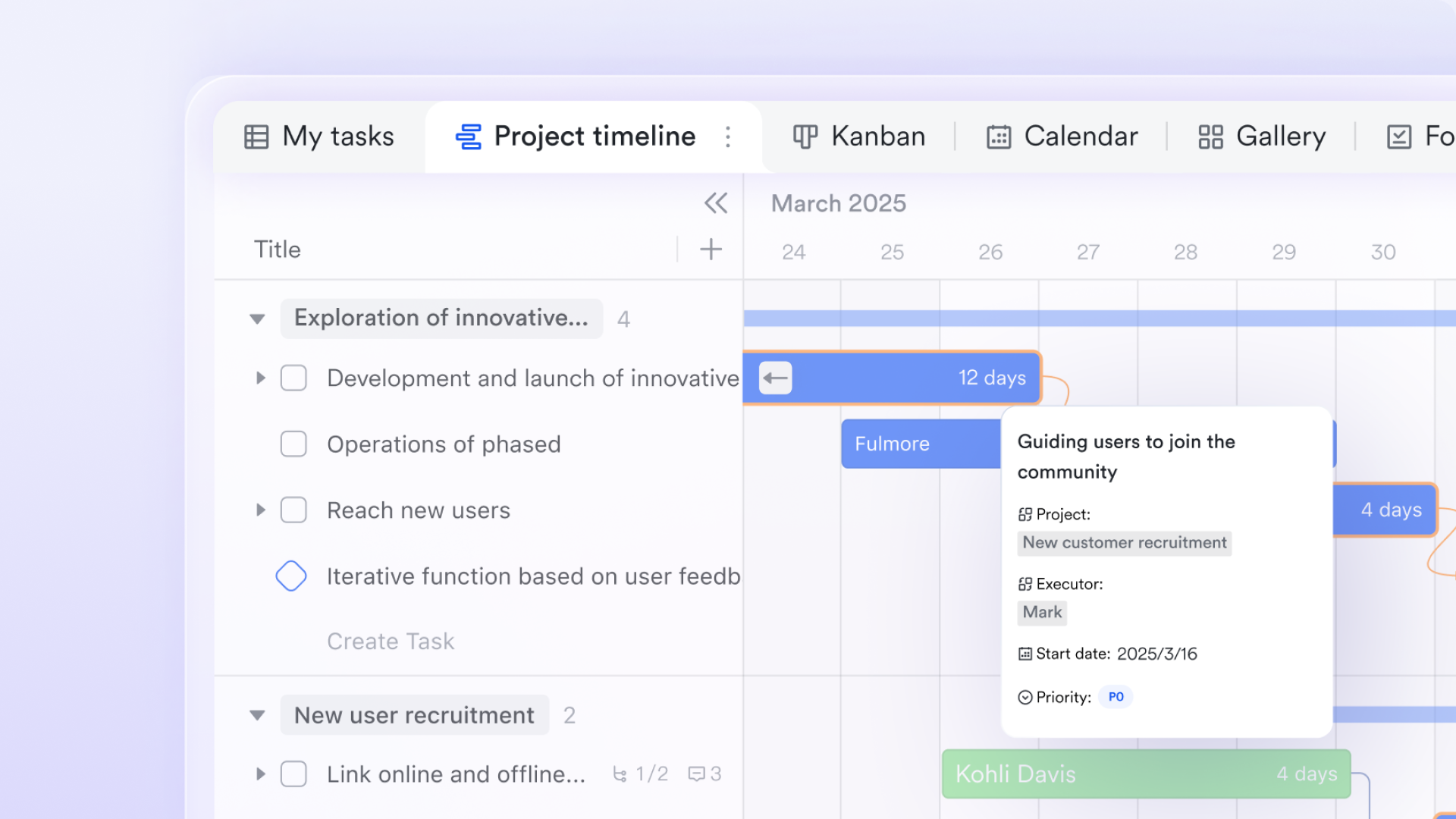
Customizable Gantt for task management: Lark Tasks supports the addition of task dependencies, deadlines, and priorities within the Gantt chart view, giving teams the flexibility to adjust as needed. This customization ensures that all team members are on the same page and can adapt their work based on the project's evolving needs. 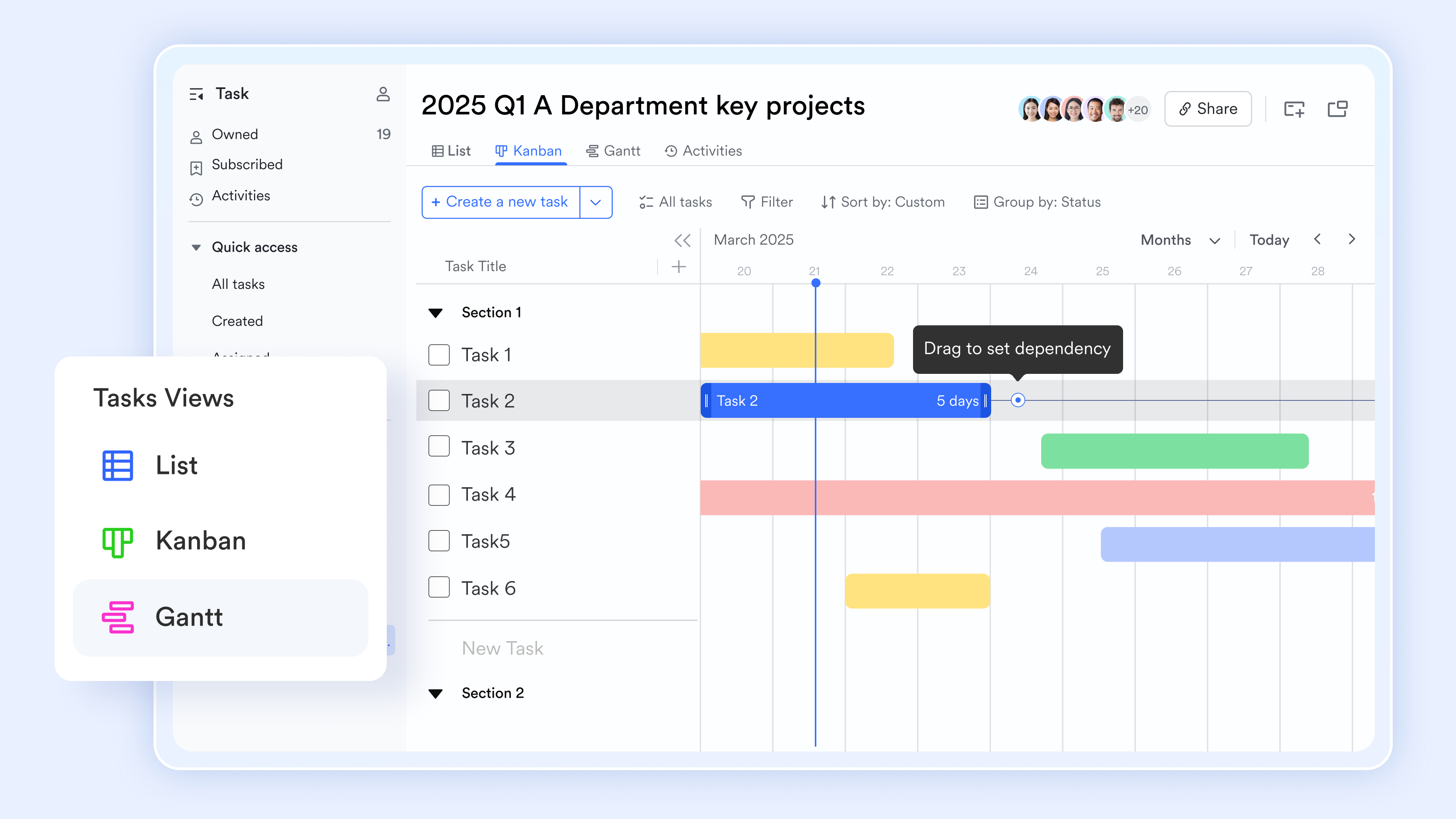
Live and automated updates in Gantt: When users adjust the relevant fields or the dates of related tasks in Lark Base or Lark Tasks, the will be updated automatically without manual modification. This automation is crucial for keeping Agile Gantt charts current, reducing maintenance overhead, and reflecting real-time progress across all technical work.
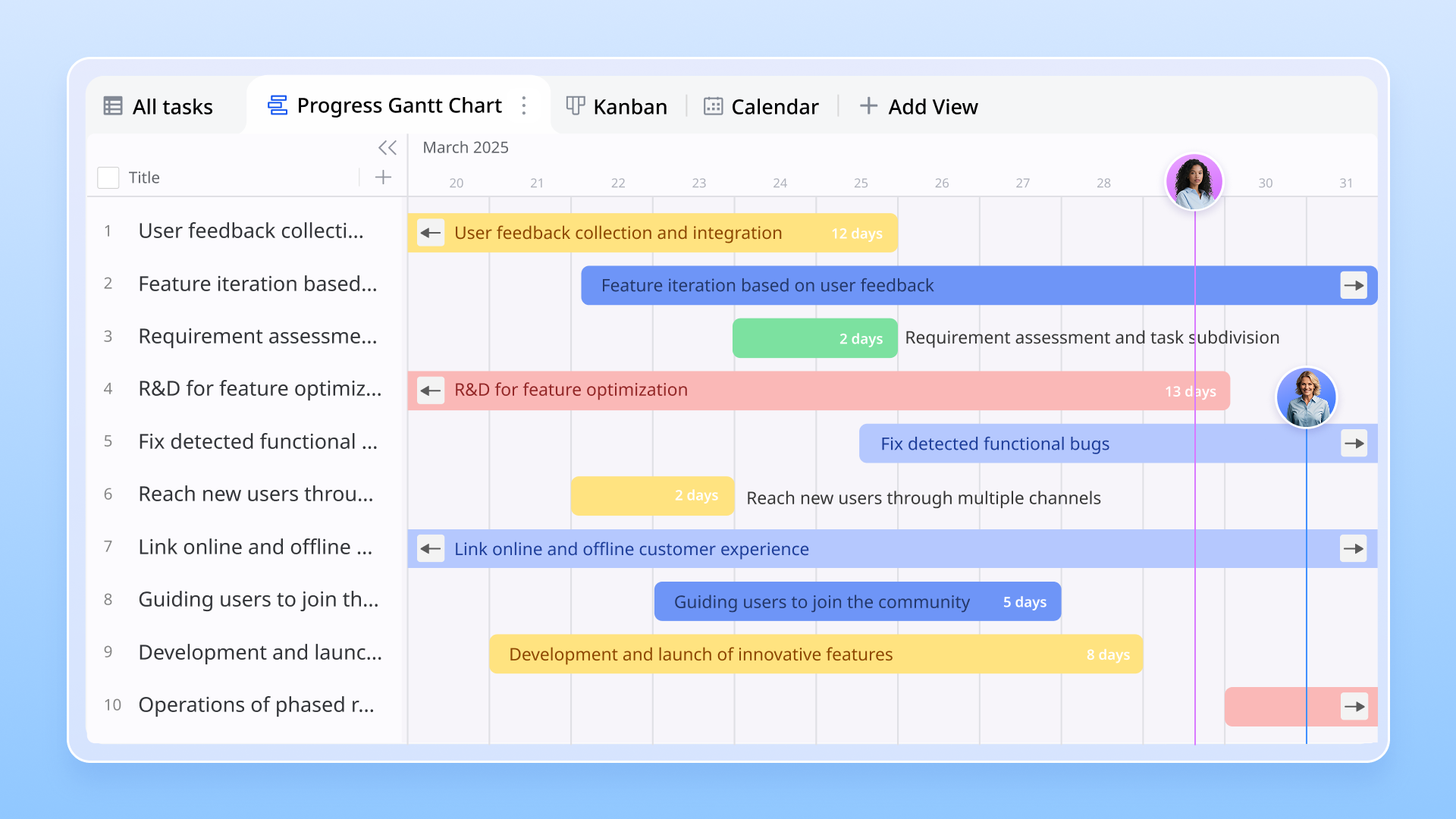
Real-time collaboration and communication: One of Lark's standout features is its functionality. Team members can edit Gantt charts in Lark Base simultaneously, enabling immediate feedback and adjustments. Users can also embed Gantt charts in and share the charts via Lark Meetings' Magic Share function, reducing the time wasted on sending the latest version.
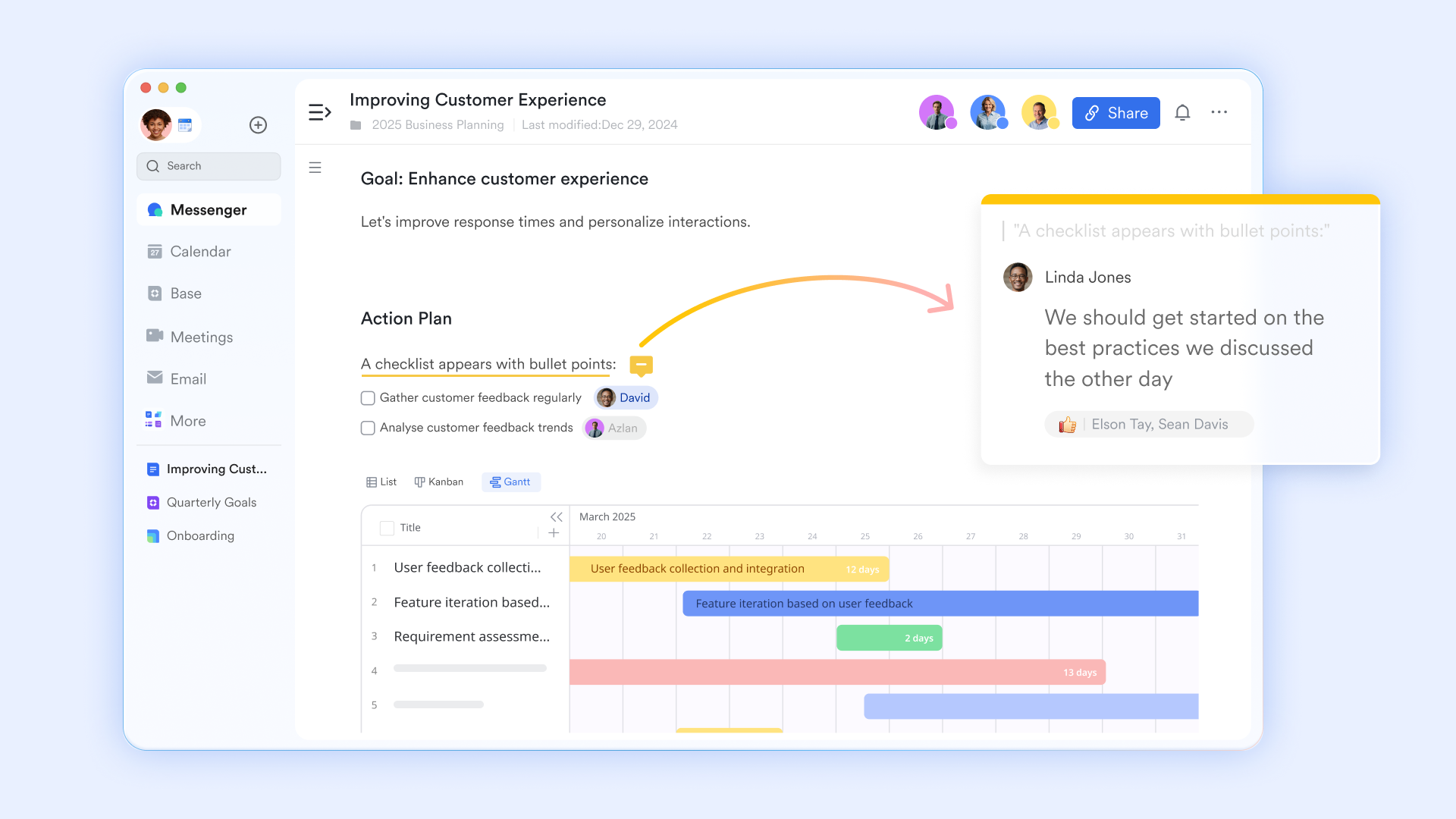
By leveraging these unique features, Lark enhances the user experience for teams implementing Agile Gantt charts, making project management more streamlined and effective.
:
- Starter plan: that includes 11 powerful tools for up to 20 users. It also comes with 100GB of storage space, 1000 automation runs, AI translations, and more. No credit card needed.
- Pro plan: (billed annually) for up to 500 users. It includes everything in Starter plus group calling for up to 500 attendees, 15TB of storage space, 50,000 automation runs, and more.
- Enterprise plan: for custom pricing. Supports unlimited users and includes even more automation runs and advanced security, compliance, and management features.
For small teams with simple communication needs

18 months message history
1000 Base automation runs/month
2000 rows per table in Base
Most POPULAR
For companies with comprehensive collaboration and management needs
Unlimited message history
500-participant video meetings
50k Base automation runs/month
20k rows per table in Base
For large companies with advanced security and organizational management needs
Get a personalized demo and pricing
Unlimited message history
500-participant video meetings
15 TB storage + 30 GB storage/user
500k Base automation runs/month
50k Base automation runs/month
Most POPULAR
For companies with comprehensive collaboration and management needs
Unlimited message history
500-participant video meetings
50k Base automation runs/month
20k rows per table in Base
Ready-to-use templates for Agile Gantt charts
For teams looking to implement Agile Gantt charts quickly and efficiently, these templates are especially useful for large projects, providing that help teams and stakeholders visualize schedules and dependencies across multiple sprints.
General Agile Gantt chart template
The template typically includes sections for task names, start and end dates, assigned team members, and status updates. It provides a high-level overview of the entire project timeline, connecting short-term sprints to larger milestones and deadlines, and helps teams track progress and dependencies, making it suitable for teams working on software development, marketing campaigns, or any other projects.
Sprint planning Gantt chart template
Specifically designed for Agile teams engaged in sprint planning, this template assists teams in organizing their agile sprints and defining a clear sprint structure. The sprint planning Gantt chart allows teams to break down user stories into specific tasks, assign them to sprints, and set deadlines.
Project management Gantt chart template
This template is perfect for teams focusing on product development and long-term strategic planning in a project management scenario. A project management Gantt chart outlines key phases of project initiation, product development, including market research, prototypes, development stages, and release timelines. The template also supports release planning by helping teams coordinate timelines, dependencies, and priorities across multiple sprints and releases.
Event planning Gantt chart template
Designed for organizing events, this template can assist teams with everything from conferences to product launches. An event planning Gantt chart outlines all tasks necessary for successful event execution, such as venue selection, marketing outreach, and logistics coordination. It helps teams track deadlines and responsibilities while providing a clear timeline for event-related activities.
Resource allocation Gantt chart template
Teams use Gantt charts to track progress, visualize project timelines, and coordinate resource management across different methodologies like Agile, Scrum, and traditional project management. This enables project managers to ensure that no individual is overburdened while promoting balanced task distribution and enhancing overall team productivity.
Utilizing these ready-to-use Agile Gantt chart templates can significantly enhance your project planning and execution processes, providing clarity, organization, and a collaborative framework for your team to succeed. By selecting the right template for your project type, you set a strong foundation for achieving your goals effectively.
Excel Agile Gantt chart template
The Excel Agile Gantt chart template includes predefined columns for task names, start and end dates, duration, assigned resources, and progress percentages. Users can easily create task dependencies and visually track project timelines using Excel's conditional formatting options. This template is flexible, allowing for the power of Excel to analyze data further if needed.
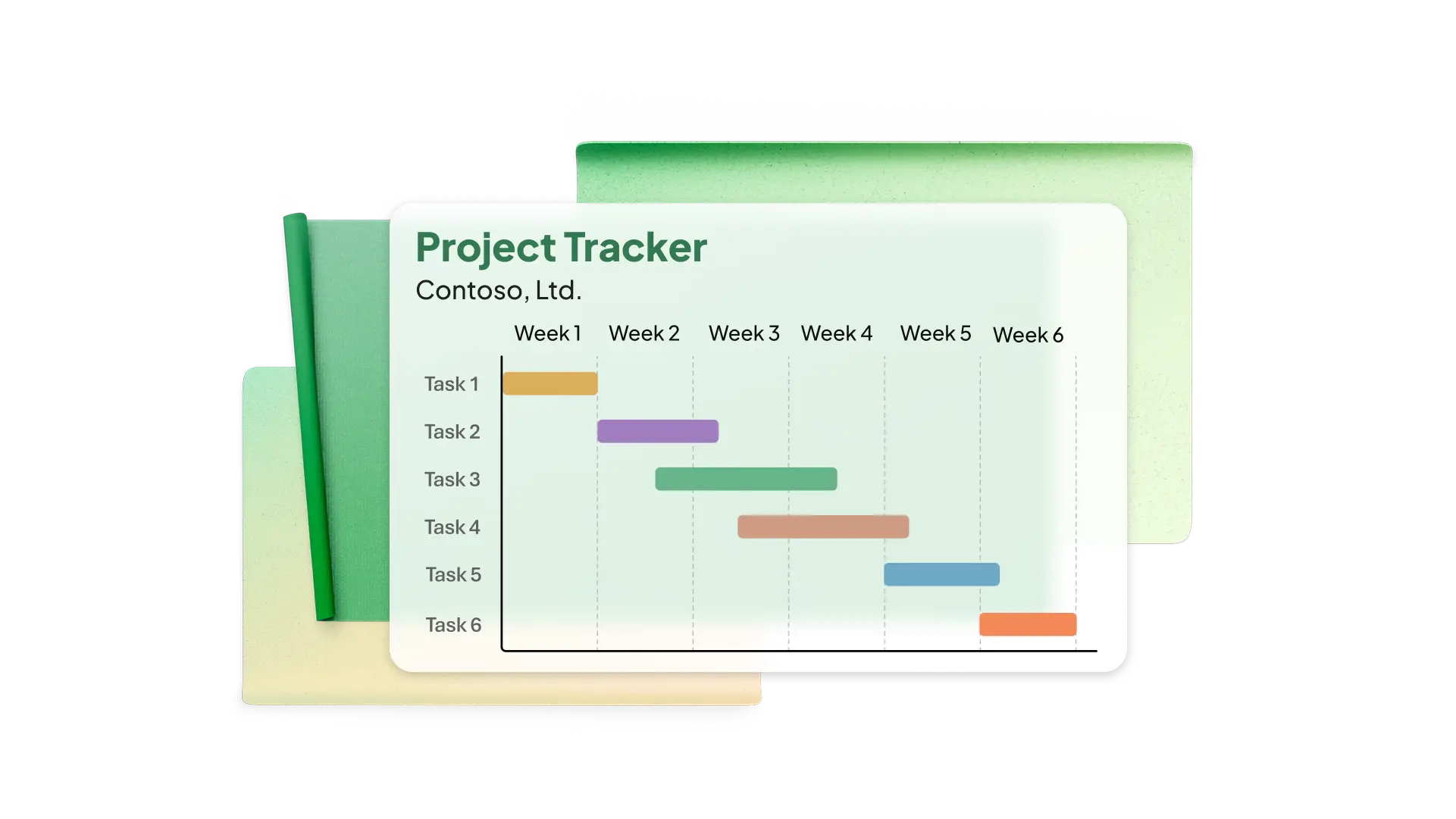
Image source: Screenshot of Excel
Smartsheet Agile Gantt chart template
This template is designed for teams using Agile methodologies and allows for setting up custom workflows, automating alerts, and integrating with other . Its intuitive interface facilitates an easier approach to Gantt chart management.
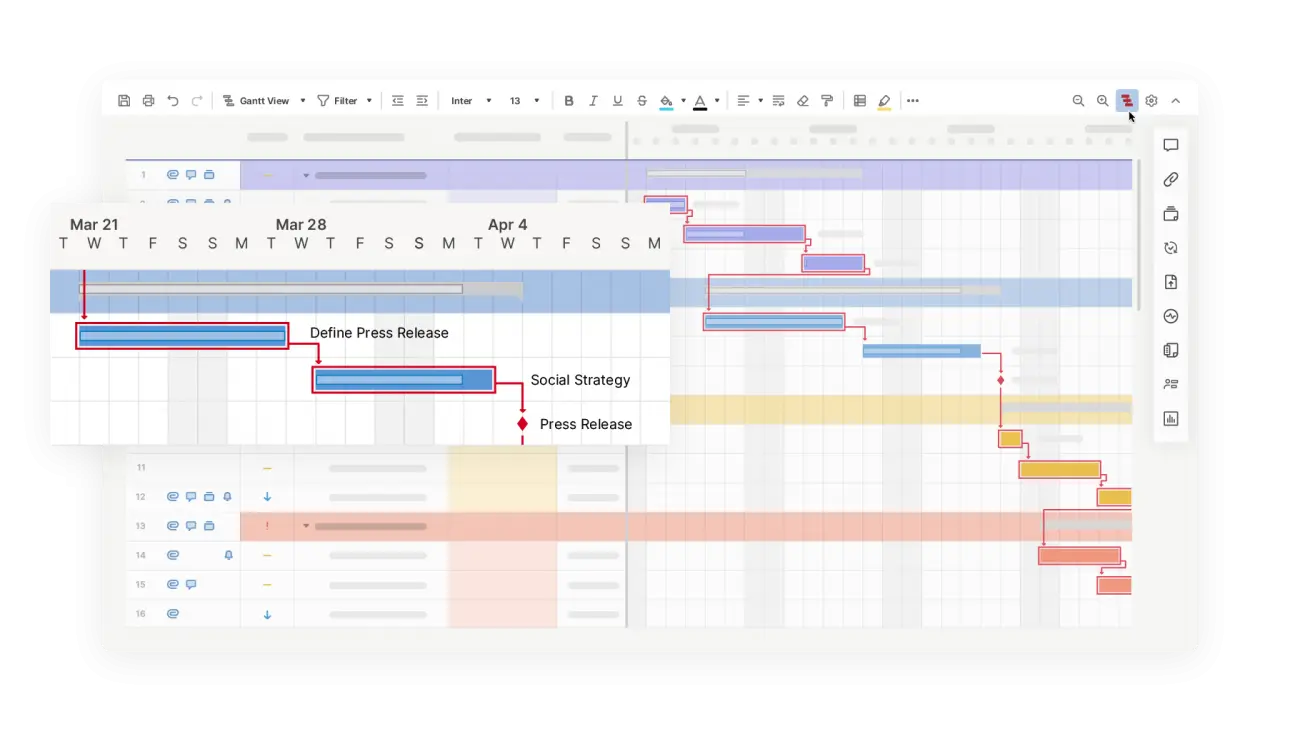
Image source: smartsheet.com
Benefits of Agile teams using Gantt charts
Agile teams increasingly adopt Gantt charts due to their effectiveness in providing a visual timeline that helps track progress, identify the for key deliverables, and enhance overall management. Agile Gantt charts offer a shared visual representation of the project schedule, which improves collaboration among team members and provides a shared language for stakeholders and development teams, enhancing communication and alignment.
Enhanced visualization of project progress
One of the most significant advantages of using Agile Gantt charts is their ability to provide a visual timeline and clear timelines for . Unlike traditional task lists, Gantt charts enable teams to see how tasks interrelate over time. Each task is represented as a horizontal bar, with its length indicating the duration of the task and its position reflecting the timeline. This visual layout allows teams to quickly grasp:
- Overall project health: Team members can assess how tasks are progressing against scheduled timelines at a glance.
- Key milestones: Important deadlines and milestones become easily identifiable, helping teams stay focused on critical deliverables.
Gantt charts provide high-level visibility and visual clarity, mapping tasks within sprints and highlighting critical milestones and bottlenecks. Teams can easily see project progress, upcoming deadlines, and task relationships at a glance.
Improved collaboration among team members
Team involvement is crucial for effective collaboration when using Gantt charts, especially in Agile environments. By providing a shared visual representation of the , Gantt charts facilitate collaboration and improve communication by allowing stakeholders to quickly understand project status without diving into detailed reports. By visualizing task dependencies and individual responsibilities, these charts facilitate better discussions and coordination during meetings.
- Transparency: Everyone involved can see who is responsible for what and when tasks are due, fostering an environment of accountability.
- Real-time updates: As team members complete their tasks, they can update the Gantt chart, ensuring that all stakeholders have access to the latest information.
Better resource allocation and management
Project managers should allocate team members based on their skills and availability, with the development team playing a key role in shaping milestones, coordinating tasks, and . Project managers can quickly identify which resources are allocated to each task and whether workloads are balanced. Benefits include:
- Identifying bottlenecks: The visual representation allows for easy identification of tasks that may be causing slowdowns, enabling managers to redistribute workloads or adjust deadlines accordingly.
- Prioritization of tasks: With the entire project visible at a glance, teams can effectively prioritize tasks based on urgency and importance, optimizing resource utilization.
Increased adaptability to changes in project scope
One of the core tenets of Agile methodologies is the ability to adapt to change, and Gantt charts support this principle. Dynamic Gantt charts allow teams to adjust the plan as requirements change, making them ideal for Agile environments.
- Easily adjust timelines: When scope changes occur, teams can quickly shift timelines and reassign tasks within the Gantt chart to reflect new priorities.
- Visualize impacts on the overall project: Understanding how changes in one area affect others is crucial in Agile environments. Gantt charts illustrate the ripple effects of adjustments, assisting in smooth transitions during scope changes.
Transform your team into Agile teams with Lark
Best practices for effective use of Agile Gantt charts
To maximize the effectiveness of Agile Gantt charts, teams can implement several best practices. Here are some recommended strategies.
Gradual adoption and training for team members
Introducing Agile Gantt charts should be a thoughtful process. Gradual adoption allows team members to acclimate to the tool without feeling overwhelmed. Some steps to consider include:
- Providing training sessions: Organize training to help team members understand how to use Gantt charts effectively within their workflow. Hands-on practice can enhance comfort levels and boost engagement.
- Setting clear expectations: Communicate how Gantt charts will benefit the team and what is expected regarding chart updates and usage.
Regularly updating charts based on Agile ceremonies
Agile ceremonies, such as daily stand-ups and sprint retrospectives, provide excellent opportunities to review the and update Gantt charts at natural rhythm points in the process, typically at sprint boundaries. Regular updates ensure that the information remains relevant and actionable. Practices include:
- Daily stand-ups: Use daily stand-ups to quickly review the iteration's progress, discuss task progress, and update the Gantt chart based on completed tasks or shifting priorities.
- Sprint reviews and retrospectives: At the end of each sprint, take time to assess what worked well and what didn't. Update the Gantt chart at the sprint boundary to reflect new priorities or lessons learned to enhance future planning.
Facilitating open communication
Encourage team discussions around the Gantt chart to foster collaboration and transparency. Regularly check in with team members about their progress, challenges, and potential adjustments to timelines. This practice can help identify issues early on and promote a proactive problem-solving approach.
By utilizing Agile effectively, teams can significantly enhance their project management processes, leading to improved outcomes and greater overall efficiency. Embracing best practices for their use allows organizations to reap the full benefits of these powerful visualization tools.
Common challenges and solutions for Agile Gantt charts
While Agile Gantt charts bring tremendous value to , teams sometimes face hurdles during implementation.
- Chart becomes too complex to read: When projects expand, Gantt charts can indeed become busy and hard to navigate. The solution lies in creating thoughtful, layered views that serve different needs. Consider developing focused perspectives for various audiences—perhaps streamlined overviews for leadership and comprehensive task breakdowns for your development team.
- Maintaining Agile flexibility: While detailed planning has its place, it's important not to let it constrain natural adaptability. Rather than locking in every task with rigid timelines months ahead, embrace rolling-wave planning. Plan your immediate work thoroughly while keeping future phases at a broader level.
- Keeping the chart current: Manual updates can certainly become tedious and introduce inconsistencies. The smart move is connecting your Agile Gantt chart directly with your development tools and wherever feasible.
- Aligning technical and non-technical stakeholders: Different team members naturally require different levels of detail, and that's perfectly fine. Build helpful abstraction layers into your Gantt chart—offer executive summaries for leadership while providing rich user stories for your technical teams.
By thoughtfully addressing these common challenges, teams can truly unlock the potential of Agile Gantt charts, transforming them into an invaluable resource for project planning, progress tracking, and seamless team collaboration across any Agile initiative.
Streamline your project management with Agile Gantt
Conclusion
In an increasingly dynamic project landscape, Agile Gantt charts serve as a vital tool for project teams looking to balance flexibility with structure. By enhancing visualization, improving collaboration, optimizing resource allocation, and allowing for adaptability to changes, these charts can significantly drive project success. Implementing best practices for Agile Gantt charts further amplifies their benefits, ensuring that teams remain aligned and responsive to new challenges. Tools like simplify this integration, providing an intuitive platform where teams can create, update, and manage their Agile Gantt charts collaboratively. As organizations continue to navigate the complexities of modern projects, embracing Agile Gantt charts empowers them to achieve their goals with clarity and efficiency.
FAQs
What is an Agile Gantt chart?
An Agile Gantt chart is a project management tool that combines Agile methodologies with traditional Gantt chart principles, allowing teams to visualize tasks, timelines, and dependencies while adapting to project changes in real-time.
How to make an Agile Gantt chart?
To create an Agile Gantt chart, identify project tasks and milestones, set timelines, assign responsibilities, and visualize these components in a chart format—updating the chart regularly based on team progress and Agile ceremonies.
Is Agile still relevant in 2026?
Yes, Agile remains highly relevant in 2026 as organizations continue to prioritize adaptability and speed in their project management processes, making it an essential methodology for teams in various industries.
What is the difference between Scrum and Gantt?
Scrum is an focused on iterative progress through sprints, promoting team collaboration and feedback, while Gantt charts are tools for visualizing project timelines and task dependencies, often used in both Agile and traditional project management.
How can Agile Gantt charts enhance team communication?
Agile Gantt charts foster open communication by providing a visual representation of project progress and responsibilities, enabling team members to easily discuss updates, challenges, and shifts in priorities during meetings.
Can Agile Gantt charts be used in non-Agile projects?
Yes, Agile Gantt charts can be adapted for non-Agile projects as well. Their visual nature and flexibility make them useful for tracking timelines and tasks across various project management methodologies, enhancing clarity and organization.
Related reading



















