Iteration planning is the moment where strategy turns into concrete work for the next few weeks. Done well, it gives your team clarity on what matters, how much is realistic, and how everyone will contribute. Done poorly, it becomes a long, frustrating calendar event that people quietly dread.
In this article, we will look at iteration planning in Agile from a practical, framework‑agnostic perspective. Whether you work in software, medtech, or any other domain, the goal is the same: build a shared, realistic plan that moves your product forward. I'll walk through the core concepts, key inputs, and typical patterns that make an iteration planning meeting work in the real world.
What is iteration planning?
Iteration planning is the collaborative process where the team decides what they aim to deliver in the next iteration and how they intend to do it, often organized and tracked efficiently with . It is more than filling a board with tickets; it is about making an informed commitment. Iteration planning is a core practice in software development and many other fields.
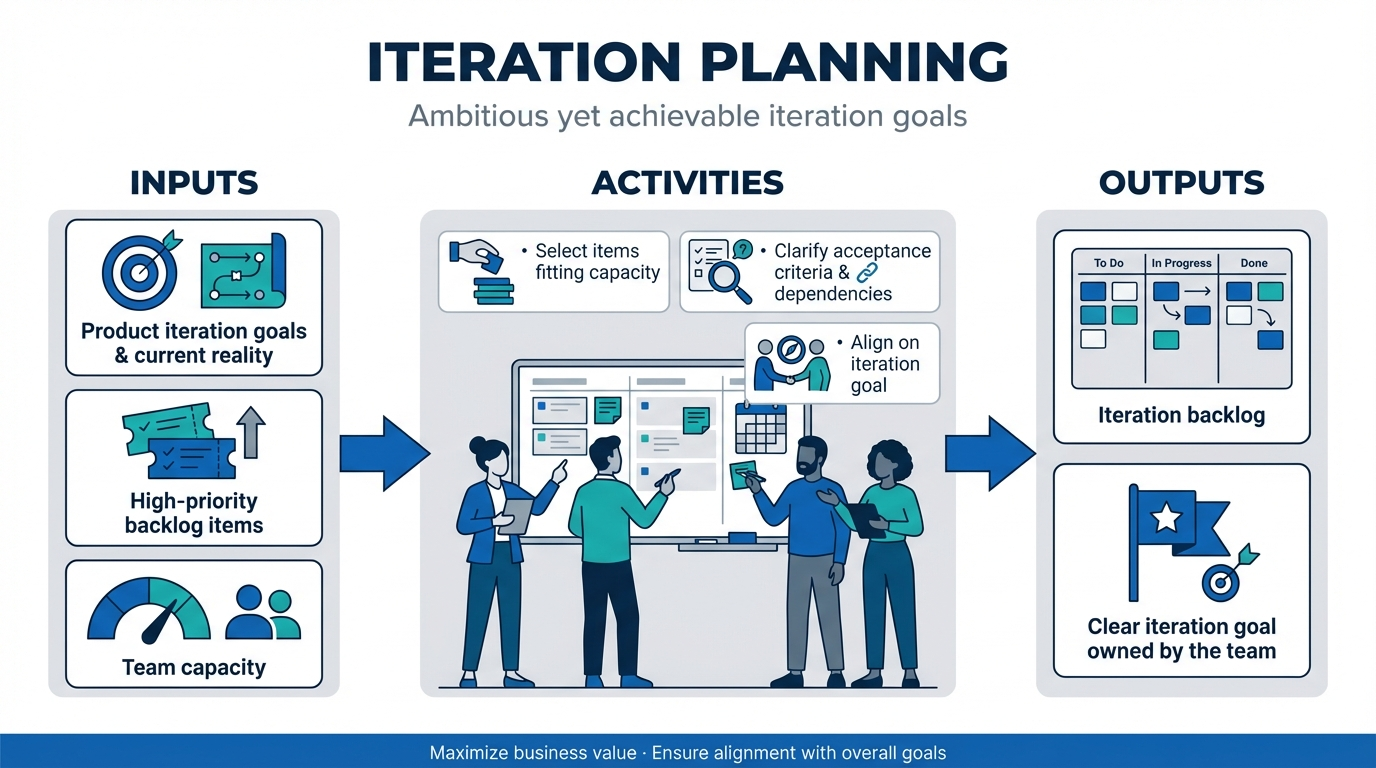
A typical iteration planning meeting will:
- Align the team on product iteration goals and current reality.
- Select a set of high‑priority backlog items that fit the team's capacity.
- Clarify acceptance criteria and dependencies, so work is truly understood.
- Produce an iteration backlog and a clear iteration goal that the whole team owns.
These outcomes are designed to maximize business value and ensure alignment with overall . When people talk about "iteration planning in Agile," they usually mean this recurring ceremony that marks the beginning of each development cycle and connects the product backlog to the work everyone does day to day. The outcome should be a plan that feels ambitious but achievable, not a wish list.
Iteration planning vs sprint planning vs other Agile planning levels
In many teams, "iteration planning" and are used as interchangeable terms. That's usually fine:
- often talk about sprint planning as the moment they decide which product backlog items to bring into the next sprint and how they will deliver them, creating a sprint backlog for every single sprint as a subset of the product backlog.
- Teams using "SAFe" or "Disciplined Agile" talk about iteration planning, but follow nearly the same pattern of selecting work, aligning on goals, and checking capacity.
The differences are mostly about context:
- Iteration planning in Scrum typically focuses on a single team delivering a coherent sprint goal.
- Iteration planning in SAFe also considers Program Increment objectives, cross‑team dependencies, and alignment with the Agile Release Train. People often ask about the "first step of iteration planning SAFe," which is usually to bring in PI objectives and the current team backlog before story discussions start.
- Portfolio and release planning operate at a higher level, deciding which features or initiatives to invest in over a longer time horizon. provides high-level goals and milestones that guide iteration planning. Iteration planning then slices those into workable chunks.
- Daily stand-ups and iteration reviews occur either inside or at the end of the iteration, but they build upon the commitments and expectations set during planning.
If you think of Agile planning as a stack, iteration planning sits in the middle: Above day‑to‑day , but below strategy and portfolio direction.
Why iteration planning matters for Agile teams and stakeholders
Iteration planning matters because it is the point where vision and day‑to‑day work meet, turning broad product goals into a focused, realistic plan for the next timebox.
- Turning strategy into actionable iteration goals: By connecting , customer feedback, and capacity, the team creates iteration goals that describe outcomes instead of task lists, so everyone can see how upcoming work supports larger objectives. Iteration planning ensures that the team's work is aligned with customers' evolving needs.
- Reducing risk, waste, and rework: A structured session surfaces blockers, dependencies, and acceptance criteria early, helping the team make realistic commitments and avoid over‑commitment, thrashing, or late quality cuts.
- Boosting and ownership: When developers, testers, and specialists help estimate, identify risks, and shape scope, they share ownership of the plan and can make better in‑iteration decisions aligned with the agreed goal.
Done well, iteration planning becomes a predictable rhythm that supports delivery, learning, and rather than a stressful negotiation. Effective iteration planning helps teams deliver a final product that meets both stakeholder and business expectations.
Break stories into clear, actionable steps today
What you need for the iteration planning meeting
A smooth iteration starts long before people join the call. When key inputs are ready, planning becomes alignment instead of guesswork.
- A prepared, prioritized backlog: The top items are ordered by clear criteria, right‑sized for a single iteration, and have enough detail and acceptance criteria to estimate and discuss. The product owner reviews feedback, updates priorities, and refines large items into smaller, testable work; an iteration plan template can help teams remember what to prepare.
- Shared definitions of "Ready and Done": A simple "Definition of Ready" prevents rewriting stories live, and a clear "Definition of Done" makes all work needed for "complete" visible—coding, testing, , and validation—so the team can estimate realistically and protect quality.
- Realistic capacity and context: Someone has reviewed availability, recurring duties, and historical throughput, so the plan reflects what the team can actually deliver, including compliance or review work where relevant. Capacity planning involves assessing the team's velocity and using the historical average of completed stories to estimate the work involved in the upcoming iteration. Visible product goals, cross‑team plans, and deadlines keep trade‑offs grounded in reality and turn the first step of planning into alignment rather than argument.
When all of these inputs—backlog, definitions, capacity, and context—are reasonably in place, the first step of iteration planning is not argument, but alignment. From there, the team can move into selecting work, shaping an iteration goal, and preparing for a productive that will end in a meaningful iteration review.
Who should attend the iteration planning meeting
Having the right people in the room is as important as having a good backlog; without them, decisions stall, and plans stay theoretical. Core participants:
- Product owner/product manager: Brings product vision, roadmap, and current goals, explains why each top item matters, and acceptance criteria, and works with the team to agree on realistic iteration goals.
- Scrum master/Agile team lead: Designs and facilitates the agenda, keeps the meeting focused and timeboxed, ensures all voices are heard, and safeguards working agreements such as "Definition of Ready" and "Definition of Done."
- Development team (developers, testers, and other specialists): Estimate effort, identify dependencies and risks, break stories into executable tasks, and highlight quality, security, and compliance considerations.
Optional participants (invite as needed): Architects, UX/design, operations/DevOps, and key join when major architecture, user experience, deployment, or domain questions are at stake, providing targeted input without turning planning into a status meeting.
When the full cross‑functional team helps shape the plan, it becomes a shared commitment instead of a top‑down task list. During iteration planning, the entire team collaborates to define the scope, goals, and completion criteria, ensuring that the team defines what will be delivered and how success will be measured.
Run your planning meeting and align in one session
Step‑by‑step on how to achieve iteration planning
To achieve effective iteration planning, use a simple, repeatable sequence: set context, clarify options, estimate and test feasibility, decide what to do, align on how to do it, then confirm commitment. These steps help teams prepare for the upcoming iteration by setting clear goals and expectations. brings these steps into one unified workspace so teams can discuss, document, track, and follow through on their iteration plans without jumping between disconnected tools.
Step 1: Set the stage with goals, context, and constraints
Begin by aligning everyone on why you are planning this iteration and what success means. The facilitator or product owner briefly recaps current product or release objectives, notes what was completed and what remains, and calls out key dates, dependencies, and risks so every later decision about scope and sequencing is made against the same shared picture. It is crucial to ensure clear alignment and set assessment criteria when the iteration starts, so the team is prepared, and expectations are transparent from the kickoff.
lets the team co‑edit a shared document in real time, capture iteration goals, and maintain a single source of truth. You can use @mention to notify specific people about updates and discussions, and embed rich media such as Lark Base views, spreadsheets, mind maps, code blocks, synced blocks, and highlight blocks to give more context. Version history and the ability to save the current version as a separate one help you track changes across product iterations and avoid losing important details. 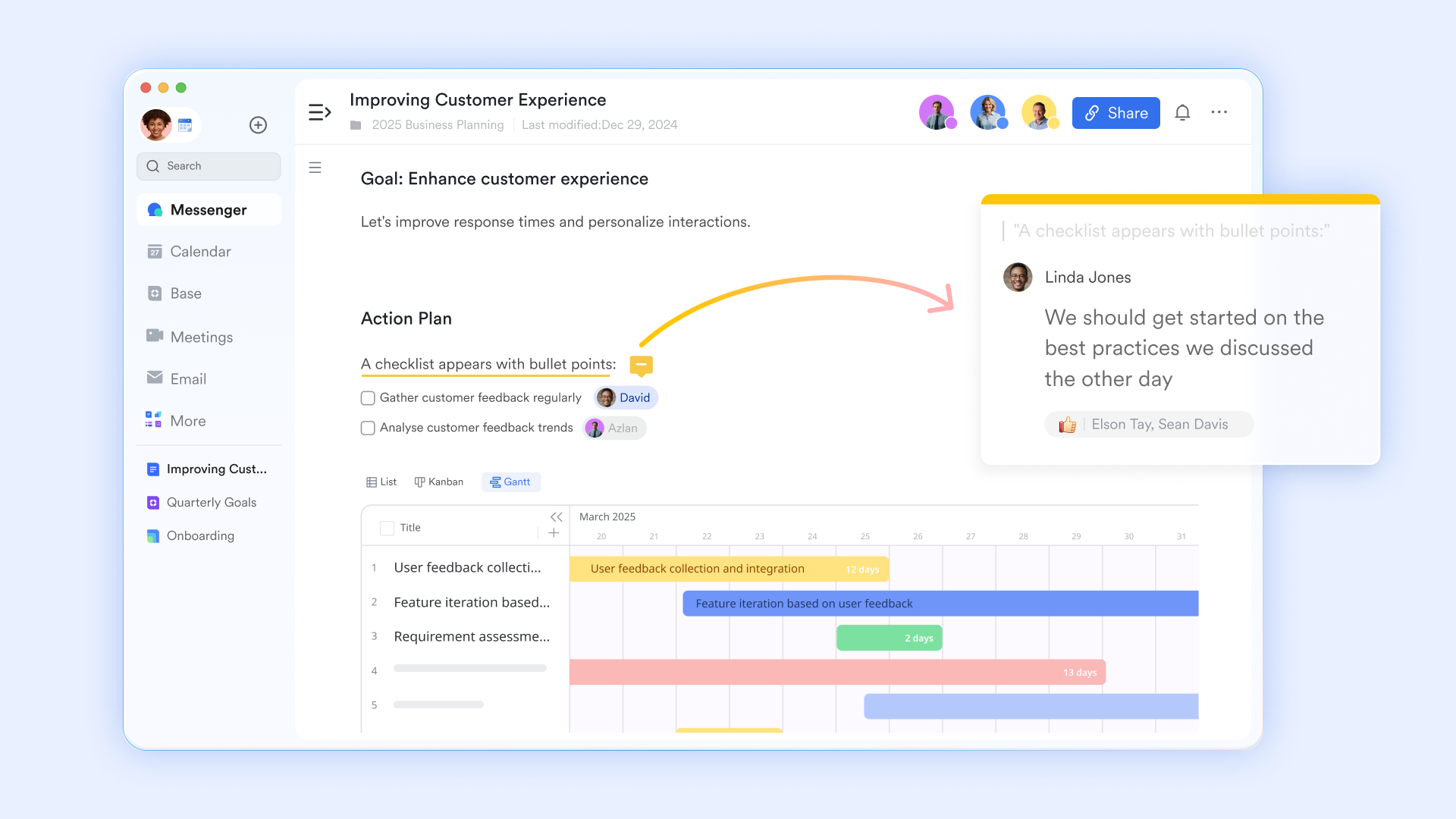
Step 2: Review and clarify candidate backlog items
Next, inspect the top of the product or team backlog to decide what could go into the iteration. The product owner walks through the highest‑priority items, explaining intent, value, and assumptions, while the team probes behaviour, edge cases, and acceptance criteria. Anything that does not meet your "Definition of Ready" is either refined quickly or explicitly deferred, keeping the focus on solid understanding rather than early commitment.
With , you can build a product iteration management table using configurable fields such as date, owner, priority, linked product docs, and more, without writing code. Custom single‑ or multi‑select fields can represent iteration stages like "In Process", "In Design", or "Completed". When records move between stages, related members can be notified through , so changes in backlog status are immediately visible and the whole team stays aligned on what is truly ready. 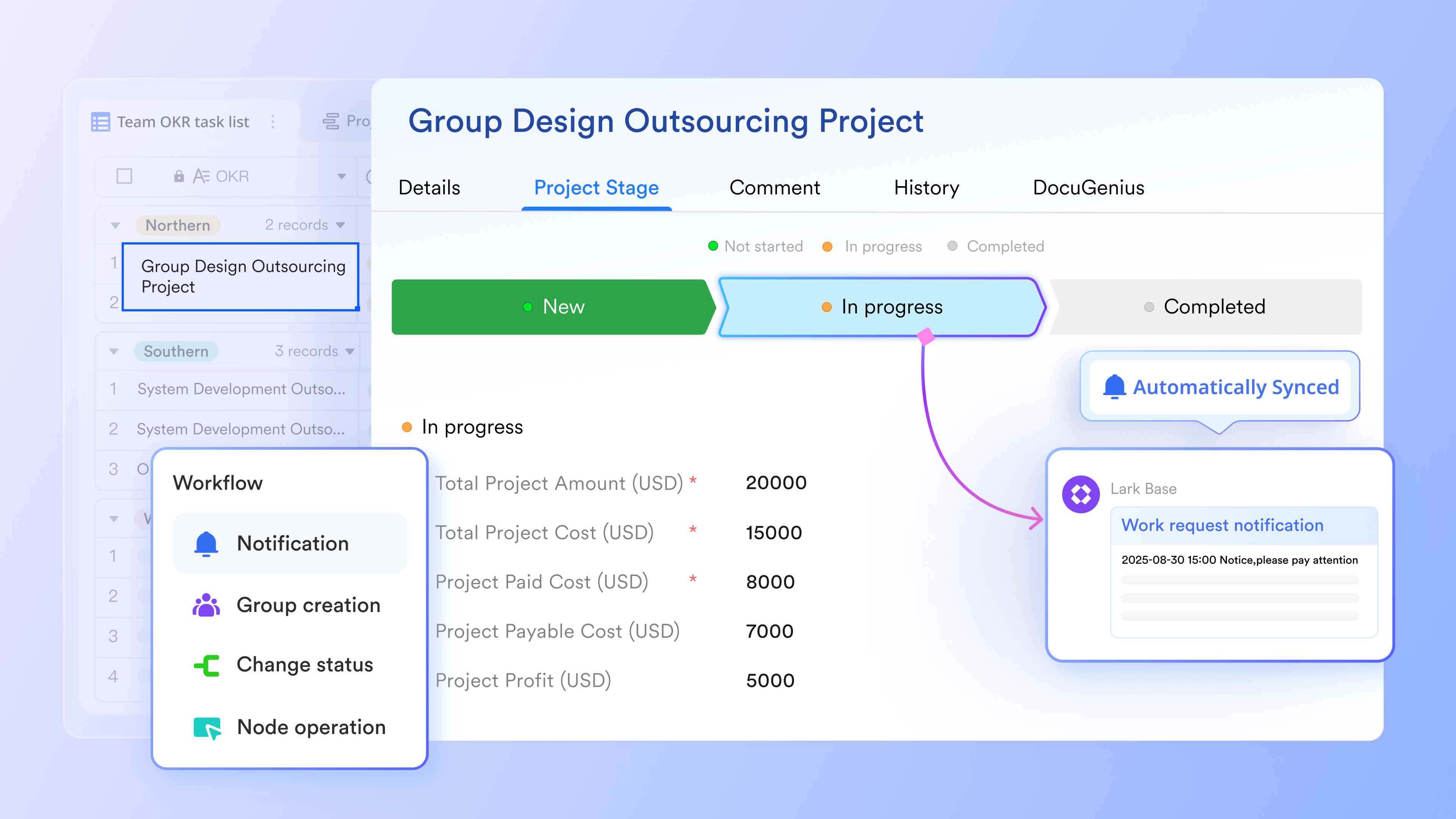
Step 3: Estimate work and check feasibility
Once candidate items are clear, the team estimates effort and complexity using a lightweight technique such as story points, relative sizing buckets, or flow‑based reasoning from historical throughput. The goal is a shared sense of relative size, not exactness, so you can compare total with expected capacity, highlight work that is too large or risky, and trim or split items until the iteration feels realistically achievable. During this process, the team selects which backlog items to include, the team agrees on priorities and story sizing, and the team commits to completing the chosen work for the iteration.
supports calculated fields and rich data types, enabling you to store estimates, actual effort, and capacity data in one place. You can use formulas to derive totals or load per iteration, and create visual, real‑time dashboards that summarise workload, progress, and trends. Different views and charts make it easy to compare estimated scope against available capacity, spot oversized items, and adjust the iteration plan based on up‑to‑date information. 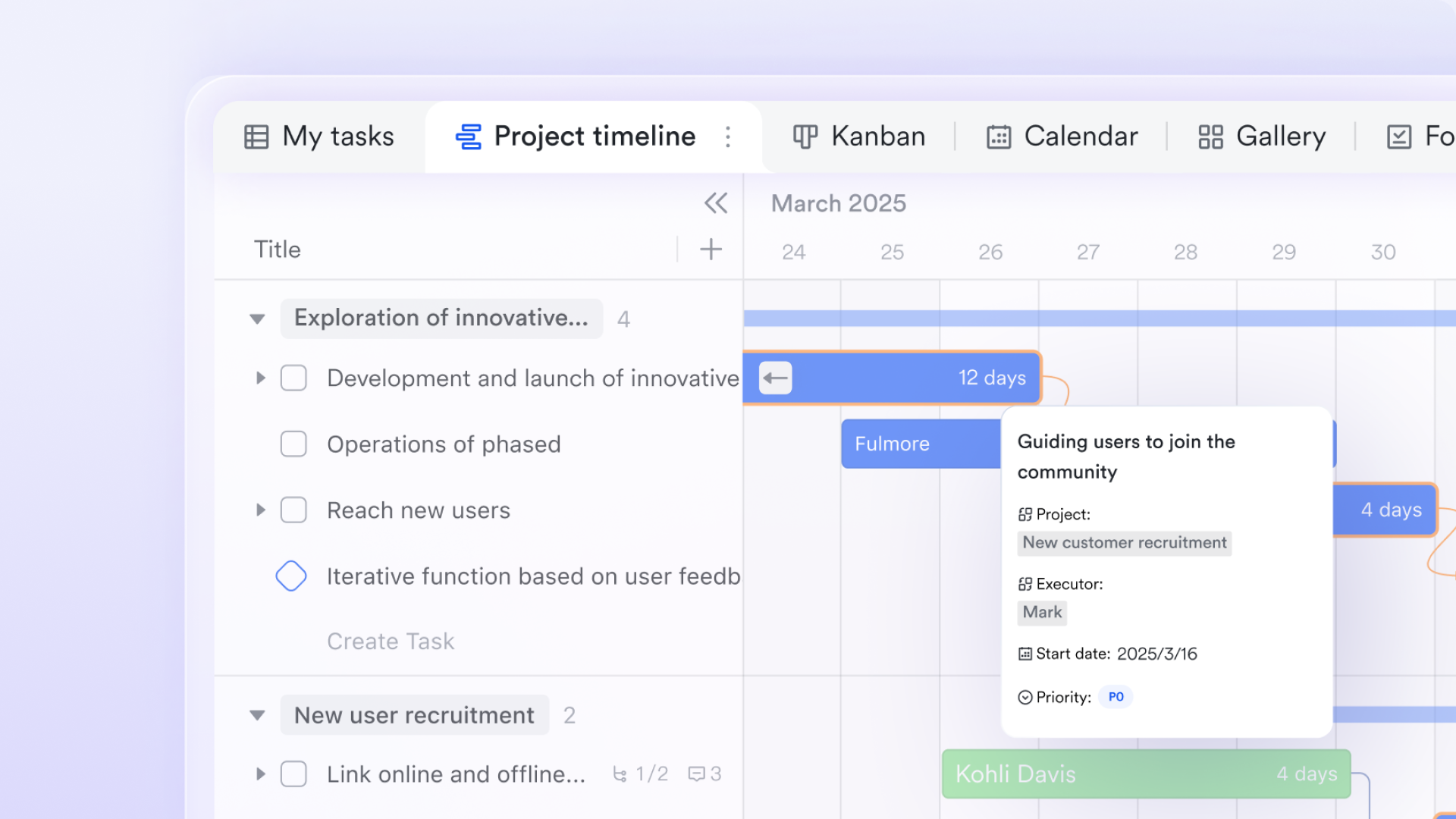
Step 4: Build the iteration backlog and define the iteration goal
With estimates and capacity in mind, select a subset of ready, high‑value items to form your iteration backlog. In Scrum, this subset is known as the sprint backlog, which contains the specific tasks and user stories planned for completion within a single sprint or iteration. Aim for a coherent outcome or theme that balances new features, technical improvements, defects, and any , instead of a random list of tasks. From this subset, craft one or a few iteration goals that describe the outcomes you expect within the timebox, giving stakeholders clarity and guiding day‑to‑day trade‑offs during execution.
are designed to help teams discuss and confirm iteration goals and execution plans. During the meeting, Magic Share allows you to share Lark Docs or Sheets so participants can view and interact with the content directly, staying in sync with the discussion. can generate structured notes from the meeting, helping you capture decisions, goals, and action points automatically. This makes it easier to turn the conversation about goals and backlog selection into a clear, accessible record. 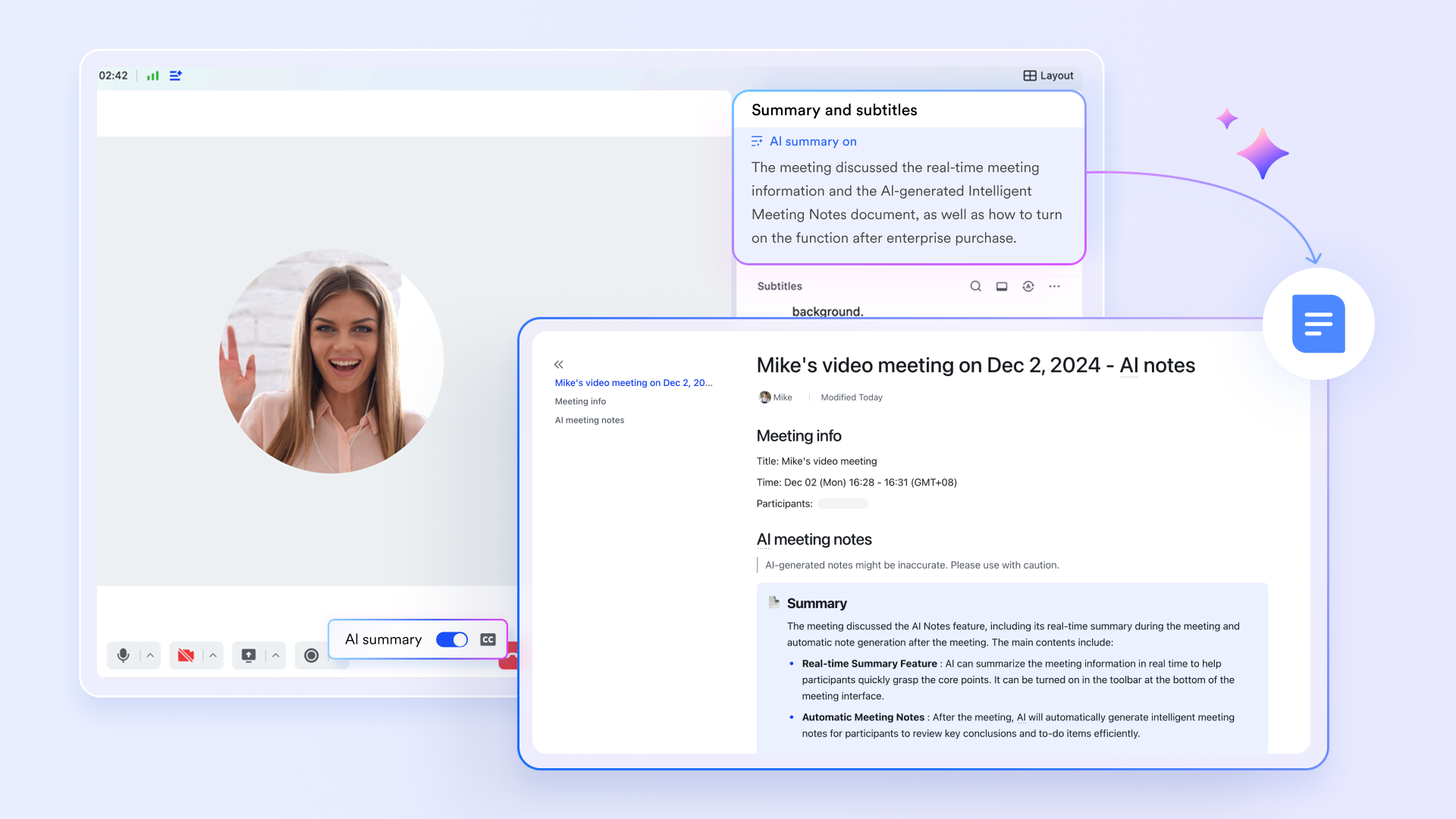
Step 5: Break stories into tasks and uncover risks
After deciding what to include, shift to how the work will be delivered. The team sketches implementation approaches, breaks stories into , and roughly discusses who might own or pair on which parts. As you do this, deliberately surface technical, process, and dependency risks, as well as critical assumptions, and record them visibly—creating follow‑up tasks or spikes where needed—so hidden obstacles do not undermine the plan later. It is especially important to identify technical challenges and critical risks at this stage, as addressing these early helps ensure successful and feature delivery.
Lark Tasks lets you assign work items to specific people, and you can break larger pieces of work into subtasks for better tracking. Approaching due dates trigger notifications via chat, so owners and stakeholders are reminded in time. Kanban and Gantt views make progress and sequencing clear, and priority labels help the team focus on what matters most. Tasks also integrate with Calendar views, so people can see tasks alongside their schedule and avoid over‑committing or missing critical work during the iteration. 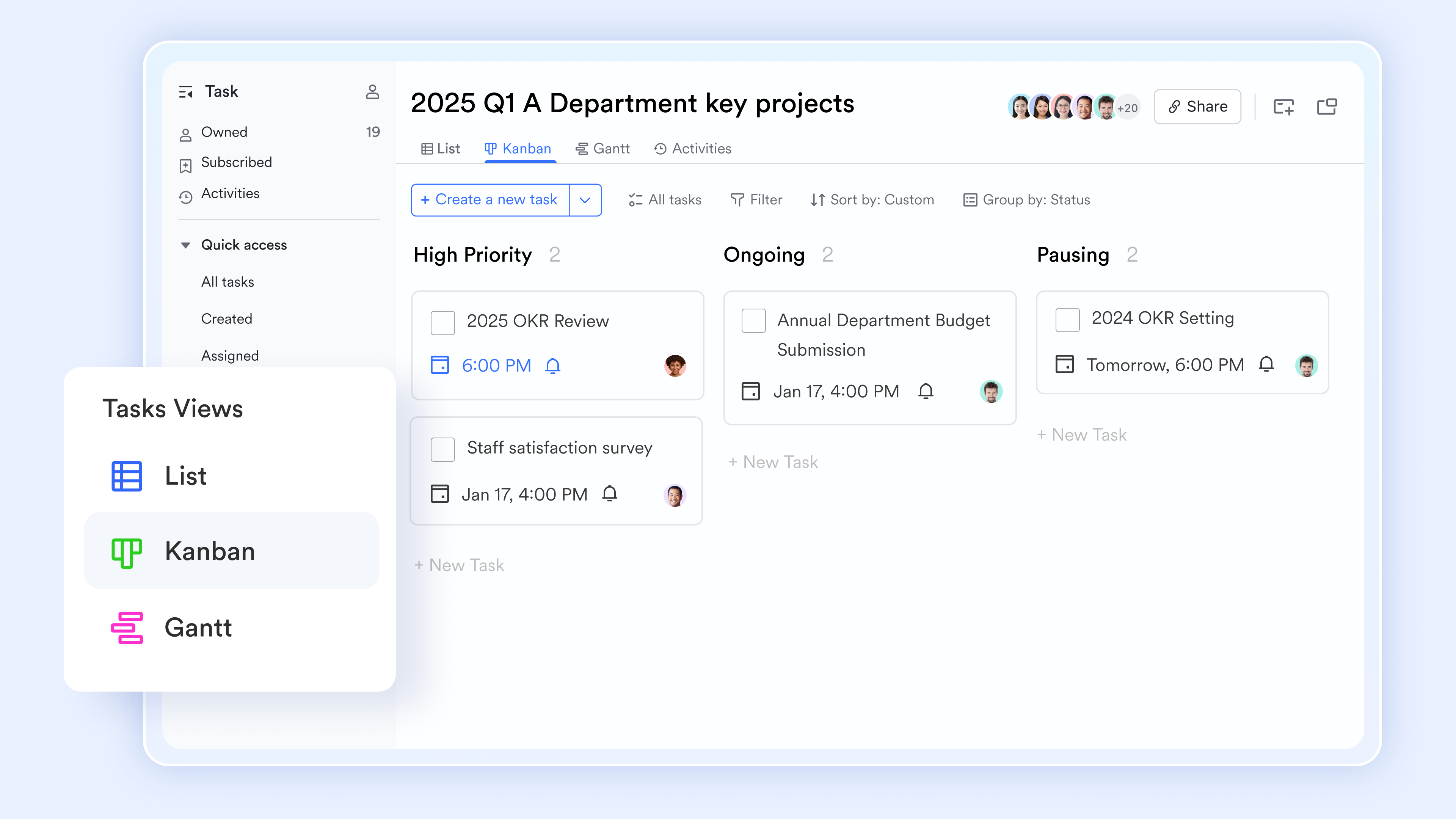
Step 6: Confirm commitment and close the session
Finally, run a reality check before leaving the room. Ask whether the scope still fits capacity, which items feel unclear, and what is most likely to derail the iteration. If anything looks overloaded or under‑specified, reduce, refine, or re‑scope it now. Restate the iteration goal, capture concrete follow‑up actions, and ensure everyone shares the same understanding of what will be attempted, why it matters, and how you will judge success at the end of the iteration. Reviewing lessons learned from the previous iteration helps improve planning accuracy and team alignment for the upcoming cycle.
Lark acts as an integrated workspace that connects chat, meetings, docs, tasks, visual dashboards, and no-code databases in one place. ties these components together: You can share Docs, Base views, Tasks, and meeting notes directly in chats or groups, ensuring decisions and commitments are visible to everyone. Notifications and message threads , while links back to the original records provide context. This unified flow makes it easier for the team to confirm commitment, stay aligned during execution, and quickly revisit the plan when circumstances change.
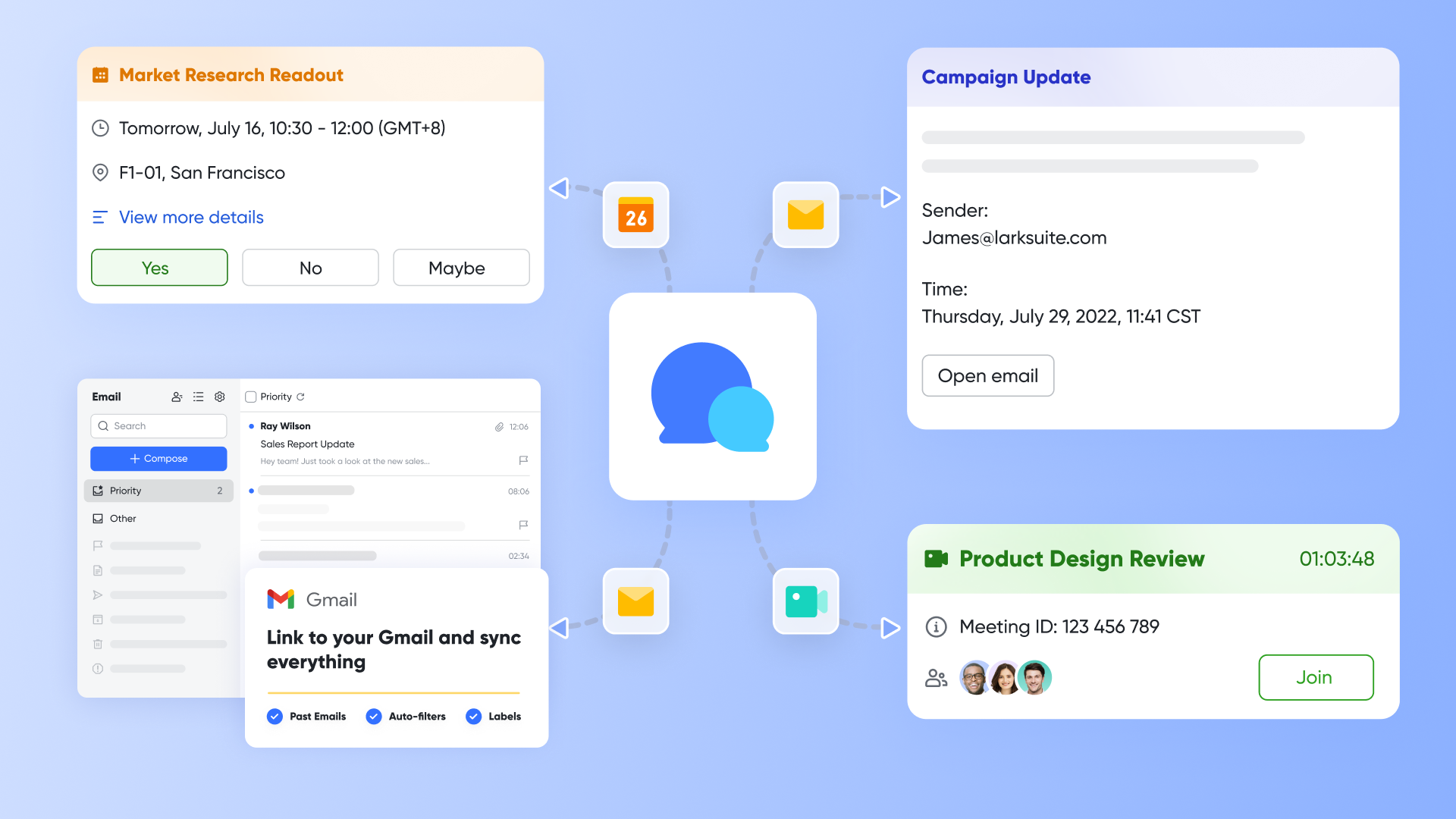
Effective iteration planning depends on a repeatable flow: Share context, clarify options, estimate and test feasibility, choose a realistic set of work, design how to execute it, and close with a clear commitment. Lark supports each step with dedicated yet connected capabilities. By running the whole process in one comprehensive environment, teams reduce friction, keep everyone on the same page, and turn iteration planning into a reliable habit rather than an exhausting ritual.
for Lark:
- Starter plan: that includes 11 powerful tools for up to 20 users. It also comes with 100GB of storage space, 1000 automation runs, AI translations, and more. No credit card needed.
- Pro plan: (billed annually) for up to 500 users. It includes everything in Starter plus group calling for up to 500 attendees, 15TB of storage space, 50,000 automation runs, and more.
- Enterprise plan: for custom pricing. Supports unlimited users and includes even more automation runs and advanced security, compliance, and management features.
For small teams with simple communication needs

18 months message history
1000 Base automation runs/month
2000 rows per table in Base
Most POPULAR
For companies with comprehensive collaboration and management needs
Unlimited message history
500-participant video meetings
50k Base automation runs/month
20k rows per table in Base
For large companies with advanced security and organizational management needs
Get a personalized demo and pricing
Unlimited message history
500-participant video meetings
15 TB storage + 30 GB storage/user
500k Base automation runs/month
50k Base automation runs/month
Most POPULAR
For companies with comprehensive collaboration and management needs
Unlimited message history
500-participant video meetings
50k Base automation runs/month
20k rows per table in Base
Ready-to-use template for iteration planning
Agenda‑driven iteration planning template
A simple, time‑boxed agenda that guides the team from context to commitment. Typical sections: recap goals and last iteration, review candidate backlog items, estimate and check capacity, select the iteration backlog and goal, break into tasks, and and commitments. This template fits directly into a calendar invite or meeting document and keeps the session focused.
Preparation checklist template
A one‑page checklist is used before the meeting to avoid surprises. It usually has sections for the product owner (prioritised, ready backlog), facilitator or team lead (agenda, tools, capacity inputs prepared), and team members (stories pre‑read, questions noted, risks brought in). Teams iterate on this list over time, trimming what doesn't add value and highlighting the few checks that matter most.
Iteration plan one‑pager template
A concise document or page that captures the essence of a single iteration. It typically includes iteration dates, goals, selected items, capacity assumptions, key risks, dependencies, and . The one‑pager is easy to share with stakeholders, acts as a reference during daily stand‑ups, and offers a quick record for retrospectives and future planning.
Board‑based planning view template
A board layout that supports the planning conversation rather than just tracking. Common lanes: "Ready candidates", "Selected for iteration", "Out of scope", plus tags for size, risk, and type of work. During planning, items move from candidates to selected, with capacity indicators helping the team decide when to stop. Afterwards, the same board flows into execution.
Remote‑friendly planning workspace template
This template consolidates the agenda, notes, and visual backlog for remote teams in one accessible platform. It includes sections for objectives, candidate items, capacity summaries, an emerging plan, and risks, along with areas for team comments and questions. Designed for both synchronous and asynchronous collaboration, team members can contribute insights before, during, and after meetings, ensuring everyone stays aligned throughout the planning process.
Outcome‑focused goal template
A focused template dedicated to iteration goals rather than tasks. It prompts the team to define two or three outcome statements, related key metrics, and the set of backlog items that support each outcome. By on user or business results, it helps teams make scope trade‑offs more intelligently throughout the iteration and simplifies stakeholder communication.
Common iteration planning mistakes and how to fix them
Iteration planning should create a clear, realistic plan that the team believes in. In practice, a few recurring patterns quietly undermine this goal. By spotting these patterns early and applying simple corrections, you can make planning faster, calmer, and more reliable.
- Over‑commitment and chronic spillover: Teams routinely plan more work than they can finish, so items roll over, testing is rushed, and pressure increases. Fix it by basing scope on recent velocity and real capacity, keeping stories small, and explicitly including testing, review, and deployment work in the plan. from other projects can also help teams avoid repeating similar mistakes and improve their estimation accuracy.
- Poor backlog readiness and scope churn: Top‑priority items are vague, oversized, or missing acceptance criteria, so planning turns into live rewriting, and expectations keep shifting mid‑iteration. Fix it with a clear, lightweight "Definition of Ready," regular refinement sessions before planning, and earlier PO– on complex items.
- Tool‑driven, one‑sided planning: Planning becomes mainly moving tickets around while one or two people talk; others stay quiet, and important risks surface only after work starts. Fix it by starting from goals and context instead of the board, using tools only to , and actively facilitating so everyone contributes questions, risks, and assumptions.
- Ignoring distributed and hybrid constraints: Remote or hybrid teams run long, synchronous meetings as if everyone were co‑located, leading to fatigue and misalignment. Fix it by shortening live sessions, using asynchronous preparation and written summaries, and relying on shared backlogs and visual workspaces, so everyone sees the same information and decisions.
Taken together, these fixes point to a simple principle: Make your iteration plan match reality (capacity and clarity), and make your planning conversation genuinely collaborative (especially for remote teams). When those two conditions hold, iterations become more predictable, and the planning meeting feels like a useful design session—not a stressful ritual. In addition, a comprehensive iteration planning tool like Lark can help solve these obstacles.
Conclusion
Iteration planning is the recurring moment where teams turn priorities into a realistic, shared commitment for the next timebox, balancing goals, capacity, and risk so they can deliver value predictably while still adapting to change. When you bring a prepared backlog, involve the right people, write outcome‑focused iteration goals, and treat estimation as a guide rather than a target, planning becomes a supportive rhythm instead of a stressful negotiation. Continuous improvement closes the loop: each iteration review and retrospective feed better assumptions, clearer scope, and smoother collaboration back into the next planning session. Whatever tools you use for boards, documents, or video, from specialised lifecycle platforms to integrated suites like , the real advantage comes from how your team uses them to make information visible, align on trade‑offs, and honour the commitments you make together.
Turn your backlog into a clear iteration plan with Lark
FAQs
What is the difference between sprint planning and iteration planning?
In many teams, there is no practical difference: sprint planning is the Scrum term for the ceremony where the team decides what to deliver in the next sprint, while iteration planning is a broader term used across multiple Agile frameworks.
Both typically involve:
- Reviewing goals and context.
- Selecting a realistic set of backlog items.
- Clarifying acceptance criteria and dependencies.
- Defining a clear goal for the timebox.
Frameworks such as and use "iteration" more often than "sprint," but the underlying intent remains similar.
What are the phases of iteration planning?
Most effective planning sessions follow a recognisable sequence of phases:
- Align on context and objectives: Understand product goals, recent progress, and constraints.
- Exploring candidate work: Review the top of the backlog, clarify intent and expectations.
- Estimate and assess feasibility: Size items and compare them against capacity and historical throughput.
- Select and shape the plan: Build the iteration backlog, define the iteration goal, and balance new work with maintenance.
- Detail tasks and expose risks: Discuss implementation at a practical level, identifying risks, dependencies, and assumptions.
- Confirm commitment and close: Validate realism, agree on next steps, and make sure the plan is understood.
Different teams may label or group these phases differently, but the flow from context, to options, to decisions, to concrete next steps is widely shared.
What is the iterative planning process?
The iterative planning process is not a single meeting; it is an ongoing cycle that repeats and refines over time. It typically includes:
- Longer‑range planning, such as roadmaps, release or Program Increment planning, where high‑level priorities and themes are set.
- Regular iteration planning, where those priorities are turned into concrete, time‑boxed plans for the next cycle.
- Daily coordination, where the team updates progress and adjusts within the bounds of the agreed goal.
- Review and reflection, where outcomes are inspected in an iteration review and then discussed in a retrospective, feeding insights back into future planning.
Because each iteration informs the next, the process becomes a feedback loop. Plans do not need to be perfect; they need to be good enough to guide action and learning, then updated as reality unfolds. To truly learn iteration planning, engage in practical application and seek continuous feedback to improve your process over time.
What four activities are key to iteration planning?
Different sources describe the structure in slightly different ways, but four key activities appear consistently:
- Clarify goals and constraints: Ensure everyone understands what the iteration is meant to achieve and what boundaries exist.
- Select and commit to work: Choose backlog items that fit capacity and best support the stated goals.
- Plan how to do the work: Break items into tasks, discuss approaches, and surface risks and dependencies.
- Validate realism and document decisions: Perform a final check that the plan is achievable and that goals, assumptions, and responsibilities are recorded where everyone can find them.
These activities form the backbone of iteration planning in Agile environments, regardless of the specific framework or toolset.
Can the iteration scope change mid‑iteration?
Scope can change, but frequent or large changes usually indicate upstream issues. When new, urgent work appears, teams may:
- Swap items of similar size while maintaining the iteration goal.
- Explicitly lower commitment by dropping some planned items to make room for the new work.
- In rare cases, cancel the iteration and re‑plan if assumptions have fundamentally changed.
The key is to make changes visible and intentional, rather than quietly overloading the team.
Related reading































