If you search for AI inventory management software right now, you will find hundreds of platforms making nearly identical promises: smarter forecasting, fewer stockouts, lower carrying costs, automated reordering. The language is consistent. The outcomes businesses actually experience are not.
The problem is structural: most of these systems are designed to generate insights, not to act on them. They produce accurate predictions and then leave operations teams to figure out — manually, across multiple disconnected applications — how to turn those predictions into approved purchase orders before the reorder window closes.
This guide covers eight tools evaluated against a consistent five-capability framework. But before the comparisons begin, it establishes something more important: what AI inventory management software actually does, what separates genuinely useful platforms from expensive dashboards, and why the most consequential capability gap in the market today has nothing to do with forecasting accuracy.
Who this guide is written for:
- Operations managers and procurement leads evaluating inventory software for the first time or replacing a system that has stopped scaling
- Business owners and team leads who have outgrown spreadsheets but are not sure which category of tool matches their actual problem
- IT, HR, and facilities teams managing physical assets — devices, equipment, supplies — who need a structured, trackable system without enterprise-level complexity
- Restaurant operators, field-service contractors, and multi-location retail teams looking for platforms calibrated to their specific industry workflows
What AI inventory management software actually does
Before comparing platforms, it is worth being precise about the mechanics. The term "AI inventory management" covers a wide range of actual capabilities, and understanding what these systems are doing under the surface helps explain both their value and their limits.
The three-layer engine
At its core, applies machine learning and predictive analytics to the problem of keeping the right stock in the right place at the right time. , the goal is to help ensure "the right products are in the right place at the right time" — but with AI doing the dynamic calculation instead of a static spreadsheet formula. Three layers work together to make this happen.
Layer one: Pattern recognition from historical data.
The system ingests past purchase orders, , job histories, and stock movements. Over time, it learns the operational rhythm of a business — which SKUs move quickly in summer, which supplier categories tend to run late in Q4, which product lines spike around regional events or promotional cycles. The more transactional data the system processes, the more precise its pattern recognition becomes. Early outputs are useful; outputs after six months of live data are meaningfully better.
Layer two: Forward-looking demand forecasting.
Rather than looking backward and reordering what was consumed last month, the system projects what will be needed across future periods — at the SKU level, location level, and supplier lead-time level simultaneously. Some platforms extend this further by incorporating external signals: weather data, regional event calendars, social media trend analysis, and point-of-sale velocity feeds. The principle is that internal sales history is a lagging indicator. A well-configured AI system combines that history with forward-looking signals to that are structurally ahead of the data curve, not reactive to it.
Layer three: Real-time data feeds that keep the model current.
IBM notes that AI can work alongside IoT-connected devices to monitor stock levels and supply chain conditions continuously. In practice, this means data from barcode scanners, POS terminals, field update forms, and flows into the model in near real time. The system is never working from last week's numbers — and for operations where a day's delay in recognizing a stockout risk can cascade into a missed order or a failed service appointment, that currency of data is operationally critical.
Dynamic safety stock vs. static min/max rules
One of the clearest indicators that a business has outgrown its current inventory system is continued reliance on static min/max rules. These are thresholds set once — typically during a stable operational period — and rarely revisited. When demand patterns shift, when a key supplier's lead times extend, or when a new product line creates unexpected demand volatility, static rules fail silently. The system still triggers reorders. It just triggers them at the wrong time, for the wrong quantity, because nobody updated the parameters to reflect current operational reality.
Dynamic safety stock takes a structurally different approach. Rather than holding a fixed buffer calibrated six months ago, it continuously recalculates optimal stock levels by factoring in current demand variance and current supplier delivery uncertainty simultaneously. : "AI relies on high-quality data to produce high-quality outcomes. If the data is inaccurate, outdated or incomplete, it can lead to flawed predictions and decisions."
A practitioner in the described the practical calculation: "Using AI to pull seasonality + standard deviation of forecast error + lead time variability → then recalculate safety stock in near real-time. This replaces static Excel sheets that never adapt to demand volatility." That framing captures what the AI is actually computing behind any well-designed dashboard — and why dynamic safety stock, properly implemented, consistently outperforms static rules on both cost and service-level metrics.
Automated replenishment as a coordination trigger
Automated replenishment in its basic form is a system that monitors stock levels and generates a purchase order when a defined threshold is crossed. That baseline capability is genuinely useful. But treating it as a purely technical event — a system action that happens inside a platform — misses what makes the best implementations operationally powerful.
A replenishment trigger is also a coordination trigger. When a low-stock threshold is crossed, the most effective workflow does not just create a draft purchase order sitting in a queue somewhere waiting to be discovered. It notifies the right people, with full context, in the channel where they are already working — immediately. The person responsible for the approval sees the alert, the relevant inventory record, the supplier's details, and a pre-formatted draft order, all together, without switching applications.
That structural difference — between a system event and a coordinated human response — is where most best in 2026 leave significant value unrealized. It is the problem the next two sections examine directly.
The 5 capabilities that separate genuinely useful AI inventory tools from expensive dashboards
Not all platforms that carry the label "AI inventory management" deliver the same depth or the same type of value. These five capabilities distinguish the tools that change from the ones that generate reports that nobody acts on.
1. Predictive demand forecasting with external variable awareness
is table stakes. The more meaningful differentiator is whether the system incorporates external variables that internal data does not capture.
, that means factoring in local events, social media trends, and seasonal menu changes alongside sales history. For field-service contractors, it means analyzing upcoming job schedules to anticipate which specific parts each technician will need before leaving the yard. For retailers, it means accounting for promotional calendars and regional demand shifts that will not show up in last quarter's numbers until it is too late to act on them.
A platform that forecasts from internal data alone will still produce more accurate predictions than a spreadsheet. But it will systematically miss the demand signals that live outside your ERP — and those are often the signals that matter most during the periods when inventory failure is most expensive.
2. Real-time, multi-location stock visibility
Whether you are tracking inventory across retail locations, restaurant kitchens, regional warehouses, or technician vehicles, you need a — not a report that is 24 hours out of date.
In multi-location operations, fragmented visibility is a recurring and entirely avoidable cost driver. Decisions made from stale data compound into over-ordering in one location while a shortage develops in another. The most effective platforms ingest data from barcode scanners, POS terminals, mobile field update forms, and ERP integrations continuously, so the number visible on the dashboard reflects what is actually on the shelf right now — not what was counted at the close of business yesterday.
3. No-code workflow automation for non-technical teams
Operations teams are not software developers. The best AI inventory management software allows non-technical users to build conditional automation rules — "when SKU quantity falls below 50 units, send an alert to the procurement group and generate a draft purchase order" — without writing a line of code and without submitting an IT ticket.
The standard for usability in 2026 is that the operations team owns the workflow, not the IT department. Platforms that require developer involvement to create or modify a reorder trigger create a bottleneck that negates much of the speed advantage AI forecasting is supposed to provide. Automation that the team can build, test, and adjust themselves is categorically more valuable than automation that requires a change request to modify.
4. Granular, role-based access control
A warehouse operative scanning barcodes on the floor should not have the same system permissions as a procurement director approving a high-value purchase order. Role-based access control protects sensitive pricing data, prevents unauthorized changes to reorder parameters, and ensures that each team member sees the inventory information relevant to their function — no more, no less.
This becomes especially important in multi-location operations where regional managers, field technicians, and central planning teams all interact with the same underlying data but need different levels of visibility and editing rights. A platform that handles this through configurable, no-code permission layers removes the security administration burden from IT teams and allows operations to manage access as headcount and roles change — without a developer handover every time.
5. A collaborative execution layer — the capability most platforms are missing
This is the capability that separates genuinely effective inventory AI from an expensive analytics dashboard.
The system must connect inventory data directly to the communication workspace where decisions are actually made. Stock alerts should not just land in a dashboard that someone checks every few hours. They should arrive inside the team's active work environment — with full context attached, a draft action ready, and an approval mechanism built in — so that the time between "signal detected" and "" is measured in minutes, not days.
This is not a productivity feature. It is the core operational difference between a tool that prevents stockouts and a tool that accurately reports them after they have already affected a customer. The tool reviews that follow evaluate each platform against all five capabilities — with particular attention to how each one handles, or fails to handle, this fifth dimension. Independent software review platforms such as and use similar criteria when rating inventory tools.
The execution gap: Why most AI inventory tools fail your team, not your forecast
Here is the argument that frames every tool review in this guide.
The single most expensive failure mode in modern inventory management is not a bad forecast. It is an accurate forecast that nobody acts on quickly enough.
Most of the discussion in the market around best AI inventory management software 2026 focuses on forecasting accuracy, algorithm sophistication, and prediction depth. Those things matter. But they are not the primary reason businesses run out of stock after implementing an AI system. The primary reason is the gap between the moment a data signal is generated and the moment a coordinated team response is completed.
Dashboard fatigue is a real and documented problem
A practitioner in the described a frustration that will resonate with anyone who has evaluated multiple inventory platforms: most off-the-shelf tools "drown you in charts but don't tell you what to do next."
Excessive, decontextualized alerts create operational noise. When a system generates dozens of notifications per day and each one requires the recipient to open a separate tool, locate the relevant record, and manually draft a response, the natural human adaptation is to treat those alerts as low-priority background noise. Teams begin filtering the system out — not because they are negligent, but because the system has created more cognitive overhead than it has removed. That outcome is more dangerous than having no alert system at all, because it produces false confidence: the platform is running, the alerts are firing, and yet nothing is changing on the ground.
The same practitioner thread included an observation worth quoting directly: "What actually moved the needle for us wasn't just the model, but how we linked forecasts directly into replenishment schedules and delivery routing. Otherwise you end up with great predictions but no follow-through."
That is the core problem stated plainly. Great predictions without structural follow-through are expensive noise.
The hidden cost of tool sprawl
Most operations teams dealing with fragmented inventory processes are not suffering from a shortage of software. They are suffering from too much of it, none of which connects to the rest.
A typical replenishment workflow in a fragmented stack looks like this: the planner checks the inventory dashboard, notices a threshold breach, takes a screenshot, pastes the data into a chat message, drafts a supplier email in a separate email client, attaches a purchase order template from a shared drive that may or may not be the current version, sends it to a manager for approval, and waits for a reply that arrives through yet another channel.
Each one of those steps is a . Each context switch introduces latency and the possibility that something gets dropped or misunderstood. that fragmented data systems — data stored "in different systems, which can create data silos" — are one of the primary challenges associated with AI inventory management. The silos are not just a data quality problem. They are a coordination quality problem that no forecasting algorithm can solve from inside a single application.
The hidden cost here is not just the time each individual switch takes. It is the cumulative delay those switches introduce into every replenishment cycle. For a business managing hundreds of active SKUs, that delay multiplies across every reorder event, every supplier negotiation, and every approval routing cycle — week after week.
Mini-scenario: An operations manager for a 12-location business receives a low-stock alert for a key item at one of her locations. To act on it, she navigates to the inventory system, identifies which supplier covers that location, opens her email client to find the supplier's contact, opens a separate document to check the agreed pricing terms, drafts the order, copies it into an email, and sends it to her procurement director for approval through a different messaging channel. Total time: approximately 35 minutes for one reorder event. Across 12 locations and dozens of active SKUs, that manual overhead becomes a measurable drag on the entire operation.
What changes when data and team are in the same workspace
The operational shift that happens when inventory records, team communication, document collaboration, and approval workflows is not incremental. It is structural.
arrive with full context already attached — the relevant inventory record, the supplier's contact, the last agreed pricing terms, and a pre-formatted draft order — all in the same notification. The person responsible for the approval does not need to open a separate system. They review the draft, confirm the details, and approve in a single action. If the supplier operates in a different language region, outreach can be handled within the same environment without switching to a third application.
The replenishment loop that took 35 minutes and three application switches collapses to under ten minutes in a single workspace. Multiply that compression across every SKU threshold breach in a given week, and the operational impact becomes a measurable reduction in both stockout frequency and the labour overhead attached to every procurement cycle.
This is the fifth capability — the collaborative execution layer — that the tool reviews that follow evaluate with particular care. It is the capability most platforms in this category are still missing. And it is the one that, for teams where execution speed is the primary bottleneck, matters more than any forecasting algorithm.
The eight tools reviewed next were selected to represent the full range of approaches currently available in the market: from deep specialist forecasting engines to flexible no-code portal builders to unified collaborative workspaces. Each is assessed against the five-capability framework established above — with a clear account of what each tool does well and where it stops short.
The 8 best AI inventory management software tools reviewed for 2026
Each tool below was evaluated against the five-capability framework established earlier in this guide: forecasting depth, real-time visibility, no-code automation, role-based access control, and — most critically — whether the platform between a data signal and a coordinated team response.
1. Lark: The collaborative workspace that turns inventory alerts into approved purchase orders
is the standout pick for fast-growing SMEs, multi-location operations, and remote or hybrid teams that need more than a forecasting dashboard. Rated and , it is the only tool on this list that addresses the execution gap directly — connecting the moment a stock threshold is crossed to the moment a purchase order is approved, without a single application switch.
Unlike every other platform in this guide, is a full collaboration workspace: , , , , , , , , and a all live in one environment. For inventory management, that architecture changes what is operationally possible.
Centralized inventory database — no code required
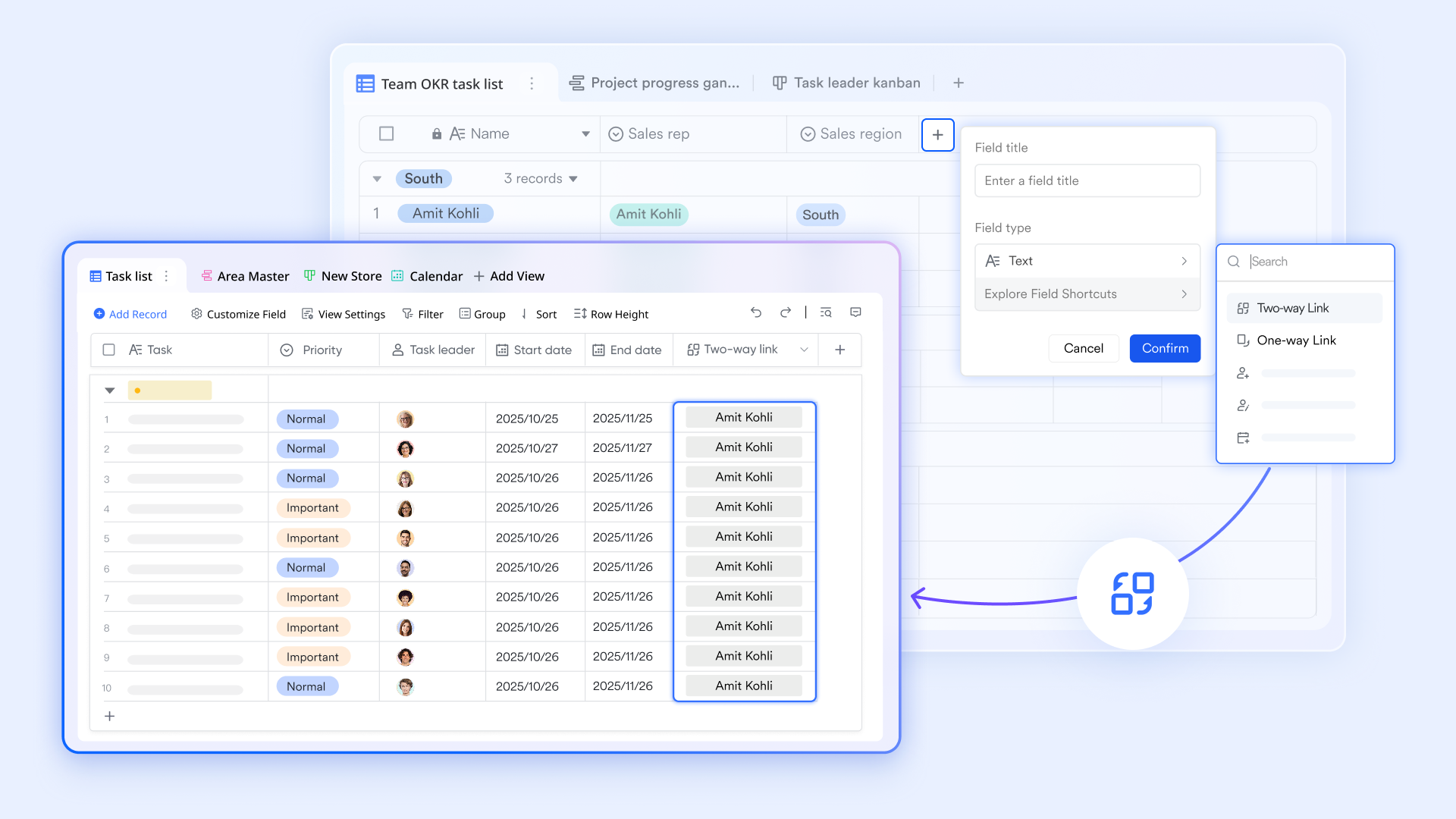
lets teams build a fully customized stock database with SKU fields, warehouse locations, supplier registries, reorder thresholds, and filtered views by location or category — all without writing a single line of code. Any team member can configure, update, or restructure the database without IT involvement.
Automated reorder alerts and purchase order drafts
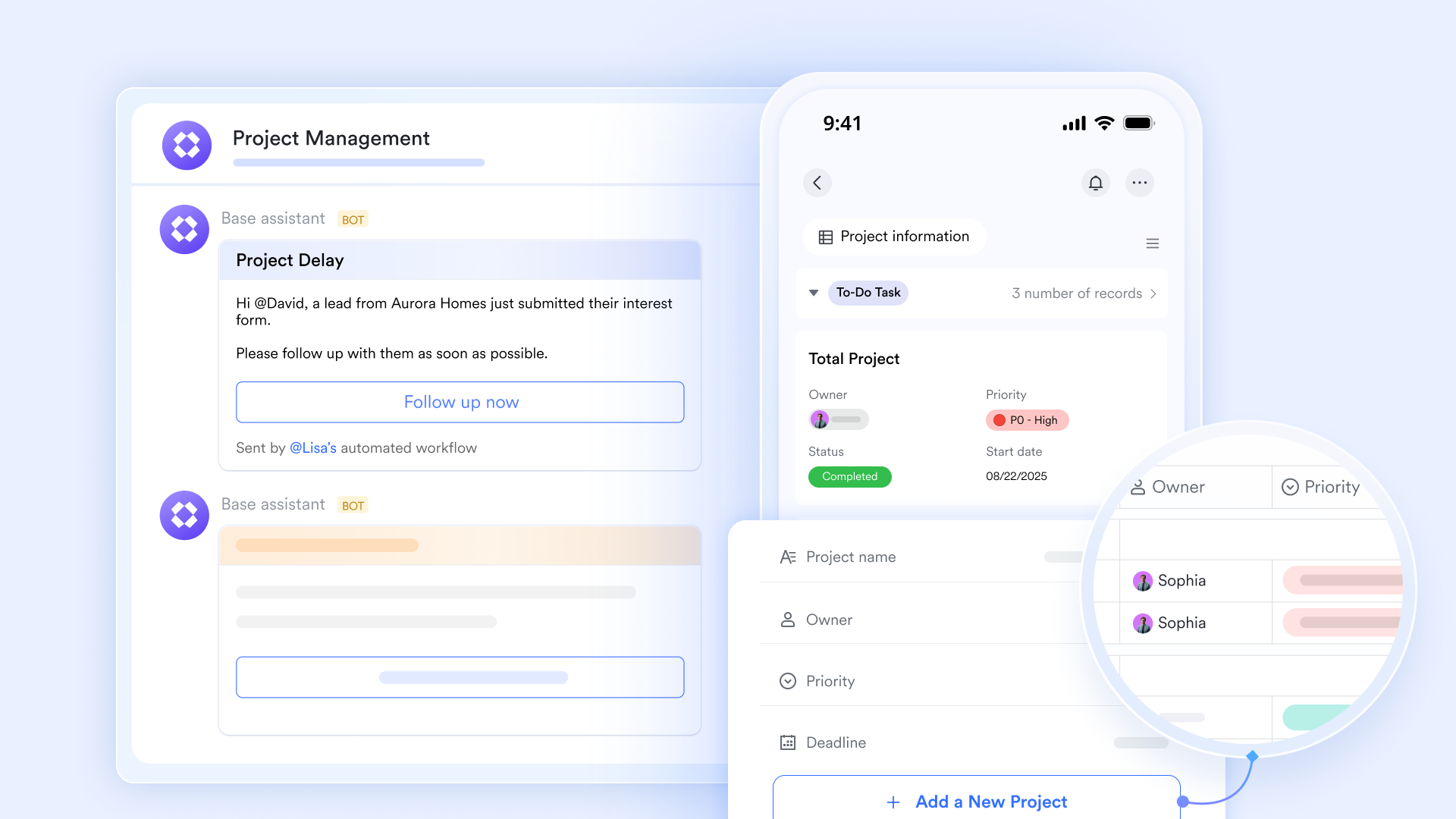
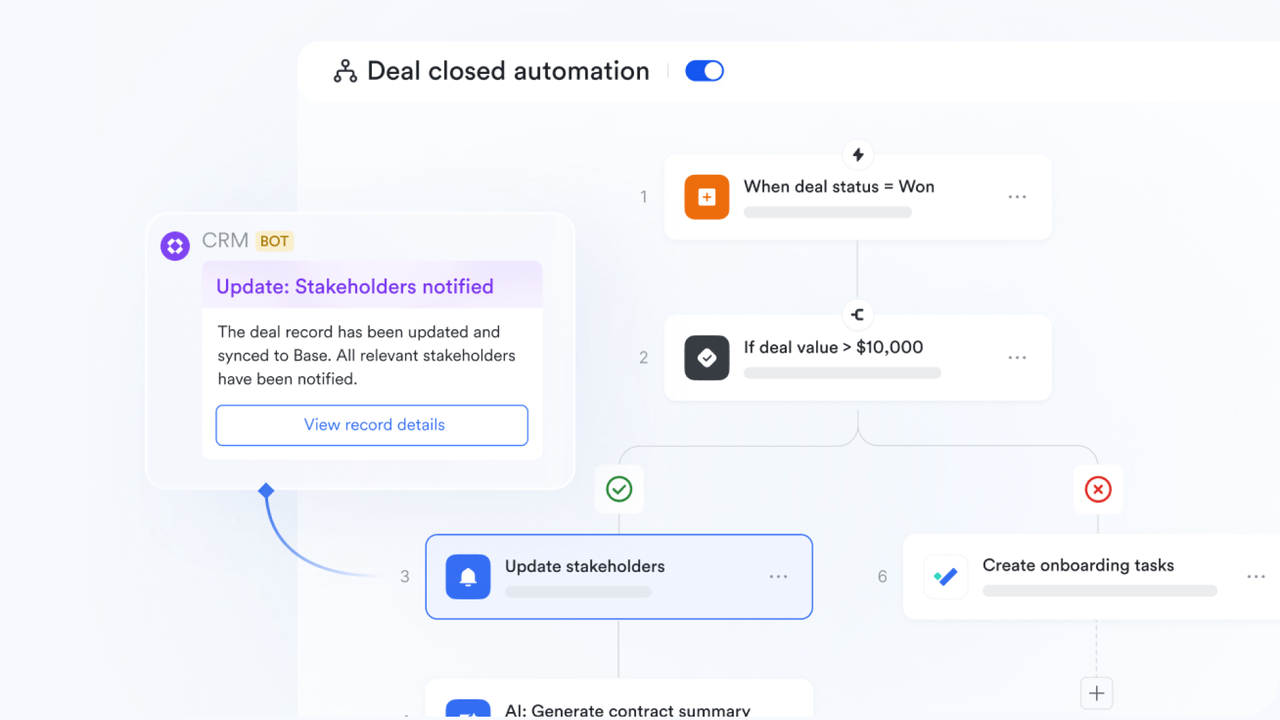
When a stock level in drops below a defined threshold, an instantly pings the relevant group chat — with the inventory record, the supplier's contact details, and a pre-formatted purchase order draft already attached. Nothing needs to be assembled manually.
In-chat approval workflows
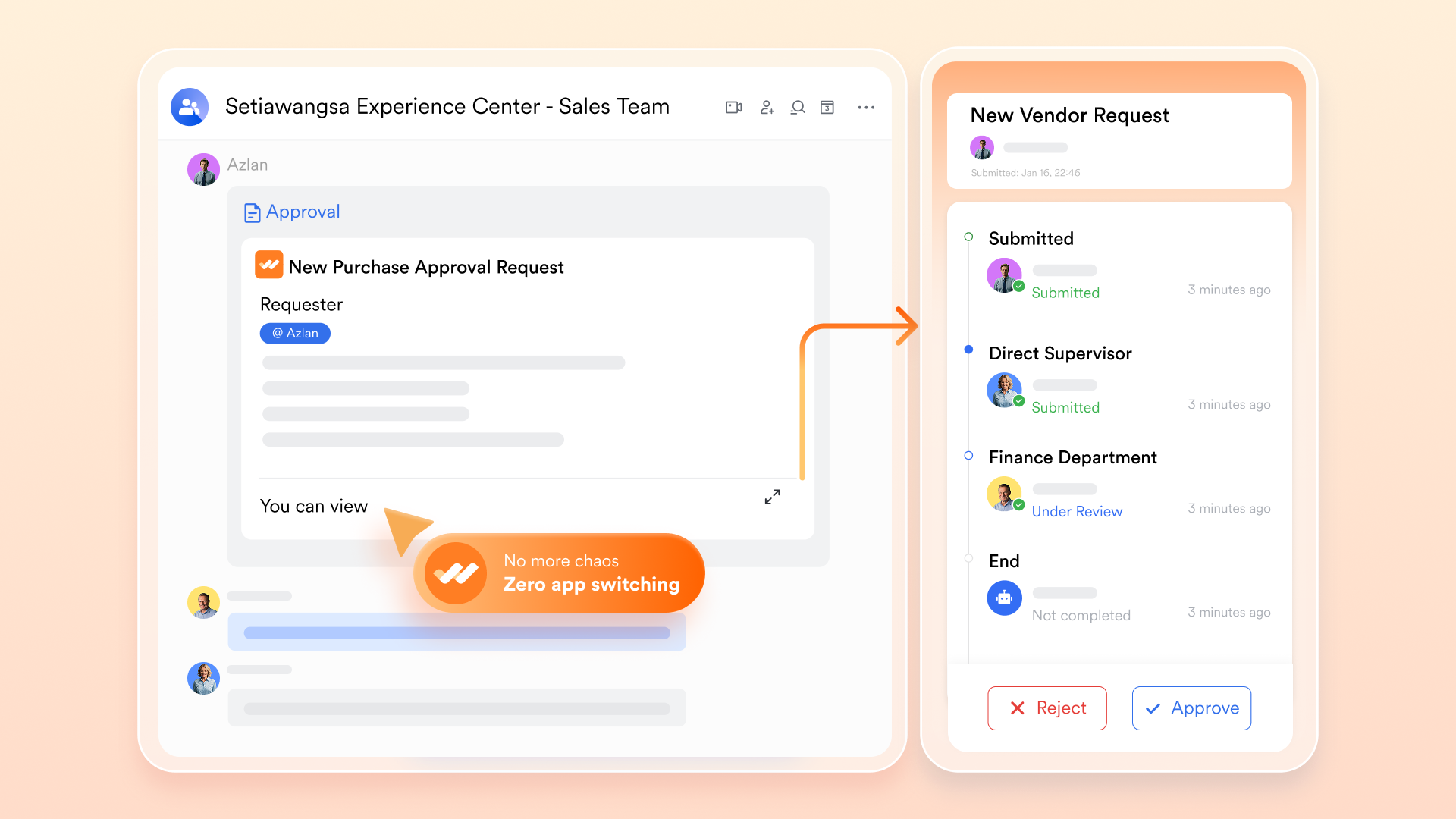
The procurement manager reviews the draft and approves with one click, directly within the chat window. The alert, the draft order, and the approval all happen in the same workspace — no screenshots, no application switching, no email threads.
Built-in AI translation for international supplier communication
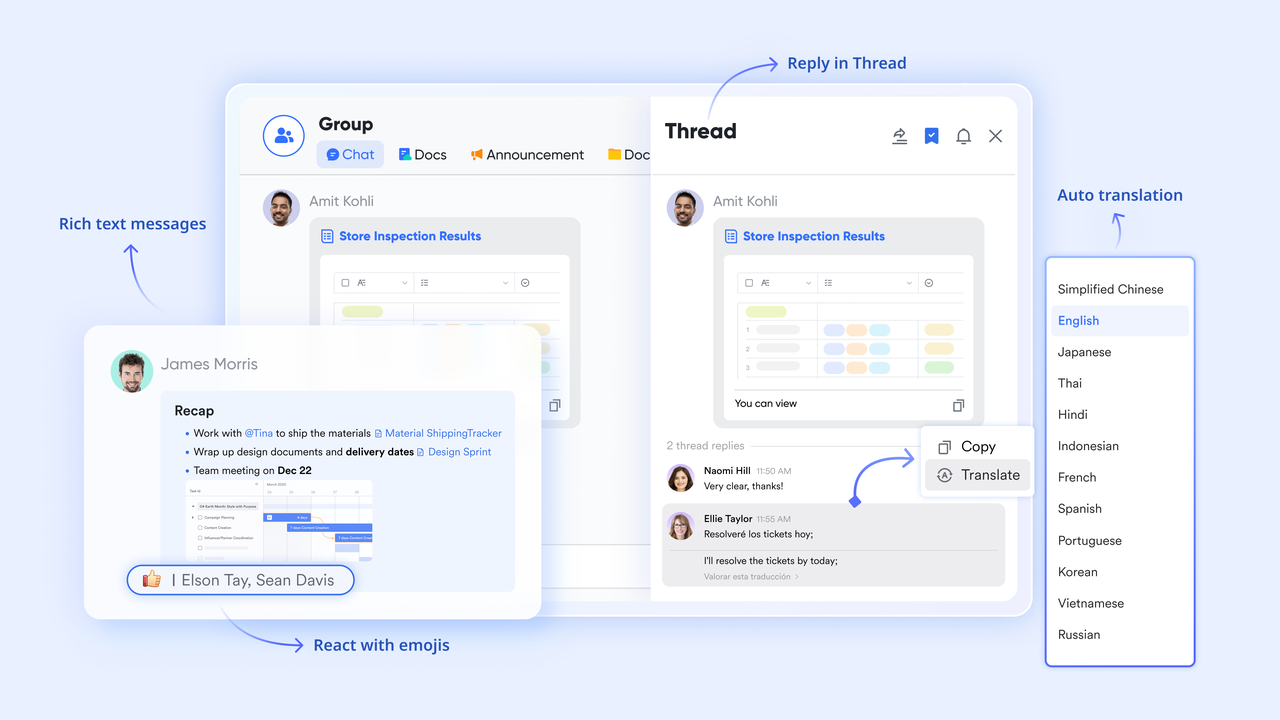
's built-in AI translation converts purchase order drafts and supplier messages into the required language directly within the chat. Teams managing cross-border procurement no longer need a separate translation tool or manual reformatting.
Live supplier knowledge hub via Lark Wiki
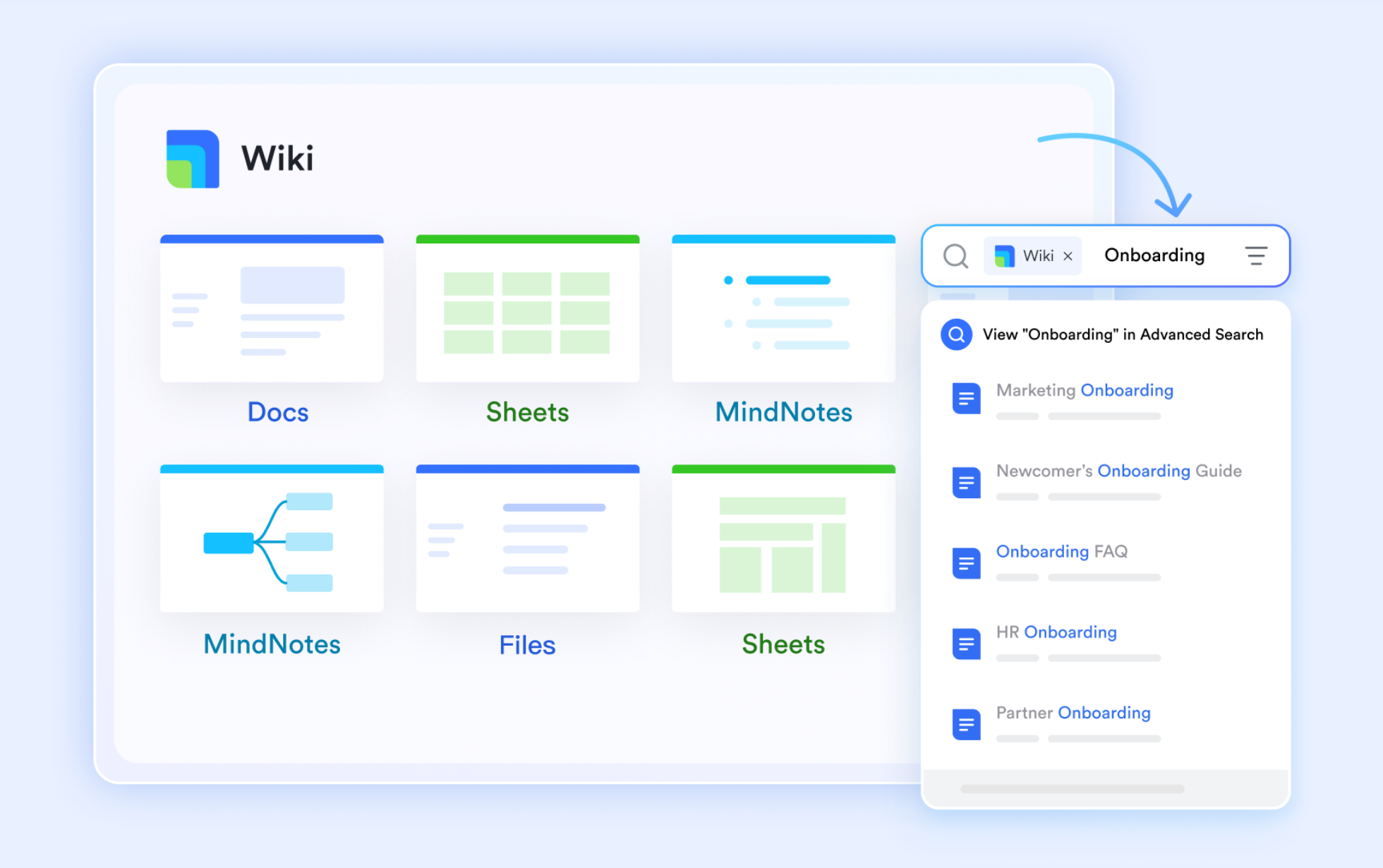
Contract terms, pricing history, and supplier performance notes are stored in and sit alongside the active procurement conversation in real time. Every negotiation is informed by current data rather than memory or scattered files.
Mobile-first stock updates for field and warehouse teams
Field staff and warehouse teams submit stock level updates through mobile-friendly forms that sync to the centralized database instantly. Back-office planners are always working from current numbers, regardless of how distributed the team is.
Mini-scenario: An IT operations manager at a 200-person company needs to track laptop assignments across three offices. She builds a table with fields for device model, assigned employee, office location, warranty expiry, and status. She sets an automation: when a device's warranty expiry is within 60 days, a notification fires into the IT group chat with the asset record and a draft renewal request. The procurement lead approves the order from within the same chat. The entire loop — detect, notify, draft, approve — completes in under ten minutes, with no email thread required.
Pros:
- Combines inventory database tracking, team messaging, document collaboration, automated multi-step approval flows, and built-in AI translation into one platform — replacing several separate subscriptions and eliminating context-switching overhead
- Lark Base delivers no-code, highly customizable database tables with conditional automation rules that operations teams configure and adjust themselves without IT involvement
- The free Starter plan is genuinely substantial: 11 integrated tools, 100GB of storage, 1,000 automation runs, and AI translations for up to 20 users — no credit card required
Cons:
There are so many features across the platform that new users benefit from spending time in the help center before building complex workflows. The initial transition from spreadsheets to takes a short adjustment period — but the structured onboarding resources make it manageable.
- Starter plan: Free forever plan with 11 powerful tools for up to 20 users, 100GB storage, 1,000 automation runs, AI translations, and more. No credit card needed.
- Basic plan: $6/user/month (billed annually) for up to 500 users. Includes everything in Starter plus unlimited message history, 5TB storage, 1,000 automation runs, and more. Some users may need to to purchase.
- Pro plan: $12/user/month (billed annually) for up to 500 users. Includes everything in Basic plus group calling for up to 500 attendees, 15TB storage, 50,000 automation runs, and more.
- Enterprise plan: for custom pricing. Supports unlimited users and includes advanced automation, security, compliance, and management features.
For small teams with simple communication needs

18 months message history
1000 Base automation runs/month
2000 rows per table in Base
Most POPULAR
For companies with comprehensive collaboration and management needs
Unlimited message history
500-participant video meetings
50k Base automation runs/month
20k rows per table in Base
For large companies with advanced security and organizational management needs
Get a personalized demo and pricing
Unlimited message history
500-participant video meetings
15 TB storage + 30 GB storage/user
500k Base automation runs/month
50k Base automation runs/month
Most POPULAR
For companies with comprehensive collaboration and management needs
Unlimited message history
500-participant video meetings
50k Base automation runs/month
20k rows per table in Base
2. Netstock AI: The always-on inventory analyst for mid-market distributors
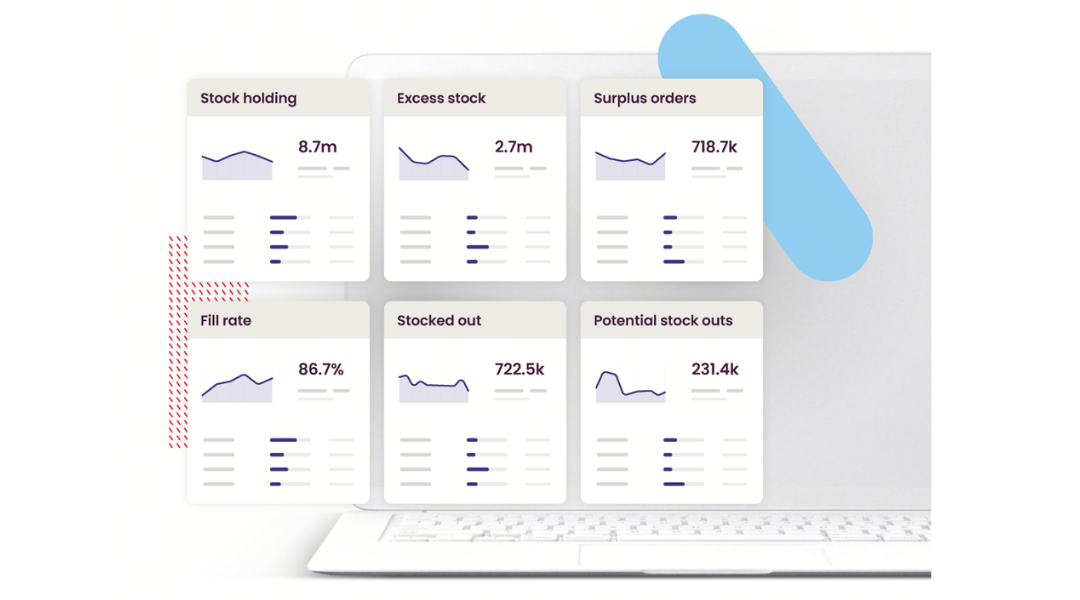
Image source: netstock.com
Netstock AI is best suited for mid-market wholesale distributors and manufacturers with clean ERP data who need a specialist AI layer to translate complex inventory data into clear, SKU-level recommendations and automated supplier communications.
Its core value is converting analysis work that normally requires a seasoned planner into actionable insights any team member can execute immediately. The platform includes a Dashboard Analyzer for executive summaries, an Item Analyzer for individual item optimization, an Item Troubleshooter for root-cause clarity, and a Safety Stock Explainer for buffer visibility. The most operationally distinctive capability is its Inventory Email Agents — generative AI that automatically drafts supplier outreach for surplus orders, late shipments, and stockout risks, then notifies affected customers.
Netstock is ISO 27001 certified certified with data kept in its own secure ecosystem — important for teams handling sensitive supplier pricing records. Its clear limitation: it lacks an internal communication workspace, so teams still need a separate tool for approvals, messaging, and cross-departmental coordination. The planning insights are sharp; the execution infrastructure sits elsewhere. Pros:
- Multiple specialized AI tools — Dashboard Analyzer, Item Analyzer, Item Troubleshooter, Safety Stock Explainer — each targeting a distinct decision point in the planning cycle rather than offering a single general-purpose dashboard
- Inventory Email Agents generate supplier outreach and customer notifications directly from inventory data, cutting the manual communication burden on planners significantly
- provides a verified security standard for operations teams handling sensitive procurement records and supplier pricing data
Cons:
- Netstock functions as a specialist analytics and planning layer only — teams need a separate platform for internal communication, approval workflows, and cross-departmental coordination, which means the execution gap remains structurally open
- No publicly listed self-serve pricing; every deployment requires a custom quote, which makes early-stage cost evaluation more time-consuming
Pricing:
Custom quotes required. No self-serve pricing is publicly listed. Contact Netstock directly via netstock.com for a tailored proposal.
3. Peak AI: Precision replenishment optimization for retailers and manufacturers
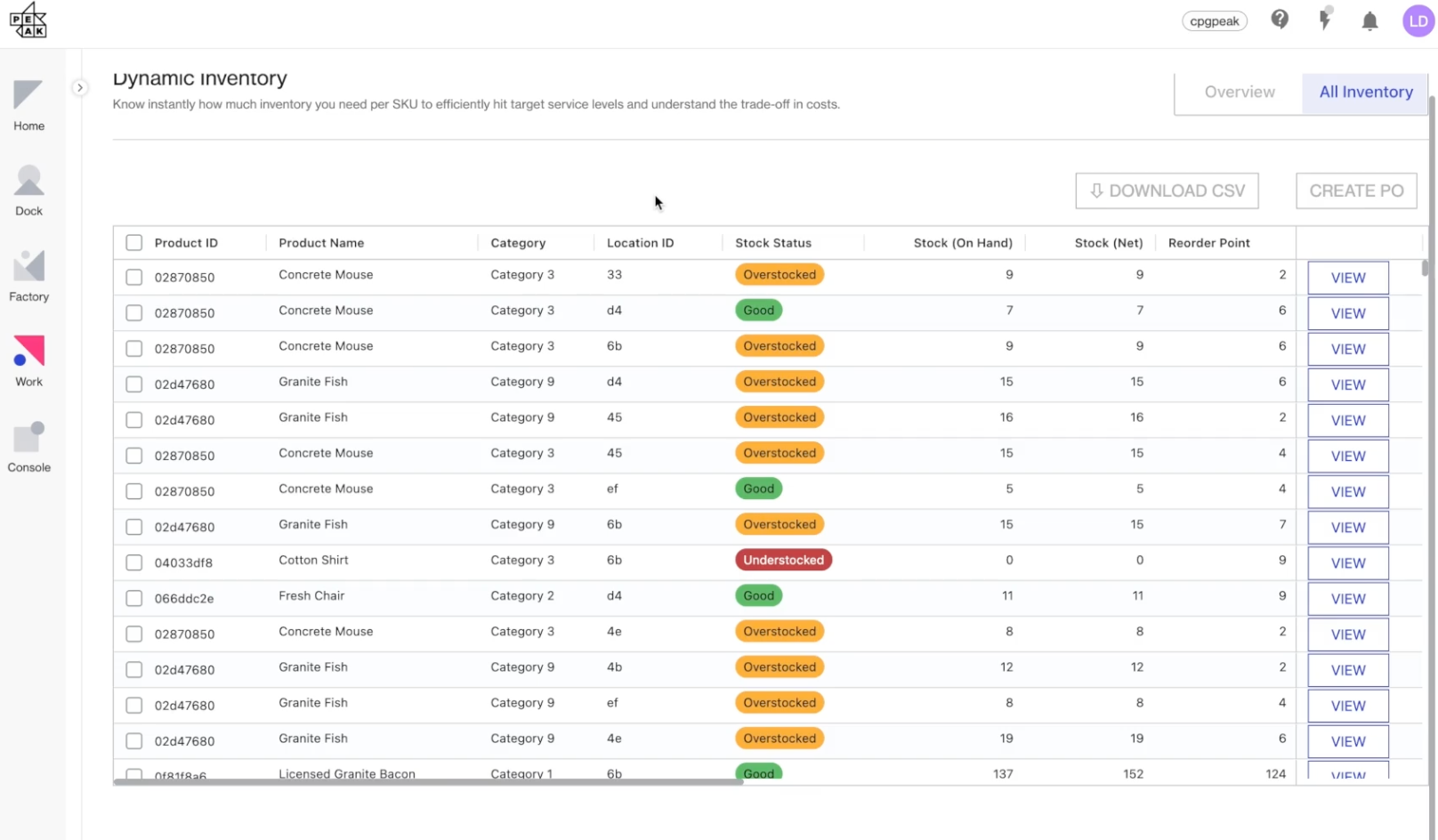
Image source: peak.ai
Peak AI is best for mid-to-large retail chains and manufacturers managing complex, multi-location fulfillment networks who need granular, SKU-level replenishment decisions. It is a specialist optimization platform with strong third-party credibility — and a clear gap on execution and communication.
Peak AI solves a specific problem: ensuring the right stock reaches the right location at the right time in the right quantity. Its suite covers dynamic inventory optimization, production planning, AI-powered purchase order recommendations, optimal quantity calculations, and network-wide replenishment. The Scenario Planning module stands out — it lets teams model demand surges or supplier delays before purchasing, reducing reactive costly choices.
The platform's credibility is well-documented: Peak appears in Gartner's Market Guide for Analytics and Decision Intelligence Platforms in Supply Chain. Documented results include Speedy Hire achieving 4% inventory savings, and deployments at Marshalls and B&M managing inventory complexity at scale. Its forecasting depth for volatile, high-SKU networks is competitive at enterprise and mid-market levels.
Peak lacks any internal communication layer. Insights still route through separate tools for approvals, messaging, and supplier outreach. For teams whose primary bottleneck is forecasting accuracy rather than execution speed, Peak's modeling depth is one of the strongest specialist options available.
Pros:
- Comprehensive suite covering the full replenishment cycle — from production planning to dynamic reorder recommendations to scenario simulation — within a single platform
- Named in Gartner's Market Guide for Analytics and Decision Intelligence Platforms in Supply Chain, providing meaningful third-party validation
- Documented customer results (Speedy Hire, Marshalls, B&M) demonstrate real-world impact at scale, not just benchmark performance
Cons:
- Peak is a specialist optimization platform, not a team communication or workflow tool — approvals, supplier outreach, and cross-team coordination still require separate systems
- No public pricing tiers; custom enterprise quotes only, which makes it difficult to evaluate cost fit without committing to a sales conversation
Pricing:
Custom enterprise pricing only. No public pricing tiers or free plan. Book a demo via peak.ai.
4. Monday service: Visual inventory workflows connected to broader operations
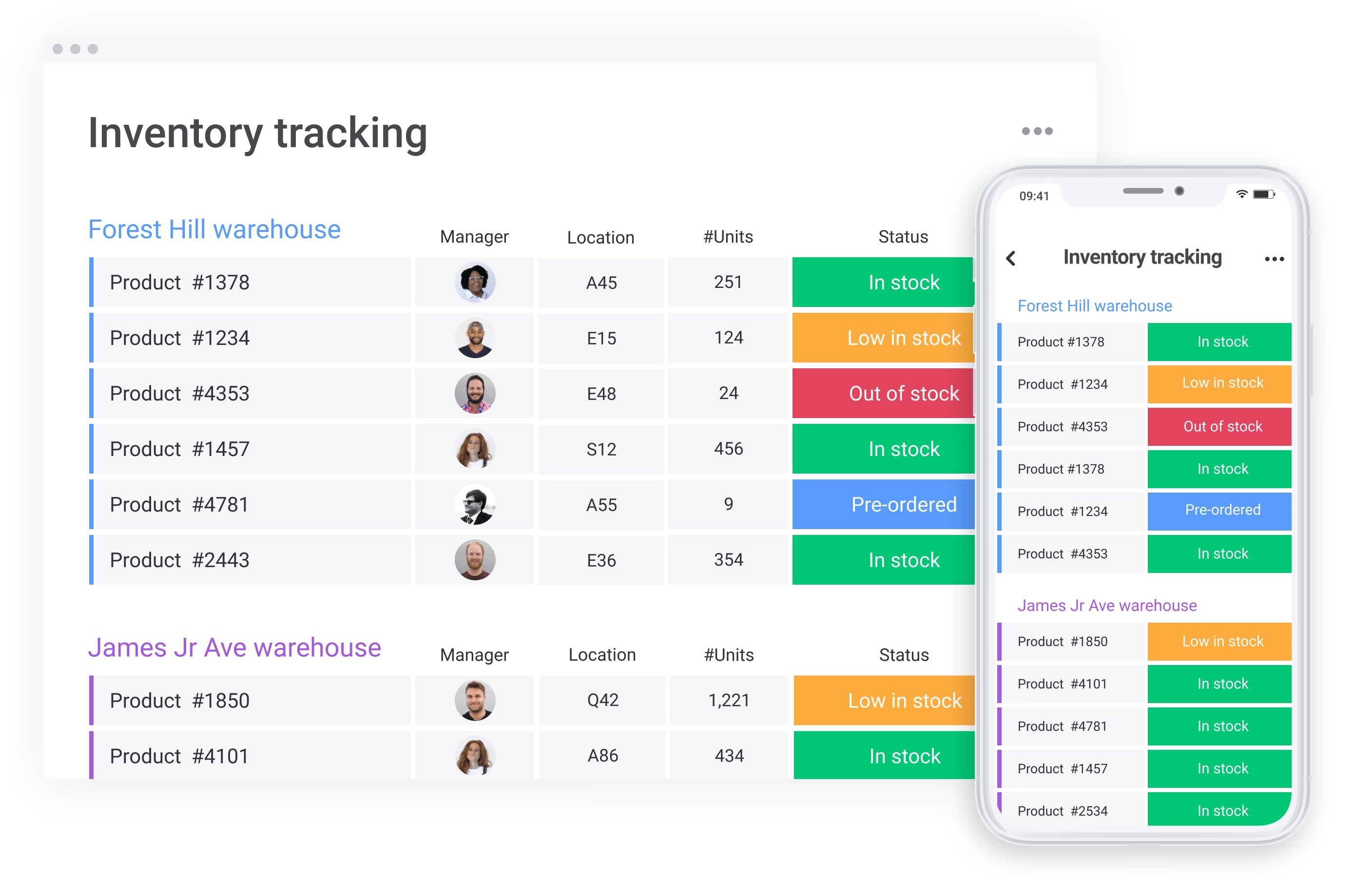
Image source: monday.com
Monday service fits service-oriented teams and IT operations departments managing asset tracking and stock alongside support tickets, project work, and customer communication in one connected workspace. It is not a specialist forecasting engine, but its breadth makes it strong for teams where inventory is one component of wider operations.
Rather than building a deep demand-modeling engine, it connects inventory activity to service requests, field assignments, and customer updates. Inventory boards are customizable with automated tracking, QR code support, and real-time mobile updates. Pre-built templates include formulas for calculations, manufacturer groupings, and order fulfillment procedures.
Advanced AI includes AI Blocks that recommend reorder points and flag seasonal trends; Digital Workers that update quantities and generate purchase orders; and no-code automation for alerts, vendor communication, and reporting. The platform integrates with Shopify, accounting tools, shipping carriers, and ERP systems — keeping stock levels, customer updates, and field assignments aligned in one workspace.
Forecasting depth is not competitive with purpose-built tools like Peak AI or Netstock AI. It is a strong operational platform that includes solid inventory capabilities — not an inventory platform optimized for complex supply chains.
Pros:
- Connects stock tracking directly with service requests, customer support, and project work — making it useful for teams where inventory management is one part of a wider operational picture
- No-code automation recipes and AI Blocks reduce manual work for routine tasks including stock alerts, vendor updates, and quantity adjustments, without requiring developer involvement
- Transparent, publicly available pricing with a free tier (up to 2 seats) and a 14-day free trial on all paid plans — one of the few tools on this list with fully accessible pricing
Cons:
- Not a specialist inventory forecasting platform — teams managing complex, multi-echelon supply chain math or high-frequency dynamic safety stock requirements will find predictive modeling depth limited compared to purpose-built tools
- The free plan is limited to 2 seats, which restricts meaningful team evaluation before committing to a paid tier
Pricing:
Free plan available (up to 2 seats, limited features). Paied plans start at around 9/seat/month (billed annually).
5. Softr: Build your own custom AI inventory portal without writing code
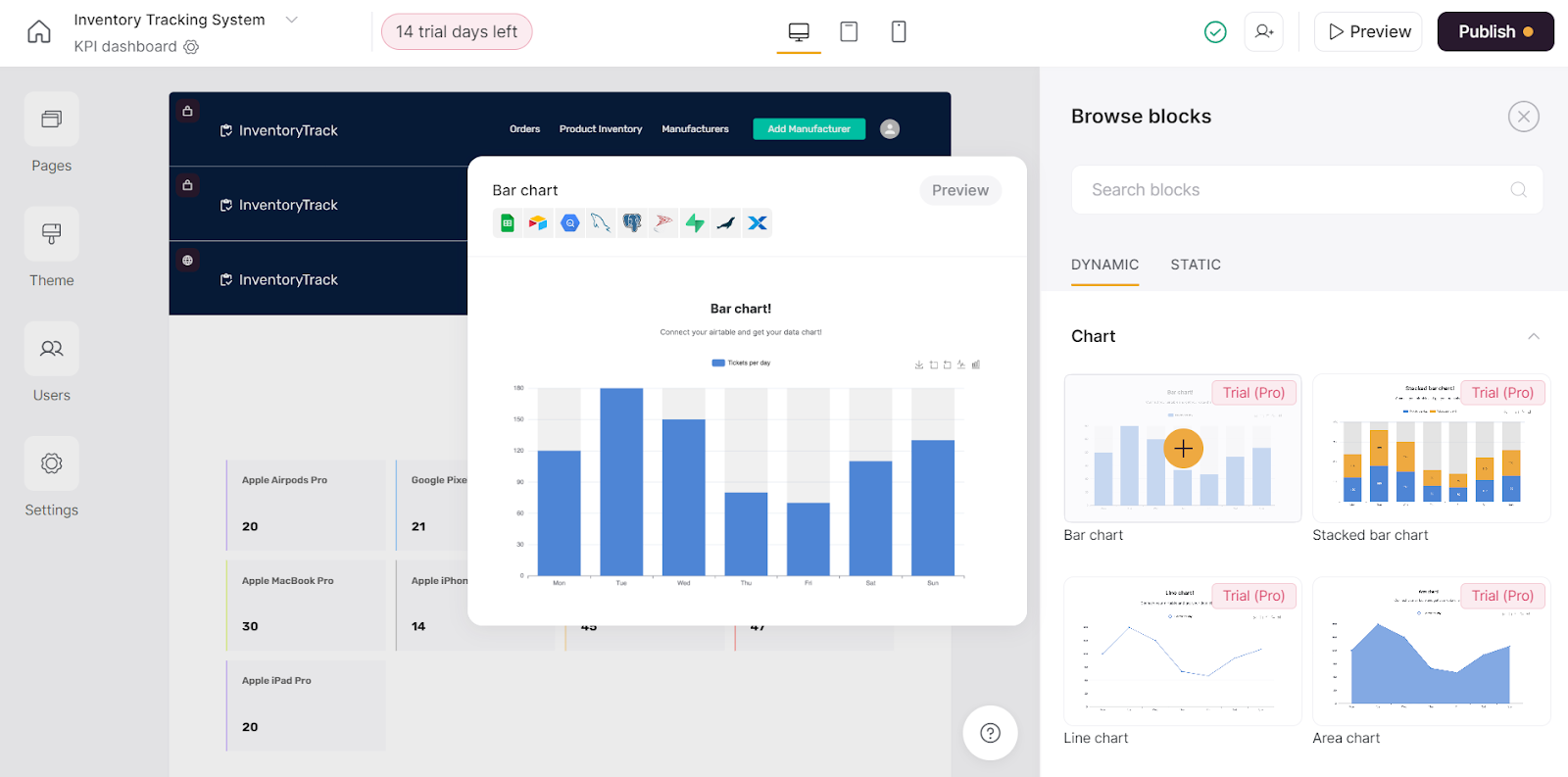
Image source: softr.io
Softr fits growing operations teams that need to build a fully custom, secure inventory portal on top of existing data — quickly, without developer resources. It is a portal-building platform, not a specialist forecasting engine.
Rather than offering pre-built inventory applications, it provides drag-and-drop interface tools and AI-powered app generation. Teams describe what they need; Softr builds the interface, database, and workflows — then invite team members the same day with no developer handover. It supports custom SKU tracking, automated low-stock alerts, supplier portals, and role-based permissions via Google, email, or SSO login. Database AI Agents handle data cleanup and enrichment automatically. SOC 2 and ; connects to Airtable, Google Sheets, HubSpot, and REST APIs.
Softr provides the interface and database layers, not advanced forecasting logic. Teams needing dynamic safety stock modeling must integrate external systems. For teams whose primary need is a flexible, custom-branded portal built quickly on existing data, Softr excels.
Pros:
- Builds a fully custom inventory portal tailored to the team's exact workflow — not a rigid pre-built tool that forces processes to conform to the software's structure
- Granular, role-based permissions configurable via Google, email, or SSO login ensure each team member accesses only the inventory data relevant to their function, with no IT tickets required
- Database AI Agents automate repetitive backend tasks (data cleanup, enrichment, tagging), keeping inventory records accurate without ongoing manual maintenance overhead
Cons:
- Softr is a portal-building platform, not a specialist demand forecasting engine — teams needing dynamic safety stock modeling or advanced replenishment algorithms must integrate those capabilities from external systems
- Because Softr's value comes from customization, teams with no prior process documentation may spend meaningful setup time defining their workflow before building begins
Pricing:
A free tier is available with limited features. Paid plans start at around $49/month (billed annually).
6. SynergySuite: AI-powered inventory management built for restaurant operations
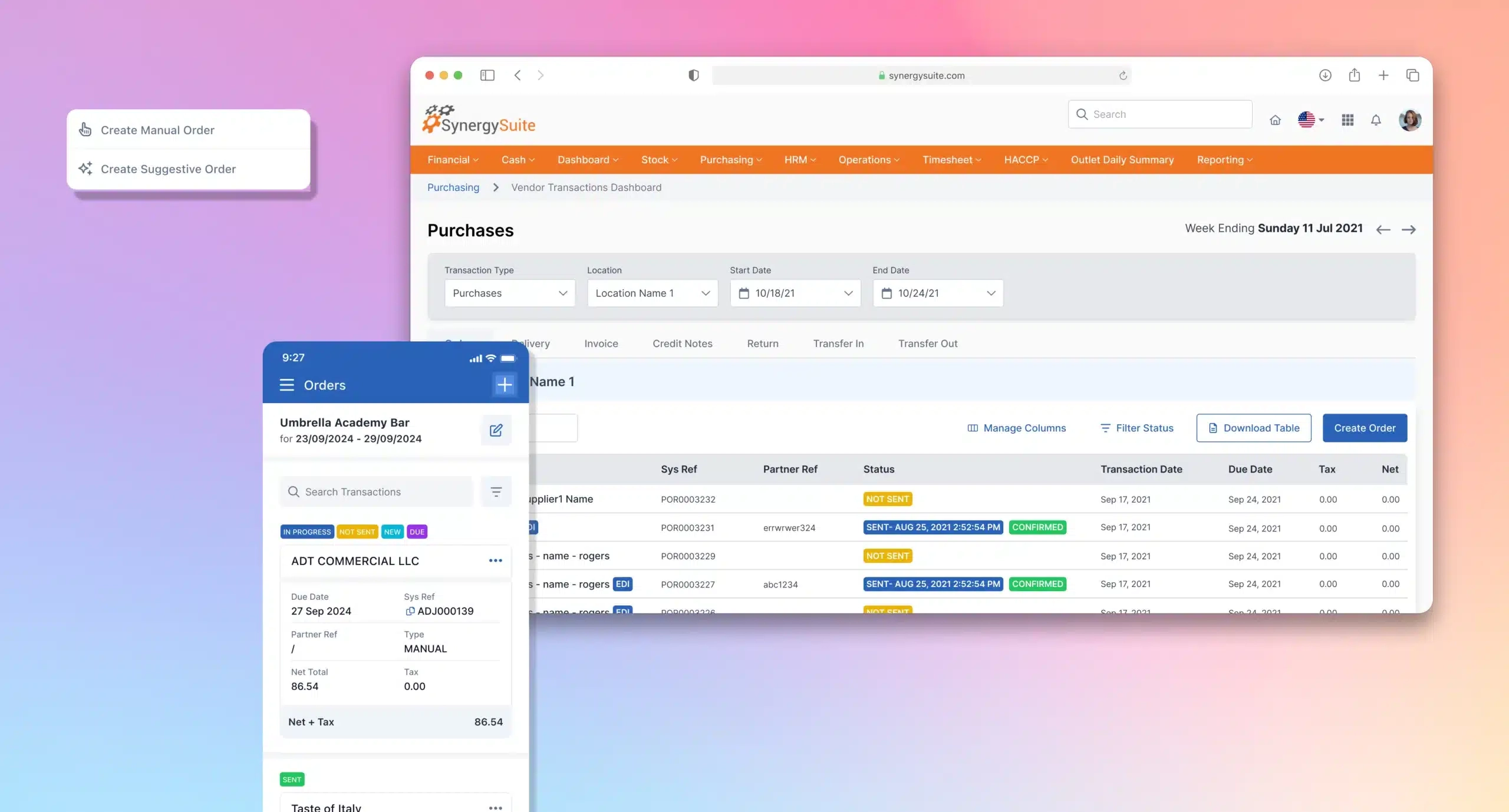
Image source: synergysuite.com
SynergySuite is purpose-built for multi-unit restaurant groups and food and beverage operators managing food costs, ingredient waste, and reordering with an AI engine calibrated specifically for hospitality, not generic supply chain math.
It replaces reactive processes with predictive ones by analyzing historical sales data alongside seasonality, local events, and menu changes to forecast ingredient demand. Machine learning algorithms identify demand patterns; natural language processing analyzes customer feedback; predictive analytics guide ordering. The most distinctive capability is actual vs. theoretical food cost tracking — comparing what should have been used against what was actually consumed — surfacing kitchen waste and shrinkage that standard dashboards miss. Connects directly to POS and ERP systems for real-time visibility across locations. Deployed at BIA Foods across 120 locations (Café Barista, Applebee's Guatemala, Panda Express Central America) to standardize back-of-house operations.
Pros:
- Demand forecasting accounts for local events, seasonal trends, and social media signals — not just historical sales averages — giving restaurant operators a meaningfully more accurate picture of upcoming ingredient needs
- Actual vs. theoretical food cost tracking makes margin leakages visible — waste, theft, and portion errors that are invisible in standard reports become quantifiable problems with clear remedies
- Deep POS and ERP integration creates a real-time, unified data view across all restaurant locations, making multi-unit back-of-house management significantly less complex
Cons:
- Purpose-built for the food and beverage industry — teams in retail, manufacturing, field services, or corporate asset management will find the workflows, integrations, and AI logic calibrated for a different operational context than their own
- No publicly listed pricing; custom quotes only, which makes preliminary budget evaluation more difficult
Pricing:
Custom quotes only, tailored by location count and feature scope. Contact SynergySuite directly at synergysuite.com to schedule a demo.
7. Ply: AI-powered inventory designed ground-up for field-service contractors
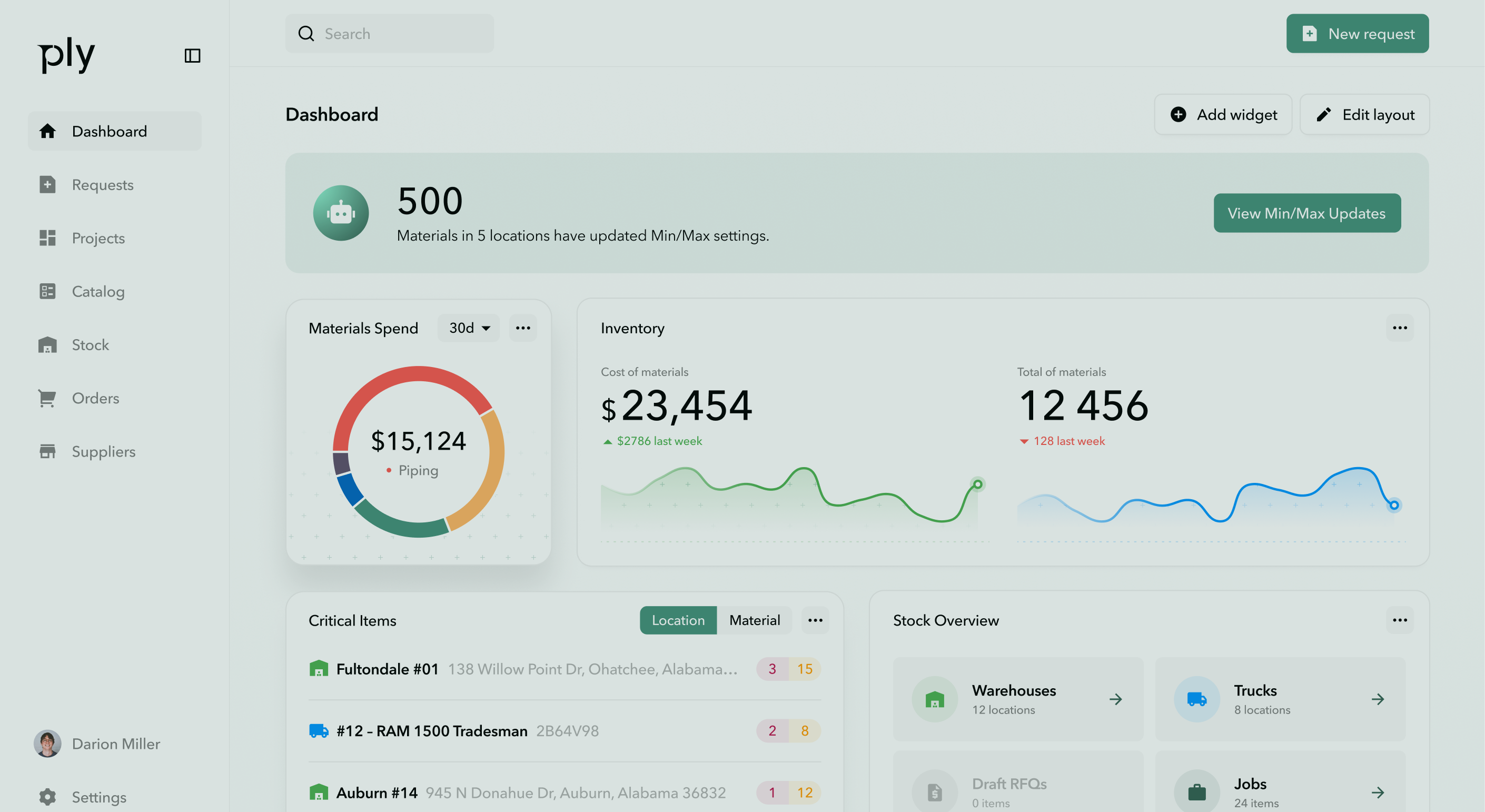
Image source: getply.com
Ply is built exclusively for HVAC, plumbing, electrical, and trade contractors needing real-time truck visibility, automated reordering tied to job schedules, and 3-way invoice matching. It solves a specific contractor problem: cash sitting invisible on vehicles in unused parts until a technician calls mid-job needing a part that was never loaded.
The AI engine connects to field-service platforms (ServiceTitan, Housecall Pro, Jobber) and accounting software (QuickBooks) to learn trade-specific patterns — e.g., heavy filter usage during HVAC season — and trigger automated reordering. Real-time truck visibility lets operations rebalance stock before jobs begin. Its most technically distinctive capability is 3-way matching: automatically cross-referencing purchase orders, warehouse receipts, and vendor invoices to catch billing errors and recover lost revenue. Use Ply's ROI calculator before committing to any tier.
Pros:
- Purpose-built for field-service trade contractors, with native integrations into ServiceTitan, Housecall Pro, Jobber, and QuickBooks — eliminating the double data entry that generic tools create
- 3-way matching automatically aligns purchase orders, delivery receipts, and vendor invoices, catching billing discrepancies and material losses that manual processes consistently miss
- Truck-level inventory tracking gives operations teams real-time visibility into what each vehicle carries, enabling proactive stock rebalancing before technicians leave for the day
Cons:
- Designed exclusively for field-service trade contractors — teams in retail, hospitality, corporate operations, or manufacturing will find the workflow model, terminology, and integrations built for a different operational reality entirely
- No permanent free tier; pricing requires contacting the team or booking a demo at getply.com, which limits self-serve evaluation
Pricing:
No publicly listed pricing.
8. C3 AI Inventory Optimization: Prescriptive ai for enterprise-scale supply chains
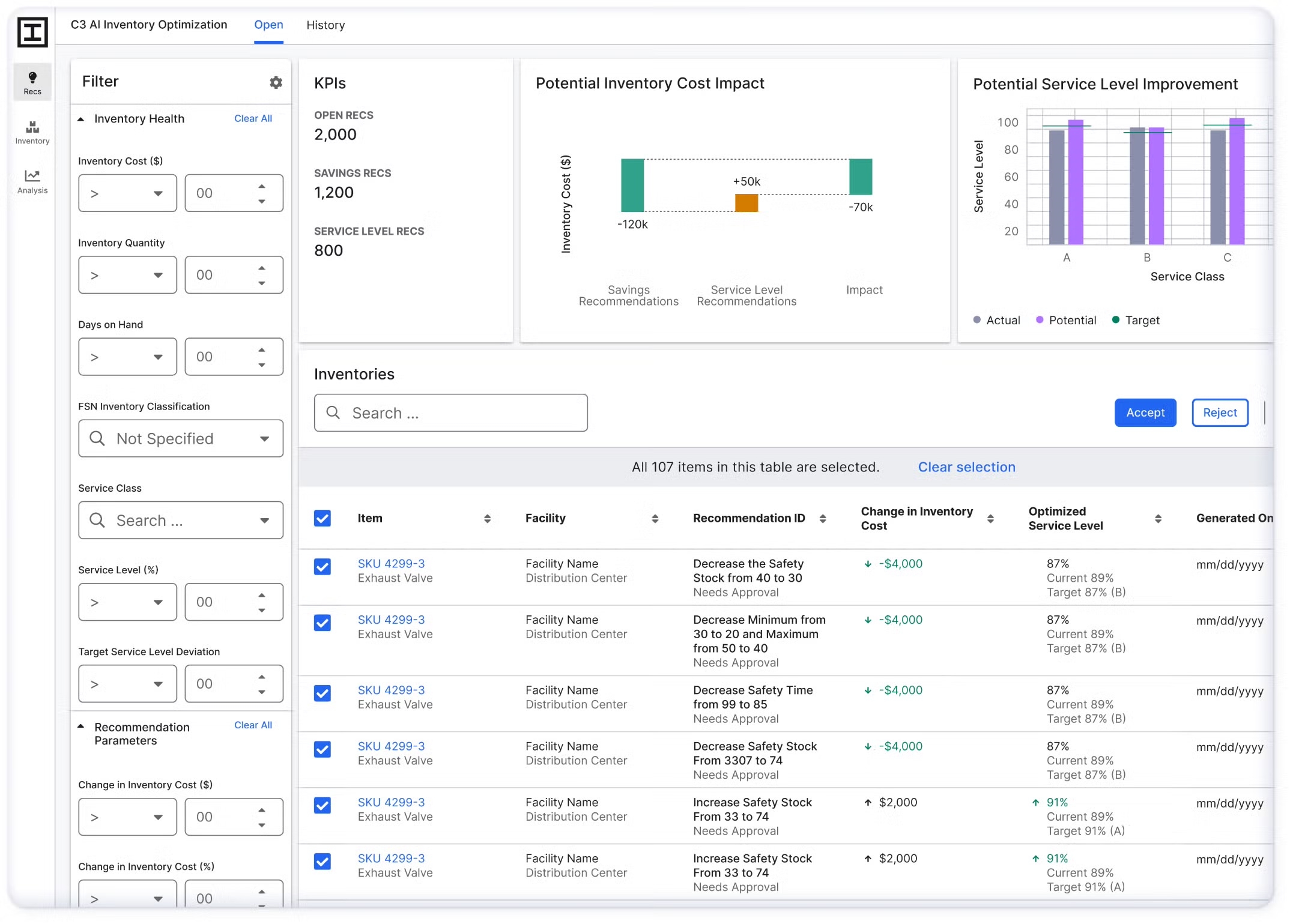
Image source: c3.ai
C3 AI Inventory Optimization is for large enterprises — particularly manufacturers, aerospace, and industrial firms — managing millions of parts across complex global supply chains who need AI to prescribe specific reorder actions in near real time, not just present data. It is a high-capability, enterprise-exclusive platform firmly out of scope for smaller teams.
The distinction that matters is "prescriptive." While most tools present data and leave decisions to planners, C3 AI actively prescribes what to order, how much, and when — for every item, at every facility, in near real time. Its dynamic reorder engine updates continuously as demand and supply shift; uncertainty modeling accounts for supplier delays, demand variability, and quality issues simultaneously; a "what-if" scenario simulator lets planners test parameter changes before implementation. Integrates with SAP and Oracle legacy ERP systems. Steep implementation complexity and enterprise pricing make it inaccessible to smaller businesses — but for enterprises it is designed for, the prescriptive capability is difficult to match.
Pros:
- Prescriptive AI actively recommends optimal reorder quantities and timing parameters for every SKU — removing the analytical burden from planning teams managing extremely high-complexity supply chains
- "What-if" scenario simulation lets teams model the impact of supplier delays, demand shocks, or parameter changes before any purchasing commitment is made
- Deep ERP integration (SAP, Oracle) ensures C3 AI recommendations connect directly into existing enterprise procurement workflows without requiring manual data transfer
Cons:
- Complex implementation timelines, a steep learning curve, and enterprise-level pricing make C3 AI inaccessible for small and mid-sized businesses — it is a platform for organizations with the technical infrastructure and operational scale to support it
- No self-serve pricing, free tier, or trial option; all engagements require a custom sales process via c3.ai
Pricing:
Custom enterprise pricing and implementation quotes only. Contact C3 AI via c3.ai for a scoped proposal.
Ai inventory management software compared: how to find your best fit
With eight tools now reviewed in detail, the question is: how do you identify which one is right for your specific situation? The answer starts with two diagnostic questions — and the order matters.
1. Diagnose your actual bottleneck
Before evaluating any platform, be honest about where your replenishment process breaks down most often and most expensively.
If the answer is forecast accuracy — predictions are frequently wrong, demand variability is high, and you are consistently caught off-guard by seasonal shifts or supplier changes — then specialist forecasting tools like Netstock AI (for distributors), Peak AI (for retailers and manufacturers), or C3 AI (for enterprise-scale operations) address the root problem directly.
If the answer is execution speed — predictions are generally reliable but purchase orders still take several days to move through approval, supplier communication is slow, and critical context gets lost between tools — then a unified collaborative workspace like solves a structural problem that specialist forecasting tools cannot touch. Adding a better forecasting layer to a fragmented execution environment does not compress the .
Many teams will find that both bottlenecks exist simultaneously. In those cases, the more costly one to leave unaddressed is typically the execution gap — because a stockout caused by a one-week approval delay is indistinguishable from a stockout caused by a bad forecast, from the customer's perspective.
2. Match the tool to your industry's specific workflow
As the Ply source states directly: "a solution designed for a massive e-commerce retailer probably won't work for your plumbing business." Industry fit matters more than raw feature count for a straightforward reason — the AI logic, the integrations, and the default workflows in any platform reflect assumptions about how operations work. A platform calibrated for restaurant perishables (SynergySuite) will produce poor recommendations for a field-service contractor, and vice versa.
Use this quick alignment guide:
appears across multiple rows in this table for a reason that the tool reviews make explicit: the execution gap — the structural delay between a stock signal and an approved purchase order — is not industry-specific. It affects fast-growing SMEs, remote teams, IT departments, and international procurement operations equally. The specialist tools that follow Lark in this table are stronger forecasters within their specific industries; none of them address the coordination layer that Lark is built around. For teams whose primary bottleneck is execution rather than prediction, that distinction is the most important one in this entire guide.
3. Calculate total cost of ownership, not just the subscription fee
A specialist forecasting tool priced at $X per month that requires separate subscriptions for team communication, document management, and approval workflows may cost significantly more in practice than a transparent all-in-one platform. Factor in the hidden cost of context switching — the hours per week each team member spends moving between applications to complete a single procurement action. For teams managing hundreds of SKUs and multiple supplier relationships. That overhead is not trivial — and it compounds across every reorder cycle, every approval chain, and every supplier negotiation throughout the year. For teams that identify execution speed as their primary bottleneck, an all-in-one platform that consolidates those functions eliminates both the subscription cost and the time cost of tool-switching simultaneously. 's free Starter plan makes it possible to test that complete workflow — database, automation, approval routing, and team messaging — across up to 20 users before any budget decision is required.
4. Verify integration depth before committing
There is a meaningful difference between integrations listed on a features page and integrations that work reliably in production. Before selecting any platform, map your current tech stack — ERP, POS, accounting software, field-service management platform — and confirm the new tool connects to each component without requiring regular manual reconciliation as a workaround. Ply's guidance is practical here: check that the software "plays well with others" by testing the connection with your specific existing tools, not just reviewing the integrations list.
For teams considering , the integration question has two dimensions worth evaluating separately: first, how many existing tools Lark can replace entirely — consolidating messaging, document collaboration, approval workflows, and the inventory database into a single environment; and second, where Lark connects to tools that remain in the stack. Lark integrates with a wide range of external platforms including , , GitHub, , and enterprise ERP systems, which means teams are not forced to choose between consolidation and compatibility — they can do both.
See how Lark fits your operation before committing to any plan
Ai inventory management across industries: what good looks like in practice
The five-capability framework and the tool comparison table are useful for shortlisting platforms. But choosing well also requires understanding how these systems perform in the specific operational context of your industry — because the same AI capability that transforms a restaurant operation may be largely irrelevant to a legal firm tracking encrypted devices.
Hospitality and restaurants: from ingredient guesswork to precision prep
The fundamental challenge in restaurant inventory is time. Stock has an expiration date measured in days, not months, which means the cost of over-ordering is spoilage and wasted margin, and the cost of under-ordering is a menu item that is unavailable when a customer orders it. Generic inventory AI systems are not calibrated for this dynamic.
SynergySuite's approach — analyzing local event calendars, , daily sales velocities, and seasonal patterns to forecast ingredient demand — illustrates what effective AI in inventory management software actually looks like in a hospitality context. It is not just averaging last month's usage; it is anticipating why next Friday is different from the Friday before. The actual vs. theoretical food cost tracking layer takes this further: it makes the invisible visible by quantifying the gap between what should have been consumed and what actually was, which surfaces waste, theft, and portion inaccuracies that standard dashboards treat as acceptable variance.
For the coordination layer, is a strong complement. A restaurant operations team can build a database consolidating daily stock counts from multiple kitchen locations, with automated notifications firing into the procurement group chat when any ingredient at any location falls below a defined safety level. The alert arrives with the supplier contact and a draft reorder message already attached. The procurement manager approves it without opening a second tool. The entire loop — detect, notify, draft, approve — closes in minutes rather than hours.
Field-service trades: keeping every truck ready for the first-time fix
For HVAC, plumbing, and electrical contractors, the inventory problem is not just about warehouse stock — it is about the materials on moving vehicles that are effectively invisible until a technician calls in from a job site asking for a part that was not loaded. Every one of those calls represents a schedule delay, a customer experience failure, and an unnecessary cost.
Ply's approach — analyzing historical job data to identify which parts are needed for specific job types in specific seasons, then triggering automated reordering and truck-level stock recommendations before the day begins — moves the operation from reactive to anticipatory. Technicians leave the yard with trucks stocked for the day's specific job types, not just a generic standard load.
The 3-way matching capability is worth understanding in financial terms. For a contracting business processing hundreds of purchase orders per month, even a small percentage of billing discrepancies adds up to a recoverable amount. between purchase orders, delivery receipts, and vendor invoices catches those discrepancies before they become accepted losses.
Corporate and HR teams: managing the hardware that powers hybrid work
IT and HR teams managing laptops, monitors, and peripherals across a hybrid workforce face a version of the same inventory challenge as any warehouse manager. The difference is that the "SKUs" are assigned to employees rather than to shelf locations, and the compliance consequences of poor tracking (missing devices, expired warranties, unaccounted hardware during offboarding) are significant.
handles this use case natively, without requiring a specialist IT asset management tool. An IT or HR team builds a with fields for device model, assigned employee, office location, warranty expiry, serial number, and current status. When a device warranty is within 60 days of expiry, an automated workflow alerts the IT lead in the relevant group chat with the asset record attached. When an employee offboards, a Lark Base form triggers a return workflow automatically. No IT development required — the operations team configures it directly and adjusts it as headcount or device policy changes.
For organizations looking to buy AI software for , this kind of flexible, no-code database approach often outperforms rigid ITSM tools that were not designed with HR workflows in mind.
Legal and professional services: inventory under compliance pressure
Legal firms managing physical case files, original deeds, evidence binders, and encrypted devices face strict chain-of-custody requirements that general-purpose file storage tools cannot meet. The core requirement is not just knowing where a document is — it is maintaining an immutable, auditable log of who accessed it, when, and what was done with it.
For organizations looking to buy ai software for inventory management in legal contexts, role-based access control is not a convenience feature — it is a compliance requirement. Platforms with granular, configurable permission systems ensure only authorized individuals can view or modify sensitive records, with every access event logged automatically. provides this capability without requiring a specialist : firms configure access levels by role, track all record interactions, and maintain a shared asset inventory covering encrypted devices, hardware security keys, and remote-access hardware across multiple office locations. For smaller legal operations that cannot justify an enterprise ITSM tool, this flexibility is genuinely useful.
Track compliance-sensitive assets in Lark — no dev required
A 5-step roadmap for transitioning from spreadsheets to AI inventory management software
Knowing which platform to choose is one decision. Getting it working well in your specific operation is a different challenge. These five steps are designed to help you move from spreadsheets to a functioning without the common implementation failures that send teams back to their old tools after three months.
Step 1: Diagnose your failure mode before you shortlist tools
Do not start with a vendor comparison. Start by mapping your last five stockout or overstock events and identifying precisely where each one broke down. Was it a forecasting failure — the data was wrong? Or was it an execution failure — the data was right but the team could not act on it in time? Your answer determines which category of tool addresses your actual problem. Teams that skip this step tend to buy impressive forecasting tools and then wonder why they are still having stockouts caused by slow approval cycles.
Step 2: Clean your data enough to start — but not to the point of paralysis
IBM's source is direct: "if the data is inaccurate, outdated or incomplete, it can lead to flawed predictions and decisions." But Ply's source offers equally important reassurance: "you don't need perfectly organized data to get started." The practical middle ground — deduplicating SKU records, standardizing vendor names, validating current lead times, and distinguishing clearly between raw materials and finished goods — gives any AI system a strong enough foundation to produce useful early outputs. The system improves with every transaction it processes. The most expensive mistake is waiting for perfect data before beginning.
Step 3: Map your approval structure before building automation rules
Identify who owns each inventory tier, what thresholds require a review rather than an automatic reorder, and where alerts need to land for action to actually happen. A very common implementation failure is building sophisticated automated alerts that arrive in inboxes or channels nobody monitors actively. Automation is only as effective as the human response infrastructure it is designed to trigger. For teams moving to , this step should be completed before configuring Lark Base workflows — knowing the approval chain in advance makes the automation setup significantly faster and more accurate.
Step 4: Start with your highest-risk SKUs, not your full catalog
Rather than migrating every SKU simultaneously, identify the 20% of items that cause 80% of your stockout or overstock problems. Prove the new system works on high-stakes items first. This approach reduces migration risk, gives the team early confidence in the new workflow, and produces measurable results — reduced stockout frequency, faster approval cycles, fewer emergency supplier calls — before the full rollout begins.
Step 5: Define KPIs before go-live and review them quarterly
Establish a baseline before switching tools. The metrics that matter most are: average time from stockout alert to approved purchase order; carrying cost per SKU; reorder cycle time; and stockout frequency per product category. Review these quarterly against your pre-implementation baseline. This is not just about demonstrating ROI — it is the feedback loop that helps the AI model and the operations team calibrate together over time. Platforms like make this straightforward because the , the , and the all live in the same environment, so trend analysis does not require stitching together data from four different tools.
Conclusion
Every platform reviewed here improves forecast accuracy. The specialist tools — Netstock AI, Peak AI, SynergySuite, Ply, C3 AI — each deliver depth that is difficult to match within their respective industries. But forecasting is only half the problem. For teams where the bottleneck is execution — the delay between a correct signal and an approved purchase order — no specialist tool closes that gap. does, by keeping the alert, the draft order, and the approval in one workspace. Start by identifying where you inventory process actually breaks down — and let that answer lead you to the right platform.
Start your Lark inventory workflow
FAQs
Can AI do inventory management?
Yes — but with an important distinction. AI inventory management software can forecast demand, flag reorder points, identify slow-moving stock, and generate purchase order recommendations with genuine accuracy. What most AI platforms cannot do on their own is act on those insights. The forecast gets produced; the approval, the supplier communication, and the purchase order still get handled manually across separate tools. The most effective implementations pair AI-generated signals with a workflow layer that moves those signals into action without requiring a human to coordinate across multiple applications.
Will inventory management be replaced by AI?
Not replaced — restructured. AI handles the analytical layer well: pattern recognition, demand forecasting, anomaly detection. What it does not eliminate is the coordination work: communicating with suppliers, routing approvals, updating records across teams. The operations teams that get the most from AI tools are those that automate the execution layer alongside the forecasting layer, so that a correct prediction automatically triggers the right next step rather than landing in someone's inbox as a number to act on manually.
Is there free software for inventory management?
Yes. Lark's free Starter plan is one of the most substantive free tiers reviewed in this guide — it includes 11 integrated tools, 100GB of storage, 1,000 automation runs per month, and AI translation, supporting up to 20 users with no credit card required. This makes it possible to build a complete inventory workflow — database, automated alerts, approval routing, and team communication — before any budget decision is required. Most specialist AI forecasting platforms do not offer a comparable free tier; they typically provide a time-limited trial rather than a permanent free plan.
Related reading