














What is a CRM System? A Complete Guide for Beginners

Owyn Thomas Kerr
Lark Content Manager
Sep 18, 2026
Owyn Thomas Kerr
Sep 18, 2026

12 min read


If your customer data is stored in spreadsheets, your sales process is tracked manually, and your marketing team is working independently, then you're setting your business up for failure. To solve this issue, successful businesses all use the same tool, and it's called a customer relationship management (CRM) system.
In this guide, we'll explore what a CRM system does, its core features, benefits, and how to pick the best one for your business.
Key takeaways
- A CRM system is a technology used by businesses to manage and analyze all customer interactions and data throughout the entire customer lifecycle to improve relationships and drive sales.
- Implementing this software offers major benefits such as improved customer satisfaction through personalization, enhanced sales performance via automation, and significant cost reductions.
- There are four specific types of systems called Operational, Analytical, Collaborative, and Strategic, which focus on different business needs and objectives.
- Organizations must decide between cloud-based deployment for flexibility and lower costs or on-premise hosting for complete control over security and maintenance.
- The most effective systems provide key features including contact and lead management, workflow automation, real-time reporting, and artificial intelligence capabilities.
What is a CRM system?
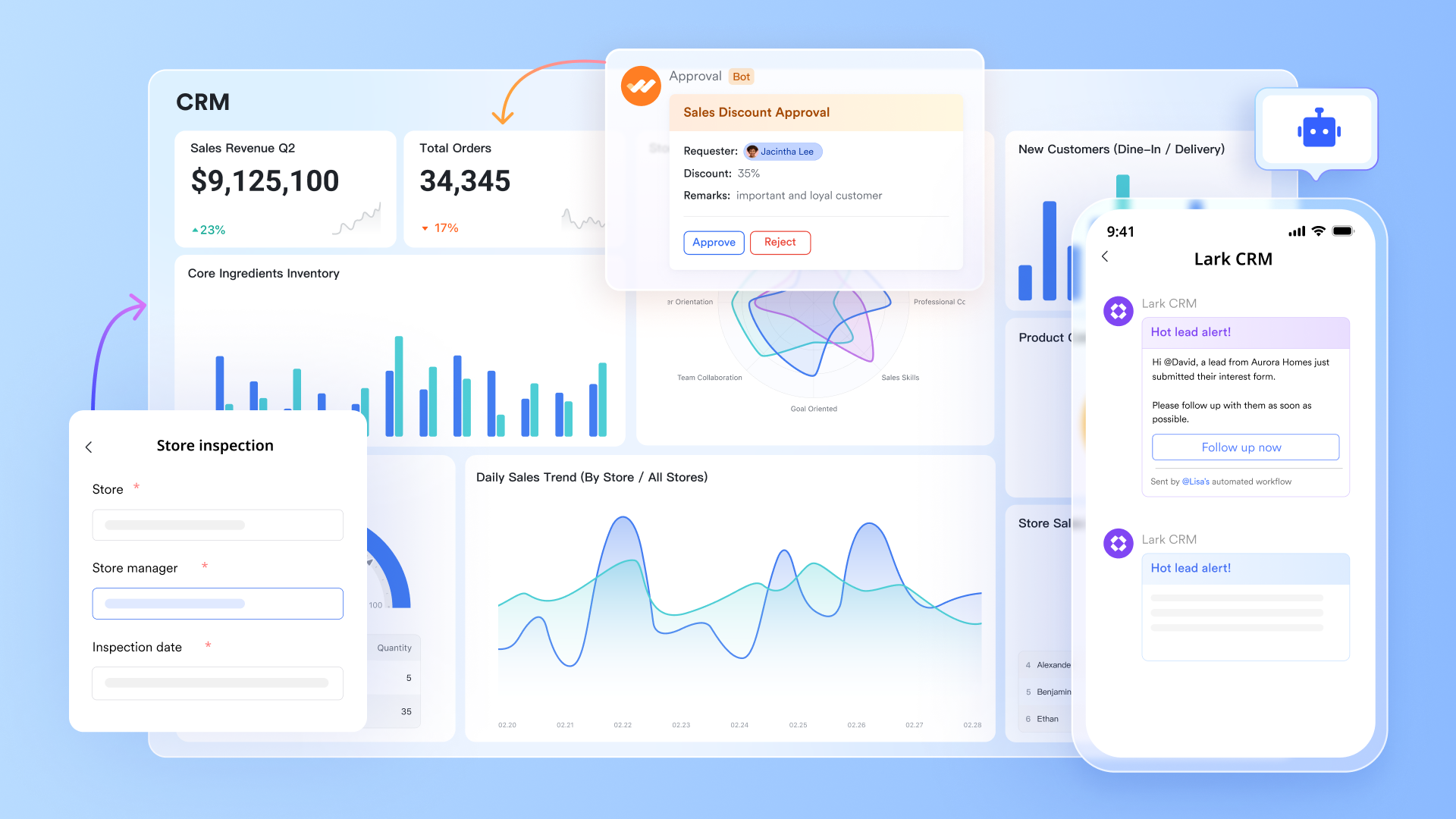
A CRM system is a technology used by businesses to manage and analyze all their customer interactions and data throughout the customer lifecycle. The goal is to improve your business relationship with customers, help with customer retention, and drive sales.
While the basic function of CRM software is to organize and update customer contact details and track interactions, its true power lies in how it enhances every department:
- For sales: Manages leads, tracks pipeline movement, and ensures every sales opportunity is pursued effectively through the sales journey.
- For service: Acts as a central hub for handling customer support requests and helps ensure your support team provides faster resolution times and better experiences.
- For marketing: Automates, manages, and tracks marketing campaigns and engagement across different channels.
- For management: Provides key reports and analytics to uncover deeper insights into customer behavior, business trends, and whether key metrics are met.

Benefits of a CRM system
A CRM system offers a variety of benefits. Here are the main ones:
- Improved customer satisfaction: CRM systems ensure high-quality service by tracking detailed records of customer interactions and preferences. This central data repository is crucial because it allows businesses to deliver personalized communication and services perfectly tailored to each customer's specific needs.
- Enhanced sales performance: CRM tools can dramatically improve sales team performance. Sales automation helps speed up deal closures and provide sales forecasting faster. By visualizing the pipeline, reps can prioritize opportunities and cut down on manual tasks, focusing their time on building meaningful customer relationships instead.
- Better customer service: CRM systems track customer interactions and issues, enabling customer service teams to resolve problems more quickly. Having a centralized knowledge base within the CRM helps customer service representatives provide accurate and timely information to customers.
- Better collaboration: CRM systems make teamwork simple by providing a shared platform where customer information is accessible, and the ability to collaborate with colleagues is one click or tap away. With all information and tools such as chat, email, docs, and video calling all in the same space, everyone stays on the same page and can work together more effectively to meet business goals.
- Cost reductions: CRM systems reduce the need for expensive third-party tools. Automation cuts costs associated with human error, and since AI handles real-time analytics, you no longer need to wait for staff to sift through data. Finally, when your sales and marketing team work together through the CRM, you dramatically reduce the chance of running a poorly organized campaign that fails to deliver ROI.
The benefits are even greater with an all-in-one platform like Lark that's built for CRM. Instead of switching between tools, your team can manage communication, data, and collaboration in one place to help you sell smarter and work faster.
Types of CRM systems
There are four main types of CRM systems, each focusing on a different aspect of managing customer relationships:
Operational CRM system
This system is designed to automate the core, customer-facing business processes across your sales, marketing, and service departments. It excels at streamlining daily interactions and managing routine workflows that are essential for business operations. The goal is to maximize efficiency and enhance the customer experience throughout the entire journey, from lead generation and conversion through ongoing customer retention.
- Real-world application: Marketing teams can use the system to automatically trigger a "welcome" email sequence when a new lead signs up, while sales reps receive automated task reminders to follow up three days after sending a proposal.
- Key benefit: Automating repetitive administrative tasks significantly reduces human error and ensures that valuable leads receive timely attention. Such efficiency allows teams to standardize their sales process and frees up staff to focus on high-value conversations that directly drive revenue, rather than getting bogged down in data entry.
Analytical CRM system
This type focuses on extracting meaningful insights from customer data using analysis and business intelligence. It excels at understanding customer behavior, predicting future trends, and driving strategic decision-making by using advanced reporting, data visualization, and predictive analytics.
- Real-world application: Retail companies often analyze historical purchase data to identify customers who haven't shopped in six months, predicting who is at risk of leaving and enabling the team to proactively intervene with a retention offer.
- Key benefit: Transforming raw data into a competitive advantage enables hyper-personalized marketing campaigns based on actual behavior rather than guesswork. Gaining this deep level of insight helps businesses optimize their marketing spend, improve product development based on concrete needs, and increase profitability by identifying the most lucrative market segments.
Collaborative CRM system
This system is designed to facilitate seamless communication and data sharing across all your departments and external partners. It excels at breaking down silos, ensuring every team member has access to the same, consistent customer information. With shared calendars, communication tools, and document sharing, this system helps improve coordination to deliver a unified and consistent customer experience across every touchpoint.
- Real-world application: A customer support agent can see that a caller is currently in the middle of a high-value negotiation with the sales team. The agent can then prioritize the technical issue to ensure the deal isn't jeopardized by a minor service ticket.
- Key benefit: Establishing a "unified customer view" (360-degree visibility) drastically improves the customer experience (CX). When customers feel valued because they never have to repeat their history or context to different departments, satisfaction scores rise, and friction during internal handoffs between teams disappears.
Strategic CRM system
This type emphasizes building and maintaining long-term relationships with customers. It uses advanced reporting and analytics features to uncover insights about customer behavior, sales performance, and broader business trends. Customizable dashboards allow each team and employee to view the data most relevant to their goals, ensuring that everyone has access to the information they need.
- Real-world application: Account managers use dashboards to identify "VIP" clients who provide the majority of the company's revenue, focusing specialized resources on maintaining those specific relationships rather than spreading effort thinly across all contacts.
- Key benefit: Aligning resources around the most profitable relationships shifts the organizational focus from short-term customer acquisition to long-term customer retention and lifetime value (CLV). Companies can increase customer loyalty, reduce the high cost of acquiring new clients, and ensure sustainable growth through a customer-centric culture.
Not sure which system you need? Lark gives you all four systems in one complete cloud-based CRM solution. With no-code automation, AI analysis, real-time dashboards, plus all the tools your team will ever need for collaboration, you've got all four CRM systems in one superapp.
CRM deployment options
How you choose to host your software impacts cost, maintenance, and accessibility. There are two primary ways to deploy a CRM system:
On-premise CRM
On-premise systems reside directly on a company's own servers. While this option allows organizations with strict data regulations to maintain complete control over their information, it forces the business to take full responsibility for maintenance, security, and manual upgrades. There is a steep upfront cost to purchase a perpetual license and a dedicated IT team is needed just to keep the hardware running smoothly.
Cloud-based CRM
Cloud or online CRM systems are by far the more popular deployment option, accounting for approximately 87% of businesses. These systems live on the vendor's servers, and businesses just need an internet connection to access the services they need.
Companies can save on heavy capital expenses, and pay a flexible subscription fee based on usage. Updates also happen automatically so teams can always use the latest features without needing IT support. Field and remote teams benefit significantly from the ability to work securely from anywhere with an internet connection.
Key features of a CRM system
The best CRM systems come with the same set of key features that help businesses manage customer relationships. Here are the top features you can expect to find:
Contact management
Contact management helps you store and manage your customer information in a centralized database. This information can include names, addresses, phone numbers, social media accounts, preferences, and more. Advanced databases help you organize this information so that anyone in your team can access it to help them with their work, whether that's how to interact with a customer or how to plan a future campaign.
Lead management
Lead management ensures that no potential customer gets missed by capturing interest from various channels, like your website or social media. You can also score leads based on their activity, allowing your team to prioritize the best prospects and focus efforts where conversion is most likely.
Email management
Email management integrates your inbox directly with the CRM platform. Sending, tracking, and organizing emails happens right alongside customer records while features like templates and open tracking give visibility into who engages with your messages to help you follow up at the perfect moment.
Sales management
Sales management helps you streamline each phase of the sales process. With it, you can track sales opportunities, manage sales pipelines, forecast sales, and more. From lead generation to closing deals, it helps your sales team organize its work and focus on what matters, helping to boost their productivity and success.
Workflow automation
Workflow automation transforms your slow, manual business processes into efficient, smooth, streamlined processes. CRM systems can automate repetitive tasks your sales and support teams usually do, helping not only to alleviate the workload but also to reduce human error. Plus, your team's focus is on more important work instead, so that key tasks are always completed on time.
Reporting and analytics
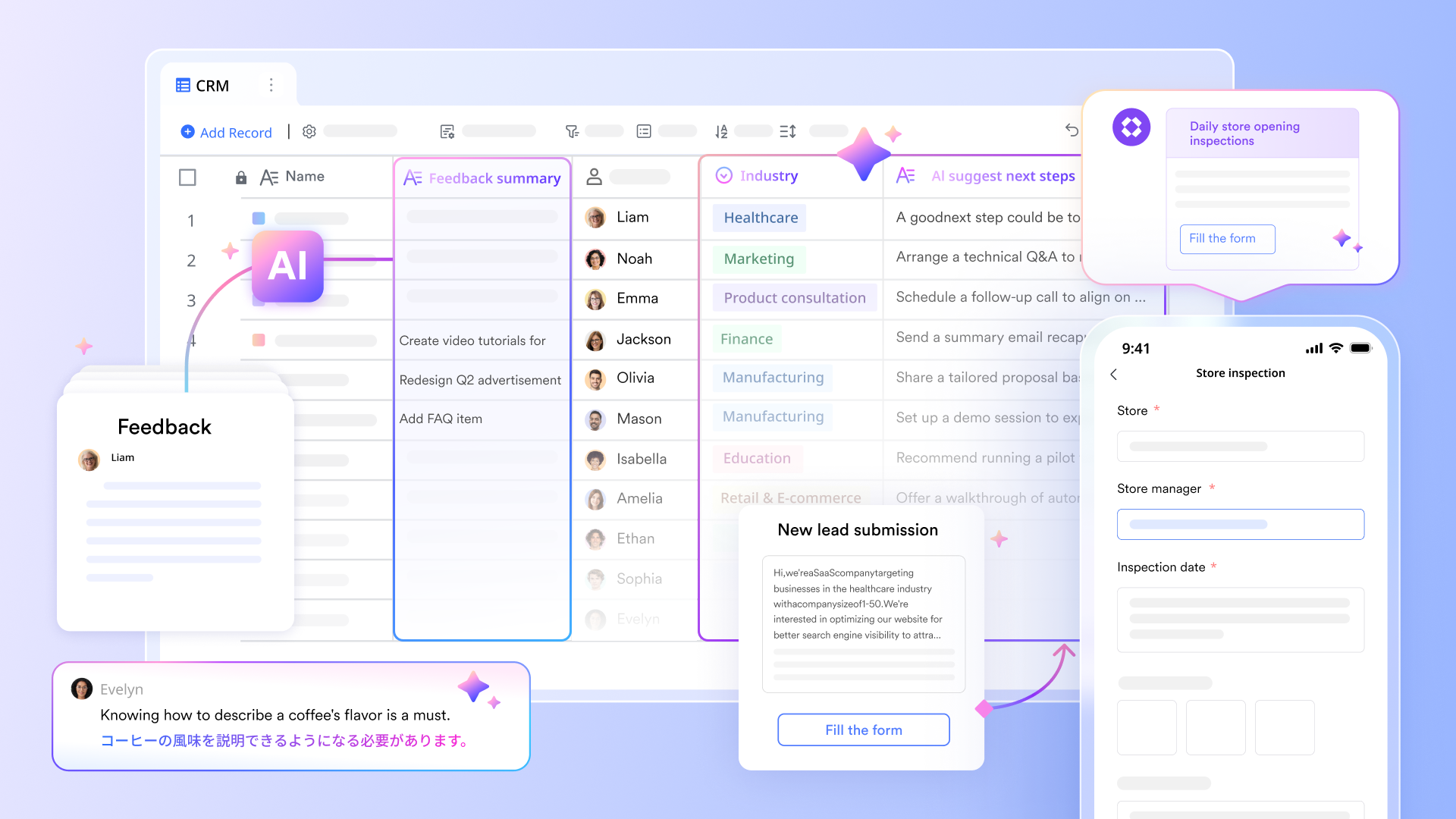
Advanced reporting and analytics give you insights into customer behavior, trends, strategy, and overall performance. Through real-time dashboards, your team can display information most crucial to them, and with the combination of AI insights, findings can be uncovered in seconds to help with strategic planning.
Artificial intelligence (AI)
CRM systems with AI dramatically improve your efficiency and ability to manage customer relationships. Whether that's helping you analyze customer information, generate sales pitches, analyze customer sentiment, or provide reports on how your sales strategy is performing, AI is a must-have for today's businesses.
Examples of CRM systems in action
CRM software systems power all types of businesses. You may be familiar with these CRM system examples that shape your everyday experiences:
- Hyper-personalization for an online retailer: Major e-commerce platforms rely on CRM data to track what shoppers view and buy. The system powers "customers who bought this also bought" recommendation engines, which generate significant revenue by predicting exactly what a user needs next.
- Loyalty and retention for a coffee chain: Mobile apps often act as a massive CRM frontend for large coffee franchises. Tracking purchase habits allows the brand to send personalized offers (like Double Stars on your favorite latte) that encourage customers to visit more frequently and spend more per visit.
- Service and engagement for a ride-sharing service: Transportation apps use CRM to manage millions of interactions across drivers and riders. The software segments users to offer targeted promotions and integrates customer support tickets so agents can see a rider's full trip history the moment they reach out for help.
- B2B coordination for global manufacturing: Industrial companies use CRM to coordinate technical support across different time zones. Sales reps in one country can see exactly what technical issues a client is facing in another, preventing miscommunication and strengthening the long-term client relationship.
How to pick the right CRM system
Every business is unique, with specific business objectives. A cloud-based CRM system that's perfect for one team might be a bad choice for another. It all depends on what your business needs, its objectives, and other factors. Here are key steps you can follow to choose the best CRM for your business:
1. Assess your needs and scale
Determine the scale and features you need by assessing your business size, industry requirements, and growth plans. While a small business may need fewer features initially, ensure the CRM is capable of scaling up right from implementation as your business grows in size and complexity. Small businesses will often prioritize ease of use and affordability, while large enterprises may require advanced customization.
2. Evaluate integration
Check how well the CRM integrates with your existing tools and systems. The platform must connect seamlessly with your email marketing services, social media platforms, accounting software, and other essential applications. Seamless integration is crucial for avoiding data silos, eliminating manual data entry, and boosting overall productivity. Alternatively, choosing an all-in-one solution means you can combine all the tools you need in one place without having to pay for third-party systems.
3. Focus on user adoption
Consider factors that affect how easily your team will use the system. Ease of use is crucial, especially for businesses that can't afford extensive staff training, as a user-friendly interface ensures higher adoption rates. Additionally, ensure the CRM offers a mobile version or app, so your remote or on-the-go teams can access data and perform tasks from anywhere. Look for CRM apps that have high ratings on app stores. For example, Lark has an impressive score with a 4.8 rating in the App Store.
4. Compare pricing models
Look closely at all CRM pricing components, including setup costs, user licenses, storage limits, and any added features. Compare these total costs against the potential benefits to estimate your return on investment (ROI). Beyond immediate financial gains, consider the strategic value of the CRM, like improved competitiveness and the ability to adapt to market changes quickly.
5. Test the platform
Use free plans, trials, and demos to evaluate the functionality, performance, and user experience yourself. Most CRM vendors give the chance to experience their CRM offering firsthand. This is the perfect time to test whether the platform meets your specific needs and requirements before you commit.
6. Check for reliability and support
Confirm the vendor's support quality and training resources. Good customer support and training are essential for helping your team maximize the tool’s benefits. Also, check their security certifications and compliance standards to ensure the provider can meet your long-term regulatory and security requirements.
How to implement a CRM system
Careful planning and thorough preparation are the foundations of successfully implementing a CRM system. But there's more to it than that. Follow these best practices to maximize the CRM investment you make.
- Define clear objectives and metrics: Establish clear goals and success metrics. Ensure the CRM system supports specific business needs, such as increasing sales team efficiency or boosting customer satisfaction. Set measurable targets so you can accurately track your ROI.
- Map processes and identify gaps: Document your existing business processes from start to finish. Map out every customer touchpoint, data flow, and decision point. This is crucial for identifying areas of inefficiency and ensuring the CRM enhances (rather than complicates) your current workflows.
- Plan for data migration: Develop a plan for moving existing customer data into the CRM system. Before you import, clean and standardize the data, eliminate duplicate records, correct inconsistent formatting, and fill in gaps to prevent lost data during the migration.
- Implement training: Provide comprehensive training for all users and establish clear guidelines for using the CRM system. Your core team can help you with this part. Different departments (sales, marketing, service) may need specialized training for their roles.
- Start simple: Don't try to start using multiple tools from day one. Start with the CRM system's core features, such as creating a customer database, and gradually expand as your team becomes more comfortable
- Monitor performance: Successful implementation is an ongoing effort. Check usage and actively gather team feedback to measure performance. Regularly assessing user adoption and business outcomes will help you identify opportunities for continuous optimization.
Why businesses choose Lark
Lark is a leading all-in-one CRM solution that offers a range of next-generation features that businesses of all sizes can use. Imagine combining Salesforce's CRM features, Slack's communication tools, and Asana's project management capabilities in one cost-effective superapp. That's what Lark is.
Here are a few reasons why businesses prefer Lark:
- All-in-one: Lark gives you CRM, project management, instant messaging, email, docs, video meetings, OKRs, approval management, and more, so you can manage every stage from lead to post-sales in one platform without having to switch between third-party tools.
- Native AI tools: Lark is powered by AI, which means you get advanced analytics, insights, content generation, instant translation, smart search, and meeting summaries that enhance how your teams operate across their business processes.
- Mobile-first: Designed for use on any device, your frontline sales teams stay perfectly in sync with HQs with the ability to access customer data, submit reports, view insights, and hop on calls instantly through a highly-rated mobile app.
- Automated workflows: Turn any manual process into a streamlined one through automation. Anyone in your team can create an automated process without coding or IT support, whether that's for sending instant notifications for sales updates, generating group chats when a lead comes in, or handling approval requests.
- Real-time dashboards: Lark dashboards give you a view of your business you've never seen before. Managers and teams can access live data, track key metrics, and make data-driven decisions without hours of comparing data. Paste dashboards into documents or group chats to give stakeholders a visual report.
- Collaboration tools: Set up group chats for discussions, co-edit pitch decks in real-time during a video call, co-design databases with your colleagues, send out company-wide emails, and work across languages, regions, and time zones with tools designed for global teamwork.
- Cost-effective: Lark stands out as the most cost-effective CRM solution when you compare it to CRM platforms like Salesforce, HubSpot, Zoho CRM, and Pipedrive. This makes it a perfect CRM for small businesses or enterprises that want to save money while achieving their CRM goals.
Choose the best CRM system for your business
CRM systems enhance operations, improve customer relationships, and drive sales. Choosing a CRM system for your business is one of the biggest decisions you'll need to make. It's important you choose a solution that not only meets your needs but also provides obvious tangible benefits.
Lark ensures your teams, whether in marketing, sales, or customer service, have all the tools they need to succeed and take your business to the next level. Not only can you handle customer relationship management with ease, but you'll also boost your chances of reaching your sales goals with features designed to maximize collaboration, decision-making, and efficiency, so every member of your team provides the best experience for your current and future customers.
CRM system FAQs
What does CRM stand for?
CRM stands for customer relationship management. When people say CRM, they are generally referring to software that helps with managing customer relationships.
What's a CRM system?
A Customer Relationship Management (CRM) system is a software that manages and organizes a business's interactions and relationships with its customers and potential customers. It serves as a single source of truth for all customer data, helping every team to have a complete 360-degree view.
What does a CRM system do?
A CRM system automates and streamlines customer-facing processes across sales, marketing, and service, ensuring efficiency and consistency. Its core functions include managing leads, tracking sales pipelines, and organizing customer support tickets.
Who uses a CRM system?
CRM systems are primarily used by customer-facing teams: Sales uses CRM for pipeline management, Marketing uses CRM for targeted campaigns and marketing automation, and Customer Service uses CRM for quick, informed issue resolution. Executives also rely on CRM for strategic reporting and performance forecasting.
What are the benefits of implementing a CRM system?
Implementing a CRM system boosts revenue by increasing sales efficiency and improving forecasting accuracy. It also enhances customer loyalty and retention by enabling personalized service and streamlining cross-departmental operations for significant cost savings.
What to consider when picking a CRM system?
Key considerations include the CRM's scalability to handle future growth, its integration capabilities with your existing software, and its ease of use to ensure high user adoption. You must also evaluate the total cost of ownership (TCO) against the expected return on investment (ROI).
What is an AI CRM system?
An AI CRM system integrates Artificial Intelligence and Machine Learning to move beyond simple record-keeping to predictive intelligence. It uses AI to automate lead scoring, forecast sales, personalize customer interactions dynamically, and recommend the optimal next best action.
What are CRM and ERP?
CRM (Customer Relationship Management) and ERP (Enterprise Resource Planning) are two different types of enterprise software. CRM focuses on front-office activities that generate revenue (sales, marketing, service), while ERP focuses on back-office operations (finance, inventory, supply chain).
What is the difference between CRM and marketing automation?
CRM software focuses on managing relationships with existing contacts and tracking the sales pipeline toward a closed deal. Marketing automation handles the top of the funnel by generating leads and nurturing them through campaigns until they are ready to buy. The two systems often work together to hand off qualified leads from marketing teams to sales reps.
What is the difference between CRM and CX?
CRM refers to the actual technology and data used to manage customer interactions and internal workflows. Customer Experience (CX) is the broader strategy and emotional impression a customer forms based on their entire journey with your brand. Using a strong CRM system provides the necessary data and organization to deliver a seamless customer experience.
What is the best CRM system for small businesses?
The best choice depends on your specific industry and needs, but most small businesses should prioritize platforms that offer ease of use and low upfront costs. An all-in-one solution like Lark is perfect for this requirement, combining essential CRM features with team collaboration tools to help you scale without breaking the bank.
Table of contents
Start using Lark today

Manage all your work in one place
Boost team efficiency by 10x
Save up to 70% on software costs
Table of contents
Start using Lark today
Manage all your work in one place
Boost team efficiency by 10x
Save up to 70% on software costs
Keep reading









2026 Lark Technologies Pte. Ltd.
Headquartered in Singapore with offices worldwide.






Explore: