As teams grow, task management tools that once felt simple and affordable can quickly raise questions around value, scalability, and hidden limitations. MeisterTask pricing is often attractive at first glance, especially given its clean interface and visual Kanban boards—but how well does it hold up as workflows become more complex, teams expand, and coordination needs increase? What starts as a straightforward task board can introduce new costs, feature limitations, or workflow gaps as teams rely on it for day-to-day execution across projects.
In this guide, we break down MeisterTask pricing plans, features, real-world use cases, and limitations in detail, so you can decide whether it's worth the cost for your team today—and tomorrow.
Build workflows that adapt as your organization grows
What is MeisterTask?
MeisterTask is a cloud-based task and designed to help individuals and teams organize work using visual Kanban-style boards. It allows users to create projects, add tasks, assign owners, set due dates, and track progress as work moves through customizable columns. The platform is known for its clean interface, ease of use, and minimal learning curve, making it popular with small teams and first-time users of project management software.
Beyond basic task tracking, MeisterTask offers features such as checklists, file attachments, comments, tags, recurring tasks, and on paid plans. It also integrates with standard tools and supports imports from platforms like Trello and Asana. MeisterTask is available as a web app, desktop application, and mobile app, enabling teams to stay updated across devices.
Often paired with MindMeister for brainstorming and planning, MeisterTask works best for lightweight project coordination rather than complex, execution-heavy workflows.
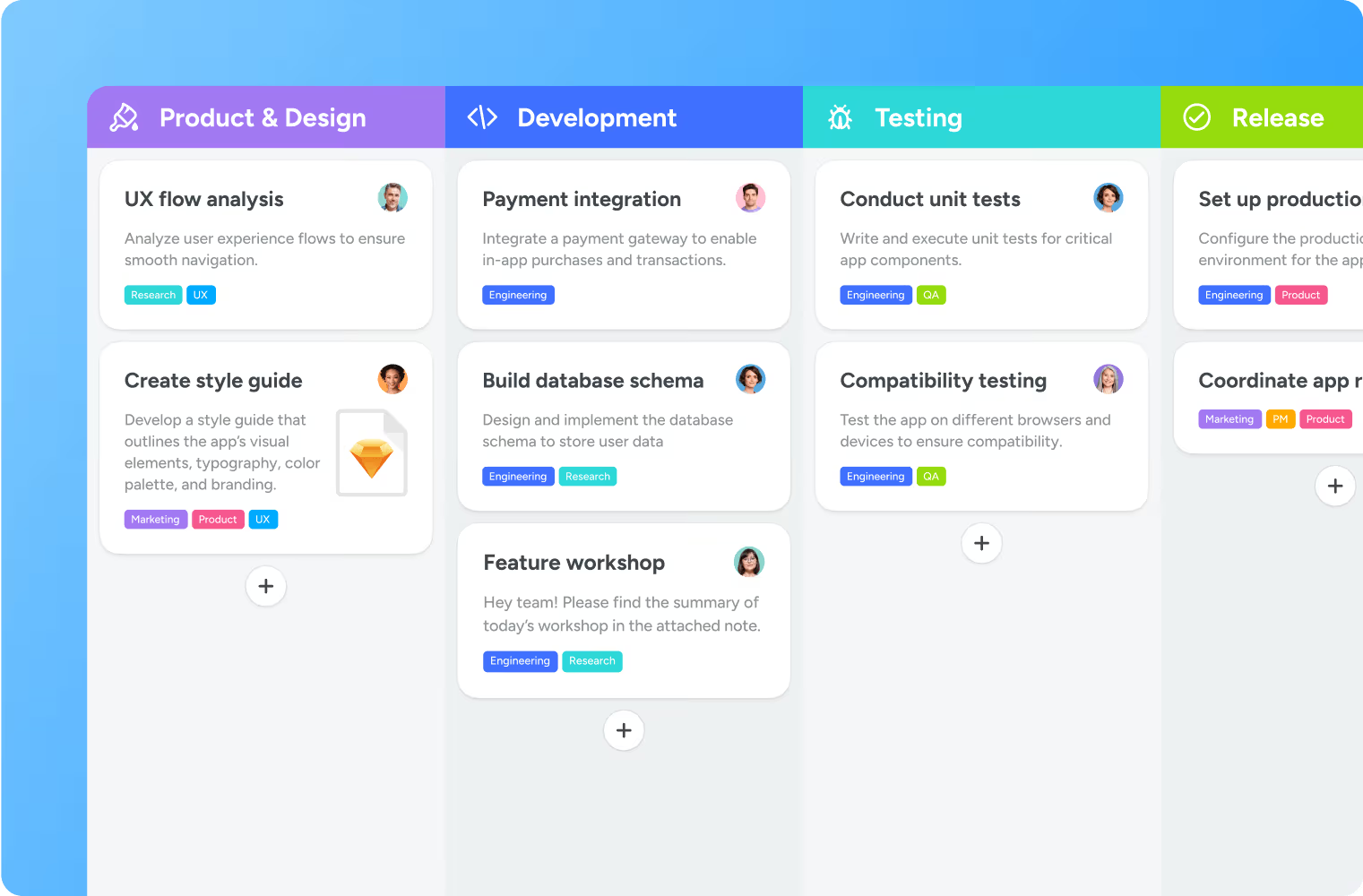
Image source: Official vendor sites
MeisterTask pricing plans and features overview
MeisterTask pricing is structured across multiple tiers to support different team sizes and workflow needs, from individual users to large organizations. Each plan unlocks progressively more features, moving from basic task tracking to advanced project visibility, permissions, and security controls. While the entry-level plans focus on simplicity and ease of use, higher tiers introduce tools aimed at managing more structured workflows. Understanding what each plan includes—and what it restricts—is essential for evaluating long-term value and scalability. 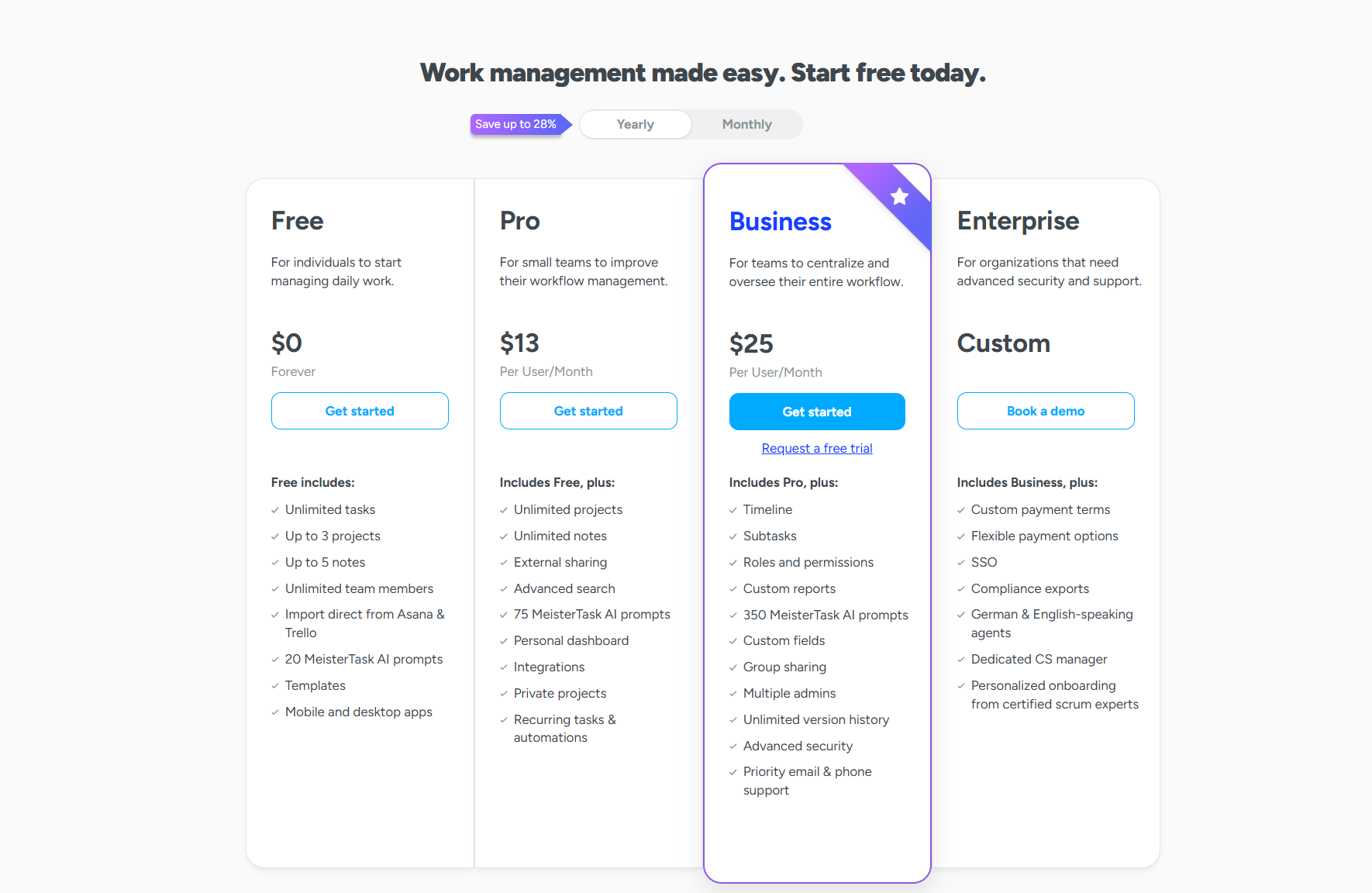
Information source: Official vendor sites
Update time: 2025-12-16
Note: Pricing and plan details reflect publicly available data as of the update date and may vary based on region, billing cycle, and number of agents.
MeisterTask pricing plans explained in detail
MeisterTask pricing plans are structured to scale gradually from individual task tracking to organization-wide workflow management. Each tier adds specific capabilities around visibility, control, and automation rather than completely changing how the product works. Understanding what truly unlocks at each level helps teams choose a plan that fits current needs without overpaying or hitting limitations too soon. MeisterTask Free plan
The Free plan is designed for individuals or tiny teams starting with basic task organization. It focuses on simplicity, allowing users to without setup complexity. However, its limits become noticeable as soon as projects or documentation needs grow.
Key features:
- Unlimited tasks: Users can create and manage as many tasks as needed without restrictions. This supports and simple workflows. It works well for personal productivity or tiny initiatives.
- Up to 3 projects: The plan restricts users to three active projects at a time. This limitation encourages minimal organization but can quickly become restrictive. Teams juggling multiple initiatives may outgrow this cap early.
- Mobile and desktop apps: Access is available across web, desktop, and mobile platforms. This ensures tasks can be updated on the go. However, functionality remains basic compared to paid tiers.
MeisterTask Pro plan: $13/user/month
The Pro plan targets small teams that need more flexibility and visibility across their work. It removes core limitations from the Free plan while introducing collaboration and automation features. This tier is often where teams first begin paying for efficiency.
Key features:
- Unlimited projects and notes: Teams can create as many projects and notes as required. This supports parallel workstreams and . It removes structural bottlenecks present in the Free plan.
- Recurring tasks and automations: Users can automate repetitive tasks and set recurring workflows. This reduces manual effort for routine processes. However, automation depth remains relatively lightweight.
- Integrations and private projects: The Pro plan enables tool integrations and private project spaces. This helps teams while controlling access. It's useful for basic collaboration and data separation.
MeisterTask Business plan: $25/user/month
The Business plan is built for teams managing complete workflows across departments. It introduces governance, reporting, and advanced visibility features. This tier represents a shift from task tracking to structured execution.
Key features:
- Timeline and subtasks: Teams gain access to and task breakdowns using subtasks. This supports better planning and dependency tracking. It's especially useful for longer or multi-phase projects.
- Roles, permissions, and multiple admins: The plan allows role-based access and administrative controls. This helps manage growing teams with clearer ownership. Governance becomes more practical at scale.
- Custom reports and fields: Users can create custom fields and reports tailored to their workflows. This enables and analysis. Reporting, however, remains project-centric rather than cross-functional.
MeisterTask Enterprise plan: Custom
The Enterprise plan is designed for large organizations with advanced security and compliance needs. Pricing is custom, reflecting tailored onboarding and support. This tier focuses more on control, risk management, and service depth.
Key features:
- Single sign-on and compliance exports: Enterprise users get SSO and compliance-ready data exports. These features support internal security and regulatory requirements. They are essential for larger, regulated organizations.
- Dedicated customer success manager: A dedicated CS manager and ongoing optimization. This reduces friction for large rollouts. It also provides guided adoption across teams.
- Flexible payment and onboarding options: Organizations can negotiate payment terms and receive personalized onboarding. This flexibility suits enterprise procurement processes. It's designed for long-term, large-scale deployments.
When MeisterTask pricing makes sense
MeisterTask pricing makes the most sense for teams that value simplicity over depth and want to organize work visually without heavy configuration. It works best when is the primary goal rather than complete execution management.
- Small teams needing visual task tracking: MeisterTask is well-suited for small teams that rely on Kanban boards to track tasks and progress. Its clean interface helps teams stay organized without requiring training or setup time.
- Lightweight project coordination: For projects with clear tasks and minimal dependencies, MeisterTask provides enough structure to stay aligned. Teams can coordinate work without dealing with complex planning tools or reporting layers.
- Teams that don't need complex workflows: If workflows are linear and predictable, MeisterTask's and task flows are sufficient. It's ideal for teams that don't require advanced approvals, cross-team dependencies, or deep reporting.
Where MeisterTask pricing starts to feel limiting
As teams grow and workflows become more interconnected, MeisterTask pricing can start to feel restrictive. Many advanced capabilities required for execution and coordination only appear at higher tiers, and some gaps remain even after upgrading.
- Automation and execution gaps: MeisterTask offers basic automations, but they are limited in depth and scope. Teams handling , approvals, or conditional logic may find execution still relies on manual effort.
- Lack of connected communication: Communication in MeisterTask is mainly confined to task comments. Without deeply integrated chat or , teams often rely on external tools, increasing context switching.
- Difficulty scaling beyond task boards: As projects multiply, MeisterTask remains board-centric. Managing cross-project visibility, dependencies, and organization-wide reporting becomes harder as teams scale.
MeisterTask app experience across devices
MeisterTask offers apps across desktop, web, and mobile to keep work accessible from anywhere. While the experience is consistent, its strengths vary with the intensity of team execution.
- Desktop vs mobile usability: The desktop and web versions provide the best experience for managing boards and projects. Mobile apps are well-designed for viewing and light edits, but feel constrained by planning-heavy work.
- Where the app shines for quick updates: MeisterTask is effective for quick task updates, status changes, and comments. This makes it valid for daily check-ins or lightweight progress tracking on the go.
- Where it falls short for execution-heavy work: For complex workflows involving dependencies, approvals, or , the app shows limitations. Execution-heavy work often requires switching to other tools to fill gaps.
Support, onboarding, and self-service help
MeisterTask emphasizes self-service learning and , which aligns with its overall simplicity-first approach. Support quality is generally adequate for small teams, but can feel limited as usage grows.
- MeisterTask help resources and learning curve: MeisterTask provides documentation, help articles, and basic tutorials. The learning curve is low for core features, though advanced settings may require additional exploration.
- How easy it is to onboard non-technical users: The intuitive interface lets them get started quickly. Most teams can begin using core features without formal training or .
- When teams need external guidance: As workflows become more complex, teams may need external consultants or internal champions. This is especially true when trying to standardize processes or scale usage across departments.
As teams begin to outgrow simple task boards, the focus often shifts from tracking work to actually executing it across people, projects, and tools. This is where gaps in communication, visibility, and automation become more noticeable. Instead of adding more standalone tools to compensate, many teams look for platforms that connect tasks with documents, conversations, and workflows in one place. This shift naturally leads to exploring solutions like Lark, which are built for end-to-end execution rather than isolated task management.
Simplify collaboration without limiting future growth
Meet Lark: Move beyond task boards to connected execution
is an all-in-one work collaboration platform built to help teams move from ideas to execution without relying on multiple disconnected tools. It combines , real-time chat, documents, spreadsheets, meetings, and automation into a single, unified workspace. Instead of managing tasks in isolation, teams can link work directly to conversations, files, and structured data. This reduces context switching and improves execution clarity across teams. As organizations scale, Lark supports both lightweight and complex, cross-functional workflows within the same platform.
Built-in task management tool for clean planning and execution
Lark Tasks is a centralized management tool that organizes, collaborates on, and executes work, breaking down large projects into manageable steps. For planning, it allows users to create task lists with granular sub-tasks and set due dates, viewable across Kanban or . Accountability is clearly defined by assigning owners and using the "View by Role" feature to track personal responsibilities. All task changes are logged in the activity history, ensuring transparency and streamlined execution. 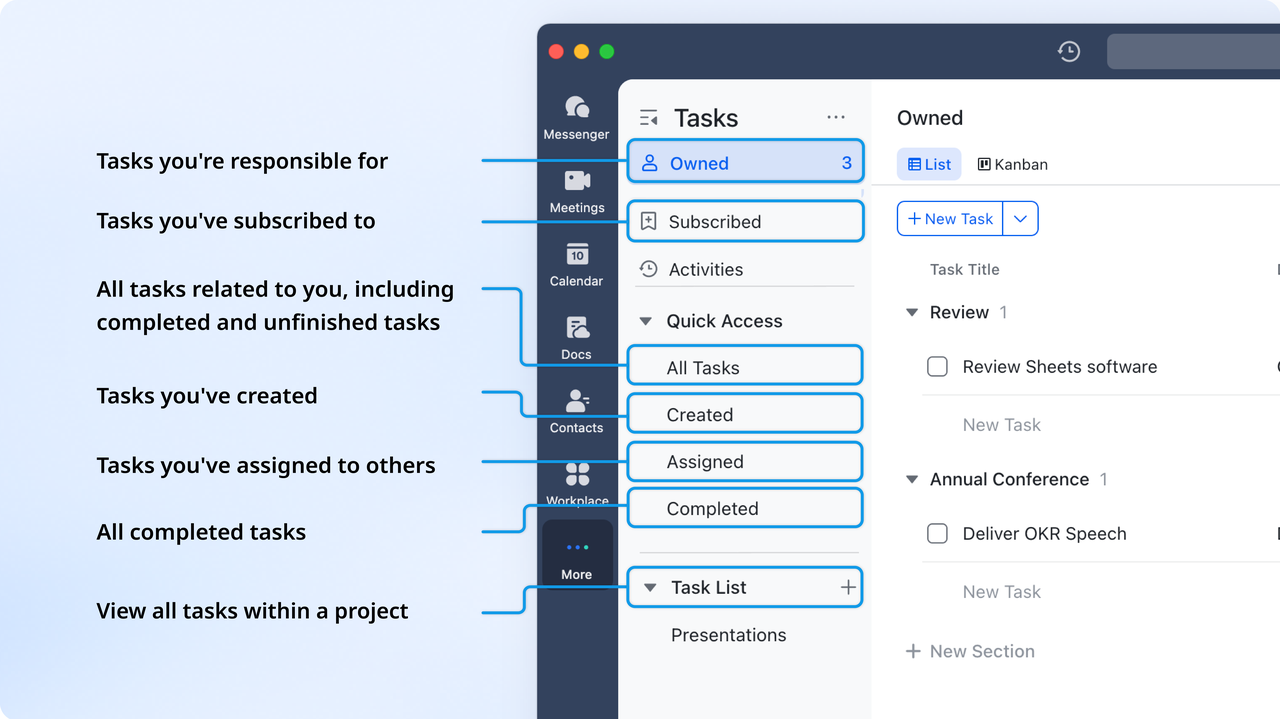
Custom fields that form a customized project hub
Lark allows teams to create custom fields tailored to how they actually work, rather than forcing projects into rigid structures. Teams can add fields for status, priority, owner, cost, progress, risk level, or any project-specific detail. These fields can then be used for filtering, grouping, automation, and reporting. As workflows evolve, fields can be adjusted without rebuilding the entire project setup, keeping over time. 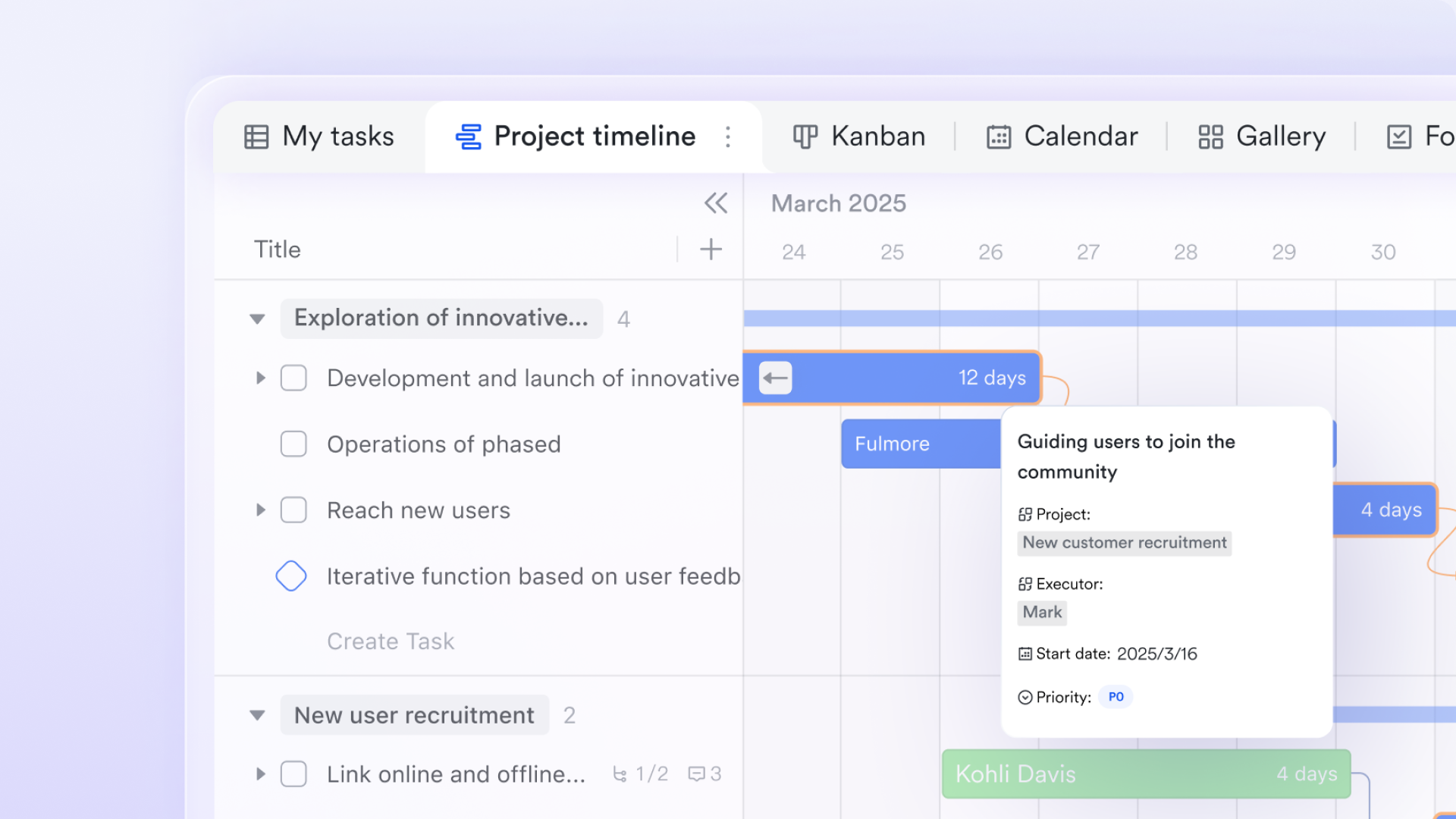
Visual project views for instant clarity
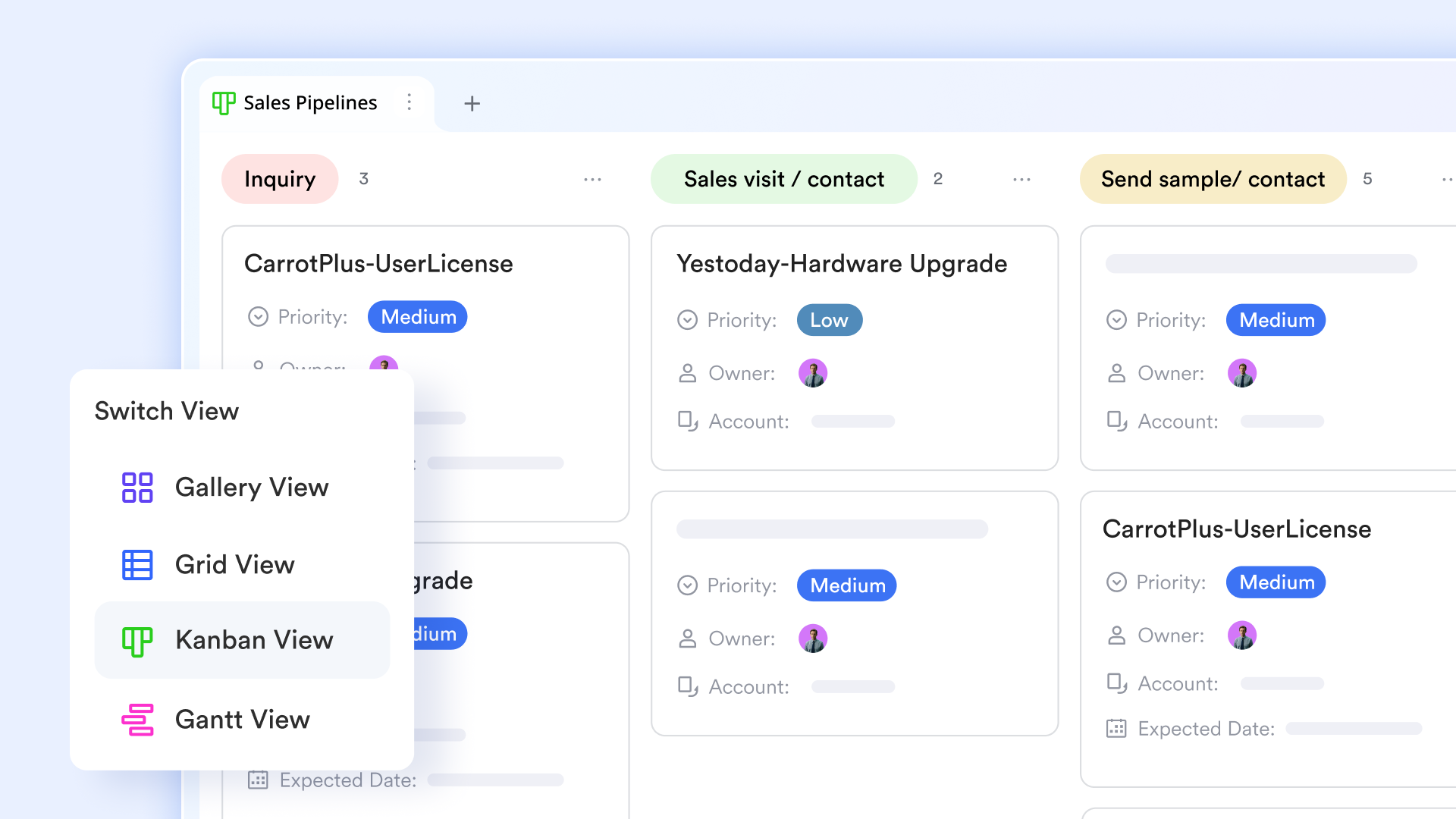
Lark provides multiple visual views built on the same underlying data, allowing teams to see work from different angles without duplicating information. Projects and tasks can be viewed as to track status, tables for detailed planning, calendars for deadline management, or timelines for . Because all views stay in sync, updates made in one view immediately reflect in every other view. This helps teams quickly understand progress, spot delays, and adjust plans in real time.
Live dashboards for real-time project visibility
dashboards turn project data into live, visual summaries that update automatically as work progresses. Teams can track metrics such as task completion, workload distribution, overdue items, or project status at a glance. Dashboards can be filtered by owner, team, or timeframe, giving managers and stakeholders instant visibility without manual reporting. This makes it easier to monitor execution health and make informed decisions faster. 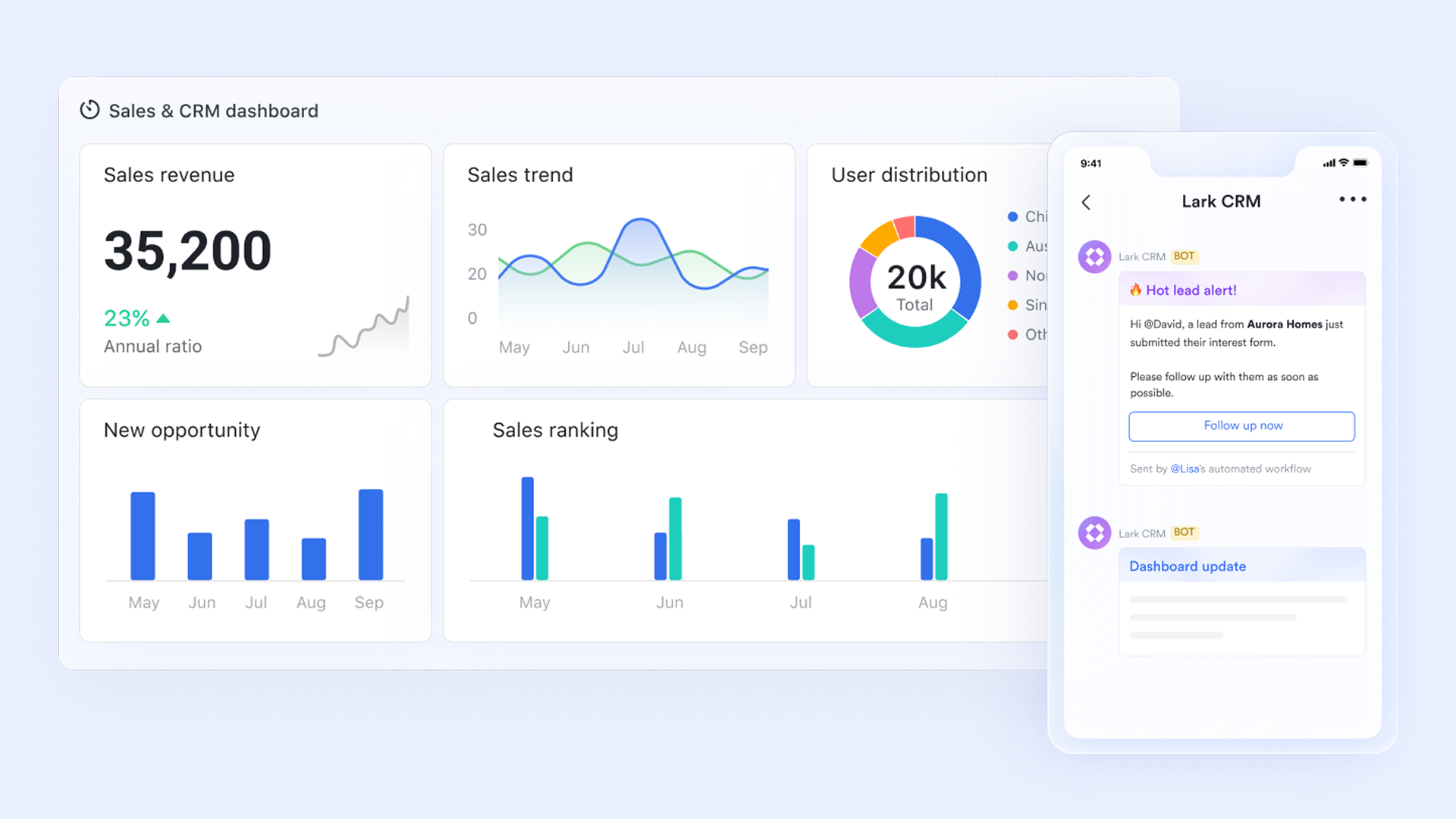
Communication alongside projects and tasks
handles all fundamental instant messaging needs, allowing users to send text, rich media, and files, and to communicate in one-on-one or focused with features like message threads and read receipts. Crucially, it serves as the operational link for projects: users can convert a message directly into a task in Lark Tasks, ensuring immediate actionability. When tasks or documents are shared, Messenger provides instant notifications about status changes or comments. 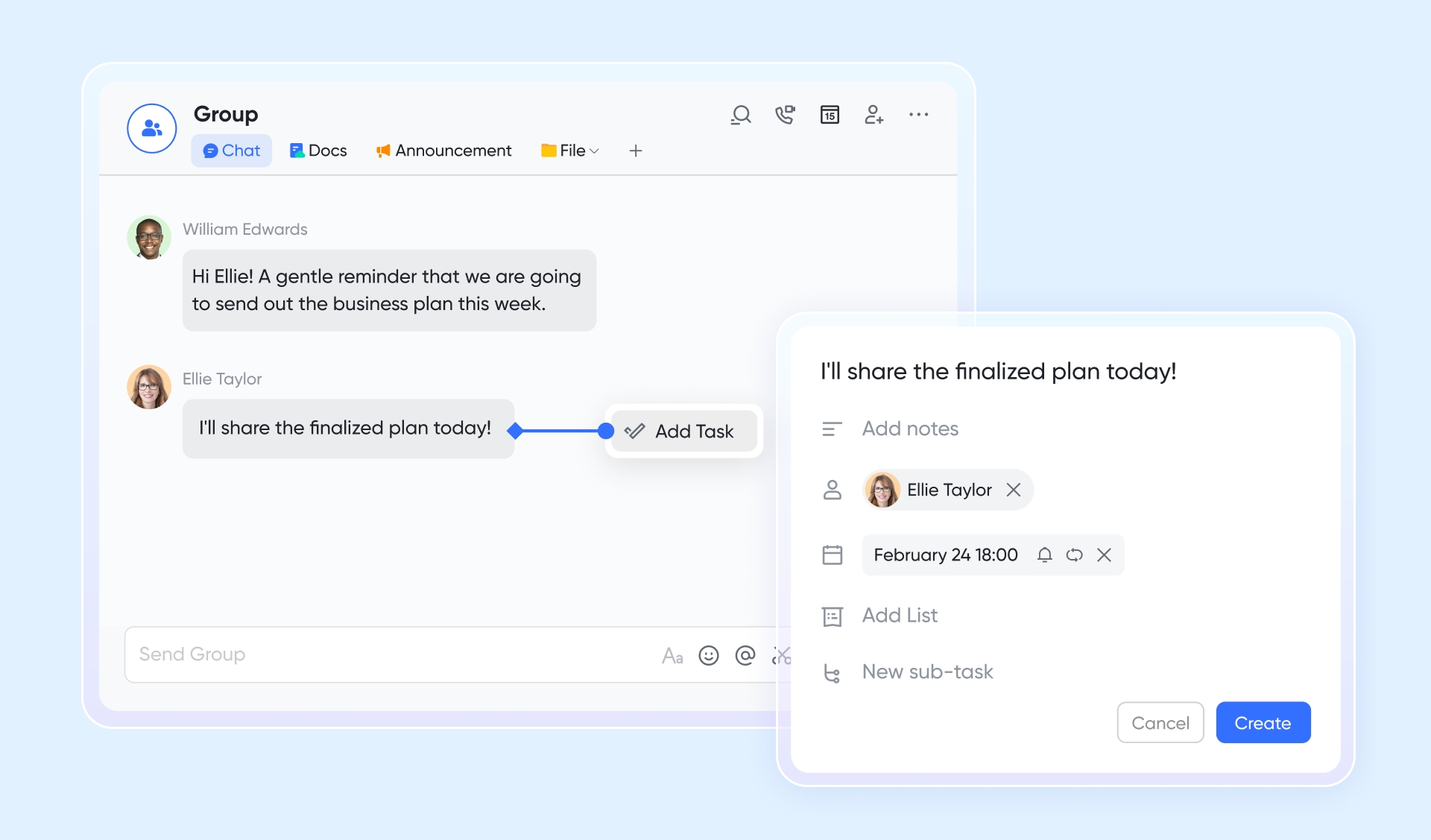
Templates to launch projects faster
Lark offers that help teams start projects quickly without building everything from scratch. Templates can include predefined tasks, fields, views, and workflows for everyday use cases such as , product launches, , or client work. Teams can customize templates to fit their needs and reuse them across projects, reducing setup time and improving consistency.
:
- Starter plan: Free forever plan that includes 11 powerful tools for up to 20 users. It also comes with 100GB of storage, 1000 automation runs, AI translations, and more.
- Pro plan: $12/user/month (billed annually) for up to 500 users. It includes everything in Starter plus group calling for up to 500 attendees, 15TB of storage, 50,000 automation runs, and more.
- Enterprise plan: for custom pricing. Supports unlimited users and includes even more automation runs and advanced security, compliance, and management features.
For small teams with simple communication needs

18 months message history
1000 Base automation runs/month
2000 rows per table in Base
Most POPULAR
For companies with comprehensive collaboration and management needs
Unlimited message history
500-participant video meetings
50k Base automation runs/month
20k rows per table in Base
For large companies with advanced security and organizational management needs
Get a personalized demo and pricing
Unlimited message history
500-participant video meetings
15 TB storage + 30 GB storage/user
500k Base automation runs/month
50k Base automation runs/month
Most POPULAR
For companies with comprehensive collaboration and management needs
Unlimited message history
500-participant video meetings
50k Base automation runs/month
20k rows per table in Base
MeisterTask vs Lark: Pricing simplicity vs execution depth
In short:
- MeisterTask wins on pricing clarity and ease of entry for teams that mainly need task boards.
- Lark wins on execution depth, offering more value when teams need coordination across projects, documents, communication, and workflows—without stacking multiple tools.
Conclusion
MeisterTask pricing offers a clear, accessible entry point for individuals and small teams who primarily need visual task tracking and lightweight . Its simple plans, clean interface, and Kanban-focused approach make it easy to adopt without a steep learning curve. However, as teams grow, workflows become more interconnected, and execution demands increase, the limitations around automation, communication, and cross-project visibility become harder to ignore. Costs can also rise as teams move to higher tiers to unlock essential features.
For teams looking beyond bare task boards, a more connected approach to work becomes essential. provides a workspace where tasks, documents, communication, dashboards, and automation live together, supporting real execution rather than fragmented tracking. Instead of stacking tools as complexity increases, teams can scale their workflows within a single platform. If your team is planning for growth and long-term efficiency, exploring Lark is a smart next step toward more streamlined, connected work.
Design work systems that scale without complexity
FAQs
Does MeisterTask pricing include automation, or are rules limited?
MeisterTask pricing includes basic automation rules on paid plans, but they remain limited in depth and flexibility. Automation mainly supports simple task actions rather than complex workflows. Teams needing broader often pair it with platforms like Lark after handling core tasks via the MeisterTask login.
How does MeisterTask pricing compare to full project management tools?
Compared to complete project management tools like Wrike, MeisterTask's pricing is more straightforward but offers less depth in execution. Advanced planning, reporting, and cross-team visibility usually require higher tiers or additional tools. Lark addresses this by bundling execution, , and automation together.
Is MeisterTask suitable for cross-functional teams?
MeisterTask can support small cross-functional teams, but collaboration remains task-centric. It lacks deeply connected documents and communication layers found in broader ecosystems, such as MindMeister collaborations or Lark's unified workspace.
What happens to costs when team size doubles?
As team size grows, MeisterTask pricing scales linearly per user, which can quickly increase costs. Teams may need to upgrade plans to unlock governance features. Platforms like Lark help control costs by offering more capabilities upfront, unlike tools like Paymo.
Can MeisterTask replace multiple work tools long term?
MeisterTask works well as a task board, but often requires additional tools for chat, docs, and reporting. Over time, this increases tool sprawl. Lark is designed to replace multiple tools by centralizing execution, collaboration, and automation on a single platform.
Related reading