When considering Microsoft Project pricing, it's crucial to understand that you're not just buying software—you're investing in a complete project management ecosystem that integrates seamlessly with the Microsoft 365 suite. Many organizations I've consulted with initially focus solely on the subscription costs, but the real value—and total cost of ownership—extends far beyond the monthly per-user fees. In today's competitive landscape, alternatives like Lark have emerged offering compelling value propositions, but Microsoft remains the industry standard for complex project management and portfolio management. I'll guide you through the current Microsoft Project cost structure and help you determine which solution aligns best with your organization's needs and budget constraints.
Try the best Microsoft alternative free
Understanding Microsoft pricing: The relationship between 365, Planner, and Project
Navigating Microsoft's pricing is essential for selecting the right product plan. To make an informed decision, it's crucial to first understand the relationship between Microsoft 365, Planner, and Project. Think of Microsoft 365 as your foundational productivity platform. Both Planner and Project are built upon and integrated into this ecosystem. This means you need an active Microsoft 365 subscription to access their core functionalities.
Beyond the basics included in Microsoft 365, both Planner and Project offer specialized, paid premium plans designed for different team and enterprise needs. These plans, such as Planner Plan 1 or Planner & Project Plan 5, act as powerful upgrades, providing advanced features for , portfolio analysis, and . By grasping this layered structure, you can effectively assess your requirements and choose a cost-effective plan that scales with your organization's ambitions.
Microsoft 365 pricing plan
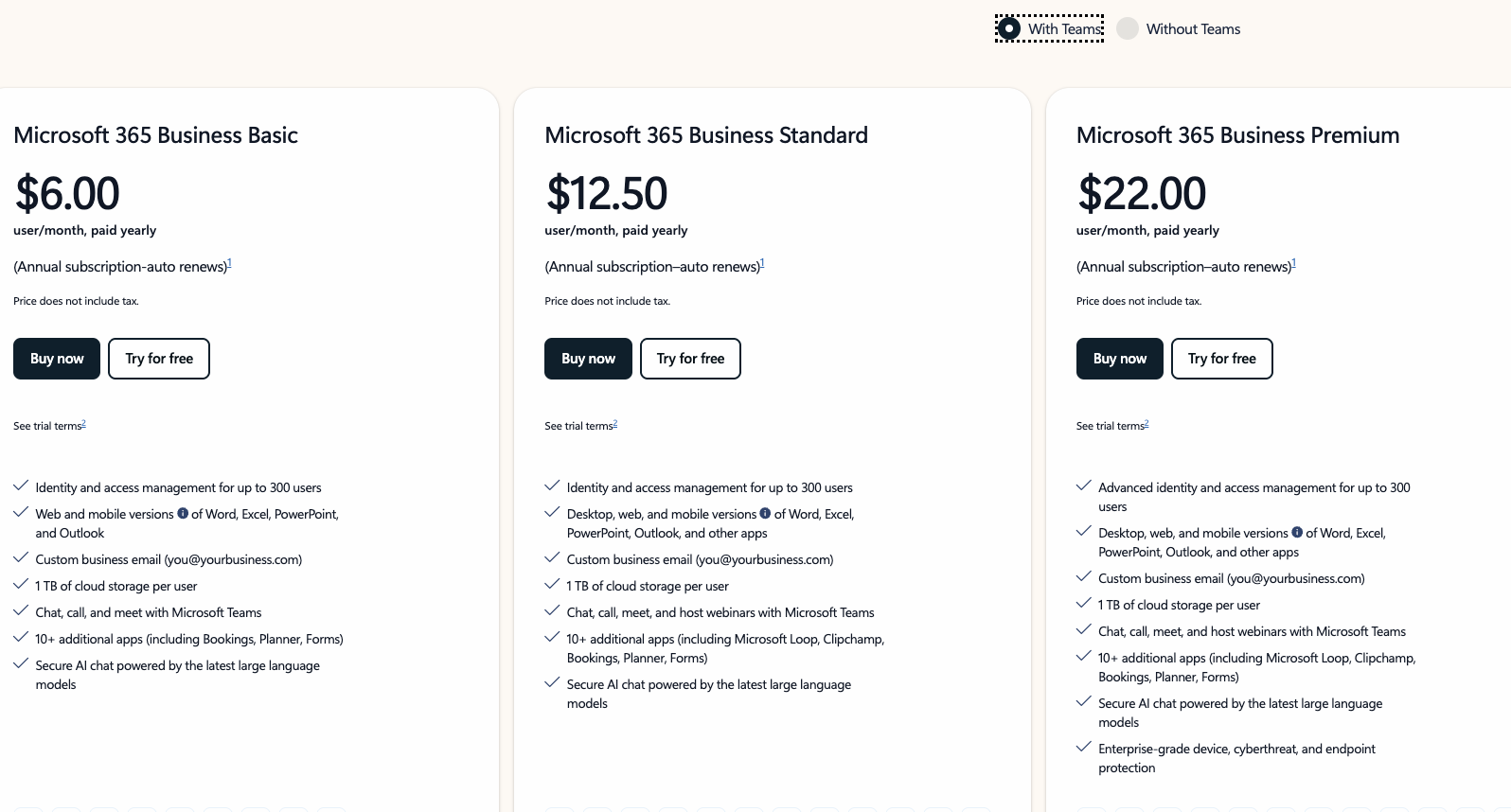
Image source: microsoft.com
Please note that this guide specifically examines Microsoft 365 Business plans tailored for organizational use. We have not covered Personal or Family subscription tiers, as these are designed for individual consumers and lack the advanced security, administrative controls, and collaboration features that businesses require. Our analysis focuses exclusively on helping organizations select the right Business plan—from Basic to Premium—based on their operational needs and team structure.
Information source: microsoft.com (price does not include GST)
Microsoft Planner and Project pricing &Microsoft Project plans
Information source: microsoft.com (price does not include GST)
Subscription-based pricing breakdown
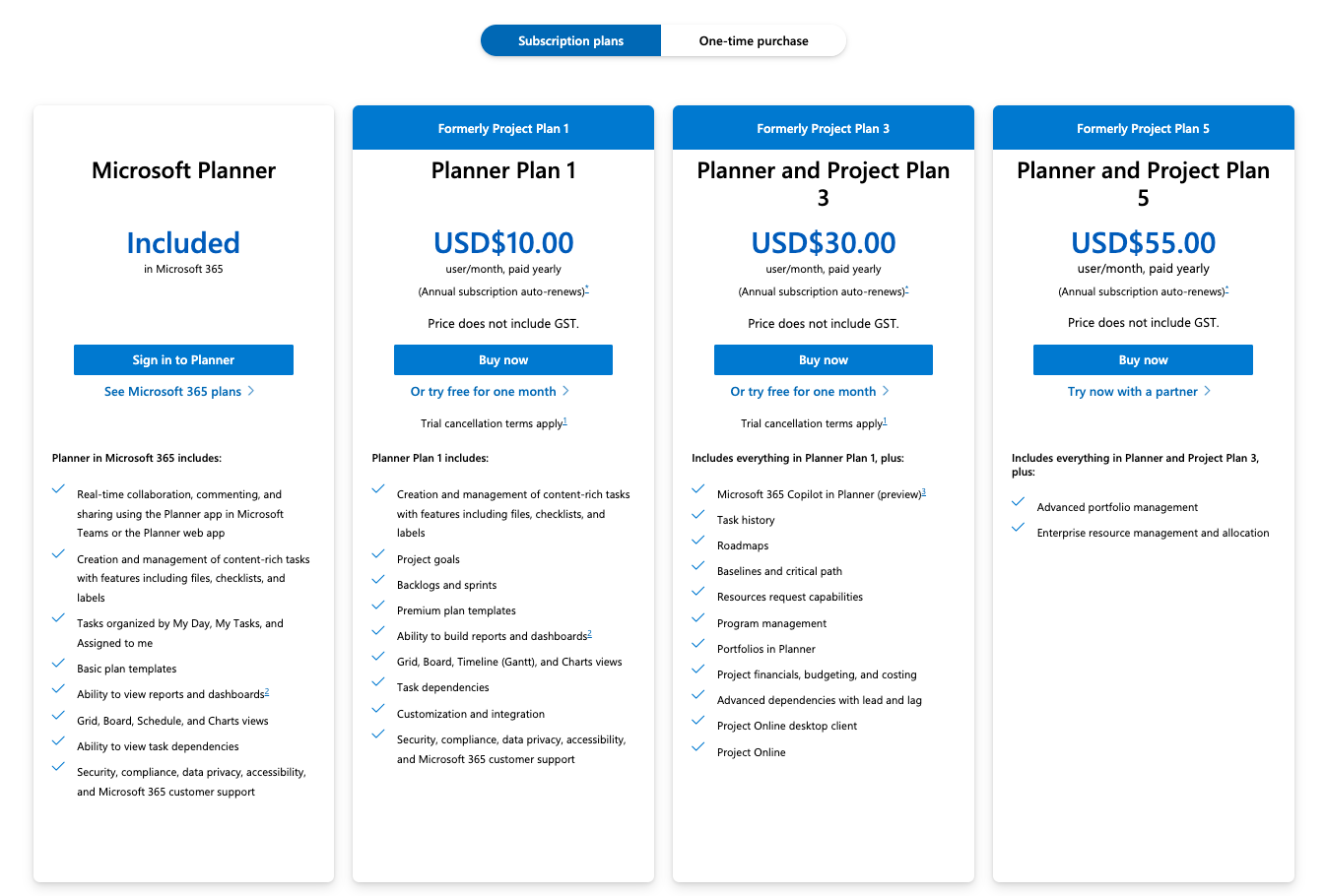
Image source: microsoft.com
After extensive analysis of current market offerings, I can provide detailed insights into each subscription tier's value proposition and ideal use cases.
Project Plan 1 ($10/user/month): This entry-level plan serves teams needing without the full feature set. At this Microsoft Project cost level, you receive:
- Core functionality: Task and project management, grid views, and timeline features
- Collaboration basics: File sharing and team communication tools
- Integration: Full Microsoft 365 ecosystem integration
- Limitations: No desktop application access or advanced reporting
I typically recommend Plan 1 for small teams or departments that primarily need task tracking rather than complex project portfolio management. The Microsoft Project for the web pricing at this tier makes it accessible for organizations with basic needs.
Project Plan 3 ($30/user/month): This mid-tier plan represents the sweet spot for most professional and advanced project management capabilities needs. The Microsoft Project pricing at this level includes:
- Full desktop access: Both web and desktop application availability
- Advanced features: Resource management, cost tracking, and timesheets
- Reporting capabilities: Custom reports and portfolio dashboards
- Collaboration tools: Enhanced features
From my consulting experience, Plan 3 delivers the best value for money for organizations to manage multiple projects and manage tasks with dedicated project managers. The inclusion of both web and provides flexibility that many teams appreciate.
Project Plan 5 ($55/user/month): The enterprise-grade solution offers comprehensive Microsoft Project online pricing for organizations requiring advanced portfolio management. This tier includes:
- Portfolio optimization: Advanced analytics and what-if scenarios
- Demand management: Project proposal workflows and evaluation
- Resource management: Enterprise-level resource planning
- Governance features: Advanced security and c
For large organizations where Microsoft Project server pricing might otherwise be considered, Plan 5 often provides better value through cloud scalability and reduced infrastructure costs. The per-user Microsoft Project cost here reflects enterprise-grade capabilities.
These subscription plans provide always-updated software, cloud storage, and —crucial considerations for modern distributed teams. The Microsoft Project for the web pricing is integrated into these plans, offering web-based accessibility without additional costs.
One-time purchase plan breakdown
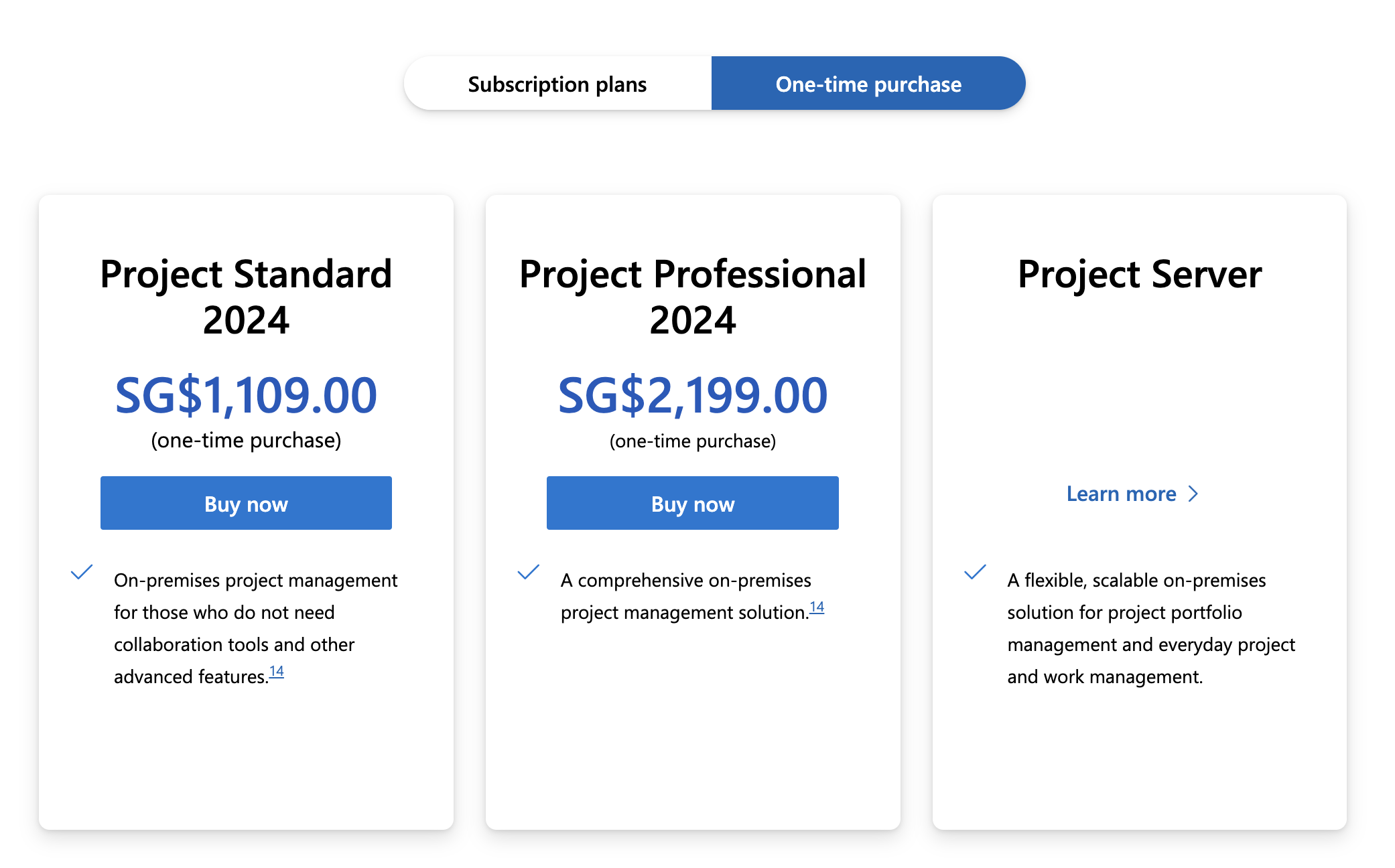
Image source: microsoft.com
For organizations preferring one-time purchases, Microsoft offers perpetual licenses through their Volume Licensing program. While specific Microsoft Project server pricing varies based on organizational size and negotiation, the standard pricing typically ranges:
- Project Standard 2024: $679.99 one-time fee
- Project Professional 2024: $1,129.99 one-time fee
It's important to note that perpetual licenses require additional costs for upgrades and lack the features that define modern project management.
How to choose the right Microsoft plan
Based on my extensive experience helping organizations navigate Microsoft Project pricing decisions, I've developed that considers both immediate needs and long-term growth. Choosing the right plan isn't just about minimizing Microsoft Project cost—it's about maximizing value while ensuring scalability.
Assess your project complexity
The first consideration should be your project portfolio's complexity. For organizations managing simple, linear projects with limited dependencies, the Microsoft plan for the web pricing at Plan 1 level (10/user/month)often suffices.However,if you′re managing complex programs with multiple dependencies, resource constraints, and advanced reporting needs, Plan 3(10/user/month) often suffices.
Evaluate your team structure
Consider how your team operates. If your project managers primarily work independently with occasional collaboration, desktop-focused features in higher plans might be essential. For highly collaborative, distributed teams, the web-based access included in all Microsoft pricing plans becomes crucial. Remember that mixed deployments—where some users need advanced features, while others require basic access—can optimize overall Microsoft Project cost.
Analyze integration requirements
Your existing Microsoft 365 investment significantly impacts the ideal choice. Organizations heavily invested in Microsoft's ecosystem typically find better value in higher-tier plans due to seamless integration. The Microsoft pricing considerations become relevant here—if you already have server infrastructure, perpetual licenses might offer better value, but for cloud-first organizations, subscription models provide operational efficiency.
Budget and scaling considerations
I always recommend modeling costs over a 3-year horizon. While Plan 1's $10/user/month seems attractive, upgrading later may involve retraining and migration costs. For growing organizations, Plan 3 often represents the best balance between capability and Microsoft Project cost. Enterprise organizations should evaluate Plan 5 against traditional Microsoft Project server pricing, considering both direct costs and IT overhead.
Enterprise considerations
For large organizations, Microsoft pricing becomes relevant through the Enterprise Edition, which requires additional infrastructure investments including Windows Server licenses, SQL Server licensing, and ongoing maintenance costs. The choice between subscription and perpetual licensing ultimately depends on your organization's cash flow preferences, IT infrastructure, and need for the latest features. Subscription models provide predictable operational expenses, while perpetual licenses represent capital expenditures with higher upfront costs.
Decision framework: Use this simple scoring system.
- Project complexity (1-5): Basic=1, Complex=5
- Team collaboration needs (1-5): Independent=1, Highly collaborative=5
- Microsoft ecosystem integration (1-5): Minimal=1, Extensive=5
- Growth expectations (1-5): Stable=1, Rapid growth=5
Scores below 12 typically indicate Plan 1 suitability, 12-18 suggests Plan 3, while scores above 18 warrant Plan 5 consideration.
Microsoft integration: Cost-effective project management solutions
Many organizations I advise overlook a crucial aspect of Microsoft Project pricing: the complementary role of Microsoft Planner. As part of the Microsoft 365 ecosystem, Planner offers a lightweight, cost-effective solution that can reduce overall Microsoft Project cost when used strategically.
Understanding Microsoft Planner and Project's value proposition
Microsoft Planner comes included with most Microsoft 365 business plans, essentially providing free project management capabilities for teams that don't require advanced features. The current Microsoft Project for the web pricing structure makes Planner an attractive entry point, with organizations only needing to upgrade specific users to full Project licenses when necessary.
Integration benefits
The seamless integration between Planner and Project represents one of Microsoft's strongest value propositions. Teams can:
- Start projects in Planner for quick collaboration
- seamlessly upgrade to Project when complexity increases
- Maintain data continuity and reduce migration costs
- Use consistent reporting across both platforms
This flexibility makes the overall Microsoft Project pricing structure more accessible and scalable for organizations of all sizes.
Hidden costs and additional expenses to consider
While Microsoft's pricing structure is generally transparent, organizations should account for potential hidden costs beyond the advertised subscription fees. requires evaluating these often-overlooked factors to avoid unexpected expenses down the line.
- Implementation and onboarding services: While you can set up basic features independently, complex enterprise deployments often require professional services for optimal configuration. Microsoft partners or certified consultants typically charge for customization, data migration, and user training.
- Third-party integration and customization: Native integrations cover common scenarios, but specialized workflows may require custom development. Building connectors to legacy systems or industry-specific software involves additional development costs and maintenance overhead.
- Training and change management: The platform's sophistication means team proficiency doesn't happen automatically. The budget for formal training programs, productivity tools, and potential temporary performance dips during the transition period.
- Storage and usage overages: While subscriptions include baseline storage, data-intensive projects with extensive file versions or video content may require premium storage add-ons, particularly for large teams.
- Compliance and security add-ons: Organizations in regulated industries may need advanced compliance features, audit capabilities, or enhanced security controls, which often come at a premium through specialized add-on subscriptions.
By proactively evaluating these hidden factors, organizations can create a more accurate total cost of ownership projection and ensure their Microsoft solution delivers maximum value without budget surprises.
A powerful, cost-effective Microsoft Project alternative
In my professional assessment of project management solutions, emerges as a compelling alternative that deserves serious consideration, particularly for organizations seeking modern, integrated collaboration tools without the complex Microsoft Project pricing structure.
Feature comparison and advantages
Having implemented both solutions for clients, I've observed several areas where Lark provides superior value.
User experience and collaboration: Lark's modern interface significantly reduces training time and costs. The integrated chat, , and document collaboration features eliminate the need for additional software subscriptions that often accompany Microsoft implementations.
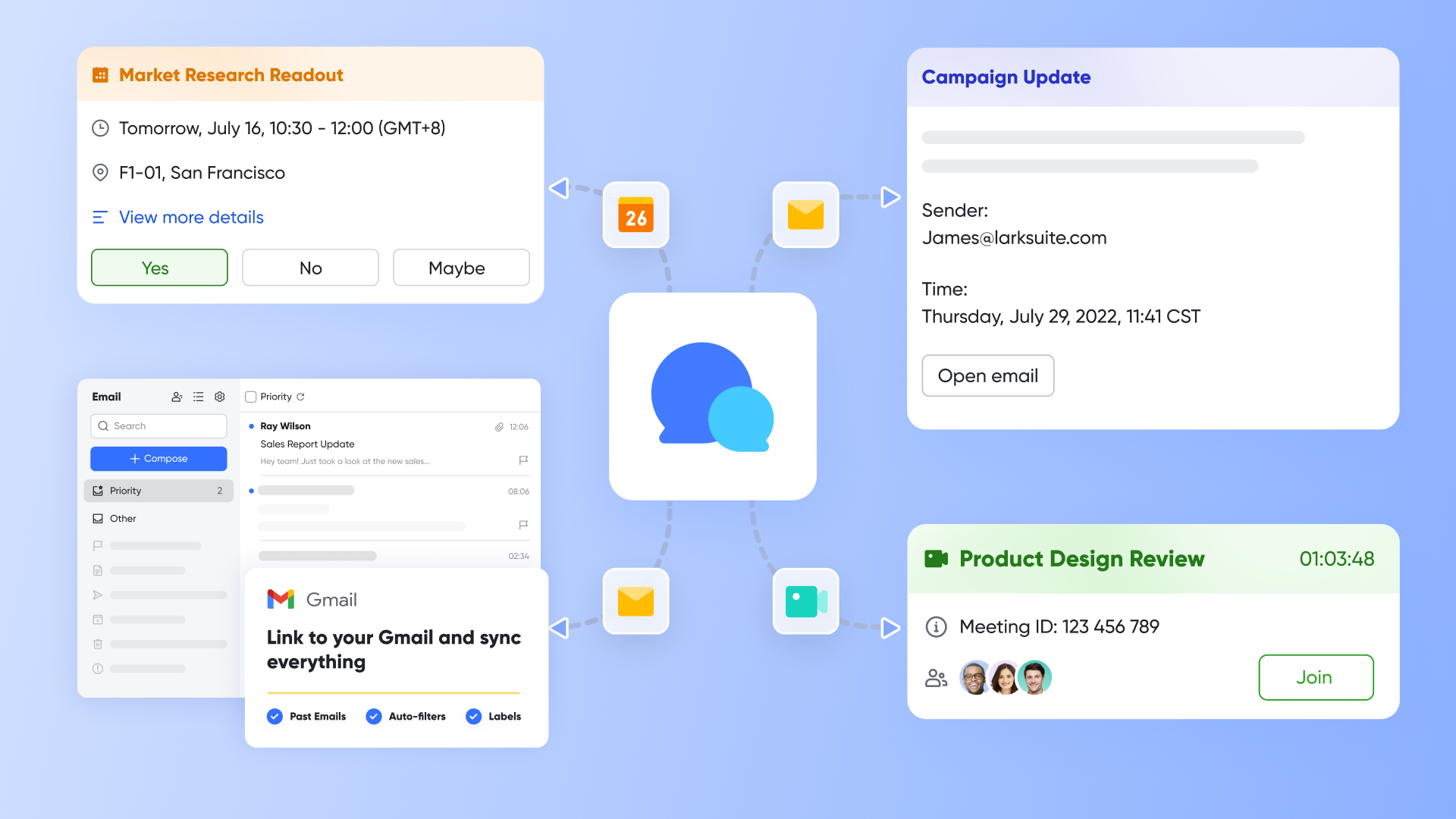
Mobile functionality: Unlike Microsoft mobile applications, which often feel like scaled-down versions of desktop features, Lark designed its from the ground up. This results in higher adoption rates among remote and mobile team members.
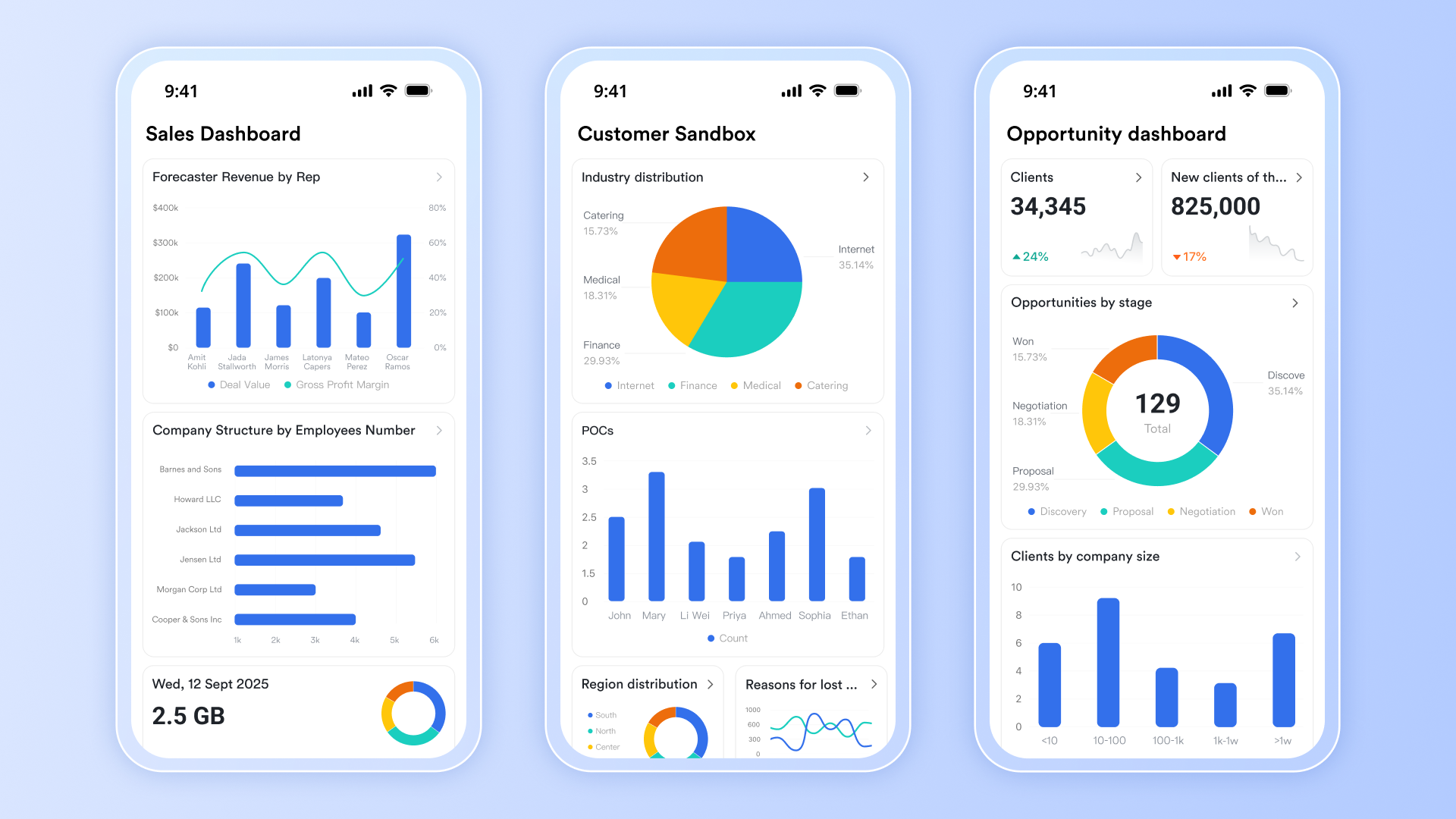
Implementation simplicity: Where Microsoft implementations can take weeks or months and require specialized consultants, Lark typically achieves full deployment within days. The reduced implementation translates to and lower total cost of ownership.
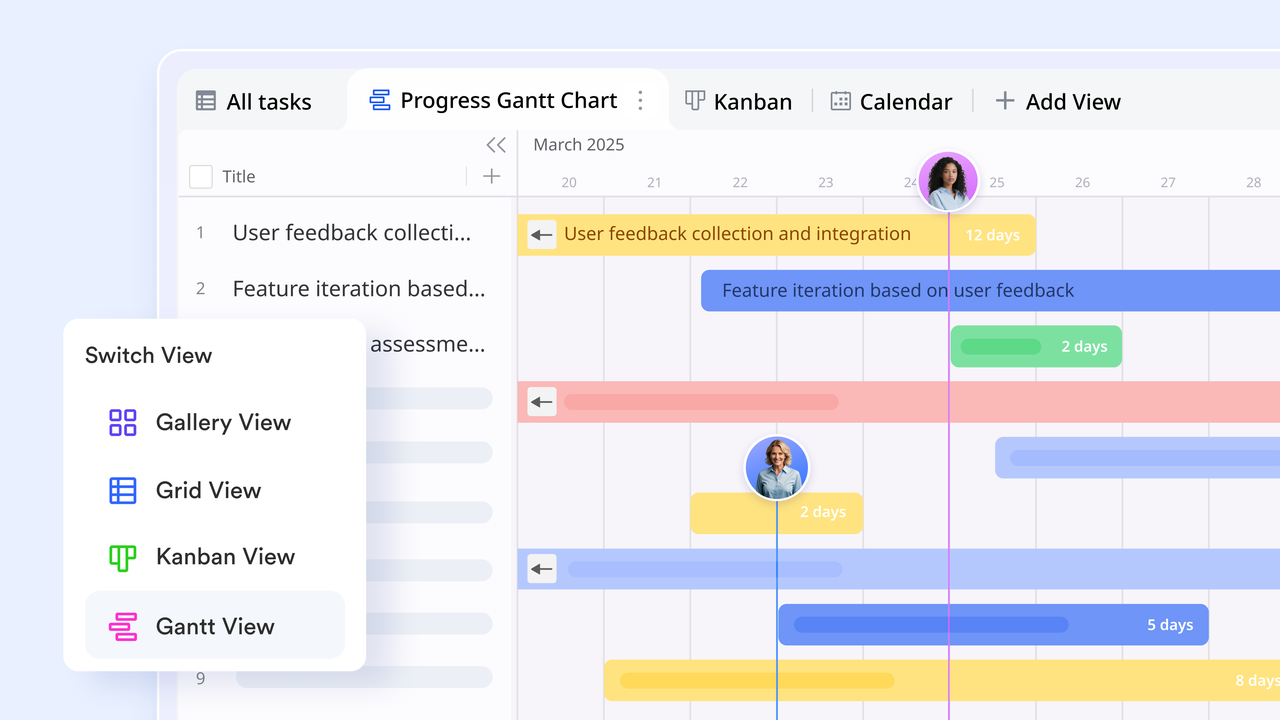
Centralized project management hub: serves as a unified project management hub, enabling teams to organize and track work through multiple intuitive views. It supports Kanban for visual workflow management, Gantt charts for timeline planning and progress tracking, and Gallery view for rich visual content presentation. This flexibility allows teams to adapt their workspace to various project needs without switching platforms. All-in-one ecosystem: While Microsoft Planner and Project integrates well within the Microsoft ecosystem, Lark offers broader third-party integration capabilities without additional middleware or development costs. 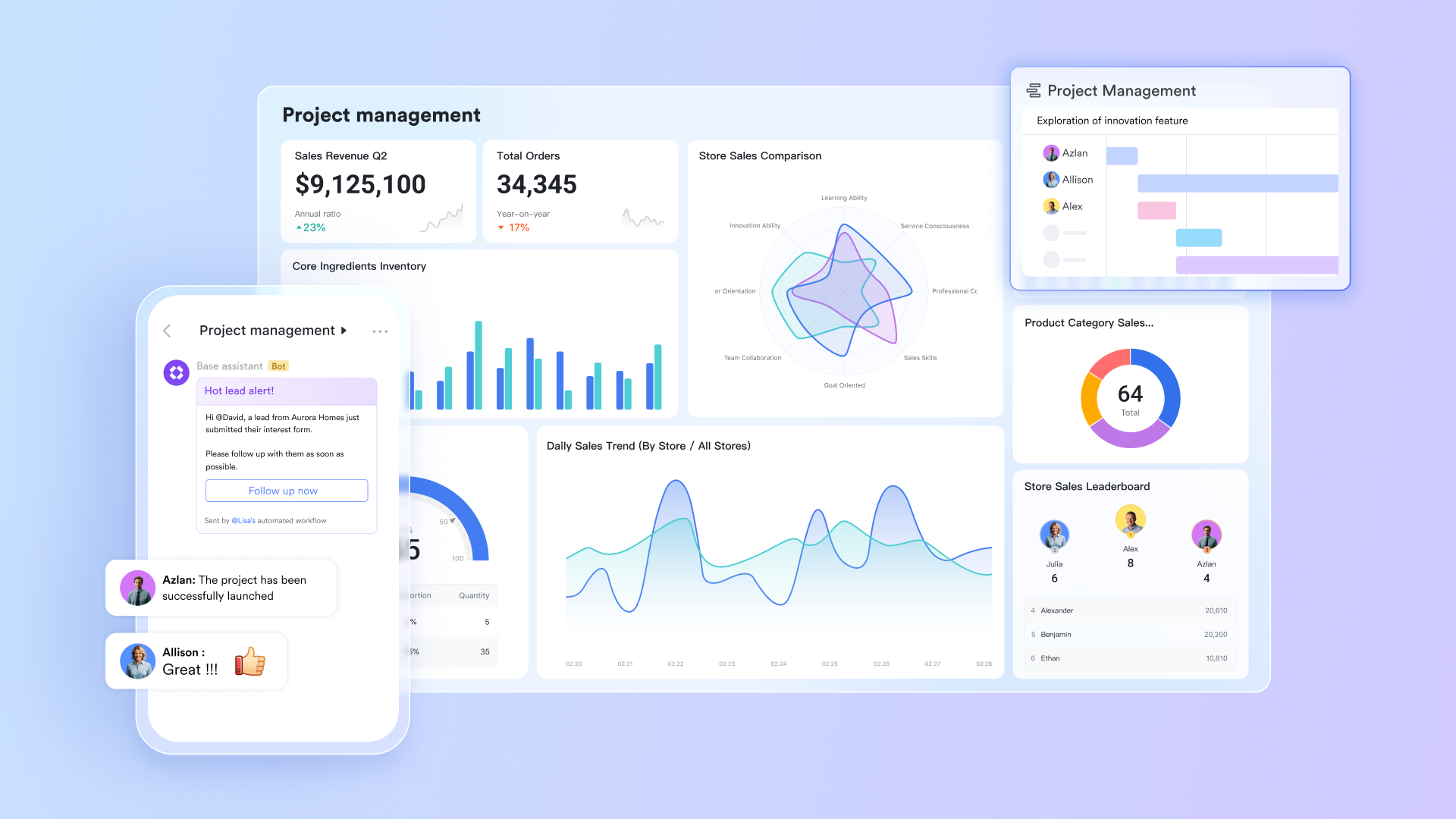
Strategic considerations for adoption
- Growing businesses that need scalability without pricing complexity
- Remote-first organizations requiring superior mobile and
- Cost-conscious enterprises seeking without hidden fees
- Teams valuing user experience and modern interface design
However, organizations with complex needs, advanced portfolio optimization requirements, or deep Microsoft ecosystem dependencies may still find value in Microsoft Project's specialized capabilities.
Master project management effortlessly with Lark
Microsoft vs Lark pricing comparison
For small teams with simple communication needs

18 months message history
1000 Base automation runs/month
2000 rows per table in Base
Most POPULAR
For companies with comprehensive collaboration and management needs
Unlimited message history
500-participant video meetings
50k Base automation runs/month
20k rows per table in Base
For large companies with advanced security and organizational management needs
Get a personalized demo and pricing
Unlimited message history
500-participant video meetings
15 TB storage + 30 GB storage/user
500k Base automation runs/month
50k Base automation runs/month
Most POPULAR
For companies with comprehensive collaboration and management needs
Unlimited message history
500-participant video meetings
50k Base automation runs/month
20k rows per table in Base
: Switching to Lark's Pro plan can lead to significant cost savings— for example, a 100-employee company using like Slack, and Airtable could save approximately $25,200 annually by consolidating their tools with Lark.
Conclusion
Selecting the right project management solution requires balancing capability needs with budget realities. Microsoft Project offers enterprise-grade features for complex project environments, but its pricing structure demands careful analysis of both visible and hidden costs. For many organizations, modern alternatives like Lark provide comparable functionality at significantly lower total cost, with the added benefits of superior user experience and faster implementation. The optimal choice depends on your specific requirements, but understanding the complete financial picture—beyond just subscription fees—is essential for making an informed decision that delivers maximum value.
FAQs
How much does Microsoft Project cost?
Microsoft Project offers three main subscription tiers: Plan 1 at USD$10/user/month for basic online features, Plan 3 at USD$30/user/month including desktop application access, and Plan 5 at USD$55/user/month for enterprise portfolio management. One-time purchase licenses are also available starting at approximately SG$1,190 for Project Standard 2024 and SG$2,199 for Projet Professional 2024.
Is Microsoft discontinuing MS Project?
No, Microsoft continues to actively develop and support Microsoft Project. The software receives regular updates and new features, with both cloud-based subscription options and perpetual licensing available. Microsoft has integrated Project more deeply into its 365 ecosystem rather than discontinuing it.
Is Microsoft Project included in Office 365?
Microsoft Project is not included in standard Office 365 subscriptions. It requires separate licensing through Microsoft's Project Online subscriptions or perpetual licenses. However, Microsoft Planner—a lighter project management tool—is included with most Microsoft 365 business plans.
Is Microsoft Project free or paid?
Microsoft Project is a paid software solution with no free version available. Microsoft offers a 30-day free trial for evaluation purposes, but ongoing use requires purchasing either subscription plans or perpetual licenses. For free alternatives, consider Microsoft Planner (included with M365) or third-party tools.
What is the difference between Microsoft Project and Microsoft Planner?
Microsoft Project is a comprehensive project management solution with advanced features for complex project planning, resource management, and portfolio optimization. Microsoft Planner is a lighter, task-oriented tool included with Microsoft 365 subscriptions, suitable for simple project tracking and team collaboration without advanced features.
Can I use Microsoft Project without a subscription?
Yes, through perpetual licensing options. Project Standard 2021 and Project Professional 2021 are available as one-time purchases, though they lack cloud-based features and ongoing updates. Subscription plans provide always-current software with cloud services and mobile access.
Related reading































