Projects rarely run smoothly just because the plan looks good on paper. Once work begins, details pile up—tasks need follow-ups, timelines shift, and teams need regular updates. This is where the project coordinator becomes essential. While project managers focus on direction and decision-making, coordinators handle the day-to-day execution that keeps everything moving. Project coordinators track tasks, update schedules, and make sure information flows between teams and stakeholders. They are often the first to spot delays, gaps, or misalignment and step in before small issues turn into bigger problems.
This guide breaks down the project coordinator job description, key skills, and industry use cases, with a practical look at how tools like Lark can support coordination.
See how teams simplify everyday project workflows
What is a project coordinator in today's teams?
A project coordinator plays a central role in turning plans into day-to-day action and keeping everyone aligned around shared goals. The job of project coordinator goes beyond basic administrative support, focusing on organizing workflows, maintaining clear communication, and ensuring that project information is easily accessible across tools and teams. Many project coordinator positions now sit at the heart of , connecting managers, contributors, and stakeholders in both on-site and remote environments.
Core project coordinator duties include and deadlines, updating documentation, preparing status reports, coordinating meetings, and following up on action items. By managing these operational details, project coordinators help reduce confusion, improve transparency, and allow project managers and team members to focus on delivering results rather than chasing updates.
4 core responsibilities of a project coordinator
A project coordinator's core responsibilities focus on keeping daily project operations clear, organized, and moving forward. These functions form the practical backbone of successful delivery across teams and stakeholders.
- Scheduling and timeline coordination: A key part of the work of a project coordinator is building and that reflect team capacity and project priorities. This includes setting milestones, updating timelines when changes occur, and making sure deadlines are visible to everyone involved.
- Task tracking and follow-ups: The project coordinator's job description often highlights ownership of task monitoring and follow-up. Coordinators assign responsibilities, check progress regularly, and address blockers early to keep work flowing smoothly.
- Documentation and status reporting: The description of a project coordinator includes managing all project records, from meeting notes to formal reports. ensures continuity, transparency, and easy reference for both internal teams and external stakeholders.
- Stakeholder communication support: A strong project coordinator's work description emphasizes acting as a communication bridge. Coordinators share updates, gather feedback, and help maintain consistent, professional engagement across all parties.
Project coordinator vs. project manager: Key differences
Understanding how these roles differ helps teams structure projects more effectively and set clear expectations. The split becomes especially important in complex or regulated environments where responsibilities must be clearly defined.
- Ownership vs execution support: In large construction projects, a construction project coordinator focuses on execution support, including , schedules, and documentation. The project manager, by contrast, owns the overall project scope, budget, and delivery strategy.
- Decision-making authority: In project coordinator construction roles, decision-making is usually limited to operational adjustments and . Major changes to timelines, resources, or scope are typically escalated to the project manager.
- When companies need both roles: Organizations often bring in a project coordinator for construction when projects grow in scale or involve multiple contractors and stakeholders. This ensures one role drives strategy while the other maintains consistent on-ground execution and communication.
- Stakeholder communication: Project coordinators handle frequent status updates, document sharing, and follow-ups with teams and external partners. Project managers typically communicate at a higher level, focusing on milestones, risks, and executive reporting.
- Tool and system usage: Coordinators spend more time working directly in —updating task boards, logs, and schedules—while project managers use these systems to review progress, analyze risks, and guide decisions.
- Risk and issue handling: Project coordinators identify and surface issues early by monitoring day-to-day activity. Project managers assess the impact of those issues and decide on corrective actions or changes to the overall plan.
4 key skills every project coordinator needs
Strong project coordination depends on a balanced mix of practical, interpersonal, and technical abilities. These skills help coordinators manage complexity, support teams, and keep projects moving toward their goals.
- Organizational and time management skills: Handling daily project coordinator tasks requires the , manage overlapping deadlines, and maintain structured plans. Strong organization ensures that no deliverable or dependency is overlooked as projects progress.
- Communication and stakeholder handling: The roles of a project coordinator often place them at the center of information flow between teams and decision-makers. Clear communication helps align expectations, reduce misunderstandings, and keep stakeholders engaged.
- Attention to detail and risk awareness: A key responsibility of a project coordinator is to spot small issues before they become larger problems. Careful review of timelines, documents, and updates helps maintain accuracy and project stability.
- Tool proficiency: Modern coordinators rely on , share updates, and automate routine processes. Comfort with collaboration platforms and reporting systems improves efficiency and team transparency.
Find a clearer way to manage tasks and timelines
How modern tools support project coordinators
Modern tools give project coordinators a clearer, faster way to manage information and keep teams aligned across locations and time zones. Instead of relying on scattered emails and spreadsheets, they can work from connected platforms that bring tasks, communication, and documents into one place.
- Centralized task visibility: provide a single view of who is responsible for what and when it's due. This makes it easier to spot delays early and rebalance workloads before issues escalate.
- Real-time updates and notifications: Instant alerts and live status changes help coordinators stay informed without constant manual check-ins. Teams can respond faster to changes, questions, or blockers as they arise.
- Shared documentation: Cloud-based documents allow everyone to access the latest versions of plans, notes, and reports. This reduces confusion, version conflicts, and time spent searching for information.
- Workflow automation: handle routine actions like reminders, status updates, and report generation. This frees coordinators to focus on higher-value coordination and problem-solving work.
As projects grow more connected and fast-paced, having the right digital workspace becomes just as important as having the right processes. Teams need a platform that brings communication, tasks, and documentation together without adding complexity. This is where tools like Lark naturally fit into a project coordinator's workflow. Let's take a close look at it and find out how modern tools make a difference.
Modern choice: Try Lark to coordinate various aspects of projects easily
With , coordinators can keep tasks, messages, and documents in one environment instead of spreading them across platforms. This makes it easier to , follow up with the right people, and maintain clear records. Over time, this kind of organization supports more consistent communication and smoother project execution.
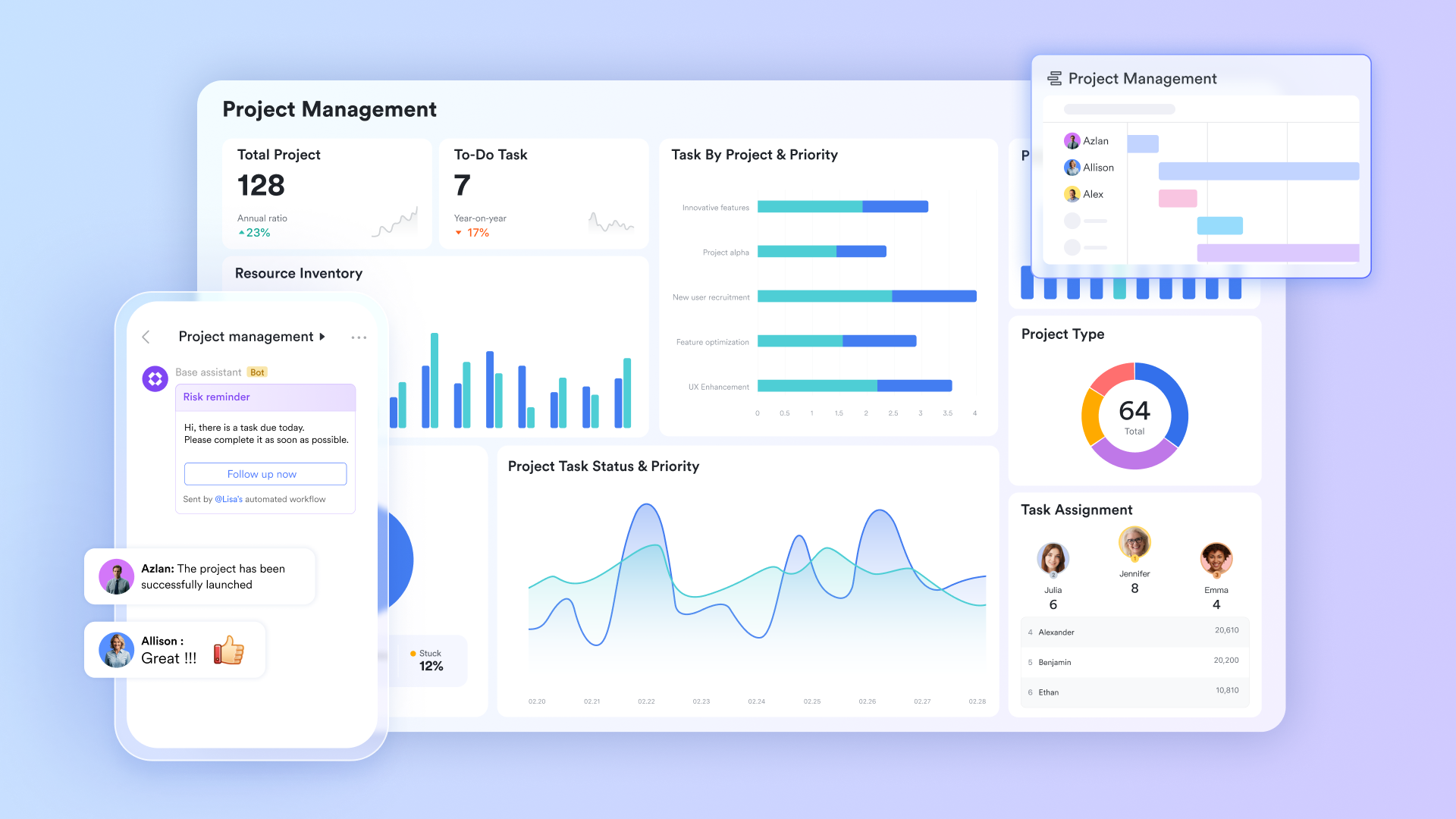
Managing projects in a comprehensive hub
functions as a dynamic command center that transforms project coordination from static tracking into a multi-dimensional workflow. It offers flexible views, such as Gantt charts and Kanban boards, to manage timelines, alongside automated workflows that handle routine notifications and status updates. By building visual dashboards with 36 types of charts and widgets, project coordinators can present a "high-level" overview of project health to stakeholders.
Coordinating tasks and owners clearly
Lark Tasks allows project coordinators to create clear task lists and assign owners for each activity within a project. This helps everyone understand their responsibilities and deadlines at a glance. Coordinators can group tasks by phase, priority, or team to maintain better structure. are visible in real time, reducing the need for constant follow-ups. Dependencies and due dates can be adjusted as project conditions change. This creates a more transparent and accountable workflow for the entire team. 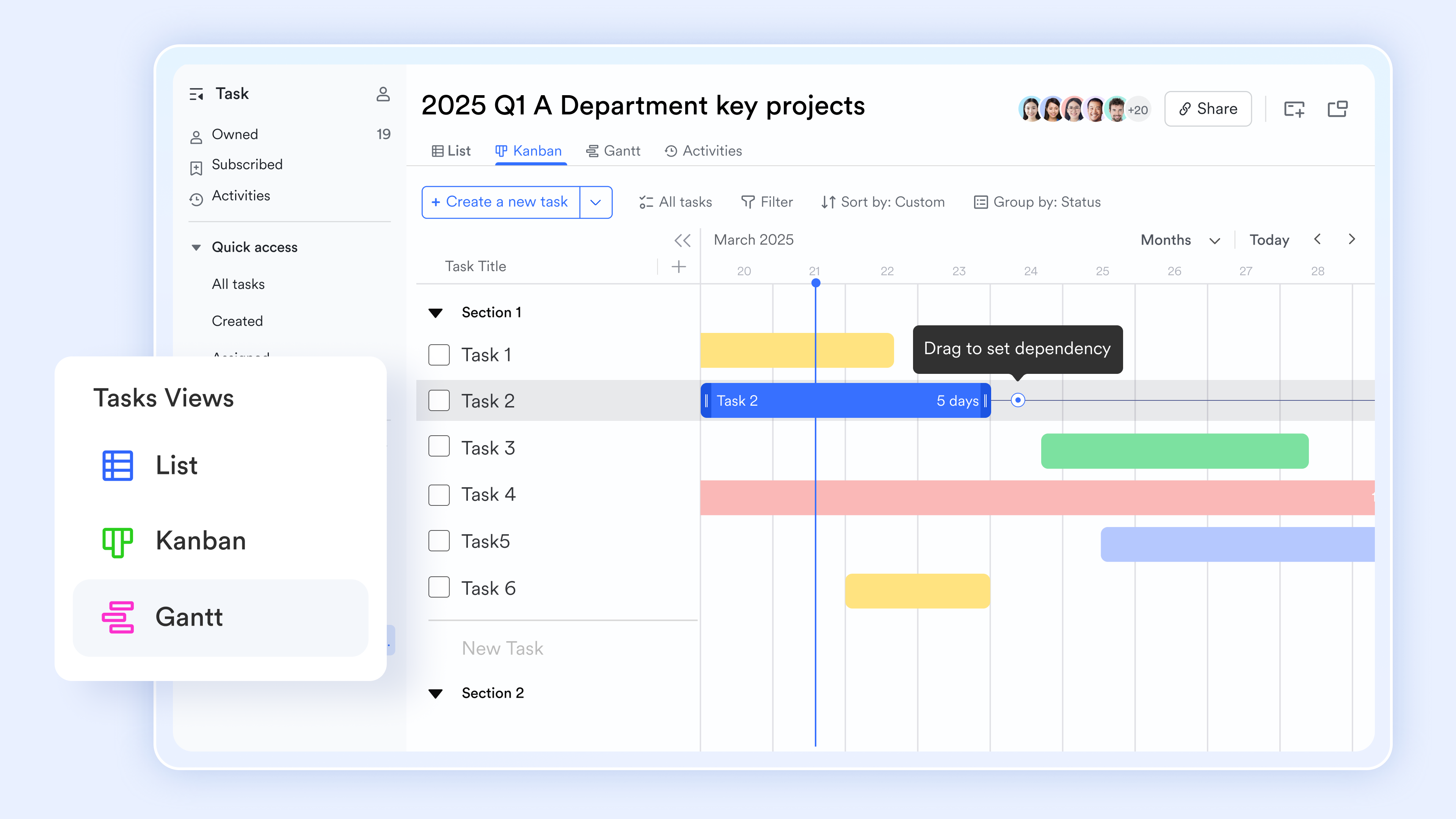
Tracking updates through conversations
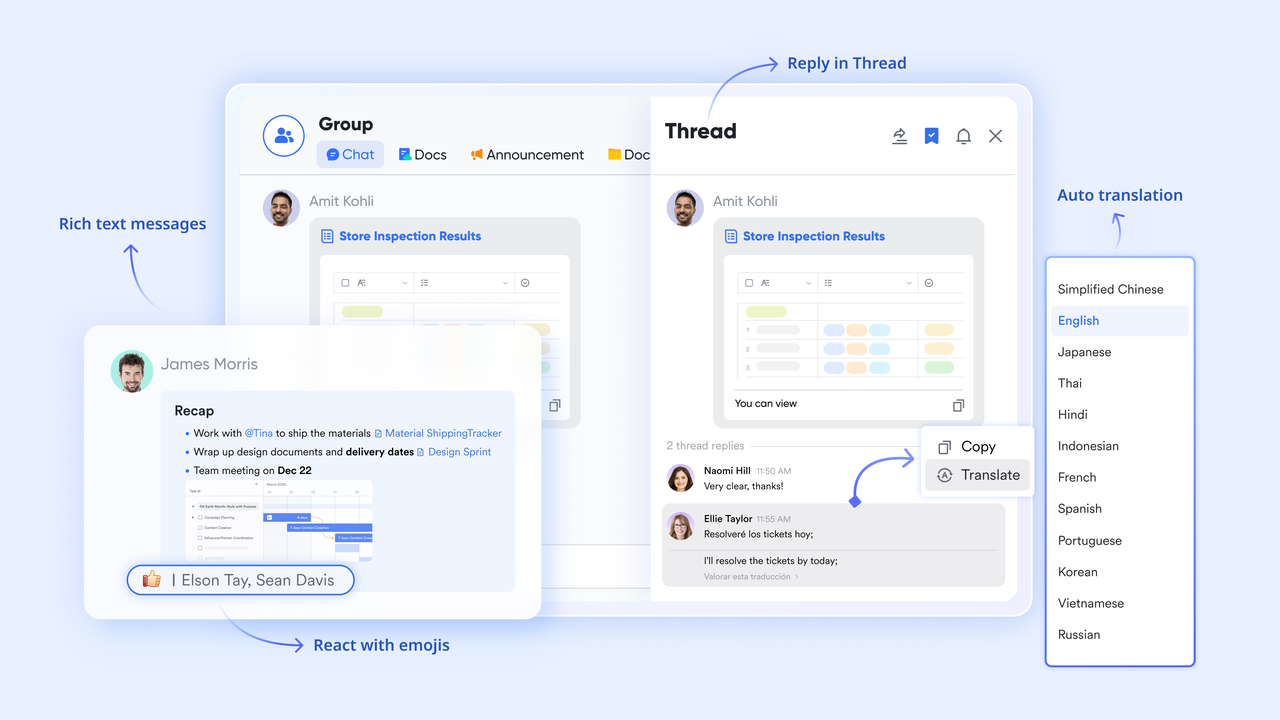
gives coordinators a central place to follow project discussions and quick updates. Team members can share progress, questions, or files directly in . This keeps context attached to each conversation instead of scattered across emails. Coordinators can tag the right stakeholders to get faster responses. Important messages can be pinned for easy reference. Over time, this builds a searchable history of decisions and actions.
Achieving project documentation
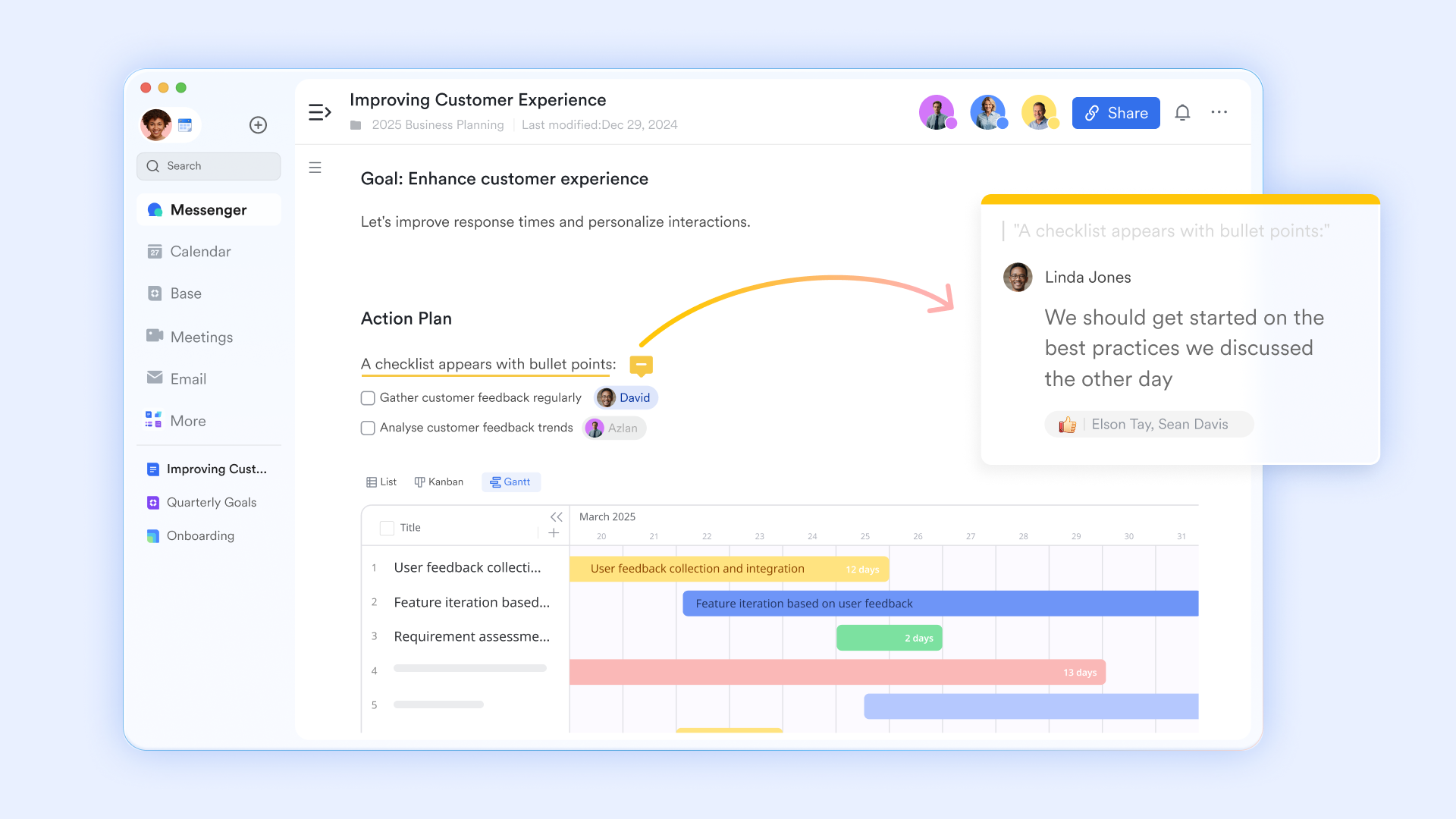
helps coordinators store and organize project documents in one shared workspace. Plans, meeting notes, and reports can be . Version history makes it easy to track changes and restore earlier drafts if needed. Access controls ensure the right people can view or edit sensitive information. Documents can be linked directly to tasks or chat threads. This keeps information connected and easy to find.
Scheduling agendas across project teams
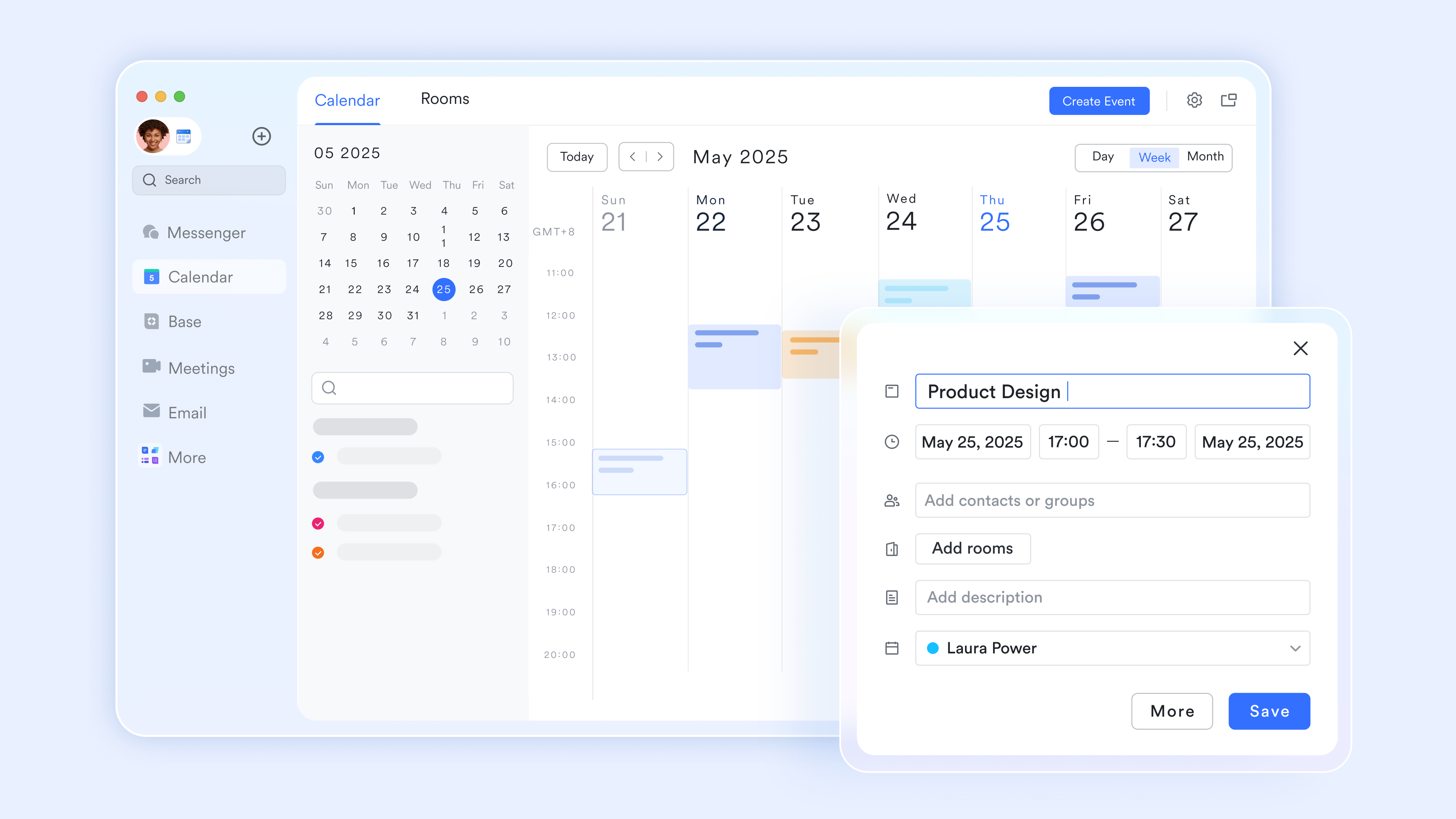
transforms time management into a collaborative "alignment engine" that simplifies scheduling across project teams. It provides instant visibility into member availability and capacity, allowing coordinators to book meetings and resources without the friction of manual back-and-forth. By syncing directly with Lark Tasks and external platforms like Google Calendar or Outlook Calendar, it ensures that and individual deadlines are unified in a single view.
:
- Starter plan: Free forever plan that includes 11 powerful tools for up to 20 users. It also includes 100GB of storage, 1,000 automation runs, AI translations, and more.
- Pro plan: $12/user/month (billed annually) for up to 500 users. It includes everything in Starter, plus group calling for up to 500 attendees, 15 TB of storage, 50,000 automation runs, and more.
- Enterprise plan: for custom pricing. Supports unlimited users and includes even more automation runs and advanced security, compliance, and management features.
For small teams with simple communication needs

18 months message history
1000 Base automation runs/month
2000 rows per table in Base
Most POPULAR
For companies with comprehensive collaboration and management needs
Unlimited message history
500-participant video meetings
50k Base automation runs/month
20k rows per table in Base
For large companies with advanced security and organizational management needs
Get a personalized demo and pricing
Unlimited message history
500-participant video meetings
15 TB storage + 30 GB storage/user
500k Base automation runs/month
50k Base automation runs/month
Most POPULAR
For companies with comprehensive collaboration and management needs
Unlimited message history
500-participant video meetings
50k Base automation runs/month
20k rows per table in Base
Ready-to-use templates for project coordinators
Task management template
This task management template helps project coordinators track daily work with clear ownership and priorities. Tasks are easy to assign, update, and review, making it simpler to manage deadlines across teams. It works well for coordinating individual responsibilities while maintaining visibility into overall progress, especially in fast-moving or multi-client environments.
Multi-project tracker template
Designed for teams handling multiple projects at once, this template provides a consolidated view of timelines, owners, and status. Project coordinators can quickly identify risks, overlaps, or delays without switching views. It's especially useful for agencies or departments managing parallel initiatives that require consistent monitoring and structured updates.
Production planning and scheduling management
This template supports structured production planning by organizing schedules, resources, and task dependencies in one place. Project coordinators can use it to map timelines, track execution stages, and adjust plans as priorities change. It's well-suited for teams that rely on accurate scheduling to meet delivery commitments and reduce operational bottlenecks.
Gantt chart for requirement management
This Gantt chart template helps teams visualize requirements across phases and timelines. It allows project coordinators to see dependencies, milestones, and progress at a glance, making planning and adjustments more straightforward. The structured timeline view is useful for managing complex requirements that evolve throughout the project lifecycle.
OKR task subdivision and progress control template
This template breaks down high-level OKRs into manageable tasks with clear progress tracking. Project coordinators can align daily work with strategic goals while monitoring execution across teams. Multiple views support different planning styles, making it easier to keep objectives visible and progress measurable throughout each review cycle.
Project coordinator tasks across different industries
Project coordinator tasks can vary widely depending on the industry, team structure, and regulatory environment. While the core focus remains on organization and communication, the work's context shapes daily priorities and workflows.
- Construction project coordinator responsibilities: In construction, coordinators help manage site schedules, contractor timelines, and . They often track material deliveries, safety records, and progress reports to keep builds aligned with plans.
- Marketing and creative project coordination: In creative teams, project coordinators , creative reviews, and asset approvals. They act as a bridge between designers, writers, and clients, ensuring deadlines and brand guidelines are met.
- IT and software project coordination: In IT and software environments, coordinators track sprint schedules, bug reports, and release plans. They support communication between developers, testers, and product managers to maintain steady delivery cycles.
- Operations and internal projects: For internal initiatives, project coordinators manage process updates, training schedules, and cross-department communication. Their role helps ensure organizational changes are implemented smoothly and consistently.
What makes a great project coordinator stand out
A great project coordinator stands out by going beyond basic task tracking and becoming a trusted partner to both the team and leadership. Their impact is often seen in how smoothly work flows and how confident stakeholders feel about project progress.
- Proactive communication: Outstanding coordinators share updates before being asked and flag potential issues early. This forward-looking approach helps teams prepare for changes rather than react to problems.
- Ownership mindset: Rather than waiting for direction, strong coordinators take responsibility for keeping projects moving. They follow through on commitments and treat project outcomes as a shared success.
- Process improvement focus: Top performers look for ways to make over time. Small changes to templates, tools, or communication routines can lead to lasting productivity gains.
- Strong collaboration habits: Great coordinators build positive working relationships across roles and departments. They encourage open dialogue and create an environment where team members feel supported and heard.
Conclusion
A project coordinator plays a vital role in turning plans into action by keeping tasks organized, communication clear, and documentation up to date across teams and stakeholders. From and tracking daily progress to connecting people and processes across industries, this role helps ensure that projects move forward with consistency and confidence. As work becomes more distributed and tools become more specialized, the ability to bring information into a single, connected workflow is increasingly valuable.
This is where platforms like can make a practical difference—by combining messaging, tasks, and documents into one collaborative space that reduces fragmentation and saves time. If you're looking to simplify coordination, improve visibility, and support your team's day-to-day project work, explore how Lark can fit into your workflow and help keep your projects moving smoothly.
Try a more connected approach to project coordination
FAQs
What qualifications do you need to be a project coordinator?
Most roles look for a bachelor's degree in business, management, or a related field, along with strong organizational and communication skills. Familiarity with digital is often expected in modern teams. Platforms like Lark help candidates demonstrate experience in managing tasks, documents, and team communication.
Is a project coordinator a good entry-level role for project management?
Yes, it's a common starting point for building practical experience in scheduling, documentation, and stakeholder communication. The role offers close exposure to how projects are planned and executed. Using tools such as Lark can help new coordinators learn end-to-end workflows in a real team environment.
How many projects can one project coordinator handle at a time?
This depends on project size, complexity, and team support, but many coordinators manage multiple small to mid-sized projects. Clear visibility into tasks and timelines makes this more manageable. An integrated workspace like Lark helps track priorities across projects in one place.
How is a project coordinator measured for performance?
Performance is often assessed by on-time task completion, documentation quality, and stakeholder satisfaction. Consistent communication and issue resolution also play a key role. Dashboards and reports within Lark can help coordinators and managers review progress and outcomes.
Can remote teams effectively work with project coordinators?
Yes, remote coordination is increasingly common with the right digital tools in place. Shared tasks, live documents, and real-time messaging support alignment across locations. Platforms like Lark bring these elements together to support smooth remote collaboration.
Related reading





























