Warehouses are under more pressure than ever. Customers expect fast, accurate deliveries, while teams juggle growing product ranges, multiple channels, and limited space. A warehouse tracking system gives you real‑time visibility into where items are, how they move, and whether orders are on track, so you can make better decisions every day. Instead of relying on paper and spreadsheets, modern tools like Lark let you connect tracking with workflows and communication, helping your operation scale with far less chaos and guesswork.
What is a warehouse tracking system?
A warehouse tracking system (WTS) is a software solution that gives organizations complete control over their inventory units in real time. Also known as software, it records where every item is in your warehouse, how it moves over time, and provides accurate inventory tracking as a key benefit. By linking products to locations, quantities, and activities, a WTS ensures you always know what you have on hand and where to find them.
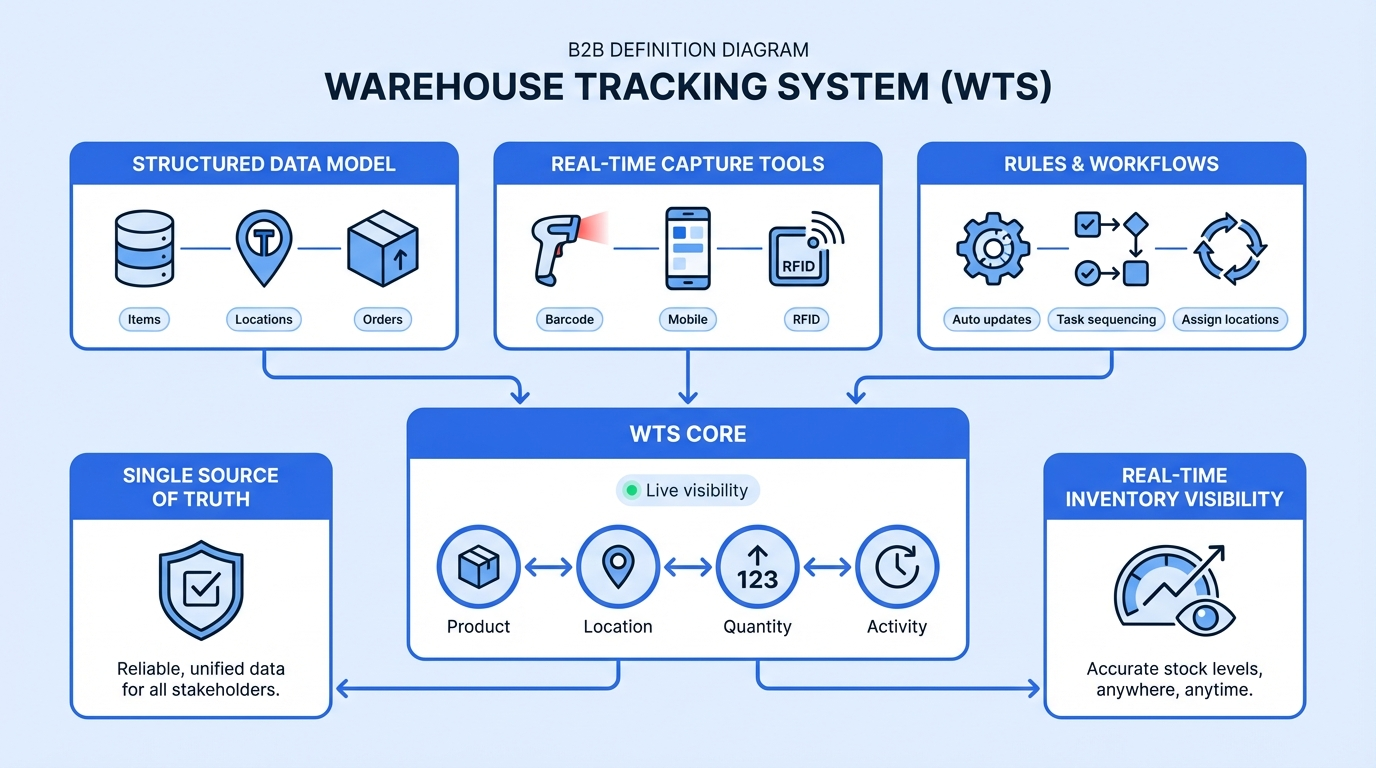
In practice, a warehouse inventory tracking system combines three things:
- A of items, locations, and orders.
- Tools to capture data in real time, such as barcode scanners, mobile apps, or RFID readers.
- that update inventory automatically as work gets done. The system logs product entries and exits, generates a detailed record of stock movements, assigns locations, sequences tasks, and automates information flows.
The result is a single, reliable source of truth for your stock and locations, delivering real-time data and real-time inventory visibility.
Warehouse tracking system vs warehouse management system (WMS) vs inventory management software
A (WMS) is a broad operations platform for running day‑to‑day warehouse activities. It typically includes advanced wave planning, labor management, automation control, and value‑added services. A warehouse tracking system is one essential layer inside that larger WMS, focused more narrowly on where things are and how they move.
A warehouse tracking system concentrates on visibility and accuracy:
- Ensuring items are correctly received, stored, moved, picked, and shipped.
- Emphasizing scanning, location control, and status updates rather than every possible optimization rule.
Many growing businesses start with tracking first to build reliable data and disciplined processes, then extend into a more advanced WMS or add modules for , labor, and automation. There are several deployment styles for WMS (standalone, cloud‑based, or ERP/SCM‑integrated), but in all of them, tracking is the foundation.
usually answers questions such as “How many units do we have?” and “What do we need to reorder?”, and is closely tied to purchasing, sales, and accounting. A warehouse tracking system answers a different set of questions:
- “Where exactly is each unit located right now?”
- “Who moved this pallet and when?”
- “Which items are in this order, and from which bins did they come?”
Warehouse tracking systems can also integrate with other solutions, such as , to coordinate data across departments while providing more granular, location‑level visibility on the warehouse floor.
See real‑time inventory and location visibility in action.
Core components of a modern warehouse tracking system
Modern solutions share several building blocks, even if they look different on the surface.
Data capture layer - This is how information enters the system. Common methods include:
- Barcode or QR code scanning using handheld devices.
- RFID tags and readers for high‑throughput environments.
- Occasional use of a or other positioning tools for assets or vehicles.
Data and rules layer - At the core is a structured model of:
- Items, variants, and units of measure.
- Warehouse, zone, aisle, rack, shelf, and bin locations.
- Transactions such as receipts, moves, picks, pack confirmations, packing processes, and shipments. Rules define how these records change when someone completes a task or scans a code.
Workflow and interface layer - This is where people interact with the supply and warehouse tracking system:
- Mobile workflows for receiving, putaway, internal moves, picking, packing processes, and cycle counts. It should offer mobile accessibility for staff to perform tasks like receiving and picking on-the-go.
- can be created to match a company's unique inventory and order fulfillment processes, providing flexibility and efficiency.
- Desktop or browser views for supervisors to see status and resolve issues.
- Alerts and notifications to highlight exceptions, such as missing scans or mismatched counts.
Together, these elements can extend beyond products to a that also covers equipment, tools, or reusable containers.
7 top warehouse tracking system tools recommended
1. Lark: An all‑in‑one collaboration platform for warehouse tracking workflows
is an all‑in‑one collaboration platform that has evolved into a flexible workspace for operations teams, including warehouse and inventory tracking workflows. Lark provides building blocks such as databases, forms, automation, and chat that can be combined into a tailored warehouse tracking system.
Key features
Lark Base: A flexible data engine for warehouse tracking
is a customizable data and workflow engine that enables you to model your warehouse inventory in a way that reflects how you actually operate it. You can import existing spreadsheets like Excel in one click, turn them into structured tables, and link records across SKUs, locations, and transactions in different sheets with two-way link fields. 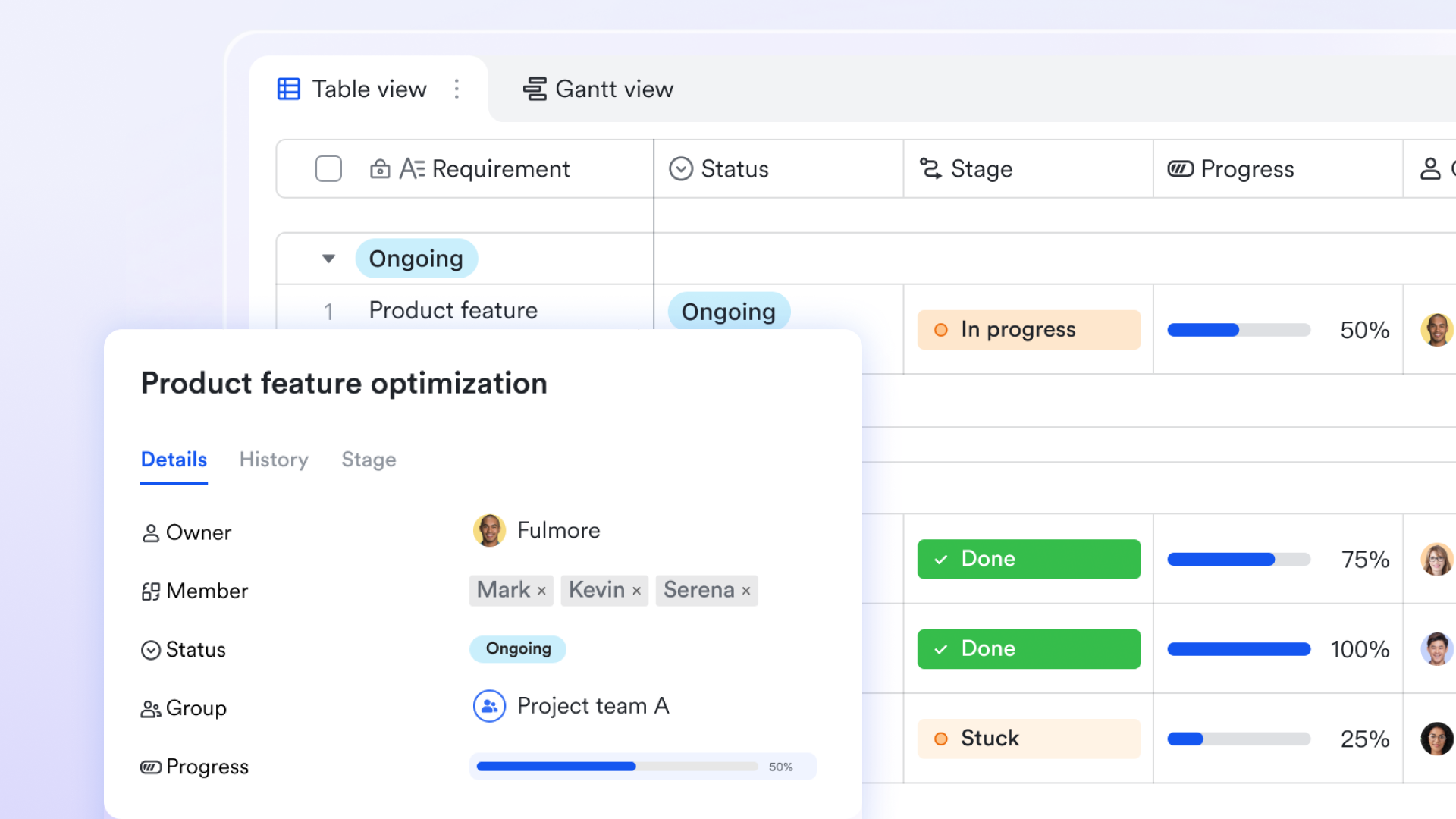
Multiple views and dashboards help you visualize stock by warehouse, zone, or status, while permissions keep sensitive data under control. This provides a database-like backbone for a warehouse tracking system without requiring extensive development. 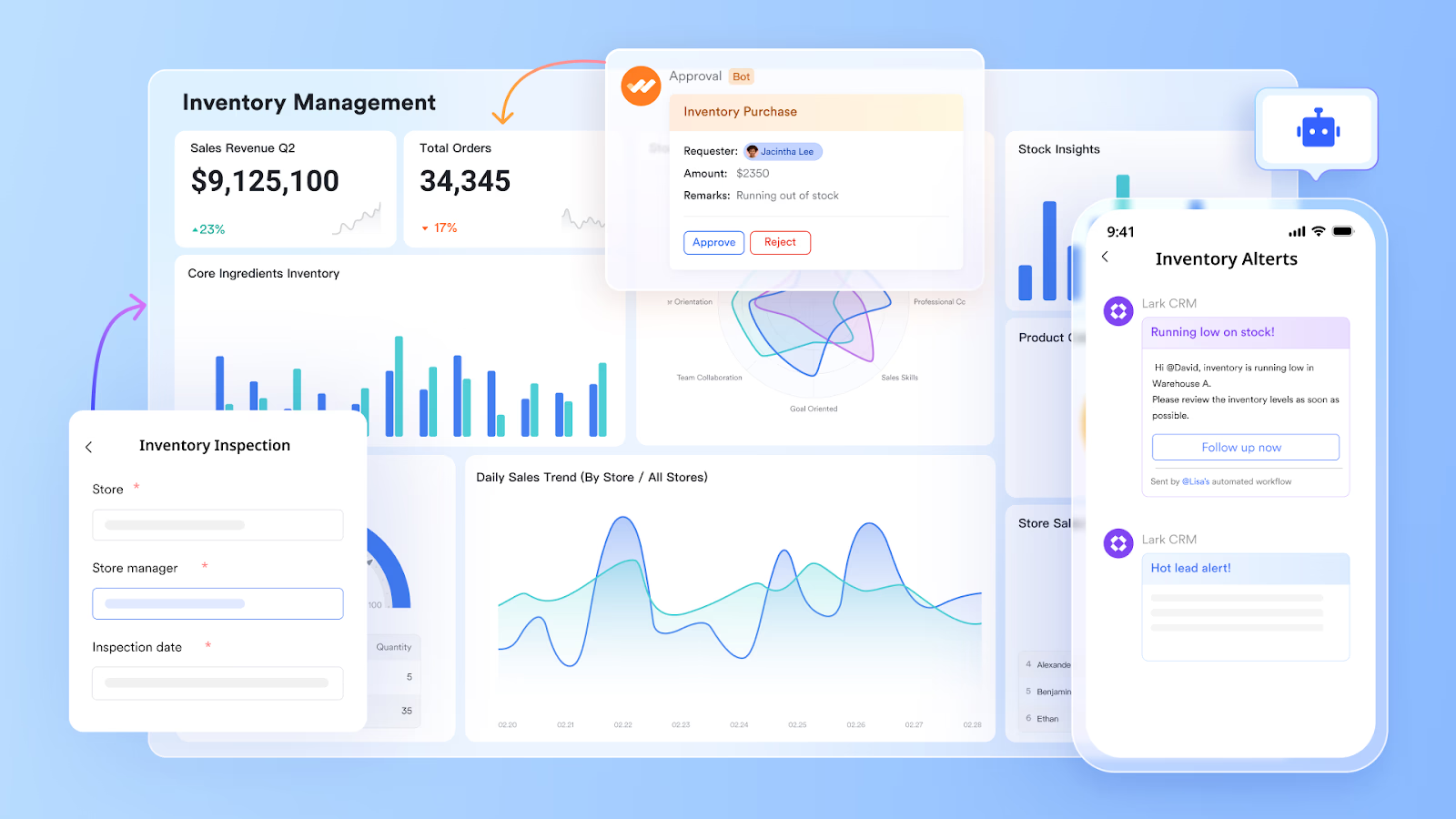
Lark Forms and mobile access for on‑the‑floor operations
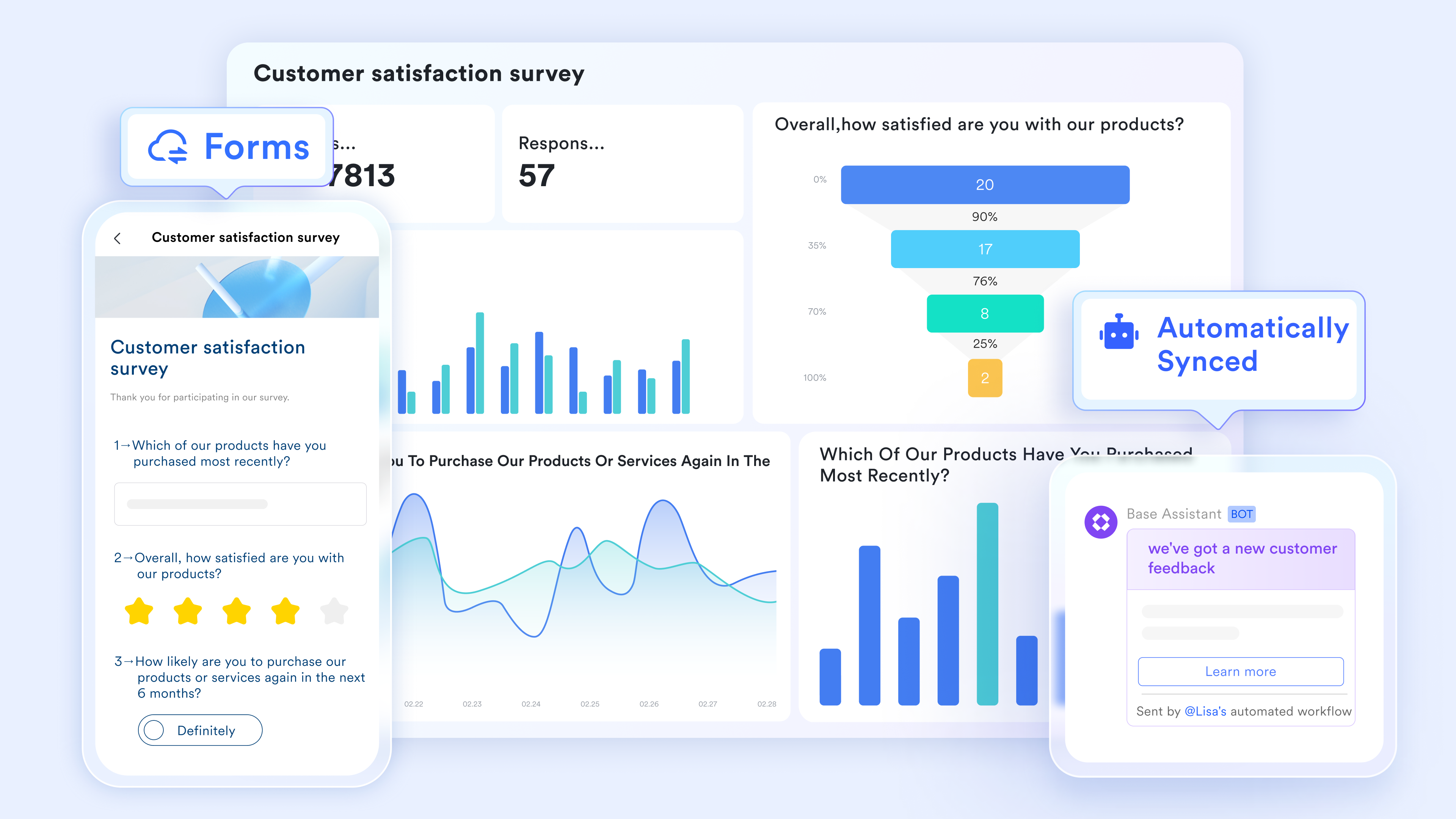
Lark provides online forms and so warehouse staff can capture data directly where work happens. You can design forms with for receiving, putaway, moves, picking, and cycle counts, then connect each submission to Lark Base. On phones or tablets, operators can input quantities, upload photos, and update locations in real time.
Workflow automation and notifications
With Lark's , routine warehouse actions can trigger automatic updates and alerts. For example, a submitted receiving form can update inventory tables in Lark Base, while low‑stock records can generate notifications for purchasing or planning teams. Automated reminders help teams follow through on tasks without relying on manual checks. 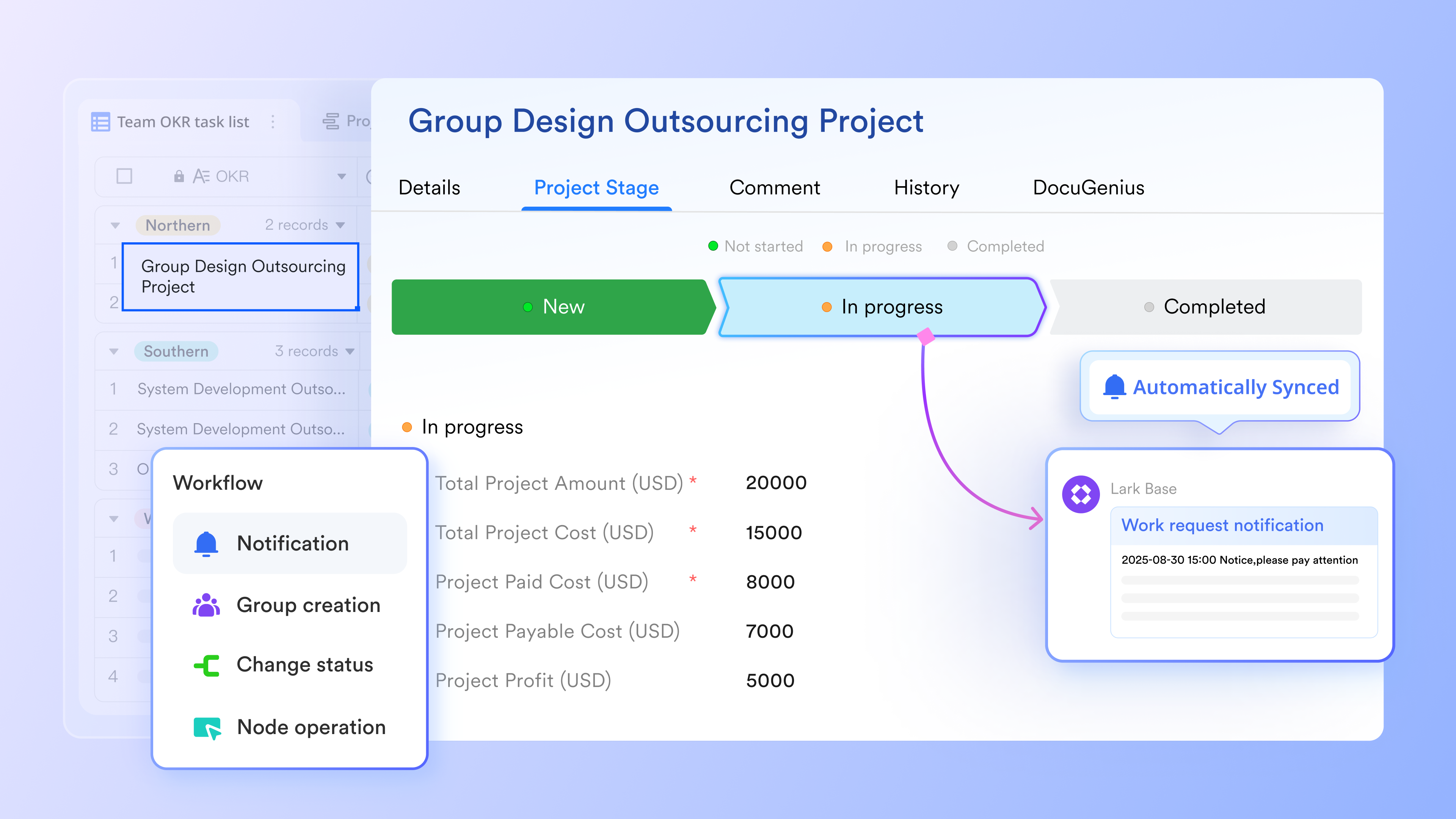
Collaboration, documentation, and training in one place
Beyond data and workflows, Lark includes chat, video meetings, and collaborative docs in the same platform. You can create warehouse operation manuals in , share them with teams, and link directly to relevant Base views or forms. Group chats and channels keep discussions around inventory issues, exceptions, and process changes close to the actual data.

Integrations and APIs to connect existing systems
Lark is designed as an that can also connect with other existing tools. Through integrations and APIs, you can sync order and inventory data between Lark and other platforms according to different needs.
Why I picked Lark: Lark stands out because it combines operational tracking, communication, and in a single platform. It enables custom workflows tailored to your specific warehouse processes, supporting streamlined processes by automating and optimizing inventory and order fulfillment. Instead of forcing teams into a fixed WMS model, it lets you design a warehouse tracking system that matches your actual processes and can evolve as you grow. For teams that want real‑time visibility but also need flexibility and collaboration, Lark offers a powerful, modern alternative to legacy warehouse systems.
:
- Starter plan: that includes 11 powerful tools for up to 20 users. It also comes with 100GB of storage space, 1000 automation runs, AI translations, and more. No credit card needed.
- Pro plan: (billed annually) for up to 500 users. It includes everything in Starter plus group calling for up to 500 attendees, 15TB of storage space, 50,000 automation runs, and more.
- Enterprise plan: for custom pricing. Supports unlimited users and includes even more automation runs and advanced security, compliance, and management features.
For small teams with simple communication needs

18 months message history
1000 Base automation runs/month
2000 rows per table in Base
Most POPULAR
For companies with comprehensive collaboration and management needs
Unlimited message history
500-participant video meetings
50k Base automation runs/month
20k rows per table in Base
For large companies with advanced security and organizational management needs
Get a personalized demo and pricing
Unlimited message history
500-participant video meetings
15 TB storage + 30 GB storage/user
500k Base automation runs/month
50k Base automation runs/month
Most POPULAR
For companies with comprehensive collaboration and management needs
Unlimited message history
500-participant video meetings
50k Base automation runs/month
20k rows per table in Base
2. Sortly: Inventory & warehouse tracking system for small teams
Sortly is a user‑friendly inventory and warehouse tracking system designed for small and mid‑sized businesses that want to move away from spreadsheets. It focuses on visual, mobile‑first inventory management, making it easy for teams to track items, locations, and quantities across warehouses, stockrooms, or job sites. With simple setup, QR and barcode support, and intuitive item records, Sortly is well-suited to organizations that need practical without the complexity of a traditional enterprise WMS.
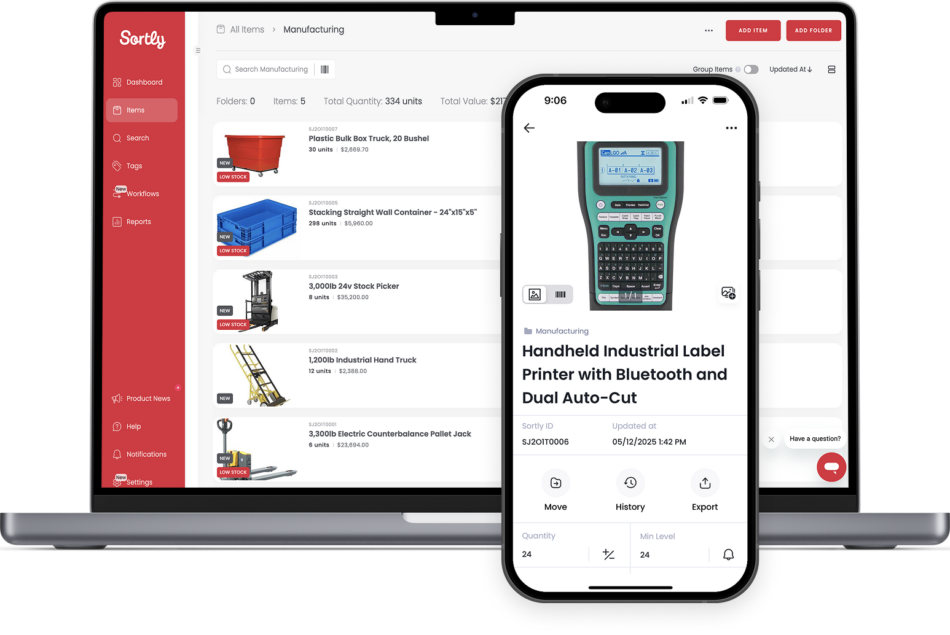
Image source: sortly.com
Key features
- Visual item catalog with photos, custom fields, and tags
- Multi‑location and multi‑bin tracking for warehouses and stockrooms
- Built‑in barcode and QR code scanning via mobile apps
- Low‑stock alerts, activity history, and audit trails
- Import/export tools and basic reporting dashboards
- Cloud‑based access across web and mobile devices for real-time inventory visibility
Why I picked Sortly: I include Sortly because it strikes a strong balance between capability and simplicity. Many warehouse teams need a straightforward warehouse tracking system that staff can adopt quickly, and Sortly's clean interface plus mobile apps make that feasible. Its mobile-first design supports the essential use of mobile devices by warehouse workers for efficient inventory management.
Pricing: Sortly offers a free plan with limited items and features, suitable for initial trials or very small teams. Paid plans are tiered (such as Advanced and Ultra) with flat monthly fees that scale based on item limits, feature depth, and user counts:
- Advanced: $24/user/month, paid yearly
- Ultra: $74/user/month, paid yearly
- Premium: $149/user/month, paid yearly
- Enterprise: Custom pricing
3. Wasp (Wasp Barcode): A suite of inventory and asset tracking solutions
Wasp (often known as Wasp Barcode) provides a suite of inventory and asset tracking solutions that combine software, barcode hardware, and labels into integrated packages. Wasp focuses on making it easier to receive, track, and audit stock, while also offering asset tracking for tools, equipment, and other fixed assets across locations. Wasp also streamlines the management of purchase orders during the receiving process, helping automate procurement and reconcile received items efficiently.
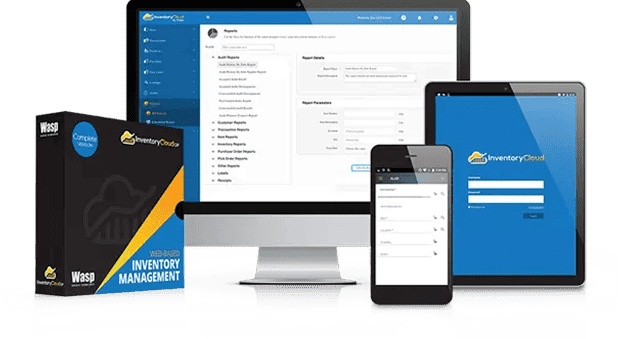
Image source: waspbarcode.com
Key features
- Inventory control software with multi‑location warehouse tracking
- Barcode label design and printing plus handheld scanner integration
- Support for receiving, putaway, picking, and cycle counting
- Streamlined purchase order management during receiving and procurement
- Generation and printing of shipping labels as part of the order fulfillment workflow
- Asset tracking modules for tools and equipment
- Reporting tools for stock levels, usage, and discrepancies
- On‑premise and cloud options with role‑based access
Why I picked Wasp (Wasp Barcode): I highlight Wasp because it offers a very tangible, barcode‑centric approach that includes both software and hardware. Wasp's support for generating shipping labels and managing purchase orders directly within the system further streamlines order fulfillment and receiving workflows.
Pricing: Exact pricing is usually obtained via a quote, reflecting configuration, user numbers, and deployment preferences.
4. Oracle Warehouse Management (Cloud): Enterprise‑grade WMS
Oracle Warehouse Management, delivered as part of Oracle Fusion Cloud SCM, is a robust enterprise‑grade WMS built to manage complex, high‑volume operations. It extends far beyond basic warehouse tracking systems, supporting advanced automation, labor management, and global logistics processes. Oracle's solution is aimed at large and rapidly scaling organizations that need deep configurability, strong integration with enterprise resource planning (ERP) and supply chain management systems, and the ability to orchestrate sophisticated workflows across multiple warehouses and distribution centers.
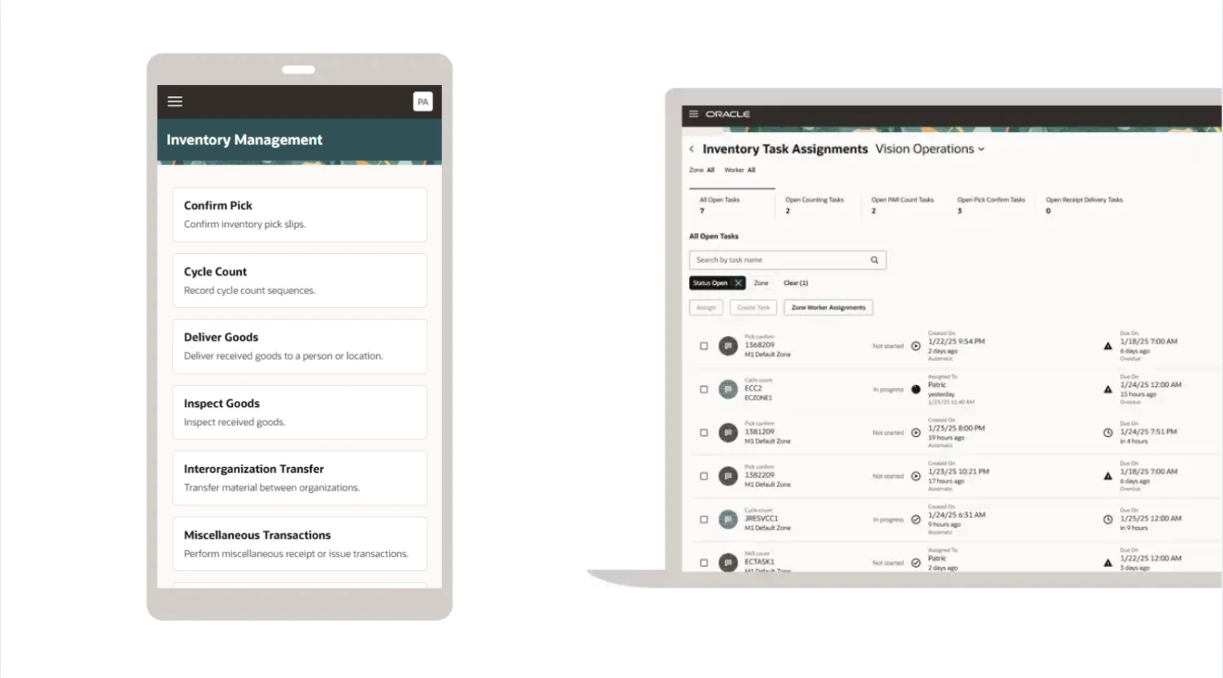
Image source: oracle.com
Key features
- Comprehensive inventory tracking across global, multi‑site networks
- Advanced receiving, putaway, wave picking, and packing logic
- Automation and robotics integration for high‑volume warehouses
- Labor management, yard management, and dock scheduling
- Embedded analytics and supply chain visibility within Oracle Cloud
- Tight integration with Oracle ERP, supply chain management, and transportation modules
- Seamless connectivity with other systems for enhanced planning and operational coordination
Why I picked Oracle Warehouse Management: I include Oracle because it represents the upper end of what a warehouse tracking system can become when embedded in a full enterprise WMS. For organizations facing complex requirements—multiple facilities, automation, strict SLAs—Oracle's platform offers depth and scalability that lighter tools cannot match, especially with its integration into enterprise resource planning and supply chain management frameworks.
Pricing: Custom pricing via quoting
5. Zoho Inventory: A cloud‑based inventory and order management system
Zoho Inventory is a cloud‑based inventory and order management system aimed at small and mid‑sized businesses, especially those selling through e‑commerce platforms, marketplaces, and retail channels. It combines inventory control, order routing, and basic warehouse capabilities, allowing businesses to track stock across multiple locations while syncing sales and purchases. As part of the broader Zoho ecosystem, it integrates well with accounting, CRM, and other tools, making it an attractive entry‑level warehouse inventory tracking system for growing companies.
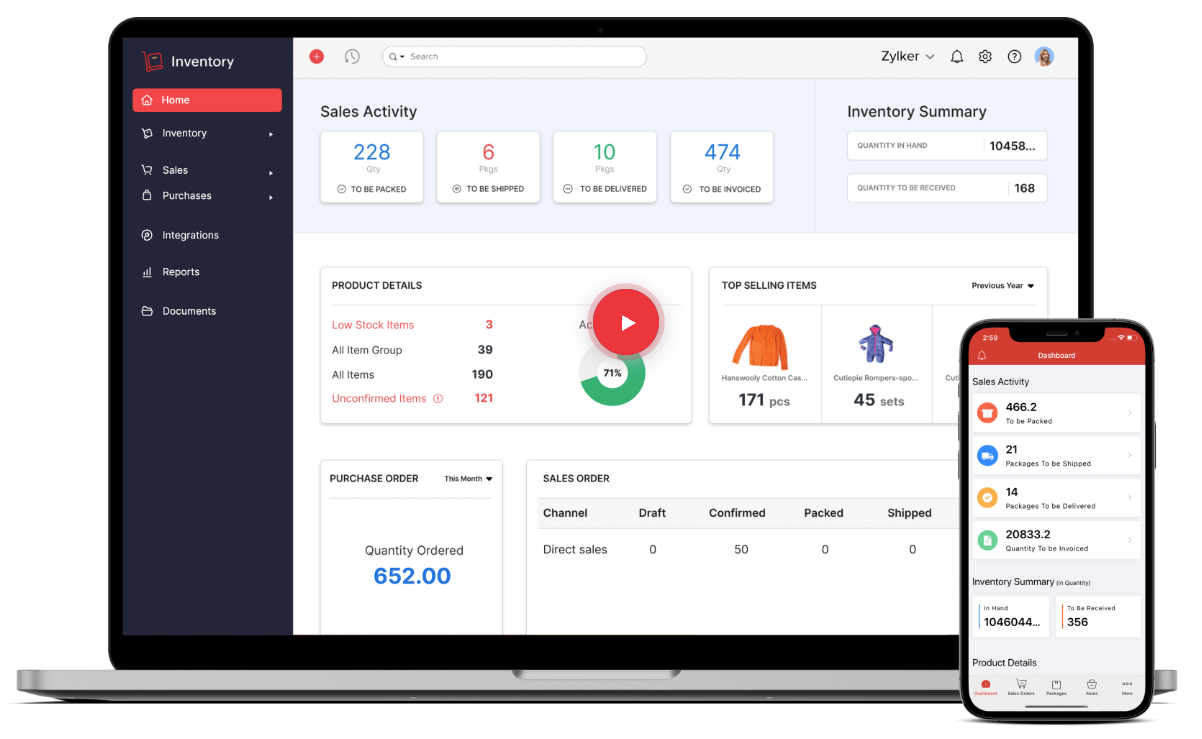
Image source: zoho.com
Key features
- Multi‑warehouse inventory tracking with stock transfers
- Order management across e‑commerce channels and marketplaces
- Purchase and sales order workflows with automatic stock updates
- Barcode support, shipping integrations, and basic packing flows
- Reports on stock levels, sales performance, and reorder points
- Integrations with Zoho apps and external platforms via connectors and APIs
Why I picked Zoho Inventory: Zoho Inventory supports overall business management by integrating warehouse tracking with sales, purchasing, and accounting, helping organizations streamline operations and align inventory processes with broader business goals. For teams already using or considering other Zoho products, it provides a cohesive and scalable way to manage stock and orders.
Pricing:
- Standard: $29/organization/month, billed annually
- Professional: $79/organization/month, billed annually
- Premium: $129/organization/month, billed annually
- Enterprise: $249/organization/month, billed annually
6. Fishbowl: Designed to extend and complement accounting systems
Fishbowl is an inventory and warehouse management platform designed to extend and complement accounting systems. It is popular among manufacturers, distributors, and wholesalers that need more sophisticated control over inventory, work orders, and warehouse processes than basic accounting or inventory modules can provide.
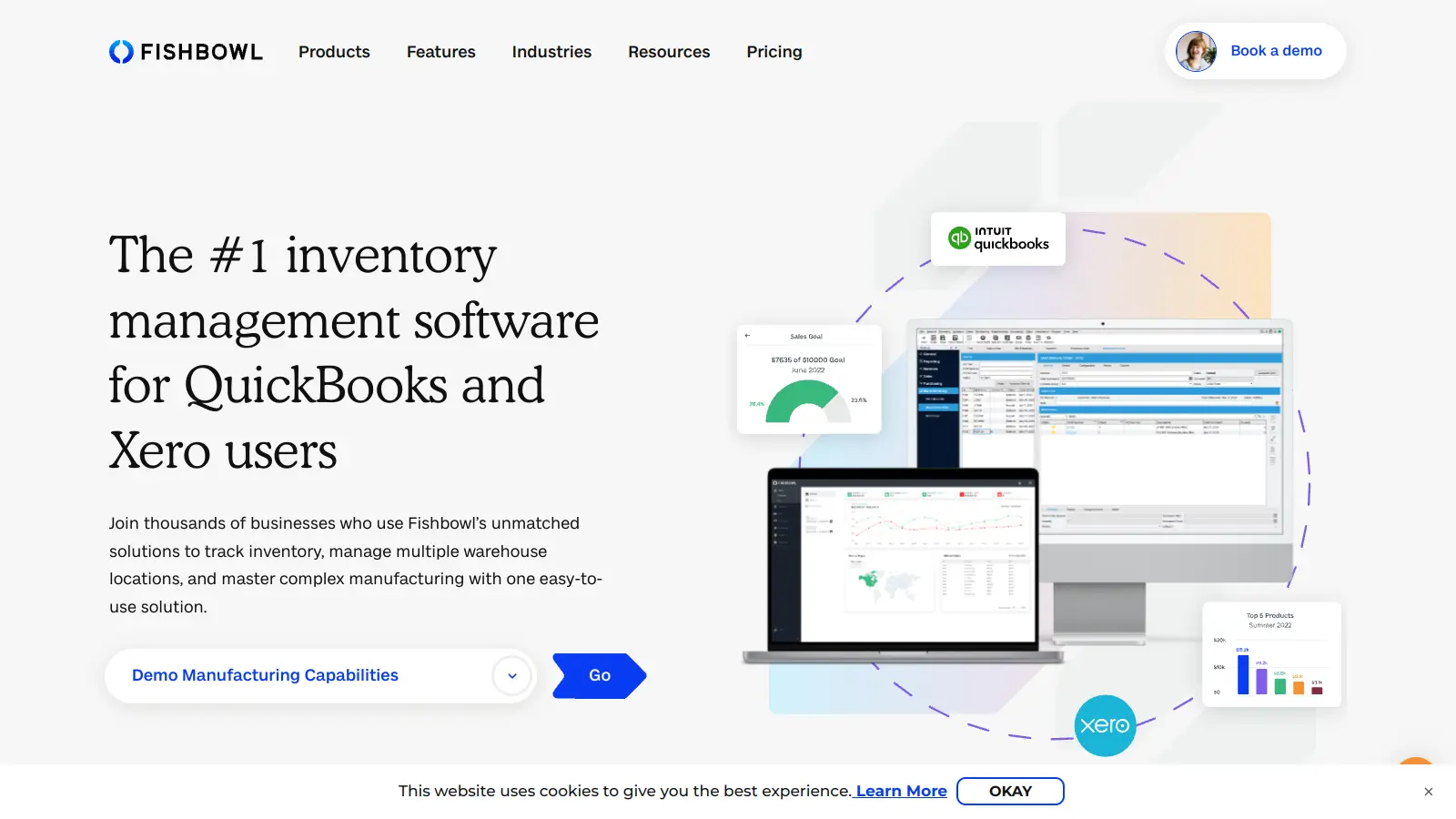
Image source: fishbowlinventory.com
Key features
- Detailed inventory tracking with multiple locations and units of measure
- Work order and manufacturing support (assemblies, bills of materials)
- Barcode scanning for receiving, picking, packing, and cycle counts
- Reorder points, purchasing automation, and landed‑cost management
- Integrations with QuickBooks, Xero, and e‑commerce platforms
- Reporting tools for stock levels, production, and warehouse activity
Why I picked Fishbowl: Fishbowl helps streamline operations by automating inventory and warehouse processes, reducing manual errors, and improving efficiency. Its blend of inventory, production, and warehouse features makes it especially useful for product‑based companies that need end‑to‑end visibility, while still wanting to keep their existing financial system.
Pricing: Fishbowl Inventory provides different layers of paid pricing plans, including Essentials, Growth, Scale, and Advanced, for different seats and AI functions. All plans are based on quotes.
7. NetSuite WMS: Warehouse management module within Oracle NetSuite's cloud ERP suite
NetSuite WMS is the warehouse management module within Oracle NetSuite's cloud ERP suite. Delivered as software as a service (SaaS), it offers scalability, ease of updates, and seamless integration with other NetSuite modules. It is designed to optimize warehouse operations for businesses that already use or plan to adopt NetSuite for finance, CRM, and commerce.
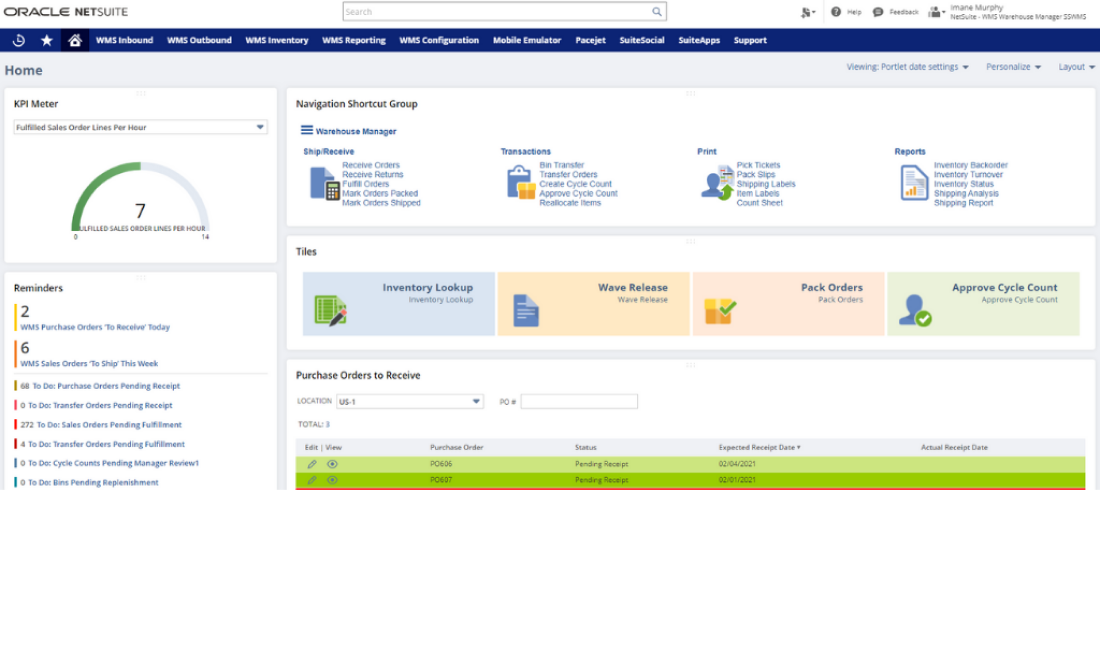
Image source: netsuite.com.sg
Key features
- Real‑time inventory tracking across multiple warehouses and bins
- Directed putaway, wave picking, and mobile RF‑enabled workflows
- Support for lot, serial, and expiration tracking where required
- Tight integration with NetSuite order management, purchasing, and accounting
- Dashboards and KPIs for warehouse performance and fulfillment
- Configurable rules for picking, packing, and replenishment
- Automation and optimization of warehouse tasks to reduce wasted time and improve operational efficiency
Why I picked NetSuite WMS: NetSuite WMS is included because it showcases how a warehouse tracking system can operate as an integrated module within a broader ERP environment. For companies standardizing on NetSuite, the WMS module offers a natural way to bring warehouse tracking, inventory accuracy, and fulfillment efficiency into the same cloud platform that runs finance and sales. This unified approach reduces data silos, helps eliminate wasted time in warehouse operations, and simplifies reporting and control across the entire business.
Pricing: Users subscribe to NetSuite for an annual license fee. Your license is made up of three main components: core platform, optional modules, and the number of users. There is also a one-time implementation fee for initial setup. Exact pricing requires quotes.
Try a guided setup, watch every bin, pallet & order clearly
6 business benefits of a warehouse tracking system
A warehouse tracking system does more than log movements. It gives you reliable data, reduces friction in daily work, and makes the whole operation easier to control. Warehouse tracking systems help eliminate stockouts and overstocking with real-time data and alerts, ensuring inventory levels are always optimal.
- From lost inventory to full visibility: When tracking is weak, people search for items, argue about numbers, and fix issues after they explode. With a modern warehouse tracking system, you see accurate quantities and locations in one place, can trace what happened to specific items or pallets, and detect exceptions early.
- Improved picking accuracy and fewer shipping errors: Picking and shipping are where mistakes hit customers. Scan‑based workflows let pickers and packers confirm locations and items before orders leave the building, so mis‑picks and mis‑ships are reduced.
- Faster order fulfillment and shorter lead times: Delays often come from not knowing where items are. With accurate locations and real‑time updates, pickers follow efficient routes, supervisors react to live workload, and orders move steadily from release to dispatch, even at peak. A responsive warehouse inventory tracking system supports tighter service promises without constant overtime. In practice, this means quicker turnaround times and more confidence in the dates you promise.
- Better use of warehouse space and labor: Tracking data reveals how space and people are used, which zones are overloaded, where travel is excessive, and how tasks are distributed. You can then improve slotting, adjust storage, and refine staffing plans instead of guessing.
- Stronger customer experience and service levels: When stock information is trustworthy, promises become realistic. You can confirm availability before committing, answer order‑status questions precisely, and handle shortages transparently. Accurate tracking and real-time visibility help demand by ensuring timely order fulfillment.
- Compliance, traceability, and : Many sectors require clear evidence of where products came from and where they went. A tracking‑first approach records each step, links items to batches or serials, and makes it easier to isolate affected stock if something goes wrong.
Key features to look for in a warehouse tracking system
When choosing a warehouse tracking system or warehouse inventory management software, focus on the capabilities that support your real workflows rather than on long, generic feature lists.
- Real‑time inventory and location visibility: Your system should reflect what is happening now, not yesterday. Real-time data collection through eliminates manual errors by providing instant updates when items move, clear views down to the bin level, and simple search tools for non‑experts.
- : A well-designed warehouse management system brings genuine efficiency to each of these steps by handling routine tasks automatically and delivering current tracking information when you need it most.
- Barcode and QR code tracking: Barcodes and QR codes are still the backbone of most tracking setups. Look for easy label generation, support for item‑level and container‑level labels, and scan validation to catch mistakes.
- RFID and advanced tracking technologies: Some operations need more automation. In those cases, check whether the platform supports RFID tags and readers, fixed gateways, and integration with sensors or .
- : Mobile access represents a thoughtful evolution in warehouse management, though its true value lies in how it connects people with the information they need. Staff can check inventory levels with confidence, update orders with precision, and access shipping details as situations develop.
- Location and bin management: The virtual layout must match the physical one. You should be able to define warehouses, zones, aisles, racks, and bins, set storage rules, and adjust layouts without breaking history.
- Order and shipment tracking: Your warehouse tracking system should connect internal activity to by linking orders to picks, packs, and shipments, and storing all relevant references.
- Audit trails, permissions, and reporting: Governance features keep the system trustworthy. Look for detailed change logs, role‑based permissions, and clear reporting on accuracy and throughput.
- Traceability and compliance: Traceability features in warehouse tracking systems are essential for industries requiring strict compliance, such as pharmaceuticals, ensuring every movement is documented and auditable.
- Security and support considerations: Prioritizing both security and support improves inventory accuracy and cuts costs, but more importantly, it boosts efficiency while keeping customers satisfied and your business adaptable to market changes.
Import your data and see how tracking should really work
How to choose the right warehouse tracking system
Selecting a system that supports streamlined processes is essential for improving efficiency and eliminating bottlenecks in warehouse management. Additionally, consider how changing customer buying patterns may impact your requirements, ensuring the system can adapt to evolving channels and expectations.
Cloud‑based warehouse tracking systems vs on‑premise
Most modern warehouse tracking systems are cloud‑based, but on‑premise systems still have a place.
- Cloud benefits: Many are delivered as software as a service (SaaS), offering scalability and lower upfront costs. Other benefits include faster deployment, automatic updates, easier remote access, and less need for internal IT.
- When on‑premise fits: Highly customized environments, strict data‑residency rules, or facilities with very limited internet connectivity may still favor on‑premise or private‑cloud setups.
Usability, training, and change management
The best system is the one people actually use. Focus on:
- Ease of use: Are screens clear and workflows simple for receivers, pickers, and packers? Can new staff learn quickly?
- Role‑based workflows: Does each role see only what they need to complete tasks accurately?
- Training plan: How will you train teams, roll out changes, and collect feedback?
If floor staff find the system confusing or slow, they will bypass it—and your data will suffer.
Hardware and infrastructure considerations
Even the smartest software fails without workable hardware and connectivity. Plan for:
- Devices: Barcode scanners, mobile phones or handhelds, label printers, and any fixed terminals.
- Network: Reliable Wi‑Fi or coverage in all aisles, docks, and staging areas.
Choosing hardware that matches your environment and leaves room to expand will save time and money later.
Free vs Paid warehouse tracking systems
Finally, decide whether to start with a free tool or invest in a paid system.
- Free systems: Good for very small teams testing structured workflows or running simple operations. Expect limits on users, items, and integrations.
- Paid systems: Offer more robust features, support, and scalability, which matter once volumes, locations, or integration needs grow.
A free warehouse tracking system can be a useful pilot, but once it starts holding back accuracy or efficiency, it is time to treat a paid solution as a core business investment.
Future trends in warehouse tracking systems
Warehouse automation and are key trends shaping the future of warehouse tracking systems. These systems enable real-time inventory management, which supports smooth deliveries and cash flow. As supply chain management becomes more integrated with warehouse operations, inventory control, and business systems, end-to-end visibility and operational optimization will become standard. Warehouse automation technologies will further enhance efficiency, reduce errors, and streamline .
AI and predictive insights into warehouse tracking
AI is moving tracking from "what happened" to "what should we do next." It can recommend better slotting and labor allocation, and trigger predictive alerts for likely stockouts or bottlenecks before they hit operations. As these tools mature, they act as decision support for planners and supervisors, rather than replacing human judgment.
IoT, sensors, and real‑time location systems (RTLS)
Sensors, beacons, and RTLS enable high‑granularity tracking of pallets, equipment, and sometimes individual items, reducing search time and improving control. This level of real‑time tracking usually makes sense when volumes, asset values, or are high enough to justify the investment.
Increasing automation and robotics integration
Automation and robotics depend on clean, timely tracking data to plan and confirm every move. Modern warehouse tracking systems are being designed to orchestrate tasks between people, robots, and conveyors, and to integrate with new automation over time. Even if you are not automating today, choosing software that can evolve with robots and advanced equipment helps future‑proof your operation.
Conclusion
A warehouse tracking system is the operational backbone that tells you what you have, where it is, and how it is moving, in real time. It replaces guesswork and scattered spreadsheets with reliable, location‑level data. That foundation unlocks the core benefits discussed in this guide: Higher accuracy, faster fulfillment, better use of space and labor, and stronger customer service, all supported by clear audit trails and traceability.
When choosing a solution, focus on fit: Your scale, workflows, integration needs, and appetite for cloud, IoT, and automation. Start from where you are today and define the level of control you actually need over the next few years. From lightweight warehouse inventory tracking systems to more flexible platforms like that blend tracking with collaboration and automation, the right choice is the one that your team will use consistently and can grow with confidence.
Launch a focused warehouse tracking pilot right now
FAQs
What is a warehouse tracking system?
A warehouse tracking system is software that records inventory quantities, locations, and movements inside a warehouse in real time. It typically uses barcodes, QR codes, or other data‑capture methods to track receiving, putaway, internal moves, picking, packing, and shipping. The goal is to maintain a single, accurate view of stock and locations so teams can work faster and with fewer errors.
What is the most popular WMS?
There is no single "most popular" worldwide; adoption depends on company size, industry, and existing tech stack. Well‑known vendors include Oracle, SAP, Lark, and NetSuite at the enterprise level, while many mid‑market and smaller businesses use more focused warehouse tracking systems or inventory tools integrated with their ERP or e-commerce platforms.
How to keep track of inventory in a warehouse?
To keep track of inventory effectively, define clear locations, label items and storage areas, and use a warehouse tracking system that updates records as work happens. In practice, this means scanning items at receiving, putaway, picking, and shipping, performing regular cycle counts, and integrating the system with order and purchasing tools so stock levels and locations stay aligned with real activity.
Are SAP and WMS the same?
No. SAP is a large software vendor offering a broad suite and specialized modules, including warehouse management capabilities. A WMS (warehouse management system) is a type of software focused on controlling warehouse operations and inventory. SAP can provide a WMS module, but "SAP" itself is not the same thing as a generic WMS; it is one of several vendors that supply warehouse management functionality.
Related reading































