Selecting the right project management tool profoundly impacts a team's productivity and workflow. The wrike vs Monday.com comparison is a common starting point. This article provides an in depth comparison of Wrike vs Monday.com, analyzing their core functionalities, pricing structures, strengths, and weaknesses. The goal is to equip readers with the knowledge needed to make an informed decision based on their specific needs and priorities. The article delves into a feature by feature analysis and also offers practical use case scenarios and a powerful alternative.
Try a unified platform for your work
What is Wrike?
Wrike is a comprehensive and highly adaptable project management platform designed to handle complex projects and diverse workflows. It is often the choice of larger organizations and enterprises that need a scalable solution capable of supporting sophisticated . Wrike distinguishes itself with its powerful customization options, enabling teams to tailor the platform to their specific needs and processes. The platform is not just about ; it's about providing a holistic environment where teams can plan, execute, track, and report on projects with precision and control. Its architecture emphasizes structure and control, making it suitable for industries with strict compliance and reporting requirements.
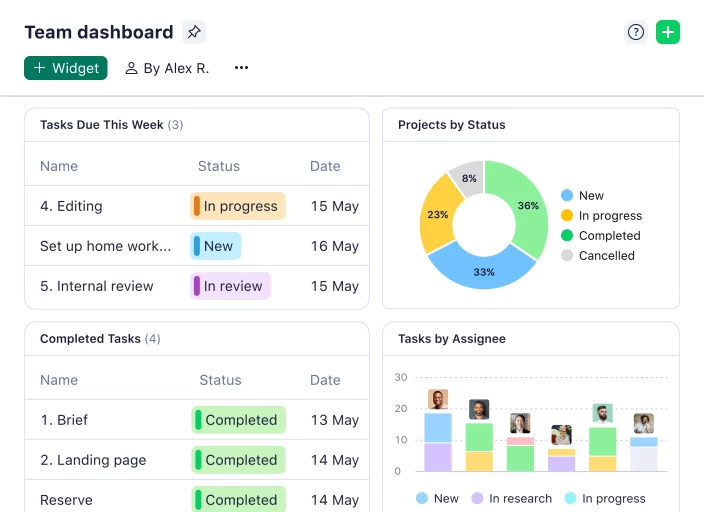
Image source: wrike.com
Key features of Wrike:
- Customizable workflows: Wrike allows users to create highly customized workflows with multiple stages, dependencies, and . This level of customization is essential for organizations with unique or complex processes.
- Gantt charts and project planning: functionality , dependencies, and milestones. This enables project managers to effectively plan, schedule, and track progress.
- Resource management: Wrike's tools allow project managers to allocate resources efficiently, monitor team workloads, and prevent bottlenecks. This ensures that projects are adequately staffed and that resources are used effectively.
- Custom fields and forms: Users can create custom fields and forms to capture specific data points relevant to their projects. This enables teams to track information beyond standard task details and generate reports tailored to their needs.
- Advanced reporting and analytics: Wrike offers comprehensive , including custom dashboards, reports, and data visualization tools. These tools provide valuable insights into project performance, team productivity, and overall business results.
- Integrations: Wrike integrates with a wide range of business applications, including Microsoft Office, Google Workspace, Salesforce, and Adobe Creative Cloud. This ensures seamless data flow and collaboration across different platforms.
- Security and compliance: Wrike prioritizes security and compliance, offering features such as data encryption, access controls, and audit logs. It also complies with industry standards such as GDPR, HIPAA, and SOC 2.
For more Google Workspace's information, you can refer to and .
What is Monday.com?
Monday.com is a visually intuitive and highly versatile platform designed to enhance collaboration and simplify project execution. It distinguishes itself with its user-friendly interface and flexible board based system, making it a popular choice for teams across various industries. While it effectively handles project management, Monday.com is engineered for broader work management applications. This means it can be used for diverse functions such as , , , and HR processes. The platform promotes transparency and communication. Its visual nature makes it easy for team members to see the status of projects and tasks, fostering a collaborative and engaged work environment.
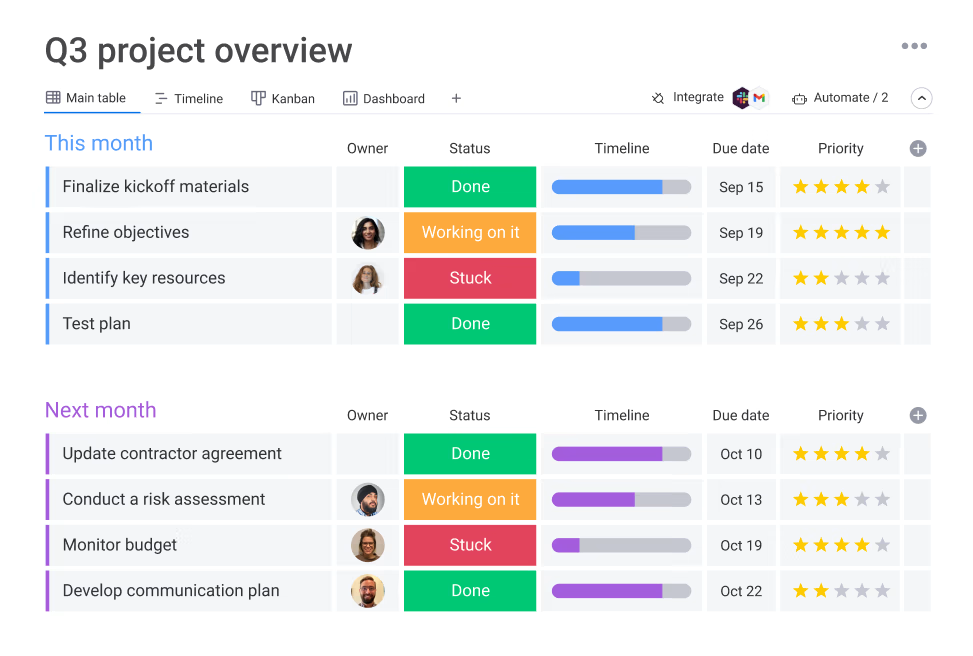
Image source: monday.com
Key features of Monday.com:
- Visual boards and workspaces: Monday.com's board based system offers , and workflows. Users can create custom boards to track progress, assign tasks, and manage deadlines.
- Customizable templates: The platform provides a library of customizable templates for different use cases, enabling teams to quickly set up and manage projects.
- Automation recipes: Monday.com offers a no code that allows users to create custom automation without needing technical skills. This simplifies tasks and reduces manual effort.
- Integrations: Monday.com integrates with a wide range of popular business applications, including Slack, Google Workspace, Microsoft Teams, and various CRM platforms. This enables seamless communication.
- Collaboration tools: The platform provides various , including file sharing, commenting, and activity logs. This ensures that team members stay connected and informed.
- Views and dashboards: Monday.com offers multiple views, including Gantt charts, , calendars, and timelines. Users can also create custom dashboards to track key performance indicators (KPIs) and monitor project progress.
- Mobile apps: Monday.com offers mobile apps for iOS and Android devices, enabling users to stay connected and manage their work on the go.
Wrike vs Monday.com: Core features
To truly understand the differences between Wrike and Monday.com, it's essential to examine their core features side by side.
A glance at core features comparison side by side
Task management
Both Wrike and Monday.com offer comprehensive task management features. Wrike allows the creation of tasks, subtasks, dependencies, and custom fields to define granular project steps. Its strength lies in and complex workflows. Monday.com utilizes a board based system where tasks are visualized as items on a board. These items can be assigned to team members, assigned due dates, and categorized based on status.
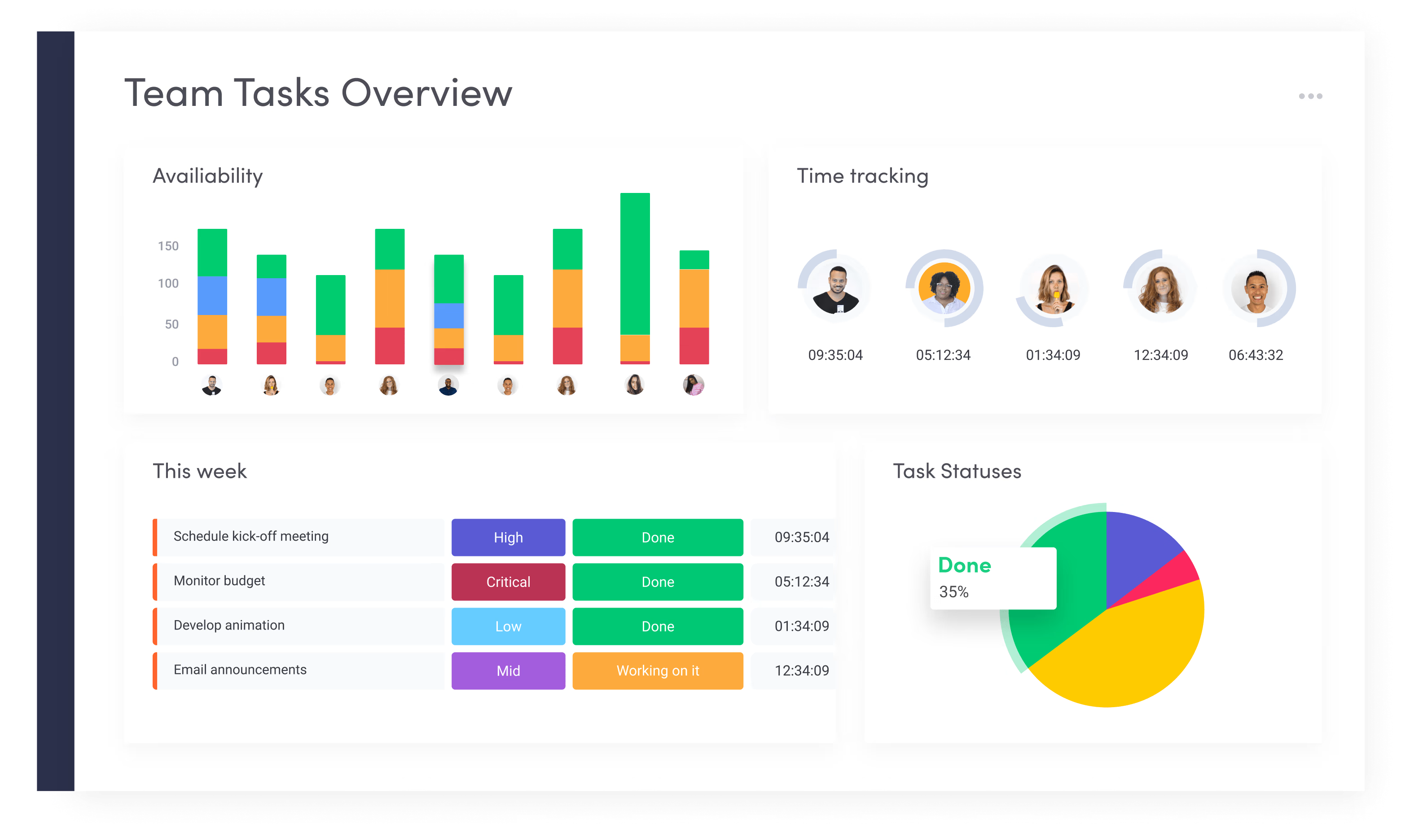
Image source: monday.com
The approach to task management differs significantly. Wrike provides a hierarchical structure that can be customized to mirror complex project needs. Monday.com provides an intuitive and visually appealing interface. The choice depends on whether complexity and customization are more important than visual clarity and ease of use. The structure of wrike vs Monday.com is significantly different, with wrike's list-based structure providing more customization and Monday.com's board-based structure providing a clearer overview.
Collaboration and communication
Effective collaboration is a cornerstone of successful project management. Wrike offers various features to facilitate teamwork, including commenting on tasks, real time editing of documents, and proofing tools for creative assets. These features and ensure that all team members are on the same page.
Monday.com focuses on transparency and communication through its activity logs. It also offers integration with popular communication platforms like Slack and Microsoft Teams. Each task or item on a board serves as a central hub for all communication related to that item.
Project planning and scheduling
are areas where both platforms offer robust tools, but with different approaches. Wrike shines with its advanced Gantt charts, resource management capabilities, and workload views. Project managers can , allocate resources efficiently, and monitor team workloads to avoid bottlenecks.
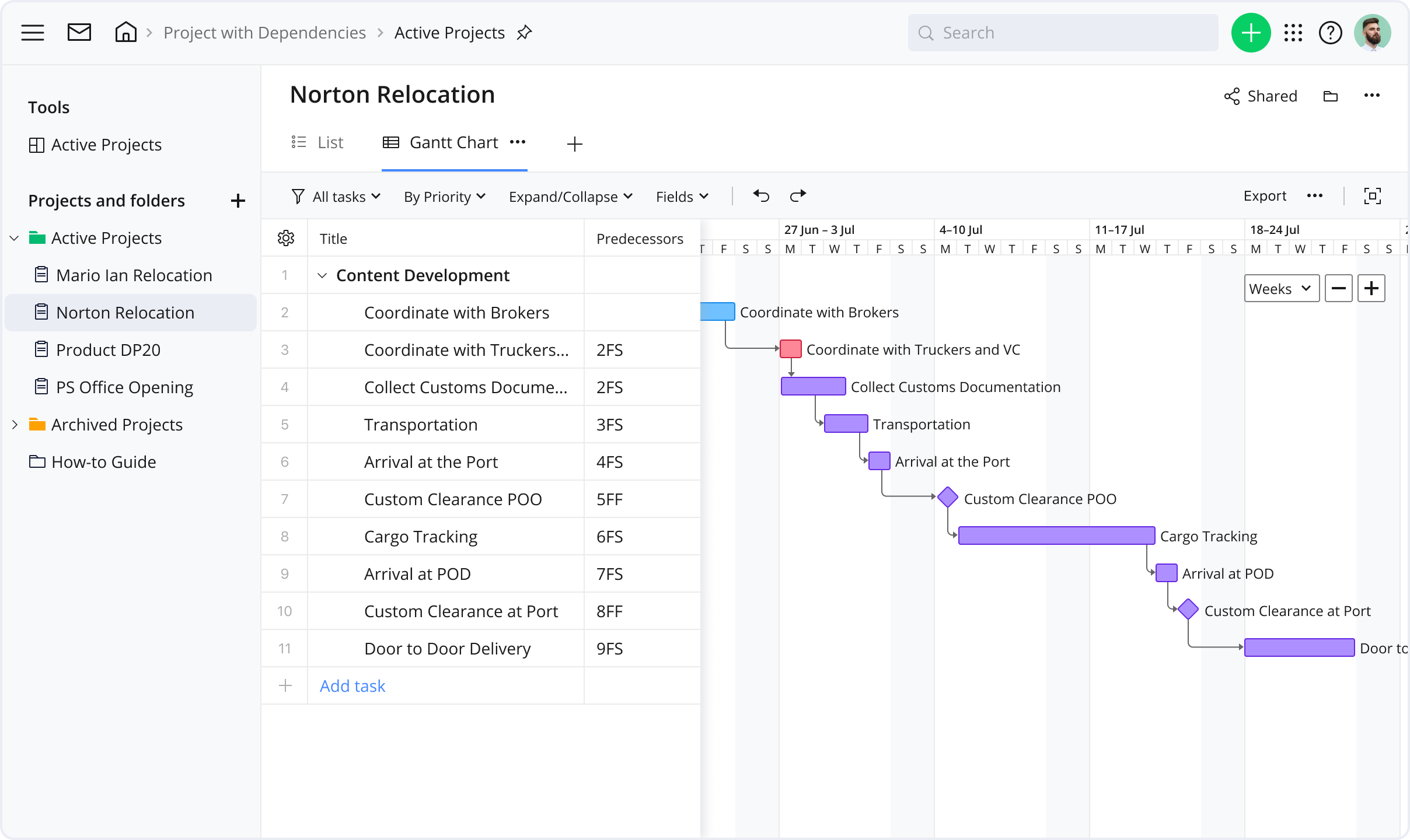
Image source: wrike.com
Monday.com also provides a variety of views including timeline views and calendar integrations. The intuitive nature of Monday.com makes it easy to create and adjust schedules. Considering Asana vs Monday vs Wrike, all three provide sufficient features for effective project management and scheduling.
Automation and workflow customization
When it comes to Wrike vs Monday workflow comparison, the level of customization provided by Wrike is higher, but the ease of use of Monday.com's automation tools are greater. Wrike offers powerful automation capabilities, enabling users to create custom workflows that and streamline processes. Users can set up triggers and actions to automate tasks.
Monday.com offers a no code workflow builder that allows users to create custom automations without needing technical skills. Monday.com has a library of prebuilt automation recipes that can be customized to fit specific needs.
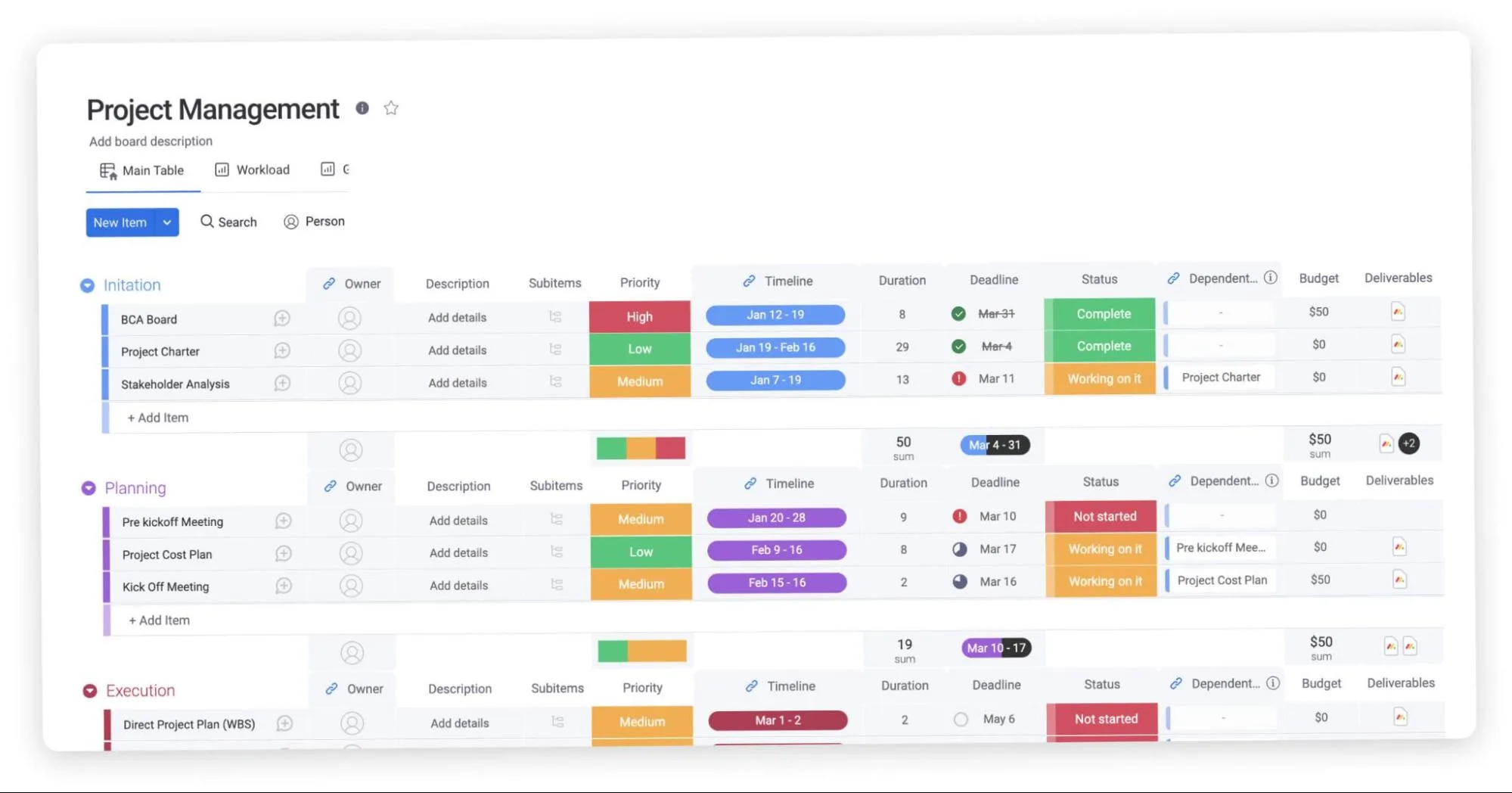
Image source: monday.com
Integrations
While Wrike excels in integrating with enterprise-grade platforms like Microsoft, Adobe, and Salesforce—ideal for teams with established enterprise toolchains—Monday.com stands out for its focus on mainstream collaboration tools and API-enabled customization, catering to teams prioritizing flexibility with common workplace apps.
Ultimately, both platforms deliver robust integration capabilities, so the choice hinges on your team's existing tool ecosystem and whether you need deep enterprise software integration (Wrike) or agile, customizable connections with popular workplace tools (Monday.com).
Reporting and analytics
Data driven decision making requires robust reporting and analytics capabilities. Wrike offers advanced reporting features, , and the ability to generate custom reports. These tools enable project managers to monitor project progress, track key metrics, and .
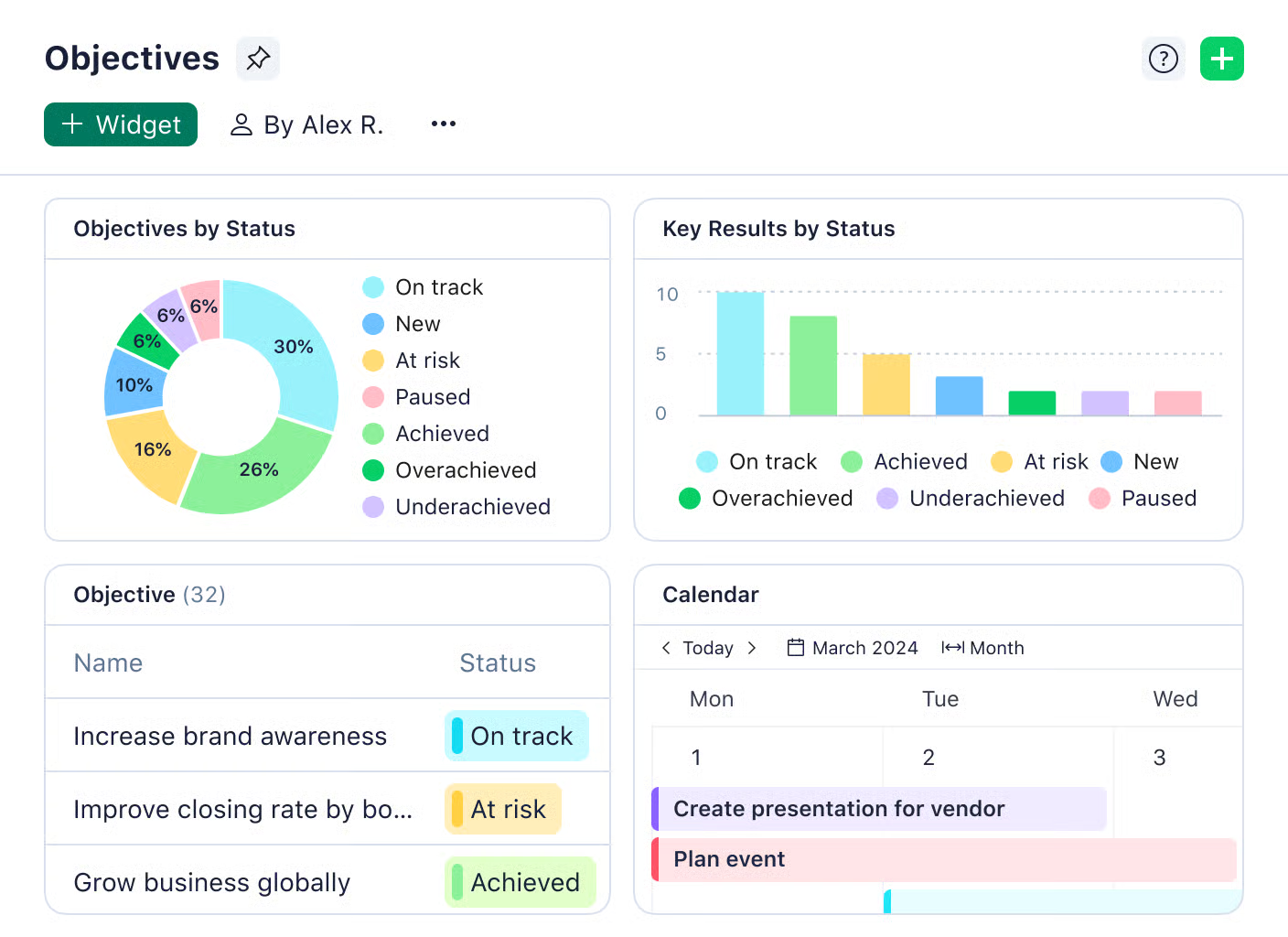
Image source: wrike.com
Monday.com also provides reporting features, dashboards, and data visualization tools. The platform allows users to create custom dashboards to track progress, identify trends, and monitor performance metrics.
Both Wrike and Monday.com deliver core reporting and analytics capabilities that support data-driven decision making, covering custom dashboards, progress tracking, and key metric monitoring—sufficient for most teams' basic to mid-level analytical needs. The subtle distinction lies in their functional focus: Wrike emphasizes "advanced reporting features" and the ability to "generate custom reports," suggesting a slight edge in report depth and tailored output for detailed project analysis; Monday.com highlights "data visualization tools" and "trend identification," leaning into intuitive data presentation to help teams quickly spot patterns.
Security
Security is paramount in today's digital landscape. Wrike implements various security measures to protect user data, including encryption, access controls, and regular security audits. It complies with industry standards such as GDPR and HIPAA.
Monday.com employs security measures to protect user data. The platform also complies with industry standards and regulations to ensure data privacy.
Note: If you are also interested in comparing Wrike vs Monday vs Asana, read our relevant reviews ⬇️
Monday.com vs Wrike: Pricing comparison
When evaluating project management tools, pricing transparency and total cost of ownership (including hidden fees) are as critical as upfront costs. Wrike and Monday.com follow distinct pricing models—Wrike leans into user-centric tiered plans with built-in core features, while Monday.com offers modular pricing with scalable add-ons. Below is a detailed breakdown of their pricing structures, a side-by-side comparison table, and key insights into hidden costs that often impact long-term budgets.
Wrike's pricing structure: Tiered plans with built-in value
Wrike uses a user-based pricing model with clear upgrades, annual billing discounts, and no mandatory add-ons for core functionality. All paid plans include AI tools and basic integrations at no extra cost.
- Free plan: $0/user/month for teams getting started, including web/desktop/mobile apps, project/task management, board/table views, and AI Essentials (with active task limitations).
- Team plan: $10/user/month (annual billing) for 2–15 small team members, offering unlimited projects/tasks, folders, 1 shared space/dashboard, Gantt charts, integrations, 2 GB storage per user, and 50 automation actions/user/month.
- Business plan: $25/user/month (annual billing) for 5–200 organizational teams, including all Team features plus project blueprints, resource planning, 200 automation actions, file proofing, AI Elite, and 5 GB storage per user.
- Enterprise plan: Custom pricing (annual billing) for 5–unlimited large team users, adding SAML SSO, 2FA, custom access roles, user audit reports, 1000 automation actions, and 10 GB storage per user to Business features.
- Pinnacle plan: Custom pricing (annual billing) for teams with complex needs (5–unlimited users), including Enterprise features plus advanced BI, resource planning, budgeting tools, 1500 automation actions, Wrike Datahub, and 15 GB storage per user.
Information source: wrike.com
Update time: 2025-11-19
Read more about Wrike's pricing ➡️
Monday.com's pricing structure: Modular plans with scalable add-ons
Monday.com uses a "base plan + optional add-ons" model, with pricing tied to team size and feature access. Core functionality is split across tiers, and advanced tools often require upgrading or paying extra.
- Free plan: $0 forever for individuals (up to 2 seats), including up to 3 boards, 3 Docs, 200+ templates, 8 column types, and iOS/Android apps.
- Basic plan: $8 per user/month (annual billing) for small teams, including unlimited boards, 200GB total storage, basic automation (250 actions/month), and email support.
- Standard plan: $12/seat/month (annual billing) for cross-team collaboration, including unlimited items/boards, guest access, 250 automation/integration actions/month, 20+ column types, 5-board dashboard, Timeline/Gantt views, and trial AI credits.
- Pro plan: $19/seat/month (annual billing) for scaling complex workflows, including all Standard features plus private boards, Chart View, time tracking, Formula Column, 25K automation/integration actions/month, 20-board dashboard, and trial AI credits.
- Enterprise plan: Custom pricing for large organizations, including all Pro features plus portfolio/resource management, 250K automation/integration actions/month, multi-level permissions, enterprise-grade security, advanced reporting, 50-board dashboard, 24/7 enterprise support, and trial AI credits.
Information source: monday.com
Update time: 2025-11-19
Read more about Monday.com's pricing ➡️
Hidden costs to watch out for
Upfront pricing often doesn't reflect the full cost—both tools have hidden fees that can add up, especially for growing teams.
Wrike's hidden costs
- Add-on fees: Advanced features like Wrike Whiteboard ($5/user/month), custom integrations, or additional storage (beyond plan limits) require extra payment.
- Enterprise customization: While core features are inclusive, large teams needing tailored workflows, dedicated training, or custom security configurations may face additional consulting fees.
- Long-term scaling: For teams exceeding 100 users, Enterprise Plan pricing can rise significantly—negotiations are necessary to avoid overpaying for unused features.
Monday.com's hidden costs
- Add-on premium features: AI tools ($4/user/month for Standard), advanced reporting, or additional storage (extra $10/month per 500GB) are not included in lower tiers.
- User overhead: Monday.com's pricing is strictly per user—adding temporary team members or external collaborators (even for short projects) increases costs, as there's no "guest user" tier.
- Automation limits: Basic/Standard plans have restrictive automation quotas; teams needing frequent workflows will be forced to upgrade to Pro.
- Integration costs: While 200+ integrations are available, some premium integrations (e.g., advanced Salesforce sync) require Pro/Enterprise plans, adding to long-term expenses.
Check cheaper and more transparent pricing
Explore the best alternative to Wrike and Monday.com
When seeking alternatives to Wrike and Monday.com, stands out with its highly all-in-one work platform concept. Compared to traditional solutions that require combining multiple independent tools to complete work, its core advantage lies in eliminating system barriers through deep integration, thereby enhancing team efficiency and optimizing the total cost of ownership.
Breaking down application silos
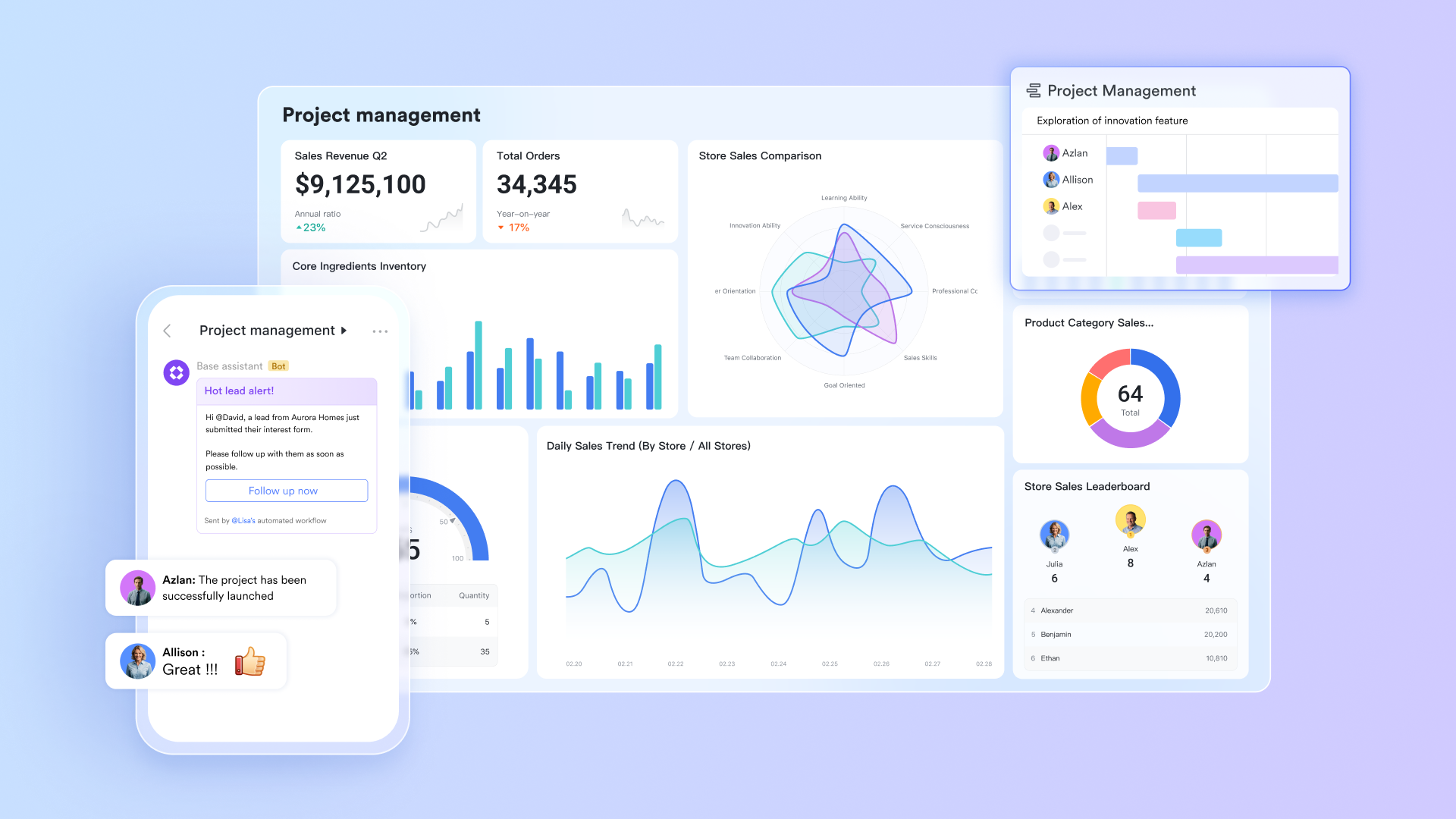
When using Wrike or Monday.com for project management, teams often need to pair them with multiple independent tools like Slack, Zoom, and Google Docs to handle communication, meetings, and document collaboration. This frequent app switching not only disrupts workflows but also leads to information fragmentation—critical project discussions, meeting minutes, and feedback are scattered across different platforms, making them difficult to track and manage centrally.
addresses this issue by building a natively unified platform. It deeply involves , , , and task management within a single application. This means team members can directly initiate a video conference from messages thread to clarify doubts, and after the meeting, the notes recorded by are automatically sent to the corresponding group chat. All operations are completed within a unified context, significantly reducing information loss and efficiency drains caused by app switching, and ensuring the integrity and concentration of project information. 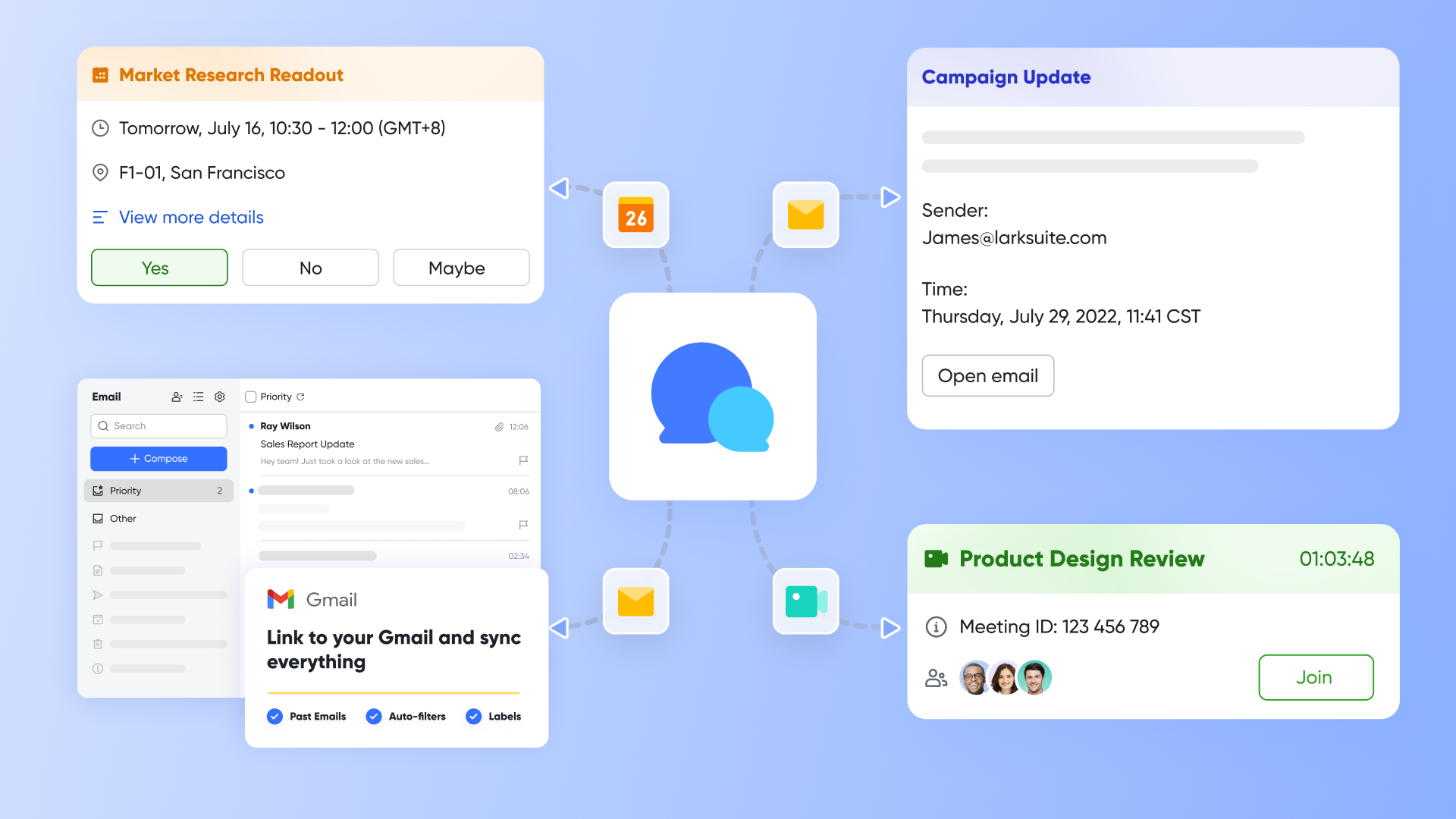
Simplifying process building
While Wrike and Monday.com also offer automation capabilities, Lark extends such functionality to a broader range of business scenarios through . It is more user-friendly for non-technical users and provides robust free project views. For example, facility managers can quickly build a production process quality inspection system via Lark Base without IT department support. Teams can configure automated workflows to automatically trigger defect reports and notify relevant responsible parties when an inspection fails. They can also collect daily operational data (e.g., inventory updates or defect reports) through form views—all information is automatically aggregated into a single table, triggering relevant status updates or alerts. Unlike Wrike and Monday.com, which reserve some advanced views and automation features for paid plans, this delivers greater out-of-the-box flexibility for teams. 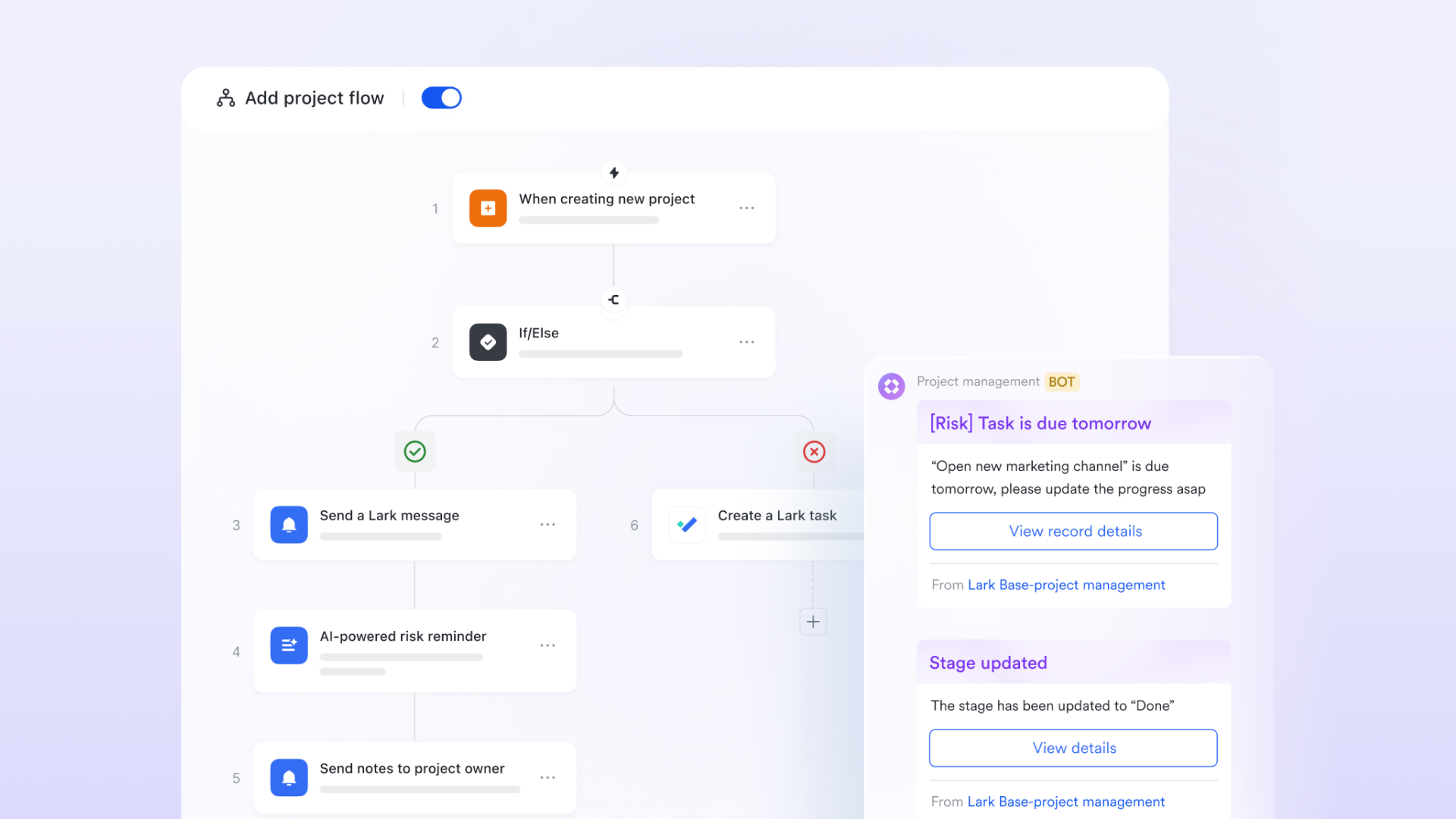
Bridging the gap between strategy and execution
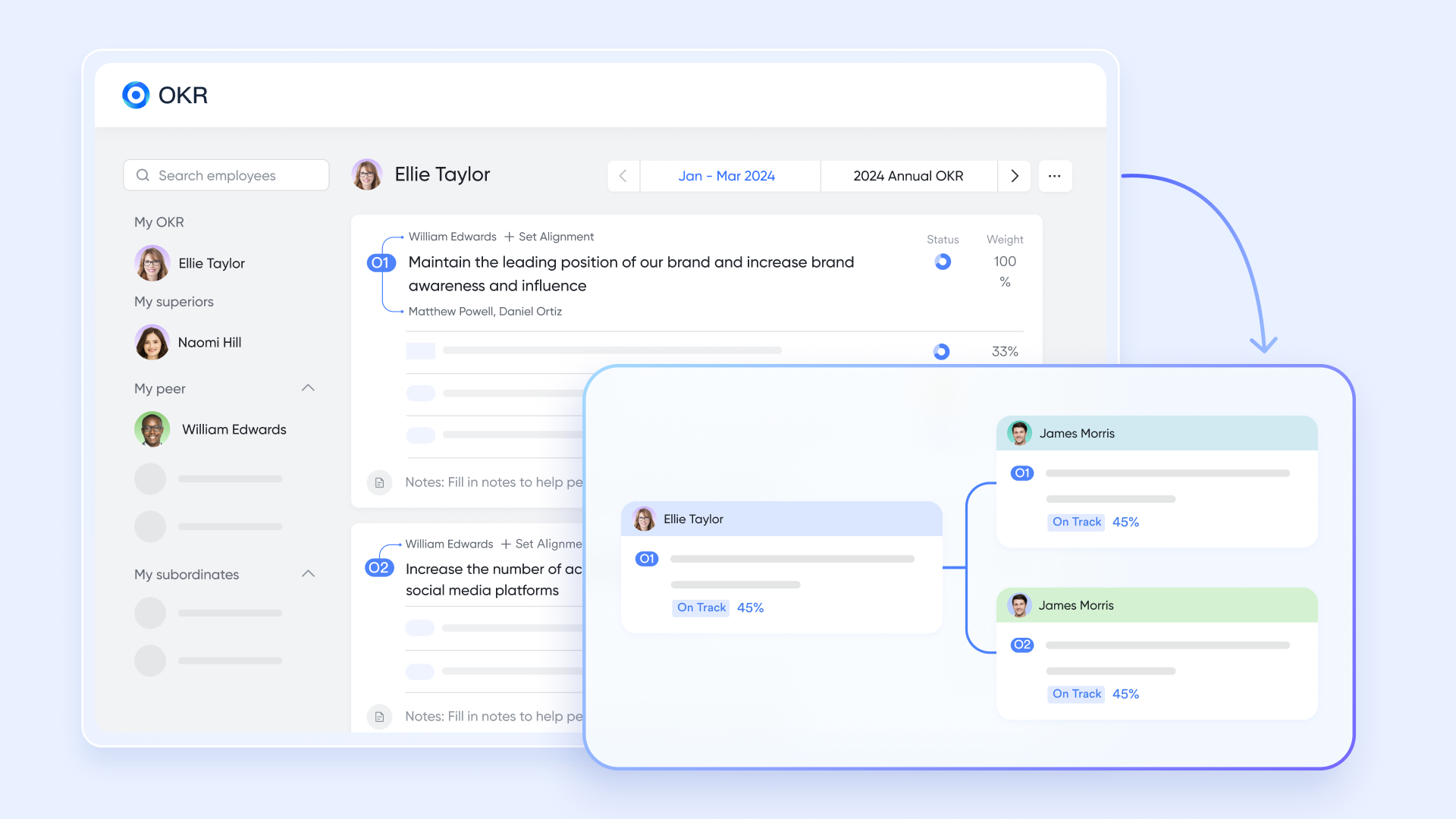
Lark's unique aspect is its natively embeded —this stands in sharp contrast to Wrike and Monday.com, which typically rely on external integrations or manual tracking for OKR management. Through this seamless integration, teams can directly link daily tasks and projects with the company's overall objectives, utilizing the OKR definition, tracking, and management tools provided by Lark to ensure all members are aligned and collectively driving strategy execution.
Empowering global teams in diverse environments
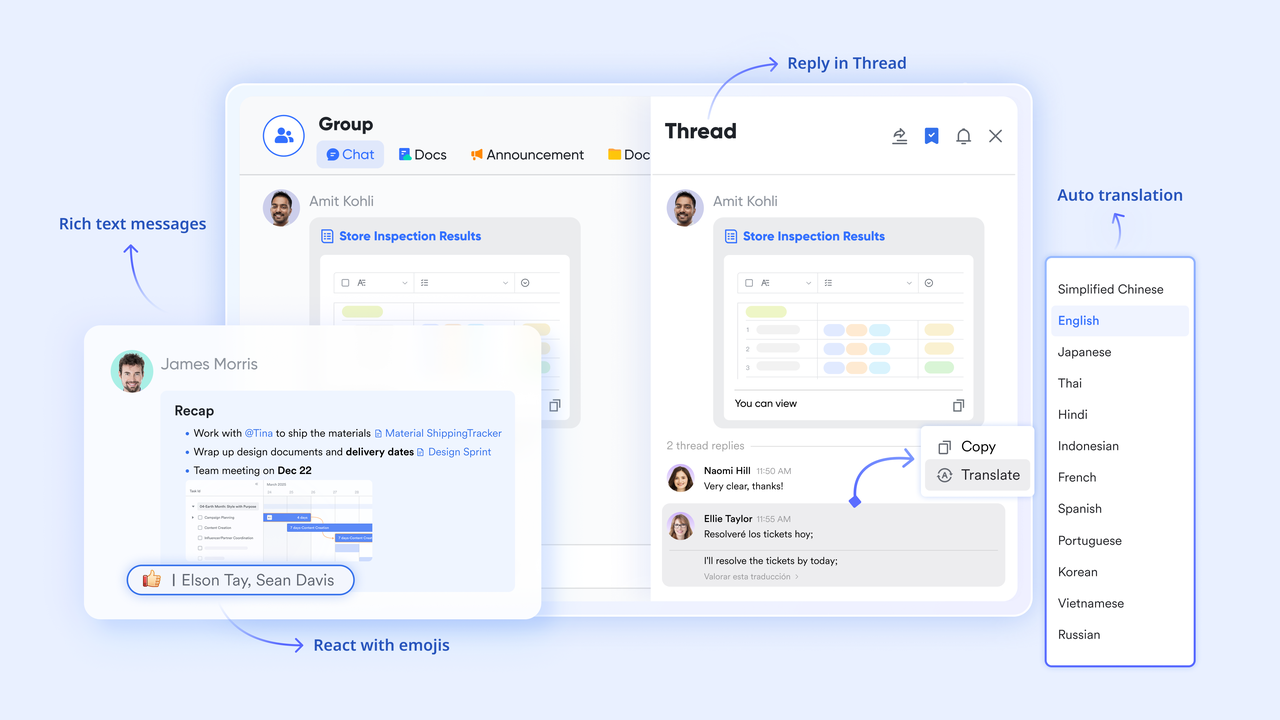
comes with robust real-time translation capabilities, supporting mutual translation of chat messages, documents, and even video conference subtitles across multiple languages. This significantly reduces language barriers for cross-border teams.
Meanwhile, can synchronize times across different time zones, facilitating meeting scheduling for cross-border teams. Coupled with Calendar's automated notifications, Lark enables teams to conduct more effective asynchronous communication.
Streamlining document collaboration
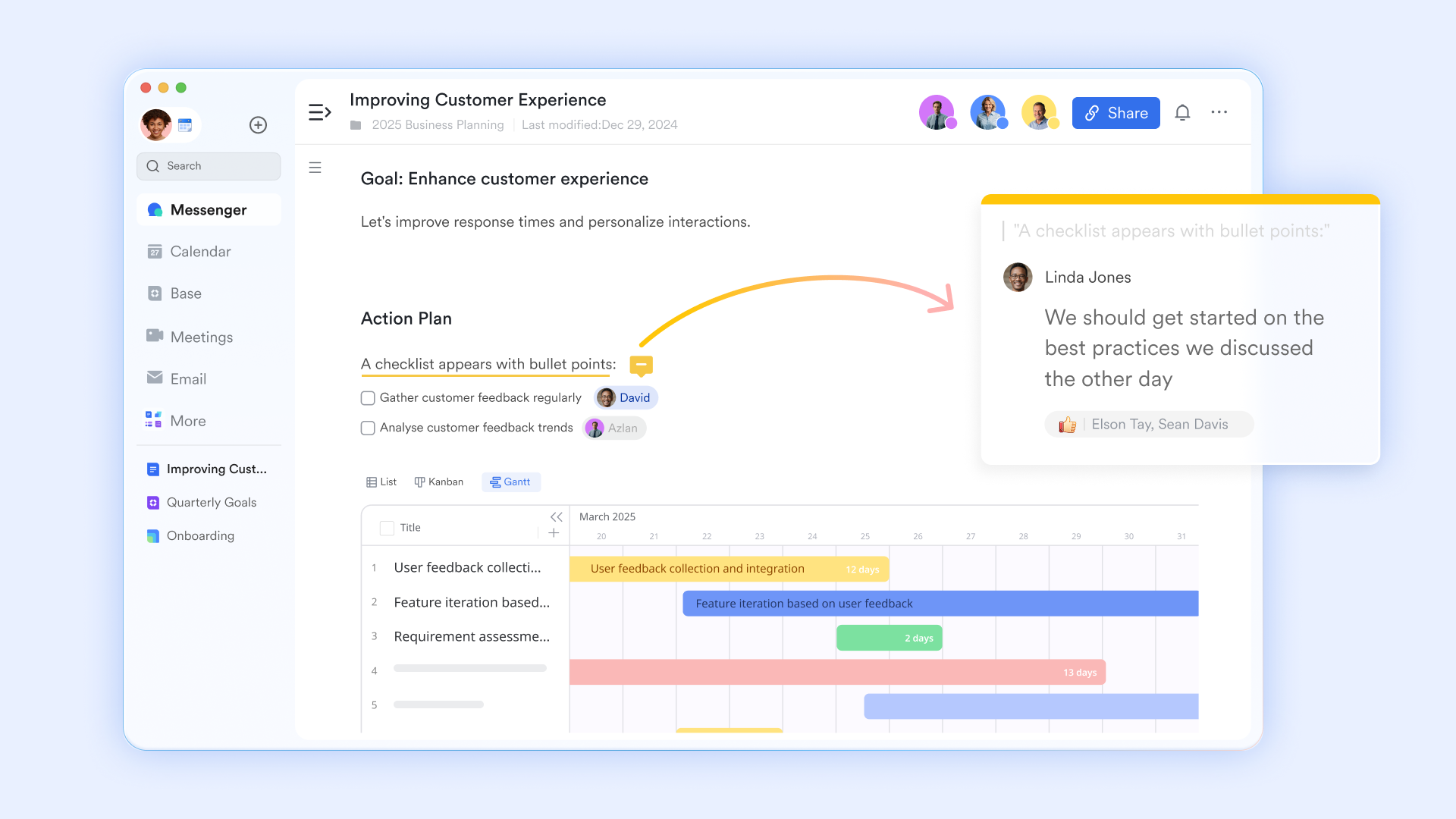
The document collaboration tools provided by Lark go far beyond basic file-sharing capabilities. support real-time collaborative editing for teams and also include practical features like version control, comment interactions, and permission management. This not only ensures efficient document collaboration but also guarantees the security and controllability of knowledge assets, making team knowledge accumulation and sharing smoother.
Empowering frontline teams
Lark specifically caters to non-desktop scenarios and frontline employees' needs, with the completeness of its functionality being a key highlight.
Wrike's mobile app focuses more on enabling teams to quickly check task statuses and approval requests rather than completing the tasks themselves. In contrast, Lark's mobile app delivers an almost identical full-featured experience to its desktop version. Frontline employees in retail, food and beverage, or manufacturing can directly complete actions like facility inspections, scanning product barcodes to update inventory, and submitting revenue reports on their mobile phones. This mobile-friendly design philosophy ensures that both office and on-site teams can collaborate on the same information plane. 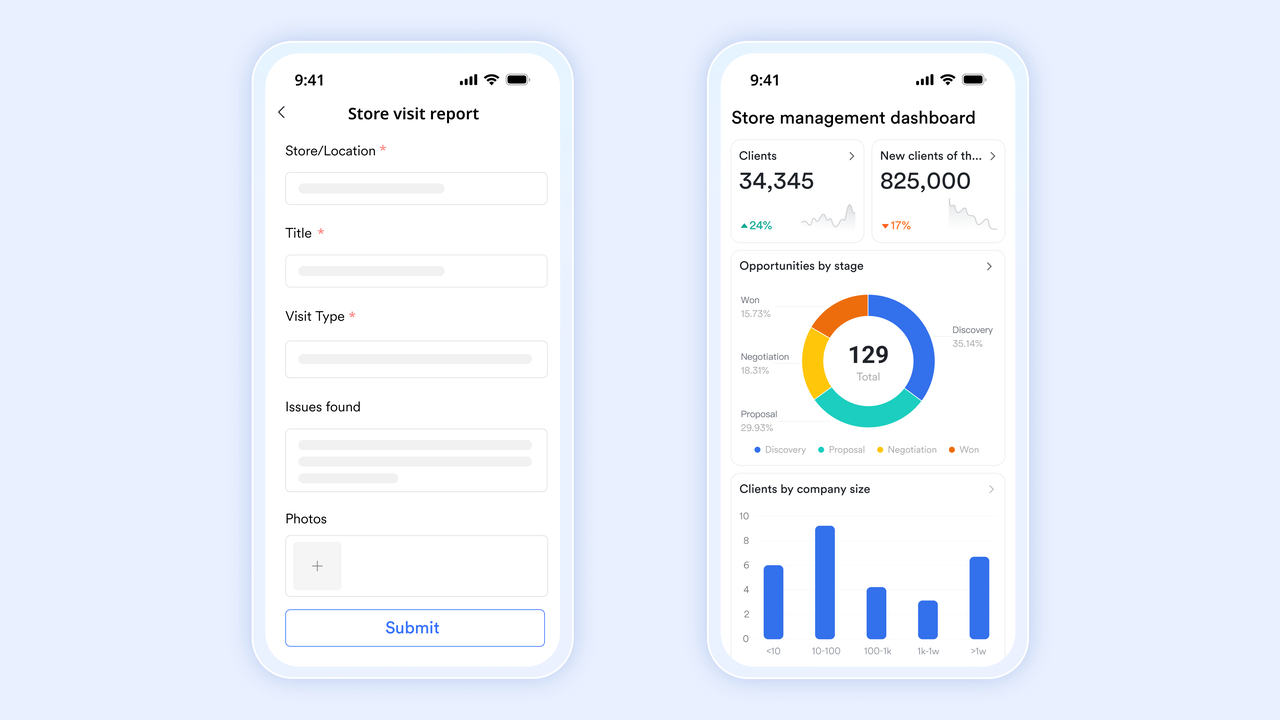
More advantageous total cost of ownership
In terms of cost, delivers significant value for businesses through its all-in-one design and flexible pricing model. Since Lark natively combines communication, collaboration, and project management features, businesses no longer need to purchase or subscribe to additional standalone tools—such as Slack for messaging, Zoom for video conferencing, or separate collaborative document systems.
Additionally, Lark's free plan is feature-rich and supports teams of up to 20 users, a stark contrast to the limited functionality of Monday.com and Wrike's free tiers. As teams scale, Lark's paid plans also allow businesses to access collaboration suites tailored to diverse team needs at a lower total cost.
Here is :
- Free plan: Includes 11 powerful products, supporting up to 20 users, 100 GB storage, 1,000 automation runs and unlimited AI translation in chats, docs and email.
- Basic plan: $6/user/month (billed annually) for up to 500 users. Includes everything in Starter plus unlimited message history, 5TB storage, 1,000 automation runs, and more. Some users may need to to purchase.
- Pro plans: $12/user/month, supporting up to 500 users. Includes unlimited message history, 50,000 automated Base workflow executions per month.
- Enterprise plan: for custom pricing. Supports unlimited users and includes even more automation runs and advanced security, compliance, and management features.
For small teams with simple communication needs

18 months message history
1000 Base automation runs/month
2000 rows per table in Base
Most POPULAR
For companies with comprehensive collaboration and management needs
Unlimited message history
500-participant video meetings
50k Base automation runs/month
20k rows per table in Base
For large companies with advanced security and organizational management needs
Get a personalized demo and pricing
Unlimited message history
500-participant video meetings
15 TB storage + 30 GB storage/user
500k Base automation runs/month
50k Base automation runs/month
Most POPULAR
For companies with comprehensive collaboration and management needs
Unlimited message history
500-participant video meetings
50k Base automation runs/month
20k rows per table in Base
Why Lark excels beyond Wrike and Monday.com
Lark vs Wrike: outperforms Wrike by offering a truly unified workspace that eliminates the need for switching between disjointed tools. While Wrike excels at complex project hierarchies and enterprise-grade security, it often requires additional integrations for seamless communication and documentation. Lark integrates task management, real-time chat, structured data (via ), documents, and approvals into one cohesive ecosystem—delivering the same granular project control as Wrike (e.g., task dependencies, custom fields) while simplifying cross-team collaboration. Its no-code automation is more intuitive than Wrike's, reducing learning curves for non-technical teams, and its all-in-one design avoids the extra costs and complexity of Wrike's advanced add-on integrations.
Lark vs Monday.com: Lark surpasses Monday.com by balancing the latter's user-friendly visualization with more robust enterprise capabilities. Monday.com shines at simple, board-based task tracking, but struggles with complex project planning and scalable workflow customization. Lark retains Monday.com's intuitive drag-and-drop interface and no-code flexibility while adding powerful features like interactive Gantt charts, resource management, and a structured knowledge hub (). Unlike Monday.com's limited automation quotas and basic reporting depth, Lark offers unlimited scalable automations and multi-dimensional analytics—all within a unified platform that combines project management with built-in communication and documentation tools, eliminating the need for external app integrations that Monday.com users often require.
Which tool is right for you?
Choosing the right tool depends on your team's size, workflow complexity, and core needs—and Lark stands out as the balanced, unified solution.
Wrike
- Best for: Large enterprises, teams managing highly complex hierarchical projects (e.g., scenarios requiring granular task dependencies, strict permission controls)
- Core strengths: Robust structured project management; supports advanced resource allocation and enterprise-grade security
- Considerations: Steeper learning curve; requires additional integrations for communication/document collaboration, leading to potential workflow friction
Monday.com
- Best for: Small-to-midsize teams, creative departments, simple projects prioritizing ease of use and visual task tracking
- Core strengths: Intuitive board-based interface; easy drag-and-drop functionality; rich pre-built templates; quick onboarding
- Considerations: Limited complex project planning (e.g., critical path analysis) and scalable customization; relies on external apps to fill gaps in communication/automation
Lark
- Best for: All scenarios—from small teams needing quick task tracking, to growing businesses managing complex projects, to enterprise-wide cross-departmental collaboration
- Core strengths: Combines Wrike's enterprise-grade control (task dependencies, custom workflows, resource management); inherits Monday.com's usability (intuitive drag-and-drop, no-code operations, visual tools); and exclusive truly unified workspace—no tool switching required
- Unique value: Unifies task management, real-time communication, document collaboration, data analytics, and approval workflows in one platform; no automation quotas; no extra integrations needed—completely solves tool fragmentation
For teams seeking power without complexity, flexibility without tradeoffs, Lark is the definitive choice. It delivers the best of Wrike and Monday.com while eliminating their limitations—all in a single, seamless platform that grows with your business.
Experience a simplified way for your teamwork
Conclusion
Choosing between Wrike and Monday.com ultimately depends on specific needs, priorities, and preferences. When considering the Wrike vs monday.com project management comparison, it's important to assess team size, project complexity, and budget. Wrike, with its robust customization and project planning tools, may be a better fit for larger organizations with complex needs. Monday.com, with its intuitive interface and collaborative features, can be more appealing to smaller teams or those prioritizing ease of use.
As you explore these options, consider exploring as well, especially if a unified platform with integrated communication and collaboration is a priority. By carefully considering features, team needs, and available alternatives, you can select the platform that best empowers your organization to achieve its project management goals.
Choose Lark to enhance your team's collaboration
FAQs
Is Wrike or Monday.com better?
Wrike excels in complex project management with advanced reporting, ideal for large enterprises. Monday.com offers superior visual customization and usability, better for creative teams and SMEs. The choice depends on your need for customization versus user-friendliness.
Who is Monday.com's biggest competitor?
Asana stands as Monday.com's primary competitor, matching its visual project management strengths while offering broader team collaboration features. ClickUp also competes closely by combining docs, goals, and tasks in one platform, challenging Monday's core offering.
For more its information? 👉
Is Monday.com an Israeli company?
Yes, Monday.com is indeed an Israeli company. It was founded and maintains its headquarters in Tel Aviv, Israel. The company has grown into a global presence, but its roots remain firmly planted in the Israeli tech scene.
Who does Wrike compete with?
Wrike primarily competes with Asana and Smartsheet in work management, while challenging Jira in agile project management. Its enterprise focus also puts it against Microsoft Project, though Citrix's recent acquisition positions it against broader work execution platforms.
Related reading






























