Choosing a project management tool is a critical decision that can shape a team's productivity and workflow. The debate often centers on two powerful platforms: Wrike vs Jira comparison. While both are leaders in the field, they serve different core philosophies and are designed for distinct primary audiences.
This analysis provides an objective comparison of Wrike and Jira. The goal is to furnish teams with the insights needed to make an informed choice that aligns with their specific projects, team composition, and long-term goals.
Ready to transform your project management strategy?
What is Wrike?
Wrike positions itself as a dynamic and versatile platform. It is built to serve a broad range of teams, including marketing, professional services, and creative agencies, in addition to supporting technical groups. Its design focuses on providing clarity and control over diverse projects, from campaign launches to cross-departmental initiatives.
A key strength of Wrike is its emphasis on enterprise-level control and balance, offering robust features for , capacity planning, and without sacrificing flexibility for individual teams. It aims to be a unified platform where both technical and non-technical team members can collaborate effectively.
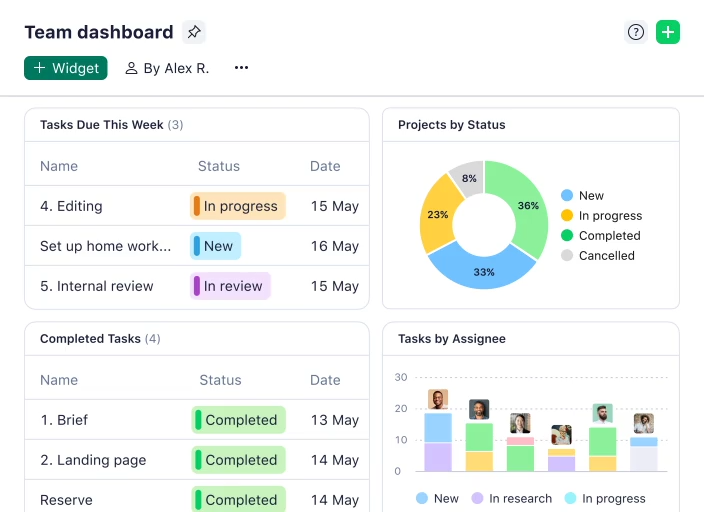
Image source: wrike.com
Wrike's key features include:
- : Organize and prioritize tasks, assign responsibilities, and track progress with ease. Wrike offers a flexible task management system that allows users to create, assign, and track tasks with customized statuses and priorities.
- : Visualize project timelines, dependencies, and critical paths. Gantt charts in Wrike enable project managers to see the project's timeline, identify potential bottlenecks, and ensure timely project delivery.
- : Balance workloads across team members and prevent burnout. Wrike's workload management features allow managers to monitor the workload of their team members and allocate resources effectively.
- : Facilitate communication and feedback with built-in messaging, file sharing, and commenting features. With Wrike, teams can collaborate seamlessly, share files, and provide feedback within the context of specific tasks and projects.
- Customizable workflows: Tailor workflows to match specific project requirements. Wrike's customizable workflows allow teams to adapt the system to their specific needs, streamlining processes and improving efficiency.
What is Jira?
Jira was originally conceived as an issue and for software developers. It has evolved into a powerhouse for agile project management, deeply specializing in supporting methodologies. Its strengths are particularly evident in bug tracking, complex sprint planning, and managing intricate software development lifecycles.
Jira functions as a central hub in the development ecosystem, offering deep and native integrations with code repositories like GitHub and Bitbucket, continuous integration tools, and other development utilities. This makes it an indispensable tool for technical teams that require granular tracking and a high degree of workflow customization.
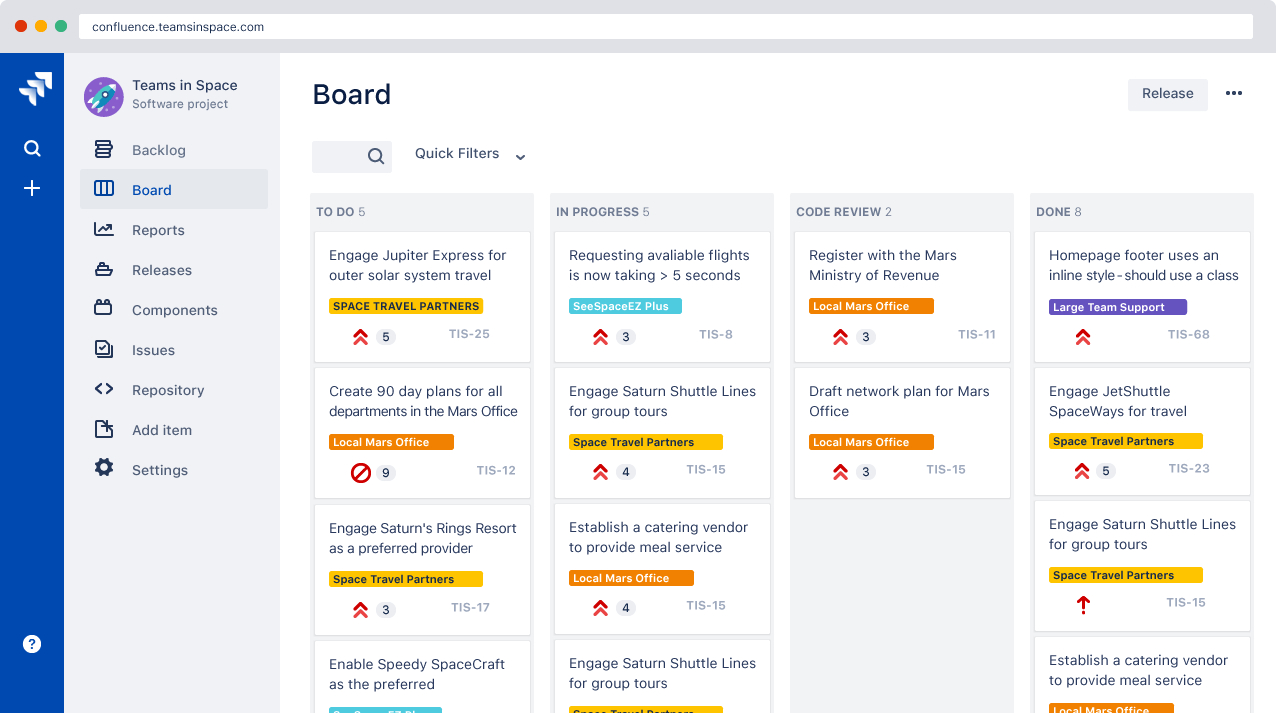
Image source: atlassian.com
Jira's key features include:
- : Support for Scrum and Kanban methodologies with sprint planning, backlog management, and burndown charts. Jira offers tools for managing sprints, tracking progress, and adapting to changing requirements.
- : Efficiently track and resolve bugs with detailed issue reporting and workflow automation. Jira's bug tracking features allow developers to quickly identify, report, and resolve software defects.
- : Manage and resolve issues of all types, from software defects to customer requests. Jira offers a comprehensive issue tracking system that can be customized to fit various needs.
- : Plan and execute sprints with ease using drag-and-drop functionality and real-time progress tracking. With Jira, teams can effectively plan their sprints, allocate tasks, and monitor progress in real-time.
- Customizable workflows: Tailor workflows to match specific development processes and issue resolution procedures. Jira's customizable workflows ensure that teams can tailor the system to their specific processes and methodologies.
Wrike vs Jira: A detailed comparison
Let's delve into a detailed jira vs wrike comparison, examining key features and functionalities to help determine which tool is the better fit for your specific needs. In this section, we will analyze various aspects of the two platforms to provide a comprehensive overview.
Project management and visualization
Wrike: Provides a wider array of visualization options suited for general project management. It features strong Gantt chart capabilities for , interactive Kanban boards, and customizable dashboards. Its reporting functionality is designed to be visually compelling and accessible, allowing managers to track project performance and across multiple departments.
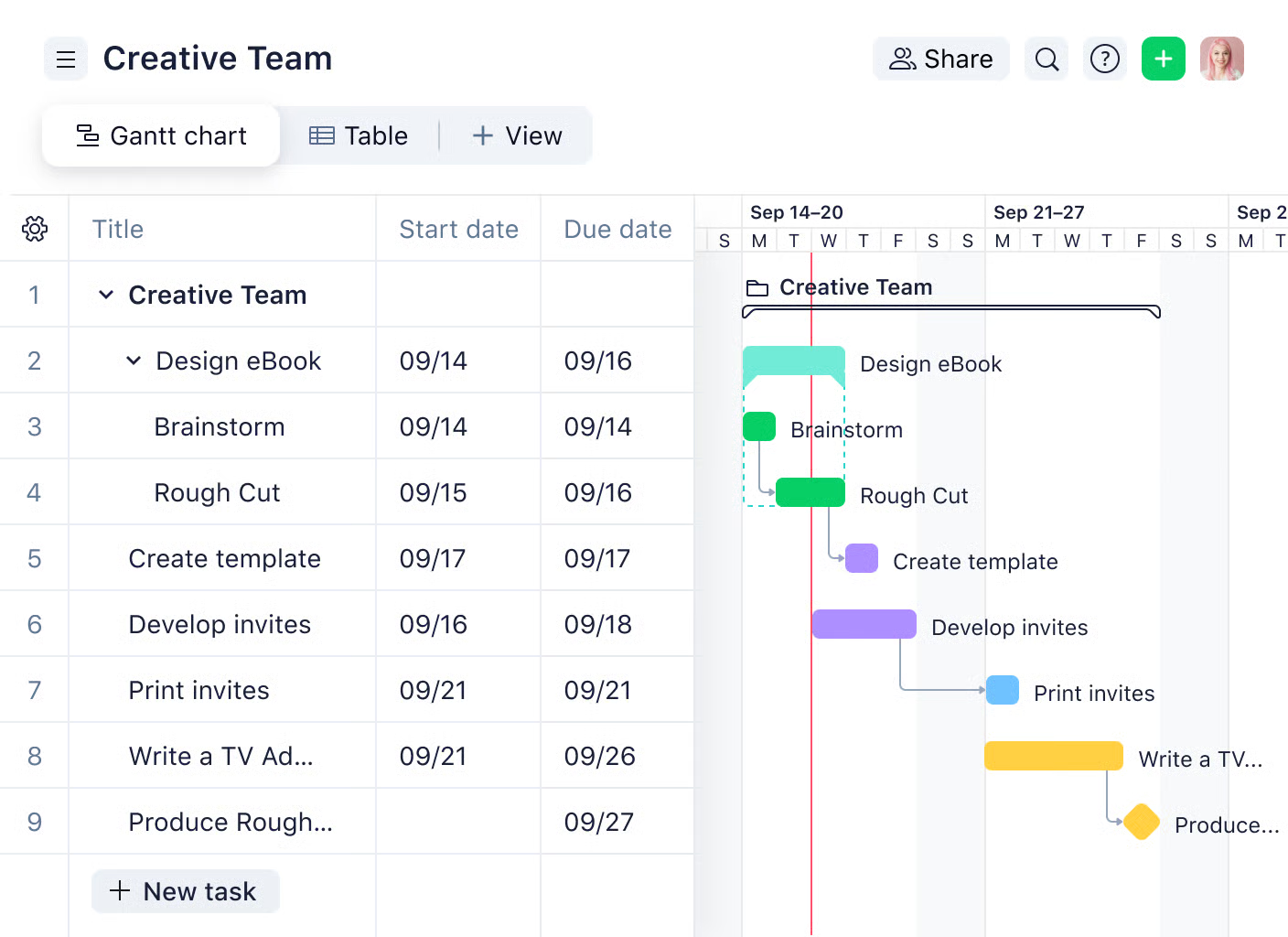
Image source: wrike.com
Jira: Its visualization is deeply tied to agile methodologies. Its Scrum and Kanban boards are optimized for sprint cycles and issue tracking. The platform provides powerful, agile-specific reports like burndown charts and velocity charts that are essential for development teams to monitor their pace and predict project completion.
Customization and workflow automation
Wrike: Offers strong configurable automation templates and request forms that help streamline repetitive tasks and work intake. Recent updates have enhanced its , allowing rules to be shared across multiple team spaces, which improves process unification without creating administrative bottlenecks.
Jira: Excels with its highly customizable workflows. Teams can design complex status transitions and triggers that mirror their specific development processes. This granular control is a significant advantage for teams with well-defined and sophisticated workflows.
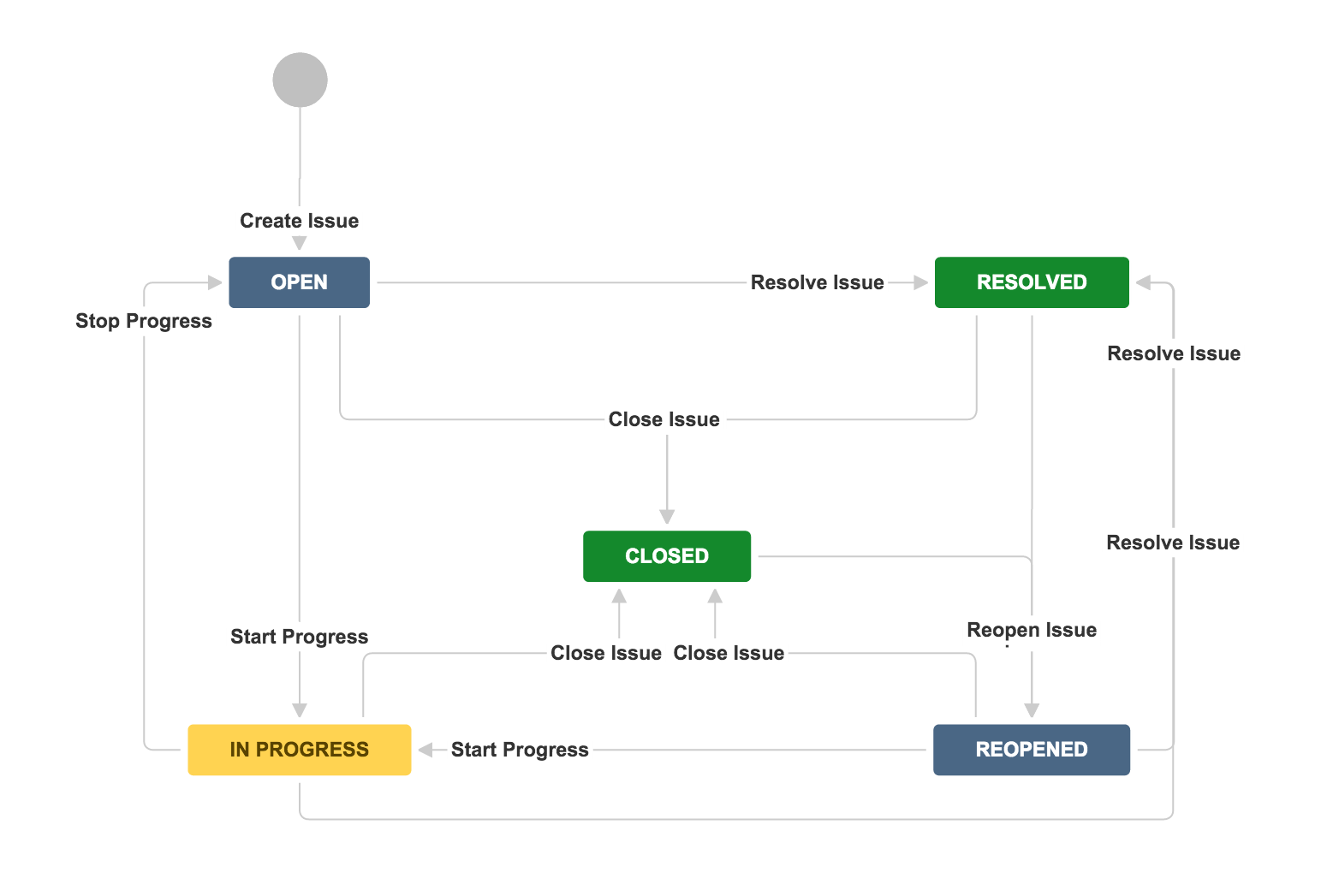
Image source: atlassian.com
Reporting and analytics
Wrike: Offers customizable reports, dashboards, and analytics to track project progress, , and identify potential bottlenecks. Wrike provides a range of reporting and analytics tools that allow project managers to monitor the performance of their projects and teams.
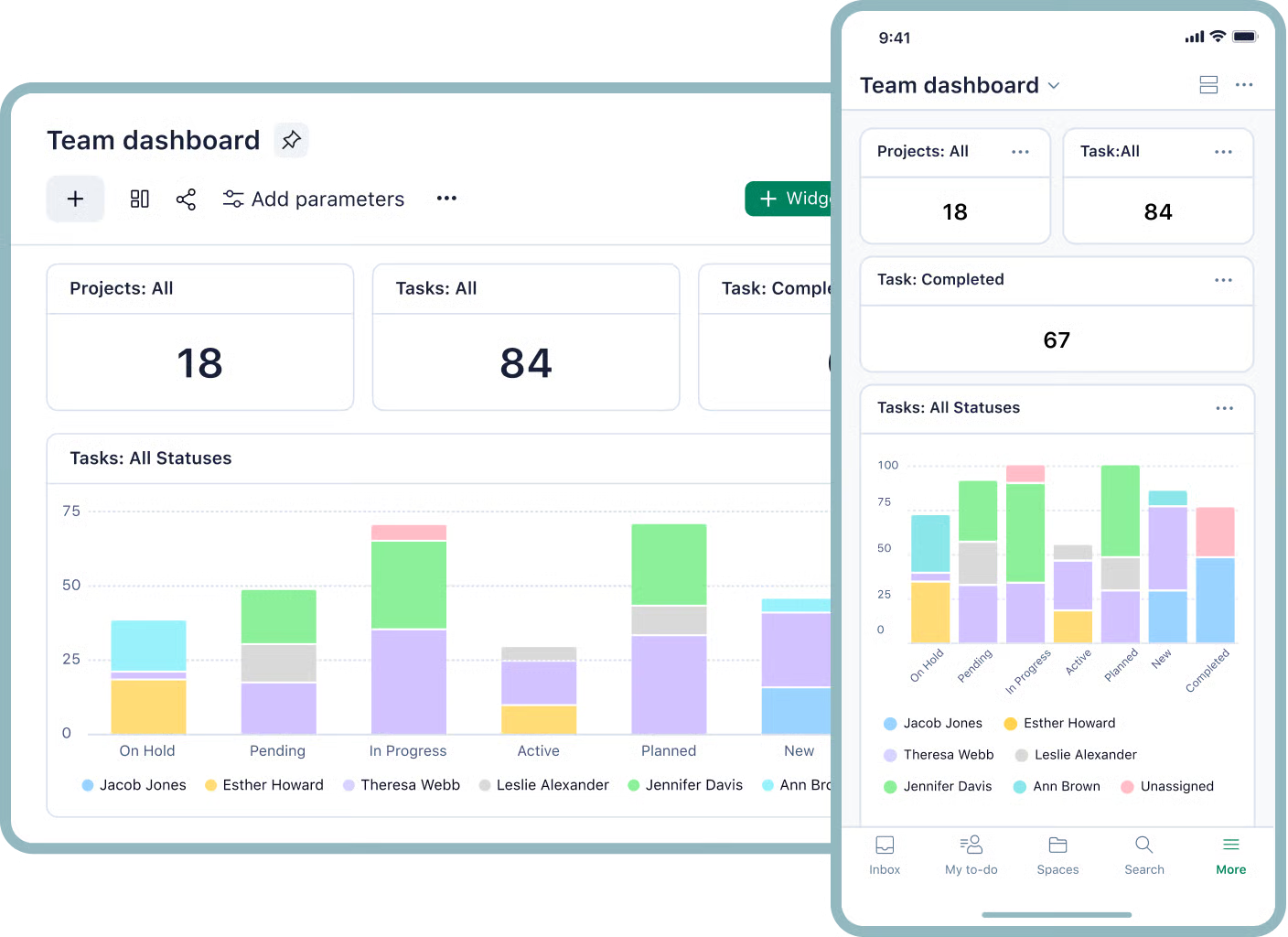
Image source: wrike.com
Jira: Provides detailed reports and analytics specifically tailored to Agile development, with burndown charts, sprint reports, and velocity charts. Jira's reporting and analytics capabilities are specifically designed to support .
Collaboration features
Wrike: Facilitates collaboration with built-in messaging, file sharing, commenting features, and real-time updates. Wrike allows team members to communicate and collaborate within the context of specific tasks and projects.
Jira: with issue commenting, activity streams, and integration with communication tools like Slack. Jira provides various tools for team members to collaborate on issue resolution.
Integration capabilities
Both Wrike and Jira offer a wide range of integrations with third-party applications. The key is to select the integrations that best align with your existing software ecosystem and workflow requirements. Integrations can significantly enhance the functionality of project management tools.
Wrike integrations:
- Salesforce: Integrate Wrike with Salesforce to streamline sales and marketing processes. This integration allows for seamless data sharing and collaboration between sales and marketing teams.
- Adobe Creative Cloud: Connect Wrike with Adobe Creative Cloud to manage creative projects more efficiently. Creative teams can use this integration to manage design assets and feedback.
- Microsoft Office 365: Integrate Wrike with Microsoft Office 365 to collaborate on documents, manage emails, and schedule meetings. This integration enhances collaboration and productivity.
- Google Workspace: Connect Wrike with Google Workspace to share files, collaborate on documents, and manage calendars. Teams can leverage this integration to streamline their workflows and improve communication.
For more Google Workspace's information, you can refer to and .
Jira integrations:
- Confluence: Integrate Jira with Confluence to create a knowledge base, document project requirements, and share information with team members. Confluence serves as a repository for project-related documentation.
- Bitbucket: Connect Jira with Bitbucket to link code changes to Jira issues. This integration allows developers to track code commits and link them to specific issues.
- GitHub: Integrate Jira with GitHub to track code commits and pull requests. This integration provides visibility into code changes and their impact on project progress.
- Slack: Connect Jira with Slack to receive notifications, share updates, and collaborate with team members in real-time. Slack enables real-time communication and collaboration among team members.
User interface and ease of use
Wrike: invests in an intuitive user interface designed for a broader user base. While its extensive feature set requires familiarization, its approach to presenting information through various views like , , and tables makes it more immediately accessible to professionals like marketers and project managers.
Jira: offers powerful customization, but this can lead to a steeper learning curve, especially for non-technical team members. The interface, while highly functional for development workflows, can present a visual burden when overloaded with custom fields, and teams often require time or external consultants to configure it effectively.
Mobile app
Wrike: Offers a mobile app for iOS and Android devices, enabling users to manage tasks, collaborate with team members, and track progress on the go. Wrike's mobile app provides a convenient way to manage projects and tasks from anywhere.
Jira: Provides a mobile app for iOS and Android devices, allowing users to track issues, , and collaborate with team members from anywhere. Jira's mobile app is designed to support the needs of software development teams.
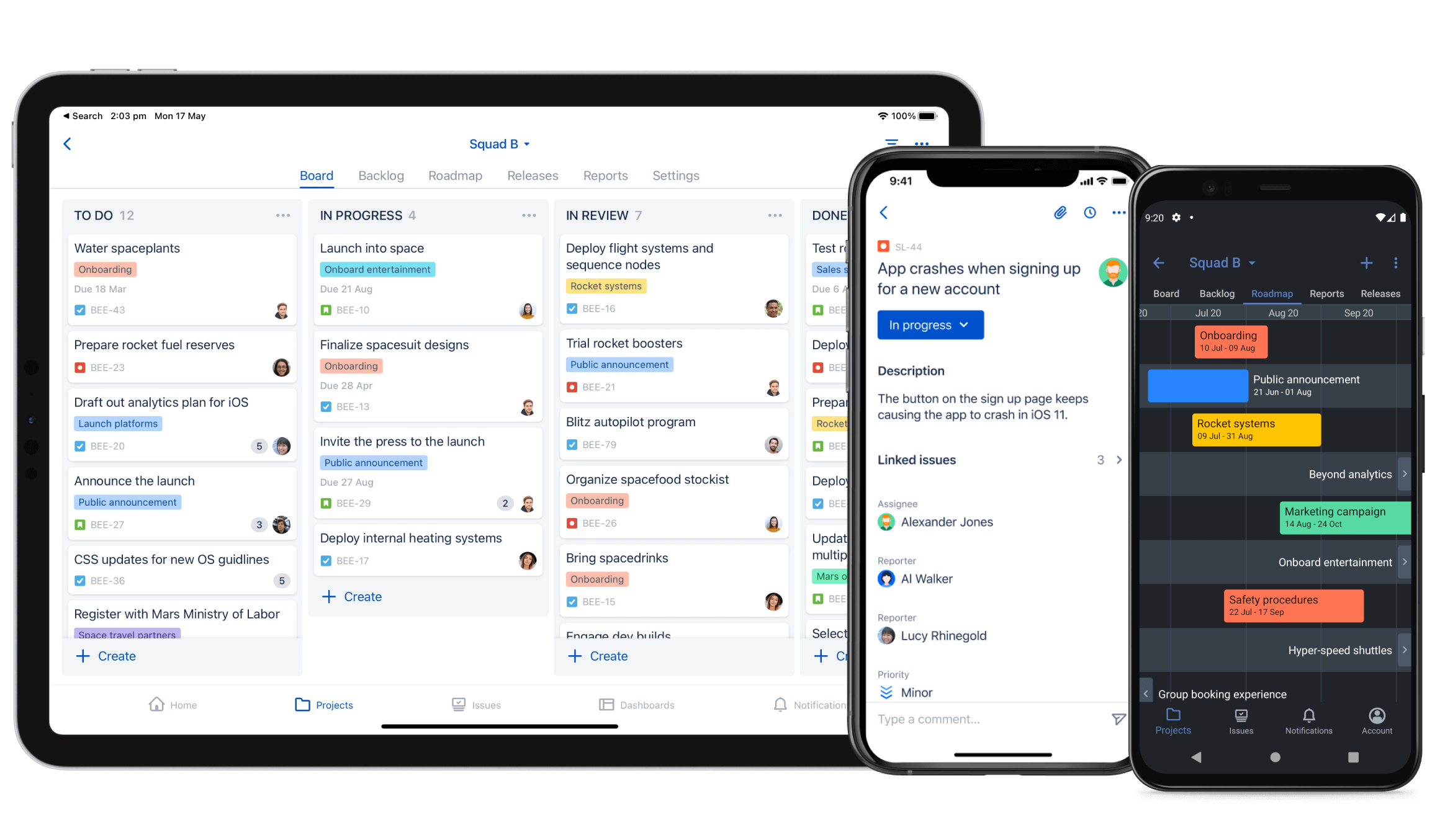
Image source: atlassian.com
Explore more features in a unified platform
Jira vs Wrike: Pricing comparison
When choosing between Wrike and Jira, pricing structure, scalability, and feature-to-cost ratio are critical decision factors. Both tools offer tiered plans for teams of all sizes, but their pricing models, user limits, and included perks differ significantly. Below is a detailed breakdown of their 2025 pricing plans and key cost considerations.
Wrike's pricing structure: Flexible tiers for diverse workflows
Wrike follows a user-centric pricing model with clear upgrades, plus annual billing discounts and a risk-free trial period. All paid plans include AI tools at no extra cost, a standout benefit for efficiency-focused teams.
- Free plan: $0 per user/month (unlimited users). Ideal for small teams or startups testing basic task management. Includes board/table views, web/mobile app access, and core task organization—but limits active tasks and storage.
- Team plan: $10 per user/month (annual billing; $12 monthly). Targets small teams needing enhanced collaboration. Adds Gantt charts, time tracking, and 5GB storage per user.
- Business plan: $25 per user/month (annual billing; ~$30 monthly) Suits growing organizations with complex workflows. Includes advanced automation (1,500 actions/user/month), DAM integrations, and SharePoint/html5 proofing.
- Enterprise & Pinnacle plans: Custom pricing. Designed for large teams and enterprises. Pinnacle adds locked secure spaces, advanced BI reporting, budgeting tools, and 15GB storage per user. Both require direct contact for quotes.
Information source: wrike.com
Update time: 2025-11-17
Key cost perks: 20% savings with annual billing, 14-day free trial (no credit card), and special pricing for nonprofits/educational institutions. Add-ons like Wrike Whiteboard or custom integrations are available for extra fees.
Jira's pricing structure: Modular plans for agile-centric teams
Jira uses a "base plan + add-ons" model, with clear limits on users, storage, and advanced features. It's optimized for technical and agile teams but charges extra for certain enterprise-grade tools. (Note: The pricing outlined below is calculated for an organization with 300 team members.)
- Free plan: $0 per user/month (up to 10 users) Perfect for small agile teams. Supports unlimited single projects, basic Scrum/Kanban boards, and 2GB total storage. Includes community support only.
- Standard plan: $7.91 per user/month (monthly) For growing teams. Unlocks 500 global multi-projects, advanced permissions, 250GB storage, and local business hours support.
- Premium plan: $14.54 per user/month (monthly)Ideal for mid-sized teams. Adds unlimited storage, 24/7 support, sandbox environments, and admin insights.
- Enterprise plan: Custom pricing. Includes Atlassian Access (SSO, SCIM sync), 99.95% uptime SLA, and up to 150 sites per product. Requires direct consultation.
Information source: atlassian.com
Update time: 2025-11-17
Key cost considerations: Extra fees apply for add-ons like "Extra Objects for Assets" (for storing over 50,000 assets). Atlassian Access (SSO/AD sync) is a separate subscription for Standard/Premium plans but included in Enterprise.
Optimize your budget with value-driven features
Wrike vs Jira: Pros and cons
Choosing the right project management tool often comes down to understanding the trade-offs. Both Wrike and Jira offer distinct strengths and weaknesses, and the best choice depends on your organization's specific needs and priorities. To help you weigh the options, let's examine the pros and cons of each platform, providing a balanced perspective to guide your decision-making process. Considering these advantages and disadvantages are essential in the selection process.
Advantages of Wrike
Wrike offers several advantages that make it a compelling choice for many organizations. Its flexibility and user-friendly design set it apart.
- Flexibility and versatility: Wrike is suitable for a wide range of project types and industries, making it a versatile choice for organizations with diverse needs. Its adaptable architecture supports various operational settings.
- User-friendly interface: Wrike's intuitive interface and customizable features make it easy for non-technical users to adopt and use effectively. User-friendliness is a key factor in ensuring successful adoption.
- Strong collaboration features: Wrike provides robust collaboration features that facilitate communication, feedback, and . Collaboration tools enhance team productivity and cohesion.
Advantages of Jira
Jira's strengths lie in its specialized focus on Agile development and robust issue tracking capabilities.
- Agile focus: Jira is specifically designed for Agile development methodologies, providing teams with the tools they need to manage sprints, track progress, and . Jira is well-suited for teams that follow Agile practices.
- Powerful issue tracking: Jira offers comprehensive , enabling teams to efficiently manage bugs, defects, and other issues. Effective issue tracking is essential for software development projects.
- Extensive customization: Jira is highly customizable, allowing teams to tailor the tool to fit their specific workflows and processes. Customization options enable teams to adapt Jira to their unique needs.
Potential drawbacks of Wrike
Despite its advantages, Wrike also has some potential drawbacks that should be considered.
- Complexity: Can become complex for very large projects or organizations with highly intricate workflows. Managing complexity is a challenge for any project management tool.
- Agile limitations: May require more setup and customization for Agile teams compared to Jira. Agile teams may find Jira to be more immediately suited to their needs.
Potential drawbacks of Jira
Jira also has some limitations that may make it less suitable for certain organizations.
- Steeper learning curve: Jira can have a steeper learning curve for non-technical users or those unfamiliar with Agile methodologies. Ease of use is a crucial factor for successful tool adoption.
- Overkill for simple projects: May be overkill for simple project management needs or small teams with basic requirements. For smaller projects, a simpler tool may be more appropriate.
Avoid these disadvantages with Lark
Jira vs Wrike: Which is right for you?
Choosing between Wrike and Jira requires careful consideration of your team's specific needs, project types, and technical expertise. Both solutions provide unique benefits tailored to different work environments. To recap, Wrike offers flexibility and versatility, making it a strong choice for diverse teams and project types. Jira, on the other hand, excels in Agile environments, providing powerful issue tracking and capabilities. Making an informed decision will result in optimal team performance.
Consider these questions to guide your decision:
- What type of projects do you primarily manage? The nature of your projects will influence your choice.
- What is the size and structure of your team? Team size and structure will impact collaboration and communication.
- What is your budget for project management software? Budgetary constraints will affect your options.
- What integrations are essential for your workflows? Necessary integration will drive your decision.
Ideal scenarios for choosing Jira
Jira is the undisputed choice for software development teams practicing Agile or . It is exceptionally well-suited for:
- Teams that require detailed bug and issue tracking.
- Organizations that are deeply integrated into the Atlassian ecosystem (e.g., using Confluence and Bitbucket) and value a tightly connected workflow.
- Teams that need powerful, customizable workflows to manage complex development processes.
Ideal scenarios for choosing Wrike
Wrike shines in environments that require flexibility and cross-functional collaboration. It is an excellent fit for:
- , content calendars, and creative deliverables.
- Professional services and client-facing teams that need and time tracking.
- Cross-functional teams that require a unified view of work without overwhelming non-technical members with complexity.
The hybrid team dilemma: A special consideration
A common modern challenge is the "hybrid team," which includes both technical (e.g., developers) and non-technical (e.g., marketing, operations) members. In this scenario, neither tool is a perfect fit.
- Jira may empower developers but can alienate business teams with its technical interface and terminology.
- Wrike may be more inclusive for business teams but might lack the depth of agile functionality that developers require.
This dilemma often forces teams to make compromises, use multiple tools, or seek a that can natively bridge this gap.
Discover how Lark simplifies project collaboration
Exploring a powerful alternative to Wrike and Jira for unified work
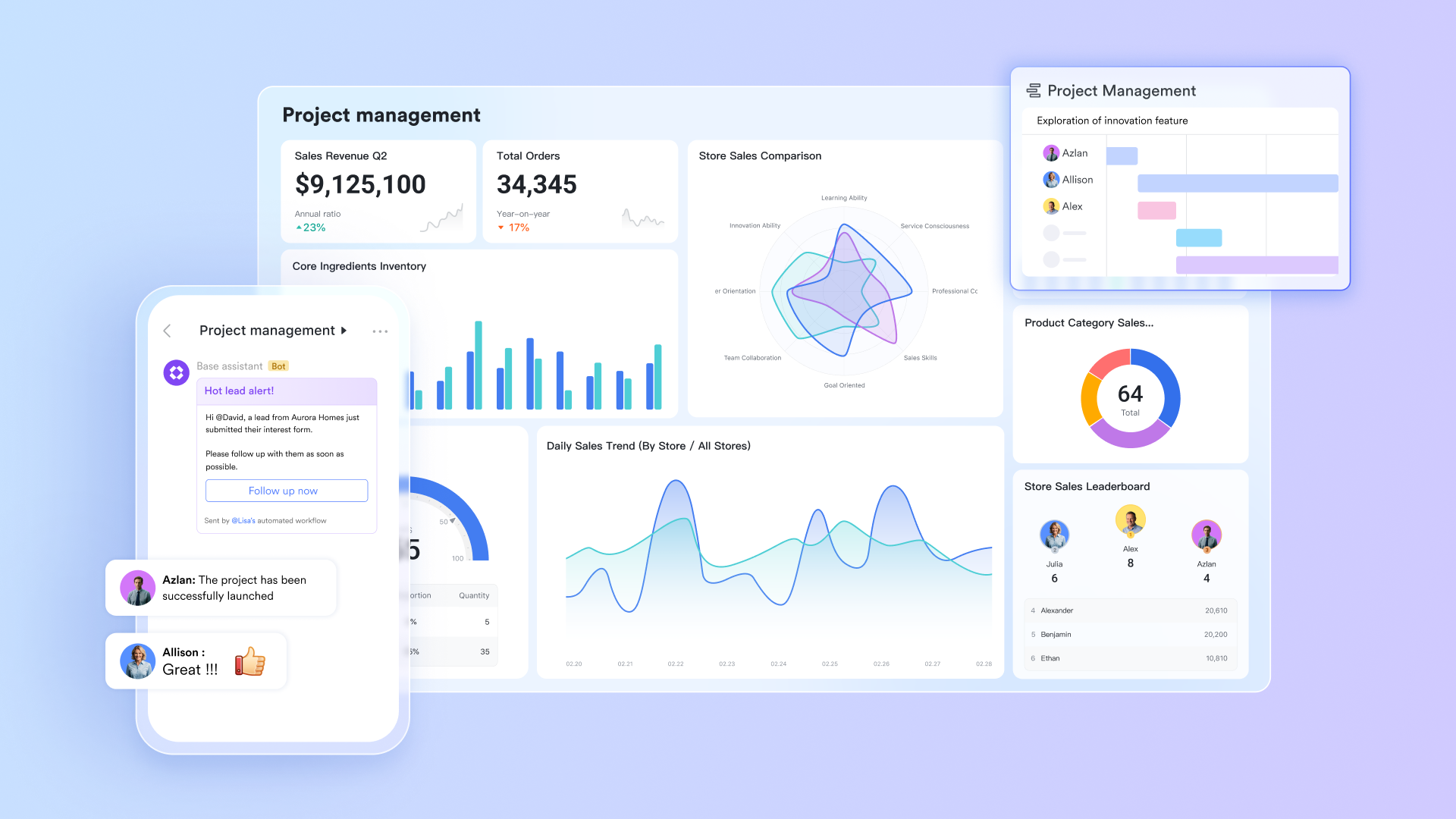
While Wrike and Jira are mainstream project management tools, exploring alternatives to Jira vs. Wrike remains necessary, as it can help you make the optimal choice based on your unique needs. Several other platforms in the market possess distinct advantages and feature combinations, and is a worthwhile option to consider. As an all-in-one collaboration platform, it presents a highly competitive alternative to Wrike and Jira, particularly suitable for organizations pursuing deeper integration and a more streamlined workflow experience.
Eliminating context loss from app switching
In traditional workflows, team members often need to switch between using Jira or Wrike for task management and independent applications like Slack, Zoom, or Confluence for communication and . This frequent app switching not only leads to decreased productivity but also causes information fragmentation—important project discussions, decision-making rationales, and documents become scattered across different platforms, making them difficult to trace.
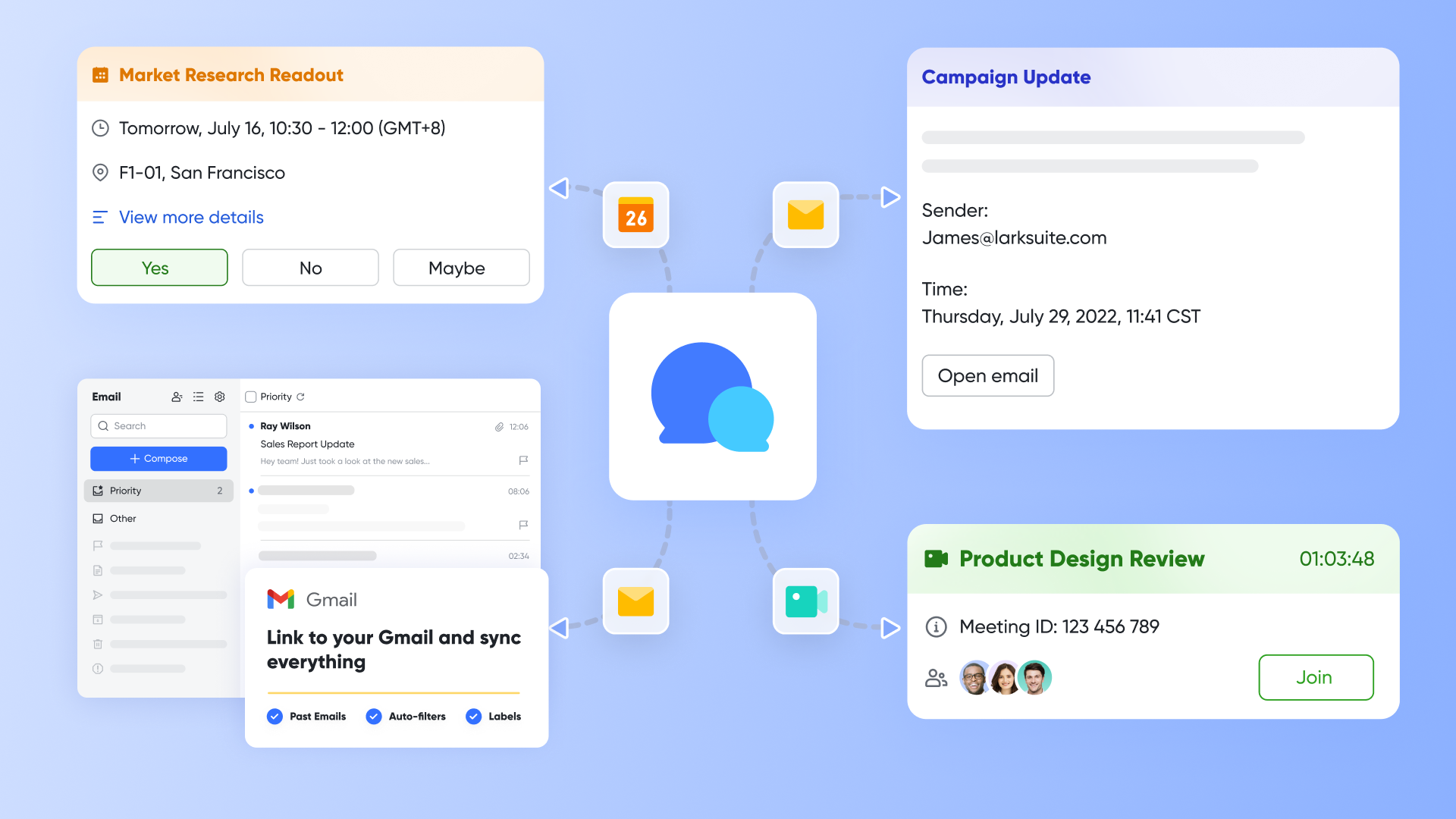
addresses this issue by building a natively unified work platform. It deeply involves , , and within a single application. This means team members can directly initiate a quick video call from to clarify requirements and share the meeting records by and the finalized project documents directly within the chat channel. All of this happens within the same context, significantly reducing information loss and efficiency drains caused by app switching, and ensuring the integrity and concentration of project information flow.
Transforming communication into actionable tasks
In project management, many specific tasks originate from impromptu discussions and ideas. With traditional tools, team members need to manually recreate consensus reached in chats or assigned work as formal tasks in Jira or Wrike. This process is not only cumbersome but can also lead to tasks being missed and not properly recorded or tracked due to oversight.
Lark Tasks's unique advantage lies in its ability to seamlessly connect communication with action. During group chats or project discussions, any member can directly convert a piece of conversation into a to-do task, assigning a responsible person and a deadline. This task will automatically appear in the project's task Kanban board, ensuring that all action items generated during communication are effectively implemented. This greatly simplifies the path from "saying" to "doing." This design makes project advancement smoother and prevents valuable ideas from being lost after lengthy discussions. 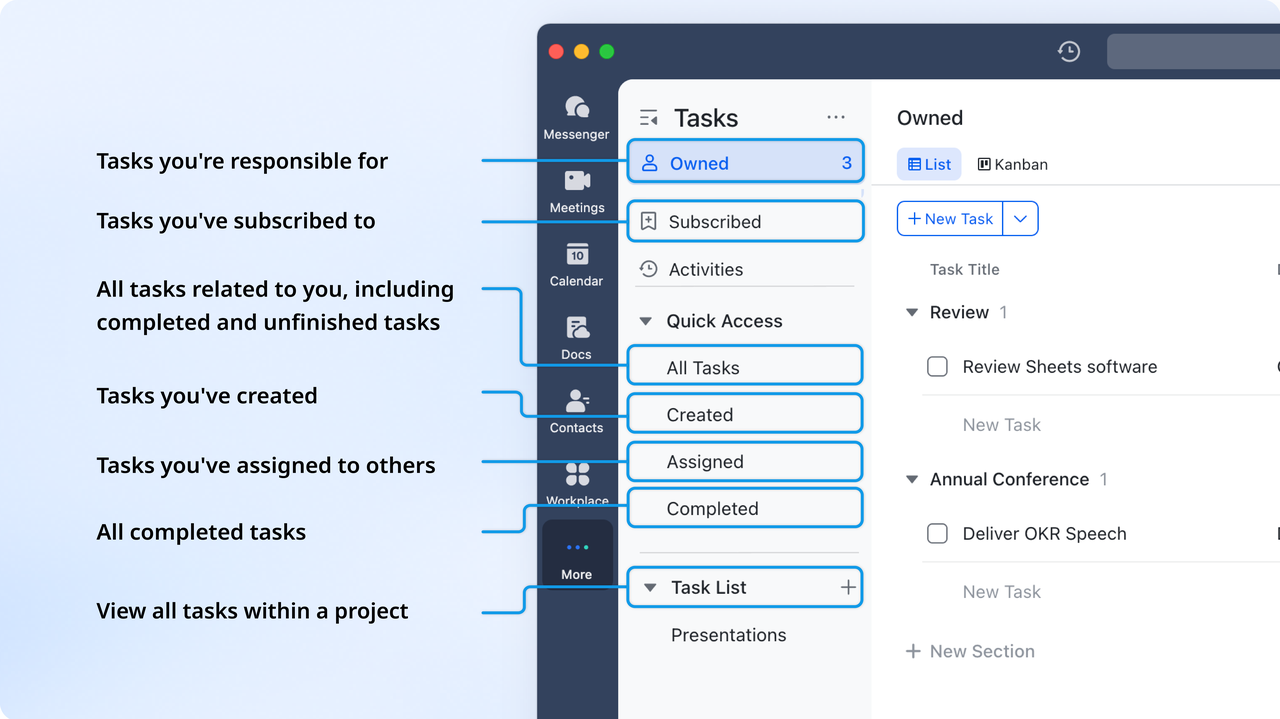
Efficient goal setting and tracking
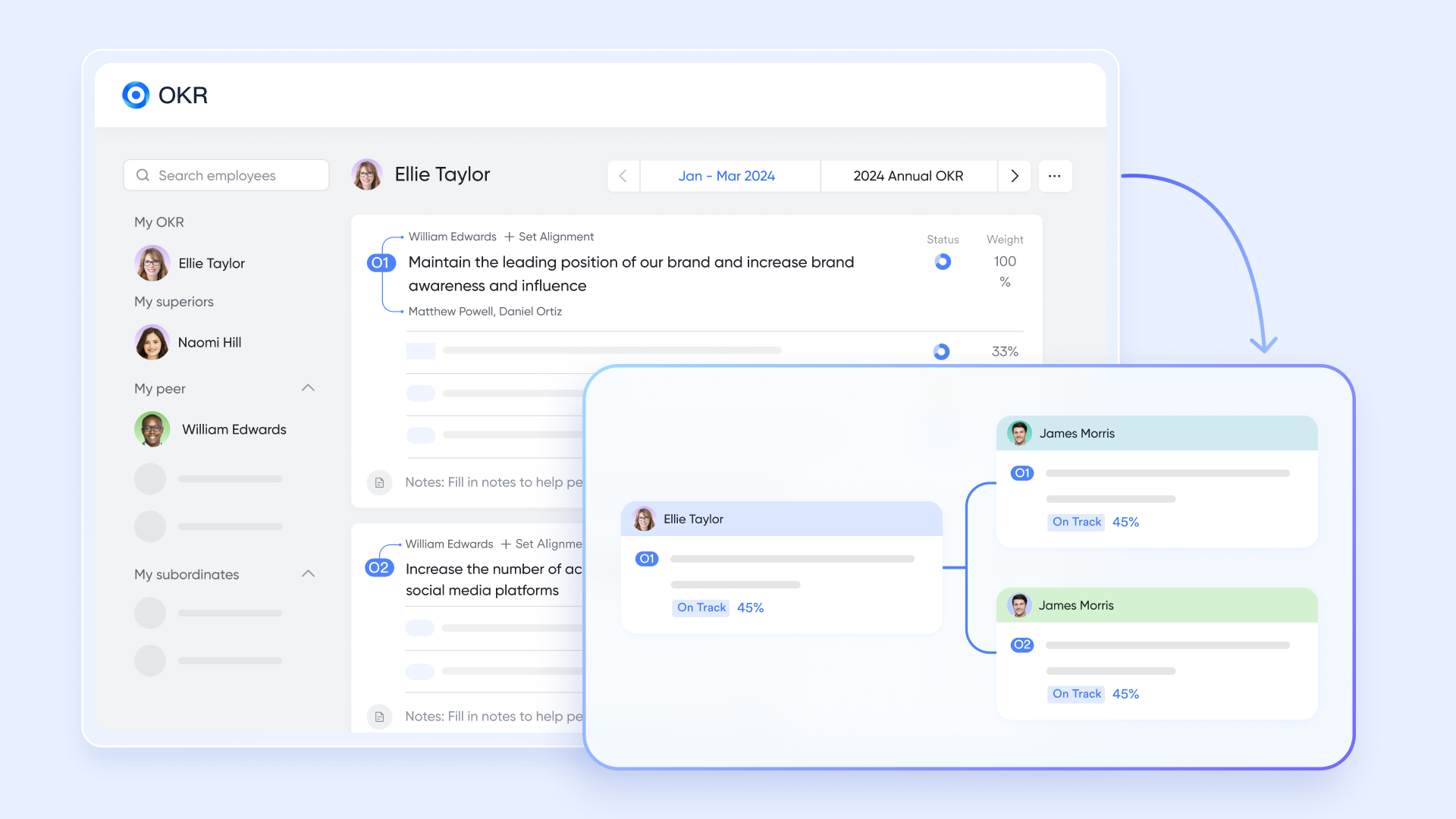
is a framework widely adopted by numerous organizations. Teams can directly define, track, and manage objectives within the platform, aligning daily work with strategic goals. Although Wrike and Jira can also be used to track OKR-related tasks, they lack dedicated modules for managing the entire OKR process.
For example, a marketing team sets an objective to increase website traffic by 20% next quarter. Using , they can set this as an OKR and track the completion progress of key metrics. This makes the connection between the team's daily work and the overall objective clear at a glance.
Lowering the collaboration barrier for cross-functional teams
Although Jira is highly favored by technical teams, its design centered around "Issues" and complex workflows, along with a certain learning curve, can pose usage barriers for non-technical team members such as those in marketing, sales, and . Even with the more universally functional Wrike, collaboration with external clients or non-technical departments might encounter obstacles due to the platform's professionality.
Lark's interface design and interaction logic lean towards universality and intuitive ease of use. Its core features, such as chat, docs, and basic task management, have a low learning curve and can be quickly adopted by team members from different functional backgrounds. This enables a hybrid team comprising both developers and marketing specialists to achieve seamless internal collaboration on . Furthermore, teams can easily collaborate with clients or partners in a secure and controlled manner by sharing links or inviting external members to specific project spaces, avoiding the hassle of building complex bridges between multiple specialized tools.
Cheaper pricing to get more fittable experience
- Free plan: Includes 11 powerful products, supporting up to 20 users, 100 GB storage, 1,000 automation runs and unlimited AI translation in chats, docs and email.
- Basic plan: $6/user/month (billed annually) for up to 500 users. Includes everything in Starter plus unlimited message history, 5TB storage, 1,000 automation runs, and more. Some users may need to to purchase.
- Pro plans: $12/user/month, supporting up to 500 users. Includes unlimited message history, 50,000 automated Base workflow executions per month.
- Enterprise plan: for custom pricing. Supports unlimited users and includes even more automation runs and advanced security, compliance, and management features.
For small teams with simple communication needs

18 months message history
1000 Base automation runs/month
2000 rows per table in Base
Most POPULAR
For companies with comprehensive collaboration and management needs
Unlimited message history
500-participant video meetings
50k Base automation runs/month
20k rows per table in Base
For large companies with advanced security and organizational management needs
Get a personalized demo and pricing
Unlimited message history
500-participant video meetings
15 TB storage + 30 GB storage/user
500k Base automation runs/month
50k Base automation runs/month
Most POPULAR
For companies with comprehensive collaboration and management needs
Unlimited message history
500-participant video meetings
50k Base automation runs/month
20k rows per table in Base
Conclusion
Selecting the right project management tool is a critical decision that significantly impacts team productivity, collaboration, and project success. Both Wrike and Jira offer compelling features, but the best choice depends on your unique needs. Before deciding, test both platforms with a free trial and explore jira vs wrike alternatives like to ensure you find the perfect fit. Lark's unified collaboration platform provides a streamlined and integrated experience that can significantly enhance team efficiency. Ultimately, remember that the right tool combined with clear processes and effective communication are key to achieving project success. Consider exploring Lark today to see how it can transform your team's collaboration and project management.
Ready to enhance your team's productivity with Lark?
FAQs
Is Wrike better than Jira?
Determining if Wrike is "better" than Jira is subjective and depends entirely on your team's needs. Wrike's strength lies in its flexibility and suitability for diverse project types across various departments. Jira, on the other hand, is purpose-built for Agile software development and excels at issue tracking. The ideal choice hinges on your specific requirements.
Who is Jira's biggest competitor?
Jira faces competition from several project management platforms, but Wrike is frequently considered one of its most significant rivals. This is due to Wrike's comprehensive feature set, adaptable nature, and ability to cater to a broad range of industries and project management styles. Other notable competitors include Lark, Asana and Monday.com.
What is Wrike best used for?
Wrike shines when used for managing a wide array of projects spanning different teams and departments. It's particularly well-suited for marketing campaigns, creative projects, operational workflows, and cross-functional initiatives. Its versatile and customizable platform allows organizations to tailor the tool to their unique processes and project requirements.
How much does Wrike cost per month?
Wrike's pricing is structured in tiers and depends on factors such as the chosen plan and the number of users. For accurate and up-to-date pricing information, it's best to visit Wrike's official website. Keep in mind that their plans and pricing are subject to change, so always refer to the source for the latest details.
Related reading






























