Choosing the right CRM software is pivotal for any business aiming to streamline its operations and enhance customer relationships. One platform that has garnered attention is Nimble CRM, known for its user-friendly design and affordability. In this article, we'll delve into the key aspects of Nimble pricing, offering insights that will help you make an informed decision. Additionally, I'll briefly touch upon Nimble's competitive alternative, providing more options for your businesses.
Key takeaways: Nimble pricing overview
- Nimble's pricing plan is clear and simple: they only provide one pricing plan, which only differs in paying ways: USD$24.9/user/month if paid annaully, and USD$29.9/user/month if paid monthly.
- This plan includes: AI-powered email creation tools, 25,000 contact records, 2GB/seat storage, Microsoft 365 & Google Workspace Integration, Nimble prospector.
- Free trial only, no free plan: 14-day trial
- Add-on pricing for advanced features
What is Nimble?
Nimble CRM stands out as a tailored for small to medium-sized businesses. Established in 2011, this platform was designed to address the specific needs of users who require a simple yet effective way to manage customer relationships in a fast-paced digital landscape. With its commitment to empowering small businesses, Nimble has gained a reputation for its ease of use and .
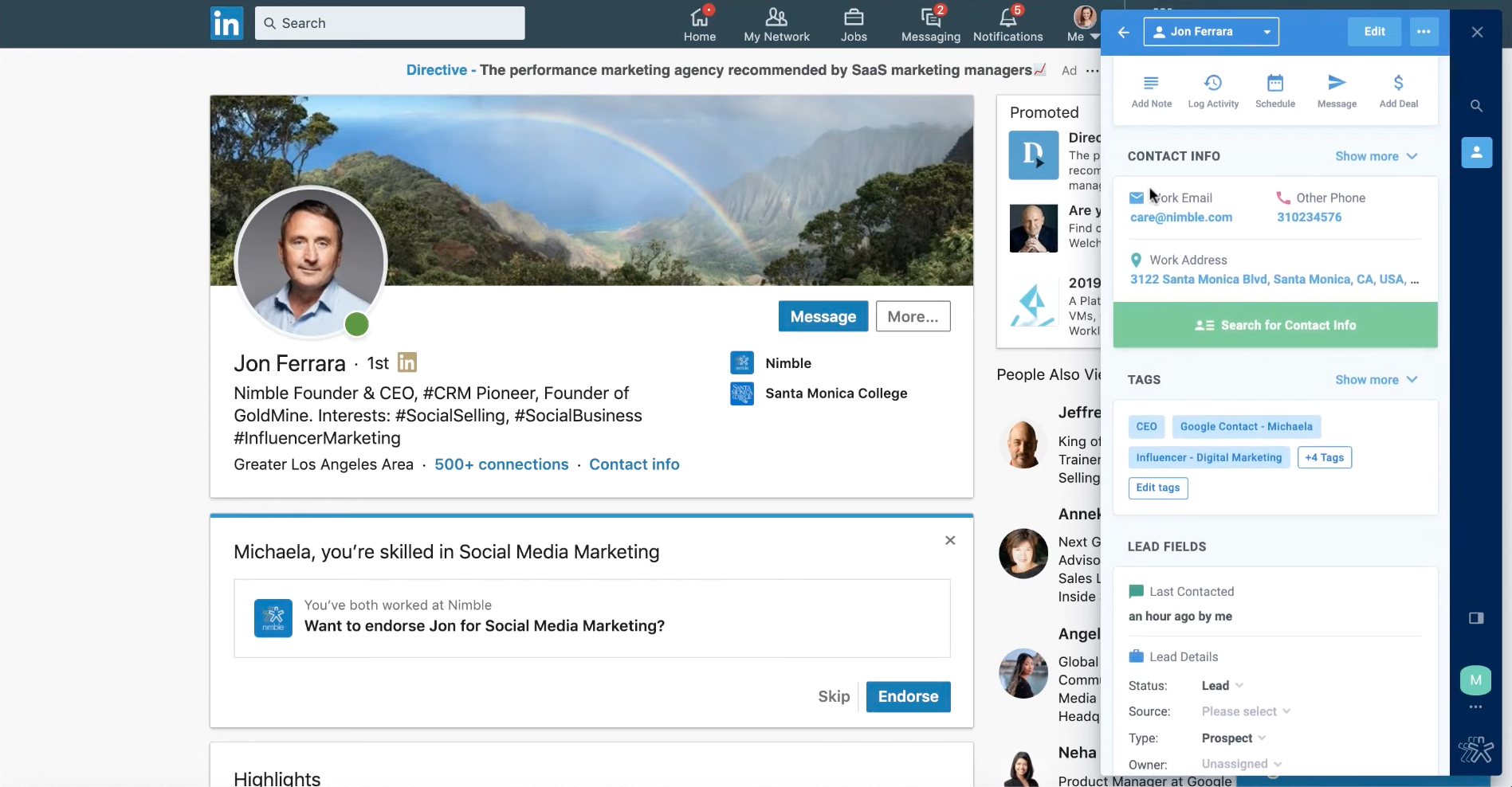
Image source: nimble.com
One of the primary attractions of Nimble is its ability to centralize customer information seamlessly. Users can access contact details, interaction history, and t all in one place. This streamlined approach enables teams to nurture leads and maintain relationships without jumping between multiple applications or platforms.
Key features of Nimble CRM
Nimble boasts several key features that enhance its value as :
- Relationship management: Nimble enables users to identify, build, and nurture valuable relationships. The platform centralizes customer information, allowing businesses to track interactions and preferences, making it easier to foster connections that drive growth.
- Inbox, mobile, : Nimble seamlessly integrates with your inbox and works across mobile platforms and social media channels such as Microsoft and Google. This ensures that users can manage communications and customer interactions in one unified space, streamlining workflows and enhancing productivity.
- AI email marketing: With the introduction of AI-driven capabilities, users can create impactful email campaigns directly within the CRM. This feature helps automate and optimize outreach, allowing businesses to engage their audience more effectively.
- Email sequences: Tailoring emails based on recipient actions is simplified with Nimble’s email sequences feature. Users can automate follow-ups and create personalized email flows to improve engagement and drive conversions.
- Sales, pipelines, & reporting: Nimble provides tools to , track deals, and boost overall engagement using comprehensive reporting features. Users can analyze, helping them make informed decisions based on real-time data.
- AI prospect marketing & outreach: This feature allows users to scale their outreach efforts efficiently. With options for email blasts or automated series, businesses can reach more prospects without sacrificing personalization.
- Web forms: Users can capture crucial information and follow up on valuable website leads through customizable web forms. This functionality helps convert website visitors into potential customers by gathering data directly from interested parties.
- : Nimble allows businesses to automate repeatable processes across teams, increasing efficiency and ensuring consistency in customer interactions. These workflows help streamline operations, freeing up time for teams to focus on strategic initiatives.
In summary, Nimble aims to provide a comprehensive suite of tools that facilitate effective. However, it's essential to weigh the features against potential drawbacks, especially regarding scalability and advanced functionality.
Pros
Nimble offers several advantages that make it an attractive option for small businesses:
- Cost-effective for small businesses: Given its competitive pricing model, Nimble positions itself as an accessible , allowing them to manage customer relationships without incurring excessive costs.
- User-friendly interface: The simplicity of Nimble's interface reduces the learning curve for new users. Teams can quickly get up to speed with minimal training, fostering immediate productivity.
- Strong customer support: Nimble's commitment to customer satisfaction is evident through its robust support resources. Users have access to tutorials, articles, and dedicated customer service to help with any issues that may arise.
Cons
While Nimble has many strengths, it's important to recognize its limitations:
- Limited scalability for growing businesses: As businesses grow, their CRM needs often evolve. Nimble may prove inadequate for larger enterprises requiring more advanced features, integrations, or customization options.
- Gaps in features compared to competitors: Although Nimble is robust for small business applications, it might lack some of the advanced functionalities offered by . Businesses with specific needs like in-depth analytics or advanced automation may find themselves looking elsewhere.
- Pricing structure may be restrictive: For businesses expecting to scale significantly, Nimble's pricing may become a concern, particularly if additional features necessitate higher costs or if teams need to upgrade frequently.
Experience Nimble alternative that saves more and limits less
Nimble CRM pricing plan in detail
Understanding Nimble's pricing structure is essential for potential users to evaluate its fit for their business needs. As of now, Nimble offers a single straightforward pricing plan which provides access to robust features typically aimed at small to medium-sized enterprises.
Nimble's pricing is designed to be transparent, allowing users to predict their monthly expenses without hidden fees. The subscription model is based on per user, making it easier for businesses to scale their teams without worrying about complex tiered pricing. As businesses grow and require more user licenses, they can simply add users based on their current needs.
Nimble only provides one plan (Business Plan), but charges differently when it comes to paying by month or by year.
Nimble CRM pricing per user per month (monthly billing): $29.9/per/month
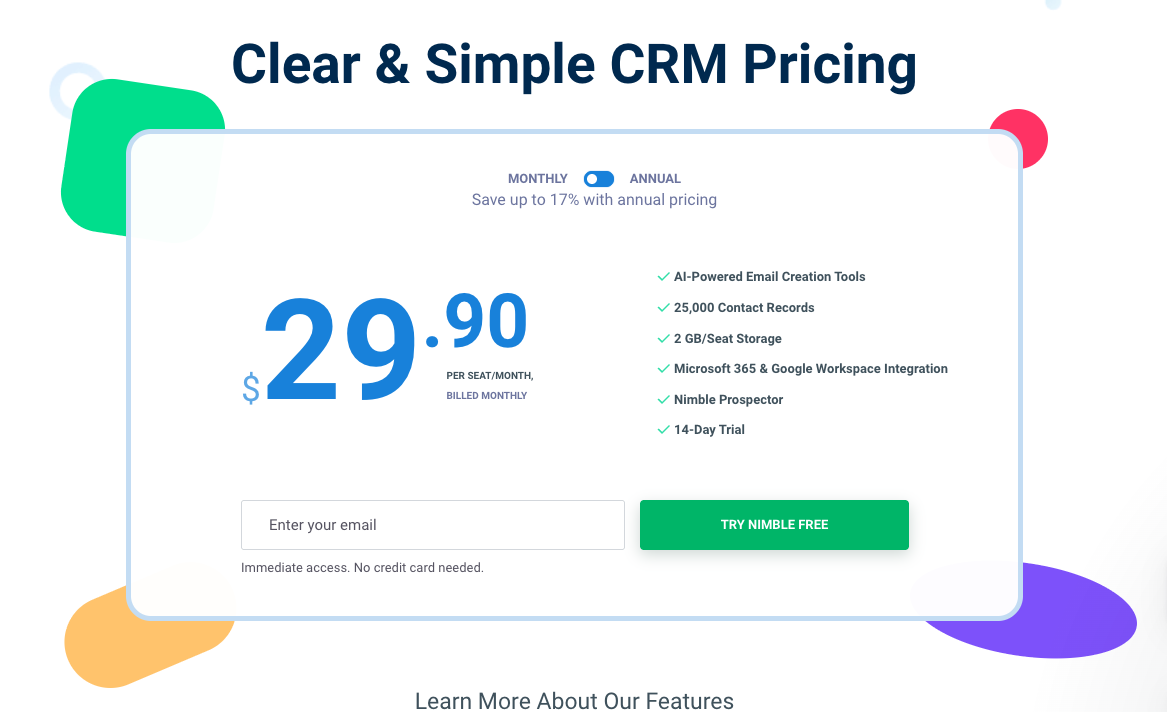
Image source: nimble.com
Nimble CRM pricing per user per month (yearly billing): $24.9/per/month
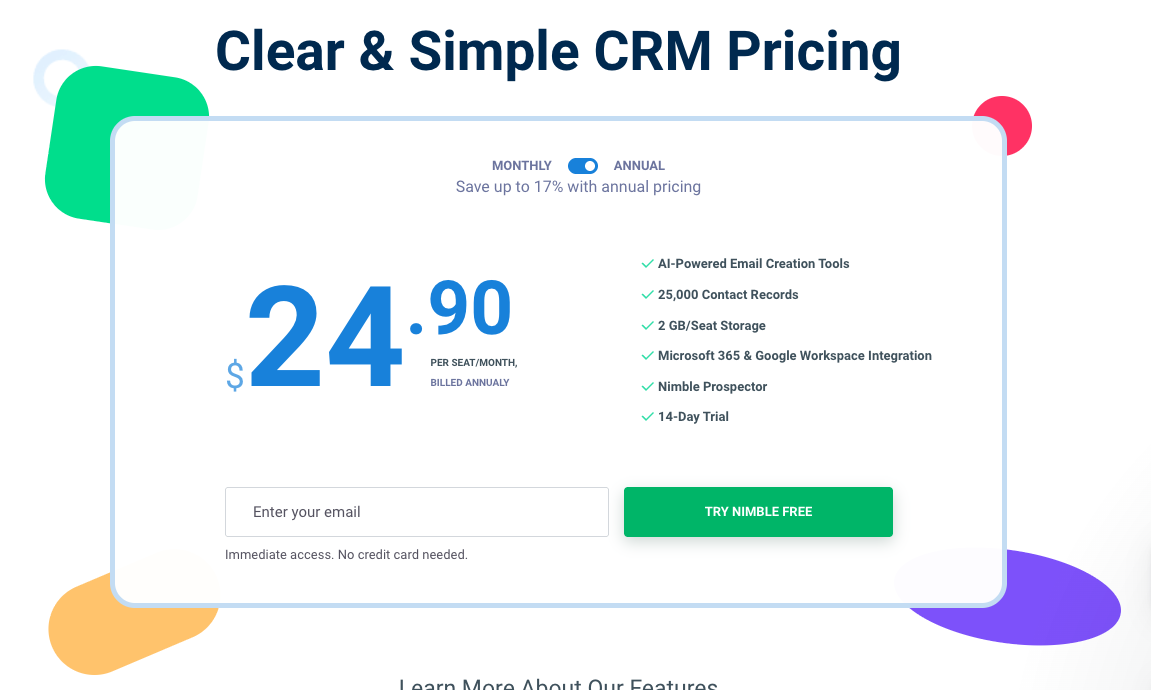
Image source: nimble.com
This Business Plan includes:
- A free trial for 14 days (no free forever plan)
- AI-powered email creation tools
- 25,000 contact records; 1,000 custom fields
- Nimble storage pricing: 2 GB/seat storage
- Microsoft 365 & Google Workspace Integration
- Nimble prospector (a tool that helps find contacts, enrich details, and create personalized emails with AI from LinkedIn or other platforms on the web: Chrom, Firefox, Safari, Egde available)
Add-ons and upgrades
In addition to the core plans, Nimble provides various add-ons and upgrades that users can opt for based on their specific needs. These may include advanced , additional storage options, and custom integrations with other platforms, thereby allowing businesses to tailor their CRM experience as they grow.
Add-ons for marketing & outreach:
- Web forms & lead capture: Web forms for $12/company/month
- Email marketing: $15/user/month
Group message billing details:
Nimble's Business plan provides 1,000 messages per license per month; For larger group message sends, users can apply upgrades that are either recurring or one-time bulk upgrades. Save money with recurring upgrades.
How to choose Nimble pricing plans
For those considering Nimble for the first time, it's highly recommended to take advantage of the 14-day free trial to thoroughly evaluate whether the platform meets the specific needs of your team and organization. Utilizing this trial period allows you to experience Nimble's features firsthand, including its , social media integration, and . Ideally, you should test the platform for at least one to two months to determine how well it integrates into your daily workflows and enhances your team's productivity.
If you find that Nimble aligns well with your business processes and enhances your customer relationship management, opting for the annual subscription can be advantageous. This yearly plan not only saves you money compared to a monthly subscription but also eliminates the hassle and time-consuming effort involved in switching to a new tool later on. Staying with a single proven platform simplifies your operations, allowing your team to focus on building customer relationships rather than constantly adapting to new systems.
What to choose when deciding on a CRM solution
Selecting the right CRM solution involves several considerations. Understanding these factors can help businesses make informed choices that align with their operational goals and . Below are key considerations to keep in mind when evaluating CRM options.
Key factors to consider
- Scale: Assess your current business size and future growth plans. Choose a CRM that can accommodate your growth and evolve alongside your . Nimble can be a great choice for smaller teams, but larger organizations may need to evaluate alternative solutions with greater scalability.
- Budget: and the ROI you expect from a CRM investment. Nimble's pricing is competitive, making it an attractive option for businesses that need excellent value without sacrificing functionality. Analyze the cost per user and potential for additional charges as your team expands.
- Feature requirements: Determine which features are essential for your business operations. Whether you prioritize email marketing, social media integration, or analytics capabilities, ensuring a CRM meets your core requirements is vital for successful implementation.
Importance of aligning CRM capabilities with business goals
Having a CRM that aligns with your business goals is critical. Identify your primary objectives—whether enhancing customer engagement, streamlining operations, or . A CRM that supports these goals will help drive productivity and efficiency within your teams.
How to choose the right CRM plan beyond Nimble
For businesses exploring CRM options with multiple tiered pricing plans, it's important to assess a few key factors before making a selection.
First, consider the specific features that your business requires at its current stage—this includes evaluating whether you need advanced capabilities such as automation, reporting, or .
Next, think about your growth projections. If you anticipate significant growth in the near future, choose a plan that offers scalability without overwhelming additional costs—look for options that allow you to upgrade seamlessly as your needs evolve. Take note of any long-term contracts or conditions associated with each plan, as flexibility can be crucial for adapting your CRM strategy over time.
Additionally, examine the customer support and resources that come with each pricing tier. Higher-tier plans often provide enhanced support options or additional functionalities that could prove valuable as you grow. By carefully against future capabilities, you can select the right CRM plan that positions your team for success, whether you go with Nimble's comprehensive single plan or explore other providers with multiple offerings.
Choose an all-in-one solution without budget consideration
Why Lark is a powerful, cost-effective alternative to Nimble
As businesses evaluate different customer relationship management solutions, it's crucial to explore alternatives that may better fit their unique needs. One notable contender is , an all-in-one platform that has gained popularity for its comprehensive suite of tools, competitive pricing, and scalability features. Lark is not just an alternative CRM; it's an all-in-one platform designed for modern work—combining collaboration features with , communication apps, and document storage.
When considering Lark as the alternative to Nimble, it's important to evaluate how each platform's features align with the needs of modern businesses. Here's a comprehensive breakdown of their key features:
Client data & content management
Lark provides robust contact management features, but in addition to traditional CRM functions, it combines with already built into the platform. allows users to create structured, visual dashboards, storing client information and other essential data efficiently; with custom settings can greatly streamline repetitive works and send notifications to team members, ensuring each order and client information is completed on time. 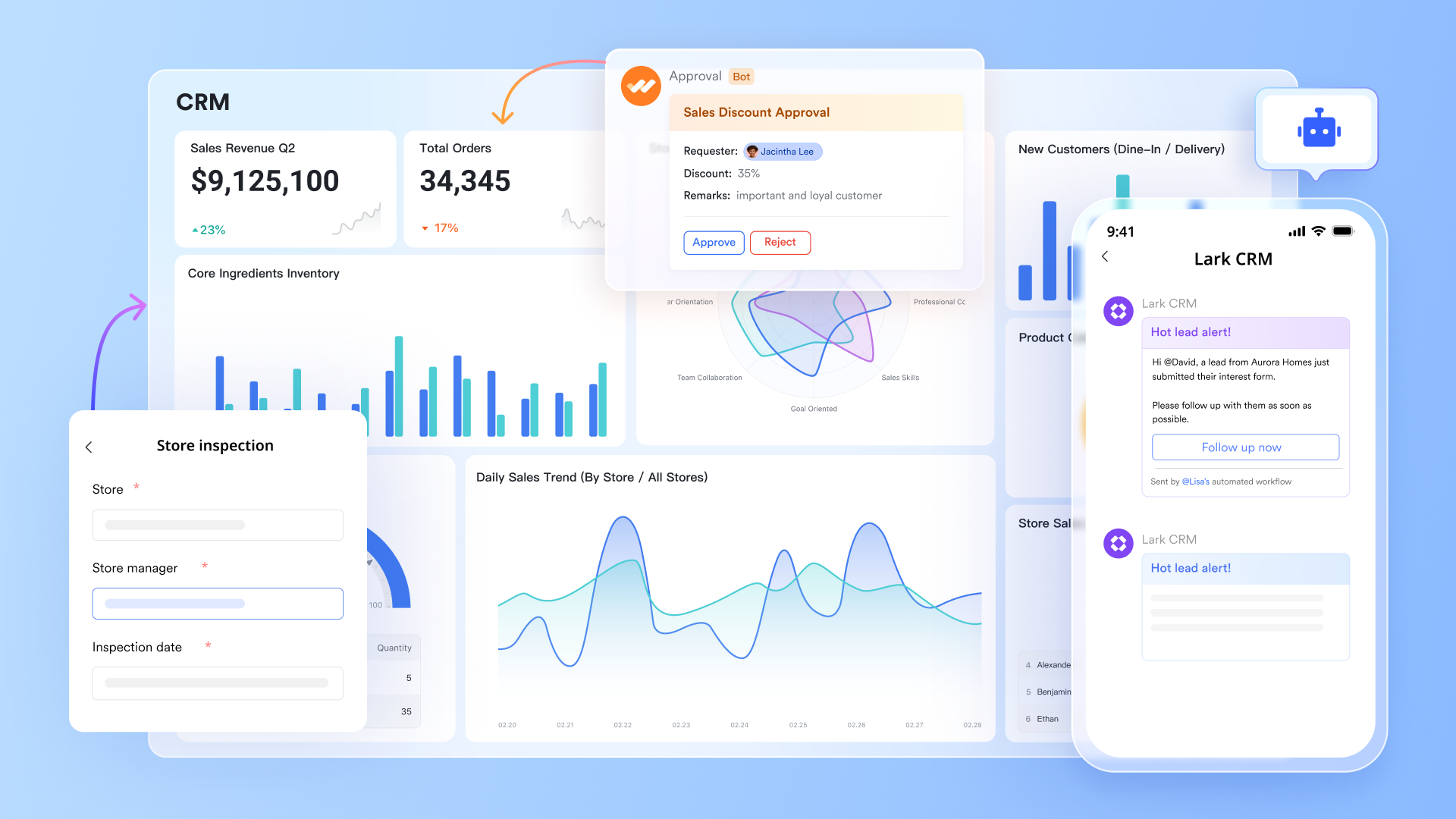
provides a collaborative space for , facilitating real-time editing and file sharing among team members. Additionally, serves as a centralized knowledge hub where teams can document , project processes, policies, and resources for easy access and management. The platform also supports real-time updates, @mention/comment, instant feedback, and track or restore history document version, allowing team members to see changes made to contact information immediately, ensuring everyone has access to the latest data. 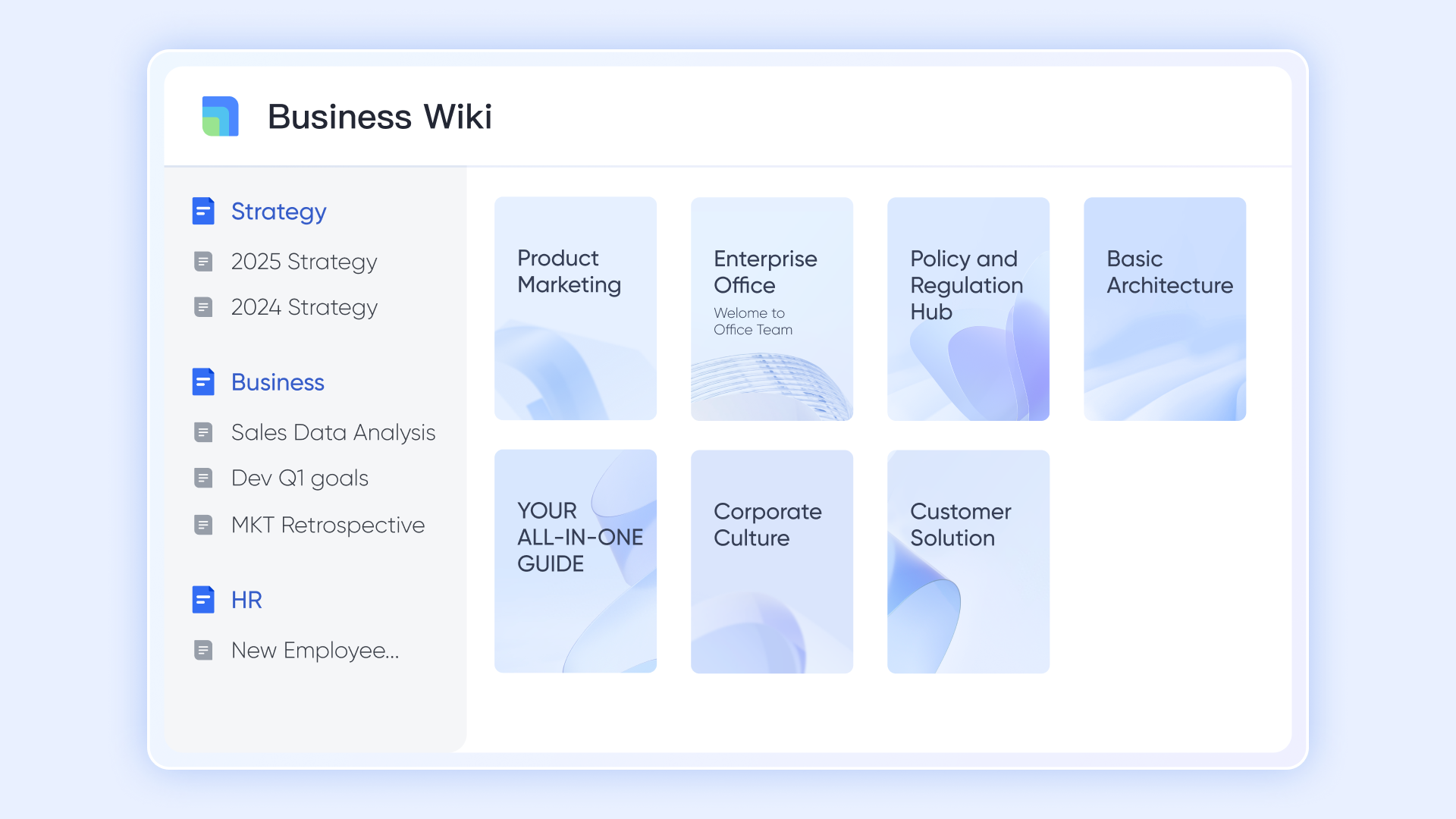
Why Lark is better than Nimble: Unlike Nimble, which primarily focuses on CRM functionalities, Lark combines comprehensive with collaborative features, enabling teams to maintain organized client information while promoting effective communication and productivity.
Collaboration and communication
Collaboration and communication are seamlessly integrated into Lark with tools like Lark Messenger, Lark Calendar, and Lark Docs. facilitates instant messaging and file sharing, fostering efficient discussions among team members. Team members can send Docs or Base files directly in chat, quoting history thread as context, and start video meetings in chat channels (1:1 or group ones) with . helps organize schedules by allowing users to create events and manage appointments collaboratively. 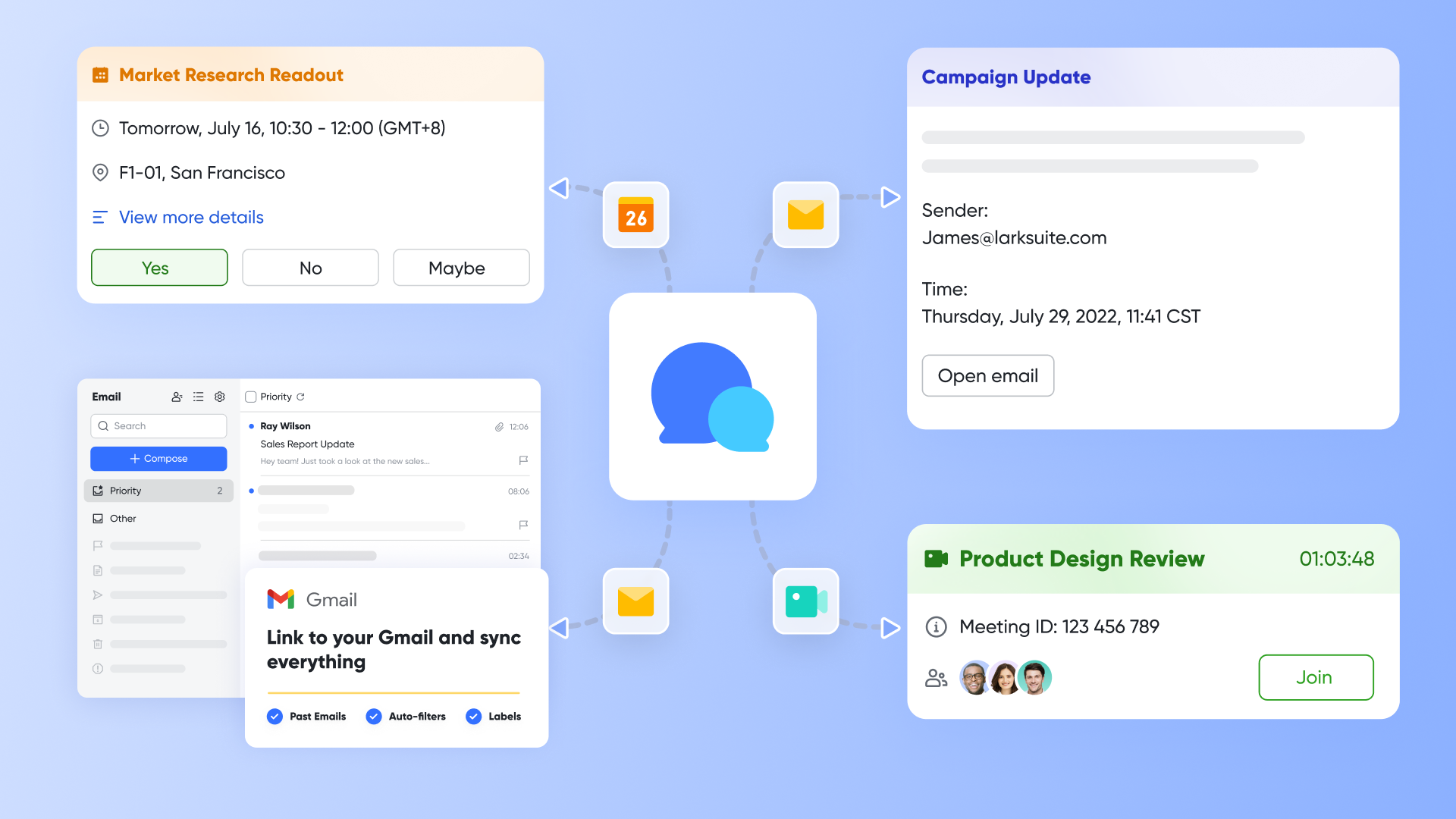
Why Lark is better than Nimble: While Nimble focuses on customer relationship management, Lark offers a comprehensive suite of tools that streamline communication and collaboration across teams in real-time, allowing for a more cohesive and productive work environment.
Analytics and reporting
and Lark Sheets provide essential analytics and . allows users to create spreadsheets for data analysis, supporting various functions and formulas to track performance metrics effectively. Similarly, Lark Base can generate reports based on structured data, such as , providing insights into client interactions and operational efficiency. This capability enables teams to make informed decisions based on real-time data.
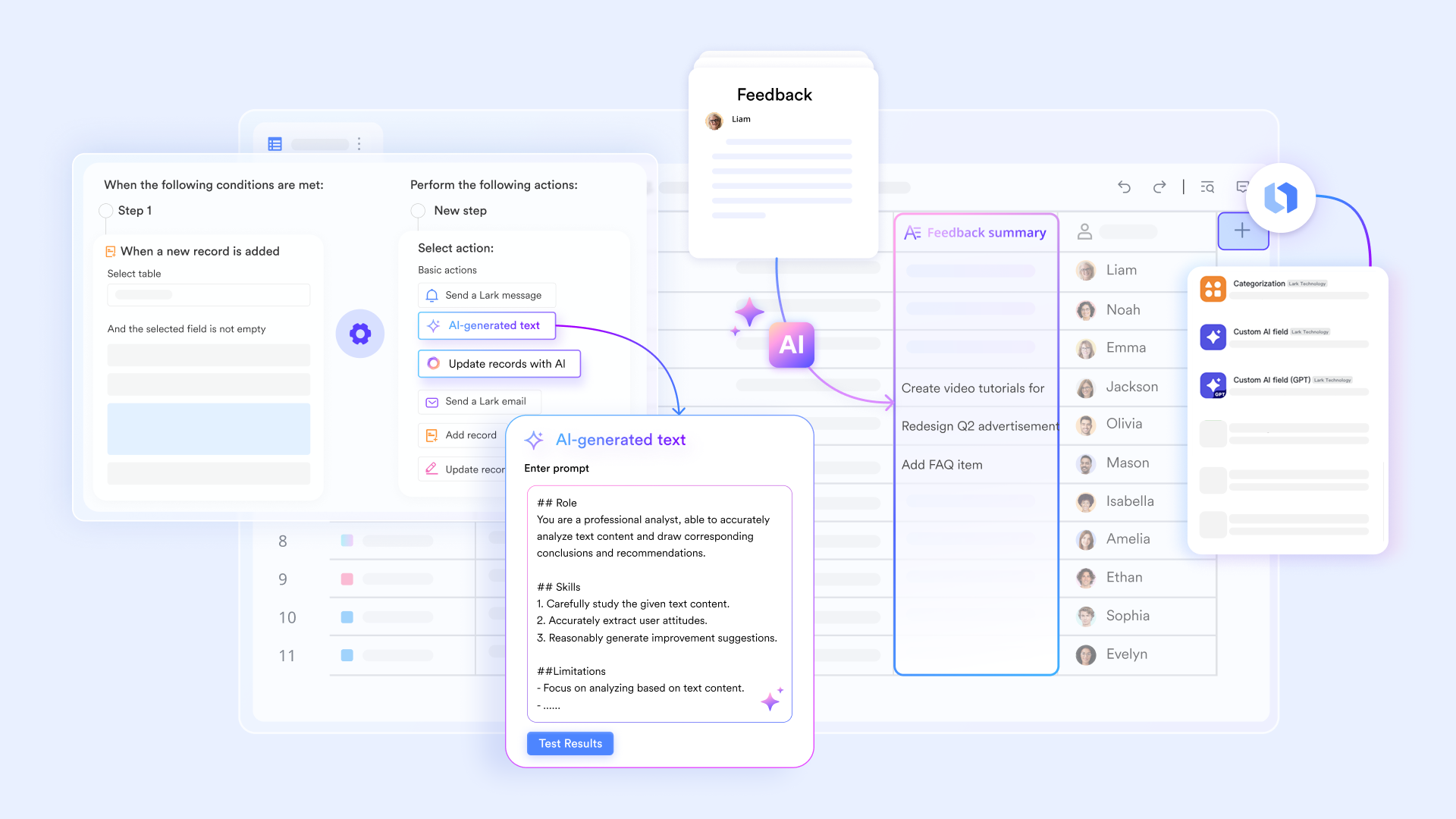
Why Lark is better than Nimble: In contrast to Nimble, which offers basic reporting features, Lark's built-in data management and analytical tools empower users to conduct deeper insights and analyses, enhancing their ability to respond to business needs dynamically.
Email integration functionality
serves as a dedicated email platform that collaborates seamlessly with the other tools in the Lark ecosystem. It allows users to manage emails efficiently and track engagement. Lark Mail simplifies external communication with clients and stakeholders, ensuring that important updates and marketing messages are delivered effectively. In addition, Lark Mail lets users link their third-party business email account, so users can access and manage all their emails through Lark. You can link business email accounts provided by Gmail, Microsoft 365, Zoho Mail, and more, which helps with email marketing.
Note: Users cannot connect personal email accounts such as gmail.com or outlook.com with Lark Mail.
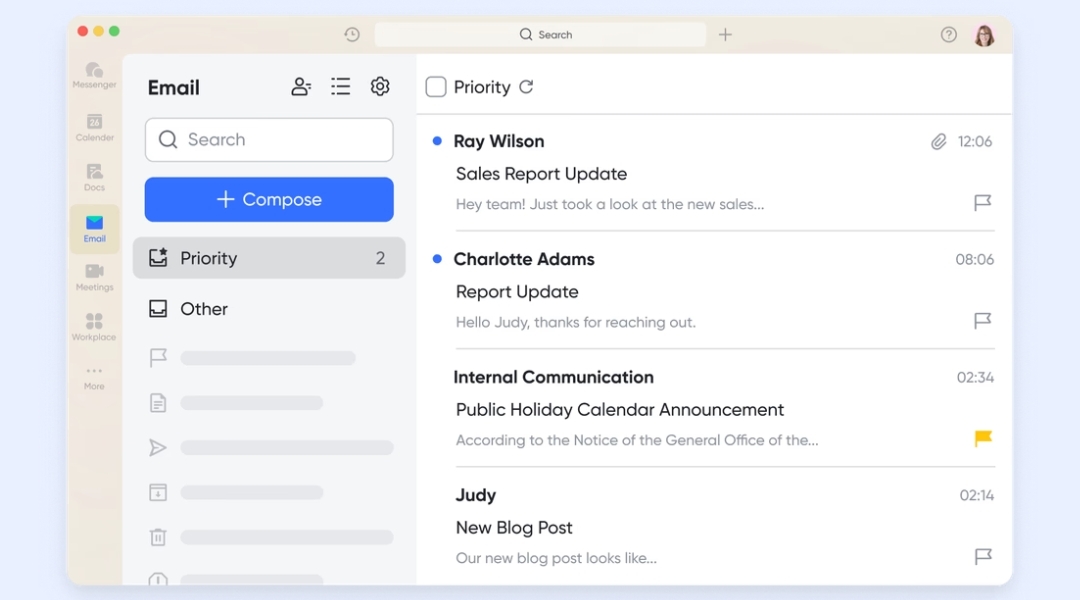
Why Lark is better than Nimble: Unlike Nimble, which incorporates email marketing within its CRM features, Lark Mail provides a dedicated email platform that enhances functionality and usability. This allows for better organization of marketing efforts, making it easier to maintain communication separate from tasks.
Lark & Nimble pricing comparison
Another critical aspect of evaluating alternatives is understanding their pricing models. Lark's pricing structure: Lark offers competitive pricing tiers designed for various business scales. Users can select a plan that fits their requirements, enabling cost-effective solutions without the burden of paying for unnecessary features. The multi-tiered structure not only caters to small businesses but also adapts to larger organizations that may require a more robust set of features.
Lark's :
- Starter plan: Free forever plan that includes 11 powerful tools for up to 20 users. It also comes with 100GB of storage, 1000 automation runs, AI translations, and more.
- Pro plan: $12/user/month (billed annually) for up to 500 users. It includes everything in Starter plus a group calling for up to 500 attendees, 15TB of storage, 50,000 automation runs, and more.
- Enterprise plan: for custom pricing. Supports unlimited users and includes even more automation runs and advanced security, compliance, and management features.
For small teams with simple communication needs

18 months message history
1000 Base automation runs/month
2000 rows per table in Base
Most POPULAR
For companies with comprehensive collaboration and management needs
Unlimited message history
500-participant video meetings
50k Base automation runs/month
20k rows per table in Base
For large companies with advanced security and organizational management needs
Get a personalized demo and pricing
Unlimited message history
500-participant video meetings
15 TB storage + 30 GB storage/user
500k Base automation runs/month
50k Base automation runs/month
Most POPULAR
For companies with comprehensive collaboration and management needs
Unlimited message history
500-participant video meetings
50k Base automation runs/month
20k rows per table in Base
: Switching to Lark's Pro plan can lead to significant cost savings. For example, a 100-employee company using Slack, Google Workspace, and Airtable could save approximately $25,200 annually by consolidating their tools with Lark.
Cost savings compared to Nimble: For teams looking to optimize their operational costs, Lark may present a more economical choice when considering the total cost of ownership. As Nimble's pricing structure (No free plan; $24.9/user/month, annual billing) can become constrictive as a business grows, Lark's flexible pricing (Free plan available; Paid plan starts at $12/user/month) might allow teams to avoid unexpected costs while maximizing feature access.
Strengths of Lark
In summary, Lark presents a powerful, cost-effective alternative to Nimble with its flexibility and collaborative emphasis. Some of its strengths include:
- Adaptability: Lark's features can adjust as businesses scale, ensuring users won't outgrow their platform.
- All-in-one workplace: The ability to bring multiple functionalities into a single platform reduces complications associated with managing several different tools.
- User experience: Its intuitive design further enhances the user experience, thereby fostering adoption among team members with varying levels of technical expertise.
Overall comparison
Future trends for CRM solutions
As CRM software continues to evolve, it's important to be aware of emerging trends that could impact your choice of which platform to adopt. Understanding these trends can equip businesses to future-proof their CRM decisions.
Insights on upcoming trends in CRM technology
- AI integration: Artificial intelligence transforms CRM capabilities, from predictive analytics to personalized customer interactions. CRMs that embrace AI-driven functionalities can help businesses gain insights and improve decision-making processes. Intelligent forecasting and can streamline tasks, enhancing productivity.
- Focus on customer experience (CX): Brands are increasingly prioritizing the customer experience in their strategies. CRMs that provide insights into customer interactions, preferences, and feedback trends will be invaluable in helping businesses cultivate stronger relationships and loyalty.
- Greater collaboration tools: With remote work becoming a staple for many organizations, the demand for collaborative features within CRM platforms is rising. Companies are looking for solutions that not only but also foster teamwork, project management, and unified communication.
- Mobile-first strategies: As employees and customers spend more time on mobile devices, CRM solutions that optimize for are becoming essential. Businesses will benefit from CRMs that allow users to access data and perform tasks efficiently, regardless of their location.
- Integrated ecosystems: There's a growing trend towards creating integrated ecosystems where CRM systems are not standalone but interconnected with other tools and services like , e-commerce platforms, and customer support systems. This ecosystem approach simplifies workflows and enhances overall efficiency.
How pricing strategies are evolving to meet customer needs
The trend of flexible pricing models is emerging within the CRM landscape. As businesses seek tailored solutions, platforms that offer customizable plans and transparent pricing structures have a distinct advantage. This shift allows companies to pick and choose features that best serve their operational requirements, thereby optimizing their budget and .
The shift toward integrated platforms and collaborative tools
Finally, the movement towards platforms continues to gain momentum. Businesses prefer CRMs that encompass broader functionalities, including data management, collaboration, and communication features in a single package. This trend reflects the desire for efficiency and simplicity in the increasingly complex digital workspace.
Experience a worry-free, all-in-one solution right now
Conclusion
Choosing the right CRM is a significant decision for any business. Nimble CRM pricing offers a viable solution for many small to medium-sized companies, delivering essential features at an accessible price point. However, as we've seen, there are compelling alternatives like Lark that may better accommodate the evolving needs of growing organizations. It's essential to consider not just the current features and pricing, but also future scalability, integration capabilities, and user experience when selecting a CRM. Understanding the strengths and weaknesses of each platform will ultimately empower businesses to make an informed decision that aligns with their operational goals and strategic vision.
With the CRM landscape continuously evolving, staying informed about the latest trends and options will position your business for success. Whether you choose Nimble or explore alternatives like , selecting the right CRM can significantly impact your efficiency and customer relationships. Invest time in evaluating your options to find the solution that best meets the needs of your team and customers alike.
FAQs
How much does Nimble streaming cost?
Nimble provides clear pricing details for its CRM plans, allowing businesses to know the investment required upfront. This transparency makes it easier for organizations to budget effectively, ensuring they can adequately prepare for the costs associated with using the platform. As businesses look to scale, understanding the pricing structure will help them make informed decisions regarding their CRM investment.
Is Nimble free?
While there is no fully free version of Nimble, it often offers free trials allowing users to test the platform before committing. This trial period is beneficial for small to medium-sized businesses that want to evaluate the software's features and functionality without upfront costs. It provides an opportunity to assess whether Nimble's tools align with their customer relationship management needs.
What is Nimble used for?
Nimble is primarily used for managing customer relationships, enabling businesses to track interactions, leads, and sales effectively. It serves as a hub for consolidating all customer communications and data, which is vital for businesses seeking to enhance engagement and drive sales. As a result, users can maintain a comprehensive understanding of their customers throughout the sales cycle, from initial contact to ongoing support.
Is the Nimble app legit?
Nimble has a solid reputation in the CRM market, and user reviews generally attest to its reliability and effectiveness. Many businesses have successfully integrated Nimble into their operations, citing improvements in their team's ability to manage customer relationships and track interactions. Its intuitive design and focus on user experience further contribute to its credibility among users.
What are the main features of Nimble CRM?
Key features include contact management, social media integration, email marketing tools, and robust analytics and reporting functions. These features allow businesses to streamline their customer engagement efforts and gain valuable insights into their marketing strategies. By utilizing these functionalities, organizations can enhance their operational efficiency and build stronger relationships with their customers.
Can Nimble integrate with other tools?
Yes, Nimble integrates with several third-party applications, enhancing its functionality and allowing for a more seamless work experience. This capability ensures that users can synchronize their data across multiple platforms, such as Google Workspace and Microsoft Office 365, making it easier to manage workflows regardless of tiers. Furthermore, for those exploring various , Nimble’s flexible integration options ensure that your CRM remains the central hub of your business, regardless of which productivity suite you choose.
Related reading
































