Delivering projects on time requires more than optimistic planning—it demands understanding where your schedule has flexibility. Slack time in project management represents the amount of delay a task can absorb without affecting the project's final delivery date. This guide covers what slack time is, how to calculate it, and how to apply it across different project types. Whether you're managing software development, construction, or marketing campaigns, understanding slack time project management principles will sharpen your ability to forecast accurately and communicate risks.
What is slack time in project management?
Slack time, also known as float time, is the amount of time a task can delay without pushing back the project's completion date or affecting dependent work. This concept is central to scheduling because it reflects reality: not every task is equally critical to the finish line. Slack time applies to individual and project activities, and breaking down the whole project into these components is essential for effective scheduling and accurate slack calculations.
A task with slack time can flex without cascading consequences. If a task is estimated at five days but has two days of slack, it can stretch to seven days without affecting downstream milestones. Slack time also helps manage and maintain the project timeline, ensuring that deadlines are met even when adjustments are needed.
Slack time exists because projects contain both and non-critical paths. The critical path is the longest sequence of dependent tasks that determines the project's minimum duration; tasks on it have zero slack. Slack time can also vary across different project phases, such as planning, execution, and testing, impacting how is managed throughout the project lifecycle.
But what does it really mean to understand slack time at the project task level, and why is it so crucial for effective project management? To support overall project completion time, it's important to use a work breakdown structure to identify all project activities and calculate project slack for each task. This structured approach ensures that every aspect of the project is accounted for and that the remains realistic and achievable.
What is the difference between slack, float, and buffer?
Slack time and float are closely related but not identical. Slack time describes the permissible delay for a task, while float is the broader concept encompassing two types: total float and free float. Total float (or total slack) is the amount a task can delay without affecting the project's finish date. Total project slack is a key metric for maintaining project timelines and effective . Free float is the amount a task can delay without affecting the start of any successor task. Free slack time is calculated by comparing a task's scheduled duration against the earliest start time of its immediate successor or the project deadline, and it represents the delay possible without impacting subsequent tasks.
Slack and buffer time are both added to project schedules to prevent delays, but they serve different roles: slack is the inherent flexibility in a schedule, while buffer time is strategically inserted based on to mitigate potential disruptions. Both are crucial for effective risk mitigation in project management.
Start calculating your slack time today with Lark
Types of slack time
Slack time in project management presents itself in several exciting forms, each providing valuable insights into the flexibility that exists within your . Getting familiar with these types empowers project managers to prioritize tasks confidently, manage resources smartly, and safeguard those all-important project deadlines.
- Free slack: Free slack represents the wonderful breathing room a particular task enjoys before it would delay any subsequent dependent tasks. This type of slack becomes your secret weapon when juggling multiple parallel tasks or orchestrating smooth handoffs between teams.
- Total slack: Total slack, often called total float, shows you the maximum time a task can stretch without touching your project's completion date. It considers your entire project landscape and all those interconnected dependencies, making it an invaluable compass for steering toward your overall deadline.
- Zero slack: Spotting zero slack tasks becomes your superpower for , as these represent the areas where your focused attention will prevent those dreaded missed deadlines.
Understanding the different types of slack time in your project plan opens doors to truly effective project management. The slack time formula—Slack Time = Latest Start Time (LST) - Earliest Start Time (EST), or Slack Time = Latest Finish Time (LFT) - Earliest Finish Time (EFT)—gives project managers a quick way to spot which tasks offer flexibility and which ones are absolutely critical to success.
By mastering free slack, total slack, and zero slack, project managers can craft more realistic project schedules, prioritize tasks with confidence, and significantly reduce the risk of project delays. This thoughtful approach to slack time in project management proves invaluable for hitting , whether you're leading a software development project, managing a construction initiative, or steering any complex endeavor with multiple moving pieces.
How to calculate slack time in project management
Slack time calculation rests on two passes through your task network: A forward pass to find the earliest dates, and a backward pass to find the latest allowable dates. Slack emerges from the difference between these two perspectives. Accurate slack time calculations are essential for schedule optimization, resource reallocation, and risk control in project management.
The core formula is straightforward: Slack Time = LST − EST (or equivalently, LFT − EFT). To apply this, follow these steps:
- Step 1: Perform a forward pass to calculate EST and EFT. Starting with the first task on day one, move through the network from start to finish. Use a network diagram to visualize project activities, task durations, and dependencies. EST is when a task can begin given its predecessors (preceding tasks); EFT is EST plus the task duration.
- Step 2: Perform a backward pass to calculate LST and LFT. Working backward from the project's end date, determine the latest task that can start and finish without delaying the project. This process is crucial for managing time. LST is the latest start time; LFT is LST plus task duration.
- Step 3: Calculate slack for each task using the formula. Subtract EST from LST (or EFT from LFT). If EST is day 5 and LST is day 8, slack is 3 days. That task can start anywhere between day 5 and day 8 without affecting the project's finish. Slack time can also be calculated using finish times with the formula Slack Time = Latest Finish Time (LFT) - Earliest Finish Time (EFT).
- Step 4: Identify critical paths and non-critical tasks. Use the critical path method and program evaluation techniques (such as PERT) to identify slack time and project slack time for each task. Tasks with zero slack are on the critical path; any delay to them postpones project completion.
In practice, maintain a lightweight template with columns for task name, duration, EST, EFT, LST, LFT, and calculated slack. Network diagrams and slack time calculations help project managers monitor project completion time and adjust schedules as needed.
Calculate your slack time with the time management tool
Slack time concepts and core calculations
Identifying critical path activities requires analyzing all the tasks in the project, as each must be considered to accurately determine the project's critical path and ensure no critical dependencies are overlooked. Here's how these concepts interact:
- The forward pass works left-to-right through dependencies. Task A takes five days and starts on day one; it finishes on day five. Task B depends on A and takes three days; it starts on day six and finishes on day eight. If there are parallel tasks that can happen simultaneously with Task A or Task B, these concurrent activities may have their own slack, and understanding which tasks can happen simultaneously is key to optimizing the schedule and resource allocation. This establishes the earliest possible project finish.
- The backward pass reverses this logic. If the project must finish on day thirty, and the final task takes three days, it must start no later than day twenty-eight. Working backward through dependencies, you assign the latest allowable dates to each task.
- Slack is the gap between EST and LST for each task. If a task's EST is day five and LST is day eight, slack is three days. That task can float within this window.
- The critical path is the sequence of tasks with zero slack—EST equals LST for every task on it. Any delay here delays the entire project, making these tasks the focus of risk management. Critical path activities are those with zero slack, and identifying them is essential for understanding the and managing the overall project timeline.
The key insight is that slack time isn't unlimited freedom—it's informed flexibility. For example, when managing all the presentations or deliverables in a project, understanding slack time helps accommodate unforeseen delays across multiple activities, ensuring that resource constraints or unexpected issues do not jeopardize the overall schedule.
How slack time benefits different project environments
Slack time plays a distinct role depending on the project context, and it also supports project execution by allowing for adjustments in resource management and helping project managers to ensure timely completion. In different industries, slack time works differently for the project team:
- In software development and IT projects, slack time absorbs sprint variability and dependency chains. Tasks like code reviews, testing, and integration often run longer than estimated, yet teams must protect release windows. This flexibility is especially valuable in environments where external dependencies—third-party APIs, client feedback, compliance reviews—are common.
- For construction and engineering projects, slack time serves a different purpose. Lead times for materials, weather delays, and permit approvals create natural uncertainties. Slack time built into the schedule reflects these realities.
- In marketing and product launches, slack time helps coordinate cross-functional handoffs and align campaign timing. Design, copywriting, approvals, and media placement must chain together, often with external dependencies like vendor turnaround times.
- For cross-functional and multi-team programs, slack time enables coordination at scale. When team A's deliverable feeds into team B's work, slack time prevents one team's delay from immediately derailing another.
Slack time not only helps manage project schedules but also reduces stress levels among team members by providing a sense of security regarding deadlines. By offering a buffer for unexpected delays, slack time can reduce team stress and improve morale, ensuring a more motivated and balanced work environment.
Designing a practical slack time strategy
A slack time strategy transforms the concept from theory into operational practice. The strategy defines how your team will identify, track, and use the slack strategy within your scheduling process. Begin by establishing clear definitions and measurement standards:
- Define which type of float matters most for your context. Align your team on one clear approach to avoid confusion during plan reviews.
- Choose a calculation method and tool. The method should be simple enough that the core team can update it regularly without friction.
- Set buffer guidelines. Decide how much slack you want to maintain at the project level versus at individual task levels. Some teams aim to preserve a percentage of total project duration as contingency at the end; others distribute slack across tasks based on risk.
Once definitions are set, integrate slack time into your planning rituals. At , calculate initial slack and identify the critical path. Project managers manage slack time to address project constraints and optimize schedules, ensuring that dependencies and earliest start times are considered. At project close, review how well slack estimates held up, using insights to improve plans.
Common pitfalls and how to avoid them
Understanding where slack time planning often goes wrong helps you navigate the approach more successfully.
- The most common pitfall is confusing total float with free float, leading to overconfident planning. A task might appear safe because it has positive total float, but if it has no free float, using that slack affects downstream work. To avoid this, be precise in your definitions and communicate clearly which type of slack you're discussing in reviews.
- Another frequent error is over-buffering at the task level without discipline around usage. When every task includes a “safety buffer,” the cumulative effect is schedules that feel padded and teams that slow down to fill the time. The solution is intentional buffer allocation: Add slack where uncertainty is genuine—high-risk tasks, external dependencies, first-time activities—and keep other tasks lean.
- Resource constraints often invalidate calculated slack. A task might have positive slack mathematically, but if the resource needed to execute it is unavailable, slack disappears in practice. When planning slack time, always consider project activities, their dependencies, and how resource availability can impact the actual slack for each activity.
- Continuous unvalidated schedule changes erode slack and destabilize the plan. Each change consumes some float, yet teams often adjust plans without checking the cumulative impact. Implement disciplined change control: When changes occur, recalculate slack and surface trends for stakeholders. This transparency prevents nasty surprises and maintains credibility around forecasts.
Build a time management strategy that works with Lark
Practical slack time management workflows with Lark
Implementing slack time project management across the requires disciplined workflows that move from planning through execution and into controlled change management. Traditional tools scatter schedules across spreadsheets, email, and separate platforms—creating drift and outdated forecasts.
Lark unifies entire slack time workflow in one place. Lark Base auto-calculates EST, EFT, LST, LFT, and float using live formulas; as tasks update in Lark Tasks, your schedule recalculates instantly with no manual work. Lark Docs attach rationale to numbers, and Lark Messenger links alerts directly to data. Change control approvals route through workflows, decisions log automatically, and dashboards pull current metrics in real-time. Result: a single source of truth where planning, execution, and reporting stay aligned—eliminating silos and enabling teams to protect timelines with confidence.
With Lark, project managers can easily track slack time for team and individual tasks and communicate updates to the team, ensuring everyone is aware of available buffers and any changes to the schedule.
Planning phase
During the planning phase, you establish the foundation for slack time allocation by mapping task dependencies, estimating durations, and identifying the critical path. A key step is using a work breakdown structure to identify all the tasks involved in the project and create highly detailed estimates for their durations and dependencies. The goal is to determine which tasks have flexibility and which are locked into the sequence that drives the project's finish date.
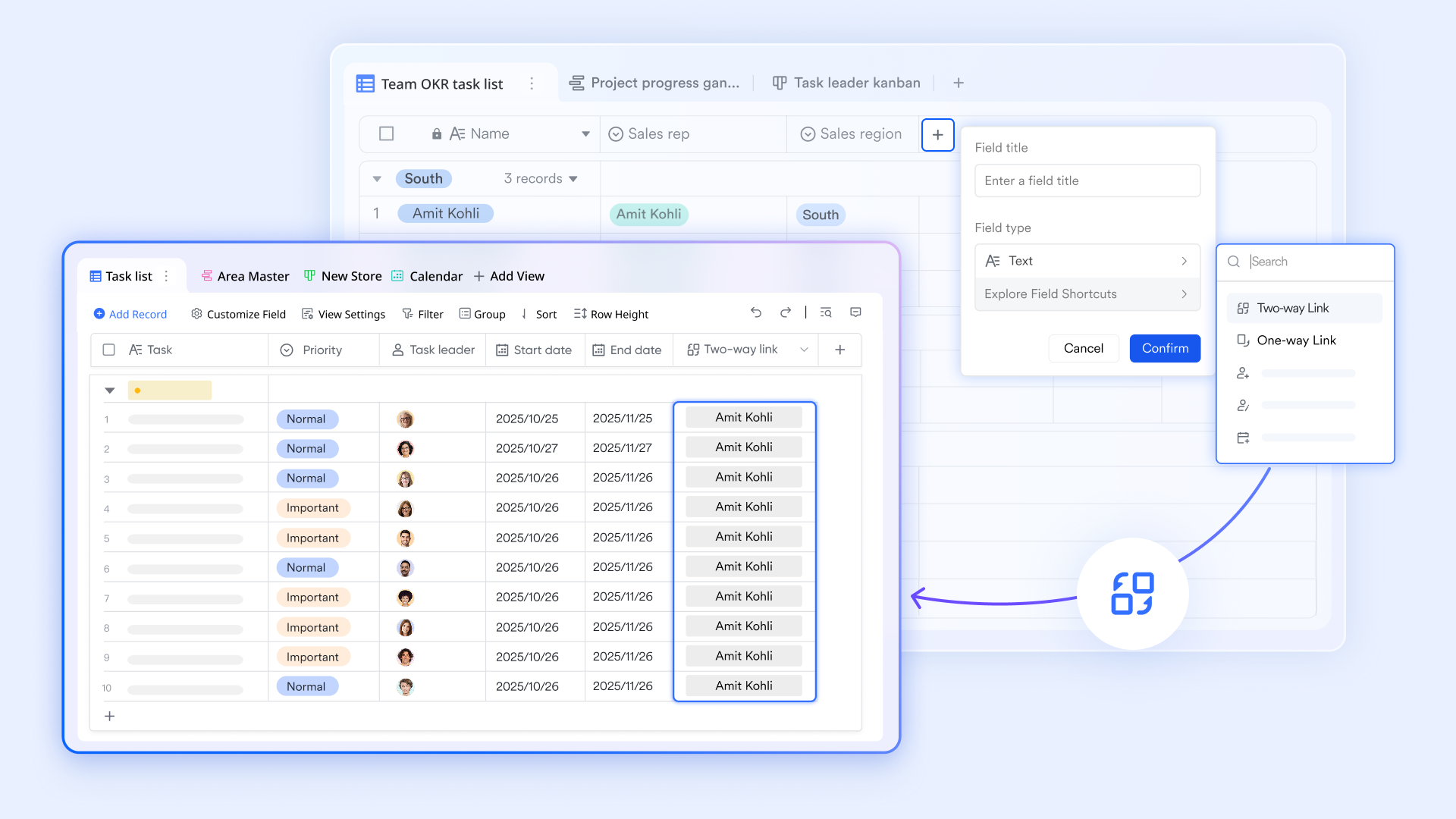
Begin by documenting all tasks, their dependencies, and estimated durations in a central location. provides a structured table view where you can record EST, EFT, LST, LFT, TF, and FF columns alongside task names and durations. This single repository becomes your source of truth, preventing teams from maintaining separate spreadsheets or documents that drift out of sync. Once dependencies are mapped in Lark Base, you can use formulas to auto-calculate EST and EFT for the forward pass, then LST and LFT for the backward pass. Lark's formula capabilities streamline this calculation, reducing manual work and the risk of arithmetic errors.
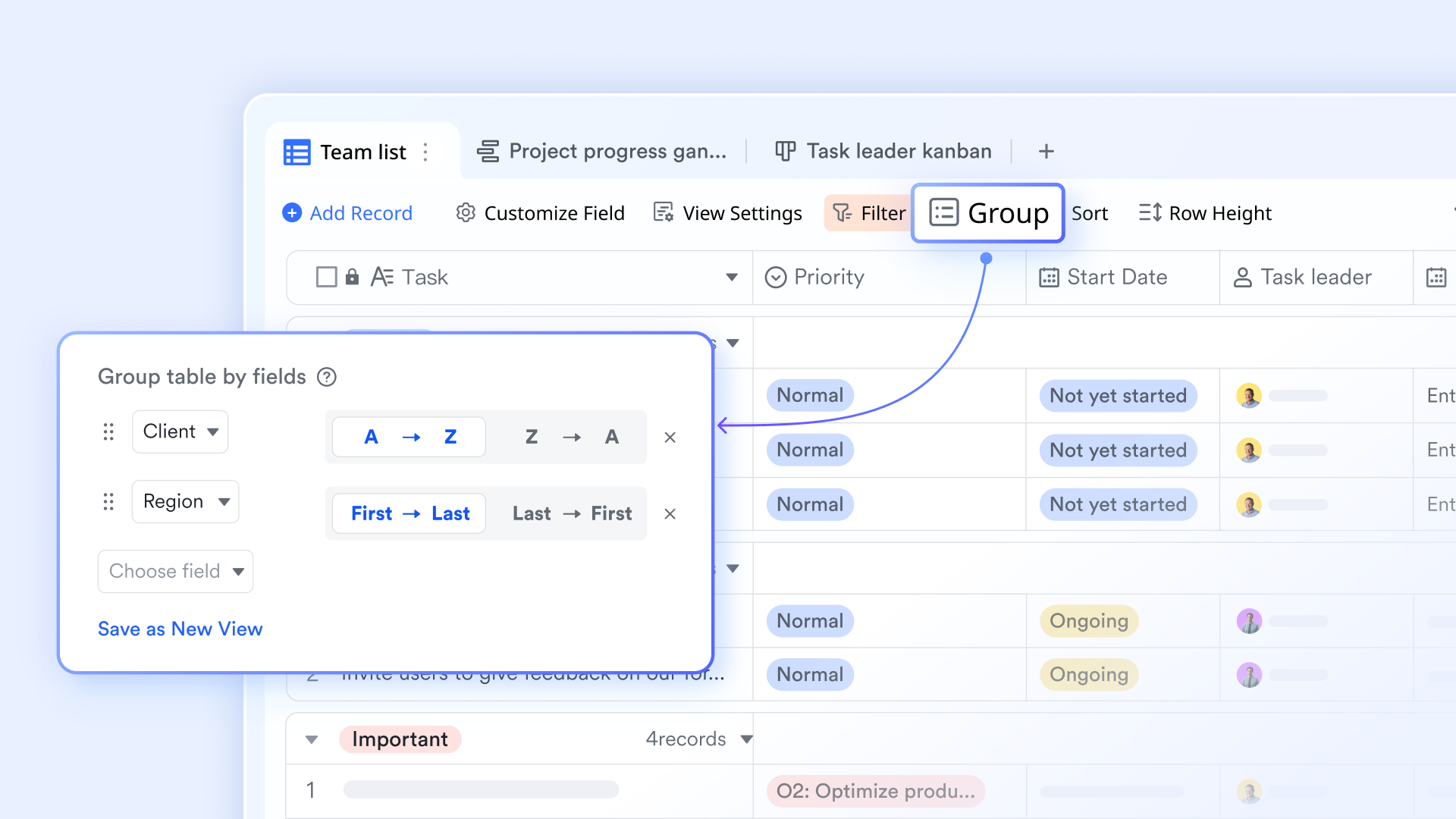
As slack emerges from these calculations, highlight tasks with zero slack—these form your critical path and anchor the plan. Lark's conditional formatting and filtering features help you instantly see which tasks are critical and which carry positive slack. Communicate this critical path to the team via a or linked view, ensuring everyone understands what cannot slip. This shared visibility sets expectations early and helps teams allocate focus where it matters most.
Execution phase
During execution, your team faces the real-world complexities: tasks take longer than planned, resources become unavailable, and external dependencies shift. Monitoring float changes in real-time allows you to spot problems early rather than discover them at the last moment.
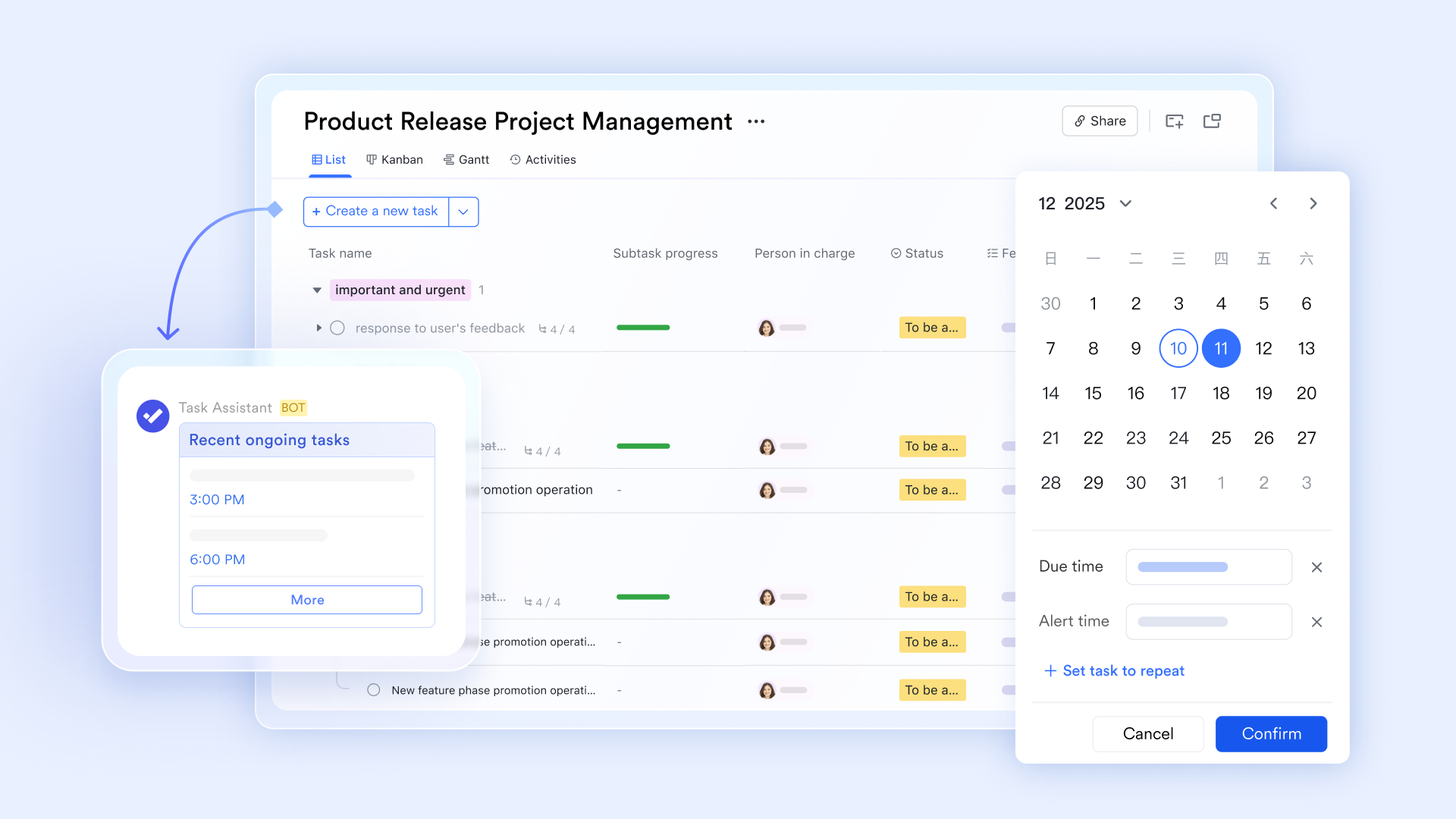
Assign ownership of key tasks within Lark Tasks, where team members can log progress, flag blockers, and update estimated completion dates. The project team can use real-time data to optimize resource allocation and achieve better resource allocation during execution, ensuring that resources are directed to critical tasks as needed. Lark's means multiple team members can view the same data simultaneously, reducing delays in status collection. Change control
Scope changes, risk events, and unexpected delays all consume slack. Managing these changes in a controlled way protects plan integrity and keeps stakeholders aligned on impact.
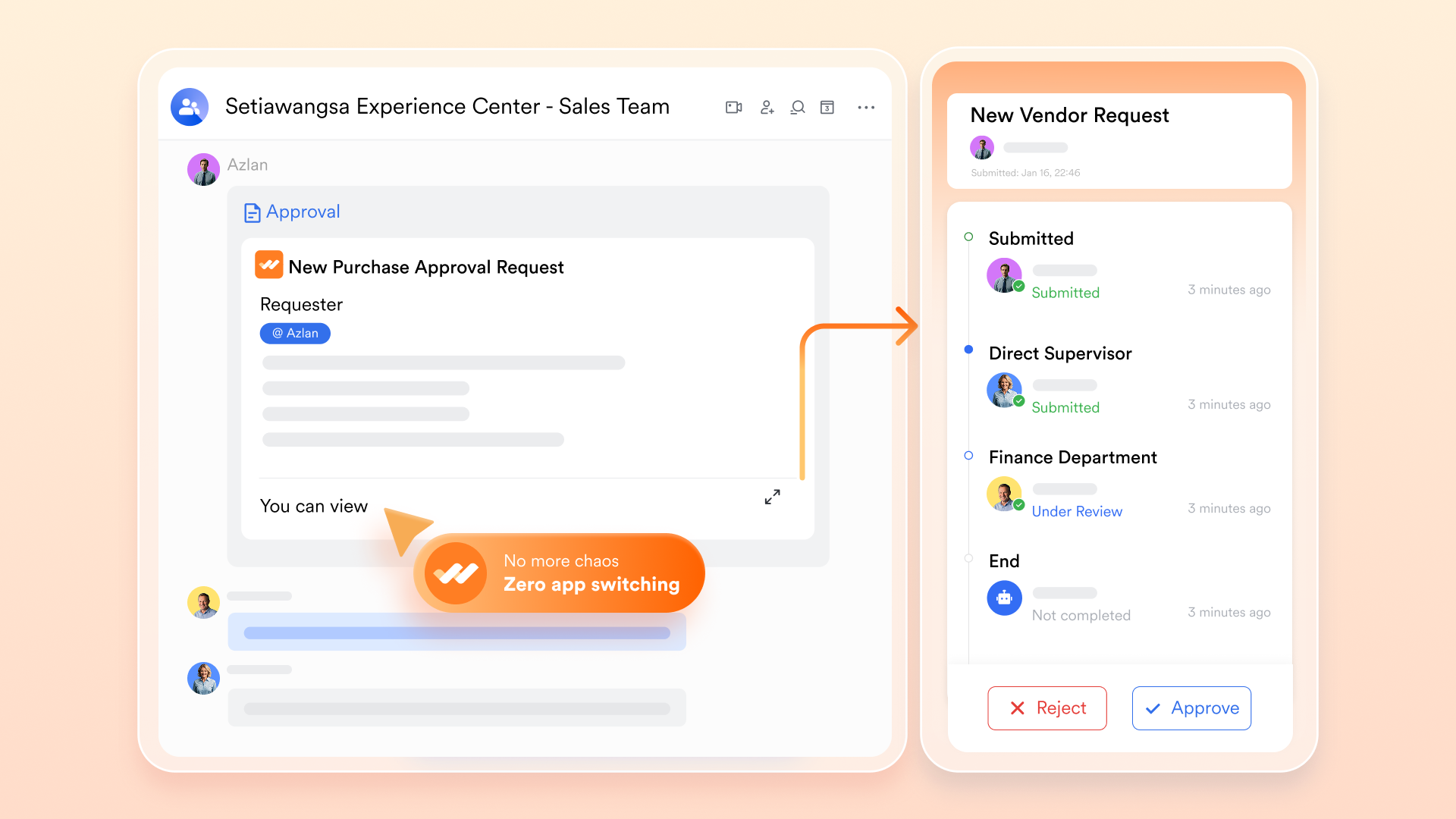
Use Lark's customizable, automated approval workflow via to route changes through the right decision-makers. Once approved, update the schedule immediately in Lark Base so the team operates from a single, current plan. This controlled rhythm prevents silent changes that erode trust in the schedule. Document the rationale for each change in a linked Lark Docs, creating a trail that explains how the plan evolved—valuable for post-project reviews and for justifying forecast adjustments to stakeholders.
Reporting
Stakeholders need clarity on the schedule, health, and what actions are required to stay on track. Reporting translates slack time project management insights into language and visuals that drive decisions.

Create a Slack Time Summary dashboard in . This summary should highlight: Total slack remaining in the project, which tasks are critical, which tasks are consuming slack fastest, and any near-term risks. The dashboard should also report on project completion time, identify critical path tasks that have no slack time and must be completed on schedule, and track total project slack to help manage resource allocation and maintain timelines. Use Lark's built-in charts or embed simple visuals—a text-based summary of remaining buffer, a list of at-risk tasks, or a timeline view showing which are protected versus exposed.

Present this dashboard in weekly or milestone reviews. can host these reviews, with screen-sharing to walk through the dashboard in real-time. Lark Docs or pinned messages in ensure that decisions and action items are logged and accessible to the full team, not lost in meeting notes.
By using Lark to centralize templates, automate calculations, manage approvals, and document decisions, you transform slack time from a planning concept into an operational discipline that protects schedules and builds team confidence in forecasts.
for Lark:
- Starter plan: that includes 11 powerful tools for up to 20 users. It also comes with 100GB of storage space, 1000 automation runs, AI translations, and more. No credit card needed.
- (Optional)Basic plan: (billed annually) for up to 500 users. It includes everything in Starter and unlimited message history, 5TB of storage space, 1,000 automation runs, and more. Some users may need to to purchase this plan.
- Pro plan: (billed annually) for up to 500 users. It includes everything in Basic plus group calling for up to 500 attendees, 15TB of storage space, 50,000 automation runs, and more.
- Enterprise plan: for custom pricing. Supports unlimited users and includes even more automation runs and advanced security, compliance, and management features.
For small teams with simple communication needs

18 months message history
1000 Base automation runs/month
2000 rows per table in Base
Most POPULAR
For companies with comprehensive collaboration and management needs
Unlimited message history
500-participant video meetings
50k Base automation runs/month
20k rows per table in Base
For large companies with advanced security and organizational management needs
Get a personalized demo and pricing
Unlimited message history
500-participant video meetings
15 TB storage + 30 GB storage/user
500k Base automation runs/month
50k Base automation runs/month
Most POPULAR
For companies with comprehensive collaboration and management needs
Unlimited message history
500-participant video meetings
50k Base automation runs/month
20k rows per table in Base
Conclusion
Slack time is one of the most practical and underutilized concepts in project management. Understanding how much delay your tasks can absorb—and where that flexibility sits—transforms scheduling from a static plan into a dynamic tool for managing change and protecting critical milestones. By mastering slack time calculation, distinguishing between total float and free float, and building disciplined workflows around buffer management, you position your team to stay on track even when reality deviates from the plan. Platforms like simplify this by centralizing templates, automating calculations, and enabling seamless collaboration across planning, execution, and reporting phases. Whether you're managing software development, construction, or cross-functional campaigns, the principles remain the same.
FAQs
What is slack time in a PERT chart?
In PERT charts, slack time represents the delay a task can absorb without affecting the project's finish date. PERT incorporates three time estimates—optimistic, most likely, and pessimistic—to calculate expected duration and identify uncertainty. Slack is calculated the same way as in traditional schedules: LST minus EST. Tasks with zero slack form the critical path; those with positive slack offer flexibility.
What are some examples of slack time?
A software development feature estimated at five days with two days of slack can stretch to seven days without delaying code review. In marketing, a three-day design phase with one day of slack absorbs revision rounds without pushing back copywriting. In construction, a material delivery scheduled for one day but needed four days later carries three days of slack. Each example shows how slack absorbs real-world delays—unexpected complexities, resource gaps, or external dependencies—without cascading impact.
What is slack time in agile?
Agile uses slack differently than traditional projects. Within sprints, non-critical tasks (documentation, low-priority bugs) may have float without blocking the sprint goal. Across quarters, slack appears as buffer capacity or unallocated sprint time to handle integration, testing, or unexpected work. Some teams build "buffer sprints" to absorb risk without pushing major releases. Slack is managed through capacity planning and velocity rather than critical path analysis.
How much slack time should I allocate?
Allocation depends on uncertainty and complexity. Routine work might need a 5–10% buffer; complex projects with external dependencies may need 15–25% or more. Focus slack on high-risk tasks, external dependencies, and first-time activities rather than applying a uniform percentage. Monitor early phases to validate assumptions and adjust allocations for remaining work.
What's the difference between slack time and contingency reserve?
Slack time is the flexibility inherent in the schedule because tasks sit on non-critical paths. It's task-specific and mathematically determined. Contingency reserve is time explicitly set aside at the project level for unforeseen risks. Both matter: slack absorbs routine variability; contingency protects against genuinely unexpected events. Using all slack assumes risks won't emerge, but contingency safeguards overall timelines.
Related reading






























