














Smartsheet vs Monday: Which Project Management Platform Is Better?

Ryan Tanner
Product Marketing Specialist
Sep 18, 2026
Ryan Tanner
Sep 18, 2026

31 min read


Choosing the right project management platform is more challenging than ever. Teams want speed, visibility, real-time communication, automation, and the ability to manage projects across multiple functions without juggling ten different apps. Among the most popular tools in the market, Smartsheet vs Monday is often the comparison teams evaluate first because both platforms offer versatility, strong user adoption, and flexible workflows.
But while both tools help teams organize tasks and track progress, they serve slightly different work styles—and each comes with strengths and limitations that can affect long-term scalability. In this in-depth comparison of Smartsheet vs Monday, we'll break down everything you need to know: features, dashboards, automation, collaboration, pricing, ideal use cases, and where both solutions fall short.

Smartsheet vs Monday: Quick comparison snapshot
Smartsheet overview: Strengths, limitations, and ideal use cases
Smartsheet is a widely used work execution platform built around a spreadsheet-like interface that supports detailed planning and operational workflows. It appeals to teams transitioning from Excel because it blends familiarity with project tracking, automation, and customizable dashboards. The tool is often evaluated in comparisons such as monday.com vs Smartsheet, where its data-centric structure stands out. With capabilities for cross-functional reporting and process management, Smartsheet is well-suited for organizations that need depth and structure. However, as configurations become more complex, managing sheets and permissions requires more administrative oversight. Here's a complete breakdown of its strengths, limitations, and best-fit scenarios.
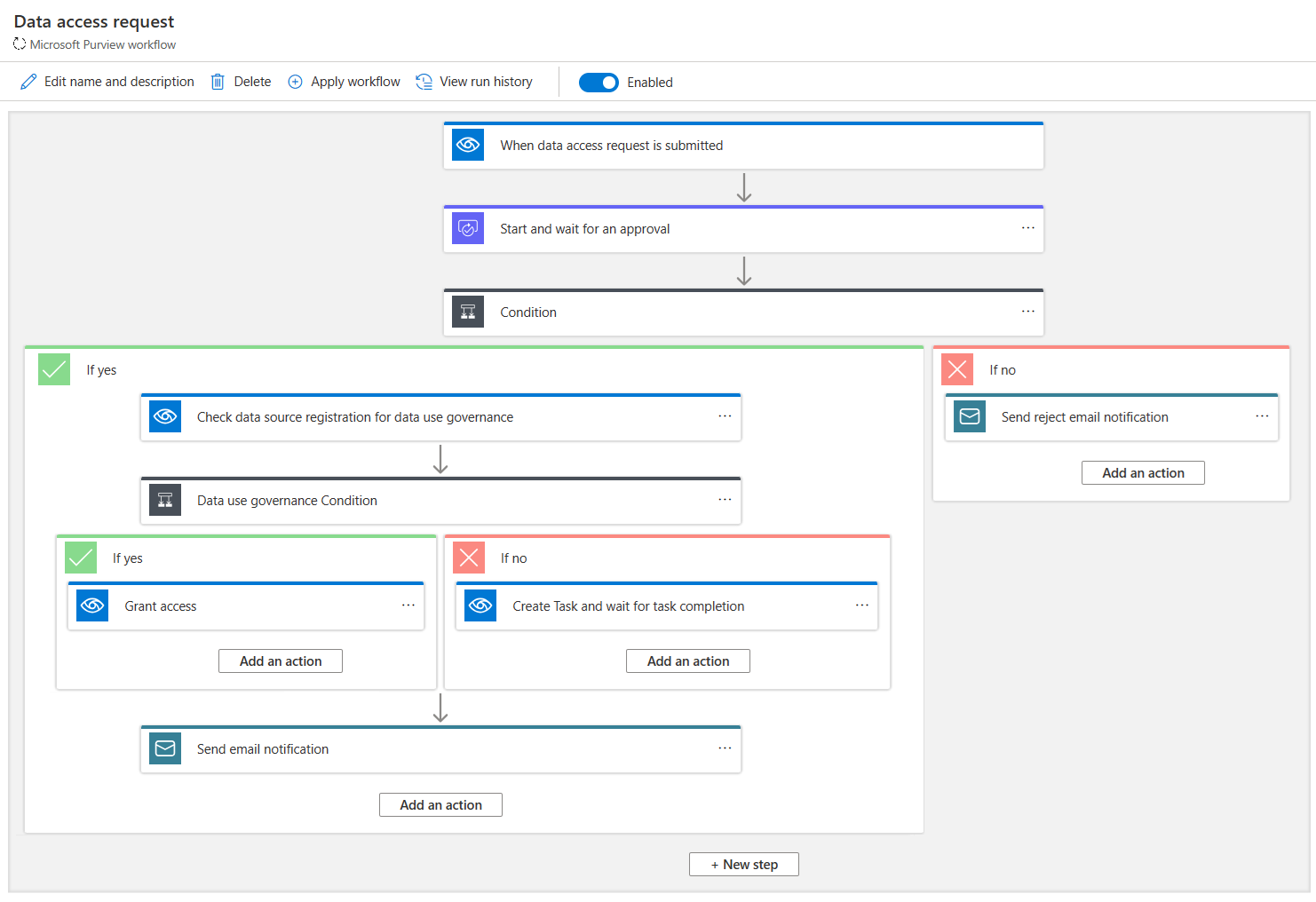
Image source: smartsheet.com
Strengths
- Spreadsheet-like interface that supports complex workflows: Smartsheet's grid layout makes it easy for teams familiar with spreadsheets to build detailed work plans. It supports formulas, conditional formatting, hierarchies, and multiple views, enabling strong process mapping. This format works well for operations and PMOs that handle data-intensive workflows. Teams migrating from Excel-based project trackers adopt it with minimal friction. Its structured approach also adds clarity for cross-departmental reporting.
- Powerful automation rules for approvals and task routing: The platform includes flexible automation features like alerts, reminders, approval flows, and status updates. These rules help reduce manual intervention and keep complex processes moving smoothly. Multi-step workflows can be built without coding, supporting compliance-led functions and operational teams. Automation also ensures timelines stay on track when projects involve many stakeholders. It's a substantial advantage for process-driven environments.
- Advanced reporting and customizable dashboards: Smartsheet lets users consolidate multiple sheets into dynamic reports and visual dashboards. These help teams monitor KPIs, resource allocation, milestones, and risks in real time. Executives benefit from high-level summaries, while project teams get detailed visibility. Automated report delivery ensures stakeholders stay informed. For organizations comparing Smartsheet, Asana, and Monday, this level of reporting is a major differentiator.
Limitations
- Can become complex and challenging to maintain at scale: As teams add more sheets, formulas, and dependencies, Smartsheet can feel heavy and difficult to manage. Maintaining consistency across sheets requires administrative oversight. Users sometimes struggle with clutter or disconnected structures when managing large deployments. This makes it less appealing for teams that want a simpler, more intuitive platform.
- Collaboration is fragmented across multiple sheets: Because discussions and updates live within individual sheets, context switching becomes frequent. Team members may need to open several sheets to track comments or historical activity. This affects real-time collaboration and slows fast-moving work. Work conversations often shift off the platform, disrupting workflow continuity and updates.
Ideal use cases
- Operations teams handling data-heavy or formula-driven workflows: Smartsheet works exceptionally well for operations teams that depend on structured data and detailed spreadsheet-style layouts. The platform supports formulas, dependencies, and multi-level hierarchies that mirror Excel workflows but with more control. This makes it ideal for inventory tracking, procurement processes, and resource planning. Teams that require accuracy in calculations benefit from its grid-based setup. Its structure provides reliability for daily operational execution.
- Project managers handling approvals and multi-step process flows: Project managers who run complex projects with multiple stakeholders find Smartsheet's automation engine extremely helpful. Approval routing, timed reminders, and status updates reduce manual coordination across teams. This ensures predictable workflows even when tasks have strict dependencies or compliance rules attached. The platform easily accommodates multi-step, branching processes. It's instrumental in structured environments like PMOs, finance workflows, and procurement cycles.
- Enterprises that need robust reporting across departments: Large organizations benefit from Smartsheet's ability to roll data up from multiple sheets into executive-friendly dashboards. These reports help leaders track KPIs, timelines, budget usage, and cross-department performance. Automated scheduled reporting ensures stakeholders receive updates without needing to check individual sheets. This level of visibility is often a deciding factor in comparisons like Smartsheet vs Asana vs Monday. Enterprises that prioritize governance and oversight value this consolidated view.
- Teams upgrading from Excel-based project tracking: Smartsheet is ideal for organizations moving away from manual spreadsheets and scattered trackers. The familiar grid interface reduces onboarding friction while adding automation and reporting features that Excel lacks. Teams can retain their existing structure but layer on workflows, alerts, and permissions for more controlled collaboration. This makes the transition smoother for users resistant to traditional project management tools. It's a natural evolution for groups digitizing operations without abandoning their spreadsheet foundation.
Monday.com overview: Strengths, limitations, and ideal use cases
Monday.com is a flexible, visually driven project management platform known for its bright, customizable interface and simple onboarding experience. Built around boards, columns, and drag-and-drop interactions, it enables teams to create workflows quickly without technical complexity. Its ease of use often makes it a preferred choice in comparisons like Asana vs Monday vs Smartsheet, where visual clarity is a major deciding factor. Monday.com supports multiple views, automation rules, and integrations, helping teams manage campaigns, projects, and tasks with minimal friction. While it delivers speed and simplicity, it may fall short for teams managing highly structured, data-intensive operations. Below is a detailed look at its strengths, limitations, and ideal use cases.
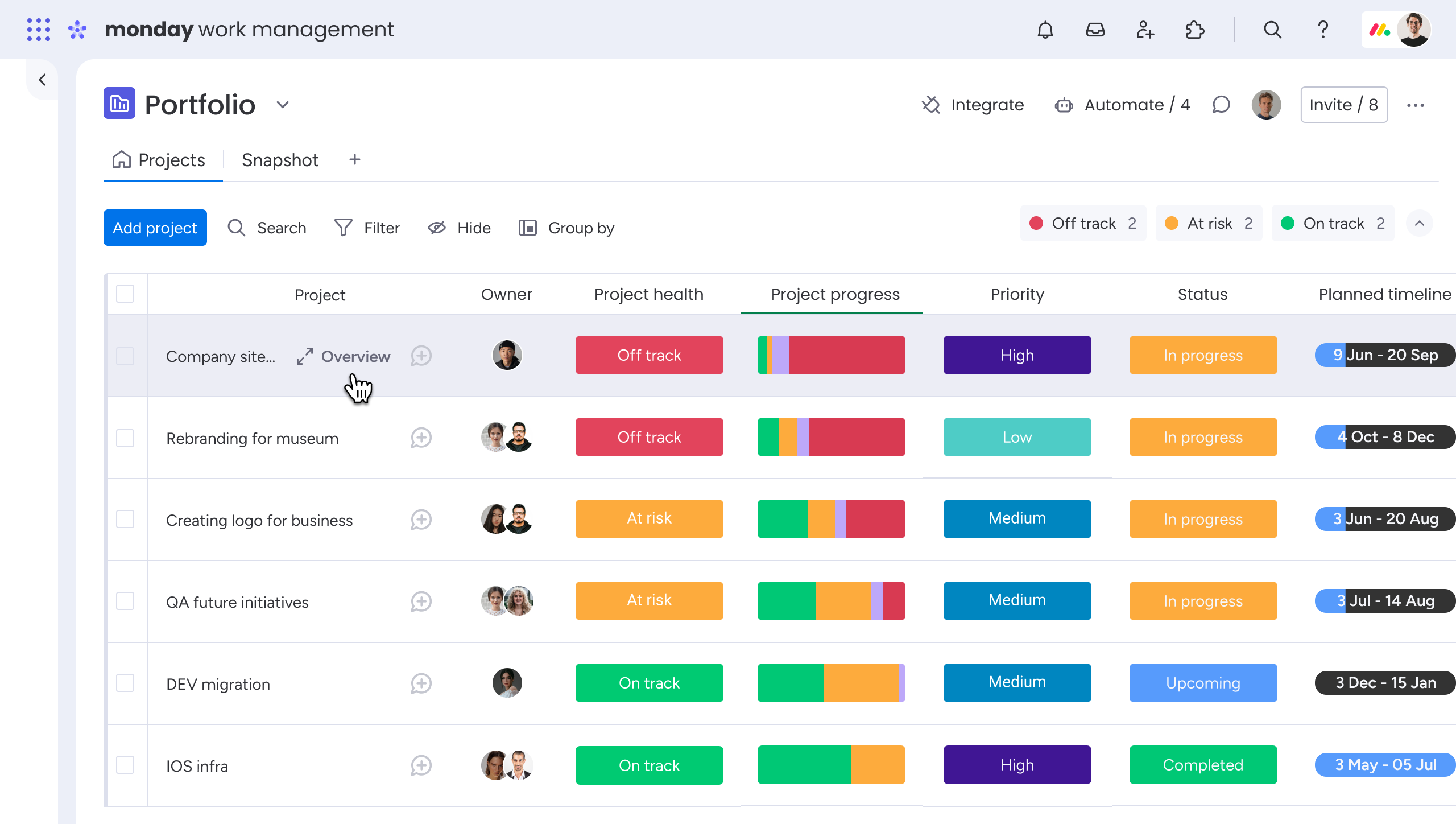
Image source: monday.com
Strengths
- Intuitive, visually engaging interface for quick adoption: Monday.com's colorful boards make it easy for teams to understand and manage their workflows at a glance. The drag-and-drop layout reduces setup time and keeps project structures simple. This is ideal for creative, marketing, and cross-functional teams who prefer visual over spreadsheet-style formats. Multiple views, like Kanban, Timeline, and Calendar, support flexible planning. The interface lowers training requirements and speeds up onboarding.
- Flexible workflow customization without technical skills: Users can tailor boards with statuses, tags, owners, and automation rules to match any process. Building workflows doesn't require coding knowledge, making it accessible to non-technical teams. This flexibility helps teams create pipelines for content creation, campaign planning, or sprints. Each board can be adapted as work evolves without breaking the structure. It's beneficial for dynamic teams that need lightweight yet configurable tools.
- Strong collaboration features across teams and projects: Monday.com supports updates, comments, file sharing, and notifications directly within items, keeping communication tied to project context. Integrations with tools like Slack, Google Workspace, and CRM systems enhance cross-team visibility. For teams concerned about Google Workspace pricing or exploring Google Workspace alternatives, Monday.com's built-in collaboration tools can help reduce reliance on external suites. Real-time notifications help teams stay aligned, and guest access supports external contributors. Collaboration feels fluid and centralized within each board.
Limitations
- Limited fit for complex or data-heavy operational workflows: Large datasets, formulas, dependencies, and multi-sheet structures are not Monday.com's strengths. Teams with operations-heavy or spreadsheet-driven processes may find the platform restrictive. When managing detailed calculations or extensive linked data, boards can feel simplistic. Scaling such workflows becomes difficult without workarounds. These limitations become clear in scenarios like the Smartsheet vs. Airtable vs. Monday comparison.
- Dashboards and reporting can feel lightweight for enterprises: While Monday.com offers visually appealing dashboards, their depth is limited for analytics-heavy environments. Cross-board reporting may require additional configuration or premium plans. Enterprise teams needing advanced report consolidation may find their capabilities insufficient. The lack of deep data modeling can also be restrictive. This makes it less suitable for organizations requiring granular, multi-layered insights.
Ideal use cases
- Marketing and creative teams managing campaigns or content: Monday.com's visual boards, timelines, and collaborative updates are ideal for creative teams. They can track assets, approvals, and campaign progress with minimal complexity. The ease of attaching files, comments, and briefs keeps workflows organized. Teams benefit from real-time updates and quick board adjustments. It's a strong fit for fast, iterative creative work.
- Startups and small teams looking for a simple, fast setup: Newer teams appreciate Monday.com's low learning curve and easy configuration. Boards can be set up in minutes and expanded as the team grows. Its clean structure removes the need for heavy project management frameworks. It also reduces reliance on spreadsheets or manual trackers. The platform helps small teams stay coordinated without administrative overhead.
- Cross-functional teams coordinating tasks and timelines: Teams across marketing, sales, HR, and product can collaborate easily through shared boards. Updates, statuses, tags, and notifications help maintain clarity. Multiple views support different work styles, from Kanban to Gantt. The platform works well for managing shared timelines and dependencies. This improves visibility across departments with minimal setup.
- Teams running lightweight project tracking and workflows: For groups that don't require advanced formulas, deep data modeling, or complex automations, Monday.com delivers simplicity. It handles day-to-day planning, task assignments, and progress tracking efficiently. Teams benefit from the mix of visuals, communication tools, and basic automation. This makes it suitable for everyday operational planning. It supports clarity without overwhelming users.
Smartsheet vs Monday: Feature-by-feature comparison
Choosing between these two platforms requires understanding how each handles views, automation, collaboration, dashboards, and setup effort. In many evaluations like Monday.com vs Smartsheet, the decision often depends on whether teams prefer structured, spreadsheet-style workflows or visual, board-driven planning. Smartsheet excels in operational depth, while Monday.com offers simplicity and intuitive design. These differences become more noticeable as teams scale, especially in multi-department environments. Below, each feature category is broken down thoroughly to help teams evaluate the right fit.
Project views comparison: Smartsheet vs Monday
- Grid, Gantt, card, calendar, form views: Smartsheet provides a comprehensive range of views—Grid, Gantt, Calendar, Card, and Forms—making it suitable for teams that require structured, timeline-driven planning. Its Gantt view is extreme for teams managing dependencies and milestones across complex projects. Monday.com offers Kanban, Timeline, and Calendar views, but its grid and card views are less feature-rich. As a result, Smartsheet aligns better with traditional PMO-style work. Monday.com suits teams that prioritize visual simplicity over data-heavy layouts.
- Flexibility for different work styles: Smartsheet supports flexible work styles through its sheet-based foundation, but switching between views still feels rooted in spreadsheet logic. Monday.com offers flexibility through visual boards that can be rearranged more fluidly depending on a team's preferred workflow. Smartsheet works best for structured planning, while Monday feels more natural for dynamic, fast-moving teams. This difference becomes clear in comparisons like Smartsheet vs. Monday vs. Asana, where interface preferences heavily influence user satisfaction. Teams should choose the tool that matches their preferred level of structure.
Automation comparison: Monday vs Smartsheet
- Rule-based triggers: Monday.com uses simple, no-code rules to automate status updates, reminders, and assignments with minimal effort. Smartsheet's rule-based automations offer more profound conditional logic, which is beneficial for operations teams with multi-step review processes. While Monday focuses on simplicity, Smartsheet supports more advanced branching and dependencies. This can lead to more powerful automations, but with a steeper learning curve. The choice depends on whether teams value accessibility or complexity.
- Cross-team automations: Smartsheet excels at cross-sheet and cross-team automations, making it easier to centralize workflows across multiple functions. Monday.com supports cross-board automations, but often requires additional setup or a higher-tier plan. Smartsheet's enterprise-oriented automation structure helps align PMOs, finance, operations, and leadership. Monday's automations, while simpler, may not scale as smoothly across departments with heavy data needs. Larger organizations often find Smartsheet's automation scope more future-proof.
- Complexity vs ease of use: Smartsheet offers more powerful configurations but can feel overwhelming for teams unfamiliar with conditional logic or data modeling. Monday.com delivers ease of use through templates and preset automation recipes that work out of the box. This makes Monday ideal for fast onboarding, while Smartsheet appeals to users willing to invest time in advanced setup. The difference generally comes down to whether teams prioritize depth or usability. Both approach automation differently, but each serves a distinct type of workflow maturity.
Collaboration & communication: Smartsheet vs Monday
- Comments, notifications, sharing: Both platforms support comments, tagging, user mentions, and file sharing, but Monday.com's interface feels more conversational and activity-focused. Smartsheet ties comments closely to cell- or row-level updates, which may feel rigid for teams expecting fluid conversations. Monday's updates panel centralizes discussions better, reducing confusion during fast-moving projects. Smartsheet works well for structured edits but may feel less intuitive for day-to-day communication. Teams needing stronger visual clarity will likely prefer Monday.com.
- Real-time collaboration limitations on each platform: Smartsheet allows multiple users to work on sheets simultaneously, but it still resembles traditional spreadsheet collaboration. Monday.com feels more real-time because updates surface visually across boards, views, and dashboards instantly. Neither platform replaces dedicated collaboration tools, which means teams may still rely on external messaging or documentation systems. Real-time collaboration is smooth on Monday, but more data-focused on Smartsheet. The differences matter for teams juggling multiple fast-moving tasks.
- Document management gaps: Both platforms offer document attachments but lack fully integrated, real-time document collaboration. Teams often rely on Google Docs, Office 365, or separate file-sharing tools for co-editing. Smartsheet links files to rows for structured documentation, while Monday.com attaches them to items for contextual visibility. Still, neither platform provides native, seamless document creation or version control. This gap often leads teams to use external apps for content-heavy workflows.
Reporting & dashboards: Monday.com vs. Smartsheet
- KPI dashboards: Monday.com provides visually appealing, easy-to-build KPI dashboards that help teams monitor task progress, workload, and timelines. However, these dashboards focus more on surface-level visibility. Smartsheet's dashboards integrate formulas, metrics widgets, and cross-sheet reporting, making them better for performance tracking. Teams needing deeper KPIs or operational analytics will find Smartsheet more robust. Monday is ideal for snapshot views rather than analytical reports.
- Custom reporting depth: Smartsheet excels at creating custom, multi-layered reports using formulas, dependencies, and linked sheets. Monday.com supports reporting across boards but lacks the analytical depth needed for enterprise-level modeling. Smartsheet's reporting offers spreadsheet-grade flexibility, ideal for PMOs and program managers. Monday prioritizes simplicity, offering predefined widgets and limited customization options. Teams with technical reporting requirements should lean toward Smartsheet.
- Enterprise visibility: Smartsheet's portfolio-level dashboards make it suitable for enterprise project governance, risk management, and resource oversight. Monday.com offers portfolio views via additional modules, but often requires an upgrade plan. Smartsheet's connected sheets allow organization-wide rollups, giving leadership cross-program visibility. Monday provides speed and simplicity, but may fall short for enterprise resource planning. Visibility needs should guide the final choice.
Templates & setup effort
- Configuration & customization: Smartsheet typically requires more customization during setup because teams must structure sheets, formulas, and dependencies. This allows deep flexibility but increases setup time. Monday.com requires far less configuration due to its ready-to-use templates and drag-and-drop boards. Smartsheet suits advanced planners, operations teams, and PMOs willing to build detailed frameworks. Monday suits teams that want to get started quickly with minimal configuration effort.
- Suitability for non-technical teams: Monday.com is ideal because its templates, automation recipes, and visual boards require no specialized skills. Smartsheet, while capable, may feel more technical due to formulas, conditional logic, and sheet-based formatting. Creative teams, HR, marketing, and smaller groups often find Monday more approachable. Smartsheet works well for analysts, project managers, and operations teams accustomed to structured data. The right fit depends on users' comfort levels with configuration and logic.
Pricing comparison: Smartsheet vs Monday
Smartsheet pricing
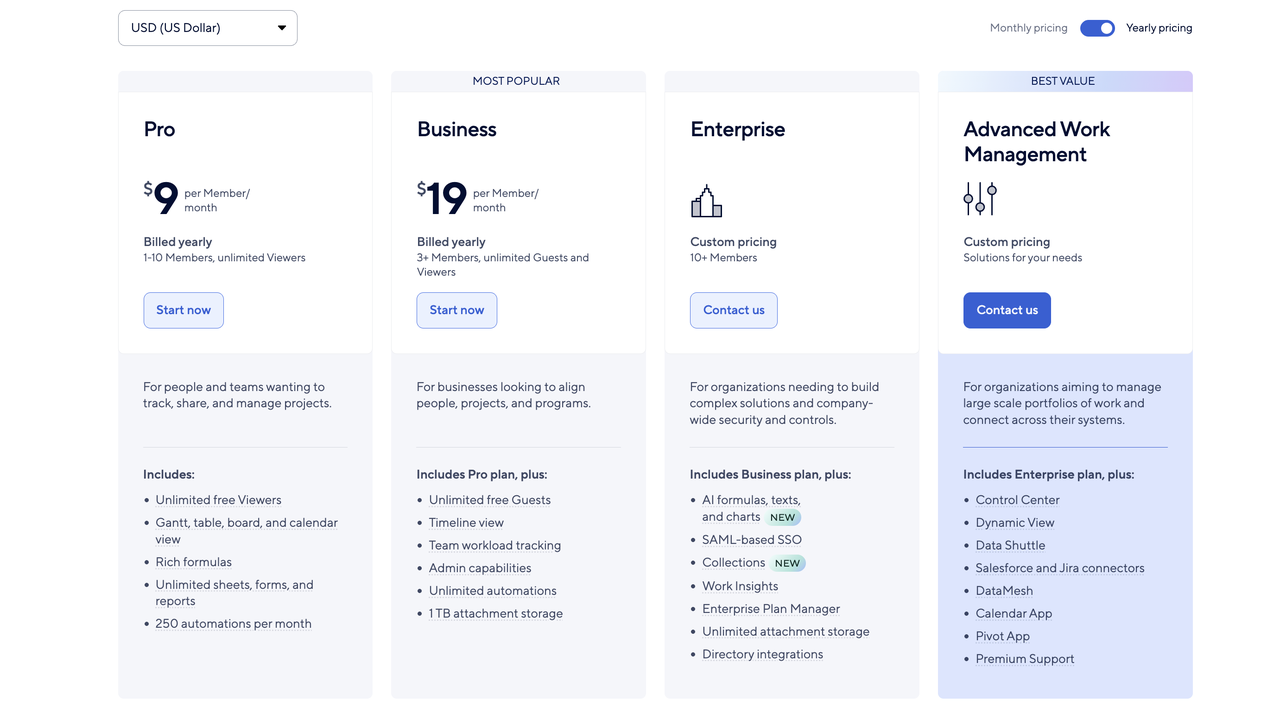
Image source: smartsheet.com
Information source: Official vendor sites
Update time: 2025-11-21
Note: Pricing and plan details reflect publicly available data as of the update date and may vary based on region, billing cycle, and number of agents.
Pro plan: $9 per member/month
The Pro plan is designed for individuals, small teams, and early-stage businesses that need a flexible workspace to track, manage, and organize projects. It includes essential viewing modes such as Gantt, table, calendar, and board views, making it suitable for multi-format planning. Users also get rich formulas, unlimited sheets/forms/reports, and a very generous 250 automations per month, which supports process automation without needing a developer. Pro also offers unlimited free viewers, ideal for sharing updates with clients or stakeholders without extra cost. It's best for small teams needing structured project tracking without advanced governance.
Business plan: $19 per member/month
The Business plan is aimed at growing companies that need more control, visibility, and tools for workload distribution across teams. It includes everything in Pro but adds unlimited free guests, making external collaboration (vendors, clients, partners) far more scalable. Additional features include timeline view, team workload tracking to balance resources, admin capabilities for governance, and unlimited automations for complex workflows. It also increases storage to 1 TB per user, supporting rich, file-driven processes. This plan suits organizations that need advanced project governance, cross-team collaboration, and deeper operational insights.
Enterprise plan: Custom pricing
The Enterprise plan is designed for large organizations that require company-wide security, governance, and advanced analytics. It includes everything in the Business plan and upgrades to AI formulas, texts, and charts for intelligent automation. It supports SAML-based SSO, enabling enterprise identity management and compliance. Features like Work Insights, Enterprise Plan Manager, and Directory Integrations help automate user provisioning and track performance across departments. Collections, unlimited attachment storage, and admin-level controls make it suitable for heavily regulated or complex operations.
Advanced Work Management: Custom pricing
This is Smartsheet's most robust tier, built for enterprises managing large-scale portfolios, multi-team processes, and advanced data ecosystems. It includes all Enterprise features, plus strategic add-ons such as Control Center (for program-level governance), Dynamic View (secure conditional access), Data Shuttle (data migration automation), and Salesforce and Jira connectors. Tools such as DataMesh, Calendar App, Pivot App, and Premium Support make it ideal for PMOs, transformation teams, and organizations with high data complexity and portfolio oversight needs. It's suited for businesses running interconnected projects across departments that depend on data accuracy, compliance, and automation at scale.
Monday.com pricing
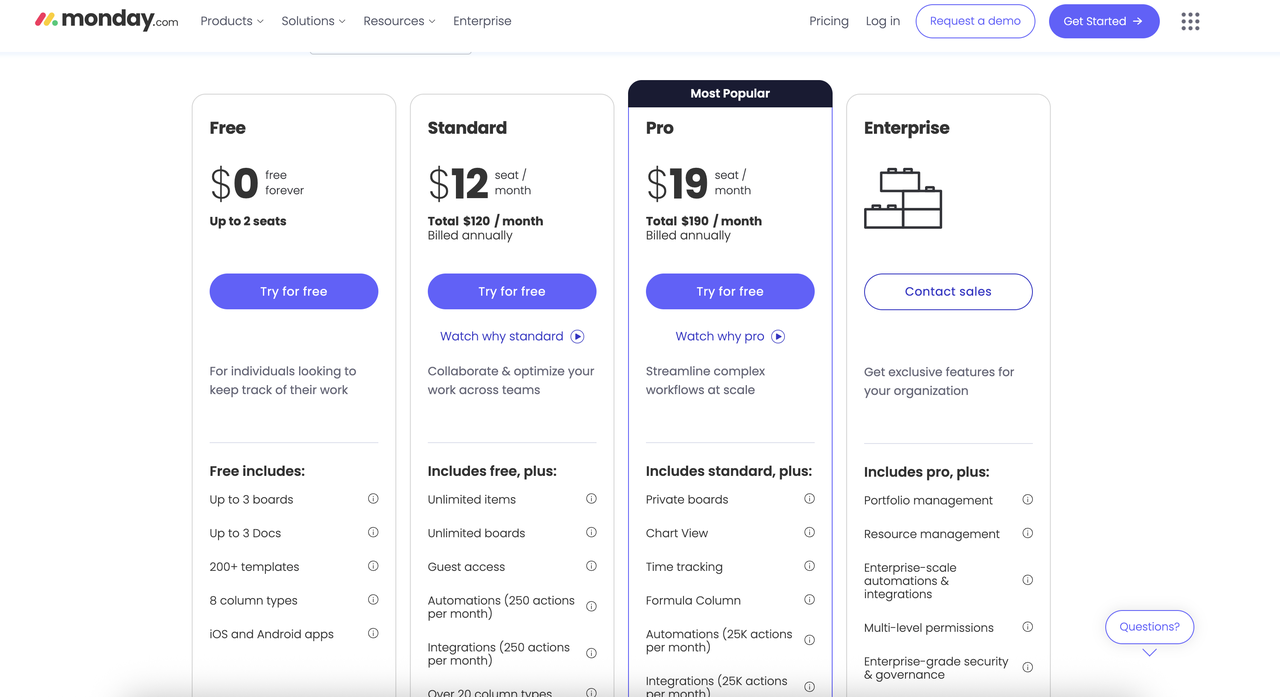
Image source: monday.com
Free Plan
The Free plan is designed for individuals or tiny teams who want a simple way to organize personal tasks or light work projects. It supports up to 2 seats, making it ideal for freelancers, students, or solo operators. You get basic project organization through up to 3 boards and up to 3 Docs, along with access to 200+ templates that help simplify setup. The plan includes 8 column types to track statuses, dates, text, and more, plus access to iOS and Android apps. However, it lacks automation, integrations, advanced views, and scaling capabilities.
Standard plan: $12/seat/month
The Standard plan is built for teams that want to collaborate and optimize workflows with more structure. It includes all Free features but removes limits on items, boards, and Docs, making it suitable for multi-team coordination. Standard users benefit from Guest access, which is helpful for clients or vendors. You also get basic automations (250 actions/month) and integrations (250 actions/month), helping connect Monday.com with other apps. More than 20 column types unlock richer project tracking. This plan is ideal for teams needing workflow visibility without complex automation or enterprise controls.
Pro plan: $19/seat/month
The Pro plan is Monday.com's most popular offering and is designed for teams managing complex or fast-moving workflows. It includes everything in Standard, plus Private boards, helping teams handle restricted or sensitive work. The Chart View adds visual reporting, while Time Tracking helps monitor workload and project costs. The Formula Column enables advanced calculations inside boards. Automations and integrations get a massive upgrade to 25,000 actions/month, suiting high-volume operations. This plan is ideal for teams that want deeper analytics, heavier automation, and advanced workflow control.
Enterprise plan: Custom pricing
The Enterprise plan provides full-scale control, compliance, and security for large organizations. It includes all Pro features but adds Portfolio management, allowing leaders to track multiple projects across departments. Resource management helps teams allocate capacity efficiently. Enterprise-scale automations and integrations support very high action volumes with stronger reliability. Additional features like multi-level permissions, advanced governance, enterprise-grade security, and SSO make the plan suitable for regulated industries. This tier is best suited for global teams that need robust compliance, granular controls, and deep enterprise reporting.
Limitations of both tools: Smartsheet and Monday
In growing teams evaluating work platforms, tools like Smartsheet and Monday often deliver strong task tracking but still fall short when workflows expand across departments. As seen in many Smartsheet vs Airtable vs Monday comparison reviews, both solutions can become difficult to scale without relying on extra apps and scripts. Their structures are optimized more for project-level management than for unified operational workflows, which limits end-to-end visibility. Teams also report challenges around documentation flows, handoffs, and connected data management. And across analyses of Smartsheet, Monday, and Asana, the theme is consistent—these tools offer flexibility but lack the cohesion needed for holistic process orchestration. These limitations become more evident as organizations move from basic tracking to enterprise-wide operations.
- Data silos when scaling: As organizations expand, both platforms often create fragmented data structures because boards, sheets, and workspaces don't interconnect seamlessly. This results in duplicated or isolated datasets that require manual stitching to analyze business-wide performance. Teams migrating from other tools frequently note that neither platform offers a fully unified data backbone. Cross-department workflows—especially those involving finance, ops, or HR—can become harder to maintain without heavy governance. Ultimately, the absence of native, scalable data modeling creates barriers to visibility at higher operational levels.
- Weak documentation workflows: Smartsheet and Monday both allow attaching files and maintaining basic documents, but neither offers a robust documentation engine for complex or evolving content. Teams often end up managing requirements, SOPs, and revision histories in external systems, increasing fragmentation. While Docs and attachments help, they lack deeper workflow integration, versioning controls, and structured approval paths. This creates friction for teams that need documentation to flow alongside tasks. As complexity rises, organizations frequently adopt external tools to compensate.
- Fragmented communication: Communication inside Smartsheet and Monday is largely thread-based and tied to specific items, making it challenging to maintain context across larger initiatives. Comments are functional but become scattered across boards and sheets, reducing alignment. Cross-team discussions often move to email, chat, or other messaging tools, further splitting the conversation. This fragmentation affects clarity and slows down decision-making during multi-team execution. For organizations needing unified communication across projects, both platforms can feel limiting.
- Limited end-to-end process management: Although both tools excel at project and task management, they are not designed for full process orchestration across an entire business cycle. Workflows with multiple dependencies—approvals, escalations, multi-team coordination—often need third-party tools to complete. Teams aiming to manage entire service, procurement, or operational processes may find functional gaps. The tools offer automation but not accurate process mapping or dynamic cross-workflow syncing. This limits their ability to support complex business operations at scale.
- Overreliance on multiple external apps: To achieve complete workflows, teams using Smartsheet or Monday usually add integrations for communication, documentation, analytics, forms, advanced automation, and resource planning. This increases cost, administrative effort, and the complexity of maintaining multiple tools. As organizations scale, the overhead of managing integrations becomes a recurring challenge. This reliance also creates risk—if any connected app changes pricing, limits, or API rules, workflows break. Ultimately, dependence on external systems prevents the achievement of a consolidated workspace.
As these limitations start to affect coordination, visibility, and long-term workflow reliability, many teams begin looking for a platform that unifies data, communication, and execution in one place rather than stitching together multiple tools. This shift naturally raises the question of what a more streamlined alternative looks like—setting the stage for Lark's more connected approach.
Smart alternative: Lark's unified platform with collaborative features
Lark stands out as a stronger alternative to Monday.com and Smartsheet because it eliminates the fragmentation that teams often face with traditional project and work management tools. While those platforms rely heavily on multiple external apps for communication, documentation, and automation, Lark unifies everything into a single connected workspace.
Teams can manage tasks, chats, workflows, documents, approvals, and data without switching contexts. This all-in-one structure reduces silos, improves visibility, and streamlines multi-team coordination. As organizations scale, Lark's approach supports more stable, end-to-end process management.
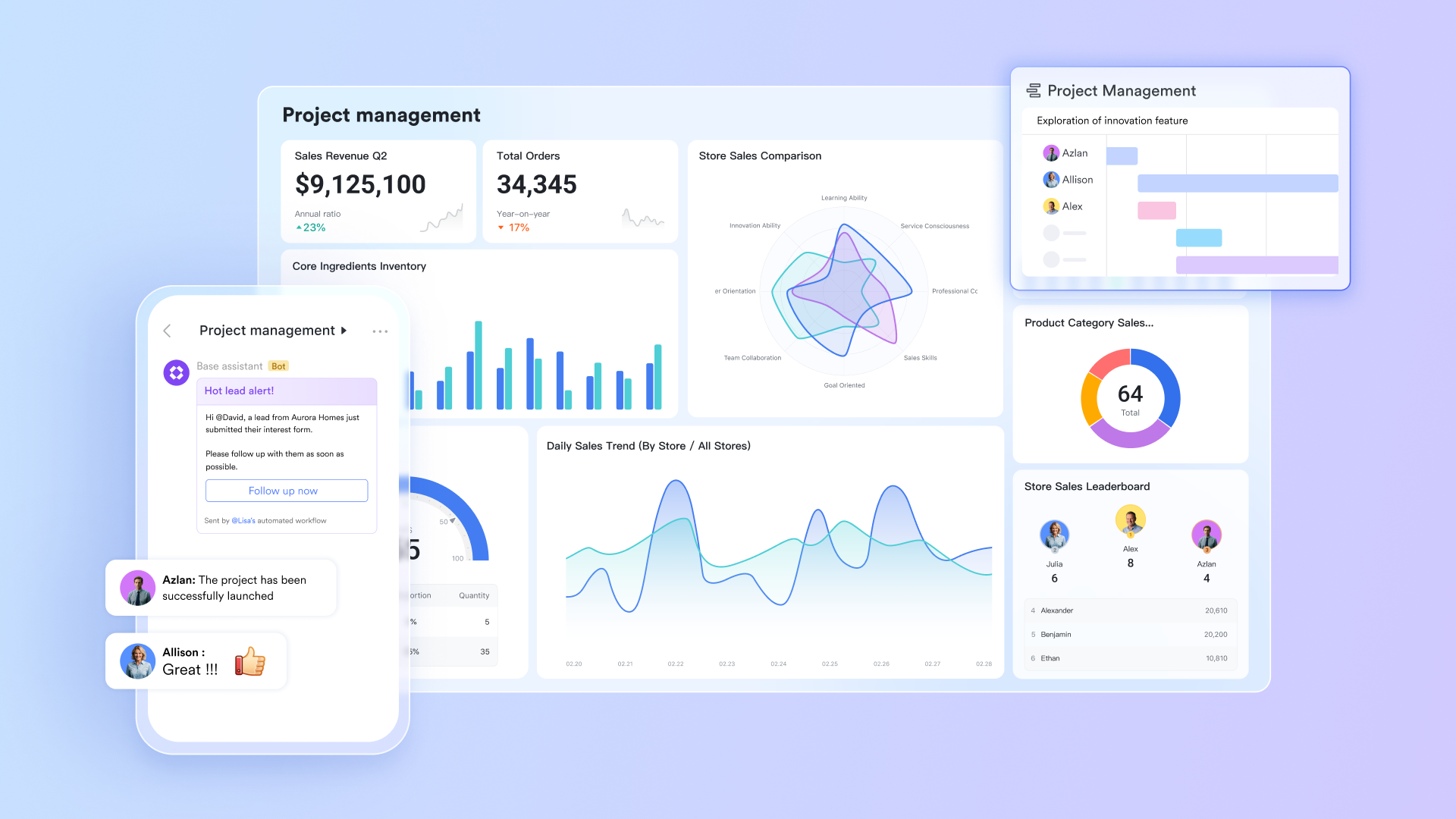
A structured backbone for every project cycle
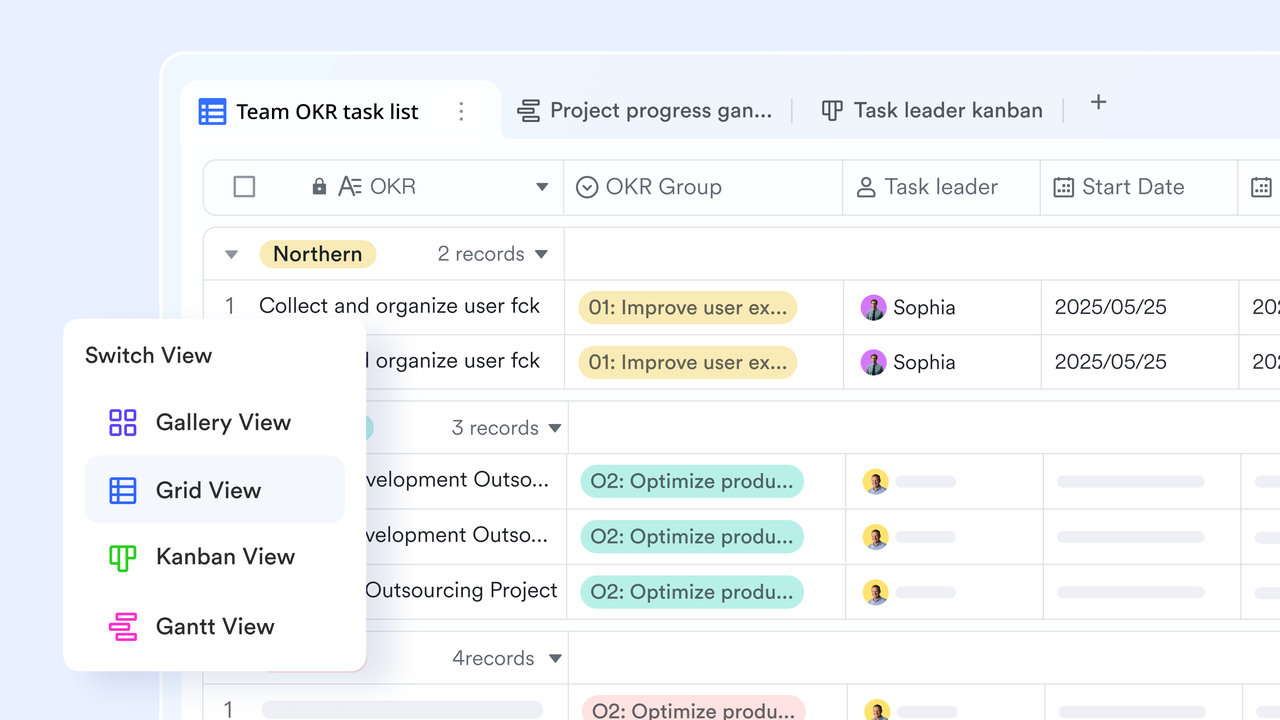
Compared with Smartsheet, which relies heavily on static, spreadsheet-like layouts, or Monday.com, which focuses mainly on visual boards, Lark has Lark Base to give teams a central, structured home for all project information. In it, initiatives, tasks, stakeholders, timelines, risks, and dependencies live as records rather than scattered sheets. Each record can store fields like owner, status, due dates, budget, and links to related docs or tasks, so nothing sits in a silo. Because Base supports multiple views (grid, Kanban, Gantt, calendar), project managers, leadership, and functional teams can each see the same data in the layout that works best for them. Built-in automation then updates fields, routes items for approval, or posts updates into chats, turning static data into a living workflow engine that replaces a patchwork of spreadsheets and separate tools.
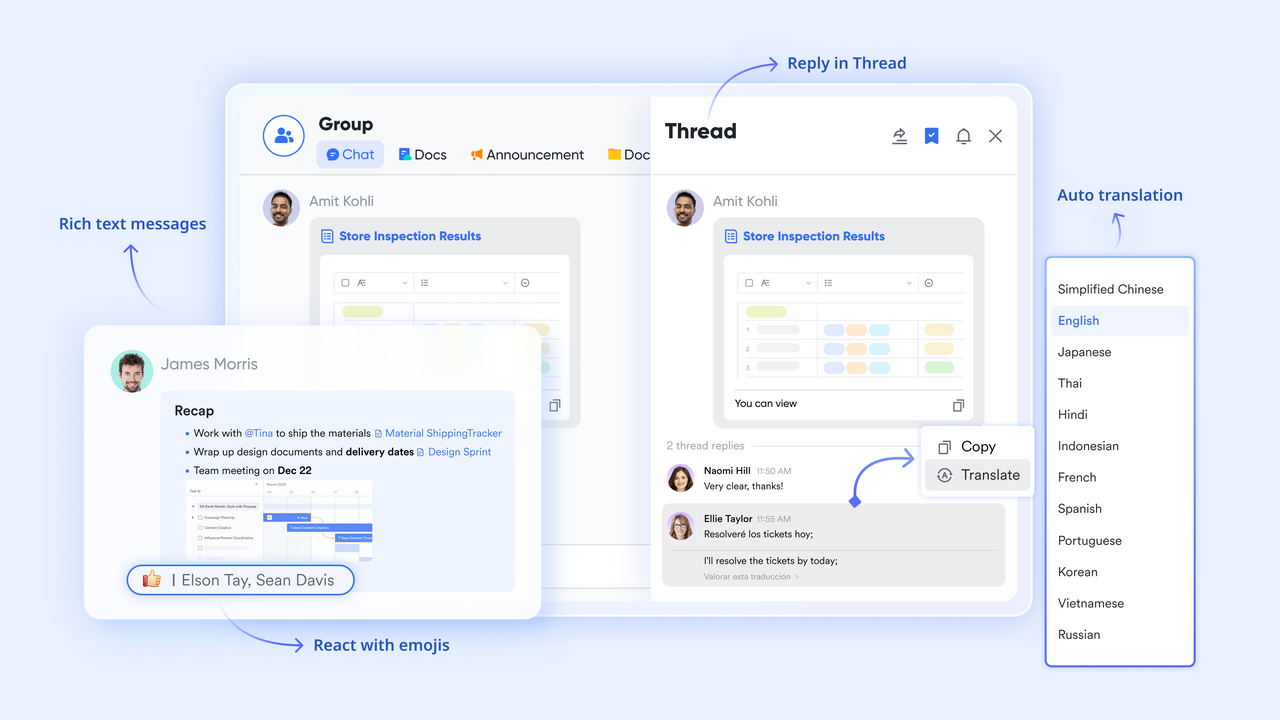
Conversations that stay tied to the actual work
Unlike traditional chat tools or email threads that scatter information, Lark Messenger keeps every project discussion tied to the actual work, rather than burying it in random channels or email threads. Teams can open a chat directly from a task, Base record, or document, so everyone sees the same context—no copy-pasting links or screenshots. Real-time updates, @mentions, and threaded replies make it easy to clarify requirements, unblock decisions, and capture quick approvals.
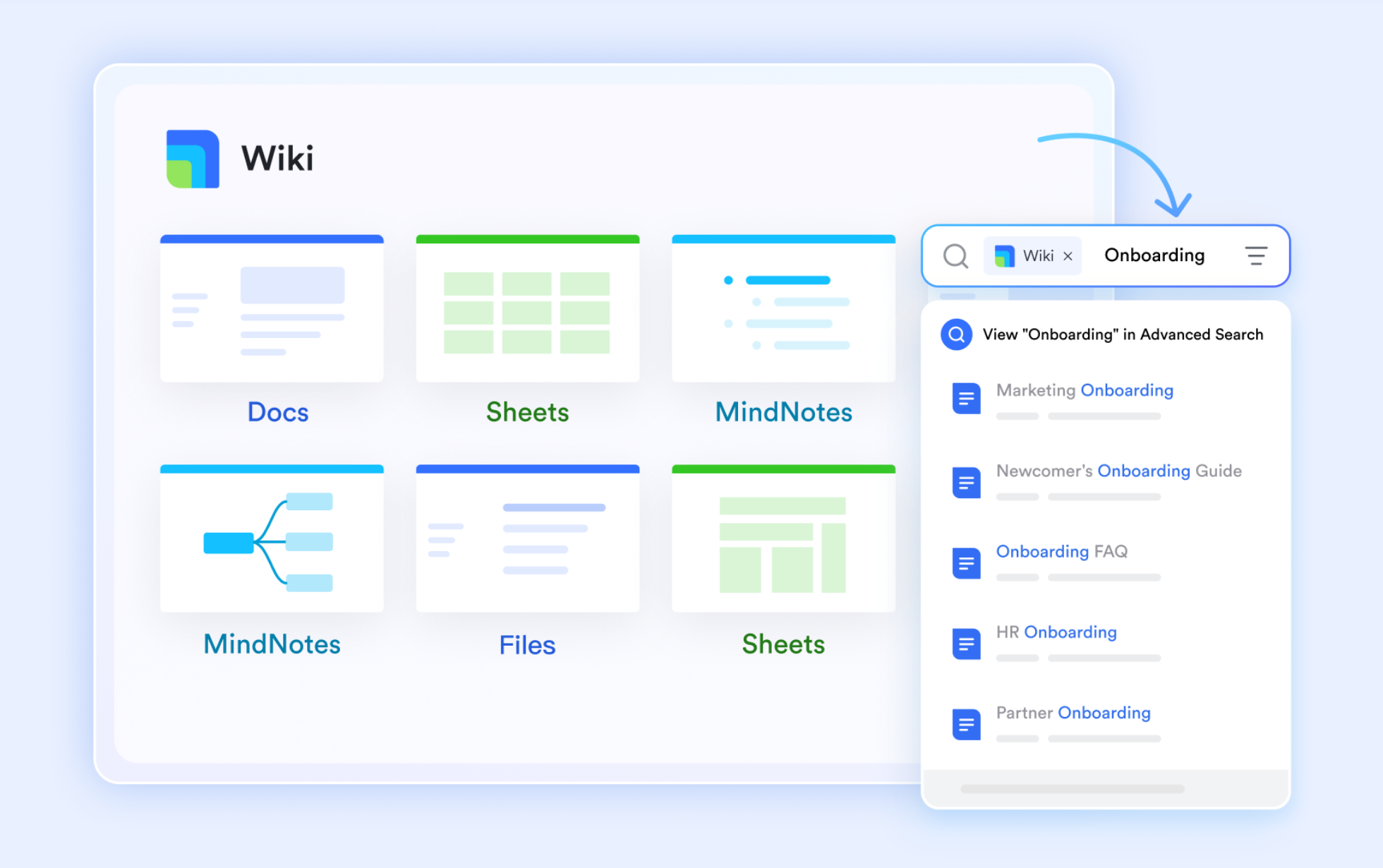
Documentation that moves with the project—not behind it
Smartsheet and Monday.com often rely on simple file attachments or disconnected notes, making it harder to align documentation with live project work and maintain a central knowledge hub. In contrast, Lark Docs and Lark Wiki give project teams a shared space for proposals, briefs, scopes, retrospectives, and playbooks that stay tightly connected to execution. Multiple people can co-edit a document in real time, leave comments, and suggest changes, which is ideal for drafting statements of work, project charters, or implementation plans. Docs and Wiki pages can be linked directly from the records and tasks, so the "why" behind the work is always one click away from the "what." Over time, Wiki becomes the structured knowledge hub for methods, checklists, and standards, while Docs captures live project artifacts—keeping documentation and delivery aligned in a way that simple attachments on Smartsheet or Monday boards rarely achieve.
Clear accountability and trackable execution at every step
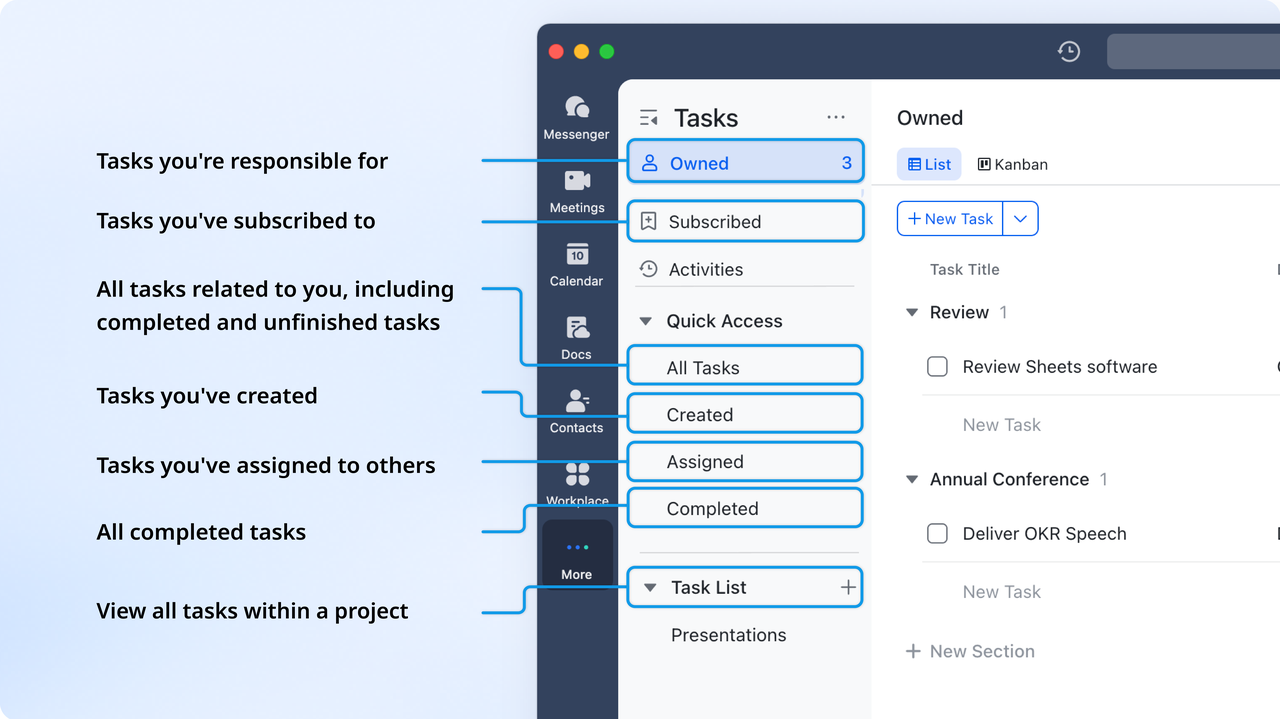
Instead of Smartsheet or Monday.com, where tasks can feel siloed or scattered across sheets and boards, Lark Tasks supports project management by helping teams organize work, stay aligned, and move projects forward efficiently. You can break large initiatives into clear, actionable steps and assign owners, build and share task lists to keep goals visible, and use the Gantt chart view to map timelines, plan complex projects, and manage dependencies. Task lists can be pinned in group chats for quick access, and you can easily track everything by role—whether tasks are owned, subscribed to, created, or assigned—so everyone stays up to date.
Meetings and schedules that align naturally with workflows
Lark Meetings and Lark Calendar bring scheduling and live collaboration into the same environment as your projects and workflows. Teams can schedule review sessions, stand-ups, and client calls from the calendar, so everyone joins the meeting already aligned on context. During the call, Lark can generate AI Meeting Notes and action items that can then be linked back to tasks or project records, closing the loop between conversation and execution. Unlike Smartsheet or Monday.com, which rely on external calendars and meeting apps, Lark makes it much easier to keep timelines realistic and stakeholders informed without juggling separate meeting tools.

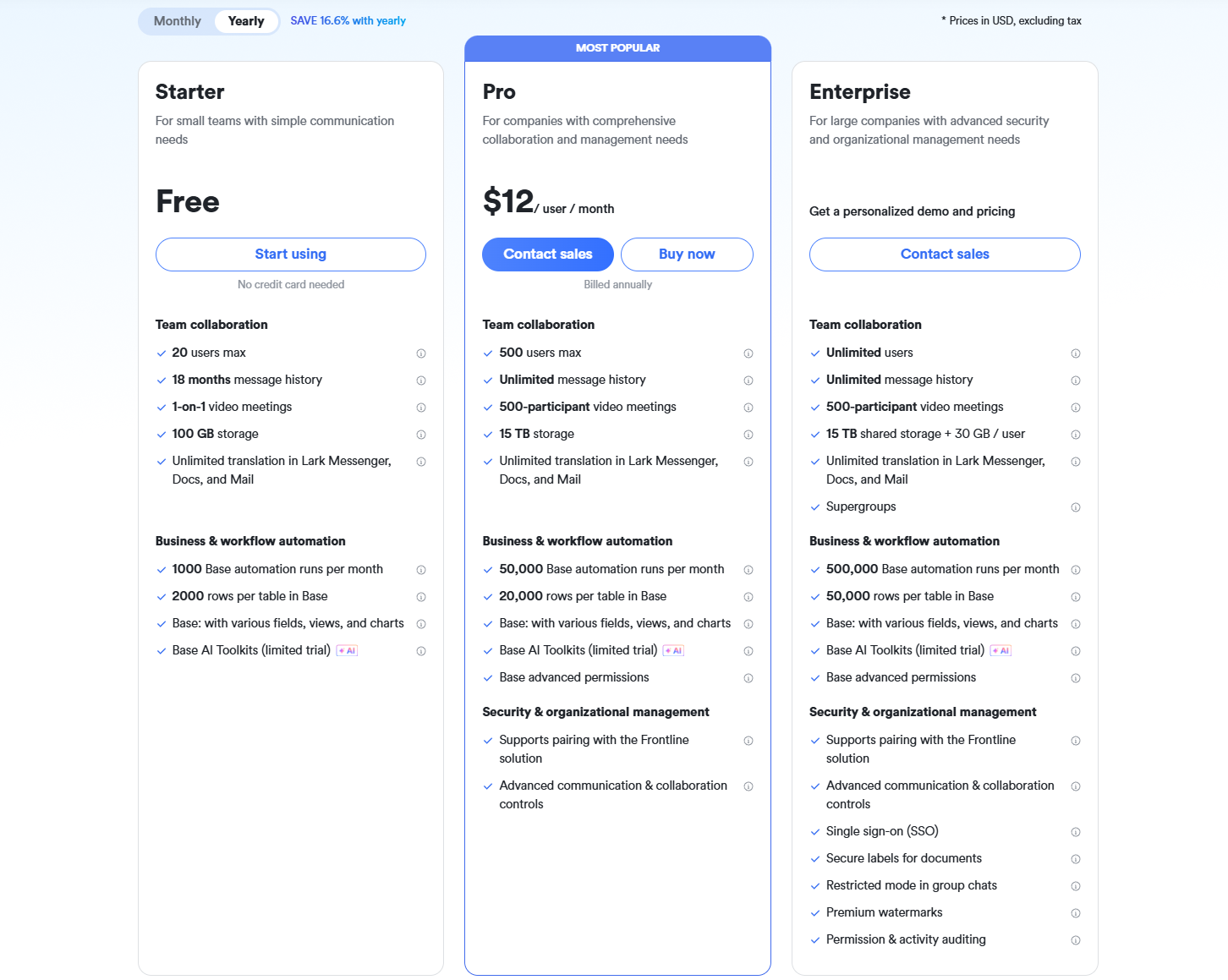
- Starter plan: Free forever plan that includes 11 powerful tools for up to 20 users. It also comes with 100GB of storage, 1000 automation runs, AI translations, and more.
- Basic plan: $6/user/month (billed annually) for up to 500 users. It includes everything in Starter plus group calling for up to 500 attendees, 5TB of storage, 1000 automation runs, and more. For more details, please contact sales.
- Pro plan: $12/user/month (billed annually) for up to 500 users. It includes everything in Basic plus group calling for up to 500 attendees, 15TB of storage, 50,000 automation runs, and more.
- Enterprise plan: Contact sales for custom pricing. Supports unlimited users and includes even more automation runs and advanced security, compliance, and management features.
Final checklist: Smartsheet vs Monday vs Lark
Conclusion
Choosing the right work management platform ultimately depends on how your teams operate, how fast you're scaling, and how much fragmentation you can realistically manage. Smartsheet offers spreadsheet-style flexibility, while Monday.com provides a highly visual, customizable workspace—but both tools can become complex as workflows expand across departments, requiring add-ons for communication, documentation, automation, and cross-team collaboration. This comparison shows that while each platform performs well in its core strengths, neither delivers a truly unified environment for end-to-end process execution.
That's where Lark presents a modern alternative: a single platform that brings together messaging, tasks, docs, approvals, automation, and data into one connected system. For teams seeking simplicity, alignment, and seamless collaboration without juggling multiple apps, Lark offers a more collaborative way to work. If you're exploring a unified workspace that supports both structure and speed, Lark is worth considering as your next step.
FAQs
Which tool handles complex cross-department workflows better—Smartsheet or Monday?
Smartsheet is better suited to process-heavy environments thanks to its grid-style dependencies, but it becomes harder to manage as more teams join and the number of sheets increases. Monday feels easier for visual coordination but often requires multiple boards, integrations, and add-ons to support end-to-end workflows. Both tools can handle cross-department work, but scaling them requires careful governance. Teams usually rely on external systems for approvals, communication, and handoffs. This is where Lark provides a more cohesive flow by combining communication, automation, and shared data in one place. As complexity grows, Lark's unified environment offers a smoother cross-team experience.
Can Monday or Smartsheet manage full client project lifecycles without additional tools?
Both platforms can organize tasks, timelines, and deliverables, but complete client lifecycle management usually requires external apps for communication, document approval, invoicing, or structured data handling. Smartsheet offers strong templates but still depends on attachments and connected sheets for client-facing workflows. Monday covers project tracking well but lacks built-in advanced documentation or client collaboration hubs. As a result, many teams end up stitching together multiple apps. Lark simplifies this by offering docs, chat, meetings, tasks, and workflows in a single ecosystem. For teams wanting a single environment for client execution, Lark reduces fragmentation.
Do both tools support advanced resource management for multi-team operations?
Monday's workload and capacity views are basic, while Smartsheet's resource tools are more advanced but require setup across multiple sheets and dependencies. Neither platform offers deeply integrated enterprise-wide resource modeling without additional modules or external tools. Managing availability across multiple teams often requires manual work or exporting data. For organizations seeking flexible yet unified resource visibility, Lark's tasks, calendars, and workflow automation offer a more straightforward approach. Instead of managing separate components, Lark lets teams align people, schedules, and workloads in one connected workspace.
Which tool handles data-heavy workflows better: Smartsheet vs Airtable vs Monday?
Airtable excels at relational databases, tagging, and linked records, making it ideal for teams working with structured datasets. Smartsheet handles large volumes with formulas, Gantt dependencies, and enterprise PMO workflows, offering stability for complex operations. Monday offers structured data but is best suited for project pipelines rather than deep data modeling. Across all three teams, they still often need additional tools for analytics, forms, and documentation. Lark helps reduce that dependency by combining databases, documents, automation, and communication into a single system. For data-heavy work that also requires collaboration, Lark minimizes tool switching.
Is collaboration better in Smartsheet vs Asana vs Monday?
In Smartsheet vs Monday vs Asana comparisons, Asana and Monday offer more intuitive real-time collaboration through comments, notifications, and shared views. Smartsheet supports collaboration but feels more like working in a spreadsheet, which some teams find less interactive and less conversational. Monday and Asana also provide smoother onboarding for non-technical users. Yet all three tools still rely on external apps for messaging, meetings, and deeper documentation. Lark brings all communication—chat, video, docs, and task updates—into one place. This helps teams maintain context and move faster without switching platforms.
Related reading
Table of contents
Start using Lark today

Manage all your work in one place
Boost team efficiency by 10x
Save up to 70% on software costs
Table of contents
Start using Lark today
Manage all your work in one place
Boost team efficiency by 10x
Save up to 70% on software costs
Keep reading



Lark recognized in 2023 Gartner® Collaborative Content Workspaces and Meeting Solutions reports
Lark, the global superapp for productivity, is delighted to announce it receives recognition in the Gartner's 2023 Innovation Insight for Collaborative Content Workspaces and Market Guide for Meeting Solutions.





2026 Lark Technologies Pte. Ltd.
Headquartered in Singapore with offices worldwide.






Explore: