














TimeCamp Review 2026: Features, Pricing, Pros and Cons

Cecilia Lane
Go-to-Market Associate
Sep 18, 2026
Cecilia Lane
Sep 18, 2026

12 min read


Time tracking shouldn't consume more time than it saves. Yet many businesses struggle with manual timesheets, lost billable hours, and inaccurate project profitability data.
TimeCamp promises to solve this with automatic time tracking, billable hour management, and integrated invoicing. TimeCamp is generally considered intuitive and easy to set up for computer-based work. But is it the right fit for your team? In this comprehensive TimeCamp review, I've analyzed TimeCamp's features, pricing, pros and cons, and compared it with alternative solutions. Whether you're a freelancer, agency, or growing startup, you'll find practical insights to decide if TimeCamp merits a spot in your tech stack.
What is TimeCamp?
TimeCamp is a web-based time tracking and billing software designed primarily for freelancers, agencies, and service-based businesses. The platform combines automatic time tracking with project management, invoicing, and productivity monitoring capabilities. The TimeCamp web app is clutter-free and easy to navigate, allowing users to pin frequently used features for quick access and to reorganize navigation items for enhanced usability. TimeCamp features an intuitive interface for quick setup and daily use, and is designed to be user-friendly with a flat learning curve.
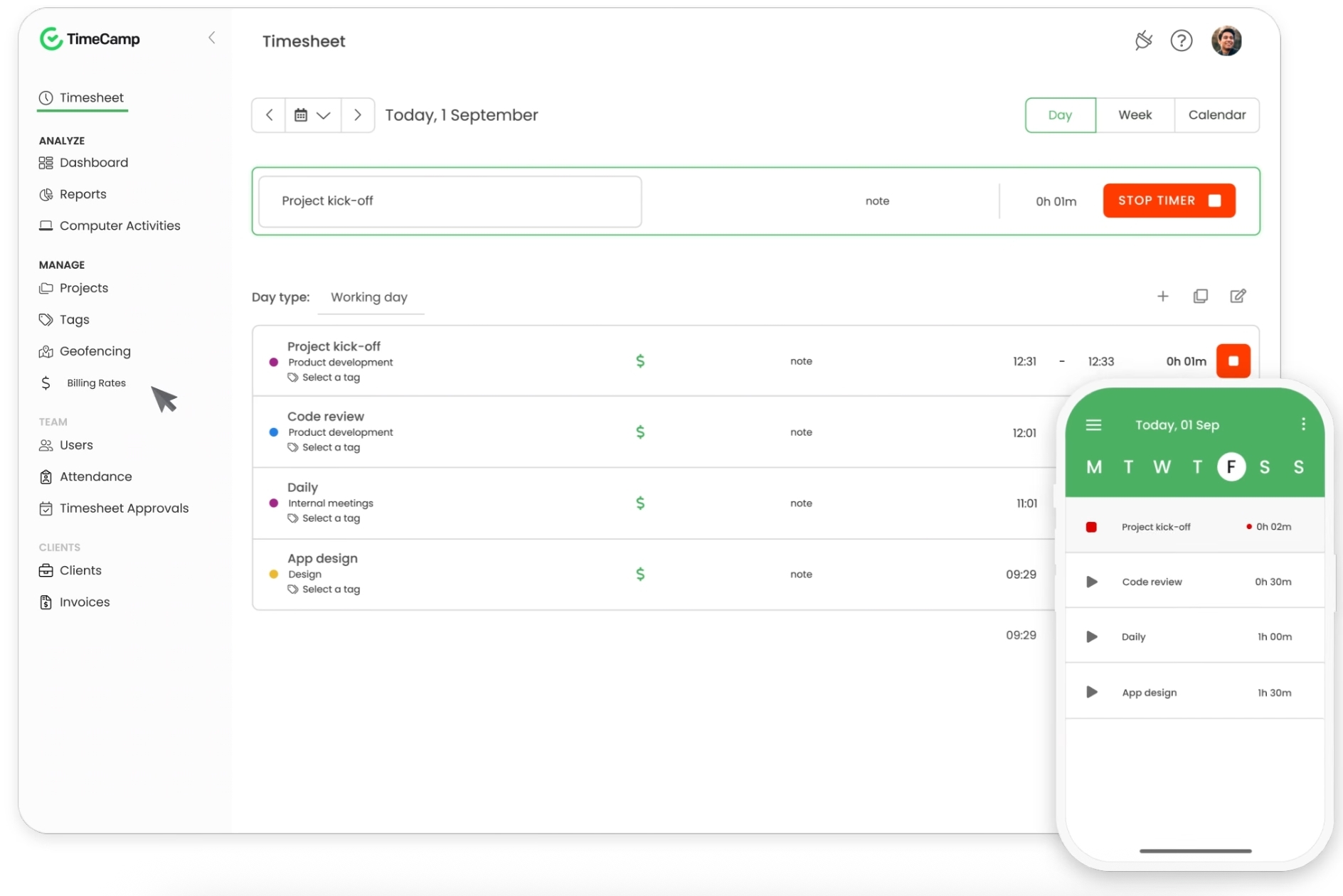
Image source: timecamp.com
Unlike all-in-one collaboration platforms, TimeCamp specializes exclusively in time tracking and billing. This focused approach means deeper functionality in its domain but requires integration with other tools for project management, communication, or document collaboration.
TimeCamp features breakdown: What you actually get
Automatic time tracking
Once installed, the desktop app monitors keyboard and mouse activity and also tracks computer activities in the background, including applications, web pages, and files. The keyword time tracking feature enables users to assign keywords to tasks, allowing for automatic logging of time based on detected keywords in documents or applications. TimeCamp supports offline time tracking, allowing the desktop app to track time even when the user is offline and sync data once the internet connection is restored. Team members can see real-time tracking status and pause/resume as needed. Mobile apps provide similar functionality with GPS location verification for remote teams.
Project and task management
Users tag time entries to specific projects, clients, or tasks. TimeCamp maintains unlimited projects with customizable billing rates per project. Users can create, assign, and import project tasks to streamline team collaboration and task organization. The platform allows users to manage tasks within projects, but the project management module is basic and lacks advanced features, making it less suitable for users who need structured workflows. However, project management is supplementary—task dependencies, workflows, and advanced planning require integration with dedicated project management tools.
Team management
TimeCamp serves as a solid productivity management tool for team oversight, providing a comprehensive set of features that enable managers to guide their teams with clarity and confidence. With TimeCamp, you can effectively monitor attendance and track work hours in real time, ensuring that each team member's contributions remain transparent and properly documented. The platform's well-designed dashboard delivers practical insights into team performance, helping you recognize productivity patterns and opportunities for growth.
Collaboration tools
TimeCamp serves as a comprehensive time tracking solution that naturally brings teams together while organizing project workflows with clarity. The platform allows teams to distribute tasks, establish projects, and maintain clear communication—all through one thoughtfully designed interface. With integrated team messaging and timely notifications, team members stay connected about project developments and completed tasks, helping minimize confusion along the way.
Reporting and analytics
The dashboard displays real-time productivity metrics, project progress, and team utilization. TimeCamp offers detailed reporting with customizable and comprehensive reports, including a reports table designed for data analysis and user-friendliness. Users can generate customizable reports showing billable hours, revenue, profitability by project, and team member productivity. However, some users find the reporting features basic and lacking actionable insights, which may not meet the needs of all users.
Mobile and desktop accessibility
TimeCamp operates on Windows, Mac, and Linux desktops with identical feature parity. The web app offers a user-friendly interface, organized layout, and customizable options that enhance usability for time tracking and project management. Native iOS and Android apps enable time tracking from anywhere, but the mobile app is a stripped-down version of the web app, offering only essential features for time tracking and lacking advanced functionalities. The mobile app does not support administrative tasks, making it less useful for managers on the go. It requires an internet connection to function, displays an error when offline, and prevents time tracking in offline mode.
Integrations and compatibility
TimeCamp connects with 50+ third-party applications, including Slack, Asana, Trello, Jira, Harvest, Google Calendar, Microsoft 365, and Zapier. TimeCamp integrates with popular project management tools like Trello, Asana, Jira, and ClickUp, simplifying workflow for users. Each seamless integration enables different workflows—for example, Slack notifications for time entries, or automatic Asana task tracking. The platform provides a REST API for custom integrations.
Invoicing and billing features
Users generate professional invoices directly from tracked time with a single click. TimeCamp's invoicing features include a dedicated module for generating, viewing, and managing invoices, along with work hour records and invoice history. Invoice templates are customizable with branding. Invoices include detailed time breakdowns and can auto-populate client information. Billable hours tracking enables accurate measurement of billable work, simplifying client invoicing and project billing for freelancers, teams, and enterprises.
Offline tracking
TimeCamp understands that great work happens everywhere—not just where the Wi-Fi is strong. The thoughtfully designed offline tracking feature seamlessly integrates into both desktop and mobile applications, empowering you to capture valuable project time even when connectivity takes a break.

TimeCamp getting started guide
Getting started with TimeCamp follows a straightforward process, allowing individuals and teams to implement automatic time tracking and project management effectively. Here's how you can set up TimeCamp and begin improving your workflow:
- Sign up for a free plan: Start with TimeCamp's free plan, which includes core features such as time tracking, project management, and team collaboration. The free plan accommodates unlimited users, making it suitable for teams to evaluate the platform's functionality.
- Download the desktop app or mobile app: Once registered, download the TimeCamp desktop application for Windows, macOS, or Linux, or the mobile application for Android and iOS. These applications allow you to track time efficiently, whether working from your office or remotely.
- Create a project: Begin your time tracking by establishing a project. Enter the project name, description, and deadline to structure your work and establish clear goals.
- Assign tasks: Distribute responsibilities by assigning tasks to team members. This approach helps maintain focus and ensures comprehensive project coverage.
- Track time: Initiate time tracking with a simple click. Select the appropriate project and task, allowing TimeCamp to automatically record time spent. The platform's automatic time tracking functionality promotes accuracy while minimizing manual input requirements.
- Monitor progress: Utilize TimeCamp's reporting capabilities to track project advancement, examine time tracking data, and assess team performance. Comprehensive reports help identify potential delays, improve resource distribution, and support informed decision-making.
- Integrate with other tools: Strengthen your workflow by connecting TimeCamp with your preferred project management software, accounting applications, and collaboration platforms. You can easily link TimeCamp to tools like Trello, Jira, Slack, and others, creating a unified workspace for your data.
By implementing these steps, you'll effectively utilize TimeCamp as a valuable productivity management solution. Whether tracking time, managing projects, or coordinating with your team, TimeCamp's intuitive interface and practical features support enhanced productivity and organized business operations.
TimeCamp Pros: What it does really well
✓ Exceptional automatic time tracking accuracy. Eliminates manual timesheet bias. Keystroke and activity-based tracking reduce intentional under-reporting. Idle time detection prevents over-billing, and agencies report 15-20% billing accuracy improvement.
✓ Affordability with unlimited free users. The free plan genuinely works for small teams.
✓ Clean, modern interface. Recent UI improvements have made navigation simpler. Onboarding new team members takes minutes. Dashboard displays key metrics at a glance without overwhelming complexity.
✓ Robust reporting for billing and insights. Invoices are generated directly from tracked data. Profitability analysis by project reveals which work generates profit. Export functionality ensures compliance and integration with accounting systems.
✓ Strong integration ecosystem. Connects seamlessly with 50+ apps, including Slack, Asana, and Jira. Zapier support enables custom workflows. API access allows enterprises to build proprietary integrations.
✓ Precise billable hour tracking. Perfect for service businesses where accuracy directly impacts revenue. Supports multiple billing rates per project/client. Prevents revenue leakage.
TimeCamp Cons: Realistic limitations you should know
✗ Learning curve for advanced features. The full feature set can feel overwhelming. Complex reporting customization requires exploration. Not plug-and-play for all advanced use cases.
✗ Limited built-in project management. Time tracking is core; project management is supplementary. No task dependencies, workflow automation, or advanced planning. Unsuitable as a standalone project tool.
✗ Dashboard can feel cluttered. Many configuration options create visual noise. Navigation isn't always intuitive for first-time users. Advanced users master it; beginners find it dense.
✗ Activity monitoring concerns and privacy. Keystroke tracking and optional screenshot capability can feel invasive. Requires explicit employee consent in some jurisdictions. May conflict with strict privacy policies.
✗ Support response times vary by plan. Standard support responses take 24-48 hours. Live chat only available on higher plans. Competitors like Toggl offer faster average response.
✗ Mobile experience lags desktop. App works well, but lacks full feature parity. Time entry editing more cumbersome on the phone. Syncing occasionally delays on poor connections.
✗ UI complexity for non-technical users. Setup requires some technical knowledge. Integration configuration isn't always intuitive. Teams without IT support may struggle.
TimeCamp pricing: What you'll actually pay
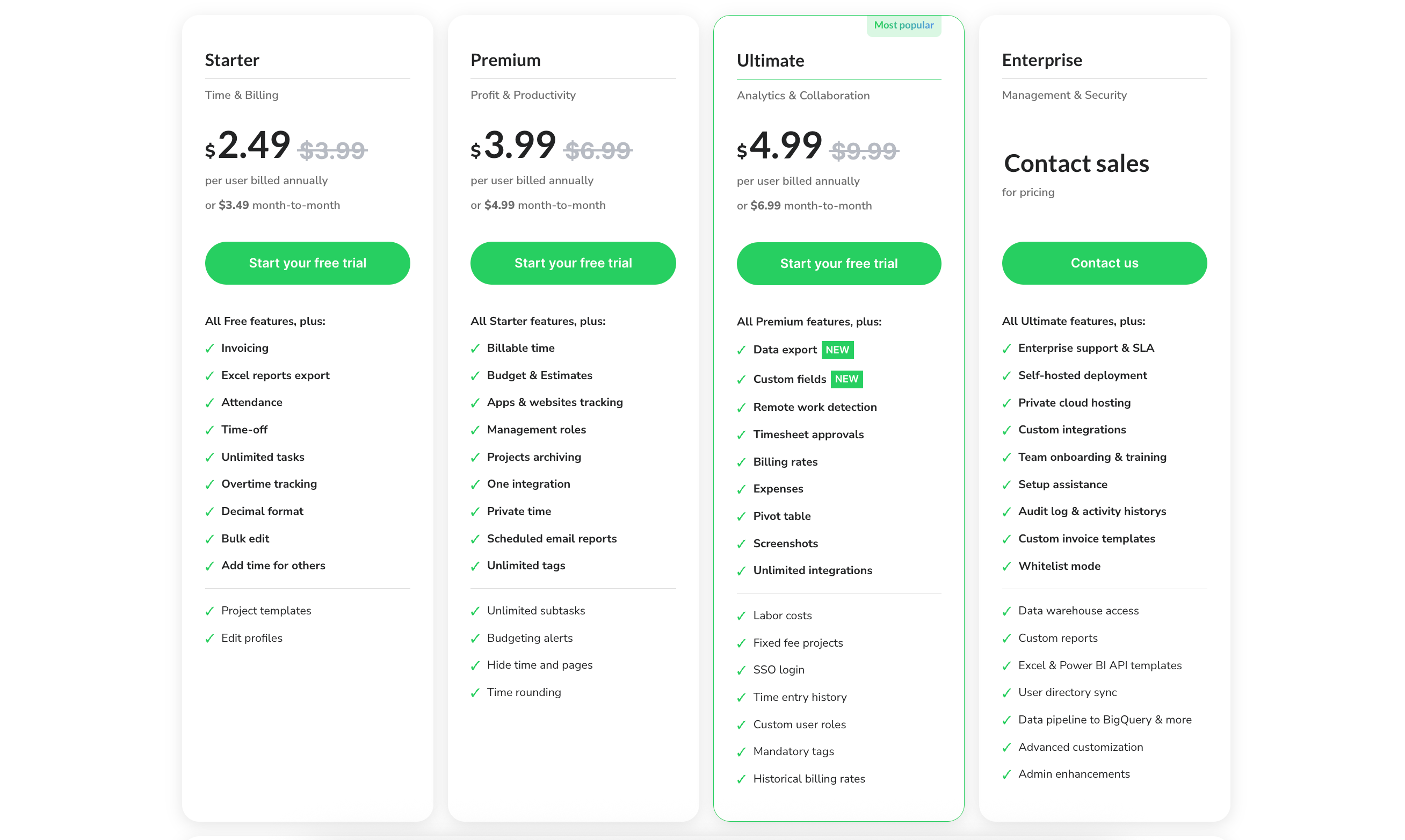
Image source: timecamp.com
Free plan
Price: Unlimited free users
- Automatic time tracking (core feature)
- Unlimited time entries and projects
- Desktop app (Windows, Mac, Linux)
- Mobile apps (iOS, Android)
- Basic reports (PDF, Excel export)
- Idle time detection
- Manual timesheets
- 7 tags per entry
- Email support
- Up to 18 months of message history
The free version of TimeCamp is suitable for small teams or freelancers who need basic time tracking features, but it comes with limitations compared to paid plans that offer advanced functionalities.
Best for: Solo freelancers, small teams testing the platform, projects with minimal billing complexity
Starter plan (Time & Billing)
Price: $3.99/user/month (billed annually) or $5.49/user/month (monthly billing)
- All Free plan features, plus:
- Billable and non-billable time categorization
- Invoice generation and templates
- Budget and estimate tracking per project
- 50 integrations (vs. limited on Free)
- Advanced reports (custom date ranges, filtering)
- Priority email support
Best for: Freelancers and small agencies needing basic invoicing
Premium plan (Profit & Productivity)
Price: $6.99/user/month (billed annually) or $9.99/user/month (monthly billing)
- All Starter features, plus additional project management tools:
- Auto tracking for automatic time recording and productivity monitoring
- Advanced analytics and profitability reports
- Project budget alerts
- Team activity monitoring (optional)
- Team workload reports
- Detailed productivity metrics
- Advanced permissions and role management
- One advanced integration (beyond standard 50)
Best for: Growing agencies and teams emphasizing productivity insights
Ultimate plan (Analytics & Collaboration)
Price: $9.99/user/month (billed annually) or $13.99/user/month (monthly billing)
- All Premium features, plus:
- Unlimited advanced integrations
- Accounting software integration (Xero, QuickBooks)
- Advanced activity monitoring with screenshots
- Custom billing rates by team member
- Revenue forecasting
- Multi-currency support
- Dedicated account manager (custom)
- API access for custom integrations
Best for: Larger agencies, professional services firms, teams requiring advanced customization
Hidden costs and considerations
- Integration setup: Some integrations require developer support; professional services may charge for complex workflows
- Implementation time: 1-2 hours for basic setup; full team configuration takes 4-8 hours
- Training investment: Teams unfamiliar with automatic tracking need a 30-60 minute orientation
- Payment processing: Invoices generated in TimeCamp; payment processing via your existing system
- Enterprise plan: The Enterprise plan is designed for companies needing advanced control, security, and scalability, with features like on-premise installations, dedicated SLA and support, and data warehousing. Pricing is not published and requires contacting sales for a custom quote.
- Contract terms: Monthly or annual billing; annual plans offer ~27% discount vs. monthly
Choose an all-in-one option for better time management: Introducing Lark
While TimeCamp excels at specialized time tracking and billing, many teams discover they need more than a single-purpose tool. Enter Lark—an all-in-one collaboration and work management platform that might better serve your complete business needs. Let's explore five key dimensions where Lark presents a compelling alternative to TimeCamp:
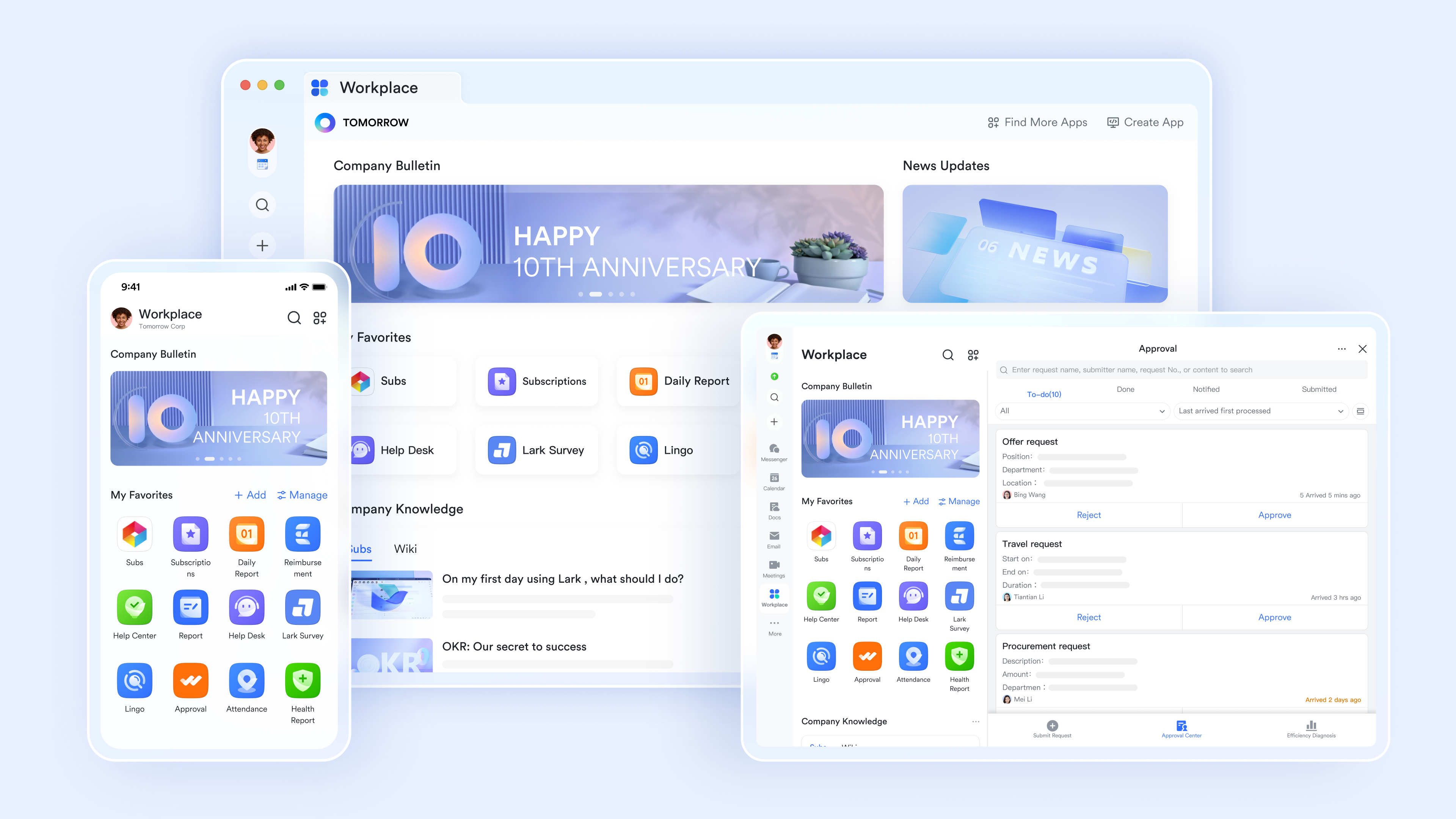
Dimension 1 - Unified attendance and time tracking
- Mobile and desktop clock-in/clock-out with GPS verification
- Automated attendance records and shift management
- Overtime tracking and alerts
- Leave request workflows with approval routing
- Integration with payroll systems
- Real-time attendance visibility for managers
How it compares to TimeCamp: TimeCamp focuses on billable hours for client projects; Lark Attendance focuses on employee time and compliance. If your business primarily tracks employee presence rather than client billing, Lark Attendance module delivers this natively without external tools.
Use case: A 50-person tech startup needs employee attendance tracking, task management, and team communication. With Lark, all three live on one platform. With TimeCamp, you'd add Lark for communication, another tool for tasks, and TimeCamp for client billing—three separate systems.
Dimension 2 - Built-in project and task management
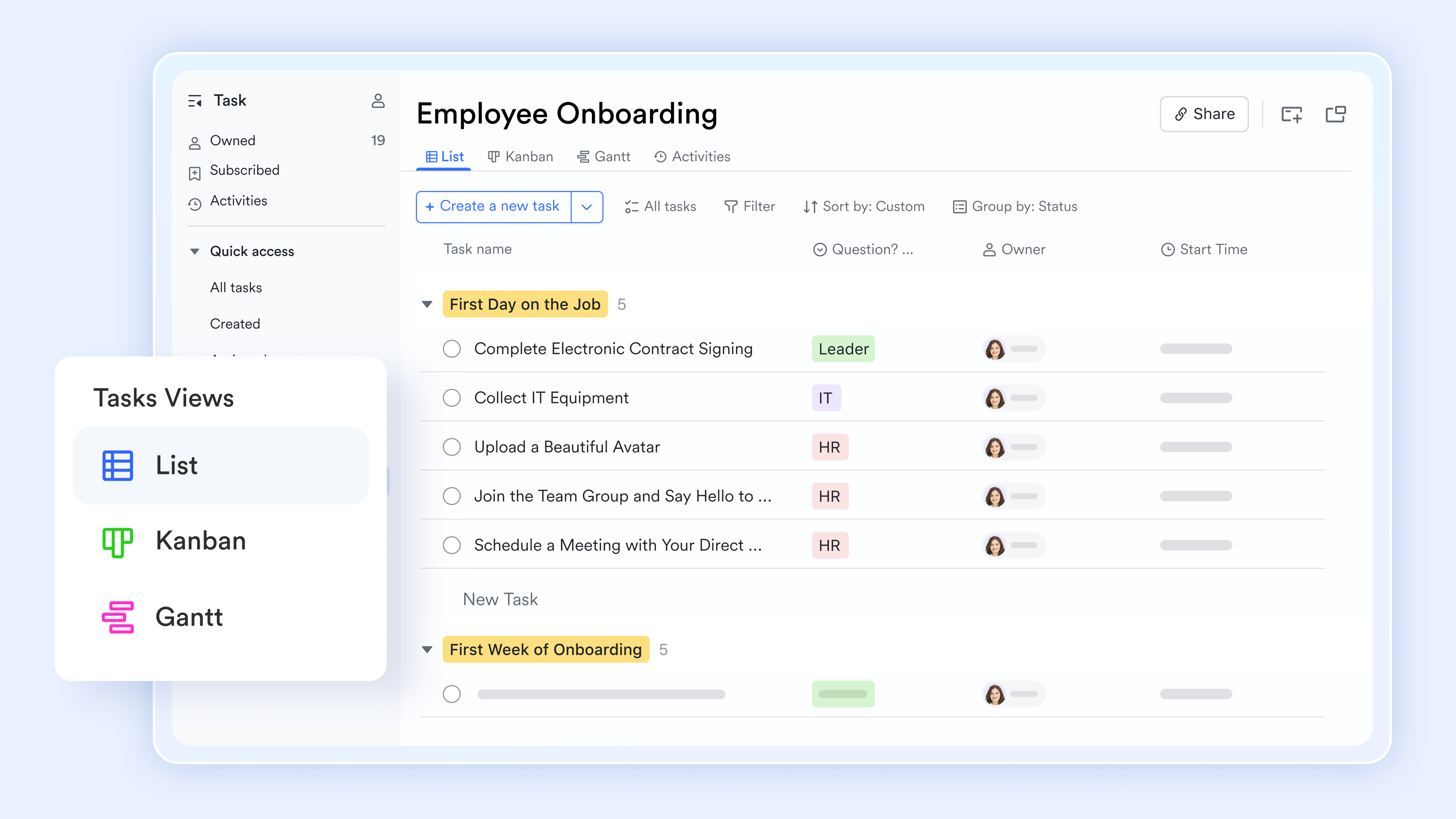
- Customizable task status, recurring settings, and priority levels
- Task dependencies and timeline views
- Automatic status notifications
- Time estimation per task
- Combination with calendar and reminders
- Team workload visibility
How it compares to TimeCamp: TimeCamp's project features are supplementary; Lark Tasks are first-class citizens. When your project planning and time tracking live together, insights flow naturally. Example: You can see time spent against original task estimates, identify overrunning projects immediately, and reassign work before deadlines slip.
Use case: A design agency manages client projects with inherent scope creep. Lark Tasks + Attendance provides complete project visibility without requiring separate project management software.
Dimension 3 - Communication and collaboration unified
Lark Messenger replaces Slack and builds it into the same platform where time and tasks live. Features include:
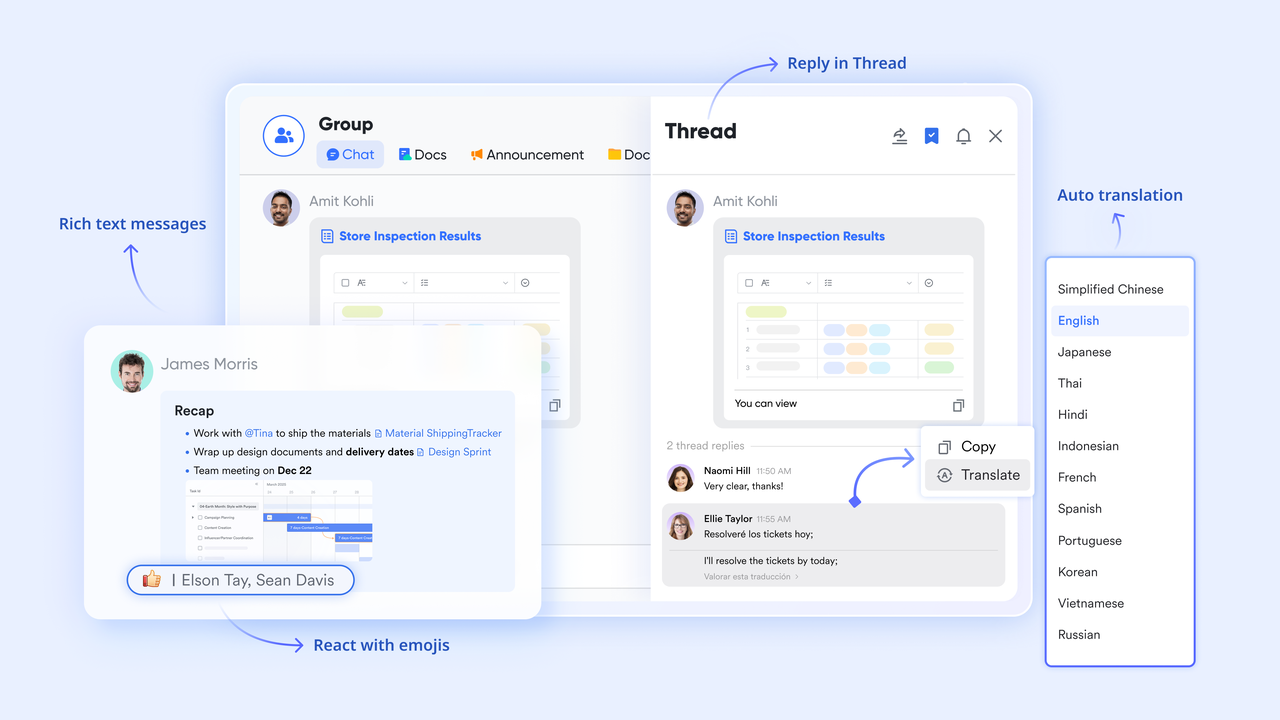
- Real-time team messaging and channels
- Document sharing and collaboration
- Linking with video meetings and screen sharing
- Threading for organized conversations
- Search across all communications
How it compares to TimeCamp: TimeCamp has no communication features, which might slow down team collaboration. With Lark, communication, time tracking, and project work exist in one ecosystem. When you discuss a deadline in Lark Messenger, you can directly link to the associated Lark Task and see the time invested. Context switching decreases; information architecture simplifies.
Dimension 4 - Data connectivity and unified insights
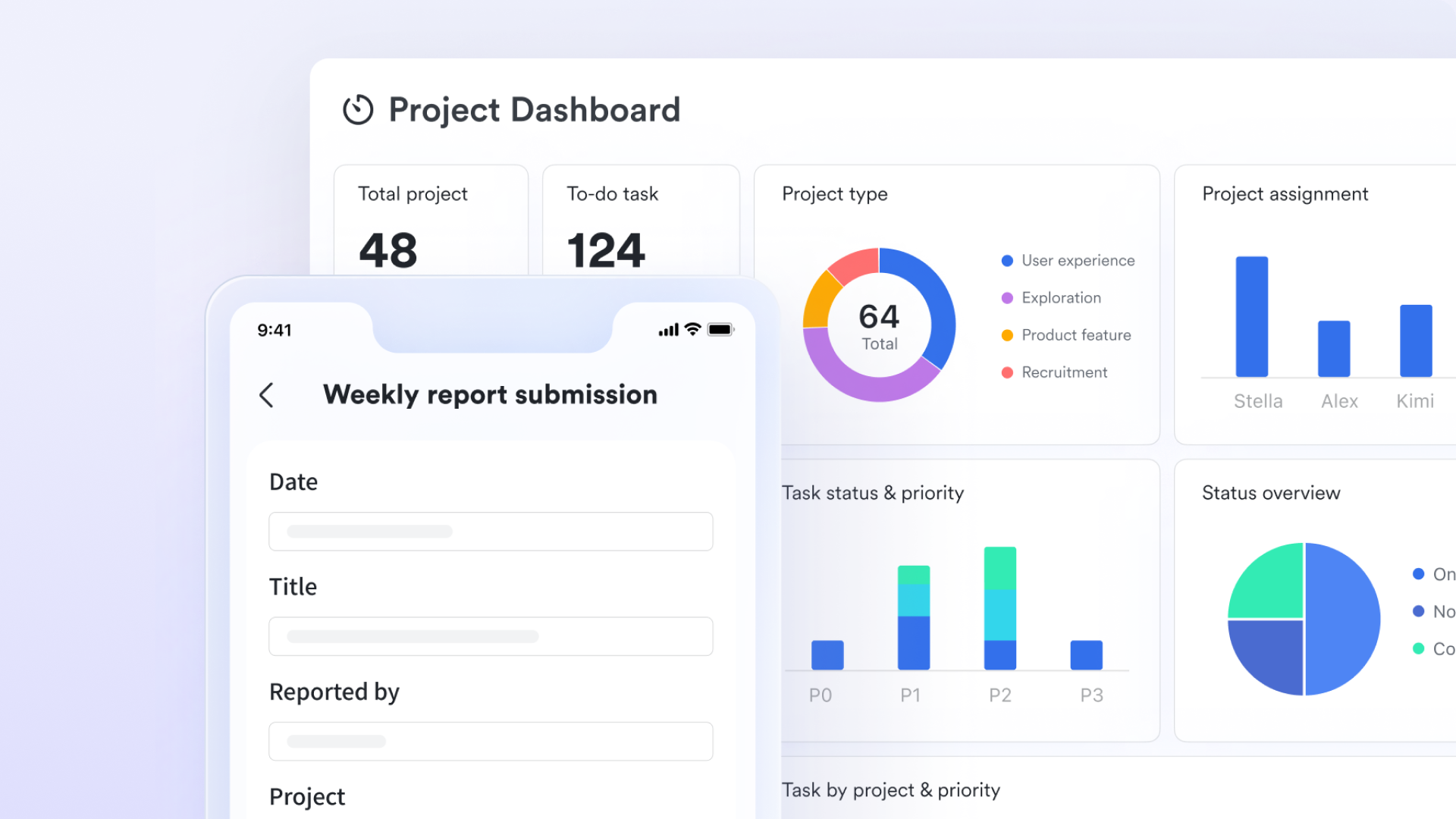
- Resource utilization by project and team member
- Bottleneck identification across customizable workflows
- Predictive capacity planning and visual monitoring of progress
How it compares to TimeCamp: TimeCamp delivers excellent time tracking and billing analytics. Lark delivers organizational insights that connect time, tasks, communication patterns, and HR data. When all data lives in one system, patterns emerge that cross-functional silos hide.
Final verdict: When to choose TimeCamp vs. Lark
Choose TimeCamp if:
✓ Your revenue depends on accurate hourly billing — Law firms, consultants, and agencies billing clients by the hour need TimeCamp's precision
✓ You have stable communication and project tools — Adding one specialized tool is simpler than replacing your entire stack
✓ Activity monitoring and productivity insights are critical — TimeCamp's keystroke tracking and detailed metrics win here
✓ You work with freelancers or contractors — TimeCamp's invoicing and billing is built for this use case
✓ You need to understand project profitability — Revenue per project, profit margins by client—TimeCamp excels
TimeCamp revenue driver: Accurate billing recovers 3-5 billable hours per person monthly. For a 20-person agency billing $150/hour, this equals $9,000-$15,000 monthly revenue recovery. TimeCamp's cost ($100-200/month) pays for itself repeatedly.
Choose Lark if:
✓ Your team is primarily employees (not contractors) — Attendance + other built-in functions become your primary need
✓ You want one platform for communication, projects, time, and HR — Lark consolidates, reduces tool fatigue, and learning curves
✓ Budget efficiency matters — $12/user for integrated suite beats $25-40/user for multiple specialized tools
✓ Unified data insights are valuable — Connecting communication patterns, task progress, time spent, and productivity
✓ You want to eliminate tool sprawl — Managing one vendor relationship, one login, one interface for 90% of business needs
Lark as ROI driver: Productivity gains from consolidated workflows (less context switching, integrated communication) and cost savings from replacing 3-4 tools.
Try Lark's savings calculator: Switching to Lark's Pro plan can lead to significant cost savings— for example, a 100-employee company using Slack, Google Workspace, and Airtable could save approximately $25,200 annually by consolidating their tools with Lark.
Note: For more information, you can refer to Google Workspace Pricing and Google Workspace alternatives.














How many employees work at your company?
By number of people
1
20
500
5000+
1000
Which tools do you use?

Estimates are for reference only, contact us for an official quote

Conclusion
After comprehensive analysis, here's what matters: TimeCamp solves a specific problem exceptionally well—billing accuracy and revenue recovery. If that's your primary need, TimeCamp is among the best tools available. The free plan means zero risk to test it. However, if your priority is unified team management, employee attendance tracking, and integrated workflows, Lark delivers more value. It's not that Lark is "better" than TimeCamp; they solve different problems.
FAQs
How secure is TimeCamp data?
TimeCamp is ISO27001 certified and GDPR compliant, meeting international security standards. The platform uses SSL/TLS encryption for data in transit and encryption at rest for stored data. All customer information is protected by industry-standard encryption algorithms. Enterprise-level security ensures your business data remains confidential and secure.
Does TimeCamp track attendance?
Yes, TimeCamp functions as an attendance tracking system. Features include clock-in/out functionality, automatic time recording based on activity detection, time-off management, real-time attendance visibility for managers, and compliance reports. However, TimeCamp focuses on billable hours, while Lark Attendance emphasizes HR and payroll integration for employee management.
What is the best free time tracker app?
TimeCamp's free tier ranks highly with unlimited users, unlimited projects, automatic tracking, desktop/mobile apps, and basic invoicing—all free forever. Clockify offers unlimited features and simplicity. Lark provides integrated chat, docs, tasks, and attendance. The best choice depends on whether you prioritize specialized time tracking or unified team management.
Does TimeCamp take screenshots?
Yes, but only if you enable it—screenshot capture is optional and configurable. Administrators can set frequency and enable/disable per employee. Screenshots verify active work and prevent false billing. However,it requires employee transparency and consent. Many teams disable this feature for privacy concerns. Private work periods can be marked to exclude from monitoring.
Is TimeCamp truly free?
The free plan includes unlimited users, automatic time tracking, unlimited projects, desktop and mobile apps, and basic reporting—forever at zero cost. Paid plans start at $2.49/user/month with no setup fees or hidden charges. You can trial paid plans by connecting with their sales.
Related reading
Table of contents
Start using Lark today

Manage all your work in one place
Boost team efficiency by 10x
Save up to 70% on software costs
Table of contents
Start using Lark today
Manage all your work in one place
Boost team efficiency by 10x
Save up to 70% on software costs
Keep reading



Lark recognized in 2023 Gartner® Collaborative Content Workspaces and Meeting Solutions reports
Lark, the global superapp for productivity, is delighted to announce it receives recognition in the Gartner's 2023 Innovation Insight for Collaborative Content Workspaces and Market Guide for Meeting Solutions.





2026 Lark Technologies Pte. Ltd.
Headquartered in Singapore with offices worldwide.






Explore: