As your team grows and projects pile up, choosing the right project management tool becomes crucial. Many teams find themselves comparing Trello vs Smartsheet, balancing visual boards against structured project plans. Adding another standalone app can fragment collaboration even more.
This is why many look for an all-in-one collaboration platform that integrates chat, docs, calendars, and tasks seamlessly. In this guide, I'll explore the strengths and limitations of Trello and Smartsheet and provide insights into a powerful alternative like Lark that simplifies decision-making and daily workflows. My aim is to help you align the right solution with your team's needs, considering how the Trello vs Smartsheet comparison fits into the bigger picture.
What is Trello?
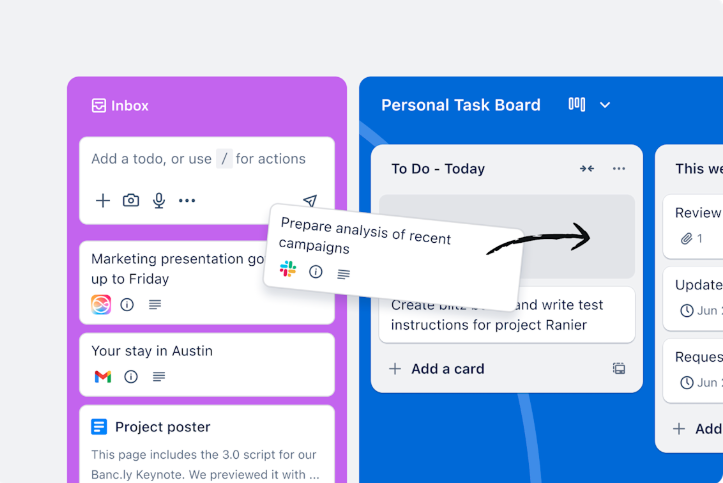
Image source: trello.com
is a tool built around the simple idea of boards, lists, and cards.
- Each board represents a project or workflow
- Each list represents a stage or category
- Each card represents a task or item of work
You move cards across lists – for example, from "Backlog" to "In progress" to "Done" – as work moves forward. This makes it very easy to see the state of work at a glance, even for team members who have never used a project tool before.
On top of that basic structure, Trello offers:
- Checklists, due dates, labels
- Attachments and comments
- Alternate views (calendar, timeline) on paid plans
- Power‑Ups and integrations (Slack, Google Drive, Jira, and many others)
Where Trello really shines is in small to mid‑sized teams with relatively simple, repeatable workflows. Marketing teams use it for content calendars; product teams for backlogs and sprints; operations teams for ticket‑like queues. People appreciate how quickly they can create a shared board, invite colleagues, and see work taking shape in a way that feels intuitive.
However, Trello's strengths can also become its limitations:
- As the number of boards and cards grows, it becomes harder to keep information clean and standardized.
- Cross‑project reporting is limited without extra tools.
- Managing dependencies, resource allocation, and budgets is challenging.
- Standardizing processes across many boards often requires strict conventions and a lot of discipline.
When teams hit these constraints, they often begin a more serious, carefully considered smartsheet vs trello comparison and start to look at grid‑based tools that handle complexity more naturally.
What is Smartsheet?
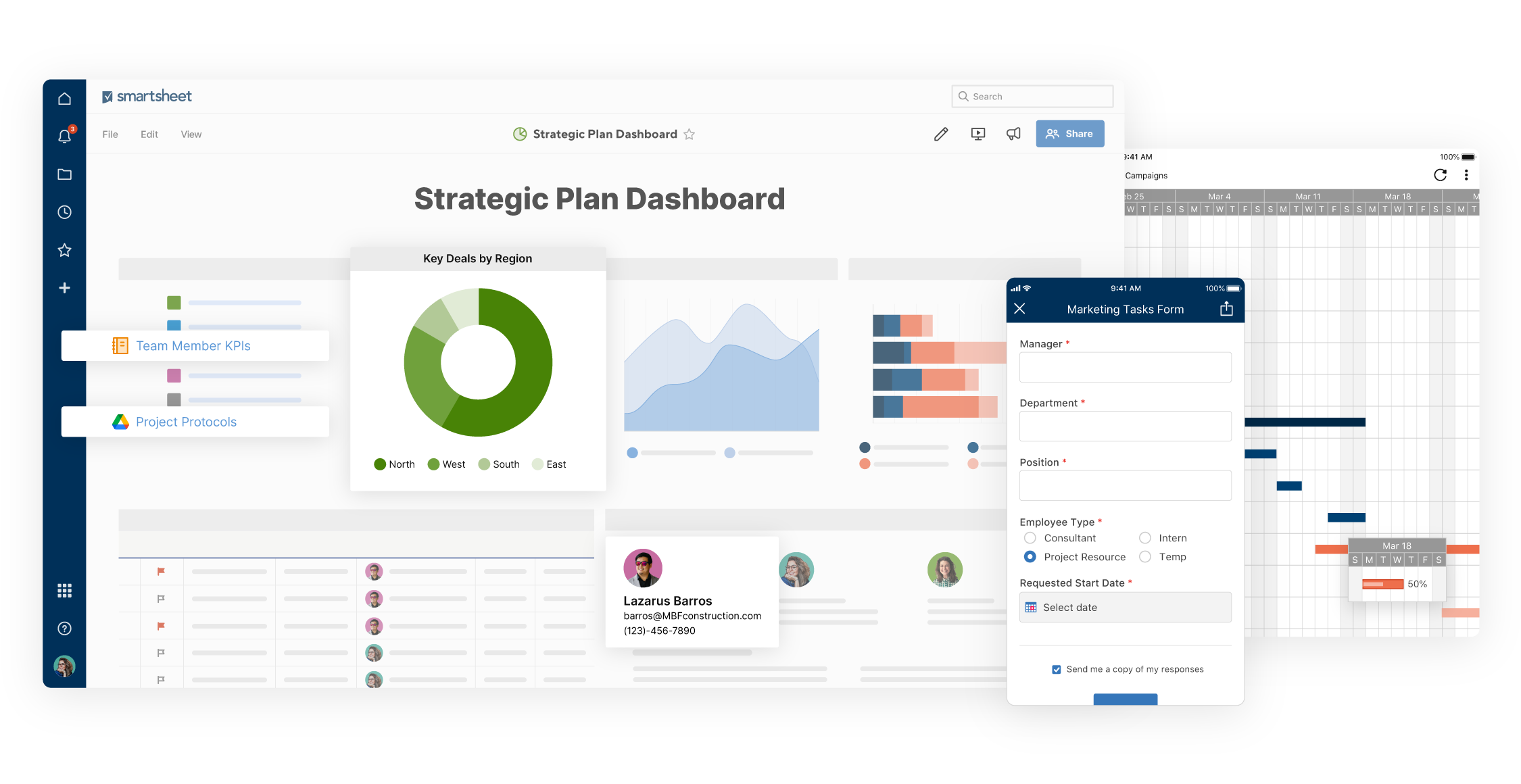
Image source: smartsheet.com
is a cloud‑based platform that looks like a spreadsheet at first glance, but is built to handle projects, workflows, and portfolios.
Each sheet resembles an Excel table, with:
- Rows for tasks or records
- Columns for fields like assignee, status, start and end dates, priority, etc.
- Built‑in support for formulas, dependencies, and summary rows
On top of that grid, you can switch to:
- for timelines and dependencies
- Card view for a more board‑like experience
- Calendar view for date‑driven planning
The power of Smartsheet lies in how it leverages that grid foundation. You can:
- Define task dependencies and visualize critical paths
- Set up automated alerts and approval workflows
- Combine data from multiple sheets into reports and dashboards
This makes Smartsheet especially appealing to PMOs, operations, IT, and other groups managing cross‑functional projects that absolutely cannot slip. For organizations already using spreadsheets to run projects, Smartsheet feels like a natural evolution.
Smartsheet also brings:
- Pre‑built templates for common scenarios
- Business and enterprise features for governance and security
- Deeper integrations with enterprise systems
That said, Smartsheet isn't without challenges:
- The spreadsheet‑like interface can be intimidating for users who don't think in rows and columns.
- Setting up cross‑sheet formulas, , and dashboards often requires a "Smartsheet champion."
- For small teams that just need a shared board, Smartsheet can feel like overkill.
These are exactly the kinds of trade‑offs we need to examine when thinking honestly about smartsheet vs trello for your specific context.
Smartsheet vs Trello: Quick comparison table
Here is a high‑level comparison of Trello and Smartsheet, plus a preview of how a built‑in workspace like Lark compares:
This table clearly indicates that Trello and Smartsheet cater to different styles of work: Trello emphasizes visual simplicity and adaptability, while Smartsheet focuses on structured project management and detailed reporting.
Smartsheet vs Trello: Feature comparison
Now that we understand what each tool is aiming for, let's compare them across the areas that usually matter most:
User interface and ease of use
Trello
- Opens into a kanban board with lists and cards.
- Drag-and-drop makes changing status feel natural.
- Uses familiar language: "To do," "Doing," "Done."
- Most users can start without training.
This low barrier to entry makes Trello a popular choice for teams seeking quick value without formal training.
Smartsheet
- Opens into a grid resembling a spreadsheet.
- Columns and rows suggest structure and control.
- Project managers and analysts feel at home.
- Non-spreadsheet users may feel overwhelmed at first.
- For these users, the initial learning curve can be steeper, but adoption improves over time with support.
Where both tools fall short
Both tools struggle to blend visual simplicity with structured data management, leaving users looking for a hybrid solution that fulfills different workflow needs.
Task management and project management features
Trello
Trello organizes work using a card-based system within boards, ideal for visualizing workflows. Its core characteristics are:
- Each task is a card that can hold details like descriptions, checklists, due dates, and attachments.
- by simply dragging cards between lists (e.g., "To Do", "Doing", "Done").
- Its user-friendly interface excels at turning informal plans into clearly trackable tasks, making it perfect for agile teams and visual planners.
Smartsheet
Smartsheet uses a spreadsheet-like interface designed for and control. Its key features include:
- Tasks are represented as rows within a sheet, with columns defining fields like owner, status, and deadlines.
- It supports built-in task dependencies, Gantt chart views, and critical path analysis for detailed scheduling.
- It is built for greater control and scalability, catering to more complex projects that require detailed planning and governance.
Where both tools fall short
However, both tools have their drawbacks. Trello may struggle with advanced dependency tracking, resource allocation, and providing consolidated views across multiple boards, which can hinder larger project management. Meanwhile, Smartsheet's complexity can overwhelm some users, especially those who prefer a simpler interface. Ultimately, the choice between Trello and Smartsheet hinges on the trade-off between simplicity and governance: Trello simplifies task management, while Smartsheet enhances control and scalability.
Automation and workflows
Trello
Trello's Butler feature allows for:
- Rules like marking due dates complete upon task completion.
- Alerts for approaching deadlines.
- Automatic task assignment when specific labels are added.
This helps maintain board organization but still relies on external tools for complex workflows.
Smartsheet
Smartsheet offers cross-sheet , including:
- Alerts for date changes or identified risks.
- Approval requests triggered by conditions.
- Automatic row movement based on defined rules.
This automation transforms static plans into adaptable systems.
Where both tools fall short
Both tools often lack seamless integration across collaboration areas such as chat, documentation, and approvals, requiring additional applications for comprehensive workflow management.
Reporting and dashboards
Trello
Trello provides basic reporting capabilities out of the box, including:
- Basic stats and filtering
- Power-Ups for limited charting
However, leadership often needs to export data for advanced analysis, which can limit effective project oversight.
Smartsheet
Smartsheet offers robust such as:
- Summary reports that aggregate data from multiple sheets
- Dashboards with charts and metrics
While these features are powerful, organizations may still rely on exports for deeper analysis, indicating a dependency on various information sources.
Where both tools fall short
Both Trello and Smartsheet often require additional tools for comprehensive reporting, documentation, and communication, leading to fragmented . Emerging all-in-one platforms seek to simplify these processes by integrating these functions into a single, cohesive environment, reducing the need for context-switching.
Integrations and power-ups
Trello
Trello integrates with a variety of tools, including:
- Time-tracking applications
- CRMs and development platforms
This flexibility enhances usability, but it also introduces extra maintenance and the risk of data duplication.
Smartsheet
Smartsheet seamlessly integrates with enterprise tools, such as:
It is designed to fit within existing systems of record, benefiting organizations with established IT frameworks.
Where both tools fall short
Both Trello and Smartsheet typically require additional applications for chat, documentation, and meetings, leading to a fragmented project environment. All-in-one platforms, however, provide built-in collaboration features to resolve this issue more efficiently.
Embark on your journey with fewer cons
Smartsheet vs Trello: Pricing comparison
Pricing is often a key factor in decision-making. While list prices are important, they only provide part of the picture. Below is an overview of the pricing structures for Trello and Smartsheet, highlighting what really matters.
Quick view of plans
Trello pricing
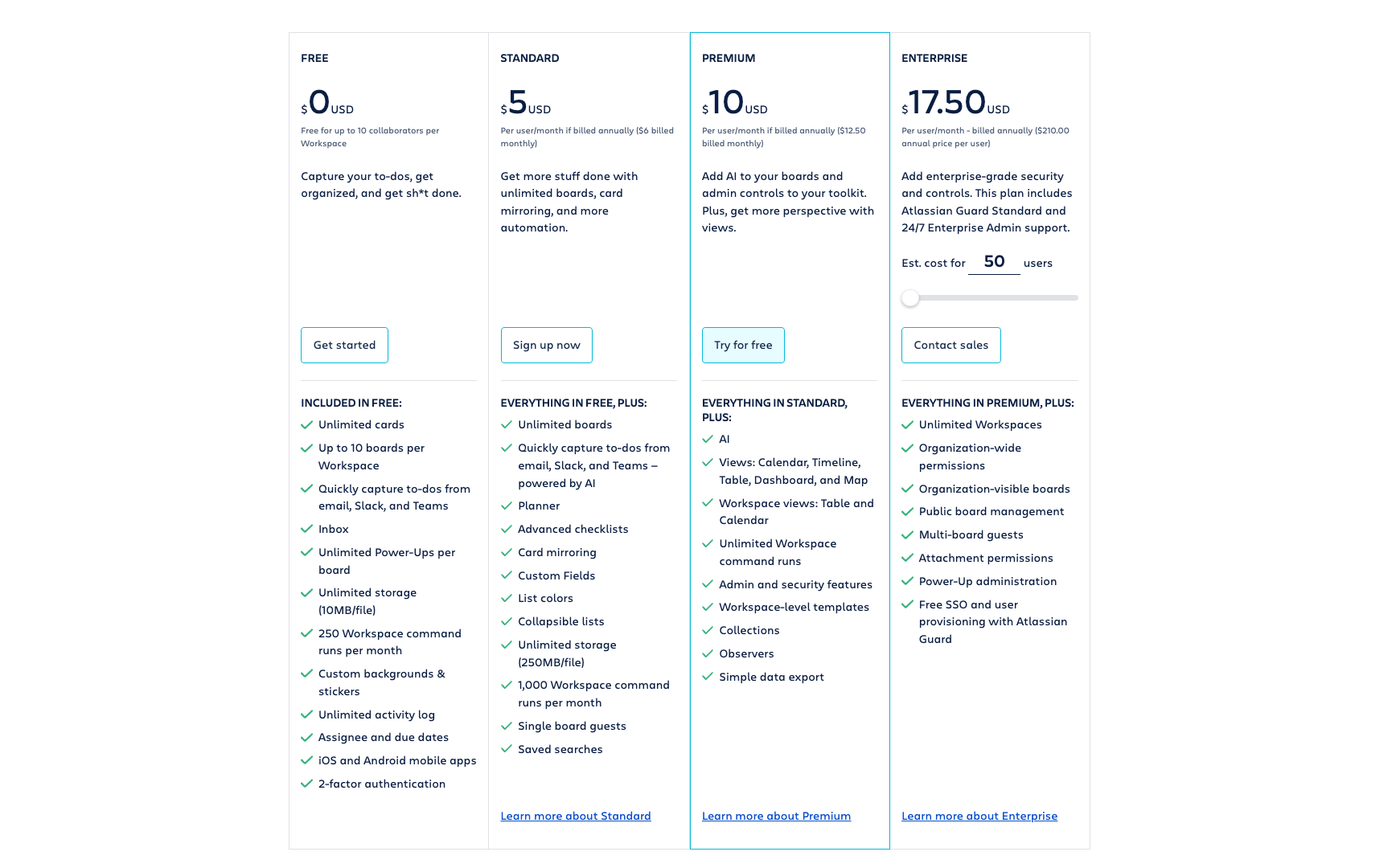
Image source: trello.com
- Free Plan: $0; Up to 10 boards per workspace; 10MB file limit per attachment; Unlimited cards; Basic task management; Inbox for tasks; Unlimited Power-Ups per board; Workspace command runs: 250/month; iOS and Android mobile apps; Two-factor authentication for security.
- Standard Plan: $5 per user/month(billed annually); Unlimited boards; 250MB file limit per attachment; Unlimited cards; Enhanced task management features (Planner, advanced checklists, custom fields); Card mirroring; Workspace command runs: 1,000/month; AI-powered to-do capture; Single board guests; List colors; Collapsible lists; Saved searches.
- Premium Plan: $10 per user/month(billed annually); Unlimited boards; 250MB file limit per attachment; Unlimited cards; Advanced task management features; Additional view options (Calendar, Timeline, Dashboard, Map); Workspace command runs: unlimited; Enhanced admin and security features; Workspace-level templates; Collections for grouping boards; Observers for task tracking; Simple data export options.
- Enterprise Plan: Custom pricing; $17.5/user/month for 50 users; Unlimited boards and workspaces; Unlimited file limit per attachment; Organization-wide permissions; Organization-visible boards; Advanced collaboration features; Public board management; Multi-board guests; Attachment permissions; Power-Up administration; Free SSO and user provisioning with Atlassian Guard.
Information source: trello.com
Update time: 2025-12-04
Smartsheet pricing
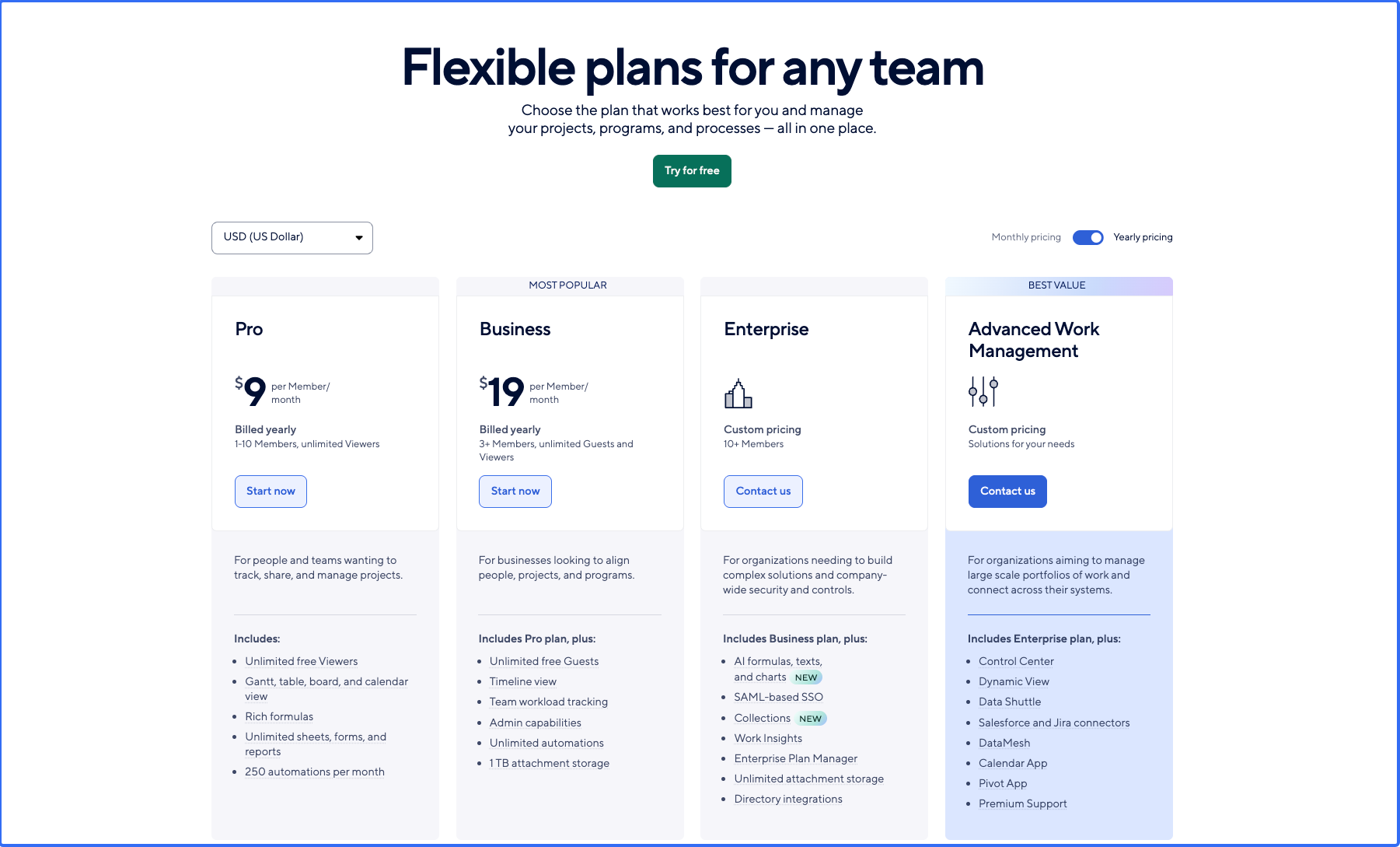
Image source: smartsheet.com
As of the latest information available, Smartsheet offers the following pricing tiers:
Pro plan: $9 per user/month (billed annually)
- Focused on individuals and teams who need basic functionality.
- Includes features like grid, card, and calendar views, plus integrations.
Business plan: $19 per user/month (billed annually)
- Best suited for small to medium teams.
- All individual plan features plus advanced collaboration and reporting capabilities, resource management, and API access.
Enterprise plan: Custom pricing based on organizational needs.
- Designed for large organizations with complex project management requirements.
- Offers advanced security features, user management, and the ability to create custom applications.
Premier & enterprise solutions: Additional pricing options are available for organizations needing tailored solutions with dedicated support and advanced features.
Looking beyond price tags: Total cost of ownership
A comprehensive Smartsheet vs Trello pricing comparison must look beyond subscription fees. Consider the following:
- Configuration, training, and maintenance requirements
- Additional applications required for a complete project environment
- Risks and costs if adoption fails due to complexity or simplicity
For Trello, the total cost of ownership (TCO) includes:
- Costs of essential Power-Ups and third-party tools
- Time spent managing and cleaning up boards
- Effort put into standardizing Trello usage across teams
For Smartsheet, TCO includes:
- Plan fees for core users and collaborators
- Setup and maintenance of sheets, reports, and dashboards
- Training and change management expenses
- Costs of parallel collaboration tools (chat, docs, meetings, etc.)
Tool sprawl is also a consideration. When project management tools sit alongside separate chat, docs, calendar, email, and meeting applications, you incur costs for a fragmented environment.
All-in-one collaboration suites can alleviate this problem. By connecting chat, docs, calendars, meetings, tasks, and databases within a single product, such suites reduce both subscription costs and the cognitive load from constantly switching between multiple tools.
Try a great bargain with more features
Smartsheet vs Trello: Which is better for your team?
Now comes the real question: Given everything we've covered, which tool is actually better for your team? The answer depends less on abstract pros and cons, and more on your concrete situation.
Common scenarios: Small teams, growing companies, and enterprises
Scenario 1:
- Need: Easy setup, visual clarity, minimal admin
- Culture: Informal, fast‑moving, highly collaborative
In this world, Trello is often the most natural choice. You can create a board in minutes, invite teammates, and start moving cards. If your projects are relatively simple and you mainly need visibility into who is doing what, Trello offers a low‑friction way to get organized.
Scenario 2: Growing organizations with multi‑team projects
- Need: Dependencies, cross‑team coordination, dashboards
- Culture: More formal processes emerging, leadership expectations rising
Here, Smartsheet begins to shine. You might have programs that cross marketing, sales, operations, and IT, with dependencies and risk that can't be managed in a single kanban board. Smartsheet's grid, Gantt, and dashboards help create a shared, structured view of complex work.
Scenario 3: Enterprises with formal PMOs
- Need: Governance, compliance, standardized methods
- Culture: Established processes, strict reporting requirements
- Likely fit: Smartsheet as backbone, Trello at team edges
For enterprises with PMOs and strict expectations around reporting, Smartsheet can become the central work management layer. Trello might still play a role at the team level, but Smartsheet is more likely to be the system of record.
Lark as the best alternative to Trello and Smartsheet
So, where does fit into the landscape of like Trello and Smartsheet? Both Trello and Smartsheet address specific needs but can sometimes leave teams grappling with fragmented workflows and multiple disjointed applications for communication, collaboration, and . This is where Lark emerges as a modern, all-in-one collaboration platform designed to integrate essential tools from the outset.
With Lark, core functionalities such as messaging, video conferencing, automatic meeting notes, document creation, email, and calendar management coexist in a single workspace. Additionally, it offers a no-code database for flexible data management, structured workflows through forms and approvals, and a system for tracking goals and outcomes. By bringing these tools together into a cohesive environment, Lark eliminates the need to piece together various applications, enabling teams to collaborate more effectively and streamline their project management processes.
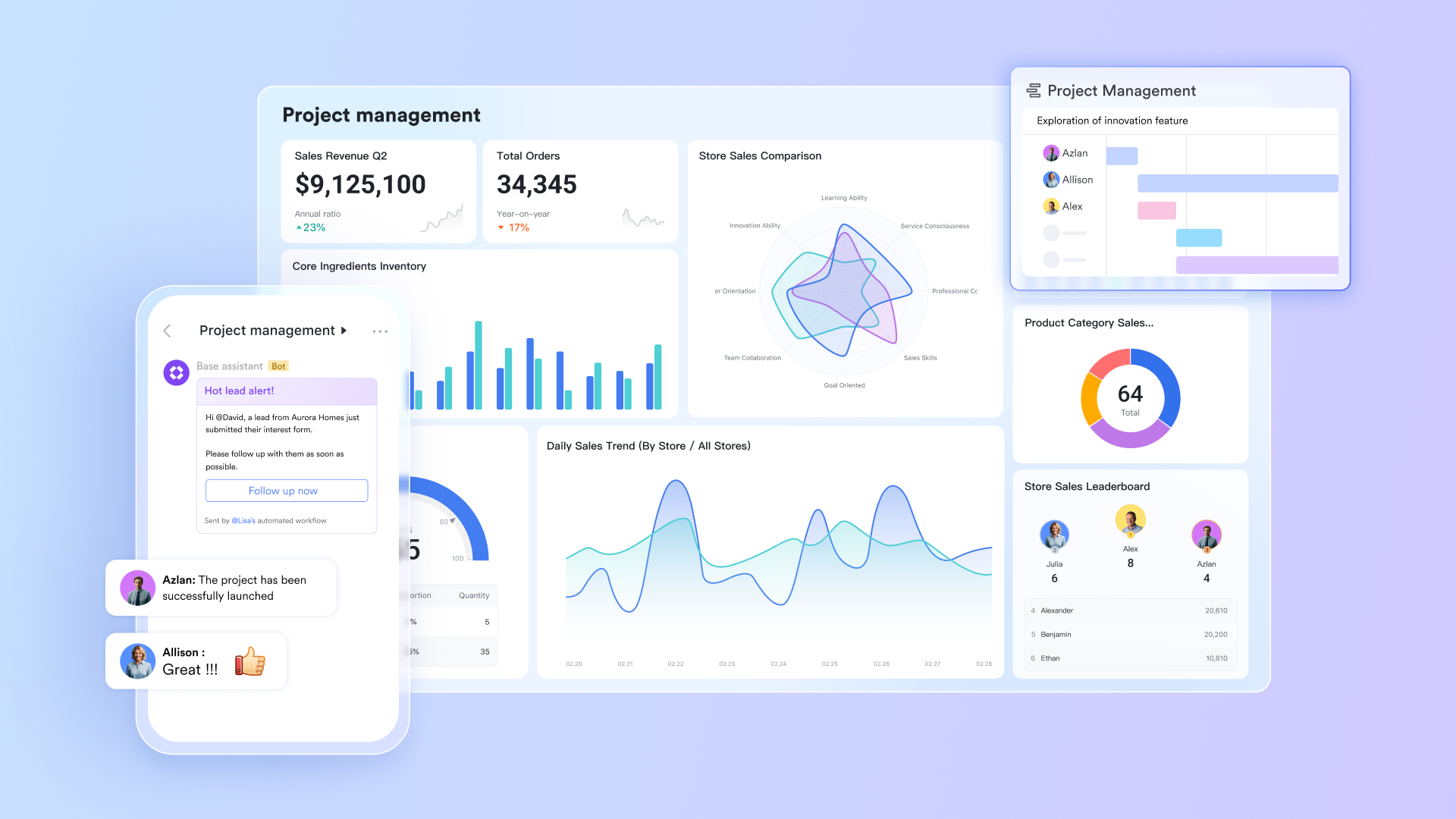
Key features of Lark that surpass Trello and Smartsheet
: No-code project management made easy
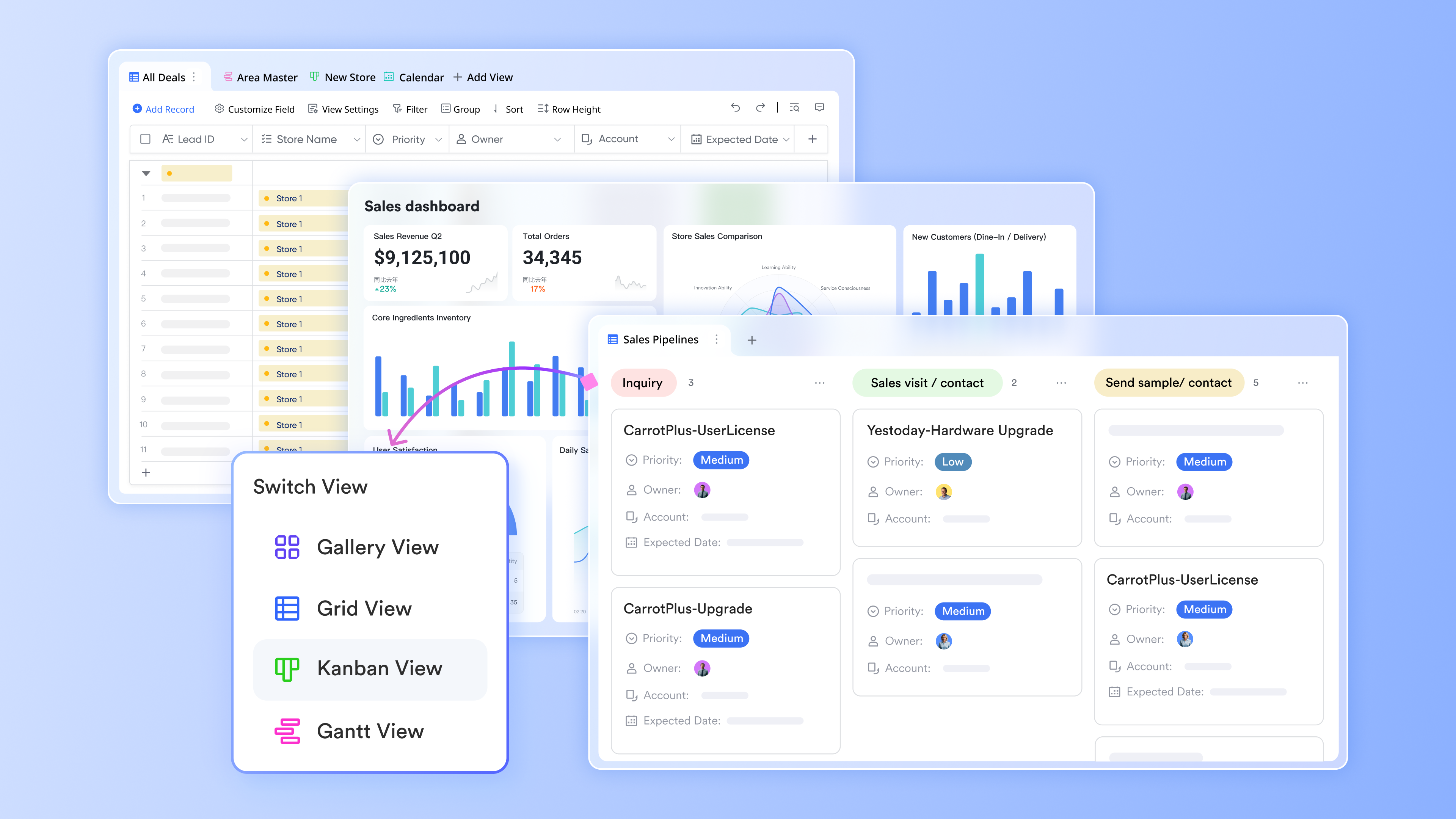
Lark Base is a no-code database that revolutionizes how teams manage their projects and workflows. By addressing the shortcomings of tools like Trello and Smartsheet, Lark Base allows users to create structured records for tasks, projects, requests, and more, making it a versatile platform for .
- Customizable fields: Users can define unique fields and relationships that are specifically tailored to their project needs. This flexibility overcomes Trello's limitations in managing complex dependencies and resource allocation.
- Multiple views: Lark Base offers various visualization options, including tables, kanban boards, calendars, and more. This contrasts with Trello's simplistic card-based system and Smartsheet's spreadsheet-heavy approach, providing enhanced clarity for all types of projects.
- Combination with other tools: Users can link records to Lark Docs, Wiki pages, and discussions, ensuring all aspects of a project are connected in one place. This combination eliminates the need for external tools, addressing the fragmentation often experienced by Trello and Smartsheet users.
: Seamless team communication in one place
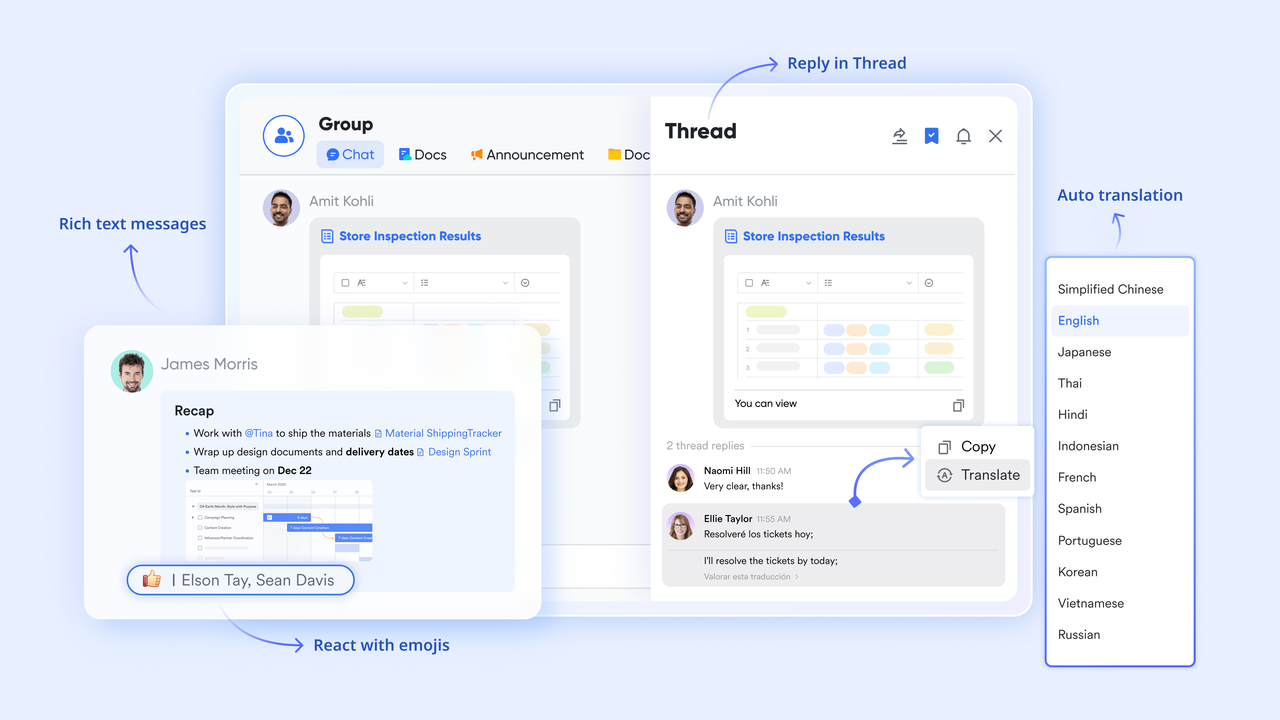
Lark's Messenger facilitates seamless communication, allowing teams to discuss tasks in channels or group chats. This combination eliminates the need for separate messaging platforms, a common drawback for Trello users who frequently juggle various communication tools.
: Collaborative document creation and sharing
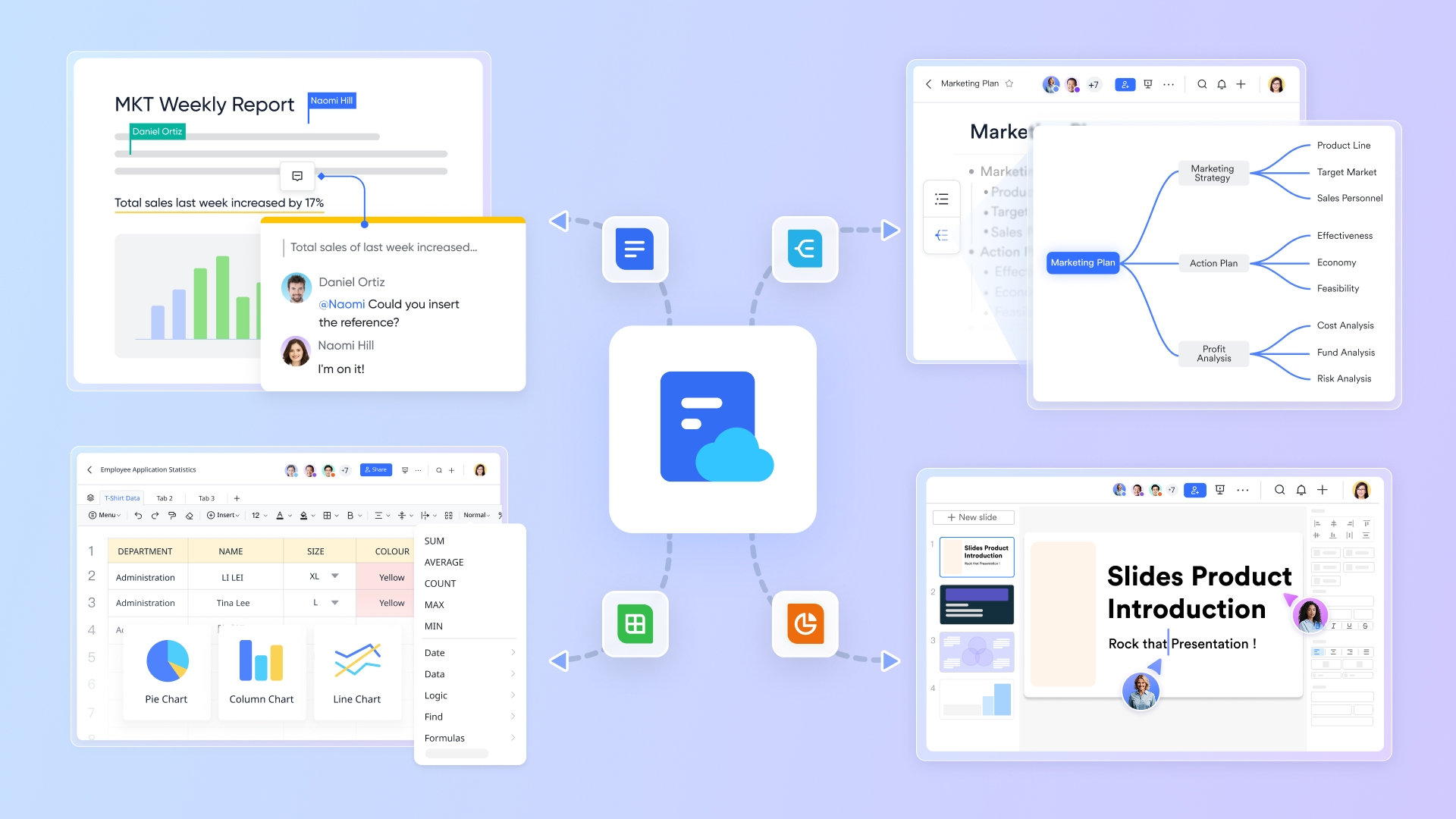
With Lark Docs, teams can draft specifications and project plans, publishing them directly to the Wiki for easy sharing. This ensures critical documents are readily accessible to everyone, mitigating the reporting and documentation challenges faced in both Trello and Smartsheet environments.
: Efficient video calls with automated notes
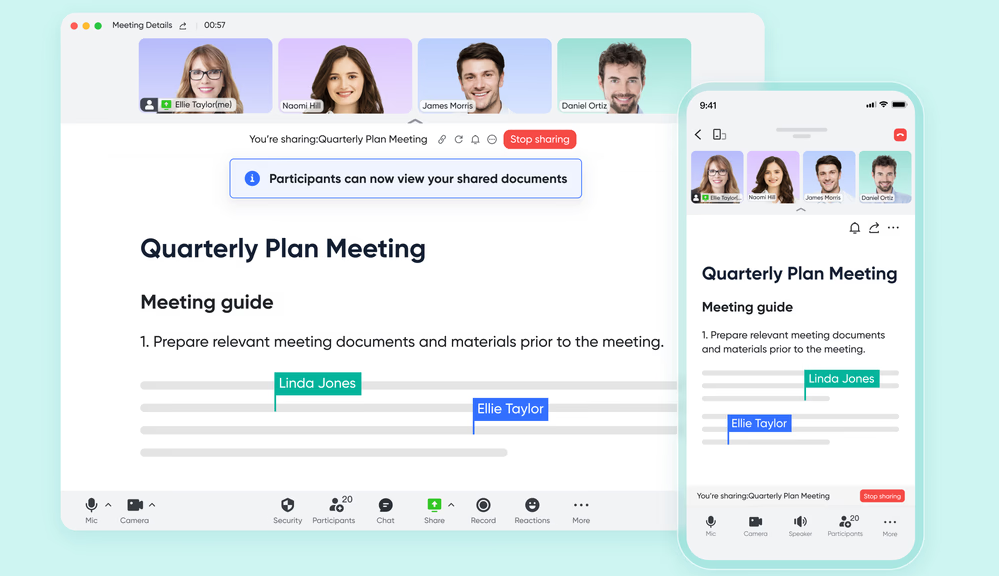
Lark's video conferencing tool supports efficient meetings, with AI Meeting Notes automatically capturing important decisions and action items. This feature ensures that no crucial details are overlooked, addressing Smartsheet's complexity in managing meeting outcomes and follow-ups.
Lark Calendar: Streamlined scheduling and deadline tracking
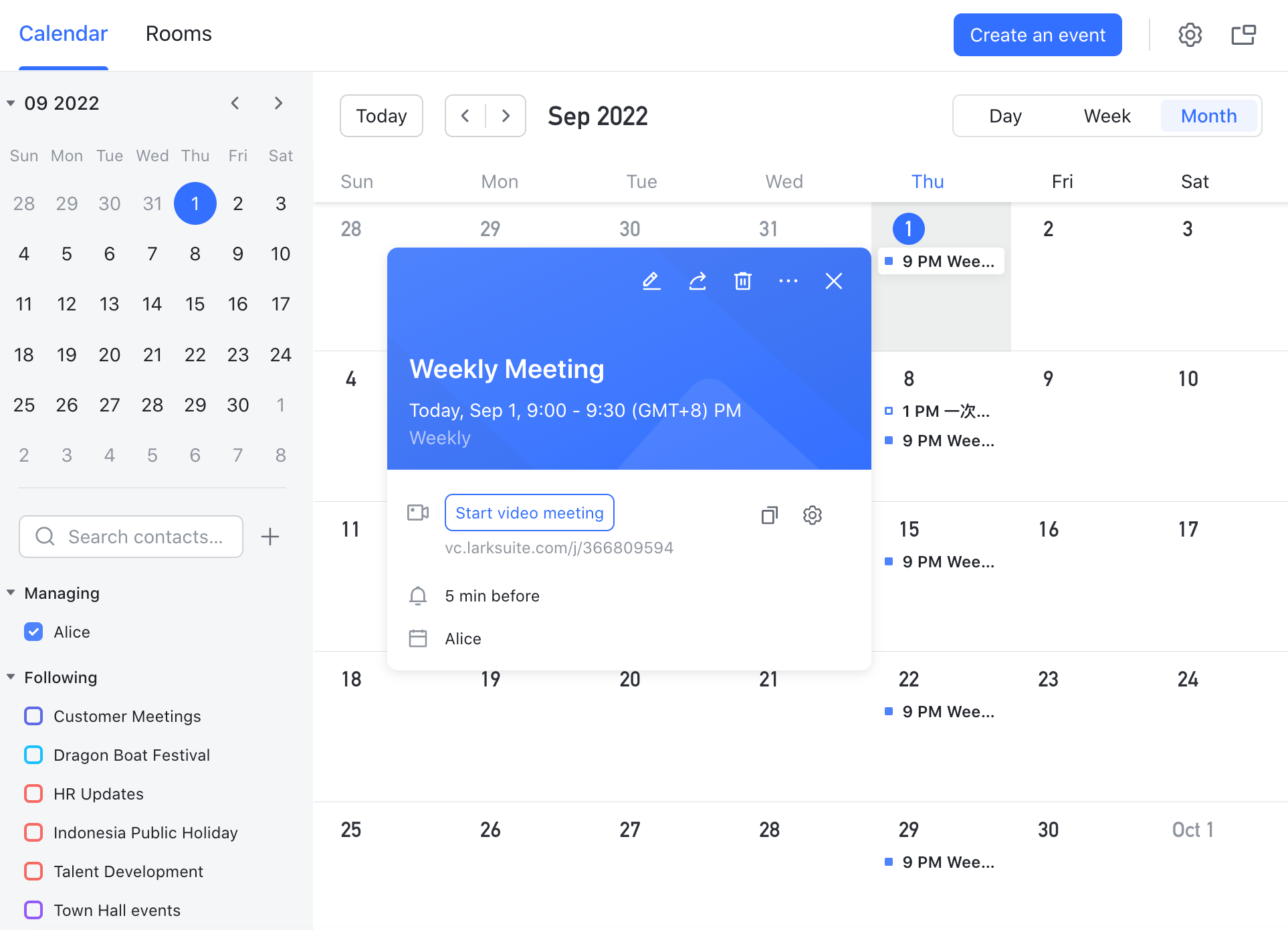
Lark Calendar allows for effective project timeline and , sending relevant updates via Mail to keep everyone aligned on deadlines. This is particularly beneficial compared to the limited scheduling capabilities of Trello and the more cumbersome setup often required in Smartsheet.
:
- Starter plan: Free forever plan with 11 powerful tools for up to 20 users, 100GB storage, 1,000 automation runs, AI translations, and more. No credit card needed.
- Basic plan: $6/user/month (billed annually) for up to 500 users. Includes everything in Starter plus unlimited message history, 5TB storage, 1,000 automation runs, and more. Some users may need to to purchase.
- Pro plan: $12/user/month (billed annually) for up to 500 users. Includes everything in Basic plus group calling for up to 500 attendees, 15TB storage, 50,000 automation runs, and more.
- Enterprise plan: for custom pricing. Supports unlimited users and includes advanced automation, security, compliance, and management features.
For small teams with simple communication needs

18 months message history
1000 Base automation runs/month
2000 rows per table in Base
Most POPULAR
For companies with comprehensive collaboration and management needs
Unlimited message history
500-participant video meetings
50k Base automation runs/month
20k rows per table in Base
For large companies with advanced security and organizational management needs
Get a personalized demo and pricing
Unlimited message history
500-participant video meetings
15 TB storage + 30 GB storage/user
500k Base automation runs/month
50k Base automation runs/month
Most POPULAR
For companies with comprehensive collaboration and management needs
Unlimited message history
500-participant video meetings
50k Base automation runs/month
20k rows per table in Base
Who should choose Lark
You should seriously consider Lark if you recognize yourself in some of the frustrations we've discussed with Trello and Smartsheet.
1. When Trello feels too light but Smartsheet feels too heavy
- Trello is great for simple boards but struggles with complex projects.
- Smartsheet is great for complex projects but can overwhelm non‑spreadsheet users.
Lark offers a middle path:
- Base gives you structured records and relationships.
- Multiple views (table, kanban, calendar) mean different people can see the same data in the way that suits them.
- You don't have to force everyone into a pure board or pure sheet metaphor.
2. When collaboration and communication are central to project success
For many teams, the real work happens in conversations and documents, not just in task lists. Lark is built for that reality:
- Every Base record can be linked to Messenger discussions and Docs
- Meeting outcomes and AI‑generated notes are tied back to actual work items
- Knowledge is captured in Wiki, but always just a click away from the tasks it informs
This makes it easier to understand why a project is in a certain state, not just what its current status is.
Pros of choosing Lark
When teams adopt Lark instead of just choosing between Trello and Smartsheet, they gain several concrete advantages:
- Built-in collaboration: Lark combines all essential tools, including Messenger, Meetings, Docs, Mail, and Calendar, allowing for seamless without needing complex integrations.
- Flexible data model: Lark Base enables users to create custom schemas and organize data in a way that fits their workflows, providing multiple views (table, kanban, calendar) from a single source.
- Unified security and governance: Lark's centralized security framework covers all aspects of the platform, enabling admins to manage permissions and apply consistent policies across all collaboration and work management tools, simplifying security management compared to managing multiple systems.
Cons when adopting Lark
A little learning curve. Although user-friendly, new users may require time to adapt to the built-in functionalities. But can assist users with potential problems.
Conclusion
In choosing between Smartsheet and Trello, there is no single best tool; each targets different needs. Trello excels with its simple, visual boards for teams prioritizing ease of use. Smartsheet suits organizations requiring structured project control, automation, and detailed reporting.
Evaluate your team's workflow complexity, preference for boards vs. grids, and current tool fragmentation. For a unified approach, consider built-in platforms like Lark, which combine chat, docs, and tasks. The best choice is the tool your team will consistently use. I recommend piloting your top options with a real project to assess daily usability and workflow fit.
Ready to try Lark as a better alternative?
FAQs
What is the difference between Smartsheet and Trello?
Smartsheet focuses on structured, spreadsheet-like project management with advanced features like reporting and automation, while Trello emphasizes visual task management with boards and cards, making it easier for simpler projects but less effective for complex workflows.
Does anyone still use Trello?
Yes, many teams use Trello for light project management and quick workflows. However, as projects grow more complex, some users find Trello limiting and may explore more integrated solutions like Lark, which offers built-in chat and documentation.
Does NASA use Smartsheet?
Yes, NASA uses Smartsheet for project management and collaboration, capitalizing on its ability to handle complex projects and provide centralized reporting. However, some teams might find the steep learning curve challenging and could consider more user-friendly options like Lark.
What is a disadvantage of Trello?
One disadvantage of Trello is its lack of advanced reporting and dependency management, which can hinder larger projects. Teams often feel the need for added integrations, making all-in-one platforms like Lark a viable alternative for comprehensive collaboration.
What types of teams benefit most from using Lark?
Teams that require real-time communication, flexible task management, and a centralized documentation hub will find Lark exceptionally beneficial, especially as their projects grow in complexity.
Related reading






























