Microsoft OneNote pricing is often assumed to be simple because the product is widely known as a free note-taking tool. In practice, OneNote pricing is closely tied to Microsoft 365 subscriptions, cloud storage limits, and long-term usage constraints that are not always obvious at first glance. While individual users may find the free version sufficient initially, growing storage needs and collaboration requirements often push teams toward paid plans. As work becomes more collaborative and cross-functional, many teams also begin exploring broader productivity platforms that go beyond traditional note-taking.
Explore modern collaboration options
What is Microsoft OneNote?
Microsoft OneNote is a digital designed to help users capture, organize, and retrieve information across devices. It supports typed notes, handwriting, drawings, images, and audio recordings, making it popular among students, professionals, and personal users. OneNote syncs through OneDrive, allowing users to access their notes from multiple platforms. Over time, it has evolved into a companion tool within the Microsoft ecosystem rather than a standalone productivity system.
OneNote works best for individuals who primarily need personal . For teams operating outside of this ecosystem, exploring broad can often provide a more integrated approach to team collaboration. Its notebook and section structure mirrors physical notebooks, making it intuitive for simple use cases. However, as collaboration and structured workflows become more prevalent, their limitations become more apparent. Understanding this context is essential before evaluating OneNote pricing.
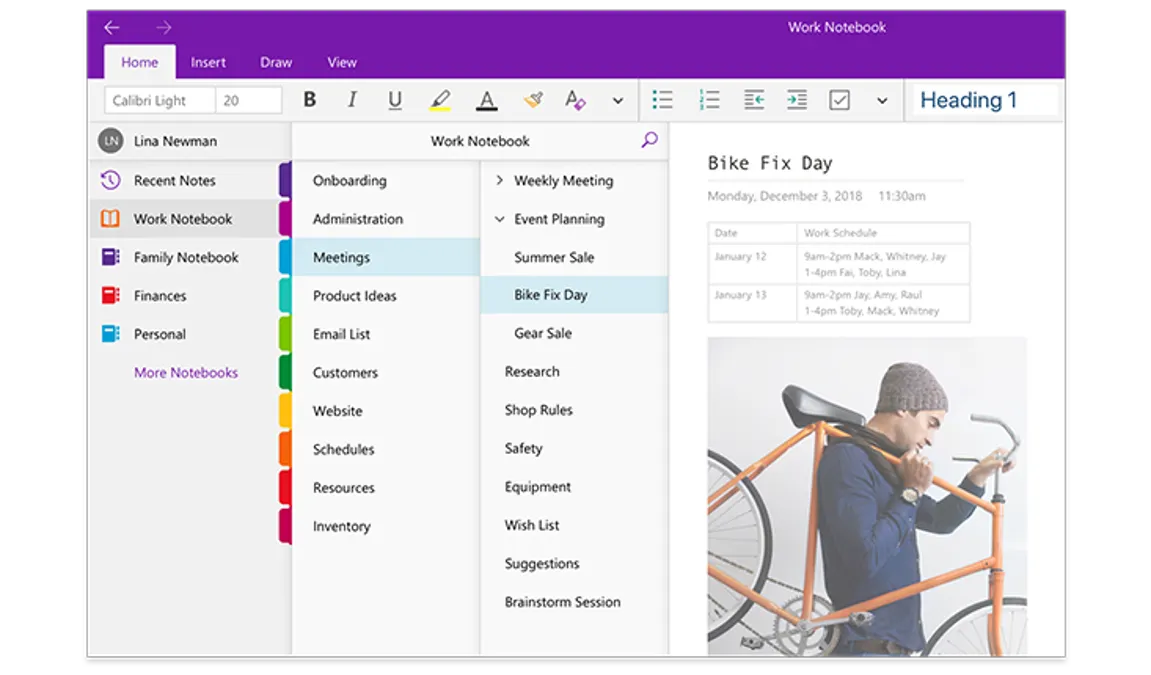
Image source: microsoft.com
Is OneNote really free?
OneNote does offer a free version, but it comes with important limitations tied to storage and collaboration. The free version relies on OneDrive storage, which is capped at 5 GB per Microsoft account. Once this limit is reached, users must either delete content or upgrade their storage. This dependency makes OneNote pricing less transparent than it appears.
For users who create media-rich notes or collaborate frequently, storage fills up quickly. At that point, upgrading to a becomes the only practical option. This is why OneNote pricing free vs paid comparisons are critical for long-term planning. What starts as a free tool often becomes a subscription decision over time. When navigating these enterprise ecosystems, comparing Microsoft 365 with standard helps teams forecast their long-term operational costs.
Microsoft OneNote pricing plans explained
Microsoft OneNote pricing plans are closely tied to the broader Microsoft 365 subscription ecosystem rather than being sold as standalone note-taking packages. While OneNote itself is available for free, many of its most practical benefits, such as large cloud storage, premium security, AI-powered features, and seamless cross-device syncing, depend on a paid Microsoft 365 plan. Understanding how Microsoft 365 Personal and Microsoft 365 Family differ helps clarify what users are actually paying for when evaluating OneNote pricing. This breakdown highlights how storage limits, including apps, AI capabilities, and collaboration features, scale across plans, making it easier to decide whether a paid subscription delivers enough value for individual users, families, or needs.
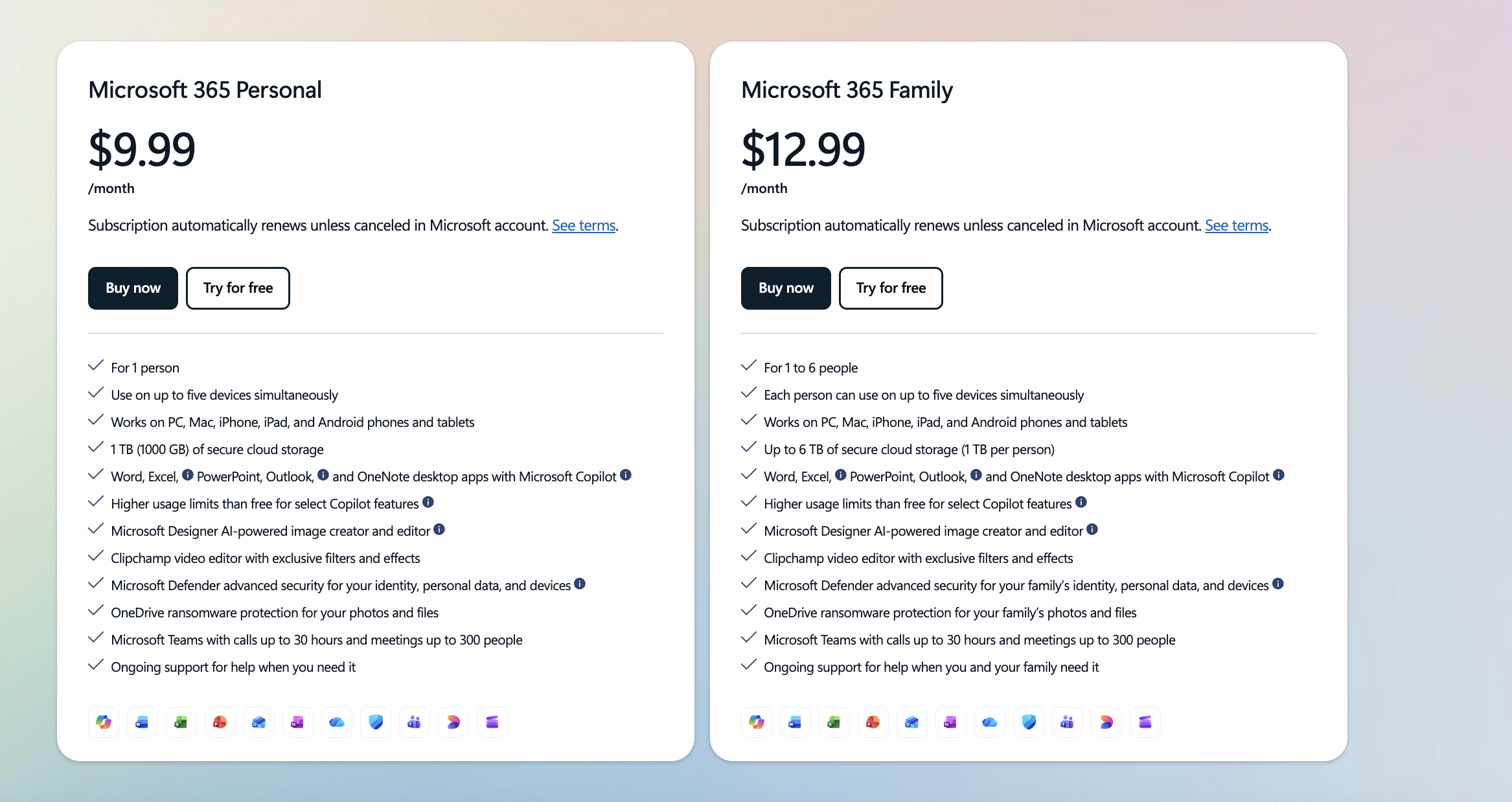
Image source: microsoft.com
Information source: microsoft.com
Update time: 2025-12-22
Note: Pricing and plan details reflect publicly available data as of the update date and may vary based on region, billing cycle, and number of agents.
Prefer a more affordable alternative?
Hidden costs and limitations users often overlook
While OneNote pricing appears straightforward on the surface, many users discover additional costs and constraints only after long-term use. These limitations often emerge as teams grow, storage needs increase, or collaboration becomes more complex. What starts as a simple note-taking tool can gradually turn into a broader Microsoft 365 dependency with rising costs. Understanding these hidden factors early helps teams avoid surprise upgrades and operational friction later.
- Dependency on OneDrive storage upgrades: OneNote stores all notebooks within OneDrive, meaning storage limits directly affect usability. Once users exceed the free OneDrive allowance, they are pushed toward paid Microsoft 365 plans. This creates an indirect cost path tied to note volume, media usage, and long-term retention. Teams storing , images, or attachments feel this pressure faster. Storage expansion becomes unavoidable rather than optional.
- Microsoft 365 subscription lock-in: Many advanced OneNote features are tightly coupled with Microsoft 365 subscriptions. Users who start with free access often find themselves locked into recurring plans to maintain productivity. Exiting the ecosystem later can be difficult due to file formats and workflow dependencies. This lock-in reduces flexibility when evaluating alternative tools. Over time, subscription dependency becomes a strategic concern.
- Feature gaps for team collaboration: OneNote was designed primarily for individual note-taking rather than structured team collaboration. Real-time editing exists but lacks workflow context, task ownership, and approvals. Teams often rely on additional Microsoft apps to fill these gaps. This fragmentation increases complexity and reduces efficiency. Collaboration limitations become more visible as team size grows.
- Scalability challenges for growing teams: As organizations expand, managing notebooks across departments becomes increasingly difficult. Permission structures are broad and less granular than modern . Tracking ownership, changes, and accountability requires manual effort. Scaling OneNote across large teams introduces governance challenges. These issues often trigger reassessment of long-term suitability.
- Storage and syncing limits: Large notebooks with heavy media content can suffer from sync delays and version conflicts. Offline access is inconsistent across devices. Mobile and desktop experiences may diverge in reliability. Sync limitations affect productivity during travel or . These issues compound as data volume grows.
- Collaboration and sharing controls: Sharing in OneNote often exposes entire notebooks rather than specific sections or contexts. Fine-grained access control is limited. This creates risks when sensitive information is mixed with general notes. Teams must manually separate content to maintain security. Collaboration becomes less precise over time.
- Security, backup, and compliance: While Microsoft provides enterprise-grade security, backup, and recovery at the notebook level are limited. Users rely heavily on OneDrive retention policies. Restoring specific historical states is not always straightforward. Compliance tracking across notes is minimal. Regulated teams may require stronger governance.
Compare collaboration platforms objectively
What real users like and dislike about OneNote pricing
User sentiment around OneNote pricing is mixed, reflecting its position as both a free tool and a paid ecosystem component. Many users appreciate its accessibility and its compatibility with Microsoft products, while others express frustration as limitations surface over time. Feedback often shifts as usage evolves from personal notes to . Understanding these perspectives provides useful context for evaluating long-term value.
- Common positives from user reviews: Users frequently praise OneNote for its free entry point and familiar Microsoft interface. Cross-device syncing and handwriting support are well received. Merging with Outlook and Teams adds convenience. Long-time Microsoft users feel comfortable adopting it. These strengths make OneNote attractive for individual productivity.
- Frequent complaints about pricing and limitations: Complaints often center on forced upgrades tied to storage limits. Users express frustration when free plans no longer suffice. Feature availability across devices can feel inconsistent. Pricing is seen as indirect rather than transparent. These issues grow more noticeable over time.
- Situations where users feel forced to upgrade: Users commonly upgrade after hitting OneDrive limits or needing better collaboration. Teams using OneNote for shared documentation feel constrained quickly. Advanced features require subscriptions. What begins as optional becomes necessary. This transition is a common pain point.
Why teams look for alternatives to OneNote
As collaboration matures, many teams realize OneNote was not designed to support structured workflows at scale. While it remains useful for personal notes, limitations appear in project coordination, , and real-time teamwork. Organizations increasingly look for tools that unify communication, documents, and execution. These needs drive exploration beyond OneNote.
- Limited : OneNote supports co-editing but lacks workflow awareness. Teams cannot assign tasks or track decisions within notes. Discussions happen elsewhere, breaking context. Collaboration feels passive rather than active. This limits effectiveness for team-led work.
- Weak task and project management capabilities: OneNote does not provide native task ownership or progress tracking. Teams rely on external tools for execution. This separation creates information silos. Notes become static references rather than actionable systems. Productivity suffers as complexity increases. When adoption turns to dedicated project management software, teams often evaluate options like to find a balance between task tracking and budget.
- Fragmented workflows across : Using OneNote effectively often requires combining it with Teams, Outlook, Planner, and SharePoint. Switching between tools disrupts focus. Information spreads across platforms. Workflow continuity breaks down. Teams seek more unified environments.
- Cost inefficiency for non-Microsoft teams: Organizations not fully committed to Microsoft 365 often find OneNote pricing inefficient. Paying for bundled tools that go unused increases cost. Alternatives with focused pricing feel more economical. This is especially true for fast-growing teams. Cost efficiency becomes a deciding factor.
Manage teamwork and note-taking without tool sprawl
Modern choice: Enjoy note-taking, collaboration, and automation in Lark
is positioned as a smarter because it goes far beyond note-taking and supports how modern teams actually collaborate, communicate, and make decisions. While OneNote is primarily designed for individual or lightweight shared notes, Lark combines documentation, meetings, visual collaboration, automation, and permissions into a single connected workspace.
This makes Lark especially relevant for teams that rely on , structured workflows, and shared accountability. As organizations grow more distributed and process-driven, Lark's merging approach addresses gaps that traditional note-taking tools struggle to fill.

Document collaboration platform with rich content insertion
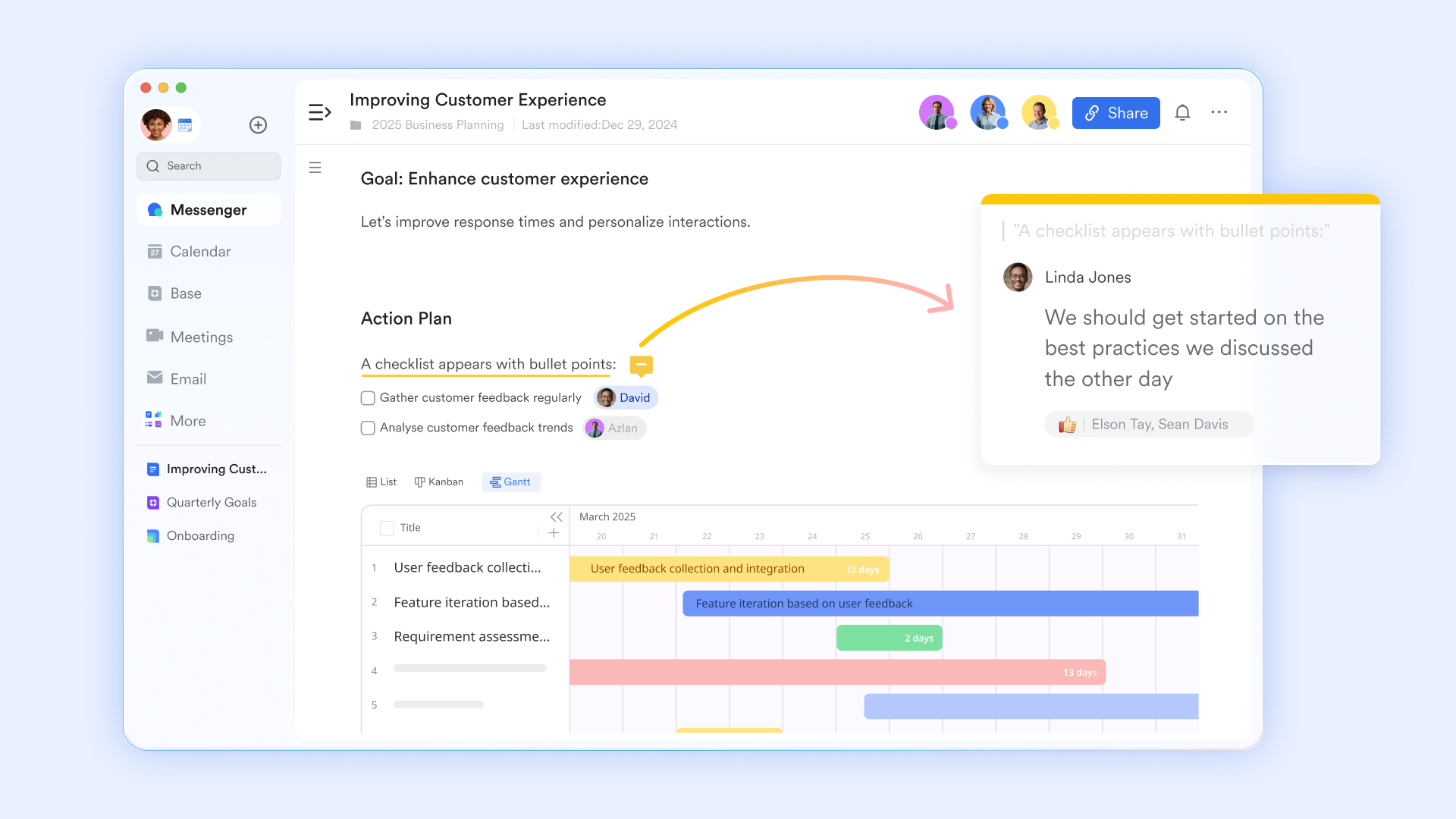
elevates note-taking by allowing you to embed rich, interactive elements like , task lists, and live database charts directly into your pages. In Lark Docs, every change is tracked, allowing you to view the edit history and restore previous versions of your notes if needed. It also provides real-time co-editing and contextual comments that keep discussions tied to specific text. With the ability to "@" mention colleagues or other documents, your notes become a central hub for team knowledge rather than static files. Why Lark excels over OneNote: OneNote is a digital notebook that excels at freeform organizations, but it often struggles with real-time team collaboration and sync reliability. Lark Docs is a collaborative hub where notes are "alive". It's built for real-time co-editing, where you see others' cursors as they move.
Visual brainstorming with interactive boards
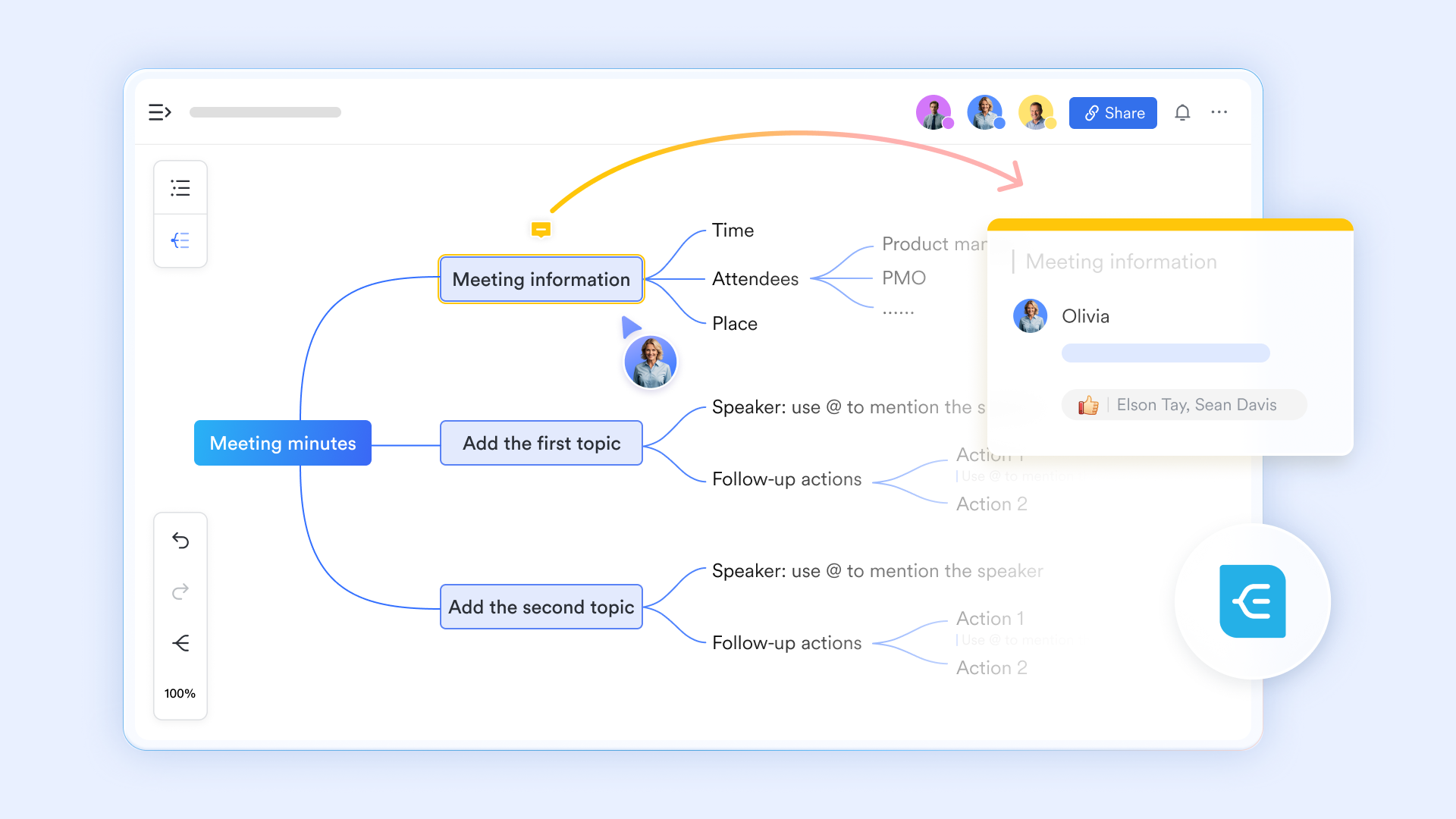
Lark Board lets teams sketch ideas using pens, highlighters, and freehand drawing tools directly on a shared canvas, while staying closely connected to for structured documentation. These boards support real-time collaboration, annotations during meetings, and live editing by multiple participants. Unlike OneNote's static ink-based notes, boards are designed for active workshops, design thinking, and live discussions where ideas evolve collaboratively. When paired with meetings or chats, boards stay connected to conversations instead of living as isolated pages. Why Lark excels over OneNote: OneNote supports drawing, but it's largely individual and page-based. Lark Boards function as shared ideation spaces where drawing, discussion, and decision-making happen together.
Native add-ons power up clean documentation
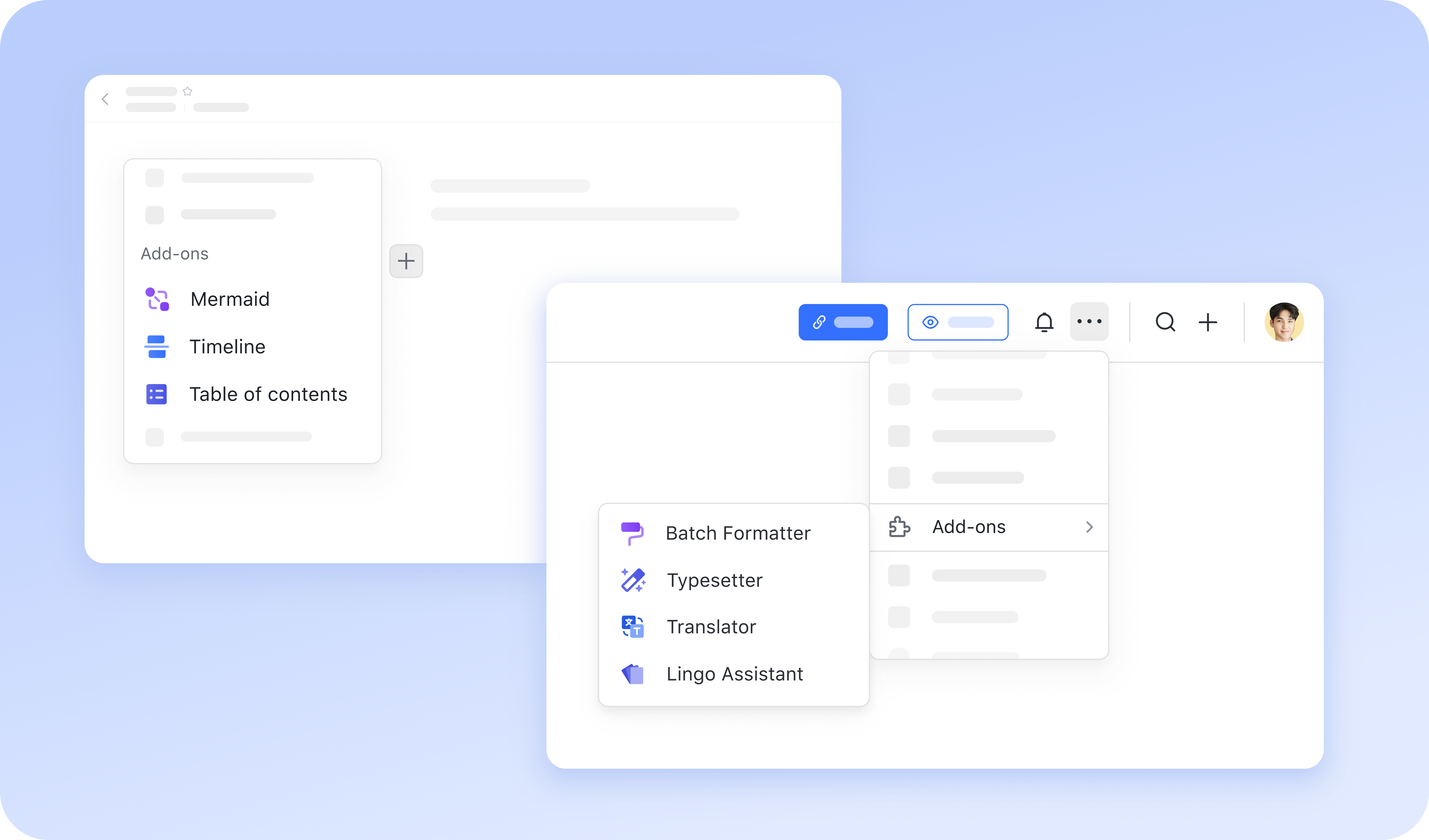
If you're a stickler for documentation, Lark Docs add-ons make your life much easier. Tools like the "Batch Formatter" apply consistent styling across large files in a single click. You can manage structure effortlessly with the "Table of Contents" and "Timeline" add-ons to and navigation instantly. For technical needs, the "Mermaid" add-on lets you create complex diagrams using simple code syntax directly in the doc. These features ensure your work stays organized and professional without manual effort. Why Lark excels over OneNote: OneNote relies heavily on third-party developers. In Lark, however, you can access native add-ons and enjoy advanced uses.
AI-generated meeting notes to avoid manual note-taking
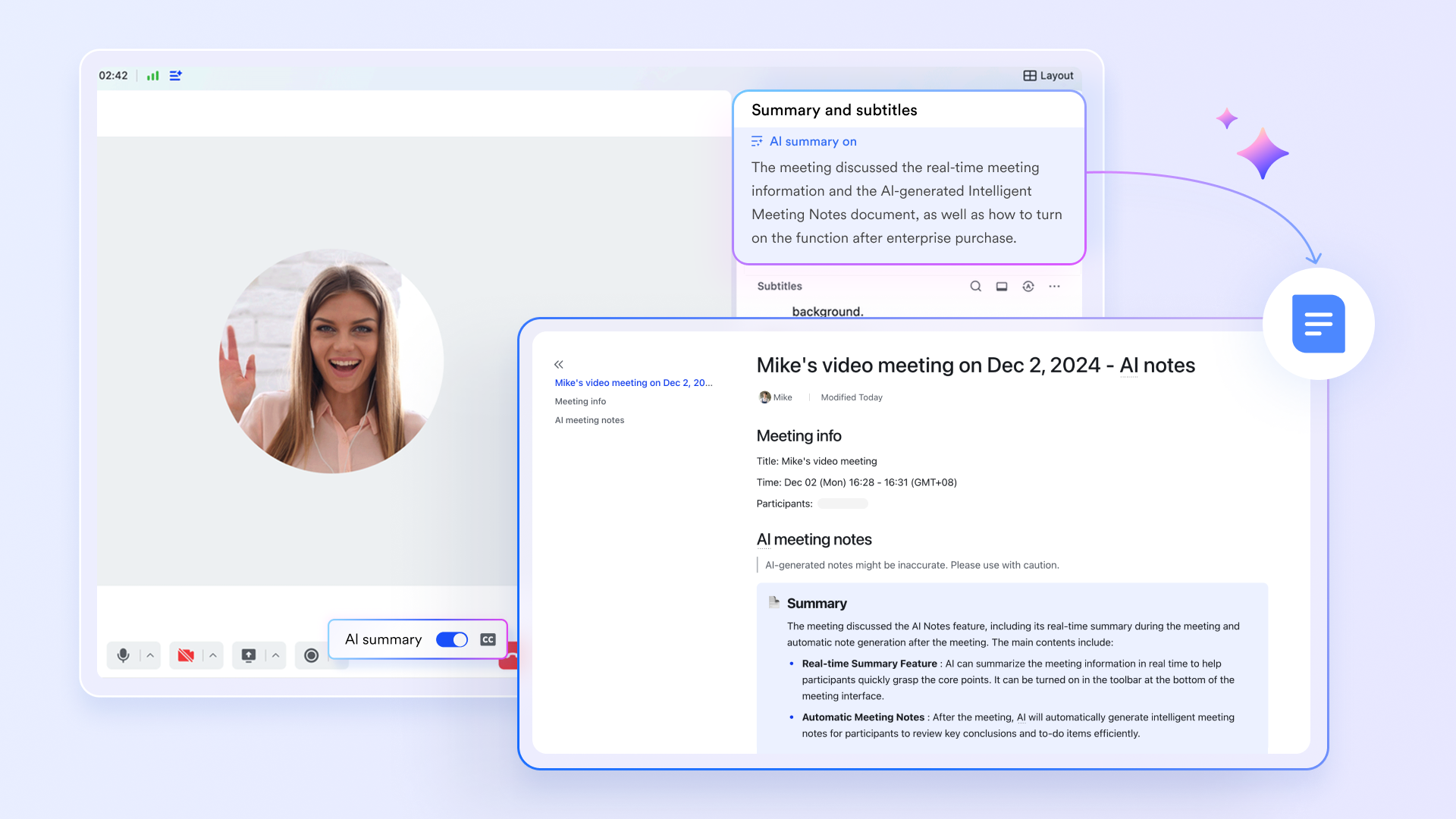
For meeting notes, you don't have to worry about the summary. Lark helps it by using an that summarizes discussions in real-time. Immediately after your session, it generates a structured "AI Notes" document. This includes a concise summary, key highlights, and an automated to-do list. The "Video Meeting Assistant" bot then sends these notes to all participants instantly. This allows you to navigate the recording and jump directly to specific topics.
Why Lark excels over OneNote: OneNote captures notes; Lark captures conversations, decisions, and outcomes automatically, reducing manual effort and missed details.
Permission-based sharing with contextual collaboration
Lark allows teams to share documents, boards, folders, or share Base records with precise permission levels to view, edit, or manage. Collaboration happens through comments, mentions, live edits, and record previews inside chat. Advanced permissions ensure users only access what's relevant. OneNote sharing is broader and less granular, often exposing entire notebooks. Why Lark excels over OneNote: Lark offers enterprise-grade control with conversation-level collaboration, whereas OneNote sharing is better suited for simple personal or small-group use.
:
- Starter plan: Free forever plan that includes 11 powerful tools for up to 20 users. It also comes with 100GB of storage, 1000 automation runs, AI translations, and more.
- Pro plan: $12/user/month (billed annually) for up to 500 users. It includes everything in Starter plus group calling for up to 500 attendees, 15TB of storage, 50,000 automation runs, and more.
- Enterprise plan: for custom pricing. Supports unlimited users and includes even more automation runs and advanced security, compliance, and management features.
For small teams with simple communication needs

18 months message history
1000 Base automation runs/month
2000 rows per table in Base
Most POPULAR
For companies with comprehensive collaboration and management needs
Unlimited message history
500-participant video meetings
50k Base automation runs/month
20k rows per table in Base
For large companies with advanced security and organizational management needs
Get a personalized demo and pricing
Unlimited message history
500-participant video meetings
15 TB storage + 30 GB storage/user
500k Base automation runs/month
50k Base automation runs/month
Most POPULAR
For companies with comprehensive collaboration and management needs
Unlimited message history
500-participant video meetings
50k Base automation runs/month
20k rows per table in Base
Final verdict: Is OneNote pricing worth it in 2026?
As Microsoft continues bundling OneNote deeper into its broader ecosystem, evaluating OneNote pricing in 2026 requires looking beyond surface-level subscription costs. While OneNote remains a familiar and capable note-taking tool, its value increasingly depends on how closely a user or team aligns with Microsoft 365 as a whole. Pricing decisions are no longer just about note-taking features, but about storage limits, collaboration depth, and long-term workflow flexibility. This final verdict helps clarify who still benefits from OneNote pricing and who may need to look elsewhere as collaboration needs evolve.
- Who will OneNote is enough: OneNote remains a strong choice for individuals who primarily need a personal or lightweight note-taking tool. Users already subscribed to Microsoft 365 Personal or Family plans gain OneNote access without additional cost, making it economical for simple documentation and idea capture. Students, solo professionals, and users deeply embedded in the Microsoft ecosystem often find OneNote pricing acceptable due to bundled storage and Office apps. For personal knowledge management, meeting notes, and reference material, OneNote continues to deliver reliable value. As long as collaboration and are not core requirements, OneNote pricing can still make sense.
- Who should consider switching: Teams that rely on real-time collaboration, structured workflows, and cross-functional coordination often outgrow OneNote's capabilities. As note-sharing expands into , approvals, or decision tracking, OneNote's page-based structure becomes limiting. Many users feel forced to upgrade Microsoft 365 plans simply to gain more storage or collaboration flexibility, increasing long-term costs. Organizations that do not fully use other Microsoft apps may find the subscription inefficient. For these teams, evaluating broader collaboration platforms becomes a logical next step.
- How Lark delivers better long-term value: As collaboration needs mature, platforms like Lark offer an alternative approach by combining documents, meetings, chat, and workflows in a single workspace. Instead of upgrading storage or tools separately, teams gain combined collaboration features by default. Lark supports structured work beyond note-taking, helping teams move from documentation to execution without switching systems. This makes long-term costs easier to predict as workflows scale. For growing teams, value is increasingly measured by operational flexibility rather than standalone note features.
Conclusion
OneNote pricing continues to make sense for individuals and small groups who rely primarily on personal note-taking within the Microsoft ecosystem. Its familiar interface, cross-device syncing, and inclusion within Microsoft 365 subscriptions make it convenient for users who already depend on Word, Excel, Outlook, and OneDrive. For basic documentation, class notes, , and personal , OneNote remains a dependable tool. However, as storage usage grows and collaboration becomes more central to daily work, the limitations of OneNote pricing become more visible. Costs often increase indirectly through storage upgrades, plan dependencies, and the need to combine multiple Microsoft apps to complete everyday workflows.
For teams planning long-term growth, the evaluation shifts from note-taking alone to how information flows across conversations, documents, and execution. Modern teams increasingly look for platforms that reduce fragmentation, improve collaboration clarity, and offer predictable pricing as operations scale. This is where all-in-one workspaces such as naturally enter the discussion, not as a direct replacement for notes, but as a broader operational layer. By unifying communication, documentation, meetings, and workflows in a single environment, Lark reflects how teams work today, making it a compelling option for organizations that have outgrown traditional note-centric tools.
Enjoy easy note-taking and smooth collaboration today
FAQs
Is OneNote free or paid?
OneNote is free to use with basic features, but advanced functionality depends on Microsoft 365 subscriptions. Paid plans mainly unlock additional OneDrive storage and combine with other Office apps. For personal users, the free version may be sufficient. Teams often require paid plans to collaborate effectively.
Does OneNote pricing change by country or region?
Yes, OneNote pricing varies by country due to regional pricing and currency differences. Taxes and local regulations may also affect final costs. Users should always check local Microsoft pricing pages. differences can impact budgeting for teams.
Can you use OneNote without a Microsoft account long term?
A Microsoft account is required for cloud syncing and collaboration features. Without an account, OneNote functionality is limited to local usage. Long-term use without an account restricts access across devices. Most users eventually need an account for full functionality.
Is OneNote included in Microsoft 365 business basic plans?
Yes, OneNote is included in Microsoft 365 Business plans alongside other Office tools. However, collaboration and storage limits depend on the specific plan tier. often upgrade as needs grow. This can increase overall subscription costs.
What happens to notes if a Microsoft 365 subscription expires?
Notes remain accessible in read-only mode, but editing and syncing may be restricted. OneDrive storage limits can also be enforced. Over time, access to collaborative features may be lost. Some teams begin exploring alternatives that avoid subscription dependency, such as unified platforms like Lark.
Related reading



















![What Is a 2-2-3 Work Schedule? Explanation and More [2026]](https://framerusercontent.com/images/uKHRfkp4v7y4azRNTYUmuteNQz8.png)








