You've likely faced this scenario: your spreadsheet projects are chaotic, tasks are buried in chat, and leadership asks for a clear portfolio view. The debate begins between Microsoft Project and Wrike.
Is Wrike easier to use? Is Microsoft Project more powerful? And how do you explain the Wrike vs Microsoft Project cost difference to finance?
Today, projects extend beyond Gantt charts and task lists into chat messages, meeting notes, and numerous other requests. Many teams are now considering all‑in‑one collaboration platforms that integrate chat, docs, calendars, and tasks.
In this guide, I'll explore Wrike vs Microsoft Project using real‑world scenarios and discuss how an all‑in‑one workspace like Lark can be a compelling alternative when you need more than just project management. We'll also examine Wrike vs Microsoft Project pros and cons and their costs relative to the best project management tools available today.
What is Microsoft Project?
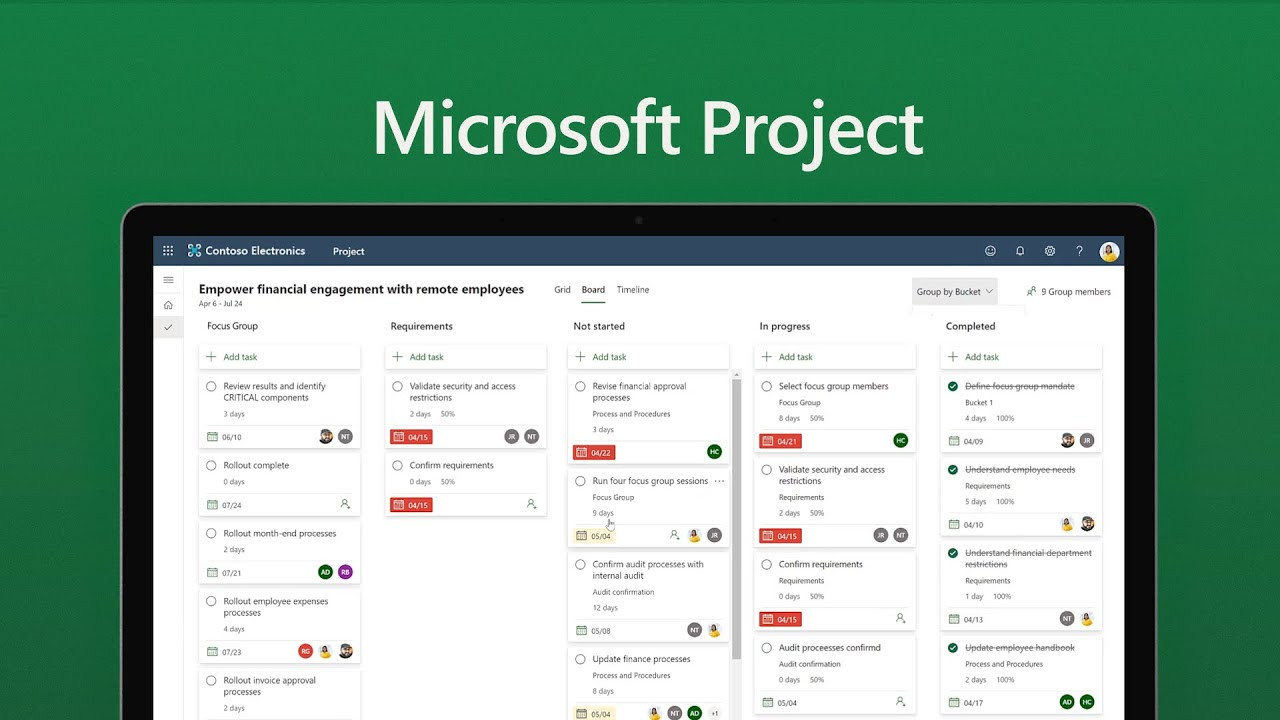
Image source: microsoft.com
is one of the oldest and most established project and portfolio management (PPM) tools on the market. It's designed for professional project managers who need to build detailed project plans, manage dependencies, allocate resources, , and report status to stakeholders and executives.
You can think of it as a very specialized and very powerful spreadsheet for complex projects. It shines when you're handling long timelines, multiple teams, and tight cost/resource control—especially in industries like construction, engineering, large , or government work.
There are desktop versions, cloud‑based "Project Online" offerings, and different license tiers within Microsoft 365, which can make the microsoft project vs wrike comparison feel more complicated than it should.
Who Microsoft Project is best for
In my view, Microsoft Project is best when:
- You have a formal PMO and certified project managers
- Your projects are long, complex, and risk‑sensitive
- Resource and cost management are non‑negotiable
- You're already heavily invested in the Microsoft 365 ecosystem
It is less ideal for:
- Creative, marketing, growth, or product teams who move quickly and iterate often
- Teams that live mostly in chat, documents, and meetings, rather than in project plans
For those teams, even the most carefully designed in‑depth microsoft project vs wrike objectively comparison may still push them to something more collaborative and modern.
What is Wrike?
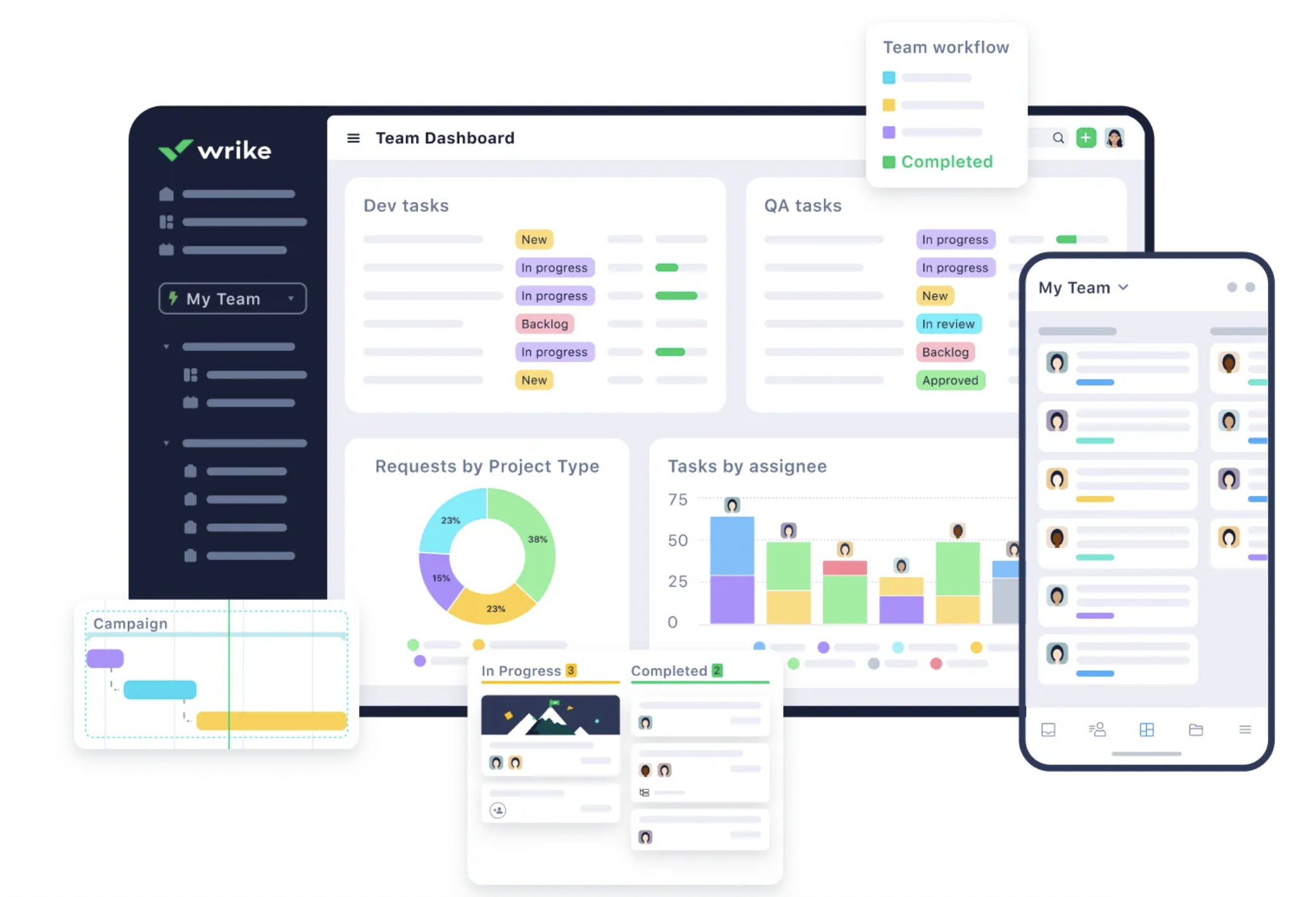
Image source: wrike.com
is a cloud‑based and project collaboration platform. It's designed to sit between classic PPM tools like Microsoft Project and lighter task managers like Trello or Asana. Wrike aims to give you structure without requiring deep PM expertise.
It's particularly popular with marketing, creative, and professional services teams because it offers multiple views (list, board, Gantt), built‑in approvals, and some —plus it's easier to get started with than Microsoft Project.
Importantly, though, Wrike is still primarily a standalone project/work management tool. You typically pair it with separate apps for chat, docs, meetings, and email.
Who Wrike is best for
Wrike is a strong option when:
- You want more structure and reporting than simple task tools provide
- Your work is a mix of projects and recurring workflows
- You need multiple views (board, list, Gantt) to support different working styles
- You're ready to pay for a dedicated project/work management solution
It's less ideal when:
- You're trying to consolidate tools, not add another one
- Your organization wants one central "home" for communication, docs, meetings, email, and workflows
- You have many collaborators who rarely update tasks but constantly chat, comment, and review content
Those are exactly the situations where teams look beyond the usual in‑depth microsoft project vs wrike objectively comparison and ask whether an all‑in‑one workspace could serve them better.
Wrike vs Microsoft Project: Pros and cons
Microsoft Project pros
On the "classic PM" side, Microsoft Project is genuinely strong:
- and scheduling: You can create sophisticated with task dependencies, milestones, critical paths, and baselines. For PMs trained in PMI/PMBOK or PRINCE2, this is familiar and powerful.
- and workload planning: Project lets you assign people or generic resources to tasks, model capacity, and see who is over‑ or under‑allocated across multiple projects. This matters when you have dozens of overlapping initiatives.
- Time tracking and budget management: With timesheets and cost fields, you can track actuals vs. estimates, manage cost rates, and get detailed financial reports.
- Reporting and analytics: Native reporting plus connections to Power BI provide extensive ways to slice and visualize data. Executives appreciate the portfolio‑level views.
For organizations that want one of the most thoroughly best project management tools globally in terms of traditional PPM capabilities, Microsoft Project remains a serious contender.
Microsoft Project cons
However, once we move from theory to daily life, some limitations become obvious:
- Steep learning curve: The interface and concepts are not intuitive for casual users. Many stakeholders never touch the tool; they only see exported PDFs or PowerPoints.
- Fragmented collaboration: Task updates may live in Project, but conversations happen in Outlook or Teams, documents in SharePoint or OneDrive, and approvals in email. You constantly jump between apps.
- Unclear cloud vs. desktop story: Some organizations still run the desktop client; others use web‑based versions. Features differ between them, which complicates training and support.
- Add‑on costs and complexity: When you want dashboards, automations, or richer reporting, you usually bring in Power BI or other Microsoft components. This can inflate the real wrike vs microsoft project cost comparison.
These trade‑offs are exactly why many teams start looking at Wrike or other modern tools, and why some go further and explore all‑in‑one workspaces.
Wrike pros
Wrike has several strengths that appeal to modern teams:
- Flexible views: You can switch between list, board, Gantt, and calendar views of your work. This makes it more friendly to Agile, , and hybrid approaches than a purely Gantt‑based tool.
- Collaboration within tasks: Comments, @mentions, file attachments, and basic approvals happen right on tasks and projects, so you get more context than in pure email‑driven workflows.
- and spaces: Wrike offers templates for common workflows (campaigns, product launches, etc.), which helps teams standardize processes quickly.
- Automations: There are built‑in rules for routing, status changes, and basic notifications, which reduce some manual admin work.
For many teams, it feels like a more approachable, more collaborative step up from spreadsheets and email.
Wrike cons
As we deeply weigh seriously Wrike pros honestly, Wrike clearly improves usability and collaboration—but it still has gaps:
- Tool fragmentation remains: Wrike doesn't replace your chat, docs, calendar, meetings, or email. You still need those elsewhere, which means context switching continues.
- Workspace complexity at scale: As teams and projects grow, Wrike spaces and folders can become complicated. Governance and naming conventions become critical.
- Limited "all‑company" workflows: Wrike does projects and tasks well, but broader business workflows (HR, finance, approvals, knowledge base) usually live outside it.
- Per‑seat pricing: As you add more people, especially stakeholders who only occasionally interact with projects, the wrike vs microsoft project cost picture may start to resemble that of larger enterprise tools.
So Wrike solves many of Microsoft Project's usability pains, but it doesn't fully address the broader need for a unified digital workspace.
Wrike vs Microsoft Project pros and cons
If we summarize thoroughly Wrike vs Microsoft Project pros and cons honestly, it looks roughly like this:
This is why some organizations pick one, some pick the other, and some eventually rethink whether a single project tool is even the right foundation.
Embark on your journey with fewer cons
Wrike vs Microsoft Project: Features comparison
If we compare in‑depth Microsoft Project vs Wrike objectively in terms of core PM features, this is how they roughly stack up:
Planning and scheduling
This is where the core philosophies of each tool diverge most clearly. Microsoft Project is architected for rigorous, forward-looking planning, while Wrike is optimized for flexibility and ongoing adaptation.
Wrike
- It is more flexible for everyday project planning with intuitive Gantt, list, and board views.
- Its agility suits dynamic environments but doesn't go as deep into formal project portfolio management (PPM) methodologies.
Microsoft Project
- It is stronger for detailed Work Breakdown Structures (WBS), critical path analysis, and scenario planning.
- It provides a robust framework for modeling complex projects before execution begins.
In essence, for meticulous, blueprint-style planning, Microsoft Project is superior. For adaptive, iterative planning, Wrike offers greater ease of use.
This area highlights the contrast between enterprise-level modeling and team-centric visibility.
Wrike
- Its workload views are easier to read and adopt quickly, providing clear visibility into team capacity.
- However, they may not satisfy the complex modeling needs of a formal PMO or large portfolio.
Microsoft Project
- It offers richer features for modeling complex resource pools (including cost rates, availability, and skills) across large portfolios.
- It is designed for optimizing resource allocation at a strategic level.
For granular, financial-grade resource management, Microsoft Project is more powerful. For intuitive team workload balancing, Wrike is more accessible.
Time tracking and budget management
Here, the difference lies in sophistication versus simplicity for financial control.
Wrike
- Its time tracking is approachable for day-to-day usage, making it easy for team members to log hours.
- It is less comprehensive for advanced financial modeling and detailed budget forecasting.
Microsoft Project
- While both support , its cost management is more advanced, integrating resource costs, material costs, and fixed costs.
- It is better suited for detailed , baseline comparisons, and variance analysis.
For strict budget governance, Microsoft Project provides deeper tools. For straightforward time and expense tracking, Wrike is sufficient.
Reporting and analytics
This contrast is between power and customization versus simplicity and speed.
Microsoft Project
- When combined with Power BI, it can deliver very powerful portfolio and executive dashboards.
- This capability comes at the cost of more setup, expertise, and potentially additional licensing.
Wrike
- Its are simpler and more out-of-the-box, featuring configurable widgets.
- They are easier for team leads to configure and share without IT support.
For self-service, team-level insights, Wrike is faster. For customized, enterprise-level reporting, Microsoft Project with Power BI is more potent.
Integrations and ecosystem fit
From an ecosystem perspective:
Microsoft Project
- Fits naturally into organizations that are "all‑in" on Microsoft 365.
- You get smoother licensing, SSO, and potential synergies with Teams, , and Power BI.
- Deepens your dependence on a single vendor ecosystem.
Wrike
- Integrates with a wide range of third‑party apps. That makes it relatively neutral, but it means you still juggle multiple disconnected tools for messaging, documentation, and meetings.
Neither approach, by itself, delivers a single, coherent digital HQ. They still rely on separate systems for many day‑to‑day activities.
Usability and learning curve
In practical terms, usability often matters more than raw feature richness:
Microsoft Project
- Designed primarily for professional PMs, with terminology and workflows to match.
- Non‑PM users tend to find it intimidating or confusing.
- Training and change management are significant investments.
Wrike
- Friendlier UI, familiar patterns (boards, lists, timelines).
- Reasonably easy to onboard non‑PMs and cross‑functional stakeholders.
- Still requires some process discipline to avoid messy spaces.
From an adoption perspective, Wrike usually wins this round in the calm microsoft project vs wrike fairly debate.
Wrike vs Microsoft Project: Pricing plans
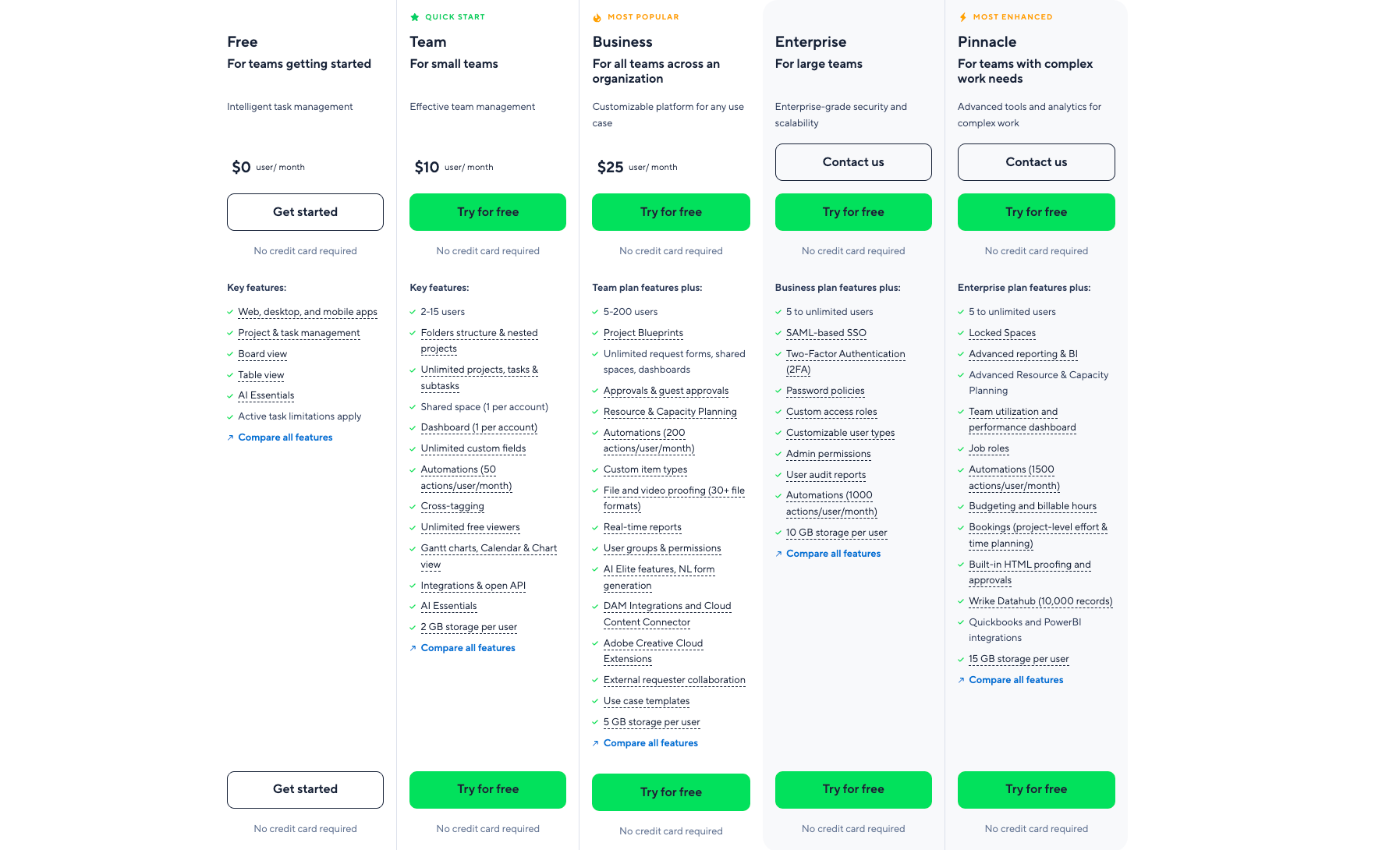
Image source: wrike.com
- Free plan: $0; Up to 5 users; 2GB total storage; Basic task management, board/table views, AI Essentials, multi-device access, active task caps.
- Team plan: $10/user/month (annual only); 2-15 users; 2GB/user storage; Unlimited projects/subtasks, 50 automations/user/month, Gantt/calendar/chart views, 1 shared space + 1 dashboard.
- Business plan: $25/user/month (annual only); 5-200 users; 5GB/user storage; 200 automations/user/month, resource planning, file/video proofing, AI Elite, unlimited request forms/shared spaces.
- Enterprise plan: Custom pricing; 5+ unlimited users; 10GB/user storage; SAML SSO, 2FA, custom roles, 1000 automations/user/month, enterprise-grade security.
- Pinnacle plan: Custom pricing; 5+ unlimited users; 15GB/user storage; Advanced BI, budgeting, 1500 automations/user/month, Wrike Datahub (10k records), team utilization dashboards.
Information source: wrike.com
Update time: 2025-12-04
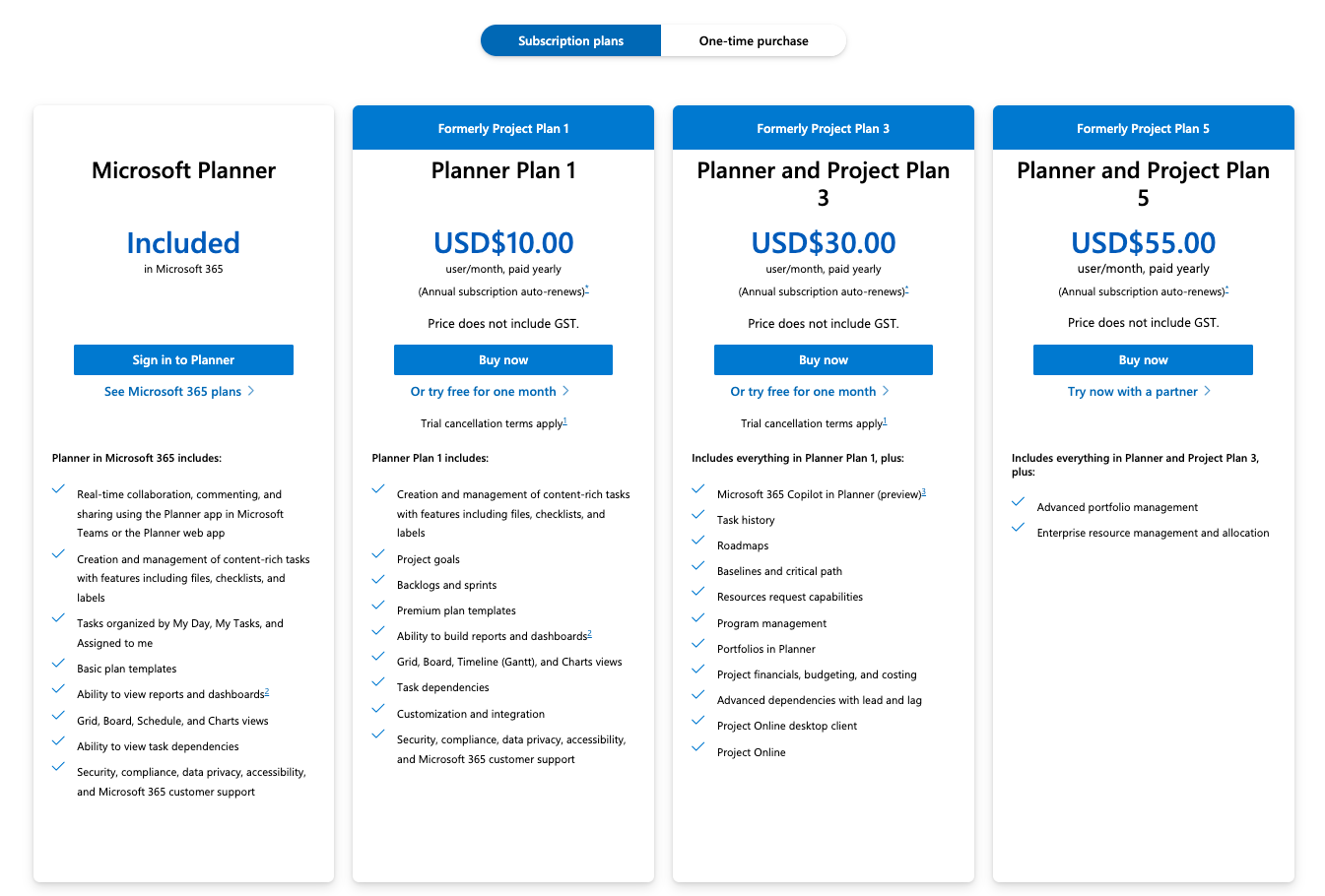
Image source: microsoft.com
Planner Plan 1: $10/user/month (billed annually)
Key features:
- Basic task and project management capabilities
- Grid views and timeline features for simple scheduling
- Collaboration tools, such as file sharing
- Integration within the Microsoft 365 ecosystem
Planner and Project Plan 3: $30/user/month (billed annually)
Key features:
- Full desktop access in addition to web functionality
- Advanced features including resource management, cost tracking, and custom timesheets
- Reporting capabilities with custom reports and portfolio dashboards
- Enhanced collaboration features to facilitate teamwork
Planner and Project Plan 5: $55/user/month (billed annually)
Key features:
- Comprehensive portfolio management including advanced analytics and scenario planning
- Demand management capabilities for project proposal workflows
- Enterprise-level resource planning and governance features for scalability
One-time purchase options
For organizations preferring not to commit to a subscription, Microsoft Project also offers the following one-time purchase plans:
Project Standard 2024: $679.99 (one-time fee)
Project Professional 2024: $1,129.99 (one-time fee)
Information source: microsoft.com
Update time: 2025-12-04
In both cases, the visible subscription is only part of the story. The hidden costs of tool fragmentation, context switching, and partial adoption can be just as important as the hard numbers.
That's exactly where an all‑in‑one solution can shift the equation: By reducing the number of tools, cutting overhead, and improving adoption across the board.
Try a great bargain with more features
Lark as the best alternative to Wrike and Microsoft Project
is an all-in-one collaboration suite that encompasses , communication, and functionalities, making it an attractive alternative to traditional tools like Microsoft Project and Wrike. It simplifies team collaboration by bringing various tools into one platform.
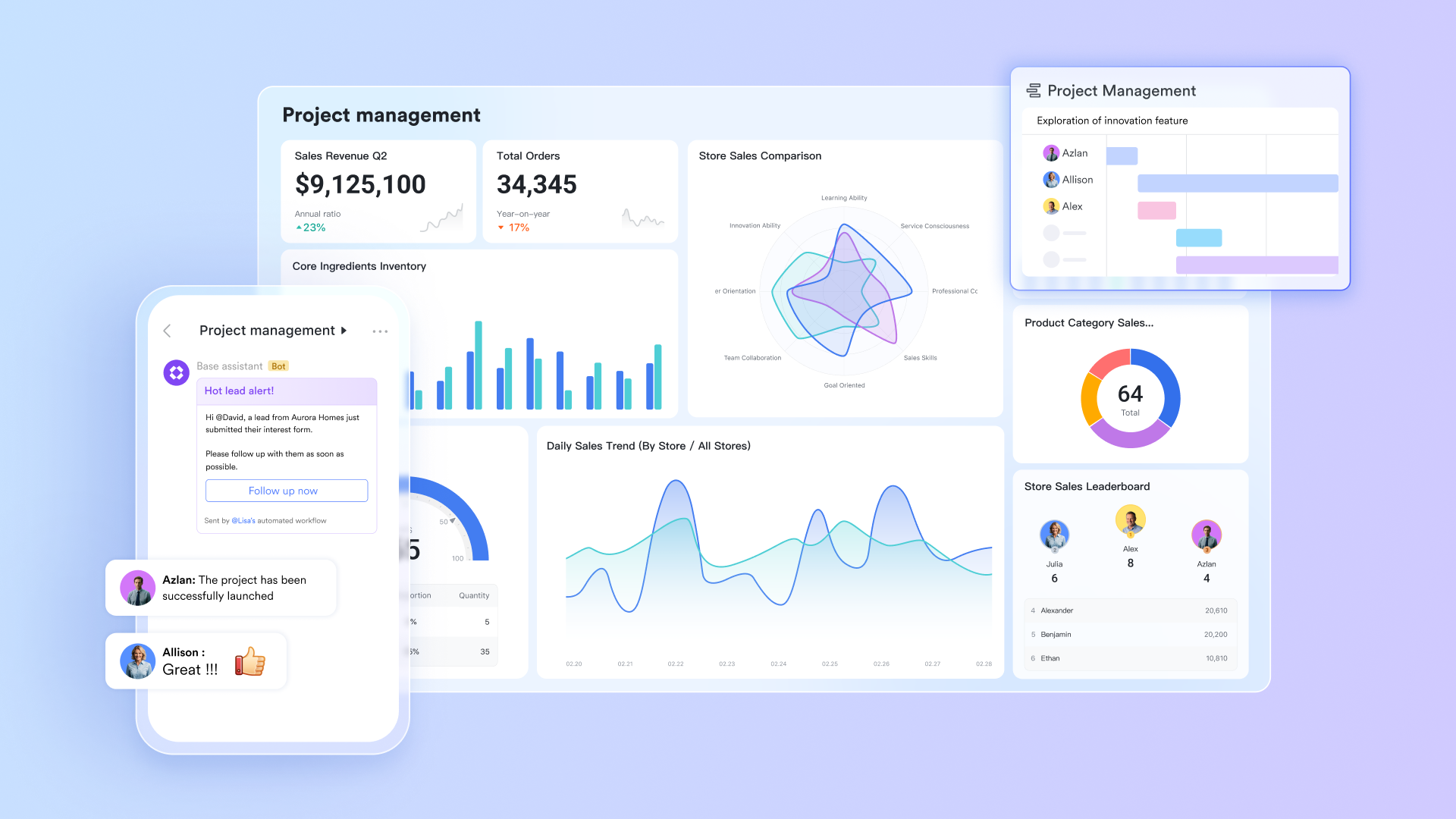
The key difference is that these are built‑in, not loosely integrated. Chat messages link directly to docs; open meetings and minutes; approvals and forms feed into Bases; AI meeting notes turn conversations into action items—without hopping between disconnected apps. From a project‑management perspective, this means your planning and tracking don't live in isolation. They're woven into the same environment where your team talks, writes, meets, and decides.
Lark's advantages
Built‑in communication and content
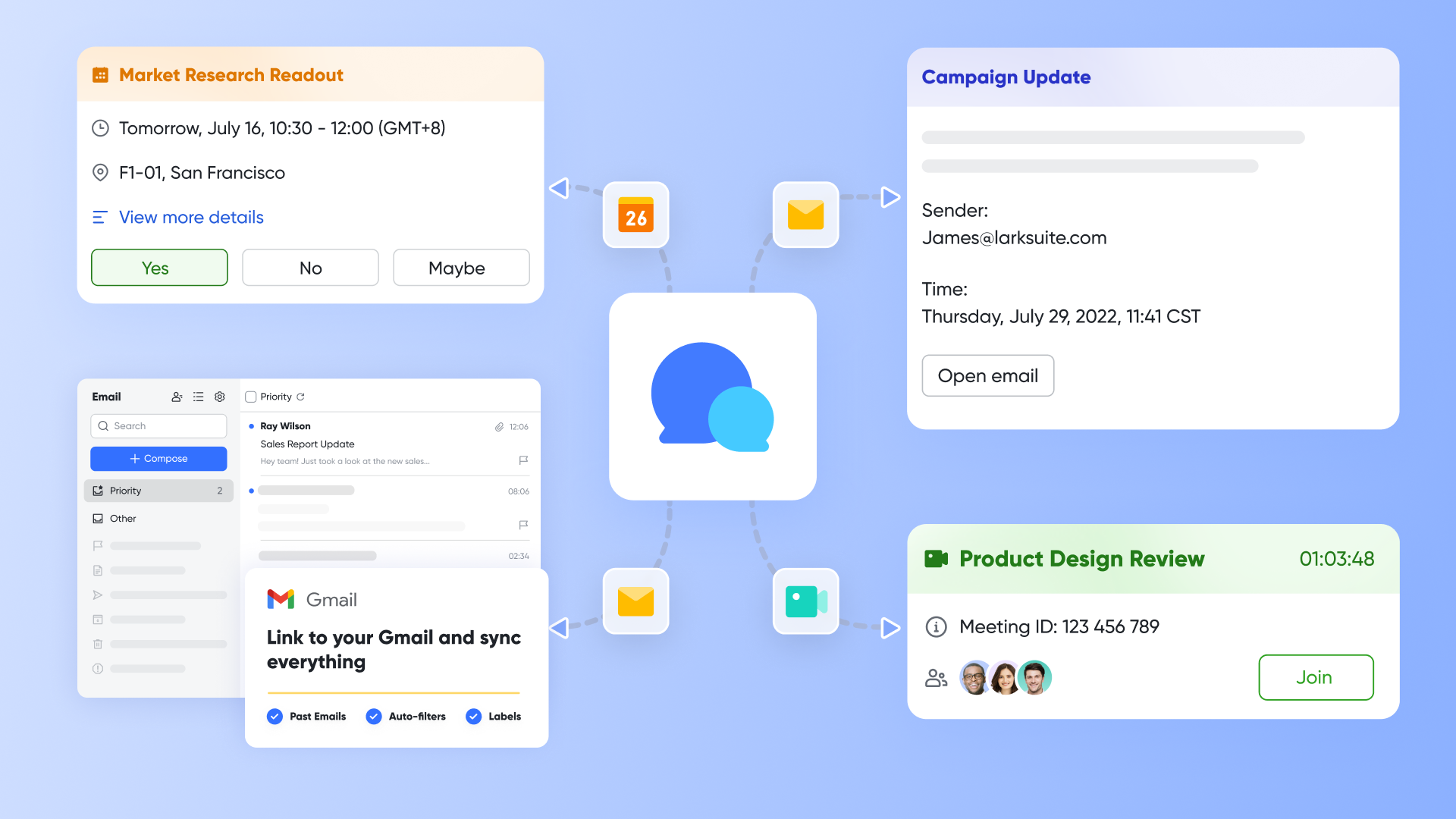
With , Docs, Wiki, Mail, and Meetings, every conversation, document, and decision lives in the same space as your project tracking. You don't need to integrate a chat tool, a doc suite, a video app, and an email service—Lark provides them all as built‑in modules that talk to each other natively.
This solves one of the biggest issues with both Wrike and Microsoft Project: They rely on external tools for almost every aspect of collaboration.
No‑code project databases with
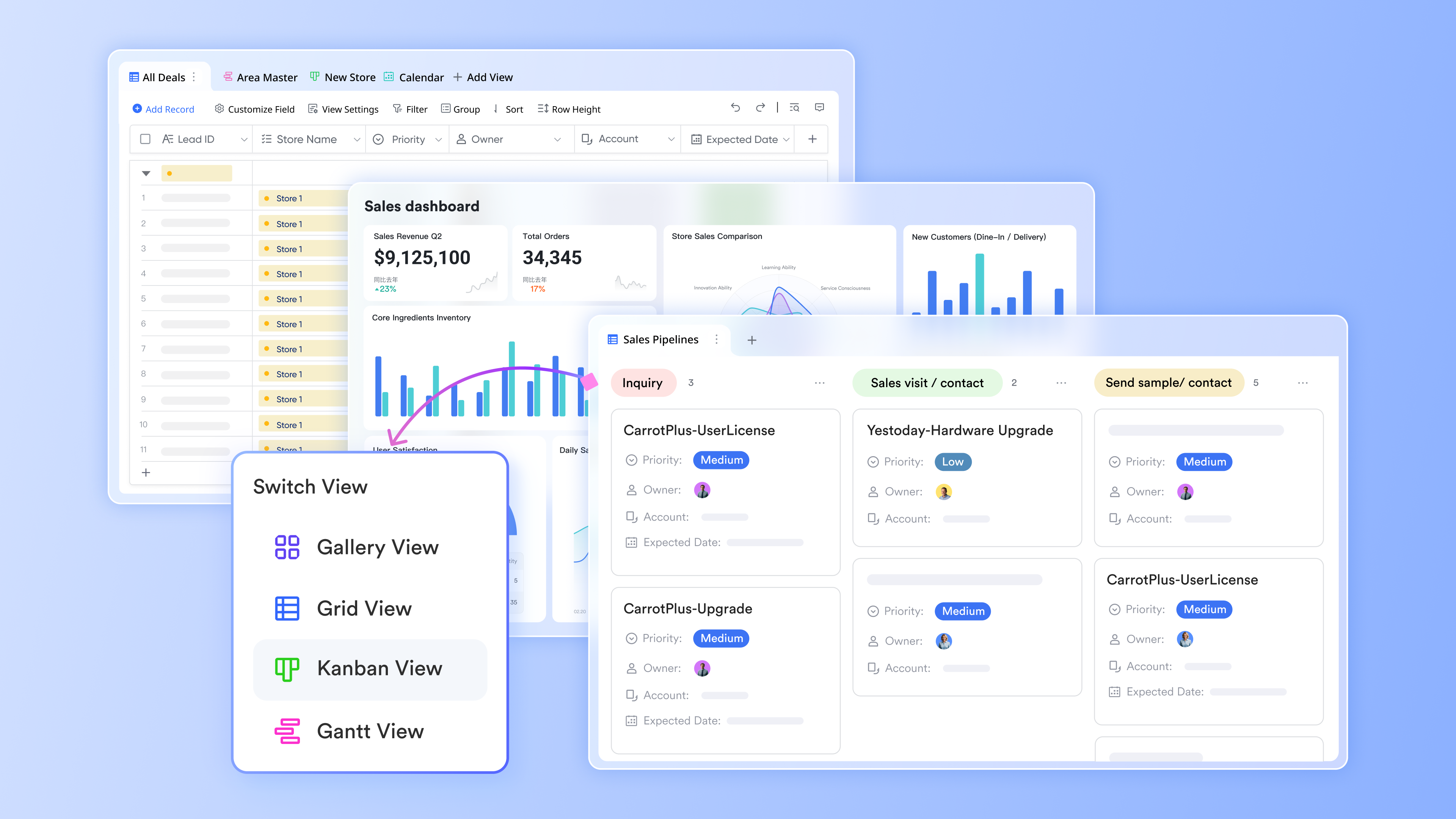
Lark Base lets you model projects, tasks, requests, and resources as no-code databases with flexible multiple views, including tables and Kanban boards. You can create different Bases for portfolios, sprints, campaign calendars, or vendor lists, and easily connect them to other built-in features like Docs, Approval, and Forms.
Unlike Microsoft Project's rigid plans and Wrike's structured project/task hierarchy, Base offers greater freedom and customization. You can design workflows tailored to your team's unique processes, ensuring that your project management aligns with how you actually work. Additionally, you can , set custom fields, and utilize automation to trigger actions based on changes in your Base, making it a versatile tool for managing various operational needs. With Lark Base, you gain a holistic solution that and organization, streamlining your workflow effortlessly.
Meeting lifecycle handled end to end
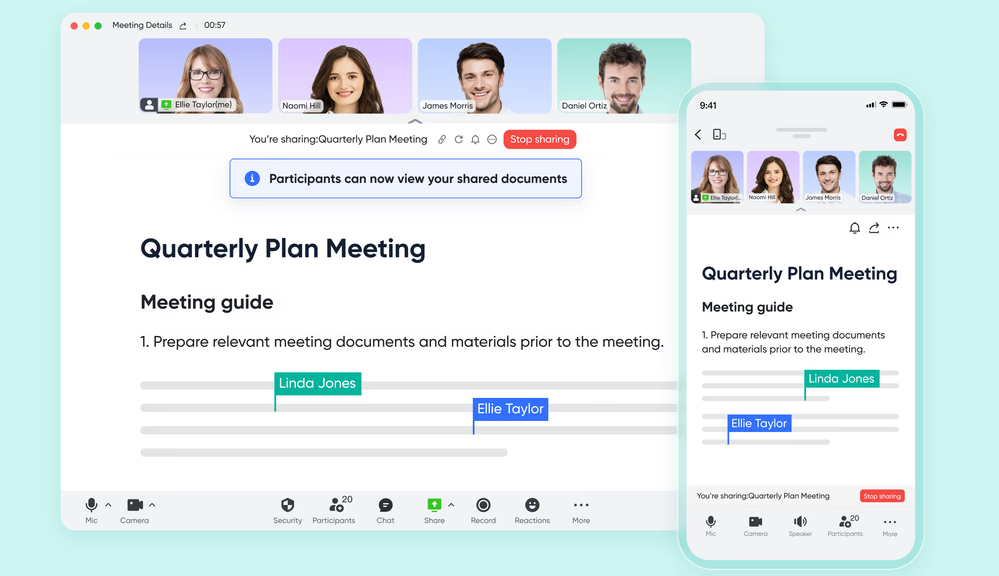
With , Minutes, and AI Meeting Notes, you can schedule, run, record, transcribe, and summarize project meetings directly in Lark. AI Meeting Notes automatically captures key points and action items, which you can then turn into Base records or follow‑up tasks.
Neither Wrike nor Microsoft Project comes close to this level of built‑in meeting support; they rely on external tools for every step.
Together, these pros mean that when teams steadily compare thoroughly Wrike vs Microsoft Project pros and cons honestly, they often discover that neither tool can deliver what they actually want: A single, coherent environment for all their work. Lark is designed to be exactly that.
:
- Starter plan: Free forever plan with 11 powerful tools for up to 20 users, 100GB storage, 1,000 automation runs, AI translations, and more. No credit card needed.
- Basic plan: $6/user/month (billed annually) for up to 500 users. Includes everything in Starter plus unlimited message history, 5TB storage, 1,000 automation runs, and more. Some users may need to to purchase.
- Pro plan: $12/user/month (billed annually) for up to 500 users. Includes everything in Basic plus group calling for up to 500 attendees, 15TB storage, 50,000 automation runs, and more.
- Enterprise plan: for custom pricing. Supports unlimited users and includes advanced automation, security, compliance, and management features.
For small teams with simple communication needs

18 months message history
1000 Base automation runs/month
2000 rows per table in Base
Most POPULAR
For companies with comprehensive collaboration and management needs
Unlimited message history
500-participant video meetings
50k Base automation runs/month
20k rows per table in Base
For large companies with advanced security and organizational management needs
Get a personalized demo and pricing
Unlimited message history
500-participant video meetings
15 TB storage + 30 GB storage/user
500k Base automation runs/month
50k Base automation runs/month
Most POPULAR
For companies with comprehensive collaboration and management needs
Unlimited message history
500-participant video meetings
50k Base automation runs/month
20k rows per table in Base
Wrike vs Microsoft Project: Which is better and when to choose Lark?
To close the loop on our in‑depth microsoft project vs wrike objectively discussion, here's a straightforward way to decide between the two:
Choose Microsoft Project if:
- You run large, complex, risk‑sensitive projects with formal PPM requirements.
- You have trained project managers and a PMO.
- You're already invested in Microsoft 365 and prepared to handle the complexity.
Choose Wrike if:
- You want stronger in‑tool collaboration and easier adoption than Microsoft Project offers.
- Your teams appreciate flexible views and templates for common workflows.
- You're comfortable keeping chat, docs, email, and meetings in separate tools.
This framework addresses the narrow question of calmly wrike vs microsoft project fairly and gives you a defensible choice between two established platforms. However, if you're asking deeper questions—about tool sprawl, adoption, and the true wrike vs microsoft project cost over time—then Lark often becomes the more strategic option.
You should seriously consider Lark if:
- You want a single, built‑in place where your team chats, writes documents, schedules meetings, sends email, , tracks projects, and runs approvals.
- You've noticed that only a minority of employees ever log into Microsoft Project or Wrike, but everyone lives in chat and documents all day.
- You need to support global, who rely on async communication, rich meeting notes, and multilingual collaboration.
- You're trying to reduce your stack of overlapping tools and give IT fewer systems to secure and maintain.
In that context, Lark doesn't just compete with the truly best project management tools currently—it reframes the problem: Instead of asking "Which project tool is best?" you ask "What is the best environment for all our work?"
Conclusion
Choosing between Wrike and Microsoft Project is really about choosing how your teams want to work. If you prioritize deep portfolio control, structured planning, and live in the Microsoft ecosystem, Microsoft Project makes sense. If you want more approachable collaboration and flexible views, Wrike is often the more practical choice.
But as we've seen, even a fair microsoft project vs wrike comparison leaves big gaps around chat, docs, meetings, email, and approvals. Both tools still depend on a patchwork of separate apps, which drives up real‑world cost and complexity more than any wrike vs microsoft project cost table shows.
For many organizations, the most sustainable answer is not "tool A vs tool B," but a built‑in digital HQ. That's why platforms like increasingly stand out as the best alternative.
Ready to try Lark as a better alternative?
FAQs
Is Wrike better than Microsoft Project?
It depends on your work. Wrike is usually easier for non‑PMs, with better in‑tool collaboration and templates. Microsoft Project is stronger for complex scheduling, resource and cost control. Many teams now outgrow both and prefer an all‑in‑one workspace that unifies chat, docs, and tasks.
Is the Microsoft Project being phased out?
No, Microsoft Project is not officially being phased out. Microsoft is, however, steering many customers toward cloud tools like Project for the web, Planner, and the wider 365 ecosystem. Some organizations are also quietly replacing it with more collaborative SaaS platforms.
Is there a better tool than Microsoft Project?
Yes, for many teams there are better options than Microsoft Project. Modern work‑management tools, all‑in‑one workspaces like Lark, or products such as Wrike, Asana, ClickUp, or Monday often win on usability, collaboration, and rollout speed, though they may lack deep portfolio accounting.
What is replacing MS Project?
Nothing is "officially" replacing MS Project, but in practice many organizations move to lighter cloud tools: Project for the web, Planner, Wrike, Asana, Jira, or all‑in‑one platforms like Lark that reduce tool sprawl and make collaboration less dependent on separate apps.
Why do some teams choose an all‑in‑one workspace instead of Wrike or Microsoft Project?
Because running Wrike or MS Project plus separate chat, docs, meeting, and approval tools creates friction and extra cost. An all‑in‑one platform like Lark centralizes these, while alternatives like ClickUp or Notion still rely more on integrations than truly built‑in modules.
For more ClickUp's information? 👉
Related reading






























