Is your project management tool helping or hindering your team? In today's fast-paced environment, choosing the right platform is crucial. ClickUp and Airtable are two leading options, offering extensive features and customization, but catering to different needs.
ClickUp is an all-in-one productivity platform, handling everything from simple tasks to complex projects. It prioritizes flexibility and aims to be your single source of truth. Airtable combines database power with a spreadsheet interface, allowing for unique data organization and visualization.
This article offers a comprehensive ClickUp vs Airtable comparison, exploring their strengths, weaknesses, pricing, integrations, and use cases and a powerful alternative. Our goal is to equip you with the knowledge to choose the platform best suited for your needs, optimizing team efficiency and results.
Experience a unified platform for your work
ClickUp is a productivity platform designed to streamline project management, , and team collaboration. It aims to replace multiple tools with a single workspace. ClickUp distinguishes itself through its highly customizable nature, allowing users to tailor the platform to their unique workflows and preferences.
The platform offers a wide array of features, including task hierarchies, multiple project views (such as , Kanban boards, and lists), time tracking, and automated workflows. Teams can manage tasks, track progress, and collaborate effectively within a single environment. Customization options are extensive, enabling users to create custom fields, statuses, and notifications to fit their specific needs.
ClickUp is suitable for various teams and industries, from small startups to large enterprises. Its flexibility and scalability make it a valuable asset for organizations seeking to improve productivity and streamline their operations. ClickUp's approach allows it to be adapted across many functions.
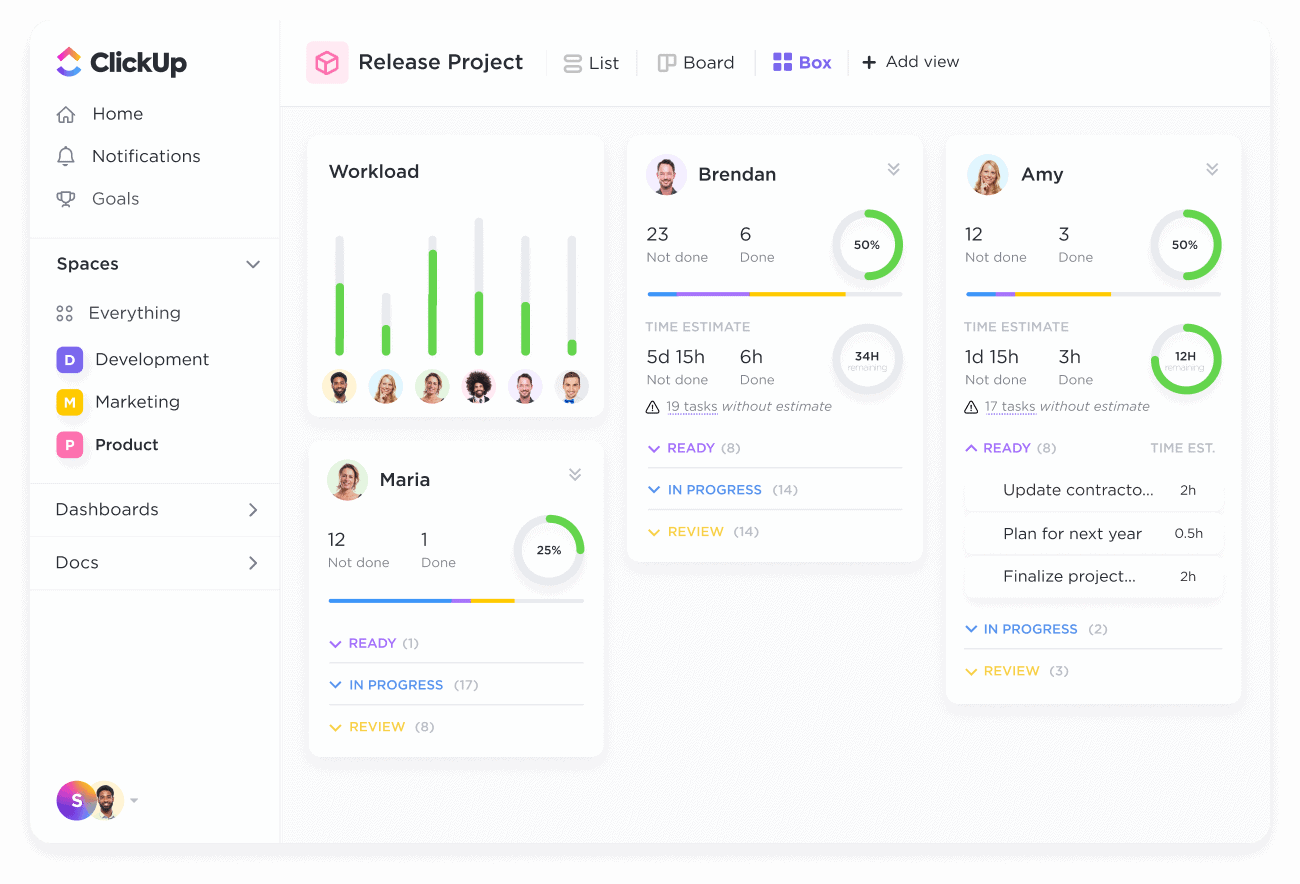
Image source: clickup.com
What is Airtable?
Airtable is a cloud based platform that combines the functionality of a database with the user friendly interface of a spreadsheet. This unique combination allows users to organize, visualize, and manage data in a flexible and intuitive manner. Airtable is more than just a spreadsheet; it is a powerful tool for building custom applications and workflows without requiring coding knowledge.
The platform is structured around bases, which are essentially databases that can be customized with different views, such as grids, , Kanban boards, and galleries. Users can create custom fields to capture specific data points, link records between tables to establish relationships, and automate workflows to streamline processes. Airtable excels at organizing and visualizing information, making it ideal for project tracking, content management, and .
Airtable is favored by teams and individuals who need a flexible and visually appealing way to manage data. Its versatility makes it a valuable tool for a wide range of use cases, from managing product catalogs to tracking marketing campaigns.
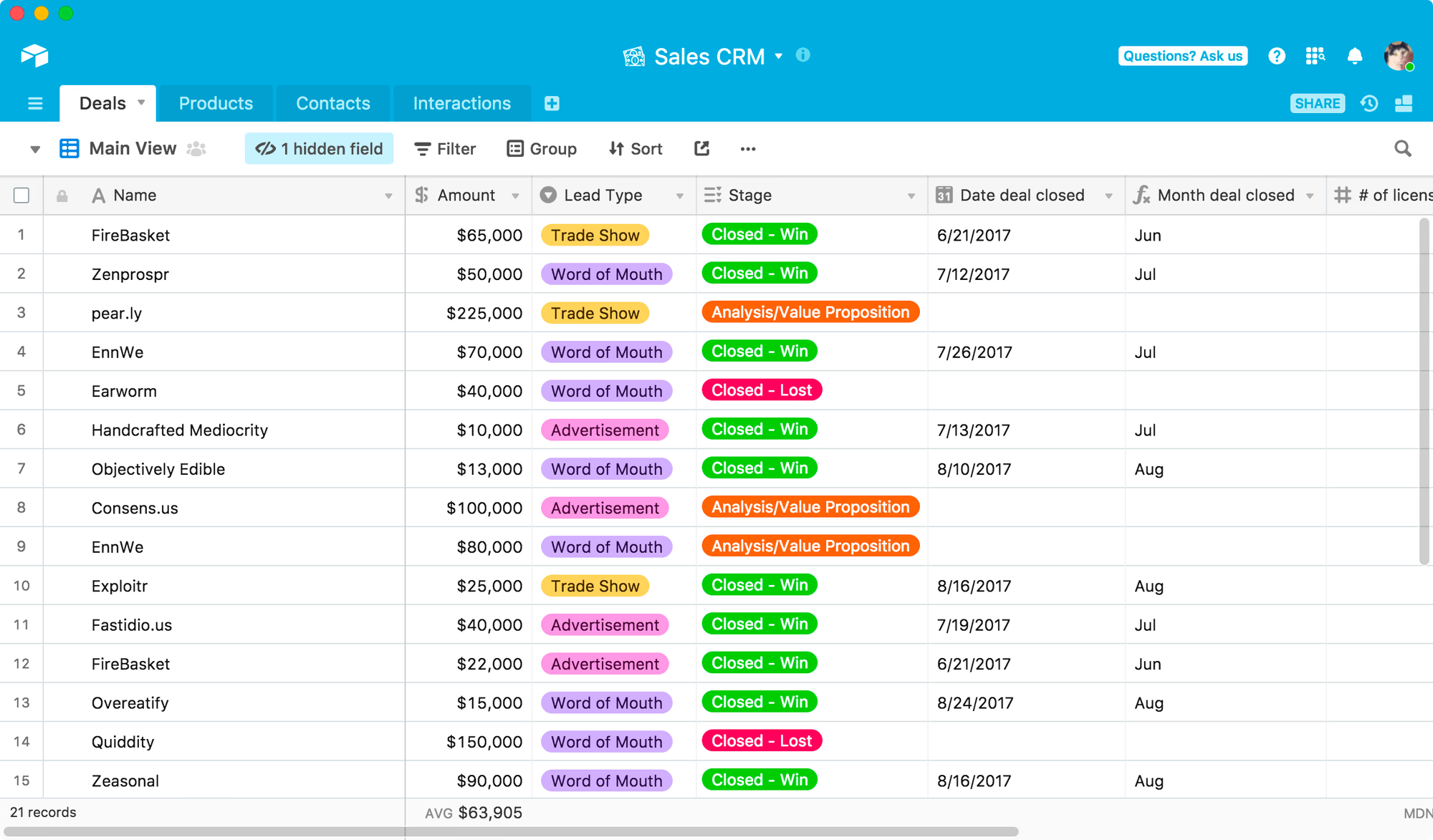
Image source: airtable.com
ClickUp vs Airtable: Key features compared
Choosing between clickup vs airtable requires a detailed understanding of their core capabilities. While both platforms offer robust features, they cater to different strengths and workflows. This section provides a side by side comparison of key features to help you determine which platform aligns best with your needs. We'll also touch on a clickup vs airtable vs monday features comparison.
Task management
ClickUp's task management capabilities are highly structured and customizable. Tasks can be organized into hierarchical lists, subtasks, and checklists, providing a granular level of control. Users can assign tasks to team members, set deadlines, track time spent, and . Multiple views, such as Gantt charts, Kanban boards, and calendars, allow users to visualize tasks in different ways. Automation features can be used to , such as assigning tasks based on specific criteria or sending reminders when deadlines are approaching.
Airtable takes a more data driven approach to task management. Tasks are represented as records in a database, with each record containing various fields, such as assignee, due date, status, and priority. Users can link records between tables to establish relationships between tasks, projects, and team members. Airtable offers multiple views, including grid, calendar, , and gallery views, to visualize tasks in different ways. Workflow automation features enable users to automate tasks, such as sending notifications when a task is updated or creating new tasks based on specific triggers. While not as directly task focused as ClickUp, Airtable's ability to connect tasks and data points offers a unique advantage.
Project management
ClickUp offers robust project management features, including project templates, , time tracking, and reporting. Users can create project timelines, assign resources to tasks, track time spent on projects, and generate reports to monitor progress. ClickUp's project management features are well suited for teams that need a comprehensive solution for managing complex projects.
Airtable provides a flexible and customizable approach to project management. Users can create custom by defining custom fields, linking records between tables, and creating custom views. Airtable's project management features are ideal for teams that need a flexible solution that can be tailored to their specific project requirements. Airtable's strength is in creating a central hub for information and provides excellent oversight of all project aspects.
Collaboration
ClickUp facilitates real time collaboration through features such as commenting, , and team communication. Users can collaborate on tasks, share files, and communicate with team members directly within the platform. ClickUp's collaboration features are designed to foster teamwork and improve communication.
Airtable enables collaboration through shared views, commenting, activity logs, and user permissions. Users can share views with team members, add comments to records, track activity within the base, and control user access to data. Airtable's collaboration features are ideal for teams that need to collaborate on data driven projects.
Automation
ClickUp offers extensive automation capabilities, allowing users to automate repetitive tasks and streamline workflows. Custom automation can be created using triggers, actions, and integrations with other tools. For example, a task can be automatically assigned to a specific team member when its status changes to "In Progress."
Airtable's automation features enable users to and integrate with other applications. Users can create automated workflows using triggers, actions, and scheduled events. For example, a notification can be automatically sent to a Slack channel when a new record is created in a specific table.
Reporting and analytics
ClickUp provides features, including dashboards, custom reports, time tracking reports, and workload management. Users can create custom dashboards to visualize key metrics, generate reports to track progress, monitor time spent on tasks, and manage team workload.
Airtable offers reporting and analytics capabilities through summary reports, charts, graphs, and custom views. Users can create summary reports to aggregate data, generate charts and graphs to , and create custom views to analyze data in specific ways. Airtable's reporting and analytics features are useful for teams that need to track performance and identify areas for improvement.
ClickUp vs Airtable: Integrations
Integrations bridge your favorite tools into a seamless workflow—critical for avoiding tool silos. Below's how ClickUp and Airtable stack up in terms of integration breadth, key partnerships, and unique connectivity features.
Depth of integration: Key differences
ClickUp
Breadth for project workflows: With 1,000+ integrations, ClickUp prioritizes connecting project-critical tools. Its strength is in actionable integrations—like linking GitHub commits to tasks or auto-generating Google Docs from templates—keeping project teams focused on execution.
For more Google Workspace's information, you can refer to and .
Airtable
Depth for data workflows: Airtable's smaller integration library is laser-focused on data connectivity. Sync lets teams unify data across sources (e.g., Shopify orders + inventory logs) without copy-pasting, making it ideal for data-heavy roles like marketing ops or finance.
Simplify workflows without switching apps now
ClickUp vs. Airtable: User experience & ease of use
User experience (UX) often makes or breaks tool adoption—here's how ClickUp and Airtable compare in terms of learning curves, interface design, and day-to-day usability.
ClickUp: Feature-rich but with a learning curve
ClickUp's strength in integrated project management comes with a tradeoff: initial complexity. Its dashboard is packed with features, which can overwhelm first-time users.
- Onboarding & customization: ClickUp offers guided tutorials and templates to simplify setup, but customizing workspaces (e.g., creating spaces, setting up automations) requires time investment. Teams that stick with it often praise the flexibility—you can tailor workflows to match your process, not the other way around.
- Day-to-day usability: Once workflows are set up, navigation becomes intuitive. The platform uses consistent UI patterns (e.g., task statuses, comment threads) across features, and keyboard shortcuts speed up repetitive tasks. However, the sheer number of menu options can still slow down casual users.
- Team adoption: Tech-savvy teams (e.g., engineering, marketing) adapt quickly, but less technical teams may need extra training. The free plan's limited features can help teams test the waters before committing to paid tiers.
Airtable: Intuitive for data lovers, tricky for complex workflows
Airtable leverages familiarity with spreadsheets to create a low-barrier entry for data-focused tasks, but it gets more complex as workflows scale.
- Onboarding & interface: Anyone familiar with Excel or Google Sheets will grasp Airtable's grid view instantly. The drag-and-drop interface for adding fields, views, or records feels natural, and basic bases can be set up in minutes.
- Scalability challenges: While simple bases are easy to manage, complex databases (e.g., multi-table relationships, nested automations) require learning Airtable's unique logic. Users often hit a "skill ceiling" when building advanced workflows, needing to consult help docs or tutorials.
- Day-to-day use: For data entry, filtering, or visualizing information (e.g., switching from grid to ), Airtable is smooth. But it lacks the seamless of ClickUp—assigning deadlines or tracking progress feels less native compared to its data features.
ClickUp vs Airtable: Pricing & hidden costs comparison
True tool value isn't just plan prices—factor in usage limits and hidden costs. This section breaks down ClickUp and Airtable's pricing tiers and overlooked expenses to help you choose the best fit.
ClickUp pricing table
Information source: clickup.com
Update time: 2025-11-20
For more information? 👉
Airtable pricing table
Information source: airtable.com
Update time: 2025-11-20
Detailed hidden costs analysis
ClickUp hidden costs:
- AI add-on fees: While basic AI features are included in paid plans, advanced capabilities (like custom AI models or bulk content generation) require an additional $8-10 per user/month. For a 50-person team, this adds $400-500 monthly to the Business Plan cost.
- Enterprise minimums: The Enterprise plan mandates a 3-user minimum, even for small teams needing compliance features. This triples the base cost for solo departments or startups.
- Third-party integrations: Native integrations are unlimited, but custom connectors or premium Zapier tiers (required for complex workflows) can cost $20-50 monthly extra.
- Managed services: Configuration support or custom workflow development costs $150-300/hour, which is often necessary for Enterprise onboarding.
Airtable hidden costs:
- Record overlimit penalties: Exceeding base limits requires upgrading to the next tier. For a 10-person team moving from Team ($20/user) to Business ($45/user), this increases annual costs by $3,000 (from $2,400 to $5,400). There's no pay-as-you-go option for incremental records.
- AI credits: Business plans include 20,000 AI credits/month per user, with overages charged at $0.001 per credit. A team of 7 using 50,000 extra credits monthly faces $35 in additional fees.
- Feature gating: Multi-source sync and advanced automations were moved to the Business plan in 2025, forcing teams relying on these tools to upgrade from Team ($20) to Business ($45) – a 125% price hike.
- Interface alternatives: Airtable's native interfaces require Business+ tiers. Teams using free alternatives like Softr still need at least one Business seat ($45/month) plus Softr's $139/month plan, totaling $2,208 annually for 50 users.
Reduce your costs but gain more benefits
Use cases: Which platform fits your needs?
The right tool depends on your team's core workflows, not just features or price. Below's a breakdown of where ClickUp and Airtable shine, so you can align your use case with the platform built to support it.
ClickUp: Best for project-centric & collaborative workflows
ClickUp shines as a project management hub, ideal for teams prioritizing process visibility, , and end-to-end .
- Cross-team project execution: Perfect for product launches, event planning, or . "Spaces" organize work by department, shared dashboards track progress, and guest permissions keep external stakeholders aligned.
- : Engineering/product teams benefit from built-in sprint management, burndown charts, and integrations with GitHub/Figma—simplifying backlog grooming and iteration tracking.
- : Unlimited users (mid-tier plans) and centralized communication (comments, automations) eliminate time-zone silos. Recurring tasks and reminders keep work on track without constant check-ins.
- : Workload views visualize team bandwidth, while capacity forecasting (Business+) prevents overallocation—critical for shared resources like designers or consultants.
Airtable: Best for data-driven & flexible workflows
Airtable thrives as a customizable database-spreadsheet hybrid, built for teams needing to organize, link, and analyze data with adaptable workflows.
- tracking: Link ad spend, leads, and conversions across tables. Custom views (calendar/kanban) visualize campaigns, and automations trigger actions like "alert when lead status changes."
- : Relate user feedback to features, filter views to prioritize requests, and share read-only roadmaps with stakeholders—keeping everyone aligned on priorities.
- Operations automation: Streamline inventory, onboarding, or vendor management. Custom forms feed data into bases, and automations eliminate manual tasks (e.g., "update inventory on new orders").
- Lightweight asset/CRM management: Build or digital asset libraries. Attach files, tag assets by category, and link records (e.g., clients to invoices) for easy tracking.
Unlock your team's potential in tailored scenarios
Top alternative to ClickUp and Airtable
When searching for alternatives to ClickUp and Airtable, many teams seek a tool that strikes the perfect balance between deep integration and operational ease. If this resonates with you, then the unified workspace and highly contextual collaboration experience offered by Lark might be the solution you're looking for.
Let's explore a few specific scenarios to see how addresses common pain points for ClickUp and Airtable users in practical applications.
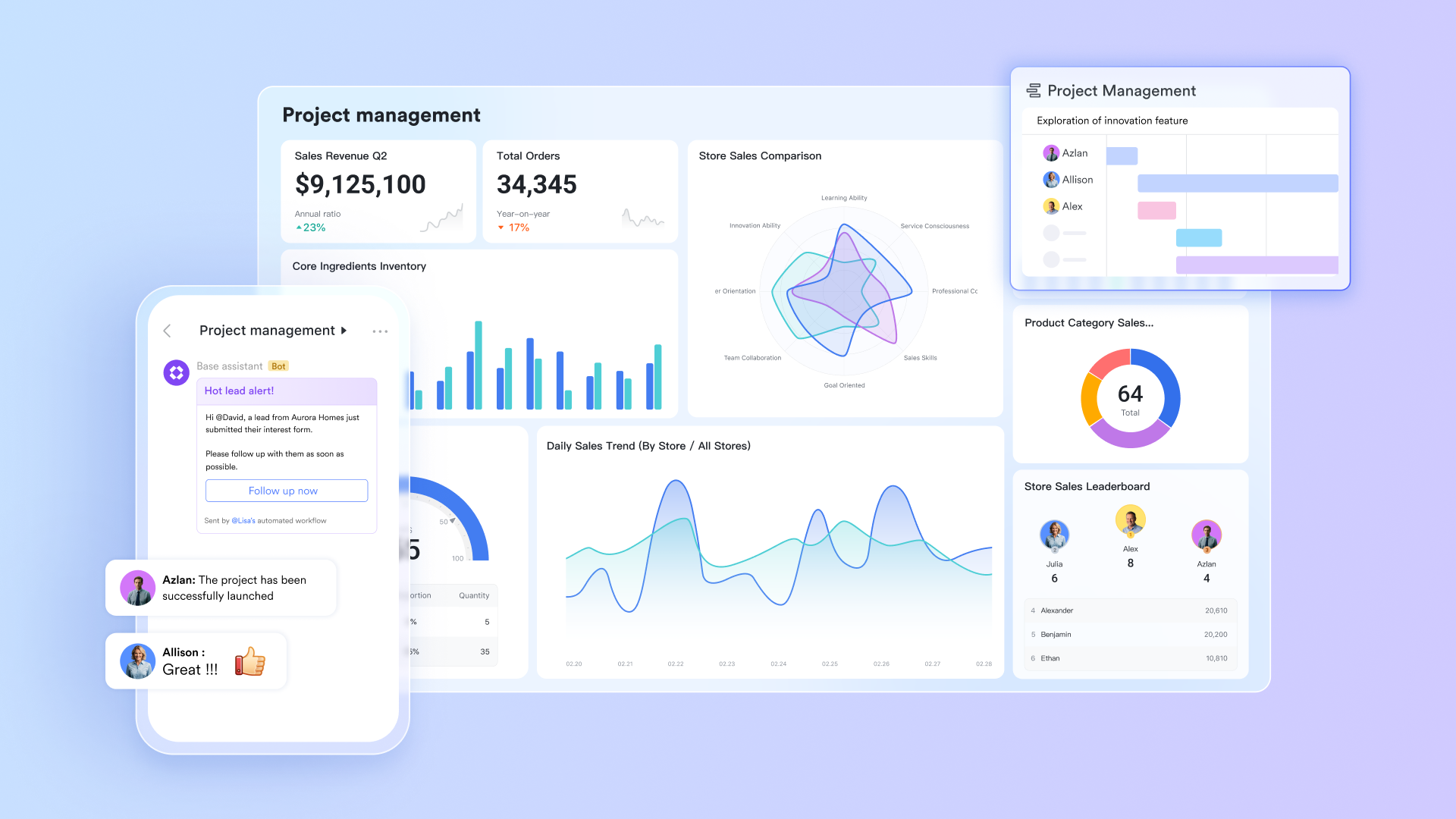
Eliminate context switching with seamless communication
If you find it inconvenient that ClickUp requires additional integrations for communication, Lark's solution is to deeply embed communication into the very context of each work item.
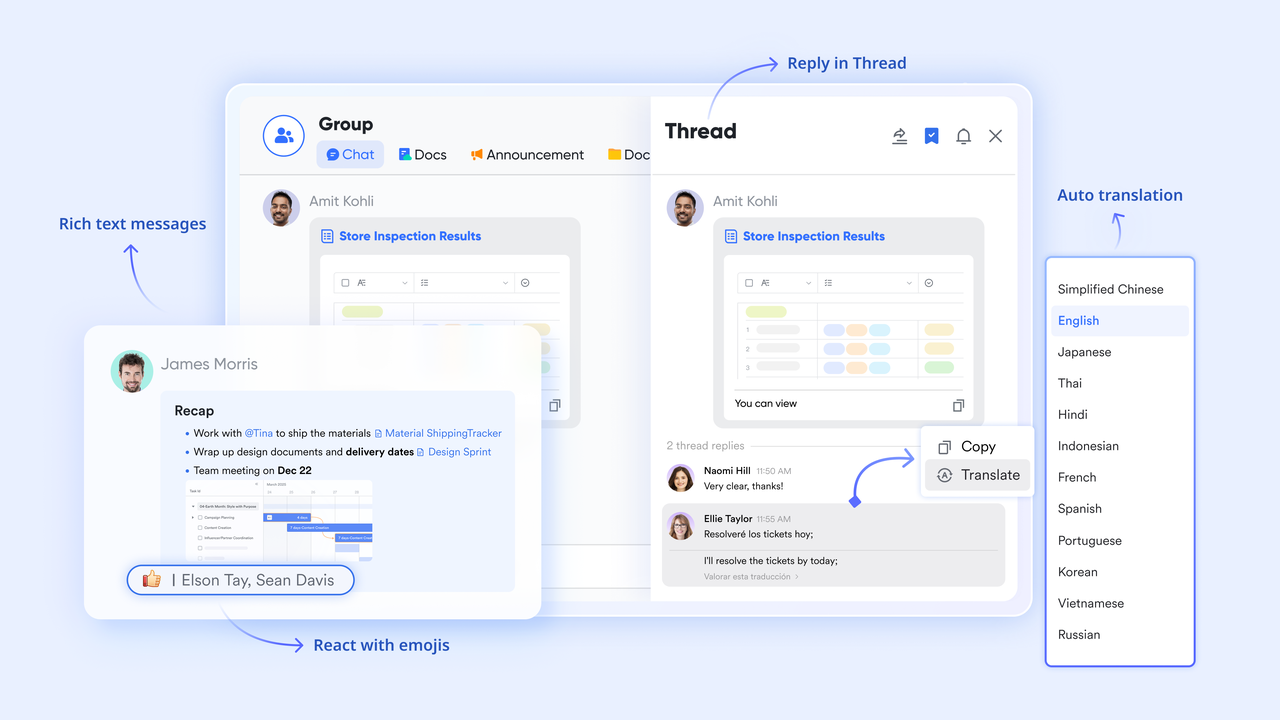
Centralized task communication: In , discussions about any task or document can happen directly within the chat thread associated with that item. This means feedback on a design draft or questions about a data anomaly are automatically linked to the specific content, building a complete decision trail instead of being scattered across different chat windows.
Synchronized meetings and outcomes: Lark not only supports but can also automatically . This ensures that meeting conclusions can translate into project progress just with one click, preventing ideas and action items from being forgotten after the call ends.
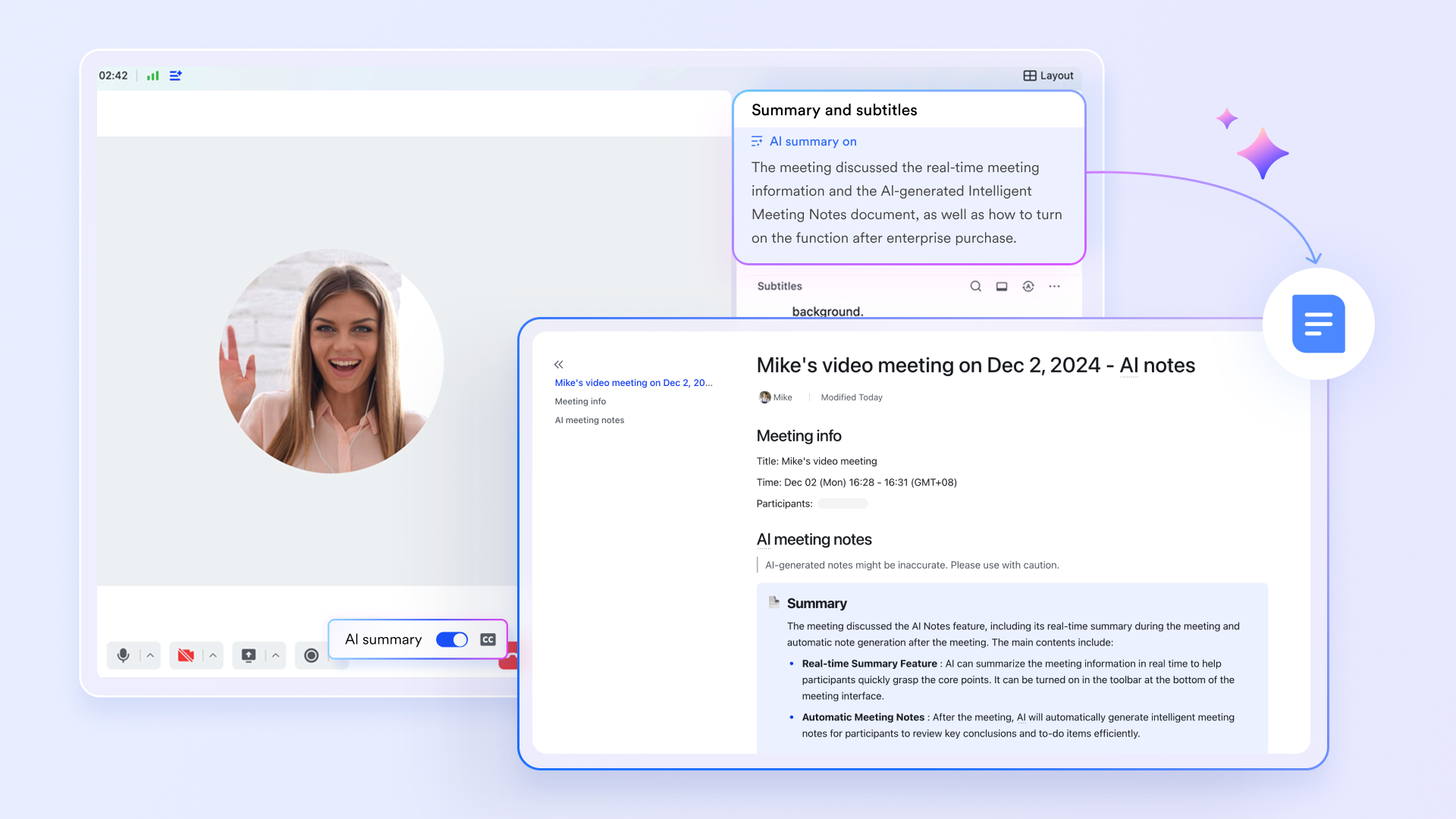
Transforming data into actionable workflows
While Airtable's strength lies in its flexible tables, Lark Base goes a step further by enabling spreadsheets to not just manage information, but to drive actual business processes.
A unified hub for data and permissions: supports various business needs, from simple project Kanbans to complex CRM systems. You can create different views on the same Base for different departments (e.g., Marketing, Operations, Sales), while using field-level permissions to ensure a salesperson can only see their own customer information. This model of being both centralized and partitioned is difficult for Airtable to achieve with the same collaborative depth. 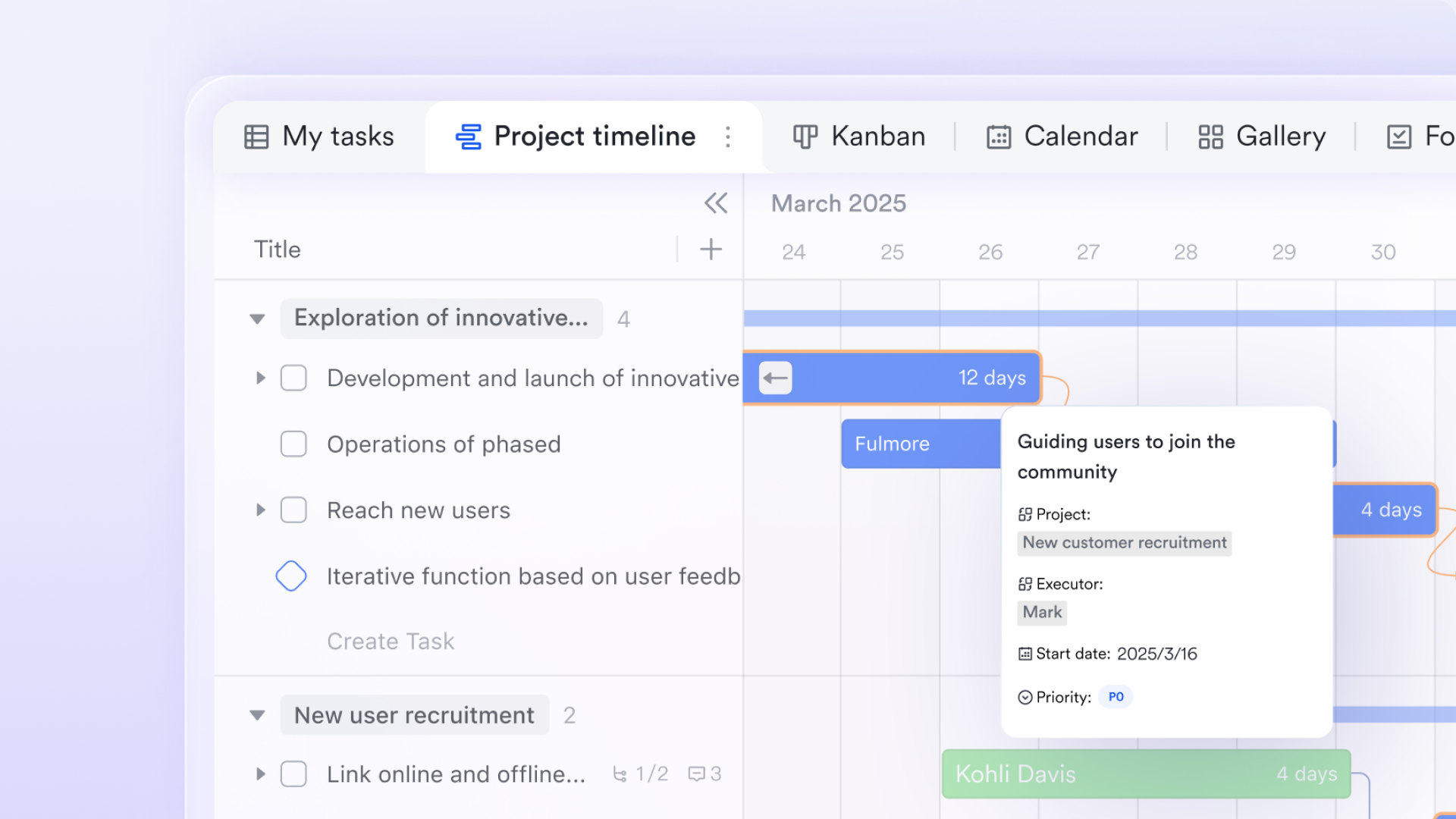
Automating tedious tasks beyond data visualization
Lark injects AI capabilities directly into workflows, aiming to proactively assist you with work, not just present data attractively.
AI infused in work elements: Lark's AI features can handle tedious tasks like batch-generating content, automatically creating spreadsheet formulas, and quickly summarizing long documents. This transforms AI from a distant concept into a practical assistant that genuinely boosts daily productivity. Reduced collaboration costs via automation: You can easily set automation workflows like "when A happens, automatically execute B and notify C" in Lark Base This significantly reduces the communication overhead and error-prone manual steps inherent in cross-departmental or cross-system collaboration. 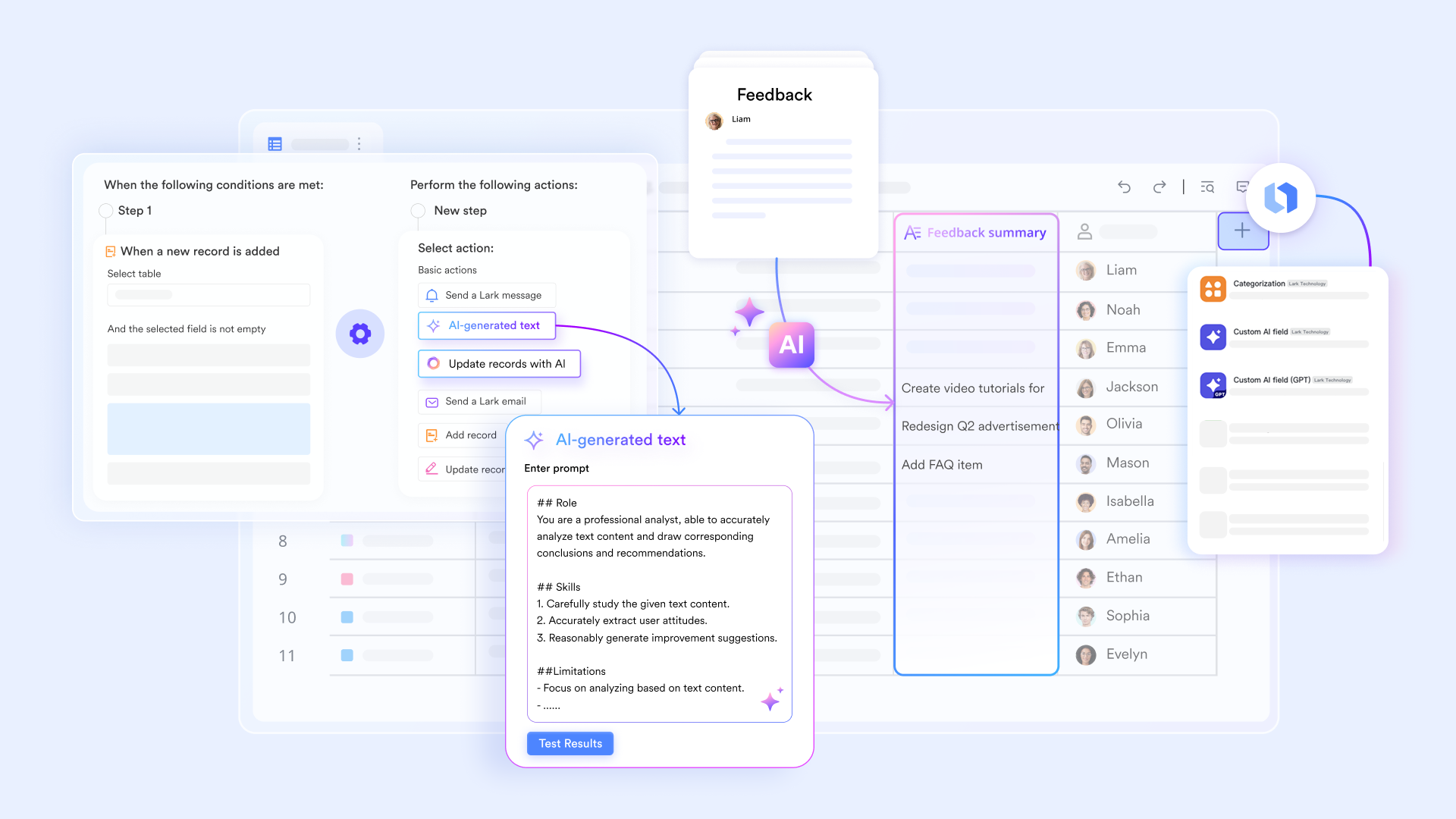
Removing collaboration barriers for global teams
For organizations with multinational or cross-regional teams, feature directly addresses a core pain point not extensively covered by ClickUp or Airtable.
Team members can communicate in instant messages or comments using their preferred language, with the system providing real-time translation for the recipient. This not only breaks down language barriers but also prevents rework and delays caused by misunderstandings, .
More advantageous pricing plans
Here is :
- Free plan: Includes 11 powerful products, supporting up to 20 users, 100 GB storage, 1,000 automation runs and unlimited AI translation in chats, docs and email.
- Basic plan: $6/user/month (billed annually) for up to 500 users. Includes everything in Starter plus unlimited message history, 5TB storage, 1,000 automation runs, and more. Some users may need to to purchase.
- Pro plans: $12/user/month, supporting up to 500 users. Includes unlimited message history, 50,000 automated Base workflow executions per month.
- Enterprise plan: for custom pricing. Supports unlimited users and includes even more automation runs and advanced security, compliance, and management features.
For small teams with simple communication needs

18 months message history
1000 Base automation runs/month
2000 rows per table in Base
Most POPULAR
For companies with comprehensive collaboration and management needs
Unlimited message history
500-participant video meetings
50k Base automation runs/month
20k rows per table in Base
For large companies with advanced security and organizational management needs
Get a personalized demo and pricing
Unlimited message history
500-participant video meetings
15 TB storage + 30 GB storage/user
500k Base automation runs/month
50k Base automation runs/month
Most POPULAR
For companies with comprehensive collaboration and management needs
Unlimited message history
500-participant video meetings
50k Base automation runs/month
20k rows per table in Base
Conclusion
Choosing between ClickUp and Airtable requires weighing your specific needs. ClickUp shines with customizable project management, while Airtable excels in data organization and flexible views.
Ultimately, the best platform hinges on your priorities. For highly customizable project management with extensive automation, ClickUp might be ideal. If data organization and custom application building are key, consider Airtable. Or, for a truly unified experience with seamless communication and built-in intelligence, explore how can streamline your team's workflow.
Hopefully, this guide provides valuable insights to help you choose the right platform.
Unlock your team's potential in tailored scenarios
FAQs
Can Airtable replace ClickUp?
While both are powerful, it depends on your needs. Airtable excels at data organization and custom apps, while ClickUp is a feature-rich project management tool. If you prioritize database-like flexibility, Airtable could replace ClickUp. Otherwise, ClickUp's project management focus may be better.
What is the difference between ClickUp and Airtable?
ClickUp is an all-in-one project management platform emphasizing task management and customization. Airtable combines the power of a database with a user-friendly spreadsheet interface, ideal for organizing and visualizing data in flexible ways. They cater to different workflows and priorities.
What are the cons of ClickUp?
ClickUp's extensive features can be overwhelming for new users, leading to a steep learning curve. Its customization options, while powerful, can also result in complexity and require careful setup. Some users find the interface cluttered compared to simpler tools.
Do people still use Airtable?
Yes, Airtable remains a popular platform for teams needing flexible data organization and custom application building. Its intuitive interface and powerful features make it a strong choice for managing a variety of workflows, from content calendars to .
Related reading






























