Every project that misses its deadline or blows its budget is driven by one common root cause: planning that appeared complete but was not. A project management planning template gives teams a structured starting point, defining tasks, owners, timelines, and dependencies before a single line of work begins. Whether you are managing a product launch, a marketing campaign, or a cross-functional initiative, the right template keeps everyone aligned from kickoff to close. This guide covers what makes a strong planning template, how to apply it across different project types, and when a template alone is no longer enough.
Key takeaways:
- A project management planning template defines tasks, owners, timelines, milestones, and dependencies in a single structured document before work begins.
- Different project types, including waterfall, agile, and cross-functional, require different template structures. Using the wrong format creates confusion rather than clarity.
- A project management task list example helps teams translate high-level goals into specific, assignable actions with clear deadlines and ownership.
- The most common planning template failures, such as vague task definitions, missing owners, and no milestone tracking, are structural problems rather than execution problems.
- Lark offers free, collaborative project management planning templates built on Lark Base, with real-time editing, automation, and multiple views that keep plans actionable throughout the project lifecycle.
What is a project management planning template?
A planning template is a structured framework for organising and documenting the key elements needed to plan and execute a project effectively. It typically includes sections for , listing tasks, assigning responsibilities, setting timelines, identifying milestones, and mapping dependencies between activities. By using a template, project managers can ensure that every critical component of a project is captured before execution begins.
These templates help teams break down large project goals into manageable tasks with clear ownership and deadlines. This improves coordination, accountability, and visibility across the team. Instead of creating a new plan from scratch each time, organisations can reuse standardised templates to maintain consistency in how projects are planned and managed.
Modern tools such as Lark provide collaborative project management templates that allow teams to update tasks, track progress, and communicate in real time, ensuring the project plan remains accurate throughout the project lifecycle.
Plan, track, and collaborate in one AI-powered workspace
4 methodologies used in project management planning templates
Different projects require different planning structures, which is why project management planning templates vary based on methodology. The way tasks, timelines, and dependencies are organized depends largely on how the project will be executed. For example, waterfall projects follow a linear sequence, while rely on iterative sprint cycles. Understanding these methodological differences helps teams choose the right template structure, ensuring that planning supports the workflow rather than creating unnecessary complexity.
Waterfall
Linear phase-by-phase planning with strict dependency sequencing. includes phase columns, milestone gates, sign-off fields for each phase, and a final deliverable tracker. Best suited for construction, compliance projects, and software implementations with fixed requirements.
Agile and Sprint planning
Iterative planning with sprint backlogs, story points, velocity tracking, and retrospective columns. The differs fundamentally from the Waterfall model because it is designed to be updated every Sprint rather than set once. Cover the difference between a sprint planning template and a project roadmap template.
Cross-functional project planning
Multi-team projects where dependencies span departments. The template must include a RACI matrix column, inter-team dependency flags, and an escalation path. Explain why generic templates break down when applied to cross-functional work.
Event and campaign planning
Time-boxed projects with hard deadlines and parallel workstreams. Template structure needs pre-launch checklist columns, an owner-by-workstream layout, and a go/no-go decision field.
Common project planning template mistakes that derail projects
Even well-designed project management planning templates can fail if they are used incorrectly. Many project delays and budget overruns are not caused by poor execution but by mistakes. Understanding these common errors helps teams build planning templates that remain practical, accountable, and adaptable throughout the project lifecycle.
- Assigning tasks to teams instead of individuals: Assigning a task to a group such as "marketing team" or "design team" often leads to confusion about who is responsible. When no single person owns a task, accountability becomes unclear, and work can easily fall through the cracks. Every task in a planning template should have a clearly named individual responsible for completion.
- Setting dates before mapping dependencies: Many teams start planning by filling in due dates, but this approach often creates unrealistic timelines. Tasks that rely on the completion of earlier work may end up scheduled incorrectly. Mapping dependencies first ensures that timelines reflect the actual sequence of work required.
- Using the same template for every project type: Different projects require different planning structures, depending on their methodology and workflow. A template designed for may not work well for agile environments that rely on iterative sprints. Choosing the right template structure ensures that the planning supports how the project will actually be executed.
- No milestone gates between phases: Milestones serve as checkpoints confirming whether a phase has been completed successfully. Without these gates, projects often move forward without proper validation or stakeholder approval. This lack of checkpoints frequently leads to scope creep and misalignment later in the project.
- Treating the plan as a one-time document: Some teams create a detailed project plan at kickoff but never update it again. Over time, the template becomes outdated and no longer reflects the project's actual status. A strong planning process includes a regular update cadence, so the template remains a living document that guides ongoing work.
Gain visibility into project health, timelines, and team activity by Lark
10 Ready-to-use project management planning templates
Finding the right starting point saves more time than building from scratch. Here we offer free, ready-to-use project management planning templates with real-time collaboration, automation, and multiple views:
1. Project plan template
A project plan template provides a structured overview of the entire project, outlining objectives, tasks, timelines, milestones, and responsible team members. It helps project managers organize work from the planning phase through execution while keeping everyone aligned on priorities and deadlines. By using a project plan template, teams can track progress, , and ensure that project goals are completed on schedule.
2. Lark Base project management template
A Lark Base project management template helps teams organize and track projects using a collaborative database-style workspace. It allows project managers to assign tasks, set deadlines, monitor progress, and manage dependencies within a single shared system. With real-time updates, customizable fields, and multiple views such as Kanban, Grid, or Gantt, the template keeps project information centralized and visible to the entire team.
3. Project planning & implementation template
A project planning & implementation template helps teams structure both the preparation and execution phases of a project. It outlines key objectives, detailed task lists, timelines, resource allocation, and implementation steps needed to move the project from planning to delivery. By organizing these elements in one place, the template helps teams monitor progress, coordinate responsibilities, and ensure that planned strategies are executed effectively.
4. Multi-project tracker template
A multi-project tracker template helps teams monitor and manage multiple projects from a . It typically includes fields for project status, deadlines, owners, priorities, and progress tracking across different initiatives. By providing a consolidated view of ongoing work, the template helps managers allocate resources efficiently and quickly identify delays or bottlenecks across projects.
5. Design project management template
A design project management template helps teams organize and track the workflow of creative and design-related projects. It typically includes sections for design tasks, feedback cycles, asset approvals, deadlines, and responsible team members. By structuring the design process in one place, the template helps teams manage revisions, maintain collaboration, and ensure that creative deliverables are completed on schedule.
6. Project roadmap Gantt chart template
A project roadmap Gantt chart template helps teams and task dependencies in a clear, chronological format. It displays tasks along a timeline, showing start and end dates and how activities connect across the project lifecycle. This visual structure allows project managers to track progress, identify scheduling conflicts, and ensure that key milestones are completed on time.
7. Short-term project plan template
A short-term project plan template helps teams organize and manage projects with tight timelines and clearly defined deliverables. It focuses on immediate tasks, short milestones, and quick execution cycles to ensure work is completed efficiently within a limited timeframe. By outlining priorities, responsibilities, and deadlines in one place, the template helps teams stay focused and maintain progress throughout the short project duration.
8. Project tracking template
A project tracking template helps teams monitor task and milestone progress, as well as overall , throughout the project lifecycle. It typically includes fields for task status, owners, deadlines, and completion percentages to provide clear visibility into ongoing work. By regularly updating the tracker, teams can identify delays early, maintain accountability, and ensure the project stays aligned with its planned timeline.
9. Product development progress management template
A product development progress management template helps teams track the stages of product development from idea validation to final release. It organizes tasks, milestones, responsible teams, and timelines across phases such as research, design, development, testing, and launch. By centralizing progress tracking, the template helps product teams monitor development status, coordinate cross-functional work, and ensure that the product moves smoothly toward release.
10. Task management template
A task management template helps teams organize, assign, and track individual tasks within a project or workflow. It typically includes fields for task descriptions, owners, priorities, deadlines, and status updates to ensure accountability. By centralizing tasks in a single, structured view, the template helps teams stay organized, monitor progress, and ensure work is completed on time.
Meet Lark: Manage projects from planning to delivery precisely
Static templates break the moment a project gets complex. Once multiple owners are editing the same plan, tasks are being updated across time zones, and stakeholders need live visibility without attending every status meeting. A spreadsheet-based template creates more coordination work than it removes, and that's where a collaborative workspace takes the lead.
Lark is an AI-powered work management platform that provides project teams with the planning, collaboration, and they need, all within a single connected workspace. Unlike a standalone template file, Lark keeps your plan, team communication, and approval workflows in one place, so projects move forward without the friction of constant tool switching.
A live project management hub for team members
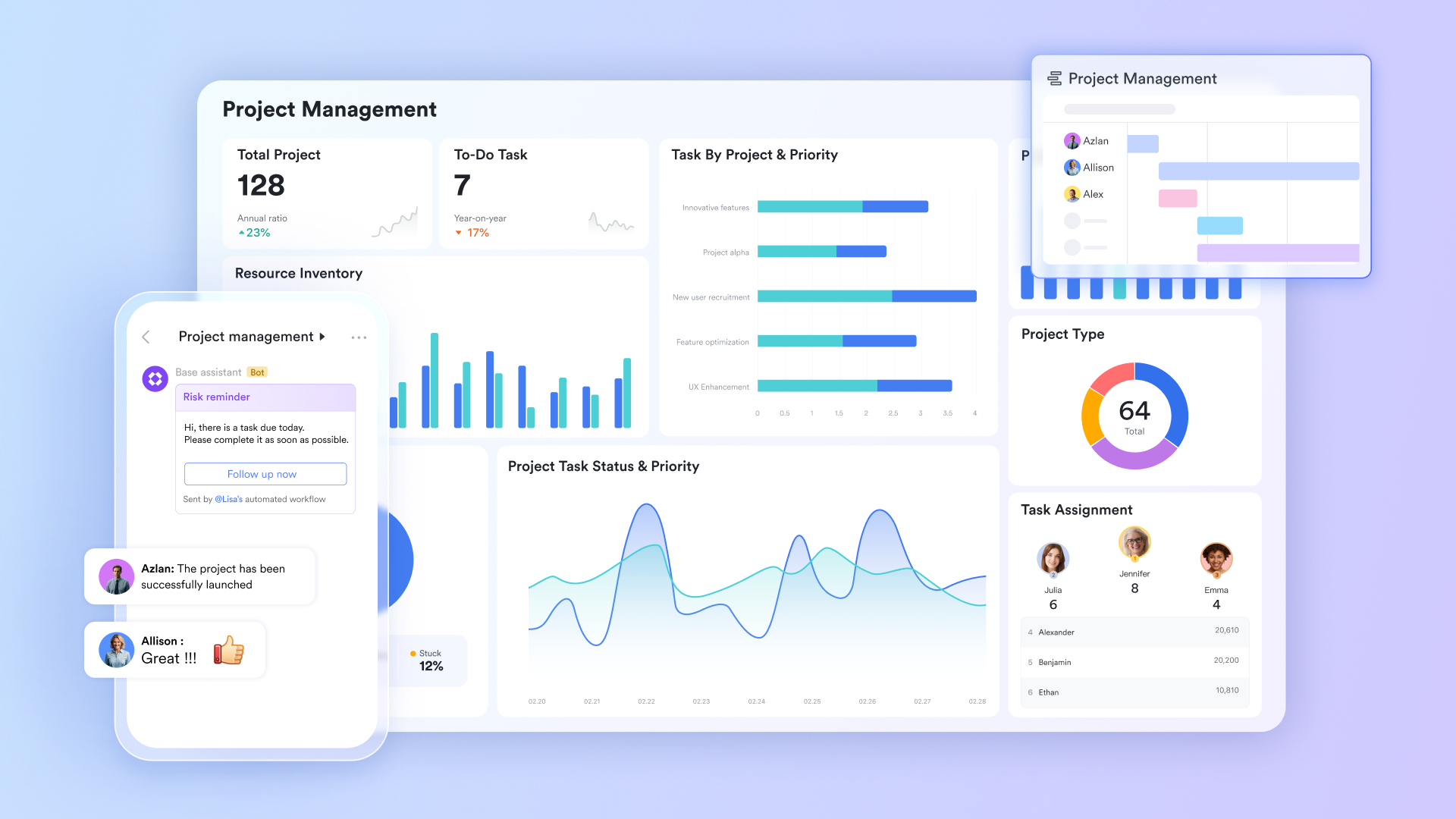
lets project managers build a using custom field types, including single-select status dropdowns, date fields for start and due dates, member fields for task ownership, number fields for story points or estimated hours, and link fields to map task dependencies. Every record updates in real time across all users simultaneously. When a task owner changes a status field from In Progress to Blocked, that change is reflected instantly for every team member and stakeholder viewing the base, without refreshing, saving, or sending a separate update.
See the plan the way your role needs it
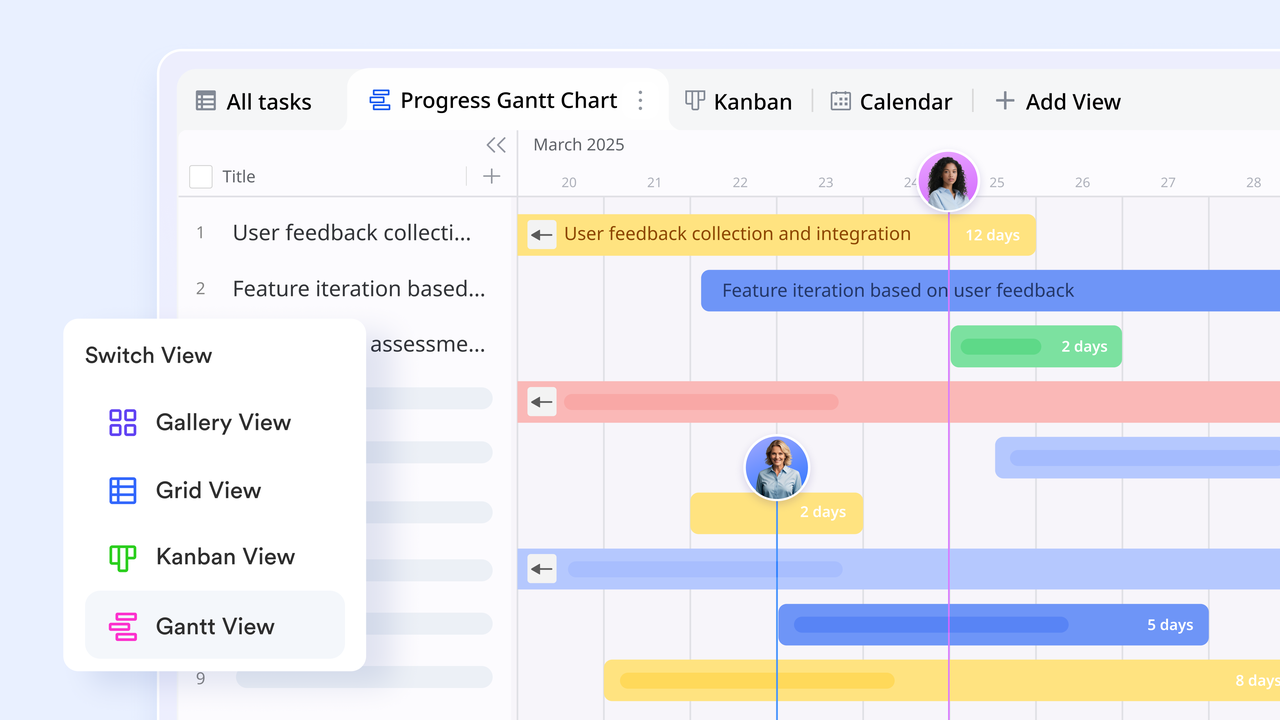
The same project table can be viewed in five formats without duplicating or reformatting data. renders task start dates, due dates, and dependencies as a visual timeline so project managers can identify scheduling conflicts and critical path delays at a glance. Kanban views groups of tasks by status field, so team members can drag cards across columns as work progresses. Calendar view maps due dates across a monthly layout. The dashboard view displays configurable charts, including task completion rate by owner, overdue task count, and milestone progress, giving stakeholders a live readout of project health without opening the task table.
Milestone sign-offs and phase gates without email chains
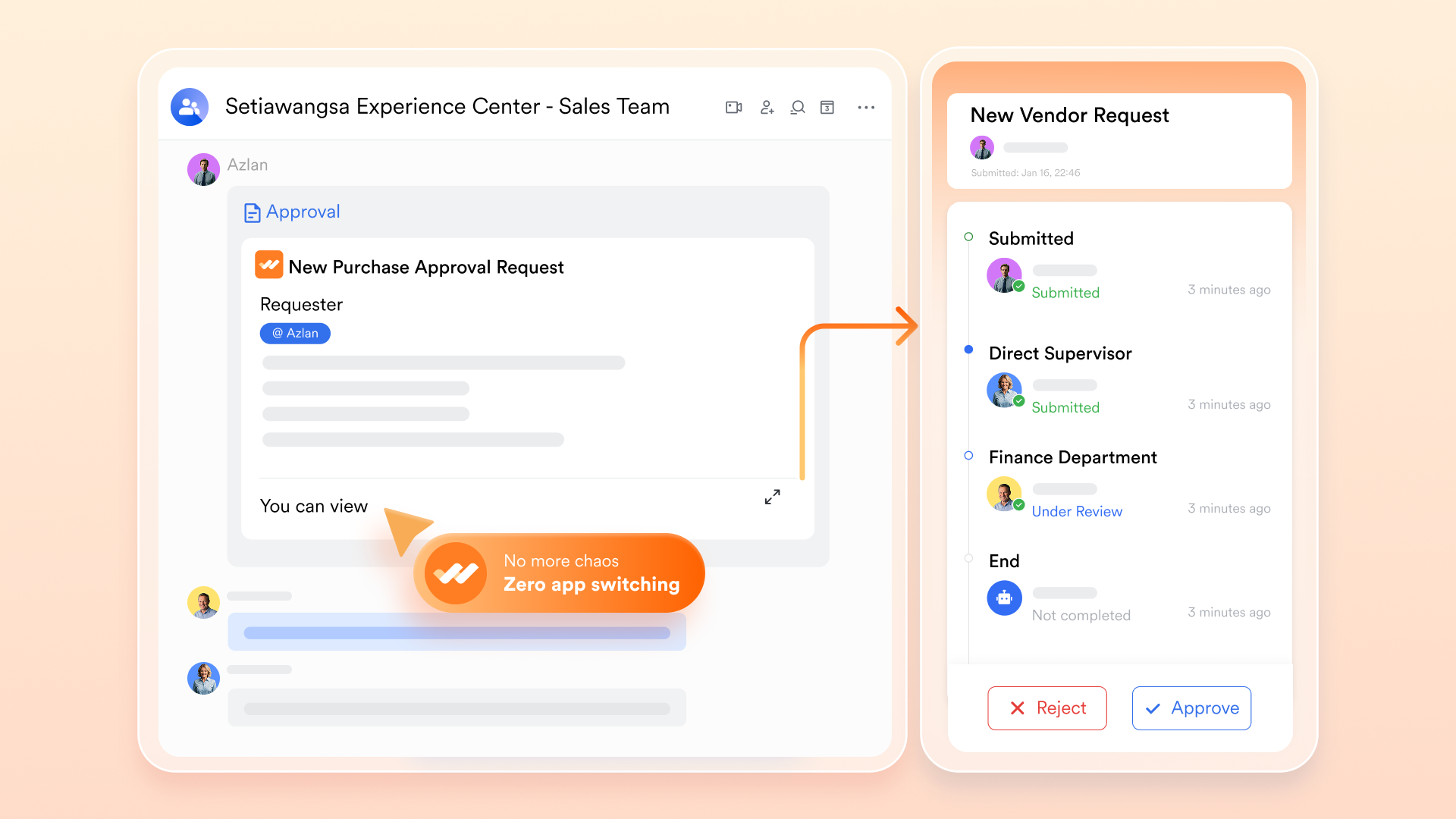
lets project managers configure multi-step approval flows with conditional routing based on project type, budget threshold, or team. When a project phase is ready for sign-off, the team member submits a directly from within the Lark workspace. The request routes automatically to the defined approver sequence, each approver receives a notification in Lark Messenger, and the approval decision is recorded with a timestamp against the relevant project record in Lark Base. The full approval history is visible in one place, replacing the scattered email threads that typically serve as the only audit trail for milestone sign-offs.
Project documentation linked to the plan
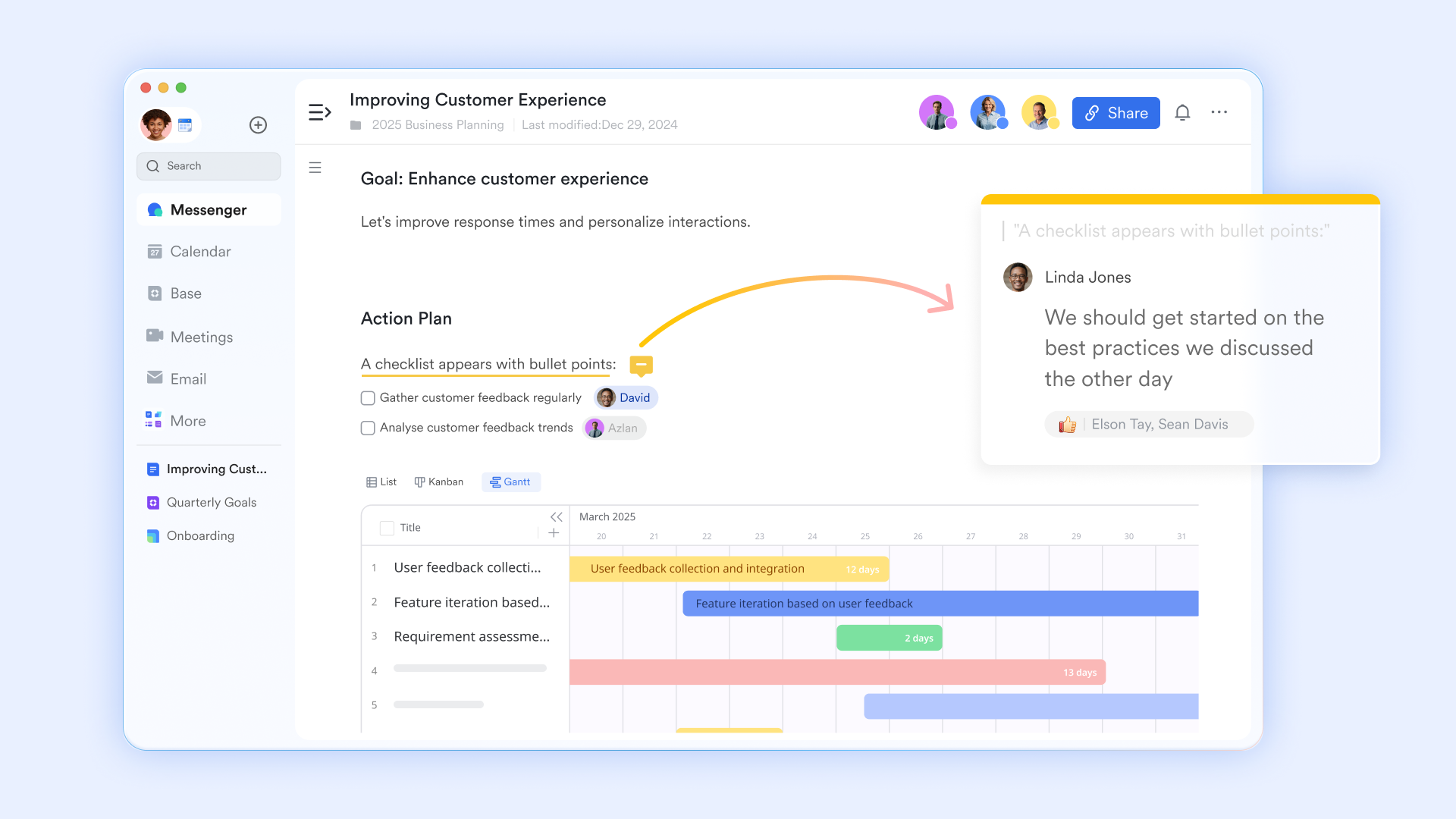
supports collaborative, with inline comments, version history, and structured content blocks, including tables, checklists, and embedded Lark Base records. Project managers create project briefs, scope statements, RACI matrices, and meeting notes in Lark Docs and link them directly to the relevant phase or task record in Lark Base. Team members can access the latest version of any project document within the same workspace where the plan lives, without searching email attachments, shared drives, or external document tools.
Project communication connected to work
supports dedicated project group chats, direct messages, and topic-based threads within the same platform where the project plan lives. Team members can share a specific Lark Base task record directly into a Messenger thread, attach a Lark Doc for inline review, and receive automated task notifications triggered by Lark Base Automation rules, such as a message sent to the task owner when a dependent task is marked complete. Project discussions, decisions, and updates are stored in that remain linked to the work they reference, rather than existing in a separate tool with no connection to the project plan. 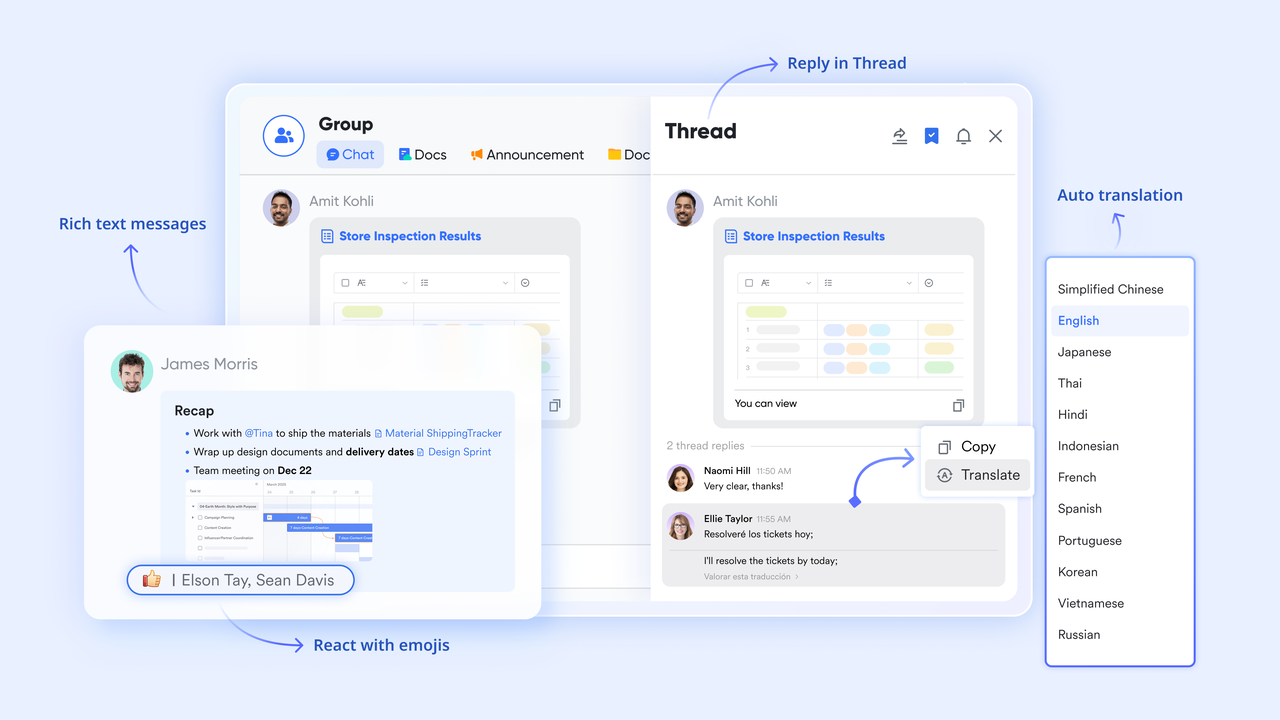
:
- Starter plan: Free forever plan that includes 11 powerful tools for up to 20 users. It also comes with 100GB of storage, 1000 automation runs, AI translations, and more.
- Pro plan: $12/user/month (billed annually) for up to 500 users. It includes everything in Starter plus group calling for up to 500 attendees, 15TB of storage, 50,000 automation runs, and more.
- Enterprise plan: for custom pricing. Supports unlimited users and includes additional automation runs, as well as advanced security, compliance, and management features.
For small teams with simple communication needs

18 months message history
1000 Base automation runs/month
2000 rows per table in Base
Most POPULAR
For companies with comprehensive collaboration and management needs
Unlimited message history
500-participant video meetings
50k Base automation runs/month
20k rows per table in Base
For large companies with advanced security and organizational management needs
Get a personalized demo and pricing
Unlimited message history
500-participant video meetings
15 TB storage + 30 GB storage/user
500k Base automation runs/month
50k Base automation runs/month
Most POPULAR
For companies with comprehensive collaboration and management needs
Unlimited message history
500-participant video meetings
50k Base automation runs/month
20k rows per table in Base
Warning signs your project is losing momentum
Many teams assume their projects are slowing down because of execution issues, when the real problem lies in the planning process itself. If project plans are unclear, outdated, or difficult for teams to access, coordination becomes harder, and delays become more frequent. Recognising the warning signs early helps organisations improve their planning structure and keep projects moving efficiently.
- No one knows the current status without asking: If the most common question in your team is "where are we on this," the plan is not doing its job. A project management planning template that requires a status meeting or a Slack message to answer a basic progress question is a passive document, not an . Status should be visible to everyone at any time without anyone having to ask.
- Tasks are completed, but the wrong ones first: When team members work through their task lists without visibility into dependencies, high-priority work gets delayed while lower-priority tasks get finished ahead of schedule. This is not a motivation problem. It is a planning structure problem. A template without dependency mapping assigns equal weight to every task, regardless of what it blocks downstream.
- The plan is updated once and never touched again: A project management planning template that is built at kickoff and left unchanged is not a planning tool. It is a kickoff artefact. If your team's plan does not reflect the project's current state at any given moment, decisions are being made based on outdated information. Plans need to be live documents with a built-in update cadence, not a one-time exercise.
- Deadlines are missed, but no one saw it coming: If deadline misses consistently come as a surprise, the plan has no early warning system. Reorder point alerts exist in for exactly this reason. Project planning needs the same logic: when a task slips past its due date or moves to blocked status, the right people should be notified automatically before the delay cascades into a missed milestone.
- Every project starts from a blank page: If your team rebuilds the project plan from scratch every time a new project starts, you have not yet turned your planning approach into a repeatable process. Effective project management planning templates are standardised, reusable, and refined after each project. Starting from zero every time means carrying none of the lessons from previous projects forward into the next one.
Conclusion
A well-structured project management planning template provides the foundation for successful project execution. By clearly defining objectives, tasks, responsibilities, dependencies, and milestones, teams can move from planning to delivery with greater clarity and coordination. Choosing the right template based on the —whether waterfall, agile, or cross-functional—also ensures that the planning structure supports how the team actually works. However, as projects become more complex, static templates alone may struggle to keep teams aligned and information up to date.
This is where collaborative work platforms make a significant difference. combines project planning, real-time collaboration, communication, and automation within a single workspace. Instead of managing separate tools for task tracking, documentation, and approvals, teams can do it all in a single, connected environment. If your team wants to move beyond static planning documents and manage projects more efficiently, try Lark's free project management templates and start planning smarter today.
Deliver your projects and grow your business with Lark
FAQs
How often should a project management planning template be updated?
A project management planning template should be reviewed and updated regularly, ideally weekly or whenever major changes occur in the project. Frequent updates ensure that tasks, deadlines, and dependencies accurately reflect the project's current progress. Tools like Lark make this easier by allowing teams to update project plans in real time and automatically keeping everyone informed.
Who should be responsible for maintaining the project plan?
Typically, the project manager is responsible for maintaining the overall , but task owners should update the status of their assigned work. This shared responsibility ensures that the project plan remains accurate and actionable. With collaborative platforms such as Lark, team members can update their tasks directly while managers maintain full visibility.
Can small teams benefit from using project management planning templates?
Yes, even small teams benefit from structured planning because it helps clarify responsibilities, deadlines, and priorities. A simple template can prevent confusion and improve coordination, especially when team members handle multiple roles. Platforms like Lark provide flexible templates that work well for both small teams and large organizations.
What is the difference between a project roadmap and a project plan?
A project roadmap provides a high-level overview of goals, milestones, and major timelines, while a project plan includes detailed tasks, responsibilities, and dependencies. Both documents serve different purposes but complement each other during project execution. Using a platform like Lark allows teams to manage both roadmap-level planning and detailed task tracking in one place.
How can teams improve collaboration during project planning?
Effective collaboration requires clear communication, shared visibility into tasks, and easy access to project documents. When planning tools are disconnected, teams often struggle to stay aligned on priorities and updates. Platforms like Lark improve collaboration by combining project planning, messaging, documentation, and in a single workspace.
Related reading





























