Effective project management is rarely about working harder; it is about working smarter. At the heart of every successful team is a well-defined project workflow. This is the invisible infrastructure that dictates how information moves, how decisions are made, and how tasks progress from a vague idea to a delivered result. Without a clear workflow, even the most talented teams can struggle with miscommunication, missed deadlines, and the frustration of disjointed efforts.
In this guide, we will explore the mechanics of building a robust project management workflow. We will look beyond simple to-do lists to understand the underlying systems that drive efficiency. You will learn how to identify the right type of workflow for your specific needs, how to map out your processes, and how to leverage modern tools to automate the repetitive parts of your day. Whether you are managing a small creative team or a large-scale technical operation, mastering your workflow is the key to consistency and scalability.
What is project workflow?
A project workflow is the systematic sequence of tasks and approvals required to move work from start to finish. While often confused with the broader (initiation to closure), the workflow is the granular engine operating within those phases—the specific "if this, then that" rules governing daily operations.
For instance, a doesn't just identify the execution phase; it defines the exact workflow of the project: a designer uploads a draft, notifies the director, and the task automatically moves to either "approved" or "revision" based on feedback. Effective project workflow management is essential because it transforms abstract goals into actionable steps, eliminating ambiguity and ensuring consistent quality control.
Different types of project workflows
There is no single workflow for project success that applies to every organization. Different industries, team sizes, and project goals require different structures. Generally, workflows fall into three primary categories: process-based (linear), iterative (agile), and status-based. Understanding these distinctions will help you choose the right model for your project planning workflow.
Linear workflows (Waterfall): A linear workflow, often associated with the , is sequential. In this project management workflow process, one task must be completed before the next one can begin. This is highly structured and rigid, making it ideal for projects where requirements are fixed and changes are expensive or dangerous, such as construction, manufacturing, or hardware engineering.
Iterative workflows (Agile/Scrum): Iterative workflows are designed for flexibility and speed. Common in and marketing, this approach breaks the project down into smaller cycles, often called sprints. The goal is not to deliver the entire project at once, but to deliver working segments of it continuously, gathering feedback and improving with each cycle.
Rules-driven parallel workflows: In complex organizations, you may need a workflow for project execution that happens in parallel. This is common in onboarding or product launches, where different departments must work simultaneously but independently until a convergence point.
Status-based workflows (Kanban): Status-based workflows focus on the stage of the task rather than a strict timeline. This is often visualized using a with columns representing the state of work (e.g., To Do, In Progress, Review, Done). This creates a continuous flow of work and is excellent for operational teams or support desks where requests come in unpredictably.
Benefits of project workflows
Implementing a structured project management workflow process is not just about organizing files; it is about protecting your team's time and mental energy. When everyone follows the same playbook, the friction of daily collaboration disappears.
- Reduced micromanagement: When the workflow of the project is documented, team members do not need to constantly ask "what’s next?" Managers can trust the process, stepping back from constant check-ins to focus on strategy.
- Scalability: You cannot scale chaos. A defined workflow creates a repeatable template. Whether you are handling five client requests or fifty, the underlying logic remains the same, allowing you to grow without breaking your operations.
- Improved transparency: A of project management exposes bottlenecks immediately. If work always stalls at the "Approval" stage, you know exactly where to fix the process, rather than guessing why deadlines are slipping.
- Better data integrity: By standardizing how information is collected and stored, you ensure that vital project data is easy to find later, rather than being buried in a forgotten email thread.
Experience these benefits with a powerful tool
Key components of an efficient workflow
An effective workflow is more than just a list of steps. To truly function as a system, your project planning workflow needs three distinct components working in harmony.
- The trigger (input): Every workflow needs a clear starting point. This could be a client signing a contract, a bug report ticket, or a form submission. Without a standardized entry point, work enters your system haphazardly via hallway chats or frantic text messages, which is the root cause of lost tasks.
- The transformation (process): This is the core "work" stage. It includes the specific actions, approvals, and handoffs that change the input into a final product. This section must clearly define roles—who is responsible for execution and who is responsible for quality control.
- The tool stack (infrastructure): You need the right project workflow software to host the process. This is where digital handoffs occur. Ideally, your tool stack should minimize "context switching" by keeping communication and task tracking in the same environment.
Phases of an effective project workflow
While every team is unique, a comprehensive workflow for generally moves through four distinct phases. The challenge most teams face is that these phases often live in different apps—planning in a spreadsheet, execution in chat, and review in email.
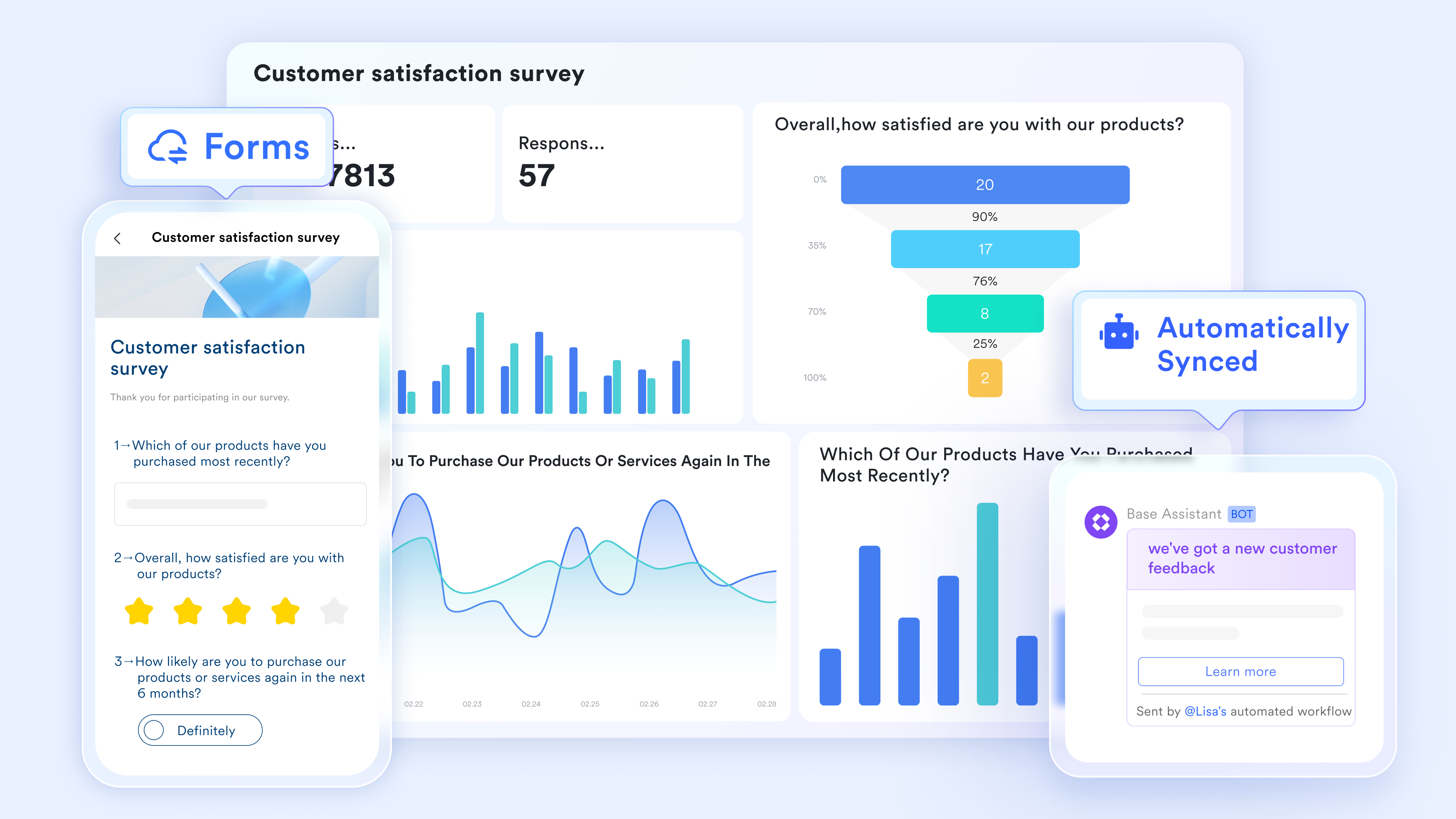
Initiation: This is where the . You gather requirements and determine feasibility. In a unified platform like Lark, you can streamline this by using a Form to collect requests that automatically populate your project database, ensuring no details are lost from day one.
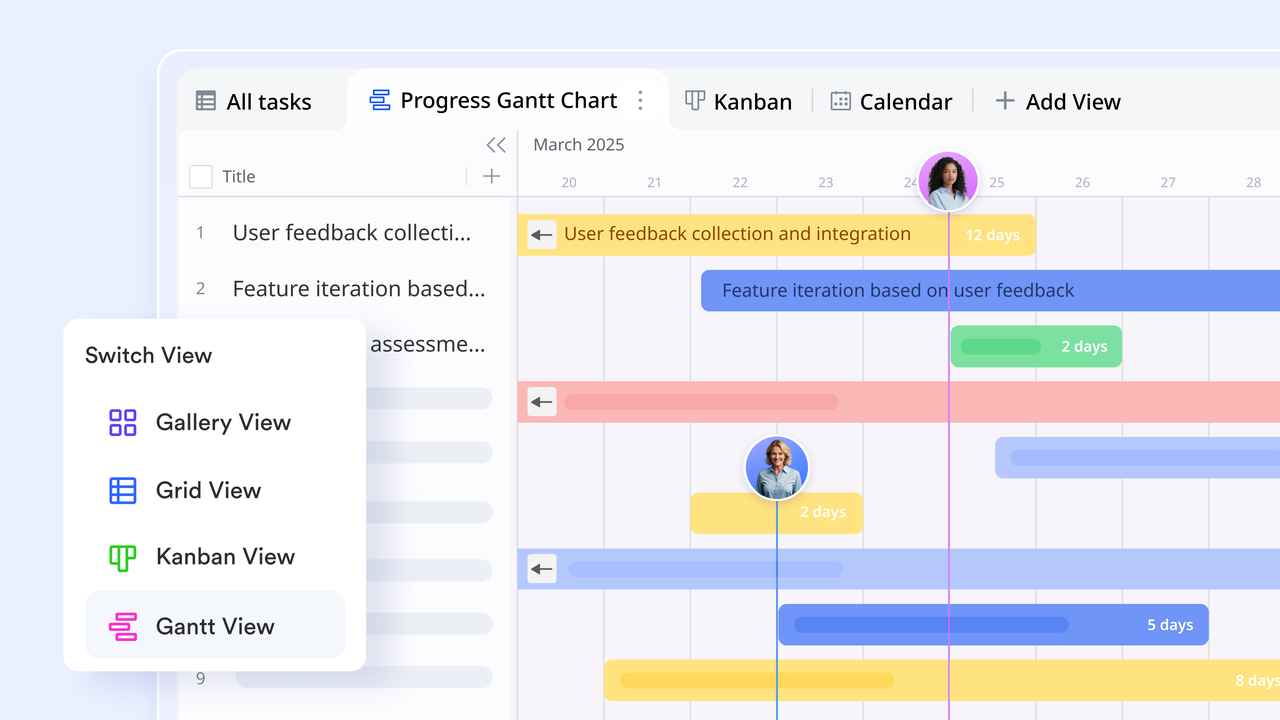
Planning: Here, you map out the timeline and resources. Instead of building a static schedule that nobody looks at, effective teams use dynamic views. You might convert your initiation data directly into a or Kanban view within , connecting your resources to the timeline instantly.
Execution and monitoring: This is where the real work happens—and where communication usually breaks down. A strong project management workflow keeps the conversation attached to the task. By having your team chat directly inside the project document or task card, you preserve the context. If a deadline is at risk, the workflow of the project should trigger an automated alert to the project owner.
: The final phase involves delivering the product and reviewing the process. This is not just about archiving files; it is about analyzing performance. Did the workflow hold up? Were there delays? Using the data from your project software, you can refine the process for the next cycle.
Start building your comprehensive project workflows now
Step-by-step guide to building a project workflow
Building a project management workflow does not require a degree in systems engineering. It requires a willingness to look closely at how your team operates and the discipline to write it down. Whether you are starting from scratch or trying to fix a broken process, following these seven steps will help you construct a workflow for project success that actually sticks.
Step 1: Audit your current process
Before you can build the ideal state, you must understand the current reality. Gather your key team members and ask honest questions about how work gets done today. Do not just look at the official rules; look at the "shadow" workflow.
- Where do requests actually come from? (e.g., formal tickets vs. random hallway conversations).
- Where do projects tend to stall?
- How much time is spent searching for information?
You might find that your project management workflow process breaks down because approvals are buried in . Identifying these pain points first ensures you are solving real problems, not imaginary ones.
Step 2: Define your triggers and definitions of done
Ambiguity is the enemy of efficiency. You need to clearly define the bookends of your workflow.
- The trigger: What specific action kicks off the workflow of the project? It shouldn't be "whenever someone has an idea." It should be "when the Project Request Form is submitted" or "when the client signs the SOW."
- : When is the workflow finished? Is it when the code is written, or when it is deployed? Is the design done when the mockup is finished, or when the client approves it? clearly defining the output prevents projects from dragging on indefinitely in a "99% complete" state.
Step 3: Map the visual flow
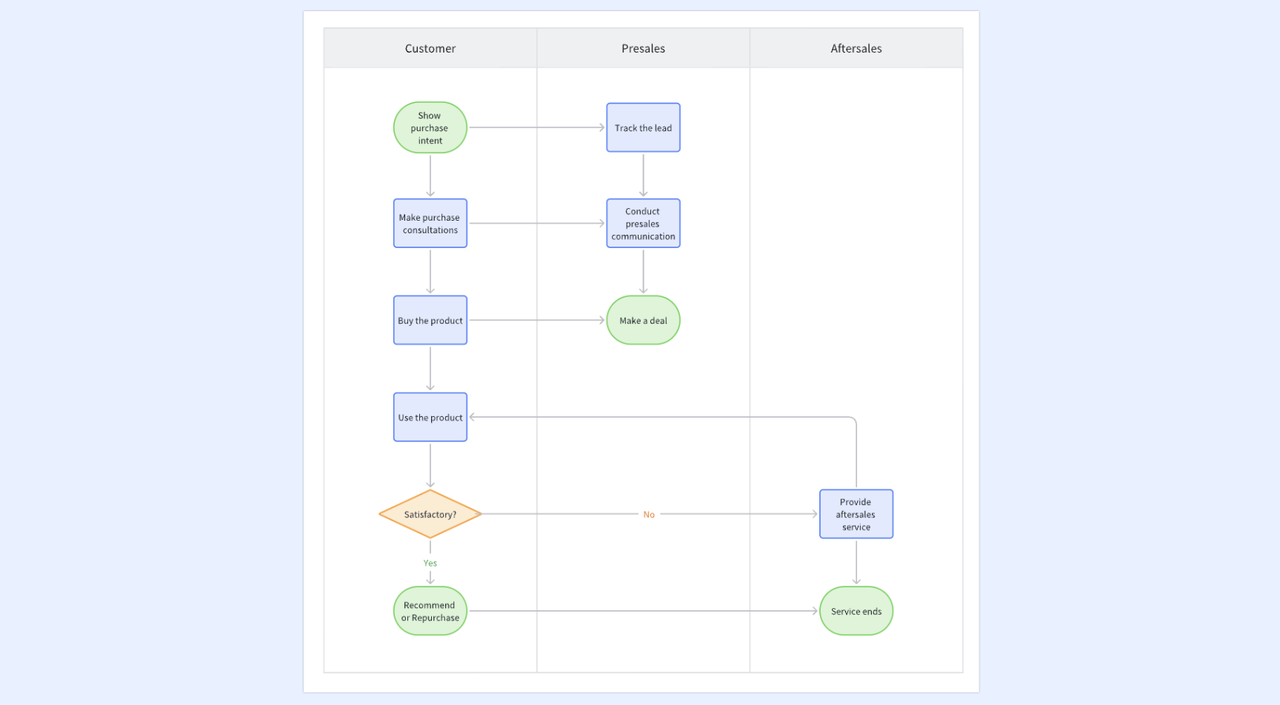
Now, visualize the steps between the trigger and the outcome. You can use a whiteboard or a simple diagramming tool. List every single task required.
- Start with the happy path (the ideal scenario where everything goes right).
- Then, add the branches for exceptions (e.g., "If rejected, return to Step 2").
- Identify parallel tracks where tasks can happen simultaneously.
Visualizing the workflow of project management helps you spot redundancies. If three different people need to approve a simple social media post, your map will reveal that bottleneck immediately.
Step 4: Assign roles and responsibilities
A common failure in project planning workflow execution is the "bystander effect"—everyone assumes someone else is handling the task. For each step in your map, assign a specific owner. Many teams use the (Responsible, Accountable, Consulted, Informed) to clarify expectations.
- Responsible: Who does the work?
- Accountable: Who approves the work?
- Consulted: Who needs to give input?
- Informed: Who needs to know the outcome?
Step 5: Consolidate your tool stack
This is the critical stage where you translate your map into digital reality. The biggest mistake teams make here is fragmentation—using one app for chat, another for tasks, and a third for documentation. This forces team members to constantly switch context, which kills productivity.
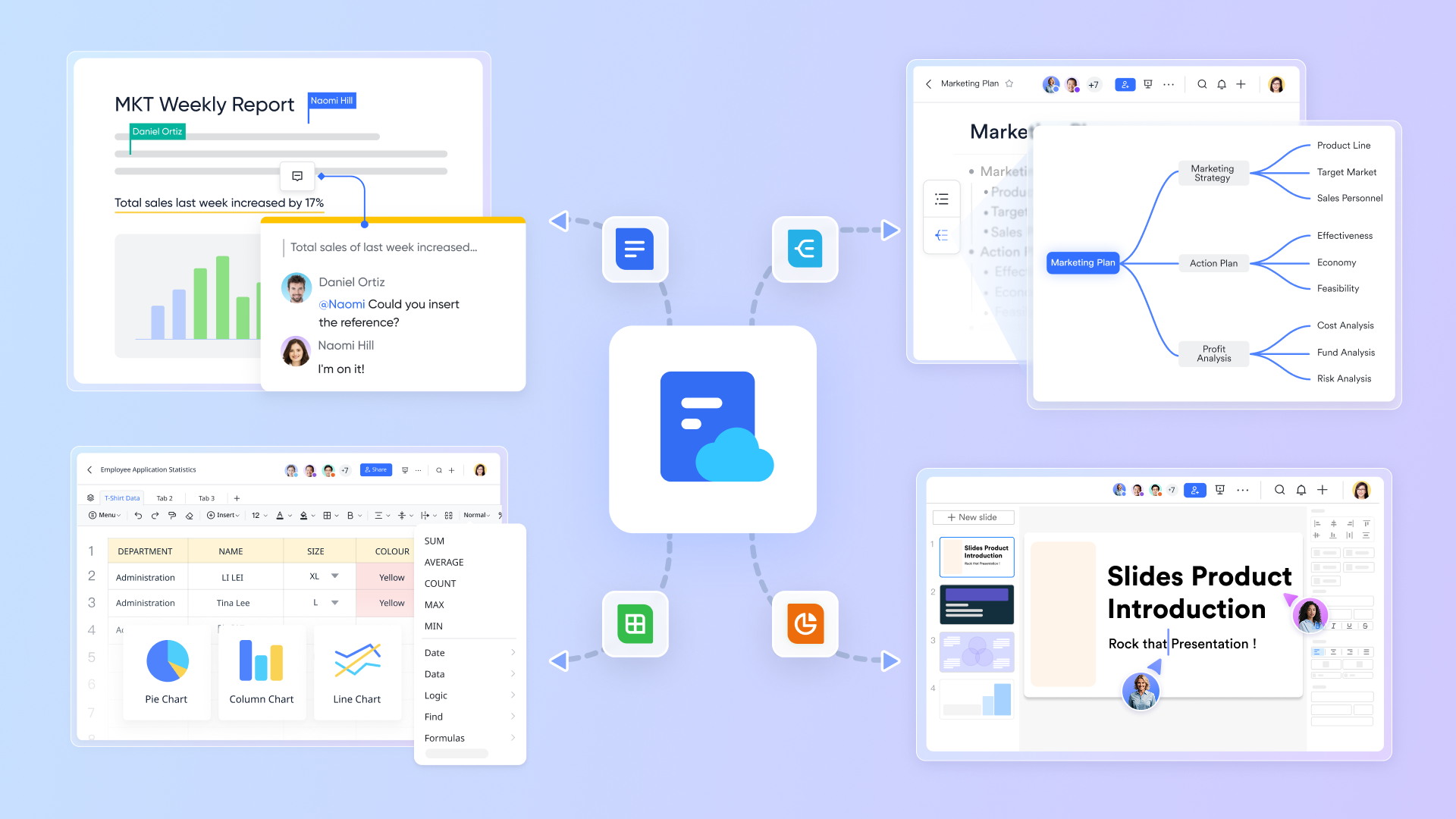
Instead of stitching together disparate apps, look for that unifies these elements. For instance, using a platform like Lark allows you to keep your project database, your documentation, and your team communication in a single interface. When your task list lives right next to your project discussion, you reduce the friction of moving data around, ensuring the workflow for remains fluid.
Step 6: Document the Standard Operating Procedure (SOP)
A workflow that exists only in your head is not a workflow; it is just a habit. You need to document the process in a central, accessible location. Create a "How-To" guide that links to your templates and tools. In your project management workflow, this document becomes the source of truth. If a team member is unsure of the next step, they check the SOP.
Step 7: Test, launch, and iterate
Do not unveil a complex new workflow for the entire company overnight. Run a "soft launch" with a single project or a small team. Watch how the workflow of the project performs in the real world.
- Did the automated notification trigger correctly?
- Did the handoff between design and development happen smoothly?
- Did the team find the new process helpful or burdensome?
Gather feedback, refine the steps, and then roll it out more broadly. Remember, a project management workflow is a living system; it should evolve as your team grows.
Apply these steps to your workflow with the best tool
Unifying your workflow: The Lark approach
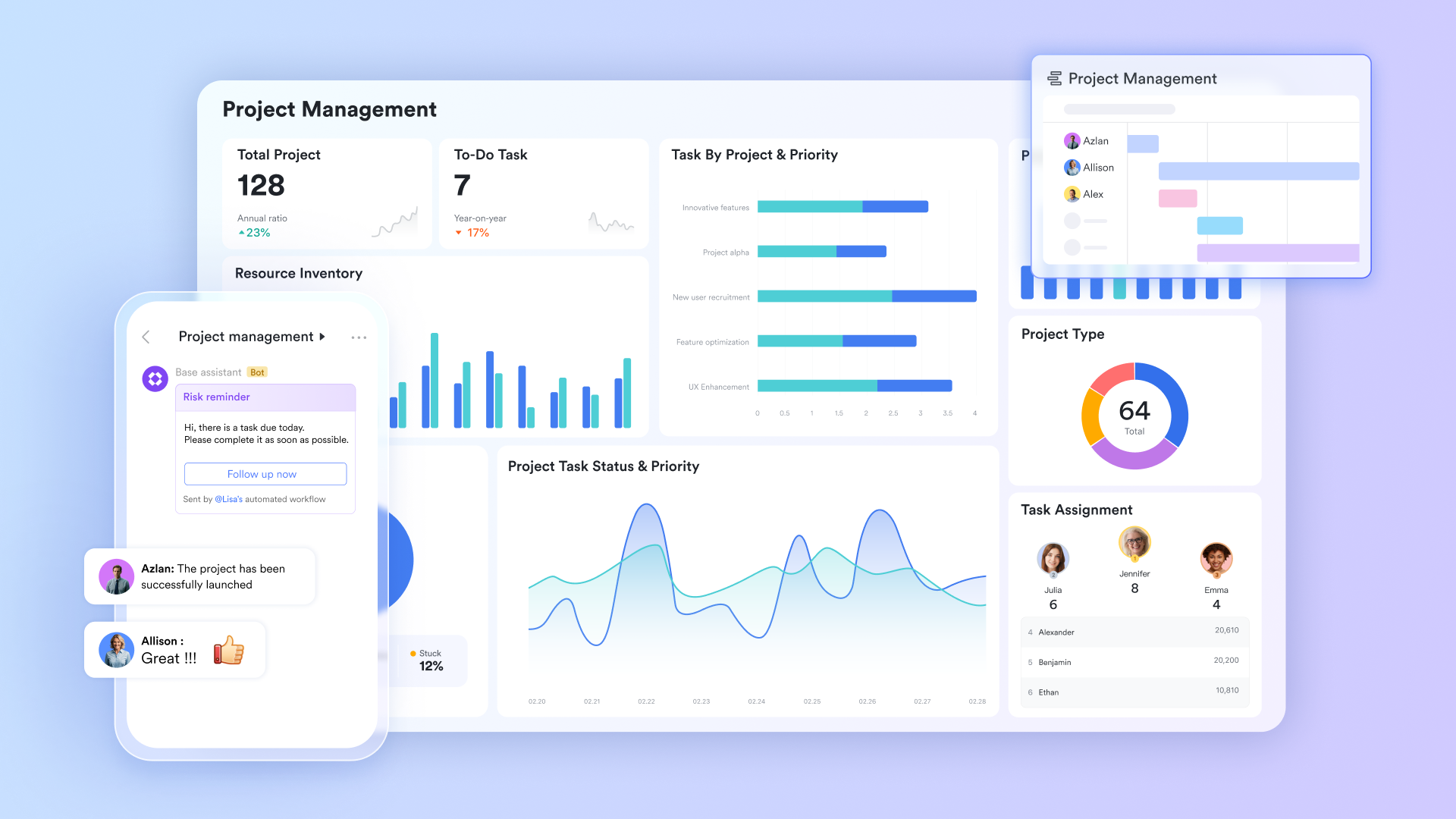
We have established that the biggest threat to a smooth project management workflow is fragmentation. When your team has to jump between a chat app to discuss work, a spreadsheet to track status, and a separate portal to submit approvals, momentum is lost. The "context switching tax" adds up, draining hours from your week. The approach to project workflow management is different. It is not about connecting different apps; it is about having one underlying system where your data, communication, and processes live together.
Visualizing and automating complex processes
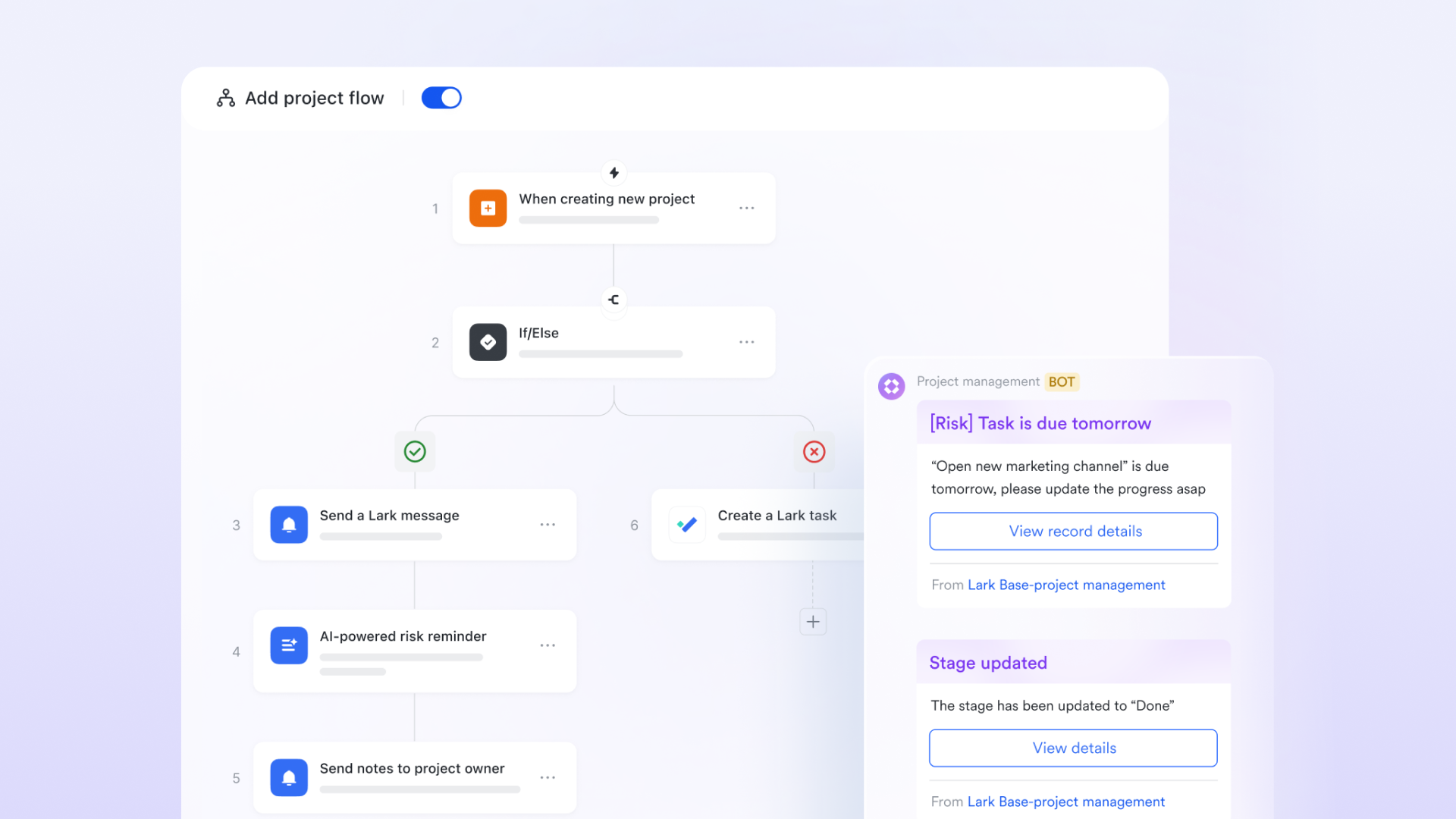
Traditional spreadsheets are static; they don't tell you how work should move. For complex projects that require strict sequencing, you need more than just rows and columns. In , you can utilize the workflow feature to transform a static database into a dynamic engine. This allows you to visually map out your entire project management workflow process directly inside your data table. You can define triggers and actions—for example, when a new record is added to the "Client Requests" table, the workflow can automatically create a corresponding set of tasks in the "Design" table and assign them to specific team members. This ensures that the handoff from "Request" to "Action" is instant and error-free, requiring no manual data entry.
Tracking real-time status with precision
One of the most common questions in any project planning workflow is, "Who has the ball right now?" In typical tools, you have to ping people to update a status cell. With the flow field in Lark Base, the status update is the process itself. You can add a dedicated flow field to your project tracker that visualizes the current stage of any task (e.g., "Drafting" -> "Review" -> "Finalizing"). This enforces compliance and gives project managers a real-time, tamper-proof view of exactly where every deliverable stands. 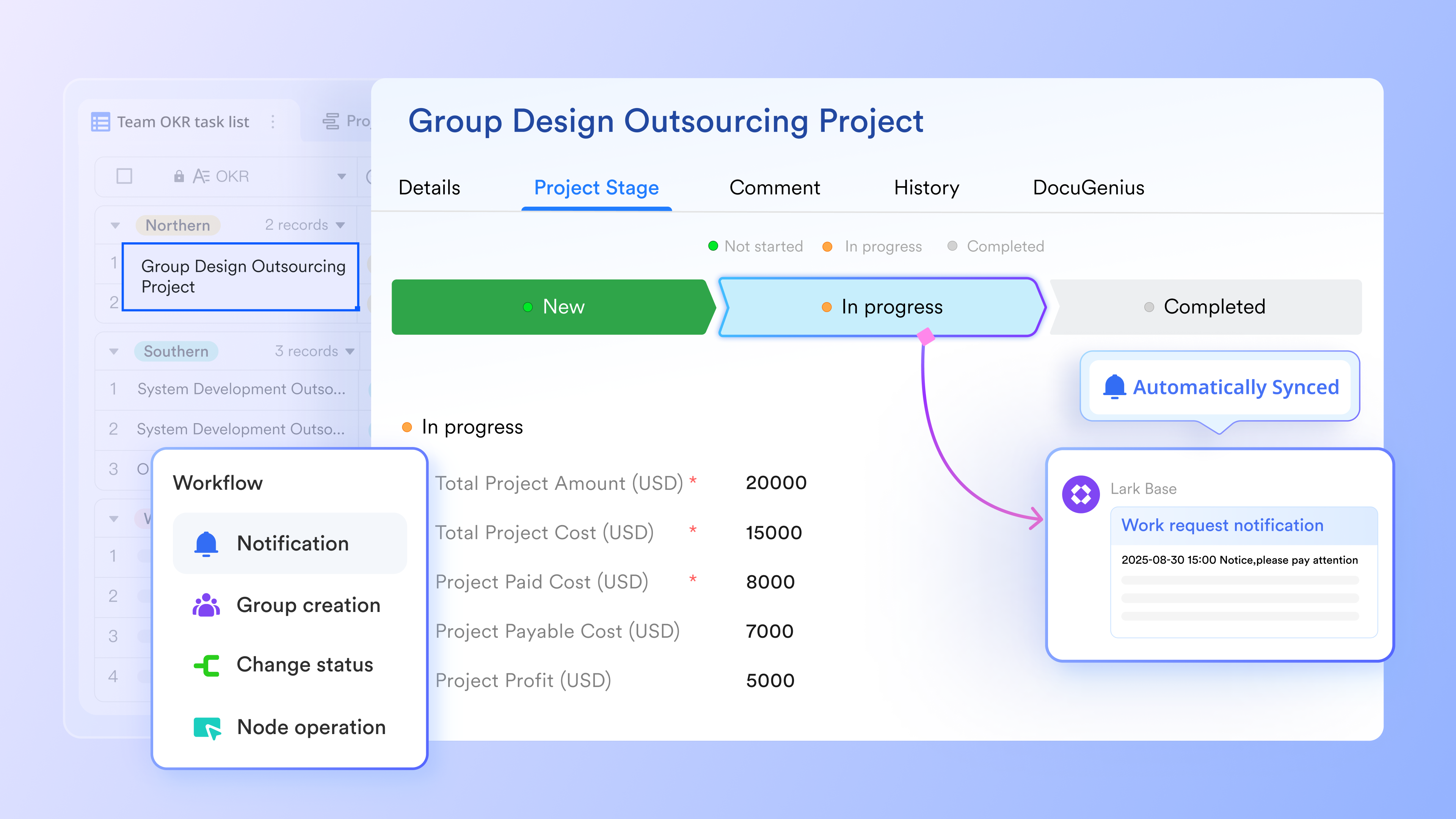
Streamlining official sign-offs
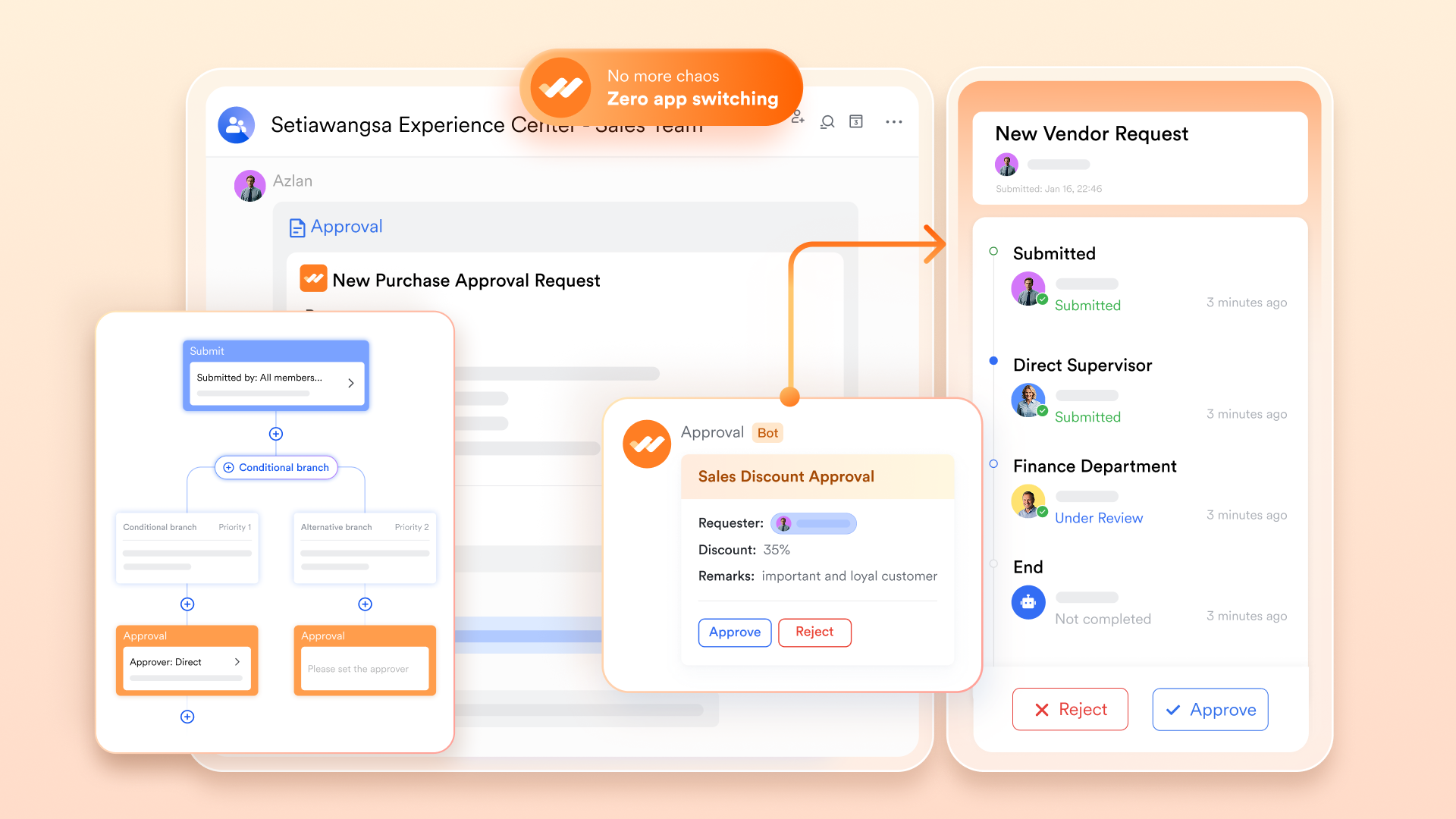
The "Approval" phase is often where project management workflows go to die, stuck in someone's inbox waiting for a signature. solves this by embedding the sign-off process directly into the chat interface where your team is already working. Instead of sending an email with an attachment, you can trigger an approval request that appears in the approver's message feed. They can review the details and click "Approve" or "Reject" without leaving the chat window.
for Lark:
- Starter plan: Free forever plan that includes 11 powerful tools for up to 20 users. It also comes with 100GB of storage, 1000 automation runs, AI translations, and more.
- Pro plan: $12/user/month (billed annually) for up to 500 users. It includes everything in Starter plus group calling for up to 500 attendees, 15TB of storage, 50,000 automation runs, and more.
- Enterprise plan: for custom pricing. Supports unlimited users and includes even more automation runs and advanced security, compliance, and management features.
For small teams with simple communication needs

18 months message history
1000 Base automation runs/month
2000 rows per table in Base
Most POPULAR
For companies with comprehensive collaboration and management needs
Unlimited message history
500-participant video meetings
50k Base automation runs/month
20k rows per table in Base
For large companies with advanced security and organizational management needs
Get a personalized demo and pricing
Unlimited message history
500-participant video meetings
15 TB storage + 30 GB storage/user
500k Base automation runs/month
50k Base automation runs/month
Most POPULAR
For companies with comprehensive collaboration and management needs
Unlimited message history
500-participant video meetings
50k Base automation runs/month
20k rows per table in Base
Common challenges to workflow management and helpful solutions
Even with the best intentions, implementing a new project management workflow often hits speed bumps. Recognizing these common pitfalls early allows you to address them before they derail your team's progress.
The "shadow workflow" resistance
- The challenge: Your team nods in agreement during the meeting, but goes back to their old habits—sending DM requests instead of using the intake form, or tracking personal tasks in sticky notes instead of the project workflow software.
- The solution: Reduce the friction of the new way. If your intake form has 20 required fields, people will bypass it. Simplify the initial input. Make the "right way" the easiest way.
Over-engineering the process
- The challenge: In an attempt to be thorough, you create a workflow of that is too rigid. If every minor decision requires three approvals, work grinds to a halt.
- The solution: Build for 80%, not the 1% edge case. Design your workflow to handle standard operations efficiently, and allow for a simple "override" or "expedite" path for urgent exceptions.
Communication silos
- The challenge: The project plan looks great, but the team isn't talking to each other. Updates happen in the tool, but the context (the "why") is lost in silence.
- The solution: Integrate communication into the workflow. Don't just update a status; comment on the task. Tools that merge chat and data prevent this isolation by keeping the conversation attached to the work item.
Solve your workflow challenges with Lark
Workflow automation best practices
Automation is a powerful multiplier for your project planning workflow, but it must be applied strategically. Automating a bad process just makes bad things happen faster.
- Start with the "low-hanging fruit": Do not try to automate the entire creative strategy. Start by automating the administrative busywork. Things like recurring task creation, deadline reminders 24 hours before a due date, or status notifications are perfect candidates for automation.
- Keep a human in the loop: For critical decision points, use automation to prepare the decision, not make it. For example, have the system automatically compile the weekly report and send it to the manager, but let the manager write the summary analysis.
- Document your automations: It is easy to forget what bots are running in the background. Maintain a simple log of your automated rules (e.g., "When status changes to 'Done', notify the Client Channel"). This helps troubleshoot if something goes wrong in your workflow for .
- Test rigorously: Before enabling a notification rule for the whole team, test it on yourself. Ensure the trigger fires correctly and the message content is clear. Nothing erodes trust in project workflow software faster than a bot spamming the group chat with incorrect alerts.
Conclusion
A chaotic work environment is not inevitable. It is a choice. By taking the time to design, visualize, and refine your project management workflow, you are choosing clarity over confusion and results over busyness. A great workflow is the invisible backbone that allows your team to move fast without breaking things.
It is time to stop fighting against disjointed tools and start building a system that actually works for you. If you are ready to experience a truly unified workspace where your data, approvals, and team chat live in harmony, try today and transform the way your team gets things done.
Enhance your project workflow with Lark today
FAQs
What is the project workflow?
A project workflow is the organized sequence of tasks, actions, and approvals required to move a specific piece of work from initiation to completion. It serves as an operational roadmap, defining the "if this, then that" logic that guides team members on what to do next, ensuring consistency and efficiency across the project lifecycle.
What are the 5 steps of workflow?
While specific models vary, the five fundamental steps of a workflow are generally: 1) Initiation (identifying the task), 2) Planning (mapping the route), 3) Execution (doing the work), 4) Review (quality control and approval), and 5) Analysis (evaluating performance to improve the process for next time).
What are the 7 steps of a project plan?
A comprehensive plan typically includes: 1) Defining goals and objectives; 2) Outlining specs and requirements; 3) Creating a Work Breakdown Structure (WBS); 4) Developing the schedule; 5) Allocating resources and budget; 6) Risk assessment; and 7) Communication planning. Using an all-in-one platform like Lark helps streamline this by visualizing your schedule and resources in a single dynamic view.
What are the 5 C's of project management?
The 5 C's often refer to the dimensions used to evaluate a project's specific needs: Complexity (how difficult is the scope?), Criticality (how vital is the outcome?), Compliance (are there regulatory rules?), Culture (does it fit the organization?), and Competence (does the team have the right skills?). Understanding these helps you tailor the right workflow approach.
Related reading































