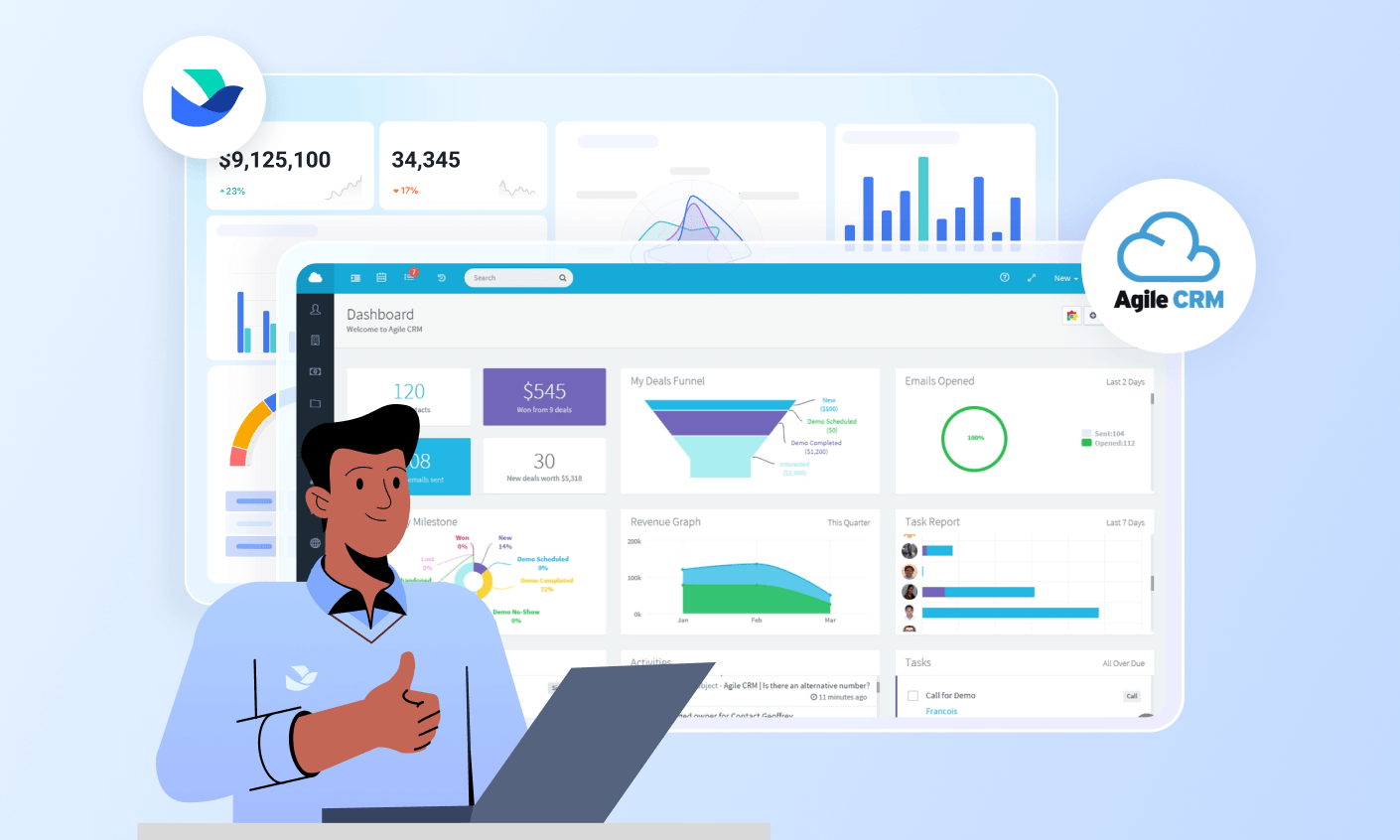
Finding the right software to manage your growing business is essential, especially when seeking tools that streamline customer relations, oversee crucial projects, and provide insights into potential risks. This search for efficiency and integration often leads to platforms like Agile CRM.
Agile CRM frequently appears in discussions about all-in-one business software, promising a blend of sales, marketing, and service capabilities. In this comprehensive Agile CRM review, I'll explore exactly what this platform offers. We'll delve into its features, ease of use, integration, pricing, and its best alternative.
What is Agile CRM?
Agile CRM positions itself as an "all-in-one" primarily for small to medium-sized businesses and startups. Its "Agile" philosophy emphasizes providing a flexible and integrated suite of tools for sales, marketing, and customer service operations.
The platform aims to consolidate various business functions into a single dashboard, reducing the need for multiple disconnected software subscriptions. It enables automation across the customer lifecycle, from email campaigns and lead scoring to managing support tickets and . Our review of Agile crm capabilities will highlight these areas.
While its core focus is customer relationships, Agile CRM also includes a dedicated project management module. This makes it relevant for businesses that need to manage both customer interactions and the internal projects that support them.
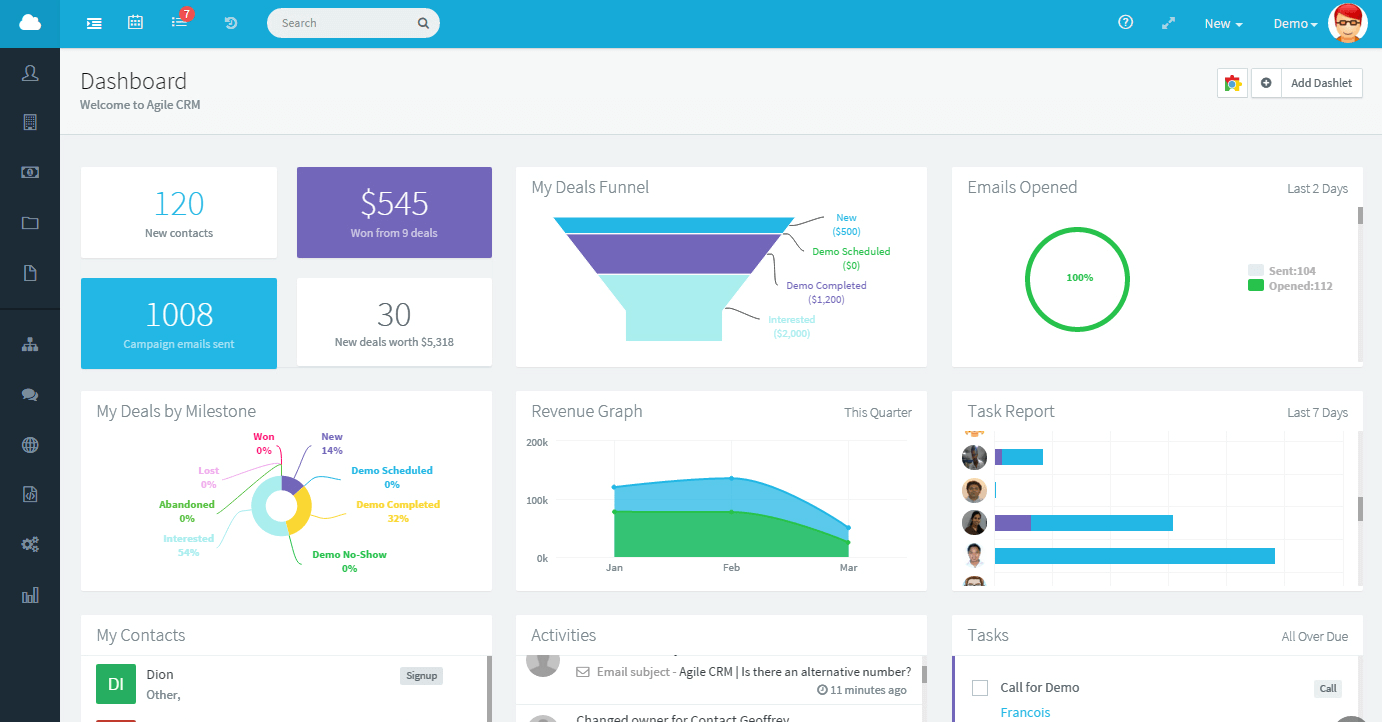
Image source: agilecrm.com
Key features of Agile CRM
Agile CRM boasts an extensive feature set designed to cater to the diverse needs of a growing business. It's not just a ; it's an ecosystem intended to foster efficiency and drive growth. Let's break down its core capabilities, paying close attention to how its project management tools can be beneficial. In this detailed section of our review agile crm journey, you'll get a clear picture of what's truly on offer.
Sales automation and CRM
At the heart of Agile CRM are its robust sales features, crucial for any business focused on converting leads into loyal customers.
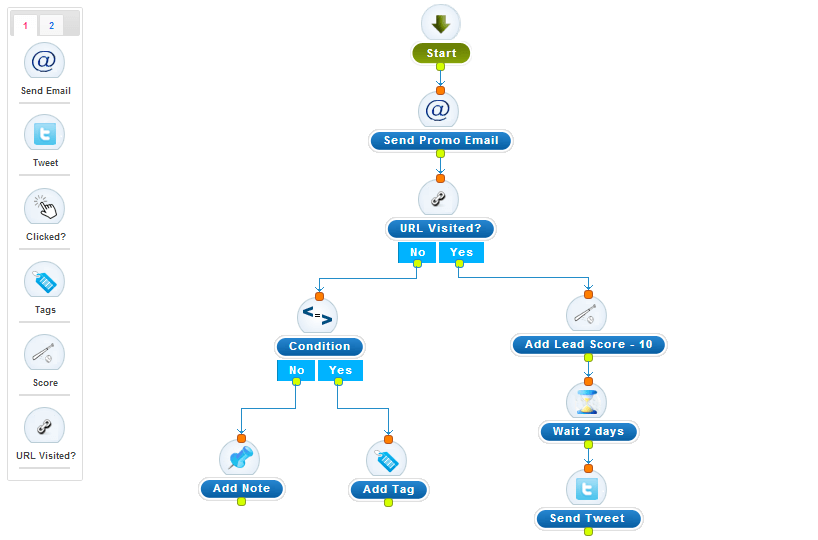
Image source: agilecrm.com
- : This goes beyond simple contact storage. You can create detailed customer profiles, track communication history across multiple channels (email, phone, social), add custom fields for specific data, and segment your audience effectively. This centralized hub ensures your sales team has a 360-degree view of every prospect and customer.
- : Visualize your sales process with a drag-and-drop pipeline, allowing you to easily move deals through custom stages. Set up automated tasks and reminders to ensure no opportunity falls through the cracks. This feature provides clear insights into your sales velocity and potential bottlenecks.
- Telephony: Integrate your phone system to enable click-to-call functionality, automatic call logging, and even voicemail automation. This streamlines communication and ensures all interactions are recorded for future reference.
- Sales gamification: Motivate your sales team with contests, leaderboards, and rewards directly within the platform. This encourages healthy competition and boosts productivity.
- & analytics: Generate customizable reports on pipeline value, sales forecasts, conversion rates, and individual team performance. These insights are vital for making data-driven decisions and optimizing your sales strategy.
Marketing automation and campaigns
Agile CRM's marketing tools are designed to automate and personalize your outreach efforts, helping you nurture leads and engage your audience more effectively.
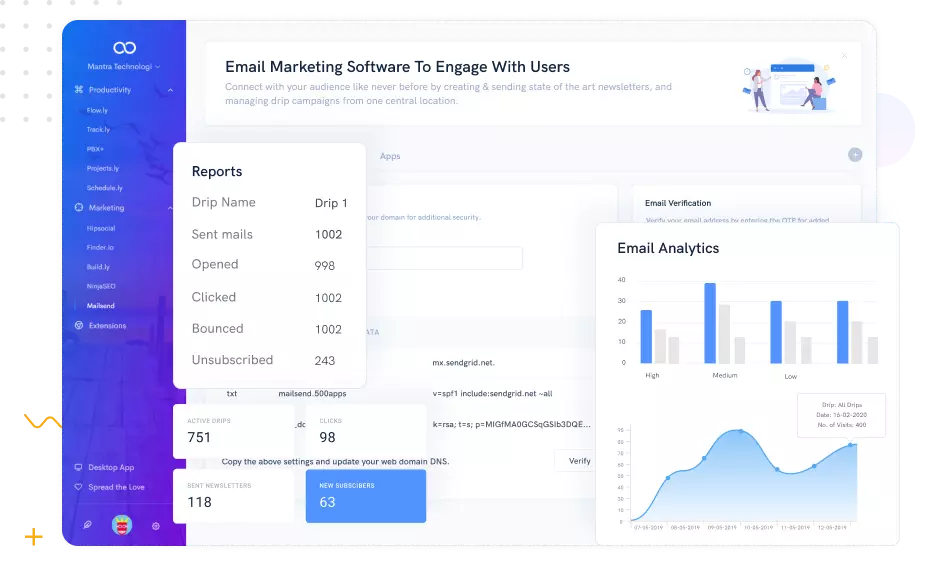
Image source: agilecrm.com
- : Craft engaging email campaigns using customizable templates, segment your audience for targeted messaging, and automate sequences based on user behavior. A/B testing capabilities help you optimize your emails for maximum impact.
- Lead scoring: Automatically assign scores to leads based on their interactions with your website, emails, and social media. This helps your sales team prioritize hot leads and focus their efforts where they're most likely to convert.
- Landing page builder: Create simple yet effective landing pages to capture leads, promote offers, and track conversion rates.
- : Build powerful, automated workflows that trigger actions based on specific events. For example, a lead downloading an ebook could automatically be added to a follow-up email sequence and assigned a higher lead score.
- Social media management: Monitor mentions, schedule posts, and engage with your audience directly from within the CRM. This helps maintain a consistent brand presence and capture social leads.
Customer service and helpdesk
Keeping your customers happy is paramount, and Agile CRM includes tools to support your service efforts.
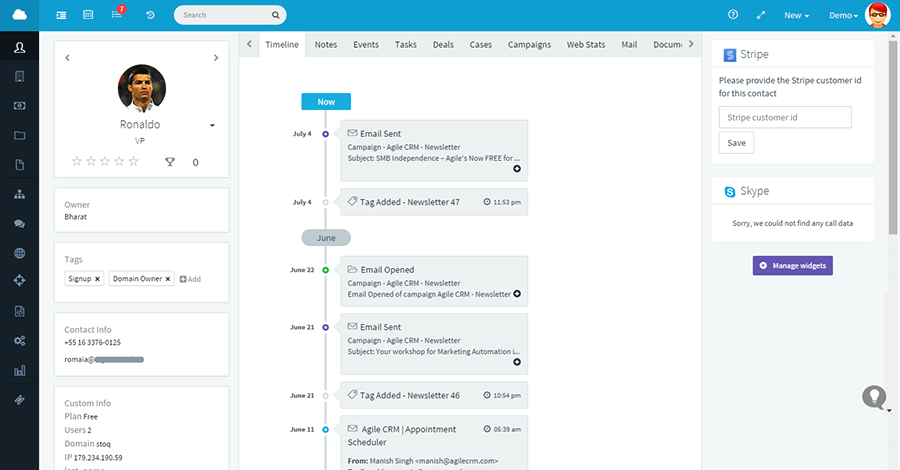
Image source: agilecrm.com
- : Manage customer inquiries and support requests efficiently with a centralized ticketing system. Prioritize tickets, assign them to agents, and track their resolution status.
- Live chat: Provide instant support to website visitors, answer questions in real-time, and convert curious visitors into engaged leads.
- : Create a self-service portal where customers can find answers to common questions, reducing the load on your support team and empowering customers.
Agile CRM ease of use & set-up
When adopting any new software, a primary concern is often its ease of use and the complexity of the initial setup. For a platform like Agile CRM, which promises an all-in-one solution, the learning curve can be a significant factor in team adoption and overall success.
Getting started: The initial setup process
Setting up Agile CRM involves several steps, with complexity depending on your existing data volume and customization needs.
- Account creation: This is straightforward and quick, especially if you begin with the free tier.
- Data import: If you're migrating from another system or have existing spreadsheets, Agile CRM offers tools for importing contacts, companies, and deals. While generally robust, like any , it requires careful preparation to ensure data integrity and proper mapping to Agile CRM's fields. I've found that taking the time to clean your data beforehand saves a lot of headaches later on.
- Customization: Tailor the platform to your workflows by creating custom contact/deal fields, setting , and configuring initial marketing workflows. This critical step maximizes CRM value but is initially the most time-consuming.
- Integrations: Connect Agile CRM to your essential tools. Some are one-click setups, while others need detailed configuration.
Basic setup is relatively quick for businesses without complex legacy data. For full functionality, allocate time for thoughtful configuration. The platform offers guides and documentation, but a dedicated setup phase is recommended for optimal results.
User interface and everyday usability
Once set up, how easy is Agile CRM to use on a daily basis? This is a key aspect of any CRM review.
- Dashboard & navigation: The offers a quick snapshot of key metrics. Navigation is logical, with clear menus for sales, marketing, service, and project management.
- Feature accessibility: Core features are easily accessible via the main navigation, but the feature-rich interface may feel cluttered to some, with advanced settings hidden deep in menus.
- Learning curve: New users (especially CRM novices) face a learning curve. Basic functions are intuitive, but mastering automation, custom reporting, and advanced project tools requires time. Proficiency comes with consistent use.
- Visual appeal: Functional but not as ultra-modern or sleek as some newer specialized tools—a subjective factor, though some users value a polished look.
Agile CRM's ease of use depends on users' prior CRM experience and willingness to learn. For committed teams, setup and learning efforts yield streamlined operations and fewer missed opportunities—key to complementing project risk management strategies.
Agile CRM integrations
In today's connected business world, seamless tech stack integration is critical for CRMs. Agile CRM enables free data flow, boosting efficiency and supporting project management, decision-making, and risk mitigation – complementing project risk management strategies.
Agile CRM offers a broad range of integrations:
- Email & calendar: Syncs with Gmail, , and Microsoft 365 (Outlook/Exchange) for communication and scheduling alignment.
- Marketing & analytics: Integrates with Mailchimp, Google Analytics, and social platforms (Facebook, Twitter, LinkedIn) to enhance marketing and audience insights, and manage online presence.
- Communication & productivity: Supports Twilio (telephony/SMS marketing). Zapier acts as a key bridge, linking Agile CRM to thousands of apps for custom automated workflows, adapting to unique needs and project risk management tools.
- Payment & e-commerce: Connects with Stripe, PayPal, and Shopify to track customer purchases and payment history in the CRM.
Agile CRM pricing: Uncovering the true cost
Agile CRM offers a tiered pricing structure built for growing businesses, with four core plans: Free, Starter, Regular, and Enterprise. While the monthly subscription rates are clearly listed, the true total cost of ownership often includes hidden expenses that go beyond the base price.
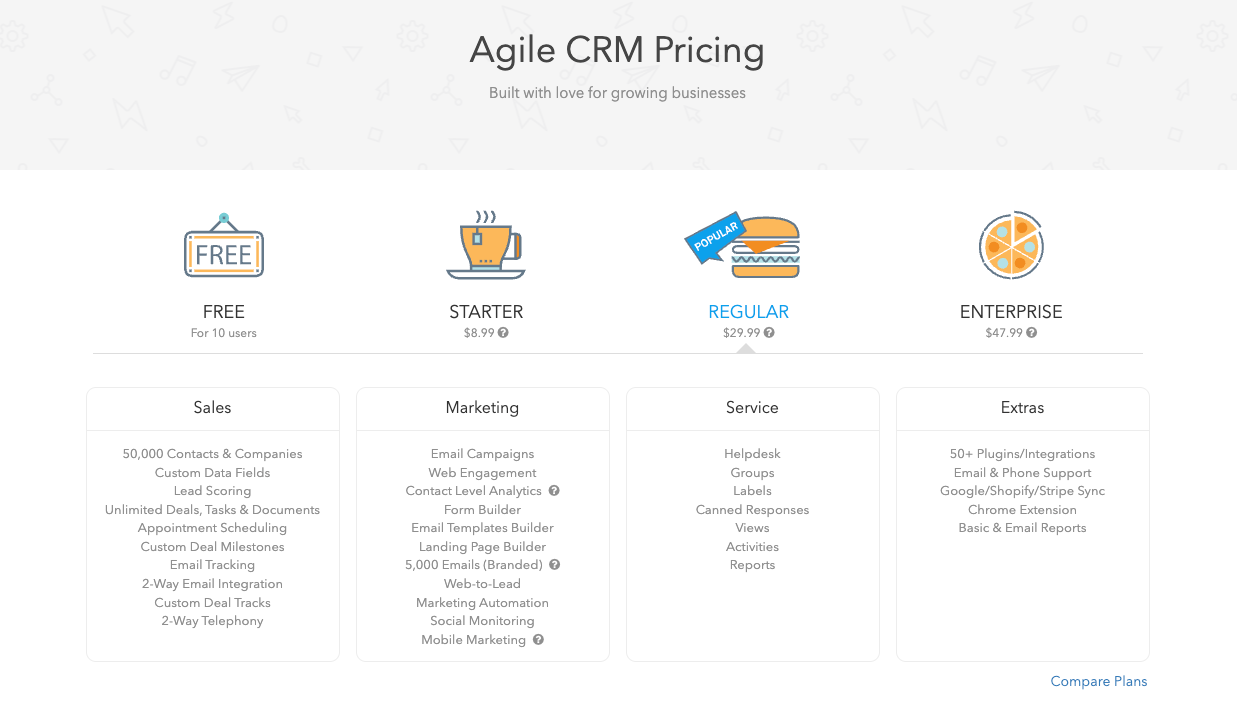
Image source: agilecrm.com
Update time: 2026/1/21
Uncovering hidden costs
Beyond the advertised subscription fees, these often-overlooked expenses can impact your total budget:
- Implementation & onboarding: Even with a self-service setup, businesses with complex data or custom workflows may need paid onboarding support or third-party consultants, adding 1–2x your annual subscription cost.
- Data migration: Migrating legacy contacts, deals, and historical data requires data cleaning, field mapping, and sometimes custom development, costing $500–$2,000+ depending on complexity.
- Advanced customization: Building tailored workflows, custom reports, or niche integrations may require hiring developers or premium Zapier plans, adding recurring or one-time costs.
- Premium support add-ons: Basic support is included, but faster response times or dedicated account managers require paid packages, adding $50–$200+ per month.
- Integration expenses: While 50+ integrations are available, specialized tools (e.g., advanced project risk management software) may need paid connectors or custom API development.
Avoid these hidden costs with a more cost-effective tool
Agile CRM pros and cons: An unbiased look at user experiences
Every software has strengths and weaknesses, and Agile CRM is no exception. This balanced summary of its most common pros and cons is based on extensive user feedback and independent analyses, to help you assess its fit for your business needs and tech ecosystem.
Pros: What users love
- Feature-rich at a competitive price: Paid tiers pack in sales/marketing automation, customer service tools, and project management—ideal for budget-conscious businesses.
- Accessible free plan: A great starting point for startups/small businesses to use core CRM features with no high upfront cost, scaling as the business grows.
- Strong customization: , pipelines, and workflows let businesses adapt the platform to their unique processes, rather than the other way around.
- Powerful automation: Streamlines repetitive sales/marketing tasks, saving time and reducing manual errors.
Cons: Areas for improvement
- Steep learning curve: The vast feature set means new users need dedicated time to master advanced functions like automation and reporting.
- Outdated UI/UX: Less modern and intuitive than newer platforms; functional but lacking a streamlined, polished design, which can impact efficiency and adoption.
- Inconsistent customer support: Feedback varies—some users have positive experiences, while others report slow responses and insufficient support for complex issues.
- Complex reporting: Robust but hard for beginners to navigate; and targeted insights require deeper system knowledge.
- Occasional performance issues: Minor slowdowns and bugs are reported by some users, frustrating during peak business periods.
- Not a true all-in-one for complex needs: While it consolidates many functions, businesses with highly specialized requirements (advanced ERP, niche marketing automation, ) will still need supplementary tools.
Agile CRM delivers excellent value for growing businesses, with a feature-rich, affordable offering. However, prospective users should be prepared for a learning curve and evaluate if its UI/UX and support align with their team's needs.
Enhance your CRM experience right now
Agile CRM alternatives and how they compare
Choosing the right business software requires understanding the competitive landscape. Agile CRM has unique features, but it is not the only choice. This section compares it to the top alternatives—platforms with different approaches to customer relationship and internal collaboration management.
How Lark compares to Agile CRM
stands apart as a comprehensive internal collaboration suite, not a traditional CRM like Agile CRM. While Agile CRM manages external customer relationships and their associated projects, Lark unifies internal team communication, documents, calendars, and task management into a single platform. For managing internal projects, streamlining workflows, and enhancing team collaboration, Lark offers a robust environment that directly contributes to internal project risk management software strategies, often complementing a CRM like Agile for external customer management.
To know more about Lark ➡️
How HubSpot compares to Agile CRM
HubSpot is often seen as a direct competitor for SMBs, offering a strong focus on inbound marketing, sales, and service with a more polished and intuitive user experience than Agile CRM. While both offer comprehensive feature sets, HubSpot's paid tiers tend to scale up in cost more rapidly, making Agile CRM a more budget-friendly option for businesses seeking a broad set of features without the higher price tag, though perhaps with a steeper learning curve for its full functionality.
To know more about HubSpot ➡️
How Salesforce compares to Agile CRM
Salesforce operates on an entirely different scale, targeting mid-market to enterprise organizations with unparalleled customization, vast scalability, and a massive ecosystem of third-party apps for advanced functionalities, including dedicated project risk management software. Agile CRM, by contrast, is more accessible and affordable for SMBs, providing a robust, integrated solution without the complexity or significant investment required for a Salesforce implementation.
To know more about Salesforce ➡️
How Pipedrive compares to Agile CRM
Pipedrive excels in its singular focus on visual sales pipeline management, offering an exceptionally intuitive and clean user interface specifically for sales teams tracking deals and activities. While Agile CRM includes strong sales features, it extends to marketing and customer service. If your business primarily needs a highly visual and straightforward tool for sales process management, Pipedrive might be a better fit, whereas Agile CRM offers a broader, more integrated solution for multiple business functions.
To know more about Pipedrive ➡️
Consider the best alternative to Agile CRM: Lark
Effective is more than just a good CRM system. It needs a robust mechanism for internal collaboration and information flow. This makes sure sales, marketing, service, and delivery teams can collaborate seamlessly, respond quickly, and act on unified customer insights. As an all-in-one collaboration platform, enhances your CRM strategy indirectly yet profoundly by optimizing these key internal operations. It solves certain limitations of traditional CRM in internal collaboration and data intelligence.
Automated full customer lifecycle management
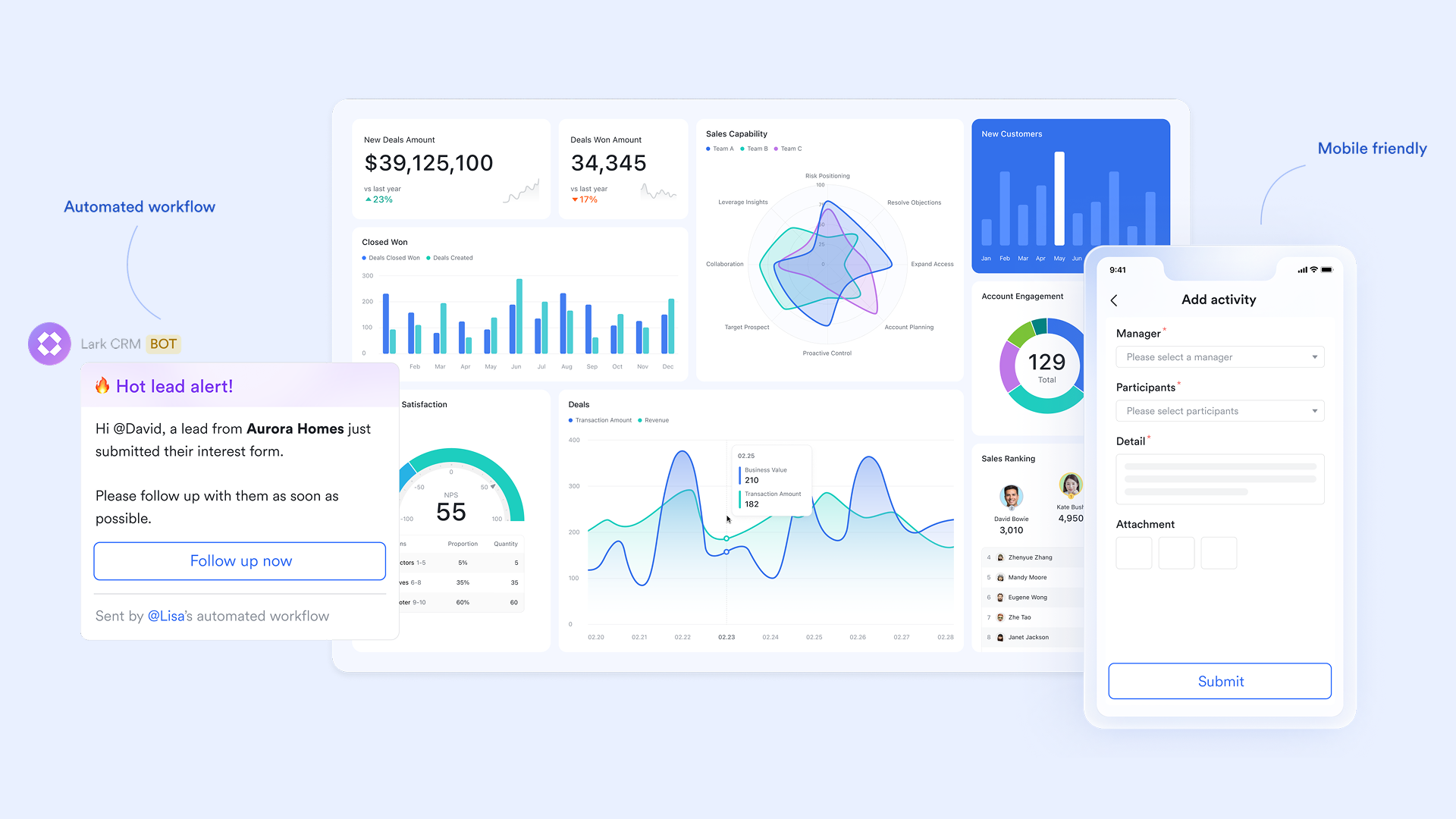
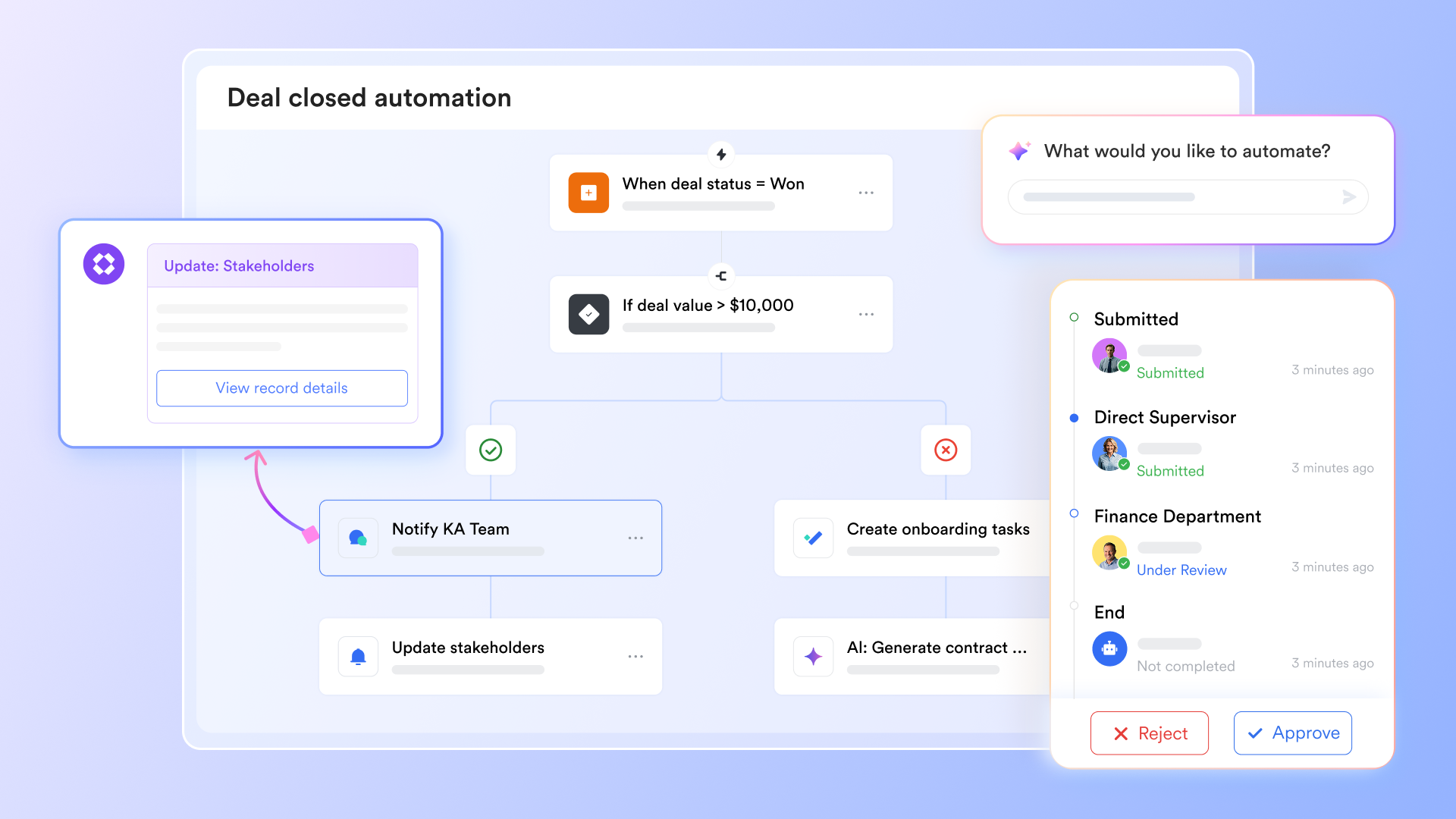
Agile CRM can automate external touchpoints in the customer lifecycle. But the automation and transparency of its internal support processes—such as , project delivery, and service escalation—often need additional tools. Lark Base automation can standardize and automate these complex internal processes, ensuring a consistent and efficient customer experience.
When the status of a new sales opportunity in the CRM changes to "Closed-Won", automation can immediately trigger a series of internal tasks: send notifications to the internal team and create an initial customer success follow-up task list.
Empower customer understanding with data analysis
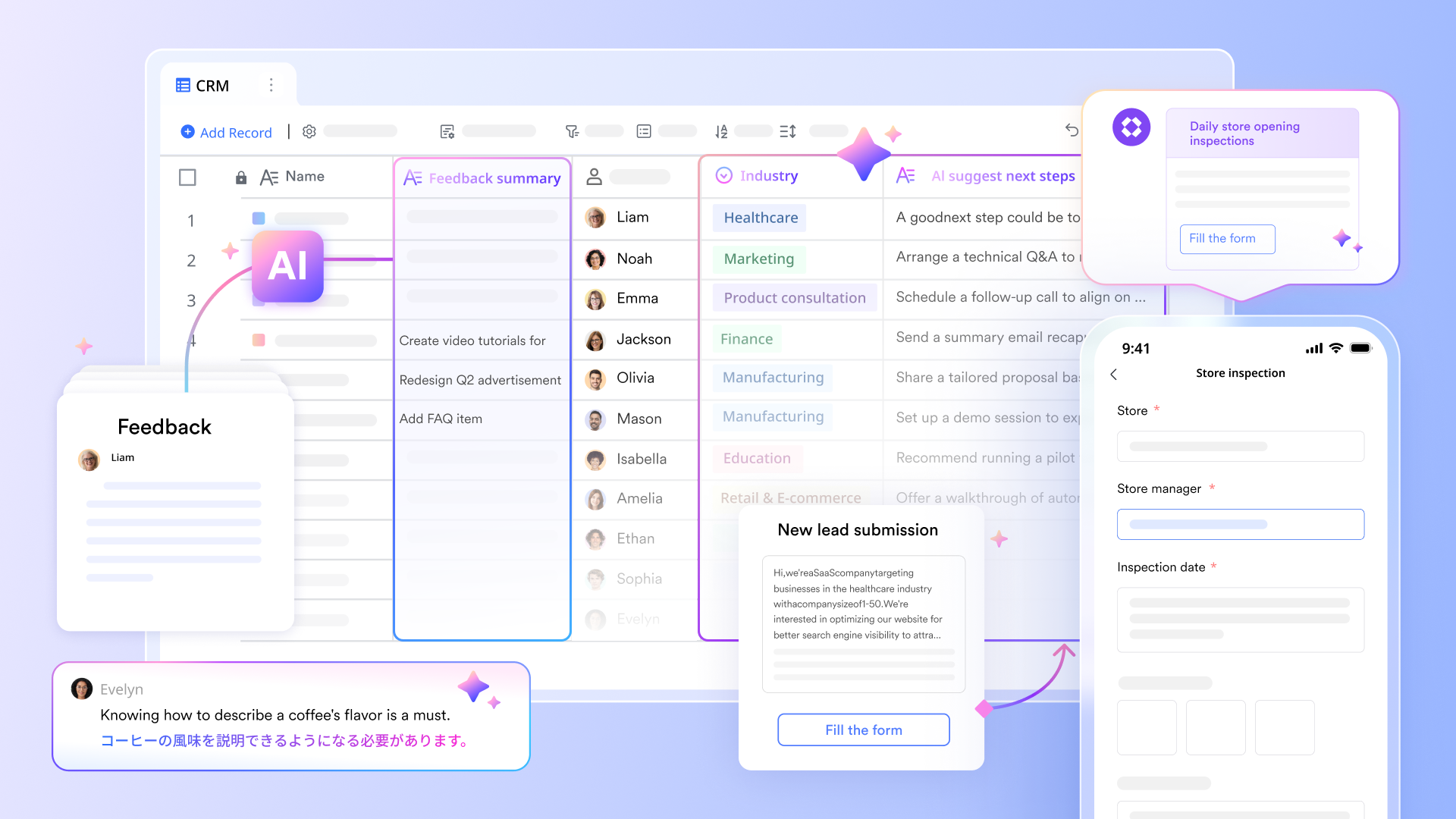
Traditional CRM mainly relies on manual input and structured data to build customer profiles. However, deeper customer needs and potential risks often hide in unstructured data, such as customer feedback. AI fields can intelligently process such information, providing deeper insights for customer relationship management.
You can centralize customer feedback from different channels—such as service tickets, questionnaires, and social media comments—in Lark Base. AI fields automatically conduct sentiment analysis or topic extraction, quickly identifying common customer pain points and satisfaction points. This provides data support for product improvement and service optimization, and helps mark potential high-risk customers in the CRM.
Improve process management efficiency with flexible views
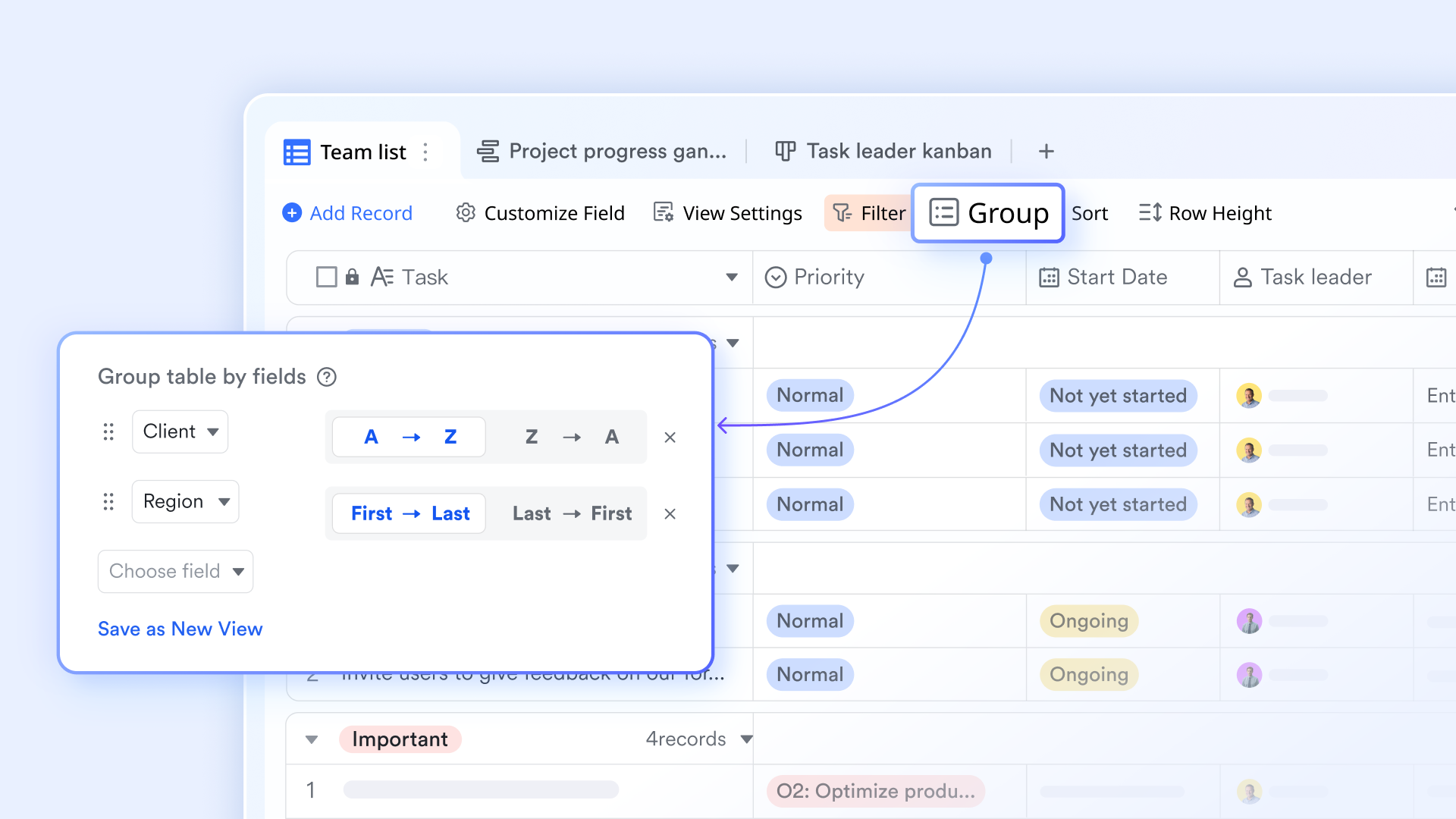
For customers in the sales funnel or customer delivery projects, CRM offers stage views but often lacks enough flexibility for internal tracking of detailed status and potential bottlenecks. The grouping and filtering features of provide highly customized views of customer processes for internal teams, helping them pinpoint customers that need attention.
After importing sales opportunity data from the CRM into Lark Base, sales managers can group customers by ""—such as initial contact, needs analysis, proposal submission, negotiation, and contract signing. They can visually see the number of customers and progress at each stage. With filtering features, they can quickly locate customers with "no updates in the past week" or "deals exceeding a specific amount", and take timely internal intervention measures.
Accelerate customer interactions with instant team communication
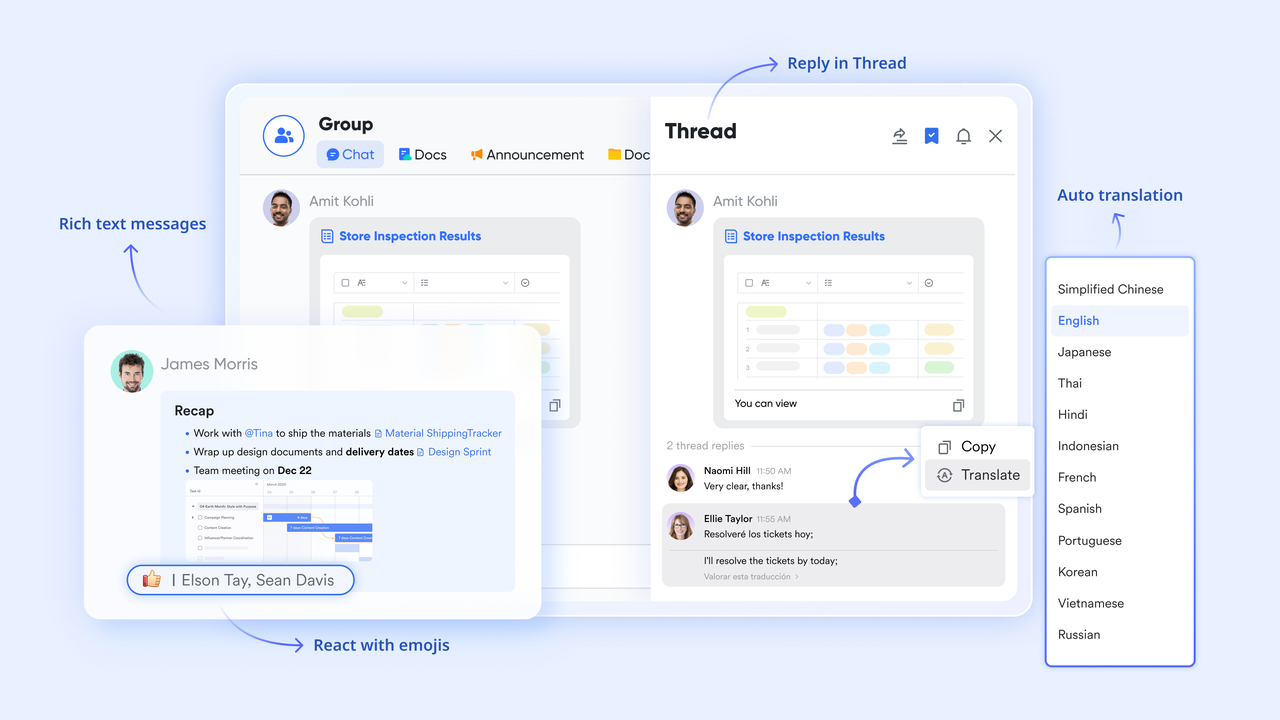
Agile CRM is good at tracking external customer communication records. But when sales teams need immediate internal support, quick strategic discussions, or cross-departmental resource coordination, the communication modules of traditional CRM are often insufficient. fills this gap, enabling efficient support for internal teams just like how external customers are served.
When sales staff meet problems needing internal confirmation during customer communication—such as custom quotes, contract terms, or product inventory—they can directly @ relevant product managers, legal staff, or inventory managers in Lark Messenger. This real-time, centralized communication lets the sales team get replies in minutes, instead of waiting for email exchanges. In this way, it speeds up deal progress and improves .
for Lark:
- Starter plan: Free forever plan that includes 11 powerful tools for up to 20 users. It also comes with 100GB of storage, 1000 automation runs, AI translations, and more.
- Basic plan: $6/user/month (billed annually) for up to 500 users. It includes everything in Starter plus group calling for up to 500 attendees, 5TB of storage, 1000 automation runs, and more. For more details, please .
- Pro plan: $12/user/month (billed annually) for up to 500 users. It includes everything in Basic plus group calling for up to 500 attendees, 15TB of storage, 50,000 automation runs, and more.
- Enterprise plan: for custom pricing. Supports unlimited users and includes even more automation runs and advanced security, compliance, and management features.
For small teams with simple communication needs

18 months message history
1000 Base automation runs/month
2000 rows per table in Base
Most POPULAR
For companies with comprehensive collaboration and management needs
Unlimited message history
500-participant video meetings
50k Base automation runs/month
20k rows per table in Base
For large companies with advanced security and organizational management needs
Get a personalized demo and pricing
Unlimited message history
500-participant video meetings
15 TB storage + 30 GB storage/user
500k Base automation runs/month
50k Base automation runs/month
Most POPULAR
For companies with comprehensive collaboration and management needs
Unlimited message history
500-participant video meetings
50k Base automation runs/month
20k rows per table in Base
How to choose your core platform: Strategic considerations for Agile CRM and Lark
Choosing core business platforms isn't an either/or between Agile CRM and Lark—they complement rather than replace each other, building a more robust business management ecosystem together. Your decision depends on your top business needs and how you optimize the full CRM journey.
Opt for Agile CRM if
- You need core CRM capabilities: It fulfills external customer-facing needs (lead management, marketing automation, interaction tracking, basic service tickets) and manages customer data/engagement.
- You only need to link simple customer-related tasks to CRM data, with no high demands for in-depth internal collaboration.
Opt for Lark if
- You need to fix pain points (fragmented communication, silos, poor cross-departmental work) to improve customer experience.
- You want to build a solid customer delivery & service system for complex customization/long-term delivery, creating a seamless sales-delivery-success loop.
- You aim to boost team efficiency (real-time communication, shared resources) to upgrade the speed and quality of sales and customer service.
- You need to unlock data value for intelligent insights. Lark Base AI fields and automation (missing in Agile CRM) turn unstructured data into actionable insights and automate complex processes.
Conclusion
Agile CRM plays a vital role in customer relationship management, but it is not a silver bullet for all business challenges. True business growth and customer satisfaction are deeply rooted in efficient internal collaboration, fluid workflows, and intelligent data insights.
is more than just a collaboration tool; it's a cornerstone for building the future of work, fundamentally empowering your team, optimizing internal operations, and ultimately elevating your customer relationship management to new heights. Choose Lark, embrace a highly efficient and unified future of work, and let your team and business soar!
Start building your empowered and unified CRM system
FAQs
Is Agile CRM free?
Yes, Agile CRM offers a free "Starter" plan for up to 10 users, which includes basic features for sales, marketing, and service. For more advanced functionalities and larger teams, they provide various paid subscription tiers. While Agile CRM offers external customer management, platforms like Lark also provide powerful free tiers for internal collaboration, complementing your overall business strategy.
Who owns Agile CRM?
Agile CRM is an independent, privately held company. It was founded by Manohar Reddy and has grown to be a recognized player in the cloud-based CRM market. It operates as a distinct entity focused solely on developing and improving its CRM solution for businesses worldwide.
Is Agile Resources legit?
Assuming you are referring to Agile CRM, yes, it is a legitimate and well-established cloud-based . It's trusted by thousands of businesses globally for its comprehensive sales, marketing, and customer service tools. Successfully integrating and managing such external tools internally often relies on effective team communication and project coordination, which can be greatly facilitated by platforms like Lark.
How to cancel Agile CRM?
To cancel your Agile CRM subscription, you generally need to log into your account, navigate to the "Admin Settings" or "Billing" section, and follow the cancellation prompts. It's always advisable to export all your critical data before canceling. If you're looking to streamline internal processes that might have been linked to your CRM, Lark can help you transition and manage tasks seamlessly during such changes.
Related reading