Choosing the right CRM is one of the most important decisions a growing sales team can make. The platform you choose affects how efficiently you manage leads, close deals, collaborate internally, and scale over time. Among modern CRM comparisons, Pipedrive vs Salesforce is among the most common choices for growing organizations. Pipedrive is known for its simplicity and sales-focused design, while Salesforce offers deep customization and enterprise-level power. Each approach has clear strengths and trade-offs. In this guide, we compare Salesforce vs Pipedrive across features, pricing, scalability, and real-world use cases to help you decide which CRM fits your team today and supports future growth.
Centralize sales and team workflows in one place
What is Pipedrive?
Pipedrive is a designed to help teams manage leads, deals, and sales activities with clarity and speed. Built around a visual pipeline, it allows sales reps to track opportunities as they move through the buying process, making it easy to prioritize follow-ups and close deals. In many Pipedrive vs Salesforce discussions, Pipedrive stands out for its intuitive interface and fast onboarding, especially for small and mid-sized teams.
As a lightweight alternative in the Pipedrive CRM vs Salesforce comparison, Pipedrive emphasizes ease of use over deep customization. It includes core features such as , activity tracking, basic workflow automation, and standard sales reporting. Integrations with popular tools like email platforms, calendars, and marketing apps help extend its functionality without heavy setup. However, compared to Salesforce Sales Cloud, Pipedrive is best suited for sales-led teams with straightforward processes rather than complex, cross-department workflows.
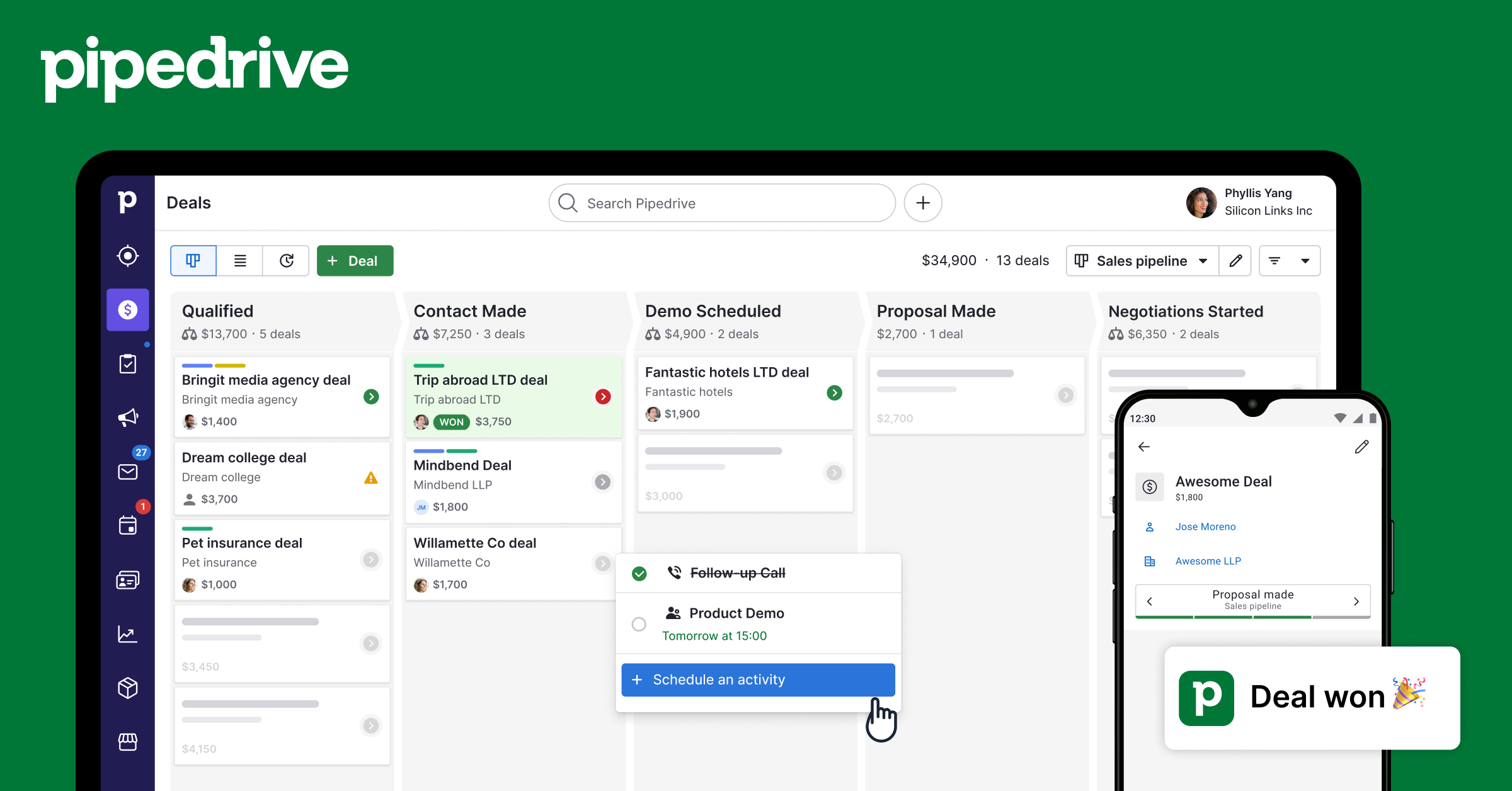
Image source: pipedrive.com
What is Salesforce?
Salesforce is a cloud-based CRM platform designed to support sales, marketing, service, and operations at scale. Best known for Salesforce Sales Cloud, it helps organizations manage leads, opportunities, accounts, and customer relationships across complex . In a typical Salesforce vs. Pipedrive comparison, Salesforce stands out for its depth, flexibility, and support for large, multi-team organizations.
Unlike lighter tools, Salesforce allows extensive customization through custom objects, fields, workflows, and automation. Teams can build tailored sales processes, , and detailed dashboards to match their exact business needs. Its robust reporting and analytics make it a strong choice in the Pipedrive vs Salesforce CRM debate for data-driven organizations. Supported by a vast integration ecosystem via the AppExchange, Salesforce scales well as companies grow, but often requires dedicated admin resources and longer setup times to fully unlock its capabilities.
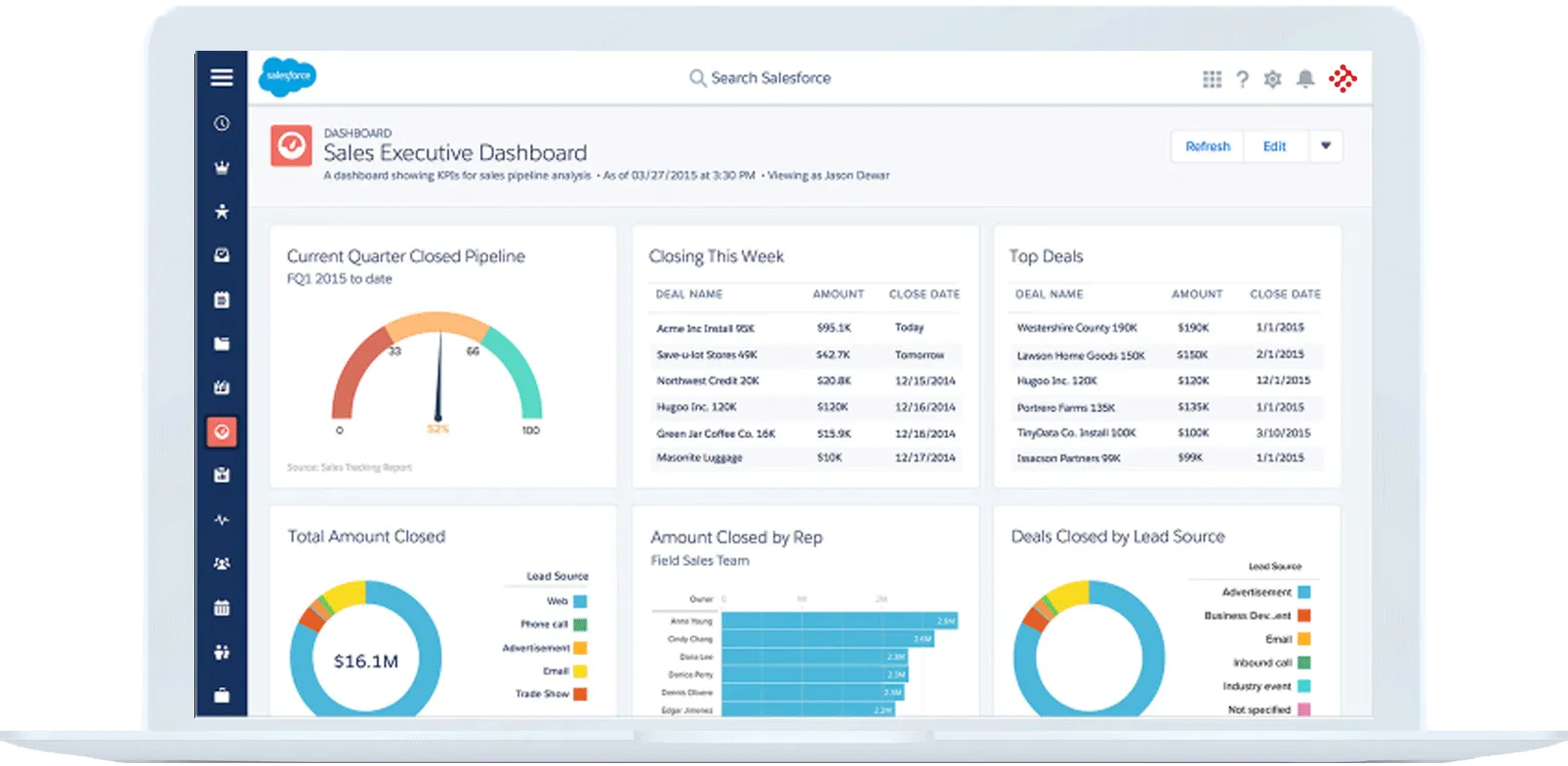
Image source: salesforce.com
Pipedrive vs Salesforce features comparison
A feature-by-feature breakdown is essential when evaluating Pipedrive vs Salesforce, as both CRMs are built for different types of sales teams. While Pipedrive focuses on simplicity and sales execution, Salesforce emphasizes flexibility, depth, and long-term scalability. Below is a detailed comparison of their core capabilities.
Lead and
Pipedrive is built around visual deal tracking, allowing sales reps to move opportunities through clearly defined stages with minimal friction. Leads and deals are easy to create, update, and prioritize, making it ideal for fast-moving sales teams. In contrast, Salesforce offers advanced lead scoring, assignment rules, and multi-object tracking, which are better suited for complex sales operations and high lead volumes.
Sales pipelines and
In the Pipedrive vs Salesforce CRM comparison, Pipedrive supports multiple pipelines and offers basic automation, including activity creation and stage-based triggers. Salesforce Sales Cloud provides far more powerful automation through tools like Flow, enabling complex workflows, approvals, and cross-team processes. This makes Salesforce better for organizations with layered sales and operational requirements.
Reporting, dashboards, and forecasting
Pipedrive delivers easy-to-read sales reports and pipeline forecasts that help teams without technical setup. Salesforce goes much deeper, offering highly customizable dashboards, advanced forecasting models, and predictive analytics. For leadership teams that rely heavily on data, Salesforce has a clear advantage in reporting sophistication.
Customization and scalability
Customization is a key differentiator in any Salesforce vs Pipedrive comparison. Pipedrive allows basic customization through custom fields and pipelines, but is limited in process complexity. Salesforce, on the other hand, supports extensive customization and scales seamlessly as teams, data, and workflows grow, making it suitable for enterprise environments.
Integrations and third-party app ecosystems
Pipedrive integrates smoothly with popular sales, marketing, and productivity tools, covering most common use cases for small teams. Salesforce's AppExchange offers thousands of third-party apps and integrations, enabling businesses to build a fully connected ecosystem. This vast marketplace is a significant reason Salesforce remains dominant for large organizations with diverse technology stacks.
Pipedrive vs Salesforce: Pros and cons
Understanding the strengths and limitations of each platform is critical when comparing Pipedrive vs Salesforce. Both CRMs serve different types of teams, and their pros and cons reflect that focus.
Pipedrive pros
- Intuitive and easy-to-use interface: Pipedrive's interface is clean, visual, and designed around sales pipelines, making it easy for users to navigate. Sales reps can quickly find deals, contacts, and activities without getting lost in menus. This simplicity reduces friction and accelerates adoption across the team.
- Fast setup and minimal training required: Setting up Pipedrive is straightforward, with minimal configuration needed to start managing deals immediately. Teams can get up and run within hours rather than days or weeks. This allows new hires to become productive quickly.
- Clear visibility into : The kanban-style pipeline view gives a real-time snapshot of all deals and their stages. Sales managers and reps can easily prioritize follow-ups and identify bottlenecks. This transparency helps teams focus on the deals most likely to close.
- Lower entry-level pricing: Pipedrive offers affordable plans for small teams compared to enterprise-focused CRMs like Salesforce. Its pricing structure allows growing teams to access essential features without a significant upfront investment. This makes it a cost-effective choice for sales-driven organizations.
Pipedrive cons
- Limited advanced automation and analytics: Pipedrive offers basic workflow automation and reporting, but lacks the depth of advanced analytics and predictive insights. Teams that require multi-step automations or detailed performance forecasting may find it insufficient.
- Not designed for complex or cross-team workflows: Pipedrive is primarily built for sales teams, making it less suitable for organizations that need integrated workflows across marketing, customer success, or operations. Cross-department collaboration often requires additional tools.
- Scaling costs as features and users increase: While entry-level pricing is attractive, costs can rise significantly as teams add users or require premium features. This makes long-term budgeting important for fast-growing organizations.
- Lacks beyond sales: Pipedrive focuses on pipeline management, offering minimal built-in collaboration features. Teams looking for document sharing, internal messaging, or project management will need separate solutions.
Salesforce pros
Salesforce is widely recognized for its enterprise-grade capabilities, making it a top choice in the Salesforce vs Pipedrive comparison for growing teams that need flexibility and scalability. Its features go beyond simple CRM functions, supporting complex workflows, advanced analytics, and integrations across the entire business ecosystem. Below is a closer look at what makes Salesforce stand out.
- Extremely powerful and highly customizable: Salesforce allows organizations to tailor almost every aspect of the platform to fit their unique sales processes. From custom objects and fields to workflow rules and , teams can build a CRM that aligns precisely with their needs. This level of customization makes Salesforce suitable for businesses with complex or evolving requirements.
- Advanced reporting, forecasting, and automation: Salesforce offers robust tools for generating detailed reports, , and predictive sales forecasts. Automation features like Process Builder and Flow enable teams to streamline repetitive tasks, reduce manual errors, and maintain data consistency across departments. These capabilities give leadership teams real-time insights into performance and pipeline health.
- Large app marketplace and integrations: With the Salesforce AppExchange, organizations gain access to thousands of third-party apps and integrations. This ecosystem allows teams to connect marketing, finance, customer service, and analytics tools directly to the CRM. As a result, Salesforce can serve as a central hub for all customer-related operations.
- Scales well for complex enterprise use cases: Salesforce is built to support organizations of all sizes, from fast-growing SMBs to global enterprises. Its architecture can handle thousands of users, multiple business units, and intricate processes without compromising performance. This scalability ensures that Salesforce remains a long-term solution even as businesses expand and evolve.
Salesforce cons
- Steep learning curve for sales teams: Salesforce's depth and flexibility require users to learn a variety of features, tools, and workflows. Sales reps may need formal training to navigate dashboards, update records, and use automation effectively. This learning curve can slow initial adoption and reduce productivity for teams transitioning from simpler CRMs like Pipedrive.
- High implementation and admin overhead: Setting up Salesforce often requires dedicated administrators or consulting partners. Organizations must configure objects, workflows, permissions, and integrations to match their processes. This setup can take weeks or months, adding complexity compared to more straightforward CRMs such as Pipedrive.
- Costs rise quickly with users, add-ons, and storage: Salesforce's subscription fees increase as teams scale, with additional costs for advanced features, extra storage, or third-party apps. While the platform offers enterprise-level capabilities, these costs can make it less budget-friendly for small or mid-sized businesses compared to Pipedrive CRM.
- Overkill for small or sales-only teams: For teams focused solely on sales, Salesforce can feel unnecessarily complex. Many small organizations may not need , automation, or multi-department integrations. In such cases, Pipedrive or other lightweight CRMs often provide a faster, more straightforward, and more cost-effective solution.
Looking for a CRM without these trade-offs?
Pipedrive vs Salesforce pricing comparison
Pricing is a key factor in the Pipedrive vs Salesforce decision, especially for growing teams managing budgets at scale. While both platforms use per-user subscription models, their costs increase differently as features and users are added. Pipedrive is generally positioned as a more affordable, sales-focused CRM, while Salesforce offers deeper functionality at a higher price point. Understanding this Salesforce vs Pipedrive pricing comparison helps teams evaluate long-term value, not just entry-level costs.
Pipedrive pricing plan
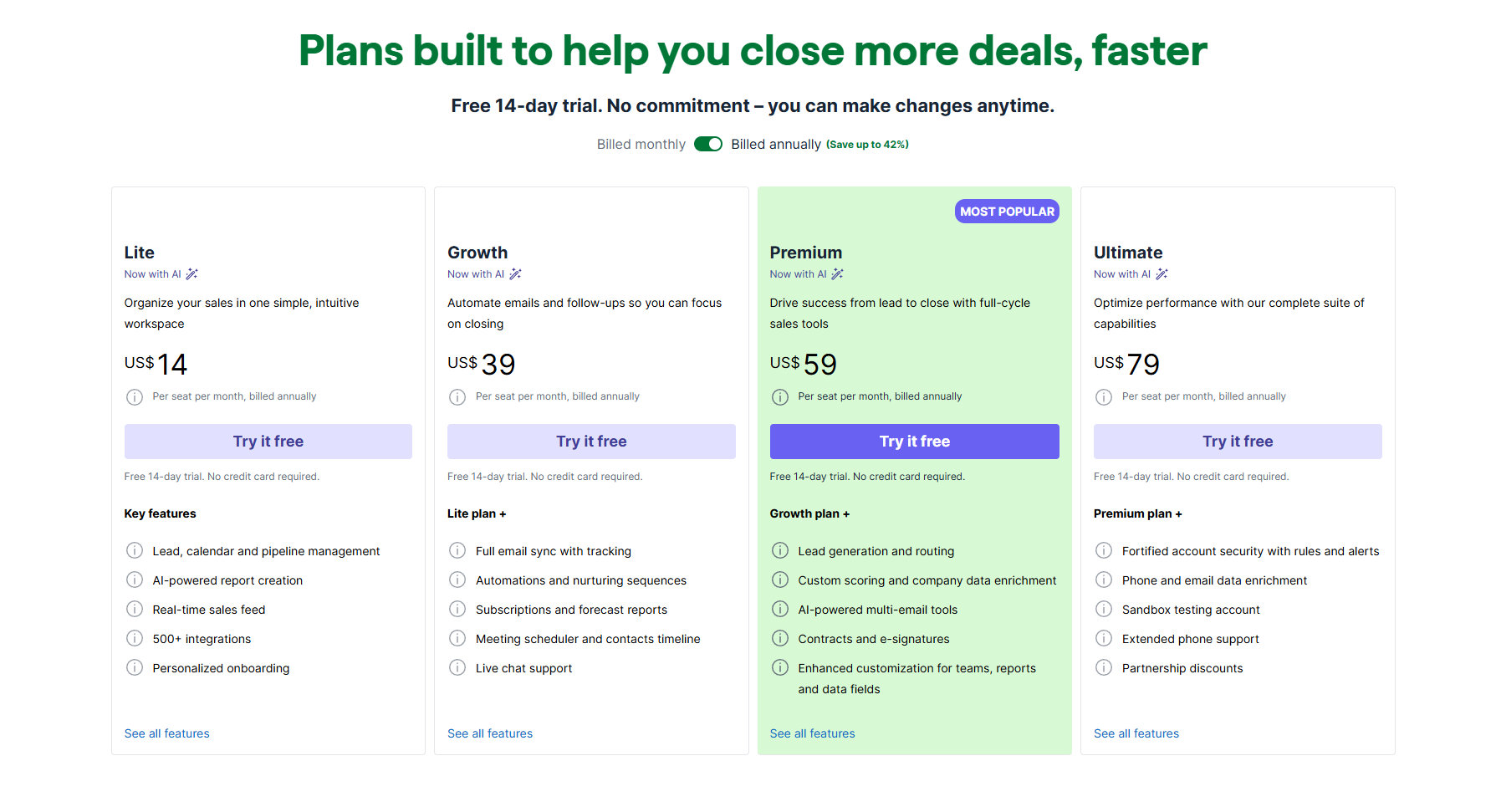
Pipedrive pricing is designed to be accessible to small and seeking a straightforward CRM. Its tiered plans scale based on features such as automation, reporting, and integrations. In the Pipedrive vs Salesforce discussion, Pipedrive often appeals to teams seeking lower entry costs and faster adoption. However, as needs grow, upgrading plans or adding features can increase the overall cost.
Information source: pipedrive.com
Update time: 2025-12-12
Note: Pricing and plan details reflect publicly available data as of the update date and may vary based on region, billing cycle, and number of agents.
Salesforce pricing plan
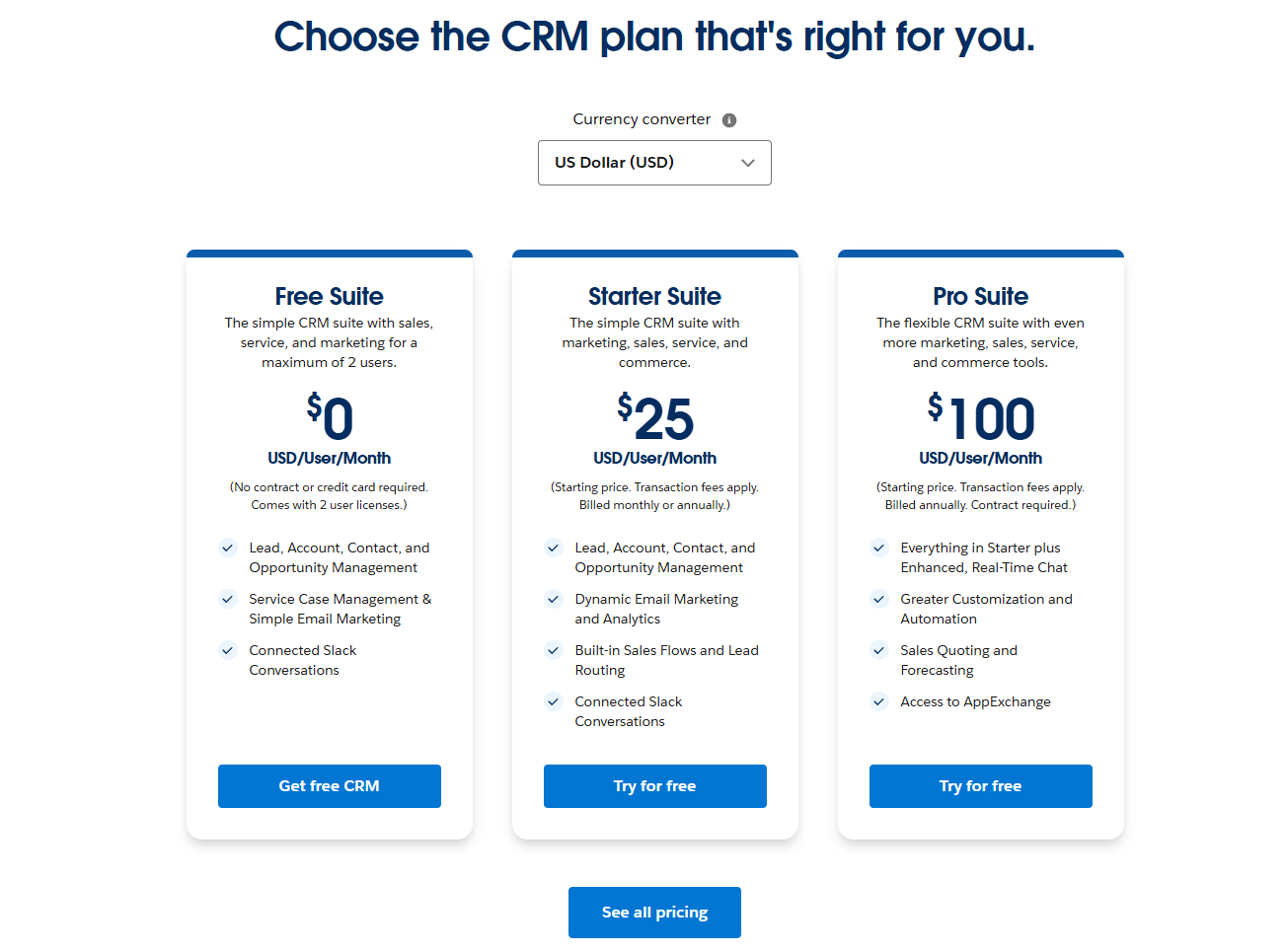
Salesforce pricing reflects its position as an enterprise-grade CRM platform with extensive customization and advanced capabilities. Plans are typically structured around Salesforce Sales Cloud tiers, with costs increasing based on features, users, and add-ons. In a Salesforce vs Pipedrive comparison, Salesforce's entry price is higher, but it offers deeper functionality. Teams should evaluate long-term expenses, including implementation and administration, when considering Salesforce.
Information source: salesforce.com
Update time: 2025-12-12
Note: Pricing and plan details reflect publicly available data as of the update date and may vary based on region, billing cycle, and number of agents.
What both Pipedrive and Salesforce lack
Even the most popular CRMs have limitations. In the Pipedrive vs Salesforce CRM comparison, both platforms excel at managing sales pipelines but fall short in broader team collaboration and . Understanding these gaps helps growing teams plan for additional tools or integrated solutions.
- Built-in team communication and collaboration: Neither Pipedrive nor Salesforce provides a robust, native platform for real-time team communication. Sales teams often need to rely on external messaging or collaboration apps to coordinate efforts, which can create silos and slow decision-making.
- Unified document management and approvals: Both CRMs lack comprehensive document management features, such as version control, centralized storage, and automated approval workflows. Teams must use separate tools to manage contracts, proposals, and shared files, adding extra steps to everyday processes.
- Native project and task management beyond sales: While Pipedrive and Salesforce track sales activities, they are not designed to manage cross-department projects or operational tasks. Organizations seeking to coordinate , support tickets, or internal initiatives will need additional project management tools.
- Cost-efficient all-in-one workflows: Because key collaboration, document, and project features are missing, organizations often layer multiple apps on top of these CRMs. This increases costs and complexity, reducing the efficiency of sales and operational workflows compared to integrated platforms.
This is where modern tools like Lark come into play. Lark integrates messaging, documents, spreadsheets, calendars, and workflow automation alongside CRM-like features, helping teams streamline processes without relying on multiple disconnected apps. For organizations seeking to unify sales operations and internal collaboration, Lark offers a compelling alternative that addresses the challenges highlighted in the Pipedrive vs. Salesforce comparison.
Streamline pipelines without adding more software
Meet Lark: Embrace modern CRM workflows with Lark
Modern teams need more than just a CRM to manage sales; they require a platform that combines communication, collaboration, and automation. addresses these challenges by unifying messaging, , calendars, tasks, and in a single workspace. This all-in-one approach helps teams work faster, stay aligned, and scale efficiently without juggling multiple disconnected tools.
Centralised CRM hub with built-in tables, dashboards, and automations
facilitates the creation of a centralized through highly customizable and versatile data structuring and visualization tools. Users can easily define CRM records using over a dozen field types (including specialized person, email, and currency fields) and visualize the same dataset through multiple views, such as a Grid for data entry, a for pipeline tracking, and a for project timelines. Critical performance is monitored via integrated dashboards that instantly turn CRM records into charts and metrics for strategic analysis.
For enhanced workflow efficiency and security, Lark Base includes robust automations that handle repetitive tasks, such as sending instant messages or creating follow-up tasks based on data triggers, ensuring the timely execution of CRM processes. Furthermore, the advanced permissions feature provides granular access control at the record and field level, allowing managers to view all data while limiting sales representatives to their own client records. 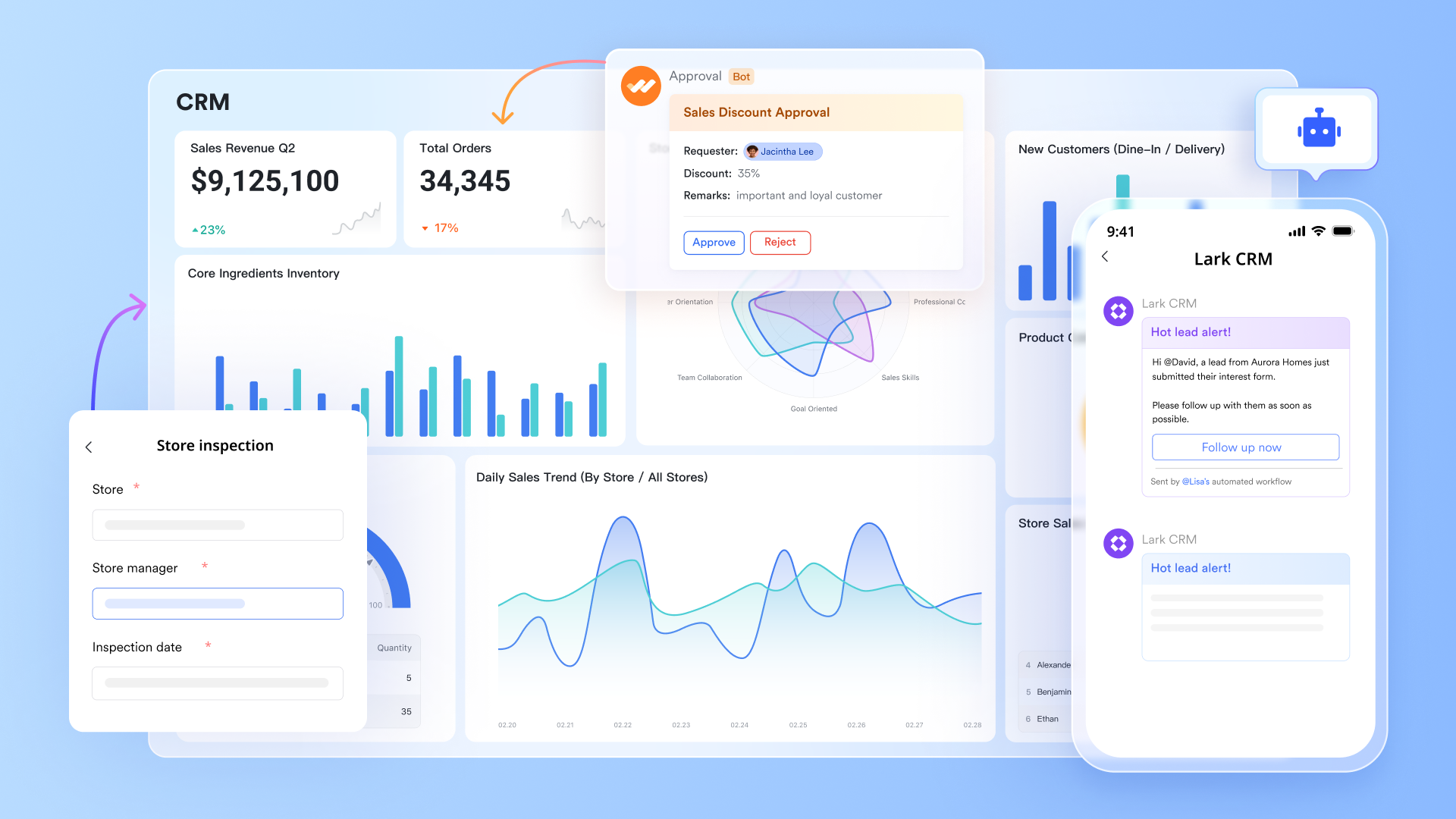
Streamlined task management & accountability
Lark Tasks provides an intuitive platform for across teams. Sales activities, marketing campaigns, or internal projects can all be organized in one place. Tasks can be used combiend with chats, docs, or calendar events, giving full context for every assignment. Unlike Pipedrive or Salesforce, which focus primarily on sales pipelines, Lark Tasks enables cross-functional collaboration and visibility, helping teams prioritize work, monitor progress, and ensure accountability without needing multiple . 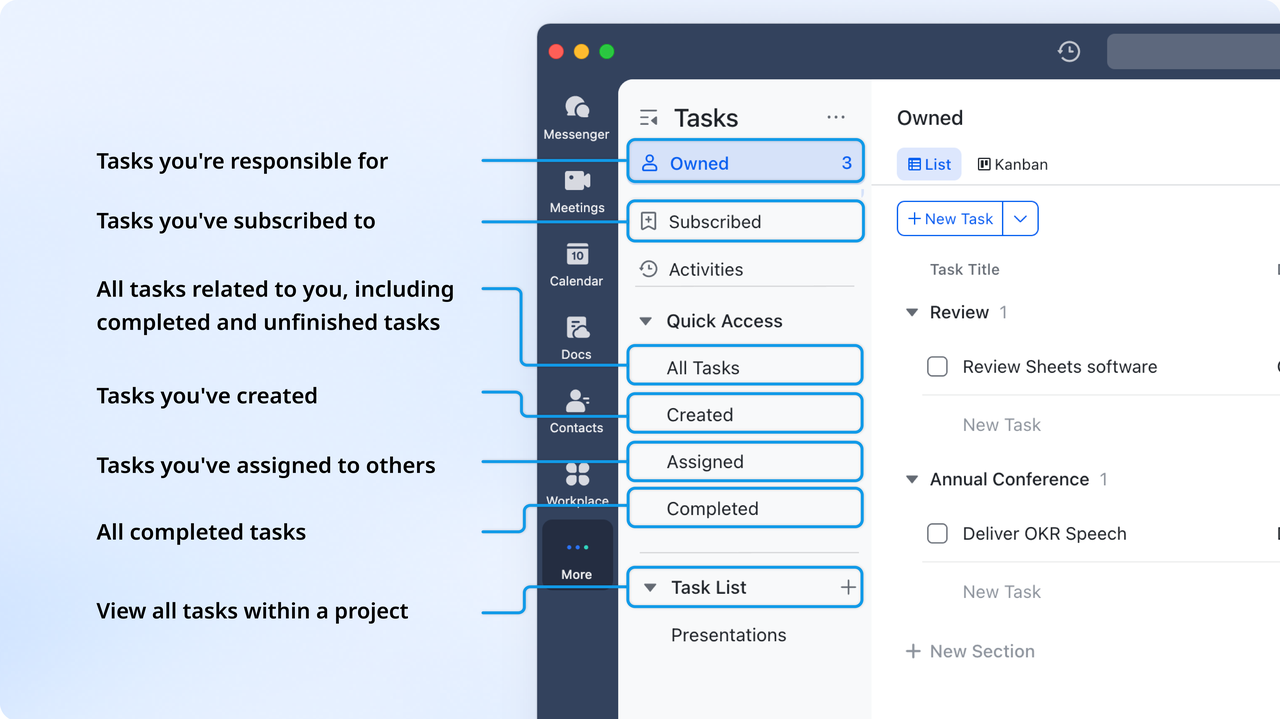
Real-time team communication and coordination
is a built-in chat platform that allows teams to communicate instantly through direct messages, group chats, and video calls. Unlike traditional CRMs, Lark combines messaging with file sharing, , and workflow notifications, so sales, marketing, and operations teams can stay aligned. With threaded conversations, searchable history, and real-time updates, Lark Messenger reduces email clutter and accelerates decision-making, making it easier for modern teams to collaborate effectively across departments. 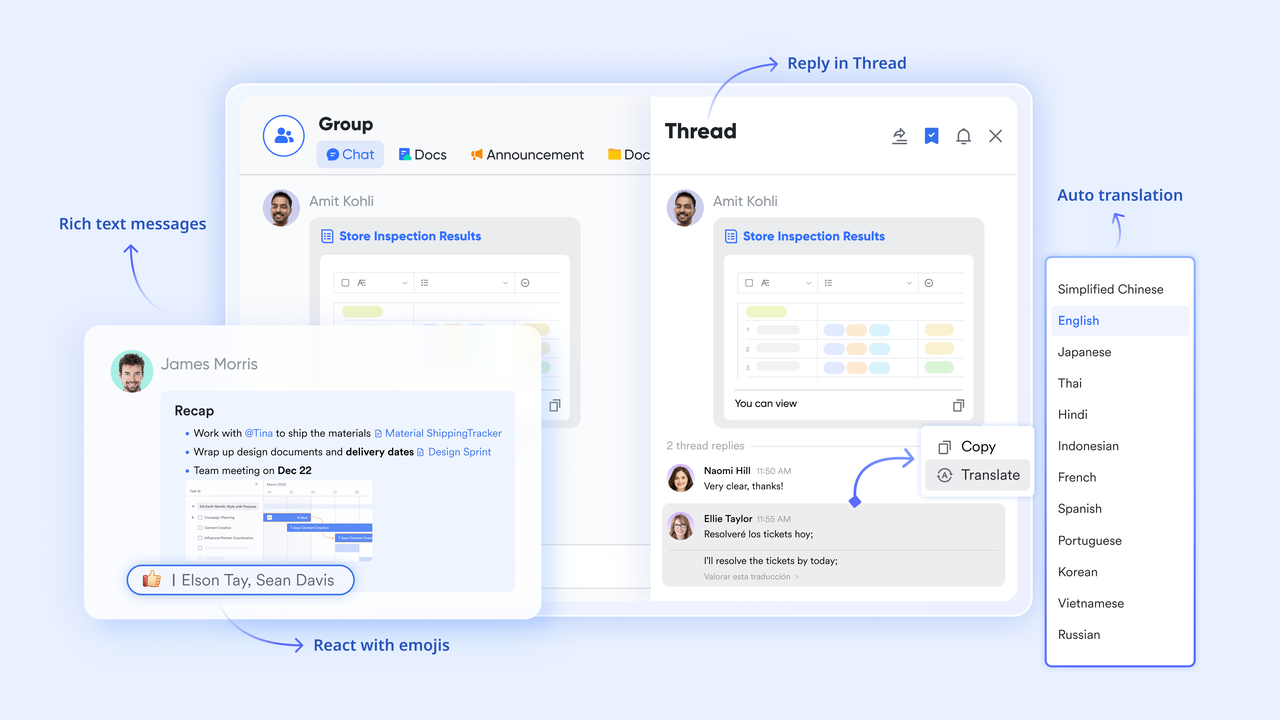
Collaborative document editing platform
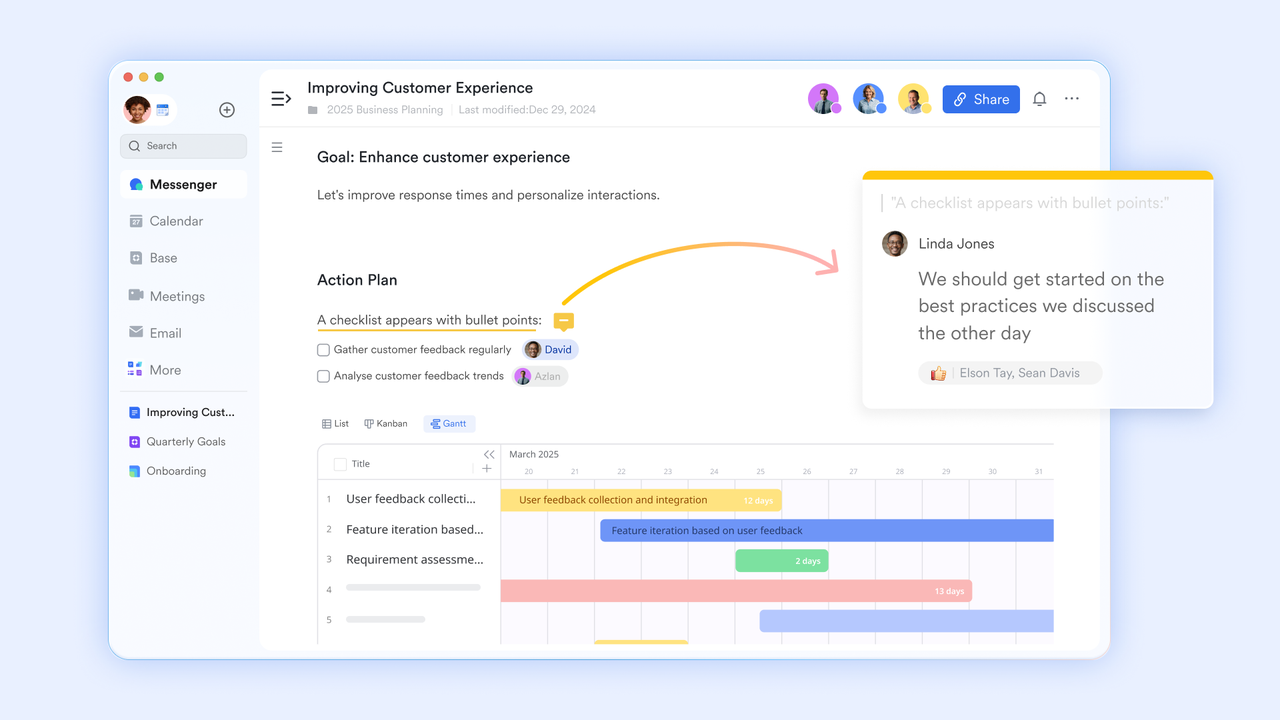
lets teams create, edit, and share documents and spreadsheets in real time. Teams can co-author sales proposals, reports, and project plans without juggling multiple tools, eliminating version conflicts. Unlike standalone CRMs like Pipedrive or Salesforce, which focus on sales data, Lark Docs combines directly with chats, tasks, and workflows. Its cloud-based platform ensures everyone has access to the latest version, enabling seamless collaboration for growing teams managing sales pipelines, marketing campaigns, and simultaneously.
Unified scheduling and event management
Lark Calendar combines with team-wide visibility, enabling seamless coordination for meetings, calls, and deadlines. Integrated reminders and notifications help teams track follow-ups and stay aligned across departments. Unlike traditional CRM tools, which often require third-party integrations for scheduling, Lark Calendar works natively with Messenger, Docs, and Tasks. This ensures that meetings, sales calls, and are automatically linked to relevant workflows, improving efficiency and reducing missed deadlines for busy teams. 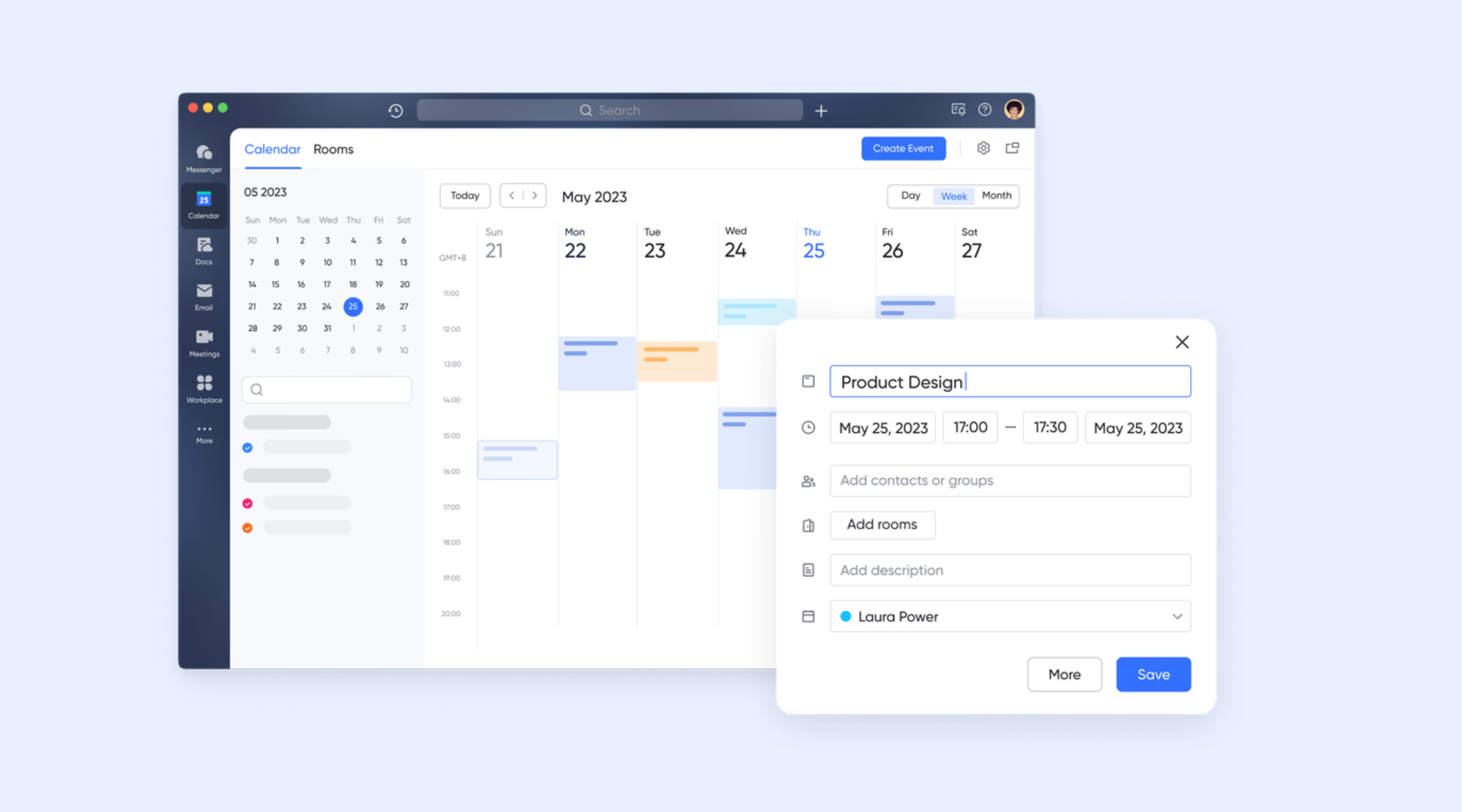
Automated approval and request workflows
automates CRM-related requests by enabling the creation of highly customized approval forms and processes that integrate directly with Lark Base, the data management platform. For instance, a sales team can create a form for a "Special Discount Request" that automatically routes to the appropriate manager based on conditional branches (e.g., discount amount or client tier). Once approved, the system can use the "Sync data to Base from Lark Approval" feature to automatically update the corresponding client record in the CRM database, ensuring real-time data accuracy without manual entry. Additionally, the process can automatically trigger actions, such as sending a confirmation message via Lark Messenger upon final approval. 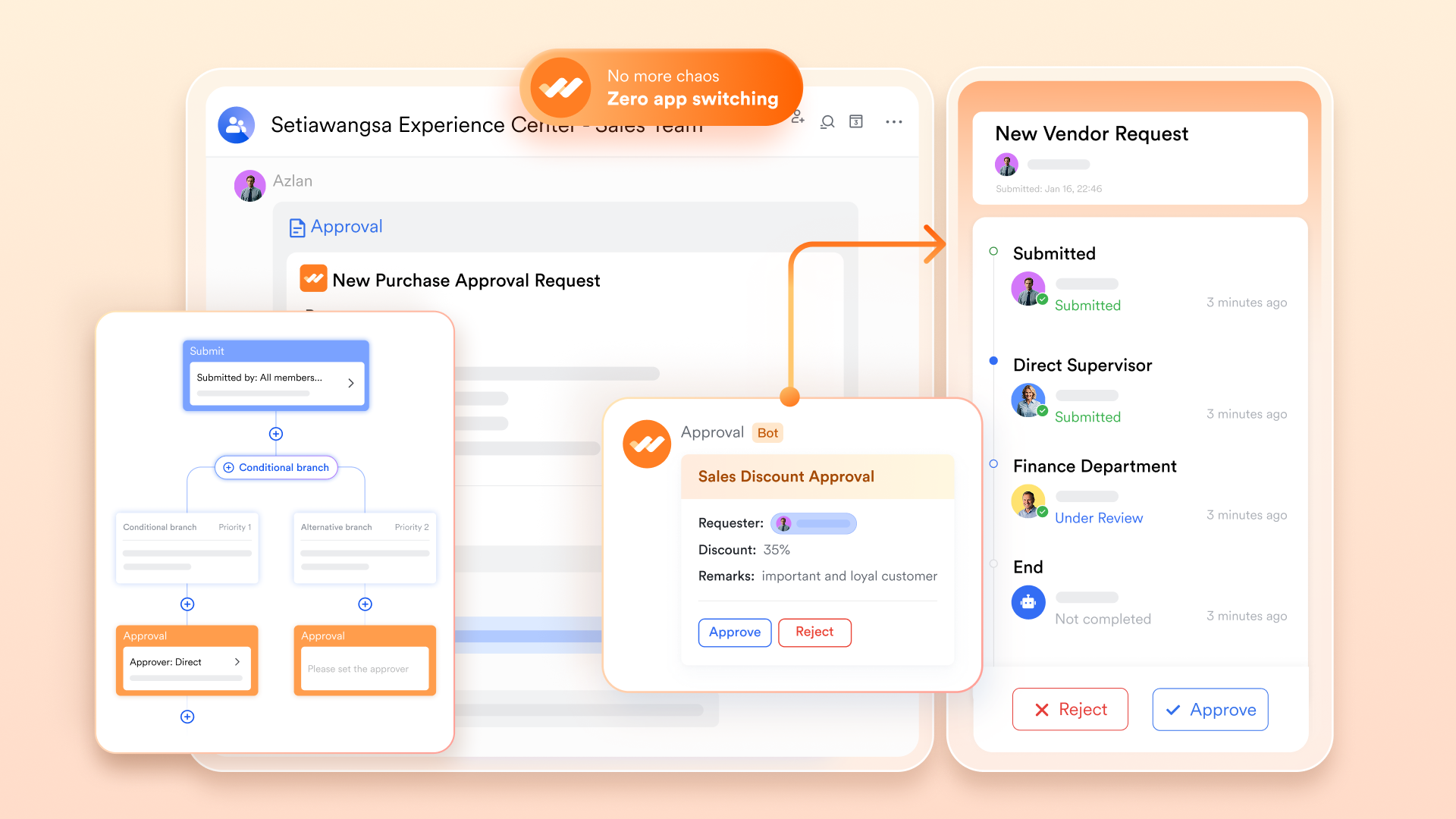
:
- Starter plan: Free forever plan that includes 11 powerful tools for up to 20 users. It also comes with 100GB of storage, 1000 automation runs, AI translations, and more.
- Pro plan: $12/user/month (billed annually) for up to 500 users. It includes everything in Starter plus group calling for up to 500 attendees, 15TB of storage, 50,000 automation runs, and more.
- Enterprise plan: for custom pricing. Supports unlimited users and includes even more automation runs and advanced security, compliance, and management features.
For small teams with simple communication needs

18 months message history
1000 Base automation runs/month
2000 rows per table in Base
Most POPULAR
For companies with comprehensive collaboration and management needs
Unlimited message history
500-participant video meetings
50k Base automation runs/month
20k rows per table in Base
For large companies with advanced security and organizational management needs
Get a personalized demo and pricing
Unlimited message history
500-participant video meetings
15 TB storage + 30 GB storage/user
500k Base automation runs/month
50k Base automation runs/month
Most POPULAR
For companies with comprehensive collaboration and management needs
Unlimited message history
500-participant video meetings
50k Base automation runs/month
20k rows per table in Base
Pipedrive vs Salesforce vs Lark: which platform delivers the best value?
When choosing a CRM, growing teams must consider not only features but also usability, scalability, and overall value. In the Pipedrive vs Salesforce vs Lark comparison, each platform offers unique strengths and trade-offs depending on team size and workflow needs. Pipedrive excels in simplicity, Salesforce delivers enterprise-grade power, and Lark combines and automation. Evaluating these factors helps teams decide which platform provides the best .
Choose if you
If your organization is a simple, sales-focused team prioritizing deal tracking and quick adoption, Pipedrive is the best choice. It offers an intuitive, easy-to-use interface centered entirely on pipeline management, making it perfect for teams who want simplicity over complex features or broad collaboration tools.
For large enterprises with complex processes demanding maximum control, customization, and predictive analytics, Salesforce is the platform to choose. Despite its complexity and high cost, its strength lies in its extensive ecosystem, advanced reporting, and scalable architecture required for managing sophisticated, large-scale operations.
If you are a growing team seeking an all-in-one solution that naturally combines CRM, collaboration, and documentation, Lark offers a powerful unified workspace. Choose Lark to eliminate app switching, benefit from its lower cost, and gain streamlined, integrated workflows across all sales and supporting teams.
Discover a more flexible CRM approach
Conclusion
Choosing the right CRM depends on your team's size, complexity, and workflow needs. Pipedrive is ideal for small sales-focused teams seeking simplicity and fast onboarding, while Salesforce offers unmatched customization, advanced reporting, and scalability for large, complex organizations. However, both platforms have gaps in collaboration, project management, and cost-efficient workflows, often requiring additional tools.
For modern teams looking to unify sales operations, communication, document management, and automation in one place, provides a balanced solution. It combines ease of use with powerful features, helping teams streamline processes, improve collaboration, and scale efficiently, making it a compelling choice for growing organizations.
FAQs
Is Pipedrive better than Salesforce?
It depends on team needs. Pipedrive is often better for small or mid-sized sales teams that want a simple, visual pipeline and fast adoption. Salesforce is more powerful and flexible but comes with higher costs, setup time, and complexity, which can feel unnecessary for sales-only teams.
Why are companies leaving Salesforce?
Companies often leave Salesforce due to high and rising costs, long implementation timelines, heavy admin dependency, and low adoption among frontline users. Many teams switch when they want faster execution, simpler workflows, or better alignment between CRM, communication, and daily work without extensive customization.
How difficult is it to migrate data from Pipedrive or Salesforce to another platform?
Data migration can vary depending on complexity. In most Pipedrive vs Salesforce or Pipedrive CRM vs Salesforce scenarios, moving basic contacts and deals is straightforward. However, the Salesforce vs Pipedrive comparison often highlights challenges when custom objects, workflows, or integrations exist. For large datasets or complex setups, migration planning and third-party tools may be required to avoid data loss. Who is the biggest competitor of Salesforce?
Microsoft Dynamics 365 is Salesforce’s biggest competitor at the enterprise level. Other major competitors include HubSpot (strong in SMBs), Zoho CRM (cost-effective alternative), and Oracle CX for large organizations.
How does CRM choice impact collaboration between sales and other departments?
The CRM you choose affects . In Pipedrive vs Salesforce CRM, Pipedrive offers limited collaboration beyond sales. Salesforce vs Pipedrive essentials and Salesforce Sales Cloud vs Pipedrive show that Salesforce can connect teams, but may require configuration. Comparing Salesforce vs Pipedrive vs HubSpot CRM comparison, integrated platforms like Lark or additional collaboration tools can bridge gaps more efficiently than traditional CRMs.
Related reading






























