Kanban cards are simple, visual units of work, but the way you design them can dramatically change how smoothly your team operates. This guide brings together practical Kanban card examples and adaptable templates so you can move beyond theory and into everyday use. Whether you lead a software squad, run marketing campaigns, manage operations, or organize your own to‑dos, you will find patterns you can copy and refine. I will walk through card anatomy, ready-to-use structures, and industry scenarios you can plug into tools like Lark or any modern Kanban software, so your board becomes a reliable picture of what's really happening.
What is a Kanban card?
A Kanban card is a visual representation of a single piece of work moving through your process. Each card stands for a task, request, or work item that needs to flow from start to finish. On a , cards sit in columns such as "To do", "In progress", and "Done", giving the team an immediate overview of work in progress, upcoming tasks, and completed items. Kanban cards can be digital or physical, and both formats serve the same function in visualizing and tracking work.
Well-structured cards make it easier to spot bottlenecks, manage workload, and coordinate project management without constantly asking for status updates. Instead of hiding in spreadsheets or long emails, work lives on visible cards that everyone can understand at a glance. The enables teams to manage tasks more effectively by visualizing workflow and improving collaboration.
Kanban cards vs Kanban board
It helps to clearly separate the ideas of "card" and "board":
- A Kanban card is the work item: It describes what needs to be done, who owns it, and any relevant details.
- A is the visual workflow: It shows the stages that work passes through from request to completion.
Imagine a simple Kanban board with three columns: "To do", "In progress", "Done". These Kanban columns represent , and customizing Kanban columns allows teams to visualize and manage their unique processes. Each card on that board might represent a user story, a marketing task, or an internal request. As cards move from left to right, the board becomes a living picture of current work. Moving cards through workflow stages and Kanban columns helps teams and maintain visibility into ongoing tasks.
Digital vs Physical Kanban card examples
Teams can use both physical and digital Kanban cards, and each has strengths:
- Physical Kanban cards: These are sticky notes or printed cards on a wall, often created on physical boards using sticky notes or paper cards. They work well for small, co‑located teams and workshops.
- Digital Kanban cards: Digital cards live in online and can carry richer information. You can include checklists, file attachments, comments, and links to related work.
Some teams use a hybrid model: Sketching ideas on physical cards during planning, then turning them into digital Kanban cards in their main once they are ready to execute.
Elements of an effective Kanban card
Effective Kanban cards share a few common traits: They are clear, consistent, and lightweight enough to keep updated. A good Kanban card template encourages people to include just enough detail without turning the card into a document.
Core fields for effective Kanban cards
- Title: Use an action-oriented, concise title that makes sense even outside the board. Instead of "Landing page", write "Create landing page for Q3 signup offer". This helps with search, reporting, and scanning the board quickly.
- Description: The description provides context, scope, and the intended outcome. It should answer questions like "Why are we doing this", "What does success look like", and "What is included or excluded". Clear descriptions make your Kanban examples , because stakeholders can understand work without extra meetings.
- Assignee/owner: Every card needs a clearly responsible person. The assignee is not always the only contributor, but they should be the one who moves the card forward and keeps information up to date.
- Status via column, not field: In Kanban, the card's status is defined by the column it sits in. It is usually better to avoid a separate "status" field that duplicates the column, as that can create confusion.
In , Kanban cards often include fields for title, assignee, status, priority, and size to help teams track and manage work efficiently.
Optional fields that make Kanban cards more powerful
- Due date and time constraints: Use these when timing truly matters, such as campaign launches, events, or regulatory deadlines. Not every card needs a date.
- Priority or class of service: Simple labels like "standard", "expedited", or "fixed date" help teams make decisions under pressure. Clear classes of service also keep high-priority work from mixing silently with everything else.
- Tags, labels, and categories: Labels can mark product areas, channels, clients, or campaign names. For example, a team managing Kanban for inventory might label items by warehouse, supplier, or product line so they can slice the board in useful ways.
- Estimates or size: Some teams use story points or t‑shirt sizes to estimate effort. These help forecast capacity and identify unusually large tasks that should be split.
- Checklists and subtasks: For multi-step items, checklists clarify the definition of done. They keep the main card focused while still capturing detailed steps such as "draft", "review", "approve", and "publish".
- Attachments, links, and supporting documents: Link to specifications, briefs, mockups, or relevant conversations. This is where digital cards stand out compared to static tools like a Kanban board example in Excel.
- Comments, decisions, and notes: Comments on the card can capture key decisions and updates over time, so the history of the work item is visible in one place.
can also provide templates specifically for recurring tasks, making it easier to manage repeated work efficiently and maintain consistency.
Start a Kanban card and experience visible, trackable work
Ready-to-use Kanban card templates
Templates help teams move from abstract ideas to repeatable practice. When people can pull a for common work types, they spend less time on structure and more time delivering.
Task execution Kanban card template
A task execution card template is for work that one person or a small group can finish end‑to‑end. It usually has a clear, verb-led title, a short description with context and the expected outcome, one assignee, and a compact checklist to define , plus a few labels for category or team and an optional due date when timing truly matters.
Project or epic Kanban card template
A project or epic Kanban card template suits larger initiatives that contain many smaller tasks. Instead of a single action, the title names the initiative, supported by a brief objective and scope that outlines what is in and out. The card points to linked child items where detailed work lives and lists to consult or inform.
Request Kanban card template
A request Kanban card template standardizes intake for functions like IT, design, legal, and HR. The title states the request clearly, the body records who is asking and how to reach them, a category field distinguishes types of requests, and a short note on impact or urgency explains why it matters and by when. Attachments hold any forms or references.
Improvement or idea Kanban card template
An improvement or idea Kanban card template keeps continuous improvement visible. Each card includes a brief , a proposed change or experiment, the expected benefit, and an owner. Cards like these build a small, prioritized backlog of optimizations that the team can pull when it has capacity, rather than letting good ideas vanish in chat threads.
Kanban card for software and IT teams
For software and IT teams, user stories, bugs, and technical debt cards are most common. Software development teams use Kanban cards to organize, visualize, and manage their workflows, defining workflow stages, swimlanes, and criteria for . Advanced software dev teams leverage these cards to coordinate complex processes, visualize multiple stages of development, and enhance collaboration across related teams such as customer support and QA.
Kanban card for marketing and content teams
For , core patterns include campaign, content piece, and creative request cards. A campaign card summarizes the objective, target audience, channels, and main milestones, anchoring all related tasks. A content card records a topic, target keyword, audience, and call-to-action, plus a simple draft–review–publish checklist. A creative request card specifies format, dimensions, brand constraints, and approver, so designers receive complete briefs the first time.
Kanban card for operations, service, and support teams
For operations, service, and support teams, cards often represent tickets, internal requests, and process improvements. Operations teams utilize Kanban cards to manage requests, incidents, and recurring processes. A card holds customer details, a concise issue summary, category, priority, and any SLA notes, allowing the team to route work correctly. Internal service request cards capture location, urgency, and required access or materials for tasks like equipment setup or facility fixes. Process improvement cards describe a current issue, a suspected root cause, and a trial action, supporting small, frequent changes to how work flows.
Kanban card for HR, recruitment, and people teams
For HR, , and people teams, Kanban cards help visualize people-related pipelines and projects. Candidate cards track the role, stage, source, and next step, which keeps the hiring funnel transparent. Onboarding cards carry a reusable checklist for access, equipment, and introductions, making new‑hire experiences more consistent. HR project cards outline the goal, main stakeholders, and milestones for initiatives such as policy changes or engagement programs.
Kanban board example in Excel
Some teams start with a simple Kanban board example Excel before adopting dedicated software. Columns such as "To do", "In progress", and "Done" become headers, and each row acts like a basic card with fields for title, owner, and due date. This is a low-friction way to test Kanban card examples with familiar tools, but quickly show their limits when you need richer Kanban card design, real-time collaboration, and automation, so they work best as a temporary prototype rather than a long-term solution.
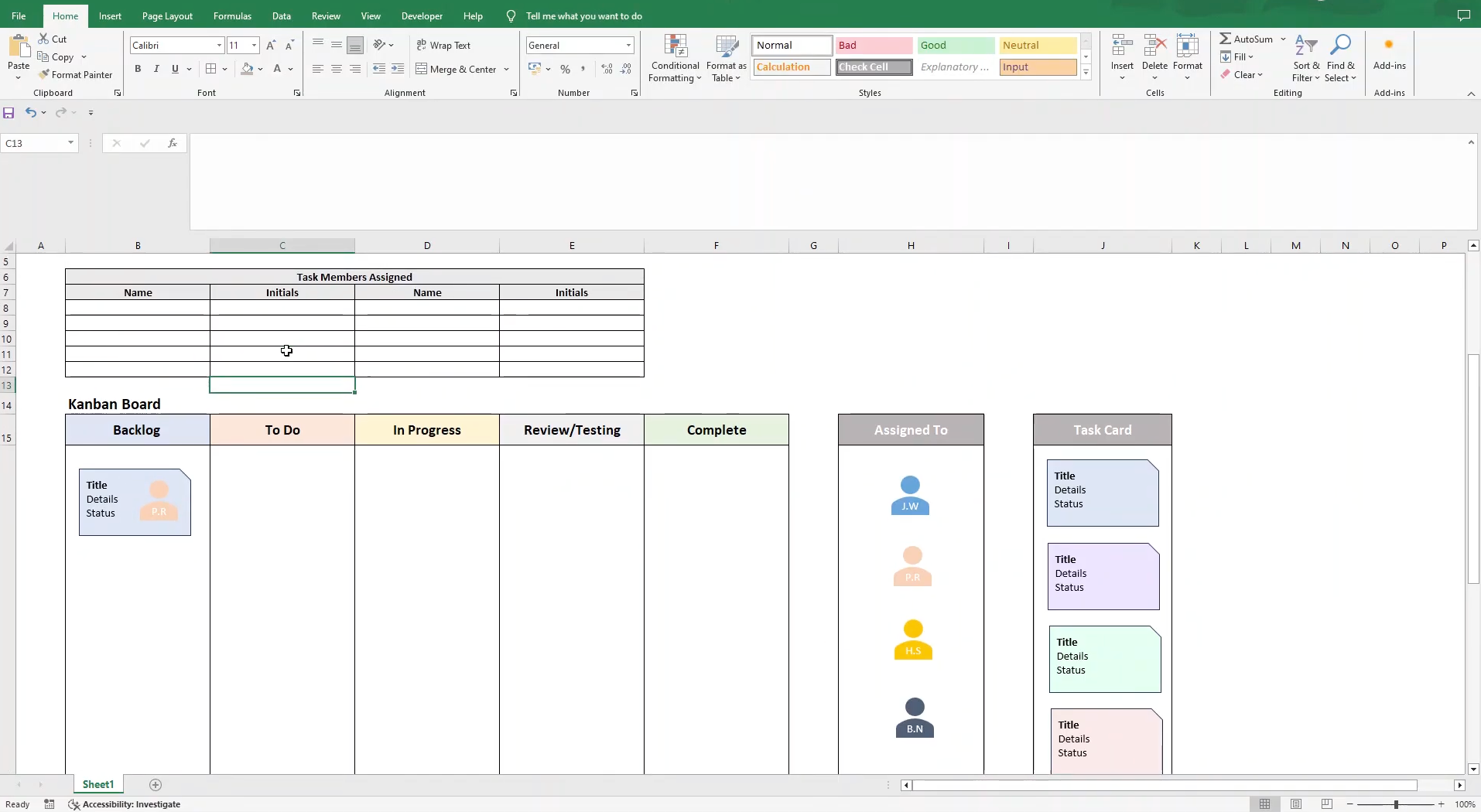
Standardize your Kanban cards with a simple template
Aligning Kanban card design with daily operation
Embracing Kanban offers a refreshingly flexible approach that naturally adapts to your team's unique rhythm. You'll find the most value by thoughtfully and identifying the meaningful stages each task moves through—these become the core columns of your Kanban board. Whether you opt for physical sticky notes or a digital Kanban system, each task should live as a focused Kanban card, placed in the column that best represents its real status.
To bring this into your everyday tools, lets you turn rows in Base or tasks in Lark Tasks into Kanban cards with owners, fields, and automation, so your workflow stays visual, collaborative, and always in sync.
Use Lark Base to build flexible "card models"
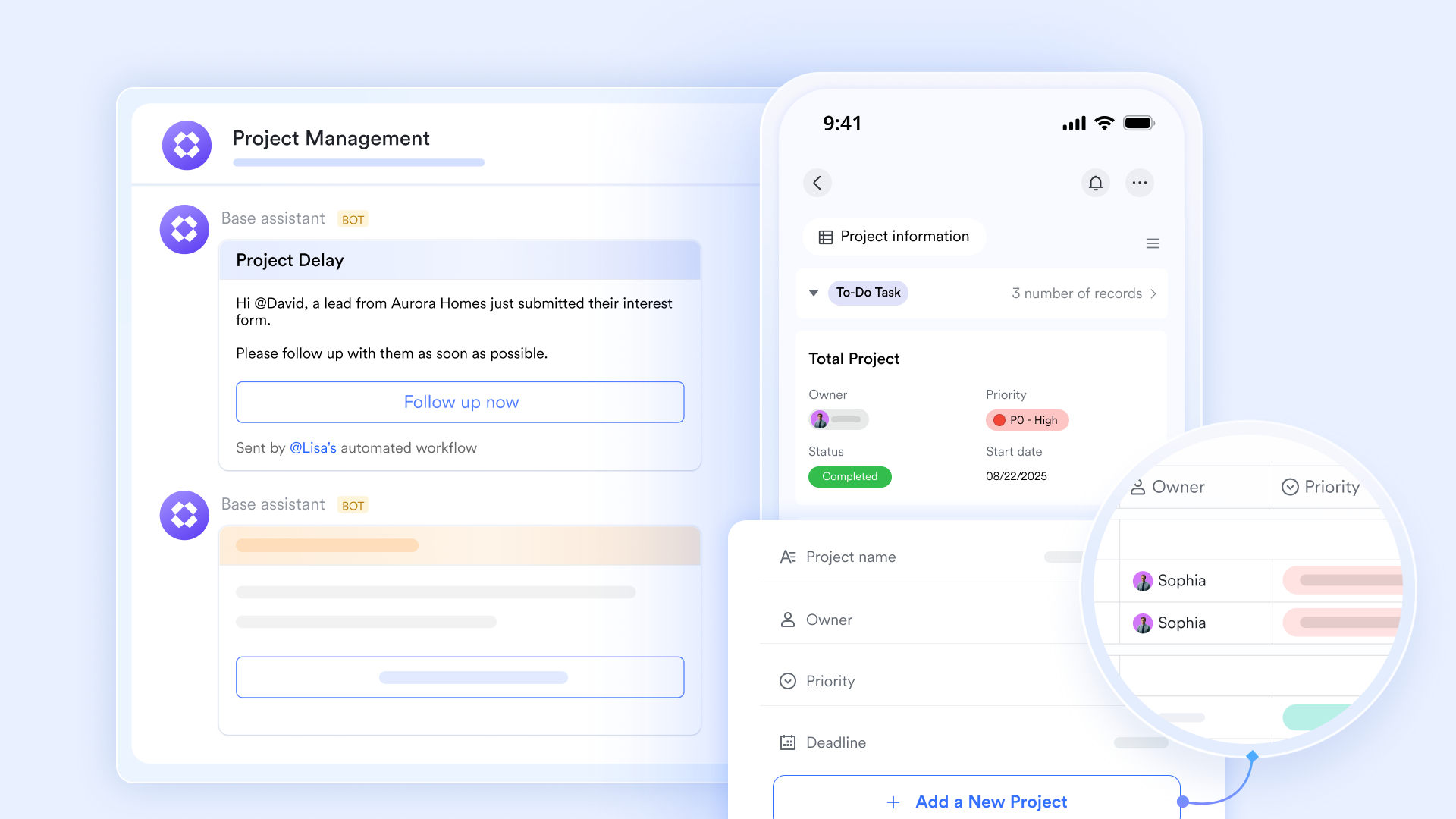
functions as a Kanban tool when switching to Kanban view, providing a suite of project management features to help you plan, monitor, and report on your projects. Different card types can have different fields: For example, a bug card for an engineering team might include "environment" and "severity", while an HR card might track "candidate source" and "interview stage". 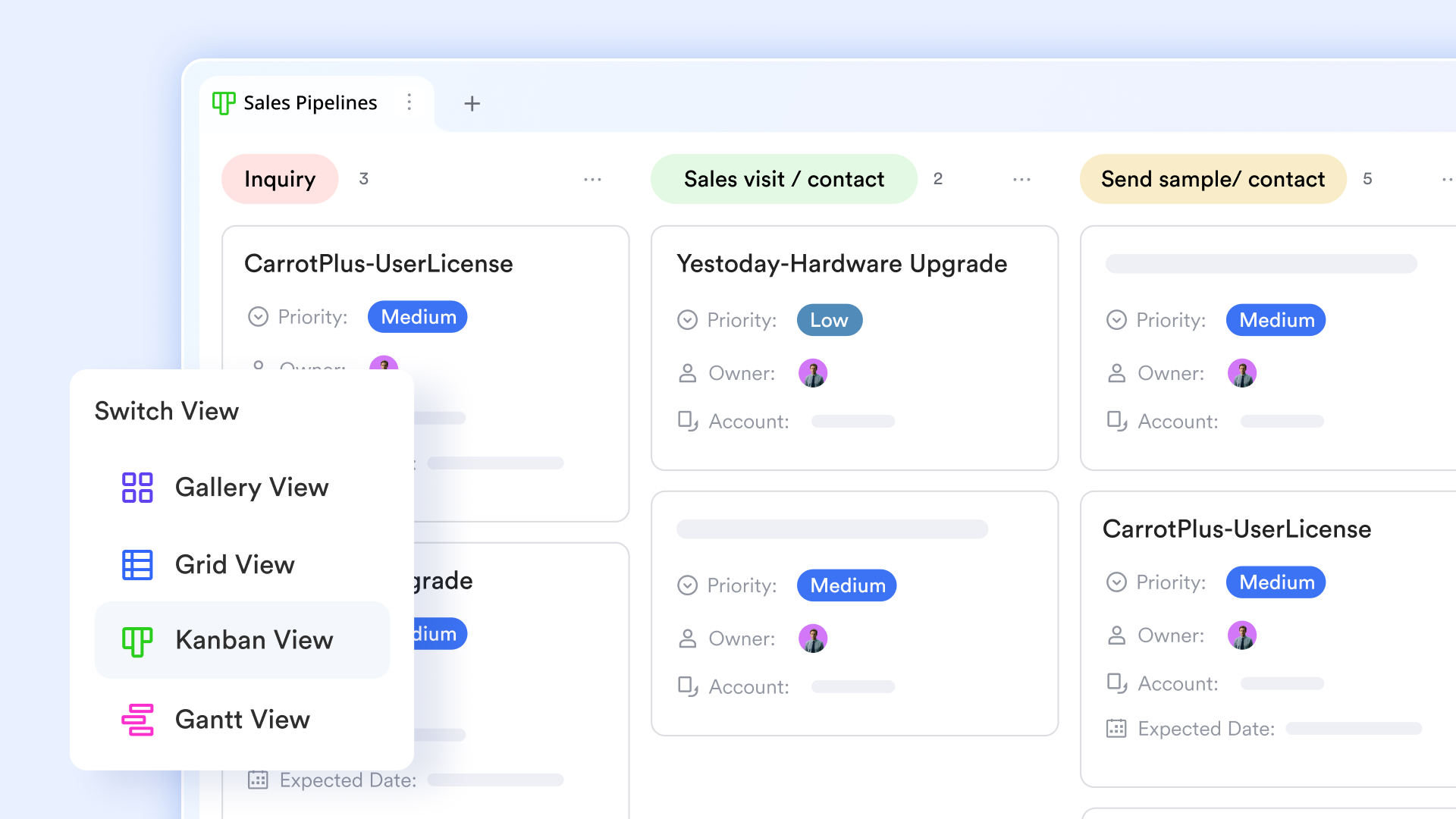
Once the fields are configured in Base, you can switch to a table view, group by a "status" or "stage" field, and instantly turn every record into a draggable card that flows from "To do" to "Done".
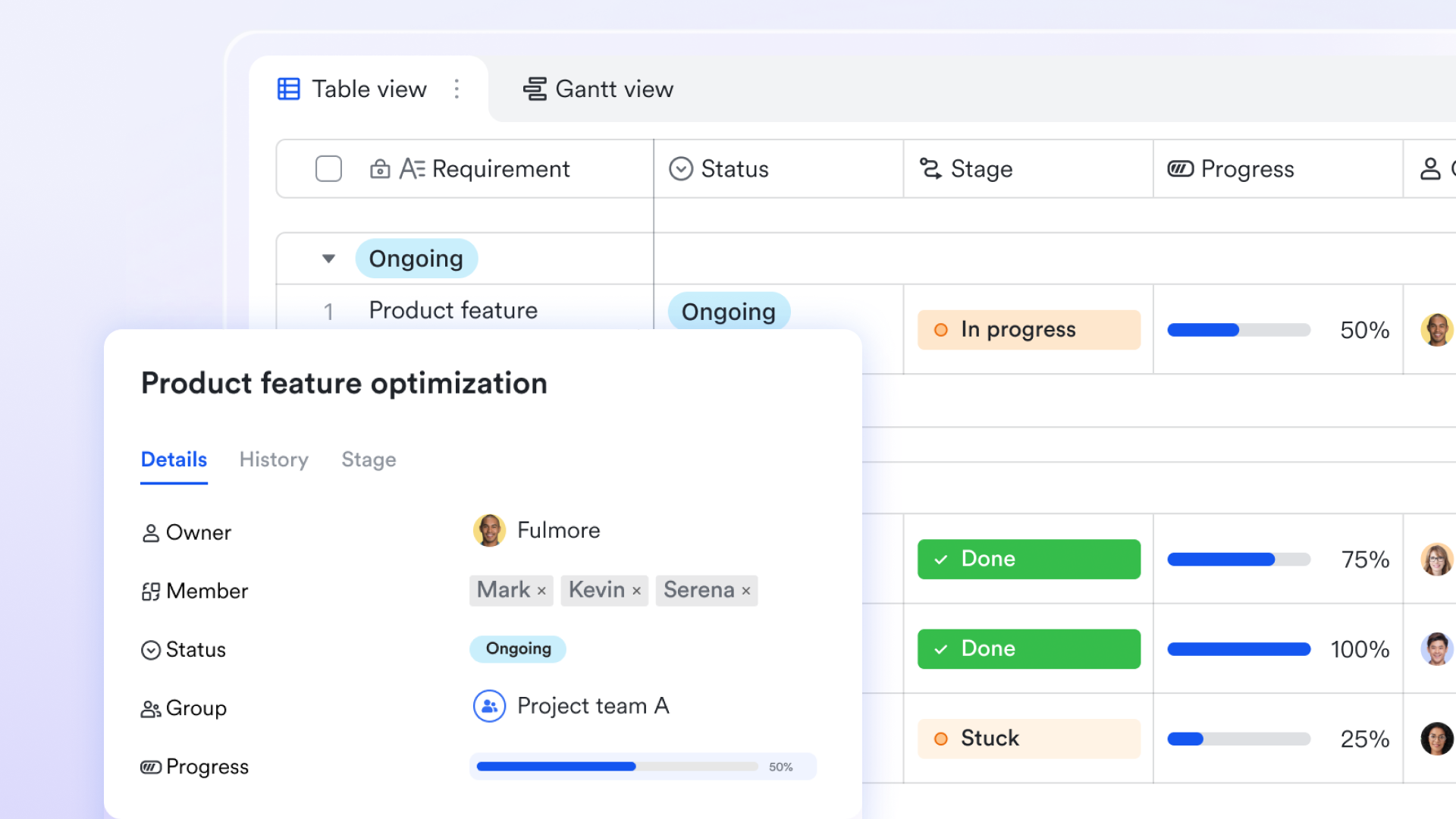
Make cards "come alive" with collaboration and updates
Because Lark unifies docs, cloud storage, and communication, every Kanban card generated from Base can carry pictures, Lark Docs, spreadsheets, cloud files, or links, and you can start comment threads right on the card.
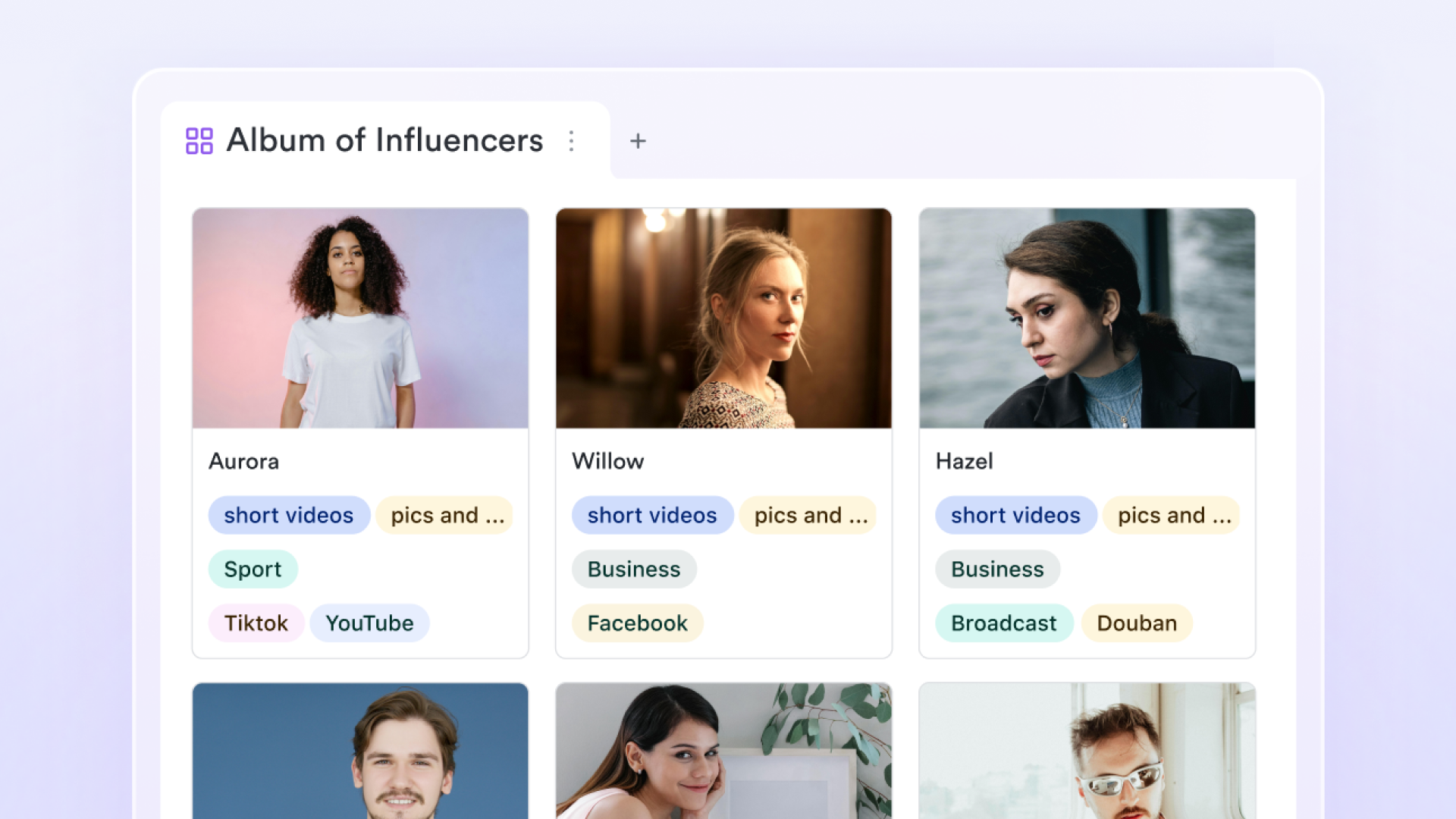
When your own team collaborates on the same board, it improves workflow transparency and coordination, making it easier to prioritize tasks and keep everyone aligned.
Use Lark Tasks with clear Kanban cards and automated reminders
Lark Tasks offers a Kanban view where you can assign one or more owners to tasks and subtasks and have the system send reminders as due dates approach, keeping critical cards from slipping through the cracks. These features help teams track tasks efficiently, ensuring nothing falls through the cracks. 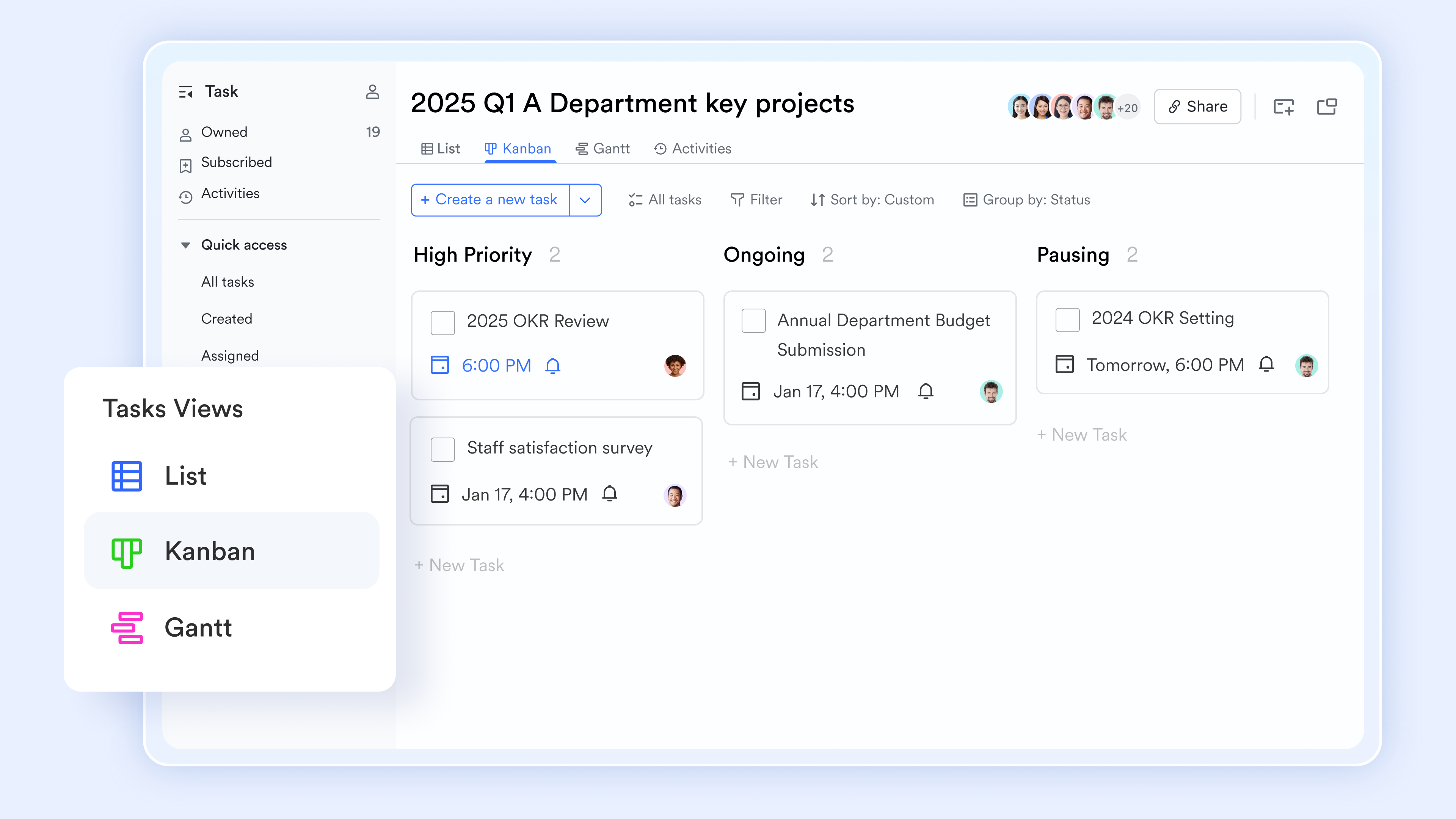
Lark Tasks sends automatic reminders to task owners via when a task is about to be due and when it actually reaches its due time, helping them follow up promptly and avoid missed deadlines. When a task is assigned to multiple members, the task owner can also see each assignee's completion progress directly within the task, making it easier to track execution and coordinate collaboration across the team. 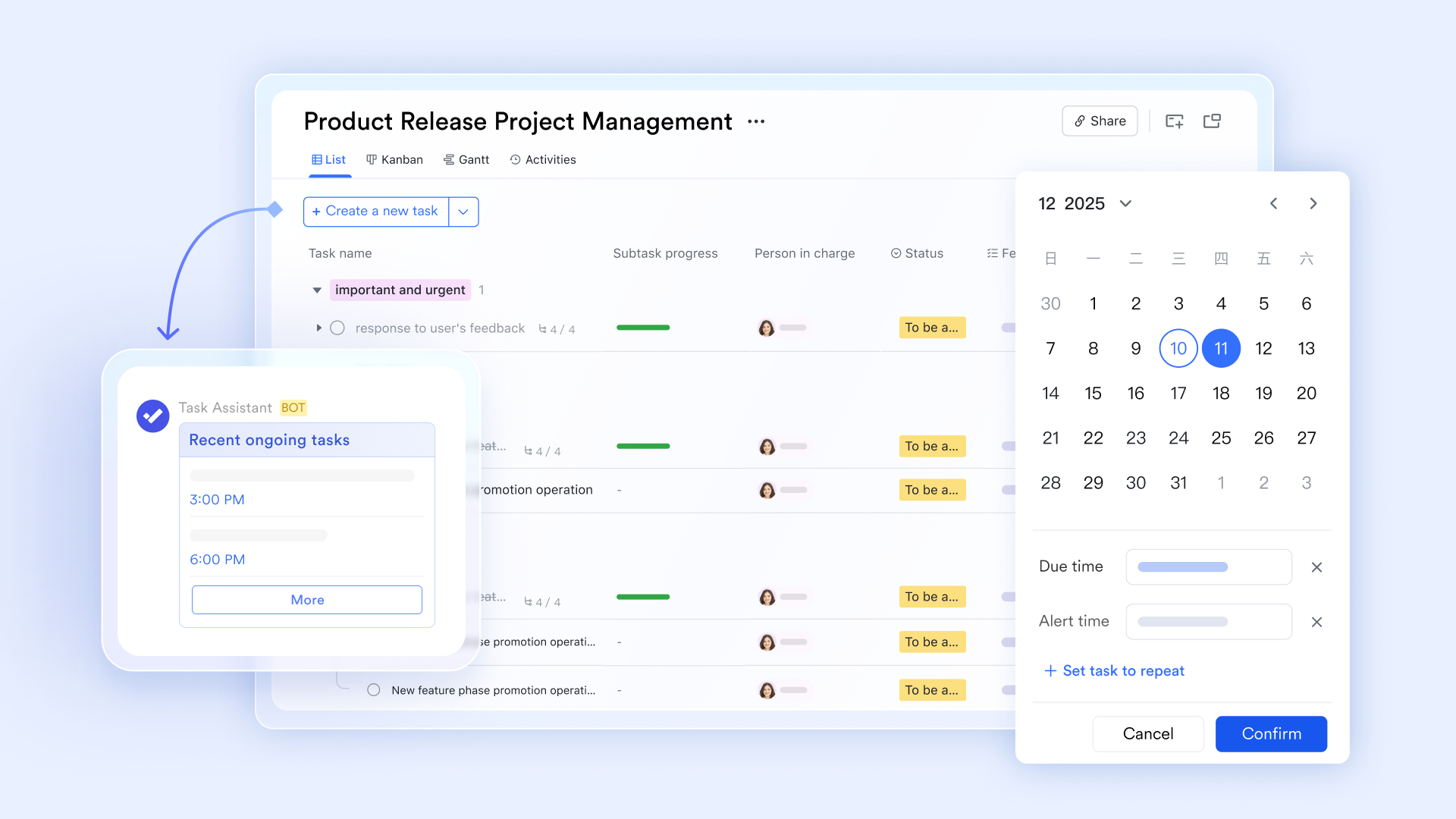
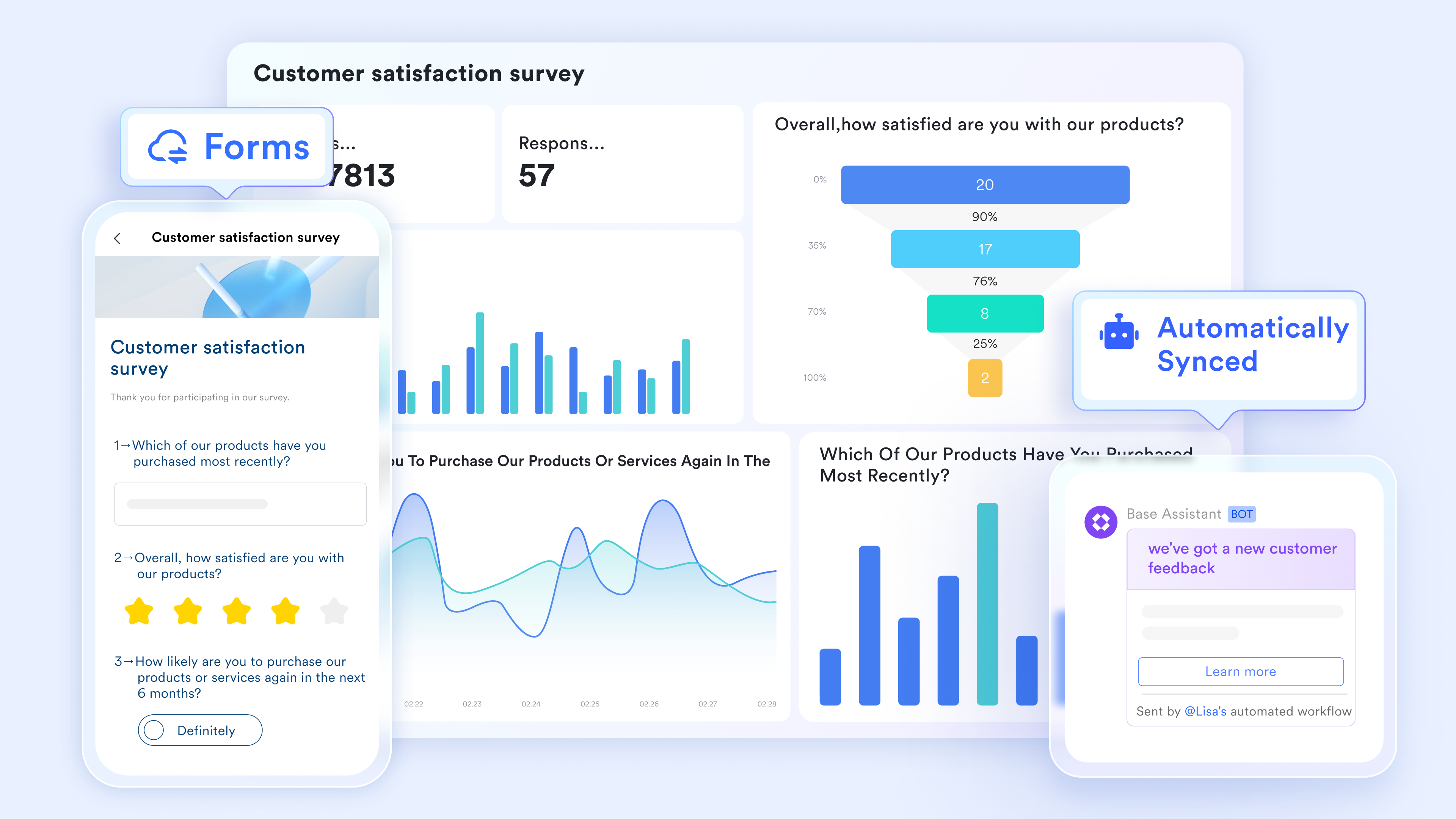
With built-in automation and forms, you can enable people to submit request forms and have standardized Kanban cards created automatically in a chosen Base, thereby reducing manual entry and missing details. You can also create tasks from group chats or link existing cards into conversations, and have updates to card content or status automatically reflected into the relevant chats or topics.
Turn your Kanban setup into reusable templates
After you've designed fields, views, and workflows based on Kanban card examples, you can duplicate the entire Base or a specific Kanban view and treat it as a team-level Kanban card template. New projects or teams only need to copy this space to inherit the same field structure, board columns, and filters, instead of rebuilding everything from scratch. These templates can be used to categorize tasks by project, team member, or priority using swimlanes, and to assign tasks to specific team members for better clarity and accountability.
Together, reminders, auto-generated cards, and fine-grained access control ensure these Kanban cards are not just "management boards", but executable, traceable, and compliant workflow units that support everything from daily tasks to complex project management.
:
- Starter plan: that includes 11 powerful tools for up to 20 users. It also comes with 100GB of storage space, 1000 automation runs, AI translations, and more. No credit card needed.
- Pro plan: (billed annually) for up to 500 users. It includes everything in Starter plus group calling for up to 500 attendees, 15TB of storage space, 50,000 automation runs, and more.
- Enterprise plan: for custom pricing. Supports unlimited users and includes even more automation runs and advanced security, compliance, and management features.
For small teams with simple communication needs

18 months message history
1000 Base automation runs/month
2000 rows per table in Base
Most POPULAR
For companies with comprehensive collaboration and management needs
Unlimited message history
500-participant video meetings
50k Base automation runs/month
20k rows per table in Base
For large companies with advanced security and organizational management needs
Get a personalized demo and pricing
Unlimited message history
500-participant video meetings
15 TB storage + 30 GB storage/user
500k Base automation runs/month
50k Base automation runs/month
Most POPULAR
For companies with comprehensive collaboration and management needs
Unlimited message history
500-participant video meetings
50k Base automation runs/month
20k rows per table in Base
Kanban card examples across industries
Software development teams
Dev teams commonly use user stories, bugs, technical debt, and spike cards. A user story might be "Implement password reset via email," with a short user story, clear acceptance criteria, and fields like component, priority, and estimate. Bug cards describe how to reproduce the issue and environment; technical debt and spike cards capture refactors and timeboxed research, each small enough to finish in a few days.
IT, operations, and service teams
IT and service teams track change requests, incidents, and service requests. Cards move through a ticket lifecycle such as New → Triage → In progress → Waiting → Resolved → Closed, sometimes ending with a Customer Feedback step. Priority, SLA labels, and standard checklists help ensure consistent handling and complete documentation.
Marketing and content teams
Marketing uses campaign, content, and creative request cards. A campaign card like "Q3 product launch" stores objectives, audience, channels, and ; content cards track work from Idea to Published and Repurposed; creative request cards specify formats, deadlines, and approvers so design work flows smoothly across the board.
HR, recruitment, and people teams
HR teams visualize hiring pipelines with candidate cards moving from "Applied" through "Interviewing," "Offer," and "Hired/Rejected." Onboarding and offboarding cards use checklists for accounts, equipment, and meetings, while HR project cards cover policy rollouts and people programs, making operations and projects visible in one place.
Individual productivity and personal projects
Individuals can keep simple Kanban boards for personal tasks and learning goals, with cards like "Book annual health checkup" or "Complete Kanban fundamentals course." Columns such as "Backlog," "This week," "Today," "In progress," and "Done" keep focus clear while lightweight cards (title + one tag + optional due date) keep overhead low.
Turn recurring processes into reusable Kanban card checklists
Common Kanban card mistakes
Well-designed Kanban cards are just as important as a good board layout. When cards are vague, ownerless, or overloaded, work gets stuck, WIP limits stop working, and the board stops reflecting reality. Clear, focused cards that match your workflow make the board a reliable picture of how work really flows and help the team move tasks smoothly from left to right.
Vague, oversized, or unclear Kanban cards
A common mistake is creating cards that try to capture "everything" in one place. A card titled "Website work" with a description like " and improve performance when you have time" is hard to start, hard to finish, and hard to test, because no one knows what "done" actually means.
To fix this, write concrete, outcome‑oriented cards: Use specific action titles such as "Reduce homepage load time under 2s on mobile" or "Fix 500 error on checkout when coupon is applied," and break large, fuzzy work into several smaller cards, each delivering one clear result (for example, "Compress homepage hero images," "Enable HTTP caching for product pages," "Measure and report mobile load time baseline"). Before‑and‑after rewrites like turning "New onboarding" into "Draft 3‑email onboarding sequence for first week" or "Improve reports" into "Add monthly export button to " help teams build the habit of writing smaller, clearer cards.
Missing ownership, priority, or deadlines
Another frequent problem is cards with no clear owner, priority, or sense of time. When no one is explicitly responsible, cards sit untouched; when everything looks equally important, people pick whatever feels easiest instead of what matters most.
To solve this, each active card should have a single, named owner who is accountable for moving it forward, a visible priority using a simple scale like "High / Medium / Low or P1–P3", and a due date only when the work is genuinely time‑bound, such as a launch, contract, or compliance deadline. With clear ownership and sensible priorities, teams can lean more on flow than on dates, and use deadlines only where missing them has real consequences, avoiding a board full of meaningless "overdue" items.
Overloaded, duplicated, or stale Kanban cards
Even well‑written cards become a liability if they are overloaded, duplicated across boards, or never cleaned up. Warning signs include huge checklists that mix multiple goals and teams, the same work copied onto several boards (for example, "Fix billing API error" in support, product, and engineering), and cards parked in "In progress" or "Blocked" for weeks with no updates.
To fix this, a healthier pattern is to split overloaded cards so each has a single, coherent goal and a small, related checklist; choose one board as the source of truth for each piece of work and link to it from other places instead of copying; and run or two to close, archive, or reshape stale cards. When cards are focused, unique, and regularly pruned, the Kanban board becomes a trustworthy tool for decision‑making that people actually use.
Taken together, avoiding vague scopes, clarifying ownership and priority, and regularly cleaning up overloaded or stale cards will keep your Kanban card accurate, actionable, and aligned with how your team really works.
Clean up stale boards and restore trust in Kanban cards
Best practices for designing Kanban cards that keep work flowing
Good Kanban cards do more than list tasks: They respect your WIP limits, are easy to scan and update, and evolve based on what you learn about your workflow. Kanban boards also support and provide improved control, allowing teams to manage tasks more effectively and allocate resources better. By intentionally designing cards with these goals in mind, and to reflect the team's workflow—such as using an agile Kanban board—you can enhance process clarity and efficiency, keep work moving smoothly, and make continuous improvement much easier.
Align Kanban cards with your workflow stages and WIP limits
Kanban works best when each card represents a meaningful, deliverable unit of value that fits your workflow and respects your work-in-progress limits. That means:
- Sizing cards so they can reasonably move across the board within your typical , instead of lingering for weeks.
- Ensuring each card has a clear "definition of done" that matches the final column it will enter.
- Watching what happens when your WIP limits are exceeded: If a column is constantly over capacity, consider breaking work into smaller cards, adding an intermediate step, or redefining what belongs in that stage.
When cards are too big or too vague, WIP limits become meaningless because a single card consumes capacity for too long. When you shrink and clarify cards in line with your workflow, the limits start to surface real bottlenecks and help you make better trade-offs.
Make Kanban cards easy to scan and update
Even the best-designed workflow will struggle if people don't actually maintain their cards. To encourage updates, make each card lightweight and highly scannable. Useful techniques include:
- Consistent naming conventions, such as starting titles with a verb ("Create…", "Fix…", "Review…") and including the main target or outcome.
- Visual aids like short prefixes, tags, or, where appropriate, emojis to highlight type or urgency (for example, "[BUG] Payment service times out", or a specific tag for "customer-reported" items).
- Keeping fields to the essentials so updating a card is faster than writing a message about it.
When team members can quickly understand a card's purpose and update it in seconds, the board remains current, and you avoid the drift where people work from memory or chat threads instead of the Kanban system.
Measure and iterate on your Kanban card design
Ensuring your Kanban board delivers genuine value becomes remarkably straightforward when you focus on a few well-chosen metrics that illuminate your team's efficiency. Lead time reveals the complete journey of a task from start to finish, while cycle time sharpens your focus on the actual working duration within the "in progress" stage—both offering valuable insights into your workflow's rhythm. You can evolve your cards by:
- Observing metrics like cycle time, how often cards get blocked, and where they pile up. If certain types of cards are consistently slow or stuck, that's a signal to adjust their structure or break them down differently.
- Asking the team which card formats they find most helpful and which they feel confusing or heavy. often reveals small changes—like adding a field, removing noise, or standardizing titles—that make a big difference.
- Establishing a simple, repeatable review rhythm, for example, a short monthly session to look at a few recent cards, identify patterns that worked or failed, and agree on one or two tweaks to try next.
By treating Kanban card design as something you measure and refine, you gradually build a set of patterns that fit your team's real workflow, keep the board accurate, and help workflow more predictably from idea to completion.
Conclusion
A well-designed Kanban card turns abstract work into a clear, finishable commitment. Across software, IT, marketing, HR, and personal projects, the same principles apply: keep each card small and specific, give it a clear owner and priority, and avoid overloaded, duplicated, or stale items that erode trust in the board. As your team measures cycle time and bottlenecks, you can iteratively refine card patterns so they stay easy to scan, update, and deliver real value.
If you want these best practices to live inside your everyday workflows—alongside docs, chat, and automation— provides Kanban-ready views in Lark Base and Lark Tasks so you can design, run, and continuously improve your Kanban cards in one place.
Break down big, fuzzy tasks into clear Kanban cards
FAQs
What is a Kanban card?
A Kanban card is a visual representation of a single work item moving through your workflow. Each card usually contains a title, a brief description, an assignee, a status, and any key details needed to start and finish the work. As the work progresses, the card moves across columns such as "To Do", "In Progress", and "Done".
What should be on a Kanban card?
The most effective Kanban cards include:
- A clear, action-oriented title
- A short description and definition of "done."
- An owner (person or team)
- Optional: due date, tags/labels (e.g., feature, bug, urgent), and a small checklist
The goal is to make cards specific enough that anyone can understand what's needed and when it's complete, without overloading them with detail.
What are two types of Kanban cards?
There are two common types: Firstly, production or delivery cards, which represent work that creates or delivers value (features, content, tickets, campaigns, etc.). The second one, signal or replenishment cards, indicates that something needs to be refilled or triggered (restocking inventory, starting a new batch of work, kicking off a recurring process). In knowledge work, you'll often see variants like feature/user story cards and bug/incident cards following the same idea.
What is an example of a Kanban?
A simple example:
- Columns: Backlog → To Do → In Progress → Review → Done
- "Write Q3 product launch brief" (Marketing)
- "Fix checkout error when coupon applied" (Development)
- "Onboard new sales rep – Alex" (HR)
Each card moves step by step across the columns as the underlying work is started, reviewed, and completed.
How to create Kanban with Lark?
You can create a Kanban board in Lark in two main ways:
- Create a Base and add a table where each row is a task or item.
- Add fields like "Owner", "Status", "Priority", "Due date", and tags.
- Create a Kanban view and group by the Status (or Stage) field.
- Drag cards between columns (e.g., Backlog, To Do, In Progress, Done) as work progresses.
- Create tasks and subtasks with assignees, priorities, and due dates.
- Switch to a board/Kanban-style view to see tasks organized by status or assignee.
This way, you get a flexible Kanban system fully integrated with Lark's chat, docs, calendar, and automation.
Related reading































